



Weiter zum Inhalt
  • Home
  • Aktuell
  • Tags
  • 0 Ungelesen 0
  • Kategorien
  • Unreplied
  • Beliebt
  • GitHub
  • Docu
  • Hilfe
Skins
  • Hell
  • Brite
  • Cerulean
  • Cosmo
  • Flatly
  • Journal
  • Litera
  • Lumen
  • Lux
  • Materia
  • Minty
  • Morph
  • Pulse
  • Sandstone
  • Simplex
  • Sketchy
  • Spacelab
  • United
  • Yeti
  • Zephyr
  • Dunkel
  • Cyborg
  • Darkly
  • Quartz
  • Slate
  • Solar
  • Superhero
  • Vapor

  • Standard: (Kein Skin)
  • Kein Skin
Einklappen
ioBroker Logo

Community Forum

donate donate
  1. ioBroker Community Home
  2. Deutsch
  3. Off Topic
  4. InfluxDB
  5. mit backitup kein Influxdb und Grafana backup möglich

NEWS

  • Neuer ioBroker-Blog online: Monatsrückblick März/April 2026
    BluefoxB
    Bluefox
    8
    1
    836

  • Verwendung von KI bitte immer deutlich kennzeichnen
    HomoranH
    Homoran
    10
    1
    629

  • Monatsrückblick Januar/Februar 2026 ist online!
    BluefoxB
    Bluefox
    18
    1
    1.1k

mit backitup kein Influxdb und Grafana backup möglich

Geplant Angeheftet Gesperrt Verschoben InfluxDB
119 Beiträge 10 Kommentatoren 16.1k Aufrufe 8 Beobachtet
  • Älteste zuerst
  • Neuste zuerst
  • Meiste Stimmen
Antworten
  • In einem neuen Thema antworten
Anmelden zum Antworten
Dieses Thema wurde gelöscht. Nur Nutzer mit entsprechenden Rechten können es sehen.
  • simatecS simatec

    @willi-wunder Lösche den Pfad in den Settings von Backitup und installiere influxdb-cli
    influxd ist lediglich zur Sicherung von InfluxDB 1.x geeignet. Für InfluxDB 2.x wird influxdb-cli benötigt.

    W Offline
    W Offline
    Willi-Wunder
    schrieb am zuletzt editiert von
    #50

    @simatec
    Zum aktivieren nehme ich dann das hier?

    influx config create --config-name CONFIG_NAME
     \
      --host-url https://us-west-2-1.aws.cloud2.influxdata.com
     \
      --org ORG (my-org)
     \
      --token API_TOKEN (meinen 1. Token vom Iobroker?)
     \
      --active
    

    Vielen Dank.

    simatecS 1 Antwort Letzte Antwort
    0
    • W Willi-Wunder

      @simatec
      Zum aktivieren nehme ich dann das hier?

      influx config create --config-name CONFIG_NAME
       \
        --host-url https://us-west-2-1.aws.cloud2.influxdata.com
       \
        --org ORG (my-org)
       \
        --token API_TOKEN (meinen 1. Token vom Iobroker?)
       \
        --active
      

      Vielen Dank.

      simatecS Online
      simatecS Online
      simatec
      Developer Most Active
      schrieb am zuletzt editiert von
      #51

      @willi-wunder Du musst nix aktivieren ... Deine InfluxDB läuft doch bereits

      • Besuche meine Github Seite
      • Beitrag hat geholfen oder willst du mich unterstützen
      • HowTo Restore ioBroker
      W 1 Antwort Letzte Antwort
      0
      • simatecS simatec

        @willi-wunder Du musst nix aktivieren ... Deine InfluxDB läuft doch bereits

        W Offline
        W Offline
        Willi-Wunder
        schrieb am zuletzt editiert von Willi-Wunder
        #52

        @simatec
        Heißt das hier so lassen und den gleichen Token wie im InfluxDB Adapter so eintragen?
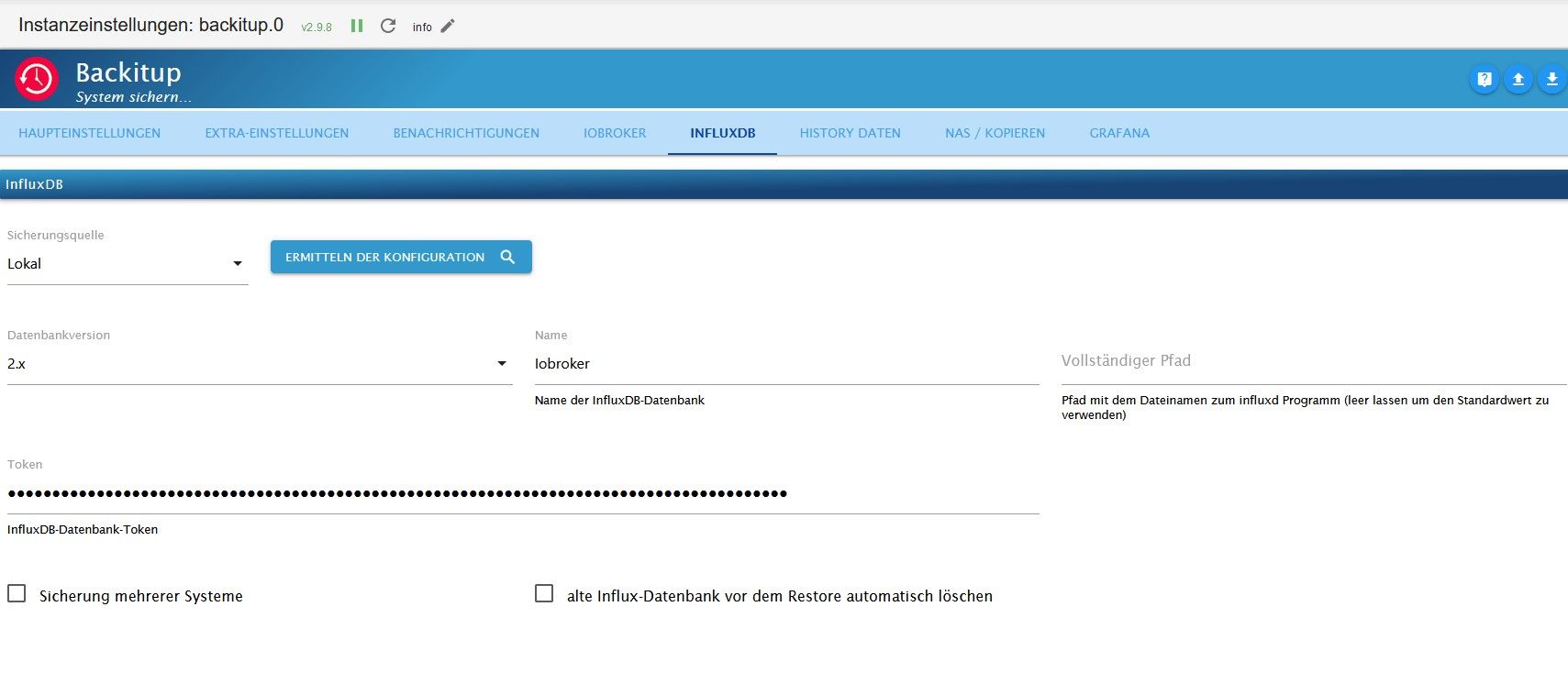
        Influx2.jpg

        Nachtrag:
        Das habe ich installiert: wget https://dl.influxdata.com/influxdb/releases/influxdb2-client-2.7.3-linux-amd64.tar.gz

        simatecS 3 Antworten Letzte Antwort
        0
        • W Willi-Wunder

          @simatec
          Heißt das hier so lassen und den gleichen Token wie im InfluxDB Adapter so eintragen?

          Influx2.jpg

          Nachtrag:
          Das habe ich installiert: wget https://dl.influxdata.com/influxdb/releases/influxdb2-client-2.7.3-linux-amd64.tar.gz

          simatecS Online
          simatecS Online
          simatec
          Developer Most Active
          schrieb am zuletzt editiert von
          #53

          @willi-wunder Wenn es der Operator-Token ist dann ja

          • Besuche meine Github Seite
          • Beitrag hat geholfen oder willst du mich unterstützen
          • HowTo Restore ioBroker
          1 Antwort Letzte Antwort
          0
          • W Willi-Wunder

            @simatec
            Heißt das hier so lassen und den gleichen Token wie im InfluxDB Adapter so eintragen?

            Influx2.jpg

            Nachtrag:
            Das habe ich installiert: wget https://dl.influxdata.com/influxdb/releases/influxdb2-client-2.7.3-linux-amd64.tar.gz

            simatecS Online
            simatecS Online
            simatec
            Developer Most Active
            schrieb am zuletzt editiert von
            #54

            @willi-wunder sagte in mit backitup kein Influxdb und Grafana backup möglich:

            Das habe ich installiert: wget https://dl.influxdata.com/influxdb/releases/influxdb2-client-2.7.3-linux-amd64.tar.gz

            Damit lädst du nur die Datei herunter ... Installiert ist es damit nicht

            • Besuche meine Github Seite
            • Beitrag hat geholfen oder willst du mich unterstützen
            • HowTo Restore ioBroker
            W 1 Antwort Letzte Antwort
            0
            • W Willi-Wunder

              @simatec
              Heißt das hier so lassen und den gleichen Token wie im InfluxDB Adapter so eintragen?

              Influx2.jpg

              Nachtrag:
              Das habe ich installiert: wget https://dl.influxdata.com/influxdb/releases/influxdb2-client-2.7.3-linux-amd64.tar.gz

              simatecS Online
              simatecS Online
              simatec
              Developer Most Active
              schrieb am zuletzt editiert von
              #55

              @willi-wunder Zeige bitte die Ausgabe von apt policy influx*

              • Besuche meine Github Seite
              • Beitrag hat geholfen oder willst du mich unterstützen
              • HowTo Restore ioBroker
              W 1 Antwort Letzte Antwort
              0
              • simatecS simatec

                @willi-wunder sagte in mit backitup kein Influxdb und Grafana backup möglich:

                Das habe ich installiert: wget https://dl.influxdata.com/influxdb/releases/influxdb2-client-2.7.3-linux-amd64.tar.gz

                Damit lädst du nur die Datei herunter ... Installiert ist es damit nicht

                W Offline
                W Offline
                Willi-Wunder
                schrieb am zuletzt editiert von
                #56

                @simatec
                Ja mit tar xvzf ./influxdb2-client-2.7.3-linux-amd64.tar.gz auch installiert.

                Scheinbar ist der hinterlegte Token im Inluxdb Adapter nicht der Operator Token.

                [DEBUG] [influxDB] - InfluxDB-Backup started ...
                [DEBUG] [influxDB] - Start InfluxDB Backup ...
                [DEBUG] [influxDB] - InfluxDB Backup tmp directory created 
                [DEBUG] [influxDB] - Try deleting the InfluxDB tmp directory: "/opt/iobroker/backups/influxDB_2023_12_26-22_50_51_backupiobroker"
                [DEBUG] [influxDB] - InfluxDB tmp directory "/opt/iobroker/backups/influxDB_2023_12_26-22_50_51_backupiobroker" successfully deleted
                [DEBUG] [influxDB] - 
                [ERROR] [influxDB] - Error: Command failed: influx backup --bucket Iobroker -t 74VTRbf_xxxxxxxxxxxxxxxxxxxxxxxxxxxxxPhY5hNuxX43QdnYAiIWp9rmexTYHJbxa1I0dQ_wNkqkexV7A== "/opt/iobroker/backups/influxDB_2023_12_26-22_50_51_backupiobroker"
                2023/12/26 22:50:51 INFO: Downloading metadata snapshot
                Error: failed to backup metadata: failed to download metadata snapshot: 401 Unauthorized: read:authorizations is unauthorized
                
                [DEBUG] [influxDB] - InfluxDB-Backup for is finish
                [DEBUG] [influxDB] - done
                

                Mit influx auth list -t <ein all access token> bekomme ich nichts brauchbares. Hier sollte ja eine Liste kommen wo dieser auch drin steht.

                pi@iobroker:~ $ influx auth list -t 74VTRbf_Qc6sAxxxxxxxxxxxxxxxxxxxxxxxxxxxNuxX43QdnYAiIWp9rmexTYHJbxa1I0dQ_wNkqkexV7A== --json
                -bash: /usr/local/bin/influx: cannot execute binary file: Exec format error
                

                Was mache ich noch falsch?

                simatecS 1 Antwort Letzte Antwort
                0
                • simatecS simatec

                  @willi-wunder Zeige bitte die Ausgabe von apt policy influx*

                  W Offline
                  W Offline
                  Willi-Wunder
                  schrieb am zuletzt editiert von
                  #57

                  @simatec sagte in mit backitup kein Influxdb und Grafana backup möglich:

                  apt policy influx*

                  pi@iobroker:~ $ apt policy influx*
                  N: Unable to locate package influx
                  N: Unable to locate package influxdata-archive_compat.key
                  N: Unable to locate package influxdata-archive_compat.key.1
                  N: Unable to locate package influxdb2-client-2.3.0-linux-amd64.tar.gz
                  N: Couldn't find any package by glob 'influxdb2-client-2.3.0-linux-amd64.tar.gz'
                  N: Unable to locate package influxdb2-client-2.7.3-linux-amd64.tar.gz
                  N: Couldn't find any package by glob 'influxdb2-client-2.7.3-linux-amd64.tar.gz'
                  

                  Ähm, das sieht aber nicht gut aus, InfluxDB läuft aber......

                  Thomas BraunT 1 Antwort Letzte Antwort
                  0
                  • W Willi-Wunder

                    @simatec
                    Ja mit tar xvzf ./influxdb2-client-2.7.3-linux-amd64.tar.gz auch installiert.

                    Scheinbar ist der hinterlegte Token im Inluxdb Adapter nicht der Operator Token.

                    [DEBUG] [influxDB] - InfluxDB-Backup started ...
                    [DEBUG] [influxDB] - Start InfluxDB Backup ...
                    [DEBUG] [influxDB] - InfluxDB Backup tmp directory created 
                    [DEBUG] [influxDB] - Try deleting the InfluxDB tmp directory: "/opt/iobroker/backups/influxDB_2023_12_26-22_50_51_backupiobroker"
                    [DEBUG] [influxDB] - InfluxDB tmp directory "/opt/iobroker/backups/influxDB_2023_12_26-22_50_51_backupiobroker" successfully deleted
                    [DEBUG] [influxDB] - 
                    [ERROR] [influxDB] - Error: Command failed: influx backup --bucket Iobroker -t 74VTRbf_xxxxxxxxxxxxxxxxxxxxxxxxxxxxxPhY5hNuxX43QdnYAiIWp9rmexTYHJbxa1I0dQ_wNkqkexV7A== "/opt/iobroker/backups/influxDB_2023_12_26-22_50_51_backupiobroker"
                    2023/12/26 22:50:51 INFO: Downloading metadata snapshot
                    Error: failed to backup metadata: failed to download metadata snapshot: 401 Unauthorized: read:authorizations is unauthorized
                    
                    [DEBUG] [influxDB] - InfluxDB-Backup for is finish
                    [DEBUG] [influxDB] - done
                    

                    Mit influx auth list -t <ein all access token> bekomme ich nichts brauchbares. Hier sollte ja eine Liste kommen wo dieser auch drin steht.

                    pi@iobroker:~ $ influx auth list -t 74VTRbf_Qc6sAxxxxxxxxxxxxxxxxxxxxxxxxxxxNuxX43QdnYAiIWp9rmexTYHJbxa1I0dQ_wNkqkexV7A== --json
                    -bash: /usr/local/bin/influx: cannot execute binary file: Exec format error
                    

                    Was mache ich noch falsch?

                    simatecS Online
                    simatecS Online
                    simatec
                    Developer Most Active
                    schrieb am zuletzt editiert von
                    #58

                    @willi-wunder sagte in mit backitup kein Influxdb und Grafana backup möglich:

                    Mit influx auth list -t <ein all access token> bekomme ich nichts brauchbares. Hier sollte ja eine Liste kommen wo dieser auch drin steht.
                    pi@iobroker:~ $ influx auth list -t 74VTRbf_Qc6sAxxxxxxxxxxxxxxxxxxxxxxxxxxxNuxX43QdnYAiIWp9rmexTYHJbxa1I0dQ_wNkqkexV7A== --json -bash: /usr/local/bin/influx: cannot execute binary file: Exec format error
                    Was mache ich noch falsch?

                    Versuche es mal mit sudo

                    • Besuche meine Github Seite
                    • Beitrag hat geholfen oder willst du mich unterstützen
                    • HowTo Restore ioBroker
                    W 1 Antwort Letzte Antwort
                    0
                    • simatecS simatec

                      @willi-wunder sagte in mit backitup kein Influxdb und Grafana backup möglich:

                      Mit influx auth list -t <ein all access token> bekomme ich nichts brauchbares. Hier sollte ja eine Liste kommen wo dieser auch drin steht.
                      pi@iobroker:~ $ influx auth list -t 74VTRbf_Qc6sAxxxxxxxxxxxxxxxxxxxxxxxxxxxNuxX43QdnYAiIWp9rmexTYHJbxa1I0dQ_wNkqkexV7A== --json -bash: /usr/local/bin/influx: cannot execute binary file: Exec format error
                      Was mache ich noch falsch?

                      Versuche es mal mit sudo

                      W Offline
                      W Offline
                      Willi-Wunder
                      schrieb am zuletzt editiert von
                      #59

                      @simatec

                      pi@iobroker:~ $ sudo influx auth list -t 74VTRbf_Qc6sAG_xxxxxxxxxxxxxxxxxxxxxxxxxxxxdnYAiIWp9rmexTYHJbxa1I0dQ_wNkqkexV7A== --json
                      /usr/local/bin/influx: 1: Syntax error: ")" unexpected
                      
                      
                      simatecS 1 Antwort Letzte Antwort
                      0
                      • W Willi-Wunder

                        @simatec

                        pi@iobroker:~ $ sudo influx auth list -t 74VTRbf_Qc6sAG_xxxxxxxxxxxxxxxxxxxxxxxxxxxxdnYAiIWp9rmexTYHJbxa1I0dQ_wNkqkexV7A== --json
                        /usr/local/bin/influx: 1: Syntax error: ")" unexpected
                        
                        
                        simatecS Online
                        simatecS Online
                        simatec
                        Developer Most Active
                        schrieb am zuletzt editiert von
                        #60

                        @willi-wunder poste den kompletten Befehl inkl. Token... Der ist bei dir lokal und es kann niemand etwas mit anfangen

                        • Besuche meine Github Seite
                        • Beitrag hat geholfen oder willst du mich unterstützen
                        • HowTo Restore ioBroker
                        W 1 Antwort Letzte Antwort
                        0
                        • simatecS simatec

                          @willi-wunder poste den kompletten Befehl inkl. Token... Der ist bei dir lokal und es kann niemand etwas mit anfangen

                          W Offline
                          W Offline
                          Willi-Wunder
                          schrieb am zuletzt editiert von Willi-Wunder
                          #61

                          @simatec

                          sudo influx auth list -t 74VTRbf_Qc6sAG_goAo4AMkdEdPKkPdWFyxVzrPhY5hNuxX43QdnYAiIWp9rmexTYHJbxa1I0dQ_wNkqkexV7A== --json
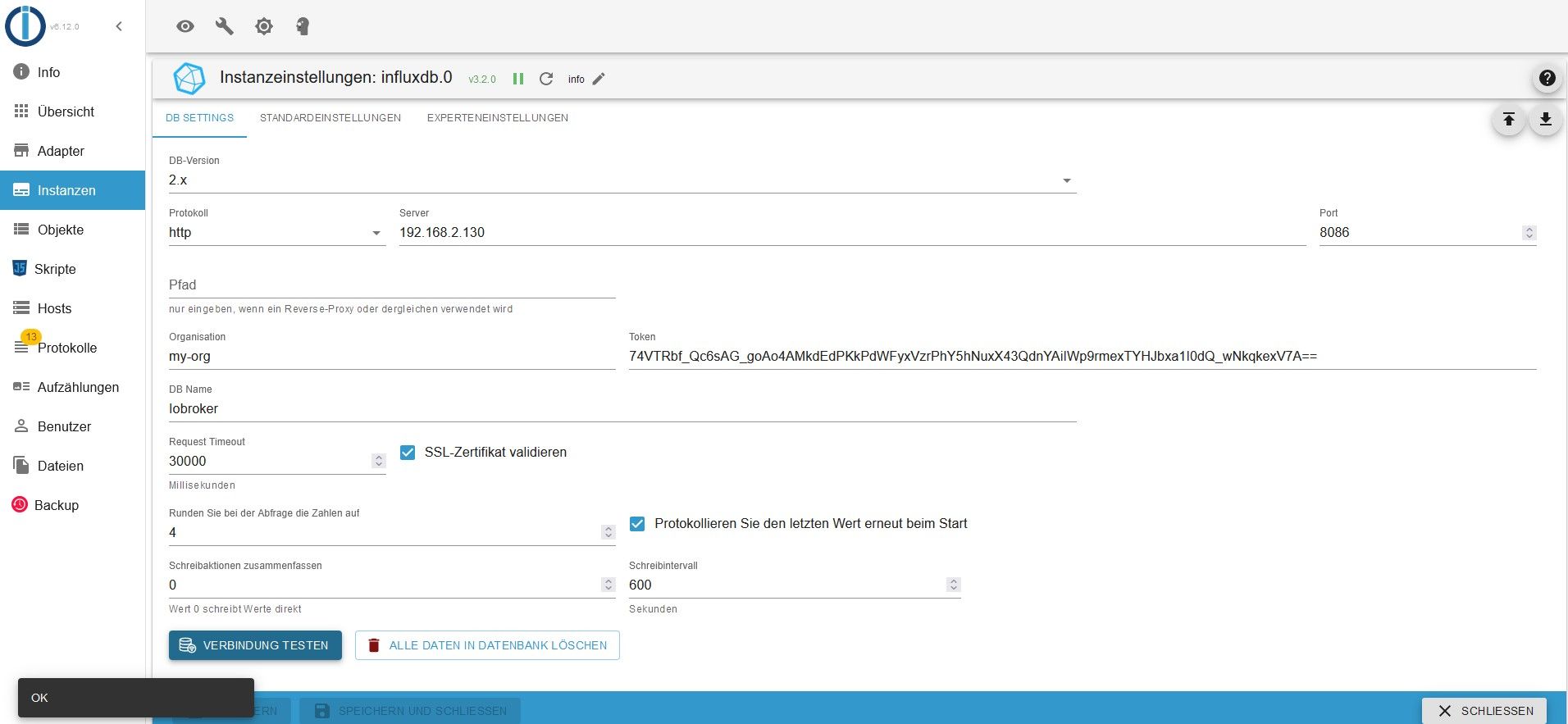
                          

                          InfluxA.jpg

                          simatecS 1 Antwort Letzte Antwort
                          0
                          • W Willi-Wunder

                            @simatec

                            sudo influx auth list -t 74VTRbf_Qc6sAG_goAo4AMkdEdPKkPdWFyxVzrPhY5hNuxX43QdnYAiIWp9rmexTYHJbxa1I0dQ_wNkqkexV7A== --json
                            

                            InfluxA.jpg

                            simatecS Online
                            simatecS Online
                            simatec
                            Developer Most Active
                            schrieb am zuletzt editiert von
                            #62

                            @willi-wunder Läuft Influxdb auf dem gleichen System wie iobroker?

                            • Besuche meine Github Seite
                            • Beitrag hat geholfen oder willst du mich unterstützen
                            • HowTo Restore ioBroker
                            W 1 Antwort Letzte Antwort
                            0
                            • W Willi-Wunder

                              @simatec sagte in mit backitup kein Influxdb und Grafana backup möglich:

                              apt policy influx*

                              pi@iobroker:~ $ apt policy influx*
                              N: Unable to locate package influx
                              N: Unable to locate package influxdata-archive_compat.key
                              N: Unable to locate package influxdata-archive_compat.key.1
                              N: Unable to locate package influxdb2-client-2.3.0-linux-amd64.tar.gz
                              N: Couldn't find any package by glob 'influxdb2-client-2.3.0-linux-amd64.tar.gz'
                              N: Unable to locate package influxdb2-client-2.7.3-linux-amd64.tar.gz
                              N: Couldn't find any package by glob 'influxdb2-client-2.7.3-linux-amd64.tar.gz'
                              

                              Ähm, das sieht aber nicht gut aus, InfluxDB läuft aber......

                              Thomas BraunT Online
                              Thomas BraunT Online
                              Thomas Braun
                              Most Active
                              schrieb am zuletzt editiert von Thomas Braun
                              #63

                              @willi-wunder

                              Software wird nicht so installiert, man verwendet einen Paketmanager.

                              sudo apt install PAKETNAME
                              

                              Das entsprechende Repository muss zuvor ggfs . installiert werden.

                              Linux-Werkzeugkasten:
                              https://forum.iobroker.net/topic/42952/der-kleine-iobroker-linux-werkzeugkasten
                              NodeJS Fixer Skript:
                              https://forum.iobroker.net/topic/68035/iob-node-fix-skript
                              iob_diag: curl -sLf -o diag.sh https://iobroker.net/diag.sh && bash diag.sh

                              1 Antwort Letzte Antwort
                              0
                              • simatecS simatec

                                @willi-wunder Läuft Influxdb auf dem gleichen System wie iobroker?

                                W Offline
                                W Offline
                                Willi-Wunder
                                schrieb am zuletzt editiert von
                                #64

                                @simatec sagte in mit backitup kein Influxdb und Grafana backup möglich:

                                @willi-wunder Läuft Influxdb auf dem gleichen System wie iobroker?

                                Ja

                                Thomas BraunT 1 Antwort Letzte Antwort
                                0
                                • W Willi-Wunder

                                  @simatec sagte in mit backitup kein Influxdb und Grafana backup möglich:

                                  @willi-wunder Läuft Influxdb auf dem gleichen System wie iobroker?

                                  Ja

                                  Thomas BraunT Online
                                  Thomas BraunT Online
                                  Thomas Braun
                                  Most Active
                                  schrieb am zuletzt editiert von
                                  #65

                                  @willi-wunder

                                  cd
                                  rm influx*
                                  sudo apt update
                                  apt policy influx*
                                  

                                  Linux-Werkzeugkasten:
                                  https://forum.iobroker.net/topic/42952/der-kleine-iobroker-linux-werkzeugkasten
                                  NodeJS Fixer Skript:
                                  https://forum.iobroker.net/topic/68035/iob-node-fix-skript
                                  iob_diag: curl -sLf -o diag.sh https://iobroker.net/diag.sh && bash diag.sh

                                  W 1 Antwort Letzte Antwort
                                  0
                                  • Thomas BraunT Thomas Braun

                                    @willi-wunder

                                    cd
                                    rm influx*
                                    sudo apt update
                                    apt policy influx*
                                    
                                    W Offline
                                    W Offline
                                    Willi-Wunder
                                    schrieb am zuletzt editiert von Willi-Wunder
                                    #66

                                    @thomas-braun

                                    pi@iobroker:~ $ apt policy influx*
                                    influxdb2-cli:
                                      Installed: 2.7.3-1
                                      Candidate: 2.7.3-1
                                      Version table:
                                     *** 2.7.3-1 500
                                            500 https://repos.influxdata.com/debian stable/main arm64 Packages
                                            100 /var/lib/dpkg/status
                                         2.7.1-2 500
                                            500 https://repos.influxdata.com/debian stable/main arm64 Packages
                                         2.6.1 500
                                            500 https://repos.influxdata.com/debian stable/main arm64 Packages
                                         2.6.0 500
                                            500 https://repos.influxdata.com/debian stable/main arm64 Packages
                                         2.5.0 500
                                            500 https://repos.influxdata.com/debian stable/main arm64 Packages
                                         2.4.0 500
                                            500 https://repos.influxdata.com/debian stable/main arm64 Packages
                                         2.3.0 500
                                            500 https://repos.influxdata.com/debian stable/main arm64 Packages
                                    influxdb-client:
                                      Installed: (none)
                                      Candidate: 1.6.7~rc0-1+b13
                                      Version table:
                                         1.6.7~rc0-1+b13 500
                                            500 http://deb.debian.org/debian bookworm/main arm64 Packages
                                    influxdb-dev:
                                      Installed: (none)
                                      Candidate: (none)
                                      Version table:
                                    influxdb2-client:
                                      Installed: (none)
                                      Candidate: 2.7.1-1
                                      Version table:
                                         2.7.1-1 500
                                            500 https://repos.influxdata.com/debian stable/main arm64 Packages
                                    influxdb:
                                      Installed: (none)
                                      Candidate: 1.8.10-1
                                      Version table:
                                         1.8.10-1 500
                                            500 https://repos.influxdata.com/debian stable/main arm64 Packages
                                         1.6.7~rc0-1+b13 500
                                            500 http://deb.debian.org/debian bookworm/main arm64 Packages
                                    influxctl:
                                      Installed: (none)
                                      Candidate: 2.4.2
                                      Version table:
                                         2.4.2 500
                                            500 https://repos.influxdata.com/debian stable/main arm64 Packages
                                         2.4.1 500
                                            500 https://repos.influxdata.com/debian stable/main arm64 Packages
                                         2.4.0 500
                                            500 https://repos.influxdata.com/debian stable/main arm64 Packages
                                         2.3.1 500
                                            500 https://repos.influxdata.com/debian stable/main arm64 Packages
                                         2.3.0 500
                                            500 https://repos.influxdata.com/debian stable/main arm64 Packages
                                         2.2.0 500
                                            500 https://repos.influxdata.com/debian stable/main arm64 Packages
                                         2.1.0 500
                                            500 https://repos.influxdata.com/debian stable/main arm64 Packages
                                         2.0.4 500
                                            500 https://repos.influxdata.com/debian stable/main arm64 Packages
                                         2.0.3 500
                                            500 https://repos.influxdata.com/debian stable/main arm64 Packages
                                         2.0.2 500
                                            500 https://repos.influxdata.com/debian stable/main arm64 Packages
                                         2.0.1 500
                                            500 https://repos.influxdata.com/debian stable/main arm64 Packages
                                         2.0.0 500
                                            500 https://repos.influxdata.com/debian stable/main arm64 Packages
                                    influxdb2:
                                      Installed: 2.7.4-1
                                      Candidate: 2.7.4-1
                                      Version table:
                                     *** 2.7.4-1 500
                                            500 https://repos.influxdata.com/debian stable/main arm64 Packages
                                            100 /var/lib/dpkg/status
                                         2.7.3-1 500
                                            500 https://repos.influxdata.com/debian stable/main arm64 Packages
                                         2.7.1-1 500
                                            500 https://repos.influxdata.com/debian stable/main arm64 Packages
                                         2.7.0-1 500
                                            500 https://repos.influxdata.com/debian stable/main arm64 Packages
                                         2.6.1-1 500
                                            500 https://repos.influxdata.com/debian stable/main arm64 Packages
                                         2.6.0-1 500
                                            500 https://repos.influxdata.com/debian stable/main arm64 Packages
                                         2.5.1-1 500
                                            500 https://repos.influxdata.com/debian stable/main arm64 Packages
                                         2.4.0-1 500
                                            500 https://repos.influxdata.com/debian stable/main arm64 Packages
                                         2.3.0-1 500
                                            500 https://repos.influxdata.com/debian stable/main arm64 Packages
                                         2.2.0 500
                                            500 https://repos.influxdata.com/debian stable/main arm64 Packages


                                    Danke, sieht jetzt schon besser aus :-)

                                    simatecS 1 Antwort Letzte Antwort
                                    0
                                    • W Willi-Wunder

                                      @thomas-braun

                                      pi@iobroker:~ $ apt policy influx*
                                      influxdb2-cli:
                                        Installed: 2.7.3-1
                                        Candidate: 2.7.3-1
                                        Version table:
                                       *** 2.7.3-1 500
                                              500 https://repos.influxdata.com/debian stable/main arm64 Packages
                                              100 /var/lib/dpkg/status
                                           2.7.1-2 500
                                              500 https://repos.influxdata.com/debian stable/main arm64 Packages
                                           2.6.1 500
                                              500 https://repos.influxdata.com/debian stable/main arm64 Packages
                                           2.6.0 500
                                              500 https://repos.influxdata.com/debian stable/main arm64 Packages
                                           2.5.0 500
                                              500 https://repos.influxdata.com/debian stable/main arm64 Packages
                                           2.4.0 500
                                              500 https://repos.influxdata.com/debian stable/main arm64 Packages
                                           2.3.0 500
                                              500 https://repos.influxdata.com/debian stable/main arm64 Packages
                                      influxdb-client:
                                        Installed: (none)
                                        Candidate: 1.6.7~rc0-1+b13
                                        Version table:
                                           1.6.7~rc0-1+b13 500
                                              500 http://deb.debian.org/debian bookworm/main arm64 Packages
                                      influxdb-dev:
                                        Installed: (none)
                                        Candidate: (none)
                                        Version table:
                                      influxdb2-client:
                                        Installed: (none)
                                        Candidate: 2.7.1-1
                                        Version table:
                                           2.7.1-1 500
                                              500 https://repos.influxdata.com/debian stable/main arm64 Packages
                                      influxdb:
                                        Installed: (none)
                                        Candidate: 1.8.10-1
                                        Version table:
                                           1.8.10-1 500
                                              500 https://repos.influxdata.com/debian stable/main arm64 Packages
                                           1.6.7~rc0-1+b13 500
                                              500 http://deb.debian.org/debian bookworm/main arm64 Packages
                                      influxctl:
                                        Installed: (none)
                                        Candidate: 2.4.2
                                        Version table:
                                           2.4.2 500
                                              500 https://repos.influxdata.com/debian stable/main arm64 Packages
                                           2.4.1 500
                                              500 https://repos.influxdata.com/debian stable/main arm64 Packages
                                           2.4.0 500
                                              500 https://repos.influxdata.com/debian stable/main arm64 Packages
                                           2.3.1 500
                                              500 https://repos.influxdata.com/debian stable/main arm64 Packages
                                           2.3.0 500
                                              500 https://repos.influxdata.com/debian stable/main arm64 Packages
                                           2.2.0 500
                                              500 https://repos.influxdata.com/debian stable/main arm64 Packages
                                           2.1.0 500
                                              500 https://repos.influxdata.com/debian stable/main arm64 Packages
                                           2.0.4 500
                                              500 https://repos.influxdata.com/debian stable/main arm64 Packages
                                           2.0.3 500
                                              500 https://repos.influxdata.com/debian stable/main arm64 Packages
                                           2.0.2 500
                                              500 https://repos.influxdata.com/debian stable/main arm64 Packages
                                           2.0.1 500
                                              500 https://repos.influxdata.com/debian stable/main arm64 Packages
                                           2.0.0 500
                                              500 https://repos.influxdata.com/debian stable/main arm64 Packages
                                      influxdb2:
                                        Installed: 2.7.4-1
                                        Candidate: 2.7.4-1
                                        Version table:
                                       *** 2.7.4-1 500
                                              500 https://repos.influxdata.com/debian stable/main arm64 Packages
                                              100 /var/lib/dpkg/status
                                           2.7.3-1 500
                                              500 https://repos.influxdata.com/debian stable/main arm64 Packages
                                           2.7.1-1 500
                                              500 https://repos.influxdata.com/debian stable/main arm64 Packages
                                           2.7.0-1 500
                                              500 https://repos.influxdata.com/debian stable/main arm64 Packages
                                           2.6.1-1 500
                                              500 https://repos.influxdata.com/debian stable/main arm64 Packages
                                           2.6.0-1 500
                                              500 https://repos.influxdata.com/debian stable/main arm64 Packages
                                           2.5.1-1 500
                                              500 https://repos.influxdata.com/debian stable/main arm64 Packages
                                           2.4.0-1 500
                                              500 https://repos.influxdata.com/debian stable/main arm64 Packages
                                           2.3.0-1 500
                                              500 https://repos.influxdata.com/debian stable/main arm64 Packages
                                           2.2.0 500
                                              500 https://repos.influxdata.com/debian stable/main arm64 Packages


                                      Danke, sieht jetzt schon besser aus :-)

                                      simatecS Online
                                      simatecS Online
                                      simatec
                                      Developer Most Active
                                      schrieb am zuletzt editiert von
                                      #67

                                      @willi-wunder

                                      sudo apt install influxdb2-client
                                      
                                      • Besuche meine Github Seite
                                      • Beitrag hat geholfen oder willst du mich unterstützen
                                      • HowTo Restore ioBroker
                                      W 1 Antwort Letzte Antwort
                                      0
                                      • simatecS simatec

                                        @willi-wunder

                                        sudo apt install influxdb2-client
                                        
                                        W Offline
                                        W Offline
                                        Willi-Wunder
                                        schrieb am zuletzt editiert von Willi-Wunder
                                        #68

                                        @simatec sagte in mit backitup kein Influxdb und Grafana backup möglich:

                                        sudo apt install influxdb2-client

                                        pi@iobroker:~ $ sudo apt install influxdb2-client
                                        Reading package lists... Done
                                        Building dependency tree... Done
                                        Reading state information... Done
                                        The following NEW packages will be installed:
                                          influxdb2-client
                                        0 upgraded, 1 newly installed, 0 to remove and 3 not upgraded.
                                        Need to get 10.5 MB of archives.
                                        After this operation, 24.0 MB of additional disk space will be used.
                                        Get:1 https://repos.influxdata.com/debian stable/main arm64 influxdb2-client arm64 2.7.1-1 [10.5 MB]
                                        Fetched 10.5 MB in 2s (4392 kB/s)
                                        apt-listchanges: Can't set locale; make sure $LC_* and $LANG are correct!
                                        perl: warning: Setting locale failed.
                                        perl: warning: Please check that your locale settings:
                                                LANGUAGE = "de_DE",
                                                LC_ALL = "de_DE",
                                                LANG = (unset)
                                            are supported and installed on your system.
                                        perl: warning: Falling back to the standard locale ("C").
                                        locale: Cannot set LC_CTYPE to default locale: No such file or directory
                                        locale: Cannot set LC_MESSAGES to default locale: No such file or directory
                                        locale: Cannot set LC_ALL to default locale: No such file or directory
                                        Selecting previously unselected package influxdb2-client.
                                        (Reading database ... 146179 files and directories currently installed.)
                                        Preparing to unpack .../influxdb2-client_2.7.1-1_arm64.deb ...
                                        Unpacking influxdb2-client (2.7.1-1) ...
                                        dpkg: error processing archive /var/cache/apt/archives/influxdb2-client_2.7.1-1_arm64.deb (--unpack):
                                         trying to overwrite '/usr/bin/influx', which is also in package influxdb2-cli 2.7.3-1
                                        dpkg-deb: error: paste subprocess was killed by signal (Broken pipe)
                                        Errors were encountered while processing:
                                         /var/cache/apt/archives/influxdb2-client_2.7.1-1_arm64.deb
                                        E: Sub-process /usr/bin/dpkg returned an error code (1)


                                        Hätte ich vorher InfluxDB stoppen müssen?

                                        simatecS 1 Antwort Letzte Antwort
                                        0
                                        • W Willi-Wunder

                                          @simatec sagte in mit backitup kein Influxdb und Grafana backup möglich:

                                          sudo apt install influxdb2-client

                                          pi@iobroker:~ $ sudo apt install influxdb2-client
                                          Reading package lists... Done
                                          Building dependency tree... Done
                                          Reading state information... Done
                                          The following NEW packages will be installed:
                                            influxdb2-client
                                          0 upgraded, 1 newly installed, 0 to remove and 3 not upgraded.
                                          Need to get 10.5 MB of archives.
                                          After this operation, 24.0 MB of additional disk space will be used.
                                          Get:1 https://repos.influxdata.com/debian stable/main arm64 influxdb2-client arm64 2.7.1-1 [10.5 MB]
                                          Fetched 10.5 MB in 2s (4392 kB/s)
                                          apt-listchanges: Can't set locale; make sure $LC_* and $LANG are correct!
                                          perl: warning: Setting locale failed.
                                          perl: warning: Please check that your locale settings:
                                                  LANGUAGE = "de_DE",
                                                  LC_ALL = "de_DE",
                                                  LANG = (unset)
                                              are supported and installed on your system.
                                          perl: warning: Falling back to the standard locale ("C").
                                          locale: Cannot set LC_CTYPE to default locale: No such file or directory
                                          locale: Cannot set LC_MESSAGES to default locale: No such file or directory
                                          locale: Cannot set LC_ALL to default locale: No such file or directory
                                          Selecting previously unselected package influxdb2-client.
                                          (Reading database ... 146179 files and directories currently installed.)
                                          Preparing to unpack .../influxdb2-client_2.7.1-1_arm64.deb ...
                                          Unpacking influxdb2-client (2.7.1-1) ...
                                          dpkg: error processing archive /var/cache/apt/archives/influxdb2-client_2.7.1-1_arm64.deb (--unpack):
                                           trying to overwrite '/usr/bin/influx', which is also in package influxdb2-cli 2.7.3-1
                                          dpkg-deb: error: paste subprocess was killed by signal (Broken pipe)
                                          Errors were encountered while processing:
                                           /var/cache/apt/archives/influxdb2-client_2.7.1-1_arm64.deb
                                          E: Sub-process /usr/bin/dpkg returned an error code (1)


                                          Hätte ich vorher InfluxDB stoppen müssen?

                                          simatecS Online
                                          simatecS Online
                                          simatec
                                          Developer Most Active
                                          schrieb am zuletzt editiert von
                                          #69

                                          @willi-wunder sagte in mit backitup kein Influxdb und Grafana backup möglich:

                                          /usr/bin/influx

                                          ohhh man da ist einiges vermurkst ...

                                          sudo rm /usr/bin/influx
                                          sudo apt install influxdb2-client

                                          
                                          • Besuche meine Github Seite
                                          • Beitrag hat geholfen oder willst du mich unterstützen
                                          • HowTo Restore ioBroker
                                          W 1 Antwort Letzte Antwort
                                          0

                                          Hey! Du scheinst an dieser Unterhaltung interessiert zu sein, hast aber noch kein Konto.

                                          Hast du es satt, bei jedem Besuch durch die gleichen Beiträge zu scrollen? Wenn du dich für ein Konto anmeldest, kommst du immer genau dorthin zurück, wo du zuvor warst, und kannst dich über neue Antworten benachrichtigen lassen (entweder per E-Mail oder Push-Benachrichtigung). Du kannst auch Lesezeichen speichern und Beiträge positiv bewerten, um anderen Community-Mitgliedern deine Wertschätzung zu zeigen.

                                          Mit deinem Input könnte dieser Beitrag noch besser werden 💗

                                          Registrieren Anmelden
                                          Antworten
                                          • In einem neuen Thema antworten
                                          Anmelden zum Antworten
                                          • Älteste zuerst
                                          • Neuste zuerst
                                          • Meiste Stimmen


                                          Support us

                                          ioBroker
                                          Community Adapters
                                          Donate

                                          301

                                          Online

                                          32.8k

                                          Benutzer

                                          82.9k

                                          Themen

                                          1.3m

                                          Beiträge
                                          Community
                                          Impressum | Datenschutz-Bestimmungen | Nutzungsbedingungen | Einwilligungseinstellungen
                                          ioBroker Community 2014-2025
                                          logo
                                          • Anmelden

                                          • Du hast noch kein Konto? Registrieren

                                          • Anmelden oder registrieren, um zu suchen
                                          • Erster Beitrag
                                            Letzter Beitrag
                                          0
                                          • Home
                                          • Aktuell
                                          • Tags
                                          • Ungelesen 0
                                          • Kategorien
                                          • Unreplied
                                          • Beliebt
                                          • GitHub
                                          • Docu
                                          • Hilfe