




Test Adapter Smart EQ und Hello Smart v0.0.x
-
@chuck2941 mal unter Objekte den auth ordner löschen
-
@tombox, erstmal DANKE für den super Adapter :-)
Der Adapter v0.1.0 funktioniert bei mir perfekt auf einer älteren Installation auf einem Raspberry Pi, die ich seit ca. einem Jahr nicht verändert habe (nur Adapter update).
Nun ist jedoch im Oktober ein neues Raspberry OS herausgekommen (2023-10-10-raspios-bookworm-arm64), und ich dachte, ich probiere das mal auf einem Spare-Raspberry Pi aus.
Ich habe die Installation nun schon 3 Mal wiederholt, aber der Adapter wird bei "Connected to device or service" nicht grün.
"Connected to host" und "Heartbeat" sind jedoch grün.
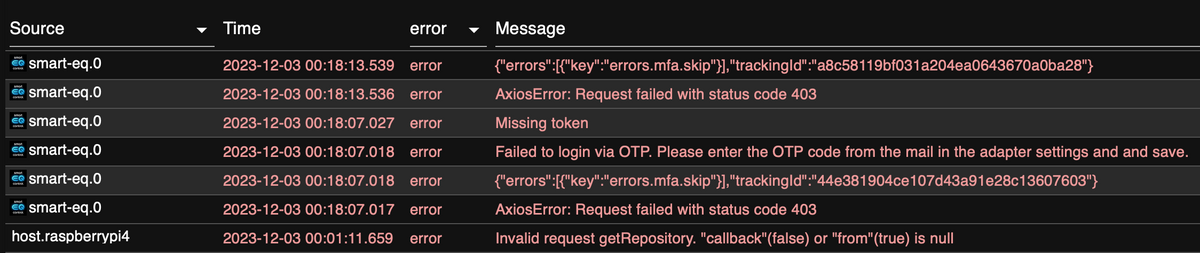
Mir ist auch aufgefallen, dass wenn ich den OTP Code von der E-Mail eingebe und dann "SAVE AND CLOSE" klicke, das Fenster schließe und es wieder öffne, dann ist der OTP Code wieder leer. Außerdem bekomme ich einen neuen per E-Mail zugesendet. Ich gebe den neuen Code ein, speichere, öffne wieder den Adapter, dann ist das Feld wieder leer, und zeitgleich bekomme ich wieder einen neuen OTP Code per E-Mail.
"Connected to device or service" bleibt immer rot.Was mache ich falsch? Hast du einen Tipp?
-
@tombox, erstmal DANKE für den super Adapter :-)
Der Adapter v0.1.0 funktioniert bei mir perfekt auf einer älteren Installation auf einem Raspberry Pi, die ich seit ca. einem Jahr nicht verändert habe (nur Adapter update).
Nun ist jedoch im Oktober ein neues Raspberry OS herausgekommen (2023-10-10-raspios-bookworm-arm64), und ich dachte, ich probiere das mal auf einem Spare-Raspberry Pi aus.
Ich habe die Installation nun schon 3 Mal wiederholt, aber der Adapter wird bei "Connected to device or service" nicht grün.
"Connected to host" und "Heartbeat" sind jedoch grün.
Mir ist auch aufgefallen, dass wenn ich den OTP Code von der E-Mail eingebe und dann "SAVE AND CLOSE" klicke, das Fenster schließe und es wieder öffne, dann ist der OTP Code wieder leer. Außerdem bekomme ich einen neuen per E-Mail zugesendet. Ich gebe den neuen Code ein, speichere, öffne wieder den Adapter, dann ist das Feld wieder leer, und zeitgleich bekomme ich wieder einen neuen OTP Code per E-Mail.
"Connected to device or service" bleibt immer rot.Was mache ich falsch? Hast du einen Tipp?
-
Danke für die Rückmeldung :-)
Du meinst den auth Ordner unter smart-eq/0/auth ?
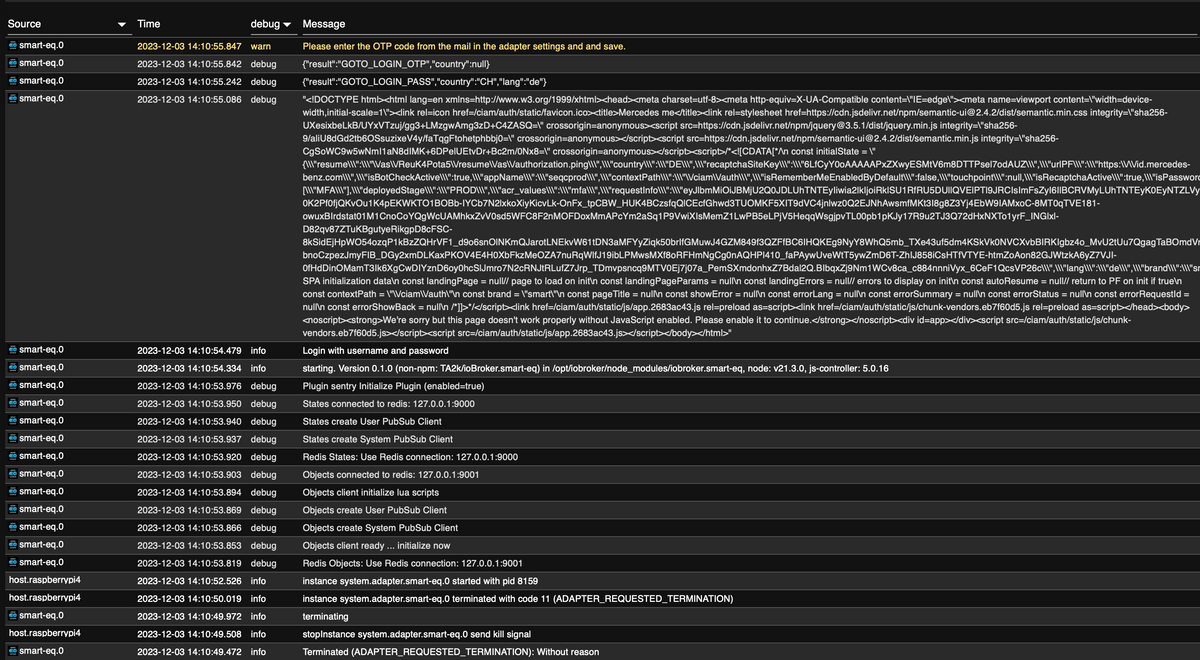
Das habe ich schon einige male versucht - dies kam ja in diesem thread weiter oben schon vor, leider hat das nie geholfen. Ich habe darum nun schon 3 mal eine Neuinstallation gemacht. So "jungfräulich" wie möglich, nur neues RaspiOS dann ioBroker und nur der Smart Adapter sonst gar nichts. Aber es will bei mir einfach nicht funktionieren ?! Kann es sein dass das Raspi OS eine Rolle spielt im Zusammenhang mit dem Token ? Benutzt Du selber auch einen Rasperry Pi?
Gäbe es auch eine Möglichkeit einen Ordner vom funktionierenden Setup das ich ja habe in den neuen Raspi rüberzukopieren ?
-
Danke für die Rückmeldung :-)
Du meinst den auth Ordner unter smart-eq/0/auth ?
Das habe ich schon einige male versucht - dies kam ja in diesem thread weiter oben schon vor, leider hat das nie geholfen. Ich habe darum nun schon 3 mal eine Neuinstallation gemacht. So "jungfräulich" wie möglich, nur neues RaspiOS dann ioBroker und nur der Smart Adapter sonst gar nichts. Aber es will bei mir einfach nicht funktionieren ?! Kann es sein dass das Raspi OS eine Rolle spielt im Zusammenhang mit dem Token ? Benutzt Du selber auch einen Rasperry Pi?
Gäbe es auch eine Möglichkeit einen Ordner vom funktionierenden Setup das ich ja habe in den neuen Raspi rüberzukopieren ?
@macman-0
Versuch es mit nodejs@18. -
@macman-0
Versuch es mit nodejs@18. -
Danke für den Tipp - dass kann ich gerne versuchen, im Moment benutze ich tatsächlich: Node.js v21.3.0 und NPM 10.2.4 und ioBroker 6.12.0 melde mich wenn ich soweit bin...
Und.. danke für die links :-)
Die Empfehlung ist Stand heute nodejs@18.
Ungerade Versionen sind für Entwickler vorgesehen. -
Danke für die Hilfe :-)
Habe alles so gemacht wie Du geschrieben hast - der Downgrade von Node.js hat funktioniert

Jedoch wird der Adapter immer noch nicht grün, habe ein paar mal versucht (immer wieder mit neuer Nummer aus email) die Zahl einzugeben.

Das log sieht immer nicht gleich aus

Neustart etc. habe ich auch gemacht und das Passwort ist auch korrekt das weiss ich wenn ich ohne TAN einlogge komme ich hinein ins Portal. Hast Du noch eine andere Idee ?
Soll ich vielleicht komplett neu beginnen und von Anfang an die v18 von Node.js installieren ?
-
Danke für die Hilfe :-)
Habe alles so gemacht wie Du geschrieben hast - der Downgrade von Node.js hat funktioniert
Jedoch wird der Adapter immer noch nicht grün, habe ein paar mal versucht (immer wieder mit neuer Nummer aus email) die Zahl einzugeben.
Das log sieht immer nicht gleich aus
Neustart etc. habe ich auch gemacht und das Passwort ist auch korrekt das weiss ich wenn ich ohne TAN einlogge komme ich hinein ins Portal. Hast Du noch eine andere Idee ?
Soll ich vielleicht komplett neu beginnen und von Anfang an die v18 von Node.js installieren ?
Bitte Auszüge aus dem Log nicht als Screenshot sondern als Text, in CodeTags eingebettet, hier reinkopieren.
Kommt man u. a. via
iob logs --watchran.
Danke.
-
Danke für die Hilfe :-)
Habe alles so gemacht wie Du geschrieben hast - der Downgrade von Node.js hat funktioniert
Jedoch wird der Adapter immer noch nicht grün, habe ein paar mal versucht (immer wieder mit neuer Nummer aus email) die Zahl einzugeben.
Das log sieht immer nicht gleich aus
Neustart etc. habe ich auch gemacht und das Passwort ist auch korrekt das weiss ich wenn ich ohne TAN einlogge komme ich hinein ins Portal. Hast Du noch eine andere Idee ?
Soll ich vielleicht komplett neu beginnen und von Anfang an die v18 von Node.js installieren ?
@macman-0 sagte in Test Adapter Smart EQ und Hello Smart v0.0.x:
Soll ich vielleicht komplett neu beginnen und von Anfang an die v18 von Node.js installieren ?
nodejs@18 wird eh 'von Anfang an' verwendet, die 21 hast du von Hand da reingeschraubt. Gibt mal die Ausgabe von
iob diagbekannt.
-
@macman-0 sagte in Test Adapter Smart EQ und Hello Smart v0.0.x:
Mach ich nächstes mal sorry
Mach es jetzt.
-
@thomas-braun said in Test Adapter Smart EQ und Hello Smart v0.0.x:
iob
======== Start marking the full check here =========
Skript v.2023-10-10

*** BASE SYSTEM ***
 Static hostname: raspberrypi4
       Icon name: computer
Operating System: Debian GNU/Linux 12 (bookworm)
          Kernel: Linux 6.1.0-rpi6-rpi-v8
    Architecture: arm64

Model		: Raspberry Pi 4 Model B Rev 1.5
Docker          : false
Virtualization  : none
Kernel          : aarch64
Userland        : arm64

Systemuptime and Load:
 16:47:57 up 22 min,  3 users,  load average: 0.87, 0.59, 0.31
CPU threads: 4


*** RASPBERRY THROTTLING ***
Current issues:
No throttling issues detected.

Previously detected issues:
No throttling issues detected.

*** Time and Time Zones ***
               Local time: Sun 2023-12-03 16:47:57 CET
           Universal time: Sun 2023-12-03 15:47:57 UTC
                 RTC time: n/a
                Time zone: Europe/XXXXX (CET, +0100)
System clock synchronized: yes
              NTP service: active
          RTC in local TZ: no

*** User and Groups ***
rasputin
/home/rasputin
rasputin adm dialout cdrom sudo audio video plugdev games users input render netdev lpadmin gpio i2c spi iobroker

*** X-Server-Setup ***
X-Server: 	false
Desktop: 	LXDE-pi-wayfire
Terminal: 	wayland
Boot Target: 	graphical.target

*** MEMORY ***
               total        used        free      shared  buff/cache   available
Mem:            1.9G        736M        585M         53M        765M        1.2G
Swap:           104M          0B        104M
Total:          2.0G        736M        690M

         1848 M total memory
          702 M used memory
          839 M active memory
          293 M inactive memory
          558 M free memory
           25 M buffer memory
          704 M swap cache
           99 M total swap
            0 M used swap
           99 M free swap

Raspberry only:
oom events: 0
lifetime oom required: 0 Mbytes
total time in oom handler: 0 ms
max time spent in oom handler: 0 ms

*** FAILED SERVICES ***

  UNIT                  LOAD   ACTIVE SUB    DESCRIPTION
* bthelper@hci0.service loaded failed failed Raspberry Pi bluetooth helper

LOAD   = Reflects whether the unit definition was properly loaded.
ACTIVE = The high-level unit activation state, i.e. generalization of SUB.
SUB    = The low-level unit activation state, values depend on unit type.
1 loaded units listed.

*** FILESYSTEM ***
Filesystem     Type      Size  Used Avail Use% Mounted on
udev           devtmpfs  658M     0  658M   0% /dev
tmpfs          tmpfs     185M  1.3M  184M   1% /run
/dev/mmcblk0p2 ext4      117G  5.7G  106G   6% /
tmpfs          tmpfs     925M  216K  924M   1% /dev/shm
tmpfs          tmpfs     5.0M   16K  5.0M   1% /run/lock
/dev/mmcblk0p1 vfat      510M   74M  437M  15% /boot/firmware
tmpfs          tmpfs     185M   40K  185M   1% /run/user/1000

Messages concerning ext4 filesystem in dmesg:
[Sun Dec  3 16:25:52 2023] Kernel command line: coherent_pool=1M 8250.nr_uarts=0 snd_bcm2835.enable_headphones=0 snd_bcm2835.enable_headphones=1 snd_bcm2835.enable_hdmi=1 snd_bcm2835.enable_hdmi=0  smsc95xx.macaddr=E4:5F:01:EB:13:BD vc_mem.mem_base=0x3ec00000 vc_mem.mem_size=0x40000000  console=ttyS0,115200 console=tty1 root=PARTUUID=d3ad1695-02 rootfstype=ext4 fsck.repair=yes rootwait quiet splash plymouth.ignore-serial-consoles cfg80211.ieee80211_regdom=CH
[Sun Dec  3 16:25:55 2023] EXT4-fs (mmcblk0p2): mounted filesystem with ordered data mode. Quota mode: none.
[Sun Dec  3 16:25:57 2023] EXT4-fs (mmcblk0p2): re-mounted. Quota mode: none.

Show mounted filesystems \(real ones only\):
TARGET               SOURCE         FSTYPE      OPTIONS
/                    /dev/mmcblk0p2 ext4        rw,noatime
|-/run/user/1000/doc portal         fuse.portal rw,nosuid,nodev,relatime,user_id=1000,group_id=1000
`-/boot/firmware     /dev/mmcblk0p1 vfat        rw,relatime,fmask=0022,dmask=0022,codepage=437,iocharset=ascii,shortname=mixed,errors=remount-ro

Files in neuralgic directories:

/var:
900M	/var/
501M	/var/cache
494M	/var/cache/apt
383M	/var/cache/apt/archives
193M	/var/lib

Archived and active journals take up 103.9M in the file system.

/opt/iobroker/backups:
1.3M	/opt/iobroker/backups/

/opt/iobroker/iobroker-data:
38M	/opt/iobroker/iobroker-data/
15M	/opt/iobroker/iobroker-data/files
15M	/opt/iobroker/iobroker-data/backup-objects
13M	/opt/iobroker/iobroker-data/files/admin.admin/custom/static/js
13M	/opt/iobroker/iobroker-data/files/admin.admin/custom/static

The five largest files in iobroker-data are:
7.8M	/opt/iobroker/iobroker-data/objects.jsonl
6.3M	/opt/iobroker/iobroker-data/files/admin.admin/custom/static/js/vendors-node_modules_iobroker_adapter-react-v5_assets_devices_parseNames_js-node_modules_iobr-99c23e.847b8ad9.chunk.js.map
2.8M	/opt/iobroker/iobroker-data/files/admin.admin/custom/static/js/vendors-node_modules_iobroker_adapter-react-v5_assets_devices_parseNames_js-node_modules_iobr-99c23e.847b8ad9.chunk.js
1.6M	/opt/iobroker/iobroker-data/files/admin.admin/custom/static/js/vendors-node_modules_mui_material_Accordion_index_js-node_modules_mui_material_AccordionDetai-57e02d.0886b730.chunk.js.map
1.3M	/opt/iobroker/iobroker-data/states.jsonl

USB-Devices by-id:
USB-Sticks -  Avoid direct links to /dev/* in your adapter setups, please always prefer the links 'by-id':

find: '/dev/serial/by-id/': No such file or directory

*** NodeJS-Installation ***

/usr/bin/nodejs 	v18.19.0
/usr/bin/node 		v18.19.0
/usr/bin/npm 		10.2.3
/usr/bin/npx 		10.2.3
/usr/bin/corepack 	0.22.0


nodejs:
  Installed: 18.19.0-1nodesource1
  Candidate: 18.19.0-1nodesource1
  Version table:
 *** 18.19.0-1nodesource1 600
        500 https://deb.nodesource.com/node_18.x nodistro/main arm64 Packages
        100 /var/lib/dpkg/status
     18.18.2-1nodesource1 600
        500 https://deb.nodesource.com/node_18.x nodistro/main arm64 Packages
     18.18.1-1nodesource1 600
        500 https://deb.nodesource.com/node_18.x nodistro/main arm64 Packages
     18.18.0-1nodesource1 600
        500 https://deb.nodesource.com/node_18.x nodistro/main arm64 Packages
     18.17.1-1nodesource1 600
        500 https://deb.nodesource.com/node_18.x nodistro/main arm64 Packages
     18.17.0-1nodesource1 600
        500 https://deb.nodesource.com/node_18.x nodistro/main arm64 Packages
     18.16.1-1nodesource1 600
        500 https://deb.nodesource.com/node_18.x nodistro/main arm64 Packages
     18.16.0-1nodesource1 600
        500 https://deb.nodesource.com/node_18.x nodistro/main arm64 Packages
     18.15.0-1nodesource1 600
        500 https://deb.nodesource.com/node_18.x nodistro/main arm64 Packages
     18.14.2-1nodesource1 600
        500 https://deb.nodesource.com/node_18.x nodistro/main arm64 Packages
     18.14.1-1nodesource1 600
        500 https://deb.nodesource.com/node_18.x nodistro/main arm64 Packages
     18.14.0-1nodesource1 600
        500 https://deb.nodesource.com/node_18.x nodistro/main arm64 Packages
     18.13.0+dfsg1-1 500
        500 http://deb.debian.org/debian bookworm/main arm64 Packages
     18.13.0-1nodesource1 600
        500 https://deb.nodesource.com/node_18.x nodistro/main arm64 Packages
     18.12.0-1nodesource1 600
        500 https://deb.nodesource.com/node_18.x nodistro/main arm64 Packages
     18.11.0-1nodesource1 600
        500 https://deb.nodesource.com/node_18.x nodistro/main arm64 Packages
     18.10.0-1nodesource1 600
        500 https://deb.nodesource.com/node_18.x nodistro/main arm64 Packages
     18.9.1-1nodesource1 600
        500 https://deb.nodesource.com/node_18.x nodistro/main arm64 Packages
     18.9.0-1nodesource1 600
        500 https://deb.nodesource.com/node_18.x nodistro/main arm64 Packages
     18.8.0-1nodesource1 600
        500 https://deb.nodesource.com/node_18.x nodistro/main arm64 Packages
     18.7.0-1nodesource1 600
        500 https://deb.nodesource.com/node_18.x nodistro/main arm64 Packages
     18.6.0-1nodesource1 600
        500 https://deb.nodesource.com/node_18.x nodistro/main arm64 Packages
     18.5.0-1nodesource1 600
        500 https://deb.nodesource.com/node_18.x nodistro/main arm64 Packages
     18.4.0-1nodesource1 600
        500 https://deb.nodesource.com/node_18.x nodistro/main arm64 Packages
     18.3.0-1nodesource1 600
        500 https://deb.nodesource.com/node_18.x nodistro/main arm64 Packages
     18.2.0-1nodesource1 600
        500 https://deb.nodesource.com/node_18.x nodistro/main arm64 Packages
     18.1.0-1nodesource1 600
        500 https://deb.nodesource.com/node_18.x nodistro/main arm64 Packages
     18.0.0-1nodesource1 600
        500 https://deb.nodesource.com/node_18.x nodistro/main arm64 Packages

Temp directories causing npm8 problem: 0
No problems detected

Errors in npm tree:

*** ioBroker-Installation ***

ioBroker Status
iobroker is running on this host.


Objects type: jsonl
States  type: jsonl

Core adapters versions
js-controller: 	5.0.16
admin: 		6.12.0
javascript: 	"javascript" not found

Adapters from github: 	1

Adapter State
+ system.adapter.admin.0                  : admin                 : raspberrypi4                             -  enabled, port: 8081, bind: 0.0.0.0, run as: admin
+ system.adapter.backitup.0               : backitup              : raspberrypi4                             -  enabled
+ system.adapter.discovery.0              : discovery             : raspberrypi4                             -  enabled
+ system.adapter.smart-eq.0               : smart-eq              : raspberrypi4                             -  enabled

+ instance is alive

Enabled adapters with bindings
+ system.adapter.admin.0                  : admin                 : raspberrypi4                             -  enabled, port: 8081, bind: 0.0.0.0, run as: admin

ioBroker-Repositories
stable        : http://download.iobroker.net/sources-dist.json
beta          : http://download.iobroker.net/sources-dist-latest.json

Active repo(s): stable

Installed ioBroker-Instances
Used repository: stable
Adapter    "admin"        : 6.12.0   , installed 6.12.0
Adapter    "backitup"     : 2.8.7    , installed 2.8.7
Adapter    "discovery"    : 4.2.0    , installed 4.2.0
Controller "js-controller": 5.0.16   , installed 5.0.16
Adapter    "smart-eq"     : 0.0.4    , installed 0.1.0

Objects and States
Please stand by - This may take a while
Objects: 	167
States: 	123

*** OS-Repositories and Updates ***
Hit:1 http://deb.debian.org/debian bookworm InRelease
Hit:2 http://deb.debian.org/debian-security bookworm-security InRelease
Hit:3 http://archive.raspberrypi.com/debian bookworm InRelease
Hit:4 http://deb.debian.org/debian bookworm-updates InRelease
Hit:5 https://deb.nodesource.com/node_18.x nodistro InRelease
Reading package lists...
Pending Updates: 0

*** Listening Ports ***
Active Internet connections (only servers)
Proto Recv-Q Send-Q Local Address           Foreign Address         State       User       Inode      PID/Program name
tcp        0      0 0.0.0.0:5900            0.0.0.0:*               LISTEN      1000       18512      1031/wayvnc
tcp        0      0 127.0.0.1:631           0.0.0.0:*               LISTEN      0          17042      662/cupsd
tcp        0      0 0.0.0.0:22              0.0.0.0:*               LISTEN      0          527        720/sshd: /usr/sbin
tcp        0      0 127.0.0.1:9001          0.0.0.0:*               LISTEN      1001       19582      664/iobroker.js-con
tcp        0      0 127.0.0.1:9000          0.0.0.0:*               LISTEN      1001       17852      664/iobroker.js-con
tcp6       0      0 :::8081                 :::*                    LISTEN      1001       18152      1200/io.admin.0
tcp6       0      0 ::1:631                 :::*                    LISTEN      0          17041      662/cupsd
tcp6       0      0 :::22                   :::*                    LISTEN      0          529        720/sshd: /usr/sbin
udp        0      0 0.0.0.0:5353            0.0.0.0:*                           104        14038      487/avahi-daemon: r
udp        0      0 0.0.0.0:631             0.0.0.0:*                           0          19556      1003/cups-browsed
udp        0      0 0.0.0.0:39569           0.0.0.0:*                           104        14040      487/avahi-daemon: r
udp6       0      0 :::5353                 :::*                                104        14039      487/avahi-daemon: r
udp6       0      0 :::47633                :::*                                104        14041      487/avahi-daemon: r
udp6       0      0 fe80::d102:490f:2c4:546 :::*                                0          20945      557/NetworkManager

*** Log File - Last 25 Lines ***

2023-12-03 16:31:58.270  - info: smart-eq.0 (1963) Terminated (ADAPTER_REQUESTED_TERMINATION): Without reason
2023-12-03 16:31:58.305  - info: host.raspberrypi4 stopInstance system.adapter.smart-eq.0 send kill signal
2023-12-03 16:31:58.772  - info: smart-eq.0 (1963) terminating
2023-12-03 16:31:58.816  - info: host.raspberrypi4 instance system.adapter.smart-eq.0 terminated with code 11 (ADAPTER_REQUESTED_TERMINATION)
2023-12-03 16:32:01.323  - info: host.raspberrypi4 instance system.adapter.smart-eq.0 started with pid 1978
2023-12-03 16:32:02.848  - debug: smart-eq.0 (1978) Redis Objects: Use Redis connection: 127.0.0.1:9001
2023-12-03 16:32:02.880  - debug: smart-eq.0 (1978) Objects client ready ... initialize now
2023-12-03 16:32:02.882  - debug: smart-eq.0 (1978) Objects create System PubSub Client
2023-12-03 16:32:02.884  - debug: smart-eq.0 (1978) Objects create User PubSub Client
2023-12-03 16:32:02.906  - debug: smart-eq.0 (1978) Objects client initialize lua scripts
2023-12-03 16:32:02.916  - debug: smart-eq.0 (1978) Objects connected to redis: 127.0.0.1:9001
2023-12-03 16:32:02.933  - debug: smart-eq.0 (1978) Redis States: Use Redis connection: 127.0.0.1:9000
2023-12-03 16:32:02.941  - debug: smart-eq.0 (1978) States create System PubSub Client
2023-12-03 16:32:02.942  - debug: smart-eq.0 (1978) States create User PubSub Client
2023-12-03 16:32:02.955  - debug: smart-eq.0 (1978) States connected to redis: 127.0.0.1:9000
2023-12-03 16:32:02.987  - debug: smart-eq.0 (1978) Plugin sentry Initialize Plugin (enabled=true)
2023-12-03 16:32:03.401  - info: smart-eq.0 (1978) starting. Version 0.1.0 (non-npm: TA2k/ioBroker.smart-eq) in /opt/iobroker/node_modules/iobroker.smart-eq, node: v18.19.0, js-controller: 5.0.16
2023-12-03 16:32:03.519  - debug: smart-eq.0 (1978) Found current session
2023-12-03 16:32:03.520  - info: smart-eq.0 (1978) Login with username and password
2023-12-03 16:32:04.203  - debug: smart-eq.0 (1978) "<!DOCTYPE html><html lang=en xmlns=http://www.w3.org/1999/xhtml><head><meta charset=utf-8><meta http-equiv=X-UA-Compatible content=\"IE=edge\"><meta name=viewport content=\"width=device-width,initial-scale=1\"><link rel=icon href=/ciam/auth/static/favicon.ico><title>Mercedes me</title><link rel=stylesheet href=https://cdn.jsdelivr.net/npm/semantic-ui@2.4.2/dist/semantic.min.css integrity=\"sha256-UXesixbeLkB/UYxVTzuj/gg3+LMzgwAmg3zD+C4ZASQ=\" crossorigin=anonymous><script src=https://cdn.jsdelivr.net/npm/jquery@3.5.1/dist/jquery.min.js integrity=\"sha256-9/aliU8dGd2tb6OSsuzixeV4y/faTqgFtohetphbbj0=\" crossorigin=anonymous></script><script src=https://cdn.jsdelivr.net/npm/semantic-ui@2.4.2/dist/semantic.min.js integrity=\"sha256-CgSoWC9w5wNmI1aN8dIMK+6DPelUEtvDr+Bc2m/0Nx8=\" crossorigin=anonymous></script><script>/*<![CDATA[*/\n      const initialState = \"{\\\"resume\\\":\\\"\\/as\\/AGC3OUbNym\\/resume\\/as\\/authorization.ping\\\",\\\"country\\\":\\\"DE\\\",\\\"recaptchaSiteKey\\\":\\\"6LfCyY0oAAAAAPxZXwyESMtV6m8DTTPsel7odAUZ\\\",\\\"urlPF\\\":\\\"https:\\/\\/id.mercedes-benz.com\\\",\\\"isBotCheckActive\\\":true,\\\"appName\\\":\\\"seqcprod\\\",\\\"contextPath\\\":\\\"\\/ciam\\/auth\\\",\\\"isRememberMeEnabledByDefault\\\":false,\\\"touchpoint\\\":null,\\\"isRecaptchaActive\\\":true,\\\"isPasswordStrengthMeterEnabled\\\":false,\\\"acr\\\":[\\\"MFA\\\"],\\\"deployedStage\\\":\\\"PROD\\\",\\\"acr_values\\\":\\\"mfa\\\",\\\"requestInfo\\\":\\\"eyJlbmMiOiJBMjU2Q0JDLUhTNTEyIiwia2lkIjoiRklSU1RfRU5DUllQVElPTl9JRCIsImFsZyI6IlBCRVMyLUhTNTEyK0EyNTZLVyIsImN0eSI6IkpXVCIsInAyYyI6NjU1MzYsInAycyI6ImRyenp6dEZNejhrT1RsTXoifQ.u_sEEBhkXzBIZotcdh_A1DLvAR6Zkq_oGWHrya_TAqCmohCcZxu34sW-Gm3oR--qLcv8QkAqj7dlV5N7S4oCLxAaITB4SwA9.5tTGZGpbwTYAvYCFRBv9Eg.hfKAxtWMt5Yj4RKx4LJnVlsD9N5H6IGZNGxZaRB5aGtdIMvTbhmKtryj-QD4EhGRDib2Vw0mUkUo1cYfLBD0Br5a8i2eNydHNhrnJmq6C0Fh9gdkmsF-rW1LrxQHWlsuUkRod9bMhDwGFGF4_DuKgXI8ueOZWM_8b4O74BAgcjk9RieZUCQyBj4l_0veZ79gvqEIGM2hjw571KXoMY4lH3mDMJNMqpig0zAzor1GyqhJ0OtEGtvz5ptqOwd3KKY8GMbkt6znwoim_Pi_McOd8oTbeSMNxNTnCAia4DFy8oWR9k55Kb9NUKe1oOQe6nP69E7LeRClCg5xv-nJ419uBBSzZgnhIVlK4Mlek00Uli7LIT7w-R2Zycq4gjXKZ5G6o9RM8g-5RYkiX4Nj_k1PW2bbK0Cuuip3FDnIDWYpXpc8jcKy-x82Et5J1QiJjoC2PxHimEpvjHDAllNQkJBSyCub9MRlWh31TzlIvtoPxXpuYf2NAfLmbgHNPFFCtin1-fCb-DgegGXfuSrpLVGfYz7r3aQla491XMbJa15143_yUdP6WwPknxM6Nm4dFCcKsZO1ls4pHXZYyxqiYlw-sAZQSOf0ri4vDBye5t0cNy70nJfh7ueiOh_uXxgbkQhj9zB7aYF8JYZqHo0s-OrcoHbs_X3PZbAnKvO6AfU2agb6mfyfbyBLksaTrNX9W4j2CLYfHzwWtkhbLBh_-kadm7FChxfk-OUXUaBfMq62gOXKP161CHvOsT7Azgd-OxXGSxPAxBtVHy2iZd3IlvExQtqVl7r2_-dRLXMtXLwmdipsfGrPpAFMh7Zh_ahc9Q7isNMPEyxUn8atnFiR8w7YBS3Z-qCSbQxFjM4rCo6Fa6CftRmABgUAdPLrYsv5VDB9bjTnnIHtzs99nGx52gmJLLOCvIIEV58JBOM9YACu1RpQQ7BPva5I6zEJVjghDUdWjTtnvuz2zIFaAceYBl2ihhYwYgX3P7irZi-gaO9_E_P3M9Ia0W9ytvopGNJocGPak439oMp4Okoqg2adgllvng.UnBVFIjYAEA-jn76cHVMSWvPXHrgA9w1AM8M41tKD-Q\\\",\\\"lang\\\":\\\"de\\\",\\\"brand\\\":\\\"smart\\\",\\\"hideRegistration\\\":false}\"// SPA initialization data\n      const landingPage = null// page to load on init\n      const landingPageParams = null\n      const landingErrors = null// errors to display on init\n      const autoResume = null// return to PF on init if true\n      const contextPath = \"\\/ciam\\/auth\"\n      const brand = \"smart\"\n      const pageTitle = null\n      const showError = null\n      const errorLang = null\n      const errorSummary = null\n      const errorStatus = null\n      const errorRequestId = null\n      const errorShowBack = null\n      /*]]>*/</script><link href=/ciam/auth/static/js/app.2683ac43.js rel=preload as=script><link href=/ciam/auth/static/js/chunk-vendors.eb7f60d5.js rel=preload as=script></head><body><noscript><strong>We're sorry but this page doesn't work properly without JavaScript enabled. Please enable it to continue.</strong></noscript><div id=app></div><script src=/ciam/auth/static/js/chunk-vendors.eb7f60d5.js></script><script src=/ciam/auth/static/js/app.2683ac43.js></script></body></html>"
2023-12-03 16:32:04.941  - debug: smart-eq.0 (1978) {"result":"GOTO_LOGIN_OTP","country":"CH","lang":"de"}
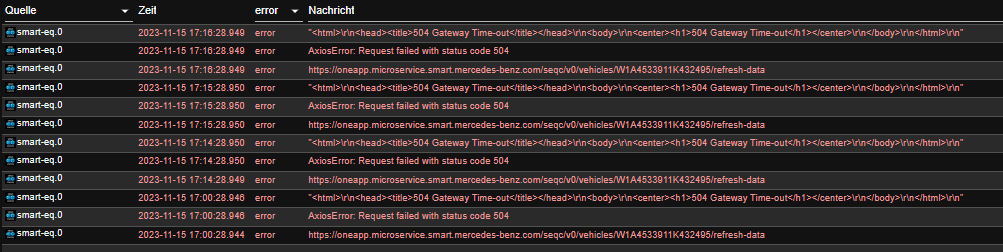
2023-12-03 16:32:05.037  - error: smart-eq.0 (1978) AxiosError: Request failed with status code 403
2023-12-03 16:32:05.038  - error: smart-eq.0 (1978) {"errors":[{"key":"errors.mfa.skip"}],"trackingId":"40991849747c7d0efd0e6a397323790d"}
2023-12-03 16:32:33.396  - info: admin.0 (1200) <== Disconnect system.user.admin from ::ffff:10.0.1.69 admin
2023-12-03 16:32:33.415  - info: admin.0 (1200) <== Disconnect system.user.admin from ::ffff:10.0.1.69 admin
============ Mark until here for C&P =============
======================= SUMMARY ======================= v.2023-10-10 Static hostname: raspberrypi4 Icon name: computer Operating System: Debian GNU/Linux 12 (bookworm) Kernel: Linux 6.1.0-rpi6-rpi-v8 Architecture: arm64 Installation: native Kernel: aarch64 Userland: arm64 Timezone: Europe/Zurich (CET, +0100) User-ID: 1000 X-Server: false Boot Target: graphical.target Pending OS-Updates: 0 Pending iob updates: 0 Nodejs-Installation: /usr/bin/nodejs v18.19.0 /usr/bin/node v18.19.0 /usr/bin/npm 10.2.3 /usr/bin/npx 10.2.3 /usr/bin/corepack 0.22.0 Recommended versions are nodejs 18.19.0 and npm 10.2.3 Your nodejs installation is correct MEMORY: total used free shared buff/cache available Mem: 1.9G 742M 580M 55M 766M 1.2G Swap: 104M 0B 104M Total: 2.0G 742M 685M Active iob-Instances: 5 Active repo(s): stable ioBroker Core: js-controller 5.0.16 admin 6.12.0 ioBroker Status: iobroker is running on this host. Objects type: jsonl States type: jsonl Status admin and web instance: + system.adapter.admin.0 : admin : raspberrypi4 - enabled, port: 8081, bind: 0.0.0.0, run as: admin Objects: 167 States: 123 Size of iob-Database: 7.8M /opt/iobroker/iobroker-data/objects.jsonl 1.3M /opt/iobroker/iobroker-data/states.jsonl =================== END OF SUMMARY ==================== -
@thomas-braun said in Test Adapter Smart EQ und Hello Smart v0.0.x:
iob
======== Start marking the full check here =========
Skript v.2023-10-10

*** BASE SYSTEM ***
 Static hostname: raspberrypi4
       Icon name: computer
Operating System: Debian GNU/Linux 12 (bookworm)
          Kernel: Linux 6.1.0-rpi6-rpi-v8
    Architecture: arm64

Model		: Raspberry Pi 4 Model B Rev 1.5
Docker          : false
Virtualization  : none
Kernel          : aarch64
Userland        : arm64

Systemuptime and Load:
 16:47:57 up 22 min,  3 users,  load average: 0.87, 0.59, 0.31
CPU threads: 4


*** RASPBERRY THROTTLING ***
Current issues:
No throttling issues detected.

Previously detected issues:
No throttling issues detected.

*** Time and Time Zones ***
               Local time: Sun 2023-12-03 16:47:57 CET
           Universal time: Sun 2023-12-03 15:47:57 UTC
                 RTC time: n/a
                Time zone: Europe/XXXXX (CET, +0100)
System clock synchronized: yes
              NTP service: active
          RTC in local TZ: no

*** User and Groups ***
rasputin
/home/rasputin
rasputin adm dialout cdrom sudo audio video plugdev games users input render netdev lpadmin gpio i2c spi iobroker

*** X-Server-Setup ***
X-Server: 	false
Desktop: 	LXDE-pi-wayfire
Terminal: 	wayland
Boot Target: 	graphical.target

*** MEMORY ***
               total        used        free      shared  buff/cache   available
Mem:            1.9G        736M        585M         53M        765M        1.2G
Swap:           104M          0B        104M
Total:          2.0G        736M        690M

         1848 M total memory
          702 M used memory
          839 M active memory
          293 M inactive memory
          558 M free memory
           25 M buffer memory
          704 M swap cache
           99 M total swap
            0 M used swap
           99 M free swap

Raspberry only:
oom events: 0
lifetime oom required: 0 Mbytes
total time in oom handler: 0 ms
max time spent in oom handler: 0 ms

*** FAILED SERVICES ***

  UNIT                  LOAD   ACTIVE SUB    DESCRIPTION
* bthelper@hci0.service loaded failed failed Raspberry Pi bluetooth helper

LOAD   = Reflects whether the unit definition was properly loaded.
ACTIVE = The high-level unit activation state, i.e. generalization of SUB.
SUB    = The low-level unit activation state, values depend on unit type.
1 loaded units listed.

*** FILESYSTEM ***
Filesystem     Type      Size  Used Avail Use% Mounted on
udev           devtmpfs  658M     0  658M   0% /dev
tmpfs          tmpfs     185M  1.3M  184M   1% /run
/dev/mmcblk0p2 ext4      117G  5.7G  106G   6% /
tmpfs          tmpfs     925M  216K  924M   1% /dev/shm
tmpfs          tmpfs     5.0M   16K  5.0M   1% /run/lock
/dev/mmcblk0p1 vfat      510M   74M  437M  15% /boot/firmware
tmpfs          tmpfs     185M   40K  185M   1% /run/user/1000

Messages concerning ext4 filesystem in dmesg:
[Sun Dec  3 16:25:52 2023] Kernel command line: coherent_pool=1M 8250.nr_uarts=0 snd_bcm2835.enable_headphones=0 snd_bcm2835.enable_headphones=1 snd_bcm2835.enable_hdmi=1 snd_bcm2835.enable_hdmi=0  smsc95xx.macaddr=E4:5F:01:EB:13:BD vc_mem.mem_base=0x3ec00000 vc_mem.mem_size=0x40000000  console=ttyS0,115200 console=tty1 root=PARTUUID=d3ad1695-02 rootfstype=ext4 fsck.repair=yes rootwait quiet splash plymouth.ignore-serial-consoles cfg80211.ieee80211_regdom=CH
[Sun Dec  3 16:25:55 2023] EXT4-fs (mmcblk0p2): mounted filesystem with ordered data mode. Quota mode: none.
[Sun Dec  3 16:25:57 2023] EXT4-fs (mmcblk0p2): re-mounted. Quota mode: none.

Show mounted filesystems \(real ones only\):
TARGET               SOURCE         FSTYPE      OPTIONS
/                    /dev/mmcblk0p2 ext4        rw,noatime
|-/run/user/1000/doc portal         fuse.portal rw,nosuid,nodev,relatime,user_id=1000,group_id=1000
`-/boot/firmware     /dev/mmcblk0p1 vfat        rw,relatime,fmask=0022,dmask=0022,codepage=437,iocharset=ascii,shortname=mixed,errors=remount-ro

Files in neuralgic directories:

/var:
900M	/var/
501M	/var/cache
494M	/var/cache/apt
383M	/var/cache/apt/archives
193M	/var/lib

Archived and active journals take up 103.9M in the file system.

/opt/iobroker/backups:
1.3M	/opt/iobroker/backups/

/opt/iobroker/iobroker-data:
38M	/opt/iobroker/iobroker-data/
15M	/opt/iobroker/iobroker-data/files
15M	/opt/iobroker/iobroker-data/backup-objects
13M	/opt/iobroker/iobroker-data/files/admin.admin/custom/static/js
13M	/opt/iobroker/iobroker-data/files/admin.admin/custom/static

The five largest files in iobroker-data are:
7.8M	/opt/iobroker/iobroker-data/objects.jsonl
6.3M	/opt/iobroker/iobroker-data/files/admin.admin/custom/static/js/vendors-node_modules_iobroker_adapter-react-v5_assets_devices_parseNames_js-node_modules_iobr-99c23e.847b8ad9.chunk.js.map
2.8M	/opt/iobroker/iobroker-data/files/admin.admin/custom/static/js/vendors-node_modules_iobroker_adapter-react-v5_assets_devices_parseNames_js-node_modules_iobr-99c23e.847b8ad9.chunk.js
1.6M	/opt/iobroker/iobroker-data/files/admin.admin/custom/static/js/vendors-node_modules_mui_material_Accordion_index_js-node_modules_mui_material_AccordionDetai-57e02d.0886b730.chunk.js.map
1.3M	/opt/iobroker/iobroker-data/states.jsonl

USB-Devices by-id:
USB-Sticks -  Avoid direct links to /dev/* in your adapter setups, please always prefer the links 'by-id':

find: '/dev/serial/by-id/': No such file or directory

*** NodeJS-Installation ***

/usr/bin/nodejs 	v18.19.0
/usr/bin/node 		v18.19.0
/usr/bin/npm 		10.2.3
/usr/bin/npx 		10.2.3
/usr/bin/corepack 	0.22.0


nodejs:
  Installed: 18.19.0-1nodesource1
  Candidate: 18.19.0-1nodesource1
  Version table:
 *** 18.19.0-1nodesource1 600
        500 https://deb.nodesource.com/node_18.x nodistro/main arm64 Packages
        100 /var/lib/dpkg/status
     18.18.2-1nodesource1 600
        500 https://deb.nodesource.com/node_18.x nodistro/main arm64 Packages
     18.18.1-1nodesource1 600
        500 https://deb.nodesource.com/node_18.x nodistro/main arm64 Packages
     18.18.0-1nodesource1 600
        500 https://deb.nodesource.com/node_18.x nodistro/main arm64 Packages
     18.17.1-1nodesource1 600
        500 https://deb.nodesource.com/node_18.x nodistro/main arm64 Packages
     18.17.0-1nodesource1 600
        500 https://deb.nodesource.com/node_18.x nodistro/main arm64 Packages
     18.16.1-1nodesource1 600
        500 https://deb.nodesource.com/node_18.x nodistro/main arm64 Packages
     18.16.0-1nodesource1 600
        500 https://deb.nodesource.com/node_18.x nodistro/main arm64 Packages
     18.15.0-1nodesource1 600
        500 https://deb.nodesource.com/node_18.x nodistro/main arm64 Packages
     18.14.2-1nodesource1 600
        500 https://deb.nodesource.com/node_18.x nodistro/main arm64 Packages
     18.14.1-1nodesource1 600
        500 https://deb.nodesource.com/node_18.x nodistro/main arm64 Packages
     18.14.0-1nodesource1 600
        500 https://deb.nodesource.com/node_18.x nodistro/main arm64 Packages
     18.13.0+dfsg1-1 500
        500 http://deb.debian.org/debian bookworm/main arm64 Packages
     18.13.0-1nodesource1 600
        500 https://deb.nodesource.com/node_18.x nodistro/main arm64 Packages
     18.12.0-1nodesource1 600
        500 https://deb.nodesource.com/node_18.x nodistro/main arm64 Packages
     18.11.0-1nodesource1 600
        500 https://deb.nodesource.com/node_18.x nodistro/main arm64 Packages
     18.10.0-1nodesource1 600
        500 https://deb.nodesource.com/node_18.x nodistro/main arm64 Packages
     18.9.1-1nodesource1 600
        500 https://deb.nodesource.com/node_18.x nodistro/main arm64 Packages
     18.9.0-1nodesource1 600
        500 https://deb.nodesource.com/node_18.x nodistro/main arm64 Packages
     18.8.0-1nodesource1 600
        500 https://deb.nodesource.com/node_18.x nodistro/main arm64 Packages
     18.7.0-1nodesource1 600
        500 https://deb.nodesource.com/node_18.x nodistro/main arm64 Packages
     18.6.0-1nodesource1 600
        500 https://deb.nodesource.com/node_18.x nodistro/main arm64 Packages
     18.5.0-1nodesource1 600
        500 https://deb.nodesource.com/node_18.x nodistro/main arm64 Packages
     18.4.0-1nodesource1 600
        500 https://deb.nodesource.com/node_18.x nodistro/main arm64 Packages
     18.3.0-1nodesource1 600
        500 https://deb.nodesource.com/node_18.x nodistro/main arm64 Packages
     18.2.0-1nodesource1 600
        500 https://deb.nodesource.com/node_18.x nodistro/main arm64 Packages
     18.1.0-1nodesource1 600
        500 https://deb.nodesource.com/node_18.x nodistro/main arm64 Packages
     18.0.0-1nodesource1 600
        500 https://deb.nodesource.com/node_18.x nodistro/main arm64 Packages

Temp directories causing npm8 problem: 0
No problems detected

Errors in npm tree:

*** ioBroker-Installation ***

ioBroker Status
iobroker is running on this host.


Objects type: jsonl
States  type: jsonl

Core adapters versions
js-controller: 	5.0.16
admin: 		6.12.0
javascript: 	"javascript" not found

Adapters from github: 	1

Adapter State
+ system.adapter.admin.0                  : admin                 : raspberrypi4                             -  enabled, port: 8081, bind: 0.0.0.0, run as: admin
+ system.adapter.backitup.0               : backitup              : raspberrypi4                             -  enabled
+ system.adapter.discovery.0              : discovery             : raspberrypi4                             -  enabled
+ system.adapter.smart-eq.0               : smart-eq              : raspberrypi4                             -  enabled

+ instance is alive

Enabled adapters with bindings
+ system.adapter.admin.0                  : admin                 : raspberrypi4                             -  enabled, port: 8081, bind: 0.0.0.0, run as: admin

ioBroker-Repositories
stable        : http://download.iobroker.net/sources-dist.json
beta          : http://download.iobroker.net/sources-dist-latest.json

Active repo(s): stable

Installed ioBroker-Instances
Used repository: stable
Adapter    "admin"        : 6.12.0   , installed 6.12.0
Adapter    "backitup"     : 2.8.7    , installed 2.8.7
Adapter    "discovery"    : 4.2.0    , installed 4.2.0
Controller "js-controller": 5.0.16   , installed 5.0.16
Adapter    "smart-eq"     : 0.0.4    , installed 0.1.0

Objects and States
Please stand by - This may take a while
Objects: 	167
States: 	123

*** OS-Repositories and Updates ***
Hit:1 http://deb.debian.org/debian bookworm InRelease
Hit:2 http://deb.debian.org/debian-security bookworm-security InRelease
Hit:3 http://archive.raspberrypi.com/debian bookworm InRelease
Hit:4 http://deb.debian.org/debian bookworm-updates InRelease
Hit:5 https://deb.nodesource.com/node_18.x nodistro InRelease
Reading package lists...
Pending Updates: 0

*** Listening Ports ***
Active Internet connections (only servers)
Proto Recv-Q Send-Q Local Address           Foreign Address         State       User       Inode      PID/Program name
tcp        0      0 0.0.0.0:5900            0.0.0.0:*               LISTEN      1000       18512      1031/wayvnc
tcp        0      0 127.0.0.1:631           0.0.0.0:*               LISTEN      0          17042      662/cupsd
tcp        0      0 0.0.0.0:22              0.0.0.0:*               LISTEN      0          527        720/sshd: /usr/sbin
tcp        0      0 127.0.0.1:9001          0.0.0.0:*               LISTEN      1001       19582      664/iobroker.js-con
tcp        0      0 127.0.0.1:9000          0.0.0.0:*               LISTEN      1001       17852      664/iobroker.js-con
tcp6       0      0 :::8081                 :::*                    LISTEN      1001       18152      1200/io.admin.0
tcp6       0      0 ::1:631                 :::*                    LISTEN      0          17041      662/cupsd
tcp6       0      0 :::22                   :::*                    LISTEN      0          529        720/sshd: /usr/sbin
udp        0      0 0.0.0.0:5353            0.0.0.0:*                           104        14038      487/avahi-daemon: r
udp        0      0 0.0.0.0:631             0.0.0.0:*                           0          19556      1003/cups-browsed
udp        0      0 0.0.0.0:39569           0.0.0.0:*                           104        14040      487/avahi-daemon: r
udp6       0      0 :::5353                 :::*                                104        14039      487/avahi-daemon: r
udp6       0      0 :::47633                :::*                                104        14041      487/avahi-daemon: r
udp6       0      0 fe80::d102:490f:2c4:546 :::*                                0          20945      557/NetworkManager

*** Log File - Last 25 Lines ***

2023-12-03 16:31:58.270  - info: smart-eq.0 (1963) Terminated (ADAPTER_REQUESTED_TERMINATION): Without reason
2023-12-03 16:31:58.305  - info: host.raspberrypi4 stopInstance system.adapter.smart-eq.0 send kill signal
2023-12-03 16:31:58.772  - info: smart-eq.0 (1963) terminating
2023-12-03 16:31:58.816  - info: host.raspberrypi4 instance system.adapter.smart-eq.0 terminated with code 11 (ADAPTER_REQUESTED_TERMINATION)
2023-12-03 16:32:01.323  - info: host.raspberrypi4 instance system.adapter.smart-eq.0 started with pid 1978
2023-12-03 16:32:02.848  - debug: smart-eq.0 (1978) Redis Objects: Use Redis connection: 127.0.0.1:9001
2023-12-03 16:32:02.880  - debug: smart-eq.0 (1978) Objects client ready ... initialize now
2023-12-03 16:32:02.882  - debug: smart-eq.0 (1978) Objects create System PubSub Client
2023-12-03 16:32:02.884  - debug: smart-eq.0 (1978) Objects create User PubSub Client
2023-12-03 16:32:02.906  - debug: smart-eq.0 (1978) Objects client initialize lua scripts
2023-12-03 16:32:02.916  - debug: smart-eq.0 (1978) Objects connected to redis: 127.0.0.1:9001
2023-12-03 16:32:02.933  - debug: smart-eq.0 (1978) Redis States: Use Redis connection: 127.0.0.1:9000
2023-12-03 16:32:02.941  - debug: smart-eq.0 (1978) States create System PubSub Client
2023-12-03 16:32:02.942  - debug: smart-eq.0 (1978) States create User PubSub Client
2023-12-03 16:32:02.955  - debug: smart-eq.0 (1978) States connected to redis: 127.0.0.1:9000
2023-12-03 16:32:02.987  - debug: smart-eq.0 (1978) Plugin sentry Initialize Plugin (enabled=true)
2023-12-03 16:32:03.401  - info: smart-eq.0 (1978) starting. Version 0.1.0 (non-npm: TA2k/ioBroker.smart-eq) in /opt/iobroker/node_modules/iobroker.smart-eq, node: v18.19.0, js-controller: 5.0.16
2023-12-03 16:32:03.519  - debug: smart-eq.0 (1978) Found current session
2023-12-03 16:32:03.520  - info: smart-eq.0 (1978) Login with username and password
2023-12-03 16:32:04.203  - debug: smart-eq.0 (1978) "<!DOCTYPE html><html lang=en xmlns=http://www.w3.org/1999/xhtml><head><meta charset=utf-8><meta http-equiv=X-UA-Compatible content=\"IE=edge\"><meta name=viewport content=\"width=device-width,initial-scale=1\"><link rel=icon href=/ciam/auth/static/favicon.ico><title>Mercedes me</title><link rel=stylesheet href=https://cdn.jsdelivr.net/npm/semantic-ui@2.4.2/dist/semantic.min.css integrity=\"sha256-UXesixbeLkB/UYxVTzuj/gg3+LMzgwAmg3zD+C4ZASQ=\" crossorigin=anonymous><script src=https://cdn.jsdelivr.net/npm/jquery@3.5.1/dist/jquery.min.js integrity=\"sha256-9/aliU8dGd2tb6OSsuzixeV4y/faTqgFtohetphbbj0=\" crossorigin=anonymous></script><script src=https://cdn.jsdelivr.net/npm/semantic-ui@2.4.2/dist/semantic.min.js integrity=\"sha256-CgSoWC9w5wNmI1aN8dIMK+6DPelUEtvDr+Bc2m/0Nx8=\" crossorigin=anonymous></script><script>/*<![CDATA[*/\n      const initialState = \"{\\\"resume\\\":\\\"\\/as\\/AGC3OUbNym\\/resume\\/as\\/authorization.ping\\\",\\\"country\\\":\\\"DE\\\",\\\"recaptchaSiteKey\\\":\\\"6LfCyY0oAAAAAPxZXwyESMtV6m8DTTPsel7odAUZ\\\",\\\"urlPF\\\":\\\"https:\\/\\/id.mercedes-benz.com\\\",\\\"isBotCheckActive\\\":true,\\\"appName\\\":\\\"seqcprod\\\",\\\"contextPath\\\":\\\"\\/ciam\\/auth\\\",\\\"isRememberMeEnabledByDefault\\\":false,\\\"touchpoint\\\":null,\\\"isRecaptchaActive\\\":true,\\\"isPasswordStrengthMeterEnabled\\\":false,\\\"acr\\\":[\\\"MFA\\\"],\\\"deployedStage\\\":\\\"PROD\\\",\\\"acr_values\\\":\\\"mfa\\\",\\\"requestInfo\\\":\\\"eyJlbmMiOiJBMjU2Q0JDLUhTNTEyIiwia2lkIjoiRklSU1RfRU5DUllQVElPTl9JRCIsImFsZyI6IlBCRVMyLUhTNTEyK0EyNTZLVyIsImN0eSI6IkpXVCIsInAyYyI6NjU1MzYsInAycyI6ImRyenp6dEZNejhrT1RsTXoifQ.u_sEEBhkXzBIZotcdh_A1DLvAR6Zkq_oGWHrya_TAqCmohCcZxu34sW-Gm3oR--qLcv8QkAqj7dlV5N7S4oCLxAaITB4SwA9.5tTGZGpbwTYAvYCFRBv9Eg.hfKAxtWMt5Yj4RKx4LJnVlsD9N5H6IGZNGxZaRB5aGtdIMvTbhmKtryj-QD4EhGRDib2Vw0mUkUo1cYfLBD0Br5a8i2eNydHNhrnJmq6C0Fh9gdkmsF-rW1LrxQHWlsuUkRod9bMhDwGFGF4_DuKgXI8ueOZWM_8b4O74BAgcjk9RieZUCQyBj4l_0veZ79gvqEIGM2hjw571KXoMY4lH3mDMJNMqpig0zAzor1GyqhJ0OtEGtvz5ptqOwd3KKY8GMbkt6znwoim_Pi_McOd8oTbeSMNxNTnCAia4DFy8oWR9k55Kb9NUKe1oOQe6nP69E7LeRClCg5xv-nJ419uBBSzZgnhIVlK4Mlek00Uli7LIT7w-R2Zycq4gjXKZ5G6o9RM8g-5RYkiX4Nj_k1PW2bbK0Cuuip3FDnIDWYpXpc8jcKy-x82Et5J1QiJjoC2PxHimEpvjHDAllNQkJBSyCub9MRlWh31TzlIvtoPxXpuYf2NAfLmbgHNPFFCtin1-fCb-DgegGXfuSrpLVGfYz7r3aQla491XMbJa15143_yUdP6WwPknxM6Nm4dFCcKsZO1ls4pHXZYyxqiYlw-sAZQSOf0ri4vDBye5t0cNy70nJfh7ueiOh_uXxgbkQhj9zB7aYF8JYZqHo0s-OrcoHbs_X3PZbAnKvO6AfU2agb6mfyfbyBLksaTrNX9W4j2CLYfHzwWtkhbLBh_-kadm7FChxfk-OUXUaBfMq62gOXKP161CHvOsT7Azgd-OxXGSxPAxBtVHy2iZd3IlvExQtqVl7r2_-dRLXMtXLwmdipsfGrPpAFMh7Zh_ahc9Q7isNMPEyxUn8atnFiR8w7YBS3Z-qCSbQxFjM4rCo6Fa6CftRmABgUAdPLrYsv5VDB9bjTnnIHtzs99nGx52gmJLLOCvIIEV58JBOM9YACu1RpQQ7BPva5I6zEJVjghDUdWjTtnvuz2zIFaAceYBl2ihhYwYgX3P7irZi-gaO9_E_P3M9Ia0W9ytvopGNJocGPak439oMp4Okoqg2adgllvng.UnBVFIjYAEA-jn76cHVMSWvPXHrgA9w1AM8M41tKD-Q\\\",\\\"lang\\\":\\\"de\\\",\\\"brand\\\":\\\"smart\\\",\\\"hideRegistration\\\":false}\"// SPA initialization data\n      const landingPage = null// page to load on init\n      const landingPageParams = null\n      const landingErrors = null// errors to display on init\n      const autoResume = null// return to PF on init if true\n      const contextPath = \"\\/ciam\\/auth\"\n      const brand = \"smart\"\n      const pageTitle = null\n      const showError = null\n      const errorLang = null\n      const errorSummary = null\n      const errorStatus = null\n      const errorRequestId = null\n      const errorShowBack = null\n      /*]]>*/</script><link href=/ciam/auth/static/js/app.2683ac43.js rel=preload as=script><link href=/ciam/auth/static/js/chunk-vendors.eb7f60d5.js rel=preload as=script></head><body><noscript><strong>We're sorry but this page doesn't work properly without JavaScript enabled. Please enable it to continue.</strong></noscript><div id=app></div><script src=/ciam/auth/static/js/chunk-vendors.eb7f60d5.js></script><script src=/ciam/auth/static/js/app.2683ac43.js></script></body></html>"
2023-12-03 16:32:04.941  - debug: smart-eq.0 (1978) {"result":"GOTO_LOGIN_OTP","country":"CH","lang":"de"}
2023-12-03 16:32:05.037  - error: smart-eq.0 (1978) AxiosError: Request failed with status code 403
2023-12-03 16:32:05.038  - error: smart-eq.0 (1978) {"errors":[{"key":"errors.mfa.skip"}],"trackingId":"40991849747c7d0efd0e6a397323790d"}
2023-12-03 16:32:33.396  - info: admin.0 (1200) <== Disconnect system.user.admin from ::ffff:10.0.1.69 admin
2023-12-03 16:32:33.415  - info: admin.0 (1200) <== Disconnect system.user.admin from ::ffff:10.0.1.69 admin
============ Mark until here for C&P =============
======================= SUMMARY ======================= v.2023-10-10 Static hostname: raspberrypi4 Icon name: computer Operating System: Debian GNU/Linux 12 (bookworm) Kernel: Linux 6.1.0-rpi6-rpi-v8 Architecture: arm64 Installation: native Kernel: aarch64 Userland: arm64 Timezone: Europe/Zurich (CET, +0100) User-ID: 1000 X-Server: false Boot Target: graphical.target Pending OS-Updates: 0 Pending iob updates: 0 Nodejs-Installation: /usr/bin/nodejs v18.19.0 /usr/bin/node v18.19.0 /usr/bin/npm 10.2.3 /usr/bin/npx 10.2.3 /usr/bin/corepack 0.22.0 Recommended versions are nodejs 18.19.0 and npm 10.2.3 Your nodejs installation is correct MEMORY: total used free shared buff/cache available Mem: 1.9G 742M 580M 55M 766M 1.2G Swap: 104M 0B 104M Total: 2.0G 742M 685M Active iob-Instances: 5 Active repo(s): stable ioBroker Core: js-controller 5.0.16 admin 6.12.0 ioBroker Status: iobroker is running on this host. Objects type: jsonl States type: jsonl Status admin and web instance: + system.adapter.admin.0 : admin : raspberrypi4 - enabled, port: 8081, bind: 0.0.0.0, run as: admin Objects: 167 States: 123 Size of iob-Database: 7.8M /opt/iobroker/iobroker-data/objects.jsonl 1.3M /opt/iobroker/iobroker-data/states.jsonl =================== END OF SUMMARY ====================@macman-0 sagte in Test Adapter Smart EQ und Hello Smart v0.0.x:
Desktop: LXDE-pi-wayfire
Terminal: wayland
Boot Target: graphical.targetServer werden ohne Desktop betrieben. Schalt das aus.
sudo systemctl set-defautl multi-user.targetDavon abgesehen schaut das aber okay aus.
-
Habe Desktop ausgeschaltet und Neustart gemacht und nochmals probiert mit neuen Nummern aber es geht immer noch nicht.
Frage vielleicht weisst Du das ja:
Ich habe ja einen älteren Raspi wo alles perfekt läuft - könnte ich da was rüberkopieren der Token etc. einfach alles drin hat sodass der Adapter dann im neuen Raspi funktioniert ?
-
Habe Desktop ausgeschaltet und Neustart gemacht und nochmals probiert mit neuen Nummern aber es geht immer noch nicht.
Frage vielleicht weisst Du das ja:
Ich habe ja einen älteren Raspi wo alles perfekt läuft - könnte ich da was rüberkopieren der Token etc. einfach alles drin hat sodass der Adapter dann im neuen Raspi funktioniert ?
403 ist was auf dem Server:
https://www.zenrows.com/blog/axios-403#randomize-the-user-agent-in-axios-request
-
@thomas-braun said in Test Adapter Smart EQ und Hello Smart v0.0.x:
https://www.zenrows.com/blog/axios-403#randomize-the-user-agent-in-axios-request
Da steht: Change your User Agent to Solve Axios 403
Ich frage mal "dumm" könnte es eine Rolle spielen mit welchem Browser und oder OS
ich den ioBroker bediene ? -
@thomas-braun said in Test Adapter Smart EQ und Hello Smart v0.0.x:
https://www.zenrows.com/blog/axios-403#randomize-the-user-agent-in-axios-request
Da steht: Change your User Agent to Solve Axios 403
Ich frage mal "dumm" könnte es eine Rolle spielen mit welchem Browser und oder OS
ich den ioBroker bediene ?Vielleicht. Vielleicht lässt der Server auch keine parallelen Logins zu. Es gibt mehrere Möglichkeiten, warum der Türsteher dich nicht reinlässt.
axios meldet sich aber mit einen eigenen UA, da spielt dein lokaler Browser/OS keine Rolle .
-
@thomas-braun said in Test Adapter Smart EQ und Hello Smart v0.0.x:
Vielleicht. Vielleicht lässt der Server auch keine parallelen Logins zu. Es gibt mehrere Möglichkeiten, warum der Türsteher dich nicht reinlässt.
Das habe ich mir auch gedacht aber dann würde doch die SmartEQ Handy App und ein login via Browser auch nicht parallel klappen - oder ?
Ich könnte dass testen indem ich den funktionierende Raspi einfach abschalte.
Ich mache das morgen - muss leider jetzt weg.


Hey! Du scheinst an dieser Unterhaltung interessiert zu sein, hast aber noch kein Konto.
Hast du es satt, bei jedem Besuch durch die gleichen Beiträge zu scrollen? Wenn du dich für ein Konto anmeldest, kommst du immer genau dorthin zurück, wo du zuvor warst, und kannst dich über neue Antworten benachrichtigen lassen (entweder per E-Mail oder Push-Benachrichtigung). Du kannst auch Lesezeichen speichern und Beiträge positiv bewerten, um anderen Community-Mitgliedern deine Wertschätzung zu zeigen.
Mit deinem Input könnte dieser Beitrag noch besser werden 💗
Registrieren AnmeldenSupport us
267
Online33.0k
Benutzer83.6k
Themen1.3m
Beiträge