




ioBroker auf neuer Maschine aufgesetzt und Adapter Probleme
-
sehe bereits, das einige adapter laufen, aber manche auch nicht (habe noch nicht alle ausprobiert).
ble ist z.B. rot:
verbunden mit host = rot
lebenszeichen = rot
Verbunden mit gerät oder dienst = grün.Komme nicht in die Einstellungen des Adapters rein, es wird 404, File Index_m.html not found angezeigt.
bei VIS, ebenso 404.
Werde nun mal die Konfiguration über Backitup einspielen, mal sehen ob es daran liegt. (mache aber vorher eine Sicherung der VM)
@gismoh sagte in ioBroker auf neuer Maschine aufgesetzt und Adapter Probleme:
Komme nicht in die Einstellungen des Adapters rein, es wird 404, File Index_m.html not found angezeigt.
bei VIS, ebenso 404.wenn du das backup einspielst, musst du schon ne weile warten, alles Adapter müssen erst wieder neu gebaut werden.
vis muss vor dem backup einspielen, schon manuell installiert werden
-
@gismoh sagte in ioBroker auf neuer Maschine aufgesetzt und Adapter Probleme:
Komme nicht in die Einstellungen des Adapters rein, es wird 404, File Index_m.html not found angezeigt.
bei VIS, ebenso 404.wenn du das backup einspielst, musst du schon ne weile warten, alles Adapter müssen erst wieder neu gebaut werden.
vis muss vor dem backup einspielen, schon manuell installiert werden
@crunchip
Hatte die Auslastung beobachtet, die VM war quasi im Ruhezustand, bevor ich einen Neustart gemacht hatte. Im Backitup adapter stand schon lange , das das Backup erfolgreich war.Sieht so aus, wie beim letzen mal, wo ich iobroker über Nacht zeitgegeben hatte.
Vis muss ich vorher einspielen? dachte das macht der Backitup adapter.
Muss ich dann später nochmal erneut machen, aber solange ich nicht weis wie ich den ble nach dem "restore" wieder zum laufen bringe, dürfte das nun auch (noch) nichts bringen.
Hätte nicht gedacht das es so kompliziert ist, die Werte/Daten zu übertragen, war schon fast ne Woche selber dran, bevor ich hier nachfragte.
Möchte nur ungern alle bisherigen Einstellungen/daten von vorher verlieren, hoffe das ich noch irgendwie diese in die neue Installation übertragen kann.Gibt es denn evtl. noch einen anderen Adapter zum Sichern/Einspielen als den Backitup Adapter, welcher zu empfehlen ist ? (bin langsam verzweifelt)
ioBroker auf: Lenovo ThinkCentre M910Q Tiny i5-7500T 16 GB mit proxmox in VM (Bookworm)
-
@crunchip
Hatte die Auslastung beobachtet, die VM war quasi im Ruhezustand, bevor ich einen Neustart gemacht hatte. Im Backitup adapter stand schon lange , das das Backup erfolgreich war.Sieht so aus, wie beim letzen mal, wo ich iobroker über Nacht zeitgegeben hatte.
Vis muss ich vorher einspielen? dachte das macht der Backitup adapter.
Muss ich dann später nochmal erneut machen, aber solange ich nicht weis wie ich den ble nach dem "restore" wieder zum laufen bringe, dürfte das nun auch (noch) nichts bringen.
Hätte nicht gedacht das es so kompliziert ist, die Werte/Daten zu übertragen, war schon fast ne Woche selber dran, bevor ich hier nachfragte.
Möchte nur ungern alle bisherigen Einstellungen/daten von vorher verlieren, hoffe das ich noch irgendwie diese in die neue Installation übertragen kann.Gibt es denn evtl. noch einen anderen Adapter zum Sichern/Einspielen als den Backitup Adapter, welcher zu empfehlen ist ? (bin langsam verzweifelt)
-
@crunchip
Hatte die Auslastung beobachtet, die VM war quasi im Ruhezustand, bevor ich einen Neustart gemacht hatte. Im Backitup adapter stand schon lange , das das Backup erfolgreich war.Sieht so aus, wie beim letzen mal, wo ich iobroker über Nacht zeitgegeben hatte.
Vis muss ich vorher einspielen? dachte das macht der Backitup adapter.
Muss ich dann später nochmal erneut machen, aber solange ich nicht weis wie ich den ble nach dem "restore" wieder zum laufen bringe, dürfte das nun auch (noch) nichts bringen.
Hätte nicht gedacht das es so kompliziert ist, die Werte/Daten zu übertragen, war schon fast ne Woche selber dran, bevor ich hier nachfragte.
Möchte nur ungern alle bisherigen Einstellungen/daten von vorher verlieren, hoffe das ich noch irgendwie diese in die neue Installation übertragen kann.Gibt es denn evtl. noch einen anderen Adapter zum Sichern/Einspielen als den Backitup Adapter, welcher zu empfehlen ist ? (bin langsam verzweifelt)
@gismoh sagte in ioBroker auf neuer Maschine aufgesetzt und Adapter Probleme:
Vis muss ich vorher einspielen? dachte das macht der Backitup adapter.
theoretisch ja, jedoch seit geraumer Zeit gibt es einen bug der noch nicht gefixt werden konnte, daher diese Vorgehensweise
@gismoh sagte in ioBroker auf neuer Maschine aufgesetzt und Adapter Probleme:
Hatte die Auslastung beobachtet, die VM war quasi im Ruhezustand
besser ins log sehen
@gismoh sagte in ioBroker auf neuer Maschine aufgesetzt und Adapter Probleme:
Im Backitup adapter stand schon lange , das das Backup erfolgreich war.
mit dem backup ja, aber dann beginnt ja erst die eigentliche Arbeit
@gismoh sagte in ioBroker auf neuer Maschine aufgesetzt und Adapter Probleme:
Muss ich dann später nochmal erneut machen, aber solange ich nicht weis wie ich den ble nach dem "restore" wieder zum laufen bringe, dürfte das nun auch (noch) nichts bringen.
der sollte bei Ordentlicher Installation eigentlich laufen, falls nicht, sollte es Meldungen im Log geben(Beim Adapter neu bauen), sollte es nicht eigenständig klappen, kann man manuell nachhelfen
@gismoh sagte in ioBroker auf neuer Maschine aufgesetzt und Adapter Probleme:
Nachtrag: Vis klappte mit dem bisherigen "projekt", habe es nur neu installiert und alles ist da - muss also scheinbar nicht vorher bereits manuell installiert werden.
dann wärst du jetzt seit langem der Erste bei dem es so klappt
-
@gismoh sagte in ioBroker auf neuer Maschine aufgesetzt und Adapter Probleme:
Vis muss ich vorher einspielen? dachte das macht der Backitup adapter.
theoretisch ja, jedoch seit geraumer Zeit gibt es einen bug der noch nicht gefixt werden konnte, daher diese Vorgehensweise
@gismoh sagte in ioBroker auf neuer Maschine aufgesetzt und Adapter Probleme:
Hatte die Auslastung beobachtet, die VM war quasi im Ruhezustand
besser ins log sehen
@gismoh sagte in ioBroker auf neuer Maschine aufgesetzt und Adapter Probleme:
Im Backitup adapter stand schon lange , das das Backup erfolgreich war.
mit dem backup ja, aber dann beginnt ja erst die eigentliche Arbeit
@gismoh sagte in ioBroker auf neuer Maschine aufgesetzt und Adapter Probleme:
Muss ich dann später nochmal erneut machen, aber solange ich nicht weis wie ich den ble nach dem "restore" wieder zum laufen bringe, dürfte das nun auch (noch) nichts bringen.
der sollte bei Ordentlicher Installation eigentlich laufen, falls nicht, sollte es Meldungen im Log geben(Beim Adapter neu bauen), sollte es nicht eigenständig klappen, kann man manuell nachhelfen
@gismoh sagte in ioBroker auf neuer Maschine aufgesetzt und Adapter Probleme:
Nachtrag: Vis klappte mit dem bisherigen "projekt", habe es nur neu installiert und alles ist da - muss also scheinbar nicht vorher bereits manuell installiert werden.
dann wärst du jetzt seit langem der Erste bei dem es so klappt
-
@gismoh sagte in ioBroker auf neuer Maschine aufgesetzt und Adapter Probleme:
Vis, siehe oben - hat geklappt.
liegt vllt an
@gismoh sagte in ioBroker auf neuer Maschine aufgesetzt und Adapter Probleme:
habe diesmal alle Instanzen außer "admin" und "backitup" auf der Zielmaschine vorher deinstalliert.
@gismoh sagte in ioBroker auf neuer Maschine aufgesetzt und Adapter Probleme:
Aber ble klappt weiterhin nicht.
dann muss es auch eine Meldung im Log geben beim restore
-
@gismoh sagte in ioBroker auf neuer Maschine aufgesetzt und Adapter Probleme:
Vis muss ich vorher einspielen? dachte das macht der Backitup adapter.
theoretisch ja, jedoch seit geraumer Zeit gibt es einen bug der noch nicht gefixt werden konnte, daher diese Vorgehensweise
@gismoh sagte in ioBroker auf neuer Maschine aufgesetzt und Adapter Probleme:
Hatte die Auslastung beobachtet, die VM war quasi im Ruhezustand
besser ins log sehen
@gismoh sagte in ioBroker auf neuer Maschine aufgesetzt und Adapter Probleme:
Im Backitup adapter stand schon lange , das das Backup erfolgreich war.
mit dem backup ja, aber dann beginnt ja erst die eigentliche Arbeit
@gismoh sagte in ioBroker auf neuer Maschine aufgesetzt und Adapter Probleme:
Muss ich dann später nochmal erneut machen, aber solange ich nicht weis wie ich den ble nach dem "restore" wieder zum laufen bringe, dürfte das nun auch (noch) nichts bringen.
der sollte bei Ordentlicher Installation eigentlich laufen, falls nicht, sollte es Meldungen im Log geben(Beim Adapter neu bauen), sollte es nicht eigenständig klappen, kann man manuell nachhelfen
@gismoh sagte in ioBroker auf neuer Maschine aufgesetzt und Adapter Probleme:
Nachtrag: Vis klappte mit dem bisherigen "projekt", habe es nur neu installiert und alles ist da - muss also scheinbar nicht vorher bereits manuell installiert werden.
dann wärst du jetzt seit langem der Erste bei dem es so klappt
@crunchip said in ioBroker auf neuer Maschine aufgesetzt und Adapter Probleme:
dann wärst du jetzt seit langem der Erste bei dem es so klappt
Vielleicht muss man auch mal Glück haben , habe nun zwar noch nicht mit gearbeitet, sieht aber auf dem ersten Blick für mich ok aus.
ioBroker auf: Lenovo ThinkCentre M910Q Tiny i5-7500T 16 GB mit proxmox in VM (Bookworm)
-
@crunchip said in ioBroker auf neuer Maschine aufgesetzt und Adapter Probleme:
dann wärst du jetzt seit langem der Erste bei dem es so klappt
Vielleicht muss man auch mal Glück haben , habe nun zwar noch nicht mit gearbeitet, sieht aber auf dem ersten Blick für mich ok aus.
@gismoh sagte in ioBroker auf neuer Maschine aufgesetzt und Adapter Probleme:
Vielleicht muss man auch mal Glück haben
ne, wie gerade schon geschrieben, du hattest keine frische Installation, sondern die Adapter gelöscht(iobroker leer gemacht)
@gismoh sagte in ioBroker auf neuer Maschine aufgesetzt und Adapter Probleme:
ble klappt weiterhin nicht.
iob del bledanach
iob add ble --debug -
@gismoh sagte in ioBroker auf neuer Maschine aufgesetzt und Adapter Probleme:
Vis, siehe oben - hat geklappt.
liegt vllt an
@gismoh sagte in ioBroker auf neuer Maschine aufgesetzt und Adapter Probleme:
habe diesmal alle Instanzen außer "admin" und "backitup" auf der Zielmaschine vorher deinstalliert.
@gismoh sagte in ioBroker auf neuer Maschine aufgesetzt und Adapter Probleme:
Aber ble klappt weiterhin nicht.
dann muss es auch eine Meldung im Log geben beim restore
@crunchip said in ioBroker auf neuer Maschine aufgesetzt und Adapter Probleme:
dann muss es auch eine Meldung im Log geben beim restore
im Backitup adapter wurde angezeigt das der restore erfolgreich war, was weiters habe ich leider nicht gesehen - den Inhalt des Fensters (also komplette meldung) konnte ich nicht kopieren.
ioBroker auf: Lenovo ThinkCentre M910Q Tiny i5-7500T 16 GB mit proxmox in VM (Bookworm)
-
@crunchip said in ioBroker auf neuer Maschine aufgesetzt und Adapter Probleme:
dann muss es auch eine Meldung im Log geben beim restore
im Backitup adapter wurde angezeigt das der restore erfolgreich war, was weiters habe ich leider nicht gesehen - den Inhalt des Fensters (also komplette meldung) konnte ich nicht kopieren.
@gismoh na im log nachsehen, da wird jeder adapter neu gebaut nach dem erfolgreichen restore
-
@gismoh sagte in ioBroker auf neuer Maschine aufgesetzt und Adapter Probleme:
Vielleicht muss man auch mal Glück haben
ne, wie gerade schon geschrieben, du hattest keine frische Installation, sondern die Adapter gelöscht(iobroker leer gemacht)
@gismoh sagte in ioBroker auf neuer Maschine aufgesetzt und Adapter Probleme:
ble klappt weiterhin nicht.
iob del bledanach
iob add ble --debugDelete adapter "ble" host.ioBrokerVM Counted 1 instances of ble host.ioBrokerVM Counted 1 meta of ble host.ioBrokerVM Counted 1 adapter for ble host.ioBrokerVM Counted 35 devices of ble host.ioBrokerVM Counted 37 channels of ble host.ioBrokerVM Counted 91 states of ble host.ioBrokerVM Counted 14 states of system.adapter.ble host.ioBrokerVM Counted 92 states (io.ble.*) from states host.ioBrokerVM Counted 13 states (system.adapter.ble.*) from states host.ioBrokerVM object ble deleted host.ioBrokerVM object ble.admin deleted host.ioBrokerVM Deleting 180 object(s). host.ioBrokerVM Deleting 105 state(s). Error deleting adapter ble from disk: Cannot find module 'iobroker.ble/io-package.json' Require stack: - /opt/iobroker/node_modules/@iobroker/js-controller-cli/build/lib/setup/setupInstall.js - /opt/iobroker/node_modules/@iobroker/js-controller-cli/build/lib/setup/setupUpgrade.js - /opt/iobroker/node_modules/@iobroker/js-controller-cli/build/index.js - /opt/iobroker/node_modules/iobroker.js-controller/iobroker.js You might have to delete it yourself!root@ioBrokerVM:~# iob add ble --debug NPM version: 9.8.1 Installing iobroker.ble@0.13.4... (System call) npm ERR! code 1 npm ERR! path /opt/iobroker/node_modules/@abandonware/noble npm ERR! command failed npm ERR! command sh -c node-gyp-build npm ERR! gyp info it worked if it ends with ok npm ERR! gyp info using node-gyp@7.1.2 npm ERR! gyp info using node@18.18.2 | linux | x64 npm ERR! gyp info find Python using Python version 3.11.2 found at "/usr/bin/python3" npm ERR! (node:3048) [DEP0150] DeprecationWarning: Setting process.config is deprecated. In the future the property will be read-only. npm ERR! (Use `node --trace-deprecation ...` to show where the warning was created) npm ERR! gyp info spawn /usr/bin/python3 npm ERR! gyp info spawn args [ npm ERR! gyp info spawn args '/opt/iobroker/node_modules/node-gyp/gyp/gyp_main.py', npm ERR! gyp info spawn args 'binding.gyp', npm ERR! gyp info spawn args '-f', npm ERR! gyp info spawn args 'make', npm ERR! gyp info spawn args '-I', npm ERR! gyp info spawn args '/opt/iobroker/node_modules/@abandonware/noble/build/config.gypi', npm ERR! gyp info spawn args '-I', npm ERR! gyp info spawn args '/opt/iobroker/node_modules/node-gyp/addon.gypi', npm ERR! gyp info spawn args '-I', npm ERR! gyp info spawn args '/home/iobroker/.cache/node-gyp/18.18.2/include/node/common.gypi', npm ERR! gyp info spawn args '-Dlibrary=shared_library', npm ERR! gyp info spawn args '-Dvisibility=default', npm ERR! gyp info spawn args '-Dnode_root_dir=/home/iobroker/.cache/node-gyp/18.18.2', npm ERR! gyp info spawn args '-Dnode_gyp_dir=/opt/iobroker/node_modules/node-gyp', npm ERR! gyp info spawn args '-Dnode_lib_file=/home/iobroker/.cache/node-gyp/18.18.2/<(target_arch)/node.lib', npm ERR! gyp info spawn args '-Dmodule_root_dir=/opt/iobroker/node_modules/@abandonware/noble', npm ERR! gyp info spawn args '-Dnode_engine=v8', npm ERR! gyp info spawn args '--depth=.', npm ERR! gyp info spawn args '--no-parallel', npm ERR! gyp info spawn args '--generator-output', npm ERR! gyp info spawn args 'build', npm ERR! gyp info spawn args '-Goutput_dir=.' npm ERR! gyp info spawn args ] npm ERR! Traceback (most recent call last): npm ERR! File "/opt/iobroker/node_modules/node-gyp/gyp/gyp_main.py", line 51, in <module> npm ERR! sys.exit(gyp.script_main()) npm ERR! ^^^^^^^^^^^^^^^^^ npm ERR! File "/opt/iobroker/node_modules/node-gyp/gyp/pylib/gyp/__init__.py", line 670, in script_main npm ERR! return main(sys.argv[1:]) npm ERR! ^^^^^^^^^^^^^^^^^^ npm ERR! File "/opt/iobroker/node_modules/node-gyp/gyp/pylib/gyp/__init__.py", line 662, in main npm ERR! return gyp_main(args) npm ERR! ^^^^^^^^^^^^^^ npm ERR! File "/opt/iobroker/node_modules/node-gyp/gyp/pylib/gyp/__init__.py", line 629, in gyp_main npm ERR! [generator, flat_list, targets, data] = Load( npm ERR! ^^^^^ npm ERR! File "/opt/iobroker/node_modules/node-gyp/gyp/pylib/gyp/__init__.py", line 150, in Load npm ERR! result = gyp.input.Load( npm ERR! ^^^^^^^^^^^^^^^ npm ERR! File "/opt/iobroker/node_modules/node-gyp/gyp/pylib/gyp/input.py", line 3021, in Load npm ERR! LoadTargetBuildFile( npm ERR! File "/opt/iobroker/node_modules/node-gyp/gyp/pylib/gyp/input.py", line 411, in LoadTargetBuildFile npm ERR! build_file_data = LoadOneBuildFile( npm ERR! ^^^^^^^^^^^^^^^^^ npm ERR! File "/opt/iobroker/node_modules/node-gyp/gyp/pylib/gyp/input.py", line 239, in LoadOneBuildFile npm ERR! build_file_contents = open(build_file_path, "rU").read() npm ERR! ^^^^^^^^^^^^^^^^^^^^^^^^^^^ npm ERR! ValueError: invalid mode: 'rU' while trying to load binding.gyp npm ERR! gyp ERR! configure error npm ERR! gyp ERR! stack Error: `gyp` failed with exit code: 1 npm ERR! gyp ERR! stack at ChildProcess.onCpExit (/opt/iobroker/node_modules/node-gyp/lib/configure.js:351:16) npm ERR! gyp ERR! stack at ChildProcess.emit (node:events:517:28) npm ERR! gyp ERR! stack at ChildProcess._handle.onexit (node:internal/child_process:292:12) npm ERR! gyp ERR! System Linux 6.1.0-13-amd64 npm ERR! gyp ERR! command "/usr/bin/node" "/opt/iobroker/node_modules/node-gyp/bin/node-gyp.js" "rebuild" npm ERR! gyp ERR! cwd /opt/iobroker/node_modules/@abandonware/noble npm ERR! gyp ERR! node -v v18.18.2 npm ERR! gyp ERR! node-gyp -v v7.1.2 npm ERR! gyp ERR! not ok npm ERR! A complete log of this run can be found in: /home/iobroker/.npm/_logs/2023-11-07T23_56_22_185Z-debug-0.log npm ERR! code 1 npm ERR! path /opt/iobroker/node_modules/@abandonware/noble npm ERR! command failed npm ERR! command sh -c node-gyp-build npm ERR! gyp info it worked if it ends with ok npm ERR! gyp info using node-gyp@7.1.2 npm ERR! gyp info using node@18.18.2 | linux | x64 npm ERR! gyp info find Python using Python version 3.11.2 found at "/usr/bin/python3" npm ERR! (node:3048) [DEP0150] DeprecationWarning: Setting process.config is deprecated. In the future the property will be read-only. npm ERR! (Use `node --trace-deprecation ...` to show where the warning was created) npm ERR! gyp info spawn /usr/bin/python3 npm ERR! gyp info spawn args [ npm ERR! gyp info spawn args '/opt/iobroker/node_modules/node-gyp/gyp/gyp_main.py', npm ERR! gyp info spawn args 'binding.gyp', npm ERR! gyp info spawn args '-f', npm ERR! gyp info spawn args 'make', npm ERR! gyp info spawn args '-I', npm ERR! gyp info spawn args '/opt/iobroker/node_modules/@abandonware/noble/build/config.gypi', npm ERR! gyp info spawn args '-I', npm ERR! gyp info spawn args '/opt/iobroker/node_modules/node-gyp/addon.gypi', npm ERR! gyp info spawn args '-I', npm ERR! gyp info spawn args '/home/iobroker/.cache/node-gyp/18.18.2/include/node/common.gypi', npm ERR! gyp info spawn args '-Dlibrary=shared_library', npm ERR! gyp info spawn args '-Dvisibility=default', npm ERR! gyp info spawn args '-Dnode_root_dir=/home/iobroker/.cache/node-gyp/18.18.2', npm ERR! gyp info spawn args '-Dnode_gyp_dir=/opt/iobroker/node_modules/node-gyp', npm ERR! gyp info spawn args '-Dnode_lib_file=/home/iobroker/.cache/node-gyp/18.18.2/<(target_arch)/node.lib', npm ERR! gyp info spawn args '-Dmodule_root_dir=/opt/iobroker/node_modules/@abandonware/noble', npm ERR! gyp info spawn args '-Dnode_engine=v8', npm ERR! gyp info spawn args '--depth=.', npm ERR! gyp info spawn args '--no-parallel', npm ERR! gyp info spawn args '--generator-output', npm ERR! gyp info spawn args 'build', npm ERR! gyp info spawn args '-Goutput_dir=.' npm ERR! gyp info spawn args ] npm ERR! Traceback (most recent call last): npm ERR! File "/opt/iobroker/node_modules/node-gyp/gyp/gyp_main.py", line 51, in <module> npm ERR! sys.exit(gyp.script_main()) npm ERR! ^^^^^^^^^^^^^^^^^ npm ERR! File "/opt/iobroker/node_modules/node-gyp/gyp/pylib/gyp/__init__.py", line 670, in script_main npm ERR! return main(sys.argv[1:]) npm ERR! ^^^^^^^^^^^^^^^^^^ npm ERR! File "/opt/iobroker/node_modules/node-gyp/gyp/pylib/gyp/__init__.py", line 662, in main npm ERR! return gyp_main(args) npm ERR! ^^^^^^^^^^^^^^ npm ERR! File "/opt/iobroker/node_modules/node-gyp/gyp/pylib/gyp/__init__.py", line 629, in gyp_main npm ERR! [generator, flat_list, targets, data] = Load( npm ERR! ^^^^^ npm ERR! File "/opt/iobroker/node_modules/node-gyp/gyp/pylib/gyp/__init__.py", line 150, in Load npm ERR! result = gyp.input.Load( npm ERR! ^^^^^^^^^^^^^^^ npm ERR! File "/opt/iobroker/node_modules/node-gyp/gyp/pylib/gyp/input.py", line 3021, in Load npm ERR! LoadTargetBuildFile( npm ERR! File "/opt/iobroker/node_modules/node-gyp/gyp/pylib/gyp/input.py", line 411, in LoadTargetBuildFile npm ERR! build_file_data = LoadOneBuildFile( npm ERR! ^^^^^^^^^^^^^^^^^ npm ERR! File "/opt/iobroker/node_modules/node-gyp/gyp/pylib/gyp/input.py", line 239, in LoadOneBuildFile npm ERR! build_file_contents = open(build_file_path, "rU").read() npm ERR! ^^^^^^^^^^^^^^^^^^^^^^^^^^^ npm ERR! ValueError: invalid mode: 'rU' while trying to load binding.gyp npm ERR! gyp ERR! configure error npm ERR! gyp ERR! stack Error: `gyp` failed with exit code: 1 npm ERR! gyp ERR! stack at ChildProcess.onCpExit (/opt/iobroker/node_modules/node-gyp/lib/configure.js:351:16) npm ERR! gyp ERR! stack at ChildProcess.emit (node:events:517:28) npm ERR! gyp ERR! stack at ChildProcess._handle.onexit (node:internal/child_process:292:12) npm ERR! gyp ERR! System Linux 6.1.0-13-amd64 npm ERR! gyp ERR! command "/usr/bin/node" "/opt/iobroker/node_modules/node-gyp/bin/node-gyp.js" "rebuild" npm ERR! gyp ERR! cwd /opt/iobroker/node_modules/@abandonware/noble npm ERR! gyp ERR! node -v v18.18.2 npm ERR! gyp ERR! node-gyp -v v7.1.2 npm ERR! gyp ERR! not ok npm ERR! A complete log of this run can be found in: /home/iobroker/.npm/_logs/2023-11-07T23_56_22_185Z-debug-0.log host.ioBrokerVM Cannot install iobroker.ble@0.13.4: 1 root@ioBrokerVM:~#ioBroker auf: Lenovo ThinkCentre M910Q Tiny i5-7500T 16 GB mit proxmox in VM (Bookworm)
-
Delete adapter "ble"
host.ioBrokerVM Counted 1 instances of ble
host.ioBrokerVM Counted 1 meta of ble
host.ioBrokerVM Counted 1 adapter for ble
host.ioBrokerVM Counted 35 devices of ble
host.ioBrokerVM Counted 37 channels of ble
host.ioBrokerVM Counted 91 states of ble
host.ioBrokerVM Counted 14 states of system.adapter.ble
host.ioBrokerVM Counted 92 states (io.ble.*) from states
host.ioBrokerVM Counted 13 states (system.adapter.ble.*) from states
host.ioBrokerVM object ble deleted
host.ioBrokerVM object ble.admin deleted
host.ioBrokerVM Deleting 180 object(s).
host.ioBrokerVM Deleting 105 state(s).
Error deleting adapter ble from disk: Cannot find module 'iobroker.ble/io-package.json'
Require stack:
- /opt/iobroker/node_modules/@iobroker/js-controller-cli/build/lib/setup/setupInstall.js
- /opt/iobroker/node_modules/@iobroker/js-controller-cli/build/lib/setup/setupUpgrade.js
- /opt/iobroker/node_modules/@iobroker/js-controller-cli/build/index.js
- /opt/iobroker/node_modules/iobroker.js-controller/iobroker.js
You might have to delete it yourself!
root@ioBrokerVM:~# iob add ble --debug NPM version: 9.8.1 Installing iobroker.ble@0.13.4... (System call) npm ERR! code 1 npm ERR! path /opt/iobroker/node_modules/@abandonware/noble npm ERR! command failed npm ERR! command sh -c node-gyp-build npm ERR! gyp info it worked if it ends with ok npm ERR! gyp info using node-gyp@7.1.2 npm ERR! gyp info using node@18.18.2 | linux | x64 npm ERR! gyp info find Python using Python version 3.11.2 found at "/usr/bin/python3" npm ERR! (node:3048) [DEP0150] DeprecationWarning: Setting process.config is deprecated. In the future the property will be read-only. npm ERR! (Use `node --trace-deprecation ...` to show where the warning was created) npm ERR! gyp info spawn /usr/bin/python3 npm ERR! gyp info spawn args [ npm ERR! gyp info spawn args '/opt/iobroker/node_modules/node-gyp/gyp/gyp_main.py', npm ERR! gyp info spawn args 'binding.gyp', npm ERR! gyp info spawn args '-f', npm ERR! gyp info spawn args 'make', npm ERR! gyp info spawn args '-I', npm ERR! gyp info spawn args '/opt/iobroker/node_modules/@abandonware/noble/build/config.gypi', npm ERR! gyp info spawn args '-I', npm ERR! gyp info spawn args '/opt/iobroker/node_modules/node-gyp/addon.gypi', npm ERR! gyp info spawn args '-I', npm ERR! gyp info spawn args '/home/iobroker/.cache/node-gyp/18.18.2/include/node/common.gypi', npm ERR! gyp info spawn args '-Dlibrary=shared_library', npm ERR! gyp info spawn args '-Dvisibility=default', npm ERR! gyp info spawn args '-Dnode_root_dir=/home/iobroker/.cache/node-gyp/18.18.2', npm ERR! gyp info spawn args '-Dnode_gyp_dir=/opt/iobroker/node_modules/node-gyp', npm ERR! gyp info spawn args '-Dnode_lib_file=/home/iobroker/.cache/node-gyp/18.18.2/<(target_arch)/node.lib', npm ERR! gyp info spawn args '-Dmodule_root_dir=/opt/iobroker/node_modules/@abandonware/noble', npm ERR! gyp info spawn args '-Dnode_engine=v8', npm ERR! gyp info spawn args '--depth=.', npm ERR! gyp info spawn args '--no-parallel', npm ERR! gyp info spawn args '--generator-output', npm ERR! gyp info spawn args 'build', npm ERR! gyp info spawn args '-Goutput_dir=.' npm ERR! gyp info spawn args ] npm ERR! Traceback (most recent call last): npm ERR! File "/opt/iobroker/node_modules/node-gyp/gyp/gyp_main.py", line 51, in <module> npm ERR! sys.exit(gyp.script_main()) npm ERR! ^^^^^^^^^^^^^^^^^ npm ERR! File "/opt/iobroker/node_modules/node-gyp/gyp/pylib/gyp/__init__.py", line 670, in script_main npm ERR! return main(sys.argv[1:]) npm ERR! ^^^^^^^^^^^^^^^^^^ npm ERR! File "/opt/iobroker/node_modules/node-gyp/gyp/pylib/gyp/__init__.py", line 662, in main npm ERR! return gyp_main(args) npm ERR! ^^^^^^^^^^^^^^ npm ERR! File "/opt/iobroker/node_modules/node-gyp/gyp/pylib/gyp/__init__.py", line 629, in gyp_main npm ERR! [generator, flat_list, targets, data] = Load( npm ERR! ^^^^^ npm ERR! File "/opt/iobroker/node_modules/node-gyp/gyp/pylib/gyp/__init__.py", line 150, in Load npm ERR! result = gyp.input.Load( npm ERR! ^^^^^^^^^^^^^^^ npm ERR! File "/opt/iobroker/node_modules/node-gyp/gyp/pylib/gyp/input.py", line 3021, in Load npm ERR! LoadTargetBuildFile( npm ERR! File "/opt/iobroker/node_modules/node-gyp/gyp/pylib/gyp/input.py", line 411, in LoadTargetBuildFile npm ERR! build_file_data = LoadOneBuildFile( npm ERR! ^^^^^^^^^^^^^^^^^ npm ERR! File "/opt/iobroker/node_modules/node-gyp/gyp/pylib/gyp/input.py", line 239, in LoadOneBuildFile npm ERR! build_file_contents = open(build_file_path, "rU").read() npm ERR! ^^^^^^^^^^^^^^^^^^^^^^^^^^^ npm ERR! ValueError: invalid mode: 'rU' while trying to load binding.gyp npm ERR! gyp ERR! configure error npm ERR! gyp ERR! stack Error: `gyp` failed with exit code: 1 npm ERR! gyp ERR! stack at ChildProcess.onCpExit (/opt/iobroker/node_modules/node-gyp/lib/configure.js:351:16) npm ERR! gyp ERR! stack at ChildProcess.emit (node:events:517:28) npm ERR! gyp ERR! stack at ChildProcess._handle.onexit (node:internal/child_process:292:12) npm ERR! gyp ERR! System Linux 6.1.0-13-amd64 npm ERR! gyp ERR! command "/usr/bin/node" "/opt/iobroker/node_modules/node-gyp/bin/node-gyp.js" "rebuild" npm ERR! gyp ERR! cwd /opt/iobroker/node_modules/@abandonware/noble npm ERR! gyp ERR! node -v v18.18.2 npm ERR! gyp ERR! node-gyp -v v7.1.2 npm ERR! gyp ERR! not ok npm ERR! A complete log of this run can be found in: /home/iobroker/.npm/_logs/2023-11-07T23_56_22_185Z-debug-0.log npm ERR! code 1 npm ERR! path /opt/iobroker/node_modules/@abandonware/noble npm ERR! command failed npm ERR! command sh -c node-gyp-build npm ERR! gyp info it worked if it ends with ok npm ERR! gyp info using node-gyp@7.1.2 npm ERR! gyp info using node@18.18.2 | linux | x64 npm ERR! gyp info find Python using Python version 3.11.2 found at "/usr/bin/python3" npm ERR! (node:3048) [DEP0150] DeprecationWarning: Setting process.config is deprecated. In the future the property will be read-only. npm ERR! (Use `node --trace-deprecation ...` to show where the warning was created) npm ERR! gyp info spawn /usr/bin/python3 npm ERR! gyp info spawn args [ npm ERR! gyp info spawn args '/opt/iobroker/node_modules/node-gyp/gyp/gyp_main.py', npm ERR! gyp info spawn args 'binding.gyp', npm ERR! gyp info spawn args '-f', npm ERR! gyp info spawn args 'make', npm ERR! gyp info spawn args '-I', npm ERR! gyp info spawn args '/opt/iobroker/node_modules/@abandonware/noble/build/config.gypi', npm ERR! gyp info spawn args '-I', npm ERR! gyp info spawn args '/opt/iobroker/node_modules/node-gyp/addon.gypi', npm ERR! gyp info spawn args '-I', npm ERR! gyp info spawn args '/home/iobroker/.cache/node-gyp/18.18.2/include/node/common.gypi', npm ERR! gyp info spawn args '-Dlibrary=shared_library', npm ERR! gyp info spawn args '-Dvisibility=default', npm ERR! gyp info spawn args '-Dnode_root_dir=/home/iobroker/.cache/node-gyp/18.18.2', npm ERR! gyp info spawn args '-Dnode_gyp_dir=/opt/iobroker/node_modules/node-gyp', npm ERR! gyp info spawn args '-Dnode_lib_file=/home/iobroker/.cache/node-gyp/18.18.2/<(target_arch)/node.lib', npm ERR! gyp info spawn args '-Dmodule_root_dir=/opt/iobroker/node_modules/@abandonware/noble', npm ERR! gyp info spawn args '-Dnode_engine=v8', npm ERR! gyp info spawn args '--depth=.', npm ERR! gyp info spawn args '--no-parallel', npm ERR! gyp info spawn args '--generator-output', npm ERR! gyp info spawn args 'build', npm ERR! gyp info spawn args '-Goutput_dir=.' npm ERR! gyp info spawn args ] npm ERR! Traceback (most recent call last): npm ERR! File "/opt/iobroker/node_modules/node-gyp/gyp/gyp_main.py", line 51, in <module> npm ERR! sys.exit(gyp.script_main()) npm ERR! ^^^^^^^^^^^^^^^^^ npm ERR! File "/opt/iobroker/node_modules/node-gyp/gyp/pylib/gyp/__init__.py", line 670, in script_main npm ERR! return main(sys.argv[1:]) npm ERR! ^^^^^^^^^^^^^^^^^^ npm ERR! File "/opt/iobroker/node_modules/node-gyp/gyp/pylib/gyp/__init__.py", line 662, in main npm ERR! return gyp_main(args) npm ERR! ^^^^^^^^^^^^^^ npm ERR! File "/opt/iobroker/node_modules/node-gyp/gyp/pylib/gyp/__init__.py", line 629, in gyp_main npm ERR! [generator, flat_list, targets, data] = Load( npm ERR! ^^^^^ npm ERR! File "/opt/iobroker/node_modules/node-gyp/gyp/pylib/gyp/__init__.py", line 150, in Load npm ERR! result = gyp.input.Load( npm ERR! ^^^^^^^^^^^^^^^ npm ERR! File "/opt/iobroker/node_modules/node-gyp/gyp/pylib/gyp/input.py", line 3021, in Load npm ERR! LoadTargetBuildFile( npm ERR! File "/opt/iobroker/node_modules/node-gyp/gyp/pylib/gyp/input.py", line 411, in LoadTargetBuildFile npm ERR! build_file_data = LoadOneBuildFile( npm ERR! ^^^^^^^^^^^^^^^^^ npm ERR! File "/opt/iobroker/node_modules/node-gyp/gyp/pylib/gyp/input.py", line 239, in LoadOneBuildFile npm ERR! build_file_contents = open(build_file_path, "rU").read() npm ERR! ^^^^^^^^^^^^^^^^^^^^^^^^^^^ npm ERR! ValueError: invalid mode: 'rU' while trying to load binding.gyp npm ERR! gyp ERR! configure error npm ERR! gyp ERR! stack Error: `gyp` failed with exit code: 1 npm ERR! gyp ERR! stack at ChildProcess.onCpExit (/opt/iobroker/node_modules/node-gyp/lib/configure.js:351:16) npm ERR! gyp ERR! stack at ChildProcess.emit (node:events:517:28) npm ERR! gyp ERR! stack at ChildProcess._handle.onexit (node:internal/child_process:292:12) npm ERR! gyp ERR! System Linux 6.1.0-13-amd64 npm ERR! gyp ERR! command "/usr/bin/node" "/opt/iobroker/node_modules/node-gyp/bin/node-gyp.js" "rebuild" npm ERR! gyp ERR! cwd /opt/iobroker/node_modules/@abandonware/noble npm ERR! gyp ERR! node -v v18.18.2 npm ERR! gyp ERR! node-gyp -v v7.1.2 npm ERR! gyp ERR! not ok npm ERR! A complete log of this run can be found in: /home/iobroker/.npm/_logs/2023-11-07T23_56_22_185Z-debug-0.log host.ioBrokerVM Cannot install iobroker.ble@0.13.4: 1 root@ioBrokerVM:~#@gismoh sag ich doch, das ist genau der Fehler den ich oben im git issue gezeigt hab
ich habe nun in /opt/iobroker/node_modules/node-gyp/gyp/pylib/gyp/input.py die folgenden Zeile von build_file_contents = open(build_file_path, 'rU').read() in build_file_contents = open(build_file_path, 'r').read() geändert.siehe nodejs/node-gyp#2219 (comment)
-
@gismoh sag ich doch, das ist genau der Fehler den ich oben im git issue gezeigt hab
ich habe nun in /opt/iobroker/node_modules/node-gyp/gyp/pylib/gyp/input.py die folgenden Zeile von build_file_contents = open(build_file_path, 'rU').read() in build_file_contents = open(build_file_path, 'r').read() geändert.siehe nodejs/node-gyp#2219 (comment)
-
@gismoh sag ich doch, das ist genau der Fehler den ich oben im git issue gezeigt hab
ich habe nun in /opt/iobroker/node_modules/node-gyp/gyp/pylib/gyp/input.py die folgenden Zeile von build_file_contents = open(build_file_path, 'rU').read() in build_file_contents = open(build_file_path, 'r').read() geändert.siehe nodejs/node-gyp#2219 (comment)
-
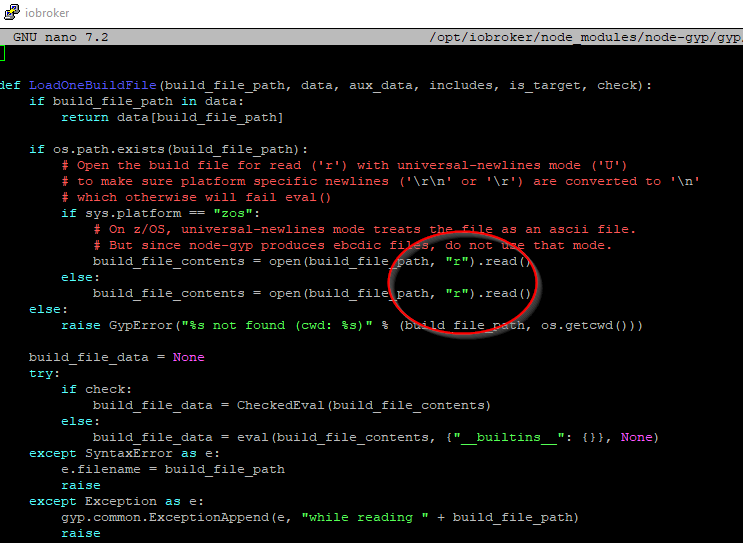
@gismoh
du musst die Zeile
/opt/iobroker/node_modules/node-gyp/gyp/pylib/gyp/input.py
mit nano aufrufen und das U in der entsprechenden Zeile entfernen
abspeichern, fertigsudo nano /opt/iobroker/node_modules/node-gyp/gyp/pylib/gyp/input.py
dabei musst du ein stück nach unten blättern
umgestiegen von Proxmox auf Unraid
-
@gismoh
du musst die Zeile
/opt/iobroker/node_modules/node-gyp/gyp/pylib/gyp/input.py
mit nano aufrufen und das U in der entsprechenden Zeile entfernen
abspeichern, fertigsudo nano /opt/iobroker/node_modules/node-gyp/gyp/pylib/gyp/input.py
dabei musst du ein stück nach unten blättern
@crunchip
Besten Dank für deine unermüdliche Hilfe!
muss allerdings erst schauen, wo die Datei bei mir ist, zumindest konnte ich die Datei mit "sudo nano /opt/iobroker/node_modules/node-gyp/gyp/pylib/gyp/input.py" nicht finden, bzw. es wurde mir eine leere Datei angezeigt.ioBroker auf: Lenovo ThinkCentre M910Q Tiny i5-7500T 16 GB mit proxmox in VM (Bookworm)
-
@crunchip
Besten Dank für deine unermüdliche Hilfe!
muss allerdings erst schauen, wo die Datei bei mir ist, zumindest konnte ich die Datei mit "sudo nano /opt/iobroker/node_modules/node-gyp/gyp/pylib/gyp/input.py" nicht finden, bzw. es wurde mir eine leere Datei angezeigt.@gismoh dann installier mal zuerst die v0.13.3
iob add ble@0.13.3 -
NPM version: 9.8.1 Installing iobroker.ble@0.13.3... (System call) npm ERR! code 1 npm ERR! path /opt/iobroker/node_modules/@abandonware/noble npm ERR! command failed npm ERR! command sh -c node-gyp-build npm ERR! (node:3259) [DEP0150] DeprecationWarning: Setting process.config is deprecated. In the future the property will be read-only. npm ERR! (Use `node --trace-deprecation ...` to show where the warning was created) npm ERR! Traceback (most recent call last): npm ERR! File "/opt/iobroker/node_modules/node-gyp/gyp/gyp_main.py", line 51, in <module> npm ERR! sys.exit(gyp.script_main()) npm ERR! ^^^^^^^^^^^^^^^^^ npm ERR! File "/opt/iobroker/node_modules/node-gyp/gyp/pylib/gyp/__init__.py", line 670, in script_main npm ERR! return main(sys.argv[1:]) npm ERR! ^^^^^^^^^^^^^^^^^^ npm ERR! File "/opt/iobroker/node_modules/node-gyp/gyp/pylib/gyp/__init__.py", line 662, in main npm ERR! return gyp_main(args) npm ERR! ^^^^^^^^^^^^^^ npm ERR! File "/opt/iobroker/node_modules/node-gyp/gyp/pylib/gyp/__init__.py", line 629, in gyp_main npm ERR! [generator, flat_list, targets, data] = Load( npm ERR! ^^^^^ npm ERR! File "/opt/iobroker/node_modules/node-gyp/gyp/pylib/gyp/__init__.py", line 150, in Load npm ERR! result = gyp.input.Load( npm ERR! ^^^^^^^^^^^^^^^ npm ERR! File "/opt/iobroker/node_modules/node-gyp/gyp/pylib/gyp/input.py", line 3021, in Load npm ERR! LoadTargetBuildFile( npm ERR! File "/opt/iobroker/node_modules/node-gyp/gyp/pylib/gyp/input.py", line 411, in LoadTargetBuildFile npm ERR! build_file_data = LoadOneBuildFile( npm ERR! ^^^^^^^^^^^^^^^^^ npm ERR! File "/opt/iobroker/node_modules/node-gyp/gyp/pylib/gyp/input.py", line 239, in LoadOneBuildFile npm ERR! build_file_contents = open(build_file_path, "rU").read() npm ERR! ^^^^^^^^^^^^^^^^^^^^^^^^^^^ npm ERR! ValueError: invalid mode: 'rU' while trying to load binding.gyp npm ERR! gyp ERR! configure error npm ERR! gyp ERR! stack Error: `gyp` failed with exit code: 1 npm ERR! gyp ERR! stack at ChildProcess.onCpExit (/opt/iobroker/node_modules/node-gyp/lib/configure.js:351:16) npm ERR! gyp ERR! stack at ChildProcess.emit (node:events:517:28) npm ERR! gyp ERR! stack at ChildProcess._handle.onexit (node:internal/child_process:292:12) npm ERR! gyp ERR! System Linux 6.1.0-13-amd64 npm ERR! gyp ERR! command "/usr/bin/node" "/opt/iobroker/node_modules/node-gyp/bin/node-gyp.js" "rebuild" npm ERR! gyp ERR! cwd /opt/iobroker/node_modules/@abandonware/noble npm ERR! gyp ERR! node -v v18.18.2 npm ERR! gyp ERR! node-gyp -v v7.1.2 npm ERR! gyp ERR! not ok npm ERR! A complete log of this run can be found in: /home/iobroker/.npm/_logs/2023-11-08T00_24_15_069Z-debug-0.log host.ioBrokerVM Cannot install iobroker.ble@0.13.3: 1ioBroker auf: Lenovo ThinkCentre M910Q Tiny i5-7500T 16 GB mit proxmox in VM (Bookworm)
-
Delete adapter "ble"
host.ioBrokerVM Counted 1 instances of ble
host.ioBrokerVM Counted 1 meta of ble
host.ioBrokerVM Counted 1 adapter for ble
host.ioBrokerVM Counted 35 devices of ble
host.ioBrokerVM Counted 37 channels of ble
host.ioBrokerVM Counted 91 states of ble
host.ioBrokerVM Counted 14 states of system.adapter.ble
host.ioBrokerVM Counted 92 states (io.ble.*) from states
host.ioBrokerVM Counted 13 states (system.adapter.ble.*) from states
host.ioBrokerVM object ble deleted
host.ioBrokerVM object ble.admin deleted
host.ioBrokerVM Deleting 180 object(s).
host.ioBrokerVM Deleting 105 state(s).
Error deleting adapter ble from disk: Cannot find module 'iobroker.ble/io-package.json'
Require stack:
- /opt/iobroker/node_modules/@iobroker/js-controller-cli/build/lib/setup/setupInstall.js
- /opt/iobroker/node_modules/@iobroker/js-controller-cli/build/lib/setup/setupUpgrade.js
- /opt/iobroker/node_modules/@iobroker/js-controller-cli/build/index.js
- /opt/iobroker/node_modules/iobroker.js-controller/iobroker.js
You might have to delete it yourself!
root@ioBrokerVM:~# iob add ble --debug NPM version: 9.8.1 Installing iobroker.ble@0.13.4... (System call) npm ERR! code 1 npm ERR! path /opt/iobroker/node_modules/@abandonware/noble npm ERR! command failed npm ERR! command sh -c node-gyp-build npm ERR! gyp info it worked if it ends with ok npm ERR! gyp info using node-gyp@7.1.2 npm ERR! gyp info using node@18.18.2 | linux | x64 npm ERR! gyp info find Python using Python version 3.11.2 found at "/usr/bin/python3" npm ERR! (node:3048) [DEP0150] DeprecationWarning: Setting process.config is deprecated. In the future the property will be read-only. npm ERR! (Use `node --trace-deprecation ...` to show where the warning was created) npm ERR! gyp info spawn /usr/bin/python3 npm ERR! gyp info spawn args [ npm ERR! gyp info spawn args '/opt/iobroker/node_modules/node-gyp/gyp/gyp_main.py', npm ERR! gyp info spawn args 'binding.gyp', npm ERR! gyp info spawn args '-f', npm ERR! gyp info spawn args 'make', npm ERR! gyp info spawn args '-I', npm ERR! gyp info spawn args '/opt/iobroker/node_modules/@abandonware/noble/build/config.gypi', npm ERR! gyp info spawn args '-I', npm ERR! gyp info spawn args '/opt/iobroker/node_modules/node-gyp/addon.gypi', npm ERR! gyp info spawn args '-I', npm ERR! gyp info spawn args '/home/iobroker/.cache/node-gyp/18.18.2/include/node/common.gypi', npm ERR! gyp info spawn args '-Dlibrary=shared_library', npm ERR! gyp info spawn args '-Dvisibility=default', npm ERR! gyp info spawn args '-Dnode_root_dir=/home/iobroker/.cache/node-gyp/18.18.2', npm ERR! gyp info spawn args '-Dnode_gyp_dir=/opt/iobroker/node_modules/node-gyp', npm ERR! gyp info spawn args '-Dnode_lib_file=/home/iobroker/.cache/node-gyp/18.18.2/<(target_arch)/node.lib', npm ERR! gyp info spawn args '-Dmodule_root_dir=/opt/iobroker/node_modules/@abandonware/noble', npm ERR! gyp info spawn args '-Dnode_engine=v8', npm ERR! gyp info spawn args '--depth=.', npm ERR! gyp info spawn args '--no-parallel', npm ERR! gyp info spawn args '--generator-output', npm ERR! gyp info spawn args 'build', npm ERR! gyp info spawn args '-Goutput_dir=.' npm ERR! gyp info spawn args ] npm ERR! Traceback (most recent call last): npm ERR! File "/opt/iobroker/node_modules/node-gyp/gyp/gyp_main.py", line 51, in <module> npm ERR! sys.exit(gyp.script_main()) npm ERR! ^^^^^^^^^^^^^^^^^ npm ERR! File "/opt/iobroker/node_modules/node-gyp/gyp/pylib/gyp/__init__.py", line 670, in script_main npm ERR! return main(sys.argv[1:]) npm ERR! ^^^^^^^^^^^^^^^^^^ npm ERR! File "/opt/iobroker/node_modules/node-gyp/gyp/pylib/gyp/__init__.py", line 662, in main npm ERR! return gyp_main(args) npm ERR! ^^^^^^^^^^^^^^ npm ERR! File "/opt/iobroker/node_modules/node-gyp/gyp/pylib/gyp/__init__.py", line 629, in gyp_main npm ERR! [generator, flat_list, targets, data] = Load( npm ERR! ^^^^^ npm ERR! File "/opt/iobroker/node_modules/node-gyp/gyp/pylib/gyp/__init__.py", line 150, in Load npm ERR! result = gyp.input.Load( npm ERR! ^^^^^^^^^^^^^^^ npm ERR! File "/opt/iobroker/node_modules/node-gyp/gyp/pylib/gyp/input.py", line 3021, in Load npm ERR! LoadTargetBuildFile( npm ERR! File "/opt/iobroker/node_modules/node-gyp/gyp/pylib/gyp/input.py", line 411, in LoadTargetBuildFile npm ERR! build_file_data = LoadOneBuildFile( npm ERR! ^^^^^^^^^^^^^^^^^ npm ERR! File "/opt/iobroker/node_modules/node-gyp/gyp/pylib/gyp/input.py", line 239, in LoadOneBuildFile npm ERR! build_file_contents = open(build_file_path, "rU").read() npm ERR! ^^^^^^^^^^^^^^^^^^^^^^^^^^^ npm ERR! ValueError: invalid mode: 'rU' while trying to load binding.gyp npm ERR! gyp ERR! configure error npm ERR! gyp ERR! stack Error: `gyp` failed with exit code: 1 npm ERR! gyp ERR! stack at ChildProcess.onCpExit (/opt/iobroker/node_modules/node-gyp/lib/configure.js:351:16) npm ERR! gyp ERR! stack at ChildProcess.emit (node:events:517:28) npm ERR! gyp ERR! stack at ChildProcess._handle.onexit (node:internal/child_process:292:12) npm ERR! gyp ERR! System Linux 6.1.0-13-amd64 npm ERR! gyp ERR! command "/usr/bin/node" "/opt/iobroker/node_modules/node-gyp/bin/node-gyp.js" "rebuild" npm ERR! gyp ERR! cwd /opt/iobroker/node_modules/@abandonware/noble npm ERR! gyp ERR! node -v v18.18.2 npm ERR! gyp ERR! node-gyp -v v7.1.2 npm ERR! gyp ERR! not ok npm ERR! A complete log of this run can be found in: /home/iobroker/.npm/_logs/2023-11-07T23_56_22_185Z-debug-0.log npm ERR! code 1 npm ERR! path /opt/iobroker/node_modules/@abandonware/noble npm ERR! command failed npm ERR! command sh -c node-gyp-build npm ERR! gyp info it worked if it ends with ok npm ERR! gyp info using node-gyp@7.1.2 npm ERR! gyp info using node@18.18.2 | linux | x64 npm ERR! gyp info find Python using Python version 3.11.2 found at "/usr/bin/python3" npm ERR! (node:3048) [DEP0150] DeprecationWarning: Setting process.config is deprecated. In the future the property will be read-only. npm ERR! (Use `node --trace-deprecation ...` to show where the warning was created) npm ERR! gyp info spawn /usr/bin/python3 npm ERR! gyp info spawn args [ npm ERR! gyp info spawn args '/opt/iobroker/node_modules/node-gyp/gyp/gyp_main.py', npm ERR! gyp info spawn args 'binding.gyp', npm ERR! gyp info spawn args '-f', npm ERR! gyp info spawn args 'make', npm ERR! gyp info spawn args '-I', npm ERR! gyp info spawn args '/opt/iobroker/node_modules/@abandonware/noble/build/config.gypi', npm ERR! gyp info spawn args '-I', npm ERR! gyp info spawn args '/opt/iobroker/node_modules/node-gyp/addon.gypi', npm ERR! gyp info spawn args '-I', npm ERR! gyp info spawn args '/home/iobroker/.cache/node-gyp/18.18.2/include/node/common.gypi', npm ERR! gyp info spawn args '-Dlibrary=shared_library', npm ERR! gyp info spawn args '-Dvisibility=default', npm ERR! gyp info spawn args '-Dnode_root_dir=/home/iobroker/.cache/node-gyp/18.18.2', npm ERR! gyp info spawn args '-Dnode_gyp_dir=/opt/iobroker/node_modules/node-gyp', npm ERR! gyp info spawn args '-Dnode_lib_file=/home/iobroker/.cache/node-gyp/18.18.2/<(target_arch)/node.lib', npm ERR! gyp info spawn args '-Dmodule_root_dir=/opt/iobroker/node_modules/@abandonware/noble', npm ERR! gyp info spawn args '-Dnode_engine=v8', npm ERR! gyp info spawn args '--depth=.', npm ERR! gyp info spawn args '--no-parallel', npm ERR! gyp info spawn args '--generator-output', npm ERR! gyp info spawn args 'build', npm ERR! gyp info spawn args '-Goutput_dir=.' npm ERR! gyp info spawn args ] npm ERR! Traceback (most recent call last): npm ERR! File "/opt/iobroker/node_modules/node-gyp/gyp/gyp_main.py", line 51, in <module> npm ERR! sys.exit(gyp.script_main()) npm ERR! ^^^^^^^^^^^^^^^^^ npm ERR! File "/opt/iobroker/node_modules/node-gyp/gyp/pylib/gyp/__init__.py", line 670, in script_main npm ERR! return main(sys.argv[1:]) npm ERR! ^^^^^^^^^^^^^^^^^^ npm ERR! File "/opt/iobroker/node_modules/node-gyp/gyp/pylib/gyp/__init__.py", line 662, in main npm ERR! return gyp_main(args) npm ERR! ^^^^^^^^^^^^^^ npm ERR! File "/opt/iobroker/node_modules/node-gyp/gyp/pylib/gyp/__init__.py", line 629, in gyp_main npm ERR! [generator, flat_list, targets, data] = Load( npm ERR! ^^^^^ npm ERR! File "/opt/iobroker/node_modules/node-gyp/gyp/pylib/gyp/__init__.py", line 150, in Load npm ERR! result = gyp.input.Load( npm ERR! ^^^^^^^^^^^^^^^ npm ERR! File "/opt/iobroker/node_modules/node-gyp/gyp/pylib/gyp/input.py", line 3021, in Load npm ERR! LoadTargetBuildFile( npm ERR! File "/opt/iobroker/node_modules/node-gyp/gyp/pylib/gyp/input.py", line 411, in LoadTargetBuildFile npm ERR! build_file_data = LoadOneBuildFile( npm ERR! ^^^^^^^^^^^^^^^^^ npm ERR! File "/opt/iobroker/node_modules/node-gyp/gyp/pylib/gyp/input.py", line 239, in LoadOneBuildFile npm ERR! build_file_contents = open(build_file_path, "rU").read() npm ERR! ^^^^^^^^^^^^^^^^^^^^^^^^^^^ npm ERR! ValueError: invalid mode: 'rU' while trying to load binding.gyp npm ERR! gyp ERR! configure error npm ERR! gyp ERR! stack Error: `gyp` failed with exit code: 1 npm ERR! gyp ERR! stack at ChildProcess.onCpExit (/opt/iobroker/node_modules/node-gyp/lib/configure.js:351:16) npm ERR! gyp ERR! stack at ChildProcess.emit (node:events:517:28) npm ERR! gyp ERR! stack at ChildProcess._handle.onexit (node:internal/child_process:292:12) npm ERR! gyp ERR! System Linux 6.1.0-13-amd64 npm ERR! gyp ERR! command "/usr/bin/node" "/opt/iobroker/node_modules/node-gyp/bin/node-gyp.js" "rebuild" npm ERR! gyp ERR! cwd /opt/iobroker/node_modules/@abandonware/noble npm ERR! gyp ERR! node -v v18.18.2 npm ERR! gyp ERR! node-gyp -v v7.1.2 npm ERR! gyp ERR! not ok npm ERR! A complete log of this run can be found in: /home/iobroker/.npm/_logs/2023-11-07T23_56_22_185Z-debug-0.log host.ioBrokerVM Cannot install iobroker.ble@0.13.4: 1 root@ioBrokerVM:~#@gismoh sagte in ioBroker auf neuer Maschine aufgesetzt und Adapter Probleme:
npm ERR! File "/opt/iobroker/node_modules/node-gyp/gyp/pylib/gyp/input.py", line 239, in LoadOneBuildFile npm ERR! build_file_contents = open(build_file_path, "rU").read() npm ERR! ^^^^^^^^^^^^^^^^^^^^^^^^^^^ npm ERR! ValueError: invalid mode: 'rU' while trying to load binding.gypdie Datei muss es geben


Hey! Du scheinst an dieser Unterhaltung interessiert zu sein, hast aber noch kein Konto.
Hast du es satt, bei jedem Besuch durch die gleichen Beiträge zu scrollen? Wenn du dich für ein Konto anmeldest, kommst du immer genau dorthin zurück, wo du zuvor warst, und kannst dich über neue Antworten benachrichtigen lassen (entweder per E-Mail oder Push-Benachrichtigung). Du kannst auch Lesezeichen speichern und Beiträge positiv bewerten, um anderen Community-Mitgliedern deine Wertschätzung zu zeigen.
Mit deinem Input könnte dieser Beitrag noch besser werden 💗
Registrieren AnmeldenSupport us
254
Online33.0k
Benutzer83.6k
Themen1.3m
Beiträge