




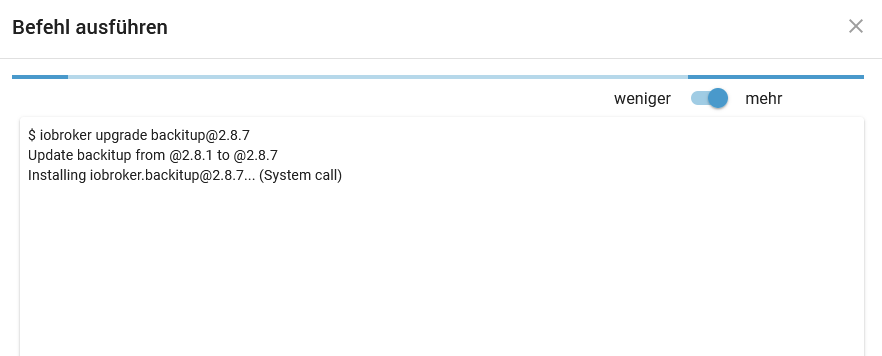
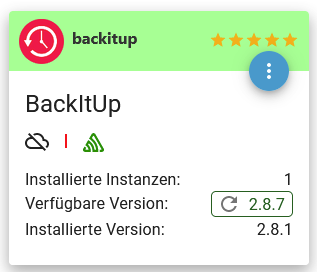
BackItUp Update hängt
-
@thomas-braun sagte in BackItUp Update hängt:
Wo kommt diese Scheiße mit 'sudo iob' immer her???
alte DAU Gewohnheit, dass ich alle Befehle nicht unter root, sondern unter eigenem User und dann mit sudo starte.
Befehle sind durch.
======== Start marking the full check here =========
Skript v.2023-10-10

*** BASE SYSTEM ***
 Static hostname: ioBroker
       Icon name: computer-container
         Chassis: container ☐
  Virtualization: lxc
Operating System: Debian GNU/Linux 12 (bookworm)
          Kernel: Linux 6.2.16-18-pve
    Architecture: x86-64

model name	: Intel(R) Core(TM) i5-10400T CPU @ 2.00GHz
Docker          : false
Virtualization  : lxc
Kernel          : x86_64
Userland        : amd64

Systemuptime and Load:
 14:29:45 up 5 days,  3:18,  2 users,  load average: 1.17, 0.94, 0.86
CPU threads: 4


*** Time and Time Zones ***
               Local time: Thu 2023-11-02 14:29:46 CET
           Universal time: Thu 2023-11-02 13:29:46 UTC
                 RTC time: n/a
                Time zone: Europe/Berlin (CET, +0100)
System clock synchronized: yes
              NTP service: inactive
          RTC in local TZ: no

*** User and Groups ***
Volker
/home/Volker
Volker sudo iobroker

*** X-Server-Setup ***
X-Server: 	false
Desktop:
Terminal: 	tty
Boot Target: 	graphical.target

*** MEMORY ***
               total        used        free      shared  buff/cache   available
Mem:            4.3G        1.2G        1.5G        196K        1.7G        3.1G
Swap:           1.1G        222M        851M
Total:          5.4G        1.4G        2.3G

         4096 M total memory
         1137 M used memory
          492 M active memory
         2053 M inactive memory
         1382 M free memory
            0 M buffer memory
         1575 M swap cache
         1024 M total swap
          212 M used swap
          811 M free swap

*** FAILED SERVICES ***

  UNIT                                 LOAD   ACTIVE SUB    DESCRIPTION
* run-rpc_pipefs.mount                 loaded failed failed RPC Pipe File System
* sys-kernel-config.mount              loaded failed failed Kernel Configuration File System
* systemd-networkd-wait-online.service loaded failed failed Wait for Network to be Configured

LOAD   = Reflects whether the unit definition was properly loaded.
ACTIVE = The high-level unit activation state, i.e. generalization of SUB.
SUB    = The low-level unit activation state, values depend on unit type.
3 loaded units listed.

*** FILESYSTEM ***
Filesystem     Type      Size  Used Avail Use% Mounted on
/dev/loop0     ext4      7.8G  5.5G  2.0G  74% /
none           tmpfs     492K  4.0K  488K   1% /dev
udev           devtmpfs   16G     0   16G   0% /dev/tty
tmpfs          tmpfs      16G     0   16G   0% /dev/shm
tmpfs          tmpfs     6.3G  224K  6.3G   1% /run
tmpfs          tmpfs     5.0M     0  5.0M   0% /run/lock
tmpfs          tmpfs     3.2G     0  3.2G   0% /run/user/1000

Messages concerning ext4 filesystem in dmesg:
dmesg: read kernel buffer failed: Operation not permitted

Show mounted filesystems \(real ones only\):
TARGET SOURCE     FSTYPE OPTIONS
/      /dev/loop0 ext4   rw,relatime

Files in neuralgic directories:

/var:
1.3G	/var/
731M	/var/log
722M	/var/log/journal/00e5974b12bd435d87aedc1bff2e2ff3
722M	/var/log/journal
274M	/var/cache

Hint: You are currently not seeing messages from other users and the system.
      Users in groups 'adm', 'systemd-journal' can see all messages.
      Pass -q to turn off this notice.
Archived and active journals take up 387.6M in the file system.

/opt/iobroker/backups:
763M	/opt/iobroker/backups/

/opt/iobroker/iobroker-data:
367M	/opt/iobroker/iobroker-data/
203M	/opt/iobroker/iobroker-data/files
71M	/opt/iobroker/iobroker-data/backup-objects
51M	/opt/iobroker/iobroker-data/files/javascript.admin
48M	/opt/iobroker/iobroker-data/files/telegram.admin

The five largest files in iobroker-data are:
52M	/opt/iobroker/iobroker-data/states.jsonl
28M	/opt/iobroker/iobroker-data/objects.jsonl
15M	/opt/iobroker/iobroker-data/files/telegram.admin/rules/static/js/vendors-node_modules_iobroker_adapter-react-v5_assets_devices_parseNames_d_ts-node_modules_io-1d9f06.44fe4a3f.chunk.js.map
8.9M	/opt/iobroker/iobroker-data/files/scenes.admin/static/js/2.7de3299d.chunk.js.map
7.2M	/opt/iobroker/iobroker-data/files/telegram.admin/rules/static/js/vendors-node_modules_iobroker_adapter-react-v5_assets_devices_parseNames_d_ts-node_modules_io-1d9f06.44fe4a3f.chunk.js

USB-Devices by-id:
USB-Sticks -  Avoid direct links to /dev/* in your adapter setups, please always prefer the links 'by-id':

find: '/dev/serial/by-id/': No such file or directory

*** NodeJS-Installation ***

/usr/bin/nodejs 	v18.18.2
/usr/bin/node 		v18.18.2
/usr/bin/npm 		9.8.1
/usr/bin/npx 		9.8.1
/usr/bin/corepack 	0.19.0


nodejs:
  Installed: 18.18.2-1nodesource1
  Candidate: 18.18.2-1nodesource1
  Version table:
 *** 18.18.2-1nodesource1 500
        500 https://deb.nodesource.com/node_18.x nodistro/main amd64 Packages
        100 /var/lib/dpkg/status
     18.18.1-1nodesource1 500
        500 https://deb.nodesource.com/node_18.x nodistro/main amd64 Packages
     18.18.0-1nodesource1 500
        500 https://deb.nodesource.com/node_18.x nodistro/main amd64 Packages
     18.17.1-1nodesource1 500
        500 https://deb.nodesource.com/node_18.x nodistro/main amd64 Packages
     18.17.0-1nodesource1 500
        500 https://deb.nodesource.com/node_18.x nodistro/main amd64 Packages
     18.16.1-1nodesource1 500
        500 https://deb.nodesource.com/node_18.x nodistro/main amd64 Packages
     18.16.0-1nodesource1 500
        500 https://deb.nodesource.com/node_18.x nodistro/main amd64 Packages
     18.15.0-1nodesource1 500
        500 https://deb.nodesource.com/node_18.x nodistro/main amd64 Packages
     18.14.2-1nodesource1 500
        500 https://deb.nodesource.com/node_18.x nodistro/main amd64 Packages
     18.14.1-1nodesource1 500
        500 https://deb.nodesource.com/node_18.x nodistro/main amd64 Packages
     18.14.0-1nodesource1 500
        500 https://deb.nodesource.com/node_18.x nodistro/main amd64 Packages
     18.13.0+dfsg1-1 500
        500 http://ftp.debian.org/debian bookworm/main amd64 Packages
     18.13.0-1nodesource1 500
        500 https://deb.nodesource.com/node_18.x nodistro/main amd64 Packages
     18.12.0-1nodesource1 500
        500 https://deb.nodesource.com/node_18.x nodistro/main amd64 Packages
     18.11.0-1nodesource1 500
        500 https://deb.nodesource.com/node_18.x nodistro/main amd64 Packages
     18.10.0-1nodesource1 500
        500 https://deb.nodesource.com/node_18.x nodistro/main amd64 Packages
     18.9.1-1nodesource1 500
        500 https://deb.nodesource.com/node_18.x nodistro/main amd64 Packages
     18.9.0-1nodesource1 500
        500 https://deb.nodesource.com/node_18.x nodistro/main amd64 Packages
     18.8.0-1nodesource1 500
        500 https://deb.nodesource.com/node_18.x nodistro/main amd64 Packages
     18.7.0-1nodesource1 500
        500 https://deb.nodesource.com/node_18.x nodistro/main amd64 Packages
     18.6.0-1nodesource1 500
        500 https://deb.nodesource.com/node_18.x nodistro/main amd64 Packages
     18.5.0-1nodesource1 500
        500 https://deb.nodesource.com/node_18.x nodistro/main amd64 Packages
     18.4.0-1nodesource1 500
        500 https://deb.nodesource.com/node_18.x nodistro/main amd64 Packages
     18.3.0-1nodesource1 500
        500 https://deb.nodesource.com/node_18.x nodistro/main amd64 Packages
     18.2.0-1nodesource1 500
        500 https://deb.nodesource.com/node_18.x nodistro/main amd64 Packages
     18.1.0-1nodesource1 500
        500 https://deb.nodesource.com/node_18.x nodistro/main amd64 Packages
     18.0.0-1nodesource1 500
        500 https://deb.nodesource.com/node_18.x nodistro/main amd64 Packages

Temp directories causing npm8 problem: 0
No problems detected

Errors in npm tree:

*** ioBroker-Installation ***

ioBroker Status
iobroker is running on this host.

At least one iobroker host is running.

Objects type: redis
States  type: redis

Core adapters versions
js-controller: 	5.0.12
admin: 		6.12.0
javascript: 	7.1.4

Adapters from github: 	5

Adapter State
+ system.adapter.admin.0                  : admin                 : ioBroker                                 -  enabled, port: 8081, bind: 0.0.0.0, run as: admin
  system.adapter.backitup.0               : backitup              : ioBroker                                 - disabled
  system.adapter.daswetter.0              : daswetter             : ioBroker                                 -  enabled
  system.adapter.deconz.0                 : deconz                : ioBroker                                 -  enabled
  system.adapter.dwd.0                    : dwd                   : ioBroker                                 -  enabled
  system.adapter.ecovacs-deebot.0         : ecovacs-deebot        : ioBroker                                 -  enabled
+ system.adapter.email.0                  : email                 : ioBroker                                 -  enabled
  system.adapter.fb-checkpresence.0       : fb-checkpresence      : ioBroker                                 -  enabled
  system.adapter.fitbit-fitness.0         : fitbit-fitness        : ioBroker                                 -  enabled
  system.adapter.fitbit-fitness.1         : fitbit-fitness        : ioBroker                                 -  enabled
+ system.adapter.fritzbox.0               : fritzbox              : ioBroker                                 -  enabled
  system.adapter.fritzdect.0              : fritzdect             : ioBroker                                 -  enabled
+ system.adapter.history.0                : history               : ioBroker                                 -  enabled
  system.adapter.ical.0                   : ical                  : ioBroker                                 -  enabled
  system.adapter.info.0                   : info                  : ioBroker                                 -  enabled
+ system.adapter.javascript.0             : javascript            : ioBroker                                 -  enabled
  system.adapter.openligadb.0             : openligadb            : ioBroker                                 -  enabled
  system.adapter.pollenflug.0             : pollenflug            : ioBroker                                 -  enabled
  system.adapter.rainbird.0               : rainbird              : ioBroker                                 -  enabled
+ system.adapter.scenes.0                 : scenes                : ioBroker                                 -  enabled
  system.adapter.signal-cmb.0             : signal-cmb            : ioBroker                                 -  enabled
  system.adapter.tahoma.0                 : tahoma                : ioBroker                                 -  enabled
  system.adapter.tankerkoenig.0           : tankerkoenig          : ioBroker                                 -  enabled
+ system.adapter.telegram.0               : telegram              : ioBroker                                 -  enabled, port: 8443, bind: 0.0.0.0
  system.adapter.tr-064.0                 : tr-064                : ioBroker                                 -  enabled
  system.adapter.trashschedule.0          : trashschedule         : ioBroker                                 -  enabled
  system.adapter.tvprogram.0              : tvprogram             : ioBroker                                 -  enabled
  system.adapter.upnp.0                   : upnp                  : ioBroker                                 -  enabled
  system.adapter.vis-canvas-gauges.0      : vis-canvas-gauges     : ioBroker                                 - disabled
  system.adapter.vis-google-fonts.0       : vis-google-fonts      : ioBroker                                 -  enabled
  system.adapter.vis-hqwidgets.0          : vis-hqwidgets         : ioBroker                                 - disabled
  system.adapter.vis-jqui-mfd.0           : vis-jqui-mfd          : ioBroker                                 -  enabled
  system.adapter.vis-timeandweather.0     : vis-timeandweather    : ioBroker                                 - disabled
  system.adapter.vis.0                    : vis                   : ioBroker                                 -  enabled
+ system.adapter.weatherunderground.0     : weatherunderground    : ioBroker                                 -  enabled
  system.adapter.web.0                    : web                   : ioBroker                                 -  enabled, port: 8082, bind: 0.0.0.0, run as: admin

+ instance is alive

Enabled adapters with bindings
+ system.adapter.admin.0                  : admin                 : ioBroker                                 -  enabled, port: 8081, bind: 0.0.0.0, run as: admin
+ system.adapter.telegram.0               : telegram              : ioBroker                                 -  enabled, port: 8443, bind: 0.0.0.0
  system.adapter.web.0                    : web                   : ioBroker                                 -  enabled, port: 8082, bind: 0.0.0.0, run as: admin

ioBroker-Repositories
stable        : http://download.iobroker.net/sources-dist.json
beta          : http://download.iobroker.net/sources-dist-latest.json

Active repo(s): stable

Installed ioBroker-Instances
Used repository: stable
Adapter    "admin"        : 6.12.0   , installed 6.12.0
Adapter    "backitup"     : 2.8.7    , installed 2.8.1  [Updatable]
Adapter    "daswetter"    : 3.1.10   , installed 3.1.10
Adapter    "deconz"       : 1.3.21   , installed 1.3.21
Adapter    "dwd"          : 2.8.5    , installed 2.8.5
Adapter    "ecovacs-deebot": 1.4.13  , installed 1.4.14-alpha.6
Adapter    "email"        : 1.2.0    , installed 1.2.0
Adapter    "fb-checkpresence": 1.2.2 , installed 1.2.2
Adapter    "fitbit-fitness": 0.4.10  , installed 0.4.10
Adapter    "fritzbox"     : 0.5.0    , installed 0.5.0
Adapter    "fritzdect"    : 2.3.1    , installed 2.3.1
Adapter    "history"      : 3.0.1    , installed 3.0.1
Adapter    "ical"         : 1.13.3   , installed 1.13.3
Adapter    "icons-material-png": 0.1.0, installed 0.1.0
Adapter    "info"         : 2.0.0    , installed 2.0.0
Adapter    "javascript"   : 7.1.4    , installed 7.1.4
Controller "js-controller": 5.0.12   , installed 5.0.12
Adapter    "openligadb"   : 1.2.4    , installed 1.3.3
Adapter    "pollenflug"   : 1.0.6    , installed 1.0.6
Adapter    "scenes"       : 2.3.9    , installed 2.3.9
Adapter    "signal-cmb"   : 0.3.0    , installed 0.3.0
Adapter    "simple-api"   : 2.7.2    , installed 2.7.2
Adapter    "socketio"     : 6.5.5    , installed 6.5.5
Adapter    "tahoma"       : 0.10.2   , installed 0.10.2
Adapter    "tankerkoenig" : 3.3.7    , installed 3.3.7
Adapter    "telegram"     : 1.16.0   , installed 1.16.0
Adapter    "tr-064"       : 4.2.18   , installed 4.2.18
Adapter    "trashschedule": 2.2.0    , installed 2.2.0
Adapter    "tvprogram"    : 1.1.2    , installed 1.1.2
Adapter    "upnp"         : 1.0.21   , installed 1.0.21
Adapter    "vis"          : 1.4.16   , installed 1.4.16
Adapter    "vis-canvas-gauges": 1.0.1, installed 1.0.1
Adapter    "vis-google-fonts": 1.0.4 , installed 1.0.4
Adapter    "vis-hqwidgets": 1.4.0    , installed 1.4.0
Adapter    "vis-jqui-mfd" : 1.0.12   , installed 1.0.12
Adapter    "vis-timeandweather": 1.2.2, installed 1.2.2
Adapter    "weatherunderground": 3.6.0, installed 3.6.0
Adapter    "web"          : 6.1.2    , installed 6.1.2
Adapter    "ws"           : 2.5.5    , installed 2.5.5

Objects and States
Please stand by - This may take a while
Objects: 	15704
States: 	14921

*** OS-Repositories and Updates ***
Hit:1 http://security.debian.org bookworm-security InRelease
Hit:2 http://ftp.debian.org/debian bookworm InRelease
Hit:3 http://ftp.debian.org/debian bookworm-updates InRelease
Hit:4 https://deb.nodesource.com/node_18.x nodistro InRelease
Reading package lists...
Pending Updates: 2

*** Listening Ports ***
Active Internet connections (only servers)
Proto Recv-Q Send-Q Local Address           Foreign Address         State       User       Inode      PID/Program name
tcp        0      0 0.0.0.0:111             0.0.0.0:*               LISTEN      0          34560      1/init
tcp        0      0 127.0.0.1:6379          0.0.0.0:*               LISTEN      109        32996      126/redis-server 12
tcp        0      0 127.0.0.1:25            0.0.0.0:*               LISTEN      0          61685      1381/master
tcp6       0      0 :::111                  :::*                    LISTEN      0          34562      1/init
tcp6       0      0 :::22                   :::*                    LISTEN      0          23037      1/init
tcp6       0      0 :::8081                 :::*                    LISTEN      1001       34063654   106519/io.admin.0
tcp6       0      0 ::1:6379                :::*                    LISTEN      109        32997      126/redis-server 12
tcp6       0      0 ::1:25                  :::*                    LISTEN      0          61686      1381/master
udp        0      0 0.0.0.0:111             0.0.0.0:*                           0          34561      1/init
udp6       0      0 :::111                  :::*                                0          34563      1/init

*** Log File - Last 25 Lines ***

2023-11-02 14:29:52.633  - info: weatherunderground.0 (106865) starting. Version 3.6.0 in /opt/iobroker/node_modules/iobroker.weatherunderground, node: v18.18.2, js-controller: 5.0.12
2023-11-02 14:29:54.014  - info: ical.0 (106818) Terminated (NO_ERROR): Without reason
2023-11-02 14:29:54.537  - info: host.ioBroker instance system.adapter.ical.0 terminated with code 0 (NO_ERROR)
2023-11-02 14:29:56.134  - info: host.ioBroker instance system.adapter.tahoma.0 started with pid 106914
2023-11-02 14:29:56.589  - info: tahoma.0 (106914) starting. Version 0.10.2 in /opt/iobroker/node_modules/iobroker.tahoma, node: v18.18.2, js-controller: 5.0.12
2023-11-02 14:29:56.600  - info: tahoma.0 (106914) [START] Starting adapter tahoma v0.10.2.3
2023-11-02 14:29:56.601  - info: tahoma.0 (106914) Configured polling interval: 20000
2023-11-02 14:29:56.602  - info: tahoma.0 (106914) Adapter will connect to Tahoma Box via local API.
2023-11-02 14:29:56.603  - info: tahoma.0 (106914) Using stored bearer token 64f5d403d5507131b3a3
2023-11-02 14:29:59.734  - warn: tahoma.0 (106914) error during request: Error: connect EHOSTUNREACH 192.168.115.108:8443, request path: setup with payload:{}
2023-11-02 14:29:59.734  - warn: tahoma.0 (106914) setup failed!
2023-11-02 14:29:59.734  - warn: tahoma.0 (106914) {"error":{"errno":-113,"code":"EHOSTUNREACH","syscall":"connect","address":"192.168.115.108","port":8443}}
2023-11-02 14:30:00.009  - info: javascript.0 (106654) script.js.sonstiges._Werte_berechnen: 2219372544
2023-11-02 14:30:00.009  - info: javascript.0 (106654) script.js.sonstiges._Werte_berechnen: 2167356
2023-11-02 14:30:00.009  - info: javascript.0 (106654) script.js.sonstiges._Werte_berechnen: 2116.55859375
2023-11-02 14:30:00.140  - info: host.ioBroker instance system.adapter.tr-064.0 started with pid 106961
2023-11-02 14:30:00.806  - info: tr-064.0 (106961) starting. Version 4.2.18 in /opt/iobroker/node_modules/iobroker.tr-064, node: v18.18.2, js-controller: 5.0.12
2023-11-02 14:30:04.540  - info: vis-google-fonts.0 (106995) starting. Version 1.0.4 in /opt/iobroker/node_modules/iobroker.vis-google-fonts, node: v18.18.2, js-controller: 5.0.12
2023-11-02 14:30:05.134  - info: vis-google-fonts.0 (106995) Terminated (NO_ERROR): Without reason
2023-11-02 14:30:05.654  - info: host.ioBroker instance system.adapter.vis-google-fonts.0 terminated while should be started once
2023-11-02 14:30:08.136  - info: host.ioBroker instance system.adapter.info.0 started with pid 107504
2023-11-02 14:30:09.043  - info: info.0 (107504) starting. Version 2.0.0 in /opt/iobroker/node_modules/iobroker.info, node: v18.18.2, js-controller: 5.0.12
2023-11-02 14:30:09.106  - info: info.0 (107504) Reading/updating systemdata.
2023-11-02 14:30:09.314  - info: info.0 (107504) State value to set for "info.0.sysinfo.cpu.info.speed" has to be type "string" but received type "number"
2023-11-02 14:30:09.388  - info: info.0 (107504) cpu Temp res = {"main":47,"cores":[42,46,43,47,42,43],"max":47,"socket":[],"chipset":56}


============ Mark until here for C&P =============
Das Update geht so ber auch nicht:
Volker@ioBroker:~$ iob upgrade all --debug

This upgrade of "backitup" will introduce the following changes:
==========================================================================
-> 2.8.7:
fix restore in docker v9

-> 2.8.6:
Fix node-red restore
dependencies updated

-> 2.8.5:
Fix mount errors

-> 2.8.4:
Fix mysql Backup
Fix pgsql Backup
Fix InfluxDB Backup

-> 2.8.3:
Wake on LAN Advanced Settings added
dependencies updated

-> 2.8.2:
Fix redis backup
==========================================================================

Would you like to upgrade backitup from @2.8.1 to @2.8.7 now? [(y)es, (n)o]: y
Update backitup from @2.8.1 to @2.8.7
NPM version: 9.8.1
Installing iobroker.backitup@2.8.7... (System call)
Und das wars.
@myssv sagte in BackItUp Update hängt:
sondern unter eigenem User und dann mit sudo starte.
Das ist ja sehr sinnvoll... Dann kannste dich auch gleich als root anmelden, wenn du eh jeglichen Befehl wieder als root ausführst. Du zerballerst dir allerdings nachhaltig das Rechtegefüge.
-
@myssv sagte in BackItUp Update hängt:
sondern unter eigenem User und dann mit sudo starte.
Das ist ja sehr sinnvoll... Dann kannste dich auch gleich als root anmelden, wenn du eh jeglichen Befehl wieder als root ausführst. Du zerballerst dir allerdings nachhaltig das Rechtegefüge.
@thomas-braun sagte in BackItUp Update hängt:
Das ist ja sehr sinnvoll...
Leider mangelnde Linux Kenntnisse bei mir.
-
@thomas-braun sagte in BackItUp Update hängt:
Das ist ja sehr sinnvoll...
Leider mangelnde Linux Kenntnisse bei mir.
-
Nun ging es doch weiter mit dem Befehl:
Volker@ioBroker:~$ iob upgrade all --debug

This upgrade of "backitup" will introduce the following changes:
==========================================================================
-> 2.8.7:
fix restore in docker v9

-> 2.8.6:
Fix node-red restore
dependencies updated

-> 2.8.5:
Fix mount errors

-> 2.8.4:
Fix mysql Backup
Fix pgsql Backup
Fix InfluxDB Backup

-> 2.8.3:
Wake on LAN Advanced Settings added
dependencies updated

-> 2.8.2:
Fix redis backup
==========================================================================

Would you like to upgrade backitup from @2.8.1 to @2.8.7 now? [(y)es, (n)o]: y
Update backitup from @2.8.1 to @2.8.7
NPM version: 9.8.1
Installing iobroker.backitup@2.8.7... (System call)
npm ERR! code ETARGET
npm ERR! notarget No matching version found for iobroker.backitup@2.8.7.
npm ERR! notarget In most cases you or one of your dependencies are requesting
npm ERR! notarget a package version that doesn't exist.

npm ERR! A complete log of this run can be found in: /home/iobroker/.npm/_logs/2023-11-02T13_31_27_157Z-debug-0.log
upload [21] backitup.admin /opt/iobroker/node_modules/iobroker.backitup/admin/adapter-settings.js adapter-settings.js application/javascript
upload [20] backitup.admin /opt/iobroker/node_modules/iobroker.backitup/admin/backitup.png backitup.png image/png
upload [19] backitup.admin /opt/iobroker/node_modules/iobroker.backitup/admin/backitup.svg backitup.svg image/svg+xml
upload [18] backitup.admin /opt/iobroker/node_modules/iobroker.backitup/admin/i18n/de/translations.json i18n/de/translations.json application/json
upload [17] backitup.admin /opt/iobroker/node_modules/iobroker.backitup/admin/i18n/en/translations.json i18n/en/translations.json application/json
upload [16] backitup.admin /opt/iobroker/node_modules/iobroker.backitup/admin/i18n/es/translations.json i18n/es/translations.json application/json
upload [15] backitup.admin /opt/iobroker/node_modules/iobroker.backitup/admin/i18n/fr/translations.json i18n/fr/translations.json application/json
upload [14] backitup.admin /opt/iobroker/node_modules/iobroker.backitup/admin/i18n/it/translations.json i18n/it/translations.json application/json
upload [13] backitup.admin /opt/iobroker/node_modules/iobroker.backitup/admin/i18n/nl/translations.json i18n/nl/translations.json application/json
upload [12] backitup.admin /opt/iobroker/node_modules/iobroker.backitup/admin/i18n/pl/translations.json i18n/pl/translations.json application/json
upload [11] backitup.admin /opt/iobroker/node_modules/iobroker.backitup/admin/i18n/pt/translations.json i18n/pt/translations.json application/json
upload [10] backitup.admin /opt/iobroker/node_modules/iobroker.backitup/admin/i18n/ru/translations.json i18n/ru/translations.json application/json
upload [9] backitup.admin /opt/iobroker/node_modules/iobroker.backitup/admin/i18n/uk/translations.json i18n/uk/translations.json application/json
upload [8] backitup.admin /opt/iobroker/node_modules/iobroker.backitup/admin/i18n/zh-cn/translations.json i18n/zh-cn/translations.json application/json
upload [7] backitup.admin /opt/iobroker/node_modules/iobroker.backitup/admin/index.html index.html text/html
upload [6] backitup.admin /opt/iobroker/node_modules/iobroker.backitup/admin/index_m.html index_m.html text/html
upload [5] backitup.admin /opt/iobroker/node_modules/iobroker.backitup/admin/index_m.js index_m.js application/javascript
upload [4] backitup.admin /opt/iobroker/node_modules/iobroker.backitup/admin/style.css style.css text/css
upload [3] backitup.admin /opt/iobroker/node_modules/iobroker.backitup/admin/tab_m.css tab_m.css text/css
upload [2] backitup.admin /opt/iobroker/node_modules/iobroker.backitup/admin/tab_m.html tab_m.html text/html
upload [1] backitup.admin /opt/iobroker/node_modules/iobroker.backitup/admin/tab_m.js tab_m.js application/javascript
upload [0] backitup.admin /opt/iobroker/node_modules/iobroker.backitup/admin/words.js words.js application/javascript
Volker@ioBroker:~$
Volker@ioBroker:~$ cd /opt/iobroker && npm ls iobroker.inst@3.0.0 /opt/iobroker +-- @types/caseless@0.12.2 extraneous +-- @types/request@2.48.8 extraneous +-- @types/tough-cookie@4.0.2 extraneous +-- coffeescript@1.12.7 extraneous +-- iobroker.admin@6.12.0 +-- iobroker.backitup@2.8.1 +-- iobroker.daswetter@3.1.10 +-- iobroker.deconz@1.3.21 +-- iobroker.dwd@2.8.5 +-- iobroker.ecovacs-deebot@1.4.14-alpha.6 (git+ssh://git@github.com/mrbungle64/ioBroker.ecovacs-deebot.git#56b31c594e59c8d97f7497a3f36db2a3607b9619) +-- iobroker.email@1.2.0 +-- iobroker.fb-checkpresence@1.2.2 +-- iobroker.fitbit-fitness@0.4.10 +-- iobroker.fritzbox@0.5.0 +-- iobroker.fritzdect@2.3.1 +-- iobroker.history@3.0.1 +-- iobroker.ical@1.13.3 +-- iobroker.icons-material-png@0.1.0 +-- iobroker.info@2.0.0 +-- iobroker.javascript@7.1.4 +-- iobroker.js-controller@5.0.12 +-- iobroker.openligadb@1.3.3 (git+ssh://git@github.com/oweitman/ioBroker.openligadb.git#5951d4a8d296db6440d38c3c930313aa41b8b48a) +-- iobroker.pollenflug@1.0.6 (git+ssh://git@github.com/schmupu/ioBroker.pollenflug.git#4ae37990c9c6bcf9ae5db5bfa0c9fba70b005e7f) +-- iobroker.rainbird@0.2.3 (git+ssh://git@github.com/StrathCole/ioBroker.rainbird.git#0caa24dcbb11024865ff9161c6f6bb5e6db6a9ce) +-- iobroker.scenes@2.3.9 +-- iobroker.signal-cmb@0.3.0 +-- iobroker.socketio@6.5.5 +-- iobroker.tahoma@0.10.2 +-- iobroker.tankerkoenig@3.3.7 +-- iobroker.telegram@1.16.0 +-- iobroker.tr-064@4.2.18 +-- iobroker.trashschedule@2.2.0 +-- iobroker.tvprogram@1.1.2 +-- iobroker.upnp@1.0.21 +-- iobroker.vis-canvas-gauges@1.0.1 +-- iobroker.vis-google-fonts@1.0.4 +-- iobroker.vis-hqwidgets@1.4.0 +-- iobroker.vis-jqui-mfd@1.0.12 +-- iobroker.vis-materialdesign@0.5.94 (git+ssh://git@github.com/Scrounger/ioBroker.vis-materialdesign.git#8b7529d493f223dfc4f1d1f632553fcb35bbcc92) +-- iobroker.vis-timeandweather@1.2.2 +-- iobroker.vis@1.4.16 +-- iobroker.weatherunderground@3.6.0 +-- iobroker.web@6.1.2 +-- iobroker.ws@2.5.5 +-- jsonata@2.0.3 extraneous +-- node-inspect@2.0.0 extraneous +-- picocolors@1.0.0 extraneous +-- suncalc2@1.8.1 extraneous +-- typescript@5.1.6 extraneous +-- virtual-tsc@0.6.2 extraneous `-- wake_on_lan@1.0.0 extraneous Volker@ioBroker:/opt/iobroker$ -
Nach einer gefühlten Ewigkeit ging es dann im Backend auch weiter:
$ iobroker upgrade backitup@2.8.7

Update backitup from @2.8.1 to @2.8.7

Installing iobroker.backitup@2.8.7... (System call)

upload [21] backitup.admin /opt/iobroker/node_modules/iobroker.backitup/admin/adapter-settings.js adapter-settings.js application/javascript

upload [10] backitup.admin /opt/iobroker/node_modules/iobroker.backitup/admin/i18n/ru/translations.json i18n/ru/translations.json application/json

upload [7] backitup.admin /opt/iobroker/node_modules/iobroker.backitup/admin/index.html index.html text/html

upload [2] backitup.admin /opt/iobroker/node_modules/iobroker.backitup/admin/tab_m.html tab_m.html text/html

upload [0] backitup.admin /opt/iobroker/node_modules/iobroker.backitup/admin/words.js words.js application/javascript

Process exited with code 0
Aber er zeigt bei den Adaptern immer noch an, dass es ein Update gibt.

-
Nach einer gefühlten Ewigkeit ging es dann im Backend auch weiter:
$ iobroker upgrade backitup@2.8.7

Update backitup from @2.8.1 to @2.8.7

Installing iobroker.backitup@2.8.7... (System call)

upload [21] backitup.admin /opt/iobroker/node_modules/iobroker.backitup/admin/adapter-settings.js adapter-settings.js application/javascript

upload [10] backitup.admin /opt/iobroker/node_modules/iobroker.backitup/admin/i18n/ru/translations.json i18n/ru/translations.json application/json

upload [7] backitup.admin /opt/iobroker/node_modules/iobroker.backitup/admin/index.html index.html text/html

upload [2] backitup.admin /opt/iobroker/node_modules/iobroker.backitup/admin/tab_m.html tab_m.html text/html

upload [0] backitup.admin /opt/iobroker/node_modules/iobroker.backitup/admin/words.js words.js application/javascript

Process exited with code 0
Aber er zeigt bei den Adaptern immer noch an, dass es ein Update gibt.
-
@thomas-braun sagte in BackItUp Update hängt:
iob update
Ich habe den Server vorher einmal neu gestartet. Scheinbar auch ohne Erfolg.
Volker@ioBroker:~$ iob update Used repository: stable Adapter "admin" : 6.12.0 , installed 6.12.0 Adapter "backitup" : 2.8.7 , installed 2.8.1 [Updatable] Adapter "daswetter" : 3.1.10 , installed 3.1.10 Adapter "deconz" : 1.3.21 , installed 1.3.21 Adapter "dwd" : 2.8.5 , installed 2.8.5 Adapter "ecovacs-deebot": 1.4.13 , installed 1.4.14-alpha.6 Adapter "email" : 1.2.0 , installed 1.2.0 Adapter "fb-checkpresence": 1.2.2 , installed 1.2.2 Adapter "fitbit-fitness": 0.4.10 , installed 0.4.10 Adapter "fritzbox" : 0.5.0 , installed 0.5.0 Adapter "fritzdect" : 2.3.1 , installed 2.3.1 Adapter "history" : 3.0.1 , installed 3.0.1 Adapter "ical" : 1.13.3 , installed 1.13.3 Adapter "icons-material-png": 0.1.0, installed 0.1.0 Adapter "info" : 2.0.0 , installed 2.0.0 Adapter "javascript" : 7.1.4 , installed 7.1.4 Controller "js-controller": 5.0.12 , installed 5.0.12 Adapter "openligadb" : 1.2.4 , installed 1.3.3 Adapter "pollenflug" : 1.0.6 , installed 1.0.6 Adapter "scenes" : 2.3.9 , installed 2.3.9 Adapter "signal-cmb" : 0.3.0 , installed 0.3.0 Adapter "simple-api" : 2.7.2 , installed 2.7.2 Adapter "socketio" : 6.5.5 , installed 6.5.5 Adapter "tahoma" : 0.10.2 , installed 0.10.2 Adapter "tankerkoenig" : 3.3.7 , installed 3.3.7 Adapter "telegram" : 1.16.0 , installed 1.16.0 Adapter "tr-064" : 4.2.18 , installed 4.2.18 Adapter "trashschedule": 2.2.0 , installed 2.2.0 Adapter "tvprogram" : 1.1.2 , installed 1.1.2 Adapter "upnp" : 1.0.21 , installed 1.0.21 Adapter "vis" : 1.4.16 , installed 1.4.16 Adapter "vis-canvas-gauges": 1.0.1, installed 1.0.1 Adapter "vis-google-fonts": 1.0.4 , installed 1.0.4 Adapter "vis-hqwidgets": 1.4.0 , installed 1.4.0 Adapter "vis-jqui-mfd" : 1.0.12 , installed 1.0.12 Adapter "vis-timeandweather": 1.2.2, installed 1.2.2 Adapter "weatherunderground": 3.6.0, installed 3.6.0 Adapter "web" : 6.1.2 , installed 6.1.2 Adapter "ws" : 2.5.5 , installed 2.5.5 Volker@ioBroker:~$ -
Ich habe jetzt nach dem Neustart das Update im Backend noch einmal gestartet und nun lief es durch
$ iobroker upgrade backitup@2.8.7

Update backitup from @2.8.1 to @2.8.7

Installing iobroker.backitup@2.8.7... (System call)

88 packages are looking for funding run `npm fund` for details

Update "system.adapter.backitup.0"

upload [0] backitup.admin /opt/iobroker/node_modules/iobroker.backitup/admin/words.js words.js application/javascript

Process exited with code 0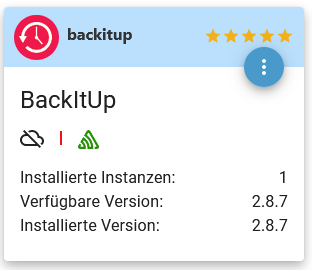
-
@thomas-braun Danke für Deine Mühen!
-
Bei mir lief das Update durch. Dann kam aber die Fehlerneldung:
startInstance system.adapter.backitup.0 Adapter dependency not fulfilled on any host: required adapter "admin" has wrong version. Installed "5.3.1", required ">=6.0.0"!admin: 6.12.0
Node.js: v18.17.1(18.18.2)
NPM: 9.6.7(9.8.1)Auch die Installation einer älteren Version haben nichts gebracht.
-
Bei mir lief das Update durch. Dann kam aber die Fehlerneldung:
startInstance system.adapter.backitup.0 Adapter dependency not fulfilled on any host: required adapter "admin" has wrong version. Installed "5.3.1", required ">=6.0.0"!admin: 6.12.0
Node.js: v18.17.1(18.18.2)
NPM: 9.6.7(9.8.1)Auch die Installation einer älteren Version haben nichts gebracht.
iob stop iob fix iob nodejs-update iob upload all -
iob stop iob fix iob nodejs-update iob upload all@thomas-braun sagte in BackItUp Update hängt:
iob stop iob fix iob nodejs-update iob upload allKann man das node.js Update immer so machen? Es gibt hier so viele Beschreibungen zu das ich mir da jetzt etwas unsicher bin :-)
Nix besonderes; iob auf Respberry pi 4 (8GB) mit 32 GB SSD
Node.js: v22.23.2
NPM: 10.9.4
js-controller 7.1.2
Linux: Trixie -
@thomas-braun sagte in BackItUp Update hängt:
iob stop iob fix iob nodejs-update iob upload allKann man das node.js Update immer so machen? Es gibt hier so viele Beschreibungen zu das ich mir da jetzt etwas unsicher bin :-)
Seit kurzen gibt es den Befehl dazu. Siehe auch die Ankündigungen hier im Forum.
-
Seit kurzen gibt es den Befehl dazu. Siehe auch die Ankündigungen hier im Forum.
Wenn man am letzten Wochenende den IOB neu installiert hatte muss man dann trotzdem jetzt noch mal
fix iobausführen oder hat das die IOB Version dann schon drin das man jetzt
iob nodejs-updateausführen kann?
Nix besonderes; iob auf Respberry pi 4 (8GB) mit 32 GB SSD
Node.js: v22.23.2
NPM: 10.9.4
js-controller 7.1.2
Linux: Trixie -
Wenn man am letzten Wochenende den IOB neu installiert hatte muss man dann trotzdem jetzt noch mal
fix iobausführen oder hat das die IOB Version dann schon drin das man jetzt
iob nodejs-updateausführen kann?
Nein, der
iob fixist nur erforderlich, wenn das Kommando 'iobroker nodejs-update' noch nicht geladen wurde (bei Alt-Installationen, Neuinstallationen kommen direkt damit an). Jetzt steht das natürlich direkt zur Verfügung.
Probier es halt einfach aus. Wenn es nicht vorhanden ist:
iob fix -
Nein, der
iob fixist nur erforderlich, wenn das Kommando 'iobroker nodejs-update' noch nicht geladen wurde (bei Alt-Installationen, Neuinstallationen kommen direkt damit an). Jetzt steht das natürlich direkt zur Verfügung.
Probier es halt einfach aus. Wenn es nicht vorhanden ist:
iob fixIch komme jetzt gerade nicht an meinen IOB aber woran sollte ich den erkennen ob es verfügbar ist?
Gibt es da auch einen Befehl für?Glaub der Groschen ist gefallen, wenn
iob nodejs-updatefunktioniert ist kein
fix iobnötig.
Werde mir das heute Abend mal anschauen. Danke dir.
Gruß Duffy
Nix besonderes; iob auf Respberry pi 4 (8GB) mit 32 GB SSD
Node.js: v22.23.2
NPM: 10.9.4
js-controller 7.1.2
Linux: Trixie -
Ich komme jetzt gerade nicht an meinen IOB aber woran sollte ich den erkennen ob es verfügbar ist?
Gibt es da auch einen Befehl für?Glaub der Groschen ist gefallen, wenn
iob nodejs-updatefunktioniert ist kein
fix iobnötig.
Werde mir das heute Abend mal anschauen. Danke dir.
Gruß Duffy
-
Ja, danke, war ein Kopierfehler trotzdem danke für den Hinweis, sonst wäre ich vielleicht wieder mal auf dem Schlauch gestanden.
-
Habe es gerade überprüft. Ich konnte
iob nodejs-updateausführen. Dann wurde mir vorgeschlagen um das System up to Date zu halten
sudo apt update && sudo apt full-upgradeauszuführen.
Dabei kam am Ende die Meldung mit der ich nichts anfangen kann (letzter Satz):
pi@raspberrypi:~ $ sudo apt update && sudo apt full-upgrade
Hit:1 http://deb.debian.org/debian bookworm InRelease
Get:2 http://deb.debian.org/debian-security bookworm-security InRelease [48.0 kB]
Get:3 http://deb.debian.org/debian bookworm-updates InRelease [52.1 kB]
Get:4 http://archive.raspberrypi.com/debian bookworm InRelease [23.6 kB]
Get:5 https://repos.influxdata.com/debian stable InRelease [6,901 B]
Get:6 https://packages.grafana.com/oss/deb stable InRelease [5,983 B]
Hit:7 https://deb.nodesource.com/node_18.x nodistro InRelease
Get:8 http://deb.debian.org/debian-security bookworm-security/main armhf Packages [90.9 kB]
Get:9 http://deb.debian.org/debian-security bookworm-security/main arm64 Packages [93.2 kB]
Get:10 http://deb.debian.org/debian bookworm-updates/main armhf Packages [6,648 B]
Get:11 http://deb.debian.org/debian bookworm-updates/main arm64 Packages [6,672 B]
Get:12 http://deb.debian.org/debian bookworm-updates/main Translation-en [5,204 B]
Get:13 http://archive.raspberrypi.com/debian bookworm/main armhf Packages [346 kB]
Get:14 http://archive.raspberrypi.com/debian bookworm/main arm64 Packages [338 kB]
Get:15 https://repos.influxdata.com/debian stable/main arm64 Packages [7,173 B]
Get:16 https://packages.grafana.com/oss/deb stable/main arm64 Packages [126 kB]
Fetched 1,157 kB in 3s (427 kB/s)
Reading package lists... Done
^Cilding dependency tree... 50%
Ist
^Cilding dependency tree... 50%was gutes??

VG Duffy
Nix besonderes; iob auf Respberry pi 4 (8GB) mit 32 GB SSD
Node.js: v22.23.2
NPM: 10.9.4
js-controller 7.1.2
Linux: Trixie -
Habe es gerade überprüft. Ich konnte
iob nodejs-updateausführen. Dann wurde mir vorgeschlagen um das System up to Date zu halten
sudo apt update && sudo apt full-upgradeauszuführen.
Dabei kam am Ende die Meldung mit der ich nichts anfangen kann (letzter Satz):
pi@raspberrypi:~ $ sudo apt update && sudo apt full-upgrade
Hit:1 http://deb.debian.org/debian bookworm InRelease
Get:2 http://deb.debian.org/debian-security bookworm-security InRelease [48.0 kB]
Get:3 http://deb.debian.org/debian bookworm-updates InRelease [52.1 kB]
Get:4 http://archive.raspberrypi.com/debian bookworm InRelease [23.6 kB]
Get:5 https://repos.influxdata.com/debian stable InRelease [6,901 B]
Get:6 https://packages.grafana.com/oss/deb stable InRelease [5,983 B]
Hit:7 https://deb.nodesource.com/node_18.x nodistro InRelease
Get:8 http://deb.debian.org/debian-security bookworm-security/main armhf Packages [90.9 kB]
Get:9 http://deb.debian.org/debian-security bookworm-security/main arm64 Packages [93.2 kB]
Get:10 http://deb.debian.org/debian bookworm-updates/main armhf Packages [6,648 B]
Get:11 http://deb.debian.org/debian bookworm-updates/main arm64 Packages [6,672 B]
Get:12 http://deb.debian.org/debian bookworm-updates/main Translation-en [5,204 B]
Get:13 http://archive.raspberrypi.com/debian bookworm/main armhf Packages [346 kB]
Get:14 http://archive.raspberrypi.com/debian bookworm/main arm64 Packages [338 kB]
Get:15 https://repos.influxdata.com/debian stable/main arm64 Packages [7,173 B]
Get:16 https://packages.grafana.com/oss/deb stable/main arm64 Packages [126 kB]
Fetched 1,157 kB in 3s (427 kB/s)
Reading package lists... Done
^Cilding dependency tree... 50%
Ist
^Cilding dependency tree... 50%was gutes??
VG Duffy


Hey! Du scheinst an dieser Unterhaltung interessiert zu sein, hast aber noch kein Konto.
Hast du es satt, bei jedem Besuch durch die gleichen Beiträge zu scrollen? Wenn du dich für ein Konto anmeldest, kommst du immer genau dorthin zurück, wo du zuvor warst, und kannst dich über neue Antworten benachrichtigen lassen (entweder per E-Mail oder Push-Benachrichtigung). Du kannst auch Lesezeichen speichern und Beiträge positiv bewerten, um anderen Community-Mitgliedern deine Wertschätzung zu zeigen.
Mit deinem Input könnte dieser Beitrag noch besser werden 💗
Registrieren Anmelden466
Online33.0k
Benutzer83.6k
Themen1.3m
Beiträge