




iobroker läuft wieder nicht...
-
@thomas-braun sagte in iobroker läuft wieder nicht...:
Dann die Antiquitäten-Sammlung auf Stand bringen:
"Antiquitäten" :))
Es lief eben alles zu meiner Zufriedenheit, daher habe ich auch keine Updates gefahren...
Also, die Updates erst nachdem grafana und influx gefixt sind oder ist das unabhängig voneinander?
@pahan sagte in iobroker läuft wieder nicht...:
Es lief eben alles zu meiner Zufriedenheit, daher habe ich auch keine Updates gefahren...
Das ist dieser 'Newah tschaindsch a running süstähm'-Bullshit, oder?
-
@pahan sagte in iobroker läuft wieder nicht...:
Es lief eben alles zu meiner Zufriedenheit, daher habe ich auch keine Updates gefahren...
Das ist dieser 'Newah tschaindsch a running süstähm'-Bullshit, oder?
@thomas-braun sagte in iobroker läuft wieder nicht...:
Das ist dieser 'Newah tschaindsch a running süstähm'-Bullshit, oder?
janz jenau !
-
@thomas-braun sagte in iobroker läuft wieder nicht...:
Das ist dieser 'Newah tschaindsch a running süstähm'-Bullshit, oder?
janz jenau !
Dann wirst du den Bullshit jetzt aufräumen.
-
@pahan sagte in iobroker läuft wieder nicht...:
load average: 10.10, 12.52, 12.35
Moin,
wenn da bei RasPI kein Multiplikator in
topist, dann werkelt da etwas ganz schön auf der Kiste, einloadvon 10 ist schon heftig.VG
Bernd@dp20eic sagte in iobroker läuft wieder nicht...:
@pahan sagte in iobroker läuft wieder nicht...:
load average: 10.10, 12.52, 12.35
Moin,
wenn da bei RasPI kein Multiplikator in
topist, dann werkelt da etwas ganz schön auf der Kiste, einloadvon 10 ist schon heftig.VG
Berndjaaa, also gefühlt ist das Ding dauerhaft überlastet, aber ich weiß nicht mit was und wie ich es fixen soll
-
@thomas-braun sagte in iobroker läuft wieder nicht...:
Dann die Antiquitäten-Sammlung auf Stand bringen:
"Antiquitäten" :))
Es lief eben alles zu meiner Zufriedenheit, daher habe ich auch keine Updates gefahren...
Also, die Updates erst nachdem grafana und influx gefixt sind oder ist das unabhängig voneinander?
@pahan sagte in iobroker läuft wieder nicht...:
Also, die Updates erst nachdem grafana und influx gefixt sind oder ist das unabhängig voneinander?
Moin,
weil man nichts macht, kommen dann auch all die schönen kleinen Fehler mit der Zeit ;)
Du musst erst die Repositorys korrigieren, denn bei jedem
apt update / upgradeläuftaptauf einen Fehler und bricht ab, somit kannst Du nichts aktuell halten.VG
Bernd -
@dp20eic sagte in iobroker läuft wieder nicht...:
@pahan sagte in iobroker läuft wieder nicht...:
load average: 10.10, 12.52, 12.35
Moin,
wenn da bei RasPI kein Multiplikator in
topist, dann werkelt da etwas ganz schön auf der Kiste, einloadvon 10 ist schon heftig.VG
Berndjaaa, also gefühlt ist das Ding dauerhaft überlastet, aber ich weiß nicht mit was und wie ich es fixen soll
@pahan sagte in iobroker läuft wieder nicht...:
also gefühlt ist das Ding dauerhaft überlastet
Ich vermute, da läuft dir ein Skript aus dem Ruder.
Schalt den ioBroker aus, wenn du da die Kernsanierung vornimmst. -
@thomas-braun sagte in iobroker läuft wieder nicht...:
Dann die Antiquitäten-Sammlung auf Stand bringen:
"Antiquitäten" :))
Es lief eben alles zu meiner Zufriedenheit, daher habe ich auch keine Updates gefahren...
Also, die Updates erst nachdem grafana und influx gefixt sind oder ist das unabhängig voneinander?
@pahan sagte in iobroker läuft wieder nicht...:
Es lief eben alles zu meiner Zufriedenheit, daher habe ich auch keine Updates gefahren...
und warum hast dann nun ein Problem, wenn das so toll war?
Genau wegen dieser doofen Einstellung der Systempflege gegenüber ;) -
@dp20eic sagte in iobroker läuft wieder nicht...:
@pahan sagte in iobroker läuft wieder nicht...:
load average: 10.10, 12.52, 12.35
Moin,
wenn da bei RasPI kein Multiplikator in
topist, dann werkelt da etwas ganz schön auf der Kiste, einloadvon 10 ist schon heftig.VG
Berndjaaa, also gefühlt ist das Ding dauerhaft überlastet, aber ich weiß nicht mit was und wie ich es fixen soll
@pahan sagte in iobroker läuft wieder nicht...:
jaaa, also gefühlt ist das Ding dauerhaft überlastet, aber ich weiß nicht mit was und wie ich es fixen soll
Moin,
dann musst Du mal in die Logs schauen, denn dazu sind die da :)
aus Deinemiob diagganz am Ende*** Log File - Last 25 Lines *** 2023-10-17 20:05:26.961 - warn: shelly.0 (15694) [authEnabled] 192.168.178.55 (shelly1 / shelly1-40F52000F535 / SHSW-1#40F52000F535#1): This device is not protected via restricted login (see adapter documentation for details) 2023-10-17 20:05:26.964 - warn: shelly.0 (15694) [authEnabled] 192.168.178.49 (shelly1 / shelly1-E098069629A1 / SHSW-1#E098069629A1#1): This device is not protected via restricted login (see adapter documentation for details) 2023-10-17 20:05:26.967 - warn: shelly.0 (15694) [authEnabled] 192.168.178.52 (shelly1 / shelly1-E09806963B80 / SHSW-1#E09806963B80#1): This device is not protected via restricted login (see adapter documentation for details) 2023-10-17 20:05:27.874 - warn: shelly.0 (15694) [authEnabled] 192.168.178.54 (shellyswitch25 / shellyswitch25-BCDDC277A135 / SHSW-25#BCDDC277A135#1): This device is not protected via restricted login (see adapter documentation for details) 2023-10-17 20:05:29.230 - info: upnp.0 (18760) starting. Version 1.0.21 in /opt/iobroker/node_modules/iobroker.upnp, node: v18.18.2, js-controller: 4.0.24 2023-10-17 20:05:29.366 - info: upnp.0 (18760) Auto discover: false 2023-10-17 20:05:30.716 - warn: influxdb.0 (15649) Error on writePoint("{"value":28416.64,"time":"2023-10-17T18:04:30.649Z","from":"system.adapter.binance.0","q":0,"ack":false}): Error: {"error":"timeout"} / "{\"error\":\"timeout\"}\n"" 2023-10-17 20:05:30.716 - info: influxdb.0 (15649) Add point that had error for crypto.btc.usdt to buffer again, error-count=6 2023-10-17 20:05:30.817 - warn: influxdb.0 (15649) Error on writePoint("{"value":0.00005609,"time":"2023-10-17T18:03:30.804Z","from":"system.adapter.binance.0","q":0,"ack":false}): Error: {"error":"timeout"} / "{\"error\":\"timeout\"}\n"" 2023-10-17 20:05:30.817 - info: influxdb.0 (15649) Add point that had error for crypto.trx.eth to buffer again, error-count=5 2023-10-17 20:05:30.966 - warn: influxdb.0 (15649) Error on writePoint("{"value":1567.09,"time":"2023-10-17T18:04:30.902Z","from":"system.adapter.binance.0","q":0,"ack":false}): Error: {"error":"timeout"} / "{\"error\":\"timeout\"}\n"" 2023-10-17 20:05:30.967 - info: influxdb.0 (15649) Add point that had error for crypto.eth.usdt to buffer again, error-count=5 2023-10-17 20:05:33.026 - warn: shelly.0 (15694) [authEnabled] 192.168.178.55 (shelly1 / shelly1-40F52000F535 / SHSW-1#40F52000F535#1): This device is not protected via restricted login (see adapter documentation for details) 2023-10-17 20:05:33.131 - warn: shelly.0 (15694) [authEnabled] 192.168.178.52 (shelly1 / shelly1-E09806963B80 / SHSW-1#E09806963B80#1): This device is not protected via restricted login (see adapter documentation for details) 2023-10-17 20:05:33.432 - warn: shelly.0 (15694) [authEnabled] 192.168.178.54 (shellyswitch25 / shellyswitch25-BCDDC277A135 / SHSW-25#BCDDC277A135#1): This device is not protected via restricted login (see adapter documentation for details) 2023-10-17 20:05:33.666 - warn: shelly.0 (15694) [authEnabled] 192.168.178.49 (shelly1 / shelly1-E098069629A1 / SHSW-1#E098069629A1#1): This device is not protected via restricted login (see adapter documentation for details) 2023-10-17 20:05:35.455 - warn: influxdb.0 (15649) Error on writePoint("{"value":21.7,"time":"2023-10-17T18:01:51.323Z","from":"system.adapter.hm-rpc.1","q":0,"ack":true}): Error: {"error":"timeout"} / "{\"error\":\"timeout\"}\n"" 2023-10-17 20:05:35.456 - info: influxdb.0 (15649) Add point that had error for temp.ist.gaeste.wc to buffer again, error-count=9 2023-10-17 20:05:35.469 - warn: influxdb.0 (15649) Error on writePoint("{"value":21.8,"time":"2023-10-17T18:04:45.240Z","from":"system.adapter.hm-rpc.1","q":0,"ack":true}): Error: {"error":"timeout"} / "{\"error\":\"timeout\"}\n"" 2023-10-17 20:05:35.469 - info: influxdb.0 (15649) Discard point that had error for temp.ist.gaeste.wc, error-count=10In
/var/log/gibt es noch mehr Log Files, da steht sicherlich auch einiges drin.
Dann kannst Du mal, das 'ne Zeitlang laufen lassen und schauen, wer da so unter den Top 10 ist# topVG
BerndP.S.: Sauberes Backup machen und gleich richtig neu aufsetzen, ist glaube ich der schmerzfreie Weg, ohne genau zu wissen, was da alles auf der Kiste werkelt.
-
Dann die Antiquitäten-Sammlung auf Stand bringen:
iob update iob upgrade all -y iob stop iob fix iob upgrade self iob start@thomas-braun sagte in iobroker läuft wieder nicht...:
Dann die Antiquitäten-Sammlung auf Stand bringen:
iob update
iob upgrade all -y
iob stop
iob fix
iob upgrade self
iob start
Habe nun grafana und influxdb aktualisiert und die von dir genannten Schritte durchgeführt. Hat sehr sehr lange gedauert und
iob diagliefert nun folgendes:
Skript v.2023-10-10 *** BASE SYSTEM *** Static hostname: raspberrypi Icon name: computer Operating System: Raspbian GNU/Linux 11 (bullseye) Kernel: Linux 6.1.21-v8+ Architecture: arm64 Model : Raspberry Pi 4 Model B Rev 1.4 Docker : false Virtualization : none Kernel : aarch64 Userland : armhf Systemuptime and Load: 23:20:02 up 9:25, 1 user, load average: 8.90, 7.26, 8.08 CPU threads: 4 *** RASPBERRY THROTTLING *** Current issues: No throttling issues detected. Previously detected issues: No throttling issues detected. *** Time and Time Zones *** Local time: Tue 2023-10-17 23:20:03 CEST Universal time: Tue 2023-10-17 21:20:03 UTC RTC time: n/a Time zone: Europe/Berlin (CEST, +0200) System clock synchronized: yes NTP service: active RTC in local TZ: no *** User and Groups *** pi /home/pi pi adm dialout cdrom sudo audio video plugdev games users input render netdev lpadmin gpio i2c spi iobroker *** X-Server-Setup *** X-Server: false Desktop: Terminal: tty Boot Target: multi-user.target *** MEMORY *** total used free shared buff/cache available Mem: 3.8G 1.6G 534M 0.0K 1.6G 2.2G Swap: 99M 0B 99M Total: 3.9G 1.6G 634M 3794 M total memory 1646 M used memory 1687 M active memory 1214 M inactive memory 533 M free memory 240 M buffer memory 1373 M swap cache 99 M total swap 0 M used swap 99 M free swap Raspberry only: oom events: 0 lifetime oom required: 0 Mbytes total time in oom handler: 0 ms max time spent in oom handler: 0 ms *** FAILED SERVICES *** UNIT LOAD ACTIVE SUB DESCRIPTION 0 loaded units listed. *** FILESYSTEM *** Filesystem Type Size Used Avail Use% Mounted on /dev/root ext4 29G 11G 18G 39% / devtmpfs devtmpfs 1.7G 0 1.7G 0% /dev tmpfs tmpfs 1.9G 0 1.9G 0% /dev/shm tmpfs tmpfs 759M 864K 759M 1% /run tmpfs tmpfs 5.0M 4.0K 5.0M 1% /run/lock /dev/mmcblk0p1 vfat 253M 51M 202M 20% /boot tmpfs tmpfs 380M 16K 380M 1% /run/user/1000 Messages concerning ext4 filesystem in dmesg: Show mounted filesystems \(real ones only\): TARGET SOURCE FSTYPE OPTIONS / /dev/mmcblk0p2 ext4 rw,noatime `-/boot /dev/mmcblk0p1 vfat rw,relatime,fmask=0022,dmask=0022,codepage=437,iocharset=ascii,short name=mixed,flush,errors=remount-ro Files in neuralgic directories: /var: 4.1G /var/ 3.4G /var/log 3.0G /var/log/journal/9177676efac74b1994c74dac83b5d5f4 3.0G /var/log/journal 378M /var/cache Archived and active journals take up 2.9G in the file system. /opt/iobroker/backups: 81M /opt/iobroker/backups/ /opt/iobroker/iobroker-data: 502M /opt/iobroker/iobroker-data/ 286M /opt/iobroker/iobroker-data/files 129M /opt/iobroker/iobroker-data/backup-objects 52M /opt/iobroker/iobroker-data/files/javascript.admin 49M /opt/iobroker/iobroker-data/files/vis.0 The five largest files in iobroker-data are: 21M /opt/iobroker/iobroker-data/objects.jsonl 21M /opt/iobroker/iobroker-data/files/web.admin/static/js/main.edf7552a.js.map 19M /opt/iobroker/iobroker-data/files/iot.admin/static/js/main.2975a411.js.map 17M /opt/iobroker/iobroker-data/objects.json.migrated 17M /opt/iobroker/iobroker-data/objects.json.broken USB-Devices by-id: USB-Sticks - Avoid direct links to /dev/* in your adapter setups, please always prefer the links 'by-id': find: '/dev/serial/by-id/': No such file or directory *** NodeJS-Installation *** /usr/bin/nodejs v18.18.2 /usr/bin/node v18.18.2 /usr/bin/npm 9.8.1 /usr/bin/npx 9.8.1 /usr/bin/corepack 0.19.0 nodejs: Installed: 18.18.2-1nodesource1 Candidate: 18.18.2-1nodesource1 Version table: *** 18.18.2-1nodesource1 1001 500 https://deb.nodesource.com/node_18.x nodistro/main armhf Packages 100 /var/lib/dpkg/status 18.18.1-1nodesource1 1001 500 https://deb.nodesource.com/node_18.x nodistro/main armhf Packages 18.18.0-1nodesource1 1001 500 https://deb.nodesource.com/node_18.x nodistro/main armhf Packages 18.17.1-1nodesource1 1001 500 https://deb.nodesource.com/node_18.x nodistro/main armhf Packages 18.17.0-1nodesource1 1001 500 https://deb.nodesource.com/node_18.x nodistro/main armhf Packages 18.16.1-1nodesource1 1001 500 https://deb.nodesource.com/node_18.x nodistro/main armhf Packages 18.16.0-1nodesource1 1001 500 https://deb.nodesource.com/node_18.x nodistro/main armhf Packages 18.15.0-1nodesource1 1001 500 https://deb.nodesource.com/node_18.x nodistro/main armhf Packages 18.14.2-1nodesource1 1001 500 https://deb.nodesource.com/node_18.x nodistro/main armhf Packages 18.14.1-1nodesource1 1001 500 https://deb.nodesource.com/node_18.x nodistro/main armhf Packages 18.14.0-1nodesource1 1001 500 https://deb.nodesource.com/node_18.x nodistro/main armhf Packages 18.13.0-1nodesource1 1001 500 https://deb.nodesource.com/node_18.x nodistro/main armhf Packages 18.12.0-1nodesource1 1001 500 https://deb.nodesource.com/node_18.x nodistro/main armhf Packages 18.11.0-1nodesource1 1001 500 https://deb.nodesource.com/node_18.x nodistro/main armhf Packages 18.10.0-1nodesource1 1001 500 https://deb.nodesource.com/node_18.x nodistro/main armhf Packages 18.9.1-1nodesource1 1001 500 https://deb.nodesource.com/node_18.x nodistro/main armhf Packages 18.9.0-1nodesource1 1001 500 https://deb.nodesource.com/node_18.x nodistro/main armhf Packages 18.8.0-1nodesource1 1001 500 https://deb.nodesource.com/node_18.x nodistro/main armhf Packages 18.7.0-1nodesource1 1001 500 https://deb.nodesource.com/node_18.x nodistro/main armhf Packages 18.6.0-1nodesource1 1001 500 https://deb.nodesource.com/node_18.x nodistro/main armhf Packages 18.5.0-1nodesource1 1001 500 https://deb.nodesource.com/node_18.x nodistro/main armhf Packages 18.4.0-1nodesource1 1001 500 https://deb.nodesource.com/node_18.x nodistro/main armhf Packages 18.3.0-1nodesource1 1001 500 https://deb.nodesource.com/node_18.x nodistro/main armhf Packages 18.2.0-1nodesource1 1001 500 https://deb.nodesource.com/node_18.x nodistro/main armhf Packages 18.1.0-1nodesource1 1001 500 https://deb.nodesource.com/node_18.x nodistro/main armhf Packages 18.0.0-1nodesource1 1001 500 https://deb.nodesource.com/node_18.x nodistro/main armhf Packages 12.22.12~dfsg-1~deb11u4 500 500 http://raspbian.raspberrypi.org/raspbian bullseye/main armhf Packages Temp directories causing npm8 problem: 0 No problems detected Errors in npm tree: *** ioBroker-Installation *** ioBroker Status iobroker is running on this host. Objects type: jsonl States type: jsonl Core adapters versions js-controller: 5.0.12 admin: 6.10.1 javascript: 7.1.4 Adapters from github: 2 Adapter State system.adapter.admin.0 : admin : raspberrypi - enabled, port: 8081, bind: 0.0.0.0, run as: admin system.adapter.alexa2.0 : alexa2 : raspberrypi - disabled + system.adapter.backitup.0 : backitup : raspberrypi - enabled + system.adapter.binance.0 : binance : raspberrypi - enabled system.adapter.daswetter.0 : daswetter : raspberrypi - enabled + system.adapter.discovery.0 : discovery : raspberrypi - enabled system.adapter.dwd.0 : dwd : raspberrypi - enabled + system.adapter.email.0 : email : raspberrypi - enabled system.adapter.eusec.0 : eusec : raspberrypi - disabled + system.adapter.fb-checkpresence.0 : fb-checkpresence : raspberrypi - enabled + system.adapter.fritzbox.0 : fritzbox : raspberrypi - enabled system.adapter.gartenbewaesserung.0 : gartenbewaesserung : raspberrypi - disabled + system.adapter.history.0 : history : raspberrypi - enabled + system.adapter.hm-rega.0 : hm-rega : raspberrypi - enabled + system.adapter.hm-rpc.0 : hm-rpc : raspberrypi - enabled, port: 18701 + system.adapter.hm-rpc.1 : hm-rpc : raspberrypi - enabled, port: 12001 + system.adapter.hm-rpc.2 : hm-rpc : raspberrypi - enabled, port: 12010 system.adapter.ical.0 : ical : raspberrypi - enabled system.adapter.ical.1 : ical : raspberrypi - enabled system.adapter.icons-fatcow-hosting.0 : icons-fatcow-hosting : raspberrypi - disabled system.adapter.icons-mfd-png.0 : icons-mfd-png : raspberrypi - disabled system.adapter.icons-mfd-svg.0 : icons-mfd-svg : raspberrypi - disabled + system.adapter.influxdb.0 : influxdb : raspberrypi - enabled, port: 8086 + system.adapter.info.0 : info : raspberrypi - enabled + system.adapter.iot.0 : iot : raspberrypi - enabled + system.adapter.javascript.0 : javascript : raspberrypi - enabled + system.adapter.logparser.0 : logparser : raspberrypi - enabled system.adapter.mercedesme.0 : mercedesme : raspberrypi - disabled system.adapter.mihome-lamp.0 : mihome-lamp : raspberrypi - disabled, port: 54321 system.adapter.mihome-vacuum.0 : mihome-vacuum : raspberrypi - disabled, port: 54321 + system.adapter.shelly.0 : shelly : raspberrypi - enabled, port: 1882, bind: 0.0.0.0 + system.adapter.snmp.0 : snmp : raspberrypi - enabled + system.adapter.sourceanalytix.0 : sourceanalytix : raspberrypi - enabled + system.adapter.sprinklecontrol.0 : sprinklecontrol : raspberrypi - enabled + system.adapter.synology.0 : synology : raspberrypi - enabled, port: 5001 + system.adapter.tankerkoenig.0 : tankerkoenig : raspberrypi - enabled + system.adapter.tr-064.0 : tr-064 : raspberrypi - enabled + system.adapter.trashschedule.0 : trashschedule : raspberrypi - enabled + system.adapter.upnp.0 : upnp : raspberrypi - enabled system.adapter.vis-canvas-gauges.0 : vis-canvas-gauges : raspberrypi - disabled system.adapter.vis-hqwidgets.0 : vis-hqwidgets : raspberrypi - disabled system.adapter.vis-icontwo.0 : vis-icontwo : raspberrypi - disabled + system.adapter.vis-inventwo.0 : vis-inventwo : raspberrypi - enabled system.adapter.vis-jqui-mfd.0 : vis-jqui-mfd : raspberrypi - disabled system.adapter.vis-materialdesign.0 : vis-materialdesign : raspberrypi - disabled system.adapter.vis-plumb.0 : vis-plumb : raspberrypi - disabled system.adapter.vis-rgraph.0 : vis-rgraph : raspberrypi - disabled system.adapter.vis-timeandweather.0 : vis-timeandweather : raspberrypi - disabled system.adapter.vis.0 : vis : raspberrypi - enabled system.adapter.weatherunderground.0 : weatherunderground : raspberrypi - disabled system.adapter.web.0 : web : raspberrypi - enabled, port: 8082, bind: 0.0.0.0, run as: admin + system.adapter.whatsapp-cmb.0 : whatsapp-cmb : raspberrypi - enabled system.adapter.yeelight-2.0 : yeelight-2 : raspberrypi - enabled + instance is alive Enabled adapters with bindings ioBroker-Repositories Server Cannot start inMem-states on port 9000: Failed to lock DB file "/opt/iobroker/iobroker-data/states.jsonl"! Installed ioBroker-Instances Used repository: stable Adapter "admin" : 6.10.1 , installed 6.10.1 Adapter "alexa2" : 3.25.2 , installed 3.25.2 Adapter "backitup" : 2.8.1 , installed 2.8.1 Adapter "daswetter" : 3.1.10 , installed 3.1.10 Adapter "discovery" : 3.1.0 , installed 3.1.0 Adapter "dwd" : 2.8.5 , installed 2.8.5 Adapter "email" : 1.2.0 , installed 1.2.0 Adapter "eusec" : 1.1.2 , installed 1.1.2 Adapter "fb-checkpresence": 1.2.2 , installed 1.2.2 Adapter "fritzbox" : 0.5.0 , installed 0.5.0 Adapter "history" : 2.2.6 , installed 2.2.6 Adapter "hm-rega" : 3.0.47 , installed 3.0.47 Adapter "hm-rpc" : 1.15.19 , installed 1.15.19 Adapter "ical" : 1.13.3 , installed 1.13.3 Adapter "icons-fatcow-hosting": 0.1.0, installed 0.1.0 Adapter "icons-mfd-png": 1.1.0 , installed 1.1.0 Adapter "icons-mfd-svg": 1.1.0 , installed 1.1.0 Adapter "influxdb" : 3.2.0 , installed 3.2.0 Adapter "info" : 2.0.0 , installed 2.0.0 Adapter "iot" : 1.14.5 , installed 1.14.5 Adapter "javascript" : 7.1.4 , installed 7.1.4 Controller "js-controller": 5.0.12 , installed 5.0.12 Adapter "logparser" : 2.2.0 , installed 2.2.0 Adapter "mercedesme" : 0.1.1 , installed 0.1.1 Adapter "mihome-lamp" : 1.1.0 , installed 1.1.0 Adapter "mihome-vacuum": 4.0.0 , installed 4.0.0 Adapter "shelly" : 6.4.1 , installed 6.4.1 Adapter "simple-api" : 2.7.2 , installed 2.7.2 Adapter "snmp" : 2.4.11 , installed 2.4.11 Adapter "socketio" : 6.5.5 , installed 6.5.5 Adapter "sprinklecontrol": 0.2.13 , installed 0.2.13 Adapter "synology" : 3.0.0 , installed 3.0.0 Adapter "tankerkoenig" : 3.3.7 , installed 3.3.7 Adapter "tr-064" : 4.2.18 , installed 4.2.18 Adapter "trashschedule": 2.2.0 , installed 2.2.0 Adapter "upnp" : 1.0.21 , installed 1.0.21 Adapter "vis" : 1.4.16 , installed 1.4.16 Adapter "vis-canvas-gauges": 1.0.1, installed 1.0.1 Adapter "vis-hqwidgets": 1.4.0 , installed 1.4.0 Adapter "vis-icontwo" : 0.96.0 , installed 0.96.0 Adapter "vis-inventwo" : 3.3.3 , installed 3.3.3 Adapter "vis-jqui-mfd" : 1.0.12 , installed 1.0.12 Adapter "vis-plumb" : 1.0.2 , installed 1.0.2 Adapter "vis-rgraph" : 0.0.2 , installed 0.0.2 Adapter "vis-timeandweather": 1.2.2, installed 1.2.2 Adapter "weatherunderground": 3.6.0, installed 3.6.0 Adapter "web" : 6.1.2 , installed 6.1.2 Adapter "whatsapp-cmb" : 0.2.3 , installed 0.2.3 Adapter "ws" : 2.5.5 , installed 2.5.5 Adapter "yeelight-2" : 1.2.1 , installed 1.2.1 Objects and States Please stand by - This may take a while Objects: 30179 States: 21095 *** OS-Repositories and Updates *** E: The repository 'https://repos.influxdata.com/raspbian bullseye Release' does not have a Release file. Pending Updates: 0 *** Listening Ports *** Active Internet connections (only servers) Proto Recv-Q Send-Q Local Address Foreign Address State User Inode PID/Program name tcp 0 0 0.0.0.0:12001 0.0.0.0:* LISTEN 1001 663955 30230/io.hm-rpc.1 tcp 0 0 0.0.0.0:12010 0.0.0.0:* LISTEN 1001 663390 30271/io.hm-rpc.2 tcp 0 0 127.0.0.1:631 0.0.0.0:* LISTEN 0 12741 518/cupsd tcp 0 0 127.0.0.1:9001 0.0.0.0:* LISTEN 1001 660964 30114/iobroker.js-c tcp 0 0 127.0.0.1:9000 0.0.0.0:* LISTEN 1001 660971 30114/iobroker.js-c tcp 0 0 0.0.0.0:18701 0.0.0.0:* LISTEN 1001 663966 30221/io.hm-rpc.0 tcp 0 0 0.0.0.0:22 0.0.0.0:* LISTEN 0 12176 563/sshd: /usr/sbin tcp 0 0 127.0.0.1:8088 0.0.0.0:* LISTEN 999 12744 536/influxd tcp6 0 0 :::8086 :::* LISTEN 999 15881 536/influxd tcp6 0 0 :::3000 :::* LISTEN 115 12823 526/grafana-server tcp6 0 0 ::1:631 :::* LISTEN 0 12740 518/cupsd tcp6 0 0 :::22 :::* LISTEN 0 12178 563/sshd: /usr/sbin udp 0 0 192.168.178.36:5353 0.0.0.0:* 1001 664016 30286/io.tr-064.0 udp 0 0 0.0.0.0:5353 0.0.0.0:* 108 12096 396/avahi-daemon: r udp 0 0 0.0.0.0:5683 0.0.0.0:* 1001 664772 30278/io.shelly.0 udp 0 0 0.0.0.0:68 0.0.0.0:* 0 12771 469/dhcpcd udp 0 0 0.0.0.0:47183 0.0.0.0:* 1001 665324 30464/io.snmp.0 udp 0 0 0.0.0.0:49317 0.0.0.0:* 108 12098 396/avahi-daemon: r udp 0 0 0.0.0.0:631 0.0.0.0:* 0 15834 602/cups-browsed udp6 0 0 :::5353 :::* 108 12097 396/avahi-daemon: r udp6 0 0 :::35623 :::* 108 12099 396/avahi-daemon: r *** Log File - Last 25 Lines *** 2023-10-17 23:24:51.363 - warn: shelly.0 (30278) [authEnabled] 192.168.178.49 (shelly1 / shelly1-E098069629A1 / SHSW-1#E098069629A1#1): This device is not protected via restricted login (see adapter documentation for details) 2023-10-17 23:24:51.415 - warn: shelly.0 (30278) [authEnabled] 192.168.178.52 (shelly1 / shelly1-E09806963B80 / SHSW-1#E09806963B80#1): This device is not protected via restricted login (see adapter documentation for details) 2023-10-17 23:24:51.428 - warn: shelly.0 (30278) [authEnabled] 192.168.178.55 (shelly1 / shelly1-40F52000F535 / SHSW-1#40F52000F535#1): This device is not protected via restricted login (see adapter documentation for details) 2023-10-17 23:24:53.724 - warn: shelly.0 (30278) [authEnabled] 192.168.178.54 (shellyswitch25 / shellyswitch25-BCDDC277A135 / SHSW-25#BCDDC277A135#1): This device is not protected via restricted login (see adapter documentation for details) 2023-10-17 23:24:56.746 - warn: shelly.0 (30278) [authEnabled] 192.168.178.52 (shelly1 / shelly1-E09806963B80 / SHSW-1#E09806963B80#1): This device is not protected via restricted login (see adapter documentation for details) 2023-10-17 23:24:56.748 - warn: shelly.0 (30278) [authEnabled] 192.168.178.49 (shelly1 / shelly1-E098069629A1 / SHSW-1#E098069629A1#1): This device is not protected via restricted login (see adapter documentation for details) 2023-10-17 23:24:56.805 - warn: shelly.0 (30278) [authEnabled] 192.168.178.55 (shelly1 / shelly1-40F52000F535 / SHSW-1#40F52000F535#1): This device is not protected via restricted login (see adapter documentation for details) 2023-10-17 23:24:58.970 - warn: shelly.0 (30278) [authEnabled] 192.168.178.54 (shellyswitch25 / shellyswitch25-BCDDC277A135 / SHSW-25#BCDDC277A135#1): This device is not protected via restricted login (see adapter documentation for details) 2023-10-17 23:25:00.025 - info: upnp.0 (31633) Scheduled restart. 2023-10-17 23:25:00.040 - info: upnp.0 (31633) terminating 2023-10-17 23:25:00.042 - info: upnp.0 (31633) Terminated (START_IMMEDIATELY_AFTER_STOP): Without reason 2023-10-17 23:25:00.542 - info: upnp.0 (31633) terminating 2023-10-17 23:25:00.555 - warn: upnp.0 (31633) get state error: Connection is closed. 2023-10-17 23:25:00.805 - info: host.raspberrypi instance system.adapter.upnp.0 scheduled normal terminated and will be restarted on schedule. 2023-10-17 23:25:00.805 - info: host.raspberrypi Restart adapter system.adapter.upnp.0 because enabled 2023-10-17 23:25:02.063 - info: host.raspberrypi instance system.adapter.upnp.0 started with pid 31847 2023-10-17 23:25:02.074 - warn: shelly.0 (30278) [authEnabled] 192.168.178.49 (shelly1 / shelly1-E098069629A1 / SHSW-1#E098069629A1#1): This device is not protected via restricted login (see adapter documentation for details) 2023-10-17 23:25:02.123 - warn: shelly.0 (30278) [authEnabled] 192.168.178.52 (shelly1 / shelly1-E09806963B80 / SHSW-1#E09806963B80#1): This device is not protected via restricted login (see adapter documentation for details) 2023-10-17 23:25:02.172 - warn: shelly.0 (30278) [authEnabled] 192.168.178.55 (shelly1 / shelly1-40F52000F535 / SHSW-1#40F52000F535#1): This device is not protected via restricted login (see adapter documentation for details) 2023-10-17 23:25:14.260 - warn: upnp.0 (31847) slow connection to objects DB. Still waiting ... 2023-10-17 23:25:25.838 - warn: shelly.0 (30278) [authEnabled] 192.168.178.52 (shelly1 / shelly1-E09806963B80 / SHSW-1#E09806963B80#1): This device is not protected via restricted login (see adapter documentation for details) 2023-10-17 23:25:25.845 - warn: shelly.0 (30278) [authEnabled] 192.168.178.55 (shelly1 / shelly1-40F52000F535 / SHSW-1#40F52000F535#1): This device is not protected via restricted login (see adapter documentation for details) 2023-10-17 23:25:26.294 - warn: shelly.0 (30278) [authEnabled] 192.168.178.49 (shelly1 / shelly1-E098069629A1 / SHSW-1#E098069629A1#1): This device is not protected via restricted login (see adapter documentation for details) 2023-10-17 23:25:27.093 - warn: shelly.0 (30278) [authEnabled] 192.168.178.54 (shellyswitch25 / shellyswitch25-BCDDC277A135 / SHSW-25#BCDDC277A135#1): This device is not protected via restricted login (see adapter documentation for details) 2023-10-17 23:25:27.436 - info: host.raspberrypi instance system.adapter.admin.0 started with pid 31897iobroker ist übers Webinterface nach wie vor nicht erreichbar. Sind aus der Diagnose evtl. weitere Fehler ableitbar ?
-
@thomas-braun sagte in iobroker läuft wieder nicht...:
Dann die Antiquitäten-Sammlung auf Stand bringen:
iob update
iob upgrade all -y
iob stop
iob fix
iob upgrade self
iob start
Habe nun grafana und influxdb aktualisiert und die von dir genannten Schritte durchgeführt. Hat sehr sehr lange gedauert und
iob diagliefert nun folgendes:
Skript v.2023-10-10 *** BASE SYSTEM *** Static hostname: raspberrypi Icon name: computer Operating System: Raspbian GNU/Linux 11 (bullseye) Kernel: Linux 6.1.21-v8+ Architecture: arm64 Model : Raspberry Pi 4 Model B Rev 1.4 Docker : false Virtualization : none Kernel : aarch64 Userland : armhf Systemuptime and Load: 23:20:02 up 9:25, 1 user, load average: 8.90, 7.26, 8.08 CPU threads: 4 *** RASPBERRY THROTTLING *** Current issues: No throttling issues detected. Previously detected issues: No throttling issues detected. *** Time and Time Zones *** Local time: Tue 2023-10-17 23:20:03 CEST Universal time: Tue 2023-10-17 21:20:03 UTC RTC time: n/a Time zone: Europe/Berlin (CEST, +0200) System clock synchronized: yes NTP service: active RTC in local TZ: no *** User and Groups *** pi /home/pi pi adm dialout cdrom sudo audio video plugdev games users input render netdev lpadmin gpio i2c spi iobroker *** X-Server-Setup *** X-Server: false Desktop: Terminal: tty Boot Target: multi-user.target *** MEMORY *** total used free shared buff/cache available Mem: 3.8G 1.6G 534M 0.0K 1.6G 2.2G Swap: 99M 0B 99M Total: 3.9G 1.6G 634M 3794 M total memory 1646 M used memory 1687 M active memory 1214 M inactive memory 533 M free memory 240 M buffer memory 1373 M swap cache 99 M total swap 0 M used swap 99 M free swap Raspberry only: oom events: 0 lifetime oom required: 0 Mbytes total time in oom handler: 0 ms max time spent in oom handler: 0 ms *** FAILED SERVICES *** UNIT LOAD ACTIVE SUB DESCRIPTION 0 loaded units listed. *** FILESYSTEM *** Filesystem Type Size Used Avail Use% Mounted on /dev/root ext4 29G 11G 18G 39% / devtmpfs devtmpfs 1.7G 0 1.7G 0% /dev tmpfs tmpfs 1.9G 0 1.9G 0% /dev/shm tmpfs tmpfs 759M 864K 759M 1% /run tmpfs tmpfs 5.0M 4.0K 5.0M 1% /run/lock /dev/mmcblk0p1 vfat 253M 51M 202M 20% /boot tmpfs tmpfs 380M 16K 380M 1% /run/user/1000 Messages concerning ext4 filesystem in dmesg: Show mounted filesystems \(real ones only\): TARGET SOURCE FSTYPE OPTIONS / /dev/mmcblk0p2 ext4 rw,noatime `-/boot /dev/mmcblk0p1 vfat rw,relatime,fmask=0022,dmask=0022,codepage=437,iocharset=ascii,short name=mixed,flush,errors=remount-ro Files in neuralgic directories: /var: 4.1G /var/ 3.4G /var/log 3.0G /var/log/journal/9177676efac74b1994c74dac83b5d5f4 3.0G /var/log/journal 378M /var/cache Archived and active journals take up 2.9G in the file system. /opt/iobroker/backups: 81M /opt/iobroker/backups/ /opt/iobroker/iobroker-data: 502M /opt/iobroker/iobroker-data/ 286M /opt/iobroker/iobroker-data/files 129M /opt/iobroker/iobroker-data/backup-objects 52M /opt/iobroker/iobroker-data/files/javascript.admin 49M /opt/iobroker/iobroker-data/files/vis.0 The five largest files in iobroker-data are: 21M /opt/iobroker/iobroker-data/objects.jsonl 21M /opt/iobroker/iobroker-data/files/web.admin/static/js/main.edf7552a.js.map 19M /opt/iobroker/iobroker-data/files/iot.admin/static/js/main.2975a411.js.map 17M /opt/iobroker/iobroker-data/objects.json.migrated 17M /opt/iobroker/iobroker-data/objects.json.broken USB-Devices by-id: USB-Sticks - Avoid direct links to /dev/* in your adapter setups, please always prefer the links 'by-id': find: '/dev/serial/by-id/': No such file or directory *** NodeJS-Installation *** /usr/bin/nodejs v18.18.2 /usr/bin/node v18.18.2 /usr/bin/npm 9.8.1 /usr/bin/npx 9.8.1 /usr/bin/corepack 0.19.0 nodejs: Installed: 18.18.2-1nodesource1 Candidate: 18.18.2-1nodesource1 Version table: *** 18.18.2-1nodesource1 1001 500 https://deb.nodesource.com/node_18.x nodistro/main armhf Packages 100 /var/lib/dpkg/status 18.18.1-1nodesource1 1001 500 https://deb.nodesource.com/node_18.x nodistro/main armhf Packages 18.18.0-1nodesource1 1001 500 https://deb.nodesource.com/node_18.x nodistro/main armhf Packages 18.17.1-1nodesource1 1001 500 https://deb.nodesource.com/node_18.x nodistro/main armhf Packages 18.17.0-1nodesource1 1001 500 https://deb.nodesource.com/node_18.x nodistro/main armhf Packages 18.16.1-1nodesource1 1001 500 https://deb.nodesource.com/node_18.x nodistro/main armhf Packages 18.16.0-1nodesource1 1001 500 https://deb.nodesource.com/node_18.x nodistro/main armhf Packages 18.15.0-1nodesource1 1001 500 https://deb.nodesource.com/node_18.x nodistro/main armhf Packages 18.14.2-1nodesource1 1001 500 https://deb.nodesource.com/node_18.x nodistro/main armhf Packages 18.14.1-1nodesource1 1001 500 https://deb.nodesource.com/node_18.x nodistro/main armhf Packages 18.14.0-1nodesource1 1001 500 https://deb.nodesource.com/node_18.x nodistro/main armhf Packages 18.13.0-1nodesource1 1001 500 https://deb.nodesource.com/node_18.x nodistro/main armhf Packages 18.12.0-1nodesource1 1001 500 https://deb.nodesource.com/node_18.x nodistro/main armhf Packages 18.11.0-1nodesource1 1001 500 https://deb.nodesource.com/node_18.x nodistro/main armhf Packages 18.10.0-1nodesource1 1001 500 https://deb.nodesource.com/node_18.x nodistro/main armhf Packages 18.9.1-1nodesource1 1001 500 https://deb.nodesource.com/node_18.x nodistro/main armhf Packages 18.9.0-1nodesource1 1001 500 https://deb.nodesource.com/node_18.x nodistro/main armhf Packages 18.8.0-1nodesource1 1001 500 https://deb.nodesource.com/node_18.x nodistro/main armhf Packages 18.7.0-1nodesource1 1001 500 https://deb.nodesource.com/node_18.x nodistro/main armhf Packages 18.6.0-1nodesource1 1001 500 https://deb.nodesource.com/node_18.x nodistro/main armhf Packages 18.5.0-1nodesource1 1001 500 https://deb.nodesource.com/node_18.x nodistro/main armhf Packages 18.4.0-1nodesource1 1001 500 https://deb.nodesource.com/node_18.x nodistro/main armhf Packages 18.3.0-1nodesource1 1001 500 https://deb.nodesource.com/node_18.x nodistro/main armhf Packages 18.2.0-1nodesource1 1001 500 https://deb.nodesource.com/node_18.x nodistro/main armhf Packages 18.1.0-1nodesource1 1001 500 https://deb.nodesource.com/node_18.x nodistro/main armhf Packages 18.0.0-1nodesource1 1001 500 https://deb.nodesource.com/node_18.x nodistro/main armhf Packages 12.22.12~dfsg-1~deb11u4 500 500 http://raspbian.raspberrypi.org/raspbian bullseye/main armhf Packages Temp directories causing npm8 problem: 0 No problems detected Errors in npm tree: *** ioBroker-Installation *** ioBroker Status iobroker is running on this host. Objects type: jsonl States type: jsonl Core adapters versions js-controller: 5.0.12 admin: 6.10.1 javascript: 7.1.4 Adapters from github: 2 Adapter State system.adapter.admin.0 : admin : raspberrypi - enabled, port: 8081, bind: 0.0.0.0, run as: admin system.adapter.alexa2.0 : alexa2 : raspberrypi - disabled + system.adapter.backitup.0 : backitup : raspberrypi - enabled + system.adapter.binance.0 : binance : raspberrypi - enabled system.adapter.daswetter.0 : daswetter : raspberrypi - enabled + system.adapter.discovery.0 : discovery : raspberrypi - enabled system.adapter.dwd.0 : dwd : raspberrypi - enabled + system.adapter.email.0 : email : raspberrypi - enabled system.adapter.eusec.0 : eusec : raspberrypi - disabled + system.adapter.fb-checkpresence.0 : fb-checkpresence : raspberrypi - enabled + system.adapter.fritzbox.0 : fritzbox : raspberrypi - enabled system.adapter.gartenbewaesserung.0 : gartenbewaesserung : raspberrypi - disabled + system.adapter.history.0 : history : raspberrypi - enabled + system.adapter.hm-rega.0 : hm-rega : raspberrypi - enabled + system.adapter.hm-rpc.0 : hm-rpc : raspberrypi - enabled, port: 18701 + system.adapter.hm-rpc.1 : hm-rpc : raspberrypi - enabled, port: 12001 + system.adapter.hm-rpc.2 : hm-rpc : raspberrypi - enabled, port: 12010 system.adapter.ical.0 : ical : raspberrypi - enabled system.adapter.ical.1 : ical : raspberrypi - enabled system.adapter.icons-fatcow-hosting.0 : icons-fatcow-hosting : raspberrypi - disabled system.adapter.icons-mfd-png.0 : icons-mfd-png : raspberrypi - disabled system.adapter.icons-mfd-svg.0 : icons-mfd-svg : raspberrypi - disabled + system.adapter.influxdb.0 : influxdb : raspberrypi - enabled, port: 8086 + system.adapter.info.0 : info : raspberrypi - enabled + system.adapter.iot.0 : iot : raspberrypi - enabled + system.adapter.javascript.0 : javascript : raspberrypi - enabled + system.adapter.logparser.0 : logparser : raspberrypi - enabled system.adapter.mercedesme.0 : mercedesme : raspberrypi - disabled system.adapter.mihome-lamp.0 : mihome-lamp : raspberrypi - disabled, port: 54321 system.adapter.mihome-vacuum.0 : mihome-vacuum : raspberrypi - disabled, port: 54321 + system.adapter.shelly.0 : shelly : raspberrypi - enabled, port: 1882, bind: 0.0.0.0 + system.adapter.snmp.0 : snmp : raspberrypi - enabled + system.adapter.sourceanalytix.0 : sourceanalytix : raspberrypi - enabled + system.adapter.sprinklecontrol.0 : sprinklecontrol : raspberrypi - enabled + system.adapter.synology.0 : synology : raspberrypi - enabled, port: 5001 + system.adapter.tankerkoenig.0 : tankerkoenig : raspberrypi - enabled + system.adapter.tr-064.0 : tr-064 : raspberrypi - enabled + system.adapter.trashschedule.0 : trashschedule : raspberrypi - enabled + system.adapter.upnp.0 : upnp : raspberrypi - enabled system.adapter.vis-canvas-gauges.0 : vis-canvas-gauges : raspberrypi - disabled system.adapter.vis-hqwidgets.0 : vis-hqwidgets : raspberrypi - disabled system.adapter.vis-icontwo.0 : vis-icontwo : raspberrypi - disabled + system.adapter.vis-inventwo.0 : vis-inventwo : raspberrypi - enabled system.adapter.vis-jqui-mfd.0 : vis-jqui-mfd : raspberrypi - disabled system.adapter.vis-materialdesign.0 : vis-materialdesign : raspberrypi - disabled system.adapter.vis-plumb.0 : vis-plumb : raspberrypi - disabled system.adapter.vis-rgraph.0 : vis-rgraph : raspberrypi - disabled system.adapter.vis-timeandweather.0 : vis-timeandweather : raspberrypi - disabled system.adapter.vis.0 : vis : raspberrypi - enabled system.adapter.weatherunderground.0 : weatherunderground : raspberrypi - disabled system.adapter.web.0 : web : raspberrypi - enabled, port: 8082, bind: 0.0.0.0, run as: admin + system.adapter.whatsapp-cmb.0 : whatsapp-cmb : raspberrypi - enabled system.adapter.yeelight-2.0 : yeelight-2 : raspberrypi - enabled + instance is alive Enabled adapters with bindings ioBroker-Repositories Server Cannot start inMem-states on port 9000: Failed to lock DB file "/opt/iobroker/iobroker-data/states.jsonl"! Installed ioBroker-Instances Used repository: stable Adapter "admin" : 6.10.1 , installed 6.10.1 Adapter "alexa2" : 3.25.2 , installed 3.25.2 Adapter "backitup" : 2.8.1 , installed 2.8.1 Adapter "daswetter" : 3.1.10 , installed 3.1.10 Adapter "discovery" : 3.1.0 , installed 3.1.0 Adapter "dwd" : 2.8.5 , installed 2.8.5 Adapter "email" : 1.2.0 , installed 1.2.0 Adapter "eusec" : 1.1.2 , installed 1.1.2 Adapter "fb-checkpresence": 1.2.2 , installed 1.2.2 Adapter "fritzbox" : 0.5.0 , installed 0.5.0 Adapter "history" : 2.2.6 , installed 2.2.6 Adapter "hm-rega" : 3.0.47 , installed 3.0.47 Adapter "hm-rpc" : 1.15.19 , installed 1.15.19 Adapter "ical" : 1.13.3 , installed 1.13.3 Adapter "icons-fatcow-hosting": 0.1.0, installed 0.1.0 Adapter "icons-mfd-png": 1.1.0 , installed 1.1.0 Adapter "icons-mfd-svg": 1.1.0 , installed 1.1.0 Adapter "influxdb" : 3.2.0 , installed 3.2.0 Adapter "info" : 2.0.0 , installed 2.0.0 Adapter "iot" : 1.14.5 , installed 1.14.5 Adapter "javascript" : 7.1.4 , installed 7.1.4 Controller "js-controller": 5.0.12 , installed 5.0.12 Adapter "logparser" : 2.2.0 , installed 2.2.0 Adapter "mercedesme" : 0.1.1 , installed 0.1.1 Adapter "mihome-lamp" : 1.1.0 , installed 1.1.0 Adapter "mihome-vacuum": 4.0.0 , installed 4.0.0 Adapter "shelly" : 6.4.1 , installed 6.4.1 Adapter "simple-api" : 2.7.2 , installed 2.7.2 Adapter "snmp" : 2.4.11 , installed 2.4.11 Adapter "socketio" : 6.5.5 , installed 6.5.5 Adapter "sprinklecontrol": 0.2.13 , installed 0.2.13 Adapter "synology" : 3.0.0 , installed 3.0.0 Adapter "tankerkoenig" : 3.3.7 , installed 3.3.7 Adapter "tr-064" : 4.2.18 , installed 4.2.18 Adapter "trashschedule": 2.2.0 , installed 2.2.0 Adapter "upnp" : 1.0.21 , installed 1.0.21 Adapter "vis" : 1.4.16 , installed 1.4.16 Adapter "vis-canvas-gauges": 1.0.1, installed 1.0.1 Adapter "vis-hqwidgets": 1.4.0 , installed 1.4.0 Adapter "vis-icontwo" : 0.96.0 , installed 0.96.0 Adapter "vis-inventwo" : 3.3.3 , installed 3.3.3 Adapter "vis-jqui-mfd" : 1.0.12 , installed 1.0.12 Adapter "vis-plumb" : 1.0.2 , installed 1.0.2 Adapter "vis-rgraph" : 0.0.2 , installed 0.0.2 Adapter "vis-timeandweather": 1.2.2, installed 1.2.2 Adapter "weatherunderground": 3.6.0, installed 3.6.0 Adapter "web" : 6.1.2 , installed 6.1.2 Adapter "whatsapp-cmb" : 0.2.3 , installed 0.2.3 Adapter "ws" : 2.5.5 , installed 2.5.5 Adapter "yeelight-2" : 1.2.1 , installed 1.2.1 Objects and States Please stand by - This may take a while Objects: 30179 States: 21095 *** OS-Repositories and Updates *** E: The repository 'https://repos.influxdata.com/raspbian bullseye Release' does not have a Release file. Pending Updates: 0 *** Listening Ports *** Active Internet connections (only servers) Proto Recv-Q Send-Q Local Address Foreign Address State User Inode PID/Program name tcp 0 0 0.0.0.0:12001 0.0.0.0:* LISTEN 1001 663955 30230/io.hm-rpc.1 tcp 0 0 0.0.0.0:12010 0.0.0.0:* LISTEN 1001 663390 30271/io.hm-rpc.2 tcp 0 0 127.0.0.1:631 0.0.0.0:* LISTEN 0 12741 518/cupsd tcp 0 0 127.0.0.1:9001 0.0.0.0:* LISTEN 1001 660964 30114/iobroker.js-c tcp 0 0 127.0.0.1:9000 0.0.0.0:* LISTEN 1001 660971 30114/iobroker.js-c tcp 0 0 0.0.0.0:18701 0.0.0.0:* LISTEN 1001 663966 30221/io.hm-rpc.0 tcp 0 0 0.0.0.0:22 0.0.0.0:* LISTEN 0 12176 563/sshd: /usr/sbin tcp 0 0 127.0.0.1:8088 0.0.0.0:* LISTEN 999 12744 536/influxd tcp6 0 0 :::8086 :::* LISTEN 999 15881 536/influxd tcp6 0 0 :::3000 :::* LISTEN 115 12823 526/grafana-server tcp6 0 0 ::1:631 :::* LISTEN 0 12740 518/cupsd tcp6 0 0 :::22 :::* LISTEN 0 12178 563/sshd: /usr/sbin udp 0 0 192.168.178.36:5353 0.0.0.0:* 1001 664016 30286/io.tr-064.0 udp 0 0 0.0.0.0:5353 0.0.0.0:* 108 12096 396/avahi-daemon: r udp 0 0 0.0.0.0:5683 0.0.0.0:* 1001 664772 30278/io.shelly.0 udp 0 0 0.0.0.0:68 0.0.0.0:* 0 12771 469/dhcpcd udp 0 0 0.0.0.0:47183 0.0.0.0:* 1001 665324 30464/io.snmp.0 udp 0 0 0.0.0.0:49317 0.0.0.0:* 108 12098 396/avahi-daemon: r udp 0 0 0.0.0.0:631 0.0.0.0:* 0 15834 602/cups-browsed udp6 0 0 :::5353 :::* 108 12097 396/avahi-daemon: r udp6 0 0 :::35623 :::* 108 12099 396/avahi-daemon: r *** Log File - Last 25 Lines *** 2023-10-17 23:24:51.363 - warn: shelly.0 (30278) [authEnabled] 192.168.178.49 (shelly1 / shelly1-E098069629A1 / SHSW-1#E098069629A1#1): This device is not protected via restricted login (see adapter documentation for details) 2023-10-17 23:24:51.415 - warn: shelly.0 (30278) [authEnabled] 192.168.178.52 (shelly1 / shelly1-E09806963B80 / SHSW-1#E09806963B80#1): This device is not protected via restricted login (see adapter documentation for details) 2023-10-17 23:24:51.428 - warn: shelly.0 (30278) [authEnabled] 192.168.178.55 (shelly1 / shelly1-40F52000F535 / SHSW-1#40F52000F535#1): This device is not protected via restricted login (see adapter documentation for details) 2023-10-17 23:24:53.724 - warn: shelly.0 (30278) [authEnabled] 192.168.178.54 (shellyswitch25 / shellyswitch25-BCDDC277A135 / SHSW-25#BCDDC277A135#1): This device is not protected via restricted login (see adapter documentation for details) 2023-10-17 23:24:56.746 - warn: shelly.0 (30278) [authEnabled] 192.168.178.52 (shelly1 / shelly1-E09806963B80 / SHSW-1#E09806963B80#1): This device is not protected via restricted login (see adapter documentation for details) 2023-10-17 23:24:56.748 - warn: shelly.0 (30278) [authEnabled] 192.168.178.49 (shelly1 / shelly1-E098069629A1 / SHSW-1#E098069629A1#1): This device is not protected via restricted login (see adapter documentation for details) 2023-10-17 23:24:56.805 - warn: shelly.0 (30278) [authEnabled] 192.168.178.55 (shelly1 / shelly1-40F52000F535 / SHSW-1#40F52000F535#1): This device is not protected via restricted login (see adapter documentation for details) 2023-10-17 23:24:58.970 - warn: shelly.0 (30278) [authEnabled] 192.168.178.54 (shellyswitch25 / shellyswitch25-BCDDC277A135 / SHSW-25#BCDDC277A135#1): This device is not protected via restricted login (see adapter documentation for details) 2023-10-17 23:25:00.025 - info: upnp.0 (31633) Scheduled restart. 2023-10-17 23:25:00.040 - info: upnp.0 (31633) terminating 2023-10-17 23:25:00.042 - info: upnp.0 (31633) Terminated (START_IMMEDIATELY_AFTER_STOP): Without reason 2023-10-17 23:25:00.542 - info: upnp.0 (31633) terminating 2023-10-17 23:25:00.555 - warn: upnp.0 (31633) get state error: Connection is closed. 2023-10-17 23:25:00.805 - info: host.raspberrypi instance system.adapter.upnp.0 scheduled normal terminated and will be restarted on schedule. 2023-10-17 23:25:00.805 - info: host.raspberrypi Restart adapter system.adapter.upnp.0 because enabled 2023-10-17 23:25:02.063 - info: host.raspberrypi instance system.adapter.upnp.0 started with pid 31847 2023-10-17 23:25:02.074 - warn: shelly.0 (30278) [authEnabled] 192.168.178.49 (shelly1 / shelly1-E098069629A1 / SHSW-1#E098069629A1#1): This device is not protected via restricted login (see adapter documentation for details) 2023-10-17 23:25:02.123 - warn: shelly.0 (30278) [authEnabled] 192.168.178.52 (shelly1 / shelly1-E09806963B80 / SHSW-1#E09806963B80#1): This device is not protected via restricted login (see adapter documentation for details) 2023-10-17 23:25:02.172 - warn: shelly.0 (30278) [authEnabled] 192.168.178.55 (shelly1 / shelly1-40F52000F535 / SHSW-1#40F52000F535#1): This device is not protected via restricted login (see adapter documentation for details) 2023-10-17 23:25:14.260 - warn: upnp.0 (31847) slow connection to objects DB. Still waiting ... 2023-10-17 23:25:25.838 - warn: shelly.0 (30278) [authEnabled] 192.168.178.52 (shelly1 / shelly1-E09806963B80 / SHSW-1#E09806963B80#1): This device is not protected via restricted login (see adapter documentation for details) 2023-10-17 23:25:25.845 - warn: shelly.0 (30278) [authEnabled] 192.168.178.55 (shelly1 / shelly1-40F52000F535 / SHSW-1#40F52000F535#1): This device is not protected via restricted login (see adapter documentation for details) 2023-10-17 23:25:26.294 - warn: shelly.0 (30278) [authEnabled] 192.168.178.49 (shelly1 / shelly1-E098069629A1 / SHSW-1#E098069629A1#1): This device is not protected via restricted login (see adapter documentation for details) 2023-10-17 23:25:27.093 - warn: shelly.0 (30278) [authEnabled] 192.168.178.54 (shellyswitch25 / shellyswitch25-BCDDC277A135 / SHSW-25#BCDDC277A135#1): This device is not protected via restricted login (see adapter documentation for details) 2023-10-17 23:25:27.436 - info: host.raspberrypi instance system.adapter.admin.0 started with pid 31897iobroker ist übers Webinterface nach wie vor nicht erreichbar. Sind aus der Diagnose evtl. weitere Fehler ableitbar ?
@pahan sagte in iobroker läuft wieder nicht...:
load average: 8.90, 7.26, 8.08
Immer noch abnorm viel.
iob stop javascript
iob start admin
Influx ist aber noch falsch:
E: The repository 'https://repos.influxdata.com/raspbian bullseye Release' does not have a Release file. -
@pahan sagte in iobroker läuft wieder nicht...:
load average: 8.90, 7.26, 8.08
Immer noch abnorm viel.
iob stop javascript
iob start admin
Influx ist aber noch falsch:
E: The repository 'https://repos.influxdata.com/raspbian bullseye Release' does not have a Release file.@thomas-braun sagte in iobroker läuft wieder nicht...:
@pahan sagte in iobroker läuft wieder nicht...:
load average: 8.90, 7.26, 8.08
Immer noch abnorm viel.
iob stop javascript
iob start admin
liefert:
pi@raspberrypi:~ $ iob stop javascript Server Cannot start inMem-objects on port 9001: Failed to lock DB file "/opt/iobroker/iobroker-data/objects.jsonl"! pi@raspberrypi:~ $ iob start admin No connection to databases possible ... -
@thomas-braun sagte in iobroker läuft wieder nicht...:
@pahan sagte in iobroker läuft wieder nicht...:
load average: 8.90, 7.26, 8.08
Immer noch abnorm viel.
iob stop javascript
iob start admin
liefert:
pi@raspberrypi:~ $ iob stop javascript Server Cannot start inMem-objects on port 9001: Failed to lock DB file "/opt/iobroker/iobroker-data/objects.jsonl"! pi@raspberrypi:~ $ iob start admin No connection to databases possible ... -
@thomas-braun sagte in iobroker läuft wieder nicht...:
@pahan
Dann schau mithtopnach, welcher Prozess da so auf das System einprügelt.
ist natürlich stark schwankend, aber meistens schimmert der js.controller durch
-
@thomas-braun sagte in iobroker läuft wieder nicht...:
@pahan
Dann schau mithtopnach, welcher Prozess da so auf das System einprügelt.
ist natürlich stark schwankend, aber meistens schimmert der js.controller durch
Da muss aber ein Prozess deutlich durchdrehen.
-
@thomas-braun sagte in iobroker läuft wieder nicht...:
@pahan
Dann schau mithtopnach, welcher Prozess da so auf das System einprügelt.
ist natürlich stark schwankend, aber meistens schimmert der js.controller durch
-
-
sieht bei mir so aus, wobei der js.controller und influxdb sich jede Sekunde abwechseln
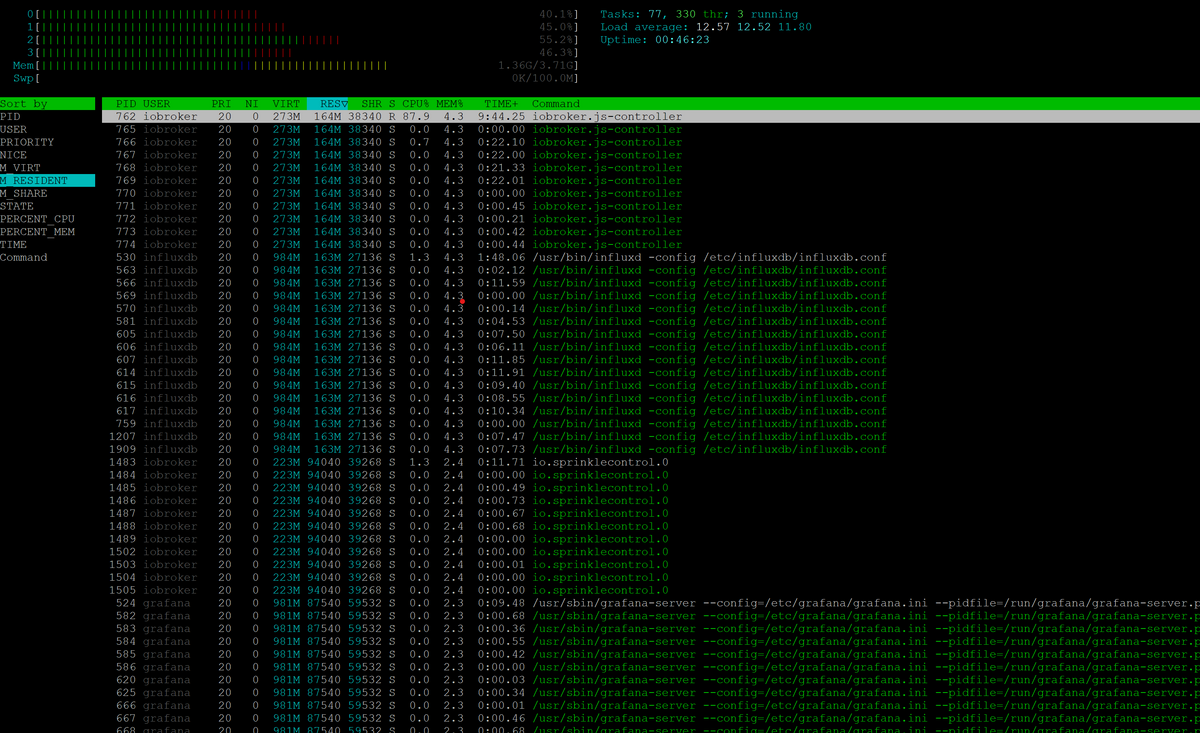
@pahan Du sollst das nach Percent_CPU sortieren, nicht nach M_Resident.
-
@pahan Du sollst das nach Percent_CPU sortieren, nicht nach M_Resident.
@thomas-braun sagte in iobroker läuft wieder nicht...:
@pahan Du sollst das nach Percent_CPU sortieren, nicht nach M_Resident.
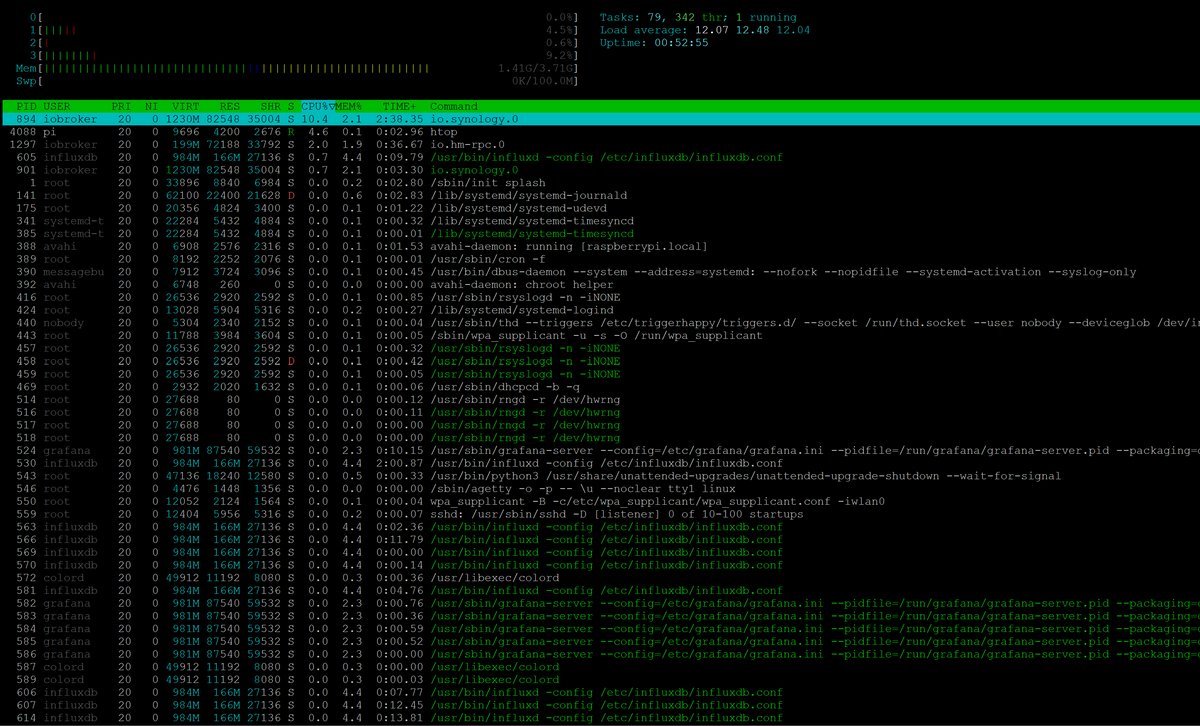
anbei eine Momentaufnahme :
-
@thomas-braun sagte in iobroker läuft wieder nicht...:
@pahan Du sollst das nach Percent_CPU sortieren, nicht nach M_Resident.
anbei eine Momentaufnahme :
Bei einer konstanten Load von 12 muss da irgendwas herausstechen.
Nutzt dir aber auch nur bedingt was, das zu wissen. Da dürfte es irgendwo eine Fehleinstellung oder ein krummes Skript geben.
-
Bei einer konstanten Load von 12 muss da irgendwas herausstechen.
Nutzt dir aber auch nur bedingt was, das zu wissen. Da dürfte es irgendwo eine Fehleinstellung oder ein krummes Skript geben.
@thomas-braun sagte in iobroker läuft wieder nicht...:
Bei einer konstanten Load von 12 muss da irgendwas herausstechen.
Nutzt dir aber auch nur bedingt was, das zu wissen. Da dürfte es irgendwo eine Fehleinstellung oder ein krummes Skript geben.
...und deswegen ist die admin Instanz über den Webbrowser nicht erreichbar? Weil zu viel Speicher/CPU von einem anderen Dienst gebraucht wird?
Ich gehe mal auf die Suche....kann es mit Grafana oder InfluxDB zusammenhängen?
Und noch eine Frage: auf dem Raspi habe ich ja nur iobroker laufen. Macht es Sinn, eine Instanz nach der anderen zu deaktivieren und den Load dabei im Auge behalten, wann dieser stark abfällt?

Hey! Du scheinst an dieser Unterhaltung interessiert zu sein, hast aber noch kein Konto.
Hast du es satt, bei jedem Besuch durch die gleichen Beiträge zu scrollen? Wenn du dich für ein Konto anmeldest, kommst du immer genau dorthin zurück, wo du zuvor warst, und kannst dich über neue Antworten benachrichtigen lassen (entweder per E-Mail oder Push-Benachrichtigung). Du kannst auch Lesezeichen speichern und Beiträge positiv bewerten, um anderen Community-Mitgliedern deine Wertschätzung zu zeigen.
Mit deinem Input könnte dieser Beitrag noch besser werden 💗
Registrieren AnmeldenSupport us
202
Online33.0k
Benutzer83.6k
Themen1.3m
Beiträge