




Rotex HPSU / Daikin Altherma Wärmepumpe über ioBroker.canbus
-
@raspiuser Hmm... sieht eigentlich gut aus. Prüfe mal deine Adapterconfig (besonders das Interface) und aktiviere mal das Debug-Log für die Adapterinstanz.
... hier der Log:
canbus.0
	2023-07-23 19:09:54.062	debug	Plugin sentry Initialize Plugin (enabled=true)
canbus.0
	2023-07-23 19:09:49.119	info	Terminated (ADAPTER_REQUESTED_TERMINATION): Without reason
canbus.0
	2023-07-23 19:09:49.118	debug	Plugin sentry destroyed
canbus.0
	2023-07-23 19:09:49.117	info	terminating
canbus.0
	2023-07-23 19:09:49.116	debug	cleaned everything up...
canbus.0
	2023-07-23 19:09:49.113	info	Got terminate signal TERMINATE_YOURSELF
canbus.0
	2023-07-23 19:09:30.656	error	Error starting can interface: Error: Error while creating channel
canbus.0
	2023-07-23 19:09:30.585	info	starting. Version 1.3.1 in /opt/iobroker/node_modules/iobroker.canbus, node: v18.17.0, js-controller: 4.0.24
canbus.0
	2023-07-23 19:09:30.149	debug	Plugin sentry Initialize Plugin (enabled=true)
canbus.0
	2023-07-23 19:09:30.117	debug	States connected to redis: 127.0.0.1:9000
canbus.0
	2023-07-23 19:09:30.102	debug	States create User PubSub Client
canbus.0
	2023-07-23 19:09:30.101	debug	States create System PubSub Client
canbus.0
	2023-07-23 19:09:30.092	debug	Redis States: Use Redis connection: 127.0.0.1:9000
canbus.0
	2023-07-23 19:09:30.068	debug	Objects connected to redis: 127.0.0.1:9001
canbus.0
	2023-07-23 19:09:30.059	debug	Objects client initialize lua scripts
canbus.0
	2023-07-23 19:09:30.036	debug	Objects create User PubSub Client
canbus.0
	2023-07-23 19:09:30.033	debug	Objects create System PubSub Client
canbus.0
	2023-07-23 19:09:30.031	debug	Objects client ready ... initialize now
canbus.0
	2023-07-23 19:09:29.989	debug	Redis Objects: Use Redis connection: 127.0.0.1:9001
canbus.0
	2023-07-23 19:09:25.199	info	Terminated (ADAPTER_REQUESTED_TERMINATION): Without reason
canbus.0
	2023-07-23 19:09:25.194	info	terminating
canbus.0
	2023-07-23 19:09:25.190	info	Got terminate signal TERMINATE_YOURSELF
canbus.0
	2023-07-23 19:08:39.954	error	Error starting can interface: Error: Error while creating channel
canbus.0
	2023-07-23 19:08:39.877	info	starting. Version 1.3.1 in /opt/iobroker/node_modules/iobroker.canbus, node: v18.17.0, js-controller: 4.0.24
... sonst passiert nix ... und hier die Einstellungen (ohne Änderungen zw. Buste rund Bookworm)
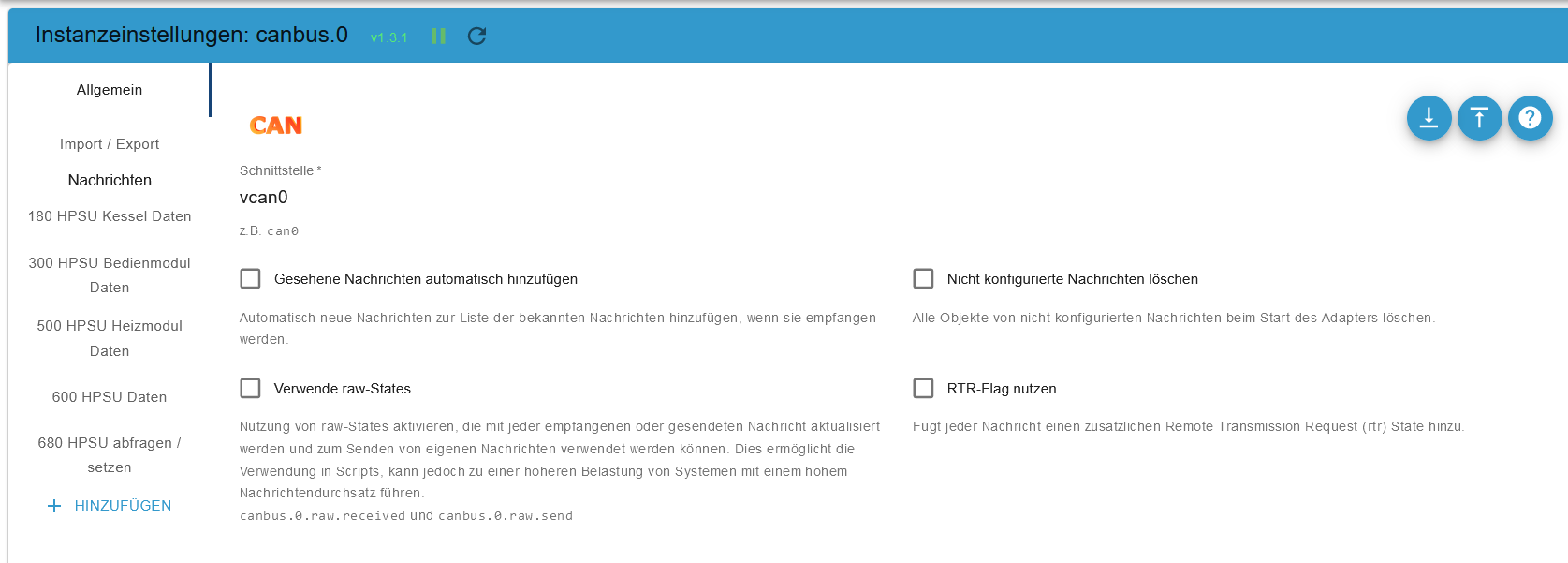
-
... hier der Log:
canbus.0
	2023-07-23 19:09:54.062	debug	Plugin sentry Initialize Plugin (enabled=true)
canbus.0
	2023-07-23 19:09:49.119	info	Terminated (ADAPTER_REQUESTED_TERMINATION): Without reason
canbus.0
	2023-07-23 19:09:49.118	debug	Plugin sentry destroyed
canbus.0
	2023-07-23 19:09:49.117	info	terminating
canbus.0
	2023-07-23 19:09:49.116	debug	cleaned everything up...
canbus.0
	2023-07-23 19:09:49.113	info	Got terminate signal TERMINATE_YOURSELF
canbus.0
	2023-07-23 19:09:30.656	error	Error starting can interface: Error: Error while creating channel
canbus.0
	2023-07-23 19:09:30.585	info	starting. Version 1.3.1 in /opt/iobroker/node_modules/iobroker.canbus, node: v18.17.0, js-controller: 4.0.24
canbus.0
	2023-07-23 19:09:30.149	debug	Plugin sentry Initialize Plugin (enabled=true)
canbus.0
	2023-07-23 19:09:30.117	debug	States connected to redis: 127.0.0.1:9000
canbus.0
	2023-07-23 19:09:30.102	debug	States create User PubSub Client
canbus.0
	2023-07-23 19:09:30.101	debug	States create System PubSub Client
canbus.0
	2023-07-23 19:09:30.092	debug	Redis States: Use Redis connection: 127.0.0.1:9000
canbus.0
	2023-07-23 19:09:30.068	debug	Objects connected to redis: 127.0.0.1:9001
canbus.0
	2023-07-23 19:09:30.059	debug	Objects client initialize lua scripts
canbus.0
	2023-07-23 19:09:30.036	debug	Objects create User PubSub Client
canbus.0
	2023-07-23 19:09:30.033	debug	Objects create System PubSub Client
canbus.0
	2023-07-23 19:09:30.031	debug	Objects client ready ... initialize now
canbus.0
	2023-07-23 19:09:29.989	debug	Redis Objects: Use Redis connection: 127.0.0.1:9001
canbus.0
	2023-07-23 19:09:25.199	info	Terminated (ADAPTER_REQUESTED_TERMINATION): Without reason
canbus.0
	2023-07-23 19:09:25.194	info	terminating
canbus.0
	2023-07-23 19:09:25.190	info	Got terminate signal TERMINATE_YOURSELF
canbus.0
	2023-07-23 19:08:39.954	error	Error starting can interface: Error: Error while creating channel
canbus.0
	2023-07-23 19:08:39.877	info	starting. Version 1.3.1 in /opt/iobroker/node_modules/iobroker.canbus, node: v18.17.0, js-controller: 4.0.24
... sonst passiert nix ... und hier die Einstellungen (ohne Änderungen zw. Buste rund Bookworm)
-
@raspiuser In deiner Config steht vcan0, aber das Interface heißt can0. ;)
@crycode said in Rotex HPSU / Daikin Altherma Wärmepumpe über ioBroker.canbus:
In deiner Config steht vcan0, aber das Interface heißt can0.
nö ... vcan0 ist richtig ... Ich habe / hatte ja bereits ein funktionsfähige Anbindung (siehe #280).
(Ich habe wirklich "nur" eine frische Bullseye / Bookworm Karte mit Backitup eingesetzt. Und dann ist ja vcan0 immer noch richtig ... funktioniert unter Buster ja einwandfrei ...)
Ich klone die Buster Karte und upgrade dann DIESE Installation ohne ein ganz frische Installation ... vielleicht ist dann die Lösung ...
-
@crycode said in Rotex HPSU / Daikin Altherma Wärmepumpe über ioBroker.canbus:
In deiner Config steht vcan0, aber das Interface heißt can0.
nö ... vcan0 ist richtig ... Ich habe / hatte ja bereits ein funktionsfähige Anbindung (siehe #280).
(Ich habe wirklich "nur" eine frische Bullseye / Bookworm Karte mit Backitup eingesetzt. Und dann ist ja vcan0 immer noch richtig ... funktioniert unter Buster ja einwandfrei ...)
Ich klone die Buster Karte und upgrade dann DIESE Installation ohne ein ganz frische Installation ... vielleicht ist dann die Lösung ...
@raspiuser Ah moment... du hast den Adapter ja auf einem anderen System laufen und das CAN-Interface vom Raspi mittel Cannelloni weitergegeben, richtig?
Den Cannelloni Service hast du auf beiden Seiten richtig eingerichtet?
Dann schau mal ins Log von den Services, ob dort irgendwelche Fehler gemeldet werden:sudo journalctl -u cannelloni-can0.servicebzw.
sudo journalctl -u cannelloni-vcan0.serviceWahrscheinlich klemmt da irgendwas, wodurch dann van0 auf deinem ioBroker System nicht richtig verfügbar ist.
-
@raspiuser Ah moment... du hast den Adapter ja auf einem anderen System laufen und das CAN-Interface vom Raspi mittel Cannelloni weitergegeben, richtig?
Den Cannelloni Service hast du auf beiden Seiten richtig eingerichtet?
Dann schau mal ins Log von den Services, ob dort irgendwelche Fehler gemeldet werden:sudo journalctl -u cannelloni-can0.servicebzw.
sudo journalctl -u cannelloni-vcan0.serviceWahrscheinlich klemmt da irgendwas, wodurch dann van0 auf deinem ioBroker System nicht richtig verfügbar ist.
@crycode
... ich war mir nicht sicher auf welchem System ich die Logs erstellen soll und habe mal (laienhaft) beide abgefragt ...Hier die Ausgabe auf dem ioBroker Raspi Pi4:
pi@ioBroker-Raspi:~ $ sudo journalctl -u cannelloni-can0.service
-- No entries --
pi@ioBroker-Raspi:~ $ sudo journalctl -u cannelloni-vcan0.service
-- No entries --
pi@ioBroker-Raspi:~ $
Und hier auf dem vcan0 Raspi Zero:
pi@ioBroker-Zero:~ $ sudo journalctl -u cannelloni-vcan0.service -- Logs begin at Sat 2023-07-22 18:08:42 CEST, end at Mon 2023-07-24 12:10:35 CE -- No entries -- lines 1-2/2 (END) pi@ioBroker-Zero:~ $ sudo journalctl -u cannelloni-can0.service -- Logs begin at Sat 2023-07-22 18:08:42 CEST, end at Mon 2023-07-24 12:11:16 CE Jul 22 18:09:09 ioBroker-Zero systemd[1]: Started Cannelloni for can0. Jul 22 18:09:10 ioBroker-Zero cannelloni[556]: INFO:udpthread.cpp[158]:run:UDPTh Jul 22 18:09:10 ioBroker-Zero cannelloni[556]: ERROR:canthread.cpp[88]:start:CAN Jul 22 18:09:10 ioBroker-Zero cannelloni[556]: INFO:canthread.cpp[108]:run:CANTh lines 1-5/5 (END)...skipping... -- Logs begin at Sat 2023-07-22 18:08:42 CEST, end at Mon 2023-07-24 12:11:16 CEST. -- Jul 22 18:09:09 ioBroker-Zero systemd[1]: Started Cannelloni for can0. Jul 22 18:09:10 ioBroker-Zero cannelloni[556]: INFO:udpthread.cpp[158]:run:UDPThread up and running Jul 22 18:09:10 ioBroker-Zero cannelloni[556]: ERROR:canthread.cpp[88]:start:CAN_FD is not supported on >can0< Jul 22 18:09:10 ioBroker-Zero cannelloni[556]: INFO:canthread.cpp[108]:run:CANThread up and running ~ ~ ~ ~ ~ ~ ~ ~ ~ ~ ~ ~ ~ ~ ~ ~ ~ ~ ~ ~ lines 1-5/5 (END) -- Logs begin at Sat 2023-07-22 18:08:42 CEST, end at Mon 2023-07-24 12:11:16 CEST. -- Jul 22 18:09:09 ioBroker-Zero systemd[1]: Started Cannelloni for can0. Jul 22 18:09:10 ioBroker-Zero cannelloni[556]: INFO:udpthread.cpp[158]:run:UDPThread up and running Jul 22 18:09:10 ioBroker-Zero cannelloni[556]: ERROR:canthread.cpp[88]:start:CAN_FD is not supported on >can0< Jul 22 18:09:10 ioBroker-Zero cannelloni[556]: INFO:canthread.cpp[108]:run:CANThread up and running ~ ~ ~ ~ ~ ~ ~ ~ ~ ~ ~ ~ ~ ~ ~ ~ ~ ~ ~ ~ lines 1-5/5 (END) -
@crycode
... ich war mir nicht sicher auf welchem System ich die Logs erstellen soll und habe mal (laienhaft) beide abgefragt ...Hier die Ausgabe auf dem ioBroker Raspi Pi4:
pi@ioBroker-Raspi:~ $ sudo journalctl -u cannelloni-can0.service
-- No entries --
pi@ioBroker-Raspi:~ $ sudo journalctl -u cannelloni-vcan0.service
-- No entries --
pi@ioBroker-Raspi:~ $
Und hier auf dem vcan0 Raspi Zero:
pi@ioBroker-Zero:~ $ sudo journalctl -u cannelloni-vcan0.service -- Logs begin at Sat 2023-07-22 18:08:42 CEST, end at Mon 2023-07-24 12:10:35 CE -- No entries -- lines 1-2/2 (END) pi@ioBroker-Zero:~ $ sudo journalctl -u cannelloni-can0.service -- Logs begin at Sat 2023-07-22 18:08:42 CEST, end at Mon 2023-07-24 12:11:16 CE Jul 22 18:09:09 ioBroker-Zero systemd[1]: Started Cannelloni for can0. Jul 22 18:09:10 ioBroker-Zero cannelloni[556]: INFO:udpthread.cpp[158]:run:UDPTh Jul 22 18:09:10 ioBroker-Zero cannelloni[556]: ERROR:canthread.cpp[88]:start:CAN Jul 22 18:09:10 ioBroker-Zero cannelloni[556]: INFO:canthread.cpp[108]:run:CANTh lines 1-5/5 (END)...skipping... -- Logs begin at Sat 2023-07-22 18:08:42 CEST, end at Mon 2023-07-24 12:11:16 CEST. -- Jul 22 18:09:09 ioBroker-Zero systemd[1]: Started Cannelloni for can0. Jul 22 18:09:10 ioBroker-Zero cannelloni[556]: INFO:udpthread.cpp[158]:run:UDPThread up and running Jul 22 18:09:10 ioBroker-Zero cannelloni[556]: ERROR:canthread.cpp[88]:start:CAN_FD is not supported on >can0< Jul 22 18:09:10 ioBroker-Zero cannelloni[556]: INFO:canthread.cpp[108]:run:CANThread up and running ~ ~ ~ ~ ~ ~ ~ ~ ~ ~ ~ ~ ~ ~ ~ ~ ~ ~ ~ ~ lines 1-5/5 (END) -- Logs begin at Sat 2023-07-22 18:08:42 CEST, end at Mon 2023-07-24 12:11:16 CEST. -- Jul 22 18:09:09 ioBroker-Zero systemd[1]: Started Cannelloni for can0. Jul 22 18:09:10 ioBroker-Zero cannelloni[556]: INFO:udpthread.cpp[158]:run:UDPThread up and running Jul 22 18:09:10 ioBroker-Zero cannelloni[556]: ERROR:canthread.cpp[88]:start:CAN_FD is not supported on >can0< Jul 22 18:09:10 ioBroker-Zero cannelloni[556]: INFO:canthread.cpp[108]:run:CANThread up and running ~ ~ ~ ~ ~ ~ ~ ~ ~ ~ ~ ~ ~ ~ ~ ~ ~ ~ ~ ~ lines 1-5/5 (END)@raspiuser Auf dem Raspi Zero sieht soweit gut aus.
Mach mal auf dem ioBroker Raspi:sudo systemctl restart cannelloni-vcan0.service sudo systemctl status cannelloni-vcan0.service sudo journalctl -u cannelloni-vcan0.serviceDas startet den Service neu, fragt den Status ab und gibt das Log aus.
Hat der Raspi Zero nach dem Update noch die gleiche IP-Adresse?
Falls nicht, musst du in der Datei/etc/systemd/system/cannelloni-vcan0.serviceauf dem ioBroker Raspi anpassen. -
@raspiuser Auf dem Raspi Zero sieht soweit gut aus.
Mach mal auf dem ioBroker Raspi:sudo systemctl restart cannelloni-vcan0.service sudo systemctl status cannelloni-vcan0.service sudo journalctl -u cannelloni-vcan0.serviceDas startet den Service neu, fragt den Status ab und gibt das Log aus.
Hat der Raspi Zero nach dem Update noch die gleiche IP-Adresse?
Falls nicht, musst du in der Datei/etc/systemd/system/cannelloni-vcan0.serviceauf dem ioBroker Raspi anpassen.@crycode
... sieht wohl so aus, dass ich (erstmal) canneloni auf dem Raspi einrichten muss, oder ?pi@ioBroker-Raspi:~ $ sudo systemctl restart cannelloni-vcan0.service Failed to restart cannelloni-vcan0.service: Unit cannelloni-vcan0.service not found. pi@ioBroker-Raspi:~ $ sudo systemctl status cannelloni-vcan0.service Unit cannelloni-vcan0.service could not be found. pi@ioBroker-Raspi:~ $ sudo journalctl -u cannelloni-vcan0.service -- No entries -- pi@ioBroker-Raspi:~ $EDIT:
so, oder ? (siehe auch "meine" Anleitung ab Seite 4 ...)
sudo apt install can-utils
sudo apt install build-essential cmake git
git clone https://github.com/mguentner/cannelloni.git
cd cannelloni
cmake -DCMAKE_BUILD_TYPE=Release make
sudo make installusw.
Während der Installation kam diese Fehlermeldung:
Job for vcan0-setup.service failed because the control process exited with error code.
See "systemctl status vcan0-setup.service" and "journalctl -xeu vcan0-setup.service" for details.
Nachdem ich dann diesem Wunsch entsprochen habe kam dann dieser ewig lange Text (mit dem ich als Laie nix anfangen kann ...):
pi@ioBroker-Raspi:~ $ systemctl status vcan0-setup.service × vcan0-setup.service - Setup vcan0 Loaded: loaded (/etc/systemd/system/vcan0-setup.service; enabled; preset: > Active: failed (Result: exit-code) since Mon 2023-07-24 14:43:18 CEST; 1s > Process: 1241 ExecStart=/usr/local/sbin/vcan0-setup.sh start (code=exited, > Main PID: 1241 (code=exited, status=203/EXEC) CPU: 6ms Jul 24 14:43:18 ioBroker-Raspi systemd[1]: Starting vcan0-setup.service - Setup> Jul 24 14:43:18 ioBroker-Raspi (setup.sh)[1241]: vcan0-setup.service: Failed to> Jul 24 14:43:18 ioBroker-Raspi (setup.sh)[1241]: vcan0-setup.service: Failed at> Jul 24 14:43:18 ioBroker-Raspi systemd[1]: vcan0-setup.service: Main process ex> Jul 24 14:43:18 ioBroker-Raspi systemd[1]: vcan0-setup.service: Failed with res> Jul 24 14:43:18 ioBroker-Raspi systemd[1]: Failed to start vcan0-setup.service > lines 1-13/13 (END)...skipping... × vcan0-setup.service - Setup vcan0 Loaded: loaded (/etc/systemd/system/vcan0-setup.service; enabled; preset: enabled) Active: failed (Result: exit-code) since Mon 2023-07-24 14:43:18 CEST; 1s ago Process: 1241 ExecStart=/usr/local/sbin/vcan0-setup.sh start (code=exited, status=203/EXEC) Main PID: 1241 (code=exited, status=203/EXEC) CPU: 6ms Jul 24 14:43:18 ioBroker-Raspi systemd[1]: Starting vcan0-setup.service - Setup vcan0... Jul 24 14:43:18 ioBroker-Raspi (setup.sh)[1241]: vcan0-setup.service: Failed to execute /usr/local/sbin/vcan0-setup.sh: Exec format error Jul 24 14:43:18 ioBroker-Raspi (setup.sh)[1241]: vcan0-setup.service: Failed at step EXEC spawning /usr/local/sbin/vcan0-setup.sh: Exec forma> Jul 24 14:43:18 ioBroker-Raspi systemd[1]: vcan0-setup.service: Main process exited, code=exited, status=203/EXEC Jul 24 14:43:18 ioBroker-Raspi systemd[1]: vcan0-setup.service: Failed with result 'exit-code'. Jul 24 14:43:18 ioBroker-Raspi systemd[1]: Failed to start vcan0-setup.service - Setup vcan0. ~ ~ ~ ~ ~ ~ ~ ~ ~ ~ ~ ~ ~ ~ ~ ~ ~ ~ ~ ~ ~ ~ ~ ~ ~ ...skipping... × vcan0-setup.service - Setup vcan0 Loaded: loaded (/etc/systemd/system/vcan0-setup.service; enabled; preset: enabled) Active: failed (Result: exit-code) since Mon 2023-07-24 14:43:18 CEST; 1s ago Process: 1241 ExecStart=/usr/local/sbin/vcan0-setup.sh start (code=exited, status=203/EXEC) Main PID: 1241 (code=exited, status=203/EXEC) CPU: 6ms Jul 24 14:43:18 ioBroker-Raspi systemd[1]: Starting vcan0-setup.service - Setup vcan0... Jul 24 14:43:18 ioBroker-Raspi (setup.sh)[1241]: vcan0-setup.service: Failed to execute /usr/local/sbin/vcan0-setup.sh: Exec format error Jul 24 14:43:18 ioBroker-Raspi (setup.sh)[1241]: vcan0-setup.service: Failed at step EXEC spawning /usr/local/sbin/vcan0-setup.sh: Exec forma> Jul 24 14:43:18 ioBroker-Raspi systemd[1]: vcan0-setup.service: Main process exited, code=exited, status=203/EXEC Jul 24 14:43:18 ioBroker-Raspi systemd[1]: vcan0-setup.service: Failed with result 'exit-code'. Jul 24 14:43:18 ioBroker-Raspi systemd[1]: Failed to start vcan0-setup.service - Setup vcan0. ~ ~ ~ ~ ~ ~ ~ ~ ~ ~ ~ ~ ~ ~ ~ ~ ~ ~ ~ ~ ~ ~ ~ ~ ~ × vcan0-setup.service - Setup vcan0 Loaded: loaded (/etc/systemd/system/vcan0-setup.service; enabled; preset: enabled) Active: failed (Result: exit-code) since Mon 2023-07-24 14:43:18 CEST; 1s ago Process: 1241 ExecStart=/usr/local/sbin/vcan0-setup.sh start (code=exited, status=203/EXEC) Main PID: 1241 (code=exited, status=203/EXEC) CPU: 6ms Jul 24 14:43:18 ioBroker-Raspi systemd[1]: Starting vcan0-setup.service - Setup vcan0... Jul 24 14:43:18 ioBroker-Raspi (setup.sh)[1241]: vcan0-setup.service: Failed to execute /usr/local/sbin/vcan0-setup.sh: Exec format error Jul 24 14:43:18 ioBroker-Raspi (setup.sh)[1241]: vcan0-setup.service: Failed at step EXEC spawning /usr/local/sbin/vcan0-setup.sh: Exec forma> Jul 24 14:43:18 ioBroker-Raspi systemd[1]: vcan0-setup.service: Main process exited, code=exited, status=203/EXEC Jul 24 14:43:18 ioBroker-Raspi systemd[1]: vcan0-setup.service: Failed with result 'exit-code'. Jul 24 14:43:18 ioBroker-Raspi systemd[1]: Failed to start vcan0-setup.service - Setup vcan0. ~ ~ ~ ~ ~ ~ ~ ~ ~ ~ ~ ~ ~ ~ ~ ~ ~ ~ ~ ~ ~ ~ ~ ~ ~ pi@ioBroker-Raspi:~ $ journalctl -xeu vcan0-setup.service ░░ Subject: A start job for unit vcan0-setup.service has begun execution ░░ Defined-By: systemd ░░ Support: https://www.debian.org/support ░░ ░░ A start job for unit vcan0-setup.service has begun execution. ░░ ░░ The job identifier is 9756. Jul 24 14:44:49 ioBroker-Raspi (setup.sh)[1333]: vcan0-setup.service: Failed to execute /usr/local/sbin/vcan0-setup.sh: Exec format error Jul 24 14:44:49 ioBroker-Raspi (setup.sh)[1333]: vcan0-setup.service: Failed at step EXEC spawning /usr/local/sbin/vcan0-setup.sh: Exec forma> ░░ Subject: Process /usr/local/sbin/vcan0-setup.sh could not be executed ░░ Defined-By: systemd ░░ Support: https://www.debian.org/support ░░ ░░ The process /usr/local/sbin/vcan0-setup.sh could not be executed and failed. ░░ ░░ The error number returned by this process is ERRNO. Jul 24 14:44:49 ioBroker-Raspi systemd[1]: vcan0-setup.service: Main process exited, code=exited, status=203/EXEC ░░ Subject: Unit process exited ░░ Defined-By: systemd ░░ Support: https://www.debian.org/support ░░ ░░ An ExecStart= process belonging to unit vcan0-setup.service has exited. ░░ ░░ The process' exit code is 'exited' and its exit status is 203. Jul 24 14:44:49 ioBroker-Raspi systemd[1]: vcan0-setup.service: Failed with result 'exit-code'. ░░ Subject: Unit failed ░░ Defined-By: systemd ░░ Support: https://www.debian.org/support ░░ ░░ The unit vcan0-setup.service has entered the 'failed' state with result 'exit-code'. Jul 24 14:44:49 ioBroker-Raspi systemd[1]: Failed to start vcan0-setup.service - Setup vcan0. ░░ Subject: A start job for unit vcan0-setup.service has failed ░░ Defined-By: systemd ░░ Support: https://www.debian.org/support ░░ ░░ A start job for unit vcan0-setup.service has finished with a failure. ░░ ░░ The job identifier is 9756 and the job result is failed. lines 4118-4155/4155 (END) -
@crycode
... sieht wohl so aus, dass ich (erstmal) canneloni auf dem Raspi einrichten muss, oder ?pi@ioBroker-Raspi:~ $ sudo systemctl restart cannelloni-vcan0.service Failed to restart cannelloni-vcan0.service: Unit cannelloni-vcan0.service not found. pi@ioBroker-Raspi:~ $ sudo systemctl status cannelloni-vcan0.service Unit cannelloni-vcan0.service could not be found. pi@ioBroker-Raspi:~ $ sudo journalctl -u cannelloni-vcan0.service -- No entries -- pi@ioBroker-Raspi:~ $EDIT:
so, oder ? (siehe auch "meine" Anleitung ab Seite 4 ...)
sudo apt install can-utils
sudo apt install build-essential cmake git
git clone https://github.com/mguentner/cannelloni.git
cd cannelloni
cmake -DCMAKE_BUILD_TYPE=Release make
sudo make installusw.
Während der Installation kam diese Fehlermeldung:
Job for vcan0-setup.service failed because the control process exited with error code.
See "systemctl status vcan0-setup.service" and "journalctl -xeu vcan0-setup.service" for details.
Nachdem ich dann diesem Wunsch entsprochen habe kam dann dieser ewig lange Text (mit dem ich als Laie nix anfangen kann ...):
pi@ioBroker-Raspi:~ $ systemctl status vcan0-setup.service × vcan0-setup.service - Setup vcan0 Loaded: loaded (/etc/systemd/system/vcan0-setup.service; enabled; preset: > Active: failed (Result: exit-code) since Mon 2023-07-24 14:43:18 CEST; 1s > Process: 1241 ExecStart=/usr/local/sbin/vcan0-setup.sh start (code=exited, > Main PID: 1241 (code=exited, status=203/EXEC) CPU: 6ms Jul 24 14:43:18 ioBroker-Raspi systemd[1]: Starting vcan0-setup.service - Setup> Jul 24 14:43:18 ioBroker-Raspi (setup.sh)[1241]: vcan0-setup.service: Failed to> Jul 24 14:43:18 ioBroker-Raspi (setup.sh)[1241]: vcan0-setup.service: Failed at> Jul 24 14:43:18 ioBroker-Raspi systemd[1]: vcan0-setup.service: Main process ex> Jul 24 14:43:18 ioBroker-Raspi systemd[1]: vcan0-setup.service: Failed with res> Jul 24 14:43:18 ioBroker-Raspi systemd[1]: Failed to start vcan0-setup.service > lines 1-13/13 (END)...skipping... × vcan0-setup.service - Setup vcan0 Loaded: loaded (/etc/systemd/system/vcan0-setup.service; enabled; preset: enabled) Active: failed (Result: exit-code) since Mon 2023-07-24 14:43:18 CEST; 1s ago Process: 1241 ExecStart=/usr/local/sbin/vcan0-setup.sh start (code=exited, status=203/EXEC) Main PID: 1241 (code=exited, status=203/EXEC) CPU: 6ms Jul 24 14:43:18 ioBroker-Raspi systemd[1]: Starting vcan0-setup.service - Setup vcan0... Jul 24 14:43:18 ioBroker-Raspi (setup.sh)[1241]: vcan0-setup.service: Failed to execute /usr/local/sbin/vcan0-setup.sh: Exec format error Jul 24 14:43:18 ioBroker-Raspi (setup.sh)[1241]: vcan0-setup.service: Failed at step EXEC spawning /usr/local/sbin/vcan0-setup.sh: Exec forma> Jul 24 14:43:18 ioBroker-Raspi systemd[1]: vcan0-setup.service: Main process exited, code=exited, status=203/EXEC Jul 24 14:43:18 ioBroker-Raspi systemd[1]: vcan0-setup.service: Failed with result 'exit-code'. Jul 24 14:43:18 ioBroker-Raspi systemd[1]: Failed to start vcan0-setup.service - Setup vcan0. ~ ~ ~ ~ ~ ~ ~ ~ ~ ~ ~ ~ ~ ~ ~ ~ ~ ~ ~ ~ ~ ~ ~ ~ ~ ...skipping... × vcan0-setup.service - Setup vcan0 Loaded: loaded (/etc/systemd/system/vcan0-setup.service; enabled; preset: enabled) Active: failed (Result: exit-code) since Mon 2023-07-24 14:43:18 CEST; 1s ago Process: 1241 ExecStart=/usr/local/sbin/vcan0-setup.sh start (code=exited, status=203/EXEC) Main PID: 1241 (code=exited, status=203/EXEC) CPU: 6ms Jul 24 14:43:18 ioBroker-Raspi systemd[1]: Starting vcan0-setup.service - Setup vcan0... Jul 24 14:43:18 ioBroker-Raspi (setup.sh)[1241]: vcan0-setup.service: Failed to execute /usr/local/sbin/vcan0-setup.sh: Exec format error Jul 24 14:43:18 ioBroker-Raspi (setup.sh)[1241]: vcan0-setup.service: Failed at step EXEC spawning /usr/local/sbin/vcan0-setup.sh: Exec forma> Jul 24 14:43:18 ioBroker-Raspi systemd[1]: vcan0-setup.service: Main process exited, code=exited, status=203/EXEC Jul 24 14:43:18 ioBroker-Raspi systemd[1]: vcan0-setup.service: Failed with result 'exit-code'. Jul 24 14:43:18 ioBroker-Raspi systemd[1]: Failed to start vcan0-setup.service - Setup vcan0. ~ ~ ~ ~ ~ ~ ~ ~ ~ ~ ~ ~ ~ ~ ~ ~ ~ ~ ~ ~ ~ ~ ~ ~ ~ × vcan0-setup.service - Setup vcan0 Loaded: loaded (/etc/systemd/system/vcan0-setup.service; enabled; preset: enabled) Active: failed (Result: exit-code) since Mon 2023-07-24 14:43:18 CEST; 1s ago Process: 1241 ExecStart=/usr/local/sbin/vcan0-setup.sh start (code=exited, status=203/EXEC) Main PID: 1241 (code=exited, status=203/EXEC) CPU: 6ms Jul 24 14:43:18 ioBroker-Raspi systemd[1]: Starting vcan0-setup.service - Setup vcan0... Jul 24 14:43:18 ioBroker-Raspi (setup.sh)[1241]: vcan0-setup.service: Failed to execute /usr/local/sbin/vcan0-setup.sh: Exec format error Jul 24 14:43:18 ioBroker-Raspi (setup.sh)[1241]: vcan0-setup.service: Failed at step EXEC spawning /usr/local/sbin/vcan0-setup.sh: Exec forma> Jul 24 14:43:18 ioBroker-Raspi systemd[1]: vcan0-setup.service: Main process exited, code=exited, status=203/EXEC Jul 24 14:43:18 ioBroker-Raspi systemd[1]: vcan0-setup.service: Failed with result 'exit-code'. Jul 24 14:43:18 ioBroker-Raspi systemd[1]: Failed to start vcan0-setup.service - Setup vcan0. ~ ~ ~ ~ ~ ~ ~ ~ ~ ~ ~ ~ ~ ~ ~ ~ ~ ~ ~ ~ ~ ~ ~ ~ ~ pi@ioBroker-Raspi:~ $ journalctl -xeu vcan0-setup.service ░░ Subject: A start job for unit vcan0-setup.service has begun execution ░░ Defined-By: systemd ░░ Support: https://www.debian.org/support ░░ ░░ A start job for unit vcan0-setup.service has begun execution. ░░ ░░ The job identifier is 9756. Jul 24 14:44:49 ioBroker-Raspi (setup.sh)[1333]: vcan0-setup.service: Failed to execute /usr/local/sbin/vcan0-setup.sh: Exec format error Jul 24 14:44:49 ioBroker-Raspi (setup.sh)[1333]: vcan0-setup.service: Failed at step EXEC spawning /usr/local/sbin/vcan0-setup.sh: Exec forma> ░░ Subject: Process /usr/local/sbin/vcan0-setup.sh could not be executed ░░ Defined-By: systemd ░░ Support: https://www.debian.org/support ░░ ░░ The process /usr/local/sbin/vcan0-setup.sh could not be executed and failed. ░░ ░░ The error number returned by this process is ERRNO. Jul 24 14:44:49 ioBroker-Raspi systemd[1]: vcan0-setup.service: Main process exited, code=exited, status=203/EXEC ░░ Subject: Unit process exited ░░ Defined-By: systemd ░░ Support: https://www.debian.org/support ░░ ░░ An ExecStart= process belonging to unit vcan0-setup.service has exited. ░░ ░░ The process' exit code is 'exited' and its exit status is 203. Jul 24 14:44:49 ioBroker-Raspi systemd[1]: vcan0-setup.service: Failed with result 'exit-code'. ░░ Subject: Unit failed ░░ Defined-By: systemd ░░ Support: https://www.debian.org/support ░░ ░░ The unit vcan0-setup.service has entered the 'failed' state with result 'exit-code'. Jul 24 14:44:49 ioBroker-Raspi systemd[1]: Failed to start vcan0-setup.service - Setup vcan0. ░░ Subject: A start job for unit vcan0-setup.service has failed ░░ Defined-By: systemd ░░ Support: https://www.debian.org/support ░░ ░░ A start job for unit vcan0-setup.service has finished with a failure. ░░ ░░ The job identifier is 9756 and the job result is failed. lines 4118-4155/4155 (END)@raspiuser Ja, du musst natürlich Cannelloni installiert und alles eingerichtet haben. ;)
Failed to execute /usr/local/sbin/vcan0-setup.sh: Exec format errorDa stimmt etwas mit dem
vcan0-setup.shScript nicht. -
@raspiuser Ja, du musst natürlich Cannelloni installiert und alles eingerichtet haben. ;)
Failed to execute /usr/local/sbin/vcan0-setup.sh: Exec format errorDa stimmt etwas mit dem
vcan0-setup.shScript nicht.@crycode said in Rotex HPSU / Daikin Altherma Wärmepumpe über ioBroker.canbus:
Da stimmt etwas mit dem vcan0-setup.sh Script nicht.
OK, Danke erstmal ...
Das einfachste für mich ist es, ich fange mit dem ioBroker-Raspi frisch an.
Auf dem CAN-Zero-Raspi sollte ja alles i.O. sein ... mit der "alten" Installation klappt es ja. -
Hi,
leider kämpfe ich bei aktivem CAN Adapter noch immer mit einer hohen Prozessorlast.
Ich habe den CAN über ein CAN HAT am RasPi 4 4GB angeschlossen.Wie und wo kann ich Abfragetimings einstellen? In der Instanz habe ich nichts gefunden.
V1.3.1 ist installiert -
Hi,
leider kämpfe ich bei aktivem CAN Adapter noch immer mit einer hohen Prozessorlast.
Ich habe den CAN über ein CAN HAT am RasPi 4 4GB angeschlossen.Wie und wo kann ich Abfragetimings einstellen? In der Instanz habe ich nichts gefunden.
V1.3.1 ist installiert -
Hi,
leider kämpfe ich bei aktivem CAN Adapter noch immer mit einer hohen Prozessorlast.
Ich habe den CAN über ein CAN HAT am RasPi 4 4GB angeschlossen.Wie und wo kann ich Abfragetimings einstellen? In der Instanz habe ich nichts gefunden.
V1.3.1 ist installiert@hg6806 Du kannst pro Parser die Option "Automatisch einen bestimmten Wert setzen" aktivieren/deaktivieren und dazu den jeweiligen Intervall in Millisekunden festlegen.

Bei sehr vielen aktiven Abfragen (oder sonst sehr hoher Aktivität auf dem Bus) steigt dann logischerweise die Last von deinem System.
-
@hg6806 Du kannst pro Parser die Option "Automatisch einen bestimmten Wert setzen" aktivieren/deaktivieren und dazu den jeweiligen Intervall in Millisekunden festlegen.
Bei sehr vielen aktiven Abfragen (oder sonst sehr hoher Aktivität auf dem Bus) steigt dann logischerweise die Last von deinem System.
Stimmt, den Intervall Wert kann man aber nur für recht wenige Werte eintragen. Hier habe ich als Minimalen Wert 10 Sek. sonst 1 Min oder auch länger.
Manche Abfrage Werte haben keine Intervall Angabe:
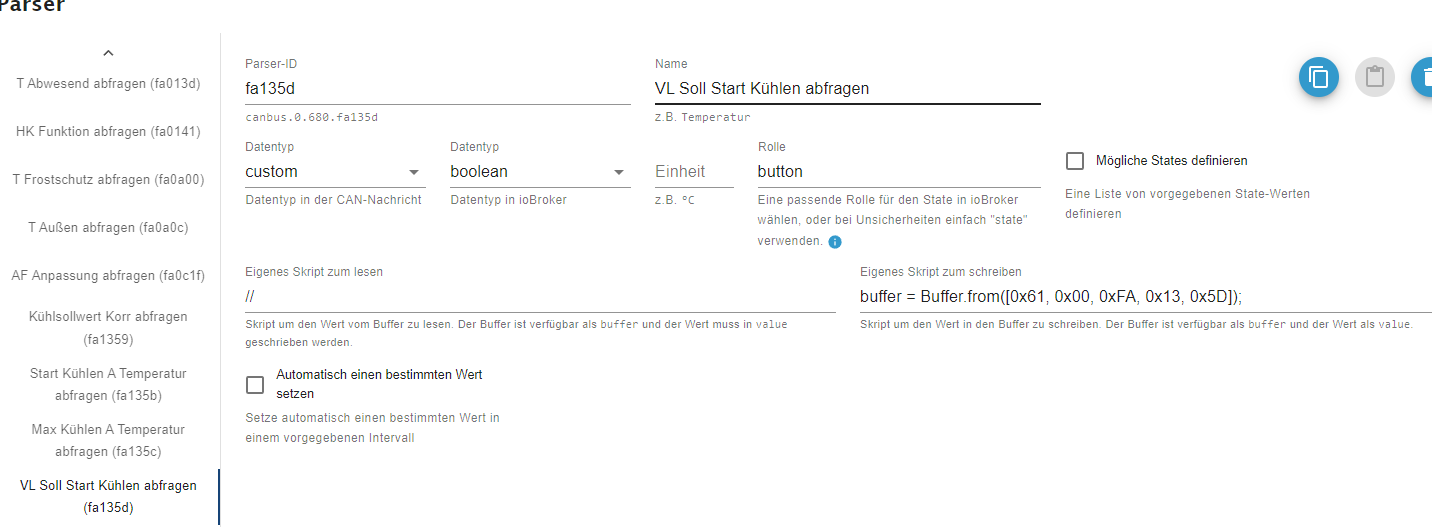
Kann man die Werte exportieren und dann einfach mal einen Teil löschen, ob es besser werte und dann das File wieder importieren? Die Last muss ja irgendwo herkommen. Ich glaube von dem Abfragen kommt das nicht.
-
Stimmt, den Intervall Wert kann man aber nur für recht wenige Werte eintragen. Hier habe ich als Minimalen Wert 10 Sek. sonst 1 Min oder auch länger.
Manche Abfrage Werte haben keine Intervall Angabe:
Kann man die Werte exportieren und dann einfach mal einen Teil löschen, ob es besser werte und dann das File wieder importieren? Die Last muss ja irgendwo herkommen. Ich glaube von dem Abfragen kommt das nicht.
@hg6806 Das Feld für den Intervall erscheint erst, wenn du den Haken für das automatische Setzen setzt. ;)
Du kannst deine Konfiguration exportieren (über Import/Export in der Konfig als json), dann einige Parser testweise löschen und später einfach die exportierte Konfig wieder importieren, um alles zurück zu haben.
Wie viele Abfragen hast du aktiv?
Hast du die "raw-States" aktiviert? Falls ja mach die mal aus.
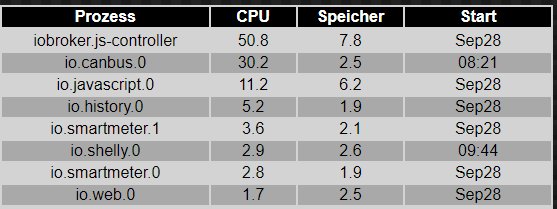
Hast du mal auf dem Raspi geschaut, welcher Prozess die CPU-Last erzeugt?
Das müsste mithtopin einem Terminal zu sehen sein. (Falls nicht installiert:sudo apt install htop) -
@hg6806 Das Feld für den Intervall erscheint erst, wenn du den Haken für das automatische Setzen setzt. ;)
Du kannst deine Konfiguration exportieren (über Import/Export in der Konfig als json), dann einige Parser testweise löschen und später einfach die exportierte Konfig wieder importieren, um alles zurück zu haben.
Wie viele Abfragen hast du aktiv?
Hast du die "raw-States" aktiviert? Falls ja mach die mal aus.
Hast du mal auf dem Raspi geschaut, welcher Prozess die CPU-Last erzeugt?
Das müsste mithtopin einem Terminal zu sehen sein. (Falls nicht installiert:sudo apt install htop)Was passiert, wenn der Haken fürs Automatische Setzen nicht gesetzt ist? Wann werden dann die Werte abgefragt bzw. erneuert?
Ich habe vielleicht 20 Abfragen aktiv
Ja, Raw-States ist angehakt. Ich "unchecke" das mal
Hier ist die Last von ioBroker. Ich hoffe das reicht.
-
Was passiert, wenn der Haken fürs Automatische Setzen nicht gesetzt ist? Wann werden dann die Werte abgefragt bzw. erneuert?
Ich habe vielleicht 20 Abfragen aktiv
Ja, Raw-States ist angehakt. Ich "unchecke" das mal
Hier ist die Last von ioBroker. Ich hoffe das reicht.
@hg6806 sagte in Rotex HPSU / Daikin Altherma Wärmepumpe über ioBroker.canbus:
Was passiert, wenn der Haken fürs Automatische Setzen nicht gesetzt ist? Wann werden dann die Werte abgefragt bzw. erneuert?
Dann werden die Werte nur abgefragt, wenn du es manuell oder z.B. über ein eigenes Script triggerst.
@hg6806 sagte in Rotex HPSU / Daikin Altherma Wärmepumpe über ioBroker.canbus:
Ich habe vielleicht 20 Abfragen aktiv
20 sollten eigentlich ohne größere Probleme funktionieren.
-
Das ist schonmal das wichtigste für den Winter für die Abtauvorgänge.
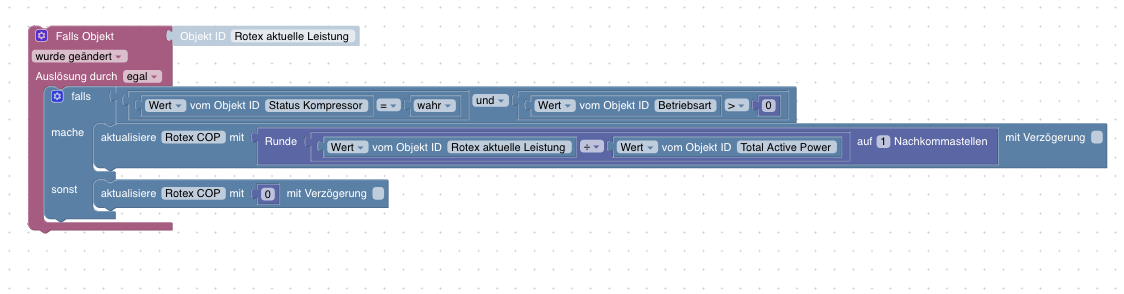
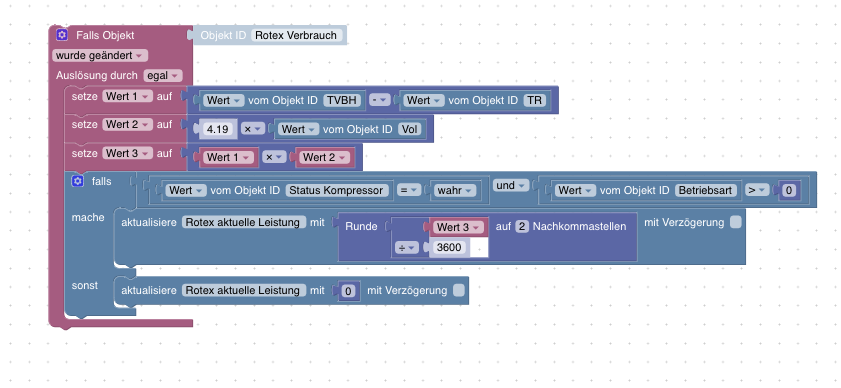
letzte ist aktuelle Leistungsberechnung
Und halt nen Dashboard wo ich alles relevante sehe.
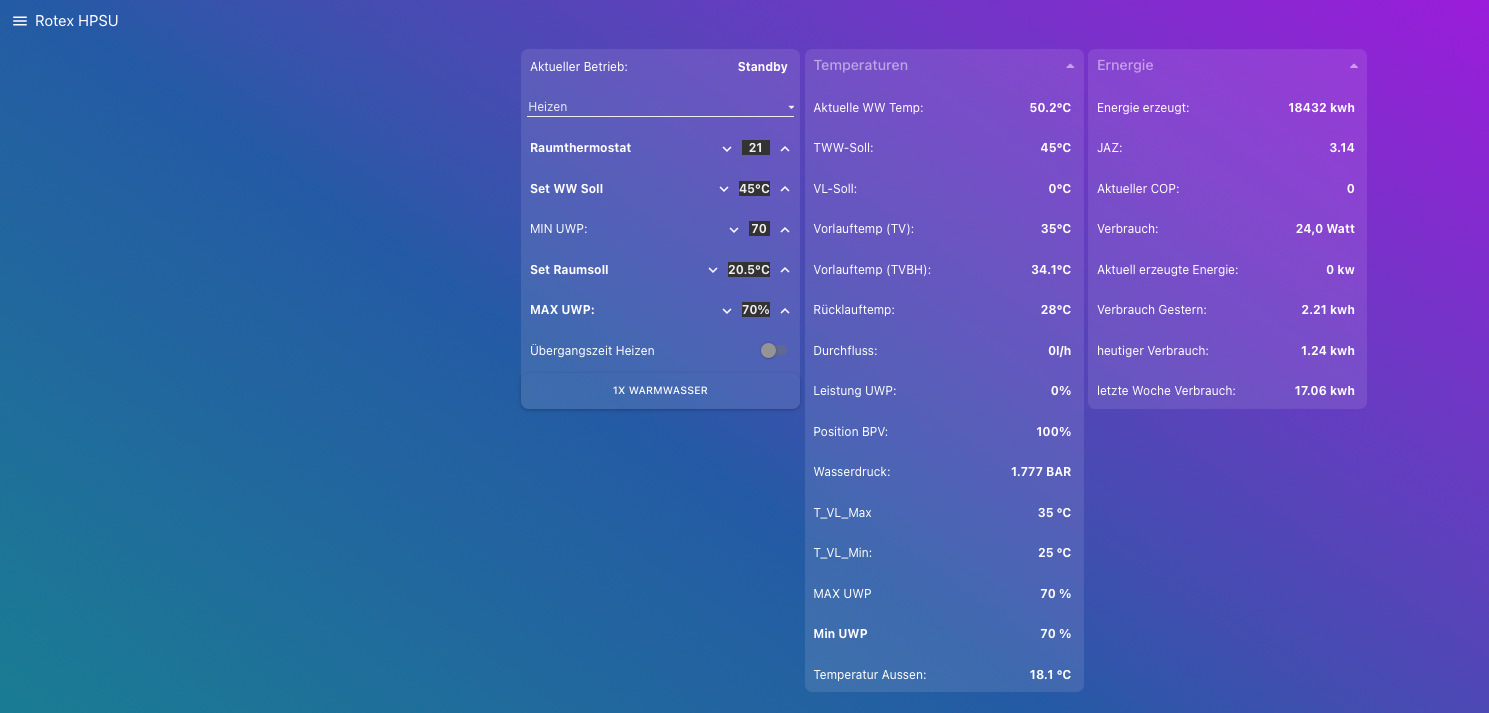
-
@earl80 said in Rotex HPSU / Daikin Altherma Wärmepumpe über ioBroker.canbus:
@cb187 Hi, danke für die gezeigten Blockly Scripts! Eine Frage habe ich: Woher kommt bei der Leistungsberechnung der Wert "Rotex Verbrauch" her? Müsste der nicht vom Stromzähler kommen?
LG Earl
Doch kommt vom eigenen WP Zähler.Bin mittlerweile von einem Modbus Zähler auf Shelly 3em gewechselt.
-
@earl80 said in Rotex HPSU / Daikin Altherma Wärmepumpe über ioBroker.canbus:
@cb187 Hi, danke für die gezeigten Blockly Scripts! Eine Frage habe ich: Woher kommt bei der Leistungsberechnung der Wert "Rotex Verbrauch" her? Müsste der nicht vom Stromzähler kommen?
LG Earl
Doch kommt vom eigenen WP Zähler.Bin mittlerweile von einem Modbus Zähler auf Shelly 3em gewechselt.
@cb187 said in Rotex HPSU / Daikin Altherma Wärmepumpe über ioBroker.canbus:
Modbus Zähler
Ok, den kannte ich noch nicht. Hast den im Zählerschrank einbauen lassen, oder am Kabel von der WP?
-
@cb187 said in Rotex HPSU / Daikin Altherma Wärmepumpe über ioBroker.canbus:
Modbus Zähler
Ok, den kannte ich noch nicht. Hast den im Zählerschrank einbauen lassen, oder am Kabel von der WP?
@earl80 said in Rotex HPSU / Daikin Altherma Wärmepumpe über ioBroker.canbus:
@cb187 said in Rotex HPSU / Daikin Altherma Wärmepumpe über ioBroker.canbus:
Modbus Zähler
Ok, den kannte ich noch nicht. Hast den im Zählerschrank einbauen lassen, oder am Kabel von der WP?



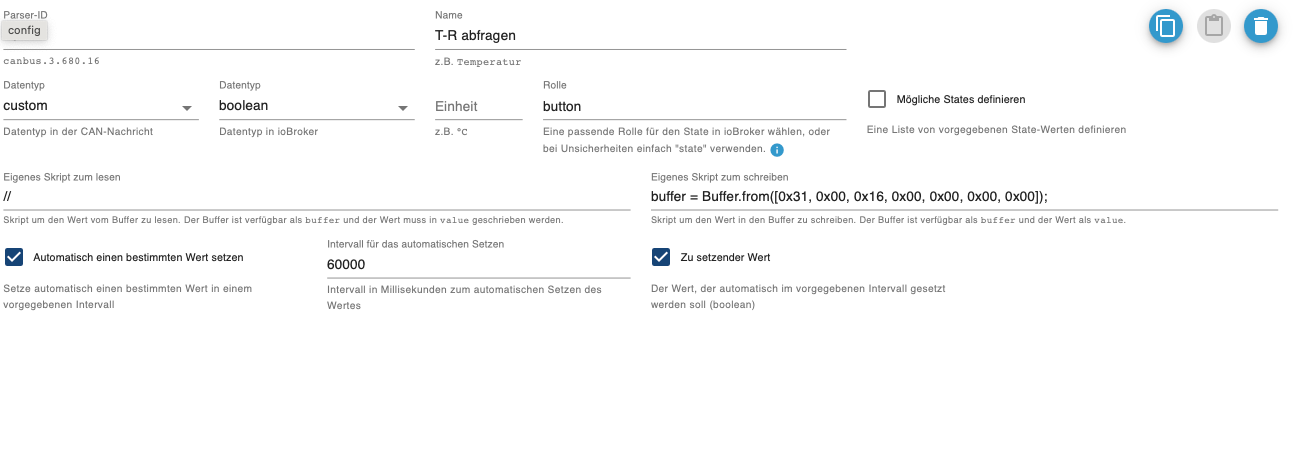
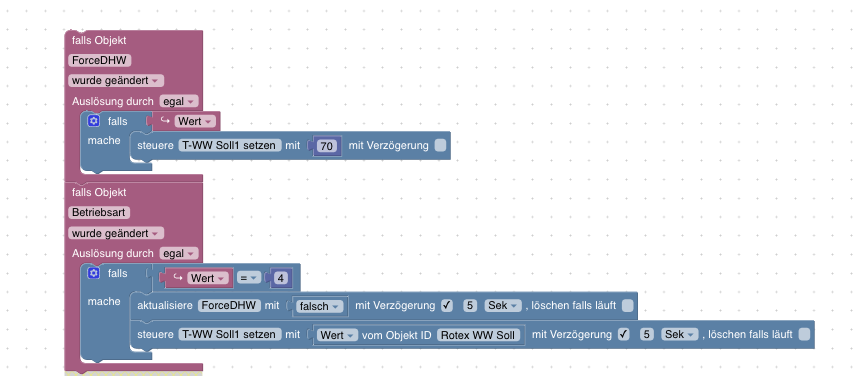
Hey! Du scheinst an dieser Unterhaltung interessiert zu sein, hast aber noch kein Konto.
Hast du es satt, bei jedem Besuch durch die gleichen Beiträge zu scrollen? Wenn du dich für ein Konto anmeldest, kommst du immer genau dorthin zurück, wo du zuvor warst, und kannst dich über neue Antworten benachrichtigen lassen (entweder per E-Mail oder Push-Benachrichtigung). Du kannst auch Lesezeichen speichern und Beiträge positiv bewerten, um anderen Community-Mitgliedern deine Wertschätzung zu zeigen.
Mit deinem Input könnte dieser Beitrag noch besser werden 💗
Registrieren Anmelden408
Online33.0k
Benutzer83.6k
Themen1.3m
Beiträge