



Skip to content
  • Home
  • Aktuell
  • Tags
  • 0 Ungelesen 0
  • Kategorien
  • Unreplied
  • Beliebt
  • GitHub
  • Docu
  • Hilfe
Skins
  • Light
  • Brite
  • Cerulean
  • Cosmo
  • Flatly
  • Journal
  • Litera
  • Lumen
  • Lux
  • Materia
  • Minty
  • Morph
  • Pulse
  • Sandstone
  • Simplex
  • Sketchy
  • Spacelab
  • United
  • Yeti
  • Zephyr
  • Dark
  • Cyborg
  • Darkly
  • Quartz
  • Slate
  • Solar
  • Superhero
  • Vapor

  • Standard: (Kein Skin)
  • Kein Skin
Einklappen
ioBroker Logo

Community Forum

donate donate
  1. ioBroker Community Home
  2. Deutsch
  3. ioBroker Allgemein
  4. Performance Probleme im iobroker Admin auf pi4

NEWS

  • Jahresrückblick 2025 – unser neuer Blogbeitrag ist online! ✨
    BluefoxB
    Bluefox
    14
    1
    298

  • Neuer Blogbeitrag: Monatsrückblick - Dezember 2025 🎄
    BluefoxB
    Bluefox
    13
    1
    600

  • Weihnachtsangebot 2025! 🎄
    BluefoxB
    Bluefox
    25
    1
    1.8k

Performance Probleme im iobroker Admin auf pi4
Geplant Angeheftet Gesperrt Verschoben ioBroker Allgemein
111 Beiträge 6 Kommentatoren 12.1k Aufrufe 5 Watching
  • Älteste zuerst
  • Neuste zuerst
  • Meiste Stimmen
Antworten
  • In einem neuen Thema antworten
Anmelden zum Antworten
Dieses Thema wurde gelöscht. Nur Nutzer mit entsprechenden Rechten können es sehen.
  • T Nicht stören
    T Nicht stören
    ticaki
    schrieb am zuletzt editiert von ticaki
    #76

    @thomas-braun sagte in Performance Probleme im iobroker Admin auf pi4:

    iobroker url https://github.com/t4qjXH8N/ioBroker.google-sharedlocations

    tim@iobroker:~$ iobroker url https://github.com/t4qjXH8N/ioBroker.google-sharedlocations --debug
    install t4qjXH8N/ioBroker.google-sharedlocations#d5a738e822ba42066fee93246f5a1f9c6621bca1
    NPM version: 9.6.7
    Installing t4qjXH8N/ioBroker.google-sharedlocations#d5a738e822ba42066fee93246f5a1f9c6621bca1... (System call)
    npm WARN skipping integrity check for git dependency ssh://git@github.com/t4qjXH8N/ioBroker.google-sharedlocations.git 
    
    added 3 packages in 6s
    
    158 packages are looking for funding
      run `npm fund` for details
    upload [3] google-sharedlocations.admin /opt/iobroker/node_modules/iobroker.google-sharedlocations/admin/google-cookie.JPG google-cookie.JPG image/jpeg
    upload [2] google-sharedlocations.admin /opt/iobroker/node_modules/iobroker.google-sharedlocations/admin/google-sharedlocations.png google-sharedlocations.png image/png
    upload [1] google-sharedlocations.admin /opt/iobroker/node_modules/iobroker.google-sharedlocations/admin/index_m.html index_m.html text/html
    upload [0] google-sharedlocations.admin /opt/iobroker/node_modules/iobroker.google-sharedlocations/admin/words.js words.js application/javascript
    

    ups wollte nur bestätigen ist aber schon ne stunde her :)

    Weather-Warnings Espresense NSPanel-Lovelace-ui Tagesschau

    Spenden

    1 Antwort Letzte Antwort
    0
    • Thomas BraunT Thomas Braun

      @maxpd

      Keine Ahnung warum das bei dir nicht sauber läuft.

      Der ist hier in 7 Sekunden sauber installiert.

      echad@chet:/opt/iobroker $  iobroker url https://github.com/t4qjXH8N/ioBroker.google-sharedlocations --host chet --debug
      install t4qjXH8N/ioBroker.google-sharedlocations#d5a738e822ba42066fee93246f5a1f9c6621bca1
      NPM version: 9.6.7
      Installing t4qjXH8N/ioBroker.google-sharedlocations#d5a738e822ba42066fee93246f5a1f9c6621bca1... (System call)
      npm WARN skipping integrity check for git dependency ssh://git@github.com/t4qjXH8N/ioBroker.google-sharedlocations.git
      
      added 2 packages in 7s
      
      96 packages are looking for funding
        run `npm fund` for details
      upload [3] google-sharedlocations.admin /opt/iobroker/node_modules/iobroker.google-sharedlocations/admin/google-cookie.JPG google-cookie.JPG image/jpeg
      upload [2] google-sharedlocations.admin /opt/iobroker/node_modules/iobroker.google-sharedlocations/admin/google-sharedlocations.png google-sharedlocations.png image/png
      upload [1] google-sharedlocations.admin /opt/iobroker/node_modules/iobroker.google-sharedlocations/admin/index_m.html index_m.html text/html
      upload [0] google-sharedlocations.admin /opt/iobroker/node_modules/iobroker.google-sharedlocations/admin/words.js words.js application/javascript
      echad@chet:/opt/iobroker $
      
      crunchipC Abwesend
      crunchipC Abwesend
      crunchip
      Forum Testing Most Active
      schrieb am zuletzt editiert von
      #77

      @thomas-braun sagte in Performance Probleme im iobroker Admin auf pi4:

      Keine Ahnung warum das bei dir nicht sauber läuft.

      war das nicht früher mal aus einer bestimmten Konstellation mit nodejs und npm, das es so lange gedauert hat.

      umgestiegen von Proxmox auf Unraid

      Thomas BraunT 1 Antwort Letzte Antwort
      0
      • crunchipC crunchip

        @thomas-braun sagte in Performance Probleme im iobroker Admin auf pi4:

        Keine Ahnung warum das bei dir nicht sauber läuft.

        war das nicht früher mal aus einer bestimmten Konstellation mit nodejs und npm, das es so lange gedauert hat.

        Thomas BraunT Online
        Thomas BraunT Online
        Thomas Braun
        Most Active
        schrieb am zuletzt editiert von
        #78

        @crunchip

        Ja, aber das war ein npm@6, wenn ich mich recht erinnere. Das wird was anderes sein. Ich vermute eine nicht abgeschlossener Kompilierung.

        Linux-Werkzeugkasten:
        https://forum.iobroker.net/topic/42952/der-kleine-iobroker-linux-werkzeugkasten
        NodeJS Fixer Skript:
        https://forum.iobroker.net/topic/68035/iob-node-fix-skript
        iob_diag: curl -sLf -o diag.sh https://iobroker.net/diag.sh && bash diag.sh

        crunchipC 1 Antwort Letzte Antwort
        0
        • Thomas BraunT Thomas Braun

          @crunchip

          Ja, aber das war ein npm@6, wenn ich mich recht erinnere. Das wird was anderes sein. Ich vermute eine nicht abgeschlossener Kompilierung.

          crunchipC Abwesend
          crunchipC Abwesend
          crunchip
          Forum Testing Most Active
          schrieb am zuletzt editiert von crunchip
          #79

          @thomas-braun ja schon, ich dachte daher eher daran, das bei ihm eventuell noch irgendwelche npm Altlasten dies verursachen
          würde es denn nicht etwas bringen, nodejs neu zu installieren?

          umgestiegen von Proxmox auf Unraid

          Thomas BraunT M 2 Antworten Letzte Antwort
          0
          • crunchipC crunchip

            @thomas-braun ja schon, ich dachte daher eher daran, das bei ihm eventuell noch irgendwelche npm Altlasten dies verursachen
            würde es denn nicht etwas bringen, nodejs neu zu installieren?

            Thomas BraunT Online
            Thomas BraunT Online
            Thomas Braun
            Most Active
            schrieb am zuletzt editiert von
            #80

            @crunchip

            Möglich. Aber er meldet sich ja immer nur so sporadisch zurück.

            Linux-Werkzeugkasten:
            https://forum.iobroker.net/topic/42952/der-kleine-iobroker-linux-werkzeugkasten
            NodeJS Fixer Skript:
            https://forum.iobroker.net/topic/68035/iob-node-fix-skript
            iob_diag: curl -sLf -o diag.sh https://iobroker.net/diag.sh && bash diag.sh

            1 Antwort Letzte Antwort
            0
            • Thomas BraunT Thomas Braun

              @maxpd

              Zeig nochmal die Langfassung von

              iob diag
              
              M Offline
              M Offline
              maxpd
              schrieb am zuletzt editiert von
              #81

              @thomas-braun said in Performance Probleme im iobroker Admin auf pi4:

              @maxpd

              Zeig nochmal die Langfassung von

              iob diag
              

              ======== Start marking the full check here =========

              Skript v.2023-04-16
              
              *** BASE SYSTEM ***
              Model           : Raspberry Pi 4 Model B Rev 1.4
              Architecture    : armv7l
              Docker          : false
              Virtualization  : none
              Distributor ID: Raspbian
              Description:    Raspbian GNU/Linux 11 (bullseye)
              Release:        11
              Codename:       bullseye
              
              PRETTY_NAME="Raspbian GNU/Linux 11 (bullseye)"
              NAME="Raspbian GNU/Linux"
              VERSION_ID="11"
              VERSION="11 (bullseye)"
              VERSION_CODENAME=bullseye
              ID=raspbian
              ID_LIKE=debian
              HOME_URL="http://www.raspbian.org/"
              SUPPORT_URL="http://www.raspbian.org/RaspbianForums"
              BUG_REPORT_URL="http://www.raspbian.org/RaspbianBugs"
              
              Systemuptime and Load:
               10:07:32 up 12:12,  2 users,  load average: 0.37, 0.49, 0.40
              CPU threads: 4
              
              Raspberry only:
              throttled=0x0
              Other values than 0x0 hint to temperature/voltage problems
              temp=46.2'C
              volt=0.8600V
              
              *** Time and Time Zones ***
                             Local time: Sun 2023-08-27 10:07:32 CEST
                         Universal time: Sun 2023-08-27 08:07:32 UTC
                               RTC time: n/a
                              Time zone: Europe/Berlin (CEST, +0200)
              System clock synchronized: yes
                            NTP service: active
                        RTC in local TZ: no
              
              *** User and Groups ***
              pi
              /home/pi
              pi adm dialout cdrom sudo audio video plugdev games users input netdev gpio i2c spi iobroker
              
              *** X-Server-Setup ***
              X-Server:       false
              Desktop:
              Terminal:       tty
              Boot Target:    multi-user.target
              
              *** MEMORY ***
                             total        used        free      shared  buff/cache   available
              Mem:            7.9G        1.9G        5.7G        0.0K        324M        5.8G
              Swap:            99M          0B         99M
              Total:          8.0G        1.9G        5.8G
              
                       7897 M total memory
                       1902 M used memory
                        128 M active memory
                       1960 M inactive memory
                       5669 M free memory
                         36 M buffer memory
                        288 M swap cache
                         99 M total swap
                          0 M used swap
                         99 M free swap
              
              Raspberry only:
              oom events: 0
              lifetime oom required: 0 Mbytes
              total time in oom handler: 0 ms
              max time spent in oom handler: 0 ms
              
              *** FILESYSTEM ***
              Filesystem     Type      Size  Used Avail Use% Mounted on
              /dev/root      ext4       30G   12G   17G  42% /
              devtmpfs       devtmpfs  3.7G     0  3.7G   0% /dev
              tmpfs          tmpfs     3.9G     0  3.9G   0% /dev/shm
              tmpfs          tmpfs     1.6G  788K  1.6G   1% /run
              tmpfs          tmpfs     5.0M  4.0K  5.0M   1% /run/lock
              /dev/sda1      vfat      253M   51M  202M  20% /boot
              tmpfs          tmpfs     790M     0  790M   0% /run/user/1000
              
              Messages concerning ext4 filesystem in dmesg:
              [Sat Aug 26 21:55:13 2023] Kernel command line: coherent_pool=1M 8250.nr_uarts=1 snd_bcm2835.enable_headphones=0 snd_bcm2835.enable_headphones=1 snd_bcm2835.enable_hdmi=1  smsc95xx.macaddr=E4:5F:01:57:31:D7 vc_mem.mem_base=0x3eb00000 vc_mem.mem_size=0x3ff00000  dwc_otg.lpm_enable=0 console=tty1 root=PARTUUID=e52a9d10-02 rootfstype=ext4 elevator=deadline fsck.repair=yes rootwait
              [Sat Aug 26 21:55:15 2023] EXT4-fs (sda2): mounted filesystem with ordered data mode. Quota mode: none.
              [Sat Aug 26 21:55:15 2023] VFS: Mounted root (ext4 filesystem) readonly on device 8:2.
              [Sat Aug 26 21:55:17 2023] EXT4-fs (sda2): re-mounted. Quota mode: none.
              
              Show mounted filesystems (real ones only):
              TARGET  SOURCE    FSTYPE OPTIONS
              /       /dev/sda2 ext4   rw,noatime,commit=600
              `-/boot /dev/sda1 vfat   rw,relatime,fmask=0022,dmask=0022,codepage=437,iocharset=ascii,shortname=mixed,flush,errors=remount-ro
              
              Files in neuralgic directories:
              
              /var:
              1.7G    /var/
              940M    /var/log
              929M    /var/log/journal/5f09e0dc24364fc8951dcf01ea03774d
              929M    /var/log/journal
              627M    /var/lib
              
              Archived and active journals take up 928.2M in the file system.
              
              /opt/iobroker/backups:
              72M     /opt/iobroker/backups/
              
              /opt/iobroker/iobroker-data:
              2.1G    /opt/iobroker/iobroker-data/
              1.5G    /opt/iobroker/iobroker-data/history
              317M    /opt/iobroker/iobroker-data/files
              249M    /opt/iobroker/iobroker-data/backup-objects
              72M     /opt/iobroker/iobroker-data/files/telegram.admin
              
              The five largest files in iobroker-data are:
              36M     /opt/iobroker/iobroker-data/objects.jsonl
              33M     /opt/iobroker/iobroker-data/files/devices.admin/static/js/main.10538062.js.map
              19M     /opt/iobroker/iobroker-data/files/iot.admin/static/js/main.904d455f.js.map
              15M     /opt/iobroker/iobroker-data/objects.json.migrated
              15M     /opt/iobroker/iobroker-data/objects.json.bak.migrated
              
              *** NodeJS-Installation ***
              
              /usr/bin/nodejs         v18.17.1
              /usr/bin/node           v18.17.1
              /usr/bin/npm            9.6.7
              /usr/bin/npx            9.6.7
              
              
              nodejs:
                Installed: 18.17.1-deb-1nodesource1
                Candidate: 18.17.1-deb-1nodesource1
                Version table:
               *** 18.17.1-deb-1nodesource1 500
                      500 https://deb.nodesource.com/node_18.x bullseye/main armhf Packages
                      100 /var/lib/dpkg/status
                   12.22.12~dfsg-1~deb11u4 500
                      500 http://raspbian.raspberrypi.org/raspbian bullseye/main armhf Packages
              
              Temp directories causing npm8 problem: 0
              No problems detected
              
              *** ioBroker-Installation ***
              
              ioBroker Status
              iobroker is running on this host.
              
              
              Objects type: jsonl
              States  type: jsonl
              
              MULTIHOSTSERVICE/enabled: false
              
              Core adapters versions
              js-controller:  4.0.24
              admin:          6.3.5
              javascript:     6.1.4
              
              npm ERR! code ELSPROBLEMS
              npm ERR! extraneous: @types/caseless@0.12.2 /opt/iobroker/node_modules/@types/caseless
              npm ERR! extraneous: @types/request@2.48.8 /opt/iobroker/node_modules/@types/request
              npm ERR! extraneous: @types/tough-cookie@4.0.2 /opt/iobroker/node_modules/@types/tough-cookie
              npm ERR! extraneous: coffeescript@1.12.7 /opt/iobroker/node_modules/coffeescript
              npm ERR! invalid: iobroker.google-sharedlocations@2.1.3 /opt/iobroker/node_modules/iobroker.google-sharedlocations
              npm ERR! extraneous: jsonata@1.8.6 /opt/iobroker/node_modules/jsonata
              npm ERR! extraneous: node-inspect@2.0.0 /opt/iobroker/node_modules/node-inspect
              npm ERR! extraneous: typescript@4.7.4 /opt/iobroker/node_modules/typescript
              npm ERR! extraneous: virtual-tsc@0.6.2 /opt/iobroker/node_modules/virtual-tsc
              npm ERR! extraneous: wake_on_lan@1.0.0 /opt/iobroker/node_modules/wake_on_lan
              
              npm ERR! A complete log of this run can be found in: /home/pi/.npm/_logs/2023-08-27T08_08_10_199Z-debug-0.log
              Adapters from github:   1
              
              Adapter State
              + system.adapter.admin.0                  : admin                 : iobroker                                 -  enabled, port: 8081, bind: 0.0.0.0, run as: admin
                system.adapter.alias-manager.0          : alias-manager         : iobroker                                 -  enabled
                system.adapter.backitup.0               : backitup              : iobroker                                 - disabled
              + system.adapter.chromecast.0             : chromecast            : iobroker                                 -  enabled
                system.adapter.cloud.0                  : cloud                 : iobroker                                 - disabled
                system.adapter.coronavirus-statistics.0 : coronavirus-statistics: iobroker                                 -  enabled
                system.adapter.daswetter.0              : daswetter             : iobroker                                 -  enabled
              + system.adapter.denon.0                  : denon                 : iobroker                                 -  enabled
              + system.adapter.discovery.0              : discovery             : iobroker                                 -  enabled
                system.adapter.feiertage.0              : feiertage             : iobroker                                 -  enabled
                system.adapter.flot.0                   : flot                  : iobroker                                 -  enabled
                system.adapter.go-e.0                   : go-e                  : iobroker                                 - disabled
              + system.adapter.history.0                : history               : iobroker                                 -  enabled
              + system.adapter.hm-rega.0                : hm-rega               : iobroker                                 -  enabled
              + system.adapter.hm-rpc.0                 : hm-rpc                : iobroker                                 -  enabled, port: 0
              + system.adapter.hm-rpc.1                 : hm-rpc                : iobroker                                 -  enabled, port: 0
                system.adapter.ical.0                   : ical                  : iobroker                                 -  enabled
                system.adapter.info.0                   : info                  : iobroker                                 - disabled
              + system.adapter.iot.0                    : iot                   : iobroker                                 -  enabled
              + system.adapter.javascript.0             : javascript            : iobroker                                 -  enabled
                system.adapter.lgtv.0                   : lgtv                  : iobroker                                 - disabled
                system.adapter.lovelace.0               : lovelace              : iobroker                                 - disabled, port: 8091, bind: 0.0.0.0, run as: admin
              + system.adapter.mihome-vacuum.0          : mihome-vacuum         : iobroker                                 -  enabled, port: 54321
              + system.adapter.modbus.0                 : modbus                : iobroker                                 -  enabled
                system.adapter.modbus.1                 : modbus                : iobroker                                 - disabled
                system.adapter.mqtt-client.0            : mqtt-client           : iobroker                                 - disabled, port: 1884
              + system.adapter.mqtt.0                   : mqtt                  : iobroker                                 -  enabled, port: 36669, bind: 192.168.178.30
              + system.adapter.net-tools.0              : net-tools             : iobroker                                 -  enabled
              + system.adapter.ping.0                   : ping                  : iobroker                                 -  enabled
              + system.adapter.rpi2.0                   : rpi2                  : iobroker                                 -  enabled
              + system.adapter.sayit.0                  : sayit                 : iobroker                                 -  enabled, port: 0
              + system.adapter.sayit.1                  : sayit                 : iobroker                                 -  enabled, port: 0
              + system.adapter.sayit.2                  : sayit                 : iobroker                                 -  enabled, port: 0
              + system.adapter.sayit.3                  : sayit                 : iobroker                                 -  enabled, port: 0
              + system.adapter.sayit.4                  : sayit                 : iobroker                                 -  enabled, port: 0
              + system.adapter.shelly.0                 : shelly                : iobroker                                 -  enabled, port: 1882, bind: 0.0.0.0
              + system.adapter.shuttercontrol.0         : shuttercontrol        : iobroker                                 -  enabled
                system.adapter.simple-api.0             : simple-api            : iobroker                                 - disabled, port: 8087, bind: 0.0.0.0, run as: admin
              + system.adapter.simple-api.1             : simple-api            : iobroker                                 -  enabled, port: 8101, bind: 0.0.0.0, run as: admin
              + system.adapter.sonoff.0                 : sonoff                : iobroker                                 -  enabled, port: 1883, bind: 0.0.0.0
                system.adapter.spotify-premium.0        : spotify-premium       : iobroker                                 - disabled
                system.adapter.synology.0               : synology              : iobroker                                 - disabled, port: 5000
                system.adapter.synology.1               : synology              : iobroker                                 - disabled, port: 5001
                system.adapter.systeminfo.0             : systeminfo            : iobroker                                 - disabled
              + system.adapter.telegram.0               : telegram              : iobroker                                 -  enabled, port: 8443, bind: 0.0.0.0
              + system.adapter.telegram.1               : telegram              : iobroker                                 -  enabled, port: 8443, bind: 0.0.0.0
                system.adapter.telegram.2               : telegram              : iobroker                                 - disabled, port: 8443, bind: 0.0.0.0
                system.adapter.terminal.0               : terminal              : iobroker                                 - disabled, port: 8088, bind: 0.0.0.0, run as: admin
              + system.adapter.text2command.0           : text2command          : iobroker                                 -  enabled
                system.adapter.tr-064.0                 : tr-064                : iobroker                                 - disabled
              + system.adapter.tuya.0                   : tuya                  : iobroker                                 -  enabled
                system.adapter.web.0                    : web                   : iobroker                                 - disabled, port: 8082, bind: 0.0.0.0, run as: admin
              + system.adapter.web.1                    : web                   : iobroker                                 -  enabled, port: 8083, bind: 0.0.0.0, run as: admin
                system.adapter.whatsapp-cmb.0           : whatsapp-cmb          : iobroker                                 - disabled
              + system.adapter.wifilight.0              : wifilight             : iobroker                                 -  enabled
              + system.adapter.wled.0                   : wled                  : iobroker                                 -  enabled
              + system.adapter.yeelight-2.0             : yeelight-2            : iobroker                                 -  enabled
              + system.adapter.zigbee.0                 : zigbee                : iobroker                                 -  enabled, port: /dev/ttyACM0
              
              + instance is alive
              
              Enabled adapters with bindings
              + system.adapter.admin.0                  : admin                 : iobroker                                 -  enabled, port: 8081, bind: 0.0.0.0, run as: admin
              + system.adapter.hm-rpc.0                 : hm-rpc                : iobroker                                 -  enabled, port: 0
              + system.adapter.hm-rpc.1                 : hm-rpc                : iobroker                                 -  enabled, port: 0
              + system.adapter.mihome-vacuum.0          : mihome-vacuum         : iobroker                                 -  enabled, port: 54321
              + system.adapter.mqtt.0                   : mqtt                  : iobroker                                 -  enabled, port: 36669, bind: 192.168.178.30
              + system.adapter.sayit.0                  : sayit                 : iobroker                                 -  enabled, port: 0
              + system.adapter.sayit.1                  : sayit                 : iobroker                                 -  enabled, port: 0
              + system.adapter.sayit.2                  : sayit                 : iobroker                                 -  enabled, port: 0
              + system.adapter.sayit.3                  : sayit                 : iobroker                                 -  enabled, port: 0
              + system.adapter.sayit.4                  : sayit                 : iobroker                                 -  enabled, port: 0
              + system.adapter.shelly.0                 : shelly                : iobroker                                 -  enabled, port: 1882, bind: 0.0.0.0
              + system.adapter.simple-api.1             : simple-api            : iobroker                                 -  enabled, port: 8101, bind: 0.0.0.0, run as: admin
              + system.adapter.sonoff.0                 : sonoff                : iobroker                                 -  enabled, port: 1883, bind: 0.0.0.0
              + system.adapter.telegram.0               : telegram              : iobroker                                 -  enabled, port: 8443, bind: 0.0.0.0
              + system.adapter.telegram.1               : telegram              : iobroker                                 -  enabled, port: 8443, bind: 0.0.0.0
              + system.adapter.web.1                    : web                   : iobroker                                 -  enabled, port: 8083, bind: 0.0.0.0, run as: admin
              + system.adapter.zigbee.0                 : zigbee                : iobroker                                 -  enabled, port: /dev/ttyACM0
              
              ioBroker-Repositories
              stable        : http://download.iobroker.net/sources-dist.json
              beta          : http://download.iobroker.net/sources-dist-latest.json
              
              Active repo(s): stable
              
              Installed ioBroker-Instances
              Used repository: stable
              Adapter    "admin"        : 6.8.0    , installed 6.3.5  [Updatable]
              Adapter    "alias-manager": 1.2.4    , installed 1.2.6
              Adapter    "backitup"     : 2.6.23   , installed 2.6.23
              Adapter    "chromecast"   : 3.0.3    , installed 3.0.3
              Adapter    "cloud"        : 4.4.1    , installed 4.3.0  [Updatable]
              Adapter    "coronavirus-statistics": 0.8.7, installed 0.8.7
              Adapter    "daswetter"    : 3.1.10   , installed 3.1.8  [Updatable]
              Adapter    "denon"        : 1.15.3   , installed 1.15.0 [Updatable]
              Adapter    "devices"      : 1.1.5    , installed 1.1.2  [Updatable]
              Adapter    "discovery"    : 3.1.0    , installed 3.1.0
              Adapter    "doorbird"     : 1.2.3    , installed 1.2.3
              Adapter    "feiertage"    : 1.1.0    , installed 1.1.0
              Adapter    "flot"         : 1.12.0   , installed 1.11.0 [Updatable]
              Adapter    "go-e"         : 1.0.27   , installed 1.0.27
              Adapter    "history"      : 2.2.6    , installed 2.2.4  [Updatable]
              Adapter    "hm-rega"      : 3.0.47   , installed 3.0.46 [Updatable]
              Adapter    "hm-rpc"       : 1.15.19  , installed 1.15.16 [Updatable]
              Adapter    "ical"         : 1.13.3   , installed 1.13.2 [Updatable]
              Adapter    "info"         : 1.9.26   , installed 1.9.26
              Adapter    "iot"          : 1.14.5   , installed 1.14.2 [Updatable]
              Adapter    "javascript"   : 7.0.3    , installed 6.1.4  [Updatable]
              Controller "js-controller": 4.0.24   , installed 4.0.24
              Adapter    "lgtv"         : 1.1.10   , installed 1.1.12
              Adapter    "lovelace"     : 3.0.1    , installed 3.0.1
              Adapter    "mihome-vacuum": 3.11.0   , installed 3.9.5  [Updatable]
              Adapter    "modbus"       : 5.0.11   , installed 5.0.11
              Adapter    "mqtt"         : 4.1.1    , installed 4.0.7  [Updatable]
              Adapter    "mqtt-client"  : 1.6.3    , installed 1.6.3
              Adapter    "net-tools"    : 0.2.0    , installed 0.2.0
              Adapter    "pi-hole"      : 1.3.6    , installed 1.3.4  [Updatable]
              Adapter    "ping"         : 1.6.2    , installed 1.5.3  [Updatable]
              Adapter    "rpi2"         : 1.3.2    , installed 1.3.2
              Adapter    "sayit"        : 3.0.5    , installed 1.13.0 [Updatable]
              Adapter    "shelly"       : 6.4.1    , installed 6.3.1  [Updatable]
              Adapter    "shuttercontrol": 1.6.1   , installed 1.4.29 [Updatable]
              Adapter    "simple-api"   : 2.7.2    , installed 2.7.2
              Adapter    "sma-em"       : 0.7.0    , installed 0.7.0
              Adapter    "socketio"     : 4.2.0    , installed 4.2.0
              Adapter    "sonoff"       : 2.5.3    , installed 2.5.1  [Updatable]
              Adapter    "spotify-premium": 1.2.2  , installed 1.2.1  [Updatable]
              Adapter    "synology"     : 2.1.13   , installed 2.1.13
              Adapter    "systeminfo"   : 1.0.0    , installed 0.3.1  [Updatable]
              Adapter    "telegram"     : 1.16.0   , installed 1.15.2 [Updatable]
              Adapter    "terminal"     : 1.0.0    , installed 1.0.0
              Adapter    "text2command" : 3.0.2    , installed 2.3.0  [Updatable]
              Adapter    "tr-064"       : 4.2.18   , installed 4.2.17 [Updatable]
              Adapter    "tuya"         : 3.14.2   , installed 3.13.1 [Updatable]
              Adapter    "web"          : 4.3.0    , installed 4.3.0
              Adapter    "whatsapp-cmb" : 0.2.3    , installed 0.2.3
              Adapter    "wifilight"    : 1.1.4    , installed 1.1.4
              Adapter    "wled"         : 0.6.7    , installed 0.6.7
              Adapter    "ws"           : 1.3.0    , installed 1.3.0
              Adapter    "yeelight-2"   : 1.2.1    , installed 1.2.1
              Adapter    "youtube"      : 4.2.1    , installed 4.1.0  [Updatable]
              Adapter    "zigbee"       : 1.8.23   , installed 1.8.10 [Updatable]
              
              Objects and States
              Please stand by - This may take a while
              Objects:        20162
              States:         17212
              
              *** OS-Repositories and Updates ***
              Hit:1 http://archive.raspberrypi.org/debian bullseye InRelease
              Hit:2 http://raspbian.raspberrypi.org/raspbian bullseye InRelease
              Hit:3 https://deb.nodesource.com/node_18.x bullseye InRelease
              Hit:4 https://apt.pivccu.de/piVCCU stable InRelease
              Reading package lists...
              Pending Updates: 0
              
              *** Listening Ports ***
              Active Internet connections (only servers)
              Proto Recv-Q Send-Q Local Address           Foreign Address         State       User       Inode      PID/Program name
              tcp        0      0 10.0.3.1:53             0.0.0.0:*               LISTEN      0          14535      824/dnsmasq
              tcp        0      0 0.0.0.0:1883            0.0.0.0:*               LISTEN      1001       17180      2095/io.sonoff.0
              tcp        0      0 192.168.178.30:2001     0.0.0.0:*               LISTEN      1001       17086      1916/io.hm-rpc.0
              tcp        0      0 192.168.178.30:2010     0.0.0.0:*               LISTEN      1001       20548      2351/io.hm-rpc.1
              tcp        0      0 127.0.0.1:9001          0.0.0.0:*               LISTEN      1001       14867      746/iobroker.js-con
              tcp        0      0 127.0.0.1:9000          0.0.0.0:*               LISTEN      1001       17622      746/iobroker.js-con
              tcp        0      0 0.0.0.0:22              0.0.0.0:*               LISTEN      0          14514      807/sshd: /usr/sbin
              tcp6       0      0 :::8081                 :::*                    LISTEN      1001       16934      1701/io.admin.0
              tcp6       0      0 :::8083                 :::*                    LISTEN      1001       21902      2749/io.web.1
              tcp6       0      0 :::8101                 :::*                    LISTEN      1001       21922      2819/io.simple-api.
              tcp6       0      0 :::22                   :::*                    LISTEN      0          14516      807/sshd: /usr/sbin
              udp        0      0 0.0.0.0:45847           0.0.0.0:*                           108        12188      373/avahi-daemon: r
              udp        0      0 0.0.0.0:6666            0.0.0.0:*                           1001       20609      2403/io.tuya.0
              udp        0      0 0.0.0.0:6667            0.0.0.0:*                           1001       20610      2403/io.tuya.0
              udp        0      0 0.0.0.0:5683            0.0.0.0:*                           1001       18244      2257/io.shelly.0
              udp        0      0 10.0.3.1:53             0.0.0.0:*                           0          14534      824/dnsmasq
              udp        0      0 0.0.0.0:67              0.0.0.0:*                           0          14531      824/dnsmasq
              udp        0      0 0.0.0.0:68              0.0.0.0:*                           0          12909      682/dhclient
              udp        0      0 0.0.0.0:53421           0.0.0.0:*                           1001       17924      2011/io.mihome-vacu
              udp        0      0 0.0.0.0:5353            0.0.0.0:*                           1001       468231     13777/io.chromecast
              udp        0      0 0.0.0.0:5353            0.0.0.0:*                           1001       20947      2715/io.wled.0
              udp        0      0 0.0.0.0:5353            0.0.0.0:*                           108        12186      373/avahi-daemon: r
              udp6       0      0 :::42265                :::*                                108        12189      373/avahi-daemon: r
              udp6       0      0 :::5353                 :::*                                108        12187      373/avahi-daemon: r
              
              *** Log File - Last 25 Lines ***
              
              2023-08-27 10:09:07.446  - warn: javascript.0 (1840)     at processImmediate (node:internal/timers:476:21)
              2023-08-27 10:09:12.386  - info: mqtt.0 (2421) Reconnected to 192.168.178.106
              2023-08-27 10:09:12.394  - info: mqtt.0 (2421) send2Server mqtt.0.info.connection[info/connection]
              2023-08-27 10:09:15.515  - info: mqtt.0 (2421) Disconnected from 192.168.178.106: undefined
              2023-08-27 10:09:15.541  - info: mqtt.0 (2421) send2Server mqtt.0.info.connection[info/connection]
              2023-08-27 10:09:17.458  - warn: javascript.0 (1840) getState "chromecast.0.38:8b:59:79:d3:db.player.state" not found (3)
              2023-08-27 10:09:17.460  - warn: javascript.0 (1840)     at Object.<anonymous> (script.js.General.Moodmusik:32:9)
              2023-08-27 10:09:17.460  - warn: javascript.0 (1840)     at Object.callback (/opt/iobroker/node_modules/iobroker.javascript/lib/sandbox.js:1244:38)
              2023-08-27 10:09:17.460  - warn: javascript.0 (1840)     at Object.stateChange (/opt/iobroker/node_modules/iobroker.javascript/main.js:593:29)
              2023-08-27 10:09:17.460  - warn: javascript.0 (1840)     at Immediate._onImmediate (/opt/iobroker/node_modules/@iobroker/js-controller-adapter/src/lib/adapter/adapter.js:5916:56)
              2023-08-27 10:09:17.461  - warn: javascript.0 (1840)     at processImmediate (node:internal/timers:476:21)
              2023-08-27 10:09:17.461  - warn: javascript.0 (1840) State "chromecast.0.38:8b:59:79:d3:db.player.volume" not found
              2023-08-27 10:09:17.462  - warn: javascript.0 (1840)     at setState (/opt/iobroker/node_modules/iobroker.javascript/lib/sandbox.js:1719:20)
              2023-08-27 10:09:17.462  - warn: javascript.0 (1840)     at Object.<anonymous> (script.js.General.Moodmusik:33:7)
              2023-08-27 10:09:17.462  - warn: javascript.0 (1840)     at Object.callback (/opt/iobroker/node_modules/iobroker.javascript/lib/sandbox.js:1244:38)
              2023-08-27 10:09:17.463  - warn: javascript.0 (1840)     at Object.stateChange (/opt/iobroker/node_modules/iobroker.javascript/main.js:593:29)
              2023-08-27 10:09:17.463  - warn: javascript.0 (1840)     at Immediate._onImmediate (/opt/iobroker/node_modules/@iobroker/js-controller-adapter/src/lib/adapter/adapter.js:5916:56)
              2023-08-27 10:09:17.463  - warn: javascript.0 (1840)     at processImmediate (node:internal/timers:476:21)
              2023-08-27 10:09:17.463  - warn: javascript.0 (1840) State "chromecast.0.38:8b:59:79:d3:db.player.pause" not found
              2023-08-27 10:09:17.464  - warn: javascript.0 (1840)     at setState (/opt/iobroker/node_modules/iobroker.javascript/lib/sandbox.js:1719:20)
              2023-08-27 10:09:17.465  - warn: javascript.0 (1840)     at Object.<anonymous> (script.js.General.Moodmusik:34:7)
              2023-08-27 10:09:17.465  - warn: javascript.0 (1840)     at Object.callback (/opt/iobroker/node_modules/iobroker.javascript/lib/sandbox.js:1244:38)
              2023-08-27 10:09:17.465  - warn: javascript.0 (1840)     at Object.stateChange (/opt/iobroker/node_modules/iobroker.javascript/main.js:593:29)
              2023-08-27 10:09:17.465  - warn: javascript.0 (1840)     at Immediate._onImmediate (/opt/iobroker/node_modules/@iobroker/js-controller-adapter/src/lib/adapter/adapter.js:5916:56)
              2023-08-27 10:09:17.465  - warn: javascript.0 (1840)     at processImmediate (node:internal/timers:476:21)


              ============ Mark until here for C&P =============

              Gruß
              maxpd

              Raspi 4 8gb | iobroker + pivccu3 | 46 Adapter | 68 Scripte, 120 Devices

              1 Antwort Letzte Antwort
              0
              • Thomas BraunT Thomas Braun

                @maxpd

                Und lösch mal den npm cache.

                npm cache clean --force
                sudo -H -u iobroker npm cache clean --force
                
                M Offline
                M Offline
                maxpd
                schrieb am zuletzt editiert von
                #82

                @thomas-braun said in Performance Probleme im iobroker Admin auf pi4:

                sudo -H -u iobroker npm cache clean --force

                pi@iobroker:~ $ npm cache clean --force
                npm WARN using --force Recommended protections disabled.
                pi@iobroker:~ $ sudo -H -u iobroker npm cache clean --force
                npm WARN using --force Recommended protections disabled.
                

                Gruß
                maxpd

                Raspi 4 8gb | iobroker + pivccu3 | 46 Adapter | 68 Scripte, 120 Devices

                1 Antwort Letzte Antwort
                0
                • crunchipC crunchip

                  @thomas-braun ja schon, ich dachte daher eher daran, das bei ihm eventuell noch irgendwelche npm Altlasten dies verursachen
                  würde es denn nicht etwas bringen, nodejs neu zu installieren?

                  M Offline
                  M Offline
                  maxpd
                  schrieb am zuletzt editiert von
                  #83

                  @crunchip Habt ihr hierzu eine fertige Anleitung, die ich mich runterhangeln kann? :)

                  Gruß
                  maxpd

                  Raspi 4 8gb | iobroker + pivccu3 | 46 Adapter | 68 Scripte, 120 Devices

                  Thomas BraunT 2 Antworten Letzte Antwort
                  0
                  • M maxpd

                    @crunchip Habt ihr hierzu eine fertige Anleitung, die ich mich runterhangeln kann? :)

                    Thomas BraunT Online
                    Thomas BraunT Online
                    Thomas Braun
                    Most Active
                    schrieb am zuletzt editiert von
                    #84

                    @maxpd

                    Schaut eigentlich prima aus.
                    Schalt mal den Chromecast testweise aus.

                    Ich würde per

                    iobroker update
                    iobroker upgrade all
                    

                    die Kiste einfach mal komplett anheben. Läuft dann halt etwas, aber kann ja z.B. über die Nacht orgeln.

                    Linux-Werkzeugkasten:
                    https://forum.iobroker.net/topic/42952/der-kleine-iobroker-linux-werkzeugkasten
                    NodeJS Fixer Skript:
                    https://forum.iobroker.net/topic/68035/iob-node-fix-skript
                    iob_diag: curl -sLf -o diag.sh https://iobroker.net/diag.sh && bash diag.sh

                    M 1 Antwort Letzte Antwort
                    0
                    • M maxpd

                      @crunchip Habt ihr hierzu eine fertige Anleitung, die ich mich runterhangeln kann? :)

                      Thomas BraunT Online
                      Thomas BraunT Online
                      Thomas Braun
                      Most Active
                      schrieb am zuletzt editiert von
                      #85

                      @maxpd

                      Alternativ kannst du auch mal die package.json löschen. Vorher Backup anlegen.

                      Linux-Werkzeugkasten:
                      https://forum.iobroker.net/topic/42952/der-kleine-iobroker-linux-werkzeugkasten
                      NodeJS Fixer Skript:
                      https://forum.iobroker.net/topic/68035/iob-node-fix-skript
                      iob_diag: curl -sLf -o diag.sh https://iobroker.net/diag.sh && bash diag.sh

                      M 2 Antworten Letzte Antwort
                      0
                      • Thomas BraunT Thomas Braun

                        @maxpd

                        Schaut eigentlich prima aus.
                        Schalt mal den Chromecast testweise aus.

                        Ich würde per

                        iobroker update
                        iobroker upgrade all
                        

                        die Kiste einfach mal komplett anheben. Läuft dann halt etwas, aber kann ja z.B. über die Nacht orgeln.

                        M Offline
                        M Offline
                        maxpd
                        schrieb am zuletzt editiert von
                        #86

                        @thomas-braun Der möchte allerdings bei jeden Adapter eine Ja / Nein bestätigung.

                        pi@iobroker:~ $ iobroker upgrade all
                        
                        This upgrade of "tr-064" will introduce the following changes:
                        ==========================================================================
                        -> 4.2.18:
                        Prepare for future js-controller verisons
                        ==========================================================================
                        
                        Would you like to upgrade tr-064 from @4.2.17 to @4.2.18 now? [(y)es, (n)o]:


                        Gruß
                        maxpd

                        Raspi 4 8gb | iobroker + pivccu3 | 46 Adapter | 68 Scripte, 120 Devices

                        Thomas BraunT 1 Antwort Letzte Antwort
                        0
                        • M maxpd

                          @thomas-braun Der möchte allerdings bei jeden Adapter eine Ja / Nein bestätigung.

                          pi@iobroker:~ $ iobroker upgrade all
                          
                          This upgrade of "tr-064" will introduce the following changes:
                          ==========================================================================
                          -> 4.2.18:
                          Prepare for future js-controller verisons
                          ==========================================================================
                          
                          Would you like to upgrade tr-064 from @4.2.17 to @4.2.18 now? [(y)es, (n)o]:
                          
                          
                          Thomas BraunT Online
                          Thomas BraunT Online
                          Thomas Braun
                          Most Active
                          schrieb am zuletzt editiert von
                          #87

                          @maxpd

                          iob upgrade all -y
                          

                          Linux-Werkzeugkasten:
                          https://forum.iobroker.net/topic/42952/der-kleine-iobroker-linux-werkzeugkasten
                          NodeJS Fixer Skript:
                          https://forum.iobroker.net/topic/68035/iob-node-fix-skript
                          iob_diag: curl -sLf -o diag.sh https://iobroker.net/diag.sh && bash diag.sh

                          1 Antwort Letzte Antwort
                          0
                          • Thomas BraunT Thomas Braun

                            @maxpd

                            Alternativ kannst du auch mal die package.json löschen. Vorher Backup anlegen.

                            M Offline
                            M Offline
                            maxpd
                            schrieb am zuletzt editiert von
                            #88

                            @thomas-braun OK, ist gebackupped und gelöscht

                            Gruß
                            maxpd

                            Raspi 4 8gb | iobroker + pivccu3 | 46 Adapter | 68 Scripte, 120 Devices

                            1 Antwort Letzte Antwort
                            0
                            • Thomas BraunT Thomas Braun

                              @maxpd

                              Alternativ kannst du auch mal die package.json löschen. Vorher Backup anlegen.

                              M Offline
                              M Offline
                              maxpd
                              schrieb am zuletzt editiert von maxpd
                              #89

                              @thomas-braun said in Performance Probleme im iobroker Admin auf pi4:

                              @maxpd

                              Alternativ kannst du auch mal die package.json löschen. Vorher Backup anlegen.

                              Hat aber das zur Folge

                              pi@iobroker:~ $ iobroker update
                              node:internal/modules/cjs/loader:1080
                                throw err;
                                ^
                              
                              Error: Cannot find module '/opt/iobroker/node_modules/iobroker.js-controller/iobroker.js'
                                  at Module._resolveFilename (node:internal/modules/cjs/loader:1077:15)
                                  at Module._load (node:internal/modules/cjs/loader:922:27)
                                  at Function.executeUserEntryPoint [as runMain] (node:internal/modules/run_main:81:12)
                                  at node:internal/main/run_main_module:23:47 {
                                code: 'MODULE_NOT_FOUND',
                                requireStack: []
                              }
                              
                              Node.js v18.17.1
                              pi@iobroker:~ $ iobroker upgrade all -y
                              node:internal/modules/cjs/loader:1080
                                throw err;
                                ^
                              
                              Error: Cannot find module '/opt/iobroker/node_modules/iobroker.js-controller/iobroker.js'
                                  at Module._resolveFilename (node:internal/modules/cjs/loader:1077:15)
                                  at Module._load (node:internal/modules/cjs/loader:922:27)
                                  at Function.executeUserEntryPoint [as runMain] (node:internal/modules/run_main:81:12)
                                  at node:internal/main/run_main_module:23:47 {
                                code: 'MODULE_NOT_FOUND',
                                requireStack: []
                              }
                              
                              Node.js v18.17.1
                              pi@iobroker:~ $


                              Reboot?

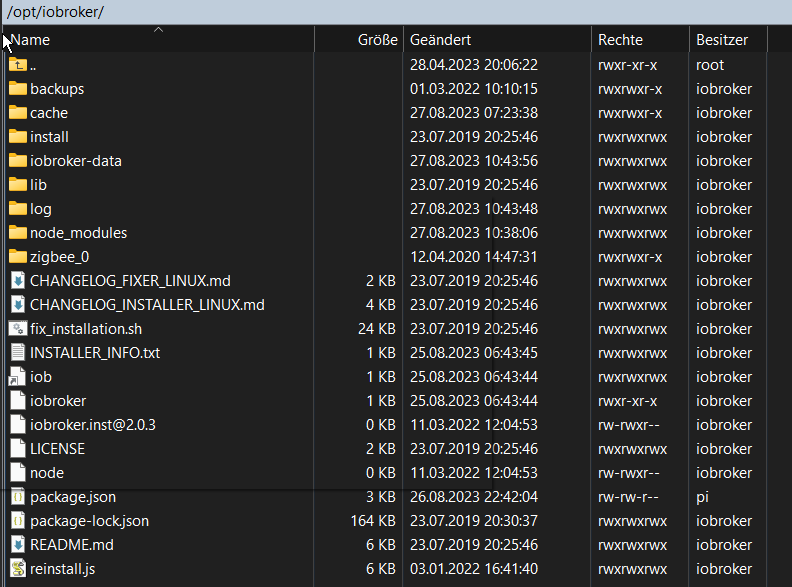
                              Funktioniert aber auch nicht mehr nach Reboot und nicht wenn ich die package.json nochmal reinlege und reboote. Vielleicht ein Problem mit den Rechten?
                              eed2e0cf-7487-49f0-b94b-8a60a4003f73-image.png

                              Gruß
                              maxpd

                              Raspi 4 8gb | iobroker + pivccu3 | 46 Adapter | 68 Scripte, 120 Devices

                              Thomas BraunT 1 Antwort Letzte Antwort
                              0
                              • M maxpd

                                @thomas-braun said in Performance Probleme im iobroker Admin auf pi4:

                                @maxpd

                                Alternativ kannst du auch mal die package.json löschen. Vorher Backup anlegen.

                                Hat aber das zur Folge

                                pi@iobroker:~ $ iobroker update
                                node:internal/modules/cjs/loader:1080
                                  throw err;
                                  ^
                                
                                Error: Cannot find module '/opt/iobroker/node_modules/iobroker.js-controller/iobroker.js'
                                    at Module._resolveFilename (node:internal/modules/cjs/loader:1077:15)
                                    at Module._load (node:internal/modules/cjs/loader:922:27)
                                    at Function.executeUserEntryPoint [as runMain] (node:internal/modules/run_main:81:12)
                                    at node:internal/main/run_main_module:23:47 {
                                  code: 'MODULE_NOT_FOUND',
                                  requireStack: []
                                }
                                
                                Node.js v18.17.1
                                pi@iobroker:~ $ iobroker upgrade all -y
                                node:internal/modules/cjs/loader:1080
                                  throw err;
                                  ^
                                
                                Error: Cannot find module '/opt/iobroker/node_modules/iobroker.js-controller/iobroker.js'
                                    at Module._resolveFilename (node:internal/modules/cjs/loader:1077:15)
                                    at Module._load (node:internal/modules/cjs/loader:922:27)
                                    at Function.executeUserEntryPoint [as runMain] (node:internal/modules/run_main:81:12)
                                    at node:internal/main/run_main_module:23:47 {
                                  code: 'MODULE_NOT_FOUND',
                                  requireStack: []
                                }
                                
                                Node.js v18.17.1
                                pi@iobroker:~ $


                                Reboot?

                                Funktioniert aber auch nicht mehr nach Reboot und nicht wenn ich die package.json nochmal reinlege und reboote. Vielleicht ein Problem mit den Rechten?

                                eed2e0cf-7487-49f0-b94b-8a60a4003f73-image.png

                                Thomas BraunT Online
                                Thomas BraunT Online
                                Thomas Braun
                                Most Active
                                schrieb am zuletzt editiert von
                                #90

                                @maxpd

                                Klar, die muss dem iobroker gehören.

                                Linux-Werkzeugkasten:
                                https://forum.iobroker.net/topic/42952/der-kleine-iobroker-linux-werkzeugkasten
                                NodeJS Fixer Skript:
                                https://forum.iobroker.net/topic/68035/iob-node-fix-skript
                                iob_diag: curl -sLf -o diag.sh https://iobroker.net/diag.sh && bash diag.sh

                                M 1 Antwort Letzte Antwort
                                0
                                • Thomas BraunT Thomas Braun

                                  @maxpd

                                  Klar, die muss dem iobroker gehören.

                                  M Offline
                                  M Offline
                                  maxpd
                                  schrieb am zuletzt editiert von
                                  #91

                                  @thomas-braun wie gebe ich ihm die wieder. denn über winscp hab ich nicht die rechte dazu.

                                  Gruß
                                  maxpd

                                  Raspi 4 8gb | iobroker + pivccu3 | 46 Adapter | 68 Scripte, 120 Devices

                                  Thomas BraunT 1 Antwort Letzte Antwort
                                  0
                                  • M maxpd

                                    @thomas-braun wie gebe ich ihm die wieder. denn über winscp hab ich nicht die rechte dazu.

                                    Thomas BraunT Online
                                    Thomas BraunT Online
                                    Thomas Braun
                                    Most Active
                                    schrieb am zuletzt editiert von
                                    #92

                                    @maxpd

                                    Deswegen macht man sowas ja auch im Terminal direkt auf der Kiste

                                    Schubs den

                                    iob fix
                                    

                                    drüber.

                                    Linux-Werkzeugkasten:
                                    https://forum.iobroker.net/topic/42952/der-kleine-iobroker-linux-werkzeugkasten
                                    NodeJS Fixer Skript:
                                    https://forum.iobroker.net/topic/68035/iob-node-fix-skript
                                    iob_diag: curl -sLf -o diag.sh https://iobroker.net/diag.sh && bash diag.sh

                                    M 1 Antwort Letzte Antwort
                                    0
                                    • Thomas BraunT Thomas Braun

                                      @maxpd

                                      Deswegen macht man sowas ja auch im Terminal direkt auf der Kiste

                                      Schubs den

                                      iob fix
                                      

                                      drüber.

                                      M Offline
                                      M Offline
                                      maxpd
                                      schrieb am zuletzt editiert von
                                      #93

                                      @thomas-braun

                                      pi@iobroker:~ $ iob fix
                                      library: loaded
                                      Library version=2022-12-09
                                      ioBroker is not installed in /opt/iobroker! Cannot fix anything...


                                      Gruß
                                      maxpd

                                      Raspi 4 8gb | iobroker + pivccu3 | 46 Adapter | 68 Scripte, 120 Devices

                                      Thomas BraunT 1 Antwort Letzte Antwort
                                      0
                                      • M maxpd

                                        @thomas-braun

                                        pi@iobroker:~ $ iob fix
                                        library: loaded
                                        Library version=2022-12-09
                                        ioBroker is not installed in /opt/iobroker! Cannot fix anything...
                                        
                                        
                                        Thomas BraunT Online
                                        Thomas BraunT Online
                                        Thomas Braun
                                        Most Active
                                        schrieb am zuletzt editiert von
                                        #94

                                        @maxpd

                                        cd /opt/iobroker
                                        sudo -H -u iobroker npm install iobroker.js-controller
                                        

                                        Linux-Werkzeugkasten:
                                        https://forum.iobroker.net/topic/42952/der-kleine-iobroker-linux-werkzeugkasten
                                        NodeJS Fixer Skript:
                                        https://forum.iobroker.net/topic/68035/iob-node-fix-skript
                                        iob_diag: curl -sLf -o diag.sh https://iobroker.net/diag.sh && bash diag.sh

                                        M 1 Antwort Letzte Antwort
                                        0
                                        • Thomas BraunT Thomas Braun

                                          @maxpd

                                          cd /opt/iobroker
                                          sudo -H -u iobroker npm install iobroker.js-controller
                                          
                                          M Offline
                                          M Offline
                                          maxpd
                                          schrieb am zuletzt editiert von
                                          #95

                                          @thomas-braun Ich habe den js.controller wieder installiert. Habe den Fixer drüber laufen lassen. Die package.json hat wieder ihre Rechte. Die Chromecast Instanz ist deaktiviert. Wenn ich nun etwas updaten will passiert eine halbe Stunde oder länger nichts, bis ein Cannot install kommt.

                                          pi@iobroker:~ $ iobroker upgrade all -y
                                          Update text2command from @2.3.0 to @3.0.2
                                          NPM version: 9.6.7
                                          Installing iobroker.text2command@3.0.2... (System call)
                                          host.iobroker Cannot install iobroker.text2command@3.0.2: 217


                                          Gruß
                                          maxpd

                                          Raspi 4 8gb | iobroker + pivccu3 | 46 Adapter | 68 Scripte, 120 Devices

                                          Thomas BraunT 1 Antwort Letzte Antwort
                                          0
                                          Antworten
                                          • In einem neuen Thema antworten
                                          Anmelden zum Antworten
                                          • Älteste zuerst
                                          • Neuste zuerst
                                          • Meiste Stimmen


                                          Support us

                                          ioBroker
                                          Community Adapters
                                          Donate
                                          FAQ Cloud / IOT
                                          HowTo: Node.js-Update
                                          HowTo: Backup/Restore
                                          Downloads
                                          BLOG

                                          871

                                          Online

                                          32.5k

                                          Benutzer

                                          81.9k

                                          Themen

                                          1.3m

                                          Beiträge
                                          Community
                                          Impressum | Datenschutz-Bestimmungen | Nutzungsbedingungen | Einwilligungseinstellungen
                                          ioBroker Community 2014-2025
                                          logo
                                          • Anmelden

                                          • Du hast noch kein Konto? Registrieren

                                          • Anmelden oder registrieren, um zu suchen
                                          • Erster Beitrag
                                            Letzter Beitrag
                                          0
                                          • Home
                                          • Aktuell
                                          • Tags
                                          • Ungelesen 0
                                          • Kategorien
                                          • Unreplied
                                          • Beliebt
                                          • GitHub
                                          • Docu
                                          • Hilfe