Skip to content
  • Home
  • Aktuell
  • Tags
  • 0 Ungelesen 0
  • Kategorien
  • Unreplied
  • Beliebt
  • GitHub
  • Docu
  • Hilfe
Skins
  • Light
  • Brite
  • Cerulean
  • Cosmo
  • Flatly
  • Journal
  • Litera
  • Lumen
  • Lux
  • Materia
  • Minty
  • Morph
  • Pulse
  • Sandstone
  • Simplex
  • Sketchy
  • Spacelab
  • United
  • Yeti
  • Zephyr
  • Dark
  • Cyborg
  • Darkly
  • Quartz
  • Slate
  • Solar
  • Superhero
  • Vapor

  • Standard: (Kein Skin)
  • Kein Skin
Einklappen
ioBroker Logo

Community Forum

donate donate
  1. ioBroker Community Home
  2. Deutsch
  3. Visualisierung
  4. [gelöst] Verbindungsprobleme – Connecting to Server

NEWS

  • Weihnachtsangebot 2025! 🎄
    BluefoxB
    Bluefox
    22
    1
    1.2k

  • UPDATE 31.10.: Amazon Alexa - ioBroker Skill läuft aus ?
    apollon77A
    apollon77
    48
    3
    9.2k

  • Monatsrückblick – September 2025
    BluefoxB
    Bluefox
    14
    1
    2.5k

[gelöst] Verbindungsprobleme – Connecting to Server

Geplant Angeheftet Gesperrt Verschoben Visualisierung
21 Beiträge 5 Kommentatoren 2.0k Aufrufe 3 Watching
  • Älteste zuerst
  • Neuste zuerst
  • Meiste Stimmen
Antworten
  • In einem neuen Thema antworten
Anmelden zum Antworten
Dieses Thema wurde gelöscht. Nur Nutzer mit entsprechenden Rechten können es sehen.
  • H Offline
    H Offline
    holydiver
    schrieb am zuletzt editiert von holydiver
    #1

    Hallo zusammen

    Seit etwa 3 Monaten bastle ich mir mit Hilfe der Community-Tipps verschiedene Views in Vis zusammen. Sehr cool, was man da alles machen kann.
    Vor 2 Tagen habe ich versucht eine Übersicht über unsere Heizungsthermostate zu basteln und dabei einige Widgets gruppiert und kopiert. Irgendwann ging dann plötzlich nichts mehr, das Projekt konnte nicht mehr geladen werden. Ich suche jetzt schon 2 Tage nach einer Lösung, komme aber nicht weiter. Egal auf welchem System (PC, iPad, Handy) oder Browser ich meine erstellte main-Vis aufrufe, ich bleibe immer im Fehler „Connecting to Server… Loading Values…“ hängen. Auch die App lädt nicht mehr. Sowohl der Aufruf der Vis (http://192.168.178.71:8082/vis/index.html, bzw. http://192.168.178.71:8082/vis/index.html#100_Home), als auch des Edit-Modes (http://192.168.178.71:8082/vis/edit.html) geht nicht mehr.
    Andere, alte Testprojekte funktionieren. Nur so komme ich auch in den Edit Mode. Versuche ich dann aber das main Projekt zu laden, bleibt wieder alles hängen.

    mein System:
    ioBroker in einem Proxmox-Container; läuft seit 1 Jahr ohne Probleme
    • websocket 1.3.0
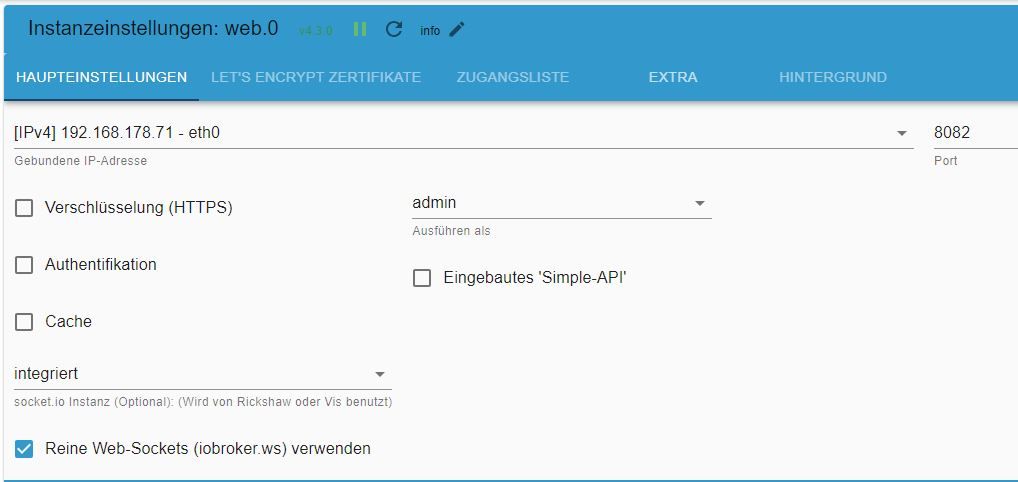
    • web-Server 4.3.0 (Reine Web-Sockets (iobroker.ws) verwenden ist angehakt)
    • socket.io 4.2.0 (192.168.178.71 - eth0; Port 8084)
    • vis 1.4.16
    • node.js 16.19.1
    • npm 8.19.3

    Was habe ich schon versucht:
    Viel gelesen im Forum unter verschiedensten Suchkriterien (leider nicht das richtige gefunden. Ausser: bilde KEINE Gruppen!)

    • ioBroker neu gestartet
    • Listenpunktalle Adapter sind aktuell
    • iobroker upload all
    • Github studiert
    • iobroker update && iobroker upgrade
    • Versuch die vis-views.json zu ändern

    Erkenntnisse:
    Gruppieren und kopieren sollte man unterlassen. Das führt wohl zu Abstürzen.

    Nach Löschen diverser Widgets und Views in der vis-views.json in Notepad++ wird es auch nicht besser. Es geht immer noch nicht. Allerdings waren das auch ehr verzweifelte Versuche, da kenne ich mich gar nicht aus. Eigentlich wollte ich nur die Gruppen auflösen, dazu habe ich jedoch keine Anleitung gefunden.
    Die Browserconsole (Strg+Shift+C für diejenigen, die noch suchen) zeigt folgende Fehler
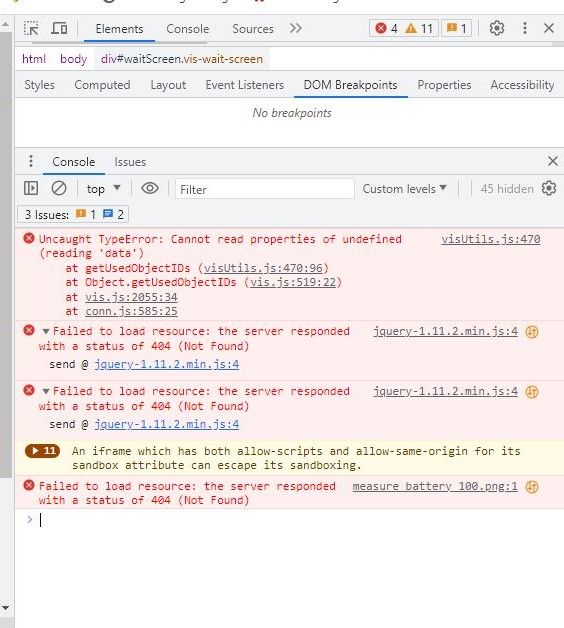
    vis fehler konsole.jpg
    Das fehlende Icon (warum auch immer es fehlte) konnte ich durch Laden eines anderen Projektes ergänzen. Aber was besagen die anderen beiden Fehler).

    Pleases help, ich möchte die Arbeit der letzten 2 Monate nicht verwerfen (hab natürlich kein aktuelles Backup:angry: – anderes Problem mit backitup und Synology)

    Danke euch
    Chris

    haselchenH bahnuhrB 2 Antworten Letzte Antwort
    0
    • H holydiver

      Hallo zusammen

      Seit etwa 3 Monaten bastle ich mir mit Hilfe der Community-Tipps verschiedene Views in Vis zusammen. Sehr cool, was man da alles machen kann.
      Vor 2 Tagen habe ich versucht eine Übersicht über unsere Heizungsthermostate zu basteln und dabei einige Widgets gruppiert und kopiert. Irgendwann ging dann plötzlich nichts mehr, das Projekt konnte nicht mehr geladen werden. Ich suche jetzt schon 2 Tage nach einer Lösung, komme aber nicht weiter. Egal auf welchem System (PC, iPad, Handy) oder Browser ich meine erstellte main-Vis aufrufe, ich bleibe immer im Fehler „Connecting to Server… Loading Values…“ hängen. Auch die App lädt nicht mehr. Sowohl der Aufruf der Vis (http://192.168.178.71:8082/vis/index.html, bzw. http://192.168.178.71:8082/vis/index.html#100_Home), als auch des Edit-Modes (http://192.168.178.71:8082/vis/edit.html) geht nicht mehr.
      Andere, alte Testprojekte funktionieren. Nur so komme ich auch in den Edit Mode. Versuche ich dann aber das main Projekt zu laden, bleibt wieder alles hängen.

      mein System:
      ioBroker in einem Proxmox-Container; läuft seit 1 Jahr ohne Probleme
      • websocket 1.3.0
      • web-Server 4.3.0 (Reine Web-Sockets (iobroker.ws) verwenden ist angehakt)
      • socket.io 4.2.0 (192.168.178.71 - eth0; Port 8084)
      • vis 1.4.16
      • node.js 16.19.1
      • npm 8.19.3

      Was habe ich schon versucht:
      Viel gelesen im Forum unter verschiedensten Suchkriterien (leider nicht das richtige gefunden. Ausser: bilde KEINE Gruppen!)

      • ioBroker neu gestartet
      • Listenpunktalle Adapter sind aktuell
      • iobroker upload all
      • Github studiert
      • iobroker update && iobroker upgrade
      • Versuch die vis-views.json zu ändern

      Erkenntnisse:
      Gruppieren und kopieren sollte man unterlassen. Das führt wohl zu Abstürzen.

      Nach Löschen diverser Widgets und Views in der vis-views.json in Notepad++ wird es auch nicht besser. Es geht immer noch nicht. Allerdings waren das auch ehr verzweifelte Versuche, da kenne ich mich gar nicht aus. Eigentlich wollte ich nur die Gruppen auflösen, dazu habe ich jedoch keine Anleitung gefunden.
      Die Browserconsole (Strg+Shift+C für diejenigen, die noch suchen) zeigt folgende Fehler
      vis fehler konsole.jpg
      Das fehlende Icon (warum auch immer es fehlte) konnte ich durch Laden eines anderen Projektes ergänzen. Aber was besagen die anderen beiden Fehler).

      Pleases help, ich möchte die Arbeit der letzten 2 Monate nicht verwerfen (hab natürlich kein aktuelles Backup:angry: – anderes Problem mit backitup und Synology)

      Danke euch
      Chris

      haselchenH Offline
      haselchenH Offline
      haselchen
      Most Active
      schrieb am zuletzt editiert von haselchen
      #2

      @holydiver

      Viel Text 😁
      Versuch mal den Workaround von @bahnuhr .
      Link suche ich dir raus .

      https://forum.iobroker.net/topic/56353/iobroker-app-android-keine-verbindung-mit-ws/27?_=1667719013105

      Damit läuft es auf meinem Laptop und mit der App einwandfrei. Genauso wie das Bearbeiten und die Runtime.

      Synology DS218+ & 2 x Fujitsu Esprimo (VM/Container) + FritzBox7590 + 2 AVM 3000 Repeater & Homematic & HUE & Osram & Xiaomi, NPM 10.9.4, Nodejs 22.21.0 ,JS Controller 7.0.7 ,Admin 7.7.19

      1 Antwort Letzte Antwort
      0
      • H holydiver

        Hallo zusammen

        Seit etwa 3 Monaten bastle ich mir mit Hilfe der Community-Tipps verschiedene Views in Vis zusammen. Sehr cool, was man da alles machen kann.
        Vor 2 Tagen habe ich versucht eine Übersicht über unsere Heizungsthermostate zu basteln und dabei einige Widgets gruppiert und kopiert. Irgendwann ging dann plötzlich nichts mehr, das Projekt konnte nicht mehr geladen werden. Ich suche jetzt schon 2 Tage nach einer Lösung, komme aber nicht weiter. Egal auf welchem System (PC, iPad, Handy) oder Browser ich meine erstellte main-Vis aufrufe, ich bleibe immer im Fehler „Connecting to Server… Loading Values…“ hängen. Auch die App lädt nicht mehr. Sowohl der Aufruf der Vis (http://192.168.178.71:8082/vis/index.html, bzw. http://192.168.178.71:8082/vis/index.html#100_Home), als auch des Edit-Modes (http://192.168.178.71:8082/vis/edit.html) geht nicht mehr.
        Andere, alte Testprojekte funktionieren. Nur so komme ich auch in den Edit Mode. Versuche ich dann aber das main Projekt zu laden, bleibt wieder alles hängen.

        mein System:
        ioBroker in einem Proxmox-Container; läuft seit 1 Jahr ohne Probleme
        • websocket 1.3.0
        • web-Server 4.3.0 (Reine Web-Sockets (iobroker.ws) verwenden ist angehakt)
        • socket.io 4.2.0 (192.168.178.71 - eth0; Port 8084)
        • vis 1.4.16
        • node.js 16.19.1
        • npm 8.19.3

        Was habe ich schon versucht:
        Viel gelesen im Forum unter verschiedensten Suchkriterien (leider nicht das richtige gefunden. Ausser: bilde KEINE Gruppen!)

        • ioBroker neu gestartet
        • Listenpunktalle Adapter sind aktuell
        • iobroker upload all
        • Github studiert
        • iobroker update && iobroker upgrade
        • Versuch die vis-views.json zu ändern

        Erkenntnisse:
        Gruppieren und kopieren sollte man unterlassen. Das führt wohl zu Abstürzen.

        Nach Löschen diverser Widgets und Views in der vis-views.json in Notepad++ wird es auch nicht besser. Es geht immer noch nicht. Allerdings waren das auch ehr verzweifelte Versuche, da kenne ich mich gar nicht aus. Eigentlich wollte ich nur die Gruppen auflösen, dazu habe ich jedoch keine Anleitung gefunden.
        Die Browserconsole (Strg+Shift+C für diejenigen, die noch suchen) zeigt folgende Fehler
        vis fehler konsole.jpg
        Das fehlende Icon (warum auch immer es fehlte) konnte ich durch Laden eines anderen Projektes ergänzen. Aber was besagen die anderen beiden Fehler).

        Pleases help, ich möchte die Arbeit der letzten 2 Monate nicht verwerfen (hab natürlich kein aktuelles Backup:angry: – anderes Problem mit backitup und Synology)

        Danke euch
        Chris

        bahnuhrB Online
        bahnuhrB Online
        bahnuhr
        Forum Testing Most Active
        schrieb am zuletzt editiert von
        #3

        @holydiver sagte in Verbindungsprobleme – Connecting to Server:

        • web-Server 4.3.0 (Reine Web-Sockets (iobroker.ws) verwenden ist angehakt)
        • socket.io 4.2.0 (192.168.178.71 - eth0; Port 8084)

        socket und ws gleichzeitig funktioniert nicht. Haben den gleichen Port.

        Entweder:

        • anderer Port wählen oder
        • socket.io aus schalten.

        Wenn ich helfen konnte, dann Daumen hoch (Pfeil nach oben)!
        Danke.
        gute Forenbeiträge: https://forum.iobroker.net/topic/51555/hinweise-f%C3%BCr-gute-forenbeitr%C3%A4ge
        ScreenToGif :https://www.screentogif.com/downloads.html

        H 1 Antwort Letzte Antwort
        0
        • bahnuhrB bahnuhr

          @holydiver sagte in Verbindungsprobleme – Connecting to Server:

          • web-Server 4.3.0 (Reine Web-Sockets (iobroker.ws) verwenden ist angehakt)
          • socket.io 4.2.0 (192.168.178.71 - eth0; Port 8084)

          socket und ws gleichzeitig funktioniert nicht. Haben den gleichen Port.

          Entweder:

          • anderer Port wählen oder
          • socket.io aus schalten.
          H Offline
          H Offline
          holydiver
          schrieb am zuletzt editiert von
          #4

          Mann, seit ihr schnell :+1:

          Also nur Ausschalten von socket.io bringt nichts.
          Nach den Anleitung von @bahnuhr vorgegangen passiert - auch nichts:

          • :heavy_check_mark: socket.io aus geschaltet
          • :heavy_check_mark: web.0 ist aktiviert mit Port 8082, und unten ws angehakt
          • :no_entry_sign: web.1 aktiviert mit Port 20002 und unten integriert eingetragen (bei ws überall Haken raus) -> habe ich erst mal weggelassen. Warum ich da ein extra web.1 benötige für die App habe ich noch nicht rausfinden können, will erst mal den Browser wieder hin bekommen
          • :interrobang: ws aktiviert mit Standard-Port -> Hmmm. ich habe gar kein websocket unter den Instanzen, nur unter den installierten Adaptern !? Muss das auch unter Instanzen sichtbar sein?
          DJMarc75D haselchenH 2 Antworten Letzte Antwort
          0
          • H holydiver

            Mann, seit ihr schnell :+1:

            Also nur Ausschalten von socket.io bringt nichts.
            Nach den Anleitung von @bahnuhr vorgegangen passiert - auch nichts:

            • :heavy_check_mark: socket.io aus geschaltet
            • :heavy_check_mark: web.0 ist aktiviert mit Port 8082, und unten ws angehakt
            • :no_entry_sign: web.1 aktiviert mit Port 20002 und unten integriert eingetragen (bei ws überall Haken raus) -> habe ich erst mal weggelassen. Warum ich da ein extra web.1 benötige für die App habe ich noch nicht rausfinden können, will erst mal den Browser wieder hin bekommen
            • :interrobang: ws aktiviert mit Standard-Port -> Hmmm. ich habe gar kein websocket unter den Instanzen, nur unter den installierten Adaptern !? Muss das auch unter Instanzen sichtbar sein?
            DJMarc75D Offline
            DJMarc75D Offline
            DJMarc75
            schrieb am zuletzt editiert von
            #5

            @holydiver sagte in Verbindungsprobleme – Connecting to Server:

            ich habe gar kein websocket unter den Instanzen, nur unter den installierten Adaptern !? Muss das auch unter Instanzen sichtbar sein?

            na Du musst eine Instanz installieren... bei dem Adapter auf das + klicken.

            Lehrling seit 1975 !!!
            Beitrag geholfen ? dann gerne ein upvote rechts unten im Beitrag klicken ;)
            https://forum.iobroker.net/topic/51555/hinweise-f%C3%BCr-gute-forenbeitr%C3%A4ge

            1 Antwort Letzte Antwort
            0
            • H holydiver

              Mann, seit ihr schnell :+1:

              Also nur Ausschalten von socket.io bringt nichts.
              Nach den Anleitung von @bahnuhr vorgegangen passiert - auch nichts:

              • :heavy_check_mark: socket.io aus geschaltet
              • :heavy_check_mark: web.0 ist aktiviert mit Port 8082, und unten ws angehakt
              • :no_entry_sign: web.1 aktiviert mit Port 20002 und unten integriert eingetragen (bei ws überall Haken raus) -> habe ich erst mal weggelassen. Warum ich da ein extra web.1 benötige für die App habe ich noch nicht rausfinden können, will erst mal den Browser wieder hin bekommen
              • :interrobang: ws aktiviert mit Standard-Port -> Hmmm. ich habe gar kein websocket unter den Instanzen, nur unter den installierten Adaptern !? Muss das auch unter Instanzen sichtbar sein?
              haselchenH Offline
              haselchenH Offline
              haselchen
              Most Active
              schrieb am zuletzt editiert von haselchen
              #6

              @holydiver

              Du solltest schon die GANZE Anleitung abarbeiten , sonst bringt Deine Frage nach Hilfe nichts und wird auch vermutlich nicht funktionieren ;)

              "habe ich erst mal weggelassen. Warum ich da ein extra web.1 benötige für die App habe ich noch nicht rausfinden können, will erst mal den Browser wieder hin bekommen"

              Synology DS218+ & 2 x Fujitsu Esprimo (VM/Container) + FritzBox7590 + 2 AVM 3000 Repeater & Homematic & HUE & Osram & Xiaomi, NPM 10.9.4, Nodejs 22.21.0 ,JS Controller 7.0.7 ,Admin 7.7.19

              H 1 Antwort Letzte Antwort
              0
              • haselchenH haselchen

                @holydiver

                Du solltest schon die GANZE Anleitung abarbeiten , sonst bringt Deine Frage nach Hilfe nichts und wird auch vermutlich nicht funktionieren ;)

                "habe ich erst mal weggelassen. Warum ich da ein extra web.1 benötige für die App habe ich noch nicht rausfinden können, will erst mal den Browser wieder hin bekommen"

                H Offline
                H Offline
                holydiver
                schrieb am zuletzt editiert von
                #7

                @haselchen
                OK, du hast ja Recht.
                @DJMarc75
                Auch das ist korrekt. Hatte ich mittlerweile auch versucht.

                Nun, folgender Stand:
                ✔ socket.io ausgeschaltet
                ✔ web.0 ist aktiviert mit Port 8082 und unten ws angehakt
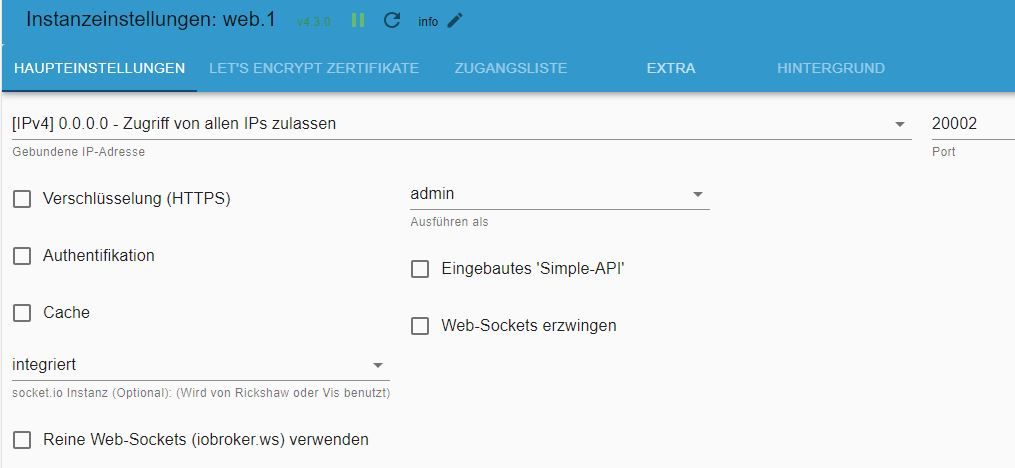
                :heavy_check_mark: web.1 aktiviert mit Port 20002, Websocket ausgeschaltet
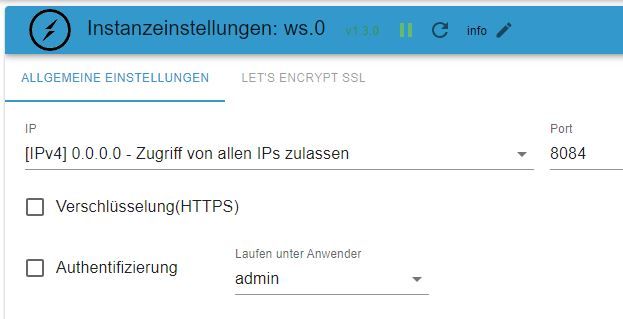
                :heavy_check_mark: ws.0 aktiviert mit Port 8084

                =>
                mein main-Projekt läuft nicht, weder die Vis, das das Edit.
                Das funktionierende Demo-Projekt lässt sich im Browser öffnen
                http://192.168.178.71:8082/vis/edit.html?all1one#101_Home ->Edit läuft
                http://192.168.178.71:8082/vis/index.html?all1one#101_Home -> läuft
                http://192.168.178.71:20002/vis/edit.html?all1one#101_Home -> Edit hängt mit Fehler "Verbindungsfehler"

                Bei main geht aber nichts
                http://192.168.178.71:8082/vis/index.html -> Connecting to Server, hängt
                http://192.168.178.71:20002/vis/index.html -> Connecting to Server, hängt
                http://192.168.178.71:8082/vis/edit.html -> Connecting to Server, hängt
                http://192.168.178.71:20002/vis/edit.html -> Connecting to Server, hängt

                Folgend meine Einstellungen:
                io3.JPG io2.JPG io1.JPG io4.JPG

                Auch mit der "gebundenen IP" habe ich schon experimentiert.

                Ich hatte in mehreren Threats gelesen, dass die Gruppierung von Widgets zu Abstürzen führt. Und es funktionierte ja alles, bis ich eben im main-Projekt einige Widgets gruppiert und kopiert hatte.
                Wie kann ich denn die Gruppierung im vis-views.json quasi "extern" aufheben? Meint ihr, es liegt nur am ws?

                haselchenH HomoranH DJMarc75D 4 Antworten Letzte Antwort
                0
                • H holydiver

                  @haselchen
                  OK, du hast ja Recht.
                  @DJMarc75
                  Auch das ist korrekt. Hatte ich mittlerweile auch versucht.

                  Nun, folgender Stand:
                  ✔ socket.io ausgeschaltet
                  ✔ web.0 ist aktiviert mit Port 8082 und unten ws angehakt
                  :heavy_check_mark: web.1 aktiviert mit Port 20002, Websocket ausgeschaltet
                  :heavy_check_mark: ws.0 aktiviert mit Port 8084

                  =>
                  mein main-Projekt läuft nicht, weder die Vis, das das Edit.
                  Das funktionierende Demo-Projekt lässt sich im Browser öffnen
                  http://192.168.178.71:8082/vis/edit.html?all1one#101_Home ->Edit läuft
                  http://192.168.178.71:8082/vis/index.html?all1one#101_Home -> läuft
                  http://192.168.178.71:20002/vis/edit.html?all1one#101_Home -> Edit hängt mit Fehler "Verbindungsfehler"

                  Bei main geht aber nichts
                  http://192.168.178.71:8082/vis/index.html -> Connecting to Server, hängt
                  http://192.168.178.71:20002/vis/index.html -> Connecting to Server, hängt
                  http://192.168.178.71:8082/vis/edit.html -> Connecting to Server, hängt
                  http://192.168.178.71:20002/vis/edit.html -> Connecting to Server, hängt

                  Folgend meine Einstellungen:
                  io3.JPG io2.JPG io1.JPG io4.JPG

                  Auch mit der "gebundenen IP" habe ich schon experimentiert.

                  Ich hatte in mehreren Threats gelesen, dass die Gruppierung von Widgets zu Abstürzen führt. Und es funktionierte ja alles, bis ich eben im main-Projekt einige Widgets gruppiert und kopiert hatte.
                  Wie kann ich denn die Gruppierung im vis-views.json quasi "extern" aufheben? Meint ihr, es liegt nur am ws?

                  haselchenH Offline
                  haselchenH Offline
                  haselchen
                  Most Active
                  schrieb am zuletzt editiert von haselchen
                  #8

                  @holydiver

                  Gelöscht

                  Muss nochmal Deine Screenshots genau angucken.
                  So und zwar hatte ich mit einigen aktuellen Versionen von Websocket und Webserver Probleme.
                  Funktioniert hat es wieder mit :
                  Websocket 2.4.0
                  Webserver 5.5.3

                  Synology DS218+ & 2 x Fujitsu Esprimo (VM/Container) + FritzBox7590 + 2 AVM 3000 Repeater & Homematic & HUE & Osram & Xiaomi, NPM 10.9.4, Nodejs 22.21.0 ,JS Controller 7.0.7 ,Admin 7.7.19

                  1 Antwort Letzte Antwort
                  0
                  • H holydiver

                    @haselchen
                    OK, du hast ja Recht.
                    @DJMarc75
                    Auch das ist korrekt. Hatte ich mittlerweile auch versucht.

                    Nun, folgender Stand:
                    ✔ socket.io ausgeschaltet
                    ✔ web.0 ist aktiviert mit Port 8082 und unten ws angehakt
                    :heavy_check_mark: web.1 aktiviert mit Port 20002, Websocket ausgeschaltet
                    :heavy_check_mark: ws.0 aktiviert mit Port 8084

                    =>
                    mein main-Projekt läuft nicht, weder die Vis, das das Edit.
                    Das funktionierende Demo-Projekt lässt sich im Browser öffnen
                    http://192.168.178.71:8082/vis/edit.html?all1one#101_Home ->Edit läuft
                    http://192.168.178.71:8082/vis/index.html?all1one#101_Home -> läuft
                    http://192.168.178.71:20002/vis/edit.html?all1one#101_Home -> Edit hängt mit Fehler "Verbindungsfehler"

                    Bei main geht aber nichts
                    http://192.168.178.71:8082/vis/index.html -> Connecting to Server, hängt
                    http://192.168.178.71:20002/vis/index.html -> Connecting to Server, hängt
                    http://192.168.178.71:8082/vis/edit.html -> Connecting to Server, hängt
                    http://192.168.178.71:20002/vis/edit.html -> Connecting to Server, hängt

                    Folgend meine Einstellungen:
                    io3.JPG io2.JPG io1.JPG io4.JPG

                    Auch mit der "gebundenen IP" habe ich schon experimentiert.

                    Ich hatte in mehreren Threats gelesen, dass die Gruppierung von Widgets zu Abstürzen führt. Und es funktionierte ja alles, bis ich eben im main-Projekt einige Widgets gruppiert und kopiert hatte.
                    Wie kann ich denn die Gruppierung im vis-views.json quasi "extern" aufheben? Meint ihr, es liegt nur am ws?

                    HomoranH Nicht stören
                    HomoranH Nicht stören
                    Homoran
                    Global Moderator Administrators
                    schrieb am zuletzt editiert von
                    #9

                    @holydiver sagte in Verbindungsprobleme – Connecting to Server:

                    web.0 ist aktiviert mit Port 8082 und unten ws angehakt
                    web.1 aktiviert mit Port 20002, Websocket ausgeschaltet
                    ws.0 aktiviert mit Port 8084

                    dann musst du bei web.0 mit port 8084 aufrufen

                    kein Support per PN! - Fragen im Forum stellen - es gibt fast nichts, was nicht auch für andere interessant ist.

                    Benutzt das Voting rechts unten im Beitrag wenn er euch geholfen hat.

                    der Installationsfixer: curl -fsL https://iobroker.net/fix.sh | bash -

                    haselchenH 1 Antwort Letzte Antwort
                    0
                    • HomoranH Homoran

                      @holydiver sagte in Verbindungsprobleme – Connecting to Server:

                      web.0 ist aktiviert mit Port 8082 und unten ws angehakt
                      web.1 aktiviert mit Port 20002, Websocket ausgeschaltet
                      ws.0 aktiviert mit Port 8084

                      dann musst du bei web.0 mit port 8084 aufrufen

                      haselchenH Offline
                      haselchenH Offline
                      haselchen
                      Most Active
                      schrieb am zuletzt editiert von
                      #10

                      @homoran

                      Das halte ich für falsch.
                      WS hat einen eigenen Port.
                      web.0 hat bei mir 8082 und ws 8083

                      Synology DS218+ & 2 x Fujitsu Esprimo (VM/Container) + FritzBox7590 + 2 AVM 3000 Repeater & Homematic & HUE & Osram & Xiaomi, NPM 10.9.4, Nodejs 22.21.0 ,JS Controller 7.0.7 ,Admin 7.7.19

                      1 Antwort Letzte Antwort
                      0
                      • H holydiver

                        @haselchen
                        OK, du hast ja Recht.
                        @DJMarc75
                        Auch das ist korrekt. Hatte ich mittlerweile auch versucht.

                        Nun, folgender Stand:
                        ✔ socket.io ausgeschaltet
                        ✔ web.0 ist aktiviert mit Port 8082 und unten ws angehakt
                        :heavy_check_mark: web.1 aktiviert mit Port 20002, Websocket ausgeschaltet
                        :heavy_check_mark: ws.0 aktiviert mit Port 8084

                        =>
                        mein main-Projekt läuft nicht, weder die Vis, das das Edit.
                        Das funktionierende Demo-Projekt lässt sich im Browser öffnen
                        http://192.168.178.71:8082/vis/edit.html?all1one#101_Home ->Edit läuft
                        http://192.168.178.71:8082/vis/index.html?all1one#101_Home -> läuft
                        http://192.168.178.71:20002/vis/edit.html?all1one#101_Home -> Edit hängt mit Fehler "Verbindungsfehler"

                        Bei main geht aber nichts
                        http://192.168.178.71:8082/vis/index.html -> Connecting to Server, hängt
                        http://192.168.178.71:20002/vis/index.html -> Connecting to Server, hängt
                        http://192.168.178.71:8082/vis/edit.html -> Connecting to Server, hängt
                        http://192.168.178.71:20002/vis/edit.html -> Connecting to Server, hängt

                        Folgend meine Einstellungen:
                        io3.JPG io2.JPG io1.JPG io4.JPG

                        Auch mit der "gebundenen IP" habe ich schon experimentiert.

                        Ich hatte in mehreren Threats gelesen, dass die Gruppierung von Widgets zu Abstürzen führt. Und es funktionierte ja alles, bis ich eben im main-Projekt einige Widgets gruppiert und kopiert hatte.
                        Wie kann ich denn die Gruppierung im vis-views.json quasi "extern" aufheben? Meint ihr, es liegt nur am ws?

                        haselchenH Offline
                        haselchenH Offline
                        haselchen
                        Most Active
                        schrieb am zuletzt editiert von
                        #11

                        @holydiver

                        In den Web.0 Einstellungen muss unten nicht integriert sondern ws(ws.0) rein.

                        Synology DS218+ & 2 x Fujitsu Esprimo (VM/Container) + FritzBox7590 + 2 AVM 3000 Repeater & Homematic & HUE & Osram & Xiaomi, NPM 10.9.4, Nodejs 22.21.0 ,JS Controller 7.0.7 ,Admin 7.7.19

                        HomoranH 1 Antwort Letzte Antwort
                        0
                        • H holydiver

                          @haselchen
                          OK, du hast ja Recht.
                          @DJMarc75
                          Auch das ist korrekt. Hatte ich mittlerweile auch versucht.

                          Nun, folgender Stand:
                          ✔ socket.io ausgeschaltet
                          ✔ web.0 ist aktiviert mit Port 8082 und unten ws angehakt
                          :heavy_check_mark: web.1 aktiviert mit Port 20002, Websocket ausgeschaltet
                          :heavy_check_mark: ws.0 aktiviert mit Port 8084

                          =>
                          mein main-Projekt läuft nicht, weder die Vis, das das Edit.
                          Das funktionierende Demo-Projekt lässt sich im Browser öffnen
                          http://192.168.178.71:8082/vis/edit.html?all1one#101_Home ->Edit läuft
                          http://192.168.178.71:8082/vis/index.html?all1one#101_Home -> läuft
                          http://192.168.178.71:20002/vis/edit.html?all1one#101_Home -> Edit hängt mit Fehler "Verbindungsfehler"

                          Bei main geht aber nichts
                          http://192.168.178.71:8082/vis/index.html -> Connecting to Server, hängt
                          http://192.168.178.71:20002/vis/index.html -> Connecting to Server, hängt
                          http://192.168.178.71:8082/vis/edit.html -> Connecting to Server, hängt
                          http://192.168.178.71:20002/vis/edit.html -> Connecting to Server, hängt

                          Folgend meine Einstellungen:
                          io3.JPG io2.JPG io1.JPG io4.JPG

                          Auch mit der "gebundenen IP" habe ich schon experimentiert.

                          Ich hatte in mehreren Threats gelesen, dass die Gruppierung von Widgets zu Abstürzen führt. Und es funktionierte ja alles, bis ich eben im main-Projekt einige Widgets gruppiert und kopiert hatte.
                          Wie kann ich denn die Gruppierung im vis-views.json quasi "extern" aufheben? Meint ihr, es liegt nur am ws?

                          DJMarc75D Offline
                          DJMarc75D Offline
                          DJMarc75
                          schrieb am zuletzt editiert von
                          #12

                          @holydiver sagte in Verbindungsprobleme – Connecting to Server:

                          Nun, folgender Stand

                          genau, zeig mal die komplette Ausgabe von

                          iob diag
                          

                          Lehrling seit 1975 !!!
                          Beitrag geholfen ? dann gerne ein upvote rechts unten im Beitrag klicken ;)
                          https://forum.iobroker.net/topic/51555/hinweise-f%C3%BCr-gute-forenbeitr%C3%A4ge

                          1 Antwort Letzte Antwort
                          0
                          • haselchenH haselchen

                            @holydiver

                            In den Web.0 Einstellungen muss unten nicht integriert sondern ws(ws.0) rein.

                            HomoranH Nicht stören
                            HomoranH Nicht stören
                            Homoran
                            Global Moderator Administrators
                            schrieb am zuletzt editiert von
                            #13

                            @haselchen sagte in Verbindungsprobleme – Connecting to Server:

                            @holydiver

                            In den Web.0 Einstellungen muss unten nicht integriert sondern ws(ws.0) rein.

                            und dann hast du trotzdem den Port 8082?

                            kein Support per PN! - Fragen im Forum stellen - es gibt fast nichts, was nicht auch für andere interessant ist.

                            Benutzt das Voting rechts unten im Beitrag wenn er euch geholfen hat.

                            der Installationsfixer: curl -fsL https://iobroker.net/fix.sh | bash -

                            haselchenH 1 Antwort Letzte Antwort
                            0
                            • HomoranH Homoran

                              @haselchen sagte in Verbindungsprobleme – Connecting to Server:

                              @holydiver

                              In den Web.0 Einstellungen muss unten nicht integriert sondern ws(ws.0) rein.

                              und dann hast du trotzdem den Port 8082?

                              haselchenH Offline
                              haselchenH Offline
                              haselchen
                              Most Active
                              schrieb am zuletzt editiert von
                              #14

                              @homoran

                              Läuft wie geschnitten Brot.
                              Alles so wie es soll.
                              Im Browser, in der App . überall.

                              Synology DS218+ & 2 x Fujitsu Esprimo (VM/Container) + FritzBox7590 + 2 AVM 3000 Repeater & Homematic & HUE & Osram & Xiaomi, NPM 10.9.4, Nodejs 22.21.0 ,JS Controller 7.0.7 ,Admin 7.7.19

                              HomoranH 1 Antwort Letzte Antwort
                              0
                              • haselchenH haselchen

                                @homoran

                                Läuft wie geschnitten Brot.
                                Alles so wie es soll.
                                Im Browser, in der App . überall.

                                HomoranH Nicht stören
                                HomoranH Nicht stören
                                Homoran
                                Global Moderator Administrators
                                schrieb am zuletzt editiert von
                                #15

                                @haselchen und bei port 8083?

                                kein Support per PN! - Fragen im Forum stellen - es gibt fast nichts, was nicht auch für andere interessant ist.

                                Benutzt das Voting rechts unten im Beitrag wenn er euch geholfen hat.

                                der Installationsfixer: curl -fsL https://iobroker.net/fix.sh | bash -

                                1 Antwort Letzte Antwort
                                0
                                • H Offline
                                  H Offline
                                  holydiver
                                  schrieb am zuletzt editiert von
                                  #16

                                  @homoran
                                  gebe ich bei web.0 den Port 2084 an, dann bleibt die Instanz "rot", verbindet er sich nicht mit dem Host.

                                  @haselchen
                                  gebe ich bei ws.0 2083 ein funktioniert es ebenfalls nicht.
                                  Und in web.0 ws(ws.0) hilft leider auch nicht

                                  @DJMarc75

                                  Skript v.2023-04-16
                                  
                                  *** BASE SYSTEM ***
                                  Architecture    : x86_64
                                  Docker          : false
                                  Virtualization  : lxc
                                  Distributor ID: Debian
                                  Description:    Debian GNU/Linux 11 (bullseye)
                                  Release:        11
                                  Codename:       bullseye
                                  
                                  PRETTY_NAME="Debian GNU/Linux 11 (bullseye)"
                                  NAME="Debian GNU/Linux"
                                  VERSION_ID="11"
                                  VERSION="11 (bullseye)"
                                  VERSION_CODENAME=bullseye
                                  ID=debian
                                  HOME_URL="https://www.debian.org/"
                                  SUPPORT_URL="https://www.debian.org/support"
                                  BUG_REPORT_URL="https://bugs.debian.org/"
                                  
                                  Systemuptime and Load:
                                   18:12:53 up 18:05,  1 user,  load average: 0.43, 0.39, 0.38
                                  CPU threads: 1
                                  
                                  
                                  *** Time and Time Zones ***
                                                 Local time: Thu 2023-08-24 18:12:53 CEST
                                             Universal time: Thu 2023-08-24 16:12:53 UTC
                                                   RTC time: n/a
                                                  Time zone: Europe/Berlin (CEST, +0200)
                                  System clock synchronized: yes
                                                NTP service: inactive
                                            RTC in local TZ: no
                                  
                                  *** User and Groups ***
                                  chris
                                  /home/chris
                                  chris sudo iobroker
                                  
                                  *** X-Server-Setup ***
                                  X-Server:       false
                                  Desktop:
                                  Terminal:       tty
                                  Boot Target:    graphical.target
                                  
                                  *** MEMORY ***
                                                 total        used        free      shared  buff/cache   available
                                  Mem:            2.5G        1.5G        708M        0.0K        360M        1.1G
                                  Swap:           512M          0B        512M
                                  Total:          3.0G        1.5G        1.2G
                                  
                                           2528 M total memory
                                           1459 M used memory
                                            155 M active memory
                                           1575 M inactive memory
                                            708 M free memory
                                              0 M buffer memory
                                            360 M swap cache
                                            512 M total swap
                                              0 M used swap
                                            512 M free swap
                                  
                                  *** FILESYSTEM ***
                                  Filesystem                       Type      Size  Used Avail Use% Mounted on
                                  /dev/mapper/pve-vm--100--disk--0 ext4      7.8G  4.0G  3.5G  54% /
                                  none                             tmpfs     492K  4.0K  488K   1% /dev
                                  udev                             devtmpfs  3.8G     0  3.8G   0% /dev/tty
                                  tmpfs                            tmpfs     3.9G     0  3.9G   0% /dev/shm
                                  tmpfs                            tmpfs     1.6G  124K  1.6G   1% /run
                                  tmpfs                            tmpfs     5.0M     0  5.0M   0% /run/lock
                                  tmpfs                            tmpfs     782M     0  782M   0% /run/user/1000
                                  
                                  Messages concerning ext4 filesystem in dmesg:
                                  dmesg: read kernel buffer failed: Operation not permitted
                                  
                                  Show mounted filesystems (real ones only):
                                  TARGET SOURCE                           FSTYPE OPTIONS
                                  /      /dev/mapper/pve-vm--100--disk--0 ext4   rw,relatime,lazytime,stripe=16
                                  
                                  Files in neuralgic directories:
                                  
                                  /var:
                                  463M    /var/
                                  223M    /var/cache
                                  218M    /var/cache/apt
                                  151M    /var/cache/apt/archives
                                  135M    /var/lib
                                  
                                  Hint: You are currently not seeing messages from other users and the system.
                                        Users in groups 'adm', 'systemd-journal' can see all messages.
                                        Pass -q to turn off this notice.
                                  Archived and active journals take up 24.0M in the file system.
                                  
                                  /opt/iobroker/backups:
                                  97M     /opt/iobroker/backups/
                                  
                                  /opt/iobroker/iobroker-data:
                                  1000M   /opt/iobroker/iobroker-data/
                                  646M    /opt/iobroker/iobroker-data/history
                                  272M    /opt/iobroker/iobroker-data/files
                                  72M     /opt/iobroker/iobroker-data/files/telegram.admin
                                  52M     /opt/iobroker/iobroker-data/files/javascript.admin
                                  
                                  The five largest files in iobroker-data are:
                                  20M     /opt/iobroker/iobroker-data/objects.jsonl
                                  15M     /opt/iobroker/iobroker-data/files/vis.0/import/vis-views.json
                                  15M     /opt/iobroker/iobroker-data/files/vis.0/all1one/vis-views.json
                                  15M     /opt/iobroker/iobroker-data/files/telegram.admin/rules/static/js/vendors-node_modules_iobroker_adapter-react-v5_assets_devices_parseNames_d_ts-node_modules_io-1d9f06.44fe4a3f.chunk.js.map
                                  12M     /opt/iobroker/iobroker-data/states.jsonl
                                  
                                  *** NodeJS-Installation ***
                                  
                                  /usr/bin/nodejs         v16.19.1
                                  /usr/bin/node           v16.19.1
                                  /usr/bin/npm            8.19.3
                                  /usr/bin/npx            8.19.3
                                  
                                  
                                  nodejs:
                                    Installed: 16.19.1-deb-1nodesource1
                                    Candidate: 16.20.2-deb-1nodesource1
                                    Version table:
                                       16.20.2-deb-1nodesource1 500
                                          500 https://deb.nodesource.com/node_16.x bullseye/main amd64 Packages
                                   *** 16.19.1-deb-1nodesource1 100
                                          100 /var/lib/dpkg/status
                                       12.22.12~dfsg-1~deb11u4 500
                                          500 http://security.debian.org bullseye-security/main amd64 Packages
                                       12.22.12~dfsg-1~deb11u3 500
                                          500 http://deb.debian.org/debian bullseye/main amd64 Packages
                                  
                                  Temp directories causing npm8 problem: 0
                                  No problems detected
                                  
                                  *** ioBroker-Installation ***
                                  
                                  ioBroker Status
                                  iobroker is running on this host.
                                  
                                  
                                  Objects type: jsonl
                                  States  type: jsonl
                                  
                                  MULTIHOSTSERVICE/enabled: false
                                  
                                  Core adapters versions
                                  js-controller:  4.0.24
                                  admin:          6.8.0
                                  javascript:     7.0.3
                                  
                                  Adapters from github:   0
                                  
                                  Adapter State
                                  + system.adapter.admin.0                  : admin                 : ioBroker                                 -  enabled, port: 8081, bind: 0.0.0.0, run as: admin
                                  + system.adapter.backitup.0               : backitup              : ioBroker                                 -  enabled
                                  + system.adapter.deconz.0                 : deconz                : ioBroker                                 -  enabled, port: 8080
                                    system.adapter.discovery.0              : discovery             : ioBroker                                 - disabled
                                    system.adapter.dwd.0                    : dwd                   : ioBroker                                 - disabled
                                    system.adapter.feiertage.0              : feiertage             : ioBroker                                 -  enabled
                                    system.adapter.flot.0                   : flot                  : ioBroker                                 - disabled
                                    system.adapter.harmony.0                : harmony               : ioBroker                                 - disabled
                                  + system.adapter.history.0                : history               : ioBroker                                 -  enabled
                                  + system.adapter.hm-rega.0                : hm-rega               : ioBroker                                 -  enabled
                                  + system.adapter.hm-rpc.0                 : hm-rpc                : ioBroker                                 -  enabled, port: 12001
                                  + system.adapter.hm-rpc.1                 : hm-rpc                : ioBroker                                 -  enabled, port: 12010
                                  + system.adapter.hm-rpc.2                 : hm-rpc                : ioBroker                                 -  enabled, port: 18701
                                    system.adapter.ical.0                   : ical                  : ioBroker                                 -  enabled
                                  + system.adapter.info.0                   : info                  : ioBroker                                 -  enabled
                                  + system.adapter.javascript.0             : javascript            : ioBroker                                 -  enabled
                                  + system.adapter.ping.0                   : ping                  : ioBroker                                 -  enabled
                                    system.adapter.proxmox.0                : proxmox               : ioBroker                                 - disabled, port: 8006
                                    system.adapter.rflink.0                 : rflink                : ioBroker                                 - disabled
                                    system.adapter.sayit.0                  : sayit                 : ioBroker                                 - disabled, port: 0
                                    system.adapter.scenes.0                 : scenes                : ioBroker                                 - disabled
                                    system.adapter.socketio.0               : socketio              : ioBroker                                 - disabled, port: 8084, bind: 192.168.178.71, run as: admin
                                    system.adapter.sonos.0                  : sonos                 : ioBroker                                 - disabled
                                  + system.adapter.statistics.0             : statistics            : ioBroker                                 -  enabled
                                  + system.adapter.telegram.0               : telegram              : ioBroker                                 -  enabled, port: 8443, bind: 0.0.0.0
                                  + system.adapter.tr-064.0                 : tr-064                : ioBroker                                 -  enabled
                                  + system.adapter.trashschedule.0          : trashschedule         : ioBroker                                 -  enabled
                                    system.adapter.tuya.0                   : tuya                  : ioBroker                                 - disabled
                                    system.adapter.vis-bars.0               : vis-bars              : ioBroker                                 -  enabled
                                    system.adapter.vis-fancyswitch.0        : vis-fancyswitch       : ioBroker                                 -  enabled
                                    system.adapter.vis-google-fonts.0       : vis-google-fonts      : ioBroker                                 -  enabled
                                    system.adapter.vis-hqwidgets.0          : vis-hqwidgets         : ioBroker                                 -  enabled
                                    system.adapter.vis-icontwo.0            : vis-icontwo           : ioBroker                                 -  enabled
                                  + system.adapter.vis-inventwo.0           : vis-inventwo          : ioBroker                                 -  enabled
                                    system.adapter.vis-jqui-mfd.0           : vis-jqui-mfd          : ioBroker                                 -  enabled
                                    system.adapter.vis-timeandweather.0     : vis-timeandweather    : ioBroker                                 -  enabled
                                    system.adapter.vis.0                    : vis                   : ioBroker                                 -  enabled
                                    system.adapter.weatherunderground.0     : weatherunderground    : ioBroker                                 -  enabled
                                  + system.adapter.web.0                    : web                   : ioBroker                                 -  enabled, port: 8082, bind: 0.0.0.0, run as: admin
                                  + system.adapter.web.1                    : web                   : ioBroker                                 -  enabled, port: 20002, bind: 0.0.0.0, run as: admin
                                  + system.adapter.ws.0                     : ws                    : ioBroker                                 -  enabled, port: 8083, bind: 0.0.0.0, run as: admin
                                    system.adapter.yahka.0                  : yahka                 : ioBroker                                 - disabled
                                  
                                  + instance is alive
                                  
                                  Enabled adapters with bindings
                                  + system.adapter.admin.0                  : admin                 : ioBroker                                 -  enabled, port: 8081, bind: 0.0.0.0, run as: admin
                                  + system.adapter.deconz.0                 : deconz                : ioBroker                                 -  enabled, port: 8080
                                  + system.adapter.hm-rpc.0                 : hm-rpc                : ioBroker                                 -  enabled, port: 12001
                                  + system.adapter.hm-rpc.1                 : hm-rpc                : ioBroker                                 -  enabled, port: 12010
                                  + system.adapter.hm-rpc.2                 : hm-rpc                : ioBroker                                 -  enabled, port: 18701
                                  + system.adapter.telegram.0               : telegram              : ioBroker                                 -  enabled, port: 8443, bind: 0.0.0.0
                                  + system.adapter.web.0                    : web                   : ioBroker                                 -  enabled, port: 8082, bind: 0.0.0.0, run as: admin
                                  + system.adapter.web.1                    : web                   : ioBroker                                 -  enabled, port: 20002, bind: 0.0.0.0, run as: admin
                                  + system.adapter.ws.0                     : ws                    : ioBroker                                 -  enabled, port: 8083, bind: 0.0.0.0, run as: admin
                                  
                                  ioBroker-Repositories
                                  stable        : http://download.iobroker.net/sources-dist.json
                                  beta          : http://download.iobroker.net/sources-dist-latest.json
                                  
                                  Active repo(s): stable
                                  
                                  Installed ioBroker-Instances
                                  Used repository: stable
                                  Adapter    "admin"        : 6.8.0    , installed 6.8.0
                                  Adapter    "backitup"     : 2.6.23   , installed 2.6.23
                                  Adapter    "deconz"       : 1.3.21   , installed 1.3.21
                                  Adapter    "discovery"    : 3.1.0    , installed 3.1.0
                                  Adapter    "dwd"          : 2.8.5    , installed 2.8.5
                                  Adapter    "feiertage"    : 1.1.0    , installed 1.1.0
                                  Adapter    "flot"         : 1.12.0   , installed 1.12.0
                                  Adapter    "harmony"      : 1.2.2    , installed 1.2.2
                                  Adapter    "history"      : 2.2.4    , installed 2.2.4
                                  Adapter    "hm-rega"      : 3.0.47   , installed 3.0.46 [Updatable]
                                  Adapter    "hm-rpc"       : 1.15.19  , installed 1.15.18 [Updatable]
                                  Adapter    "ical"         : 1.13.3   , installed 1.13.3
                                  Adapter    "info"         : 1.9.26   , installed 1.9.26
                                  Adapter    "javascript"   : 7.0.3    , installed 7.0.3
                                  Controller "js-controller": 4.0.24   , installed 4.0.24
                                  Adapter    "ping"         : 1.6.2    , installed 1.6.2
                                  Adapter    "proxmox"      : 1.3.5    , installed 1.3.5
                                  Adapter    "rflink"       : 2.1.6    , installed 2.1.6
                                  Adapter    "sayit"        : 3.0.5    , installed 3.0.5
                                  Adapter    "scenes"       : 2.3.9    , installed 2.3.9
                                  Adapter    "simple-api"   : 2.7.2    , installed 2.7.2
                                  Adapter    "socketio"     : 4.2.0    , installed 4.2.0
                                  Adapter    "sonos"        : 2.3.1    , installed 2.3.1
                                  Adapter    "statistics"   : 2.3.0    , installed 2.3.0
                                  Adapter    "telegram"     : 1.16.0   , installed 1.16.0
                                  Adapter    "tr-064"       : 4.2.18   , installed 4.2.18
                                  Adapter    "trashschedule": 2.2.0    , installed 2.2.0
                                  Adapter    "tuya"         : 3.14.2   , installed 3.14.2
                                  Adapter    "vis"          : 1.4.16   , installed 1.4.16
                                  Adapter    "vis-bars"     : 0.1.4    , installed 0.1.4
                                  Adapter    "vis-fancyswitch": 1.1.0  , installed 1.1.0
                                  Adapter    "vis-google-fonts": 1.0.4 , installed 1.0.4
                                  Adapter    "vis-hqwidgets": 1.4.0    , installed 1.4.0
                                  Adapter    "vis-icontwo"  : 0.96.0   , installed 0.96.0
                                  Adapter    "vis-inventwo" : 3.3.3    , installed 3.3.3
                                  Adapter    "vis-jqui-mfd" : 1.0.12   , installed 1.0.12
                                  Adapter    "vis-timeandweather": 1.2.2, installed 1.2.2
                                  Adapter    "weatherunderground": 3.4.2, installed 3.4.2
                                  Adapter    "web"          : 4.3.0    , installed 4.3.0
                                  Adapter    "ws"           : 1.3.0    , installed 1.3.0
                                  Adapter    "yahka"        : 1.0.3    , installed 0.17.0 [Updatable]
                                  
                                  Objects and States
                                  Please stand by - This may take a while
                                  Objects:        7489
                                  States:         6776
                                  
                                  *** OS-Repositories and Updates ***
                                  Hit:1 http://security.debian.org bullseye-security InRelease
                                  Hit:2 http://deb.debian.org/debian bullseye InRelease
                                  Hit:3 http://deb.debian.org/debian bullseye-updates InRelease
                                  Hit:4 https://deb.nodesource.com/node_16.x bullseye InRelease
                                  Reading package lists...
                                  Pending Updates: 48
                                  
                                  *** Listening Ports ***
                                  Active Internet connections (only servers)
                                  Proto Recv-Q Send-Q Local Address           Foreign Address         State       User       Inode      PID/Program name
                                  tcp        0      0 192.168.178.71:18701    0.0.0.0:*               LISTEN      1001       143775895  441/io.hm-rpc.2
                                  tcp        0      0 192.168.178.71:12010    0.0.0.0:*               LISTEN      1001       143775843  426/io.hm-rpc.1
                                  tcp        0      0 192.168.178.71:12001    0.0.0.0:*               LISTEN      1001       143775781  411/io.hm-rpc.0
                                  tcp        0      0 127.0.0.53:53           0.0.0.0:*               LISTEN      104        143774943  86/systemd-resolved
                                  tcp        0      0 0.0.0.0:111             0.0.0.0:*               LISTEN      0          143773437  1/init
                                  tcp        0      0 127.0.0.1:25            0.0.0.0:*               LISTEN      0          143775171  313/master
                                  tcp        0      0 127.0.0.1:9000          0.0.0.0:*               LISTEN      1001       143775131  137/iobroker.js-con
                                  tcp        0      0 127.0.0.1:9001          0.0.0.0:*               LISTEN      1001       143775074  137/iobroker.js-con
                                  tcp        0      0 0.0.0.0:5355            0.0.0.0:*               LISTEN      104        143774936  86/systemd-resolved
                                  tcp6       0      0 :::20002                :::*                    LISTEN      1001       145429883  53606/io.web.1
                                  tcp6       0      0 :::8081                 :::*                    LISTEN      1001       143775459  324/io.admin.0
                                  tcp6       0      0 :::8083                 :::*                    LISTEN      1001       145732133  60723/io.ws.0
                                  tcp6       0      0 :::8082                 :::*                    LISTEN      1001       145728261  60592/io.web.0
                                  tcp6       0      0 :::22                   :::*                    LISTEN      0          143774755  1/init
                                  tcp6       0      0 :::111                  :::*                    LISTEN      0          143773439  1/init
                                  tcp6       0      0 ::1:25                  :::*                    LISTEN      0          143775172  313/master
                                  tcp6       0      0 :::5355                 :::*                    LISTEN      104        143774939  86/systemd-resolved
                                  udp        0      0 0.0.0.0:5355            0.0.0.0:*                           104        143774935  86/systemd-resolved
                                  udp        0      0 0.0.0.0:1900            0.0.0.0:*                           1001       143777849  561/io.deconz.0
                                  udp        0      0 127.0.0.53:53           0.0.0.0:*                           104        143774942  86/systemd-resolved
                                  udp        0      0 0.0.0.0:111             0.0.0.0:*                           0          143773438  1/init
                                  udp6       0      0 :::5355                 :::*                                104        143774938  86/systemd-resolved
                                  udp6       0      0 :::1900                 :::*                                1001       143777850  561/io.deconz.0
                                  udp6       0      0 :::111                  :::*                                0          143773440  1/init
                                  
                                  *** Log File - Last 25 Lines ***
                                  
                                  2023-08-24 18:11:11.239  - debug: statistics.0 (1888) [STATE CHANGE] Increase temp.sumDelta.deconz.0.Sensors.12.power.day on 0 to -789
                                  2023-08-24 18:11:11.262  - debug: statistics.0 (1888) [STATE CHANGE] Increase temp.sumDelta.deconz.0.Sensors.12.power.week on 0 to -789
                                  2023-08-24 18:11:11.264  - debug: statistics.0 (1888) [STATE CHANGE] Increase temp.sumDelta.deconz.0.Sensors.12.power.month on 0 to -789
                                  2023-08-24 18:11:11.267  - debug: statistics.0 (1888) [STATE CHANGE] Increase temp.sumDelta.deconz.0.Sensors.12.power.quarter on 0 to -789
                                  2023-08-24 18:11:11.269  - debug: statistics.0 (1888) [STATE CHANGE] Increase temp.sumDelta.deconz.0.Sensors.12.power.year on 0 to -789
                                  2023-08-24 18:11:11.271  - debug: statistics.0 (1888) [EXECUTING] minmax deconz.0.Sensors.12.power
                                  2023-08-24 18:11:11.271  - debug: statistics.0 (1888) [STATE CHANGE] new last for "temp.minmax.deconz.0.Sensors.12.power.last: 0
                                  2023-08-24 18:11:11.315  - debug: statistics.0 (1888) [EXECUTING] avg call deconz.0.Sensors.12.power
                                  2023-08-24 18:11:11.315  - debug: statistics.0 (1888) [STATE CHANGE] new last for "temp.avg.deconz.0.Sensors.12.power.last: 0
                                  2023-08-24 18:13:00.213  - debug: statistics.0 (1888) [STATE CHANGE] ======================= deconz.0.Sensors.12.power =======================
                                  2023-08-24 18:13:00.213  - debug: statistics.0 (1888) [STATE CHANGE] stateChange => 0
                                  2023-08-24 18:13:00.213  - debug: statistics.0 (1888) [STATE CHANGE] schedule onStateChangeSumDeltaValue for deconz.0.Sensors.12.power
                                  2023-08-24 18:13:00.213  - debug: statistics.0 (1888) [EXECUTING] sum delta deconz.0.Sensors.12.power
                                  2023-08-24 18:13:00.213  - debug: statistics.0 (1888) [STATE CHANGE] schedule onStateChangeMinMaxValue for deconz.0.Sensors.12.power
                                  2023-08-24 18:13:00.220  - debug: statistics.0 (1888) [STATE CHANGE] Increase temp.sumDelta.deconz.0.Sensors.12.power.15Min on 0 to -53
                                  2023-08-24 18:13:00.230  - debug: statistics.0 (1888) [STATE CHANGE] Increase temp.sumDelta.deconz.0.Sensors.12.power.hour on 0 to -53
                                  2023-08-24 18:13:00.232  - debug: statistics.0 (1888) [STATE CHANGE] Increase temp.sumDelta.deconz.0.Sensors.12.power.day on 0 to -789
                                  2023-08-24 18:13:00.234  - debug: statistics.0 (1888) [STATE CHANGE] Increase temp.sumDelta.deconz.0.Sensors.12.power.week on 0 to -789
                                  2023-08-24 18:13:00.236  - debug: statistics.0 (1888) [STATE CHANGE] Increase temp.sumDelta.deconz.0.Sensors.12.power.month on 0 to -789
                                  2023-08-24 18:13:00.238  - debug: statistics.0 (1888) [STATE CHANGE] Increase temp.sumDelta.deconz.0.Sensors.12.power.quarter on 0 to -789
                                  2023-08-24 18:13:00.241  - debug: statistics.0 (1888) [STATE CHANGE] Increase temp.sumDelta.deconz.0.Sensors.12.power.year on 0 to -789
                                  2023-08-24 18:13:00.243  - debug: statistics.0 (1888) [EXECUTING] minmax deconz.0.Sensors.12.power
                                  2023-08-24 18:13:00.243  - debug: statistics.0 (1888) [STATE CHANGE] new last for "temp.minmax.deconz.0.Sensors.12.power.last: 0
                                  2023-08-24 18:13:00.286  - debug: statistics.0 (1888) [EXECUTING] avg call deconz.0.Sensors.12.power
                                  2023-08-24 18:13:00.286  - debug: statistics.0 (1888) [STATE CHANGE] new last for "temp.avg.deconz.0.Sensors.12.power.last: 0
                                  
                                  
                                  haselchenH DJMarc75D HomoranH 3 Antworten Letzte Antwort
                                  0
                                  • H holydiver

                                    @homoran
                                    gebe ich bei web.0 den Port 2084 an, dann bleibt die Instanz "rot", verbindet er sich nicht mit dem Host.

                                    @haselchen
                                    gebe ich bei ws.0 2083 ein funktioniert es ebenfalls nicht.
                                    Und in web.0 ws(ws.0) hilft leider auch nicht

                                    @DJMarc75

                                    Skript v.2023-04-16
                                    
                                    *** BASE SYSTEM ***
                                    Architecture    : x86_64
                                    Docker          : false
                                    Virtualization  : lxc
                                    Distributor ID: Debian
                                    Description:    Debian GNU/Linux 11 (bullseye)
                                    Release:        11
                                    Codename:       bullseye
                                    
                                    PRETTY_NAME="Debian GNU/Linux 11 (bullseye)"
                                    NAME="Debian GNU/Linux"
                                    VERSION_ID="11"
                                    VERSION="11 (bullseye)"
                                    VERSION_CODENAME=bullseye
                                    ID=debian
                                    HOME_URL="https://www.debian.org/"
                                    SUPPORT_URL="https://www.debian.org/support"
                                    BUG_REPORT_URL="https://bugs.debian.org/"
                                    
                                    Systemuptime and Load:
                                     18:12:53 up 18:05,  1 user,  load average: 0.43, 0.39, 0.38
                                    CPU threads: 1
                                    
                                    
                                    *** Time and Time Zones ***
                                                   Local time: Thu 2023-08-24 18:12:53 CEST
                                               Universal time: Thu 2023-08-24 16:12:53 UTC
                                                     RTC time: n/a
                                                    Time zone: Europe/Berlin (CEST, +0200)
                                    System clock synchronized: yes
                                                  NTP service: inactive
                                              RTC in local TZ: no
                                    
                                    *** User and Groups ***
                                    chris
                                    /home/chris
                                    chris sudo iobroker
                                    
                                    *** X-Server-Setup ***
                                    X-Server:       false
                                    Desktop:
                                    Terminal:       tty
                                    Boot Target:    graphical.target
                                    
                                    *** MEMORY ***
                                                   total        used        free      shared  buff/cache   available
                                    Mem:            2.5G        1.5G        708M        0.0K        360M        1.1G
                                    Swap:           512M          0B        512M
                                    Total:          3.0G        1.5G        1.2G
                                    
                                             2528 M total memory
                                             1459 M used memory
                                              155 M active memory
                                             1575 M inactive memory
                                              708 M free memory
                                                0 M buffer memory
                                              360 M swap cache
                                              512 M total swap
                                                0 M used swap
                                              512 M free swap
                                    
                                    *** FILESYSTEM ***
                                    Filesystem                       Type      Size  Used Avail Use% Mounted on
                                    /dev/mapper/pve-vm--100--disk--0 ext4      7.8G  4.0G  3.5G  54% /
                                    none                             tmpfs     492K  4.0K  488K   1% /dev
                                    udev                             devtmpfs  3.8G     0  3.8G   0% /dev/tty
                                    tmpfs                            tmpfs     3.9G     0  3.9G   0% /dev/shm
                                    tmpfs                            tmpfs     1.6G  124K  1.6G   1% /run
                                    tmpfs                            tmpfs     5.0M     0  5.0M   0% /run/lock
                                    tmpfs                            tmpfs     782M     0  782M   0% /run/user/1000
                                    
                                    Messages concerning ext4 filesystem in dmesg:
                                    dmesg: read kernel buffer failed: Operation not permitted
                                    
                                    Show mounted filesystems (real ones only):
                                    TARGET SOURCE                           FSTYPE OPTIONS
                                    /      /dev/mapper/pve-vm--100--disk--0 ext4   rw,relatime,lazytime,stripe=16
                                    
                                    Files in neuralgic directories:
                                    
                                    /var:
                                    463M    /var/
                                    223M    /var/cache
                                    218M    /var/cache/apt
                                    151M    /var/cache/apt/archives
                                    135M    /var/lib
                                    
                                    Hint: You are currently not seeing messages from other users and the system.
                                          Users in groups 'adm', 'systemd-journal' can see all messages.
                                          Pass -q to turn off this notice.
                                    Archived and active journals take up 24.0M in the file system.
                                    
                                    /opt/iobroker/backups:
                                    97M     /opt/iobroker/backups/
                                    
                                    /opt/iobroker/iobroker-data:
                                    1000M   /opt/iobroker/iobroker-data/
                                    646M    /opt/iobroker/iobroker-data/history
                                    272M    /opt/iobroker/iobroker-data/files
                                    72M     /opt/iobroker/iobroker-data/files/telegram.admin
                                    52M     /opt/iobroker/iobroker-data/files/javascript.admin
                                    
                                    The five largest files in iobroker-data are:
                                    20M     /opt/iobroker/iobroker-data/objects.jsonl
                                    15M     /opt/iobroker/iobroker-data/files/vis.0/import/vis-views.json
                                    15M     /opt/iobroker/iobroker-data/files/vis.0/all1one/vis-views.json
                                    15M     /opt/iobroker/iobroker-data/files/telegram.admin/rules/static/js/vendors-node_modules_iobroker_adapter-react-v5_assets_devices_parseNames_d_ts-node_modules_io-1d9f06.44fe4a3f.chunk.js.map
                                    12M     /opt/iobroker/iobroker-data/states.jsonl
                                    
                                    *** NodeJS-Installation ***
                                    
                                    /usr/bin/nodejs         v16.19.1
                                    /usr/bin/node           v16.19.1
                                    /usr/bin/npm            8.19.3
                                    /usr/bin/npx            8.19.3
                                    
                                    
                                    nodejs:
                                      Installed: 16.19.1-deb-1nodesource1
                                      Candidate: 16.20.2-deb-1nodesource1
                                      Version table:
                                         16.20.2-deb-1nodesource1 500
                                            500 https://deb.nodesource.com/node_16.x bullseye/main amd64 Packages
                                     *** 16.19.1-deb-1nodesource1 100
                                            100 /var/lib/dpkg/status
                                         12.22.12~dfsg-1~deb11u4 500
                                            500 http://security.debian.org bullseye-security/main amd64 Packages
                                         12.22.12~dfsg-1~deb11u3 500
                                            500 http://deb.debian.org/debian bullseye/main amd64 Packages
                                    
                                    Temp directories causing npm8 problem: 0
                                    No problems detected
                                    
                                    *** ioBroker-Installation ***
                                    
                                    ioBroker Status
                                    iobroker is running on this host.
                                    
                                    
                                    Objects type: jsonl
                                    States  type: jsonl
                                    
                                    MULTIHOSTSERVICE/enabled: false
                                    
                                    Core adapters versions
                                    js-controller:  4.0.24
                                    admin:          6.8.0
                                    javascript:     7.0.3
                                    
                                    Adapters from github:   0
                                    
                                    Adapter State
                                    + system.adapter.admin.0                  : admin                 : ioBroker                                 -  enabled, port: 8081, bind: 0.0.0.0, run as: admin
                                    + system.adapter.backitup.0               : backitup              : ioBroker                                 -  enabled
                                    + system.adapter.deconz.0                 : deconz                : ioBroker                                 -  enabled, port: 8080
                                      system.adapter.discovery.0              : discovery             : ioBroker                                 - disabled
                                      system.adapter.dwd.0                    : dwd                   : ioBroker                                 - disabled
                                      system.adapter.feiertage.0              : feiertage             : ioBroker                                 -  enabled
                                      system.adapter.flot.0                   : flot                  : ioBroker                                 - disabled
                                      system.adapter.harmony.0                : harmony               : ioBroker                                 - disabled
                                    + system.adapter.history.0                : history               : ioBroker                                 -  enabled
                                    + system.adapter.hm-rega.0                : hm-rega               : ioBroker                                 -  enabled
                                    + system.adapter.hm-rpc.0                 : hm-rpc                : ioBroker                                 -  enabled, port: 12001
                                    + system.adapter.hm-rpc.1                 : hm-rpc                : ioBroker                                 -  enabled, port: 12010
                                    + system.adapter.hm-rpc.2                 : hm-rpc                : ioBroker                                 -  enabled, port: 18701
                                      system.adapter.ical.0                   : ical                  : ioBroker                                 -  enabled
                                    + system.adapter.info.0                   : info                  : ioBroker                                 -  enabled
                                    + system.adapter.javascript.0             : javascript            : ioBroker                                 -  enabled
                                    + system.adapter.ping.0                   : ping                  : ioBroker                                 -  enabled
                                      system.adapter.proxmox.0                : proxmox               : ioBroker                                 - disabled, port: 8006
                                      system.adapter.rflink.0                 : rflink                : ioBroker                                 - disabled
                                      system.adapter.sayit.0                  : sayit                 : ioBroker                                 - disabled, port: 0
                                      system.adapter.scenes.0                 : scenes                : ioBroker                                 - disabled
                                      system.adapter.socketio.0               : socketio              : ioBroker                                 - disabled, port: 8084, bind: 192.168.178.71, run as: admin
                                      system.adapter.sonos.0                  : sonos                 : ioBroker                                 - disabled
                                    + system.adapter.statistics.0             : statistics            : ioBroker                                 -  enabled
                                    + system.adapter.telegram.0               : telegram              : ioBroker                                 -  enabled, port: 8443, bind: 0.0.0.0
                                    + system.adapter.tr-064.0                 : tr-064                : ioBroker                                 -  enabled
                                    + system.adapter.trashschedule.0          : trashschedule         : ioBroker                                 -  enabled
                                      system.adapter.tuya.0                   : tuya                  : ioBroker                                 - disabled
                                      system.adapter.vis-bars.0               : vis-bars              : ioBroker                                 -  enabled
                                      system.adapter.vis-fancyswitch.0        : vis-fancyswitch       : ioBroker                                 -  enabled
                                      system.adapter.vis-google-fonts.0       : vis-google-fonts      : ioBroker                                 -  enabled
                                      system.adapter.vis-hqwidgets.0          : vis-hqwidgets         : ioBroker                                 -  enabled
                                      system.adapter.vis-icontwo.0            : vis-icontwo           : ioBroker                                 -  enabled
                                    + system.adapter.vis-inventwo.0           : vis-inventwo          : ioBroker                                 -  enabled
                                      system.adapter.vis-jqui-mfd.0           : vis-jqui-mfd          : ioBroker                                 -  enabled
                                      system.adapter.vis-timeandweather.0     : vis-timeandweather    : ioBroker                                 -  enabled
                                      system.adapter.vis.0                    : vis                   : ioBroker                                 -  enabled
                                      system.adapter.weatherunderground.0     : weatherunderground    : ioBroker                                 -  enabled
                                    + system.adapter.web.0                    : web                   : ioBroker                                 -  enabled, port: 8082, bind: 0.0.0.0, run as: admin
                                    + system.adapter.web.1                    : web                   : ioBroker                                 -  enabled, port: 20002, bind: 0.0.0.0, run as: admin
                                    + system.adapter.ws.0                     : ws                    : ioBroker                                 -  enabled, port: 8083, bind: 0.0.0.0, run as: admin
                                      system.adapter.yahka.0                  : yahka                 : ioBroker                                 - disabled
                                    
                                    + instance is alive
                                    
                                    Enabled adapters with bindings
                                    + system.adapter.admin.0                  : admin                 : ioBroker                                 -  enabled, port: 8081, bind: 0.0.0.0, run as: admin
                                    + system.adapter.deconz.0                 : deconz                : ioBroker                                 -  enabled, port: 8080
                                    + system.adapter.hm-rpc.0                 : hm-rpc                : ioBroker                                 -  enabled, port: 12001
                                    + system.adapter.hm-rpc.1                 : hm-rpc                : ioBroker                                 -  enabled, port: 12010
                                    + system.adapter.hm-rpc.2                 : hm-rpc                : ioBroker                                 -  enabled, port: 18701
                                    + system.adapter.telegram.0               : telegram              : ioBroker                                 -  enabled, port: 8443, bind: 0.0.0.0
                                    + system.adapter.web.0                    : web                   : ioBroker                                 -  enabled, port: 8082, bind: 0.0.0.0, run as: admin
                                    + system.adapter.web.1                    : web                   : ioBroker                                 -  enabled, port: 20002, bind: 0.0.0.0, run as: admin
                                    + system.adapter.ws.0                     : ws                    : ioBroker                                 -  enabled, port: 8083, bind: 0.0.0.0, run as: admin
                                    
                                    ioBroker-Repositories
                                    stable        : http://download.iobroker.net/sources-dist.json
                                    beta          : http://download.iobroker.net/sources-dist-latest.json
                                    
                                    Active repo(s): stable
                                    
                                    Installed ioBroker-Instances
                                    Used repository: stable
                                    Adapter    "admin"        : 6.8.0    , installed 6.8.0
                                    Adapter    "backitup"     : 2.6.23   , installed 2.6.23
                                    Adapter    "deconz"       : 1.3.21   , installed 1.3.21
                                    Adapter    "discovery"    : 3.1.0    , installed 3.1.0
                                    Adapter    "dwd"          : 2.8.5    , installed 2.8.5
                                    Adapter    "feiertage"    : 1.1.0    , installed 1.1.0
                                    Adapter    "flot"         : 1.12.0   , installed 1.12.0
                                    Adapter    "harmony"      : 1.2.2    , installed 1.2.2
                                    Adapter    "history"      : 2.2.4    , installed 2.2.4
                                    Adapter    "hm-rega"      : 3.0.47   , installed 3.0.46 [Updatable]
                                    Adapter    "hm-rpc"       : 1.15.19  , installed 1.15.18 [Updatable]
                                    Adapter    "ical"         : 1.13.3   , installed 1.13.3
                                    Adapter    "info"         : 1.9.26   , installed 1.9.26
                                    Adapter    "javascript"   : 7.0.3    , installed 7.0.3
                                    Controller "js-controller": 4.0.24   , installed 4.0.24
                                    Adapter    "ping"         : 1.6.2    , installed 1.6.2
                                    Adapter    "proxmox"      : 1.3.5    , installed 1.3.5
                                    Adapter    "rflink"       : 2.1.6    , installed 2.1.6
                                    Adapter    "sayit"        : 3.0.5    , installed 3.0.5
                                    Adapter    "scenes"       : 2.3.9    , installed 2.3.9
                                    Adapter    "simple-api"   : 2.7.2    , installed 2.7.2
                                    Adapter    "socketio"     : 4.2.0    , installed 4.2.0
                                    Adapter    "sonos"        : 2.3.1    , installed 2.3.1
                                    Adapter    "statistics"   : 2.3.0    , installed 2.3.0
                                    Adapter    "telegram"     : 1.16.0   , installed 1.16.0
                                    Adapter    "tr-064"       : 4.2.18   , installed 4.2.18
                                    Adapter    "trashschedule": 2.2.0    , installed 2.2.0
                                    Adapter    "tuya"         : 3.14.2   , installed 3.14.2
                                    Adapter    "vis"          : 1.4.16   , installed 1.4.16
                                    Adapter    "vis-bars"     : 0.1.4    , installed 0.1.4
                                    Adapter    "vis-fancyswitch": 1.1.0  , installed 1.1.0
                                    Adapter    "vis-google-fonts": 1.0.4 , installed 1.0.4
                                    Adapter    "vis-hqwidgets": 1.4.0    , installed 1.4.0
                                    Adapter    "vis-icontwo"  : 0.96.0   , installed 0.96.0
                                    Adapter    "vis-inventwo" : 3.3.3    , installed 3.3.3
                                    Adapter    "vis-jqui-mfd" : 1.0.12   , installed 1.0.12
                                    Adapter    "vis-timeandweather": 1.2.2, installed 1.2.2
                                    Adapter    "weatherunderground": 3.4.2, installed 3.4.2
                                    Adapter    "web"          : 4.3.0    , installed 4.3.0
                                    Adapter    "ws"           : 1.3.0    , installed 1.3.0
                                    Adapter    "yahka"        : 1.0.3    , installed 0.17.0 [Updatable]
                                    
                                    Objects and States
                                    Please stand by - This may take a while
                                    Objects:        7489
                                    States:         6776
                                    
                                    *** OS-Repositories and Updates ***
                                    Hit:1 http://security.debian.org bullseye-security InRelease
                                    Hit:2 http://deb.debian.org/debian bullseye InRelease
                                    Hit:3 http://deb.debian.org/debian bullseye-updates InRelease
                                    Hit:4 https://deb.nodesource.com/node_16.x bullseye InRelease
                                    Reading package lists...
                                    Pending Updates: 48
                                    
                                    *** Listening Ports ***
                                    Active Internet connections (only servers)
                                    Proto Recv-Q Send-Q Local Address           Foreign Address         State       User       Inode      PID/Program name
                                    tcp        0      0 192.168.178.71:18701    0.0.0.0:*               LISTEN      1001       143775895  441/io.hm-rpc.2
                                    tcp        0      0 192.168.178.71:12010    0.0.0.0:*               LISTEN      1001       143775843  426/io.hm-rpc.1
                                    tcp        0      0 192.168.178.71:12001    0.0.0.0:*               LISTEN      1001       143775781  411/io.hm-rpc.0
                                    tcp        0      0 127.0.0.53:53           0.0.0.0:*               LISTEN      104        143774943  86/systemd-resolved
                                    tcp        0      0 0.0.0.0:111             0.0.0.0:*               LISTEN      0          143773437  1/init
                                    tcp        0      0 127.0.0.1:25            0.0.0.0:*               LISTEN      0          143775171  313/master
                                    tcp        0      0 127.0.0.1:9000          0.0.0.0:*               LISTEN      1001       143775131  137/iobroker.js-con
                                    tcp        0      0 127.0.0.1:9001          0.0.0.0:*               LISTEN      1001       143775074  137/iobroker.js-con
                                    tcp        0      0 0.0.0.0:5355            0.0.0.0:*               LISTEN      104        143774936  86/systemd-resolved
                                    tcp6       0      0 :::20002                :::*                    LISTEN      1001       145429883  53606/io.web.1
                                    tcp6       0      0 :::8081                 :::*                    LISTEN      1001       143775459  324/io.admin.0
                                    tcp6       0      0 :::8083                 :::*                    LISTEN      1001       145732133  60723/io.ws.0
                                    tcp6       0      0 :::8082                 :::*                    LISTEN      1001       145728261  60592/io.web.0
                                    tcp6       0      0 :::22                   :::*                    LISTEN      0          143774755  1/init
                                    tcp6       0      0 :::111                  :::*                    LISTEN      0          143773439  1/init
                                    tcp6       0      0 ::1:25                  :::*                    LISTEN      0          143775172  313/master
                                    tcp6       0      0 :::5355                 :::*                    LISTEN      104        143774939  86/systemd-resolved
                                    udp        0      0 0.0.0.0:5355            0.0.0.0:*                           104        143774935  86/systemd-resolved
                                    udp        0      0 0.0.0.0:1900            0.0.0.0:*                           1001       143777849  561/io.deconz.0
                                    udp        0      0 127.0.0.53:53           0.0.0.0:*                           104        143774942  86/systemd-resolved
                                    udp        0      0 0.0.0.0:111             0.0.0.0:*                           0          143773438  1/init
                                    udp6       0      0 :::5355                 :::*                                104        143774938  86/systemd-resolved
                                    udp6       0      0 :::1900                 :::*                                1001       143777850  561/io.deconz.0
                                    udp6       0      0 :::111                  :::*                                0          143773440  1/init
                                    
                                    *** Log File - Last 25 Lines ***
                                    
                                    2023-08-24 18:11:11.239  - debug: statistics.0 (1888) [STATE CHANGE] Increase temp.sumDelta.deconz.0.Sensors.12.power.day on 0 to -789
                                    2023-08-24 18:11:11.262  - debug: statistics.0 (1888) [STATE CHANGE] Increase temp.sumDelta.deconz.0.Sensors.12.power.week on 0 to -789
                                    2023-08-24 18:11:11.264  - debug: statistics.0 (1888) [STATE CHANGE] Increase temp.sumDelta.deconz.0.Sensors.12.power.month on 0 to -789
                                    2023-08-24 18:11:11.267  - debug: statistics.0 (1888) [STATE CHANGE] Increase temp.sumDelta.deconz.0.Sensors.12.power.quarter on 0 to -789
                                    2023-08-24 18:11:11.269  - debug: statistics.0 (1888) [STATE CHANGE] Increase temp.sumDelta.deconz.0.Sensors.12.power.year on 0 to -789
                                    2023-08-24 18:11:11.271  - debug: statistics.0 (1888) [EXECUTING] minmax deconz.0.Sensors.12.power
                                    2023-08-24 18:11:11.271  - debug: statistics.0 (1888) [STATE CHANGE] new last for "temp.minmax.deconz.0.Sensors.12.power.last: 0
                                    2023-08-24 18:11:11.315  - debug: statistics.0 (1888) [EXECUTING] avg call deconz.0.Sensors.12.power
                                    2023-08-24 18:11:11.315  - debug: statistics.0 (1888) [STATE CHANGE] new last for "temp.avg.deconz.0.Sensors.12.power.last: 0
                                    2023-08-24 18:13:00.213  - debug: statistics.0 (1888) [STATE CHANGE] ======================= deconz.0.Sensors.12.power =======================
                                    2023-08-24 18:13:00.213  - debug: statistics.0 (1888) [STATE CHANGE] stateChange => 0
                                    2023-08-24 18:13:00.213  - debug: statistics.0 (1888) [STATE CHANGE] schedule onStateChangeSumDeltaValue for deconz.0.Sensors.12.power
                                    2023-08-24 18:13:00.213  - debug: statistics.0 (1888) [EXECUTING] sum delta deconz.0.Sensors.12.power
                                    2023-08-24 18:13:00.213  - debug: statistics.0 (1888) [STATE CHANGE] schedule onStateChangeMinMaxValue for deconz.0.Sensors.12.power
                                    2023-08-24 18:13:00.220  - debug: statistics.0 (1888) [STATE CHANGE] Increase temp.sumDelta.deconz.0.Sensors.12.power.15Min on 0 to -53
                                    2023-08-24 18:13:00.230  - debug: statistics.0 (1888) [STATE CHANGE] Increase temp.sumDelta.deconz.0.Sensors.12.power.hour on 0 to -53
                                    2023-08-24 18:13:00.232  - debug: statistics.0 (1888) [STATE CHANGE] Increase temp.sumDelta.deconz.0.Sensors.12.power.day on 0 to -789
                                    2023-08-24 18:13:00.234  - debug: statistics.0 (1888) [STATE CHANGE] Increase temp.sumDelta.deconz.0.Sensors.12.power.week on 0 to -789
                                    2023-08-24 18:13:00.236  - debug: statistics.0 (1888) [STATE CHANGE] Increase temp.sumDelta.deconz.0.Sensors.12.power.month on 0 to -789
                                    2023-08-24 18:13:00.238  - debug: statistics.0 (1888) [STATE CHANGE] Increase temp.sumDelta.deconz.0.Sensors.12.power.quarter on 0 to -789
                                    2023-08-24 18:13:00.241  - debug: statistics.0 (1888) [STATE CHANGE] Increase temp.sumDelta.deconz.0.Sensors.12.power.year on 0 to -789
                                    2023-08-24 18:13:00.243  - debug: statistics.0 (1888) [EXECUTING] minmax deconz.0.Sensors.12.power
                                    2023-08-24 18:13:00.243  - debug: statistics.0 (1888) [STATE CHANGE] new last for "temp.minmax.deconz.0.Sensors.12.power.last: 0
                                    2023-08-24 18:13:00.286  - debug: statistics.0 (1888) [EXECUTING] avg call deconz.0.Sensors.12.power
                                    2023-08-24 18:13:00.286  - debug: statistics.0 (1888) [STATE CHANGE] new last for "temp.avg.deconz.0.Sensors.12.power.last: 0
                                    
                                    
                                    haselchenH Offline
                                    haselchenH Offline
                                    haselchen
                                    Most Active
                                    schrieb am zuletzt editiert von haselchen
                                    #17

                                    @holydiver

                                    Was in Gottes Namen machst du da?
                                    Lies doch bitte mal richtig.
                                    Niemand schreibt was von Port 2084 oder 2083.

                                    Im Text schreibst du, dass du "ws.0" in web.0 eingetragen hast, im Screenshot steht integriert.

                                    Tur mir leid, aber ich bin raus.
                                    Dafür ist mir meine "freie" Zeit zu schade.

                                    Synology DS218+ & 2 x Fujitsu Esprimo (VM/Container) + FritzBox7590 + 2 AVM 3000 Repeater & Homematic & HUE & Osram & Xiaomi, NPM 10.9.4, Nodejs 22.21.0 ,JS Controller 7.0.7 ,Admin 7.7.19

                                    1 Antwort Letzte Antwort
                                    0
                                    • H holydiver

                                      @homoran
                                      gebe ich bei web.0 den Port 2084 an, dann bleibt die Instanz "rot", verbindet er sich nicht mit dem Host.

                                      @haselchen
                                      gebe ich bei ws.0 2083 ein funktioniert es ebenfalls nicht.
                                      Und in web.0 ws(ws.0) hilft leider auch nicht

                                      @DJMarc75

                                      Skript v.2023-04-16
                                      
                                      *** BASE SYSTEM ***
                                      Architecture    : x86_64
                                      Docker          : false
                                      Virtualization  : lxc
                                      Distributor ID: Debian
                                      Description:    Debian GNU/Linux 11 (bullseye)
                                      Release:        11
                                      Codename:       bullseye
                                      
                                      PRETTY_NAME="Debian GNU/Linux 11 (bullseye)"
                                      NAME="Debian GNU/Linux"
                                      VERSION_ID="11"
                                      VERSION="11 (bullseye)"
                                      VERSION_CODENAME=bullseye
                                      ID=debian
                                      HOME_URL="https://www.debian.org/"
                                      SUPPORT_URL="https://www.debian.org/support"
                                      BUG_REPORT_URL="https://bugs.debian.org/"
                                      
                                      Systemuptime and Load:
                                       18:12:53 up 18:05,  1 user,  load average: 0.43, 0.39, 0.38
                                      CPU threads: 1
                                      
                                      
                                      *** Time and Time Zones ***
                                                     Local time: Thu 2023-08-24 18:12:53 CEST
                                                 Universal time: Thu 2023-08-24 16:12:53 UTC
                                                       RTC time: n/a
                                                      Time zone: Europe/Berlin (CEST, +0200)
                                      System clock synchronized: yes
                                                    NTP service: inactive
                                                RTC in local TZ: no
                                      
                                      *** User and Groups ***
                                      chris
                                      /home/chris
                                      chris sudo iobroker
                                      
                                      *** X-Server-Setup ***
                                      X-Server:       false
                                      Desktop:
                                      Terminal:       tty
                                      Boot Target:    graphical.target
                                      
                                      *** MEMORY ***
                                                     total        used        free      shared  buff/cache   available
                                      Mem:            2.5G        1.5G        708M        0.0K        360M        1.1G
                                      Swap:           512M          0B        512M
                                      Total:          3.0G        1.5G        1.2G
                                      
                                               2528 M total memory
                                               1459 M used memory
                                                155 M active memory
                                               1575 M inactive memory
                                                708 M free memory
                                                  0 M buffer memory
                                                360 M swap cache
                                                512 M total swap
                                                  0 M used swap
                                                512 M free swap
                                      
                                      *** FILESYSTEM ***
                                      Filesystem                       Type      Size  Used Avail Use% Mounted on
                                      /dev/mapper/pve-vm--100--disk--0 ext4      7.8G  4.0G  3.5G  54% /
                                      none                             tmpfs     492K  4.0K  488K   1% /dev
                                      udev                             devtmpfs  3.8G     0  3.8G   0% /dev/tty
                                      tmpfs                            tmpfs     3.9G     0  3.9G   0% /dev/shm
                                      tmpfs                            tmpfs     1.6G  124K  1.6G   1% /run
                                      tmpfs                            tmpfs     5.0M     0  5.0M   0% /run/lock
                                      tmpfs                            tmpfs     782M     0  782M   0% /run/user/1000
                                      
                                      Messages concerning ext4 filesystem in dmesg:
                                      dmesg: read kernel buffer failed: Operation not permitted
                                      
                                      Show mounted filesystems (real ones only):
                                      TARGET SOURCE                           FSTYPE OPTIONS
                                      /      /dev/mapper/pve-vm--100--disk--0 ext4   rw,relatime,lazytime,stripe=16
                                      
                                      Files in neuralgic directories:
                                      
                                      /var:
                                      463M    /var/
                                      223M    /var/cache
                                      218M    /var/cache/apt
                                      151M    /var/cache/apt/archives
                                      135M    /var/lib
                                      
                                      Hint: You are currently not seeing messages from other users and the system.
                                            Users in groups 'adm', 'systemd-journal' can see all messages.
                                            Pass -q to turn off this notice.
                                      Archived and active journals take up 24.0M in the file system.
                                      
                                      /opt/iobroker/backups:
                                      97M     /opt/iobroker/backups/
                                      
                                      /opt/iobroker/iobroker-data:
                                      1000M   /opt/iobroker/iobroker-data/
                                      646M    /opt/iobroker/iobroker-data/history
                                      272M    /opt/iobroker/iobroker-data/files
                                      72M     /opt/iobroker/iobroker-data/files/telegram.admin
                                      52M     /opt/iobroker/iobroker-data/files/javascript.admin
                                      
                                      The five largest files in iobroker-data are:
                                      20M     /opt/iobroker/iobroker-data/objects.jsonl
                                      15M     /opt/iobroker/iobroker-data/files/vis.0/import/vis-views.json
                                      15M     /opt/iobroker/iobroker-data/files/vis.0/all1one/vis-views.json
                                      15M     /opt/iobroker/iobroker-data/files/telegram.admin/rules/static/js/vendors-node_modules_iobroker_adapter-react-v5_assets_devices_parseNames_d_ts-node_modules_io-1d9f06.44fe4a3f.chunk.js.map
                                      12M     /opt/iobroker/iobroker-data/states.jsonl
                                      
                                      *** NodeJS-Installation ***
                                      
                                      /usr/bin/nodejs         v16.19.1
                                      /usr/bin/node           v16.19.1
                                      /usr/bin/npm            8.19.3
                                      /usr/bin/npx            8.19.3
                                      
                                      
                                      nodejs:
                                        Installed: 16.19.1-deb-1nodesource1
                                        Candidate: 16.20.2-deb-1nodesource1
                                        Version table:
                                           16.20.2-deb-1nodesource1 500
                                              500 https://deb.nodesource.com/node_16.x bullseye/main amd64 Packages
                                       *** 16.19.1-deb-1nodesource1 100
                                              100 /var/lib/dpkg/status
                                           12.22.12~dfsg-1~deb11u4 500
                                              500 http://security.debian.org bullseye-security/main amd64 Packages
                                           12.22.12~dfsg-1~deb11u3 500
                                              500 http://deb.debian.org/debian bullseye/main amd64 Packages
                                      
                                      Temp directories causing npm8 problem: 0
                                      No problems detected
                                      
                                      *** ioBroker-Installation ***
                                      
                                      ioBroker Status
                                      iobroker is running on this host.
                                      
                                      
                                      Objects type: jsonl
                                      States  type: jsonl
                                      
                                      MULTIHOSTSERVICE/enabled: false
                                      
                                      Core adapters versions
                                      js-controller:  4.0.24
                                      admin:          6.8.0
                                      javascript:     7.0.3
                                      
                                      Adapters from github:   0
                                      
                                      Adapter State
                                      + system.adapter.admin.0                  : admin                 : ioBroker                                 -  enabled, port: 8081, bind: 0.0.0.0, run as: admin
                                      + system.adapter.backitup.0               : backitup              : ioBroker                                 -  enabled
                                      + system.adapter.deconz.0                 : deconz                : ioBroker                                 -  enabled, port: 8080
                                        system.adapter.discovery.0              : discovery             : ioBroker                                 - disabled
                                        system.adapter.dwd.0                    : dwd                   : ioBroker                                 - disabled
                                        system.adapter.feiertage.0              : feiertage             : ioBroker                                 -  enabled
                                        system.adapter.flot.0                   : flot                  : ioBroker                                 - disabled
                                        system.adapter.harmony.0                : harmony               : ioBroker                                 - disabled
                                      + system.adapter.history.0                : history               : ioBroker                                 -  enabled
                                      + system.adapter.hm-rega.0                : hm-rega               : ioBroker                                 -  enabled
                                      + system.adapter.hm-rpc.0                 : hm-rpc                : ioBroker                                 -  enabled, port: 12001
                                      + system.adapter.hm-rpc.1                 : hm-rpc                : ioBroker                                 -  enabled, port: 12010
                                      + system.adapter.hm-rpc.2                 : hm-rpc                : ioBroker                                 -  enabled, port: 18701
                                        system.adapter.ical.0                   : ical                  : ioBroker                                 -  enabled
                                      + system.adapter.info.0                   : info                  : ioBroker                                 -  enabled
                                      + system.adapter.javascript.0             : javascript            : ioBroker                                 -  enabled
                                      + system.adapter.ping.0                   : ping                  : ioBroker                                 -  enabled
                                        system.adapter.proxmox.0                : proxmox               : ioBroker                                 - disabled, port: 8006
                                        system.adapter.rflink.0                 : rflink                : ioBroker                                 - disabled
                                        system.adapter.sayit.0                  : sayit                 : ioBroker                                 - disabled, port: 0
                                        system.adapter.scenes.0                 : scenes                : ioBroker                                 - disabled
                                        system.adapter.socketio.0               : socketio              : ioBroker                                 - disabled, port: 8084, bind: 192.168.178.71, run as: admin
                                        system.adapter.sonos.0                  : sonos                 : ioBroker                                 - disabled
                                      + system.adapter.statistics.0             : statistics            : ioBroker                                 -  enabled
                                      + system.adapter.telegram.0               : telegram              : ioBroker                                 -  enabled, port: 8443, bind: 0.0.0.0
                                      + system.adapter.tr-064.0                 : tr-064                : ioBroker                                 -  enabled
                                      + system.adapter.trashschedule.0          : trashschedule         : ioBroker                                 -  enabled
                                        system.adapter.tuya.0                   : tuya                  : ioBroker                                 - disabled
                                        system.adapter.vis-bars.0               : vis-bars              : ioBroker                                 -  enabled
                                        system.adapter.vis-fancyswitch.0        : vis-fancyswitch       : ioBroker                                 -  enabled
                                        system.adapter.vis-google-fonts.0       : vis-google-fonts      : ioBroker                                 -  enabled
                                        system.adapter.vis-hqwidgets.0          : vis-hqwidgets         : ioBroker                                 -  enabled
                                        system.adapter.vis-icontwo.0            : vis-icontwo           : ioBroker                                 -  enabled
                                      + system.adapter.vis-inventwo.0           : vis-inventwo          : ioBroker                                 -  enabled
                                        system.adapter.vis-jqui-mfd.0           : vis-jqui-mfd          : ioBroker                                 -  enabled
                                        system.adapter.vis-timeandweather.0     : vis-timeandweather    : ioBroker                                 -  enabled
                                        system.adapter.vis.0                    : vis                   : ioBroker                                 -  enabled
                                        system.adapter.weatherunderground.0     : weatherunderground    : ioBroker                                 -  enabled
                                      + system.adapter.web.0                    : web                   : ioBroker                                 -  enabled, port: 8082, bind: 0.0.0.0, run as: admin
                                      + system.adapter.web.1                    : web                   : ioBroker                                 -  enabled, port: 20002, bind: 0.0.0.0, run as: admin
                                      + system.adapter.ws.0                     : ws                    : ioBroker                                 -  enabled, port: 8083, bind: 0.0.0.0, run as: admin
                                        system.adapter.yahka.0                  : yahka                 : ioBroker                                 - disabled
                                      
                                      + instance is alive
                                      
                                      Enabled adapters with bindings
                                      + system.adapter.admin.0                  : admin                 : ioBroker                                 -  enabled, port: 8081, bind: 0.0.0.0, run as: admin
                                      + system.adapter.deconz.0                 : deconz                : ioBroker                                 -  enabled, port: 8080
                                      + system.adapter.hm-rpc.0                 : hm-rpc                : ioBroker                                 -  enabled, port: 12001
                                      + system.adapter.hm-rpc.1                 : hm-rpc                : ioBroker                                 -  enabled, port: 12010
                                      + system.adapter.hm-rpc.2                 : hm-rpc                : ioBroker                                 -  enabled, port: 18701
                                      + system.adapter.telegram.0               : telegram              : ioBroker                                 -  enabled, port: 8443, bind: 0.0.0.0
                                      + system.adapter.web.0                    : web                   : ioBroker                                 -  enabled, port: 8082, bind: 0.0.0.0, run as: admin
                                      + system.adapter.web.1                    : web                   : ioBroker                                 -  enabled, port: 20002, bind: 0.0.0.0, run as: admin
                                      + system.adapter.ws.0                     : ws                    : ioBroker                                 -  enabled, port: 8083, bind: 0.0.0.0, run as: admin
                                      
                                      ioBroker-Repositories
                                      stable        : http://download.iobroker.net/sources-dist.json
                                      beta          : http://download.iobroker.net/sources-dist-latest.json
                                      
                                      Active repo(s): stable
                                      
                                      Installed ioBroker-Instances
                                      Used repository: stable
                                      Adapter    "admin"        : 6.8.0    , installed 6.8.0
                                      Adapter    "backitup"     : 2.6.23   , installed 2.6.23
                                      Adapter    "deconz"       : 1.3.21   , installed 1.3.21
                                      Adapter    "discovery"    : 3.1.0    , installed 3.1.0
                                      Adapter    "dwd"          : 2.8.5    , installed 2.8.5
                                      Adapter    "feiertage"    : 1.1.0    , installed 1.1.0
                                      Adapter    "flot"         : 1.12.0   , installed 1.12.0
                                      Adapter    "harmony"      : 1.2.2    , installed 1.2.2
                                      Adapter    "history"      : 2.2.4    , installed 2.2.4
                                      Adapter    "hm-rega"      : 3.0.47   , installed 3.0.46 [Updatable]
                                      Adapter    "hm-rpc"       : 1.15.19  , installed 1.15.18 [Updatable]
                                      Adapter    "ical"         : 1.13.3   , installed 1.13.3
                                      Adapter    "info"         : 1.9.26   , installed 1.9.26
                                      Adapter    "javascript"   : 7.0.3    , installed 7.0.3
                                      Controller "js-controller": 4.0.24   , installed 4.0.24
                                      Adapter    "ping"         : 1.6.2    , installed 1.6.2
                                      Adapter    "proxmox"      : 1.3.5    , installed 1.3.5
                                      Adapter    "rflink"       : 2.1.6    , installed 2.1.6
                                      Adapter    "sayit"        : 3.0.5    , installed 3.0.5
                                      Adapter    "scenes"       : 2.3.9    , installed 2.3.9
                                      Adapter    "simple-api"   : 2.7.2    , installed 2.7.2
                                      Adapter    "socketio"     : 4.2.0    , installed 4.2.0
                                      Adapter    "sonos"        : 2.3.1    , installed 2.3.1
                                      Adapter    "statistics"   : 2.3.0    , installed 2.3.0
                                      Adapter    "telegram"     : 1.16.0   , installed 1.16.0
                                      Adapter    "tr-064"       : 4.2.18   , installed 4.2.18
                                      Adapter    "trashschedule": 2.2.0    , installed 2.2.0
                                      Adapter    "tuya"         : 3.14.2   , installed 3.14.2
                                      Adapter    "vis"          : 1.4.16   , installed 1.4.16
                                      Adapter    "vis-bars"     : 0.1.4    , installed 0.1.4
                                      Adapter    "vis-fancyswitch": 1.1.0  , installed 1.1.0
                                      Adapter    "vis-google-fonts": 1.0.4 , installed 1.0.4
                                      Adapter    "vis-hqwidgets": 1.4.0    , installed 1.4.0
                                      Adapter    "vis-icontwo"  : 0.96.0   , installed 0.96.0
                                      Adapter    "vis-inventwo" : 3.3.3    , installed 3.3.3
                                      Adapter    "vis-jqui-mfd" : 1.0.12   , installed 1.0.12
                                      Adapter    "vis-timeandweather": 1.2.2, installed 1.2.2
                                      Adapter    "weatherunderground": 3.4.2, installed 3.4.2
                                      Adapter    "web"          : 4.3.0    , installed 4.3.0
                                      Adapter    "ws"           : 1.3.0    , installed 1.3.0
                                      Adapter    "yahka"        : 1.0.3    , installed 0.17.0 [Updatable]
                                      
                                      Objects and States
                                      Please stand by - This may take a while
                                      Objects:        7489
                                      States:         6776
                                      
                                      *** OS-Repositories and Updates ***
                                      Hit:1 http://security.debian.org bullseye-security InRelease
                                      Hit:2 http://deb.debian.org/debian bullseye InRelease
                                      Hit:3 http://deb.debian.org/debian bullseye-updates InRelease
                                      Hit:4 https://deb.nodesource.com/node_16.x bullseye InRelease
                                      Reading package lists...
                                      Pending Updates: 48
                                      
                                      *** Listening Ports ***
                                      Active Internet connections (only servers)
                                      Proto Recv-Q Send-Q Local Address           Foreign Address         State       User       Inode      PID/Program name
                                      tcp        0      0 192.168.178.71:18701    0.0.0.0:*               LISTEN      1001       143775895  441/io.hm-rpc.2
                                      tcp        0      0 192.168.178.71:12010    0.0.0.0:*               LISTEN      1001       143775843  426/io.hm-rpc.1
                                      tcp        0      0 192.168.178.71:12001    0.0.0.0:*               LISTEN      1001       143775781  411/io.hm-rpc.0
                                      tcp        0      0 127.0.0.53:53           0.0.0.0:*               LISTEN      104        143774943  86/systemd-resolved
                                      tcp        0      0 0.0.0.0:111             0.0.0.0:*               LISTEN      0          143773437  1/init
                                      tcp        0      0 127.0.0.1:25            0.0.0.0:*               LISTEN      0          143775171  313/master
                                      tcp        0      0 127.0.0.1:9000          0.0.0.0:*               LISTEN      1001       143775131  137/iobroker.js-con
                                      tcp        0      0 127.0.0.1:9001          0.0.0.0:*               LISTEN      1001       143775074  137/iobroker.js-con
                                      tcp        0      0 0.0.0.0:5355            0.0.0.0:*               LISTEN      104        143774936  86/systemd-resolved
                                      tcp6       0      0 :::20002                :::*                    LISTEN      1001       145429883  53606/io.web.1
                                      tcp6       0      0 :::8081                 :::*                    LISTEN      1001       143775459  324/io.admin.0
                                      tcp6       0      0 :::8083                 :::*                    LISTEN      1001       145732133  60723/io.ws.0
                                      tcp6       0      0 :::8082                 :::*                    LISTEN      1001       145728261  60592/io.web.0
                                      tcp6       0      0 :::22                   :::*                    LISTEN      0          143774755  1/init
                                      tcp6       0      0 :::111                  :::*                    LISTEN      0          143773439  1/init
                                      tcp6       0      0 ::1:25                  :::*                    LISTEN      0          143775172  313/master
                                      tcp6       0      0 :::5355                 :::*                    LISTEN      104        143774939  86/systemd-resolved
                                      udp        0      0 0.0.0.0:5355            0.0.0.0:*                           104        143774935  86/systemd-resolved
                                      udp        0      0 0.0.0.0:1900            0.0.0.0:*                           1001       143777849  561/io.deconz.0
                                      udp        0      0 127.0.0.53:53           0.0.0.0:*                           104        143774942  86/systemd-resolved
                                      udp        0      0 0.0.0.0:111             0.0.0.0:*                           0          143773438  1/init
                                      udp6       0      0 :::5355                 :::*                                104        143774938  86/systemd-resolved
                                      udp6       0      0 :::1900                 :::*                                1001       143777850  561/io.deconz.0
                                      udp6       0      0 :::111                  :::*                                0          143773440  1/init
                                      
                                      *** Log File - Last 25 Lines ***
                                      
                                      2023-08-24 18:11:11.239  - debug: statistics.0 (1888) [STATE CHANGE] Increase temp.sumDelta.deconz.0.Sensors.12.power.day on 0 to -789
                                      2023-08-24 18:11:11.262  - debug: statistics.0 (1888) [STATE CHANGE] Increase temp.sumDelta.deconz.0.Sensors.12.power.week on 0 to -789
                                      2023-08-24 18:11:11.264  - debug: statistics.0 (1888) [STATE CHANGE] Increase temp.sumDelta.deconz.0.Sensors.12.power.month on 0 to -789
                                      2023-08-24 18:11:11.267  - debug: statistics.0 (1888) [STATE CHANGE] Increase temp.sumDelta.deconz.0.Sensors.12.power.quarter on 0 to -789
                                      2023-08-24 18:11:11.269  - debug: statistics.0 (1888) [STATE CHANGE] Increase temp.sumDelta.deconz.0.Sensors.12.power.year on 0 to -789
                                      2023-08-24 18:11:11.271  - debug: statistics.0 (1888) [EXECUTING] minmax deconz.0.Sensors.12.power
                                      2023-08-24 18:11:11.271  - debug: statistics.0 (1888) [STATE CHANGE] new last for "temp.minmax.deconz.0.Sensors.12.power.last: 0
                                      2023-08-24 18:11:11.315  - debug: statistics.0 (1888) [EXECUTING] avg call deconz.0.Sensors.12.power
                                      2023-08-24 18:11:11.315  - debug: statistics.0 (1888) [STATE CHANGE] new last for "temp.avg.deconz.0.Sensors.12.power.last: 0
                                      2023-08-24 18:13:00.213  - debug: statistics.0 (1888) [STATE CHANGE] ======================= deconz.0.Sensors.12.power =======================
                                      2023-08-24 18:13:00.213  - debug: statistics.0 (1888) [STATE CHANGE] stateChange => 0
                                      2023-08-24 18:13:00.213  - debug: statistics.0 (1888) [STATE CHANGE] schedule onStateChangeSumDeltaValue for deconz.0.Sensors.12.power
                                      2023-08-24 18:13:00.213  - debug: statistics.0 (1888) [EXECUTING] sum delta deconz.0.Sensors.12.power
                                      2023-08-24 18:13:00.213  - debug: statistics.0 (1888) [STATE CHANGE] schedule onStateChangeMinMaxValue for deconz.0.Sensors.12.power
                                      2023-08-24 18:13:00.220  - debug: statistics.0 (1888) [STATE CHANGE] Increase temp.sumDelta.deconz.0.Sensors.12.power.15Min on 0 to -53
                                      2023-08-24 18:13:00.230  - debug: statistics.0 (1888) [STATE CHANGE] Increase temp.sumDelta.deconz.0.Sensors.12.power.hour on 0 to -53
                                      2023-08-24 18:13:00.232  - debug: statistics.0 (1888) [STATE CHANGE] Increase temp.sumDelta.deconz.0.Sensors.12.power.day on 0 to -789
                                      2023-08-24 18:13:00.234  - debug: statistics.0 (1888) [STATE CHANGE] Increase temp.sumDelta.deconz.0.Sensors.12.power.week on 0 to -789
                                      2023-08-24 18:13:00.236  - debug: statistics.0 (1888) [STATE CHANGE] Increase temp.sumDelta.deconz.0.Sensors.12.power.month on 0 to -789
                                      2023-08-24 18:13:00.238  - debug: statistics.0 (1888) [STATE CHANGE] Increase temp.sumDelta.deconz.0.Sensors.12.power.quarter on 0 to -789
                                      2023-08-24 18:13:00.241  - debug: statistics.0 (1888) [STATE CHANGE] Increase temp.sumDelta.deconz.0.Sensors.12.power.year on 0 to -789
                                      2023-08-24 18:13:00.243  - debug: statistics.0 (1888) [EXECUTING] minmax deconz.0.Sensors.12.power
                                      2023-08-24 18:13:00.243  - debug: statistics.0 (1888) [STATE CHANGE] new last for "temp.minmax.deconz.0.Sensors.12.power.last: 0
                                      2023-08-24 18:13:00.286  - debug: statistics.0 (1888) [EXECUTING] avg call deconz.0.Sensors.12.power
                                      2023-08-24 18:13:00.286  - debug: statistics.0 (1888) [STATE CHANGE] new last for "temp.avg.deconz.0.Sensors.12.power.last: 0
                                      
                                      
                                      DJMarc75D Offline
                                      DJMarc75D Offline
                                      DJMarc75
                                      schrieb am zuletzt editiert von
                                      #18

                                      @holydiver sagte in Verbindungsprobleme – Connecting to Server:

                                      v16.19.1

                                      empfohlen ist v18.X
                                      findest Du hier im Forum massenweise

                                      admin:          6.8.0
                                      

                                      Beta

                                      @holydiver sagte in Verbindungsprobleme – Connecting to Server:

                                      Pending Updates: 48

                                      updaten bitte

                                      Lehrling seit 1975 !!!
                                      Beitrag geholfen ? dann gerne ein upvote rechts unten im Beitrag klicken ;)
                                      https://forum.iobroker.net/topic/51555/hinweise-f%C3%BCr-gute-forenbeitr%C3%A4ge

                                      1 Antwort Letzte Antwort
                                      0
                                      • H holydiver

                                        @homoran
                                        gebe ich bei web.0 den Port 2084 an, dann bleibt die Instanz "rot", verbindet er sich nicht mit dem Host.

                                        @haselchen
                                        gebe ich bei ws.0 2083 ein funktioniert es ebenfalls nicht.
                                        Und in web.0 ws(ws.0) hilft leider auch nicht

                                        @DJMarc75

                                        Skript v.2023-04-16
                                        
                                        *** BASE SYSTEM ***
                                        Architecture    : x86_64
                                        Docker          : false
                                        Virtualization  : lxc
                                        Distributor ID: Debian
                                        Description:    Debian GNU/Linux 11 (bullseye)
                                        Release:        11
                                        Codename:       bullseye
                                        
                                        PRETTY_NAME="Debian GNU/Linux 11 (bullseye)"
                                        NAME="Debian GNU/Linux"
                                        VERSION_ID="11"
                                        VERSION="11 (bullseye)"
                                        VERSION_CODENAME=bullseye
                                        ID=debian
                                        HOME_URL="https://www.debian.org/"
                                        SUPPORT_URL="https://www.debian.org/support"
                                        BUG_REPORT_URL="https://bugs.debian.org/"
                                        
                                        Systemuptime and Load:
                                         18:12:53 up 18:05,  1 user,  load average: 0.43, 0.39, 0.38
                                        CPU threads: 1
                                        
                                        
                                        *** Time and Time Zones ***
                                                       Local time: Thu 2023-08-24 18:12:53 CEST
                                                   Universal time: Thu 2023-08-24 16:12:53 UTC
                                                         RTC time: n/a
                                                        Time zone: Europe/Berlin (CEST, +0200)
                                        System clock synchronized: yes
                                                      NTP service: inactive
                                                  RTC in local TZ: no
                                        
                                        *** User and Groups ***
                                        chris
                                        /home/chris
                                        chris sudo iobroker
                                        
                                        *** X-Server-Setup ***
                                        X-Server:       false
                                        Desktop:
                                        Terminal:       tty
                                        Boot Target:    graphical.target
                                        
                                        *** MEMORY ***
                                                       total        used        free      shared  buff/cache   available
                                        Mem:            2.5G        1.5G        708M        0.0K        360M        1.1G
                                        Swap:           512M          0B        512M
                                        Total:          3.0G        1.5G        1.2G
                                        
                                                 2528 M total memory
                                                 1459 M used memory
                                                  155 M active memory
                                                 1575 M inactive memory
                                                  708 M free memory
                                                    0 M buffer memory
                                                  360 M swap cache
                                                  512 M total swap
                                                    0 M used swap
                                                  512 M free swap
                                        
                                        *** FILESYSTEM ***
                                        Filesystem                       Type      Size  Used Avail Use% Mounted on
                                        /dev/mapper/pve-vm--100--disk--0 ext4      7.8G  4.0G  3.5G  54% /
                                        none                             tmpfs     492K  4.0K  488K   1% /dev
                                        udev                             devtmpfs  3.8G     0  3.8G   0% /dev/tty
                                        tmpfs                            tmpfs     3.9G     0  3.9G   0% /dev/shm
                                        tmpfs                            tmpfs     1.6G  124K  1.6G   1% /run
                                        tmpfs                            tmpfs     5.0M     0  5.0M   0% /run/lock
                                        tmpfs                            tmpfs     782M     0  782M   0% /run/user/1000
                                        
                                        Messages concerning ext4 filesystem in dmesg:
                                        dmesg: read kernel buffer failed: Operation not permitted
                                        
                                        Show mounted filesystems (real ones only):
                                        TARGET SOURCE                           FSTYPE OPTIONS
                                        /      /dev/mapper/pve-vm--100--disk--0 ext4   rw,relatime,lazytime,stripe=16
                                        
                                        Files in neuralgic directories:
                                        
                                        /var:
                                        463M    /var/
                                        223M    /var/cache
                                        218M    /var/cache/apt
                                        151M    /var/cache/apt/archives
                                        135M    /var/lib
                                        
                                        Hint: You are currently not seeing messages from other users and the system.
                                              Users in groups 'adm', 'systemd-journal' can see all messages.
                                              Pass -q to turn off this notice.
                                        Archived and active journals take up 24.0M in the file system.
                                        
                                        /opt/iobroker/backups:
                                        97M     /opt/iobroker/backups/
                                        
                                        /opt/iobroker/iobroker-data:
                                        1000M   /opt/iobroker/iobroker-data/
                                        646M    /opt/iobroker/iobroker-data/history
                                        272M    /opt/iobroker/iobroker-data/files
                                        72M     /opt/iobroker/iobroker-data/files/telegram.admin
                                        52M     /opt/iobroker/iobroker-data/files/javascript.admin
                                        
                                        The five largest files in iobroker-data are:
                                        20M     /opt/iobroker/iobroker-data/objects.jsonl
                                        15M     /opt/iobroker/iobroker-data/files/vis.0/import/vis-views.json
                                        15M     /opt/iobroker/iobroker-data/files/vis.0/all1one/vis-views.json
                                        15M     /opt/iobroker/iobroker-data/files/telegram.admin/rules/static/js/vendors-node_modules_iobroker_adapter-react-v5_assets_devices_parseNames_d_ts-node_modules_io-1d9f06.44fe4a3f.chunk.js.map
                                        12M     /opt/iobroker/iobroker-data/states.jsonl
                                        
                                        *** NodeJS-Installation ***
                                        
                                        /usr/bin/nodejs         v16.19.1
                                        /usr/bin/node           v16.19.1
                                        /usr/bin/npm            8.19.3
                                        /usr/bin/npx            8.19.3
                                        
                                        
                                        nodejs:
                                          Installed: 16.19.1-deb-1nodesource1
                                          Candidate: 16.20.2-deb-1nodesource1
                                          Version table:
                                             16.20.2-deb-1nodesource1 500
                                                500 https://deb.nodesource.com/node_16.x bullseye/main amd64 Packages
                                         *** 16.19.1-deb-1nodesource1 100
                                                100 /var/lib/dpkg/status
                                             12.22.12~dfsg-1~deb11u4 500
                                                500 http://security.debian.org bullseye-security/main amd64 Packages
                                             12.22.12~dfsg-1~deb11u3 500
                                                500 http://deb.debian.org/debian bullseye/main amd64 Packages
                                        
                                        Temp directories causing npm8 problem: 0
                                        No problems detected
                                        
                                        *** ioBroker-Installation ***
                                        
                                        ioBroker Status
                                        iobroker is running on this host.
                                        
                                        
                                        Objects type: jsonl
                                        States  type: jsonl
                                        
                                        MULTIHOSTSERVICE/enabled: false
                                        
                                        Core adapters versions
                                        js-controller:  4.0.24
                                        admin:          6.8.0
                                        javascript:     7.0.3
                                        
                                        Adapters from github:   0
                                        
                                        Adapter State
                                        + system.adapter.admin.0                  : admin                 : ioBroker                                 -  enabled, port: 8081, bind: 0.0.0.0, run as: admin
                                        + system.adapter.backitup.0               : backitup              : ioBroker                                 -  enabled
                                        + system.adapter.deconz.0                 : deconz                : ioBroker                                 -  enabled, port: 8080
                                          system.adapter.discovery.0              : discovery             : ioBroker                                 - disabled
                                          system.adapter.dwd.0                    : dwd                   : ioBroker                                 - disabled
                                          system.adapter.feiertage.0              : feiertage             : ioBroker                                 -  enabled
                                          system.adapter.flot.0                   : flot                  : ioBroker                                 - disabled
                                          system.adapter.harmony.0                : harmony               : ioBroker                                 - disabled
                                        + system.adapter.history.0                : history               : ioBroker                                 -  enabled
                                        + system.adapter.hm-rega.0                : hm-rega               : ioBroker                                 -  enabled
                                        + system.adapter.hm-rpc.0                 : hm-rpc                : ioBroker                                 -  enabled, port: 12001
                                        + system.adapter.hm-rpc.1                 : hm-rpc                : ioBroker                                 -  enabled, port: 12010
                                        + system.adapter.hm-rpc.2                 : hm-rpc                : ioBroker                                 -  enabled, port: 18701
                                          system.adapter.ical.0                   : ical                  : ioBroker                                 -  enabled
                                        + system.adapter.info.0                   : info                  : ioBroker                                 -  enabled
                                        + system.adapter.javascript.0             : javascript            : ioBroker                                 -  enabled
                                        + system.adapter.ping.0                   : ping                  : ioBroker                                 -  enabled
                                          system.adapter.proxmox.0                : proxmox               : ioBroker                                 - disabled, port: 8006
                                          system.adapter.rflink.0                 : rflink                : ioBroker                                 - disabled
                                          system.adapter.sayit.0                  : sayit                 : ioBroker                                 - disabled, port: 0
                                          system.adapter.scenes.0                 : scenes                : ioBroker                                 - disabled
                                          system.adapter.socketio.0               : socketio              : ioBroker                                 - disabled, port: 8084, bind: 192.168.178.71, run as: admin
                                          system.adapter.sonos.0                  : sonos                 : ioBroker                                 - disabled
                                        + system.adapter.statistics.0             : statistics            : ioBroker                                 -  enabled
                                        + system.adapter.telegram.0               : telegram              : ioBroker                                 -  enabled, port: 8443, bind: 0.0.0.0
                                        + system.adapter.tr-064.0                 : tr-064                : ioBroker                                 -  enabled
                                        + system.adapter.trashschedule.0          : trashschedule         : ioBroker                                 -  enabled
                                          system.adapter.tuya.0                   : tuya                  : ioBroker                                 - disabled
                                          system.adapter.vis-bars.0               : vis-bars              : ioBroker                                 -  enabled
                                          system.adapter.vis-fancyswitch.0        : vis-fancyswitch       : ioBroker                                 -  enabled
                                          system.adapter.vis-google-fonts.0       : vis-google-fonts      : ioBroker                                 -  enabled
                                          system.adapter.vis-hqwidgets.0          : vis-hqwidgets         : ioBroker                                 -  enabled
                                          system.adapter.vis-icontwo.0            : vis-icontwo           : ioBroker                                 -  enabled
                                        + system.adapter.vis-inventwo.0           : vis-inventwo          : ioBroker                                 -  enabled
                                          system.adapter.vis-jqui-mfd.0           : vis-jqui-mfd          : ioBroker                                 -  enabled
                                          system.adapter.vis-timeandweather.0     : vis-timeandweather    : ioBroker                                 -  enabled
                                          system.adapter.vis.0                    : vis                   : ioBroker                                 -  enabled
                                          system.adapter.weatherunderground.0     : weatherunderground    : ioBroker                                 -  enabled
                                        + system.adapter.web.0                    : web                   : ioBroker                                 -  enabled, port: 8082, bind: 0.0.0.0, run as: admin
                                        + system.adapter.web.1                    : web                   : ioBroker                                 -  enabled, port: 20002, bind: 0.0.0.0, run as: admin
                                        + system.adapter.ws.0                     : ws                    : ioBroker                                 -  enabled, port: 8083, bind: 0.0.0.0, run as: admin
                                          system.adapter.yahka.0                  : yahka                 : ioBroker                                 - disabled
                                        
                                        + instance is alive
                                        
                                        Enabled adapters with bindings
                                        + system.adapter.admin.0                  : admin                 : ioBroker                                 -  enabled, port: 8081, bind: 0.0.0.0, run as: admin
                                        + system.adapter.deconz.0                 : deconz                : ioBroker                                 -  enabled, port: 8080
                                        + system.adapter.hm-rpc.0                 : hm-rpc                : ioBroker                                 -  enabled, port: 12001
                                        + system.adapter.hm-rpc.1                 : hm-rpc                : ioBroker                                 -  enabled, port: 12010
                                        + system.adapter.hm-rpc.2                 : hm-rpc                : ioBroker                                 -  enabled, port: 18701
                                        + system.adapter.telegram.0               : telegram              : ioBroker                                 -  enabled, port: 8443, bind: 0.0.0.0
                                        + system.adapter.web.0                    : web                   : ioBroker                                 -  enabled, port: 8082, bind: 0.0.0.0, run as: admin
                                        + system.adapter.web.1                    : web                   : ioBroker                                 -  enabled, port: 20002, bind: 0.0.0.0, run as: admin
                                        + system.adapter.ws.0                     : ws                    : ioBroker                                 -  enabled, port: 8083, bind: 0.0.0.0, run as: admin
                                        
                                        ioBroker-Repositories
                                        stable        : http://download.iobroker.net/sources-dist.json
                                        beta          : http://download.iobroker.net/sources-dist-latest.json
                                        
                                        Active repo(s): stable
                                        
                                        Installed ioBroker-Instances
                                        Used repository: stable
                                        Adapter    "admin"        : 6.8.0    , installed 6.8.0
                                        Adapter    "backitup"     : 2.6.23   , installed 2.6.23
                                        Adapter    "deconz"       : 1.3.21   , installed 1.3.21
                                        Adapter    "discovery"    : 3.1.0    , installed 3.1.0
                                        Adapter    "dwd"          : 2.8.5    , installed 2.8.5
                                        Adapter    "feiertage"    : 1.1.0    , installed 1.1.0
                                        Adapter    "flot"         : 1.12.0   , installed 1.12.0
                                        Adapter    "harmony"      : 1.2.2    , installed 1.2.2
                                        Adapter    "history"      : 2.2.4    , installed 2.2.4
                                        Adapter    "hm-rega"      : 3.0.47   , installed 3.0.46 [Updatable]
                                        Adapter    "hm-rpc"       : 1.15.19  , installed 1.15.18 [Updatable]
                                        Adapter    "ical"         : 1.13.3   , installed 1.13.3
                                        Adapter    "info"         : 1.9.26   , installed 1.9.26
                                        Adapter    "javascript"   : 7.0.3    , installed 7.0.3
                                        Controller "js-controller": 4.0.24   , installed 4.0.24
                                        Adapter    "ping"         : 1.6.2    , installed 1.6.2
                                        Adapter    "proxmox"      : 1.3.5    , installed 1.3.5
                                        Adapter    "rflink"       : 2.1.6    , installed 2.1.6
                                        Adapter    "sayit"        : 3.0.5    , installed 3.0.5
                                        Adapter    "scenes"       : 2.3.9    , installed 2.3.9
                                        Adapter    "simple-api"   : 2.7.2    , installed 2.7.2
                                        Adapter    "socketio"     : 4.2.0    , installed 4.2.0
                                        Adapter    "sonos"        : 2.3.1    , installed 2.3.1
                                        Adapter    "statistics"   : 2.3.0    , installed 2.3.0
                                        Adapter    "telegram"     : 1.16.0   , installed 1.16.0
                                        Adapter    "tr-064"       : 4.2.18   , installed 4.2.18
                                        Adapter    "trashschedule": 2.2.0    , installed 2.2.0
                                        Adapter    "tuya"         : 3.14.2   , installed 3.14.2
                                        Adapter    "vis"          : 1.4.16   , installed 1.4.16
                                        Adapter    "vis-bars"     : 0.1.4    , installed 0.1.4
                                        Adapter    "vis-fancyswitch": 1.1.0  , installed 1.1.0
                                        Adapter    "vis-google-fonts": 1.0.4 , installed 1.0.4
                                        Adapter    "vis-hqwidgets": 1.4.0    , installed 1.4.0
                                        Adapter    "vis-icontwo"  : 0.96.0   , installed 0.96.0
                                        Adapter    "vis-inventwo" : 3.3.3    , installed 3.3.3
                                        Adapter    "vis-jqui-mfd" : 1.0.12   , installed 1.0.12
                                        Adapter    "vis-timeandweather": 1.2.2, installed 1.2.2
                                        Adapter    "weatherunderground": 3.4.2, installed 3.4.2
                                        Adapter    "web"          : 4.3.0    , installed 4.3.0
                                        Adapter    "ws"           : 1.3.0    , installed 1.3.0
                                        Adapter    "yahka"        : 1.0.3    , installed 0.17.0 [Updatable]
                                        
                                        Objects and States
                                        Please stand by - This may take a while
                                        Objects:        7489
                                        States:         6776
                                        
                                        *** OS-Repositories and Updates ***
                                        Hit:1 http://security.debian.org bullseye-security InRelease
                                        Hit:2 http://deb.debian.org/debian bullseye InRelease
                                        Hit:3 http://deb.debian.org/debian bullseye-updates InRelease
                                        Hit:4 https://deb.nodesource.com/node_16.x bullseye InRelease
                                        Reading package lists...
                                        Pending Updates: 48
                                        
                                        *** Listening Ports ***
                                        Active Internet connections (only servers)
                                        Proto Recv-Q Send-Q Local Address           Foreign Address         State       User       Inode      PID/Program name
                                        tcp        0      0 192.168.178.71:18701    0.0.0.0:*               LISTEN      1001       143775895  441/io.hm-rpc.2
                                        tcp        0      0 192.168.178.71:12010    0.0.0.0:*               LISTEN      1001       143775843  426/io.hm-rpc.1
                                        tcp        0      0 192.168.178.71:12001    0.0.0.0:*               LISTEN      1001       143775781  411/io.hm-rpc.0
                                        tcp        0      0 127.0.0.53:53           0.0.0.0:*               LISTEN      104        143774943  86/systemd-resolved
                                        tcp        0      0 0.0.0.0:111             0.0.0.0:*               LISTEN      0          143773437  1/init
                                        tcp        0      0 127.0.0.1:25            0.0.0.0:*               LISTEN      0          143775171  313/master
                                        tcp        0      0 127.0.0.1:9000          0.0.0.0:*               LISTEN      1001       143775131  137/iobroker.js-con
                                        tcp        0      0 127.0.0.1:9001          0.0.0.0:*               LISTEN      1001       143775074  137/iobroker.js-con
                                        tcp        0      0 0.0.0.0:5355            0.0.0.0:*               LISTEN      104        143774936  86/systemd-resolved
                                        tcp6       0      0 :::20002                :::*                    LISTEN      1001       145429883  53606/io.web.1
                                        tcp6       0      0 :::8081                 :::*                    LISTEN      1001       143775459  324/io.admin.0
                                        tcp6       0      0 :::8083                 :::*                    LISTEN      1001       145732133  60723/io.ws.0
                                        tcp6       0      0 :::8082                 :::*                    LISTEN      1001       145728261  60592/io.web.0
                                        tcp6       0      0 :::22                   :::*                    LISTEN      0          143774755  1/init
                                        tcp6       0      0 :::111                  :::*                    LISTEN      0          143773439  1/init
                                        tcp6       0      0 ::1:25                  :::*                    LISTEN      0          143775172  313/master
                                        tcp6       0      0 :::5355                 :::*                    LISTEN      104        143774939  86/systemd-resolved
                                        udp        0      0 0.0.0.0:5355            0.0.0.0:*                           104        143774935  86/systemd-resolved
                                        udp        0      0 0.0.0.0:1900            0.0.0.0:*                           1001       143777849  561/io.deconz.0
                                        udp        0      0 127.0.0.53:53           0.0.0.0:*                           104        143774942  86/systemd-resolved
                                        udp        0      0 0.0.0.0:111             0.0.0.0:*                           0          143773438  1/init
                                        udp6       0      0 :::5355                 :::*                                104        143774938  86/systemd-resolved
                                        udp6       0      0 :::1900                 :::*                                1001       143777850  561/io.deconz.0
                                        udp6       0      0 :::111                  :::*                                0          143773440  1/init
                                        
                                        *** Log File - Last 25 Lines ***
                                        
                                        2023-08-24 18:11:11.239  - debug: statistics.0 (1888) [STATE CHANGE] Increase temp.sumDelta.deconz.0.Sensors.12.power.day on 0 to -789
                                        2023-08-24 18:11:11.262  - debug: statistics.0 (1888) [STATE CHANGE] Increase temp.sumDelta.deconz.0.Sensors.12.power.week on 0 to -789
                                        2023-08-24 18:11:11.264  - debug: statistics.0 (1888) [STATE CHANGE] Increase temp.sumDelta.deconz.0.Sensors.12.power.month on 0 to -789
                                        2023-08-24 18:11:11.267  - debug: statistics.0 (1888) [STATE CHANGE] Increase temp.sumDelta.deconz.0.Sensors.12.power.quarter on 0 to -789
                                        2023-08-24 18:11:11.269  - debug: statistics.0 (1888) [STATE CHANGE] Increase temp.sumDelta.deconz.0.Sensors.12.power.year on 0 to -789
                                        2023-08-24 18:11:11.271  - debug: statistics.0 (1888) [EXECUTING] minmax deconz.0.Sensors.12.power
                                        2023-08-24 18:11:11.271  - debug: statistics.0 (1888) [STATE CHANGE] new last for "temp.minmax.deconz.0.Sensors.12.power.last: 0
                                        2023-08-24 18:11:11.315  - debug: statistics.0 (1888) [EXECUTING] avg call deconz.0.Sensors.12.power
                                        2023-08-24 18:11:11.315  - debug: statistics.0 (1888) [STATE CHANGE] new last for "temp.avg.deconz.0.Sensors.12.power.last: 0
                                        2023-08-24 18:13:00.213  - debug: statistics.0 (1888) [STATE CHANGE] ======================= deconz.0.Sensors.12.power =======================
                                        2023-08-24 18:13:00.213  - debug: statistics.0 (1888) [STATE CHANGE] stateChange => 0
                                        2023-08-24 18:13:00.213  - debug: statistics.0 (1888) [STATE CHANGE] schedule onStateChangeSumDeltaValue for deconz.0.Sensors.12.power
                                        2023-08-24 18:13:00.213  - debug: statistics.0 (1888) [EXECUTING] sum delta deconz.0.Sensors.12.power
                                        2023-08-24 18:13:00.213  - debug: statistics.0 (1888) [STATE CHANGE] schedule onStateChangeMinMaxValue for deconz.0.Sensors.12.power
                                        2023-08-24 18:13:00.220  - debug: statistics.0 (1888) [STATE CHANGE] Increase temp.sumDelta.deconz.0.Sensors.12.power.15Min on 0 to -53
                                        2023-08-24 18:13:00.230  - debug: statistics.0 (1888) [STATE CHANGE] Increase temp.sumDelta.deconz.0.Sensors.12.power.hour on 0 to -53
                                        2023-08-24 18:13:00.232  - debug: statistics.0 (1888) [STATE CHANGE] Increase temp.sumDelta.deconz.0.Sensors.12.power.day on 0 to -789
                                        2023-08-24 18:13:00.234  - debug: statistics.0 (1888) [STATE CHANGE] Increase temp.sumDelta.deconz.0.Sensors.12.power.week on 0 to -789
                                        2023-08-24 18:13:00.236  - debug: statistics.0 (1888) [STATE CHANGE] Increase temp.sumDelta.deconz.0.Sensors.12.power.month on 0 to -789
                                        2023-08-24 18:13:00.238  - debug: statistics.0 (1888) [STATE CHANGE] Increase temp.sumDelta.deconz.0.Sensors.12.power.quarter on 0 to -789
                                        2023-08-24 18:13:00.241  - debug: statistics.0 (1888) [STATE CHANGE] Increase temp.sumDelta.deconz.0.Sensors.12.power.year on 0 to -789
                                        2023-08-24 18:13:00.243  - debug: statistics.0 (1888) [EXECUTING] minmax deconz.0.Sensors.12.power
                                        2023-08-24 18:13:00.243  - debug: statistics.0 (1888) [STATE CHANGE] new last for "temp.minmax.deconz.0.Sensors.12.power.last: 0
                                        2023-08-24 18:13:00.286  - debug: statistics.0 (1888) [EXECUTING] avg call deconz.0.Sensors.12.power
                                        2023-08-24 18:13:00.286  - debug: statistics.0 (1888) [STATE CHANGE] new last for "temp.avg.deconz.0.Sensors.12.power.last: 0
                                        
                                        
                                        HomoranH Nicht stören
                                        HomoranH Nicht stören
                                        Homoran
                                        Global Moderator Administrators
                                        schrieb am zuletzt editiert von Homoran
                                        #19

                                        @holydiver sagte in Verbindungsprobleme – Connecting to Server:

                                        gebe ich bei web.0 den Port 2084 an, dann bleibt die Instanz "rot", verbindet er sich nicht mit dem Host.

                                        nee, mit

                                        @homoran sagte in Verbindungsprobleme – Connecting to Server:

                                        @haselchen und bei port 8083?

                                        meinte ich @haselchen was passiert, wenn er bei seiner Konfiguration

                                        @haselchen sagte in Verbindungsprobleme – Connecting to Server:

                                        web.0 hat bei mir 8082 und ws 8083

                                        die vis über <ip>:8083/vis/ aufrufst

                                        kein Support per PN! - Fragen im Forum stellen - es gibt fast nichts, was nicht auch für andere interessant ist.

                                        Benutzt das Voting rechts unten im Beitrag wenn er euch geholfen hat.

                                        der Installationsfixer: curl -fsL https://iobroker.net/fix.sh | bash -

                                        1 Antwort Letzte Antwort
                                        0
                                        • H Offline
                                          H Offline
                                          holydiver
                                          schrieb am zuletzt editiert von
                                          #20

                                          @haselchen
                                          Ich verstehe deine Verwirrung und bewundere dein/euer Engagement!! Wo nehmt ihr die Zeit her?
                                          Sorry, das war ein Schreibfehler:confounded: ! Muss natürlich heißen 8082
                                          Eben noch mal kontrolliert
                                          Und den Screenshot, den du ansprichst hatte ich heute Mittag gepostet, jetzt habe ich es geändert.
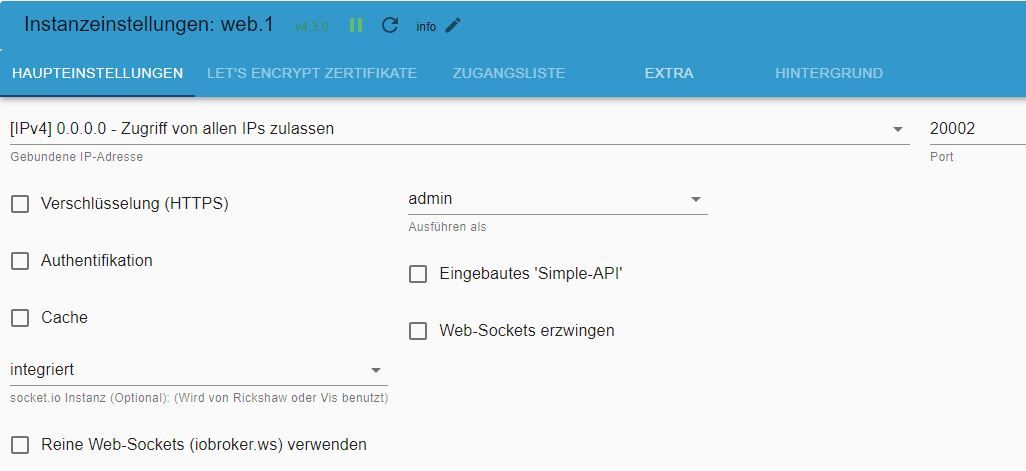
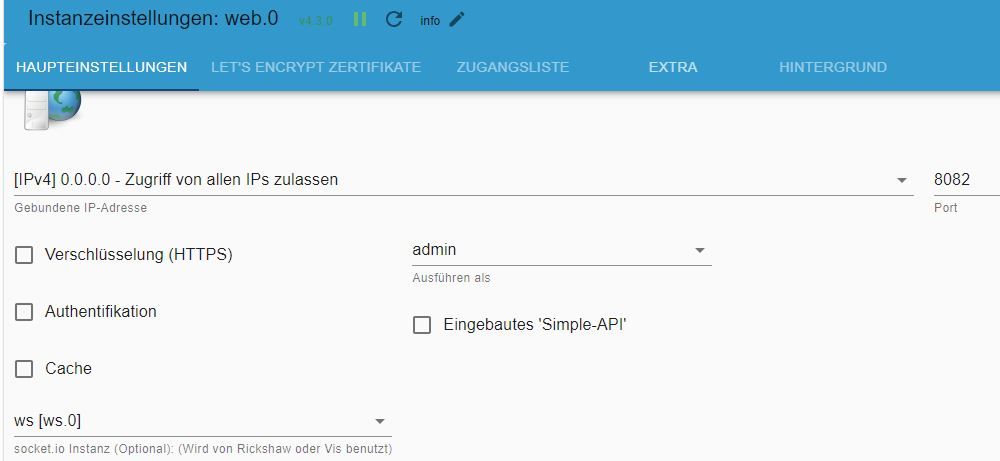
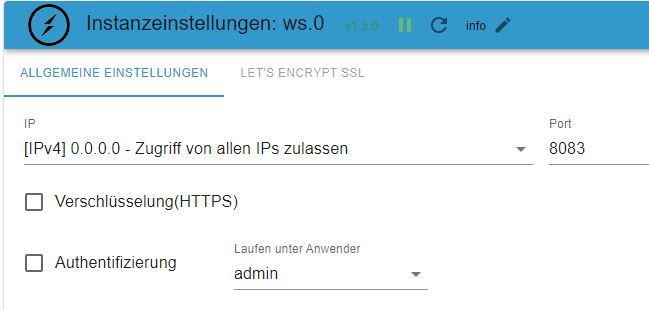
                                          io11.JPG io10.JPG io12.JPG

                                          Irgendwie steige ich noch nicht durch und versuche eben das nachzubilden, was ihr vorschlagt.

                                          H 1 Antwort Letzte Antwort
                                          0
                                          Antworten
                                          • In einem neuen Thema antworten
                                          Anmelden zum Antworten
                                          • Älteste zuerst
                                          • Neuste zuerst
                                          • Meiste Stimmen


                                          Support us

                                          ioBroker
                                          Community Adapters
                                          Donate

                                          760

                                          Online

                                          32.5k

                                          Benutzer

                                          81.7k

                                          Themen

                                          1.3m

                                          Beiträge
                                          Community
                                          Impressum | Datenschutz-Bestimmungen | Nutzungsbedingungen | Einwilligungseinstellungen
                                          ioBroker Community 2014-2025
                                          logo
                                          • Anmelden

                                          • Du hast noch kein Konto? Registrieren

                                          • Anmelden oder registrieren, um zu suchen
                                          • Erster Beitrag
                                            Letzter Beitrag
                                          0
                                          • Home
                                          • Aktuell
                                          • Tags
                                          • Ungelesen 0
                                          • Kategorien
                                          • Unreplied
                                          • Beliebt
                                          • GitHub
                                          • Docu
                                          • Hilfe