




[gelöst] Verbindungsprobleme – Connecting to Server
-
Du solltest schon die GANZE Anleitung abarbeiten , sonst bringt Deine Frage nach Hilfe nichts und wird auch vermutlich nicht funktionieren ;)
"habe ich erst mal weggelassen. Warum ich da ein extra web.1 benötige für die App habe ich noch nicht rausfinden können, will erst mal den Browser wieder hin bekommen"
@haselchen
OK, du hast ja Recht.
@DJMarc75
Auch das ist korrekt. Hatte ich mittlerweile auch versucht.Nun, folgender Stand:
✔ socket.io ausgeschaltet
✔ web.0 ist aktiviert mit Port 8082 und unten ws angehakt
 web.1 aktiviert mit Port 20002, Websocket ausgeschaltet
ws.0 aktiviert mit Port 8084=>
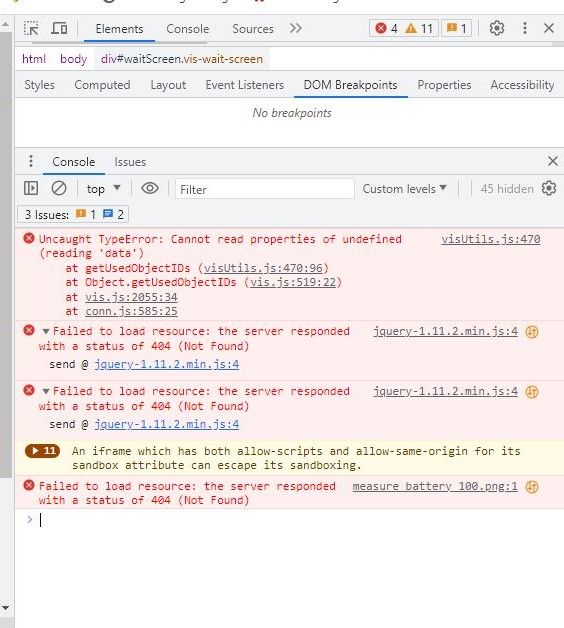
mein main-Projekt läuft nicht, weder die Vis, das das Edit.
Das funktionierende Demo-Projekt lässt sich im Browser öffnen
http://192.168.178.71:8082/vis/edit.html?all1one#101_Home ->Edit läuft
http://192.168.178.71:8082/vis/index.html?all1one#101_Home -> läuft
http://192.168.178.71:20002/vis/edit.html?all1one#101_Home -> Edit hängt mit Fehler "Verbindungsfehler"Bei main geht aber nichts
http://192.168.178.71:8082/vis/index.html -> Connecting to Server, hängt
http://192.168.178.71:20002/vis/index.html -> Connecting to Server, hängt
http://192.168.178.71:8082/vis/edit.html -> Connecting to Server, hängt
http://192.168.178.71:20002/vis/edit.html -> Connecting to Server, hängtFolgend meine Einstellungen:
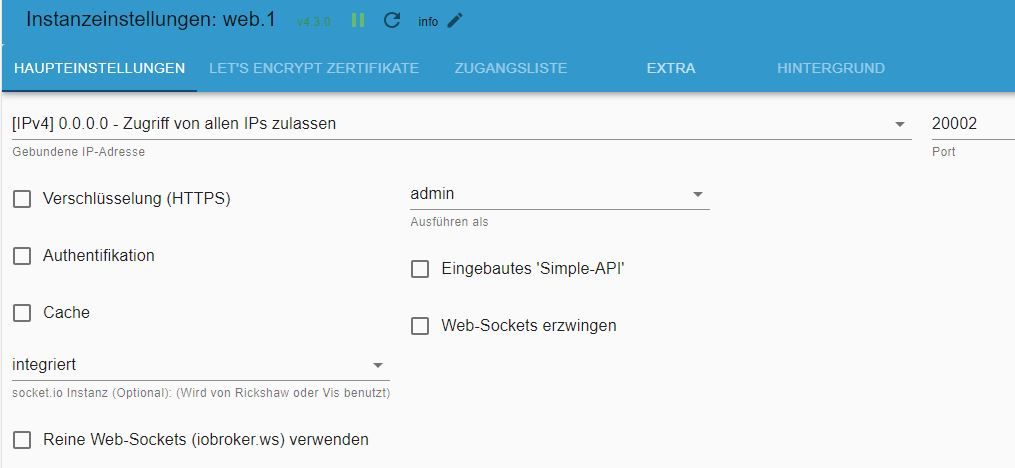
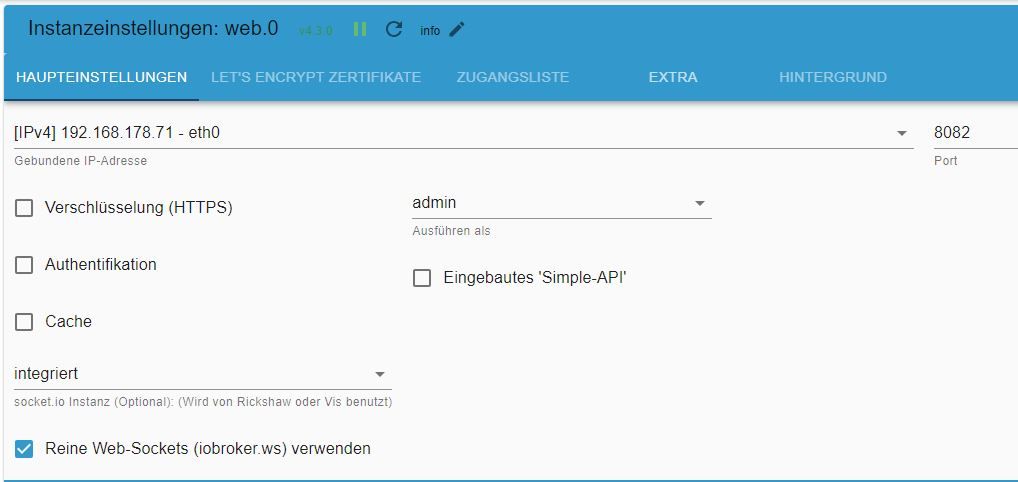

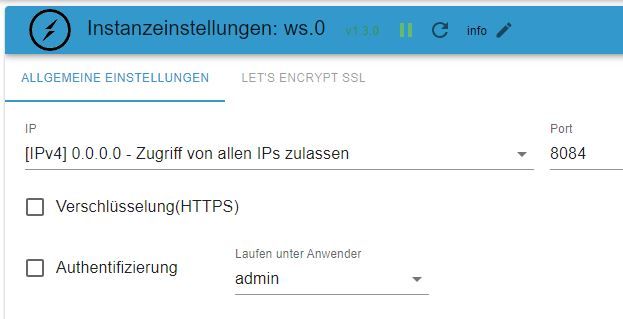
Auch mit der "gebundenen IP" habe ich schon experimentiert.
Ich hatte in mehreren Threats gelesen, dass die Gruppierung von Widgets zu Abstürzen führt. Und es funktionierte ja alles, bis ich eben im main-Projekt einige Widgets gruppiert und kopiert hatte.
Wie kann ich denn die Gruppierung im vis-views.json quasi "extern" aufheben? Meint ihr, es liegt nur am ws? -
@haselchen
OK, du hast ja Recht.
@DJMarc75
Auch das ist korrekt. Hatte ich mittlerweile auch versucht.Nun, folgender Stand:
✔ socket.io ausgeschaltet
✔ web.0 ist aktiviert mit Port 8082 und unten ws angehakt
web.1 aktiviert mit Port 20002, Websocket ausgeschaltet
ws.0 aktiviert mit Port 8084=>
mein main-Projekt läuft nicht, weder die Vis, das das Edit.
Das funktionierende Demo-Projekt lässt sich im Browser öffnen
http://192.168.178.71:8082/vis/edit.html?all1one#101_Home ->Edit läuft
http://192.168.178.71:8082/vis/index.html?all1one#101_Home -> läuft
http://192.168.178.71:20002/vis/edit.html?all1one#101_Home -> Edit hängt mit Fehler "Verbindungsfehler"Bei main geht aber nichts
http://192.168.178.71:8082/vis/index.html -> Connecting to Server, hängt
http://192.168.178.71:20002/vis/index.html -> Connecting to Server, hängt
http://192.168.178.71:8082/vis/edit.html -> Connecting to Server, hängt
http://192.168.178.71:20002/vis/edit.html -> Connecting to Server, hängtFolgend meine Einstellungen:
Auch mit der "gebundenen IP" habe ich schon experimentiert.
Ich hatte in mehreren Threats gelesen, dass die Gruppierung von Widgets zu Abstürzen führt. Und es funktionierte ja alles, bis ich eben im main-Projekt einige Widgets gruppiert und kopiert hatte.
Wie kann ich denn die Gruppierung im vis-views.json quasi "extern" aufheben? Meint ihr, es liegt nur am ws?Gelöscht
Muss nochmal Deine Screenshots genau angucken.
So und zwar hatte ich mit einigen aktuellen Versionen von Websocket und Webserver Probleme.
Funktioniert hat es wieder mit :
Websocket 2.4.0
Webserver 5.5.3 -
@haselchen
OK, du hast ja Recht.
@DJMarc75
Auch das ist korrekt. Hatte ich mittlerweile auch versucht.Nun, folgender Stand:
✔ socket.io ausgeschaltet
✔ web.0 ist aktiviert mit Port 8082 und unten ws angehakt
web.1 aktiviert mit Port 20002, Websocket ausgeschaltet
ws.0 aktiviert mit Port 8084=>
mein main-Projekt läuft nicht, weder die Vis, das das Edit.
Das funktionierende Demo-Projekt lässt sich im Browser öffnen
http://192.168.178.71:8082/vis/edit.html?all1one#101_Home ->Edit läuft
http://192.168.178.71:8082/vis/index.html?all1one#101_Home -> läuft
http://192.168.178.71:20002/vis/edit.html?all1one#101_Home -> Edit hängt mit Fehler "Verbindungsfehler"Bei main geht aber nichts
http://192.168.178.71:8082/vis/index.html -> Connecting to Server, hängt
http://192.168.178.71:20002/vis/index.html -> Connecting to Server, hängt
http://192.168.178.71:8082/vis/edit.html -> Connecting to Server, hängt
http://192.168.178.71:20002/vis/edit.html -> Connecting to Server, hängtFolgend meine Einstellungen:
Auch mit der "gebundenen IP" habe ich schon experimentiert.
Ich hatte in mehreren Threats gelesen, dass die Gruppierung von Widgets zu Abstürzen führt. Und es funktionierte ja alles, bis ich eben im main-Projekt einige Widgets gruppiert und kopiert hatte.
Wie kann ich denn die Gruppierung im vis-views.json quasi "extern" aufheben? Meint ihr, es liegt nur am ws?@holydiver sagte in Verbindungsprobleme – Connecting to Server:
web.0 ist aktiviert mit Port 8082 und unten ws angehakt
web.1 aktiviert mit Port 20002, Websocket ausgeschaltet
ws.0 aktiviert mit Port 8084dann musst du bei web.0 mit port 8084 aufrufen
kein Support per PN! - Fragen im Forum stellen -
Benutzt das Voting rechts unten im Beitrag wenn er euch geholfen hat.
Das Forum freut sich über eine Spende. Benutzt dazu den Spendenbutton oben rechts. Danke!
der Installationsfixer: curl -fsL https://iobroker.net/fix.sh | bash - -
@holydiver sagte in Verbindungsprobleme – Connecting to Server:
web.0 ist aktiviert mit Port 8082 und unten ws angehakt
web.1 aktiviert mit Port 20002, Websocket ausgeschaltet
ws.0 aktiviert mit Port 8084dann musst du bei web.0 mit port 8084 aufrufen
-
@haselchen
OK, du hast ja Recht.
@DJMarc75
Auch das ist korrekt. Hatte ich mittlerweile auch versucht.Nun, folgender Stand:
✔ socket.io ausgeschaltet
✔ web.0 ist aktiviert mit Port 8082 und unten ws angehakt
web.1 aktiviert mit Port 20002, Websocket ausgeschaltet
ws.0 aktiviert mit Port 8084=>
mein main-Projekt läuft nicht, weder die Vis, das das Edit.
Das funktionierende Demo-Projekt lässt sich im Browser öffnen
http://192.168.178.71:8082/vis/edit.html?all1one#101_Home ->Edit läuft
http://192.168.178.71:8082/vis/index.html?all1one#101_Home -> läuft
http://192.168.178.71:20002/vis/edit.html?all1one#101_Home -> Edit hängt mit Fehler "Verbindungsfehler"Bei main geht aber nichts
http://192.168.178.71:8082/vis/index.html -> Connecting to Server, hängt
http://192.168.178.71:20002/vis/index.html -> Connecting to Server, hängt
http://192.168.178.71:8082/vis/edit.html -> Connecting to Server, hängt
http://192.168.178.71:20002/vis/edit.html -> Connecting to Server, hängtFolgend meine Einstellungen:
Auch mit der "gebundenen IP" habe ich schon experimentiert.
Ich hatte in mehreren Threats gelesen, dass die Gruppierung von Widgets zu Abstürzen führt. Und es funktionierte ja alles, bis ich eben im main-Projekt einige Widgets gruppiert und kopiert hatte.
Wie kann ich denn die Gruppierung im vis-views.json quasi "extern" aufheben? Meint ihr, es liegt nur am ws?In den Web.0 Einstellungen muss unten nicht integriert sondern ws(ws.0) rein.
Synology DS218+ & 2 x Fujitsu Esprimo (VM/Container) + FritzBox7590 + 2 AVM 3000 Repeater & Homematic & HUE & Osram & Xiaomi, NPM 10.9.7, Nodejs 22.22.2 ,JS Controller 7.0.7 ,Admin 7.8.24
-
@haselchen
OK, du hast ja Recht.
@DJMarc75
Auch das ist korrekt. Hatte ich mittlerweile auch versucht.Nun, folgender Stand:
✔ socket.io ausgeschaltet
✔ web.0 ist aktiviert mit Port 8082 und unten ws angehakt
web.1 aktiviert mit Port 20002, Websocket ausgeschaltet
ws.0 aktiviert mit Port 8084=>
mein main-Projekt läuft nicht, weder die Vis, das das Edit.
Das funktionierende Demo-Projekt lässt sich im Browser öffnen
http://192.168.178.71:8082/vis/edit.html?all1one#101_Home ->Edit läuft
http://192.168.178.71:8082/vis/index.html?all1one#101_Home -> läuft
http://192.168.178.71:20002/vis/edit.html?all1one#101_Home -> Edit hängt mit Fehler "Verbindungsfehler"Bei main geht aber nichts
http://192.168.178.71:8082/vis/index.html -> Connecting to Server, hängt
http://192.168.178.71:20002/vis/index.html -> Connecting to Server, hängt
http://192.168.178.71:8082/vis/edit.html -> Connecting to Server, hängt
http://192.168.178.71:20002/vis/edit.html -> Connecting to Server, hängtFolgend meine Einstellungen:
Auch mit der "gebundenen IP" habe ich schon experimentiert.
Ich hatte in mehreren Threats gelesen, dass die Gruppierung von Widgets zu Abstürzen führt. Und es funktionierte ja alles, bis ich eben im main-Projekt einige Widgets gruppiert und kopiert hatte.
Wie kann ich denn die Gruppierung im vis-views.json quasi "extern" aufheben? Meint ihr, es liegt nur am ws?@holydiver sagte in Verbindungsprobleme – Connecting to Server:
Nun, folgender Stand
genau, zeig mal die komplette Ausgabe von
iob diag -
In den Web.0 Einstellungen muss unten nicht integriert sondern ws(ws.0) rein.
@haselchen sagte in Verbindungsprobleme – Connecting to Server:
In den Web.0 Einstellungen muss unten nicht integriert sondern ws(ws.0) rein.
und dann hast du trotzdem den Port 8082?
kein Support per PN! - Fragen im Forum stellen -
Benutzt das Voting rechts unten im Beitrag wenn er euch geholfen hat.
Das Forum freut sich über eine Spende. Benutzt dazu den Spendenbutton oben rechts. Danke!
der Installationsfixer: curl -fsL https://iobroker.net/fix.sh | bash - -
@haselchen sagte in Verbindungsprobleme – Connecting to Server:
In den Web.0 Einstellungen muss unten nicht integriert sondern ws(ws.0) rein.
und dann hast du trotzdem den Port 8082?
Läuft wie geschnitten Brot.
Alles so wie es soll.
Im Browser, in der App . überall.Synology DS218+ & 2 x Fujitsu Esprimo (VM/Container) + FritzBox7590 + 2 AVM 3000 Repeater & Homematic & HUE & Osram & Xiaomi, NPM 10.9.7, Nodejs 22.22.2 ,JS Controller 7.0.7 ,Admin 7.8.24
-
Läuft wie geschnitten Brot.
Alles so wie es soll.
Im Browser, in der App . überall.@haselchen und bei port 8083?
-
@homoran
gebe ich bei web.0 den Port 2084 an, dann bleibt die Instanz "rot", verbindet er sich nicht mit dem Host.@haselchen
gebe ich bei ws.0 2083 ein funktioniert es ebenfalls nicht.
Und in web.0 ws(ws.0) hilft leider auch nichtSkript v.2023-04-16 *** BASE SYSTEM *** Architecture : x86_64 Docker : false Virtualization : lxc Distributor ID: Debian Description: Debian GNU/Linux 11 (bullseye) Release: 11 Codename: bullseye PRETTY_NAME="Debian GNU/Linux 11 (bullseye)" NAME="Debian GNU/Linux" VERSION_ID="11" VERSION="11 (bullseye)" VERSION_CODENAME=bullseye ID=debian HOME_URL="https://www.debian.org/" SUPPORT_URL="https://www.debian.org/support" BUG_REPORT_URL="https://bugs.debian.org/" Systemuptime and Load: 18:12:53 up 18:05, 1 user, load average: 0.43, 0.39, 0.38 CPU threads: 1 *** Time and Time Zones *** Local time: Thu 2023-08-24 18:12:53 CEST Universal time: Thu 2023-08-24 16:12:53 UTC RTC time: n/a Time zone: Europe/Berlin (CEST, +0200) System clock synchronized: yes NTP service: inactive RTC in local TZ: no *** User and Groups *** chris /home/chris chris sudo iobroker *** X-Server-Setup *** X-Server: false Desktop: Terminal: tty Boot Target: graphical.target *** MEMORY *** total used free shared buff/cache available Mem: 2.5G 1.5G 708M 0.0K 360M 1.1G Swap: 512M 0B 512M Total: 3.0G 1.5G 1.2G 2528 M total memory 1459 M used memory 155 M active memory 1575 M inactive memory 708 M free memory 0 M buffer memory 360 M swap cache 512 M total swap 0 M used swap 512 M free swap *** FILESYSTEM *** Filesystem Type Size Used Avail Use% Mounted on /dev/mapper/pve-vm--100--disk--0 ext4 7.8G 4.0G 3.5G 54% / none tmpfs 492K 4.0K 488K 1% /dev udev devtmpfs 3.8G 0 3.8G 0% /dev/tty tmpfs tmpfs 3.9G 0 3.9G 0% /dev/shm tmpfs tmpfs 1.6G 124K 1.6G 1% /run tmpfs tmpfs 5.0M 0 5.0M 0% /run/lock tmpfs tmpfs 782M 0 782M 0% /run/user/1000 Messages concerning ext4 filesystem in dmesg: dmesg: read kernel buffer failed: Operation not permitted Show mounted filesystems (real ones only): TARGET SOURCE FSTYPE OPTIONS / /dev/mapper/pve-vm--100--disk--0 ext4 rw,relatime,lazytime,stripe=16 Files in neuralgic directories: /var: 463M /var/ 223M /var/cache 218M /var/cache/apt 151M /var/cache/apt/archives 135M /var/lib Hint: You are currently not seeing messages from other users and the system. Users in groups 'adm', 'systemd-journal' can see all messages. Pass -q to turn off this notice. Archived and active journals take up 24.0M in the file system. /opt/iobroker/backups: 97M /opt/iobroker/backups/ /opt/iobroker/iobroker-data: 1000M /opt/iobroker/iobroker-data/ 646M /opt/iobroker/iobroker-data/history 272M /opt/iobroker/iobroker-data/files 72M /opt/iobroker/iobroker-data/files/telegram.admin 52M /opt/iobroker/iobroker-data/files/javascript.admin The five largest files in iobroker-data are: 20M /opt/iobroker/iobroker-data/objects.jsonl 15M /opt/iobroker/iobroker-data/files/vis.0/import/vis-views.json 15M /opt/iobroker/iobroker-data/files/vis.0/all1one/vis-views.json 15M /opt/iobroker/iobroker-data/files/telegram.admin/rules/static/js/vendors-node_modules_iobroker_adapter-react-v5_assets_devices_parseNames_d_ts-node_modules_io-1d9f06.44fe4a3f.chunk.js.map 12M /opt/iobroker/iobroker-data/states.jsonl *** NodeJS-Installation *** /usr/bin/nodejs v16.19.1 /usr/bin/node v16.19.1 /usr/bin/npm 8.19.3 /usr/bin/npx 8.19.3 nodejs: Installed: 16.19.1-deb-1nodesource1 Candidate: 16.20.2-deb-1nodesource1 Version table: 16.20.2-deb-1nodesource1 500 500 https://deb.nodesource.com/node_16.x bullseye/main amd64 Packages *** 16.19.1-deb-1nodesource1 100 100 /var/lib/dpkg/status 12.22.12~dfsg-1~deb11u4 500 500 http://security.debian.org bullseye-security/main amd64 Packages 12.22.12~dfsg-1~deb11u3 500 500 http://deb.debian.org/debian bullseye/main amd64 Packages Temp directories causing npm8 problem: 0 No problems detected *** ioBroker-Installation *** ioBroker Status iobroker is running on this host. Objects type: jsonl States type: jsonl MULTIHOSTSERVICE/enabled: false Core adapters versions js-controller: 4.0.24 admin: 6.8.0 javascript: 7.0.3 Adapters from github: 0 Adapter State + system.adapter.admin.0 : admin : ioBroker - enabled, port: 8081, bind: 0.0.0.0, run as: admin + system.adapter.backitup.0 : backitup : ioBroker - enabled + system.adapter.deconz.0 : deconz : ioBroker - enabled, port: 8080 system.adapter.discovery.0 : discovery : ioBroker - disabled system.adapter.dwd.0 : dwd : ioBroker - disabled system.adapter.feiertage.0 : feiertage : ioBroker - enabled system.adapter.flot.0 : flot : ioBroker - disabled system.adapter.harmony.0 : harmony : ioBroker - disabled + system.adapter.history.0 : history : ioBroker - enabled + system.adapter.hm-rega.0 : hm-rega : ioBroker - enabled + system.adapter.hm-rpc.0 : hm-rpc : ioBroker - enabled, port: 12001 + system.adapter.hm-rpc.1 : hm-rpc : ioBroker - enabled, port: 12010 + system.adapter.hm-rpc.2 : hm-rpc : ioBroker - enabled, port: 18701 system.adapter.ical.0 : ical : ioBroker - enabled + system.adapter.info.0 : info : ioBroker - enabled + system.adapter.javascript.0 : javascript : ioBroker - enabled + system.adapter.ping.0 : ping : ioBroker - enabled system.adapter.proxmox.0 : proxmox : ioBroker - disabled, port: 8006 system.adapter.rflink.0 : rflink : ioBroker - disabled system.adapter.sayit.0 : sayit : ioBroker - disabled, port: 0 system.adapter.scenes.0 : scenes : ioBroker - disabled system.adapter.socketio.0 : socketio : ioBroker - disabled, port: 8084, bind: 192.168.178.71, run as: admin system.adapter.sonos.0 : sonos : ioBroker - disabled + system.adapter.statistics.0 : statistics : ioBroker - enabled + system.adapter.telegram.0 : telegram : ioBroker - enabled, port: 8443, bind: 0.0.0.0 + system.adapter.tr-064.0 : tr-064 : ioBroker - enabled + system.adapter.trashschedule.0 : trashschedule : ioBroker - enabled system.adapter.tuya.0 : tuya : ioBroker - disabled system.adapter.vis-bars.0 : vis-bars : ioBroker - enabled system.adapter.vis-fancyswitch.0 : vis-fancyswitch : ioBroker - enabled system.adapter.vis-google-fonts.0 : vis-google-fonts : ioBroker - enabled system.adapter.vis-hqwidgets.0 : vis-hqwidgets : ioBroker - enabled system.adapter.vis-icontwo.0 : vis-icontwo : ioBroker - enabled + system.adapter.vis-inventwo.0 : vis-inventwo : ioBroker - enabled system.adapter.vis-jqui-mfd.0 : vis-jqui-mfd : ioBroker - enabled system.adapter.vis-timeandweather.0 : vis-timeandweather : ioBroker - enabled system.adapter.vis.0 : vis : ioBroker - enabled system.adapter.weatherunderground.0 : weatherunderground : ioBroker - enabled + system.adapter.web.0 : web : ioBroker - enabled, port: 8082, bind: 0.0.0.0, run as: admin + system.adapter.web.1 : web : ioBroker - enabled, port: 20002, bind: 0.0.0.0, run as: admin + system.adapter.ws.0 : ws : ioBroker - enabled, port: 8083, bind: 0.0.0.0, run as: admin system.adapter.yahka.0 : yahka : ioBroker - disabled + instance is alive Enabled adapters with bindings + system.adapter.admin.0 : admin : ioBroker - enabled, port: 8081, bind: 0.0.0.0, run as: admin + system.adapter.deconz.0 : deconz : ioBroker - enabled, port: 8080 + system.adapter.hm-rpc.0 : hm-rpc : ioBroker - enabled, port: 12001 + system.adapter.hm-rpc.1 : hm-rpc : ioBroker - enabled, port: 12010 + system.adapter.hm-rpc.2 : hm-rpc : ioBroker - enabled, port: 18701 + system.adapter.telegram.0 : telegram : ioBroker - enabled, port: 8443, bind: 0.0.0.0 + system.adapter.web.0 : web : ioBroker - enabled, port: 8082, bind: 0.0.0.0, run as: admin + system.adapter.web.1 : web : ioBroker - enabled, port: 20002, bind: 0.0.0.0, run as: admin + system.adapter.ws.0 : ws : ioBroker - enabled, port: 8083, bind: 0.0.0.0, run as: admin ioBroker-Repositories stable : http://download.iobroker.net/sources-dist.json beta : http://download.iobroker.net/sources-dist-latest.json Active repo(s): stable Installed ioBroker-Instances Used repository: stable Adapter "admin" : 6.8.0 , installed 6.8.0 Adapter "backitup" : 2.6.23 , installed 2.6.23 Adapter "deconz" : 1.3.21 , installed 1.3.21 Adapter "discovery" : 3.1.0 , installed 3.1.0 Adapter "dwd" : 2.8.5 , installed 2.8.5 Adapter "feiertage" : 1.1.0 , installed 1.1.0 Adapter "flot" : 1.12.0 , installed 1.12.0 Adapter "harmony" : 1.2.2 , installed 1.2.2 Adapter "history" : 2.2.4 , installed 2.2.4 Adapter "hm-rega" : 3.0.47 , installed 3.0.46 [Updatable] Adapter "hm-rpc" : 1.15.19 , installed 1.15.18 [Updatable] Adapter "ical" : 1.13.3 , installed 1.13.3 Adapter "info" : 1.9.26 , installed 1.9.26 Adapter "javascript" : 7.0.3 , installed 7.0.3 Controller "js-controller": 4.0.24 , installed 4.0.24 Adapter "ping" : 1.6.2 , installed 1.6.2 Adapter "proxmox" : 1.3.5 , installed 1.3.5 Adapter "rflink" : 2.1.6 , installed 2.1.6 Adapter "sayit" : 3.0.5 , installed 3.0.5 Adapter "scenes" : 2.3.9 , installed 2.3.9 Adapter "simple-api" : 2.7.2 , installed 2.7.2 Adapter "socketio" : 4.2.0 , installed 4.2.0 Adapter "sonos" : 2.3.1 , installed 2.3.1 Adapter "statistics" : 2.3.0 , installed 2.3.0 Adapter "telegram" : 1.16.0 , installed 1.16.0 Adapter "tr-064" : 4.2.18 , installed 4.2.18 Adapter "trashschedule": 2.2.0 , installed 2.2.0 Adapter "tuya" : 3.14.2 , installed 3.14.2 Adapter "vis" : 1.4.16 , installed 1.4.16 Adapter "vis-bars" : 0.1.4 , installed 0.1.4 Adapter "vis-fancyswitch": 1.1.0 , installed 1.1.0 Adapter "vis-google-fonts": 1.0.4 , installed 1.0.4 Adapter "vis-hqwidgets": 1.4.0 , installed 1.4.0 Adapter "vis-icontwo" : 0.96.0 , installed 0.96.0 Adapter "vis-inventwo" : 3.3.3 , installed 3.3.3 Adapter "vis-jqui-mfd" : 1.0.12 , installed 1.0.12 Adapter "vis-timeandweather": 1.2.2, installed 1.2.2 Adapter "weatherunderground": 3.4.2, installed 3.4.2 Adapter "web" : 4.3.0 , installed 4.3.0 Adapter "ws" : 1.3.0 , installed 1.3.0 Adapter "yahka" : 1.0.3 , installed 0.17.0 [Updatable] Objects and States Please stand by - This may take a while Objects: 7489 States: 6776 *** OS-Repositories and Updates *** Hit:1 http://security.debian.org bullseye-security InRelease Hit:2 http://deb.debian.org/debian bullseye InRelease Hit:3 http://deb.debian.org/debian bullseye-updates InRelease Hit:4 https://deb.nodesource.com/node_16.x bullseye InRelease Reading package lists... Pending Updates: 48 *** Listening Ports *** Active Internet connections (only servers) Proto Recv-Q Send-Q Local Address Foreign Address State User Inode PID/Program name tcp 0 0 192.168.178.71:18701 0.0.0.0:* LISTEN 1001 143775895 441/io.hm-rpc.2 tcp 0 0 192.168.178.71:12010 0.0.0.0:* LISTEN 1001 143775843 426/io.hm-rpc.1 tcp 0 0 192.168.178.71:12001 0.0.0.0:* LISTEN 1001 143775781 411/io.hm-rpc.0 tcp 0 0 127.0.0.53:53 0.0.0.0:* LISTEN 104 143774943 86/systemd-resolved tcp 0 0 0.0.0.0:111 0.0.0.0:* LISTEN 0 143773437 1/init tcp 0 0 127.0.0.1:25 0.0.0.0:* LISTEN 0 143775171 313/master tcp 0 0 127.0.0.1:9000 0.0.0.0:* LISTEN 1001 143775131 137/iobroker.js-con tcp 0 0 127.0.0.1:9001 0.0.0.0:* LISTEN 1001 143775074 137/iobroker.js-con tcp 0 0 0.0.0.0:5355 0.0.0.0:* LISTEN 104 143774936 86/systemd-resolved tcp6 0 0 :::20002 :::* LISTEN 1001 145429883 53606/io.web.1 tcp6 0 0 :::8081 :::* LISTEN 1001 143775459 324/io.admin.0 tcp6 0 0 :::8083 :::* LISTEN 1001 145732133 60723/io.ws.0 tcp6 0 0 :::8082 :::* LISTEN 1001 145728261 60592/io.web.0 tcp6 0 0 :::22 :::* LISTEN 0 143774755 1/init tcp6 0 0 :::111 :::* LISTEN 0 143773439 1/init tcp6 0 0 ::1:25 :::* LISTEN 0 143775172 313/master tcp6 0 0 :::5355 :::* LISTEN 104 143774939 86/systemd-resolved udp 0 0 0.0.0.0:5355 0.0.0.0:* 104 143774935 86/systemd-resolved udp 0 0 0.0.0.0:1900 0.0.0.0:* 1001 143777849 561/io.deconz.0 udp 0 0 127.0.0.53:53 0.0.0.0:* 104 143774942 86/systemd-resolved udp 0 0 0.0.0.0:111 0.0.0.0:* 0 143773438 1/init udp6 0 0 :::5355 :::* 104 143774938 86/systemd-resolved udp6 0 0 :::1900 :::* 1001 143777850 561/io.deconz.0 udp6 0 0 :::111 :::* 0 143773440 1/init *** Log File - Last 25 Lines *** 2023-08-24 18:11:11.239 - debug: statistics.0 (1888) [STATE CHANGE] Increase temp.sumDelta.deconz.0.Sensors.12.power.day on 0 to -789 2023-08-24 18:11:11.262 - debug: statistics.0 (1888) [STATE CHANGE] Increase temp.sumDelta.deconz.0.Sensors.12.power.week on 0 to -789 2023-08-24 18:11:11.264 - debug: statistics.0 (1888) [STATE CHANGE] Increase temp.sumDelta.deconz.0.Sensors.12.power.month on 0 to -789 2023-08-24 18:11:11.267 - debug: statistics.0 (1888) [STATE CHANGE] Increase temp.sumDelta.deconz.0.Sensors.12.power.quarter on 0 to -789 2023-08-24 18:11:11.269 - debug: statistics.0 (1888) [STATE CHANGE] Increase temp.sumDelta.deconz.0.Sensors.12.power.year on 0 to -789 2023-08-24 18:11:11.271 - debug: statistics.0 (1888) [EXECUTING] minmax deconz.0.Sensors.12.power 2023-08-24 18:11:11.271 - debug: statistics.0 (1888) [STATE CHANGE] new last for "temp.minmax.deconz.0.Sensors.12.power.last: 0 2023-08-24 18:11:11.315 - debug: statistics.0 (1888) [EXECUTING] avg call deconz.0.Sensors.12.power 2023-08-24 18:11:11.315 - debug: statistics.0 (1888) [STATE CHANGE] new last for "temp.avg.deconz.0.Sensors.12.power.last: 0 2023-08-24 18:13:00.213 - debug: statistics.0 (1888) [STATE CHANGE] ======================= deconz.0.Sensors.12.power ======================= 2023-08-24 18:13:00.213 - debug: statistics.0 (1888) [STATE CHANGE] stateChange => 0 2023-08-24 18:13:00.213 - debug: statistics.0 (1888) [STATE CHANGE] schedule onStateChangeSumDeltaValue for deconz.0.Sensors.12.power 2023-08-24 18:13:00.213 - debug: statistics.0 (1888) [EXECUTING] sum delta deconz.0.Sensors.12.power 2023-08-24 18:13:00.213 - debug: statistics.0 (1888) [STATE CHANGE] schedule onStateChangeMinMaxValue for deconz.0.Sensors.12.power 2023-08-24 18:13:00.220 - debug: statistics.0 (1888) [STATE CHANGE] Increase temp.sumDelta.deconz.0.Sensors.12.power.15Min on 0 to -53 2023-08-24 18:13:00.230 - debug: statistics.0 (1888) [STATE CHANGE] Increase temp.sumDelta.deconz.0.Sensors.12.power.hour on 0 to -53 2023-08-24 18:13:00.232 - debug: statistics.0 (1888) [STATE CHANGE] Increase temp.sumDelta.deconz.0.Sensors.12.power.day on 0 to -789 2023-08-24 18:13:00.234 - debug: statistics.0 (1888) [STATE CHANGE] Increase temp.sumDelta.deconz.0.Sensors.12.power.week on 0 to -789 2023-08-24 18:13:00.236 - debug: statistics.0 (1888) [STATE CHANGE] Increase temp.sumDelta.deconz.0.Sensors.12.power.month on 0 to -789 2023-08-24 18:13:00.238 - debug: statistics.0 (1888) [STATE CHANGE] Increase temp.sumDelta.deconz.0.Sensors.12.power.quarter on 0 to -789 2023-08-24 18:13:00.241 - debug: statistics.0 (1888) [STATE CHANGE] Increase temp.sumDelta.deconz.0.Sensors.12.power.year on 0 to -789 2023-08-24 18:13:00.243 - debug: statistics.0 (1888) [EXECUTING] minmax deconz.0.Sensors.12.power 2023-08-24 18:13:00.243 - debug: statistics.0 (1888) [STATE CHANGE] new last for "temp.minmax.deconz.0.Sensors.12.power.last: 0 2023-08-24 18:13:00.286 - debug: statistics.0 (1888) [EXECUTING] avg call deconz.0.Sensors.12.power 2023-08-24 18:13:00.286 - debug: statistics.0 (1888) [STATE CHANGE] new last for "temp.avg.deconz.0.Sensors.12.power.last: 0 -
@homoran
gebe ich bei web.0 den Port 2084 an, dann bleibt die Instanz "rot", verbindet er sich nicht mit dem Host.@haselchen
gebe ich bei ws.0 2083 ein funktioniert es ebenfalls nicht.
Und in web.0 ws(ws.0) hilft leider auch nichtSkript v.2023-04-16 *** BASE SYSTEM *** Architecture : x86_64 Docker : false Virtualization : lxc Distributor ID: Debian Description: Debian GNU/Linux 11 (bullseye) Release: 11 Codename: bullseye PRETTY_NAME="Debian GNU/Linux 11 (bullseye)" NAME="Debian GNU/Linux" VERSION_ID="11" VERSION="11 (bullseye)" VERSION_CODENAME=bullseye ID=debian HOME_URL="https://www.debian.org/" SUPPORT_URL="https://www.debian.org/support" BUG_REPORT_URL="https://bugs.debian.org/" Systemuptime and Load: 18:12:53 up 18:05, 1 user, load average: 0.43, 0.39, 0.38 CPU threads: 1 *** Time and Time Zones *** Local time: Thu 2023-08-24 18:12:53 CEST Universal time: Thu 2023-08-24 16:12:53 UTC RTC time: n/a Time zone: Europe/Berlin (CEST, +0200) System clock synchronized: yes NTP service: inactive RTC in local TZ: no *** User and Groups *** chris /home/chris chris sudo iobroker *** X-Server-Setup *** X-Server: false Desktop: Terminal: tty Boot Target: graphical.target *** MEMORY *** total used free shared buff/cache available Mem: 2.5G 1.5G 708M 0.0K 360M 1.1G Swap: 512M 0B 512M Total: 3.0G 1.5G 1.2G 2528 M total memory 1459 M used memory 155 M active memory 1575 M inactive memory 708 M free memory 0 M buffer memory 360 M swap cache 512 M total swap 0 M used swap 512 M free swap *** FILESYSTEM *** Filesystem Type Size Used Avail Use% Mounted on /dev/mapper/pve-vm--100--disk--0 ext4 7.8G 4.0G 3.5G 54% / none tmpfs 492K 4.0K 488K 1% /dev udev devtmpfs 3.8G 0 3.8G 0% /dev/tty tmpfs tmpfs 3.9G 0 3.9G 0% /dev/shm tmpfs tmpfs 1.6G 124K 1.6G 1% /run tmpfs tmpfs 5.0M 0 5.0M 0% /run/lock tmpfs tmpfs 782M 0 782M 0% /run/user/1000 Messages concerning ext4 filesystem in dmesg: dmesg: read kernel buffer failed: Operation not permitted Show mounted filesystems (real ones only): TARGET SOURCE FSTYPE OPTIONS / /dev/mapper/pve-vm--100--disk--0 ext4 rw,relatime,lazytime,stripe=16 Files in neuralgic directories: /var: 463M /var/ 223M /var/cache 218M /var/cache/apt 151M /var/cache/apt/archives 135M /var/lib Hint: You are currently not seeing messages from other users and the system. Users in groups 'adm', 'systemd-journal' can see all messages. Pass -q to turn off this notice. Archived and active journals take up 24.0M in the file system. /opt/iobroker/backups: 97M /opt/iobroker/backups/ /opt/iobroker/iobroker-data: 1000M /opt/iobroker/iobroker-data/ 646M /opt/iobroker/iobroker-data/history 272M /opt/iobroker/iobroker-data/files 72M /opt/iobroker/iobroker-data/files/telegram.admin 52M /opt/iobroker/iobroker-data/files/javascript.admin The five largest files in iobroker-data are: 20M /opt/iobroker/iobroker-data/objects.jsonl 15M /opt/iobroker/iobroker-data/files/vis.0/import/vis-views.json 15M /opt/iobroker/iobroker-data/files/vis.0/all1one/vis-views.json 15M /opt/iobroker/iobroker-data/files/telegram.admin/rules/static/js/vendors-node_modules_iobroker_adapter-react-v5_assets_devices_parseNames_d_ts-node_modules_io-1d9f06.44fe4a3f.chunk.js.map 12M /opt/iobroker/iobroker-data/states.jsonl *** NodeJS-Installation *** /usr/bin/nodejs v16.19.1 /usr/bin/node v16.19.1 /usr/bin/npm 8.19.3 /usr/bin/npx 8.19.3 nodejs: Installed: 16.19.1-deb-1nodesource1 Candidate: 16.20.2-deb-1nodesource1 Version table: 16.20.2-deb-1nodesource1 500 500 https://deb.nodesource.com/node_16.x bullseye/main amd64 Packages *** 16.19.1-deb-1nodesource1 100 100 /var/lib/dpkg/status 12.22.12~dfsg-1~deb11u4 500 500 http://security.debian.org bullseye-security/main amd64 Packages 12.22.12~dfsg-1~deb11u3 500 500 http://deb.debian.org/debian bullseye/main amd64 Packages Temp directories causing npm8 problem: 0 No problems detected *** ioBroker-Installation *** ioBroker Status iobroker is running on this host. Objects type: jsonl States type: jsonl MULTIHOSTSERVICE/enabled: false Core adapters versions js-controller: 4.0.24 admin: 6.8.0 javascript: 7.0.3 Adapters from github: 0 Adapter State + system.adapter.admin.0 : admin : ioBroker - enabled, port: 8081, bind: 0.0.0.0, run as: admin + system.adapter.backitup.0 : backitup : ioBroker - enabled + system.adapter.deconz.0 : deconz : ioBroker - enabled, port: 8080 system.adapter.discovery.0 : discovery : ioBroker - disabled system.adapter.dwd.0 : dwd : ioBroker - disabled system.adapter.feiertage.0 : feiertage : ioBroker - enabled system.adapter.flot.0 : flot : ioBroker - disabled system.adapter.harmony.0 : harmony : ioBroker - disabled + system.adapter.history.0 : history : ioBroker - enabled + system.adapter.hm-rega.0 : hm-rega : ioBroker - enabled + system.adapter.hm-rpc.0 : hm-rpc : ioBroker - enabled, port: 12001 + system.adapter.hm-rpc.1 : hm-rpc : ioBroker - enabled, port: 12010 + system.adapter.hm-rpc.2 : hm-rpc : ioBroker - enabled, port: 18701 system.adapter.ical.0 : ical : ioBroker - enabled + system.adapter.info.0 : info : ioBroker - enabled + system.adapter.javascript.0 : javascript : ioBroker - enabled + system.adapter.ping.0 : ping : ioBroker - enabled system.adapter.proxmox.0 : proxmox : ioBroker - disabled, port: 8006 system.adapter.rflink.0 : rflink : ioBroker - disabled system.adapter.sayit.0 : sayit : ioBroker - disabled, port: 0 system.adapter.scenes.0 : scenes : ioBroker - disabled system.adapter.socketio.0 : socketio : ioBroker - disabled, port: 8084, bind: 192.168.178.71, run as: admin system.adapter.sonos.0 : sonos : ioBroker - disabled + system.adapter.statistics.0 : statistics : ioBroker - enabled + system.adapter.telegram.0 : telegram : ioBroker - enabled, port: 8443, bind: 0.0.0.0 + system.adapter.tr-064.0 : tr-064 : ioBroker - enabled + system.adapter.trashschedule.0 : trashschedule : ioBroker - enabled system.adapter.tuya.0 : tuya : ioBroker - disabled system.adapter.vis-bars.0 : vis-bars : ioBroker - enabled system.adapter.vis-fancyswitch.0 : vis-fancyswitch : ioBroker - enabled system.adapter.vis-google-fonts.0 : vis-google-fonts : ioBroker - enabled system.adapter.vis-hqwidgets.0 : vis-hqwidgets : ioBroker - enabled system.adapter.vis-icontwo.0 : vis-icontwo : ioBroker - enabled + system.adapter.vis-inventwo.0 : vis-inventwo : ioBroker - enabled system.adapter.vis-jqui-mfd.0 : vis-jqui-mfd : ioBroker - enabled system.adapter.vis-timeandweather.0 : vis-timeandweather : ioBroker - enabled system.adapter.vis.0 : vis : ioBroker - enabled system.adapter.weatherunderground.0 : weatherunderground : ioBroker - enabled + system.adapter.web.0 : web : ioBroker - enabled, port: 8082, bind: 0.0.0.0, run as: admin + system.adapter.web.1 : web : ioBroker - enabled, port: 20002, bind: 0.0.0.0, run as: admin + system.adapter.ws.0 : ws : ioBroker - enabled, port: 8083, bind: 0.0.0.0, run as: admin system.adapter.yahka.0 : yahka : ioBroker - disabled + instance is alive Enabled adapters with bindings + system.adapter.admin.0 : admin : ioBroker - enabled, port: 8081, bind: 0.0.0.0, run as: admin + system.adapter.deconz.0 : deconz : ioBroker - enabled, port: 8080 + system.adapter.hm-rpc.0 : hm-rpc : ioBroker - enabled, port: 12001 + system.adapter.hm-rpc.1 : hm-rpc : ioBroker - enabled, port: 12010 + system.adapter.hm-rpc.2 : hm-rpc : ioBroker - enabled, port: 18701 + system.adapter.telegram.0 : telegram : ioBroker - enabled, port: 8443, bind: 0.0.0.0 + system.adapter.web.0 : web : ioBroker - enabled, port: 8082, bind: 0.0.0.0, run as: admin + system.adapter.web.1 : web : ioBroker - enabled, port: 20002, bind: 0.0.0.0, run as: admin + system.adapter.ws.0 : ws : ioBroker - enabled, port: 8083, bind: 0.0.0.0, run as: admin ioBroker-Repositories stable : http://download.iobroker.net/sources-dist.json beta : http://download.iobroker.net/sources-dist-latest.json Active repo(s): stable Installed ioBroker-Instances Used repository: stable Adapter "admin" : 6.8.0 , installed 6.8.0 Adapter "backitup" : 2.6.23 , installed 2.6.23 Adapter "deconz" : 1.3.21 , installed 1.3.21 Adapter "discovery" : 3.1.0 , installed 3.1.0 Adapter "dwd" : 2.8.5 , installed 2.8.5 Adapter "feiertage" : 1.1.0 , installed 1.1.0 Adapter "flot" : 1.12.0 , installed 1.12.0 Adapter "harmony" : 1.2.2 , installed 1.2.2 Adapter "history" : 2.2.4 , installed 2.2.4 Adapter "hm-rega" : 3.0.47 , installed 3.0.46 [Updatable] Adapter "hm-rpc" : 1.15.19 , installed 1.15.18 [Updatable] Adapter "ical" : 1.13.3 , installed 1.13.3 Adapter "info" : 1.9.26 , installed 1.9.26 Adapter "javascript" : 7.0.3 , installed 7.0.3 Controller "js-controller": 4.0.24 , installed 4.0.24 Adapter "ping" : 1.6.2 , installed 1.6.2 Adapter "proxmox" : 1.3.5 , installed 1.3.5 Adapter "rflink" : 2.1.6 , installed 2.1.6 Adapter "sayit" : 3.0.5 , installed 3.0.5 Adapter "scenes" : 2.3.9 , installed 2.3.9 Adapter "simple-api" : 2.7.2 , installed 2.7.2 Adapter "socketio" : 4.2.0 , installed 4.2.0 Adapter "sonos" : 2.3.1 , installed 2.3.1 Adapter "statistics" : 2.3.0 , installed 2.3.0 Adapter "telegram" : 1.16.0 , installed 1.16.0 Adapter "tr-064" : 4.2.18 , installed 4.2.18 Adapter "trashschedule": 2.2.0 , installed 2.2.0 Adapter "tuya" : 3.14.2 , installed 3.14.2 Adapter "vis" : 1.4.16 , installed 1.4.16 Adapter "vis-bars" : 0.1.4 , installed 0.1.4 Adapter "vis-fancyswitch": 1.1.0 , installed 1.1.0 Adapter "vis-google-fonts": 1.0.4 , installed 1.0.4 Adapter "vis-hqwidgets": 1.4.0 , installed 1.4.0 Adapter "vis-icontwo" : 0.96.0 , installed 0.96.0 Adapter "vis-inventwo" : 3.3.3 , installed 3.3.3 Adapter "vis-jqui-mfd" : 1.0.12 , installed 1.0.12 Adapter "vis-timeandweather": 1.2.2, installed 1.2.2 Adapter "weatherunderground": 3.4.2, installed 3.4.2 Adapter "web" : 4.3.0 , installed 4.3.0 Adapter "ws" : 1.3.0 , installed 1.3.0 Adapter "yahka" : 1.0.3 , installed 0.17.0 [Updatable] Objects and States Please stand by - This may take a while Objects: 7489 States: 6776 *** OS-Repositories and Updates *** Hit:1 http://security.debian.org bullseye-security InRelease Hit:2 http://deb.debian.org/debian bullseye InRelease Hit:3 http://deb.debian.org/debian bullseye-updates InRelease Hit:4 https://deb.nodesource.com/node_16.x bullseye InRelease Reading package lists... Pending Updates: 48 *** Listening Ports *** Active Internet connections (only servers) Proto Recv-Q Send-Q Local Address Foreign Address State User Inode PID/Program name tcp 0 0 192.168.178.71:18701 0.0.0.0:* LISTEN 1001 143775895 441/io.hm-rpc.2 tcp 0 0 192.168.178.71:12010 0.0.0.0:* LISTEN 1001 143775843 426/io.hm-rpc.1 tcp 0 0 192.168.178.71:12001 0.0.0.0:* LISTEN 1001 143775781 411/io.hm-rpc.0 tcp 0 0 127.0.0.53:53 0.0.0.0:* LISTEN 104 143774943 86/systemd-resolved tcp 0 0 0.0.0.0:111 0.0.0.0:* LISTEN 0 143773437 1/init tcp 0 0 127.0.0.1:25 0.0.0.0:* LISTEN 0 143775171 313/master tcp 0 0 127.0.0.1:9000 0.0.0.0:* LISTEN 1001 143775131 137/iobroker.js-con tcp 0 0 127.0.0.1:9001 0.0.0.0:* LISTEN 1001 143775074 137/iobroker.js-con tcp 0 0 0.0.0.0:5355 0.0.0.0:* LISTEN 104 143774936 86/systemd-resolved tcp6 0 0 :::20002 :::* LISTEN 1001 145429883 53606/io.web.1 tcp6 0 0 :::8081 :::* LISTEN 1001 143775459 324/io.admin.0 tcp6 0 0 :::8083 :::* LISTEN 1001 145732133 60723/io.ws.0 tcp6 0 0 :::8082 :::* LISTEN 1001 145728261 60592/io.web.0 tcp6 0 0 :::22 :::* LISTEN 0 143774755 1/init tcp6 0 0 :::111 :::* LISTEN 0 143773439 1/init tcp6 0 0 ::1:25 :::* LISTEN 0 143775172 313/master tcp6 0 0 :::5355 :::* LISTEN 104 143774939 86/systemd-resolved udp 0 0 0.0.0.0:5355 0.0.0.0:* 104 143774935 86/systemd-resolved udp 0 0 0.0.0.0:1900 0.0.0.0:* 1001 143777849 561/io.deconz.0 udp 0 0 127.0.0.53:53 0.0.0.0:* 104 143774942 86/systemd-resolved udp 0 0 0.0.0.0:111 0.0.0.0:* 0 143773438 1/init udp6 0 0 :::5355 :::* 104 143774938 86/systemd-resolved udp6 0 0 :::1900 :::* 1001 143777850 561/io.deconz.0 udp6 0 0 :::111 :::* 0 143773440 1/init *** Log File - Last 25 Lines *** 2023-08-24 18:11:11.239 - debug: statistics.0 (1888) [STATE CHANGE] Increase temp.sumDelta.deconz.0.Sensors.12.power.day on 0 to -789 2023-08-24 18:11:11.262 - debug: statistics.0 (1888) [STATE CHANGE] Increase temp.sumDelta.deconz.0.Sensors.12.power.week on 0 to -789 2023-08-24 18:11:11.264 - debug: statistics.0 (1888) [STATE CHANGE] Increase temp.sumDelta.deconz.0.Sensors.12.power.month on 0 to -789 2023-08-24 18:11:11.267 - debug: statistics.0 (1888) [STATE CHANGE] Increase temp.sumDelta.deconz.0.Sensors.12.power.quarter on 0 to -789 2023-08-24 18:11:11.269 - debug: statistics.0 (1888) [STATE CHANGE] Increase temp.sumDelta.deconz.0.Sensors.12.power.year on 0 to -789 2023-08-24 18:11:11.271 - debug: statistics.0 (1888) [EXECUTING] minmax deconz.0.Sensors.12.power 2023-08-24 18:11:11.271 - debug: statistics.0 (1888) [STATE CHANGE] new last for "temp.minmax.deconz.0.Sensors.12.power.last: 0 2023-08-24 18:11:11.315 - debug: statistics.0 (1888) [EXECUTING] avg call deconz.0.Sensors.12.power 2023-08-24 18:11:11.315 - debug: statistics.0 (1888) [STATE CHANGE] new last for "temp.avg.deconz.0.Sensors.12.power.last: 0 2023-08-24 18:13:00.213 - debug: statistics.0 (1888) [STATE CHANGE] ======================= deconz.0.Sensors.12.power ======================= 2023-08-24 18:13:00.213 - debug: statistics.0 (1888) [STATE CHANGE] stateChange => 0 2023-08-24 18:13:00.213 - debug: statistics.0 (1888) [STATE CHANGE] schedule onStateChangeSumDeltaValue for deconz.0.Sensors.12.power 2023-08-24 18:13:00.213 - debug: statistics.0 (1888) [EXECUTING] sum delta deconz.0.Sensors.12.power 2023-08-24 18:13:00.213 - debug: statistics.0 (1888) [STATE CHANGE] schedule onStateChangeMinMaxValue for deconz.0.Sensors.12.power 2023-08-24 18:13:00.220 - debug: statistics.0 (1888) [STATE CHANGE] Increase temp.sumDelta.deconz.0.Sensors.12.power.15Min on 0 to -53 2023-08-24 18:13:00.230 - debug: statistics.0 (1888) [STATE CHANGE] Increase temp.sumDelta.deconz.0.Sensors.12.power.hour on 0 to -53 2023-08-24 18:13:00.232 - debug: statistics.0 (1888) [STATE CHANGE] Increase temp.sumDelta.deconz.0.Sensors.12.power.day on 0 to -789 2023-08-24 18:13:00.234 - debug: statistics.0 (1888) [STATE CHANGE] Increase temp.sumDelta.deconz.0.Sensors.12.power.week on 0 to -789 2023-08-24 18:13:00.236 - debug: statistics.0 (1888) [STATE CHANGE] Increase temp.sumDelta.deconz.0.Sensors.12.power.month on 0 to -789 2023-08-24 18:13:00.238 - debug: statistics.0 (1888) [STATE CHANGE] Increase temp.sumDelta.deconz.0.Sensors.12.power.quarter on 0 to -789 2023-08-24 18:13:00.241 - debug: statistics.0 (1888) [STATE CHANGE] Increase temp.sumDelta.deconz.0.Sensors.12.power.year on 0 to -789 2023-08-24 18:13:00.243 - debug: statistics.0 (1888) [EXECUTING] minmax deconz.0.Sensors.12.power 2023-08-24 18:13:00.243 - debug: statistics.0 (1888) [STATE CHANGE] new last for "temp.minmax.deconz.0.Sensors.12.power.last: 0 2023-08-24 18:13:00.286 - debug: statistics.0 (1888) [EXECUTING] avg call deconz.0.Sensors.12.power 2023-08-24 18:13:00.286 - debug: statistics.0 (1888) [STATE CHANGE] new last for "temp.avg.deconz.0.Sensors.12.power.last: 0Was in Gottes Namen machst du da?
Lies doch bitte mal richtig.
Niemand schreibt was von Port 2084 oder 2083.Im Text schreibst du, dass du "ws.0" in web.0 eingetragen hast, im Screenshot steht integriert.
Tur mir leid, aber ich bin raus.
Dafür ist mir meine "freie" Zeit zu schade. -
@homoran
gebe ich bei web.0 den Port 2084 an, dann bleibt die Instanz "rot", verbindet er sich nicht mit dem Host.@haselchen
gebe ich bei ws.0 2083 ein funktioniert es ebenfalls nicht.
Und in web.0 ws(ws.0) hilft leider auch nichtSkript v.2023-04-16 *** BASE SYSTEM *** Architecture : x86_64 Docker : false Virtualization : lxc Distributor ID: Debian Description: Debian GNU/Linux 11 (bullseye) Release: 11 Codename: bullseye PRETTY_NAME="Debian GNU/Linux 11 (bullseye)" NAME="Debian GNU/Linux" VERSION_ID="11" VERSION="11 (bullseye)" VERSION_CODENAME=bullseye ID=debian HOME_URL="https://www.debian.org/" SUPPORT_URL="https://www.debian.org/support" BUG_REPORT_URL="https://bugs.debian.org/" Systemuptime and Load: 18:12:53 up 18:05, 1 user, load average: 0.43, 0.39, 0.38 CPU threads: 1 *** Time and Time Zones *** Local time: Thu 2023-08-24 18:12:53 CEST Universal time: Thu 2023-08-24 16:12:53 UTC RTC time: n/a Time zone: Europe/Berlin (CEST, +0200) System clock synchronized: yes NTP service: inactive RTC in local TZ: no *** User and Groups *** chris /home/chris chris sudo iobroker *** X-Server-Setup *** X-Server: false Desktop: Terminal: tty Boot Target: graphical.target *** MEMORY *** total used free shared buff/cache available Mem: 2.5G 1.5G 708M 0.0K 360M 1.1G Swap: 512M 0B 512M Total: 3.0G 1.5G 1.2G 2528 M total memory 1459 M used memory 155 M active memory 1575 M inactive memory 708 M free memory 0 M buffer memory 360 M swap cache 512 M total swap 0 M used swap 512 M free swap *** FILESYSTEM *** Filesystem Type Size Used Avail Use% Mounted on /dev/mapper/pve-vm--100--disk--0 ext4 7.8G 4.0G 3.5G 54% / none tmpfs 492K 4.0K 488K 1% /dev udev devtmpfs 3.8G 0 3.8G 0% /dev/tty tmpfs tmpfs 3.9G 0 3.9G 0% /dev/shm tmpfs tmpfs 1.6G 124K 1.6G 1% /run tmpfs tmpfs 5.0M 0 5.0M 0% /run/lock tmpfs tmpfs 782M 0 782M 0% /run/user/1000 Messages concerning ext4 filesystem in dmesg: dmesg: read kernel buffer failed: Operation not permitted Show mounted filesystems (real ones only): TARGET SOURCE FSTYPE OPTIONS / /dev/mapper/pve-vm--100--disk--0 ext4 rw,relatime,lazytime,stripe=16 Files in neuralgic directories: /var: 463M /var/ 223M /var/cache 218M /var/cache/apt 151M /var/cache/apt/archives 135M /var/lib Hint: You are currently not seeing messages from other users and the system. Users in groups 'adm', 'systemd-journal' can see all messages. Pass -q to turn off this notice. Archived and active journals take up 24.0M in the file system. /opt/iobroker/backups: 97M /opt/iobroker/backups/ /opt/iobroker/iobroker-data: 1000M /opt/iobroker/iobroker-data/ 646M /opt/iobroker/iobroker-data/history 272M /opt/iobroker/iobroker-data/files 72M /opt/iobroker/iobroker-data/files/telegram.admin 52M /opt/iobroker/iobroker-data/files/javascript.admin The five largest files in iobroker-data are: 20M /opt/iobroker/iobroker-data/objects.jsonl 15M /opt/iobroker/iobroker-data/files/vis.0/import/vis-views.json 15M /opt/iobroker/iobroker-data/files/vis.0/all1one/vis-views.json 15M /opt/iobroker/iobroker-data/files/telegram.admin/rules/static/js/vendors-node_modules_iobroker_adapter-react-v5_assets_devices_parseNames_d_ts-node_modules_io-1d9f06.44fe4a3f.chunk.js.map 12M /opt/iobroker/iobroker-data/states.jsonl *** NodeJS-Installation *** /usr/bin/nodejs v16.19.1 /usr/bin/node v16.19.1 /usr/bin/npm 8.19.3 /usr/bin/npx 8.19.3 nodejs: Installed: 16.19.1-deb-1nodesource1 Candidate: 16.20.2-deb-1nodesource1 Version table: 16.20.2-deb-1nodesource1 500 500 https://deb.nodesource.com/node_16.x bullseye/main amd64 Packages *** 16.19.1-deb-1nodesource1 100 100 /var/lib/dpkg/status 12.22.12~dfsg-1~deb11u4 500 500 http://security.debian.org bullseye-security/main amd64 Packages 12.22.12~dfsg-1~deb11u3 500 500 http://deb.debian.org/debian bullseye/main amd64 Packages Temp directories causing npm8 problem: 0 No problems detected *** ioBroker-Installation *** ioBroker Status iobroker is running on this host. Objects type: jsonl States type: jsonl MULTIHOSTSERVICE/enabled: false Core adapters versions js-controller: 4.0.24 admin: 6.8.0 javascript: 7.0.3 Adapters from github: 0 Adapter State + system.adapter.admin.0 : admin : ioBroker - enabled, port: 8081, bind: 0.0.0.0, run as: admin + system.adapter.backitup.0 : backitup : ioBroker - enabled + system.adapter.deconz.0 : deconz : ioBroker - enabled, port: 8080 system.adapter.discovery.0 : discovery : ioBroker - disabled system.adapter.dwd.0 : dwd : ioBroker - disabled system.adapter.feiertage.0 : feiertage : ioBroker - enabled system.adapter.flot.0 : flot : ioBroker - disabled system.adapter.harmony.0 : harmony : ioBroker - disabled + system.adapter.history.0 : history : ioBroker - enabled + system.adapter.hm-rega.0 : hm-rega : ioBroker - enabled + system.adapter.hm-rpc.0 : hm-rpc : ioBroker - enabled, port: 12001 + system.adapter.hm-rpc.1 : hm-rpc : ioBroker - enabled, port: 12010 + system.adapter.hm-rpc.2 : hm-rpc : ioBroker - enabled, port: 18701 system.adapter.ical.0 : ical : ioBroker - enabled + system.adapter.info.0 : info : ioBroker - enabled + system.adapter.javascript.0 : javascript : ioBroker - enabled + system.adapter.ping.0 : ping : ioBroker - enabled system.adapter.proxmox.0 : proxmox : ioBroker - disabled, port: 8006 system.adapter.rflink.0 : rflink : ioBroker - disabled system.adapter.sayit.0 : sayit : ioBroker - disabled, port: 0 system.adapter.scenes.0 : scenes : ioBroker - disabled system.adapter.socketio.0 : socketio : ioBroker - disabled, port: 8084, bind: 192.168.178.71, run as: admin system.adapter.sonos.0 : sonos : ioBroker - disabled + system.adapter.statistics.0 : statistics : ioBroker - enabled + system.adapter.telegram.0 : telegram : ioBroker - enabled, port: 8443, bind: 0.0.0.0 + system.adapter.tr-064.0 : tr-064 : ioBroker - enabled + system.adapter.trashschedule.0 : trashschedule : ioBroker - enabled system.adapter.tuya.0 : tuya : ioBroker - disabled system.adapter.vis-bars.0 : vis-bars : ioBroker - enabled system.adapter.vis-fancyswitch.0 : vis-fancyswitch : ioBroker - enabled system.adapter.vis-google-fonts.0 : vis-google-fonts : ioBroker - enabled system.adapter.vis-hqwidgets.0 : vis-hqwidgets : ioBroker - enabled system.adapter.vis-icontwo.0 : vis-icontwo : ioBroker - enabled + system.adapter.vis-inventwo.0 : vis-inventwo : ioBroker - enabled system.adapter.vis-jqui-mfd.0 : vis-jqui-mfd : ioBroker - enabled system.adapter.vis-timeandweather.0 : vis-timeandweather : ioBroker - enabled system.adapter.vis.0 : vis : ioBroker - enabled system.adapter.weatherunderground.0 : weatherunderground : ioBroker - enabled + system.adapter.web.0 : web : ioBroker - enabled, port: 8082, bind: 0.0.0.0, run as: admin + system.adapter.web.1 : web : ioBroker - enabled, port: 20002, bind: 0.0.0.0, run as: admin + system.adapter.ws.0 : ws : ioBroker - enabled, port: 8083, bind: 0.0.0.0, run as: admin system.adapter.yahka.0 : yahka : ioBroker - disabled + instance is alive Enabled adapters with bindings + system.adapter.admin.0 : admin : ioBroker - enabled, port: 8081, bind: 0.0.0.0, run as: admin + system.adapter.deconz.0 : deconz : ioBroker - enabled, port: 8080 + system.adapter.hm-rpc.0 : hm-rpc : ioBroker - enabled, port: 12001 + system.adapter.hm-rpc.1 : hm-rpc : ioBroker - enabled, port: 12010 + system.adapter.hm-rpc.2 : hm-rpc : ioBroker - enabled, port: 18701 + system.adapter.telegram.0 : telegram : ioBroker - enabled, port: 8443, bind: 0.0.0.0 + system.adapter.web.0 : web : ioBroker - enabled, port: 8082, bind: 0.0.0.0, run as: admin + system.adapter.web.1 : web : ioBroker - enabled, port: 20002, bind: 0.0.0.0, run as: admin + system.adapter.ws.0 : ws : ioBroker - enabled, port: 8083, bind: 0.0.0.0, run as: admin ioBroker-Repositories stable : http://download.iobroker.net/sources-dist.json beta : http://download.iobroker.net/sources-dist-latest.json Active repo(s): stable Installed ioBroker-Instances Used repository: stable Adapter "admin" : 6.8.0 , installed 6.8.0 Adapter "backitup" : 2.6.23 , installed 2.6.23 Adapter "deconz" : 1.3.21 , installed 1.3.21 Adapter "discovery" : 3.1.0 , installed 3.1.0 Adapter "dwd" : 2.8.5 , installed 2.8.5 Adapter "feiertage" : 1.1.0 , installed 1.1.0 Adapter "flot" : 1.12.0 , installed 1.12.0 Adapter "harmony" : 1.2.2 , installed 1.2.2 Adapter "history" : 2.2.4 , installed 2.2.4 Adapter "hm-rega" : 3.0.47 , installed 3.0.46 [Updatable] Adapter "hm-rpc" : 1.15.19 , installed 1.15.18 [Updatable] Adapter "ical" : 1.13.3 , installed 1.13.3 Adapter "info" : 1.9.26 , installed 1.9.26 Adapter "javascript" : 7.0.3 , installed 7.0.3 Controller "js-controller": 4.0.24 , installed 4.0.24 Adapter "ping" : 1.6.2 , installed 1.6.2 Adapter "proxmox" : 1.3.5 , installed 1.3.5 Adapter "rflink" : 2.1.6 , installed 2.1.6 Adapter "sayit" : 3.0.5 , installed 3.0.5 Adapter "scenes" : 2.3.9 , installed 2.3.9 Adapter "simple-api" : 2.7.2 , installed 2.7.2 Adapter "socketio" : 4.2.0 , installed 4.2.0 Adapter "sonos" : 2.3.1 , installed 2.3.1 Adapter "statistics" : 2.3.0 , installed 2.3.0 Adapter "telegram" : 1.16.0 , installed 1.16.0 Adapter "tr-064" : 4.2.18 , installed 4.2.18 Adapter "trashschedule": 2.2.0 , installed 2.2.0 Adapter "tuya" : 3.14.2 , installed 3.14.2 Adapter "vis" : 1.4.16 , installed 1.4.16 Adapter "vis-bars" : 0.1.4 , installed 0.1.4 Adapter "vis-fancyswitch": 1.1.0 , installed 1.1.0 Adapter "vis-google-fonts": 1.0.4 , installed 1.0.4 Adapter "vis-hqwidgets": 1.4.0 , installed 1.4.0 Adapter "vis-icontwo" : 0.96.0 , installed 0.96.0 Adapter "vis-inventwo" : 3.3.3 , installed 3.3.3 Adapter "vis-jqui-mfd" : 1.0.12 , installed 1.0.12 Adapter "vis-timeandweather": 1.2.2, installed 1.2.2 Adapter "weatherunderground": 3.4.2, installed 3.4.2 Adapter "web" : 4.3.0 , installed 4.3.0 Adapter "ws" : 1.3.0 , installed 1.3.0 Adapter "yahka" : 1.0.3 , installed 0.17.0 [Updatable] Objects and States Please stand by - This may take a while Objects: 7489 States: 6776 *** OS-Repositories and Updates *** Hit:1 http://security.debian.org bullseye-security InRelease Hit:2 http://deb.debian.org/debian bullseye InRelease Hit:3 http://deb.debian.org/debian bullseye-updates InRelease Hit:4 https://deb.nodesource.com/node_16.x bullseye InRelease Reading package lists... Pending Updates: 48 *** Listening Ports *** Active Internet connections (only servers) Proto Recv-Q Send-Q Local Address Foreign Address State User Inode PID/Program name tcp 0 0 192.168.178.71:18701 0.0.0.0:* LISTEN 1001 143775895 441/io.hm-rpc.2 tcp 0 0 192.168.178.71:12010 0.0.0.0:* LISTEN 1001 143775843 426/io.hm-rpc.1 tcp 0 0 192.168.178.71:12001 0.0.0.0:* LISTEN 1001 143775781 411/io.hm-rpc.0 tcp 0 0 127.0.0.53:53 0.0.0.0:* LISTEN 104 143774943 86/systemd-resolved tcp 0 0 0.0.0.0:111 0.0.0.0:* LISTEN 0 143773437 1/init tcp 0 0 127.0.0.1:25 0.0.0.0:* LISTEN 0 143775171 313/master tcp 0 0 127.0.0.1:9000 0.0.0.0:* LISTEN 1001 143775131 137/iobroker.js-con tcp 0 0 127.0.0.1:9001 0.0.0.0:* LISTEN 1001 143775074 137/iobroker.js-con tcp 0 0 0.0.0.0:5355 0.0.0.0:* LISTEN 104 143774936 86/systemd-resolved tcp6 0 0 :::20002 :::* LISTEN 1001 145429883 53606/io.web.1 tcp6 0 0 :::8081 :::* LISTEN 1001 143775459 324/io.admin.0 tcp6 0 0 :::8083 :::* LISTEN 1001 145732133 60723/io.ws.0 tcp6 0 0 :::8082 :::* LISTEN 1001 145728261 60592/io.web.0 tcp6 0 0 :::22 :::* LISTEN 0 143774755 1/init tcp6 0 0 :::111 :::* LISTEN 0 143773439 1/init tcp6 0 0 ::1:25 :::* LISTEN 0 143775172 313/master tcp6 0 0 :::5355 :::* LISTEN 104 143774939 86/systemd-resolved udp 0 0 0.0.0.0:5355 0.0.0.0:* 104 143774935 86/systemd-resolved udp 0 0 0.0.0.0:1900 0.0.0.0:* 1001 143777849 561/io.deconz.0 udp 0 0 127.0.0.53:53 0.0.0.0:* 104 143774942 86/systemd-resolved udp 0 0 0.0.0.0:111 0.0.0.0:* 0 143773438 1/init udp6 0 0 :::5355 :::* 104 143774938 86/systemd-resolved udp6 0 0 :::1900 :::* 1001 143777850 561/io.deconz.0 udp6 0 0 :::111 :::* 0 143773440 1/init *** Log File - Last 25 Lines *** 2023-08-24 18:11:11.239 - debug: statistics.0 (1888) [STATE CHANGE] Increase temp.sumDelta.deconz.0.Sensors.12.power.day on 0 to -789 2023-08-24 18:11:11.262 - debug: statistics.0 (1888) [STATE CHANGE] Increase temp.sumDelta.deconz.0.Sensors.12.power.week on 0 to -789 2023-08-24 18:11:11.264 - debug: statistics.0 (1888) [STATE CHANGE] Increase temp.sumDelta.deconz.0.Sensors.12.power.month on 0 to -789 2023-08-24 18:11:11.267 - debug: statistics.0 (1888) [STATE CHANGE] Increase temp.sumDelta.deconz.0.Sensors.12.power.quarter on 0 to -789 2023-08-24 18:11:11.269 - debug: statistics.0 (1888) [STATE CHANGE] Increase temp.sumDelta.deconz.0.Sensors.12.power.year on 0 to -789 2023-08-24 18:11:11.271 - debug: statistics.0 (1888) [EXECUTING] minmax deconz.0.Sensors.12.power 2023-08-24 18:11:11.271 - debug: statistics.0 (1888) [STATE CHANGE] new last for "temp.minmax.deconz.0.Sensors.12.power.last: 0 2023-08-24 18:11:11.315 - debug: statistics.0 (1888) [EXECUTING] avg call deconz.0.Sensors.12.power 2023-08-24 18:11:11.315 - debug: statistics.0 (1888) [STATE CHANGE] new last for "temp.avg.deconz.0.Sensors.12.power.last: 0 2023-08-24 18:13:00.213 - debug: statistics.0 (1888) [STATE CHANGE] ======================= deconz.0.Sensors.12.power ======================= 2023-08-24 18:13:00.213 - debug: statistics.0 (1888) [STATE CHANGE] stateChange => 0 2023-08-24 18:13:00.213 - debug: statistics.0 (1888) [STATE CHANGE] schedule onStateChangeSumDeltaValue for deconz.0.Sensors.12.power 2023-08-24 18:13:00.213 - debug: statistics.0 (1888) [EXECUTING] sum delta deconz.0.Sensors.12.power 2023-08-24 18:13:00.213 - debug: statistics.0 (1888) [STATE CHANGE] schedule onStateChangeMinMaxValue for deconz.0.Sensors.12.power 2023-08-24 18:13:00.220 - debug: statistics.0 (1888) [STATE CHANGE] Increase temp.sumDelta.deconz.0.Sensors.12.power.15Min on 0 to -53 2023-08-24 18:13:00.230 - debug: statistics.0 (1888) [STATE CHANGE] Increase temp.sumDelta.deconz.0.Sensors.12.power.hour on 0 to -53 2023-08-24 18:13:00.232 - debug: statistics.0 (1888) [STATE CHANGE] Increase temp.sumDelta.deconz.0.Sensors.12.power.day on 0 to -789 2023-08-24 18:13:00.234 - debug: statistics.0 (1888) [STATE CHANGE] Increase temp.sumDelta.deconz.0.Sensors.12.power.week on 0 to -789 2023-08-24 18:13:00.236 - debug: statistics.0 (1888) [STATE CHANGE] Increase temp.sumDelta.deconz.0.Sensors.12.power.month on 0 to -789 2023-08-24 18:13:00.238 - debug: statistics.0 (1888) [STATE CHANGE] Increase temp.sumDelta.deconz.0.Sensors.12.power.quarter on 0 to -789 2023-08-24 18:13:00.241 - debug: statistics.0 (1888) [STATE CHANGE] Increase temp.sumDelta.deconz.0.Sensors.12.power.year on 0 to -789 2023-08-24 18:13:00.243 - debug: statistics.0 (1888) [EXECUTING] minmax deconz.0.Sensors.12.power 2023-08-24 18:13:00.243 - debug: statistics.0 (1888) [STATE CHANGE] new last for "temp.minmax.deconz.0.Sensors.12.power.last: 0 2023-08-24 18:13:00.286 - debug: statistics.0 (1888) [EXECUTING] avg call deconz.0.Sensors.12.power 2023-08-24 18:13:00.286 - debug: statistics.0 (1888) [STATE CHANGE] new last for "temp.avg.deconz.0.Sensors.12.power.last: 0@holydiver sagte in Verbindungsprobleme – Connecting to Server:
v16.19.1
empfohlen ist v18.X
findest Du hier im Forum massenweiseadmin: 6.8.0Beta
@holydiver sagte in Verbindungsprobleme – Connecting to Server:
Pending Updates: 48
updaten bitte
-
@homoran
gebe ich bei web.0 den Port 2084 an, dann bleibt die Instanz "rot", verbindet er sich nicht mit dem Host.@haselchen
gebe ich bei ws.0 2083 ein funktioniert es ebenfalls nicht.
Und in web.0 ws(ws.0) hilft leider auch nichtSkript v.2023-04-16 *** BASE SYSTEM *** Architecture : x86_64 Docker : false Virtualization : lxc Distributor ID: Debian Description: Debian GNU/Linux 11 (bullseye) Release: 11 Codename: bullseye PRETTY_NAME="Debian GNU/Linux 11 (bullseye)" NAME="Debian GNU/Linux" VERSION_ID="11" VERSION="11 (bullseye)" VERSION_CODENAME=bullseye ID=debian HOME_URL="https://www.debian.org/" SUPPORT_URL="https://www.debian.org/support" BUG_REPORT_URL="https://bugs.debian.org/" Systemuptime and Load: 18:12:53 up 18:05, 1 user, load average: 0.43, 0.39, 0.38 CPU threads: 1 *** Time and Time Zones *** Local time: Thu 2023-08-24 18:12:53 CEST Universal time: Thu 2023-08-24 16:12:53 UTC RTC time: n/a Time zone: Europe/Berlin (CEST, +0200) System clock synchronized: yes NTP service: inactive RTC in local TZ: no *** User and Groups *** chris /home/chris chris sudo iobroker *** X-Server-Setup *** X-Server: false Desktop: Terminal: tty Boot Target: graphical.target *** MEMORY *** total used free shared buff/cache available Mem: 2.5G 1.5G 708M 0.0K 360M 1.1G Swap: 512M 0B 512M Total: 3.0G 1.5G 1.2G 2528 M total memory 1459 M used memory 155 M active memory 1575 M inactive memory 708 M free memory 0 M buffer memory 360 M swap cache 512 M total swap 0 M used swap 512 M free swap *** FILESYSTEM *** Filesystem Type Size Used Avail Use% Mounted on /dev/mapper/pve-vm--100--disk--0 ext4 7.8G 4.0G 3.5G 54% / none tmpfs 492K 4.0K 488K 1% /dev udev devtmpfs 3.8G 0 3.8G 0% /dev/tty tmpfs tmpfs 3.9G 0 3.9G 0% /dev/shm tmpfs tmpfs 1.6G 124K 1.6G 1% /run tmpfs tmpfs 5.0M 0 5.0M 0% /run/lock tmpfs tmpfs 782M 0 782M 0% /run/user/1000 Messages concerning ext4 filesystem in dmesg: dmesg: read kernel buffer failed: Operation not permitted Show mounted filesystems (real ones only): TARGET SOURCE FSTYPE OPTIONS / /dev/mapper/pve-vm--100--disk--0 ext4 rw,relatime,lazytime,stripe=16 Files in neuralgic directories: /var: 463M /var/ 223M /var/cache 218M /var/cache/apt 151M /var/cache/apt/archives 135M /var/lib Hint: You are currently not seeing messages from other users and the system. Users in groups 'adm', 'systemd-journal' can see all messages. Pass -q to turn off this notice. Archived and active journals take up 24.0M in the file system. /opt/iobroker/backups: 97M /opt/iobroker/backups/ /opt/iobroker/iobroker-data: 1000M /opt/iobroker/iobroker-data/ 646M /opt/iobroker/iobroker-data/history 272M /opt/iobroker/iobroker-data/files 72M /opt/iobroker/iobroker-data/files/telegram.admin 52M /opt/iobroker/iobroker-data/files/javascript.admin The five largest files in iobroker-data are: 20M /opt/iobroker/iobroker-data/objects.jsonl 15M /opt/iobroker/iobroker-data/files/vis.0/import/vis-views.json 15M /opt/iobroker/iobroker-data/files/vis.0/all1one/vis-views.json 15M /opt/iobroker/iobroker-data/files/telegram.admin/rules/static/js/vendors-node_modules_iobroker_adapter-react-v5_assets_devices_parseNames_d_ts-node_modules_io-1d9f06.44fe4a3f.chunk.js.map 12M /opt/iobroker/iobroker-data/states.jsonl *** NodeJS-Installation *** /usr/bin/nodejs v16.19.1 /usr/bin/node v16.19.1 /usr/bin/npm 8.19.3 /usr/bin/npx 8.19.3 nodejs: Installed: 16.19.1-deb-1nodesource1 Candidate: 16.20.2-deb-1nodesource1 Version table: 16.20.2-deb-1nodesource1 500 500 https://deb.nodesource.com/node_16.x bullseye/main amd64 Packages *** 16.19.1-deb-1nodesource1 100 100 /var/lib/dpkg/status 12.22.12~dfsg-1~deb11u4 500 500 http://security.debian.org bullseye-security/main amd64 Packages 12.22.12~dfsg-1~deb11u3 500 500 http://deb.debian.org/debian bullseye/main amd64 Packages Temp directories causing npm8 problem: 0 No problems detected *** ioBroker-Installation *** ioBroker Status iobroker is running on this host. Objects type: jsonl States type: jsonl MULTIHOSTSERVICE/enabled: false Core adapters versions js-controller: 4.0.24 admin: 6.8.0 javascript: 7.0.3 Adapters from github: 0 Adapter State + system.adapter.admin.0 : admin : ioBroker - enabled, port: 8081, bind: 0.0.0.0, run as: admin + system.adapter.backitup.0 : backitup : ioBroker - enabled + system.adapter.deconz.0 : deconz : ioBroker - enabled, port: 8080 system.adapter.discovery.0 : discovery : ioBroker - disabled system.adapter.dwd.0 : dwd : ioBroker - disabled system.adapter.feiertage.0 : feiertage : ioBroker - enabled system.adapter.flot.0 : flot : ioBroker - disabled system.adapter.harmony.0 : harmony : ioBroker - disabled + system.adapter.history.0 : history : ioBroker - enabled + system.adapter.hm-rega.0 : hm-rega : ioBroker - enabled + system.adapter.hm-rpc.0 : hm-rpc : ioBroker - enabled, port: 12001 + system.adapter.hm-rpc.1 : hm-rpc : ioBroker - enabled, port: 12010 + system.adapter.hm-rpc.2 : hm-rpc : ioBroker - enabled, port: 18701 system.adapter.ical.0 : ical : ioBroker - enabled + system.adapter.info.0 : info : ioBroker - enabled + system.adapter.javascript.0 : javascript : ioBroker - enabled + system.adapter.ping.0 : ping : ioBroker - enabled system.adapter.proxmox.0 : proxmox : ioBroker - disabled, port: 8006 system.adapter.rflink.0 : rflink : ioBroker - disabled system.adapter.sayit.0 : sayit : ioBroker - disabled, port: 0 system.adapter.scenes.0 : scenes : ioBroker - disabled system.adapter.socketio.0 : socketio : ioBroker - disabled, port: 8084, bind: 192.168.178.71, run as: admin system.adapter.sonos.0 : sonos : ioBroker - disabled + system.adapter.statistics.0 : statistics : ioBroker - enabled + system.adapter.telegram.0 : telegram : ioBroker - enabled, port: 8443, bind: 0.0.0.0 + system.adapter.tr-064.0 : tr-064 : ioBroker - enabled + system.adapter.trashschedule.0 : trashschedule : ioBroker - enabled system.adapter.tuya.0 : tuya : ioBroker - disabled system.adapter.vis-bars.0 : vis-bars : ioBroker - enabled system.adapter.vis-fancyswitch.0 : vis-fancyswitch : ioBroker - enabled system.adapter.vis-google-fonts.0 : vis-google-fonts : ioBroker - enabled system.adapter.vis-hqwidgets.0 : vis-hqwidgets : ioBroker - enabled system.adapter.vis-icontwo.0 : vis-icontwo : ioBroker - enabled + system.adapter.vis-inventwo.0 : vis-inventwo : ioBroker - enabled system.adapter.vis-jqui-mfd.0 : vis-jqui-mfd : ioBroker - enabled system.adapter.vis-timeandweather.0 : vis-timeandweather : ioBroker - enabled system.adapter.vis.0 : vis : ioBroker - enabled system.adapter.weatherunderground.0 : weatherunderground : ioBroker - enabled + system.adapter.web.0 : web : ioBroker - enabled, port: 8082, bind: 0.0.0.0, run as: admin + system.adapter.web.1 : web : ioBroker - enabled, port: 20002, bind: 0.0.0.0, run as: admin + system.adapter.ws.0 : ws : ioBroker - enabled, port: 8083, bind: 0.0.0.0, run as: admin system.adapter.yahka.0 : yahka : ioBroker - disabled + instance is alive Enabled adapters with bindings + system.adapter.admin.0 : admin : ioBroker - enabled, port: 8081, bind: 0.0.0.0, run as: admin + system.adapter.deconz.0 : deconz : ioBroker - enabled, port: 8080 + system.adapter.hm-rpc.0 : hm-rpc : ioBroker - enabled, port: 12001 + system.adapter.hm-rpc.1 : hm-rpc : ioBroker - enabled, port: 12010 + system.adapter.hm-rpc.2 : hm-rpc : ioBroker - enabled, port: 18701 + system.adapter.telegram.0 : telegram : ioBroker - enabled, port: 8443, bind: 0.0.0.0 + system.adapter.web.0 : web : ioBroker - enabled, port: 8082, bind: 0.0.0.0, run as: admin + system.adapter.web.1 : web : ioBroker - enabled, port: 20002, bind: 0.0.0.0, run as: admin + system.adapter.ws.0 : ws : ioBroker - enabled, port: 8083, bind: 0.0.0.0, run as: admin ioBroker-Repositories stable : http://download.iobroker.net/sources-dist.json beta : http://download.iobroker.net/sources-dist-latest.json Active repo(s): stable Installed ioBroker-Instances Used repository: stable Adapter "admin" : 6.8.0 , installed 6.8.0 Adapter "backitup" : 2.6.23 , installed 2.6.23 Adapter "deconz" : 1.3.21 , installed 1.3.21 Adapter "discovery" : 3.1.0 , installed 3.1.0 Adapter "dwd" : 2.8.5 , installed 2.8.5 Adapter "feiertage" : 1.1.0 , installed 1.1.0 Adapter "flot" : 1.12.0 , installed 1.12.0 Adapter "harmony" : 1.2.2 , installed 1.2.2 Adapter "history" : 2.2.4 , installed 2.2.4 Adapter "hm-rega" : 3.0.47 , installed 3.0.46 [Updatable] Adapter "hm-rpc" : 1.15.19 , installed 1.15.18 [Updatable] Adapter "ical" : 1.13.3 , installed 1.13.3 Adapter "info" : 1.9.26 , installed 1.9.26 Adapter "javascript" : 7.0.3 , installed 7.0.3 Controller "js-controller": 4.0.24 , installed 4.0.24 Adapter "ping" : 1.6.2 , installed 1.6.2 Adapter "proxmox" : 1.3.5 , installed 1.3.5 Adapter "rflink" : 2.1.6 , installed 2.1.6 Adapter "sayit" : 3.0.5 , installed 3.0.5 Adapter "scenes" : 2.3.9 , installed 2.3.9 Adapter "simple-api" : 2.7.2 , installed 2.7.2 Adapter "socketio" : 4.2.0 , installed 4.2.0 Adapter "sonos" : 2.3.1 , installed 2.3.1 Adapter "statistics" : 2.3.0 , installed 2.3.0 Adapter "telegram" : 1.16.0 , installed 1.16.0 Adapter "tr-064" : 4.2.18 , installed 4.2.18 Adapter "trashschedule": 2.2.0 , installed 2.2.0 Adapter "tuya" : 3.14.2 , installed 3.14.2 Adapter "vis" : 1.4.16 , installed 1.4.16 Adapter "vis-bars" : 0.1.4 , installed 0.1.4 Adapter "vis-fancyswitch": 1.1.0 , installed 1.1.0 Adapter "vis-google-fonts": 1.0.4 , installed 1.0.4 Adapter "vis-hqwidgets": 1.4.0 , installed 1.4.0 Adapter "vis-icontwo" : 0.96.0 , installed 0.96.0 Adapter "vis-inventwo" : 3.3.3 , installed 3.3.3 Adapter "vis-jqui-mfd" : 1.0.12 , installed 1.0.12 Adapter "vis-timeandweather": 1.2.2, installed 1.2.2 Adapter "weatherunderground": 3.4.2, installed 3.4.2 Adapter "web" : 4.3.0 , installed 4.3.0 Adapter "ws" : 1.3.0 , installed 1.3.0 Adapter "yahka" : 1.0.3 , installed 0.17.0 [Updatable] Objects and States Please stand by - This may take a while Objects: 7489 States: 6776 *** OS-Repositories and Updates *** Hit:1 http://security.debian.org bullseye-security InRelease Hit:2 http://deb.debian.org/debian bullseye InRelease Hit:3 http://deb.debian.org/debian bullseye-updates InRelease Hit:4 https://deb.nodesource.com/node_16.x bullseye InRelease Reading package lists... Pending Updates: 48 *** Listening Ports *** Active Internet connections (only servers) Proto Recv-Q Send-Q Local Address Foreign Address State User Inode PID/Program name tcp 0 0 192.168.178.71:18701 0.0.0.0:* LISTEN 1001 143775895 441/io.hm-rpc.2 tcp 0 0 192.168.178.71:12010 0.0.0.0:* LISTEN 1001 143775843 426/io.hm-rpc.1 tcp 0 0 192.168.178.71:12001 0.0.0.0:* LISTEN 1001 143775781 411/io.hm-rpc.0 tcp 0 0 127.0.0.53:53 0.0.0.0:* LISTEN 104 143774943 86/systemd-resolved tcp 0 0 0.0.0.0:111 0.0.0.0:* LISTEN 0 143773437 1/init tcp 0 0 127.0.0.1:25 0.0.0.0:* LISTEN 0 143775171 313/master tcp 0 0 127.0.0.1:9000 0.0.0.0:* LISTEN 1001 143775131 137/iobroker.js-con tcp 0 0 127.0.0.1:9001 0.0.0.0:* LISTEN 1001 143775074 137/iobroker.js-con tcp 0 0 0.0.0.0:5355 0.0.0.0:* LISTEN 104 143774936 86/systemd-resolved tcp6 0 0 :::20002 :::* LISTEN 1001 145429883 53606/io.web.1 tcp6 0 0 :::8081 :::* LISTEN 1001 143775459 324/io.admin.0 tcp6 0 0 :::8083 :::* LISTEN 1001 145732133 60723/io.ws.0 tcp6 0 0 :::8082 :::* LISTEN 1001 145728261 60592/io.web.0 tcp6 0 0 :::22 :::* LISTEN 0 143774755 1/init tcp6 0 0 :::111 :::* LISTEN 0 143773439 1/init tcp6 0 0 ::1:25 :::* LISTEN 0 143775172 313/master tcp6 0 0 :::5355 :::* LISTEN 104 143774939 86/systemd-resolved udp 0 0 0.0.0.0:5355 0.0.0.0:* 104 143774935 86/systemd-resolved udp 0 0 0.0.0.0:1900 0.0.0.0:* 1001 143777849 561/io.deconz.0 udp 0 0 127.0.0.53:53 0.0.0.0:* 104 143774942 86/systemd-resolved udp 0 0 0.0.0.0:111 0.0.0.0:* 0 143773438 1/init udp6 0 0 :::5355 :::* 104 143774938 86/systemd-resolved udp6 0 0 :::1900 :::* 1001 143777850 561/io.deconz.0 udp6 0 0 :::111 :::* 0 143773440 1/init *** Log File - Last 25 Lines *** 2023-08-24 18:11:11.239 - debug: statistics.0 (1888) [STATE CHANGE] Increase temp.sumDelta.deconz.0.Sensors.12.power.day on 0 to -789 2023-08-24 18:11:11.262 - debug: statistics.0 (1888) [STATE CHANGE] Increase temp.sumDelta.deconz.0.Sensors.12.power.week on 0 to -789 2023-08-24 18:11:11.264 - debug: statistics.0 (1888) [STATE CHANGE] Increase temp.sumDelta.deconz.0.Sensors.12.power.month on 0 to -789 2023-08-24 18:11:11.267 - debug: statistics.0 (1888) [STATE CHANGE] Increase temp.sumDelta.deconz.0.Sensors.12.power.quarter on 0 to -789 2023-08-24 18:11:11.269 - debug: statistics.0 (1888) [STATE CHANGE] Increase temp.sumDelta.deconz.0.Sensors.12.power.year on 0 to -789 2023-08-24 18:11:11.271 - debug: statistics.0 (1888) [EXECUTING] minmax deconz.0.Sensors.12.power 2023-08-24 18:11:11.271 - debug: statistics.0 (1888) [STATE CHANGE] new last for "temp.minmax.deconz.0.Sensors.12.power.last: 0 2023-08-24 18:11:11.315 - debug: statistics.0 (1888) [EXECUTING] avg call deconz.0.Sensors.12.power 2023-08-24 18:11:11.315 - debug: statistics.0 (1888) [STATE CHANGE] new last for "temp.avg.deconz.0.Sensors.12.power.last: 0 2023-08-24 18:13:00.213 - debug: statistics.0 (1888) [STATE CHANGE] ======================= deconz.0.Sensors.12.power ======================= 2023-08-24 18:13:00.213 - debug: statistics.0 (1888) [STATE CHANGE] stateChange => 0 2023-08-24 18:13:00.213 - debug: statistics.0 (1888) [STATE CHANGE] schedule onStateChangeSumDeltaValue for deconz.0.Sensors.12.power 2023-08-24 18:13:00.213 - debug: statistics.0 (1888) [EXECUTING] sum delta deconz.0.Sensors.12.power 2023-08-24 18:13:00.213 - debug: statistics.0 (1888) [STATE CHANGE] schedule onStateChangeMinMaxValue for deconz.0.Sensors.12.power 2023-08-24 18:13:00.220 - debug: statistics.0 (1888) [STATE CHANGE] Increase temp.sumDelta.deconz.0.Sensors.12.power.15Min on 0 to -53 2023-08-24 18:13:00.230 - debug: statistics.0 (1888) [STATE CHANGE] Increase temp.sumDelta.deconz.0.Sensors.12.power.hour on 0 to -53 2023-08-24 18:13:00.232 - debug: statistics.0 (1888) [STATE CHANGE] Increase temp.sumDelta.deconz.0.Sensors.12.power.day on 0 to -789 2023-08-24 18:13:00.234 - debug: statistics.0 (1888) [STATE CHANGE] Increase temp.sumDelta.deconz.0.Sensors.12.power.week on 0 to -789 2023-08-24 18:13:00.236 - debug: statistics.0 (1888) [STATE CHANGE] Increase temp.sumDelta.deconz.0.Sensors.12.power.month on 0 to -789 2023-08-24 18:13:00.238 - debug: statistics.0 (1888) [STATE CHANGE] Increase temp.sumDelta.deconz.0.Sensors.12.power.quarter on 0 to -789 2023-08-24 18:13:00.241 - debug: statistics.0 (1888) [STATE CHANGE] Increase temp.sumDelta.deconz.0.Sensors.12.power.year on 0 to -789 2023-08-24 18:13:00.243 - debug: statistics.0 (1888) [EXECUTING] minmax deconz.0.Sensors.12.power 2023-08-24 18:13:00.243 - debug: statistics.0 (1888) [STATE CHANGE] new last for "temp.minmax.deconz.0.Sensors.12.power.last: 0 2023-08-24 18:13:00.286 - debug: statistics.0 (1888) [EXECUTING] avg call deconz.0.Sensors.12.power 2023-08-24 18:13:00.286 - debug: statistics.0 (1888) [STATE CHANGE] new last for "temp.avg.deconz.0.Sensors.12.power.last: 0@holydiver sagte in Verbindungsprobleme – Connecting to Server:
gebe ich bei web.0 den Port 2084 an, dann bleibt die Instanz "rot", verbindet er sich nicht mit dem Host.
nee, mit
@homoran sagte in Verbindungsprobleme – Connecting to Server:
@haselchen und bei port 8083?
meinte ich @haselchen was passiert, wenn er bei seiner Konfiguration
@haselchen sagte in Verbindungsprobleme – Connecting to Server:
web.0 hat bei mir 8082 und ws 8083
die vis über <ip>:8083/vis/ aufrufst
-
@haselchen
Ich verstehe deine Verwirrung und bewundere dein/euer Engagement!! Wo nehmt ihr die Zeit her?
Sorry, das war ein Schreibfehler ! Muss natürlich heißen 8082
Eben noch mal kontrolliert
Und den Screenshot, den du ansprichst hatte ich heute Mittag gepostet, jetzt habe ich es geändert.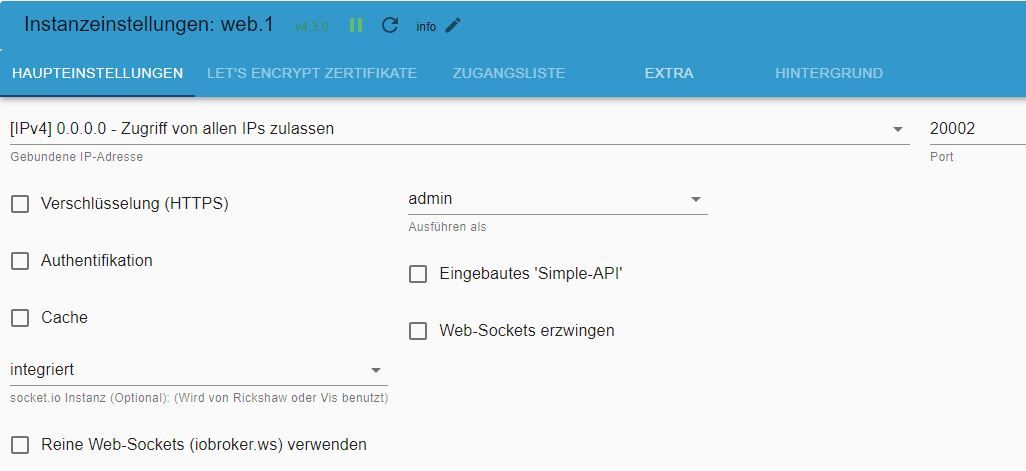
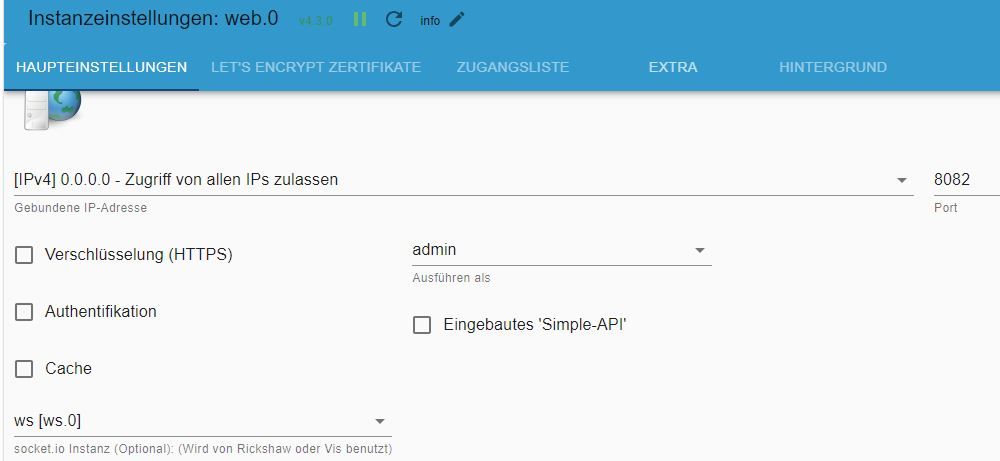
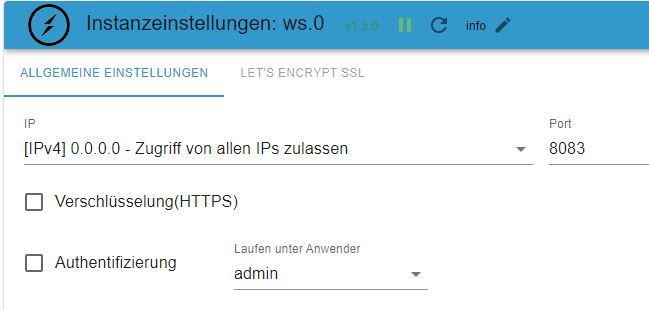
Irgendwie steige ich noch nicht durch und versuche eben das nachzubilden, was ihr vorschlagt.
-
@haselchen
Ich verstehe deine Verwirrung und bewundere dein/euer Engagement!! Wo nehmt ihr die Zeit her?
Sorry, das war ein Schreibfehler ! Muss natürlich heißen 8082
Eben noch mal kontrolliert
Und den Screenshot, den du ansprichst hatte ich heute Mittag gepostet, jetzt habe ich es geändert. Irgendwie steige ich noch nicht durch und versuche eben das nachzubilden, was ihr vorschlagt.
kurzes Update (sorry, war sehr beschäftigt und wollte erst weiter an einer Lösung arbeiten):
Habe das System upgedatet (Danke an @DJMarc75 )
Node.js: v18.17.1
NPM: 9.6.7
Admin wird mir auch unter Expertenmodus nur 6.8.0 angezeigt
System ist up2date, es werden unter iob diag keine offenen Punkte mehr angezeigtAdapter nach Anleitung von @haselchen und @bahnuhr installiert und eingerichtet
=> Ergebnis: VIS lädt leider immer noch nicht. Weder die Edit, noch die Oberfläche. Und das jeweils auf beiden Ports.Nun habe ich mit einem Online Json-Editor meine beiden zuletzt bearbeiteten Views gelöscht und siehe da, VIS lädt wieder!

Ich werde also alles neu basteln und ohne Gruppierung arbeiten.Danke für eure Mühen!


Hey! Du scheinst an dieser Unterhaltung interessiert zu sein, hast aber noch kein Konto.
Hast du es satt, bei jedem Besuch durch die gleichen Beiträge zu scrollen? Wenn du dich für ein Konto anmeldest, kommst du immer genau dorthin zurück, wo du zuvor warst, und kannst dich über neue Antworten benachrichtigen lassen (entweder per E-Mail oder Push-Benachrichtigung). Du kannst auch Lesezeichen speichern und Beiträge positiv bewerten, um anderen Community-Mitgliedern deine Wertschätzung zu zeigen.
Mit deinem Input könnte dieser Beitrag noch besser werden 💗
Registrieren AnmeldenSupport us
260
Online33.0k
Benutzer83.3k
Themen1.3m
Beiträge