




inventwo Icon Set Adapter - updaten funktioniert nicht
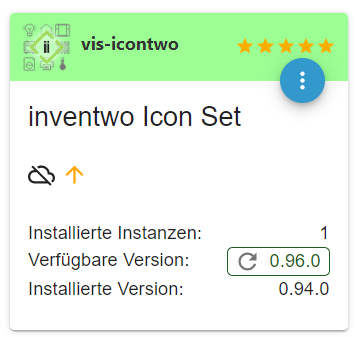
-
@glasfaser
kann ich gerne "probieren". Was aber passiert da im schlimmsten Fall? Kann ich damit mein System lahm legen?muss ich diese 3 Zeilen hintereinander einfügen mit jeweils [ENTER], oder ist es nur eine Zeile und beim Einfügen hier etwas schief gegangen?
@rtwl sagte in inventwo Icon Set Adapter - updaten funktioniert nicht:
muss ich diese 3 Zeilen hintereinander einfügen mit jeweils [ENTER], oder ist es nur eine Zeile und beim Einfügen hier etwas schief gegangen?
in der ersten Zeile wird von Github das Script auf dein System geladen
in der zweiten Zeile die Rechte dafür vergeben
die dritte Zeile startet das Script .Also alles einzeln eingeben !
Synology 918+ 16GB - ioBroker in Docker v9 , VISO auf Trekstor Primebook C13 13,3" , Hikvision Domkameras mit Surveillance Station .. CCU RaspberryMatic in Synology VM .. Zigbee CC2538+CC2592 .. Sonoff .. KNX .. Modbus ..
-
@rtwl sagte in inventwo Icon Set Adapter - updaten funktioniert nicht:
muss ich diese 3 Zeilen hintereinander einfügen mit jeweils [ENTER], oder ist es nur eine Zeile und beim Einfügen hier etwas schief gegangen?
in der ersten Zeile wird von Github das Script auf dein System geladen
in der zweiten Zeile die Rechte dafür vergeben
die dritte Zeile startet das Script .Also alles einzeln eingeben !
-
-
@rtwl sagte in inventwo Icon Set Adapter - updaten funktioniert nicht:
wird erst jetzt installiert
jipp
Synology 918+ 16GB - ioBroker in Docker v9 , VISO auf Trekstor Primebook C13 13,3" , Hikvision Domkameras mit Surveillance Station .. CCU RaspberryMatic in Synology VM .. Zigbee CC2538+CC2592 .. Sonoff .. KNX .. Modbus ..
-
@rtwl sagte in inventwo Icon Set Adapter - updaten funktioniert nicht:
wird erst jetzt installiert
jipp
@glasfaser
sieht schlecht aus...You are running nodejs v.14.21.3. Do you want to install recommended nodejs v.18.17.1? *** DO NOT TRY THIS FIX ON NON-LINUX-SYSTEMS! *** Press <y> to continue or any other key to quit Waiting for ioBroker to shut down - Give me a minute... ############################################################sudo: /home/iobroker/nodesetup: command not found Reading package lists... Done Building dependency tree... Done Reading state information... Done E: Version '18.17.1-deb-1nodesource1' for 'nodejs' was not found-Peter
-
@glasfaser
sieht schlecht aus...You are running nodejs v.14.21.3. Do you want to install recommended nodejs v.18.17.1? *** DO NOT TRY THIS FIX ON NON-LINUX-SYSTEMS! *** Press <y> to continue or any other key to quit Waiting for ioBroker to shut down - Give me a minute... ############################################################sudo: /home/iobroker/nodesetup: command not found Reading package lists... Done Building dependency tree... Done Reading state information... Done E: Version '18.17.1-deb-1nodesource1' for 'nodejs' was not foundkannst du mal in dein Script schauen !!!
-
@glasfaser
sieht schlecht aus...You are running nodejs v.14.21.3. Do you want to install recommended nodejs v.18.17.1? *** DO NOT TRY THIS FIX ON NON-LINUX-SYSTEMS! *** Press <y> to continue or any other key to quit Waiting for ioBroker to shut down - Give me a minute... ############################################################sudo: /home/iobroker/nodesetup: command not found Reading package lists... Done Building dependency tree... Done Reading state information... Done E: Version '18.17.1-deb-1nodesource1' for 'nodejs' was not found@rtwl
Kein Panik , warte bitte auf @Thomas-BraunSynology 918+ 16GB - ioBroker in Docker v9 , VISO auf Trekstor Primebook C13 13,3" , Hikvision Domkameras mit Surveillance Station .. CCU RaspberryMatic in Synology VM .. Zigbee CC2538+CC2592 .. Sonoff .. KNX .. Modbus ..
-
@rtwl
Kein Panik , warte bitte auf @Thomas-Braun -
@glasfaser
alles klar - Danke für deine/eure Hilfe! -
das hier wird angezeigt:
nodejs:
  Installed: 14.21.3-deb-1nodesource1
  Candidate: 14.21.3-deb-1nodesource1
  Version table:
 *** 14.21.3-deb-1nodesource1 100
        100 /var/lib/dpkg/status
     12.22.12~dfsg-1~deb11u4 500
        500 http://raspbian.raspberrypi.org/raspbian bullseye/main armhf Packages
-Peter
-
das hier wird angezeigt:
nodejs: Installed: 14.21.3-deb-1nodesource1 Candidate: 14.21.3-deb-1nodesource1 Version table: *** 14.21.3-deb-1nodesource1 100 100 /var/lib/dpkg/status 12.22.12~dfsg-1~deb11u4 500 500 http://raspbian.raspberrypi.org/raspbian bullseye/main armhf PackagesHm... Das ist komisch:
sudo: /home/iobroker/nodesetup: command not found
Das sollte eigentlich gefunden werden können....
Ich schau mal flugs in den Code, wo es da hängt. -
das hier wird angezeigt:
nodejs: Installed: 14.21.3-deb-1nodesource1 Candidate: 14.21.3-deb-1nodesource1 Version table: *** 14.21.3-deb-1nodesource1 100 100 /var/lib/dpkg/status 12.22.12~dfsg-1~deb11u4 500 500 http://raspbian.raspberrypi.org/raspbian bullseye/main armhf PackagesLad das skript nochmal frisch runter. Dürfte jetzt funktionieren.
-
Lad das skript nochmal frisch runter. Dürfte jetzt funktionieren.
@thomas-braun
Hat geklappt - zumindest ist jetzt eine Installation gelaufen. hier der Auszug davon:You are running nodejs v.14.21.3. Do you want to install recommended nodejs v.18.17.1? *** DO NOT TRY THIS FIX ON NON-LINUX-SYSTEMS! *** Press <y> to continue or any other key to quit rm: cannot remove '/etc/apt/sources.list.d/nodesource.lis*': No such file or directory Waiting for ioBroker to shut down - Give me a minute... ############################################################ ## Installing the NodeSource Node.js 18.x repo... ## Populating apt-get cache... + apt-get update Hit:1 http://raspbian.raspberrypi.org/raspbian bullseye InRelease Hit:2 http://archive.raspberrypi.org/debian bullseye InRelease Reading package lists... Done ## Confirming "bullseye" is supported... + curl -sLf -o /dev/null 'https://deb.nodesource.com/node_18.x/dists/bullseye/Release' ## Adding the NodeSource signing key to your keyring... + curl -s https://deb.nodesource.com/gpgkey/nodesource.gpg.key | gpg --dearmor | tee /usr/share/keyrings/nodesource.gpg >/dev/null ## Creating apt sources list file for the NodeSource Node.js 18.x repo... + echo 'deb [signed-by=/usr/share/keyrings/nodesource.gpg] https://deb.nodesource.com/node_18.x bullseye main' > /etc/apt/sources.list.d/nodesource.list Hit:2 http://archive.raspberrypi.org/debian bullseye InRelease Get:3 https://deb.nodesource.com/node_18.x bullseye InRelease [4586 B] Get:4 https://deb.nodesource.com/node_18.x bullseye/main armhf Packages [787 B] Fetched 5373 B in 1s (5983 B/s) Reading package lists... Done ## Run `sudo apt-get install -y nodejs` to install Node.js 18.x and npm ## You may also need development tools to build native addons: sudo apt-get install gcc g++ make ## To install the Yarn package manager, run: curl -sL https://dl.yarnpkg.com/debian/pubkey.gpg | gpg --dearmor | sudo tee /usr/share/keyrings/yarnkey.gpg >/dev/null echo "deb [signed-by=/usr/share/keyrings/yarnkey.gpg] https://dl.yarnpkg.com/debian stable main" | sudo tee /etc/apt/sources.list.d/yarn.list sudo apt-get update && sudo apt-get install yarn Reading package lists... Done Building dependency tree... Done Reading state information... Done The following package was automatically installed and is no longer required: raspinfo Use 'sudo apt autoremove' to remove it. The following packages will be upgraded: nodejs 1 upgraded, 0 newly installed, 0 to remove and 0 not upgraded. Need to get 25.9 MB of archives. After this operation, 61.6 MB of additional disk space will be used. Get:1 https://deb.nodesource.com/node_18.x bullseye/main armhf nodejs armhf 18.17.1-deb-1nodesource1 [25.9 MB] Fetched 25.9 MB in 6s (4332 kB/s) apt-listchanges: Reading changelogs... (Reading database ... 55245 files and directories currently installed.) Preparing to unpack .../nodejs_18.17.1-deb-1nodesource1_armhf.deb ... Unpacking nodejs (18.17.1-deb-1nodesource1) over (14.21.3-deb-1nodesource1) ... Setting up nodejs (18.17.1-deb-1nodesource1) ... Processing triggers for man-db (2.9.4-2) ...passt das so?
-Peter
-
@thomas-braun
Hat geklappt - zumindest ist jetzt eine Installation gelaufen. hier der Auszug davon:You are running nodejs v.14.21.3. Do you want to install recommended nodejs v.18.17.1? *** DO NOT TRY THIS FIX ON NON-LINUX-SYSTEMS! *** Press <y> to continue or any other key to quit rm: cannot remove '/etc/apt/sources.list.d/nodesource.lis*': No such file or directory Waiting for ioBroker to shut down - Give me a minute... ############################################################ ## Installing the NodeSource Node.js 18.x repo... ## Populating apt-get cache... + apt-get update Hit:1 http://raspbian.raspberrypi.org/raspbian bullseye InRelease Hit:2 http://archive.raspberrypi.org/debian bullseye InRelease Reading package lists... Done ## Confirming "bullseye" is supported... + curl -sLf -o /dev/null 'https://deb.nodesource.com/node_18.x/dists/bullseye/Release' ## Adding the NodeSource signing key to your keyring... + curl -s https://deb.nodesource.com/gpgkey/nodesource.gpg.key | gpg --dearmor | tee /usr/share/keyrings/nodesource.gpg >/dev/null ## Creating apt sources list file for the NodeSource Node.js 18.x repo... + echo 'deb [signed-by=/usr/share/keyrings/nodesource.gpg] https://deb.nodesource.com/node_18.x bullseye main' > /etc/apt/sources.list.d/nodesource.list Hit:2 http://archive.raspberrypi.org/debian bullseye InRelease Get:3 https://deb.nodesource.com/node_18.x bullseye InRelease [4586 B] Get:4 https://deb.nodesource.com/node_18.x bullseye/main armhf Packages [787 B] Fetched 5373 B in 1s (5983 B/s) Reading package lists... Done ## Run `sudo apt-get install -y nodejs` to install Node.js 18.x and npm ## You may also need development tools to build native addons: sudo apt-get install gcc g++ make ## To install the Yarn package manager, run: curl -sL https://dl.yarnpkg.com/debian/pubkey.gpg | gpg --dearmor | sudo tee /usr/share/keyrings/yarnkey.gpg >/dev/null echo "deb [signed-by=/usr/share/keyrings/yarnkey.gpg] https://dl.yarnpkg.com/debian stable main" | sudo tee /etc/apt/sources.list.d/yarn.list sudo apt-get update && sudo apt-get install yarn Reading package lists... Done Building dependency tree... Done Reading state information... Done The following package was automatically installed and is no longer required: raspinfo Use 'sudo apt autoremove' to remove it. The following packages will be upgraded: nodejs 1 upgraded, 0 newly installed, 0 to remove and 0 not upgraded. Need to get 25.9 MB of archives. After this operation, 61.6 MB of additional disk space will be used. Get:1 https://deb.nodesource.com/node_18.x bullseye/main armhf nodejs armhf 18.17.1-deb-1nodesource1 [25.9 MB] Fetched 25.9 MB in 6s (4332 kB/s) apt-listchanges: Reading changelogs... (Reading database ... 55245 files and directories currently installed.) Preparing to unpack .../nodejs_18.17.1-deb-1nodesource1_armhf.deb ... Unpacking nodejs (18.17.1-deb-1nodesource1) over (14.21.3-deb-1nodesource1) ... Setting up nodejs (18.17.1-deb-1nodesource1) ... Processing triggers for man-db (2.9.4-2) ...passt das so?
@rtwl sagte in inventwo Icon Set Adapter - updaten funktioniert nicht:
passt das so?
Ja, so soll das aussehen.
Kannst ja mit dem
iob diag
jetzt nochmal schauen, ob es passt. -
müsste passen, oder?
rtwl@smarthome:~ $ node -v
v18.17.1
Bin ich jetzt meine "Steinzeit" los? 🙂
@rtwl sagte in inventwo Icon Set Adapter - updaten funktioniert nicht:
Bin ich jetzt meine "Steinzeit" los?
Moderne Neuzeit.
Schau mal die 'Summary' voniob diagan. Da sollte es ja jetzt auch alles richtig sein. -
@rtwl sagte in inventwo Icon Set Adapter - updaten funktioniert nicht:
Bin ich jetzt meine "Steinzeit" los?
Moderne Neuzeit.
Schau mal die 'Summary' voniob diagan. Da sollte es ja jetzt auch alles richtig sein. -
Ja, schaut sehr gut aus.
Und Danke für's Beta-Testing des nodejs-Fixer-Codes. :-) -
Ich hab nicht "beta-gestestet" ich hab nur copy&paste gemacht 😁
mal schauen, ob sich jetzt der icontwo icon set Adapter updaten lässt - hängt jetzt schon 5 min in der Installation
@rtwl sagte in inventwo Icon Set Adapter - updaten funktioniert nicht:
Ich hab nicht "beta-gestestet" ich hab nur copy&paste gemacht
Sieht doch alles gut aus
und Danke das du nicht quer im Hintergrund etwas selber gemacht hast ... LOB

Synology 918+ 16GB - ioBroker in Docker v9 , VISO auf Trekstor Primebook C13 13,3" , Hikvision Domkameras mit Surveillance Station .. CCU RaspberryMatic in Synology VM .. Zigbee CC2538+CC2592 .. Sonoff .. KNX .. Modbus ..


Hey! Du scheinst an dieser Unterhaltung interessiert zu sein, hast aber noch kein Konto.
Hast du es satt, bei jedem Besuch durch die gleichen Beiträge zu scrollen? Wenn du dich für ein Konto anmeldest, kommst du immer genau dorthin zurück, wo du zuvor warst, und kannst dich über neue Antworten benachrichtigen lassen (entweder per E-Mail oder Push-Benachrichtigung). Du kannst auch Lesezeichen speichern und Beiträge positiv bewerten, um anderen Community-Mitgliedern deine Wertschätzung zu zeigen.
Mit deinem Input könnte dieser Beitrag noch besser werden 💗
Registrieren Anmelden355
Online33.0k
Benutzer83.5k
Themen1.3m
Beiträge