Skip to content
  • Home
  • Aktuell
  • Tags
  • 0 Ungelesen 0
  • Kategorien
  • Unreplied
  • Beliebt
  • GitHub
  • Docu
  • Hilfe
Skins
  • Light
  • Brite
  • Cerulean
  • Cosmo
  • Flatly
  • Journal
  • Litera
  • Lumen
  • Lux
  • Materia
  • Minty
  • Morph
  • Pulse
  • Sandstone
  • Simplex
  • Sketchy
  • Spacelab
  • United
  • Yeti
  • Zephyr
  • Dark
  • Cyborg
  • Darkly
  • Quartz
  • Slate
  • Solar
  • Superhero
  • Vapor

  • Standard: (Kein Skin)
  • Kein Skin
Einklappen
ioBroker Logo

Community Forum

donate donate
  1. ioBroker Community Home
  2. Deutsch
  3. Off Topic
  4. Restore auf neuem Raspberry

NEWS

  • Jahresrückblick 2025 – unser neuer Blogbeitrag ist online! ✨
    BluefoxB
    Bluefox
    15
    1
    823

  • Neuer Blogbeitrag: Monatsrückblick - Dezember 2025 🎄
    BluefoxB
    Bluefox
    13
    1
    680

  • Weihnachtsangebot 2025! 🎄
    BluefoxB
    Bluefox
    25
    1
    1.9k

Restore auf neuem Raspberry

Geplant Angeheftet Gesperrt Verschoben Off Topic
29 Beiträge 5 Kommentatoren 2.1k Aufrufe 2 Watching
  • Älteste zuerst
  • Neuste zuerst
  • Meiste Stimmen
Antworten
  • In einem neuen Thema antworten
Anmelden zum Antworten
Dieses Thema wurde gelöscht. Nur Nutzer mit entsprechenden Rechten können es sehen.
  • T TT-Tom

    @loverz

    bei Influx darf das Bucket nicht schon angelegt sein.

    L Offline
    L Offline
    loverz
    schrieb am zuletzt editiert von
    #6

    @tt-tom okay. Wie lösche ich das wieder?

    T 1 Antwort Letzte Antwort
    0
    • L loverz

      @tt-tom okay. Wie lösche ich das wieder?

      T Offline
      T Offline
      TT-Tom
      schrieb am zuletzt editiert von
      #7

      @loverz

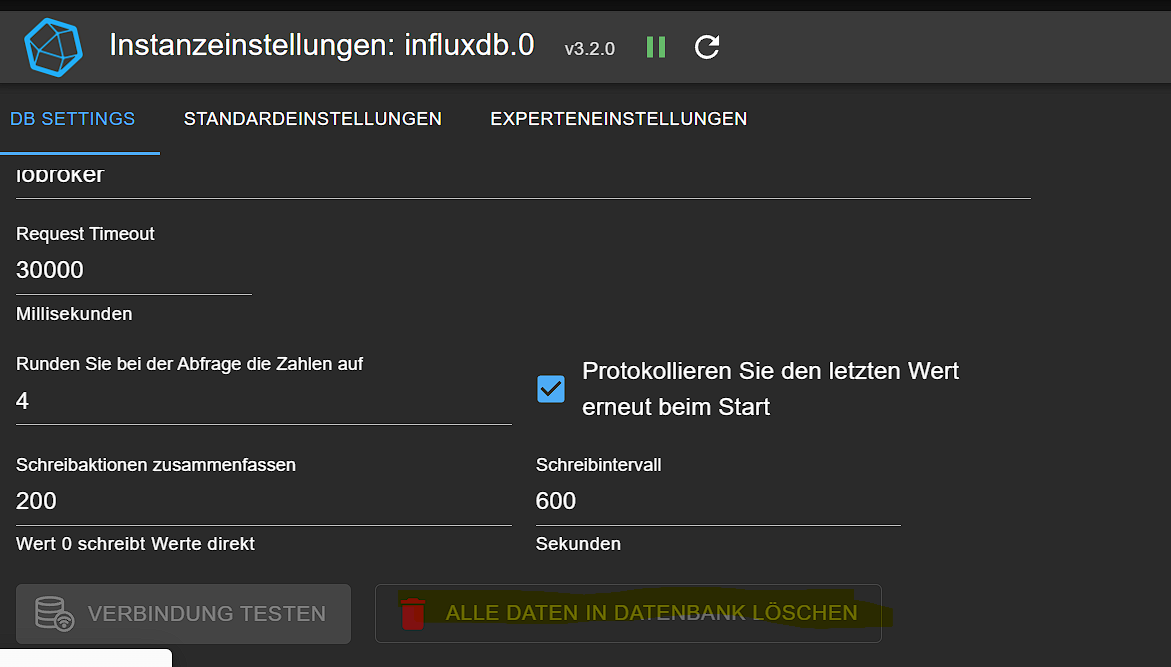
      ich in der Influx Oberfläche das Bucket löschen und InfluxDB über den Service neu starten.

      Gruß Tom
      https://github.com/tt-tom17
      Wenn meine Hilfe erfolgreich war, benutze bitte das Voting unten rechts im Beitrag

      NSPanel Script Wiki
      https://github.com/joBr99/nspanel-lovelace-ui/wiki

      NSPanel Adapter Wiki
      https://github.com/ticaki/ioBroker.nspanel-lovelace-ui/wiki

      L 1 Antwort Letzte Antwort
      0
      • T TT-Tom

        @loverz

        ich in der Influx Oberfläche das Bucket löschen und InfluxDB über den Service neu starten.

        L Offline
        L Offline
        loverz
        schrieb am zuletzt editiert von
        #8

        @tt-tom Hier?
        843241e5-5e1d-440d-a02f-7a59c7ead50c-image.png

        Wie starte ich den Service neu? Kann ich auch den ganzen Raspberry neu starten?

        T 1 Antwort Letzte Antwort
        0
        • Meister MopperM Meister Mopper

          @loverz sagte in Restore auf neuem Raspberry:

          dashboard "wetterdaten": {"message":"invalid API key"

          HM, offenbar fehlt da der richtige API key.

          L Offline
          L Offline
          loverz
          schrieb am zuletzt editiert von
          #9

          @meister-mopper den API Key (heißt jetzt Service Account) hab ich neu angelegt und verknüpft. Scheint nun weiter zu gehen, leider klappt der Restore weiterhin nicht:

          Started restore ...
          [DEBUG] [grafana] - Start Grafana Restore ...
          [DEBUG] [grafana] - filename for restore: /opt/iobroker/backups/grafana_2023_07_16-03_32_13_Eck29_backupiobroker.tar.gz
          [DEBUG] [grafana] - Grafana tmp directory created: /opt/iobroker/backups/grafana_tmp
          [DEBUG] [grafana] - start decompress
          [DEBUG] [grafana] - Grafana request started
          [DEBUG] [grafana] - Grafana is available ... Status: 200
          [DEBUG] [grafana] - Try to Restore: /opt/iobroker/backups/grafana_tmp/datasource/InfluxDB.json
          [DEBUG] [grafana] - cannot restore datasource "InfluxDB": "data source with the same name already exists"
          [DEBUG] [grafana] - Try to Restore: /opt/iobroker/backups/grafana_tmp/dashboards/energieverbrauch.json
          [DEBUG] [grafana] - Try to Restore: /opt/iobroker/backups/grafana_tmp/dashboards/general-alerting.json
          [DEBUG] [grafana] - Try to Restore: /opt/iobroker/backups/grafana_tmp/dashboards/heizungsanlage.json
          [DEBUG] [grafana] - Try to Restore: /opt/iobroker/backups/grafana_tmp/dashboards/wetterdaten.json
          [DEBUG] [grafana] - dashboard restore for "wetterdaten" finish: {"id":1,"slug":"wetterdaten","status":"success","uid":"MyXZDlggk","url":"/d/MyXZDlggk/wetterdaten","version":3}
          [DEBUG] [grafana] - dashboard restore for "general-alerting" finish: {"id":2,"slug":"general-alerting","status":"success","uid":"XflZZbZRz","url":"/d/XflZZbZRz/general-alerting","version":3}
          [DEBUG] [grafana] - dashboard restore for "energieverbrauch" finish: {"id":4,"slug":"energieverbrauch","status":"success","uid":"QJpROlgRk","url":"/d/QJpROlgRk/energieverbrauch","version":3}
          [DEBUG] [grafana] - dashboard restore for "heizungsanlage" finish: {"id":3,"slug":"heizungsanlage","status":"success","uid":"BJK6AugRk","url":"/d/BJK6AugRk/heizungsanlage","version":3}
          [DEBUG] [grafana] - Grafana request ended
          [DEBUG] [grafana] - Try deleting the Grafana tmp directory
          [DEBUG] [grafana] - Grafana tmp directory was successfully deleted
          [DEBUG] [grafana] - Grafana Restore completed successfully
          [EXIT] Grafana restore done
          
          1 Antwort Letzte Antwort
          0
          • L loverz

            @tt-tom Hier?
            843241e5-5e1d-440d-a02f-7a59c7ead50c-image.png

            Wie starte ich den Service neu? Kann ich auch den ganzen Raspberry neu starten?

            T Offline
            T Offline
            TT-Tom
            schrieb am zuletzt editiert von
            #10

            @loverz

            nein die Oberfläche von der InfluxDB -> ip-influx-server:8086

            Gruß Tom
            https://github.com/tt-tom17
            Wenn meine Hilfe erfolgreich war, benutze bitte das Voting unten rechts im Beitrag

            NSPanel Script Wiki
            https://github.com/joBr99/nspanel-lovelace-ui/wiki

            NSPanel Adapter Wiki
            https://github.com/ticaki/ioBroker.nspanel-lovelace-ui/wiki

            L 1 Antwort Letzte Antwort
            0
            • T TT-Tom

              @loverz

              nein die Oberfläche von der InfluxDB -> ip-influx-server:8086

              L Offline
              L Offline
              loverz
              schrieb am zuletzt editiert von
              #11

              @tt-tom gibts bei mir anscheinend nicht. Ich glaub ich habe Influx ohne Weboberfläche installiert.

              T 1 Antwort Letzte Antwort
              0
              • HomoranH Offline
                HomoranH Offline
                Homoran
                Global Moderator Administrators
                schrieb am zuletzt editiert von
                #12

                ich schieb das mal ins offTopic. hat ja mit iobroker selbst nichts zu tun.

                kein Support per PN! - Fragen im Forum stellen - es gibt fast nichts, was nicht auch für andere interessant ist.

                Benutzt das Voting rechts unten im Beitrag wenn er euch geholfen hat.

                der Installationsfixer: curl -fsL https://iobroker.net/fix.sh | bash -

                1 Antwort Letzte Antwort
                1
                • L loverz

                  @tt-tom gibts bei mir anscheinend nicht. Ich glaub ich habe Influx ohne Weboberfläche installiert.

                  T Offline
                  T Offline
                  TT-Tom
                  schrieb am zuletzt editiert von
                  #13

                  @loverz welche Version hast Du den installiert ??

                  Gruß Tom
                  https://github.com/tt-tom17
                  Wenn meine Hilfe erfolgreich war, benutze bitte das Voting unten rechts im Beitrag

                  NSPanel Script Wiki
                  https://github.com/joBr99/nspanel-lovelace-ui/wiki

                  NSPanel Adapter Wiki
                  https://github.com/ticaki/ioBroker.nspanel-lovelace-ui/wiki

                  L 1 Antwort Letzte Antwort
                  0
                  • L Offline
                    L Offline
                    loverz
                    schrieb am zuletzt editiert von
                    #14

                    Ich denke ich brauche hier allgemeine Hilfe.
                    Wenn sich jemand offenbaren möchte, bitte per PN melden, dann kann vlt. jemand mit mir gegen nen Kasten Bier auf den Bildschirm schauen.

                    Kann ja nicht so schwer sein ioBroker neu zu installieren und wieder zum laufen zu bekommen...

                    HomoranH 1 Antwort Letzte Antwort
                    0
                    • T TT-Tom

                      @loverz welche Version hast Du den installiert ??

                      L Offline
                      L Offline
                      loverz
                      schrieb am zuletzt editiert von
                      #15

                      @tt-tom influxDB V1 nach dieser Anleitung:
                      https://rodnic.de/hausautomation/4-iobroker-influxdb-grafana/

                      Thomas BraunT 1 Antwort Letzte Antwort
                      0
                      • L loverz

                        @tt-tom influxDB V1 nach dieser Anleitung:
                        https://rodnic.de/hausautomation/4-iobroker-influxdb-grafana/

                        Thomas BraunT Online
                        Thomas BraunT Online
                        Thomas Braun
                        Most Active
                        schrieb am zuletzt editiert von
                        #16

                        @loverz

                        Die Anleitung dürfte für dein System falsch/veraltet sein.

                        iob diag
                        

                        sagt?

                        Linux-Werkzeugkasten:
                        https://forum.iobroker.net/topic/42952/der-kleine-iobroker-linux-werkzeugkasten
                        NodeJS Fixer Skript:
                        https://forum.iobroker.net/topic/68035/iob-node-fix-skript
                        iob_diag: curl -sLf -o diag.sh https://iobroker.net/diag.sh && bash diag.sh

                        L 1 Antwort Letzte Antwort
                        0
                        • L loverz

                          Ich denke ich brauche hier allgemeine Hilfe.
                          Wenn sich jemand offenbaren möchte, bitte per PN melden, dann kann vlt. jemand mit mir gegen nen Kasten Bier auf den Bildschirm schauen.

                          Kann ja nicht so schwer sein ioBroker neu zu installieren und wieder zum laufen zu bekommen...

                          HomoranH Offline
                          HomoranH Offline
                          Homoran
                          Global Moderator Administrators
                          schrieb am zuletzt editiert von
                          #17

                          @loverz sagte in Restore auf neuem Raspberry:

                          Kann ja nicht so schwer sein ioBroker neu zu installieren

                          @homoran sagte in Restore auf neuem Raspberry:

                          hat ja mit iobroker selbst nichts zu tun.

                          kein Support per PN! - Fragen im Forum stellen - es gibt fast nichts, was nicht auch für andere interessant ist.

                          Benutzt das Voting rechts unten im Beitrag wenn er euch geholfen hat.

                          der Installationsfixer: curl -fsL https://iobroker.net/fix.sh | bash -

                          1 Antwort Letzte Antwort
                          0
                          • Thomas BraunT Thomas Braun

                            @loverz

                            Die Anleitung dürfte für dein System falsch/veraltet sein.

                            iob diag
                            

                            sagt?

                            L Offline
                            L Offline
                            loverz
                            schrieb am zuletzt editiert von
                            #18

                            @thomas-braun
                            ======== Start marking the full check here =========

                            Skript v.2023-04-16
                            
                            *** BASE SYSTEM ***
                            Model           : Raspberry Pi 4 Model B Rev 1.1
                            Architecture    : aarch64
                            Docker          : false
                            Virtualization  : none
                            Distributor ID: Debian
                            Description:    Debian GNU/Linux 11 (bullseye)
                            Release:        11
                            Codename:       bullseye
                            
                            PRETTY_NAME="Debian GNU/Linux 11 (bullseye)"
                            NAME="Debian GNU/Linux"
                            VERSION_ID="11"
                            VERSION="11 (bullseye)"
                            VERSION_CODENAME=bullseye
                            ID=debian
                            HOME_URL="https://www.debian.org/"
                            SUPPORT_URL="https://www.debian.org/support"
                            BUG_REPORT_URL="https://bugs.debian.org/"
                            
                            Systemuptime and Load:
                             22:37:18 up  3:22,  1 user,  load average: 0.00, 0.01, 0.00
                            CPU threads: 4
                            
                            Raspberry only:
                            throttled=0x0
                            Other values than 0x0 hint to temperature/voltage problems
                            temp=49.1'C
                            volt=0.8563V
                            
                            *** Time and Time Zones ***
                                           Local time: Sun 2023-07-16 22:37:18 CEST
                                       Universal time: Sun 2023-07-16 20:37:18 UTC
                                             RTC time: n/a
                                            Time zone: Europe/Berlin (CEST, +0200)
                            System clock synchronized: yes
                                          NTP service: active
                                      RTC in local TZ: no
                            
                            *** User and Groups ***
                            pi
                            /home/pi
                            pi adm dialout cdrom sudo audio video plugdev games users input render netdev gpio i2c spi iobroker
                            
                            *** X-Server-Setup ***
                            X-Server:       false
                            Desktop:
                            Terminal:       tty
                            Boot Target:    multi-user.target
                            
                            *** MEMORY ***
                                           total        used        free      shared  buff/cache   available
                            Mem:            1.8G        573M        913M        1.0M        362M        1.2G
                            Swap:            99M          0B         99M
                            Total:          1.9G        573M        1.0G
                            
                                     1849 M total memory
                                      573 M used memory
                                      703 M active memory
                                      136 M inactive memory
                                      913 M free memory
                                       35 M buffer memory
                                      326 M swap cache
                                       99 M total swap
                                        0 M used swap
                                       99 M free swap
                            
                            Raspberry only:
                            oom events: 0
                            lifetime oom required: 0 Mbytes
                            total time in oom handler: 0 ms
                            max time spent in oom handler: 0 ms
                            
                            *** FILESYSTEM ***
                            Filesystem     Type      Size  Used Avail Use% Mounted on
                            /dev/root      ext4      117G  3.6G  109G   4% /
                            devtmpfs       devtmpfs  667M     0  667M   0% /dev
                            tmpfs          tmpfs     925M     0  925M   0% /dev/shm
                            tmpfs          tmpfs     370M  1.1M  369M   1% /run
                            tmpfs          tmpfs     5.0M  4.0K  5.0M   1% /run/lock
                            /dev/mmcblk0p1 vfat      255M   31M  225M  13% /boot
                            tmpfs          tmpfs     185M     0  185M   0% /run/user/1000
                            
                            Messages concerning ext4 filesystem in dmesg:
                            [Sun Jul 16 19:14:48 2023] Kernel command line: coherent_pool=1M 8250.nr_uarts=0 snd_bcm2835.enable_headphones=0 snd_bcm2835.enable_headphones=1 snd_bcm2835.enable_hdmi=1 snd_bcm2835.enable_hdmi=0  smsc95xx.macaddr=DC:A6:32:43:7C:47 vc_mem.mem_base=0x3ec00000 vc_mem.mem_size=0x40000000  console=ttyS0,115200 console=tty1 root=PARTUUID=f60dec51-02 rootfstype=ext4 fsck.repair=yes rootwait
                            [Sun Jul 16 19:14:49 2023] EXT4-fs (mmcblk0p2): mounted filesystem with ordered data mode. Quota mode: none.
                            [Sun Jul 16 19:14:49 2023] VFS: Mounted root (ext4 filesystem) readonly on device 179:2.
                            [Sun Jul 16 19:14:51 2023] EXT4-fs (mmcblk0p2): re-mounted. Quota mode: none.
                            
                            Show mounted filesystems (real ones only):
                            TARGET  SOURCE         FSTYPE OPTIONS
                            /       /dev/mmcblk0p2 ext4   rw,noatime,commit=600
                            `-/boot /dev/mmcblk0p1 vfat   rw,relatime,fmask=0022,dmask=0022,codepage=437,iocharset=ascii,shortname=mixed,errors=remount-ro
                            
                            Files in neuralgic directories:
                            
                            /var:
                            608M    /var/
                            257M    /var/cache
                            251M    /var/cache/apt
                            160M    /var/lib
                            151M    /var/cache/apt/archives
                            
                            Archived and active journals take up 88.0M in the file system.
                            
                            /opt/iobroker/backups:
                            91M     /opt/iobroker/backups/
                            
                            /opt/iobroker/iobroker-data:
                            173M    /opt/iobroker/iobroker-data/
                            98M     /opt/iobroker/iobroker-data/files
                            52M     /opt/iobroker/iobroker-data/files/javascript.admin
                            34M     /opt/iobroker/iobroker-data/files/javascript.admin/static
                            33M     /opt/iobroker/iobroker-data/files/javascript.admin/static/js
                            
                            The five largest files in iobroker-data are:
                            36M     /opt/iobroker/iobroker-data/objects.jsonl
                            9.5M    /opt/iobroker/iobroker-data/states.jsonl
                            6.9M    /opt/iobroker/iobroker-data/files/javascript.admin/static/js/610.312d98a8.chunk.js.map
                            6.3M    /opt/iobroker/iobroker-data/files/admin.admin/custom/static/js/vendors-node_modules_iobroker_adapter-react-v5_assets_devices_parseNames_js-node_modules_iobr-99c23e.847b8ad9.chunk.js.map
                            5.9M    /opt/iobroker/iobroker-data/files/javascript.admin/static/js/44.59b48e42.chunk.js.map
                            
                            *** NodeJS-Installation ***
                            
                            /usr/bin/nodejs         v18.16.1
                            /usr/bin/node           v18.16.1
                            /usr/bin/npm            9.5.1
                            /usr/bin/npx            9.5.1
                            
                            
                            nodejs:
                              Installed: 18.16.1-deb-1nodesource1
                              Candidate: 18.16.1-deb-1nodesource1
                              Version table:
                             *** 18.16.1-deb-1nodesource1 500
                                    500 https://deb.nodesource.com/node_18.x bullseye/main arm64 Packages
                                    100 /var/lib/dpkg/status
                                 12.22.12~dfsg-1~deb11u4 500
                                    500 http://security.debian.org/debian-security bullseye-security/main arm64 Packages
                                 12.22.12~dfsg-1~deb11u3 500
                                    500 http://deb.debian.org/debian bullseye/main arm64 Packages
                            
                            Temp directories causing npm8 problem: 0
                            No problems detected
                            
                            *** ioBroker-Installation ***
                            
                            ioBroker Status
                            iobroker is running on this host.
                            
                            
                            Objects type: jsonl
                            States  type: jsonl
                            
                            MULTIHOSTSERVICE/enabled: false
                            
                            Core adapters versions
                            js-controller:  4.0.24
                            admin:          6.3.5
                            javascript:     7.0.3
                            
                            Adapters from github:   0
                            
                            Adapter State
                            + system.adapter.admin.0                  : admin                 : Eck29-ioBroker                           -  enabled, port: 8081, bind: 0.0.0.0, run as: admin
                              system.adapter.alexa2.0                 : alexa2                : Eck29-ioBroker                           - disabled
                            + system.adapter.backitup.0               : backitup              : Eck29-ioBroker                           -  enabled
                              system.adapter.daswetter.0              : daswetter             : Eck29-ioBroker                           - disabled
                              system.adapter.deconz.0                 : deconz                : Eck29-ioBroker                           - disabled, port: 80
                              system.adapter.easee.0                  : easee                 : Eck29-ioBroker                           - disabled
                              system.adapter.ems-esp.0                : ems-esp               : Eck29-ioBroker                           - disabled
                              system.adapter.hmip.0                   : hmip                  : Eck29-ioBroker                           - disabled
                              system.adapter.hs100.0                  : hs100                 : Eck29-ioBroker                           - disabled
                              system.adapter.hue.0                    : hue                   : Eck29-ioBroker                           - disabled, port: 443
                            + system.adapter.influxdb.0               : influxdb              : Eck29-ioBroker                           -  enabled, port: 8086
                              system.adapter.info.0                   : info                  : Eck29-ioBroker                           - disabled
                              system.adapter.javascript.0             : javascript            : Eck29-ioBroker                           - disabled
                              system.adapter.km200.0                  : km200                 : Eck29-ioBroker                           - disabled
                              system.adapter.knx.0                    : knx                   : Eck29-ioBroker                           - disabled, bind: 192.168.1.166
                              system.adapter.mydlink.0                : mydlink               : Eck29-ioBroker                           - disabled
                              system.adapter.netatmo-crawler.0        : netatmo-crawler       : Eck29-ioBroker                           - disabled
                              system.adapter.philips-tv.0             : philips-tv            : Eck29-ioBroker                           - disabled
                              system.adapter.ping.0                   : ping                  : Eck29-ioBroker                           - disabled
                              system.adapter.rpi2.0                   : rpi2                  : Eck29-ioBroker                           - disabled
                              system.adapter.shelly.0                 : shelly                : Eck29-ioBroker                           - disabled, port: 1882, bind: 192.168.1.166
                              system.adapter.solarmanpv.0             : solarmanpv            : Eck29-ioBroker                           - disabled
                              system.adapter.telegram.0               : telegram              : Eck29-ioBroker                           - disabled, port: 8443, bind: 0.0.0.0
                              system.adapter.telegram.1               : telegram              : Eck29-ioBroker                           - disabled, port: 8443, bind: 0.0.0.0
                              system.adapter.yahka.0                  : yahka                 : Eck29-ioBroker                           - disabled
                              system.adapter.yahka.3                  : yahka                 : Eck29-ioBroker                           - disabled
                              system.adapter.yeelight-2.0             : yeelight-2            : Eck29-ioBroker                           - disabled
                            
                            + instance is alive
                            
                            Enabled adapters with bindings
                            + system.adapter.admin.0                  : admin                 : Eck29-ioBroker                           -  enabled, port: 8081, bind: 0.0.0.0, run as: admin
                            + system.adapter.influxdb.0               : influxdb              : Eck29-ioBroker                           -  enabled, port: 8086
                            
                            ioBroker-Repositories
                            stable        : http://download.iobroker.net/sources-dist.json
                            beta          : http://download.iobroker.net/sources-dist-latest.json
                            latest        : http://iobroker.live/repo/sources-dist-latest.json
                            
                            Active repo(s): stable
                            
                            Installed ioBroker-Instances
                            Used repository: stable
                            Adapter    "admin"        : 6.3.5    , installed 6.3.5
                            Adapter    "alexa2"       : 3.23.2   , installed 3.23.2
                            Adapter    "backitup"     : 2.6.23   , installed 2.6.23
                            Adapter    "daswetter"    : 3.1.8    , installed 3.1.8
                            Adapter    "deconz"       : 1.3.21   , installed 1.3.21
                            Adapter    "easee"        : 1.0.7    , installed 1.0.7
                            Adapter    "ems-esp"      : 1.30.0   , installed 1.30.0
                            Adapter    "hmip"         : 1.20.0   , installed 1.20.0
                            Adapter    "hs100"        : 2.1.2    , installed 2.1.2
                            Adapter    "hue"          : 3.9.3    , installed 3.9.3
                            Adapter    "influxdb"     : 3.2.0    , installed 3.2.0
                            Adapter    "info"         : 1.9.26   , installed 1.9.26
                            Adapter    "javascript"   : 7.0.3    , installed 7.0.3
                            Controller "js-controller": 4.0.24   , installed 4.0.24
                            Adapter    "km200"        : 2.0.3    , installed 2.0.3
                            Adapter    "knx"          : 2.0.17   , installed 2.0.18
                            Adapter    "mydlink"      : 1.3.1    , installed 1.3.1
                            Adapter    "netatmo-crawler": 0.8.1  , installed 0.8.1
                            Adapter    "philips-tv"   : 0.5.3    , installed 0.5.3
                            Adapter    "ping"         : 1.5.3    , installed 1.5.3
                            Adapter    "rpi2"         : 1.3.2    , installed 1.3.2
                            Adapter    "shelly"       : 6.4.1    , installed 6.4.1
                            Adapter    "solarmanpv"   : 0.5.0    , installed 0.5.0
                            Adapter    "telegram"     : 1.15.6   , installed 1.15.6
                            Adapter    "yahka"        : 0.17.0   , installed 1.0.3
                            Adapter    "yeelight-2"   : 1.2.1    , installed 1.2.1
                            
                            Objects and States
                            Please stand by - This may take a while
                            Objects:        10835
                            States:         8894
                            
                            *** OS-Repositories and Updates ***
                            W: GPG error: https://repos.influxdata.com/debian stretch InRelease: The following signatures couldn't be verified because the public key is not available: NO_PUBKEY D8FF8E1F7DF8B07E
                            E: The repository 'https://repos.influxdata.com/debian stretch InRelease' is not signed.
                            Pending Updates: 0
                            
                            *** Listening Ports ***
                            Active Internet connections (only servers)
                            Proto Recv-Q Send-Q Local Address           Foreign Address         State       User       Inode      PID/Program name
                            tcp        0      0 0.0.0.0:22              0.0.0.0:*               LISTEN      0          1976       520/sshd: /usr/sbin
                            tcp        0      0 127.0.0.1:9001          0.0.0.0:*               LISTEN      1001       11831      483/iobroker.js-con
                            tcp        0      0 127.0.0.1:9000          0.0.0.0:*               LISTEN      1001       13090      483/iobroker.js-con
                            tcp        0      0 127.0.0.1:8088          0.0.0.0:*               LISTEN      110        14143      482/influxd
                            tcp6       0      0 :::3000                 :::*                    LISTEN      111        17439      1086/grafana
                            tcp6       0      0 :::8081                 :::*                    LISTEN      1001       11971      718/io.admin.0
                            tcp6       0      0 :::8086                 :::*                    LISTEN      110        13070      482/influxd
                            tcp6       0      0 :::22                   :::*                    LISTEN      0          1978       520/sshd: /usr/sbin
                            udp        0      0 0.0.0.0:68              0.0.0.0:*                           0          13075      1085/dhcpcd
                            udp        0      0 0.0.0.0:33986           0.0.0.0:*                           108        12956      365/avahi-daemon: r
                            udp        0      0 0.0.0.0:5353            0.0.0.0:*                           108        12954      365/avahi-daemon: r
                            udp6       0      0 :::5353                 :::*                                108        12955      365/avahi-daemon: r
                            udp6       0      0 :::546                  :::*                                0          15989      1085/dhcpcd
                            udp6       0      0 :::33322                :::*                                108        12957      365/avahi-daemon: r
                            
                            *** Log File - Last 25 Lines ***
                            
                            2023-07-16 19:15:01.139  - info: admin.0 (718) Repository received successfully.
                            2023-07-16 19:15:04.078  - info: backitup.0 (849) starting. Version 2.6.23 in /opt/iobroker/node_modules/iobroker.backitup, node: v18.16.1, js-controller: 4.0.24
                            2023-07-16 19:15:04.231  - info: backitup.0 (849) [iobroker] backup will be activated at 03:30 every 1 day(s)
                            2023-07-16 19:15:06.143  - info: admin.0 (718) ==> Connected system.user.admin from ::ffff:192.168.1.152
                            2023-07-16 19:15:07.139  - info: admin.0 (718) ==> Connected system.user.admin from ::ffff:192.168.1.152
                            2023-07-16 19:15:29.199  - info: admin.0 (718) <== Disconnect system.user.admin from ::ffff:192.168.1.152
                            2023-07-16 19:15:29.219  - info: admin.0 (718) ==> Connected system.user.admin from ::ffff:192.168.1.152
                            2023-07-16 19:15:30.195  - info: admin.0 (718) <== Disconnect system.user.admin from ::ffff:192.168.1.152 admin
                            2023-07-16 19:15:30.241  - info: admin.0 (718) ==> Connected system.user.admin from ::ffff:192.168.1.152
                            2023-07-16 19:17:19.238  - info: admin.0 (718) <== Disconnect system.user.admin from ::ffff:192.168.1.152
                            2023-07-16 19:17:25.259  - info: admin.0 (718) <== Disconnect system.user.admin from ::ffff:192.168.1.152 admin
                            2023-07-16 19:17:29.372  - info: admin.0 (718) ==> Connected system.user.admin from ::ffff:192.168.1.152
                            2023-07-16 19:17:30.353  - info: admin.0 (718) ==> Connected system.user.admin from ::ffff:192.168.1.152
                            2023-07-16 19:19:32.882  - info: admin.0 (718) <== Disconnect system.user.admin from ::ffff:192.168.1.152 admin
                            2023-07-16 19:19:32.887  - info: admin.0 (718) <== Disconnect system.user.admin from ::ffff:192.168.1.152
                            2023-07-16 20:19:27.316  - info: admin.0 (718) ==> Connected system.user.admin from ::ffff:192.168.1.152
                            2023-07-16 20:19:27.344  - info: admin.0 (718) ==> Connected system.user.admin from ::ffff:192.168.1.152
                            2023-07-16 20:20:27.788  - info: admin.0 (718) <== Disconnect system.user.admin from ::ffff:192.168.1.152
                            2023-07-16 20:20:27.800  - info: admin.0 (718) <== Disconnect system.user.admin from ::ffff:192.168.1.152 admin
                            2023-07-16 20:20:27.931  - info: admin.0 (718) ==> Connected system.user.admin from ::ffff:192.168.1.152
                            2023-07-16 20:20:27.958  - info: admin.0 (718) ==> Connected system.user.admin from ::ffff:192.168.1.152
                            2023-07-16 20:21:27.915  - info: admin.0 (718) <== Disconnect system.user.admin from ::ffff:192.168.1.152 admin
                            2023-07-16 20:21:27.924  - info: admin.0 (718) <== Disconnect system.user.admin from ::ffff:192.168.1.152
                            2023-07-16 22:36:18.904  - info: admin.0 (718) ==> Connected system.user.admin from ::ffff:192.168.1.152
                            2023-07-16 22:36:18.967  - info: admin.0 (718) ==> Connected system.user.admin from ::ffff:192.168.1.152


                            ============ Mark until here for C&P =============

                            Thomas BraunT 1 Antwort Letzte Antwort
                            0
                            • L loverz

                              @thomas-braun
                              ======== Start marking the full check here =========

                              Skript v.2023-04-16
                              
                              *** BASE SYSTEM ***
                              Model           : Raspberry Pi 4 Model B Rev 1.1
                              Architecture    : aarch64
                              Docker          : false
                              Virtualization  : none
                              Distributor ID: Debian
                              Description:    Debian GNU/Linux 11 (bullseye)
                              Release:        11
                              Codename:       bullseye
                              
                              PRETTY_NAME="Debian GNU/Linux 11 (bullseye)"
                              NAME="Debian GNU/Linux"
                              VERSION_ID="11"
                              VERSION="11 (bullseye)"
                              VERSION_CODENAME=bullseye
                              ID=debian
                              HOME_URL="https://www.debian.org/"
                              SUPPORT_URL="https://www.debian.org/support"
                              BUG_REPORT_URL="https://bugs.debian.org/"
                              
                              Systemuptime and Load:
                               22:37:18 up  3:22,  1 user,  load average: 0.00, 0.01, 0.00
                              CPU threads: 4
                              
                              Raspberry only:
                              throttled=0x0
                              Other values than 0x0 hint to temperature/voltage problems
                              temp=49.1'C
                              volt=0.8563V
                              
                              *** Time and Time Zones ***
                                             Local time: Sun 2023-07-16 22:37:18 CEST
                                         Universal time: Sun 2023-07-16 20:37:18 UTC
                                               RTC time: n/a
                                              Time zone: Europe/Berlin (CEST, +0200)
                              System clock synchronized: yes
                                            NTP service: active
                                        RTC in local TZ: no
                              
                              *** User and Groups ***
                              pi
                              /home/pi
                              pi adm dialout cdrom sudo audio video plugdev games users input render netdev gpio i2c spi iobroker
                              
                              *** X-Server-Setup ***
                              X-Server:       false
                              Desktop:
                              Terminal:       tty
                              Boot Target:    multi-user.target
                              
                              *** MEMORY ***
                                             total        used        free      shared  buff/cache   available
                              Mem:            1.8G        573M        913M        1.0M        362M        1.2G
                              Swap:            99M          0B         99M
                              Total:          1.9G        573M        1.0G
                              
                                       1849 M total memory
                                        573 M used memory
                                        703 M active memory
                                        136 M inactive memory
                                        913 M free memory
                                         35 M buffer memory
                                        326 M swap cache
                                         99 M total swap
                                          0 M used swap
                                         99 M free swap
                              
                              Raspberry only:
                              oom events: 0
                              lifetime oom required: 0 Mbytes
                              total time in oom handler: 0 ms
                              max time spent in oom handler: 0 ms
                              
                              *** FILESYSTEM ***
                              Filesystem     Type      Size  Used Avail Use% Mounted on
                              /dev/root      ext4      117G  3.6G  109G   4% /
                              devtmpfs       devtmpfs  667M     0  667M   0% /dev
                              tmpfs          tmpfs     925M     0  925M   0% /dev/shm
                              tmpfs          tmpfs     370M  1.1M  369M   1% /run
                              tmpfs          tmpfs     5.0M  4.0K  5.0M   1% /run/lock
                              /dev/mmcblk0p1 vfat      255M   31M  225M  13% /boot
                              tmpfs          tmpfs     185M     0  185M   0% /run/user/1000
                              
                              Messages concerning ext4 filesystem in dmesg:
                              [Sun Jul 16 19:14:48 2023] Kernel command line: coherent_pool=1M 8250.nr_uarts=0 snd_bcm2835.enable_headphones=0 snd_bcm2835.enable_headphones=1 snd_bcm2835.enable_hdmi=1 snd_bcm2835.enable_hdmi=0  smsc95xx.macaddr=DC:A6:32:43:7C:47 vc_mem.mem_base=0x3ec00000 vc_mem.mem_size=0x40000000  console=ttyS0,115200 console=tty1 root=PARTUUID=f60dec51-02 rootfstype=ext4 fsck.repair=yes rootwait
                              [Sun Jul 16 19:14:49 2023] EXT4-fs (mmcblk0p2): mounted filesystem with ordered data mode. Quota mode: none.
                              [Sun Jul 16 19:14:49 2023] VFS: Mounted root (ext4 filesystem) readonly on device 179:2.
                              [Sun Jul 16 19:14:51 2023] EXT4-fs (mmcblk0p2): re-mounted. Quota mode: none.
                              
                              Show mounted filesystems (real ones only):
                              TARGET  SOURCE         FSTYPE OPTIONS
                              /       /dev/mmcblk0p2 ext4   rw,noatime,commit=600
                              `-/boot /dev/mmcblk0p1 vfat   rw,relatime,fmask=0022,dmask=0022,codepage=437,iocharset=ascii,shortname=mixed,errors=remount-ro
                              
                              Files in neuralgic directories:
                              
                              /var:
                              608M    /var/
                              257M    /var/cache
                              251M    /var/cache/apt
                              160M    /var/lib
                              151M    /var/cache/apt/archives
                              
                              Archived and active journals take up 88.0M in the file system.
                              
                              /opt/iobroker/backups:
                              91M     /opt/iobroker/backups/
                              
                              /opt/iobroker/iobroker-data:
                              173M    /opt/iobroker/iobroker-data/
                              98M     /opt/iobroker/iobroker-data/files
                              52M     /opt/iobroker/iobroker-data/files/javascript.admin
                              34M     /opt/iobroker/iobroker-data/files/javascript.admin/static
                              33M     /opt/iobroker/iobroker-data/files/javascript.admin/static/js
                              
                              The five largest files in iobroker-data are:
                              36M     /opt/iobroker/iobroker-data/objects.jsonl
                              9.5M    /opt/iobroker/iobroker-data/states.jsonl
                              6.9M    /opt/iobroker/iobroker-data/files/javascript.admin/static/js/610.312d98a8.chunk.js.map
                              6.3M    /opt/iobroker/iobroker-data/files/admin.admin/custom/static/js/vendors-node_modules_iobroker_adapter-react-v5_assets_devices_parseNames_js-node_modules_iobr-99c23e.847b8ad9.chunk.js.map
                              5.9M    /opt/iobroker/iobroker-data/files/javascript.admin/static/js/44.59b48e42.chunk.js.map
                              
                              *** NodeJS-Installation ***
                              
                              /usr/bin/nodejs         v18.16.1
                              /usr/bin/node           v18.16.1
                              /usr/bin/npm            9.5.1
                              /usr/bin/npx            9.5.1
                              
                              
                              nodejs:
                                Installed: 18.16.1-deb-1nodesource1
                                Candidate: 18.16.1-deb-1nodesource1
                                Version table:
                               *** 18.16.1-deb-1nodesource1 500
                                      500 https://deb.nodesource.com/node_18.x bullseye/main arm64 Packages
                                      100 /var/lib/dpkg/status
                                   12.22.12~dfsg-1~deb11u4 500
                                      500 http://security.debian.org/debian-security bullseye-security/main arm64 Packages
                                   12.22.12~dfsg-1~deb11u3 500
                                      500 http://deb.debian.org/debian bullseye/main arm64 Packages
                              
                              Temp directories causing npm8 problem: 0
                              No problems detected
                              
                              *** ioBroker-Installation ***
                              
                              ioBroker Status
                              iobroker is running on this host.
                              
                              
                              Objects type: jsonl
                              States  type: jsonl
                              
                              MULTIHOSTSERVICE/enabled: false
                              
                              Core adapters versions
                              js-controller:  4.0.24
                              admin:          6.3.5
                              javascript:     7.0.3
                              
                              Adapters from github:   0
                              
                              Adapter State
                              + system.adapter.admin.0                  : admin                 : Eck29-ioBroker                           -  enabled, port: 8081, bind: 0.0.0.0, run as: admin
                                system.adapter.alexa2.0                 : alexa2                : Eck29-ioBroker                           - disabled
                              + system.adapter.backitup.0               : backitup              : Eck29-ioBroker                           -  enabled
                                system.adapter.daswetter.0              : daswetter             : Eck29-ioBroker                           - disabled
                                system.adapter.deconz.0                 : deconz                : Eck29-ioBroker                           - disabled, port: 80
                                system.adapter.easee.0                  : easee                 : Eck29-ioBroker                           - disabled
                                system.adapter.ems-esp.0                : ems-esp               : Eck29-ioBroker                           - disabled
                                system.adapter.hmip.0                   : hmip                  : Eck29-ioBroker                           - disabled
                                system.adapter.hs100.0                  : hs100                 : Eck29-ioBroker                           - disabled
                                system.adapter.hue.0                    : hue                   : Eck29-ioBroker                           - disabled, port: 443
                              + system.adapter.influxdb.0               : influxdb              : Eck29-ioBroker                           -  enabled, port: 8086
                                system.adapter.info.0                   : info                  : Eck29-ioBroker                           - disabled
                                system.adapter.javascript.0             : javascript            : Eck29-ioBroker                           - disabled
                                system.adapter.km200.0                  : km200                 : Eck29-ioBroker                           - disabled
                                system.adapter.knx.0                    : knx                   : Eck29-ioBroker                           - disabled, bind: 192.168.1.166
                                system.adapter.mydlink.0                : mydlink               : Eck29-ioBroker                           - disabled
                                system.adapter.netatmo-crawler.0        : netatmo-crawler       : Eck29-ioBroker                           - disabled
                                system.adapter.philips-tv.0             : philips-tv            : Eck29-ioBroker                           - disabled
                                system.adapter.ping.0                   : ping                  : Eck29-ioBroker                           - disabled
                                system.adapter.rpi2.0                   : rpi2                  : Eck29-ioBroker                           - disabled
                                system.adapter.shelly.0                 : shelly                : Eck29-ioBroker                           - disabled, port: 1882, bind: 192.168.1.166
                                system.adapter.solarmanpv.0             : solarmanpv            : Eck29-ioBroker                           - disabled
                                system.adapter.telegram.0               : telegram              : Eck29-ioBroker                           - disabled, port: 8443, bind: 0.0.0.0
                                system.adapter.telegram.1               : telegram              : Eck29-ioBroker                           - disabled, port: 8443, bind: 0.0.0.0
                                system.adapter.yahka.0                  : yahka                 : Eck29-ioBroker                           - disabled
                                system.adapter.yahka.3                  : yahka                 : Eck29-ioBroker                           - disabled
                                system.adapter.yeelight-2.0             : yeelight-2            : Eck29-ioBroker                           - disabled
                              
                              + instance is alive
                              
                              Enabled adapters with bindings
                              + system.adapter.admin.0                  : admin                 : Eck29-ioBroker                           -  enabled, port: 8081, bind: 0.0.0.0, run as: admin
                              + system.adapter.influxdb.0               : influxdb              : Eck29-ioBroker                           -  enabled, port: 8086
                              
                              ioBroker-Repositories
                              stable        : http://download.iobroker.net/sources-dist.json
                              beta          : http://download.iobroker.net/sources-dist-latest.json
                              latest        : http://iobroker.live/repo/sources-dist-latest.json
                              
                              Active repo(s): stable
                              
                              Installed ioBroker-Instances
                              Used repository: stable
                              Adapter    "admin"        : 6.3.5    , installed 6.3.5
                              Adapter    "alexa2"       : 3.23.2   , installed 3.23.2
                              Adapter    "backitup"     : 2.6.23   , installed 2.6.23
                              Adapter    "daswetter"    : 3.1.8    , installed 3.1.8
                              Adapter    "deconz"       : 1.3.21   , installed 1.3.21
                              Adapter    "easee"        : 1.0.7    , installed 1.0.7
                              Adapter    "ems-esp"      : 1.30.0   , installed 1.30.0
                              Adapter    "hmip"         : 1.20.0   , installed 1.20.0
                              Adapter    "hs100"        : 2.1.2    , installed 2.1.2
                              Adapter    "hue"          : 3.9.3    , installed 3.9.3
                              Adapter    "influxdb"     : 3.2.0    , installed 3.2.0
                              Adapter    "info"         : 1.9.26   , installed 1.9.26
                              Adapter    "javascript"   : 7.0.3    , installed 7.0.3
                              Controller "js-controller": 4.0.24   , installed 4.0.24
                              Adapter    "km200"        : 2.0.3    , installed 2.0.3
                              Adapter    "knx"          : 2.0.17   , installed 2.0.18
                              Adapter    "mydlink"      : 1.3.1    , installed 1.3.1
                              Adapter    "netatmo-crawler": 0.8.1  , installed 0.8.1
                              Adapter    "philips-tv"   : 0.5.3    , installed 0.5.3
                              Adapter    "ping"         : 1.5.3    , installed 1.5.3
                              Adapter    "rpi2"         : 1.3.2    , installed 1.3.2
                              Adapter    "shelly"       : 6.4.1    , installed 6.4.1
                              Adapter    "solarmanpv"   : 0.5.0    , installed 0.5.0
                              Adapter    "telegram"     : 1.15.6   , installed 1.15.6
                              Adapter    "yahka"        : 0.17.0   , installed 1.0.3
                              Adapter    "yeelight-2"   : 1.2.1    , installed 1.2.1
                              
                              Objects and States
                              Please stand by - This may take a while
                              Objects:        10835
                              States:         8894
                              
                              *** OS-Repositories and Updates ***
                              W: GPG error: https://repos.influxdata.com/debian stretch InRelease: The following signatures couldn't be verified because the public key is not available: NO_PUBKEY D8FF8E1F7DF8B07E
                              E: The repository 'https://repos.influxdata.com/debian stretch InRelease' is not signed.
                              Pending Updates: 0
                              
                              *** Listening Ports ***
                              Active Internet connections (only servers)
                              Proto Recv-Q Send-Q Local Address           Foreign Address         State       User       Inode      PID/Program name
                              tcp        0      0 0.0.0.0:22              0.0.0.0:*               LISTEN      0          1976       520/sshd: /usr/sbin
                              tcp        0      0 127.0.0.1:9001          0.0.0.0:*               LISTEN      1001       11831      483/iobroker.js-con
                              tcp        0      0 127.0.0.1:9000          0.0.0.0:*               LISTEN      1001       13090      483/iobroker.js-con
                              tcp        0      0 127.0.0.1:8088          0.0.0.0:*               LISTEN      110        14143      482/influxd
                              tcp6       0      0 :::3000                 :::*                    LISTEN      111        17439      1086/grafana
                              tcp6       0      0 :::8081                 :::*                    LISTEN      1001       11971      718/io.admin.0
                              tcp6       0      0 :::8086                 :::*                    LISTEN      110        13070      482/influxd
                              tcp6       0      0 :::22                   :::*                    LISTEN      0          1978       520/sshd: /usr/sbin
                              udp        0      0 0.0.0.0:68              0.0.0.0:*                           0          13075      1085/dhcpcd
                              udp        0      0 0.0.0.0:33986           0.0.0.0:*                           108        12956      365/avahi-daemon: r
                              udp        0      0 0.0.0.0:5353            0.0.0.0:*                           108        12954      365/avahi-daemon: r
                              udp6       0      0 :::5353                 :::*                                108        12955      365/avahi-daemon: r
                              udp6       0      0 :::546                  :::*                                0          15989      1085/dhcpcd
                              udp6       0      0 :::33322                :::*                                108        12957      365/avahi-daemon: r
                              
                              *** Log File - Last 25 Lines ***
                              
                              2023-07-16 19:15:01.139  - info: admin.0 (718) Repository received successfully.
                              2023-07-16 19:15:04.078  - info: backitup.0 (849) starting. Version 2.6.23 in /opt/iobroker/node_modules/iobroker.backitup, node: v18.16.1, js-controller: 4.0.24
                              2023-07-16 19:15:04.231  - info: backitup.0 (849) [iobroker] backup will be activated at 03:30 every 1 day(s)
                              2023-07-16 19:15:06.143  - info: admin.0 (718) ==> Connected system.user.admin from ::ffff:192.168.1.152
                              2023-07-16 19:15:07.139  - info: admin.0 (718) ==> Connected system.user.admin from ::ffff:192.168.1.152
                              2023-07-16 19:15:29.199  - info: admin.0 (718) <== Disconnect system.user.admin from ::ffff:192.168.1.152
                              2023-07-16 19:15:29.219  - info: admin.0 (718) ==> Connected system.user.admin from ::ffff:192.168.1.152
                              2023-07-16 19:15:30.195  - info: admin.0 (718) <== Disconnect system.user.admin from ::ffff:192.168.1.152 admin
                              2023-07-16 19:15:30.241  - info: admin.0 (718) ==> Connected system.user.admin from ::ffff:192.168.1.152
                              2023-07-16 19:17:19.238  - info: admin.0 (718) <== Disconnect system.user.admin from ::ffff:192.168.1.152
                              2023-07-16 19:17:25.259  - info: admin.0 (718) <== Disconnect system.user.admin from ::ffff:192.168.1.152 admin
                              2023-07-16 19:17:29.372  - info: admin.0 (718) ==> Connected system.user.admin from ::ffff:192.168.1.152
                              2023-07-16 19:17:30.353  - info: admin.0 (718) ==> Connected system.user.admin from ::ffff:192.168.1.152
                              2023-07-16 19:19:32.882  - info: admin.0 (718) <== Disconnect system.user.admin from ::ffff:192.168.1.152 admin
                              2023-07-16 19:19:32.887  - info: admin.0 (718) <== Disconnect system.user.admin from ::ffff:192.168.1.152
                              2023-07-16 20:19:27.316  - info: admin.0 (718) ==> Connected system.user.admin from ::ffff:192.168.1.152
                              2023-07-16 20:19:27.344  - info: admin.0 (718) ==> Connected system.user.admin from ::ffff:192.168.1.152
                              2023-07-16 20:20:27.788  - info: admin.0 (718) <== Disconnect system.user.admin from ::ffff:192.168.1.152
                              2023-07-16 20:20:27.800  - info: admin.0 (718) <== Disconnect system.user.admin from ::ffff:192.168.1.152 admin
                              2023-07-16 20:20:27.931  - info: admin.0 (718) ==> Connected system.user.admin from ::ffff:192.168.1.152
                              2023-07-16 20:20:27.958  - info: admin.0 (718) ==> Connected system.user.admin from ::ffff:192.168.1.152
                              2023-07-16 20:21:27.915  - info: admin.0 (718) <== Disconnect system.user.admin from ::ffff:192.168.1.152 admin
                              2023-07-16 20:21:27.924  - info: admin.0 (718) <== Disconnect system.user.admin from ::ffff:192.168.1.152
                              2023-07-16 22:36:18.904  - info: admin.0 (718) ==> Connected system.user.admin from ::ffff:192.168.1.152
                              2023-07-16 22:36:18.967  - info: admin.0 (718) ==> Connected system.user.admin from ::ffff:192.168.1.152


                              ============ Mark until here for C&P =============

                              Thomas BraunT Online
                              Thomas BraunT Online
                              Thomas Braun
                              Most Active
                              schrieb am zuletzt editiert von
                              #19

                              @loverz

                              Wie vermutet. Das influx-Repo ist für 'stretch' angelegt, du fährst aber 'bullseye'. Und der key ist auch nicht richtig. Man buddelt auch keine mehrere Jahre alten Anleitungen aus dem Netz.

                              Linux-Werkzeugkasten:
                              https://forum.iobroker.net/topic/42952/der-kleine-iobroker-linux-werkzeugkasten
                              NodeJS Fixer Skript:
                              https://forum.iobroker.net/topic/68035/iob-node-fix-skript
                              iob_diag: curl -sLf -o diag.sh https://iobroker.net/diag.sh && bash diag.sh

                              L 1 Antwort Letzte Antwort
                              0
                              • Thomas BraunT Thomas Braun

                                @loverz

                                Wie vermutet. Das influx-Repo ist für 'stretch' angelegt, du fährst aber 'bullseye'. Und der key ist auch nicht richtig. Man buddelt auch keine mehrere Jahre alten Anleitungen aus dem Netz.

                                L Offline
                                L Offline
                                loverz
                                schrieb am zuletzt editiert von
                                #20

                                @thomas-braun okay, dann installiere ich alles nochmal neu und versuche eine neue Anleitung zu finden. Würde am liebsten gerne direkt influxDB v2 verwenden, aber das macht es wahrscheinlich noch komplexer.

                                Ist bei Grafana das gleiche Problem vorhanden, oder wieso stellt er die nicht wieder her? Oder meintest du dass der Grafana Key falsch ist?

                                Thomas BraunT 1 Antwort Letzte Antwort
                                0
                                • L loverz

                                  @thomas-braun okay, dann installiere ich alles nochmal neu und versuche eine neue Anleitung zu finden. Würde am liebsten gerne direkt influxDB v2 verwenden, aber das macht es wahrscheinlich noch komplexer.

                                  Ist bei Grafana das gleiche Problem vorhanden, oder wieso stellt er die nicht wieder her? Oder meintest du dass der Grafana Key falsch ist?

                                  Thomas BraunT Online
                                  Thomas BraunT Online
                                  Thomas Braun
                                  Most Active
                                  schrieb am zuletzt editiert von
                                  #21

                                  @loverz

                                  Mach es so:

                                  sudo rm /etc/apt/sources.list.d/infl*
                                  wget -q https://repos.influxdata.com/influxdata-archive_compat.key
                                  
                                  echo '393e8779c89ac8d958f81f942f9ad7fb82a25e133faddaf92e15b16e6ac9ce4c influxdata-archive_compat.key' | sha256sum -c && cat influxdata-archive_compat.key | gpg --dearmor | sudo tee /usr/share/keyrings/influxdata-archive_compat.gpg > /dev/null
                                  
                                  echo 'deb [signed-by=/usr/share/keyrings/influxdata-archive_compat.gpg] https://repos.influxdata.com/debian stable main' | sudo tee /etc/apt/sources.list.d/influxdata.list
                                  
                                  rm influxdata-archive_compat.key
                                  
                                  sudo apt update
                                  apt policy influx*
                                  

                                  Linux-Werkzeugkasten:
                                  https://forum.iobroker.net/topic/42952/der-kleine-iobroker-linux-werkzeugkasten
                                  NodeJS Fixer Skript:
                                  https://forum.iobroker.net/topic/68035/iob-node-fix-skript
                                  iob_diag: curl -sLf -o diag.sh https://iobroker.net/diag.sh && bash diag.sh

                                  L 1 Antwort Letzte Antwort
                                  0
                                  • Thomas BraunT Thomas Braun

                                    @loverz

                                    Mach es so:

                                    sudo rm /etc/apt/sources.list.d/infl*
                                    wget -q https://repos.influxdata.com/influxdata-archive_compat.key
                                    
                                    echo '393e8779c89ac8d958f81f942f9ad7fb82a25e133faddaf92e15b16e6ac9ce4c influxdata-archive_compat.key' | sha256sum -c && cat influxdata-archive_compat.key | gpg --dearmor | sudo tee /usr/share/keyrings/influxdata-archive_compat.gpg > /dev/null
                                    
                                    echo 'deb [signed-by=/usr/share/keyrings/influxdata-archive_compat.gpg] https://repos.influxdata.com/debian stable main' | sudo tee /etc/apt/sources.list.d/influxdata.list
                                    
                                    rm influxdata-archive_compat.key
                                    
                                    sudo apt update
                                    apt policy influx*
                                    
                                    L Offline
                                    L Offline
                                    loverz
                                    schrieb am zuletzt editiert von
                                    #22

                                    @thomas-braun also komplett neu installieren und dann das hier ausführen?Danach dann den Restore von Backitup?

                                    Thomas BraunT 1 Antwort Letzte Antwort
                                    0
                                    • L loverz

                                      @thomas-braun also komplett neu installieren und dann das hier ausführen?Danach dann den Restore von Backitup?

                                      Thomas BraunT Online
                                      Thomas BraunT Online
                                      Thomas Braun
                                      Most Active
                                      schrieb am zuletzt editiert von
                                      #23

                                      @loverz sagte in Restore auf neuem Raspberry:

                                      also komplett neu installieren

                                      Wer sagt denn das? Du sollst nur das falsche Repo da aus dem System kratzen.

                                      Linux-Werkzeugkasten:
                                      https://forum.iobroker.net/topic/42952/der-kleine-iobroker-linux-werkzeugkasten
                                      NodeJS Fixer Skript:
                                      https://forum.iobroker.net/topic/68035/iob-node-fix-skript
                                      iob_diag: curl -sLf -o diag.sh https://iobroker.net/diag.sh && bash diag.sh

                                      L 1 Antwort Letzte Antwort
                                      0
                                      • Thomas BraunT Thomas Braun

                                        @loverz sagte in Restore auf neuem Raspberry:

                                        also komplett neu installieren

                                        Wer sagt denn das? Du sollst nur das falsche Repo da aus dem System kratzen.

                                        L Offline
                                        L Offline
                                        loverz
                                        schrieb am zuletzt editiert von
                                        #24

                                        @thomas-braun weil du meintest dass ich keine alten Anleitungen nutzen soll. Dachte das ist nun der aktuelle Befehl um Influx zu installieren.

                                        Ich hab nun die Befehle von dir ausgeführt und danach nochmal des Restore probiert. Leider klappt es weiterhin nicht.

                                        Diese Kommandozeile-Zeugs liegt mir einfach nicht. Ich hab da 0 Ahnung leider.

                                        Hast du vielleicht die Tage mal Zeit mit mir zusammen den neuen Raspberry einzurichten? Am besten per Bildschirmfreigabe?

                                        Ich brauche eigentlich nur einen neuen Raspberry mit:
                                        -ioBroker
                                        -InfluxDB (vielleicht gleich v2)
                                        -Grafana

                                        und die Datensicherungen davon.

                                        Optional dann:
                                        -Phoscon
                                        -Homebridge

                                        ebenfalls mit Datensicherungen.

                                        Thomas BraunT 1 Antwort Letzte Antwort
                                        0
                                        • L loverz

                                          @thomas-braun weil du meintest dass ich keine alten Anleitungen nutzen soll. Dachte das ist nun der aktuelle Befehl um Influx zu installieren.

                                          Ich hab nun die Befehle von dir ausgeführt und danach nochmal des Restore probiert. Leider klappt es weiterhin nicht.

                                          Diese Kommandozeile-Zeugs liegt mir einfach nicht. Ich hab da 0 Ahnung leider.

                                          Hast du vielleicht die Tage mal Zeit mit mir zusammen den neuen Raspberry einzurichten? Am besten per Bildschirmfreigabe?

                                          Ich brauche eigentlich nur einen neuen Raspberry mit:
                                          -ioBroker
                                          -InfluxDB (vielleicht gleich v2)
                                          -Grafana

                                          und die Datensicherungen davon.

                                          Optional dann:
                                          -Phoscon
                                          -Homebridge

                                          ebenfalls mit Datensicherungen.

                                          Thomas BraunT Online
                                          Thomas BraunT Online
                                          Thomas Braun
                                          Most Active
                                          schrieb am zuletzt editiert von Thomas Braun
                                          #25

                                          @loverz sagte in Restore auf neuem Raspberry:

                                          Am besten per Bildschirmfreigabe?

                                          Nein. Und schon gar nicht per Remote Desktop.

                                          Was sagt denn nun

                                          sudo apt update

                                          

                                          Linux-Werkzeugkasten:
                                          https://forum.iobroker.net/topic/42952/der-kleine-iobroker-linux-werkzeugkasten
                                          NodeJS Fixer Skript:
                                          https://forum.iobroker.net/topic/68035/iob-node-fix-skript
                                          iob_diag: curl -sLf -o diag.sh https://iobroker.net/diag.sh && bash diag.sh

                                          L 1 Antwort Letzte Antwort
                                          0
                                          Antworten
                                          • In einem neuen Thema antworten
                                          Anmelden zum Antworten
                                          • Älteste zuerst
                                          • Neuste zuerst
                                          • Meiste Stimmen


                                          Support us

                                          ioBroker
                                          Community Adapters
                                          Donate

                                          370

                                          Online

                                          32.6k

                                          Benutzer

                                          81.9k

                                          Themen

                                          1.3m

                                          Beiträge
                                          Community
                                          Impressum | Datenschutz-Bestimmungen | Nutzungsbedingungen | Einwilligungseinstellungen
                                          ioBroker Community 2014-2025
                                          logo
                                          • Anmelden

                                          • Du hast noch kein Konto? Registrieren

                                          • Anmelden oder registrieren, um zu suchen
                                          • Erster Beitrag
                                            Letzter Beitrag
                                          0
                                          • Home
                                          • Aktuell
                                          • Tags
                                          • Ungelesen 0
                                          • Kategorien
                                          • Unreplied
                                          • Beliebt
                                          • GitHub
                                          • Docu
                                          • Hilfe