




hm-rpc aktualisiert nicht alle Werte im Objektbaum
-
@coffee-junk sagte in hm-rpc aktualisiert nicht alle Werte im Objektbaum:
Als Beispiel hier, alle Zeitstempel sind vom 27.02.2022 als vor 1,5 Jahren...
auch wenn ich die Timestamps nicht sehe, so sind diebwahrscheinlich zur Installation des Adapters.
Orange Werte zeigen, dass sie nie geändert wurden.Das ist so.
die schwarzen Werte wurden jedoch geändert/aktualisiert.
@homoran sagte in hm-rpc aktualisiert nicht alle Werte im Objektbaum:
die schwarzen Werte wurden jedoch geändert/aktualisiert
OK, hier der Zeitstempel von UNREACH:
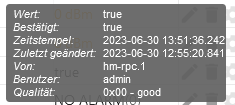
Das war der Netzwerkausfall bei dem das Gerät nicht erreichbar war, seit diesem Zeitpunkt ist UREACH auf true.
Wenn ich mir das Device direkt in der RaspberryMatic anschaue mit SDA (ScriptDeveloper) ist dort der Status UNREACH nicht gesetzt.Und aus irgendeinem Grund wird dieser State nicht aktualisiert...
Jürgen
-
@homoran sagte in hm-rpc aktualisiert nicht alle Werte im Objektbaum:
die schwarzen Werte wurden jedoch geändert/aktualisiert
OK, hier der Zeitstempel von UNREACH:
Das war der Netzwerkausfall bei dem das Gerät nicht erreichbar war, seit diesem Zeitpunkt ist UREACH auf true.
Wenn ich mir das Device direkt in der RaspberryMatic anschaue mit SDA (ScriptDeveloper) ist dort der Status UNREACH nicht gesetzt.Und aus irgendeinem Grund wird dieser State nicht aktualisiert...
@coffee-junk sagte in hm-rpc aktualisiert nicht alle Werte im Objektbaum:
seit diesem Zeitpunkt ist UREACH auf true.
ist so! (leider) liegt an Homematic.
-
@coffee-junk sagte in hm-rpc aktualisiert nicht alle Werte im Objektbaum:
seit diesem Zeitpunkt ist UREACH auf true.
ist so! (leider) liegt an Homematic.
@homoran sagte in hm-rpc aktualisiert nicht alle Werte im Objektbaum:
liegt an Homematic
Hmmmm seltsam, hier die Werte direkt aus der Homematic:
<state>
<device name="Gartenpumpe-Keller" ise_id="*hidden*" unreach="false" sticky_unreach="false" config_pending="false">
<channel name="Gartenpumpe-Keller:0" ise_id="*hidden*">
<datapoint name="BidCos-RF.*hidden*:0.UNREACH" type="UNREACH" ise_id="26345" value="false" valuetype="2" valueunit="" timestamp="1688731914"/>
<datapoint name="BidCos-RF.*hidden*:0.STICKY_UNREACH" type="STICKY_UNREACH" ise_id="26341" value="false" valuetype="2" valueunit="" timestamp="1688731914"/>
<datapoint name="BidCos-RF.*hidden*:0.CONFIG_PENDING" type="CONFIG_PENDING" ise_id="26327" value="false" valuetype="2" valueunit="" timestamp="1688731914"/>
<datapoint name="BidCos-RF.*hidden*:0.DUTYCYCLE" type="DUTYCYCLE" ise_id="26335" value="false" valuetype="2" valueunit="" timestamp="1688731914"/>
<datapoint name="BidCos-RF.*hidden*:0.RSSI_DEVICE" type="RSSI_DEVICE" ise_id="26339" value="-70" valuetype="16" valueunit="" timestamp="1688731914"/>
<datapoint name="BidCos-RF.*hidden*:0.RSSI_PEER" type="RSSI_PEER" ise_id="26340" value="-62" valuetype="16" valueunit="" timestamp="1688731914"/>
<datapoint name="BidCos-RF.*hidden*:0.DEVICE_IN_BOOTLOADER" type="DEVICE_IN_BOOTLOADER" ise_id="26331" value="false" valuetype="2" valueunit="" timestamp="1688731914"/>
<datapoint name="BidCos-RF.*hidden*:0.UPDATE_PENDING" type="UPDATE_PENDING" ise_id="26349" value="false" valuetype="2" valueunit="" timestamp="1688731914"/>
Wobei der Timestamp der Zeit Fri Jul 07 2023 14:11:54 GMT+0200 entspricht.
Und die Werte in der HM und ioBroker sind fast alle komplett unterschiedlich.....
Gibt es keine Möglichkeit die Werte neu einzulesen in ioBroker?
Jürgen
-
@homoran sagte in hm-rpc aktualisiert nicht alle Werte im Objektbaum:
liegt an Homematic
Hmmmm seltsam, hier die Werte direkt aus der Homematic:
<state>
<device name="Gartenpumpe-Keller" ise_id="*hidden*" unreach="false" sticky_unreach="false" config_pending="false">
<channel name="Gartenpumpe-Keller:0" ise_id="*hidden*">
<datapoint name="BidCos-RF.*hidden*:0.UNREACH" type="UNREACH" ise_id="26345" value="false" valuetype="2" valueunit="" timestamp="1688731914"/>
<datapoint name="BidCos-RF.*hidden*:0.STICKY_UNREACH" type="STICKY_UNREACH" ise_id="26341" value="false" valuetype="2" valueunit="" timestamp="1688731914"/>
<datapoint name="BidCos-RF.*hidden*:0.CONFIG_PENDING" type="CONFIG_PENDING" ise_id="26327" value="false" valuetype="2" valueunit="" timestamp="1688731914"/>
<datapoint name="BidCos-RF.*hidden*:0.DUTYCYCLE" type="DUTYCYCLE" ise_id="26335" value="false" valuetype="2" valueunit="" timestamp="1688731914"/>
<datapoint name="BidCos-RF.*hidden*:0.RSSI_DEVICE" type="RSSI_DEVICE" ise_id="26339" value="-70" valuetype="16" valueunit="" timestamp="1688731914"/>
<datapoint name="BidCos-RF.*hidden*:0.RSSI_PEER" type="RSSI_PEER" ise_id="26340" value="-62" valuetype="16" valueunit="" timestamp="1688731914"/>
<datapoint name="BidCos-RF.*hidden*:0.DEVICE_IN_BOOTLOADER" type="DEVICE_IN_BOOTLOADER" ise_id="26331" value="false" valuetype="2" valueunit="" timestamp="1688731914"/>
<datapoint name="BidCos-RF.*hidden*:0.UPDATE_PENDING" type="UPDATE_PENDING" ise_id="26349" value="false" valuetype="2" valueunit="" timestamp="1688731914"/>
Wobei der Timestamp der Zeit Fri Jul 07 2023 14:11:54 GMT+0200 entspricht.
Und die Werte in der HM und ioBroker sind fast alle komplett unterschiedlich.....
Gibt es keine Möglichkeit die Werte neu einzulesen in ioBroker?
@coffee-junk sagte in hm-rpc aktualisiert nicht alle Werte im Objektbaum:
Gibt es keine Möglichkeit die Werte neu einzulesen in ioBroker?
wenn Homematic sie nicht rausrückt?
leider nicht -
@coffee-junk sagte in hm-rpc aktualisiert nicht alle Werte im Objektbaum:
Gibt es keine Möglichkeit die Werte neu einzulesen in ioBroker?
wenn Homematic sie nicht rausrückt?
leider nicht@homoran sagte in hm-rpc aktualisiert nicht alle Werte im Objektbaum:
wenn Homematic sie nicht rausrückt?
leider nichtOK, dann muss ich damit leben. Allerdings, wenn ich die Instanz lösche und neu anlege, stimmen die Werte wieder, dann rückt die HM damit raus. Wo ist der Unterschied, technisch gesehen?
-
Also, das einzige was wirklich hilft, wenn sich die States zwischen der Zentrale und ioBroker verhakt haben:
- Die Geräte stromlos machen
- Unreach in der Zentrale abwarten
- Geräte wieder in Betrieb nehmen
Danach sind die States in ioBroker und RaspberryMatic wieder synchron.
Jürgen
-
Also, das einzige was wirklich hilft, wenn sich die States zwischen der Zentrale und ioBroker verhakt haben:
- Die Geräte stromlos machen
- Unreach in der Zentrale abwarten
- Geräte wieder in Betrieb nehmen
Danach sind die States in ioBroker und RaspberryMatic wieder synchron.
@coffee-junk sagte in hm-rpc aktualisiert nicht alle Werte im Objektbaum:
Danach sind die States in ioBroker und RaspberryMatic wieder synchron.
aber sie bleiben es nicht
-
Also, das einzige was wirklich hilft, wenn sich die States zwischen der Zentrale und ioBroker verhakt haben:
- Die Geräte stromlos machen
- Unreach in der Zentrale abwarten
- Geräte wieder in Betrieb nehmen
Danach sind die States in ioBroker und RaspberryMatic wieder synchron.
Dein nodejs ist nicht richtig aufgesetzt:
Nodejs-Version: 	16.19.0
NPM-Version: 	          9.8.0
Passt nicht.
Nodejs 16 kommt so daher:Node.js 16.20.1 Gallium 2023-06-20 8.19.4Schau dir
iob diagan. Und installier da sauber nodejs@18.
-
Dein nodejs ist nicht richtig aufgesetzt:
Nodejs-Version: 	16.19.0
NPM-Version: 	          9.8.0
Passt nicht.
Nodejs 16 kommt so daher:Node.js 16.20.1 Gallium 2023-06-20 8.19.4Schau dir
iob diagan. Und installier da sauber nodejs@18.
@thomas-braun sagte in hm-rpc aktualisiert nicht alle Werte im Objektbaum:
Und installier da sauber nodejs@18
Cool, die Funktion iob diag kannte ich noch gar nicht. Vielen Dank!
Habe jetzt NodeJS 18 installiert, ich weiss jetzt nicht ob es damit zu tun hat, aber nun werden alle States, auch die RSSI Werte aktualisiert.
Vorher war RSSI immer 0.
Danke!
Jürgen
-
@thomas-braun sagte in hm-rpc aktualisiert nicht alle Werte im Objektbaum:
Und installier da sauber nodejs@18
Cool, die Funktion iob diag kannte ich noch gar nicht. Vielen Dank!
Habe jetzt NodeJS 18 installiert, ich weiss jetzt nicht ob es damit zu tun hat, aber nun werden alle States, auch die RSSI Werte aktualisiert.
Vorher war RSSI immer 0.
Danke!
Zeig mal die Ausgabe von iob diag.
-
Zeig mal die Ausgabe von iob diag.
@thomas-braun sagte in hm-rpc aktualisiert nicht alle Werte im Objektbaum:
Zeig mal die Ausgabe von iob diag
Skript v.2023-04-16

*** BASE SYSTEM ***
Model           : Raspberry Pi 4 Model B Rev 1.1
Architecture    : aarch64
Docker          : false
Virtualization  : none
Distributor ID: Debian
Description:    Debian GNU/Linux 11 (bullseye)
Release:        11
Codename:       bullseye

PRETTY_NAME="Debian GNU/Linux 11 (bullseye)"
NAME="Debian GNU/Linux"
VERSION_ID="11"
VERSION="11 (bullseye)"
VERSION_CODENAME=bullseye
ID=debian
HOME_URL="https://www.debian.org/"
SUPPORT_URL="https://www.debian.org/support"
BUG_REPORT_URL="https://bugs.debian.org/"

Systemuptime and Load:
 22:10:50 up 11 min,  1 user,  load average: 0.22, 0.33, 0.31
CPU threads: 4

Raspberry only:
throttled=0x0
Other values than 0x0 hint to temperature/voltage problems
temp=63.7'C
volt=0.8375V

*** Time and Time Zones ***
               Local time: Sun 2023-07-09 22:10:50 CEST
           Universal time: Sun 2023-07-09 20:10:50 UTC
                 RTC time: Sun 2023-07-09 20:10:50
                Time zone: Europe/Berlin (CEST, +0200)
System clock synchronized: yes
              NTP service: active
          RTC in local TZ: no

*** User and Groups ***
root
/root
root

*** X-Server-Setup ***
X-Server:       false
Desktop:
Terminal:       tty
Boot Target:    multi-user.target

*** MEMORY ***
               total        used        free      shared  buff/cache   available
Mem:            3.8G        1.1G        2.4G        1.0M        288M        2.6G
Swap:            99M          0B         99M
Total:          3.9G        1.1G        2.5G

         3794 M total memory
         1141 M used memory
         1202 M active memory
          120 M inactive memory
         2364 M free memory
           32 M buffer memory
          255 M swap cache
           99 M total swap
            0 M used swap
           99 M free swap

Raspberry only:
oom events: 0
lifetime oom required: 0 Mbytes
total time in oom handler: 0 ms
max time spent in oom handler: 0 ms

*** FILESYSTEM ***
Filesystem     Type      Size  Used Avail Use% Mounted on
/dev/root      ext4       59G  4.1G   52G   8% /
devtmpfs       devtmpfs  1.7G     0  1.7G   0% /dev
tmpfs          tmpfs     1.9G     0  1.9G   0% /dev/shm
tmpfs          tmpfs     759M  1.1M  758M   1% /run
tmpfs          tmpfs     5.0M  4.0K  5.0M   1% /run/lock
/dev/mmcblk0p1 vfat      255M   31M  225M  13% /boot
tmpfs          tmpfs     380M     0  380M   0% /run/user/0

Messages concerning ext4 filesystem in dmesg:
[Sun Jul  9 21:59:24 2023] Kernel command line: coherent_pool=1M 8250.nr_uarts=0 snd_bcm2835.enable_headphones=0 snd_bcm2835.enable_headphones=1 snd_bcm2835.enable_hdmi=1 snd_bcm2835.enable_hdmi=0  smsc95xx.macaddr=DC:A6:32:30:83:BE vc_mem.mem_base=0x3ec00000 vc_mem.mem_size=0x40000000  console=ttyS0,115200 console=tty1 root=PARTUUID=ae9472db-02 rootfstype=ext4 fsck.repair=yes rootwait
[Sun Jul  9 21:59:25 2023] EXT4-fs (mmcblk0p2): mounted filesystem with ordered data mode. Quota mode: none.
[Sun Jul  9 21:59:25 2023] VFS: Mounted root (ext4 filesystem) readonly on device 179:2.
[Sun Jul  9 21:59:27 2023] EXT4-fs (mmcblk0p2): re-mounted. Quota mode: none.

Show mounted filesystems (real ones only):
TARGET  SOURCE         FSTYPE OPTIONS
/       /dev/mmcblk0p2 ext4   rw,noatime
`-/boot /dev/mmcblk0p1 vfat   rw,relatime,fmask=0022,dmask=0022,codepage=437,iocharset=ascii,shortname=mixed,errors=remount-ro

Files in neuralgic directories:

/var:
1.4G    /var/
670M    /var/log
665M    /var/log/journal/8a29fdabcce1430aa6d3100d0130e62c
665M    /var/log/journal
491M    /var/cache

Archived and active journals take up 664.1M in the file system.

/opt/iobroker/backups:
3.3M    /opt/iobroker/backups/

/opt/iobroker/iobroker-data:
160M    /opt/iobroker/iobroker-data/
102M    /opt/iobroker/iobroker-data/files
52M     /opt/iobroker/iobroker-data/files/javascript.admin
46M     /opt/iobroker/iobroker-data/backup-objects
34M     /opt/iobroker/iobroker-data/files/javascript.admin/static

The five largest files in iobroker-data are:
9.7M    /opt/iobroker/iobroker-data/objects.jsonl
6.9M    /opt/iobroker/iobroker-data/files/javascript.admin/static/js/610.312d98a8.chunk.js.map
6.3M    /opt/iobroker/iobroker-data/files/admin.admin/custom/static/js/vendors-node_modules_iobroker_adapter-react-v5_assets_devices_parseNames_js-node_modules_iobr-99c23e.847b8ad9.chunk.js.map
5.9M    /opt/iobroker/iobroker-data/files/javascript.admin/static/js/44.59b48e42.chunk.js.map
4.6M    /opt/iobroker/iobroker-data/files/javascript.admin/vs/language/typescript/tsWorker.js

*** NodeJS-Installation ***

/usr/bin/nodejs         v18.16.1
/usr/bin/node           v18.16.1
/usr/bin/npm            9.5.1
/usr/bin/npx            9.5.1


nodejs:
  Installed: 18.16.1-deb-1nodesource1
  Candidate: 18.16.1-deb-1nodesource1
  Version table:
 *** 18.16.1-deb-1nodesource1 500
        500 https://deb.nodesource.com/node_18.x bullseye/main arm64 Packages
        100 /var/lib/dpkg/status
     12.22.12~dfsg-1~deb11u4 500
        500 http://security.debian.org/debian-security bullseye-security/main arm64 Packages
     12.22.12~dfsg-1~deb11u3 500
        500 http://deb.debian.org/debian bullseye/main arm64 Packages

Temp directories causing npm8 problem: 0
No problems detected

*** ioBroker-Installation ***

ioBroker Status
iobroker is running on this host.


Objects type: jsonl
States  type: jsonl

MULTIHOSTSERVICE/enabled: false

Core adapters versions
js-controller:  4.0.24
admin:          6.3.5
javascript:     7.0.3

Adapters from github:   0

Adapter State
+ system.adapter.admin.0                  : admin                 : Homevision                               -  enabled, port: 8081, bind: 0.0.0.0 (SSL), run as: admin
  system.adapter.admin.1                  : admin                 : Homevision                               - disabled, port: 8090, bind: 0.0.0.0, run as: admin
+ system.adapter.backitup.0               : backitup              : Homevision                               -  enabled
+ system.adapter.discovery.0              : discovery             : Homevision                               -  enabled
+ system.adapter.email.0                  : email                 : Homevision                               -  enabled
  system.adapter.flot.0                   : flot                  : Homevision                               - disabled
+ system.adapter.hm-rega.0                : hm-rega               : Homevision                               -  enabled
+ system.adapter.hm-rpc.0                 : hm-rpc                : Homevision                               -  enabled, port: 18701
+ system.adapter.hm-rpc.1                 : hm-rpc                : Homevision                               -  enabled, port: 12001
+ system.adapter.hm-rpc.2                 : hm-rpc                : Homevision                               -  enabled, port: 12010
  system.adapter.ical.0                   : ical                  : Homevision                               -  enabled
+ system.adapter.info.0                   : info                  : Homevision                               -  enabled
+ system.adapter.javascript.0             : javascript            : Homevision                               -  enabled
  system.adapter.javascript.1             : javascript            : Homevision                               - disabled
+ system.adapter.nut.0                    : nut                   : Homevision                               -  enabled
+ system.adapter.nut.1                    : nut                   : Homevision                               -  enabled
+ system.adapter.ping.0                   : ping                  : Homevision                               -  enabled
+ system.adapter.rpi2.0                   : rpi2                  : Homevision                               -  enabled
+ system.adapter.sql.0                    : sql                   : Homevision                               -  enabled, port: 3307
  system.adapter.vis-bars.0               : vis-bars              : Homevision                               - disabled
  system.adapter.vis-canvas-gauges.0      : vis-canvas-gauges     : Homevision                               - disabled
  system.adapter.vis-colorpicker.0        : vis-colorpicker       : Homevision                               - disabled
  system.adapter.vis-fancyswitch.0        : vis-fancyswitch       : Homevision                               - disabled
  system.adapter.vis-hqwidgets.0          : vis-hqwidgets         : Homevision                               - disabled
  system.adapter.vis-metro.0              : vis-metro             : Homevision                               - disabled
  system.adapter.vis.0                    : vis                   : Homevision                               -  enabled
+ system.adapter.web.0                    : web                   : Homevision                               -  enabled, port: 8082, bind: 0.0.0.0 (SSL), run as: admin
+ system.adapter.web.1                    : web                   : Homevision                               -  enabled, port: 8083, bind: 0.0.0.0, run as: admin

+ instance is alive

Enabled adapters with bindings
+ system.adapter.admin.0                  : admin                 : Homevision                               -  enabled, port: 8081, bind: 0.0.0.0 (SSL), run as: admin
+ system.adapter.hm-rpc.0                 : hm-rpc                : Homevision                               -  enabled, port: 18701
+ system.adapter.hm-rpc.1                 : hm-rpc                : Homevision                               -  enabled, port: 12001
+ system.adapter.hm-rpc.2                 : hm-rpc                : Homevision                               -  enabled, port: 12010
+ system.adapter.sql.0                    : sql                   : Homevision                               -  enabled, port: 3307
+ system.adapter.web.0                    : web                   : Homevision                               -  enabled, port: 8082, bind: 0.0.0.0 (SSL), run as: admin
+ system.adapter.web.1                    : web                   : Homevision                               -  enabled, port: 8083, bind: 0.0.0.0, run as: admin

ioBroker-Repositories
Stable (default): http://download.iobroker.net/sources-dist.json
Beta (latest) : http://download.iobroker.net/sources-dist-latest.json

Active repo(s): Stable (default)

Installed ioBroker-Instances
Used repository: Stable (default)
Adapter    "admin"        : 6.3.5    , installed 6.3.5
Adapter    "backitup"     : 2.6.23   , installed 2.6.23
Adapter    "discovery"    : 3.1.0    , installed 3.1.0
Adapter    "email"        : 1.2.0    , installed 1.2.0
Adapter    "flot"         : 1.12.0   , installed 1.12.0
Adapter    "hm-rega"      : 3.0.46   , installed 3.0.46
Adapter    "hm-rpc"       : 1.15.18  , installed 1.15.18
Adapter    "ical"         : 1.13.3   , installed 1.13.3
Adapter    "info"         : 1.9.26   , installed 1.9.26
Adapter    "javascript"   : 7.0.3    , installed 7.0.3
Controller "js-controller": 4.0.24   , installed 4.0.24
Adapter    "nut"          : 1.6.0    , installed 1.6.0
Adapter    "ping"         : 1.5.3    , installed 1.5.3
Adapter    "rpi2"         : 1.3.2    , installed 1.3.2
Adapter    "simple-api"   : 2.7.2    , installed 2.7.2
Adapter    "socketio"     : 4.2.0    , installed 4.2.0
Adapter    "sql"          : 2.2.0    , installed 2.2.0
Adapter    "vis"          : 1.4.16   , installed 1.4.16
Adapter    "vis-bars"     : 0.1.4    , installed 0.1.4
Adapter    "vis-canvas-gauges": 1.0.1, installed 1.0.1
Adapter    "vis-colorpicker": 2.0.3  , installed 2.0.3
Adapter    "vis-fancyswitch": 1.1.0  , installed 1.1.0
Adapter    "vis-hqwidgets": 1.4.0    , installed 1.4.0
Adapter    "vis-metro"    : 1.2.0    , installed 1.2.0
Adapter    "web"          : 4.3.0    , installed 4.3.0
Adapter    "ws"           : 1.3.0    , installed 1.3.0

Objects and States
Please stand by - This may take a while
Objects:        8978
States:         8312

*** OS-Repositories and Updates ***
Hit:1 http://deb.debian.org/debian bullseye InRelease
Hit:2 http://deb.debian.org/debian bullseye-updates InRelease
Hit:3 http://security.debian.org/debian-security bullseye-security InRelease
Hit:4 http://archive.raspberrypi.org/debian bullseye InRelease
Hit:5 https://deb.nodesource.com/node_18.x bullseye InRelease
Reading package lists...
Pending Updates: 0

*** Listening Ports ***
Active Internet connections (only servers)
Proto Recv-Q Send-Q Local Address           Foreign Address         State       User       Inode      PID/Program name
tcp        0      0 0.0.0.0:22              0.0.0.0:*               LISTEN      0          14625      553/sshd: /usr/sbin
tcp        0      0 192.168.29.22:18701     0.0.0.0:*               LISTEN      1001       14829      761/io.hm-rpc.0
tcp        0      0 192.168.29.22:12001     0.0.0.0:*               LISTEN      1001       12733      776/io.hm-rpc.1
tcp        0      0 192.168.29.22:12010     0.0.0.0:*               LISTEN      1001       12760      791/io.hm-rpc.2
tcp        0      0 127.0.0.1:9001          0.0.0.0:*               LISTEN      1001       11179      513/iobroker.js-con
tcp        0      0 127.0.0.1:9000          0.0.0.0:*               LISTEN      1001       11186      513/iobroker.js-con
tcp6       0      0 :::22                   :::*                    LISTEN      0          14627      553/sshd: /usr/sbin
tcp6       0      0 :::8081                 :::*                    LISTEN      1001       14079      588/io.admin.0
tcp6       0      0 :::8083                 :::*                    LISTEN      1001       17856      1062/io.web.1
tcp6       0      0 :::8082                 :::*                    LISTEN      1001       15839      1045/io.web.0
udp        0      0 0.0.0.0:5353            0.0.0.0:*                           108        13870      400/avahi-daemon: r
udp        0      0 0.0.0.0:44872           0.0.0.0:*                           108        13872      400/avahi-daemon: r
udp        0      0 0.0.0.0:68              0.0.0.0:*                           0          12590      682/dhcpcd
udp6       0      0 :::5353                 :::*                                108        13871      400/avahi-daemon: r
udp6       0      0 :::36789                :::*                                108        13873      400/avahi-daemon: r

*** Log File - Last 25 Lines ***
2023-07-09 22:00:52.617  - info: web.0 (1045) starting. Version 4.3.0 in /opt/iobroker/node_modules/iobroker.web, node: v18.16.1, js-controller: 4.0.24
2023-07-09 22:00:52.653  - info: info.0 (971) starting. Version 1.9.26 in /opt/iobroker/node_modules/iobroker.info, node: v18.16.1, js-controller: 4.0.24
2023-07-09 22:00:52.662  - info: hm-rega.0 (746) update favorites to enum.favorites
2023-07-09 22:00:53.159  - info: info.0 (971) Reading/updating systemdata.
2023-07-09 22:00:53.294  - info: web.0 (1045) Secure socket.io server listening on port 8082
2023-07-09 22:00:53.304  - info: web.0 (1045) https server listening on port 8082
2023-07-09 22:00:54.540  - info: info.0 (971) State value to set for "info.0.sysinfo.cpu.info.speed" has to be type "string" but received type "number"
2023-07-09 22:00:54.735  - info: info.0 (971) State value to set for "info.0.sysinfo.cpu.info.cache-l3" has to be type "number" but received type "string"
2023-07-09 22:00:55.054  - info: web.1 (1062) starting. Version 4.3.0 in /opt/iobroker/node_modules/iobroker.web, node: v18.16.1, js-controller: 4.0.24
2023-07-09 22:00:55.091  - info: info.0 (971) cpu Temp res = {"main":73.036,"cores":[],"max":73.036,"socket":[],"chipset":null}
2023-07-09 22:00:55.575  - info: web.1 (1062) socket.io server listening on port 8083
2023-07-09 22:00:55.585  - info: web.1 (1062) http server listening on port 8083
2023-07-09 22:01:04.385  - info: admin.0 (588) ==> Connected system.user.admin from ::ffff:192.168.29.31
2023-07-09 22:01:06.059  - info: host.Homevision Updating repository "Stable (default)" under "http://download.iobroker.net/sources-dist.json"
2023-07-09 22:01:16.666  - info: javascript.0 (720) script.js.Ueberwachung.IOB-KomGestoert: Unreach Monitor wurde initalisiert
2023-07-09 22:01:21.668  - info: javascript.0 (720) script.js.Ueberwachung.IOB-KomGestoert: Unreach Monitor laeuft
2023-07-09 22:01:36.438  - info: admin.0 (588) <== Disconnect system.user.admin from ::ffff:192.168.29.31
2023-07-09 22:03:50.871  - info: admin.0 (588) <== Disconnect system.user.admin from ::ffff:192.168.29.31 admin
Die Einträge des Logfiles habe ich etwas gekürzt wegen Daten....
Jürgen
-
@thomas-braun sagte in hm-rpc aktualisiert nicht alle Werte im Objektbaum:
Zeig mal die Ausgabe von iob diag
Skript v.2023-04-16

*** BASE SYSTEM ***
Model           : Raspberry Pi 4 Model B Rev 1.1
Architecture    : aarch64
Docker          : false
Virtualization  : none
Distributor ID: Debian
Description:    Debian GNU/Linux 11 (bullseye)
Release:        11
Codename:       bullseye

PRETTY_NAME="Debian GNU/Linux 11 (bullseye)"
NAME="Debian GNU/Linux"
VERSION_ID="11"
VERSION="11 (bullseye)"
VERSION_CODENAME=bullseye
ID=debian
HOME_URL="https://www.debian.org/"
SUPPORT_URL="https://www.debian.org/support"
BUG_REPORT_URL="https://bugs.debian.org/"

Systemuptime and Load:
 22:10:50 up 11 min,  1 user,  load average: 0.22, 0.33, 0.31
CPU threads: 4

Raspberry only:
throttled=0x0
Other values than 0x0 hint to temperature/voltage problems
temp=63.7'C
volt=0.8375V

*** Time and Time Zones ***
               Local time: Sun 2023-07-09 22:10:50 CEST
           Universal time: Sun 2023-07-09 20:10:50 UTC
                 RTC time: Sun 2023-07-09 20:10:50
                Time zone: Europe/Berlin (CEST, +0200)
System clock synchronized: yes
              NTP service: active
          RTC in local TZ: no

*** User and Groups ***
root
/root
root

*** X-Server-Setup ***
X-Server:       false
Desktop:
Terminal:       tty
Boot Target:    multi-user.target

*** MEMORY ***
               total        used        free      shared  buff/cache   available
Mem:            3.8G        1.1G        2.4G        1.0M        288M        2.6G
Swap:            99M          0B         99M
Total:          3.9G        1.1G        2.5G

         3794 M total memory
         1141 M used memory
         1202 M active memory
          120 M inactive memory
         2364 M free memory
           32 M buffer memory
          255 M swap cache
           99 M total swap
            0 M used swap
           99 M free swap

Raspberry only:
oom events: 0
lifetime oom required: 0 Mbytes
total time in oom handler: 0 ms
max time spent in oom handler: 0 ms

*** FILESYSTEM ***
Filesystem     Type      Size  Used Avail Use% Mounted on
/dev/root      ext4       59G  4.1G   52G   8% /
devtmpfs       devtmpfs  1.7G     0  1.7G   0% /dev
tmpfs          tmpfs     1.9G     0  1.9G   0% /dev/shm
tmpfs          tmpfs     759M  1.1M  758M   1% /run
tmpfs          tmpfs     5.0M  4.0K  5.0M   1% /run/lock
/dev/mmcblk0p1 vfat      255M   31M  225M  13% /boot
tmpfs          tmpfs     380M     0  380M   0% /run/user/0

Messages concerning ext4 filesystem in dmesg:
[Sun Jul  9 21:59:24 2023] Kernel command line: coherent_pool=1M 8250.nr_uarts=0 snd_bcm2835.enable_headphones=0 snd_bcm2835.enable_headphones=1 snd_bcm2835.enable_hdmi=1 snd_bcm2835.enable_hdmi=0  smsc95xx.macaddr=DC:A6:32:30:83:BE vc_mem.mem_base=0x3ec00000 vc_mem.mem_size=0x40000000  console=ttyS0,115200 console=tty1 root=PARTUUID=ae9472db-02 rootfstype=ext4 fsck.repair=yes rootwait
[Sun Jul  9 21:59:25 2023] EXT4-fs (mmcblk0p2): mounted filesystem with ordered data mode. Quota mode: none.
[Sun Jul  9 21:59:25 2023] VFS: Mounted root (ext4 filesystem) readonly on device 179:2.
[Sun Jul  9 21:59:27 2023] EXT4-fs (mmcblk0p2): re-mounted. Quota mode: none.

Show mounted filesystems (real ones only):
TARGET  SOURCE         FSTYPE OPTIONS
/       /dev/mmcblk0p2 ext4   rw,noatime
`-/boot /dev/mmcblk0p1 vfat   rw,relatime,fmask=0022,dmask=0022,codepage=437,iocharset=ascii,shortname=mixed,errors=remount-ro

Files in neuralgic directories:

/var:
1.4G    /var/
670M    /var/log
665M    /var/log/journal/8a29fdabcce1430aa6d3100d0130e62c
665M    /var/log/journal
491M    /var/cache

Archived and active journals take up 664.1M in the file system.

/opt/iobroker/backups:
3.3M    /opt/iobroker/backups/

/opt/iobroker/iobroker-data:
160M    /opt/iobroker/iobroker-data/
102M    /opt/iobroker/iobroker-data/files
52M     /opt/iobroker/iobroker-data/files/javascript.admin
46M     /opt/iobroker/iobroker-data/backup-objects
34M     /opt/iobroker/iobroker-data/files/javascript.admin/static

The five largest files in iobroker-data are:
9.7M    /opt/iobroker/iobroker-data/objects.jsonl
6.9M    /opt/iobroker/iobroker-data/files/javascript.admin/static/js/610.312d98a8.chunk.js.map
6.3M    /opt/iobroker/iobroker-data/files/admin.admin/custom/static/js/vendors-node_modules_iobroker_adapter-react-v5_assets_devices_parseNames_js-node_modules_iobr-99c23e.847b8ad9.chunk.js.map
5.9M    /opt/iobroker/iobroker-data/files/javascript.admin/static/js/44.59b48e42.chunk.js.map
4.6M    /opt/iobroker/iobroker-data/files/javascript.admin/vs/language/typescript/tsWorker.js

*** NodeJS-Installation ***

/usr/bin/nodejs         v18.16.1
/usr/bin/node           v18.16.1
/usr/bin/npm            9.5.1
/usr/bin/npx            9.5.1


nodejs:
  Installed: 18.16.1-deb-1nodesource1
  Candidate: 18.16.1-deb-1nodesource1
  Version table:
 *** 18.16.1-deb-1nodesource1 500
        500 https://deb.nodesource.com/node_18.x bullseye/main arm64 Packages
        100 /var/lib/dpkg/status
     12.22.12~dfsg-1~deb11u4 500
        500 http://security.debian.org/debian-security bullseye-security/main arm64 Packages
     12.22.12~dfsg-1~deb11u3 500
        500 http://deb.debian.org/debian bullseye/main arm64 Packages

Temp directories causing npm8 problem: 0
No problems detected

*** ioBroker-Installation ***

ioBroker Status
iobroker is running on this host.


Objects type: jsonl
States  type: jsonl

MULTIHOSTSERVICE/enabled: false

Core adapters versions
js-controller:  4.0.24
admin:          6.3.5
javascript:     7.0.3

Adapters from github:   0

Adapter State
+ system.adapter.admin.0                  : admin                 : Homevision                               -  enabled, port: 8081, bind: 0.0.0.0 (SSL), run as: admin
  system.adapter.admin.1                  : admin                 : Homevision                               - disabled, port: 8090, bind: 0.0.0.0, run as: admin
+ system.adapter.backitup.0               : backitup              : Homevision                               -  enabled
+ system.adapter.discovery.0              : discovery             : Homevision                               -  enabled
+ system.adapter.email.0                  : email                 : Homevision                               -  enabled
  system.adapter.flot.0                   : flot                  : Homevision                               - disabled
+ system.adapter.hm-rega.0                : hm-rega               : Homevision                               -  enabled
+ system.adapter.hm-rpc.0                 : hm-rpc                : Homevision                               -  enabled, port: 18701
+ system.adapter.hm-rpc.1                 : hm-rpc                : Homevision                               -  enabled, port: 12001
+ system.adapter.hm-rpc.2                 : hm-rpc                : Homevision                               -  enabled, port: 12010
  system.adapter.ical.0                   : ical                  : Homevision                               -  enabled
+ system.adapter.info.0                   : info                  : Homevision                               -  enabled
+ system.adapter.javascript.0             : javascript            : Homevision                               -  enabled
  system.adapter.javascript.1             : javascript            : Homevision                               - disabled
+ system.adapter.nut.0                    : nut                   : Homevision                               -  enabled
+ system.adapter.nut.1                    : nut                   : Homevision                               -  enabled
+ system.adapter.ping.0                   : ping                  : Homevision                               -  enabled
+ system.adapter.rpi2.0                   : rpi2                  : Homevision                               -  enabled
+ system.adapter.sql.0                    : sql                   : Homevision                               -  enabled, port: 3307
  system.adapter.vis-bars.0               : vis-bars              : Homevision                               - disabled
  system.adapter.vis-canvas-gauges.0      : vis-canvas-gauges     : Homevision                               - disabled
  system.adapter.vis-colorpicker.0        : vis-colorpicker       : Homevision                               - disabled
  system.adapter.vis-fancyswitch.0        : vis-fancyswitch       : Homevision                               - disabled
  system.adapter.vis-hqwidgets.0          : vis-hqwidgets         : Homevision                               - disabled
  system.adapter.vis-metro.0              : vis-metro             : Homevision                               - disabled
  system.adapter.vis.0                    : vis                   : Homevision                               -  enabled
+ system.adapter.web.0                    : web                   : Homevision                               -  enabled, port: 8082, bind: 0.0.0.0 (SSL), run as: admin
+ system.adapter.web.1                    : web                   : Homevision                               -  enabled, port: 8083, bind: 0.0.0.0, run as: admin

+ instance is alive

Enabled adapters with bindings
+ system.adapter.admin.0                  : admin                 : Homevision                               -  enabled, port: 8081, bind: 0.0.0.0 (SSL), run as: admin
+ system.adapter.hm-rpc.0                 : hm-rpc                : Homevision                               -  enabled, port: 18701
+ system.adapter.hm-rpc.1                 : hm-rpc                : Homevision                               -  enabled, port: 12001
+ system.adapter.hm-rpc.2                 : hm-rpc                : Homevision                               -  enabled, port: 12010
+ system.adapter.sql.0                    : sql                   : Homevision                               -  enabled, port: 3307
+ system.adapter.web.0                    : web                   : Homevision                               -  enabled, port: 8082, bind: 0.0.0.0 (SSL), run as: admin
+ system.adapter.web.1                    : web                   : Homevision                               -  enabled, port: 8083, bind: 0.0.0.0, run as: admin

ioBroker-Repositories
Stable (default): http://download.iobroker.net/sources-dist.json
Beta (latest) : http://download.iobroker.net/sources-dist-latest.json

Active repo(s): Stable (default)

Installed ioBroker-Instances
Used repository: Stable (default)
Adapter    "admin"        : 6.3.5    , installed 6.3.5
Adapter    "backitup"     : 2.6.23   , installed 2.6.23
Adapter    "discovery"    : 3.1.0    , installed 3.1.0
Adapter    "email"        : 1.2.0    , installed 1.2.0
Adapter    "flot"         : 1.12.0   , installed 1.12.0
Adapter    "hm-rega"      : 3.0.46   , installed 3.0.46
Adapter    "hm-rpc"       : 1.15.18  , installed 1.15.18
Adapter    "ical"         : 1.13.3   , installed 1.13.3
Adapter    "info"         : 1.9.26   , installed 1.9.26
Adapter    "javascript"   : 7.0.3    , installed 7.0.3
Controller "js-controller": 4.0.24   , installed 4.0.24
Adapter    "nut"          : 1.6.0    , installed 1.6.0
Adapter    "ping"         : 1.5.3    , installed 1.5.3
Adapter    "rpi2"         : 1.3.2    , installed 1.3.2
Adapter    "simple-api"   : 2.7.2    , installed 2.7.2
Adapter    "socketio"     : 4.2.0    , installed 4.2.0
Adapter    "sql"          : 2.2.0    , installed 2.2.0
Adapter    "vis"          : 1.4.16   , installed 1.4.16
Adapter    "vis-bars"     : 0.1.4    , installed 0.1.4
Adapter    "vis-canvas-gauges": 1.0.1, installed 1.0.1
Adapter    "vis-colorpicker": 2.0.3  , installed 2.0.3
Adapter    "vis-fancyswitch": 1.1.0  , installed 1.1.0
Adapter    "vis-hqwidgets": 1.4.0    , installed 1.4.0
Adapter    "vis-metro"    : 1.2.0    , installed 1.2.0
Adapter    "web"          : 4.3.0    , installed 4.3.0
Adapter    "ws"           : 1.3.0    , installed 1.3.0

Objects and States
Please stand by - This may take a while
Objects:        8978
States:         8312

*** OS-Repositories and Updates ***
Hit:1 http://deb.debian.org/debian bullseye InRelease
Hit:2 http://deb.debian.org/debian bullseye-updates InRelease
Hit:3 http://security.debian.org/debian-security bullseye-security InRelease
Hit:4 http://archive.raspberrypi.org/debian bullseye InRelease
Hit:5 https://deb.nodesource.com/node_18.x bullseye InRelease
Reading package lists...
Pending Updates: 0

*** Listening Ports ***
Active Internet connections (only servers)
Proto Recv-Q Send-Q Local Address           Foreign Address         State       User       Inode      PID/Program name
tcp        0      0 0.0.0.0:22              0.0.0.0:*               LISTEN      0          14625      553/sshd: /usr/sbin
tcp        0      0 192.168.29.22:18701     0.0.0.0:*               LISTEN      1001       14829      761/io.hm-rpc.0
tcp        0      0 192.168.29.22:12001     0.0.0.0:*               LISTEN      1001       12733      776/io.hm-rpc.1
tcp        0      0 192.168.29.22:12010     0.0.0.0:*               LISTEN      1001       12760      791/io.hm-rpc.2
tcp        0      0 127.0.0.1:9001          0.0.0.0:*               LISTEN      1001       11179      513/iobroker.js-con
tcp        0      0 127.0.0.1:9000          0.0.0.0:*               LISTEN      1001       11186      513/iobroker.js-con
tcp6       0      0 :::22                   :::*                    LISTEN      0          14627      553/sshd: /usr/sbin
tcp6       0      0 :::8081                 :::*                    LISTEN      1001       14079      588/io.admin.0
tcp6       0      0 :::8083                 :::*                    LISTEN      1001       17856      1062/io.web.1
tcp6       0      0 :::8082                 :::*                    LISTEN      1001       15839      1045/io.web.0
udp        0      0 0.0.0.0:5353            0.0.0.0:*                           108        13870      400/avahi-daemon: r
udp        0      0 0.0.0.0:44872           0.0.0.0:*                           108        13872      400/avahi-daemon: r
udp        0      0 0.0.0.0:68              0.0.0.0:*                           0          12590      682/dhcpcd
udp6       0      0 :::5353                 :::*                                108        13871      400/avahi-daemon: r
udp6       0      0 :::36789                :::*                                108        13873      400/avahi-daemon: r

*** Log File - Last 25 Lines ***
2023-07-09 22:00:52.617  - info: web.0 (1045) starting. Version 4.3.0 in /opt/iobroker/node_modules/iobroker.web, node: v18.16.1, js-controller: 4.0.24
2023-07-09 22:00:52.653  - info: info.0 (971) starting. Version 1.9.26 in /opt/iobroker/node_modules/iobroker.info, node: v18.16.1, js-controller: 4.0.24
2023-07-09 22:00:52.662  - info: hm-rega.0 (746) update favorites to enum.favorites
2023-07-09 22:00:53.159  - info: info.0 (971) Reading/updating systemdata.
2023-07-09 22:00:53.294  - info: web.0 (1045) Secure socket.io server listening on port 8082
2023-07-09 22:00:53.304  - info: web.0 (1045) https server listening on port 8082
2023-07-09 22:00:54.540  - info: info.0 (971) State value to set for "info.0.sysinfo.cpu.info.speed" has to be type "string" but received type "number"
2023-07-09 22:00:54.735  - info: info.0 (971) State value to set for "info.0.sysinfo.cpu.info.cache-l3" has to be type "number" but received type "string"
2023-07-09 22:00:55.054  - info: web.1 (1062) starting. Version 4.3.0 in /opt/iobroker/node_modules/iobroker.web, node: v18.16.1, js-controller: 4.0.24
2023-07-09 22:00:55.091  - info: info.0 (971) cpu Temp res = {"main":73.036,"cores":[],"max":73.036,"socket":[],"chipset":null}
2023-07-09 22:00:55.575  - info: web.1 (1062) socket.io server listening on port 8083
2023-07-09 22:00:55.585  - info: web.1 (1062) http server listening on port 8083
2023-07-09 22:01:04.385  - info: admin.0 (588) ==> Connected system.user.admin from ::ffff:192.168.29.31
2023-07-09 22:01:06.059  - info: host.Homevision Updating repository "Stable (default)" under "http://download.iobroker.net/sources-dist.json"
2023-07-09 22:01:16.666  - info: javascript.0 (720) script.js.Ueberwachung.IOB-KomGestoert: Unreach Monitor wurde initalisiert
2023-07-09 22:01:21.668  - info: javascript.0 (720) script.js.Ueberwachung.IOB-KomGestoert: Unreach Monitor laeuft
2023-07-09 22:01:36.438  - info: admin.0 (588) <== Disconnect system.user.admin from ::ffff:192.168.29.31
2023-07-09 22:03:50.871  - info: admin.0 (588) <== Disconnect system.user.admin from ::ffff:192.168.29.31 admin
Die Einträge des Logfiles habe ich etwas gekürzt wegen Daten....
Setz das sauber in CodeTags und hampel NICHT als root über das System.
-
Setz das sauber in CodeTags und hampel NICHT als root über das System.
@thomas-braun sagte in hm-rpc aktualisiert nicht alle Werte im Objektbaum:
Setz das sauber in CodeTags und hampel NICHT als root über das System
OK, Sorry, da ging wohl was schief....
@Homoran Danke fürs "richten" !

Hey! Du scheinst an dieser Unterhaltung interessiert zu sein, hast aber noch kein Konto.
Hast du es satt, bei jedem Besuch durch die gleichen Beiträge zu scrollen? Wenn du dich für ein Konto anmeldest, kommst du immer genau dorthin zurück, wo du zuvor warst, und kannst dich über neue Antworten benachrichtigen lassen (entweder per E-Mail oder Push-Benachrichtigung). Du kannst auch Lesezeichen speichern und Beiträge positiv bewerten, um anderen Community-Mitgliedern deine Wertschätzung zu zeigen.
Mit deinem Input könnte dieser Beitrag noch besser werden 💗
Registrieren Anmelden407
Online33.0k
Benutzer83.5k
Themen1.3m
Beiträge