Skip to content
  • Home
  • Aktuell
  • Tags
  • 0 Ungelesen 0
  • Kategorien
  • Unreplied
  • Beliebt
  • GitHub
  • Docu
  • Hilfe
Skins
  • Light
  • Brite
  • Cerulean
  • Cosmo
  • Flatly
  • Journal
  • Litera
  • Lumen
  • Lux
  • Materia
  • Minty
  • Morph
  • Pulse
  • Sandstone
  • Simplex
  • Sketchy
  • Spacelab
  • United
  • Yeti
  • Zephyr
  • Dark
  • Cyborg
  • Darkly
  • Quartz
  • Slate
  • Solar
  • Superhero
  • Vapor

  • Standard: (Kein Skin)
  • Kein Skin
Einklappen
ioBroker Logo

Community Forum

donate donate
  1. ioBroker Community Home
  2. Deutsch
  3. Einsteigerfragen
  4. Installation
  5. Fehler nach Restore Websocket Adapter

NEWS

  • Neuer Blogbeitrag: Monatsrückblick - Dezember 2025 🎄
    BluefoxB
    Bluefox
    10
    1
    323

  • Weihnachtsangebot 2025! 🎄
    BluefoxB
    Bluefox
    24
    1
    1.5k

  • UPDATE 31.10.: Amazon Alexa - ioBroker Skill läuft aus ?
    apollon77A
    apollon77
    48
    3
    9.5k

Fehler nach Restore Websocket Adapter

Geplant Angeheftet Gesperrt Verschoben Installation
47 Beiträge 4 Kommentatoren 3.0k Aufrufe 3 Watching
  • Älteste zuerst
  • Neuste zuerst
  • Meiste Stimmen
Antworten
  • In einem neuen Thema antworten
Anmelden zum Antworten
Dieses Thema wurde gelöscht. Nur Nutzer mit entsprechenden Rechten können es sehen.
  • Thomas BraunT Thomas Braun

    @würfel sagte in Fehler nach Restore Websocket Adapter:

    + system.adapter.web.0                    : web                   : PI250GBUSBC                              -  enabled, port: 8082, bind: 192.168.178.144, run as: admin
    + system.adapter.web.1                    : web                   : PI250GBUSBC                              -  enabled, port: 8083, bind: 192.168.178.144, run as: admin
      system.adapter.ws.0                     : ws                    : PI250GBUSBC                              - disabled, port: 8084, bind: 192.168.178.144, run as: admin
      system.adapter.ws.1                     : ws                    : PI250GBUSBC                              -  enabled, port: 8084, bind: 0.0.0.0, run as: admin
    

    Ich würde das ja nach Möglichkeit vereinfachen.

    W Offline
    W Offline
    Würfel
    schrieb am zuletzt editiert von
    #3

    @thomas-braun

    WS.0 war da nach Backup
    WS.1 war der Versuch über Neuinstallation ….

    Web 0 und 1 brauchte ich für Energiefluss Adapter meine ich doppelt.

    Thomas BraunT HomoranH 2 Antworten Letzte Antwort
    0
    • W Würfel

      @thomas-braun

      WS.0 war da nach Backup
      WS.1 war der Versuch über Neuinstallation ….

      Web 0 und 1 brauchte ich für Energiefluss Adapter meine ich doppelt.

      Thomas BraunT Online
      Thomas BraunT Online
      Thomas Braun
      Most Active
      schrieb am zuletzt editiert von
      #4

      @würfel

      Dann würde ich einen fragen, der sich mit dem Energiefluss-Adapter auskennt.

      Linux-Werkzeugkasten:
      https://forum.iobroker.net/topic/42952/der-kleine-iobroker-linux-werkzeugkasten
      NodeJS Fixer Skript:
      https://forum.iobroker.net/topic/68035/iob-node-fix-skript
      iob_diag: curl -sLf -o diag.sh https://iobroker.net/diag.sh && bash diag.sh

      1 Antwort Letzte Antwort
      0
      • W Würfel

        @thomas-braun

        WS.0 war da nach Backup
        WS.1 war der Versuch über Neuinstallation ….

        Web 0 und 1 brauchte ich für Energiefluss Adapter meine ich doppelt.

        HomoranH Nicht stören
        HomoranH Nicht stören
        Homoran
        Global Moderator Administrators
        schrieb am zuletzt editiert von
        #5

        @würfel sagte in Fehler nach Restore Websocket Adapter:

        Web 0 und 1 brauchte ich für Energiefluss Adapter meine ich doppelt.

        wieso?

        kein Support per PN! - Fragen im Forum stellen - es gibt fast nichts, was nicht auch für andere interessant ist.

        Benutzt das Voting rechts unten im Beitrag wenn er euch geholfen hat.

        der Installationsfixer: curl -fsL https://iobroker.net/fix.sh | bash -

        W 1 Antwort Letzte Antwort
        0
        • HomoranH Homoran

          @würfel sagte in Fehler nach Restore Websocket Adapter:

          Web 0 und 1 brauchte ich für Energiefluss Adapter meine ich doppelt.

          wieso?

          W Offline
          W Offline
          Würfel
          schrieb am zuletzt editiert von Würfel
          #6

          @homoran
          Weil der anders nicht zu öffnen war

          Da kam der Tipp mit zwei Web Instanzen.

          Kam aus dem Post zu dem Adapter Energiefluss.

          @Thomas-Braun
          Der ws war im Backup nur einmal enthalten / installiert und funktionierte dann nicht.
          Die zweite kann ich löschen das war mein Versuch es reparieren aber die zweite Ausführung produziert den gleichen Fehler.

          HomoranH 1 Antwort Letzte Antwort
          0
          • W Würfel

            @homoran
            Weil der anders nicht zu öffnen war

            Da kam der Tipp mit zwei Web Instanzen.

            Kam aus dem Post zu dem Adapter Energiefluss.

            @Thomas-Braun
            Der ws war im Backup nur einmal enthalten / installiert und funktionierte dann nicht.
            Die zweite kann ich löschen das war mein Versuch es reparieren aber die zweite Ausführung produziert den gleichen Fehler.

            HomoranH Nicht stören
            HomoranH Nicht stören
            Homoran
            Global Moderator Administrators
            schrieb am zuletzt editiert von
            #7

            @würfel sagte in Fehler nach Restore Websocket Adapter:

            Weil der anders nicht zu öffnen war

            muss dann bei dir was ganz spezielles sein.

            @würfel sagte in Fehler nach Restore Websocket Adapter:

            hab nachdem Restore mit dem Websocket Adapter das Problem,

            das Backup enthielt ja nicht nur den ws. Wie kommst du darauf, dass der "schuld" ist?

            @würfel sagte in Fehler nach Restore Websocket Adapter:

            das ich die Einstellungspage nicht öffnen kann.

            was meinst du damit?

            @würfel sagte in Fehler nach Restore Websocket Adapter:

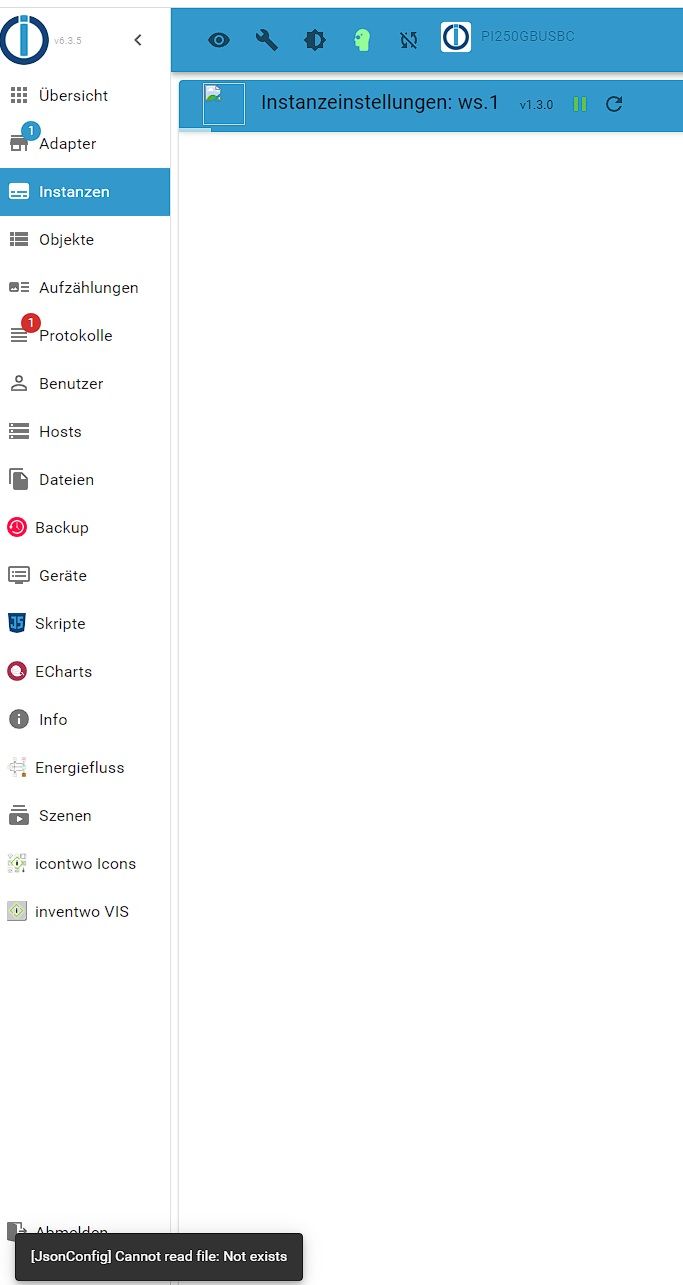
            ein kleines Fenster mit dem Text : JsonConfig cannot read file: not exist.

            welches file stand nicht dabei?
            auch nichts in der Browserkonsole?

            kein Support per PN! - Fragen im Forum stellen - es gibt fast nichts, was nicht auch für andere interessant ist.

            Benutzt das Voting rechts unten im Beitrag wenn er euch geholfen hat.

            der Installationsfixer: curl -fsL https://iobroker.net/fix.sh | bash -

            W 1 Antwort Letzte Antwort
            0
            • HomoranH Homoran

              @würfel sagte in Fehler nach Restore Websocket Adapter:

              Weil der anders nicht zu öffnen war

              muss dann bei dir was ganz spezielles sein.

              @würfel sagte in Fehler nach Restore Websocket Adapter:

              hab nachdem Restore mit dem Websocket Adapter das Problem,

              das Backup enthielt ja nicht nur den ws. Wie kommst du darauf, dass der "schuld" ist?

              @würfel sagte in Fehler nach Restore Websocket Adapter:

              das ich die Einstellungspage nicht öffnen kann.

              was meinst du damit?

              @würfel sagte in Fehler nach Restore Websocket Adapter:

              ein kleines Fenster mit dem Text : JsonConfig cannot read file: not exist.

              welches file stand nicht dabei?
              auch nichts in der Browserkonsole?

              W Offline
              W Offline
              Würfel
              schrieb am zuletzt editiert von
              #8

              @homoran

              1. ??? >Das war die Aussage in dem Post zu dem Adapter.

              2. Der WS Adapter ist Rot hinterlegt. Wenn ich auf den Schlüssel klicke für die Einstellungen kommt die Fehlermeldung.
                Davon ein Bild


                ws adapter.jpg

                Dann passiert nichts mehr

              Hab nun WS.1 und WEB.1 gelöscht.
              Trotzdem wird WS.0 nicht grün.

              Und wenn ich auf Einstellungen Klicke erscheint das Bild von oben.

              Rot sind Verbunden mit Host und Lebenszeichen

              Verbunden mit Gerät und Dienst ist Grün.

              Protokoll:

              
              ws.0
              2023-07-07 21:28:57.245	warn	Terminated (NO_ADAPTER_CONFIG_FOUND): Without reason
              
              ws.0
              2023-07-07 21:28:57.193	error	adapter disabled
              
              Thomas BraunT HomoranH 2 Antworten Letzte Antwort
              0
              • W Würfel

                @homoran

                1. ??? >Das war die Aussage in dem Post zu dem Adapter.

                2. Der WS Adapter ist Rot hinterlegt. Wenn ich auf den Schlüssel klicke für die Einstellungen kommt die Fehlermeldung.
                  Davon ein Bild


                  ws adapter.jpg

                  Dann passiert nichts mehr

                Hab nun WS.1 und WEB.1 gelöscht.
                Trotzdem wird WS.0 nicht grün.

                Und wenn ich auf Einstellungen Klicke erscheint das Bild von oben.

                Rot sind Verbunden mit Host und Lebenszeichen

                Verbunden mit Gerät und Dienst ist Grün.

                Protokoll:

                
                ws.0
                2023-07-07 21:28:57.245	warn	Terminated (NO_ADAPTER_CONFIG_FOUND): Without reason
                
                ws.0
                2023-07-07 21:28:57.193	error	adapter disabled
                
                Thomas BraunT Online
                Thomas BraunT Online
                Thomas Braun
                Most Active
                schrieb am zuletzt editiert von
                #9

                @würfel

                iob upload all
                

                mal versuchen.

                Linux-Werkzeugkasten:
                https://forum.iobroker.net/topic/42952/der-kleine-iobroker-linux-werkzeugkasten
                NodeJS Fixer Skript:
                https://forum.iobroker.net/topic/68035/iob-node-fix-skript
                iob_diag: curl -sLf -o diag.sh https://iobroker.net/diag.sh && bash diag.sh

                1 Antwort Letzte Antwort
                0
                • W Würfel

                  @homoran

                  1. ??? >Das war die Aussage in dem Post zu dem Adapter.

                  2. Der WS Adapter ist Rot hinterlegt. Wenn ich auf den Schlüssel klicke für die Einstellungen kommt die Fehlermeldung.
                    Davon ein Bild


                    ws adapter.jpg

                    Dann passiert nichts mehr

                  Hab nun WS.1 und WEB.1 gelöscht.
                  Trotzdem wird WS.0 nicht grün.

                  Und wenn ich auf Einstellungen Klicke erscheint das Bild von oben.

                  Rot sind Verbunden mit Host und Lebenszeichen

                  Verbunden mit Gerät und Dienst ist Grün.

                  Protokoll:

                  
                  ws.0
                  2023-07-07 21:28:57.245	warn	Terminated (NO_ADAPTER_CONFIG_FOUND): Without reason
                  
                  ws.0
                  2023-07-07 21:28:57.193	error	adapter disabled
                  
                  HomoranH Nicht stören
                  HomoranH Nicht stören
                  Homoran
                  Global Moderator Administrators
                  schrieb am zuletzt editiert von
                  #10

                  @würfel sagte in Fehler nach Restore Websocket Adapter:

                  NO_ADAPTER_CONFIG_FOUND

                  dann nochmal drüberinstallieren.
                  die Einstellungen sind dann ggf. futsch

                  kein Support per PN! - Fragen im Forum stellen - es gibt fast nichts, was nicht auch für andere interessant ist.

                  Benutzt das Voting rechts unten im Beitrag wenn er euch geholfen hat.

                  der Installationsfixer: curl -fsL https://iobroker.net/fix.sh | bash -

                  W 1 Antwort Letzte Antwort
                  0
                  • HomoranH Homoran

                    @würfel sagte in Fehler nach Restore Websocket Adapter:

                    NO_ADAPTER_CONFIG_FOUND

                    dann nochmal drüberinstallieren.
                    die Einstellungen sind dann ggf. futsch

                    W Offline
                    W Offline
                    Würfel
                    schrieb am zuletzt editiert von Würfel
                    #11

                    @homoran
                    WS.1 war ja mein Versuch.
                    Oder meinst du alle WS komplett deinstallieren
                    Nachdem ich WS.1 und WEB.1 gelöscht hab hatte ich keine Verbindung mehr zu meiner VIS und VIS Editor.....

                    Jetzt ist WS.1 wieder da, der sich auch nicht einstellen lässt, aber ich kann die VIS wieder öffnen.... :face_with_head_bandage:

                    @Thomas-Braun
                    Lasse ich gerade laufen

                    HomoranH 1 Antwort Letzte Antwort
                    0
                    • W Würfel

                      @homoran
                      WS.1 war ja mein Versuch.
                      Oder meinst du alle WS komplett deinstallieren
                      Nachdem ich WS.1 und WEB.1 gelöscht hab hatte ich keine Verbindung mehr zu meiner VIS und VIS Editor.....

                      Jetzt ist WS.1 wieder da, der sich auch nicht einstellen lässt, aber ich kann die VIS wieder öffnen.... :face_with_head_bandage:

                      @Thomas-Braun
                      Lasse ich gerade laufen

                      HomoranH Nicht stören
                      HomoranH Nicht stören
                      Homoran
                      Global Moderator Administrators
                      schrieb am zuletzt editiert von
                      #12

                      @würfel sagte in Fehler nach Restore Websocket Adapter:

                      Oder meinst du alle WS komplett deinstallieren

                      nein drüberinstallieren oder mit upload versuchen zu reparieren.

                      kein Support per PN! - Fragen im Forum stellen - es gibt fast nichts, was nicht auch für andere interessant ist.

                      Benutzt das Voting rechts unten im Beitrag wenn er euch geholfen hat.

                      der Installationsfixer: curl -fsL https://iobroker.net/fix.sh | bash -

                      W 1 Antwort Letzte Antwort
                      0
                      • HomoranH Homoran

                        @würfel sagte in Fehler nach Restore Websocket Adapter:

                        Oder meinst du alle WS komplett deinstallieren

                        nein drüberinstallieren oder mit upload versuchen zu reparieren.

                        W Offline
                        W Offline
                        Würfel
                        schrieb am zuletzt editiert von
                        #13

                        @homoran

                        So, upload hat zum Teil geholfen.

                        ich kann WS einstellen, bekomme ihn aber nicht Grün.

                        ws.0
                        2023-07-07 21:58:24.097	info	terminating http server on port 8084
                        
                        ws.0
                        2023-07-07 21:58:23.576	info	Terminated (ADAPTER_REQUESTED_TERMINATION): Without reason
                        
                        ws.0
                        2023-07-07 21:58:23.573	error	port 8084 already in use
                        

                        Wenn ich Port :8084 öffne sehe ich das im Browser oben links:
                        Not Implemented

                        Glaube mich zu erinnern das dies mit dem Energiefluss Adapter zusammenhängt, da gab es auch solch eine Meldung.

                        crunchipC 1 Antwort Letzte Antwort
                        0
                        • W Würfel

                          @homoran

                          So, upload hat zum Teil geholfen.

                          ich kann WS einstellen, bekomme ihn aber nicht Grün.

                          ws.0
                          2023-07-07 21:58:24.097	info	terminating http server on port 8084
                          
                          ws.0
                          2023-07-07 21:58:23.576	info	Terminated (ADAPTER_REQUESTED_TERMINATION): Without reason
                          
                          ws.0
                          2023-07-07 21:58:23.573	error	port 8084 already in use
                          

                          Wenn ich Port :8084 öffne sehe ich das im Browser oben links:
                          Not Implemented

                          Glaube mich zu erinnern das dies mit dem Energiefluss Adapter zusammenhängt, da gab es auch solch eine Meldung.

                          crunchipC Abwesend
                          crunchipC Abwesend
                          crunchip
                          Forum Testing Most Active
                          schrieb am zuletzt editiert von
                          #14

                          @würfel sagte in Fehler nach Restore Websocket Adapter:

                          port 8084 already in use

                          zeig mal die Ausgabe

                          sudo netstat -ltp
                          

                          umgestiegen von Proxmox auf Unraid

                          W 1 Antwort Letzte Antwort
                          0
                          • crunchipC crunchip

                            @würfel sagte in Fehler nach Restore Websocket Adapter:

                            port 8084 already in use

                            zeig mal die Ausgabe

                            sudo netstat -ltp
                            
                            W Offline
                            W Offline
                            Würfel
                            schrieb am zuletzt editiert von
                            #15

                            @crunchip

                            Hab den Port von WS auf 8085 geändert dann geht es erstmal das er grün ist.

                            Nur der Energiefluss Adapter ist gerade nutzlos da das "Bild" nicht erscheint.

                            Das ganze WEB.0 und WEB.1 hing mit dem Adapter zusammen.

                            Aber der WS Adapter scheint wieder io zu sein nach dem Upload von @Thomas-Braun

                            1 Antwort Letzte Antwort
                            0
                            • W Würfel

                              HI,

                              hab nachdem Restore mit dem Websocket Adapter das Problem, das ich die Einstellungspage nicht öffnen kann.

                              Unten Links im Bildschirm erscheint ein kleines Fenster mit dem Text : JsonConfig cannot read file: not exist.

                              Anbei der komplette Auszug aus der Diagnose.

                              Neuinstallation bringt das selbe Ergebnis beim öffnen.
                              Tobias

                              *** BASE SYSTEM ***
                              Model           : Raspberry Pi 4 Model B Rev 1.5
                              Architecture    : aarch64
                              Docker          : false
                              Virtualization  : none
                              Distributor ID: Debian
                              Description:    Debian GNU/Linux 11 (bullseye)
                              Release:        11
                              Codename:       bullseye
                              
                              PRETTY_NAME="Debian GNU/Linux 11 (bullseye)"
                              NAME="Debian GNU/Linux"
                              VERSION_ID="11"
                              VERSION="11 (bullseye)"
                              VERSION_CODENAME=bullseye
                              ID=debian
                              HOME_URL="https://www.debian.org/"
                              SUPPORT_URL="https://www.debian.org/support"
                              BUG_REPORT_URL="https://bugs.debian.org/"
                              
                              Systemuptime and Load:
                               20:43:21 up  1:53,  1 user,  load average: 0.75, 0.65, 0.49
                              CPU threads: 4
                              
                              Raspberry only:
                              throttled=0x0
                              Other values than 0x0 hint to temperature/voltage problems
                              temp=53.0'C
                              volt=0.9160V
                              
                              *** Time and Time Zones ***
                                             Local time: Fri 2023-07-07 20:43:22 CEST
                                         Universal time: Fri 2023-07-07 18:43:22 UTC
                                               RTC time: n/a
                                              Time zone: Europe/Berlin (CEST, +0200)
                              System clock synchronized: yes
                                            NTP service: active
                                        RTC in local TZ: no
                              
                              *** User and Groups ***
                              pi
                              /home/pi
                              pi adm dialout cdrom sudo audio video plugdev games users input render netdev gpio i2c spi iobroker
                              
                              *** X-Server-Setup ***
                              X-Server:       false
                              Desktop:
                              Terminal:       tty
                              Boot Target:    multi-user.target
                              
                              *** MEMORY ***
                                             total        used        free      shared  buff/cache   available
                              Mem:            7.8G        2.2G        2.0G        1.0M        3.6G        5.5G
                              Swap:            99M          0B         99M
                              Total:          7.9G        2.2G        2.1G
                              
                                       7811 M total memory
                                       2190 M used memory
                                       2204 M active memory
                                       3170 M inactive memory
                                       2011 M free memory
                                        135 M buffer memory
                                       3474 M swap cache
                                         99 M total swap
                                          0 M used swap
                                         99 M free swap
                              
                              Raspberry only:
                              oom events: 0
                              lifetime oom required: 0 Mbytes
                              total time in oom handler: 0 ms
                              max time spent in oom handler: 0 ms
                              
                              *** FILESYSTEM ***
                              Filesystem     Type      Size  Used Avail Use% Mounted on
                              /dev/root      ext4      230G  4.3G  216G   2% /
                              devtmpfs       devtmpfs  3.6G     0  3.6G   0% /dev
                              tmpfs          tmpfs     3.9G     0  3.9G   0% /dev/shm
                              tmpfs          tmpfs     1.6G  1.2M  1.6G   1% /run
                              tmpfs          tmpfs     5.0M  4.0K  5.0M   1% /run/lock
                              /dev/sda1      vfat      255M   31M  225M  13% /boot
                              tmpfs          tmpfs     782M     0  782M   0% /run/user/1000
                              
                              Messages concerning ext4 filesystem in dmesg:
                              [Fri Jul  7 18:49:59 2023] Kernel command line: coherent_pool=1M 8250.nr_uarts=0 snd_bcm2835.enable_headphones=0 snd_bcm2835.enable_headphones=1 snd_bcm2835.enable_hdmi=1 snd_bcm2835.enable_hdmi=0 video=HDMI-A-1:1920x1080M@60 smsc95xx.macaddr=E4:5F:01:DB:55:80 vc_mem.mem_base=0x3eb00000 vc_mem.mem_size=0x3ff00000  console=ttyS0,115200 console=tty1 root=PARTUUID=92a571b1-02 rootfstype=ext4 fsck.repair=yes rootwait
                              [Fri Jul  7 18:50:01 2023] EXT4-fs (sda2): mounted filesystem with ordered data mode. Quota mode: none.
                              [Fri Jul  7 18:50:01 2023] VFS: Mounted root (ext4 filesystem) readonly on device 8:2.
                              [Fri Jul  7 18:50:03 2023] EXT4-fs (sda2): re-mounted. Quota mode: none.
                              
                              Show mounted filesystems (real ones only):
                              TARGET  SOURCE    FSTYPE OPTIONS
                              /       /dev/sda2 ext4   rw,noatime
                              `-/boot /dev/sda1 vfat   rw,relatime,fmask=0022,dmask=0022,codepage=437,iocharset=ascii,shortname=mixed,errors=remount-ro
                              
                              Files in neuralgic directories:
                              
                              /var:
                              476M    /var/
                              180M    /var/cache
                              174M    /var/cache/apt
                              147M    /var/lib
                              123M    /var/lib/apt/lists
                              
                              Archived and active journals take up 48.0M in the file system.
                              
                              /opt/iobroker/backups:
                              4.0K    /opt/iobroker/backups/
                              
                              /opt/iobroker/iobroker-data:
                              570M    /opt/iobroker/iobroker-data/
                              534M    /opt/iobroker/iobroker-data/files
                              88M     /opt/iobroker/iobroker-data/files/echarts.admin
                              78M     /opt/iobroker/iobroker-data/files/icons-open-icon-library-png
                              57M     /opt/iobroker/iobroker-data/files/echarts
                              
                              The five largest files in iobroker-data are:
                              35M     /opt/iobroker/iobroker-data/files/devices.admin/static/js/main.24f2bb56.js.map
                              23M     /opt/iobroker/iobroker-data/files/echarts/static/js/main.eb0afecd.js.map
                              23M     /opt/iobroker/iobroker-data/files/echarts.admin/static/js/main.7952f0f7.js.map
                              23M     /opt/iobroker/iobroker-data/files/echarts.admin/chart/static/js/main.eb0afecd.js.map
                              22M     /opt/iobroker/iobroker-data/objects.jsonl
                              
                              *** NodeJS-Installation ***
                              
                              /usr/bin/nodejs         v18.16.1
                              /usr/bin/node           v18.16.1
                              /usr/bin/npm            9.5.1
                              /usr/bin/npx            9.5.1
                              
                              
                              nodejs:
                                Installed: 18.16.1-deb-1nodesource1
                                Candidate: 18.16.1-deb-1nodesource1
                                Version table:
                               *** 18.16.1-deb-1nodesource1 500
                                      500 https://deb.nodesource.com/node_18.x bullseye/main arm64 Packages
                                      100 /var/lib/dpkg/status
                                   12.22.12~dfsg-1~deb11u4 500
                                      500 http://security.debian.org/debian-security bullseye-security/main arm64 Packages
                                   12.22.12~dfsg-1~deb11u3 500
                                      500 http://deb.debian.org/debian bullseye/main arm64 Packages
                              
                              Temp directories causing npm8 problem: 0
                              No problems detected
                              
                              *** ioBroker-Installation ***
                              
                              ioBroker Status
                              iobroker is running on this host.
                              
                              
                              Objects type: jsonl
                              States  type: jsonl
                              
                              MULTIHOSTSERVICE/enabled: false
                              
                              Core adapters versions
                              js-controller:  4.0.24
                              admin:          6.3.5
                              javascript:     7.0.3
                              
                              Adapters from github:   3
                              
                              Adapter State
                              + system.adapter.admin.0                  : admin                 : PI250GBUSBC                              -  enabled, port: 8081, bind: 0.0.0.0, run as: admin
                              + system.adapter.backitup.0               : backitup              : PI250GBUSBC                              -  enabled
                              + system.adapter.botslab360.0             : botslab360            : PI250GBUSBC                              -  enabled
                              + system.adapter.cloud.0                  : cloud                 : PI250GBUSBC                              -  enabled
                                system.adapter.devices.0                : devices               : PI250GBUSBC                              - disabled
                              + system.adapter.discovery.0              : discovery             : PI250GBUSBC                              -  enabled
                                system.adapter.dwd.0                    : dwd                   : PI250GBUSBC                              -  enabled
                              + system.adapter.echarts.0                : echarts               : PI250GBUSBC                              -  enabled
                                system.adapter.ecoflow.0                : ecoflow               : PI250GBUSBC                              - disabled
                              + system.adapter.energiefluss.0           : energiefluss          : PI250GBUSBC                              -  enabled
                              + system.adapter.epson_ecotank_et_2750.0  : epson_ecotank_et_2750 : PI250GBUSBC                              -  enabled
                                system.adapter.fb-checkpresence.0       : fb-checkpresence      : PI250GBUSBC                              - disabled
                                system.adapter.feiertage.0              : feiertage             : PI250GBUSBC                              -  enabled
                                system.adapter.flot.0                   : flot                  : PI250GBUSBC                              - disabled
                              + system.adapter.history.0                : history               : PI250GBUSBC                              -  enabled
                              + system.adapter.hm-rega.0                : hm-rega               : PI250GBUSBC                              -  enabled
                              + system.adapter.hm-rpc.0                 : hm-rpc                : PI250GBUSBC                              -  enabled, port: 0
                              + system.adapter.hm-rpc.1                 : hm-rpc                : PI250GBUSBC                              -  enabled, port: 0
                              + system.adapter.hm-rpc.2                 : hm-rpc                : PI250GBUSBC                              -  enabled, port: 0
                                system.adapter.hm-rpc.3                 : hm-rpc                : PI250GBUSBC                              - disabled, port: 0
                                system.adapter.ical.0                   : ical                  : PI250GBUSBC                              -  enabled
                                system.adapter.icons-addictive-flavour-png.0: icons-addictive-flavour-png: PI250GBUSBC                              - disabled
                                system.adapter.icons-fatcow-hosting.0   : icons-fatcow-hosting  : PI250GBUSBC                              - disabled
                                system.adapter.icons-material-png.0     : icons-material-png    : PI250GBUSBC                              - disabled
                                system.adapter.icons-material-svg.0     : icons-material-svg    : PI250GBUSBC                              - disabled
                                system.adapter.icons-mfd-png.0          : icons-mfd-png         : PI250GBUSBC                              - disabled
                                system.adapter.icons-mfd-svg.0          : icons-mfd-svg         : PI250GBUSBC                              - disabled
                                system.adapter.icons-open-icon-library-png.0: icons-open-icon-library-png: PI250GBUSBC                              - disabled
                                system.adapter.icons-ultimate-png.0     : icons-ultimate-png    : PI250GBUSBC                              - disabled
                                system.adapter.influxdb.0               : influxdb              : PI250GBUSBC                              - disabled, port: 8086
                              + system.adapter.info.0                   : info                  : PI250GBUSBC                              -  enabled
                              + system.adapter.javascript.0             : javascript            : PI250GBUSBC                              -  enabled
                                system.adapter.luftdaten.0              : luftdaten             : PI250GBUSBC                              -  enabled
                              + system.adapter.melcloud.0               : melcloud              : PI250GBUSBC                              -  enabled
                                system.adapter.meteoalarm.0             : meteoalarm            : PI250GBUSBC                              -  enabled
                              + system.adapter.mihome.0                 : mihome                : PI250GBUSBC                              -  enabled, port: 9898, bind: 0.0.0.0
                              + system.adapter.nina.0                   : nina                  : PI250GBUSBC                              -  enabled
                                system.adapter.parcel.0                 : parcel                : PI250GBUSBC                              - disabled
                                system.adapter.scenes.0                 : scenes                : PI250GBUSBC                              - disabled
                              + system.adapter.shelly.0                 : shelly                : PI250GBUSBC                              -  enabled, port: 1882, bind: 0.0.0.0
                                system.adapter.smartcontrol.0           : smartcontrol          : PI250GBUSBC                              - disabled
                              + system.adapter.socketio.0               : socketio              : PI250GBUSBC                              -  enabled, port: 8084, bind: 192.168.178.144, run as: admin
                              + system.adapter.sourceanalytix.0         : sourceanalytix        : PI250GBUSBC                              -  enabled
                              + system.adapter.sprinklecontrol.0        : sprinklecontrol       : PI250GBUSBC                              -  enabled
                                system.adapter.tankerkoenig.0           : tankerkoenig          : PI250GBUSBC                              - disabled
                                system.adapter.tr-064.0                 : tr-064                : PI250GBUSBC                              - disabled
                              + system.adapter.tuya.0                   : tuya                  : PI250GBUSBC                              -  enabled
                              + system.adapter.virtualpowermeter.0      : virtualpowermeter     : PI250GBUSBC                              -  enabled
                                system.adapter.vis-bars.0               : vis-bars              : PI250GBUSBC                              - disabled
                                system.adapter.vis-colorpicker.0        : vis-colorpicker       : PI250GBUSBC                              - disabled
                                system.adapter.vis-fancyswitch.0        : vis-fancyswitch       : PI250GBUSBC                              - disabled
                                system.adapter.vis-history.0            : vis-history           : PI250GBUSBC                              - disabled
                                system.adapter.vis-hqwidgets.0          : vis-hqwidgets         : PI250GBUSBC                              - disabled
                                system.adapter.vis-icontwo.0            : vis-icontwo           : PI250GBUSBC                              - disabled
                              + system.adapter.vis-inventwo.0           : vis-inventwo          : PI250GBUSBC                              -  enabled
                                system.adapter.vis-jqui-mfd.0           : vis-jqui-mfd          : PI250GBUSBC                              - disabled
                                system.adapter.vis-justgage.0           : vis-justgage          : PI250GBUSBC                              - disabled
                                system.adapter.vis-map.0                : vis-map               : PI250GBUSBC                              - disabled
                                system.adapter.vis-material-advanced.0  : vis-material-advanced : PI250GBUSBC                              - disabled
                                system.adapter.vis-metro.0              : vis-metro             : PI250GBUSBC                              - disabled
                                system.adapter.vis-plumb.0              : vis-plumb             : PI250GBUSBC                              - disabled
                                system.adapter.vis-rgraph.0             : vis-rgraph            : PI250GBUSBC                              - disabled
                                system.adapter.vis.0                    : vis                   : PI250GBUSBC                              -  enabled
                              + system.adapter.vw-connect.0             : vw-connect            : PI250GBUSBC                              -  enabled
                              + system.adapter.vw-connect.1             : vw-connect            : PI250GBUSBC                              -  enabled
                              + system.adapter.web.0                    : web                   : PI250GBUSBC                              -  enabled, port: 8082, bind: 192.168.178.144, run as: admin
                              + system.adapter.web.1                    : web                   : PI250GBUSBC                              -  enabled, port: 8083, bind: 192.168.178.144, run as: admin
                                system.adapter.worx.0                   : worx                  : PI250GBUSBC                              - disabled
                                system.adapter.ws.0                     : ws                    : PI250GBUSBC                              - disabled, port: 8084, bind: 192.168.178.144, run as: admin
                                system.adapter.ws.1                     : ws                    : PI250GBUSBC                              -  enabled, port: 8084, bind: 0.0.0.0, run as: admin
                              
                              + instance is alive
                              
                              Enabled adapters with bindings
                              + system.adapter.admin.0                  : admin                 : PI250GBUSBC                              -  enabled, port: 8081, bind: 0.0.0.0, run as: admin
                              + system.adapter.hm-rpc.0                 : hm-rpc                : PI250GBUSBC                              -  enabled, port: 0
                              + system.adapter.hm-rpc.1                 : hm-rpc                : PI250GBUSBC                              -  enabled, port: 0
                              + system.adapter.hm-rpc.2                 : hm-rpc                : PI250GBUSBC                              -  enabled, port: 0
                              + system.adapter.mihome.0                 : mihome                : PI250GBUSBC                              -  enabled, port: 9898, bind: 0.0.0.0
                              + system.adapter.shelly.0                 : shelly                : PI250GBUSBC                              -  enabled, port: 1882, bind: 0.0.0.0
                              + system.adapter.socketio.0               : socketio              : PI250GBUSBC                              -  enabled, port: 8084, bind: 192.168.178.144, run as: admin
                              + system.adapter.web.0                    : web                   : PI250GBUSBC                              -  enabled, port: 8082, bind: 192.168.178.144, run as: admin
                              + system.adapter.web.1                    : web                   : PI250GBUSBC                              -  enabled, port: 8083, bind: 192.168.178.144, run as: admin
                                system.adapter.ws.1                     : ws                    : PI250GBUSBC                              -  enabled, port: 8084, bind: 0.0.0.0, run as: admin
                              
                              ioBroker-Repositories
                              stable        : http://download.iobroker.net/sources-dist.json
                              beta          : http://download.iobroker.net/sources-dist-latest.json
                              
                              Active repo(s): stable
                              
                              Installed ioBroker-Instances
                              Used repository: stable
                              Adapter    "admin"        : 6.3.5    , installed 6.3.5
                              Adapter    "backitup"     : 2.6.23   , installed 2.6.23
                              Adapter    "botslab360"   : 0.0.2    , installed 0.0.2
                              Adapter    "cloud"        : 4.4.1    , installed 4.4.1
                              Adapter    "devices"      : 1.1.5    , installed 1.1.5
                              Adapter    "discovery"    : 3.1.0    , installed 3.1.0
                              Adapter    "dwd"          : 2.8.3    , installed 2.8.3
                              Adapter    "echarts"      : 1.5.1    , installed 1.5.1
                              Adapter    "epson_ecotank_et_2750": 0.0.12, installed 0.0.12
                              Adapter    "fb-checkpresence": 1.1.26, installed 1.1.26
                              Adapter    "feiertage"    : 1.1.0    , installed 1.1.0
                              Adapter    "flot"         : 1.12.0   , installed 1.12.0
                              Adapter    "history"      : 2.2.4    , installed 2.2.4
                              Adapter    "hm-rega"      : 3.0.46   , installed 3.0.46
                              Adapter    "hm-rpc"       : 1.15.18  , installed 1.15.18
                              Adapter    "ical"         : 1.13.3   , installed 1.13.3
                              Adapter    "icons-addictive-flavour-png": 0.1.0, installed 0.1.0
                              Adapter    "icons-fatcow-hosting": 0.1.0, installed 0.1.0
                              Adapter    "icons-material-png": 0.1.0, installed 0.1.0
                              Adapter    "icons-material-svg": 0.1.0, installed 0.1.0
                              Adapter    "icons-mfd-png": 1.1.0    , installed 1.1.0
                              Adapter    "icons-mfd-svg": 1.1.0    , installed 1.1.0
                              Adapter    "icons-open-icon-library-png": 0.1.2, installed 0.1.2
                              Adapter    "icons-ultimate-png": 1.0.1, installed 1.0.1
                              Adapter    "influxdb"     : 3.2.0    , installed 3.2.0
                              Adapter    "info"         : 1.9.26   , installed 1.9.26
                              Adapter    "javascript"   : 7.0.3    , installed 7.0.3
                              Controller "js-controller": 4.0.24   , installed 4.0.24
                              Adapter    "luftdaten"    : 2.2.4    , installed 2.2.4
                              Adapter    "melcloud"     : 1.3.4    , installed 1.3.4
                              Adapter    "meteoalarm"   : 2.3.6    , installed 2.3.6
                              Adapter    "mihome"       : 1.4.0    , installed 1.4.0
                              Adapter    "nina"         : 0.0.25   , installed 0.0.25
                              Adapter    "parcel"       : 0.0.27   , installed 0.0.27
                              Adapter    "scenes"       : 2.3.9    , installed 2.3.9
                              Adapter    "shelly"       : 6.4.1    , installed 6.4.1
                              Adapter    "simple-api"   : 2.7.2    , installed 2.7.2
                              Adapter    "smartcontrol" : 1.3.2    , installed 1.3.2
                              Adapter    "socketio"     : 4.2.0    , installed 4.2.0
                              Adapter    "sprinklecontrol": 0.2.13 , installed 0.2.13
                              Adapter    "tankerkoenig" : 3.3.7    , installed 3.3.7
                              Adapter    "tr-064"       : 4.2.18   , installed 4.2.18
                              Adapter    "tuya"         : 3.14.2   , installed 3.14.2
                              Adapter    "virtualpowermeter": 1.4.6, installed 1.4.6
                              Adapter    "vis"          : 1.4.16   , installed 1.4.16
                              Adapter    "vis-bars"     : 0.1.4    , installed 0.1.4
                              Adapter    "vis-colorpicker": 2.0.3  , installed 2.0.3
                              Adapter    "vis-fancyswitch": 1.1.0  , installed 1.1.0
                              Adapter    "vis-history"  : 1.0.0    , installed 1.0.0
                              Adapter    "vis-hqwidgets": 1.4.0    , installed 1.4.0
                              Adapter    "vis-icontwo"  : 0.96.0   , installed 0.94.0 [Updatable]
                              Adapter    "vis-inventwo" : 3.3.1    , installed 3.3.1
                              Adapter    "vis-jqui-mfd" : 1.0.12   , installed 1.0.12
                              Adapter    "vis-justgage" : 1.0.2    , installed 1.0.2
                              Adapter    "vis-map"      : 1.0.4    , installed 1.0.4
                              Adapter    "vis-material-advanced": 1.7.2, installed 1.7.2
                              Adapter    "vis-metro"    : 1.2.0    , installed 1.2.0
                              Adapter    "vis-plumb"    : 1.0.2    , installed 1.0.2
                              Adapter    "vis-rgraph"   : 0.0.2    , installed 0.0.2
                              Adapter    "vw-connect"   : 0.0.67   , installed 0.0.67
                              Adapter    "web"          : 4.3.0    , installed 4.3.0
                              Adapter    "worx"         : 2.1.3    , installed 2.1.3
                              Adapter    "ws"           : 1.3.0    , installed 1.3.0
                              
                              Objects and States
                              Please stand by - This may take a while
                              Objects:        16267
                              States:         14130
                              
                              *** OS-Repositories and Updates ***
                              Hit:1 http://security.debian.org/debian-security bullseye-security InRelease
                              Hit:2 http://deb.debian.org/debian bullseye InRelease
                              Hit:3 http://deb.debian.org/debian bullseye-updates InRelease
                              Hit:4 http://archive.raspberrypi.org/debian bullseye InRelease
                              Hit:5 https://deb.nodesource.com/node_18.x bullseye InRelease
                              Reading package lists...
                              Pending Updates: 0
                              
                              *** Listening Ports ***
                              Active Internet connections (only servers)
                              Proto Recv-Q Send-Q Local Address           Foreign Address         State       User       Inode      PID/Program name
                              tcp        0      0 192.168.178.144:8082    0.0.0.0:*               LISTEN      1001       50579      12147/io.web.0
                              tcp        0      0 192.168.178.144:8083    0.0.0.0:*               LISTEN      1001       51327      12154/io.web.1
                              tcp        0      0 192.168.178.144:8084    0.0.0.0:*               LISTEN      1001       40706      10748/io.socketio.0
                              tcp        0      0 0.0.0.0:111             0.0.0.0:*               LISTEN      0          29594      1/init
                              tcp        0      0 0.0.0.0:22              0.0.0.0:*               LISTEN      0          3510       535/sshd: /usr/sbin
                              tcp        0      0 192.168.178.144:2010    0.0.0.0:*               LISTEN      1001       41538      10659/io.hm-rpc.2
                              tcp        0      0 192.168.178.144:2001    0.0.0.0:*               LISTEN      1001       40672      10645/io.hm-rpc.0
                              tcp        0      0 127.0.0.1:9000          0.0.0.0:*               LISTEN      1001       34032      7511/iobroker.js-co
                              tcp        0      0 127.0.0.1:9001          0.0.0.0:*               LISTEN      1001       34025      7511/iobroker.js-co
                              tcp        0      0 192.168.178.144:8701    0.0.0.0:*               LISTEN      1001       40674      10652/io.hm-rpc.1
                              tcp        0      0 0.0.0.0:48261           0.0.0.0:*               LISTEN      107        29630      7235/rpc.statd
                              tcp6       0      0 :::111                  :::*                    LISTEN      0          32113      1/init
                              tcp6       0      0 :::22                   :::*                    LISTEN      0          3512       535/sshd: /usr/sbin
                              tcp6       0      0 :::58529                :::*                    LISTEN      107        29634      7235/rpc.statd
                              tcp6       0      0 :::8081                 :::*                    LISTEN      1001       34115      7539/io.admin.0
                              udp        0      0 0.0.0.0:54166           0.0.0.0:*                           108        13543      405/avahi-daemon: r
                              udp        0      0 0.0.0.0:5353            0.0.0.0:*                           108        13541      405/avahi-daemon: r
                              udp        0      0 0.0.0.0:54597           0.0.0.0:*                           107        29628      7235/rpc.statd
                              udp        0      0 0.0.0.0:5683            0.0.0.0:*                           1001       40767      10737/io.shelly.0
                              udp        0      0 0.0.0.0:9898            0.0.0.0:*                           1001       41560      10700/io.mihome.0
                              udp        0      0 0.0.0.0:6666            0.0.0.0:*                           1001       48093      12048/io.tuya.0
                              udp        0      0 0.0.0.0:6667            0.0.0.0:*                           1001       48094      12048/io.tuya.0
                              udp        0      0 0.0.0.0:68              0.0.0.0:*                           0          15188      716/dhcpcd
                              udp        0      0 0.0.0.0:111             0.0.0.0:*                           0          29596      1/init
                              udp        0      0 127.0.0.1:627           0.0.0.0:*                           0          29615      7235/rpc.statd
                              udp6       0      0 :::5353                 :::*                                108        13542      405/avahi-daemon: r
                              udp6       0      0 :::38245                :::*                                108        13544      405/avahi-daemon: r
                              udp6       0      0 :::36947                :::*                                107        29632      7235/rpc.statd
                              udp6       0      0 :::111                  :::*                                0          29600      1/init
                              udp6       0      0 :::546                  :::*                                0          3541       716/dhcpcd
                              
                              *** Log File - Last 25 Lines ***
                              
                              2023-07-07 20:43:12.796  - info: javascript.0 (10685) script.js.Messungen.Solar: Own states (javascript.0.scriptEnabled.Messungen.SolarGesamtLeistung) should not be used in javascript.X.scriptEnabled.*! Please move the states to 0_userdata.0.*
                              2023-07-07 20:43:12.797  - info: javascript.0 (10685) script.js.Messungen.Solar: Own states (javascript.0.scriptEnabled.Messungen.HausVerbrauchHomematicGemessen) should not be used in javascript.X.scriptEnabled.*! Please move the states to 0_userdata.0.*
                              2023-07-07 20:43:12.798  - info: javascript.0 (10685) script.js.Messungen.Solar: Own states (javascript.0.scriptEnabled.Messungen.HausVerbrauchShellyGemessen) should not be used in javascript.X.scriptEnabled.*! Please move the states to 0_userdata.0.*
                              2023-07-07 20:43:12.798  - info: javascript.0 (10685) script.js.Messungen.Solar_Rechnungen: Own states (javascript.0.scriptEnabled.Messungen.Solar_Tagesertrag_Gesamt) should not be used in javascript.X.scriptEnabled.*! Please move the states to 0_userdata.0.*
                              2023-07-07 20:43:12.799  - info: javascript.0 (10685) script.js.Messungen.Solar_Rechnungen: Own states (javascript.0.scriptEnabled.Messungen.Solar_Tagesertrag_Gesamt__) should not be used in javascript.X.scriptEnabled.*! Please move the states to 0_userdata.0.*
                              2023-07-07 20:43:28.206  - info: javascript.0 (10685) script.js.Messungen.Solar: Own states (javascript.0.scriptEnabled.Messungen.SolarGesamtLeistung) should not be used in javascript.X.scriptEnabled.*! Please move the states to 0_userdata.0.*
                              2023-07-07 20:43:28.207  - info: javascript.0 (10685) script.js.Messungen.Solar: Own states (javascript.0.scriptEnabled.Messungen.HausVerbrauchHomematicGemessen) should not be used in javascript.X.scriptEnabled.*! Please move the states to 0_userdata.0.*
                              2023-07-07 20:43:28.207  - info: javascript.0 (10685) script.js.Messungen.Solar: Own states (javascript.0.scriptEnabled.Messungen.HausVerbrauchShellyGemessen) should not be used in javascript.X.scriptEnabled.*! Please move the states to 0_userdata.0.*
                              2023-07-07 20:43:28.208  - info: javascript.0 (10685) script.js.Messungen.Solar_Rechnungen: Own states (javascript.0.scriptEnabled.Messungen.Solar_Tagesertrag_Gesamt) should not be used in javascript.X.scriptEnabled.*! Please move the states to 0_userdata.0.*
                              2023-07-07 20:43:28.208  - info: javascript.0 (10685) script.js.Messungen.Solar_Rechnungen: Own states (javascript.0.scriptEnabled.Messungen.Solar_Tagesertrag_Gesamt__) should not be used in javascript.X.scriptEnabled.*! Please move the states to 0_userdata.0.*
                              2023-07-07 20:43:43.615  - info: javascript.0 (10685) script.js.Messungen.Solar: Own states (javascript.0.scriptEnabled.Messungen.SolarGesamtLeistung) should not be used in javascript.X.scriptEnabled.*! Please move the states to 0_userdata.0.*
                              2023-07-07 20:43:43.616  - info: javascript.0 (10685) script.js.Messungen.Solar: Own states (javascript.0.scriptEnabled.Messungen.HausVerbrauchHomematicGemessen) should not be used in javascript.X.scriptEnabled.*! Please move the states to 0_userdata.0.*
                              2023-07-07 20:43:43.617  - info: javascript.0 (10685) script.js.Messungen.Solar: Own states (javascript.0.scriptEnabled.Messungen.HausVerbrauchShellyGemessen) should not be used in javascript.X.scriptEnabled.*! Please move the states to 0_userdata.0.*
                              2023-07-07 20:43:43.617  - info: javascript.0 (10685) script.js.Messungen.Solar_Rechnungen: Own states (javascript.0.scriptEnabled.Messungen.Solar_Tagesertrag_Gesamt) should not be used in javascript.X.scriptEnabled.*! Please move the states to 0_userdata.0.*
                              2023-07-07 20:43:43.618  - info: javascript.0 (10685) script.js.Messungen.Solar_Rechnungen: Own states (javascript.0.scriptEnabled.Messungen.Solar_Tagesertrag_Gesamt__) should not be used in javascript.X.scriptEnabled.*! Please move the states to 0_userdata.0.*
                              2023-07-07 20:43:59.084  - info: javascript.0 (10685) script.js.Messungen.Solar: Own states (javascript.0.scriptEnabled.Messungen.SolarGesamtLeistung) should not be used in javascript.X.scriptEnabled.*! Please move the states to 0_userdata.0.*
                              2023-07-07 20:43:59.089  - info: javascript.0 (10685) script.js.Messungen.Solar: Own states (javascript.0.scriptEnabled.Messungen.HausVerbrauchHomematicGemessen) should not be used in javascript.X.scriptEnabled.*! Please move the states to 0_userdata.0.*
                              2023-07-07 20:43:59.090  - info: javascript.0 (10685) script.js.Messungen.Solar: Own states (javascript.0.scriptEnabled.Messungen.HausVerbrauchShellyGemessen) should not be used in javascript.X.scriptEnabled.*! Please move the states to 0_userdata.0.*
                              2023-07-07 20:43:59.091  - info: javascript.0 (10685) script.js.Messungen.Solar_Rechnungen: Own states (javascript.0.scriptEnabled.Messungen.Solar_Tagesertrag_Gesamt) should not be used in javascript.X.scriptEnabled.*! Please move the states to 0_userdata.0.*
                              2023-07-07 20:43:59.091  - info: javascript.0 (10685) script.js.Messungen.Solar_Rechnungen: Own states (javascript.0.scriptEnabled.Messungen.Solar_Tagesertrag_Gesamt__) should not be used in javascript.X.scriptEnabled.*! Please move the states to 0_userdata.0.*
                              2023-07-07 20:44:14.732  - info: javascript.0 (10685) script.js.Messungen.Solar: Own states (javascript.0.scriptEnabled.Messungen.SolarGesamtLeistung) should not be used in javascript.X.scriptEnabled.*! Please move the states to 0_userdata.0.*
                              2023-07-07 20:44:14.732  - info: javascript.0 (10685) script.js.Messungen.Solar: Own states (javascript.0.scriptEnabled.Messungen.HausVerbrauchHomematicGemessen) should not be used in javascript.X.scriptEnabled.*! Please move the states to 0_userdata.0.*
                              2023-07-07 20:44:14.733  - info: javascript.0 (10685) script.js.Messungen.Solar: Own states (javascript.0.scriptEnabled.Messungen.HausVerbrauchShellyGemessen) should not be used in javascript.X.scriptEnabled.*! Please move the states to 0_userdata.0.*
                              2023-07-07 20:44:14.734  - info: javascript.0 (10685) script.js.Messungen.Solar_Rechnungen: Own states (javascript.0.scriptEnabled.Messungen.Solar_Tagesertrag_Gesamt) should not be used in javascript.X.scriptEnabled.*! Please move the states to 0_userdata.0.*
                              2023-07-07 20:44:14.734  - info: javascript.0 (10685) script.js.Messungen.Solar_Rechnungen: Own states (javascript.0.scriptEnabled.Messungen.Solar_Tagesertrag_Gesamt__) should not be used in javascript.X.scriptEnabled.*! Please move the states to 0_userdata.0.*


                              ============ Mark until here for C&P =============

                              iob diag has finished.

                              ======================= SUMMARY =======================
                                                   v.2023-04-16
                              
                              
                              Operatingsystem:        Debian GNU/Linux 11 (bullseye)
                              Kernel:                 6.1.21-v8+
                              Installation:           Native
                              Timezone:               Europe/Berlin (CEST, +0200)
                              User-ID:                1000
                              X-Server:               false
                              Boot Target:            multi-user.target
                              
                              Pending OS-Updates:     0
                              Pending iob updates:    1
                              
                              Nodejs-Installation:    /usr/bin/nodejs         v18.16.1
                                                      /usr/bin/node           v18.16.1
                                                      /usr/bin/npm            9.5.1
                                                      /usr/bin/npx            9.5.1
                              
                              Recommended versions are nodejs 18.x.y and npm 9.x.y
                              Your nodejs installation is correct
                              
                              MEMORY:
                                             total        used        free      shared  buff/cache   available
                              Mem:            7.8G        2.3G        2.0G        1.0M        3.6G        5.4G
                              Swap:            99M          0B         99M
                              Total:          7.9G        2.3G        2.0G
                              
                              Active iob-Instances:   30
                              Active repo(s): stable
                              
                              ioBroker Core:          js-controller           4.0.24
                                                      admin                   6.3.5
                              
                              ioBroker Status:        iobroker is running on this host.
                              
                              
                              Objects type: jsonl
                              States  type: jsonl
                              
                              Status admin and web instance:
                              + system.adapter.admin.0                  : admin                 : PI250GBUSBC                              -  enabled, port: 8081, bind: 0.0.0.0, run as: admin
                              + system.adapter.web.0                    : web                   : PI250GBUSBC                              -  enabled, port: 8082, bind: 192.168.178.144, run as: admin
                              + system.adapter.web.1                    : web                   : PI250GBUSBC                              -  enabled, port: 8083, bind: 192.168.178.144, run as: admin
                              
                              Objects:                16267
                              States:                 14130
                              
                              Size of iob-Database:
                              
                              22M     /opt/iobroker/iobroker-data/objects.jsonl
                              16M     /opt/iobroker/iobroker-data/states.jsonl


                              =================== END OF SUMMARY ====================
                              

                              pi@PI250GBUSBC:~ $ Copy text starting here:

                              ======================= SUMMARY =======================
                                                   v.2023-04-16
                              
                              
                              Operatingsystem:        Debian GNU/Linux 11 (bullseye)
                              Kernel:                 6.1.21-v8+
                              Installation:           Native
                              Timezone:               Europe/Berlin (CEST, +0200)
                              User-ID:                1000
                              X-Server:               false
                              Boot Target:            multi-user.target
                              
                              Pending OS-Updates:     0
                              Pending iob updates:    1
                              
                              Nodejs-Installation:    /usr/bin/nodejs         v18.16.1
                                                      /usr/bin/node           v18.16.1
                                                      /usr/bin/npm            9.5.1
                                                      /usr/bin/npx            9.5.1
                              
                              Recommended versions are nodejs 18.x.y and npm 9.x.y
                              Your nodejs installation is correct
                              
                              MEMORY:
                                             total        used        free      shared  buff/cache   available
                              Mem:            7.8G        2.3G        2.0G        1.0M        3.6G        5.4G
                              Swap:            99M          0B         99M
                              Total:          7.9G        2.3G        2.0G
                              
                              Active iob-Instances:   30
                              Active repo(s): stable
                              
                              ioBroker Core:          js-controller           4.0.24
                                                      admin                   6.3.5
                              
                              ioBroker Status:        iobroker is running on this host.
                              
                              
                              Objects type: jsonl
                              States  type: jsonl
                              
                              Status admin and web instance:
                              + system.adapter.admin.0                  : admin                 : PI250GBUSBC                              -  enabled, port: 8081, bind: 0.0.0.0, run as: admin
                              + system.adapter.web.0                    : web                   : PI250GBUSBC                              -  enabled, port: 8082, bind: 192.168.178.144, run as: admin
                              + system.adapter.web.1                    : web                   : PI250GBUSBC                              -  enabled, port: 8083, bind: 192.168.178.144, run as: admin
                              
                              Objects:                16267
                              
                              HomoranH Nicht stören
                              HomoranH Nicht stören
                              Homoran
                              Global Moderator Administrators
                              schrieb am zuletzt editiert von Homoran
                              #16

                              @würfel sagte in Fehler nach Restore Websocket Adapter:

                              tcp 0 0 192.168.178.144:8084 0.0.0.0:* LISTEN 1001 40706 10748/io.socketio.0
                              tcp

                              kein Support per PN! - Fragen im Forum stellen - es gibt fast nichts, was nicht auch für andere interessant ist.

                              Benutzt das Voting rechts unten im Beitrag wenn er euch geholfen hat.

                              der Installationsfixer: curl -fsL https://iobroker.net/fix.sh | bash -

                              W 1 Antwort Letzte Antwort
                              0
                              • HomoranH Homoran

                                @würfel sagte in Fehler nach Restore Websocket Adapter:

                                tcp 0 0 192.168.178.144:8084 0.0.0.0:* LISTEN 1001 40706 10748/io.socketio.0
                                tcp

                                W Offline
                                W Offline
                                Würfel
                                schrieb am zuletzt editiert von Würfel
                                #17

                                @crunchip

                                
                                pi@PI250GBUSBC:~ $ sudo netstat -ltp
                                Active Internet connections (only servers)
                                Proto Recv-Q Send-Q Local Address           Foreign Address         State       PID/Program name
                                tcp        0      0 PI250GBUSBC.fritz.:8082 0.0.0.0:*               LISTEN      15858/io.web.0
                                tcp        0      0 PI250GBUSBC.fritz.:8083 0.0.0.0:*               LISTEN      16387/io.web.1
                                tcp        0      0 PI250GBUSBC.fritz.:8084 0.0.0.0:*               LISTEN      10748/io.socketio.0
                                tcp        0      0 0.0.0.0:sunrpc          0.0.0.0:*               LISTEN      1/init
                                tcp        0      0 0.0.0.0:ssh             0.0.0.0:*               LISTEN      535/sshd: /usr/sbin
                                tcp        0      0 PI250GBUSBC.fritz.:2010 0.0.0.0:*               LISTEN      10659/io.hm-rpc.2
                                tcp        0      0 PI250GBUSBC.fritz.:2001 0.0.0.0:*               LISTEN      10645/io.hm-rpc.0
                                tcp        0      0 localhost:9000          0.0.0.0:*               LISTEN      7511/iobroker.js-co
                                tcp        0      0 localhost:9001          0.0.0.0:*               LISTEN      7511/iobroker.js-co
                                tcp        0      0 PI250GBUSBC.fritz.:8701 0.0.0.0:*               LISTEN      10652/io.hm-rpc.1
                                tcp        0      0 0.0.0.0:48261           0.0.0.0:*               LISTEN      7235/rpc.statd
                                tcp6       0      0 [::]:sunrpc             [::]:*                  LISTEN      1/init
                                tcp6       0      0 [::]:ssh                [::]:*                  LISTEN      535/sshd: /usr/sbin
                                tcp6       0      0 [::]:58529              [::]:*                  LISTEN      7235/rpc.statd
                                tcp6       0      0 [::]:8085               [::]:*                  LISTEN      16309/io.ws.0
                                tcp6       0      0 [::]:tproxy             [::]:*                  LISTEN      15532/io.admin.0
                                
                                
                                HomoranH crunchipC 2 Antworten Letzte Antwort
                                0
                                • W Würfel

                                  @crunchip

                                  
                                  pi@PI250GBUSBC:~ $ sudo netstat -ltp
                                  Active Internet connections (only servers)
                                  Proto Recv-Q Send-Q Local Address           Foreign Address         State       PID/Program name
                                  tcp        0      0 PI250GBUSBC.fritz.:8082 0.0.0.0:*               LISTEN      15858/io.web.0
                                  tcp        0      0 PI250GBUSBC.fritz.:8083 0.0.0.0:*               LISTEN      16387/io.web.1
                                  tcp        0      0 PI250GBUSBC.fritz.:8084 0.0.0.0:*               LISTEN      10748/io.socketio.0
                                  tcp        0      0 0.0.0.0:sunrpc          0.0.0.0:*               LISTEN      1/init
                                  tcp        0      0 0.0.0.0:ssh             0.0.0.0:*               LISTEN      535/sshd: /usr/sbin
                                  tcp        0      0 PI250GBUSBC.fritz.:2010 0.0.0.0:*               LISTEN      10659/io.hm-rpc.2
                                  tcp        0      0 PI250GBUSBC.fritz.:2001 0.0.0.0:*               LISTEN      10645/io.hm-rpc.0
                                  tcp        0      0 localhost:9000          0.0.0.0:*               LISTEN      7511/iobroker.js-co
                                  tcp        0      0 localhost:9001          0.0.0.0:*               LISTEN      7511/iobroker.js-co
                                  tcp        0      0 PI250GBUSBC.fritz.:8701 0.0.0.0:*               LISTEN      10652/io.hm-rpc.1
                                  tcp        0      0 0.0.0.0:48261           0.0.0.0:*               LISTEN      7235/rpc.statd
                                  tcp6       0      0 [::]:sunrpc             [::]:*                  LISTEN      1/init
                                  tcp6       0      0 [::]:ssh                [::]:*                  LISTEN      535/sshd: /usr/sbin
                                  tcp6       0      0 [::]:58529              [::]:*                  LISTEN      7235/rpc.statd
                                  tcp6       0      0 [::]:8085               [::]:*                  LISTEN      16309/io.ws.0
                                  tcp6       0      0 [::]:tproxy             [::]:*                  LISTEN      15532/io.admin.0
                                  
                                  
                                  HomoranH Nicht stören
                                  HomoranH Nicht stören
                                  Homoran
                                  Global Moderator Administrators
                                  schrieb am zuletzt editiert von
                                  #18

                                  @würfel wo steht deine Eingabe?

                                  kein Support per PN! - Fragen im Forum stellen - es gibt fast nichts, was nicht auch für andere interessant ist.

                                  Benutzt das Voting rechts unten im Beitrag wenn er euch geholfen hat.

                                  der Installationsfixer: curl -fsL https://iobroker.net/fix.sh | bash -

                                  W 1 Antwort Letzte Antwort
                                  0
                                  • HomoranH Homoran

                                    @würfel wo steht deine Eingabe?

                                    W Offline
                                    W Offline
                                    Würfel
                                    schrieb am zuletzt editiert von
                                    #19

                                    @homoran
                                    Da ist was schief gegangen eben

                                    HomoranH 1 Antwort Letzte Antwort
                                    0
                                    • W Würfel

                                      @crunchip

                                      
                                      pi@PI250GBUSBC:~ $ sudo netstat -ltp
                                      Active Internet connections (only servers)
                                      Proto Recv-Q Send-Q Local Address           Foreign Address         State       PID/Program name
                                      tcp        0      0 PI250GBUSBC.fritz.:8082 0.0.0.0:*               LISTEN      15858/io.web.0
                                      tcp        0      0 PI250GBUSBC.fritz.:8083 0.0.0.0:*               LISTEN      16387/io.web.1
                                      tcp        0      0 PI250GBUSBC.fritz.:8084 0.0.0.0:*               LISTEN      10748/io.socketio.0
                                      tcp        0      0 0.0.0.0:sunrpc          0.0.0.0:*               LISTEN      1/init
                                      tcp        0      0 0.0.0.0:ssh             0.0.0.0:*               LISTEN      535/sshd: /usr/sbin
                                      tcp        0      0 PI250GBUSBC.fritz.:2010 0.0.0.0:*               LISTEN      10659/io.hm-rpc.2
                                      tcp        0      0 PI250GBUSBC.fritz.:2001 0.0.0.0:*               LISTEN      10645/io.hm-rpc.0
                                      tcp        0      0 localhost:9000          0.0.0.0:*               LISTEN      7511/iobroker.js-co
                                      tcp        0      0 localhost:9001          0.0.0.0:*               LISTEN      7511/iobroker.js-co
                                      tcp        0      0 PI250GBUSBC.fritz.:8701 0.0.0.0:*               LISTEN      10652/io.hm-rpc.1
                                      tcp        0      0 0.0.0.0:48261           0.0.0.0:*               LISTEN      7235/rpc.statd
                                      tcp6       0      0 [::]:sunrpc             [::]:*                  LISTEN      1/init
                                      tcp6       0      0 [::]:ssh                [::]:*                  LISTEN      535/sshd: /usr/sbin
                                      tcp6       0      0 [::]:58529              [::]:*                  LISTEN      7235/rpc.statd
                                      tcp6       0      0 [::]:8085               [::]:*                  LISTEN      16309/io.ws.0
                                      tcp6       0      0 [::]:tproxy             [::]:*                  LISTEN      15532/io.admin.0
                                      
                                      
                                      crunchipC Abwesend
                                      crunchipC Abwesend
                                      crunchip
                                      Forum Testing Most Active
                                      schrieb am zuletzt editiert von
                                      #20

                                      @würfel dein socketio steht auf 8084, geht nichts zeitgleich dann den ws zu verwenden auf dem selben port

                                      umgestiegen von Proxmox auf Unraid

                                      1 Antwort Letzte Antwort
                                      0
                                      • W Würfel

                                        @homoran
                                        Da ist was schief gegangen eben

                                        HomoranH Nicht stören
                                        HomoranH Nicht stören
                                        Homoran
                                        Global Moderator Administrators
                                        schrieb am zuletzt editiert von
                                        #21

                                        @würfel sagte in Fehler nach Restore Websocket Adapter:

                                        @homoran
                                        Da ist was schief gegangen eben

                                        ach was!?

                                        wofür läuft bei dir noch der socketio?
                                        hatte dir das doch schon aus dem diag gepostet

                                        kein Support per PN! - Fragen im Forum stellen - es gibt fast nichts, was nicht auch für andere interessant ist.

                                        Benutzt das Voting rechts unten im Beitrag wenn er euch geholfen hat.

                                        der Installationsfixer: curl -fsL https://iobroker.net/fix.sh | bash -

                                        W 1 Antwort Letzte Antwort
                                        0
                                        • HomoranH Homoran

                                          @würfel sagte in Fehler nach Restore Websocket Adapter:

                                          @homoran
                                          Da ist was schief gegangen eben

                                          ach was!?

                                          wofür läuft bei dir noch der socketio?
                                          hatte dir das doch schon aus dem diag gepostet

                                          W Offline
                                          W Offline
                                          Würfel
                                          schrieb am zuletzt editiert von Würfel
                                          #22

                                          @homoran

                                          Das kann ich dir gerade spontan nicht beantworten.

                                          Ich vermute das hängt mit dem Energiefluss zusammen.

                                          Wie konfiguriere ich es nun einmal richtig das meine Vis und wenn möglich auch Energiefluss funktioniert ?

                                          Socket io und Ws löschen ?

                                          Wenn ich socket io stoppet ist meine Vis nicht erreichbar

                                          crunchipC 1 Antwort Letzte Antwort
                                          0
                                          Antworten
                                          • In einem neuen Thema antworten
                                          Anmelden zum Antworten
                                          • Älteste zuerst
                                          • Neuste zuerst
                                          • Meiste Stimmen


                                          Support us

                                          ioBroker
                                          Community Adapters
                                          Donate

                                          737

                                          Online

                                          32.5k

                                          Benutzer

                                          81.7k

                                          Themen

                                          1.3m

                                          Beiträge
                                          Community
                                          Impressum | Datenschutz-Bestimmungen | Nutzungsbedingungen | Einwilligungseinstellungen
                                          ioBroker Community 2014-2025
                                          logo
                                          • Anmelden

                                          • Du hast noch kein Konto? Registrieren

                                          • Anmelden oder registrieren, um zu suchen
                                          • Erster Beitrag
                                            Letzter Beitrag
                                          0
                                          • Home
                                          • Aktuell
                                          • Tags
                                          • Ungelesen 0
                                          • Kategorien
                                          • Unreplied
                                          • Beliebt
                                          • GitHub
                                          • Docu
                                          • Hilfe