



Skip to content
  • Home
  • Aktuell
  • Tags
  • 0 Ungelesen 0
  • Kategorien
  • Unreplied
  • Beliebt
  • GitHub
  • Docu
  • Hilfe
Skins
  • Light
  • Brite
  • Cerulean
  • Cosmo
  • Flatly
  • Journal
  • Litera
  • Lumen
  • Lux
  • Materia
  • Minty
  • Morph
  • Pulse
  • Sandstone
  • Simplex
  • Sketchy
  • Spacelab
  • United
  • Yeti
  • Zephyr
  • Dark
  • Cyborg
  • Darkly
  • Quartz
  • Slate
  • Solar
  • Superhero
  • Vapor

  • Standard: (Kein Skin)
  • Kein Skin
Einklappen
ioBroker Logo

Community Forum

donate donate
  1. ioBroker Community Home
  2. Deutsch
  3. ioBroker Allgemein
  4. [gelöst] Neueres Docker Image fährt nicht hoch

NEWS

  • Jahresrückblick 2025 – unser neuer Blogbeitrag ist online! ✨
    BluefoxB
    Bluefox
    16
    1
    1.4k

  • Neuer Blogbeitrag: Monatsrückblick - Dezember 2025 🎄
    BluefoxB
    Bluefox
    13
    1
    801

  • Weihnachtsangebot 2025! 🎄
    BluefoxB
    Bluefox
    25
    1
    2.0k

[gelöst] Neueres Docker Image fährt nicht hoch

Geplant Angeheftet Gesperrt Verschoben ioBroker Allgemein
52 Beiträge 4 Kommentatoren 1.7k Aufrufe 3 Watching
  • Älteste zuerst
  • Neuste zuerst
  • Meiste Stimmen
Antworten
  • In einem neuen Thema antworten
Anmelden zum Antworten
Dieses Thema wurde gelöscht. Nur Nutzer mit entsprechenden Rechten können es sehen.
  • Ben1983B Offline
    Ben1983B Offline
    Ben1983
    schrieb am zuletzt editiert von Ben1983
    #1

    Hallo, ich habe aktuell das Docker Image 8.0.0
    Ich wollte heute das 8.0.1 Drauf machen.

    Wenn ich einen neuen ioBroker aufsetze, geht es, wenn ich jedoch das gemountet Verzeichnis angebe,
    in welchem die aktuellen Daten drin liegen (hat immer so funktioniert) dann fährt er nicht hoch und kommt nur zu dem Punkt:

    -----              Welcome to your ioBroker Docker container!              -----
    -----                    Startupscript is now running!                     -----
    -----                          Please be patient!                          -----
    --------------------------------------------------------------------------------
     
    --------------------------------------------------------------------------------
    -----                          System Information                          -----
    -----                    arch:                x86_64                       -----
    -----                    hostname:            buanet-iobroker801           -----
    -----                                                                      -----
    -----                          Version Information                         -----
    -----                    image:               v8.0.1                       -----
    -----                    build:               2023-04-26T23:45:40+00:00    -----
    -----                    node:                v18.16.0                     -----
    -----                    npm:                 9.5.1                        -----
    -----                                                                      -----
    -----                        Environment Variables                         -----
    -----                    SETGID:              1000                         -----
    -----                    SETUID:              1000                         -----
    --------------------------------------------------------------------------------
     
    --------------------------------------------------------------------------------
    -----                   Step 1 of 5: Preparing container                   -----
    --------------------------------------------------------------------------------
    

    Weiter geht es nicht.
    Hat jemand eine Idee?

    GlasfaserG FredFF 2 Antworten Letzte Antwort
    0
    • Ben1983B Ben1983

      Hallo, ich habe aktuell das Docker Image 8.0.0
      Ich wollte heute das 8.0.1 Drauf machen.

      Wenn ich einen neuen ioBroker aufsetze, geht es, wenn ich jedoch das gemountet Verzeichnis angebe,
      in welchem die aktuellen Daten drin liegen (hat immer so funktioniert) dann fährt er nicht hoch und kommt nur zu dem Punkt:

      -----              Welcome to your ioBroker Docker container!              -----
      -----                    Startupscript is now running!                     -----
      -----                          Please be patient!                          -----
      --------------------------------------------------------------------------------
       
      --------------------------------------------------------------------------------
      -----                          System Information                          -----
      -----                    arch:                x86_64                       -----
      -----                    hostname:            buanet-iobroker801           -----
      -----                                                                      -----
      -----                          Version Information                         -----
      -----                    image:               v8.0.1                       -----
      -----                    build:               2023-04-26T23:45:40+00:00    -----
      -----                    node:                v18.16.0                     -----
      -----                    npm:                 9.5.1                        -----
      -----                                                                      -----
      -----                        Environment Variables                         -----
      -----                    SETGID:              1000                         -----
      -----                    SETUID:              1000                         -----
      --------------------------------------------------------------------------------
       
      --------------------------------------------------------------------------------
      -----                   Step 1 of 5: Preparing container                   -----
      --------------------------------------------------------------------------------
      

      Weiter geht es nicht.
      Hat jemand eine Idee?

      GlasfaserG Offline
      GlasfaserG Offline
      Glasfaser
      schrieb am zuletzt editiert von
      #2

      @ben1983 sagte in Neueres Docker Image fährt nicht hoch:

      Hat jemand eine Idee?

      Stelle mal auf DEBUG ... so kann man überhaupt nichts dazu sagen ... eher Glaskugel lesen .

      in der ENV

      Configure environment:
      
          DEBUG (optional) Set true to get extended logging messages on container startup
      

      Synology 918+ 16GB - ioBroker in Docker v9 , VISO auf Trekstor Primebook C13 13,3" , Hikvision Domkameras mit Surveillance Station .. CCU RaspberryMatic in Synology VM .. Zigbee CC2538+CC2592 .. Sonoff .. KNX .. Modbus ..

      Ben1983B 1 Antwort Letzte Antwort
      0
      • GlasfaserG Glasfaser

        @ben1983 sagte in Neueres Docker Image fährt nicht hoch:

        Hat jemand eine Idee?

        Stelle mal auf DEBUG ... so kann man überhaupt nichts dazu sagen ... eher Glaskugel lesen .

        in der ENV

        Configure environment:
        
            DEBUG (optional) Set true to get extended logging messages on container startup
        
        Ben1983B Offline
        Ben1983B Offline
        Ben1983
        schrieb am zuletzt editiert von Ben1983
        #3

        @glasfaser Wo soll ich das machen?`
        Ich habe eine DS220+ auf dem docker läuft.
        In der Docker App?

        GlasfaserG 1 Antwort Letzte Antwort
        0
        • Ben1983B Ben1983

          @glasfaser Wo soll ich das machen?`
          Ich habe eine DS220+ auf dem docker läuft.
          In der Docker App?

          GlasfaserG Offline
          GlasfaserG Offline
          Glasfaser
          schrieb am zuletzt editiert von Glasfaser
          #4

          @ben1983

          In der Syn Docker ..

          ioBroker Docker stoppen , Bearbeiten , Erweiterte Einstellungen
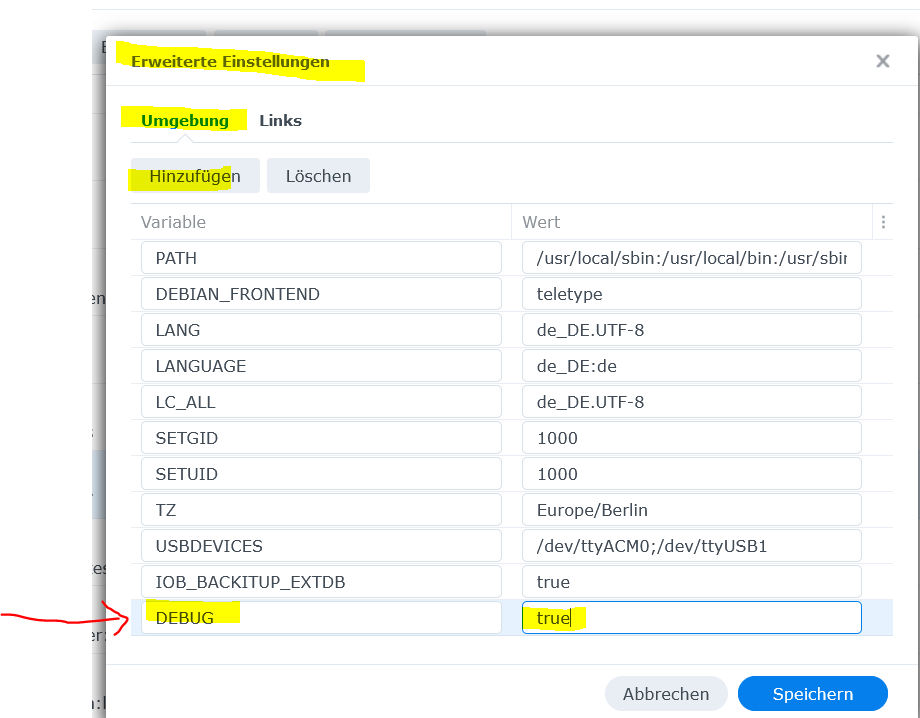
          3438d2bf-f2a5-4019-a3b4-2e7fbfeb3d5e-grafik.png

          dann das Log hier posten ... dann steht auch mehr drin ...

          Synology 918+ 16GB - ioBroker in Docker v9 , VISO auf Trekstor Primebook C13 13,3" , Hikvision Domkameras mit Surveillance Station .. CCU RaspberryMatic in Synology VM .. Zigbee CC2538+CC2592 .. Sonoff .. KNX .. Modbus ..


          Ben1983B 1 Antwort Letzte Antwort
          0
          • GlasfaserG Glasfaser

            @ben1983

            In der Syn Docker ..

            ioBroker Docker stoppen , Bearbeiten , Erweiterte Einstellungen

            3438d2bf-f2a5-4019-a3b4-2e7fbfeb3d5e-grafik.png

            dann das Log hier posten ... dann steht auch mehr drin ...

            Ben1983B Offline
            Ben1983B Offline
            Ben1983
            schrieb am zuletzt editiert von
            #5

            @glasfaser Das Gleiche in Grün.

            
            Suche
            -----                          Version Information                         -----
            -----                    image:               v8.0.1                       -----
            -----                    build:               2023-04-26T23:45:40+00:00    -----
            -----                    node:                v18.16.0                     -----
            -----                    npm:                 9.5.1                        -----
            -----                                                                      -----
            -----                        Environment Variables                         -----
            -----                    DEBUG:               true                         -----
            -----                    SETGID:              1000                         -----
            -----                    SETUID:              1000                         -----
            --------------------------------------------------------------------------------
             
            !!!!!!!!!!!!!!!!!!!!!!!!!!!!!!!!!!!!!!!!!!!!!!!!!!!!!!!!!!!!!!!!!!!!!!!!!!!!!!!!
            !!!!                            DEBUG LOG ACTIVE                            !!!!
            !!!!               Environment variable DEBUG is set to true.               !!!!
            !!!! This will extend the logging output and may slow down container start. !!!!
            !!!!          Please make sure to deactivate if no longer needed.           !!!!
            !!!!     For more information see ioBroker Docker image documentation:      !!!!
            !!!!           https://docs.buanet.de/iobroker-docker-image/docs/           !!!!
            !!!!!!!!!!!!!!!!!!!!!!!!!!!!!!!!!!!!!!!!!!!!!!!!!!!!!!!!!!!!!!!!!!!!!!!!!!!!!!!!
             
            --------------------------------------------------------------------------------
            -----                   Step 1 of 5: Preparing container                   -----
            --------------------------------------------------------------------------------
             
            
            GlasfaserG 1 Antwort Letzte Antwort
            0
            • Ben1983B Ben1983

              @glasfaser Das Gleiche in Grün.

              
              Suche
              -----                          Version Information                         -----
              -----                    image:               v8.0.1                       -----
              -----                    build:               2023-04-26T23:45:40+00:00    -----
              -----                    node:                v18.16.0                     -----
              -----                    npm:                 9.5.1                        -----
              -----                                                                      -----
              -----                        Environment Variables                         -----
              -----                    DEBUG:               true                         -----
              -----                    SETGID:              1000                         -----
              -----                    SETUID:              1000                         -----
              --------------------------------------------------------------------------------
               
              !!!!!!!!!!!!!!!!!!!!!!!!!!!!!!!!!!!!!!!!!!!!!!!!!!!!!!!!!!!!!!!!!!!!!!!!!!!!!!!!
              !!!!                            DEBUG LOG ACTIVE                            !!!!
              !!!!               Environment variable DEBUG is set to true.               !!!!
              !!!! This will extend the logging output and may slow down container start. !!!!
              !!!!          Please make sure to deactivate if no longer needed.           !!!!
              !!!!     For more information see ioBroker Docker image documentation:      !!!!
              !!!!           https://docs.buanet.de/iobroker-docker-image/docs/           !!!!
              !!!!!!!!!!!!!!!!!!!!!!!!!!!!!!!!!!!!!!!!!!!!!!!!!!!!!!!!!!!!!!!!!!!!!!!!!!!!!!!!
               
              --------------------------------------------------------------------------------
              -----                   Step 1 of 5: Preparing container                   -----
              --------------------------------------------------------------------------------
               
              
              GlasfaserG Offline
              GlasfaserG Offline
              Glasfaser
              schrieb am zuletzt editiert von
              #6

              @ben1983

              Da sollte eigentlich mehr kommen ...

              keine Ahnung gerade was da jetzt so hängt .

              Alle Docker Container die du so hast mal stoppen , dann starte die Syn mal neu , erstelle einen neuen iobroker Container ... dann das Verzeichniss mounten .

              Was ist dann ..

              Synology 918+ 16GB - ioBroker in Docker v9 , VISO auf Trekstor Primebook C13 13,3" , Hikvision Domkameras mit Surveillance Station .. CCU RaspberryMatic in Synology VM .. Zigbee CC2538+CC2592 .. Sonoff .. KNX .. Modbus ..

              Ben1983B 1 Antwort Letzte Antwort
              0
              • GlasfaserG Glasfaser

                @ben1983

                Da sollte eigentlich mehr kommen ...

                keine Ahnung gerade was da jetzt so hängt .

                Alle Docker Container die du so hast mal stoppen , dann starte die Syn mal neu , erstelle einen neuen iobroker Container ... dann das Verzeichniss mounten .

                Was ist dann ..

                Ben1983B Offline
                Ben1983B Offline
                Ben1983
                schrieb am zuletzt editiert von
                #7

                @glasfaser Versuche ich spätestens morgen. muss jetzt erst mal was anderes machen. Melde mich wieder

                GlasfaserG 1 Antwort Letzte Antwort
                0
                • Ben1983B Ben1983

                  @glasfaser Versuche ich spätestens morgen. muss jetzt erst mal was anderes machen. Melde mich wieder

                  GlasfaserG Offline
                  GlasfaserG Offline
                  Glasfaser
                  schrieb am zuletzt editiert von
                  #8

                  @ben1983

                  Zeige bitte noch die Full-Ausgabe von

                  iob diag
                  

                  vielleicht sehe ich dort etwas !

                  "In deinem funktionierenden Image 8.0.0 "

                  Synology 918+ 16GB - ioBroker in Docker v9 , VISO auf Trekstor Primebook C13 13,3" , Hikvision Domkameras mit Surveillance Station .. CCU RaspberryMatic in Synology VM .. Zigbee CC2538+CC2592 .. Sonoff .. KNX .. Modbus ..

                  Ben1983B 1 Antwort Letzte Antwort
                  0
                  • Ben1983B Ben1983

                    Hallo, ich habe aktuell das Docker Image 8.0.0
                    Ich wollte heute das 8.0.1 Drauf machen.

                    Wenn ich einen neuen ioBroker aufsetze, geht es, wenn ich jedoch das gemountet Verzeichnis angebe,
                    in welchem die aktuellen Daten drin liegen (hat immer so funktioniert) dann fährt er nicht hoch und kommt nur zu dem Punkt:

                    -----              Welcome to your ioBroker Docker container!              -----
                    -----                    Startupscript is now running!                     -----
                    -----                          Please be patient!                          -----
                    --------------------------------------------------------------------------------
                     
                    --------------------------------------------------------------------------------
                    -----                          System Information                          -----
                    -----                    arch:                x86_64                       -----
                    -----                    hostname:            buanet-iobroker801           -----
                    -----                                                                      -----
                    -----                          Version Information                         -----
                    -----                    image:               v8.0.1                       -----
                    -----                    build:               2023-04-26T23:45:40+00:00    -----
                    -----                    node:                v18.16.0                     -----
                    -----                    npm:                 9.5.1                        -----
                    -----                                                                      -----
                    -----                        Environment Variables                         -----
                    -----                    SETGID:              1000                         -----
                    -----                    SETUID:              1000                         -----
                    --------------------------------------------------------------------------------
                     
                    --------------------------------------------------------------------------------
                    -----                   Step 1 of 5: Preparing container                   -----
                    --------------------------------------------------------------------------------
                    

                    Weiter geht es nicht.
                    Hat jemand eine Idee?

                    FredFF Offline
                    FredFF Offline
                    FredF
                    Most Active Forum Testing
                    schrieb am zuletzt editiert von
                    #9

                    @ben1983 sagte in Neueres Docker Image fährt nicht hoch:

                    Ich wollte heute das 8.0.1 Drauf machen.

                    Wie lange wartest du?
                    Denn da steht:

                    -----                          Please be patient!                          -----
                    
                    Ben1983B 1 Antwort Letzte Antwort
                    1
                    • FredFF FredF

                      @ben1983 sagte in Neueres Docker Image fährt nicht hoch:

                      Ich wollte heute das 8.0.1 Drauf machen.

                      Wie lange wartest du?
                      Denn da steht:

                      -----                          Please be patient!                          -----
                      
                      Ben1983B Offline
                      Ben1983B Offline
                      Ben1983
                      schrieb am zuletzt editiert von
                      #10

                      @fredf Ich habe schon 15 min gewartet...
                      mit dem aktuellen image macht er es in 3s

                      1 Antwort Letzte Antwort
                      0
                      • GlasfaserG Glasfaser

                        @ben1983

                        Zeige bitte noch die Full-Ausgabe von

                        iob diag
                        

                        vielleicht sehe ich dort etwas !

                        "In deinem funktionierenden Image 8.0.0 "

                        Ben1983B Offline
                        Ben1983B Offline
                        Ben1983
                        schrieb am zuletzt editiert von Ben1983
                        #11

                        @glasfaser ok. mom. Das komische ist ja, dass er mit ">Latest_v8" läuft ( hatte ich damals bei der 8.0.0 runter geladen)
                        und direkt mit der 8.0.0 geht es nicht.

                        Bitte

                        root@buanet-iobroker:/opt/iobroker# iob diag                                                                                             
                          iobroker uuid                                                Show uuid of the installation  [aliases: id]                              
                          iobroker unsetup                                             Reset license, installation secret and language                           
                          iobroker fix                                                 Execute the installation fixer script, this updates your ioBroker installa
                        tion                                                                                                                                     
                          iobroker multihost                                           Multihost management                                                      
                          iobroker compact                                             compact group management                                                  
                          iobroker plugin                                              Plugin management                                                         
                          iobroker version [<adapter>]                                 Show version of js-controller or specified adapter  [aliases: v]          
                                                                                                                                                                 
                        Options:                                                                                                                                 
                          --help  Show help  [boolean]                                                                                                           
                        iobroker [command]                                                                                                                       
                                                                                                                                                                 
                        Commands:                                                                                                                                
                          iobroker setup                                               Setup ioBroker                                                            
                          iobroker start [all|<adapter>.<instance>]                    Starts the js-controller or a specified adapter instance                  
                          iobroker stop [<adapter>.<instance>]                         stops the js-controller or a specified adapter instance                   
                          iobroker restart [<adapter>.<instance>]                      Restarts js-controller or a specified adapter instance  [aliases: r]      
                          iobroker debug <adapter>[.<instance>]                        Starts a Node.js debugging session for the adapter instance               
                          iobroker info                                                Shows the host info                                                       
                          iobroker logs [<adapter>]                                    Monitor log                                                               
                          iobroker add <adapter> [desiredNumber]                       Add instance of adapter  [aliases: a]                                     
                          iobroker install <adapter>                                   Installs a specified adapter  [aliases: i]                                
                          iobroker rebuild [<module>]                                  Rebuild all native modules or path                                        
                          iobroker url <url> [<name>]                                  Install adapter from specified url, e.g. GitHub                           
                          iobroker del <adapter>                                       Remove adapter and all instances from this host  [aliases: delete]        
                          iobroker del <adapter>.<instance>                            Remove adapter instance  [aliases: delete]                                
                          iobroker update [<repositoryUrl>]                            Update repository and list adapters                                       
                          iobroker upgrade                                             Upgrade management                                                        
                          iobroker upload [all|<adapter>]                              Upload management  [aliases: u]                                           
                          iobroker object                                              Object management  [aliases: o]                                           
                          iobroker state                                               State management  [aliases: s]                                            
                          iobroker message <adapter>[.instance] <command> [<message>]  Send message to adapter instance/s                                        
                          iobroker list <type> [<filter>]                              List all entries, like objects                                            
                          iobroker chmod <mode> <file>                                 Change file rights                                                        
                          iobroker chown <user> <group> <file>                         Change file ownership                                                     
                          iobroker touch <file>                                        Touch file                                                                
                        iobroker file                                                File management                                                           
                          iobroker user                                                User commands                                                             
                          iobroker group                                               group management                                                          
                          iobroker host <hostname>                                     Set host to given hostname                                                
                          iobroker set <adapter>.<instance>                            Change settings of adapter config                                         
                          iobroker license <license.file or license.text>              Update license by given file                                              
                          iobroker cert                                                Certificate management                                                    
                          iobroker clean <yes>                                         Clears all objects and states                                             
                          iobroker backup                                              Create backup                                                             
                          iobroker restore <backup name or path>                       Restore a specified backup                                                
                          iobroker validate <backup name or path>                      Validate a specified backup                                               
                          iobroker status [all|<adapter>.<instance>]                   Status of ioBroker or adapter instance  [aliases: isrun]                  
                          iobroker repo [<name>]                                       Show repo information                                                     
                        
                        GlasfaserG 2 Antworten Letzte Antwort
                        0
                        • Ben1983B Ben1983

                          @glasfaser ok. mom. Das komische ist ja, dass er mit ">Latest_v8" läuft ( hatte ich damals bei der 8.0.0 runter geladen)
                          und direkt mit der 8.0.0 geht es nicht.

                          Bitte

                          root@buanet-iobroker:/opt/iobroker# iob diag                                                                                             
                            iobroker uuid                                                Show uuid of the installation  [aliases: id]                              
                            iobroker unsetup                                             Reset license, installation secret and language                           
                            iobroker fix                                                 Execute the installation fixer script, this updates your ioBroker installa
                          tion                                                                                                                                     
                            iobroker multihost                                           Multihost management                                                      
                            iobroker compact                                             compact group management                                                  
                            iobroker plugin                                              Plugin management                                                         
                            iobroker version [<adapter>]                                 Show version of js-controller or specified adapter  [aliases: v]          
                                                                                                                                                                   
                          Options:                                                                                                                                 
                            --help  Show help  [boolean]                                                                                                           
                          iobroker [command]                                                                                                                       
                                                                                                                                                                   
                          Commands:                                                                                                                                
                            iobroker setup                                               Setup ioBroker                                                            
                            iobroker start [all|<adapter>.<instance>]                    Starts the js-controller or a specified adapter instance                  
                            iobroker stop [<adapter>.<instance>]                         stops the js-controller or a specified adapter instance                   
                            iobroker restart [<adapter>.<instance>]                      Restarts js-controller or a specified adapter instance  [aliases: r]      
                            iobroker debug <adapter>[.<instance>]                        Starts a Node.js debugging session for the adapter instance               
                            iobroker info                                                Shows the host info                                                       
                            iobroker logs [<adapter>]                                    Monitor log                                                               
                            iobroker add <adapter> [desiredNumber]                       Add instance of adapter  [aliases: a]                                     
                            iobroker install <adapter>                                   Installs a specified adapter  [aliases: i]                                
                            iobroker rebuild [<module>]                                  Rebuild all native modules or path                                        
                            iobroker url <url> [<name>]                                  Install adapter from specified url, e.g. GitHub                           
                            iobroker del <adapter>                                       Remove adapter and all instances from this host  [aliases: delete]        
                            iobroker del <adapter>.<instance>                            Remove adapter instance  [aliases: delete]                                
                            iobroker update [<repositoryUrl>]                            Update repository and list adapters                                       
                            iobroker upgrade                                             Upgrade management                                                        
                            iobroker upload [all|<adapter>]                              Upload management  [aliases: u]                                           
                            iobroker object                                              Object management  [aliases: o]                                           
                            iobroker state                                               State management  [aliases: s]                                            
                            iobroker message <adapter>[.instance] <command> [<message>]  Send message to adapter instance/s                                        
                            iobroker list <type> [<filter>]                              List all entries, like objects                                            
                            iobroker chmod <mode> <file>                                 Change file rights                                                        
                            iobroker chown <user> <group> <file>                         Change file ownership                                                     
                            iobroker touch <file>                                        Touch file                                                                
                          iobroker file                                                File management                                                           
                            iobroker user                                                User commands                                                             
                            iobroker group                                               group management                                                          
                            iobroker host <hostname>                                     Set host to given hostname                                                
                            iobroker set <adapter>.<instance>                            Change settings of adapter config                                         
                            iobroker license <license.file or license.text>              Update license by given file                                              
                            iobroker cert                                                Certificate management                                                    
                            iobroker clean <yes>                                         Clears all objects and states                                             
                            iobroker backup                                              Create backup                                                             
                            iobroker restore <backup name or path>                       Restore a specified backup                                                
                            iobroker validate <backup name or path>                      Validate a specified backup                                               
                            iobroker status [all|<adapter>.<instance>]                   Status of ioBroker or adapter instance  [aliases: isrun]                  
                            iobroker repo [<name>]                                       Show repo information                                                     
                          
                          GlasfaserG Offline
                          GlasfaserG Offline
                          Glasfaser
                          schrieb am zuletzt editiert von
                          #12

                          @fredf sagte in Neueres Docker Image fährt nicht hoch:

                          Wie lange wartest du?

                          Das ist nur am Anfang des Docker Start-Skript ... der Hinweis .

                          ----- Step 1 of 5: Preparing container -----

                          bei DEBUG sollte dann auch mehr kommen danach ... gerade keine Ahnung woran es liegt .

                          Synology 918+ 16GB - ioBroker in Docker v9 , VISO auf Trekstor Primebook C13 13,3" , Hikvision Domkameras mit Surveillance Station .. CCU RaspberryMatic in Synology VM .. Zigbee CC2538+CC2592 .. Sonoff .. KNX .. Modbus ..

                          1 Antwort Letzte Antwort
                          0
                          • Ben1983B Ben1983

                            @glasfaser ok. mom. Das komische ist ja, dass er mit ">Latest_v8" läuft ( hatte ich damals bei der 8.0.0 runter geladen)
                            und direkt mit der 8.0.0 geht es nicht.

                            Bitte

                            root@buanet-iobroker:/opt/iobroker# iob diag                                                                                             
                              iobroker uuid                                                Show uuid of the installation  [aliases: id]                              
                              iobroker unsetup                                             Reset license, installation secret and language                           
                              iobroker fix                                                 Execute the installation fixer script, this updates your ioBroker installa
                            tion                                                                                                                                     
                              iobroker multihost                                           Multihost management                                                      
                              iobroker compact                                             compact group management                                                  
                              iobroker plugin                                              Plugin management                                                         
                              iobroker version [<adapter>]                                 Show version of js-controller or specified adapter  [aliases: v]          
                                                                                                                                                                     
                            Options:                                                                                                                                 
                              --help  Show help  [boolean]                                                                                                           
                            iobroker [command]                                                                                                                       
                                                                                                                                                                     
                            Commands:                                                                                                                                
                              iobroker setup                                               Setup ioBroker                                                            
                              iobroker start [all|<adapter>.<instance>]                    Starts the js-controller or a specified adapter instance                  
                              iobroker stop [<adapter>.<instance>]                         stops the js-controller or a specified adapter instance                   
                              iobroker restart [<adapter>.<instance>]                      Restarts js-controller or a specified adapter instance  [aliases: r]      
                              iobroker debug <adapter>[.<instance>]                        Starts a Node.js debugging session for the adapter instance               
                              iobroker info                                                Shows the host info                                                       
                              iobroker logs [<adapter>]                                    Monitor log                                                               
                              iobroker add <adapter> [desiredNumber]                       Add instance of adapter  [aliases: a]                                     
                              iobroker install <adapter>                                   Installs a specified adapter  [aliases: i]                                
                              iobroker rebuild [<module>]                                  Rebuild all native modules or path                                        
                              iobroker url <url> [<name>]                                  Install adapter from specified url, e.g. GitHub                           
                              iobroker del <adapter>                                       Remove adapter and all instances from this host  [aliases: delete]        
                              iobroker del <adapter>.<instance>                            Remove adapter instance  [aliases: delete]                                
                              iobroker update [<repositoryUrl>]                            Update repository and list adapters                                       
                              iobroker upgrade                                             Upgrade management                                                        
                              iobroker upload [all|<adapter>]                              Upload management  [aliases: u]                                           
                              iobroker object                                              Object management  [aliases: o]                                           
                              iobroker state                                               State management  [aliases: s]                                            
                              iobroker message <adapter>[.instance] <command> [<message>]  Send message to adapter instance/s                                        
                              iobroker list <type> [<filter>]                              List all entries, like objects                                            
                              iobroker chmod <mode> <file>                                 Change file rights                                                        
                              iobroker chown <user> <group> <file>                         Change file ownership                                                     
                              iobroker touch <file>                                        Touch file                                                                
                            iobroker file                                                File management                                                           
                              iobroker user                                                User commands                                                             
                              iobroker group                                               group management                                                          
                              iobroker host <hostname>                                     Set host to given hostname                                                
                              iobroker set <adapter>.<instance>                            Change settings of adapter config                                         
                              iobroker license <license.file or license.text>              Update license by given file                                              
                              iobroker cert                                                Certificate management                                                    
                              iobroker clean <yes>                                         Clears all objects and states                                             
                              iobroker backup                                              Create backup                                                             
                              iobroker restore <backup name or path>                       Restore a specified backup                                                
                              iobroker validate <backup name or path>                      Validate a specified backup                                               
                              iobroker status [all|<adapter>.<instance>]                   Status of ioBroker or adapter instance  [aliases: isrun]                  
                              iobroker repo [<name>]                                       Show repo information                                                     
                            
                            GlasfaserG Offline
                            GlasfaserG Offline
                            Glasfaser
                            schrieb am zuletzt editiert von Glasfaser
                            #13

                            @ben1983

                            direkt mit der 8.0.0 geht es nicht.

                            pkill -u iobroker
                            iob fix
                            

                            dann den Container neu starten

                            dann

                            iob diag
                            

                            Synology 918+ 16GB - ioBroker in Docker v9 , VISO auf Trekstor Primebook C13 13,3" , Hikvision Domkameras mit Surveillance Station .. CCU RaspberryMatic in Synology VM .. Zigbee CC2538+CC2592 .. Sonoff .. KNX .. Modbus ..

                            Ben1983B 1 Antwort Letzte Antwort
                            0
                            • GlasfaserG Glasfaser

                              @ben1983

                              direkt mit der 8.0.0 geht es nicht.

                              pkill -u iobroker
                              iob fix
                              

                              dann den Container neu starten

                              dann

                              iob diag
                              
                              Ben1983B Offline
                              Ben1983B Offline
                              Ben1983
                              schrieb am zuletzt editiert von Ben1983
                              #14

                              @glasfaser OK, was macht dass?
                              Nur damit ich weiß, was ich mache.

                              Den Container dann normal mit meinem Image starten?

                              GlasfaserG 2 Antworten Letzte Antwort
                              0
                              • Ben1983B Ben1983

                                @glasfaser OK, was macht dass?
                                Nur damit ich weiß, was ich mache.

                                Den Container dann normal mit meinem Image starten?

                                GlasfaserG Offline
                                GlasfaserG Offline
                                Glasfaser
                                schrieb am zuletzt editiert von
                                #15

                                @ben1983 sagte in Neueres Docker Image fährt nicht hoch:

                                @glasfaser OK, was macht dass?

                                Der fixt deinen ioBroker , damit auch der Befehl funktioniert ( Abhängigkeiten werden heruntergeladen )

                                Synology 918+ 16GB - ioBroker in Docker v9 , VISO auf Trekstor Primebook C13 13,3" , Hikvision Domkameras mit Surveillance Station .. CCU RaspberryMatic in Synology VM .. Zigbee CC2538+CC2592 .. Sonoff .. KNX .. Modbus ..

                                Ben1983B 1 Antwort Letzte Antwort
                                0
                                • GlasfaserG Glasfaser

                                  @ben1983 sagte in Neueres Docker Image fährt nicht hoch:

                                  @glasfaser OK, was macht dass?

                                  Der fixt deinen ioBroker , damit auch der Befehl funktioniert ( Abhängigkeiten werden heruntergeladen )

                                  Ben1983B Offline
                                  Ben1983B Offline
                                  Ben1983
                                  schrieb am zuletzt editiert von
                                  #16

                                  @glasfaser ich vertraue Dir mal

                                  GlasfaserG 1 Antwort Letzte Antwort
                                  0
                                  • Ben1983B Ben1983

                                    @glasfaser OK, was macht dass?
                                    Nur damit ich weiß, was ich mache.

                                    Den Container dann normal mit meinem Image starten?

                                    GlasfaserG Offline
                                    GlasfaserG Offline
                                    Glasfaser
                                    schrieb am zuletzt editiert von
                                    #17

                                    @ben1983 sagte in Neueres Docker Image fährt nicht hoch:

                                    Den Container dann normal mit meinem Image starten?

                                    Ja , du stoppst ioBroker mit

                                    pkill -u iobroker
                                    

                                    und dann bitte nicht mit iobroker start "" sondern den Container neu starten "

                                    Synology 918+ 16GB - ioBroker in Docker v9 , VISO auf Trekstor Primebook C13 13,3" , Hikvision Domkameras mit Surveillance Station .. CCU RaspberryMatic in Synology VM .. Zigbee CC2538+CC2592 .. Sonoff .. KNX .. Modbus ..

                                    Ben1983B 1 Antwort Letzte Antwort
                                    0
                                    • Ben1983B Ben1983

                                      @glasfaser ich vertraue Dir mal

                                      GlasfaserG Offline
                                      GlasfaserG Offline
                                      Glasfaser
                                      schrieb am zuletzt editiert von
                                      #18

                                      @ben1983 sagte in Neueres Docker Image fährt nicht hoch:

                                      @glasfaser ich vertraue Dir mal

                                      Vertrauen ist gut ... Backup ist sicherer ..

                                      nee Scherz :)

                                      Synology 918+ 16GB - ioBroker in Docker v9 , VISO auf Trekstor Primebook C13 13,3" , Hikvision Domkameras mit Surveillance Station .. CCU RaspberryMatic in Synology VM .. Zigbee CC2538+CC2592 .. Sonoff .. KNX .. Modbus ..

                                      1 Antwort Letzte Antwort
                                      0
                                      • GlasfaserG Glasfaser

                                        @ben1983 sagte in Neueres Docker Image fährt nicht hoch:

                                        Den Container dann normal mit meinem Image starten?

                                        Ja , du stoppst ioBroker mit

                                        pkill -u iobroker
                                        

                                        und dann bitte nicht mit iobroker start "" sondern den Container neu starten "

                                        Ben1983B Offline
                                        Ben1983B Offline
                                        Ben1983
                                        schrieb am zuletzt editiert von
                                        #19

                                        @glasfaser OK, meinen Aktuellen, oder mit dem neuen Image?

                                        GlasfaserG 1 Antwort Letzte Antwort
                                        0
                                        • Ben1983B Ben1983

                                          @glasfaser OK, meinen Aktuellen, oder mit dem neuen Image?

                                          GlasfaserG Offline
                                          GlasfaserG Offline
                                          Glasfaser
                                          schrieb am zuletzt editiert von
                                          #20

                                          @ben1983 sagte in Neueres Docker Image fährt nicht hoch:

                                          @glasfaser OK, meinen Aktuellen,

                                          Wie oben geschrieben ... im alten Container .

                                          Damit ich sehe was du so hast !!

                                          Synology 918+ 16GB - ioBroker in Docker v9 , VISO auf Trekstor Primebook C13 13,3" , Hikvision Domkameras mit Surveillance Station .. CCU RaspberryMatic in Synology VM .. Zigbee CC2538+CC2592 .. Sonoff .. KNX .. Modbus ..

                                          Ben1983B 1 Antwort Letzte Antwort
                                          0
                                          Antworten
                                          • In einem neuen Thema antworten
                                          Anmelden zum Antworten
                                          • Älteste zuerst
                                          • Neuste zuerst
                                          • Meiste Stimmen


                                          Support us

                                          ioBroker
                                          Community Adapters
                                          Donate
                                          FAQ Cloud / IOT
                                          HowTo: Node.js-Update
                                          HowTo: Backup/Restore
                                          Downloads
                                          BLOG

                                          288

                                          Online

                                          32.6k

                                          Benutzer

                                          82.0k

                                          Themen

                                          1.3m

                                          Beiträge
                                          Community
                                          Impressum | Datenschutz-Bestimmungen | Nutzungsbedingungen | Einwilligungseinstellungen
                                          ioBroker Community 2014-2025
                                          logo
                                          • Anmelden

                                          • Du hast noch kein Konto? Registrieren

                                          • Anmelden oder registrieren, um zu suchen
                                          • Erster Beitrag
                                            Letzter Beitrag
                                          0
                                          • Home
                                          • Aktuell
                                          • Tags
                                          • Ungelesen 0
                                          • Kategorien
                                          • Unreplied
                                          • Beliebt
                                          • GitHub
                                          • Docu
                                          • Hilfe