@ymurawski sagte:
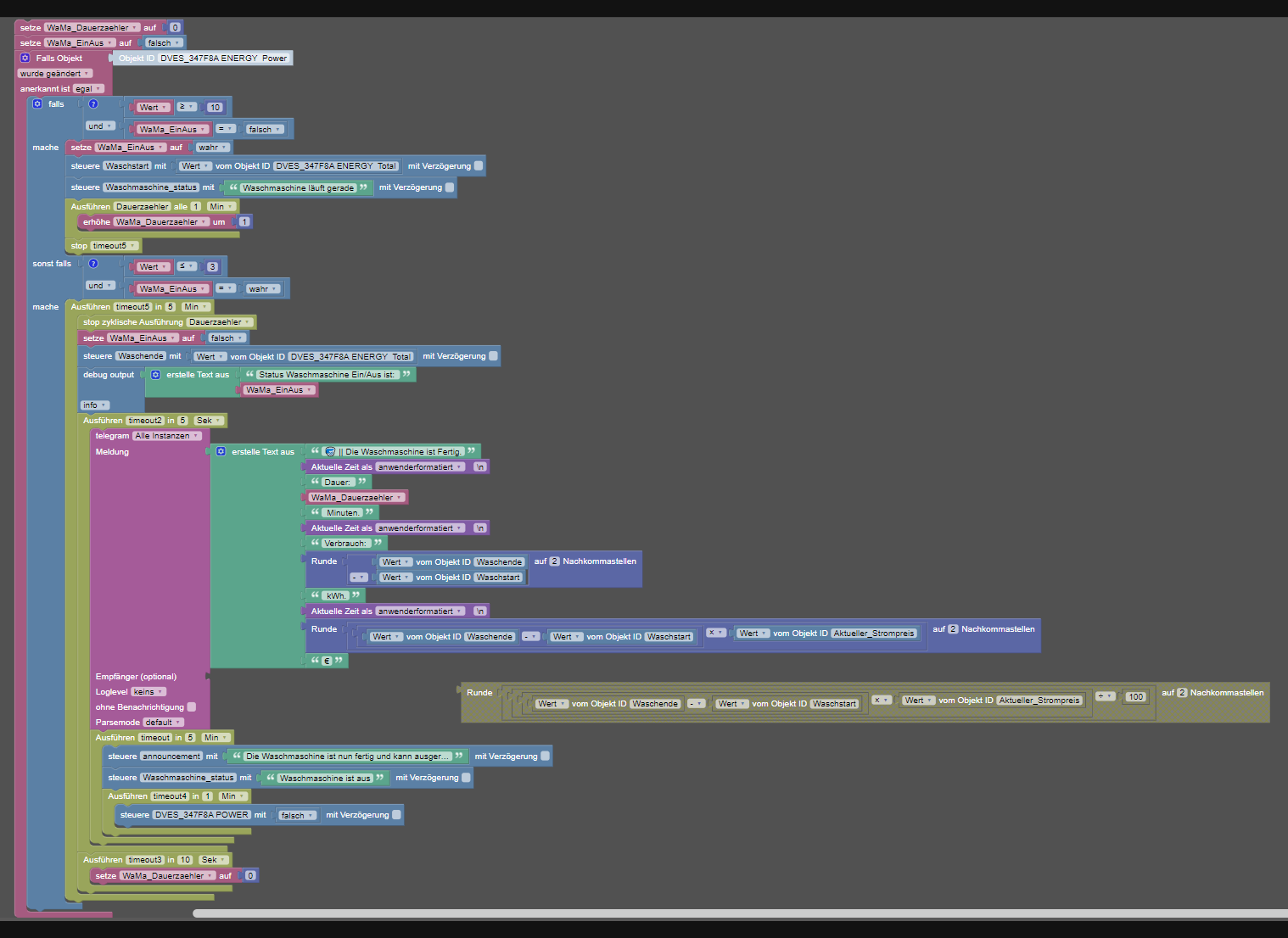
eine kurze Ruhepause habe wo der Stromverbrauch so weit runter geht, das die meldung kommt das Gerät ist fertig.
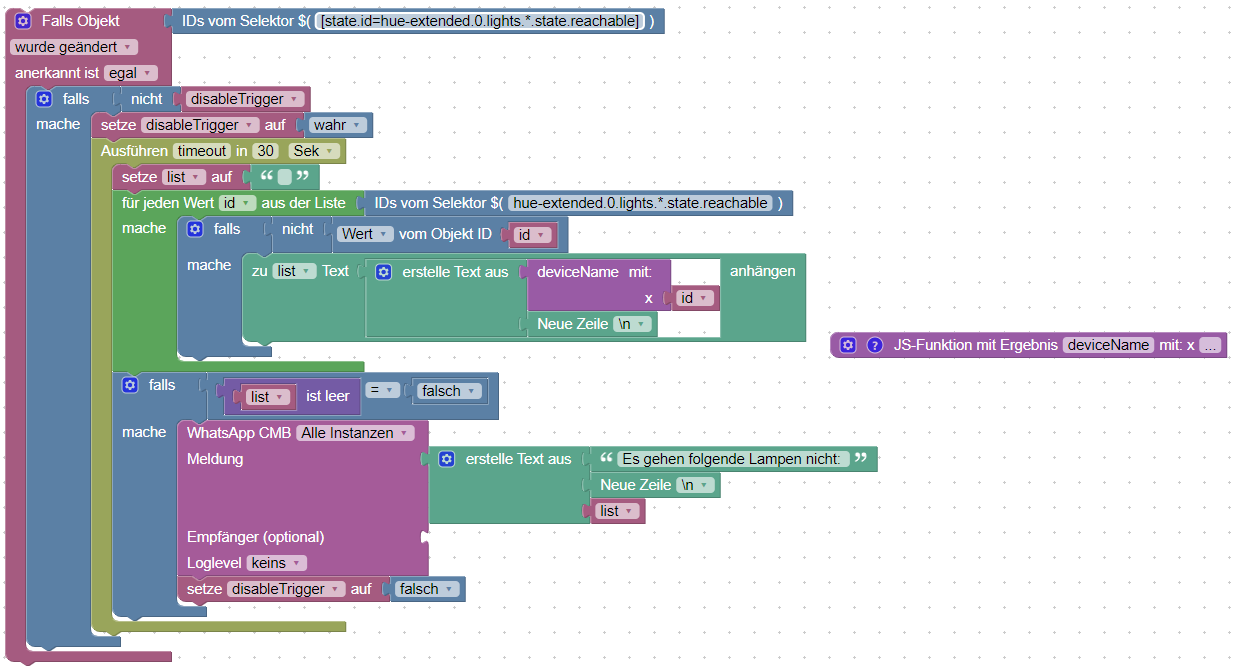
Die Ruhepause muss man mit einer ausreichend langen Verzögerung überbrücken. Beispiel mit 5 Minuten:
Export
<xml xmlns="https://developers.google.com/blockly/xml">
<variables>
<variable id="Hhe!Hg(xh7gHuy(6hLlx">WaMa_EinAus</variable>
<variable type="timeout" id="timeout">timeout</variable>
<variable id="K5A.JA0gB#|i%bfZ+FzS">energyStop</variable>
<variable id="=?OmOeJXP(6k$Q8a4v1*">WaMa_Dauerzaehler</variable>
<variable type="interval" id="Dauerzaehler">Dauerzaehler</variable>
</variables>
<block type="variables_set" id="i@;~wXOo)(5+=$*9v:QF" x="13" y="88">
<field name="VAR" id="Hhe!Hg(xh7gHuy(6hLlx">WaMa_EinAus</field>
<value name="VALUE">
<block type="logic_boolean" id="stD7DD67D[4(YSQ3dCvR">
<field name="BOOL">FALSE</field>
</block>
</value>
<next>
<block type="on_ext" id="%l??Ns0%ZOhlZQJn)RIY">
<mutation xmlns="http://www.w3.org/1999/xhtml" items="1"></mutation>
<field name="CONDITION">ne</field>
<field name="ACK_CONDITION"></field>
<value name="OID0">
<shadow type="field_oid" id="8p+iN2CjzC1M$2o|Xq=m">
<field name="oid">sonoff.0.Blitz-KUE-Geschir.ENERGY_Power</field>
</shadow>
</value>
<statement name="STATEMENT">
<block type="controls_if" id="-4y,4m5H6`8[U,UjJH(0">
<mutation elseif="1"></mutation>
<value name="IF0">
<block type="logic_compare" id="-%Kg)H+S;{}Yyd@cqe=l">
<field name="OP">GTE</field>
<value name="A">
<block type="on_source" id="QS5)==Ahwtfe.nNTl`R@">
<field name="ATTR">state.val</field>
</block>
</value>
<value name="B">
<block type="math_number" id="OT1x**T)z3hCtGxhqDDI">
<field name="NUM">10</field>
</block>
</value>
</block>
</value>
<statement name="DO0">
<block type="timeouts_cleartimeout" id="88BtYKkA-AW[R6^J*q|U">
<field name="NAME">timeout</field>
<next>
<block type="controls_if" id="7bEvP:et}eR?9SYk-g%8">
<value name="IF0">
<block type="logic_compare" id=",LW+*+gUB/lbO[yiNJdv">
<field name="OP">EQ</field>
<value name="A">
<block type="variables_get" id="[$/1md}o9xogfLp*!}WA">
<field name="VAR" id="Hhe!Hg(xh7gHuy(6hLlx">WaMa_EinAus</field>
</block>
</value>
<value name="B">
<block type="logic_boolean" id="V}KP*,b;J,.3q802Q0l^">
<field name="BOOL">FALSE</field>
</block>
</value>
</block>
</value>
<statement name="DO0">
<block type="telegram" id="X-I8D%J5X^!dz[4QvgVm">
<field name="INSTANCE"></field>
<field name="LOG"></field>
<field name="SILENT">FALSE</field>
<field name="PARSEMODE">default</field>
<value name="MESSAGE">
<shadow xmlns="http://www.w3.org/1999/xhtml" type="text">
<field name="TEXT">Waschmaschine ist fertig</field>
</shadow>
<block type="text_join" id="u-4_=Mr@@2pUh#$CCv)-">
<mutation items="1"></mutation>
<value name="ADD0">
<block type="text" id="vLXbm(bY@n5GB:XT{2o^">
<field name="TEXT">Der Geschirrspüler wurde eingeschaltet.</field>
</block>
</value>
</block>
</value>
<next>
<block type="variables_set" id="HHIFm}6:*U#VVrIRv7e|">
<field name="VAR" id="Hhe!Hg(xh7gHuy(6hLlx">WaMa_EinAus</field>
<value name="VALUE">
<block type="logic_boolean" id="%.`!o$LmcZOm0##5WWoJ">
<field name="BOOL">TRUE</field>
</block>
</value>
<next>
<block type="control" id="z]7Pj2YXS1-d)pnchN,!">
<mutation xmlns="http://www.w3.org/1999/xhtml" delay_input="false"></mutation>
<field name="OID">javascript.0.Geschirrspuelerstart</field>
<field name="WITH_DELAY">FALSE</field>
<value name="VALUE">
<block type="get_value" id="b$lgvB*z^u:a@_hX4hL]">
<field name="ATTR">val</field>
<field name="OID">sonoff.0.Blitz-KUE-Geschir.ENERGY_Total</field>
</block>
</value>
<next>
<block type="variables_set" id="VhvVE3UkVJB2fvjGzu*!">
<field name="VAR" id="=?OmOeJXP(6k$Q8a4v1*">WaMa_Dauerzaehler</field>
<value name="VALUE">
<block type="math_number" id="g,Bx,*s}7,][vN=Z-Mt4">
<field name="NUM">0</field>
</block>
</value>
<next>
<block type="timeouts_setinterval" id="(?2yHN!soJ=}mLZ7l]lF">
<field name="NAME">Dauerzaehler</field>
<field name="INTERVAL">1</field>
<field name="UNIT">min</field>
<statement name="STATEMENT">
<block type="math_change" id="w,FoLyTV8R1TP-!PMN(k">
<field name="VAR" id="=?OmOeJXP(6k$Q8a4v1*">WaMa_Dauerzaehler</field>
<value name="DELTA">
<shadow xmlns="http://www.w3.org/1999/xhtml" type="math_number" id="H!-!N4kZhgP#5;zrxCTY">
<field name="NUM">1</field>
</shadow>
<block type="math_number" id="AF2;r}gdm2RpvV`mn)fr">
<field name="NUM">1</field>
</block>
</value>
</block>
</statement>
</block>
</next>
</block>
</next>
</block>
</next>
</block>
</next>
</block>
</statement>
</block>
</next>
</block>
</statement>
<value name="IF1">
<block type="logic_compare" id="Qs-7KB3imiChi@Fc${*|">
<field name="OP">GTE</field>
<value name="A">
<block type="on_source" id="uh!#Fm/5UukRZb(Fb-K}">
<field name="ATTR">oldState.val</field>
</block>
</value>
<value name="B">
<block type="math_number" id="K7F_(ep+nLXlQ-%pt*41">
<field name="NUM">10</field>
</block>
</value>
</block>
</value>
<statement name="DO1">
<block type="timeouts_settimeout" id=",NjGW@Wtt+n7RKNkcxK!">
<field name="NAME">timeout</field>
<field name="DELAY">5</field>
<field name="UNIT">min</field>
<statement name="STATEMENT">
<block type="variables_set" id="v%uZ~9!9y)K3z8=AM`Jl">
<field name="VAR" id="K5A.JA0gB#|i%bfZ+FzS">energyStop</field>
<value name="VALUE">
<block type="get_value" id="}_}=j6pEBm+0afN/394(">
<field name="ATTR">val</field>
<field name="OID">sonoff.0.Blitz-KUE-Geschir.ENERGY_Total</field>
</block>
</value>
<next>
<block type="telegram" id=":)Sqh|eio_J%+h7Q@6nJ">
<field name="INSTANCE"></field>
<field name="LOG"></field>
<field name="SILENT">FALSE</field>
<field name="PARSEMODE">default</field>
<value name="MESSAGE">
<shadow xmlns="http://www.w3.org/1999/xhtml" type="text" id="zaE.r=+WylppU_4Nmdx~">
<field name="TEXT">Waschmaschine ist fertig</field>
</shadow>
<block type="text_join" id="3,~.TJZeugM.!B%S1^X}">
<mutation items="9"></mutation>
<value name="ADD0">
<block type="text" id="|9?4%ic*sy2}Q088ry:q">
<field name="TEXT">Der Geschirrspüler ist fertig.</field>
</block>
</value>
<value name="ADD1">
<block type="time_get" id="a?D^RPe+s+Si=*kkfgj[">
<mutation xmlns="http://www.w3.org/1999/xhtml" format="true" language="false"></mutation>
<field name="OPTION">custom</field>
<field name="FORMAT">\n</field>
</block>
</value>
<value name="ADD2">
<block type="text" id="grfj-@D75~7#;4n|*Zja">
<field name="TEXT">Dauer: </field>
</block>
</value>
<value name="ADD3">
<block type="math_arithmetic" id="|eK0:/U9CG:=7:J7(]|g">
<field name="OP">MINUS</field>
<value name="A">
<shadow type="math_number" id="|%n~|5x7X,_kG*tC~gVV">
<field name="NUM">1</field>
</shadow>
<block type="variables_get" id="n.X3BE*TU_{qnfXV+E~:">
<field name="VAR" id="=?OmOeJXP(6k$Q8a4v1*">WaMa_Dauerzaehler</field>
</block>
</value>
<value name="B">
<shadow type="math_number" id="@Dyxh0r.^r3DMA!TQJcV">
<field name="NUM">5</field>
</shadow>
</value>
</block>
</value>
<value name="ADD4">
<block type="text" id="hB0LeD{cRvcWSjG+y.+=">
<field name="TEXT"> Minuten.</field>
</block>
</value>
<value name="ADD5">
<block type="time_get" id="cA93H,ih=ovnjMRR4?Q6">
<mutation xmlns="http://www.w3.org/1999/xhtml" format="true" language="false"></mutation>
<field name="OPTION">custom</field>
<field name="FORMAT">\n</field>
</block>
</value>
<value name="ADD6">
<block type="text" id="iq5Tj*K!:5+gf]#fZ42]">
<field name="TEXT">Verbrauch: </field>
</block>
</value>
<value name="ADD7">
<block type="math_rndfixed" id=")6B|F41_epI9gP[THRW[">
<field name="n">2</field>
<value name="x">
<shadow xmlns="http://www.w3.org/1999/xhtml" type="math_number" id="}[m8CJ[~.H(X2Ez)$MNC">
<field name="NUM">3.1234</field>
</shadow>
<block type="math_arithmetic" id="vkHPDt[yds%_+|}F~JlI" inline="false">
<field name="OP">MINUS</field>
<value name="A">
<shadow type="math_number" id=";x*EJIT-UHcl7Q0j{G#U">
<field name="NUM">1</field>
</shadow>
<block type="variables_get" id="[%Vl~YC,P$~DB_Bi!0ab">
<field name="VAR" id="K5A.JA0gB#|i%bfZ+FzS">energyStop</field>
</block>
</value>
<value name="B">
<shadow xmlns="http://www.w3.org/1999/xhtml" type="math_number" id=")KC,Lt~MMGdb=v/v*dsR">
<field name="NUM">1</field>
</shadow>
<block type="get_value" id="Y8iAp,Pk9o!]nby,SpJ^">
<field name="ATTR">val</field>
<field name="OID">javascript.0.Geschirrspuelerstart</field>
</block>
</value>
</block>
</value>
</block>
</value>
<value name="ADD8">
<block type="text" id="Gq}sI5F*R]paEBl+;3+e">
<field name="TEXT"> kWh.</field>
</block>
</value>
</block>
</value>
<next>
<block type="timeouts_clearinterval" id="4Usl2WULucSJQ,Ptrt9^">
<field name="NAME">Dauerzaehler</field>
<next>
<block type="variables_set" id="vj!Vu=sDr5yt.:ZU#OfU">
<field name="VAR" id="Hhe!Hg(xh7gHuy(6hLlx">WaMa_EinAus</field>
<value name="VALUE">
<block type="logic_boolean" id="5xCJ(QRB3mIo5.*f1Fsg">
<field name="BOOL">FALSE</field>
</block>
</value>
<next>
<block type="control" id="{MMg6Za}8I|gw.4cE6oG">
<mutation xmlns="http://www.w3.org/1999/xhtml" delay_input="false"></mutation>
<field name="OID">javascript.0.Geschirrspuelerstop</field>
<field name="WITH_DELAY">FALSE</field>
<value name="VALUE">
<block type="variables_get" id="h$ge*RGQb(,SzqKJ{W@q">
<field name="VAR" id="K5A.JA0gB#|i%bfZ+FzS">energyStop</field>
</block>
</value>
<next>
<block type="debug" id="~(eEE8/,iS{wG@j0X)TU">
<field name="Severity">log</field>
<value name="TEXT">
<shadow xmlns="http://www.w3.org/1999/xhtml" type="text" id="3K0c5WSS9VmMq/XFB(e9">
<field name="TEXT">test</field>
</shadow>
<block type="text_join" id="2xby$^zDuX^$?-Yp2~k,">
<mutation items="2"></mutation>
<value name="ADD0">
<block type="text" id="L6trfC]%tV;Q1#[_3UQJ">
<field name="TEXT">Status Waschmaschine Ein/Aus ist: </field>
</block>
</value>
<value name="ADD1">
<block type="variables_get" id="mN7^USWq(%,us)OL?!1#">
<field name="VAR" id="Hhe!Hg(xh7gHuy(6hLlx">WaMa_EinAus</field>
</block>
</value>
</block>
</value>
</block>
</next>
</block>
</next>
</block>
</next>
</block>
</next>
</block>
</next>
</block>
</statement>
</block>
</statement>
</block>
</statement>
</block>
</next>
</block>
</xml>
EDIT: Um Variable energyStop erweitert.