Skip to content

Blockly

6.6k Topics 79.8k Posts

Hilfe für Skripterstellung mit Blockly

NEWS

  • Nuki stumm schalten über vis

    1
    0 Votes
    1 Posts
    82 Views
    No one has replied
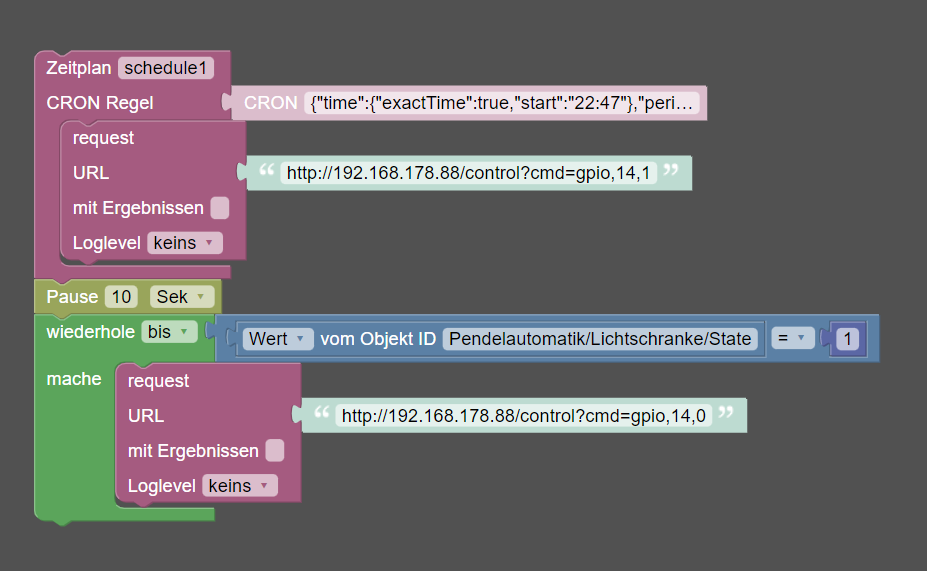
  • Pendelzugsteuerung mit Lichtschranke

    5
    1
    0 Votes
    5 Posts
    248 Views
    A
    Perfekt. Es hat funktioniert. Vielen Dank! :)
  • [gelöst] Fehler bei Prüfung Wert > als Zahl

    40
    2
    0 Votes
    40 Posts
    3k Views
    maeusekingM
    @glasfaser sagte in [gelöst] Fehler bei Prüfung Wert > als Zahl: x = (x>10000) ? 0:x Das ist ja richtig cool! Habe ich gleich ersetzt, nicht zusätzlich angelegt. DANKE!
  • Rollladen per Shelly 2.5 steuern *Lösung*

    10
    2
    0 Votes
    10 Posts
    1k Views
    BananaJoeB
    @paul53 du hast Recht ... aber in meinen Programmablaufplänen aus den 80/90er kann ich das nicht vernünftig darstellen ...
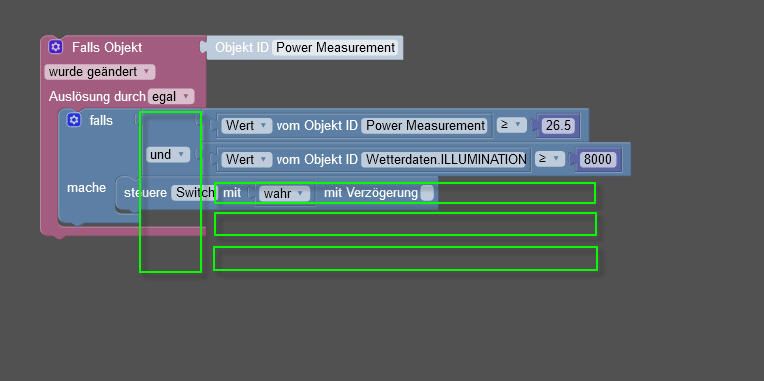
  • Mehrfach und

    11
    0 Votes
    11 Posts
    823 Views
    Dr. BakteriusD
    @paul53 sagte in Mehrfach und: Soll auch nicht: Bedingung "Wert >= 23" war vorher schon erfüllt, als "vorheriger Wert" noch kleiner als 23 war. Natürlich, sorry ich habe das >= nicht gesehen (nur verkleinerte Bildansicht, da sieht es wie ein > aus).
  • Fehlersuche nach Log einträgen

    3
    2
    0 Votes
    3 Posts
    230 Views
    M
    super das hat schon mal geholfen Jetzt gibt es aber immer noch einen Fehler ich glaube der hat mit Set posuition zutun: [image: 1654627112957-1.png]
  • Blockly restore meldet IP hat eine Verbindung verweigert

    1
    1
    0 Votes
    1 Posts
    110 Views
    No one has replied
  • Mehrere UND Bedingungen

    5
    1
    0 Votes
    5 Posts
    326 Views
    J
    @papaechokilo ja das ist auch so wie von Paul, dann muss ich es halt so machen.. Danke euch beiden
  • Abfahrzeit in Minuten

    3
    0 Votes
    3 Posts
    315 Views
    E
    @paul53 Danke dir vielmals! :)
  • IDs vom Selektor Wert steuern

    blockly
    3
    1
    0 Votes
    3 Posts
    188 Views
    R
    @paul53 Sehr gut, vielen Dank!
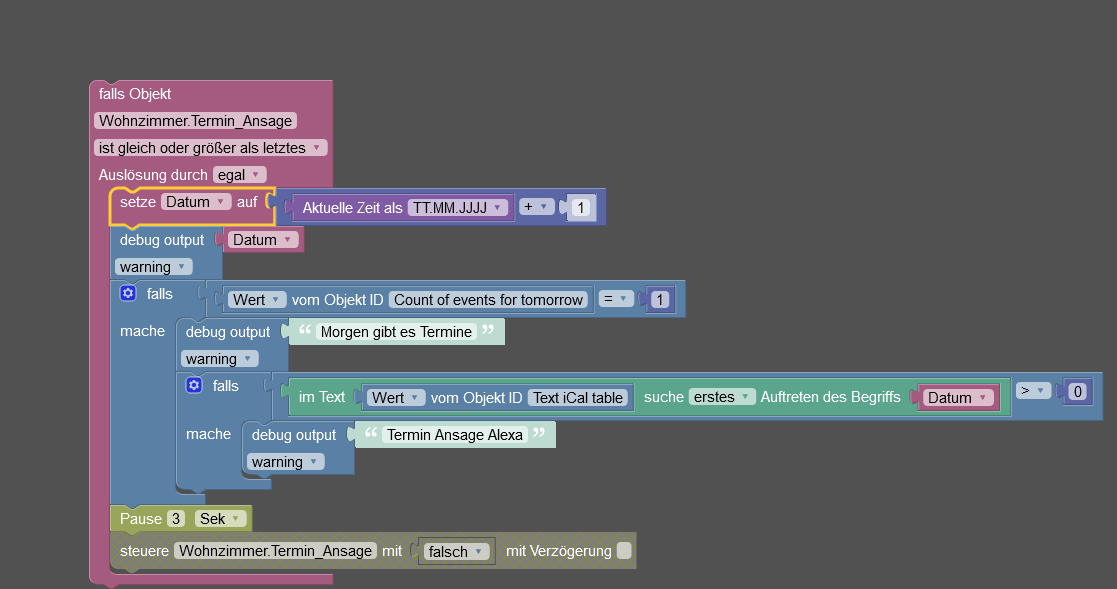
  • iCal Text filtern nach Datum, für Ansage

    9
    1
    0 Votes
    9 Posts
    287 Views
    DJMarc75D
    @d3ltoroxp sagte in iCal Text filtern nach Datum, für Ansage: Ich versuche das nach Datum zu machen, nimm erste 06.06.2022 bis 07.06.2022 Neee, so wird das mit dem Skript nicht funktonieren weil es auf "Morgen" reagiert und nicht auf ein Datum. Datum ist weniger gut realisierbar.
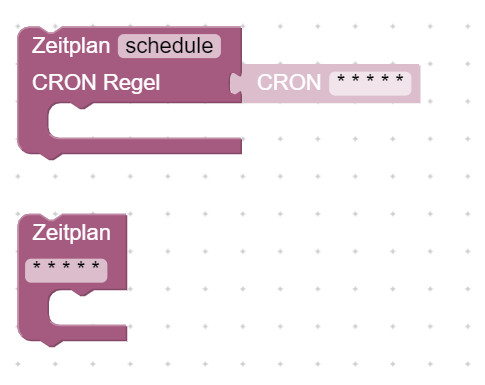
  • Cron vs. Zeitplan

    Moved javascript blockly
    13
    1
    0 Votes
    13 Posts
    1k Views
    A
    @qwerty1896 Nein, keine Neuigkeiten. Ich nutze seit damals eben nur noch die CRON-Eingabe und habe seit dem nie wieder "Seltsamkeiten" festgestellt. Ja, Zeitplan ist einfach, aber ich komme inzwischen auch mit Cron zurecht, zumal einen die Eingabemaske ja sehr gut "führt". Tendenziell immer beim Reiter für den größten Bereich anfangen und dann zu den kleineren Zeitdefinitionen "durchhangeln". Jeden Tag im Juni um 04:00 Uhr: Reiter "MONATE" auswählen, "bestimmte Monate" auswählen ==> Nur Juni markieren. Reiter "TAGE" auswählen, "jeden Tag" auswählen (müßte wegen Default eigentlich bereits eingestellt sein) Reiter "STUNDEN" auswählen, "bestimmte Stunden" auswählen ==> Nur 4 markieren. Reiter "MINUTEN" auswählen, "bestimmte Minuten" auswählen ==> Nur 0 markieren. (müßte wegen Default eigentlich bereits eingestellt sein)
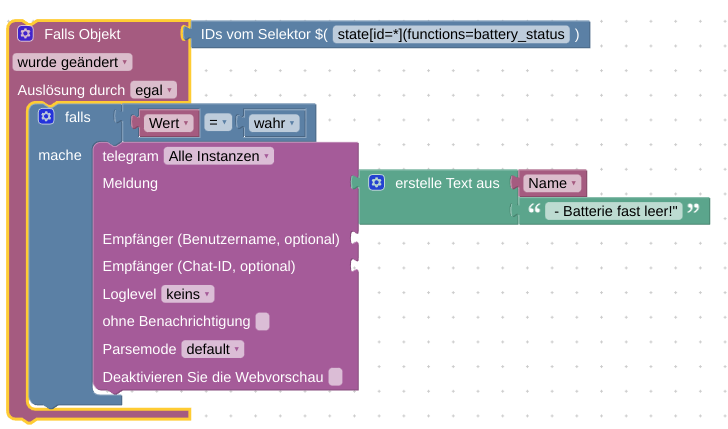
  • Blockly Script: Batterie leer

    3
    1
    0 Votes
    3 Posts
    465 Views
    R
    @tt-tom Hallo! Danke für die schnelle Antwort. "True" ist bei geringer Batterie (lowbat warning). Hab den Fehler gerade gefunden: Im "IDs vom Selektor" Block hat ganz am Ende eine ")" gefehlt....:man-facepalming:
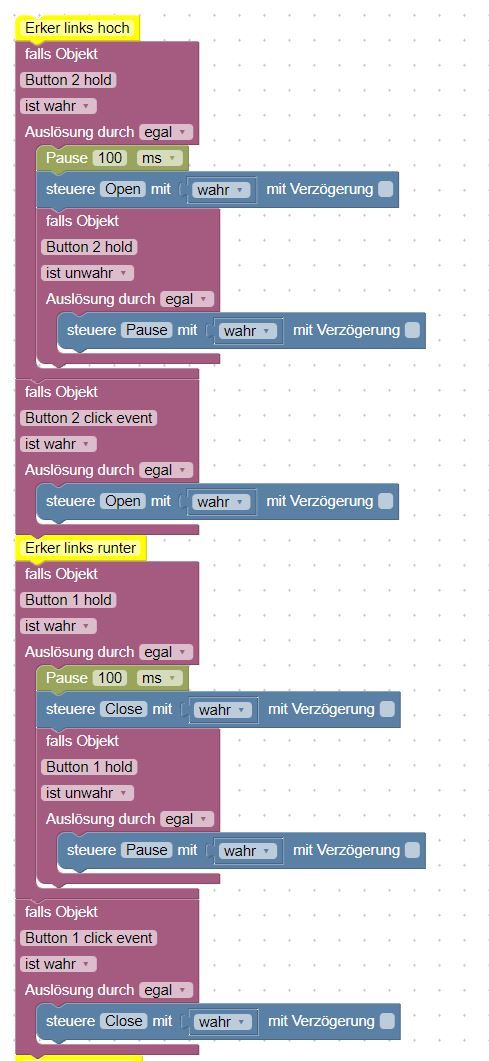
  • harmony Lange auf eine Tagse drücken

    javascript
    8
    0 Votes
    8 Posts
    326 Views
    D
    @digi-bit Hallo, Hab es rausgefunden ................. <block xmlns="https://developers.google.com/blockly/xml" type="control" id="^o@][c:*NGG^m5CTt0/." x="724.0014190673832" y="1394.9999999999995"> <mutation xmlns="http://www.w3.org/1999/xhtml" delay_input="false"></mutation> <field name="OID">harmony.0.Hub-Schlafzimmer.Makerfire_Mode:M8.PowerToggle</field> <field name="WITH_DELAY">FALSE</field> <value name="VALUE"> <block type="math_number" id="p6/R3dtF$08/jYWb=Vre"> <field name="NUM">4000</field> </block> </value> </block> dem Botten einfach eine "Nummer" 4000 reinpressen anstelle einer 1 oder 0 Nur für den fall das mal noch ein andere sowas sucht ! Gelöst ! Winkeeeeee Digi-Bit
  • [Gelöst] Sensoren überwachen + Benachrichtigung

    28
    3
    0 Votes
    28 Posts
    2k Views
    D3ltoroxpD
    @paul53 Ich hänge hier noch etwas fest. Ich habe das für HMIP Geräte genau so gemacht, aber da spuckt er gar nichts aus. Obwohl ein Kontakt nicht erreichbar ist. [image: 1654372232254-5e30920a-c576-4e33-aec0-0a405416dde0-grafik.png] Hat sich erledigt, ka. Ich hatte mal mit einer kleineren Zeit getestet da gings, die Zeit wieder hoch gesetzt dann ging's auch.
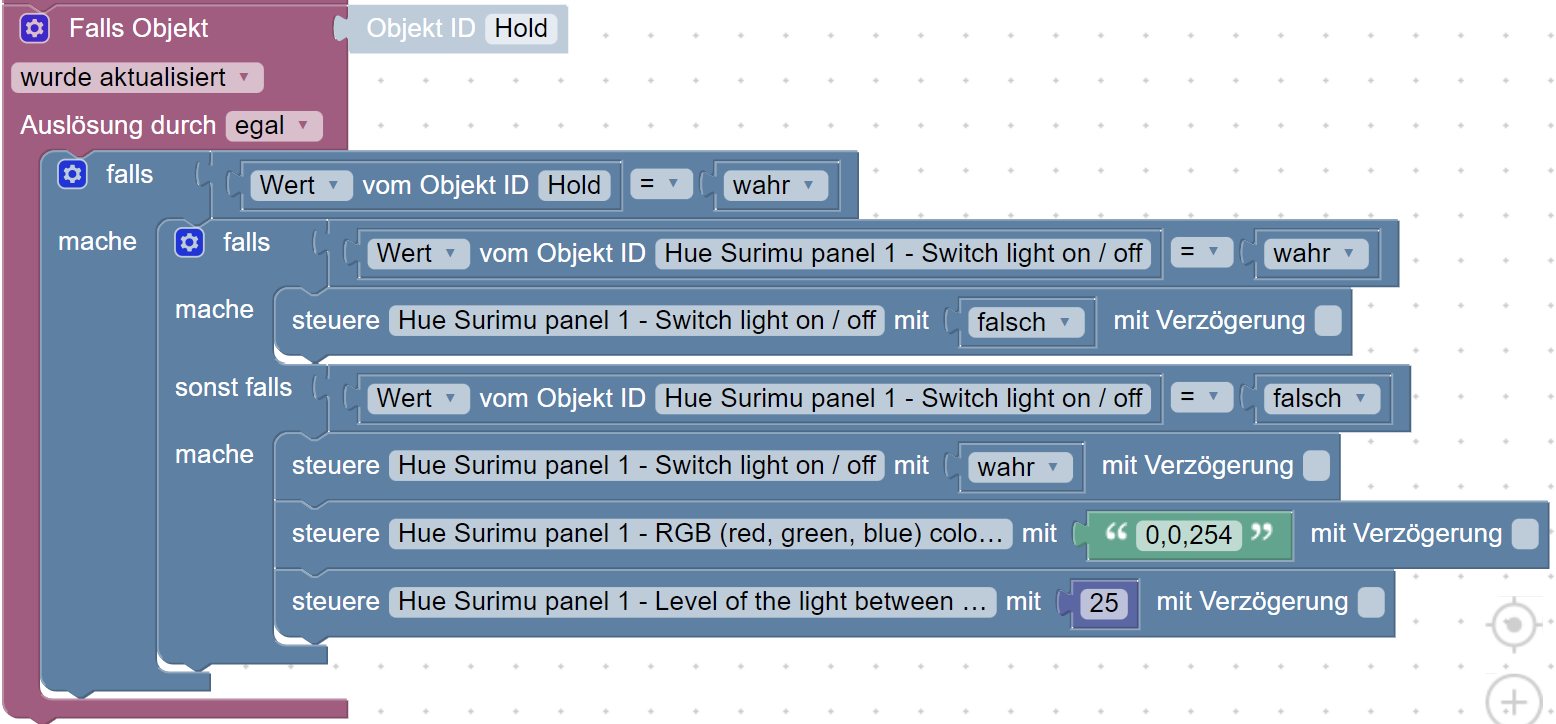
  • <gelöst> Hardwarebutton Steuerung HUE

    blockly
    14
    2
    0 Votes
    14 Posts
    783 Views
    P
    @djmarc75 gerne, wobei es sehr einfach gestaltet ist: "Click": Anschalten wenn Lampe aus, Level 25 % und Warmweiß bzw ausschalten wenn Lampe an ist: <block xmlns="https://developers.google.com/blockly/xml" type="on_ext" id="/A~$qt5qd?jx75Ipue0H" x="-137" y="338"> <mutation xmlns="http://www.w3.org/1999/xhtml" items="1"></mutation> <field name="CONDITION">true</field> <field name="ACK_CONDITION"></field> <value name="OID0"> <shadow type="field_oid" id="d)Vzrr`{SXj@%E%};ebK"> <field name="oid">zigbee.1.00158d0008073091.click</field> </shadow> </value> <statement name="STATEMENT"> <block type="controls_if" id="vLx:!_;x@2~;4o5:ua)|"> <mutation elseif="1"></mutation> <value name="IF0"> <block type="logic_operation" id="~jB(v:paGx#JA?DqZ|Dg" inline="false"> <field name="OP">AND</field> <value name="A"> <block type="logic_compare" id="j#*;I@nswhYDw`45=_8C"> <field name="OP">EQ</field> <value name="A"> <block type="get_value" id="|*43jF|,TSp$)/jslyGm"> <field name="ATTR">val</field> <field name="OID">zigbee.1.00158d0008073091.click</field> </block> </value> <value name="B"> <block type="logic_boolean" id="(8}a%}Lsktl:hRmkRHZo"> <field name="BOOL">TRUE</field> </block> </value> </block> </value> <value name="B"> <block type="logic_compare" id="DsWK9mDmuGT_SZ0k(YI^"> <field name="OP">EQ</field> <value name="A"> <block type="get_value" id="~F$FZRs5s+x{19BuvvY="> <field name="ATTR">val</field> <field name="OID">hue.0.Hue_Surimu_panel_1.on</field> </block> </value> <value name="B"> <block type="logic_boolean" id="uONuNRs5tg)0}a.sP=c:"> <field name="BOOL">FALSE</field> </block> </value> </block> </value> </block> </value> <statement name="DO0"> <block type="control" id="IXnRGy1La|2}JHEoz[Z0"> <mutation xmlns="http://www.w3.org/1999/xhtml" delay_input="false"></mutation> <field name="OID">hue.0.Hue_Surimu_panel_1.on</field> <field name="WITH_DELAY">FALSE</field> <value name="VALUE"> <block type="logic_boolean" id="rSAh~C.$*$0OhD7p+@lo"> <field name="BOOL">TRUE</field> </block> </value> <next> <block type="control" id="-5?UWDa*tL2JGmitkmYP"> <mutation xmlns="http://www.w3.org/1999/xhtml" delay_input="false"></mutation> <field name="OID">hue.0.Hue_Surimu_panel_1.ct</field> <field name="WITH_DELAY">FALSE</field> <value name="VALUE"> <block type="math_number" id="D_^K!0ZC0%i_|L7]43PY"> <field name="NUM">2732</field> </block> </value> <next> <block type="control" id="bHeZ:a8g%AfKn=h*VPFg"> <mutation xmlns="http://www.w3.org/1999/xhtml" delay_input="false"></mutation> <field name="OID">hue.0.Hue_Surimu_panel_1.level</field> <field name="WITH_DELAY">FALSE</field> <value name="VALUE"> <block type="math_number" id="I=1e;p*pa5)OMjSQ+d5F"> <field name="NUM">25</field> </block> </value> </block> </next> </block> </next> </block> </statement> <value name="IF1"> <block type="logic_operation" id="wb..|1Obf]81}c.OL:)s" inline="false"> <field name="OP">AND</field> <value name="A"> <block type="logic_compare" id="ul/-n^5OX9lJhr~/JgWc"> <field name="OP">EQ</field> <value name="A"> <block type="get_value" id="8Aw_FU*5ocqXpj5_ZJYS"> <field name="ATTR">val</field> <field name="OID">zigbee.1.00158d0008073091.click</field> </block> </value> <value name="B"> <block type="logic_boolean" id="W(/%C4[|jYCg+pj{v=}}"> <field name="BOOL">TRUE</field> </block> </value> </block> </value> <value name="B"> <block type="logic_compare" id="TL{QAtyHRFAv$WSE-$b@"> <field name="OP">EQ</field> <value name="A"> <block type="get_value" id="li(ae}7Ml82BM8rLS%w^"> <field name="ATTR">val</field> <field name="OID">hue.0.Hue_Surimu_panel_1.on</field> </block> </value> <value name="B"> <block type="logic_boolean" id="x}i6kAZ~rs1H(,NuShN6"> <field name="BOOL">TRUE</field> </block> </value> </block> </value> </block> </value> <statement name="DO1"> <block type="control" id="|r%{5S!Knu[Jt#Ijo#J2"> <mutation xmlns="http://www.w3.org/1999/xhtml" delay_input="false"></mutation> <field name="OID">hue.0.Hue_Surimu_panel_1.on</field> <field name="WITH_DELAY">FALSE</field> <value name="VALUE"> <block type="logic_boolean" id="TytfxQ1~e5vpc/}(L4uC"> <field name="BOOL">FALSE</field> </block> </value> </block> </statement> </block> </statement> </block> "Hold": Anschalten wenn Lampe aus, Level 25 % und Farbe Rot einstellen bzw ausschalten wenn Lampe an ist: <block xmlns="https://developers.google.com/blockly/xml" type="on_ext" id="YpQ4R$x-4[4ke!PsYl(g" x="-137" y="757"> <mutation xmlns="http://www.w3.org/1999/xhtml" items="1"></mutation> <field name="CONDITION">true</field> <field name="ACK_CONDITION"></field> <value name="OID0"> <shadow type="field_oid" id="Hw!*8=zFS-L;^R!KB81^"> <field name="oid">zigbee.1.00158d0008073091.hold</field> </shadow> </value> <statement name="STATEMENT"> <block type="controls_if" id="@Vfx2}MP^#;Pv@O@/VDn"> <mutation elseif="1"></mutation> <value name="IF0"> <block type="logic_operation" id="I/PMGz@z.CkuIp}Xjc+-" inline="false"> <field name="OP">AND</field> <value name="A"> <block type="logic_compare" id="_n:_0{uNg_7du^sgr3p@"> <field name="OP">EQ</field> <value name="A"> <block type="get_value" id="h*W,@^}e[^ZB==oPn^Pq"> <field name="ATTR">val</field> <field name="OID">zigbee.1.00158d0008073091.hold</field> </block> </value> <value name="B"> <block type="logic_boolean" id="+JRA1WJATLeiFw(+_=~;"> <field name="BOOL">TRUE</field> </block> </value> </block> </value> <value name="B"> <block type="logic_compare" id="6[K}4o;vU(EF9}6m1~s1"> <field name="OP">EQ</field> <value name="A"> <block type="get_value" id="_QuS0OXT(4-QQP^yy{@k"> <field name="ATTR">val</field> <field name="OID">hue.0.Hue_Surimu_panel_1.on</field> </block> </value> <value name="B"> <block type="logic_boolean" id="J([$g}R0Ho{4q=29l!zN"> <field name="BOOL">FALSE</field> </block> </value> </block> </value> </block> </value> <statement name="DO0"> <block type="control" id="`*!S$`;W6e5CST7j3EOY"> <mutation xmlns="http://www.w3.org/1999/xhtml" delay_input="false"></mutation> <field name="OID">hue.0.Hue_Surimu_panel_1.on</field> <field name="WITH_DELAY">FALSE</field> <value name="VALUE"> <block type="logic_boolean" id="ojc{Lt:lIr?1X-y.w}ro"> <field name="BOOL">TRUE</field> </block> </value> <next> <block type="control" id="lf=,_#JyvUm(Xa0PXPm3"> <mutation xmlns="http://www.w3.org/1999/xhtml" delay_input="false"></mutation> <field name="OID">hue.0.Hue_Surimu_panel_1.hue</field> <field name="WITH_DELAY">FALSE</field> <value name="VALUE"> <block type="math_number" id="+wfRu?FvdmeTTng5qi+#"> <field name="NUM">0</field> </block> </value> <next> <block type="control" id="?8]3s/leY$hC3Gqad%gt"> <mutation xmlns="http://www.w3.org/1999/xhtml" delay_input="false"></mutation> <field name="OID">hue.0.Hue_Surimu_panel_1.level</field> <field name="WITH_DELAY">FALSE</field> <value name="VALUE"> <block type="math_number" id="VH%}J7Yaj_*M%IoTI:xg"> <field name="NUM">25</field> </block> </value> </block> </next> </block> </next> </block> </statement> <value name="IF1"> <block type="logic_operation" id="qDvXH(MhtZ9u{LJ/@IV*" inline="false"> <field name="OP">AND</field> <value name="A"> <block type="logic_compare" id="/Q}k*(7Wh~hBb8]vHTG-"> <field name="OP">EQ</field> <value name="A"> <block type="get_value" id="j_}:{{Gw,gy2F|UXzo7J"> <field name="ATTR">val</field> <field name="OID">zigbee.1.00158d0008073091.hold</field> </block> </value> <value name="B"> <block type="logic_boolean" id="|KDE2P5;x|lfZrm0PG#H"> <field name="BOOL">TRUE</field> </block> </value> </block> </value> <value name="B"> <block type="logic_compare" id="nKtUEUqb=0IaFn$`B4zu"> <field name="OP">EQ</field> <value name="A"> <block type="get_value" id="g4.8C}7w{W^2?QLto0zY"> <field name="ATTR">val</field> <field name="OID">hue.0.Hue_Surimu_panel_1.on</field> </block> </value> <value name="B"> <block type="logic_boolean" id="Z|`aU6*.AiT:9*-fc{k$"> <field name="BOOL">TRUE</field> </block> </value> </block> </value> </block> </value> <statement name="DO1"> <block type="control" id="%xrr|A[uK34C4QZ#3:%Q"> <mutation xmlns="http://www.w3.org/1999/xhtml" delay_input="false"></mutation> <field name="OID">hue.0.Hue_Surimu_panel_1.on</field> <field name="WITH_DELAY">FALSE</field> <value name="VALUE"> <block type="logic_boolean" id="]~_Ib3S}*D%x]JvS@-t4"> <field name="BOOL">FALSE</field> </block> </value> </block> </statement> </block> </statement> </block> @DJMarc75 : Die Datenpunkte waren alle korrekt.
  • JSON über Blockly zerlegen

    blockly
    17
    1
    0 Votes
    17 Posts
    1k Views
    sten-torS
    @aski71 Hi Alex, JSONata ist ziemlich mächtig. Du kannst damit direkt ohne Schleife den gewünschten location-Wert extrahieren: $[event='Charge'].location Falls mehrere Charge-Events vorkommen und du willst nur das erste haben: $[event='Charge'][0].location Hier kannst du die JSONata Befehle testen: https://try.jsonata.org/
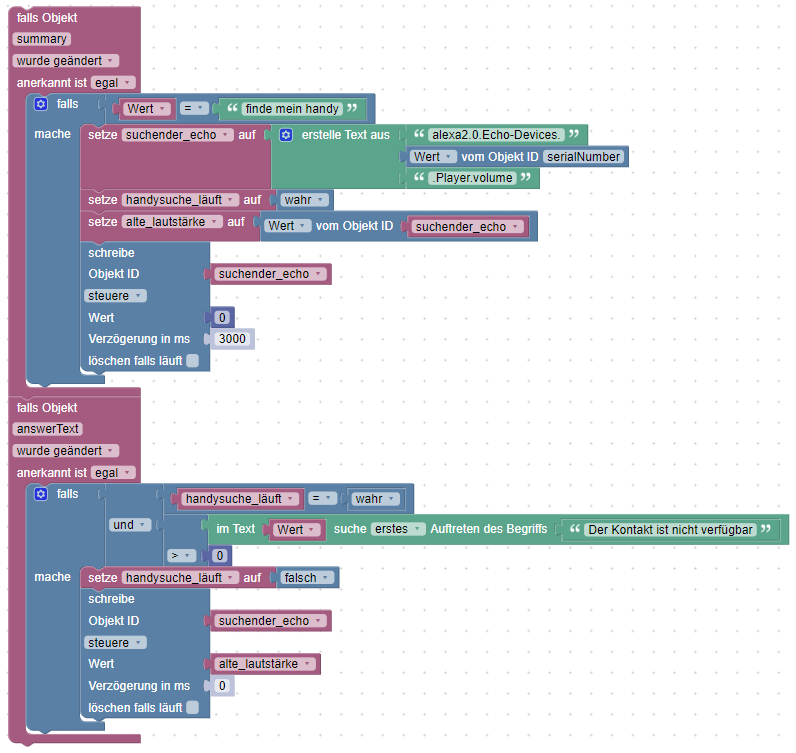
  • Endlich leise Handysuche =)

    9
    1
    1 Votes
    9 Posts
    593 Views
    DJMarc75D
    @da_woody sagte in Endlich leise Handysuche =): 2 stunden später wurde es mir gebracht. Von der Bedienung namens Alexa
  • 6 Votes
    8 Posts
    2k Views
    Hant0rH
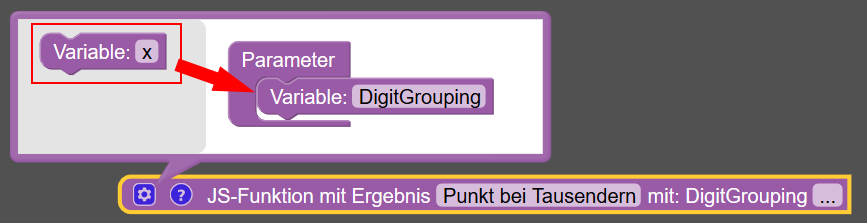
    Vielen lieben Dank, der Artikel hat mir sehr weitergeholfen :) Im Endeffekt reichte mir eine Javafunktion mit dem Code: DigitGrouping = Intl.NumberFormat('de-DE').format(DigitGrouping); return DigitGrouping;
  • Objekte setzen bei Reboot / Neustart usw.

    2
    0 Votes
    2 Posts
    142 Views
    paul53P
    @hotspot_2 sagte: Objekte initial (also nach Neustart) usw. mit einem Wert setze. Außerhalb des Triggers schreiben. Datenpunktwerte überleben aber einen Neustart, außer man schreibt feste Werte außerhalb von Triggern.

604

Online

32.8k

Users

82.8k

Topics

1.3m

Posts