




Umzug von Bullseye auf Trixie, Probleme mit Backup
-
Hi Marc,
ich habe die 9.4.7. drauf, allerdings stellt sich das updaten sehr schwer heraus, da ich kein offizielles Update mehr finde.
Andere Idee: Sollte das Downloaden der einzelnen Dashboards auch gehen?
So muss jetzt ins Bett, hatte Nachtschicht.Andere Idee: Sollte das Downloaden der einzelnen Dashboards auch gehen?
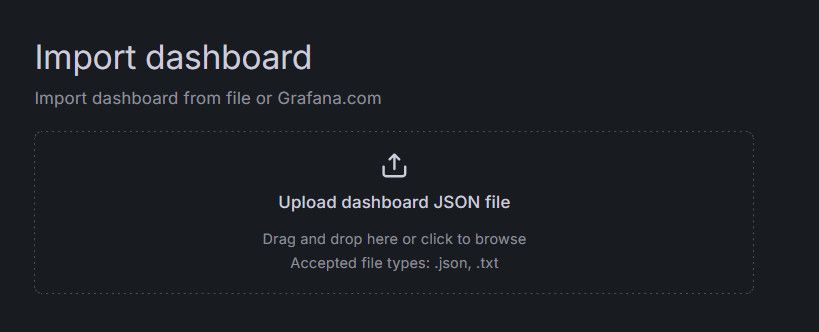
Du kannst dafür in das *.tar.gz gehen, welches von Backitup erstellt wurde. Da drin gibt es einen Ordner "dashboards_manually_restore". Diese Jsons kann du in Grafana unter "Dashboards --> New --> Import" importieren.
-
Hi Marc, da mein Grafana Backup über Backitup nicht funktioniert. Habe ich die Dashboards einzeln heruntergeladen und ins neue Grafana importiert.Die ging aber komischerweise nicht durch die Drag and Drop Funktion, da ist mir Grafan sofort ausgestiegen. Habe den Code dann kopiert und eingefügt.
Soweit so gut. Werde jetzt erstmal ein Image von dem Stand machen. Als nächstes habe ich vor die Influx Datenbank wieder herzustellen. Da will ich morgen ran. Oder hast du einen anderen Vorschlag zur Vorgehensweise. -
Hi Marc,
ich habe die 9.4.7. drauf, allerdings stellt sich das updaten sehr schwer heraus, da ich kein offizielles Update mehr finde.
Andere Idee: Sollte das Downloaden der einzelnen Dashboards auch gehen?
So muss jetzt ins Bett, hatte Nachtschicht. -
Hallo Thomas.
Meinst du das?pi@raspberrypi:~ $ pi@raspberrypi:~ $ sudo apt update Get:1 http://raspbian.raspberrypi.org/raspbian bullseye InRelease [15.0 kB] Get:2 http://archive.raspberrypi.org/debian bullseye InRelease [39.0 kB] Ign:3 http://archive.raspbian.org/raspbian stretch InRelease Err:4 http://archive.raspbian.org/raspbian stretch Release 404 Not Found [IP: 2a00:1098:0:80:1000:75:0:2 80] Get:5 https://packages.grafana.com/oss/deb stable InRelease [7,661 B] Hit:6 https://deb.nodesource.com/node_20.x nodistro InRelease Get:7 https://repos.influxdata.com/debian stretch InRelease [12.9 kB] Get:8 http://archive.raspberrypi.org/debian bullseye/main armhf Packages [330 kB ] Err:5 https://packages.grafana.com/oss/deb stable InRelease The following signatures couldn't be verified because the public key is not av ailable: NO_PUBKEY 963FA27710458545 Err:7 https://repos.influxdata.com/debian stretch InRelease The following signatures couldn't be verified because the public key is not av ailable: NO_PUBKEY DA61C26A0585BD3B Reading package lists... Done E: The repository 'http://archive.raspbian.org/raspbian stretch Release' no long er has a Release file. N: Updating from such a repository can't be done securely, and is therefore disa bled by default. N: See apt-secure(8) manpage for repository creation and user configuration deta ils. W: An error occurred during the signature verification. The repository is not up dated and the previous index files will be used. GPG error: https://packages.gra fana.com/oss/deb stable InRelease: The following signatures couldn't be verified because the public key is not available: NO_PUBKEY 963FA27710458545 W: GPG error: https://repos.influxdata.com/debian stretch InRelease: The followi ng signatures couldn't be verified because the public key is not available: NO_P UBKEY DA61C26A0585BD3B E: The repository 'https://repos.influxdata.com/debian stretch InRelease' is not signed. N: Updating from such a repository can't be done securely, and is therefore disa bled by default. N: See apt-secure(8) manpage for repository creation and user configuration deta ils. N: See apt-secure(8) manpage for repository creation and user configuration deta ils. W: An error occurred during the signature verification. The repository is not up dated and the previous index files will be used. GPG error: https://packages.gra fana.com/oss/deb stable InRelease: The following signatures couldn't be verified because the public key is not available: NO_PUBKEY 963FA27710458545 W: GPG error: https://repos.influxdata.com/debian stretch InRelease: The followi ng signatures couldn't be verified because the public key is not available: NO_P UBKEY DA61C26A0585BD3B -
Hallo Thomas.
Meinst du das?pi@raspberrypi:~ $ pi@raspberrypi:~ $ sudo apt update Get:1 http://raspbian.raspberrypi.org/raspbian bullseye InRelease [15.0 kB] Get:2 http://archive.raspberrypi.org/debian bullseye InRelease [39.0 kB] Ign:3 http://archive.raspbian.org/raspbian stretch InRelease Err:4 http://archive.raspbian.org/raspbian stretch Release 404 Not Found [IP: 2a00:1098:0:80:1000:75:0:2 80] Get:5 https://packages.grafana.com/oss/deb stable InRelease [7,661 B] Hit:6 https://deb.nodesource.com/node_20.x nodistro InRelease Get:7 https://repos.influxdata.com/debian stretch InRelease [12.9 kB] Get:8 http://archive.raspberrypi.org/debian bullseye/main armhf Packages [330 kB ] Err:5 https://packages.grafana.com/oss/deb stable InRelease The following signatures couldn't be verified because the public key is not av ailable: NO_PUBKEY 963FA27710458545 Err:7 https://repos.influxdata.com/debian stretch InRelease The following signatures couldn't be verified because the public key is not av ailable: NO_PUBKEY DA61C26A0585BD3B Reading package lists... Done E: The repository 'http://archive.raspbian.org/raspbian stretch Release' no long er has a Release file. N: Updating from such a repository can't be done securely, and is therefore disa bled by default. N: See apt-secure(8) manpage for repository creation and user configuration deta ils. W: An error occurred during the signature verification. The repository is not up dated and the previous index files will be used. GPG error: https://packages.gra fana.com/oss/deb stable InRelease: The following signatures couldn't be verified because the public key is not available: NO_PUBKEY 963FA27710458545 W: GPG error: https://repos.influxdata.com/debian stretch InRelease: The followi ng signatures couldn't be verified because the public key is not available: NO_P UBKEY DA61C26A0585BD3B E: The repository 'https://repos.influxdata.com/debian stretch InRelease' is not signed. N: Updating from such a repository can't be done securely, and is therefore disa bled by default. N: See apt-secure(8) manpage for repository creation and user configuration deta ils. N: See apt-secure(8) manpage for repository creation and user configuration deta ils. W: An error occurred during the signature verification. The repository is not up dated and the previous index files will be used. GPG error: https://packages.gra fana.com/oss/deb stable InRelease: The following signatures couldn't be verified because the public key is not available: NO_PUBKEY 963FA27710458545 W: GPG error: https://repos.influxdata.com/debian stretch InRelease: The followi ng signatures couldn't be verified because the public key is not available: NO_P UBKEY DA61C26A0585BD3B -
Ich habe letzte Woche als ich den neuen Senec Adapter installiert habe.
Bereits iob fix ausgeführt. Hier die aktuelle iob diag========== Start marking the full check here =========== ```bash Script v.2026-06-06 *** BASE SYSTEM *** Operating System: Raspbian GNU/Linux 11 (bullseye) Static hostname: raspberrypi Icon name: computer Kernel: Linux 6.1.21-v7l+ Architecture: arm OS is similar to: debian Model : Raspberry Pi 4 Model B Rev 1.1 Docker : false Virtualization : none Unknown Kernel : armv7l Userland : 32bit System was installed 1697 days ago (on 2021-10-30). Outdated 32Bit architecture detected. Only a pure 64Bit-System will be supported in the future. You will have to reinstall your operating system with full 64Bit support or upgrade to more modern hardware soon. Systemuptime and Load: 19:24:59 up 1:39, 1 user, load average: 5.00, 2.75, 1.28 CPU threads : 4 *** LIFE CYCLE STATUS *** ERROR: Package 'distro-info' is not installed. Please do: sudo apt update && sudo apt install distro-info Alternatively execute the 'iob fix' -
Ich habe letzte Woche als ich den neuen Senec Adapter installiert habe.
Bereits iob fix ausgeführt. Hier die aktuelle iob diag========== Start marking the full check here =========== ```bash Script v.2026-06-06 *** BASE SYSTEM *** Operating System: Raspbian GNU/Linux 11 (bullseye) Static hostname: raspberrypi Icon name: computer Kernel: Linux 6.1.21-v7l+ Architecture: arm OS is similar to: debian Model : Raspberry Pi 4 Model B Rev 1.1 Docker : false Virtualization : none Unknown Kernel : armv7l Userland : 32bit System was installed 1697 days ago (on 2021-10-30). Outdated 32Bit architecture detected. Only a pure 64Bit-System will be supported in the future. You will have to reinstall your operating system with full 64Bit support or upgrade to more modern hardware soon. Systemuptime and Load: 19:24:59 up 1:39, 1 user, load average: 5.00, 2.75, 1.28 CPU threads : 4 *** LIFE CYCLE STATUS *** ERROR: Package 'distro-info' is not installed. Please do: sudo apt update && sudo apt install distro-info Alternatively execute the 'iob fix'Kernel : armv7l
Userland : 32bitDas System NEUINSTALLIEREN.
In der 64Bit-Lite-Version.https://forum.iobroker.net/topic/51869/installation-auf-raspi-einfacher-geht-s-nicht
-
Hi Thomas, das mache ich ja gerade. Ich habe eben Probleme mit dem Einspielen des Backups.
Habe ja bereits alles installiert. Und jetzt möchte ich eben die Backups implemenierenDa dürfte dir deine verkorkste Quellensammlung in die Suppe spucken.
Weder influx noch grafana können darüber aktuell gehalten werden. Und die Versionen dürften mittlerweile zu weit auseinanderliegen. -
Da dürfte dir deine verkorkste Quellensammlung in die Suppe spucken.
Weder influx noch grafana können darüber aktuell gehalten werden. Und die Versionen dürften mittlerweile zu weit auseinanderliegen. -
Hallo, ich wieder.
Habe jetzt schon mehrere Tage versucht meine Influxdb mit dem iobroker zu Verbinden. Mir fehlt aber immer "Verbunden mit Gerät oder Dienst" im Adapter.
Zuerst habe ich mein Influx und Iobroker backup zurück geholt (Backitup). iobroker hat eigentlich keine Probleme gemacht, das Influx Backup hat mir im Logger keine Fehler gebracht und mitgeteil succesfull. Konnte es bis jetzt aber nicht überprüfen ob die Daten wirklich vorhanden sind. Das ist eigentlich mein zweites Problem. Aber jetzt erstmal zur Verbindung.
Ich habe jetzt die Sache mal so probiert, wie wenn ich es komplett neu installiert hätte, d.h. ich hole mir kein Backup her, sondern versuch einfach mit der nackten Installation (Habe ja ein Image in dem iobroker und Influx frisch installiert wurden) also influx setup durchgeführt:pi@Raspberry:~ $ influx setup > Welcome to InfluxDB 2.0! ? Please type your primary username admin ? Please type your password ************ ? Please type your password again ************ ? Please type your primary organization name DM ? Please type your primary bucket name iobroker ? Please type your retention period in hours, or 0 for infinite 0 ? Setup with these parameters? Username: admin Organization: DM Bucket: iobroker Retention Period: infinite Yes User Organization Bucket admin DM iobrokerJetzt im iobroker den Infuxadapter runtergeladen und eingerichtet:
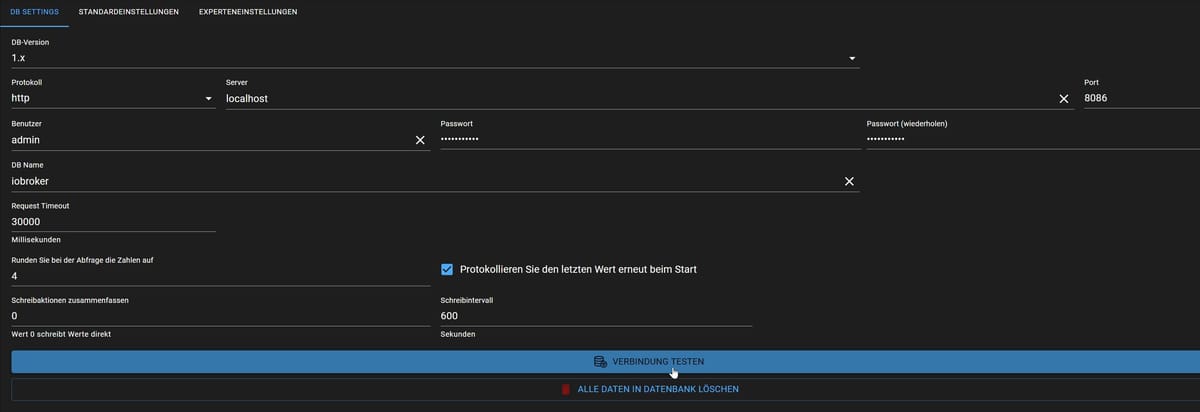
Beim Verbindungstest dies hier:
"Error: {"code":"unauthorized","message":"Unauthorized"}"Und im Adapter wird wie bereits beschrieben das hier gemeldet:

Name und Passwort passen, ich find es einfach nicht. Bin gerade am verzweifeln da dies ja eigentlich ohne Probleme zu bewerkstelligen sein sollte, ich meine damals habe ich es ja hin bekommen.
-
Hallo, ich wieder.
Habe jetzt schon mehrere Tage versucht meine Influxdb mit dem iobroker zu Verbinden. Mir fehlt aber immer "Verbunden mit Gerät oder Dienst" im Adapter.
Zuerst habe ich mein Influx und Iobroker backup zurück geholt (Backitup). iobroker hat eigentlich keine Probleme gemacht, das Influx Backup hat mir im Logger keine Fehler gebracht und mitgeteil succesfull. Konnte es bis jetzt aber nicht überprüfen ob die Daten wirklich vorhanden sind. Das ist eigentlich mein zweites Problem. Aber jetzt erstmal zur Verbindung.
Ich habe jetzt die Sache mal so probiert, wie wenn ich es komplett neu installiert hätte, d.h. ich hole mir kein Backup her, sondern versuch einfach mit der nackten Installation (Habe ja ein Image in dem iobroker und Influx frisch installiert wurden) also influx setup durchgeführt:pi@Raspberry:~ $ influx setup > Welcome to InfluxDB 2.0! ? Please type your primary username admin ? Please type your password ************ ? Please type your password again ************ ? Please type your primary organization name DM ? Please type your primary bucket name iobroker ? Please type your retention period in hours, or 0 for infinite 0 ? Setup with these parameters? Username: admin Organization: DM Bucket: iobroker Retention Period: infinite Yes User Organization Bucket admin DM iobrokerJetzt im iobroker den Infuxadapter runtergeladen und eingerichtet:
Beim Verbindungstest dies hier:
"Error: {"code":"unauthorized","message":"Unauthorized"}"Und im Adapter wird wie bereits beschrieben das hier gemeldet:
Name und Passwort passen, ich find es einfach nicht. Bin gerade am verzweifeln da dies ja eigentlich ohne Probleme zu bewerkstelligen sein sollte, ich meine damals habe ich es ja hin bekommen.
Bist du wirklich noch mit influxdb 1.x unterwegs?
-
Hallo Thomas,
ja, habe damals die 1.x auch benutzt. mit der 2er kann man anscheindend noch mehr. Mein Backup basiert ja auch auf der 1. und ich weis nicht ob ich das von der 1 zur 2 emigrieren kann. Wenn es natürlich sinnvoller wäre die 2.x zu benutzen und ihr sagt das (ich bin in diesem Thema leider noch so versiert und bewundere euch wie ihr immer die Befehle raushaut), werde ich die 2er nehmen. Mittlerweile wird mir meinBackup der Influx immer egaler, will einfach nur wieder Grafan mit meinem Senec und andere Sachen wieder angezeigt haben. -
Hallo Thomas,
ja, habe damals die 1.x auch benutzt. mit der 2er kann man anscheindend noch mehr. Mein Backup basiert ja auch auf der 1. und ich weis nicht ob ich das von der 1 zur 2 emigrieren kann. Wenn es natürlich sinnvoller wäre die 2.x zu benutzen und ihr sagt das (ich bin in diesem Thema leider noch so versiert und bewundere euch wie ihr immer die Befehle raushaut), werde ich die 2er nehmen. Mittlerweile wird mir meinBackup der Influx immer egaler, will einfach nur wieder Grafan mit meinem Senec und andere Sachen wieder angezeigt haben.Mir ist immer noch nicht klar, wie groß da jeweils die Versionssprünge sind.
influx hat im Altsystem? Und im neuen System?
Gleiches für Grafana und was da sonst noch installiert ist. -
Bist du wirklich noch mit influxdb 1.x unterwegs?
Bist du wirklich noch mit influxdb 1.x unterwegs?
Warum nicht, damit kann man bei InfluxQl bleiben, ohne auf die jungfräuliche 3er-Version schwenken zu müssen. Bis diese soweit ist, kann man auch die 1.x aus meiner Sicht weiter nutzen.
Der Wechsel auf InfluxDB2 (ich habe ihn gemacht) bedeutet ja, dass alle Queries auf Flux überarbeitet werden müssen.
Ich bleibe jetzt erstmal bei v2.x und finde nebenbei die Entwicklungsstrategie von InfluxDB gelinde gesagt fragwürdig.
Proxmox und HA ...
Ich schreibe den Code nicht mehr selbst – ich schimpfe mit der KI, bis es funktioniert. -
Bist du wirklich noch mit influxdb 1.x unterwegs?
Warum nicht, damit kann man bei InfluxQl bleiben, ohne auf die jungfräuliche 3er-Version schwenken zu müssen. Bis diese soweit ist, kann man auch die 1.x aus meiner Sicht weiter nutzen.
Der Wechsel auf InfluxDB2 (ich habe ihn gemacht) bedeutet ja, dass alle Queries auf Flux überarbeitet werden müssen.
Ich bleibe jetzt erstmal bei v2.x und finde nebenbei die Entwicklungsstrategie von InfluxDB gelinde gesagt fragwürdig.
Mir geht es primär um Versionssprünge ,da ein Backup einer influxdb1 mit Sicherheit nicht ohne Klimmzüge in eine influxdb2 geladen werden kann
-
Mir geht es primär um Versionssprünge ,da ein Backup einer influxdb1 mit Sicherheit nicht ohne Klimmzüge in eine influxdb2 geladen werden kann
Mir geht es primär um Versionssprünge ,da ein Backup einer influxdb1 mit Sicherheit nicht ohne Klimmzüge in eine influxdb2 geladen werden kann
Na ja, das habe ich auch mit schwachen Armen geschafft, es gibt ja entsprechende Anleitungen im Netz. Wenn ich mich richtig erinnere sogar hier im Forum.
-
Hallo, ich wieder.
Habe jetzt schon mehrere Tage versucht meine Influxdb mit dem iobroker zu Verbinden. Mir fehlt aber immer "Verbunden mit Gerät oder Dienst" im Adapter.
Zuerst habe ich mein Influx und Iobroker backup zurück geholt (Backitup). iobroker hat eigentlich keine Probleme gemacht, das Influx Backup hat mir im Logger keine Fehler gebracht und mitgeteil succesfull. Konnte es bis jetzt aber nicht überprüfen ob die Daten wirklich vorhanden sind. Das ist eigentlich mein zweites Problem. Aber jetzt erstmal zur Verbindung.
Ich habe jetzt die Sache mal so probiert, wie wenn ich es komplett neu installiert hätte, d.h. ich hole mir kein Backup her, sondern versuch einfach mit der nackten Installation (Habe ja ein Image in dem iobroker und Influx frisch installiert wurden) also influx setup durchgeführt:pi@Raspberry:~ $ influx setup > Welcome to InfluxDB 2.0! ? Please type your primary username admin ? Please type your password ************ ? Please type your password again ************ ? Please type your primary organization name DM ? Please type your primary bucket name iobroker ? Please type your retention period in hours, or 0 for infinite 0 ? Setup with these parameters? Username: admin Organization: DM Bucket: iobroker Retention Period: infinite Yes User Organization Bucket admin DM iobrokerJetzt im iobroker den Infuxadapter runtergeladen und eingerichtet:
Beim Verbindungstest dies hier:
"Error: {"code":"unauthorized","message":"Unauthorized"}"Und im Adapter wird wie bereits beschrieben das hier gemeldet:
Name und Passwort passen, ich find es einfach nicht. Bin gerade am verzweifeln da dies ja eigentlich ohne Probleme zu bewerkstelligen sein sollte, ich meine damals habe ich es ja hin bekommen.
-
Ja da gebe ich dir absolut recht
 , danke Thomas.
Habe im Influx ein Token erstellt , und habe im iobroker auf 2.x umgestellt.
jetzt habe ich Verbindung.
Jetzt nur mal zum Verständnis. Ich habe die 2.x installiert. Früher hatte ich dann wohl nur 1.x
Ich bin immer davon ausgegangen das allein die Datenbank entweder 1.x oder 2.x.
Da ich 2.x von Influx jetzt drauf habe, kann ich wohl keine 1.x Datenbank laufen lassen.Also habe ich mal gegoogle wie ich mein backup von 1.x auf eine 2.x hochjagen kann.
Bin dabei auf eine Video von
"EddyD's SmartHome", ich weis jetzt nicht ob ich ein Youtube link posten darf.
Das Video ist zwar von 2022 aber ich werde es mal damit probieren.
Falls ihr eine andere Idee habe, gebt mir gerne Bescheid.Eine andere Alternative wäre natürlich das ich die 2er deinstalliere und die 1.8 draufmache
-
Ja da gebe ich dir absolut recht
, danke Thomas.
Habe im Influx ein Token erstellt , und habe im iobroker auf 2.x umgestellt.
jetzt habe ich Verbindung.
Jetzt nur mal zum Verständnis. Ich habe die 2.x installiert. Früher hatte ich dann wohl nur 1.x
Ich bin immer davon ausgegangen das allein die Datenbank entweder 1.x oder 2.x.
Da ich 2.x von Influx jetzt drauf habe, kann ich wohl keine 1.x Datenbank laufen lassen.Also habe ich mal gegoogle wie ich mein backup von 1.x auf eine 2.x hochjagen kann.
Bin dabei auf eine Video von
"EddyD's SmartHome", ich weis jetzt nicht ob ich ein Youtube link posten darf.
Das Video ist zwar von 2022 aber ich werde es mal damit probieren.
Falls ihr eine andere Idee habe, gebt mir gerne Bescheid.Eine andere Alternative wäre natürlich das ich die 2er deinstalliere und die 1.8 draufmache
Du kannst ja auch influxdb1 installieren.
Jedenfalls, wenn du da das passende Repo am Start hast.echad@chet:~ $ apt policy influxdb influxdb: Installiert: (keine) Installationskandidat: 1.12.4-1 Versionstabelle: 1.12.4-1 500 500 https://repos.influxdata.com/debian stable/main arm64 Packages 1.12.3-1 500 500 https://repos.influxdata.com/debian stable/main arm64 Packages 1.12.2-4 500 500 https://repos.influxdata.com/debian stable/main arm64 Packages 1.12.2-3 500 500 https://repos.influxdata.com/debian stable/main arm64 Packages 1.12.2-1 500 500 https://repos.influxdata.com/debian stable/main arm64 Packages 1.11.8-2 500 500 https://repos.influxdata.com/debian stable/main arm64 Packages 1.11.8-1 500 500 https://repos.influxdata.com/debian stable/main arm64 Packages 1.11.7-1 500 500 https://repos.influxdata.com/debian stable/main arm64 Packages 1.8.10-1 500 500 https://repos.influxdata.com/debian stable/main arm64 Packages 1.6.7~rc0-2+b12 500 500 http://deb.debian.org/debian trixie/main arm64 Packages echad@chet:~ $




Hey! Du scheinst an dieser Unterhaltung interessiert zu sein, hast aber noch kein Konto.
Hast du es satt, bei jedem Besuch durch die gleichen Beiträge zu scrollen? Wenn du dich für ein Konto anmeldest, kommst du immer genau dorthin zurück, wo du zuvor warst, und kannst dich über neue Antworten benachrichtigen lassen (entweder per E-Mail oder Push-Benachrichtigung). Du kannst auch Lesezeichen speichern und Beiträge positiv bewerten, um anderen Community-Mitgliedern deine Wertschätzung zu zeigen.
Mit deinem Input könnte dieser Beitrag noch besser werden 💗
Registrieren AnmeldenSupport us
497
Online33.0k
Benutzer83.6k
Themen1.3m
Beiträge