




BackItUp sichert InfluxDB nicht mehr
-
BackItUp sichert kein InfluxDB mehr.
Ausgabe während der Backup-Erstellung ..
20:57:41.395DEBUGinfluxDBInfluxDB-Backup started ...
20:57:41.398DEBUGinfluxDBStart InfluxDB Backup ...
20:57:41.430DEBUGinfluxDBInfluxDB-Backup for is finish
20:57:41.434DEBUGinfluxDBdone
Und das findet man in den Protokollen ..
..

backitup.0
2025-11-21 20:57:43.643	debug	[iobroker/zigbee] Found zigbee databases: zigbee.0

backitup.0
2025-11-21 20:57:42.736	debug	[iobroker/influxDB] done

backitup.0
2025-11-21 20:57:42.736	debug	[iobroker/influxDB] InfluxDB-Backup for is finish

backitup.0
2025-11-21 20:57:42.736	error	[iobroker] Error: Command failed: influx backup --bucket db_iobroker --host http://192.168.4.200:8086 -t <hier steht mein Token> "/opt/iobroker/backups/influxDB_2025_11_21-20_57_42_ioBroker_backupiobroker"/bin/sh: 1: influx: not found

backitup.0
2025-11-21 20:57:42.736	error	[iobroker/influxDB] /bin/sh: 1: influx: not found

backitup.0
2025-11-21 20:57:42.736	error	[iobroker/influxDB] Error: Command failed: influx backup --bucket db_iobroker --host http://192.168.4.200:8086 -t cX1d4c3DYcKSQNJOoQRev12kMgEvOnCN5Afc2XK0XrxbxbAaZglgbjKfpNX9VtEiez4TUjDZSC1epnPgYBsf7g== "/opt/iobroker/backups/influxDB_2025_11_21-20_57_42_ioBroker_backupiobroker"

backitup.0
2025-11-21 20:57:42.736	debug	[iobroker/influxDB] InfluxDB tmp directory "/opt/iobroker/backups/influxDB_2025_11_21-20_57_42_ioBroker_backupiobroker" successfully deleted

backitup.0
2025-11-21 20:57:42.733	debug	[iobroker/influxDB] Try deleting the InfluxDB tmp directory: "/opt/iobroker/backups/influxDB_2025_11_21-20_57_42_ioBroker_backupiobroker"

backitup.0
2025-11-21 20:57:42.730	debug	[iobroker/influxDB] InfluxDB Backup tmp directory created

backitup.0
2025-11-21 20:57:42.728	debug	[iobroker/influxDB] Start InfluxDB Backup ...

backitup.0
2025-11-21 20:57:42.728	debug	[iobroker/influxDB] InfluxDB-Backup started ...
InfluxDB läuft auf einer Synology 923+ in Docker, ioBroker läuft auf einem Pi 5.
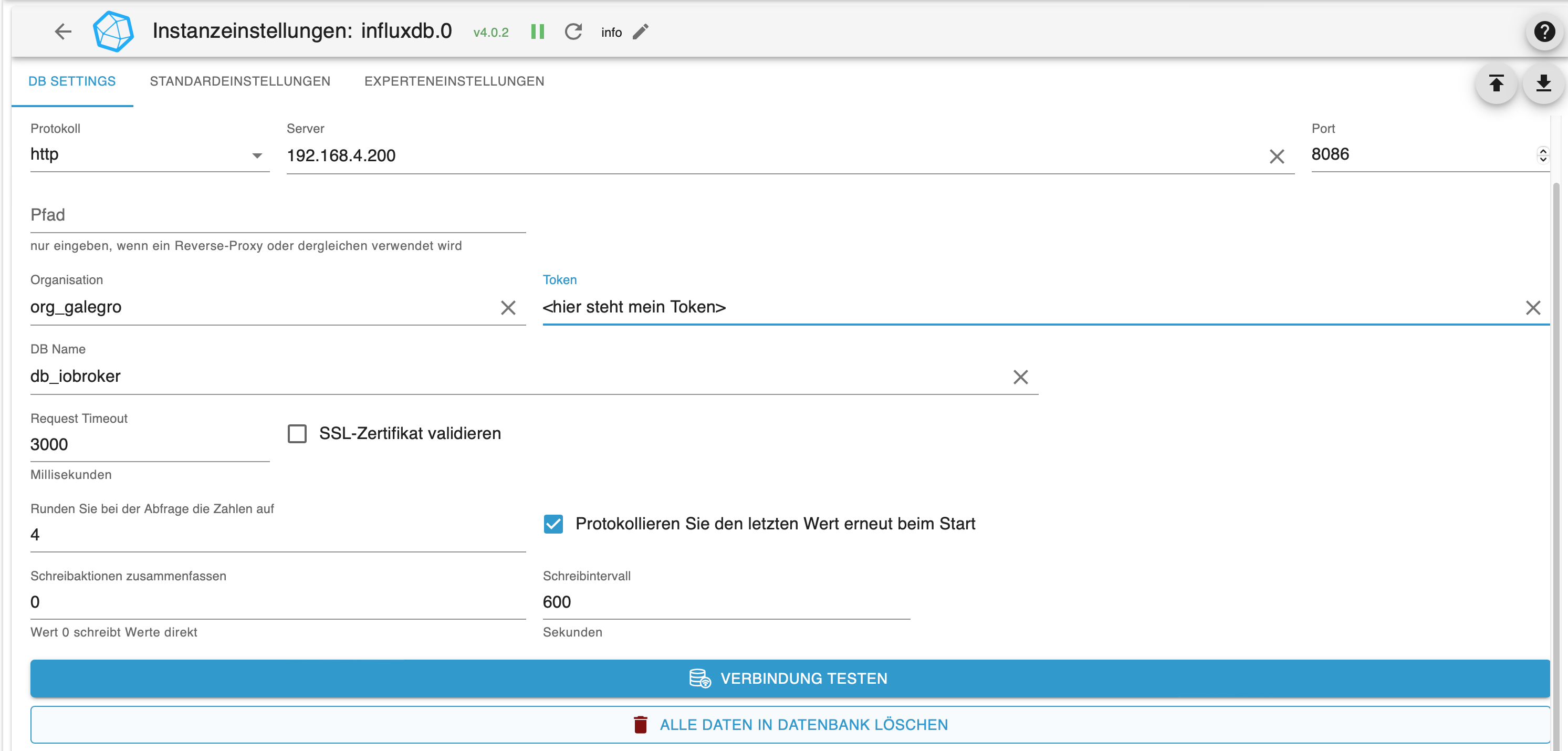
Dies ist meine Konfiguration des InfluxDB-Adapters ..
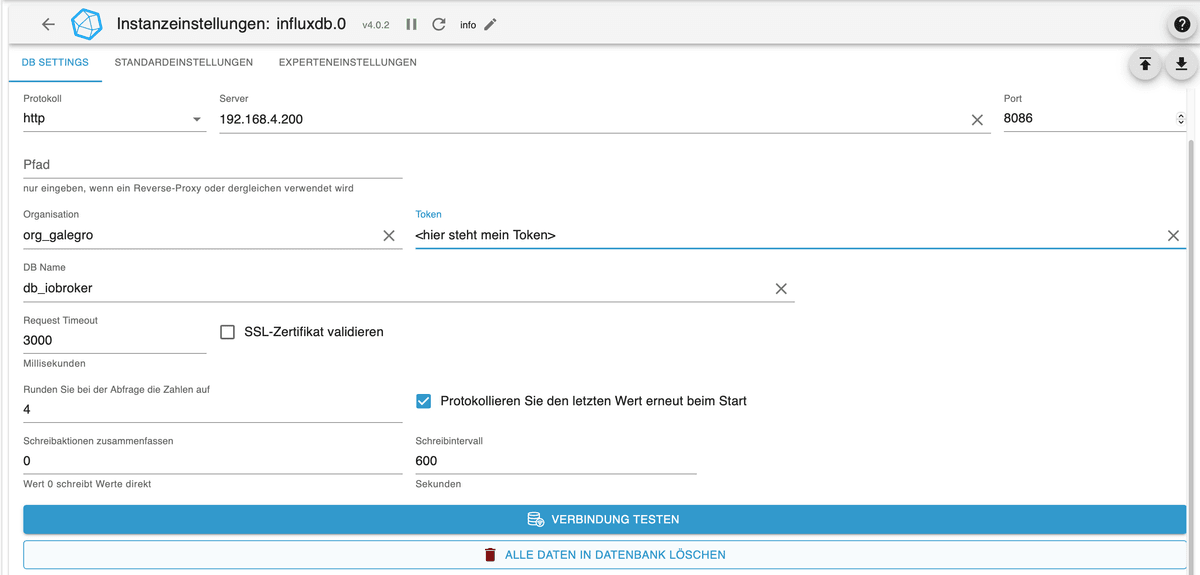
Weiß jemand Rat?
Raspberry Pi 5 mit 8GB + 120GB SSD + Coordinator COD-m + ioBroker ..
-
BackItUp sichert kein InfluxDB mehr.
Ausgabe während der Backup-Erstellung ..
20:57:41.395DEBUGinfluxDBInfluxDB-Backup started ...
20:57:41.398DEBUGinfluxDBStart InfluxDB Backup ...
20:57:41.430DEBUGinfluxDBInfluxDB-Backup for is finish
20:57:41.434DEBUGinfluxDBdone
Und das findet man in den Protokollen ..
..

backitup.0
2025-11-21 20:57:43.643	debug	[iobroker/zigbee] Found zigbee databases: zigbee.0

backitup.0
2025-11-21 20:57:42.736	debug	[iobroker/influxDB] done

backitup.0
2025-11-21 20:57:42.736	debug	[iobroker/influxDB] InfluxDB-Backup for is finish

backitup.0
2025-11-21 20:57:42.736	error	[iobroker] Error: Command failed: influx backup --bucket db_iobroker --host http://192.168.4.200:8086 -t <hier steht mein Token> "/opt/iobroker/backups/influxDB_2025_11_21-20_57_42_ioBroker_backupiobroker"/bin/sh: 1: influx: not found

backitup.0
2025-11-21 20:57:42.736	error	[iobroker/influxDB] /bin/sh: 1: influx: not found

backitup.0
2025-11-21 20:57:42.736	error	[iobroker/influxDB] Error: Command failed: influx backup --bucket db_iobroker --host http://192.168.4.200:8086 -t cX1d4c3DYcKSQNJOoQRev12kMgEvOnCN5Afc2XK0XrxbxbAaZglgbjKfpNX9VtEiez4TUjDZSC1epnPgYBsf7g== "/opt/iobroker/backups/influxDB_2025_11_21-20_57_42_ioBroker_backupiobroker"

backitup.0
2025-11-21 20:57:42.736	debug	[iobroker/influxDB] InfluxDB tmp directory "/opt/iobroker/backups/influxDB_2025_11_21-20_57_42_ioBroker_backupiobroker" successfully deleted

backitup.0
2025-11-21 20:57:42.733	debug	[iobroker/influxDB] Try deleting the InfluxDB tmp directory: "/opt/iobroker/backups/influxDB_2025_11_21-20_57_42_ioBroker_backupiobroker"

backitup.0
2025-11-21 20:57:42.730	debug	[iobroker/influxDB] InfluxDB Backup tmp directory created

backitup.0
2025-11-21 20:57:42.728	debug	[iobroker/influxDB] Start InfluxDB Backup ...

backitup.0
2025-11-21 20:57:42.728	debug	[iobroker/influxDB] InfluxDB-Backup started ...
InfluxDB läuft auf einer Synology 923+ in Docker, ioBroker läuft auf einem Pi 5.
Dies ist meine Konfiguration des InfluxDB-Adapters ..
Weiß jemand Rat?
@legro sagte in BackItUp sichert InfluxDB nicht mehr:
/bin/sh: 1: influx: not found
Es fehlt der client.
-
@legro sagte in BackItUp sichert InfluxDB nicht mehr:
/bin/sh: 1: influx: not found
Es fehlt der client.
@Thomas-Braun sagte in BackItUp sichert InfluxDB nicht mehr:
Es fehlt der client.
Wo fehlt der und wie kann ich diesen Fehler reparieren?
Wenn ich den die Verbindung Adapter ->InfluxDB teste, erhalte ich ein OK.
Raspberry Pi 5 mit 8GB + 120GB SSD + Coordinator COD-m + ioBroker ..
-
@Thomas-Braun sagte in BackItUp sichert InfluxDB nicht mehr:
Es fehlt der client.
Wo fehlt der und wie kann ich diesen Fehler reparieren?
Wenn ich den die Verbindung Adapter ->InfluxDB teste, erhalte ich ein OK.
-
@Thomas-Braun sagte in BackItUp sichert InfluxDB nicht mehr:
sudo apt install influxdb2-cli
Leider erhalte ich bloß einen weiteren Fehler ..
pi@Pi5:~ $ sudo apt install influxdb2-cli
Reading package lists... Done
Building dependency tree... Done
Reading state information... Done
E: Unable to locate package influxdb2-cli
pi@Pi5:~ $
Raspberry Pi 5 mit 8GB + 120GB SSD + Coordinator COD-m + ioBroker ..
-
@Thomas-Braun sagte in BackItUp sichert InfluxDB nicht mehr:
sudo apt install influxdb2-cli
Leider erhalte ich bloß einen weiteren Fehler ..
pi@Pi5:~ $ sudo apt install influxdb2-cli Reading package lists... Done Building dependency tree... Done Reading state information... Done E: Unable to locate package influxdb2-cli pi@Pi5:~ $ -
pi@Pi5:/ $ sudo apt install influxdb2-cli
Reading package lists... Done
Building dependency tree... Done
Reading state information... Done
E: Unable to locate package influxdb2-cli
pi@Pi5:/ $ sudo apt update
apt policy influx*
Hit:1 http://deb.debian.org/debian bookworm InRelease
Get:2 http://deb.debian.org/debian-security bookworm-security InRelease [48.0 kB]
Get:3 http://deb.debian.org/debian bookworm-updates InRelease [55.4 kB]
Get:4 http://archive.raspberrypi.com/debian bookworm InRelease [54.9 kB]
Get:5 https://deb.nodesource.com/node_22.x nodistro InRelease [12.1 kB]
Get:6 http://deb.debian.org/debian-security bookworm-security/main arm64 Packages [283 kB]
Get:7 http://deb.debian.org/debian-security bookworm-security/main armhf Packages [268 kB]
Err:5 https://deb.nodesource.com/node_22.x nodistro InRelease
  The following signatures couldn't be verified because the public key is not available: NO_PUBKEY 2F59B5F99B1BE0B4
Get:8 http://archive.raspberrypi.com/debian bookworm/main arm64 Packages [559 kB]
Get:9 http://archive.raspberrypi.com/debian bookworm/main armhf Packages [560 kB]
Reading package lists... Done
W: GPG error: https://deb.nodesource.com/node_22.x nodistro InRelease: The following signatures couldn't be verified because the public key is not available: NO_PUBKEY 2F59B5F99B1BE0B4
E: The repository 'https://deb.nodesource.com/node_22.x nodistro InRelease' is not signed.
N: Updating from such a repository can't be done securely, and is therefore disabled by default.
N: See apt-secure(8) manpage for repository creation and user configuration details.
influxdb-client:
  Installed: (none)
  Candidate: 1.6.7~rc0-1+b13
  Version table:
     1.6.7~rc0-1+b13 500
        500 http://deb.debian.org/debian bookworm/main arm64 Packages
influxdb-dev:
  Installed: (none)
  Candidate: (none)
  Version table:
influxdb:
  Installed: (none)
  Candidate: 1.6.7~rc0-1+b13
  Version table:
     1.6.7~rc0-1+b13 500
        500 http://deb.debian.org/debian bookworm/main arm64 Packages
Leider erhalte ich anschließend denselben Fehler beim Installieren wie zuvor.
Raspberry Pi 5 mit 8GB + 120GB SSD + Coordinator COD-m + ioBroker ..
-
Vorgeschichte ..
Ich bin ja von meine Pi 4 -> Pi 5 umgezogen. Ist hier ggf. verloren gegangen?
Auf dem Pi 4 habe ich als Installationquelle die sog. "phantastischen Repositories" installiert.
Raspberry Pi 5 mit 8GB + 120GB SSD + Coordinator COD-m + ioBroker ..
-
pi@Pi5:/ $ sudo apt install influxdb2-cli
Reading package lists... Done
Building dependency tree... Done
Reading state information... Done
E: Unable to locate package influxdb2-cli
pi@Pi5:/ $ sudo apt update
apt policy influx*
Hit:1 http://deb.debian.org/debian bookworm InRelease
Get:2 http://deb.debian.org/debian-security bookworm-security InRelease [48.0 kB]
Get:3 http://deb.debian.org/debian bookworm-updates InRelease [55.4 kB]
Get:4 http://archive.raspberrypi.com/debian bookworm InRelease [54.9 kB]
Get:5 https://deb.nodesource.com/node_22.x nodistro InRelease [12.1 kB]
Get:6 http://deb.debian.org/debian-security bookworm-security/main arm64 Packages [283 kB]
Get:7 http://deb.debian.org/debian-security bookworm-security/main armhf Packages [268 kB]
Err:5 https://deb.nodesource.com/node_22.x nodistro InRelease
  The following signatures couldn't be verified because the public key is not available: NO_PUBKEY 2F59B5F99B1BE0B4
Get:8 http://archive.raspberrypi.com/debian bookworm/main arm64 Packages [559 kB]
Get:9 http://archive.raspberrypi.com/debian bookworm/main armhf Packages [560 kB]
Reading package lists... Done
W: GPG error: https://deb.nodesource.com/node_22.x nodistro InRelease: The following signatures couldn't be verified because the public key is not available: NO_PUBKEY 2F59B5F99B1BE0B4
E: The repository 'https://deb.nodesource.com/node_22.x nodistro InRelease' is not signed.
N: Updating from such a repository can't be done securely, and is therefore disabled by default.
N: See apt-secure(8) manpage for repository creation and user configuration details.
influxdb-client:
  Installed: (none)
  Candidate: 1.6.7~rc0-1+b13
  Version table:
     1.6.7~rc0-1+b13 500
        500 http://deb.debian.org/debian bookworm/main arm64 Packages
influxdb-dev:
  Installed: (none)
  Candidate: (none)
  Version table:
influxdb:
  Installed: (none)
  Candidate: 1.6.7~rc0-1+b13
  Version table:
     1.6.7~rc0-1+b13 500
        500 http://deb.debian.org/debian bookworm/main arm64 Packages
Leider erhalte ich anschließend denselben Fehler beim Installieren wie zuvor.
@legro sagte in BackItUp sichert InfluxDB nicht mehr:
Leider erhalte ich anschließend denselben Fehler beim Installieren wie zuvor.
Weil die Quelle nicht angelegt wurde...
Stell dich in dein home und leg es danach an:
https://forum.iobroker.net/topic/59231/phantastische-repositories-und-wo-sie-zu-finden-sind
-
Vorgeschichte ..
Ich bin ja von meine Pi 4 -> Pi 5 umgezogen. Ist hier ggf. verloren gegangen?
Auf dem Pi 4 habe ich als Installationquelle die sog. "phantastischen Repositories" installiert.
@legro sagte in BackItUp sichert InfluxDB nicht mehr:
Ist hier ggf. verloren gegangen?
Externe Quellen müssen neu angelegt werden.
-
@legro sagte in BackItUp sichert InfluxDB nicht mehr:
Ist hier ggf. verloren gegangen?
Externe Quellen müssen neu angelegt werden.
@Thomas-Braun sagte in BackItUp sichert InfluxDB nicht mehr:
Externe Quellen müssen neu angelegt werden.
Oh, da wird meine Dokumentation noch länger. ;-)
Ich habe nun die Quellen neu angelegt. Anschließend sudo apt update & upgrade durchgeführt. Leider war das Ganze nicht erfolgreich.
pi@Pi5:~ $ sudo apt install influxdb2-cli
Reading package lists... Done
Building dependency tree... Done
Reading state information... Done
influxdb2-cli is already the newest version (2.7.5-2).
The following packages were automatically installed and are no longer required:
  libunwind8 linux-headers-6.12.34+rpt-common-rpi linux-kbuild-6.12.34+rpt rpicam-apps-lite
Use 'sudo apt autoremove' to remove them.
0 upgraded, 0 newly installed, 0 to remove and 0 not upgraded.
Raspberry Pi 5 mit 8GB + 120GB SSD + Coordinator COD-m + ioBroker ..
-
@Thomas-Braun sagte in BackItUp sichert InfluxDB nicht mehr:
Externe Quellen müssen neu angelegt werden.
Oh, da wird meine Dokumentation noch länger. ;-)
Ich habe nun die Quellen neu angelegt. Anschließend sudo apt update & upgrade durchgeführt. Leider war das Ganze nicht erfolgreich.
pi@Pi5:~ $ sudo apt install influxdb2-cli Reading package lists... Done Building dependency tree... Done Reading state information... Done influxdb2-cli is already the newest version (2.7.5-2). The following packages were automatically installed and are no longer required: libunwind8 linux-headers-6.12.34+rpt-common-rpi linux-kbuild-6.12.34+rpt rpicam-apps-lite Use 'sudo apt autoremove' to remove them. 0 upgraded, 0 newly installed, 0 to remove and 0 not upgraded.Nach meiner Dokumentation hatte ich bei der Vorbereitung des Umzugs den Pi 5 nicht nur mit dem neuesten OS ausgestattet, sondern ich hatte vorsorglich bereits alle Repositories eingepflegt bevor ich mittels BackItUp den Umzug einläutete.
-
@Thomas-Braun sagte in BackItUp sichert InfluxDB nicht mehr:
Externe Quellen müssen neu angelegt werden.
Oh, da wird meine Dokumentation noch länger. ;-)
Ich habe nun die Quellen neu angelegt. Anschließend sudo apt update & upgrade durchgeführt. Leider war das Ganze nicht erfolgreich.
pi@Pi5:~ $ sudo apt install influxdb2-cli Reading package lists... Done Building dependency tree... Done Reading state information... Done influxdb2-cli is already the newest version (2.7.5-2). The following packages were automatically installed and are no longer required: libunwind8 linux-headers-6.12.34+rpt-common-rpi linux-kbuild-6.12.34+rpt rpicam-apps-lite Use 'sudo apt autoremove' to remove them. 0 upgraded, 0 newly installed, 0 to remove and 0 not upgraded.@legro sagte in BackItUp sichert InfluxDB nicht mehr:
influxdb2-cli is already the newest version (2.7.5-2).
Heißt: Das Paket ist schon installiert.
-
@legro sagte in BackItUp sichert InfluxDB nicht mehr:
influxdb2-cli is already the newest version (2.7.5-2).
Heißt: Das Paket ist schon installiert.
Ich habe das Backup erneut angestoßen: Es funktioniert! Super! Vielen Dank für deine wieder einmal großartige Unterstützung!
21:47:14.466DEBUGinfluxDBStart InfluxDB Backup ...
21:47:14.472DEBUGinfluxDBInfluxDB Backup tmp directory created
21:48:27.395DEBUGinfluxDBPacked 202MB so far...
21:48:37.472DEBUGinfluxDBPacked 406MB so far...
21:48:47.414DEBUGinfluxDBPacked 612MB so far...
21:48:57.400DEBUGinfluxDBPacked 797MB so far...
21:49:02.837DEBUGinfluxDBBackup created: /opt/iobroker/backups/influxDB_2025_11_21-21_47_15_ioBroker_backupiobroker.tar.gz
21:49:02.968DEBUGinfluxDBTry deleting the InfluxDB tmp directory: "/opt/iobroker/backups/influxDB_2025_11_21-21_47_15_ioBroker_backupiobroker"
21:49:04.731DEBUGinfluxDBdone
Der Pi4 -> Pi5 ist wie Trabbi -> BMW ;-)
-
Bei mir wird influxdb seit 4 Wochen nicht mehr gesichert. Änderungen seit dem- nur Linux- Updates.
Backitup bleibt mit 100% CPU Auslastung hier stehen:
13:34:37.871DEBUGinfluxDBInfluxDB-Backup started ...
13:34:37.904DEBUGinfluxDBStart InfluxDB Backup ...
13:34:37.911DEBUGinfluxDBInfluxDB Backup tmp directory createdin der Konsole:
xxxx@neuheizung:~ $ ls
export influxdb2-client-2.7.5-linux-arm64.tar.gz README.md
influx influxdb2-client-2.7.5-linux-arm64.tar.gz.1
influxdata-archive.key LICENSEdie Zeile mit "export" ist rot
-
Bei mir wird influxdb seit 4 Wochen nicht mehr gesichert. Änderungen seit dem- nur Linux- Updates.
Backitup bleibt mit 100% CPU Auslastung hier stehen:
13:34:37.871DEBUGinfluxDBInfluxDB-Backup started ...
13:34:37.904DEBUGinfluxDBStart InfluxDB Backup ...
13:34:37.911DEBUGinfluxDBInfluxDB Backup tmp directory createdin der Konsole:
xxxx@neuheizung:~ $ ls
export influxdb2-client-2.7.5-linux-arm64.tar.gz README.md
influx influxdb2-client-2.7.5-linux-arm64.tar.gz.1
influxdata-archive.key LICENSEdie Zeile mit "export" ist rot
Das hast du nicht ordentlich über deinen Paketmanager installiert, scheint mir.
NUTZ das Ding, dafür ist er ja da! Mit tar.gz machst du auf einem Debian i.d.R. gar nichts. -
Ich soll was genau über den Paketmanager installieren? Backitup? Influx habe ich seit über 1 Jahr nicht angefasst. Bis vor 4 Wochen funktionierte das Backup ja.
sudo apt update und sudo apt upgrade gemacht.@Laser sagte in BackItUp sichert InfluxDB nicht mehr:
sudo apt update und sudo apt upgrade gemacht.
Zeig mal die Ausgabe davon. Ich befürchte, du hast da u. u. eine doppelte Installation.
Einmal über den Paketmanager und dann eine 'wilde' Installation am Paketmanager vorbei.
Warum sollte da sonst ein tarball in dem Verzeichnis liegen? -
Update:
xxxx@neuheizung:~ $ sudo apt update Hit:1 http://deb.debian.org/debian bookworm InRelease Get:2 http://deb.debian.org/debian-security bookworm-security InRelease [48.0 kB] Hit:3 http://archive.raspberrypi.com/debian bookworm InRelease Get:4 http://deb.debian.org/debian bookworm-updates InRelease [55.4 kB] Hit:5 https://repos.influxdata.com/debian stable InRelease Get:6 https://packages.grafana.com/enterprise/deb stable InRelease [7,660 B] Hit:7 https://deb.nodesource.com/node_20.x nodistro InRelease Get:8 http://deb.debian.org/debian-security bookworm-security/main armhf Packages [270 kB] Get:9 http://deb.debian.org/debian-security bookworm-security/main arm64 Packages [285 kB] Err:6 https://packages.grafana.com/enterprise/deb stable InRelease The following signatures were invalid: EXPKEYSIG 963FA27710458545 Grafana Labs <engineering@grafana.com> Fetched 666 kB in 4s (185 kB/s) Reading package lists... Done Building dependency tree... Done Reading state information... Done 2 packages can be upgraded. Run 'apt list --upgradable' to see them. W: https://packages.grafana.com/enterprise/deb/dists/stable/InRelease: Key is stored in legacy trusted.gpg keyring (/etc/apt/trusted.gpg), see the DEPRECATION section in apt-key(8) for details. W: An error occurred during the signature verification. The repository is not updated and the previous index files will be used. GPG error: https://packages.grafana.com/enterprise/deb stable InRelease: The following signatures were invalid: EXPKEYSIG 963FA27710458545 Grafana Labs <engineering@grafana.com> W: Failed to fetch https://packages.grafana.com/enterprise/deb/dists/stable/InRelease The following signatures were invalid: EXPKEYSIG 963FA27710458545 Grafana Labs <engineering@grafana.com> W: Some index files failed to download. They have been ignored, or old ones used instead. -
Upgrade (die Vorversion ist natürlich weg):
wieso gehen die Code-Tags nicht mehr?xxxx@neuheizung:~ $ sudo apt upgrade Reading package lists... Done Building dependency tree... Done Reading state information... Done Calculating upgrade... Done The following packages were automatically installed and are no longer required: linux-headers-6.12.20+rpt-common-rpi linux-headers-6.12.20+rpt-rpi-2712 linux-headers-6.12.20+rpt-rpi-v8 linux-headers-6.12.25+rpt-common-rpi linux-headers-6.12.25+rpt-rpi-2712 linux-headers-6.12.25+rpt-rpi-v8 linux-headers-6.6.51+rpt-common-rpi linux-headers-6.6.51+rpt-rpi-2712 linux-headers-6.6.51+rpt-rpi-v8 linux-headers-6.6.62+rpt-common-rpi linux-headers-6.6.62+rpt-rpi-2712 linux-headers-6.6.62+rpt-rpi-v8 linux-headers-6.6.74+rpt-common-rpi linux-headers-6.6.74+rpt-rpi-2712 linux-headers-6.6.74+rpt-rpi-v8 linux-image-6.12.20+rpt-rpi-2712 linux-image-6.12.20+rpt-rpi-v8 linux-image-6.12.25+rpt-rpi-2712 linux-image-6.12.25+rpt-rpi-v8 linux-image-6.6.51+rpt-rpi-2712 linux-image-6.6.51+rpt-rpi-v8 linux-image-6.6.62+rpt-rpi-2712 linux-image-6.6.62+rpt-rpi-v8 linux-image-6.6.74+rpt-rpi-2712 linux-image-6.6.74+rpt-rpi-v8 linux-kbuild-6.12.20+rpt linux-kbuild-6.12.25+rpt linux-kbuild-6.6.51+rpt linux-kbuild-6.6.62+rpt linux-kbuild-6.6.74+rpt Use 'sudo apt autoremove' to remove them. The following packages have been kept back: raspi-utils The following packages will be upgraded: rpi-eeprom 1 upgraded, 0 newly installed, 0 to remove and 1 not upgraded. Need to get 3,940 kB of archives. After this operation, 5,245 kB of additional disk space will be used. Do you want to continue? [Y/n] y Get:1 http://archive.raspberrypi.com/debian bookworm/main arm64 rpi-eeprom all 28.9-1 [3,940 kB] Fetched 3,940 kB in 2s (2,295 kB/s) Reading changelogs... Done (Reading database ... 207535 files and directories currently installed.) Preparing to unpack .../rpi-eeprom_28.9-1_all.deb ... Unpacking rpi-eeprom (28.9-1) over (28.7-1~bookworm) ... Setting up rpi-eeprom (28.9-1) ... Processing triggers for man-db (2.11.2-2) ...

Hey! Du scheinst an dieser Unterhaltung interessiert zu sein, hast aber noch kein Konto.
Hast du es satt, bei jedem Besuch durch die gleichen Beiträge zu scrollen? Wenn du dich für ein Konto anmeldest, kommst du immer genau dorthin zurück, wo du zuvor warst, und kannst dich über neue Antworten benachrichtigen lassen (entweder per E-Mail oder Push-Benachrichtigung). Du kannst auch Lesezeichen speichern und Beiträge positiv bewerten, um anderen Community-Mitgliedern deine Wertschätzung zu zeigen.
Mit deinem Input könnte dieser Beitrag noch besser werden 💗
Registrieren Anmelden474
Online33.0k
Benutzer83.6k
Themen1.3m
Beiträge