



Skip to content
  • Home
  • Aktuell
  • Tags
  • 0 Ungelesen 0
  • Kategorien
  • Unreplied
  • Beliebt
  • GitHub
  • Docu
  • Hilfe
Skins
  • Light
  • Brite
  • Cerulean
  • Cosmo
  • Flatly
  • Journal
  • Litera
  • Lumen
  • Lux
  • Materia
  • Minty
  • Morph
  • Pulse
  • Sandstone
  • Simplex
  • Sketchy
  • Spacelab
  • United
  • Yeti
  • Zephyr
  • Dark
  • Cyborg
  • Darkly
  • Quartz
  • Slate
  • Solar
  • Superhero
  • Vapor

  • Standard: (Kein Skin)
  • Kein Skin
Einklappen
ioBroker Logo

Community Forum

donate donate
  1. ioBroker Community Home
  2. Deutsch
  3. ioBroker Allgemein
  4. BackItUp sichert InfluxDB nicht mehr
NEWS

  • Weihnachtsangebot 2025! 🎄
    BluefoxB
    Bluefox
    22
    1
    1.0k

  • UPDATE 31.10.: Amazon Alexa - ioBroker Skill läuft aus ?
    apollon77A
    apollon77
    48
    3
    9.1k

  • Monatsrückblick – September 2025
    BluefoxB
    Bluefox
    14
    1
    2.4k

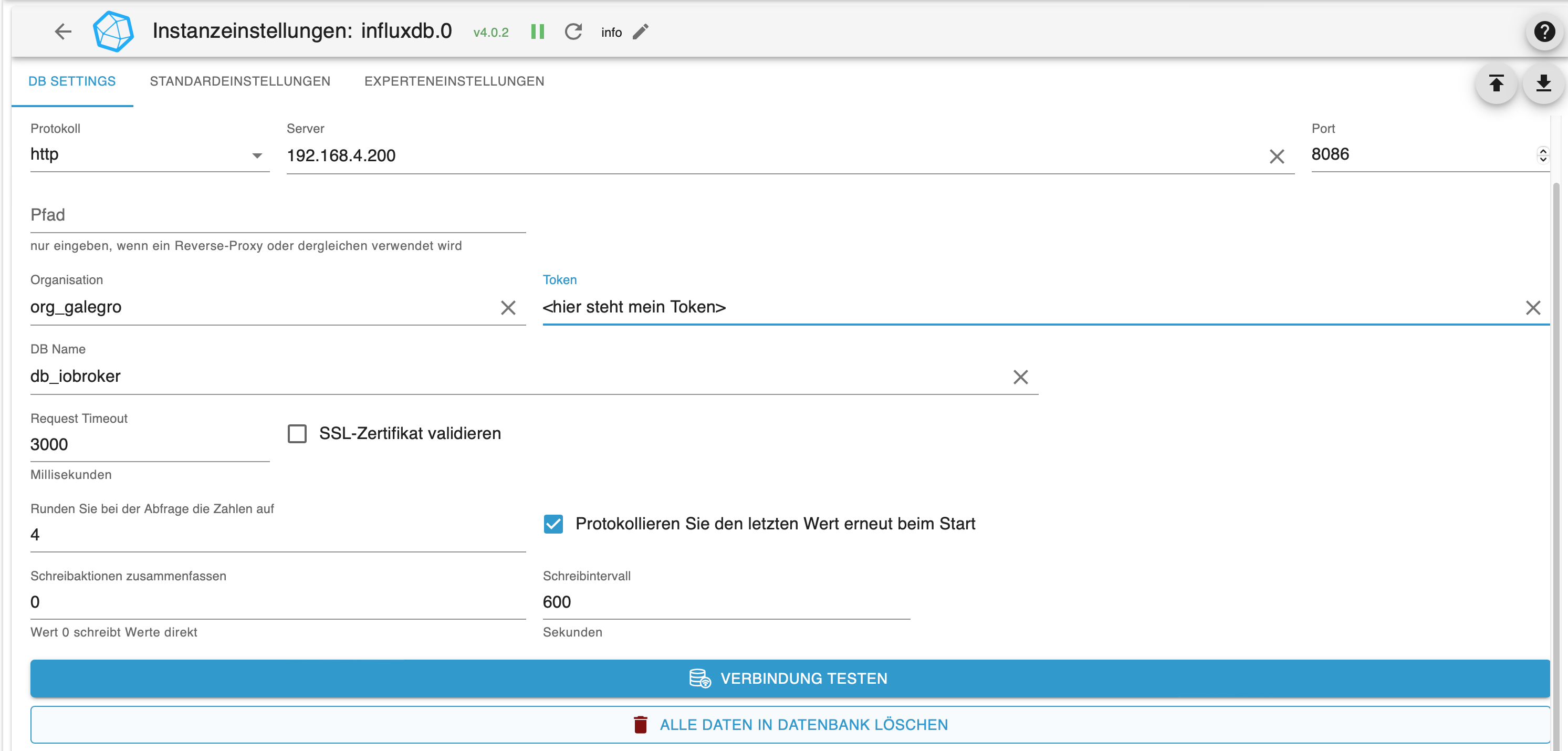
BackItUp sichert InfluxDB nicht mehr

Geplant Angeheftet Gesperrt Verschoben ioBroker Allgemein
36 Beiträge 3 Kommentatoren 264 Aufrufe 4 Watching
  • Älteste zuerst
  • Neuste zuerst
  • Meiste Stimmen
Antworten
  • In einem neuen Thema antworten
Anmelden zum Antworten
Dieses Thema wurde gelöscht. Nur Nutzer mit entsprechenden Rechten können es sehen.
  • L legro

    @Thomas-Braun

    Vorgeschichte ..

    Ich bin ja von meine Pi 4 -> Pi 5 umgezogen. Ist hier ggf. verloren gegangen?

    Auf dem Pi 4 habe ich als Installationquelle die sog. "phantastischen Repositories" installiert.

    Thomas BraunT Online
    Thomas BraunT Online
    Thomas Braun
    Most Active
    schrieb am zuletzt editiert von
    #10

    @legro sagte in BackItUp sichert InfluxDB nicht mehr:

    Ist hier ggf. verloren gegangen?

    Externe Quellen müssen neu angelegt werden.

    Linux-Werkzeugkasten:
    https://forum.iobroker.net/topic/42952/der-kleine-iobroker-linux-werkzeugkasten
    NodeJS Fixer Skript:
    https://forum.iobroker.net/topic/68035/iob-node-fix-skript
    iob_diag: curl -sLf -o diag.sh https://iobroker.net/diag.sh && bash diag.sh

    L 1 Antwort Letzte Antwort
    0
    • Thomas BraunT Thomas Braun

      @legro sagte in BackItUp sichert InfluxDB nicht mehr:

      Ist hier ggf. verloren gegangen?

      Externe Quellen müssen neu angelegt werden.

      L Offline
      L Offline
      legro
      schrieb am zuletzt editiert von legro
      #11

      @Thomas-Braun sagte in BackItUp sichert InfluxDB nicht mehr:

      Externe Quellen müssen neu angelegt werden.

      Oh, da wird meine Dokumentation noch länger. ;-)

      Ich habe nun die Quellen neu angelegt. Anschließend sudo apt update & upgrade durchgeführt. Leider war das Ganze nicht erfolgreich.

      pi@Pi5:~ $ sudo apt install influxdb2-cli
      Reading package lists... Done
      Building dependency tree... Done
      Reading state information... Done
      influxdb2-cli is already the newest version (2.7.5-2).
      The following packages were automatically installed and are no longer required:
        libunwind8 linux-headers-6.12.34+rpt-common-rpi linux-kbuild-6.12.34+rpt rpicam-apps-lite
      Use 'sudo apt autoremove' to remove them.
      0 upgraded, 0 newly installed, 0 to remove and 0 not upgraded.
      

      Nach über vier Jahren Leidenszeit unter Qivicon/MSH vor den Telekomikern zu ioBroker geflüchtet.
      Raspberry Pi 4 mit 8GB + ArgonOneM.2 + 120GB SSD + Coordinator CC26X2R1 + ioBroker + piVCCU3

      L Thomas BraunT 2 Antworten Letzte Antwort
      0
      • L legro

        @Thomas-Braun sagte in BackItUp sichert InfluxDB nicht mehr:

        Externe Quellen müssen neu angelegt werden.

        Oh, da wird meine Dokumentation noch länger. ;-)

        Ich habe nun die Quellen neu angelegt. Anschließend sudo apt update & upgrade durchgeführt. Leider war das Ganze nicht erfolgreich.

        pi@Pi5:~ $ sudo apt install influxdb2-cli
        Reading package lists... Done
        Building dependency tree... Done
        Reading state information... Done
        influxdb2-cli is already the newest version (2.7.5-2).
        The following packages were automatically installed and are no longer required:
          libunwind8 linux-headers-6.12.34+rpt-common-rpi linux-kbuild-6.12.34+rpt rpicam-apps-lite
        Use 'sudo apt autoremove' to remove them.
        0 upgraded, 0 newly installed, 0 to remove and 0 not upgraded.
        
        L Offline
        L Offline
        legro
        schrieb am zuletzt editiert von legro
        #12

        Nach meiner Dokumentation hatte ich bei der Vorbereitung des Umzugs den Pi 5 nicht nur mit dem neuesten OS ausgestattet, sondern ich hatte vorsorglich bereits alle Repositories eingepflegt bevor ich mittels BackItUp den Umzug einläutete.

        Nach über vier Jahren Leidenszeit unter Qivicon/MSH vor den Telekomikern zu ioBroker geflüchtet.
        Raspberry Pi 4 mit 8GB + ArgonOneM.2 + 120GB SSD + Coordinator CC26X2R1 + ioBroker + piVCCU3

        1 Antwort Letzte Antwort
        0
        • L legro

          @Thomas-Braun sagte in BackItUp sichert InfluxDB nicht mehr:

          Externe Quellen müssen neu angelegt werden.

          Oh, da wird meine Dokumentation noch länger. ;-)

          Ich habe nun die Quellen neu angelegt. Anschließend sudo apt update & upgrade durchgeführt. Leider war das Ganze nicht erfolgreich.

          pi@Pi5:~ $ sudo apt install influxdb2-cli
          Reading package lists... Done
          Building dependency tree... Done
          Reading state information... Done
          influxdb2-cli is already the newest version (2.7.5-2).
          The following packages were automatically installed and are no longer required:
            libunwind8 linux-headers-6.12.34+rpt-common-rpi linux-kbuild-6.12.34+rpt rpicam-apps-lite
          Use 'sudo apt autoremove' to remove them.
          0 upgraded, 0 newly installed, 0 to remove and 0 not upgraded.
          
          Thomas BraunT Online
          Thomas BraunT Online
          Thomas Braun
          Most Active
          schrieb am zuletzt editiert von
          #13

          @legro sagte in BackItUp sichert InfluxDB nicht mehr:

          influxdb2-cli is already the newest version (2.7.5-2).

          Heißt: Das Paket ist schon installiert.

          Linux-Werkzeugkasten:
          https://forum.iobroker.net/topic/42952/der-kleine-iobroker-linux-werkzeugkasten
          NodeJS Fixer Skript:
          https://forum.iobroker.net/topic/68035/iob-node-fix-skript
          iob_diag: curl -sLf -o diag.sh https://iobroker.net/diag.sh && bash diag.sh

          L 1 Antwort Letzte Antwort
          0
          • Thomas BraunT Thomas Braun

            @legro sagte in BackItUp sichert InfluxDB nicht mehr:

            influxdb2-cli is already the newest version (2.7.5-2).

            Heißt: Das Paket ist schon installiert.

            L Offline
            L Offline
            legro
            schrieb am zuletzt editiert von legro
            #14

            @Thomas-Braun

            Ich habe das Backup erneut angestoßen: Es funktioniert! Super! Vielen Dank für deine wieder einmal großartige Unterstützung!

            21:47:14.466DEBUGinfluxDBStart InfluxDB Backup ...
            21:47:14.472DEBUGinfluxDBInfluxDB Backup tmp directory created
            21:48:27.395DEBUGinfluxDBPacked 202MB so far...
            21:48:37.472DEBUGinfluxDBPacked 406MB so far...
            21:48:47.414DEBUGinfluxDBPacked 612MB so far...
            21:48:57.400DEBUGinfluxDBPacked 797MB so far...
            21:49:02.837DEBUGinfluxDBBackup created: /opt/iobroker/backups/influxDB_2025_11_21-21_47_15_ioBroker_backupiobroker.tar.gz
            21:49:02.968DEBUGinfluxDBTry deleting the InfluxDB tmp directory: "/opt/iobroker/backups/influxDB_2025_11_21-21_47_15_ioBroker_backupiobroker"
            21:49:04.731DEBUGinfluxDBdone
            

            Der Pi4 -> Pi5 ist wie Trabbi -> BMW ;-)

            Nach über vier Jahren Leidenszeit unter Qivicon/MSH vor den Telekomikern zu ioBroker geflüchtet.
            Raspberry Pi 4 mit 8GB + ArgonOneM.2 + 120GB SSD + Coordinator CC26X2R1 + ioBroker + piVCCU3

            1 Antwort Letzte Antwort
            0
            • L Offline
              L Offline
              Laser
              schrieb am zuletzt editiert von Laser
              #15

              Bei mir wird influxdb seit 4 Wochen nicht mehr gesichert. Änderungen seit dem- nur Linux- Updates.
              Backitup bleibt mit 100% CPU Auslastung hier stehen:
              13:34:37.871DEBUGinfluxDBInfluxDB-Backup started ...
              13:34:37.904DEBUGinfluxDBStart InfluxDB Backup ...
              13:34:37.911DEBUGinfluxDBInfluxDB Backup tmp directory created

              in der Konsole:

              xxxx@neuheizung:~ $ ls
              export influxdb2-client-2.7.5-linux-arm64.tar.gz README.md
              influx influxdb2-client-2.7.5-linux-arm64.tar.gz.1
              influxdata-archive.key LICENSE

              die Zeile mit "export" ist rot

              Thomas BraunT 1 Antwort Letzte Antwort
              0
              • L Laser

                Bei mir wird influxdb seit 4 Wochen nicht mehr gesichert. Änderungen seit dem- nur Linux- Updates.
                Backitup bleibt mit 100% CPU Auslastung hier stehen:
                13:34:37.871DEBUGinfluxDBInfluxDB-Backup started ...
                13:34:37.904DEBUGinfluxDBStart InfluxDB Backup ...
                13:34:37.911DEBUGinfluxDBInfluxDB Backup tmp directory created

                in der Konsole:

                xxxx@neuheizung:~ $ ls
                export influxdb2-client-2.7.5-linux-arm64.tar.gz README.md
                influx influxdb2-client-2.7.5-linux-arm64.tar.gz.1
                influxdata-archive.key LICENSE

                die Zeile mit "export" ist rot

                Thomas BraunT Online
                Thomas BraunT Online
                Thomas Braun
                Most Active
                schrieb am zuletzt editiert von
                #16

                @Laser

                Das hast du nicht ordentlich über deinen Paketmanager installiert, scheint mir.
                NUTZ das Ding, dafür ist er ja da! Mit tar.gz machst du auf einem Debian i.d.R. gar nichts.

                Linux-Werkzeugkasten:
                https://forum.iobroker.net/topic/42952/der-kleine-iobroker-linux-werkzeugkasten
                NodeJS Fixer Skript:
                https://forum.iobroker.net/topic/68035/iob-node-fix-skript
                iob_diag: curl -sLf -o diag.sh https://iobroker.net/diag.sh && bash diag.sh

                1 Antwort Letzte Antwort
                0
                • L Offline
                  L Offline
                  Laser
                  schrieb am zuletzt editiert von Laser
                  #17

                  Ich soll was genau über den Paketmanager installieren? Backitup? Influx habe ich seit über 1 Jahr nicht angefasst. Bis vor 4 Wochen funktionierte das Backup ja.
                  sudo apt update und sudo apt upgrade gemacht.

                  Thomas BraunT 1 Antwort Letzte Antwort
                  0
                  • L Laser

                    Ich soll was genau über den Paketmanager installieren? Backitup? Influx habe ich seit über 1 Jahr nicht angefasst. Bis vor 4 Wochen funktionierte das Backup ja.
                    sudo apt update und sudo apt upgrade gemacht.

                    Thomas BraunT Online
                    Thomas BraunT Online
                    Thomas Braun
                    Most Active
                    schrieb am zuletzt editiert von
                    #18

                    @Laser sagte in BackItUp sichert InfluxDB nicht mehr:

                    sudo apt update und sudo apt upgrade gemacht.

                    Zeig mal die Ausgabe davon. Ich befürchte, du hast da u. u. eine doppelte Installation.
                    Einmal über den Paketmanager und dann eine 'wilde' Installation am Paketmanager vorbei.
                    Warum sollte da sonst ein tarball in dem Verzeichnis liegen?

                    Linux-Werkzeugkasten:
                    https://forum.iobroker.net/topic/42952/der-kleine-iobroker-linux-werkzeugkasten
                    NodeJS Fixer Skript:
                    https://forum.iobroker.net/topic/68035/iob-node-fix-skript
                    iob_diag: curl -sLf -o diag.sh https://iobroker.net/diag.sh && bash diag.sh

                    1 Antwort Letzte Antwort
                    -1
                    • L Offline
                      L Offline
                      Laser
                      schrieb am zuletzt editiert von Laser
                      #19

                      Update:

                      xxxx@neuheizung:~ $ sudo apt update
                      Hit:1 http://deb.debian.org/debian bookworm InRelease
                      Get:2 http://deb.debian.org/debian-security bookworm-security InRelease [48.0 kB]
                      Hit:3 http://archive.raspberrypi.com/debian bookworm InRelease
                      Get:4 http://deb.debian.org/debian bookworm-updates InRelease [55.4 kB]
                      Hit:5 https://repos.influxdata.com/debian stable InRelease
                      Get:6 https://packages.grafana.com/enterprise/deb stable InRelease [7,660 B]
                      Hit:7 https://deb.nodesource.com/node_20.x nodistro InRelease
                      Get:8 http://deb.debian.org/debian-security bookworm-security/main armhf Packages [270 kB]
                      Get:9 http://deb.debian.org/debian-security bookworm-security/main arm64 Packages [285 kB]
                      Err:6 https://packages.grafana.com/enterprise/deb stable InRelease
                        The following signatures were invalid: EXPKEYSIG 963FA27710458545 Grafana Labs <engineering@grafana.com>
                      Fetched 666 kB in 4s (185 kB/s)
                      Reading package lists... Done
                      Building dependency tree... Done
                      Reading state information... Done
                      2 packages can be upgraded. Run 'apt list --upgradable' to see them.
                      W: https://packages.grafana.com/enterprise/deb/dists/stable/InRelease: Key is stored in legacy trusted.gpg keyring (/etc/apt/trusted.gpg), see the DEPRECATION section in apt-key(8) for details.
                      W: An error occurred during the signature verification. The repository is not updated and the previous index files will be used. GPG error: https://packages.grafana.com/enterprise/deb stable InRelease: The following signatures were invalid: EXPKEYSIG 963FA27710458545 Grafana Labs <engineering@grafana.com>
                      W: Failed to fetch https://packages.grafana.com/enterprise/deb/dists/stable/InRelease  The following signatures were invalid: EXPKEYSIG 963FA27710458545 Grafana Labs <engineering@grafana.com>
                      W: Some index files failed to download. They have been ignored, or old ones used instead.
                      
                      1 Antwort Letzte Antwort
                      0
                      • L Offline
                        L Offline
                        Laser
                        schrieb am zuletzt editiert von Laser
                        #20

                        Upgrade (die Vorversion ist natürlich weg):
                        wieso gehen die Code-Tags nicht mehr?

                        xxxx@neuheizung:~ $ sudo apt upgrade
                        Reading package lists... Done
                        Building dependency tree... Done
                        Reading state information... Done
                        Calculating upgrade... Done
                        The following packages were automatically installed and are no longer required:
                          linux-headers-6.12.20+rpt-common-rpi linux-headers-6.12.20+rpt-rpi-2712
                          linux-headers-6.12.20+rpt-rpi-v8 linux-headers-6.12.25+rpt-common-rpi
                          linux-headers-6.12.25+rpt-rpi-2712 linux-headers-6.12.25+rpt-rpi-v8
                          linux-headers-6.6.51+rpt-common-rpi linux-headers-6.6.51+rpt-rpi-2712
                          linux-headers-6.6.51+rpt-rpi-v8 linux-headers-6.6.62+rpt-common-rpi
                          linux-headers-6.6.62+rpt-rpi-2712 linux-headers-6.6.62+rpt-rpi-v8
                          linux-headers-6.6.74+rpt-common-rpi linux-headers-6.6.74+rpt-rpi-2712
                          linux-headers-6.6.74+rpt-rpi-v8 linux-image-6.12.20+rpt-rpi-2712
                          linux-image-6.12.20+rpt-rpi-v8 linux-image-6.12.25+rpt-rpi-2712
                          linux-image-6.12.25+rpt-rpi-v8 linux-image-6.6.51+rpt-rpi-2712
                          linux-image-6.6.51+rpt-rpi-v8 linux-image-6.6.62+rpt-rpi-2712
                          linux-image-6.6.62+rpt-rpi-v8 linux-image-6.6.74+rpt-rpi-2712
                          linux-image-6.6.74+rpt-rpi-v8 linux-kbuild-6.12.20+rpt
                          linux-kbuild-6.12.25+rpt linux-kbuild-6.6.51+rpt linux-kbuild-6.6.62+rpt
                          linux-kbuild-6.6.74+rpt
                        Use 'sudo apt autoremove' to remove them.
                        The following packages have been kept back:
                          raspi-utils
                        The following packages will be upgraded:
                          rpi-eeprom
                        1 upgraded, 0 newly installed, 0 to remove and 1 not upgraded.
                        Need to get 3,940 kB of archives.
                        After this operation, 5,245 kB of additional disk space will be used.
                        Do you want to continue? [Y/n] y
                        Get:1 http://archive.raspberrypi.com/debian bookworm/main arm64 rpi-eeprom all 28.9-1 [3,940 kB]
                        Fetched 3,940 kB in 2s (2,295 kB/s)
                        Reading changelogs... Done
                        (Reading database ... 207535 files and directories currently installed.)
                        Preparing to unpack .../rpi-eeprom_28.9-1_all.deb ...
                        Unpacking rpi-eeprom (28.9-1) over (28.7-1~bookworm) ...
                        Setting up rpi-eeprom (28.9-1) ...
                        Processing triggers for man-db (2.11.2-2) ...
                        
                        Thomas BraunT 2 Antworten Letzte Antwort
                        0
                        • L Laser

                          Upgrade (die Vorversion ist natürlich weg):
                          wieso gehen die Code-Tags nicht mehr?

                          xxxx@neuheizung:~ $ sudo apt upgrade
                          Reading package lists... Done
                          Building dependency tree... Done
                          Reading state information... Done
                          Calculating upgrade... Done
                          The following packages were automatically installed and are no longer required:
                            linux-headers-6.12.20+rpt-common-rpi linux-headers-6.12.20+rpt-rpi-2712
                            linux-headers-6.12.20+rpt-rpi-v8 linux-headers-6.12.25+rpt-common-rpi
                            linux-headers-6.12.25+rpt-rpi-2712 linux-headers-6.12.25+rpt-rpi-v8
                            linux-headers-6.6.51+rpt-common-rpi linux-headers-6.6.51+rpt-rpi-2712
                            linux-headers-6.6.51+rpt-rpi-v8 linux-headers-6.6.62+rpt-common-rpi
                            linux-headers-6.6.62+rpt-rpi-2712 linux-headers-6.6.62+rpt-rpi-v8
                            linux-headers-6.6.74+rpt-common-rpi linux-headers-6.6.74+rpt-rpi-2712
                            linux-headers-6.6.74+rpt-rpi-v8 linux-image-6.12.20+rpt-rpi-2712
                            linux-image-6.12.20+rpt-rpi-v8 linux-image-6.12.25+rpt-rpi-2712
                            linux-image-6.12.25+rpt-rpi-v8 linux-image-6.6.51+rpt-rpi-2712
                            linux-image-6.6.51+rpt-rpi-v8 linux-image-6.6.62+rpt-rpi-2712
                            linux-image-6.6.62+rpt-rpi-v8 linux-image-6.6.74+rpt-rpi-2712
                            linux-image-6.6.74+rpt-rpi-v8 linux-kbuild-6.12.20+rpt
                            linux-kbuild-6.12.25+rpt linux-kbuild-6.6.51+rpt linux-kbuild-6.6.62+rpt
                            linux-kbuild-6.6.74+rpt
                          Use 'sudo apt autoremove' to remove them.
                          The following packages have been kept back:
                            raspi-utils
                          The following packages will be upgraded:
                            rpi-eeprom
                          1 upgraded, 0 newly installed, 0 to remove and 1 not upgraded.
                          Need to get 3,940 kB of archives.
                          After this operation, 5,245 kB of additional disk space will be used.
                          Do you want to continue? [Y/n] y
                          Get:1 http://archive.raspberrypi.com/debian bookworm/main arm64 rpi-eeprom all 28.9-1 [3,940 kB]
                          Fetched 3,940 kB in 2s (2,295 kB/s)
                          Reading changelogs... Done
                          (Reading database ... 207535 files and directories currently installed.)
                          Preparing to unpack .../rpi-eeprom_28.9-1_all.deb ...
                          Unpacking rpi-eeprom (28.9-1) over (28.7-1~bookworm) ...
                          Setting up rpi-eeprom (28.9-1) ...
                          Processing triggers for man-db (2.11.2-2) ...
                          
                          Thomas BraunT Online
                          Thomas BraunT Online
                          Thomas Braun
                          Most Active
                          schrieb am zuletzt editiert von
                          #21

                          @Laser sagte in BackItUp sichert InfluxDB nicht mehr:

                          Solche Ausgaben aus dem Terminal bitte in CodeTags, danke.

                          raspi-utils

                          sudo apt upgrade raspi-utils
                          

                          Und dann die Kiste einmal sauber durchstarten.

                          iob stop
                          sudo reboot
                          

                          Linux-Werkzeugkasten:
                          https://forum.iobroker.net/topic/42952/der-kleine-iobroker-linux-werkzeugkasten
                          NodeJS Fixer Skript:
                          https://forum.iobroker.net/topic/68035/iob-node-fix-skript
                          iob_diag: curl -sLf -o diag.sh https://iobroker.net/diag.sh && bash diag.sh

                          1 Antwort Letzte Antwort
                          0
                          • L Laser

                            Upgrade (die Vorversion ist natürlich weg):
                            wieso gehen die Code-Tags nicht mehr?

                            xxxx@neuheizung:~ $ sudo apt upgrade
                            Reading package lists... Done
                            Building dependency tree... Done
                            Reading state information... Done
                            Calculating upgrade... Done
                            The following packages were automatically installed and are no longer required:
                              linux-headers-6.12.20+rpt-common-rpi linux-headers-6.12.20+rpt-rpi-2712
                              linux-headers-6.12.20+rpt-rpi-v8 linux-headers-6.12.25+rpt-common-rpi
                              linux-headers-6.12.25+rpt-rpi-2712 linux-headers-6.12.25+rpt-rpi-v8
                              linux-headers-6.6.51+rpt-common-rpi linux-headers-6.6.51+rpt-rpi-2712
                              linux-headers-6.6.51+rpt-rpi-v8 linux-headers-6.6.62+rpt-common-rpi
                              linux-headers-6.6.62+rpt-rpi-2712 linux-headers-6.6.62+rpt-rpi-v8
                              linux-headers-6.6.74+rpt-common-rpi linux-headers-6.6.74+rpt-rpi-2712
                              linux-headers-6.6.74+rpt-rpi-v8 linux-image-6.12.20+rpt-rpi-2712
                              linux-image-6.12.20+rpt-rpi-v8 linux-image-6.12.25+rpt-rpi-2712
                              linux-image-6.12.25+rpt-rpi-v8 linux-image-6.6.51+rpt-rpi-2712
                              linux-image-6.6.51+rpt-rpi-v8 linux-image-6.6.62+rpt-rpi-2712
                              linux-image-6.6.62+rpt-rpi-v8 linux-image-6.6.74+rpt-rpi-2712
                              linux-image-6.6.74+rpt-rpi-v8 linux-kbuild-6.12.20+rpt
                              linux-kbuild-6.12.25+rpt linux-kbuild-6.6.51+rpt linux-kbuild-6.6.62+rpt
                              linux-kbuild-6.6.74+rpt
                            Use 'sudo apt autoremove' to remove them.
                            The following packages have been kept back:
                              raspi-utils
                            The following packages will be upgraded:
                              rpi-eeprom
                            1 upgraded, 0 newly installed, 0 to remove and 1 not upgraded.
                            Need to get 3,940 kB of archives.
                            After this operation, 5,245 kB of additional disk space will be used.
                            Do you want to continue? [Y/n] y
                            Get:1 http://archive.raspberrypi.com/debian bookworm/main arm64 rpi-eeprom all 28.9-1 [3,940 kB]
                            Fetched 3,940 kB in 2s (2,295 kB/s)
                            Reading changelogs... Done
                            (Reading database ... 207535 files and directories currently installed.)
                            Preparing to unpack .../rpi-eeprom_28.9-1_all.deb ...
                            Unpacking rpi-eeprom (28.9-1) over (28.7-1~bookworm) ...
                            Setting up rpi-eeprom (28.9-1) ...
                            Processing triggers for man-db (2.11.2-2) ...
                            
                            Thomas BraunT Online
                            Thomas BraunT Online
                            Thomas Braun
                            Most Active
                            schrieb am zuletzt editiert von
                            #22

                            @Laser

                            Und dann legst du das grafana-Repository nochmal danach neu an:

                            https://forum.iobroker.net/topic/59231/phantastische-repositories-und-wo-sie-zu-finden-sind

                            Linux-Werkzeugkasten:
                            https://forum.iobroker.net/topic/42952/der-kleine-iobroker-linux-werkzeugkasten
                            NodeJS Fixer Skript:
                            https://forum.iobroker.net/topic/68035/iob-node-fix-skript
                            iob_diag: curl -sLf -o diag.sh https://iobroker.net/diag.sh && bash diag.sh

                            1 Antwort Letzte Antwort
                            0
                            • L Offline
                              L Offline
                              Laser
                              schrieb am zuletzt editiert von Laser
                              #23

                              Die Code Tags werden mir nicht mehr angeboten. Muß mal einen anderen Browser nehmen. z.Zt. Edge
                              Liegt vermutlich an meinem verwendeten "schnell antworten" Code Tags gehen.
                              Aber Backitup bleibt immer noch hängen...

                              Thomas BraunT 1 Antwort Letzte Antwort
                              0
                              • L Laser

                                Die Code Tags werden mir nicht mehr angeboten. Muß mal einen anderen Browser nehmen. z.Zt. Edge
                                Liegt vermutlich an meinem verwendeten "schnell antworten" Code Tags gehen.
                                Aber Backitup bleibt immer noch hängen...

                                Thomas BraunT Online
                                Thomas BraunT Online
                                Thomas Braun
                                Most Active
                                schrieb am zuletzt editiert von
                                #24

                                @Laser sagte in BackItUp sichert InfluxDB nicht mehr:

                                Ligt vermutlich an meinem verwendeten "schnell antworten"

                                Du darfst dir gerne Zeit für ein ordentliches Posting nehmen.

                                Linux-Werkzeugkasten:
                                https://forum.iobroker.net/topic/42952/der-kleine-iobroker-linux-werkzeugkasten
                                NodeJS Fixer Skript:
                                https://forum.iobroker.net/topic/68035/iob-node-fix-skript
                                iob_diag: curl -sLf -o diag.sh https://iobroker.net/diag.sh && bash diag.sh

                                1 Antwort Letzte Antwort
                                0
                                • L Offline
                                  L Offline
                                  Laser
                                  schrieb am zuletzt editiert von Laser
                                  #25

                                  Code Tags gehen wieder. Habe die vorherigen Beiträge korrigiert. Ebenso den Rechtschreibfehler bei "ligt".
                                  Nur Backitup funktioniert immer noch nicht. Bleibt wie vorher stehen.
                                  "Wilde Installation" -warum sollte ich etwas "wild" installieren? Zumindest nicht absichtlich.

                                  Thomas BraunT 1 Antwort Letzte Antwort
                                  0
                                  • L Laser

                                    Code Tags gehen wieder. Habe die vorherigen Beiträge korrigiert. Ebenso den Rechtschreibfehler bei "ligt".
                                    Nur Backitup funktioniert immer noch nicht. Bleibt wie vorher stehen.
                                    "Wilde Installation" -warum sollte ich etwas "wild" installieren? Zumindest nicht absichtlich.

                                    Thomas BraunT Online
                                    Thomas BraunT Online
                                    Thomas Braun
                                    Most Active
                                    schrieb am zuletzt editiert von
                                    #26

                                    @Laser

                                    Was tust du dann mit den beiden Dateien in deinem /home?

                                    influxdb2-client-2.7.5-linux-arm64.tar.gz
                                    influxdb2-client-2.7.5-linux-arm64.tar.gz1
                                    

                                    Für eine ordentliche Installation via Paketmanager braucht man die nicht.

                                    Paketquellen aufgeräumt?
                                    Was sagt denn

                                    iob diag
                                    

                                    zum Gesamtzustand der Kiste?

                                    Linux-Werkzeugkasten:
                                    https://forum.iobroker.net/topic/42952/der-kleine-iobroker-linux-werkzeugkasten
                                    NodeJS Fixer Skript:
                                    https://forum.iobroker.net/topic/68035/iob-node-fix-skript
                                    iob_diag: curl -sLf -o diag.sh https://iobroker.net/diag.sh && bash diag.sh

                                    1 Antwort Letzte Antwort
                                    0
                                    • L Offline
                                      L Offline
                                      Laser
                                      schrieb am zuletzt editiert von Laser
                                      #27

                                      Wie diese beiden Dateien dort hinkommen, weiß ich nicht (mehr).

                                      ========== Start marking the full check here ===========
                                      
                                      ```bash
                                      Script v.2025-08-09
                                      
                                      *** BASE SYSTEM ***
                                      Operating System: Debian GNU/Linux 12 (bookworm)
                                       Static hostname: neuheizung
                                             Icon name: computer
                                                Kernel: Linux 6.12.47+rpt-rpi-v8
                                          Architecture: arm64
                                      OS is similar to:
                                      
                                      Model           : Raspberry Pi 4 Model B Rev 1.5
                                      Docker          : false
                                      Virtualization  : none
                                      Kernel          : aarch64
                                      Userland        : 64 bit
                                      
                                      Systemuptime and Load:
                                       15:13:07 up 24 min,  2 users,  load average: 2.27, 2.96, 2.57
                                      CPU threads: 4
                                      
                                      
                                      *** LIFE CYCLE STATUS ***
                                      Debian 'bookworm' is the current oldstable version. Please upgrade to the latest stable release 'trixie' in due time!
                                      
                                      *** RASPBERRY THROTTLING ***
                                      Current issues:
                                      No throttling issues detected.
                                      
                                      Previously detected issues:
                                      No throttling issues detected.
                                      
                                      *** TIME AND TIMEZONES ***
                                                     Local time: Thu 2025-12-04 15:13:07 CET
                                                 Universal time: Thu 2025-12-04 14:13:07 UTC
                                                       RTC time: n/a
                                                      Time zone: Europe/Berlin (CET, +0100)
                                      System clock synchronized: yes
                                                    NTP service: active
                                                RTC in local TZ: no
                                      
                                      *** Users and Groups ***
                                      User that called 'iob diag':
                                      otto
                                      HOME=/home/otto
                                      GROUPS=otto adm dialout cdrom sudo audio video plugdev games users input render netdev gpio i2c spi iobroker
                                      
                                      User that is running 'js-controller':
                                      iobroker
                                      HOME=/home/iobroker
                                      GROUPS=iobroker tty dialout audio video plugdev bluetooth gpio i2c
                                      
                                      *** DISPLAY-SERVER SETUP ***
                                      Display-Server:         false
                                      Unit display-manager.service could not be found.
                                      Display-Manager:
                                      Desktop:
                                      Session:                tty
                                      
                                      *** MEMORY ***
                                                     total        used        free      shared  buff/cache   available
                                      Mem:            8.2G        2.5G        1.7G        1.2M        4.1G        5.7G
                                      Swap:           209M          0B        209M
                                      Total:          8.4G        2.5G        1.9G
                                      
                                      Active iob-Instances:   28
                                      
                                               7819 M total memory
                                               2365 M used memory
                                               2809 M active memory
                                               3195 M inactive memory
                                               1624 M free memory
                                                 47 M buffer memory
                                               3875 M swap cache
                                                199 M total swap
                                                  0 M used swap
                                                199 M free swap
                                      
                                      *** top - Table Of Processes  ***
                                      top - 15:13:08 up 24 min,  2 users,  load average: 2.27, 2.96, 2.57
                                      Tasks: 210 total,   1 running, 209 sleeping,   0 stopped,   0 zombie
                                      %Cpu(s): 10.0 us, 10.0 sy,  0.0 ni, 60.0 id, 10.0 wa,  0.0 hi, 10.0 si,  0.0 st
                                      MiB Mem :   7819.8 total,   1623.0 free,   2367.0 used,   3922.7 buff/cache
                                      MiB Swap:    200.0 total,    200.0 free,      0.0 used.   5452.8 avail Mem
                                      
                                      *** FAILED SERVICES ***
                                      
                                        UNIT LOAD ACTIVE SUB DESCRIPTION
                                      0 loaded units listed.
                                      
                                      
                                      *** DMESG CRITICAL ERRORS ***
                                      29 CRITICAL ERRORS DETECTED!
                                      Check 'sudo dmesg --level=emerg,alert,crit -T' for details
                                      
                                      *** FILESYSTEM ***
                                      Filesystem     Type      Size  Used Avail Use% Mounted on
                                      udev           devtmpfs  3.6G     0  3.6G   0% /dev
                                      tmpfs          tmpfs     1.6G  1.2M  1.6G   1% /run
                                      /dev/sda2      ext4      110G   61G   44G  59% /
                                      tmpfs          tmpfs     3.9G     0  3.9G   0% /dev/shm
                                      tmpfs          tmpfs     5.0M   16K  5.0M   1% /run/lock
                                      /dev/sda1      vfat      510M   66M  445M  13% /boot/firmware
                                      tmpfs          tmpfs     782M     0  782M   0% /run/user/1000
                                      
                                      Messages concerning ext4 filesystem in dmesg:
                                      [Thu Dec  4 14:48:56 2025] Kernel command line: coherent_pool=1M 8250.nr_uarts=0 snd_bcm2835.enable_headphones=0 cgroup_disable=memory numa_policy=interleave nvme.max_host_mem_size_mb=0 snd_bcm2835.enable_headphones=1 snd_bcm2835.enable_hdmi=1 snd_bcm2835.enable_hdmi=0  numa=fake=2 system_heap.max_order=0 smsc95xx.macaddr=D8:3A:DD:0D:3B:C5 vc_mem.mem_base=0x3eb00000 vc_mem.mem_size=0x3ff00000  console=ttyS0,115200 console=tty1 root=PARTUUID=522926e5-02 rootfstype=ext4 fsck.repair=yes rootwait
                                      [Thu Dec  4 14:48:59 2025] EXT4-fs (sda2): mounted filesystem 6835594d-a5f3-459f-a244-318060e7e0ab ro with ordered data mode. Quota mode: none.
                                      [Thu Dec  4 14:49:01 2025] EXT4-fs (sda2): re-mounted 6835594d-a5f3-459f-a244-318060e7e0ab r/w.
                                      
                                      Show mounted filesystems:
                                      TARGET           SOURCE    FSTYPE OPTIONS
                                      /                /dev/sda2 ext4   rw,noatime
                                      `-/boot/firmware /dev/sda1 vfat   rw,relatime,fmask=0022,dmask=0022,codepage=437,iocharset=ascii,shortname=mixed,errors=remount-ro
                                      
                                      Files in neuralgic directories:
                                      
                                      /var:
                                      36G     /var/
                                      34G     /var/lib/influxdb/engine/data/7b6dd0929a6bb818/autogen
                                      34G     /var/lib/influxdb/engine/data/7b6dd0929a6bb818
                                      34G     /var/lib/influxdb/engine/data
                                      34G     /var/lib/influxdb/engine
                                      
                                      Archived and active journals take up 1023.5M in the file system.
                                      
                                      /opt/iobroker/backups:
                                      9.5G    /opt/iobroker/backups/
                                      814M    /opt/iobroker/backups/influxDB_2025_02_01-10_20_38_backupiobroker
                                      4.0K    /opt/iobroker/backups/influxDB_2023_11_20-10_53_21_backupiobroker
                                      
                                      /opt/iobroker/iobroker-data:
                                      7.5G    /opt/iobroker/iobroker-data/
                                      7.0G    /opt/iobroker/iobroker-data/history
                                      406M    /opt/iobroker/iobroker-data/files
                                      98M     /opt/iobroker/iobroker-data/backup-objects
                                      73M     /opt/iobroker/iobroker-data/files/vis-2
                                      
                                      The five largest files in iobroker-data are:
                                      26M     /opt/iobroker/iobroker-data/files/echarts/static/js/main.41cee985.js.map
                                      26M     /opt/iobroker/iobroker-data/files/echarts.admin/chart/static/js/main.41cee985.js.map
                                      24M     /opt/iobroker/iobroker-data/files/modbus.admin/static/js/main.6a71b34c.js.map
                                      24M     /opt/iobroker/iobroker-data/files/echarts.admin/static/js/main.70a15e1f.js.map
                                      20M     /opt/iobroker/iobroker-data/objects.jsonl
                                      
                                      USB-Devices by-id:
                                      USB-Sticks -  Avoid direct links to /dev/tty* in your adapter setups, please always prefer the links 'by-id':
                                      
                                      /dev/serial/by-id/usb-1a86_USB2.0-Ser_-if00-port0
                                      /dev/serial/by-id/usb-VictronEnergy_BV_VE_Direct_cable_VE82E1IJ-if00-port0
                                      
                                      *** ZigBee Settings ***
                                      Zigbee Network Settings on your coordinator/in nvbackup are:
                                      
                                      zigbee.X
                                      Extended Pan ID:
                                      *** MASKED ***
                                      Pan ID:
                                      *** MASKED ***
                                      Channel:
                                      *** MASKED ***
                                      Network Key:
                                      *** MASKED ***
                                      
                                      To unmask the settings run 'iob diag --unmask'
                                      
                                      
                                      *** NodeJS-Installation ***
                                      
                                      /usr/bin/nodejs         v20.19.6
                                      /usr/bin/node           v20.19.6
                                      /usr/bin/npm            10.8.2
                                      /usr/bin/npx            10.8.2
                                      /usr/bin/corepack       0.34.1
                                      
                                      nodejs:
                                        Installed: 20.19.6-1nodesource1
                                        Candidate: 20.19.6-1nodesource1
                                        Version table:
                                       *** 20.19.6-1nodesource1 1001
                                              500 https://deb.nodesource.com/node_20.x nodistro/main arm64 Packages
                                              100 /var/lib/dpkg/status
                                           20.19.5-1nodesource1 1001
                                              500 https://deb.nodesource.com/node_20.x nodistro/main arm64 Packages
                                           20.19.4-1nodesource1 1001
                                              500 https://deb.nodesource.com/node_20.x nodistro/main arm64 Packages
                                           20.19.3-1nodesource1 1001
                                              500 https://deb.nodesource.com/node_20.x nodistro/main arm64 Packages
                                           20.19.2-1nodesource1 1001
                                              500 https://deb.nodesource.com/node_20.x nodistro/main arm64 Packages
                                           20.19.1-1nodesource1 1001
                                              500 https://deb.nodesource.com/node_20.x nodistro/main arm64 Packages
                                           20.19.0-1nodesource1 1001
                                              500 https://deb.nodesource.com/node_20.x nodistro/main arm64 Packages
                                           20.18.3-1nodesource1 1001
                                              500 https://deb.nodesource.com/node_20.x nodistro/main arm64 Packages
                                           20.18.2-1nodesource1 1001
                                              500 https://deb.nodesource.com/node_20.x nodistro/main arm64 Packages
                                           20.18.1-1nodesource1 1001
                                              500 https://deb.nodesource.com/node_20.x nodistro/main arm64 Packages
                                           20.18.0-1nodesource1 1001
                                              500 https://deb.nodesource.com/node_20.x nodistro/main arm64 Packages
                                           20.17.0-1nodesource1 1001
                                              500 https://deb.nodesource.com/node_20.x nodistro/main arm64 Packages
                                           20.16.0-1nodesource1 1001
                                              500 https://deb.nodesource.com/node_20.x nodistro/main arm64 Packages
                                           20.15.1-1nodesource1 1001
                                              500 https://deb.nodesource.com/node_20.x nodistro/main arm64 Packages
                                           20.15.0-1nodesource1 1001
                                              500 https://deb.nodesource.com/node_20.x nodistro/main arm64 Packages
                                           20.14.0-1nodesource1 1001
                                              500 https://deb.nodesource.com/node_20.x nodistro/main arm64 Packages
                                           20.13.1-1nodesource1 1001
                                              500 https://deb.nodesource.com/node_20.x nodistro/main arm64 Packages
                                           20.13.0-1nodesource1 1001
                                              500 https://deb.nodesource.com/node_20.x nodistro/main arm64 Packages
                                           20.12.2-1nodesource1 1001
                                              500 https://deb.nodesource.com/node_20.x nodistro/main arm64 Packages
                                           20.12.1-1nodesource1 1001
                                              500 https://deb.nodesource.com/node_20.x nodistro/main arm64 Packages
                                           20.12.0-1nodesource1 1001
                                              500 https://deb.nodesource.com/node_20.x nodistro/main arm64 Packages
                                           20.11.1-1nodesource1 1001
                                              500 https://deb.nodesource.com/node_20.x nodistro/main arm64 Packages
                                           20.11.0-1nodesource1 1001
                                              500 https://deb.nodesource.com/node_20.x nodistro/main arm64 Packages
                                           20.10.0-1nodesource1 1001
                                              500 https://deb.nodesource.com/node_20.x nodistro/main arm64 Packages
                                           20.9.0-1nodesource1 1001
                                              500 https://deb.nodesource.com/node_20.x nodistro/main arm64 Packages
                                           20.8.1-1nodesource1 1001
                                              500 https://deb.nodesource.com/node_20.x nodistro/main arm64 Packages
                                           20.8.0-1nodesource1 1001
                                              500 https://deb.nodesource.com/node_20.x nodistro/main arm64 Packages
                                           20.7.0-1nodesource1 1001
                                              500 https://deb.nodesource.com/node_20.x nodistro/main arm64 Packages
                                           20.6.1-1nodesource1 1001
                                              500 https://deb.nodesource.com/node_20.x nodistro/main arm64 Packages
                                           20.6.0-1nodesource1 1001
                                              500 https://deb.nodesource.com/node_20.x nodistro/main arm64 Packages
                                           20.5.1-1nodesource1 1001
                                              500 https://deb.nodesource.com/node_20.x nodistro/main arm64 Packages
                                           20.5.0-1nodesource1 1001
                                              500 https://deb.nodesource.com/node_20.x nodistro/main arm64 Packages
                                           20.4.0-1nodesource1 1001
                                              500 https://deb.nodesource.com/node_20.x nodistro/main arm64 Packages
                                           20.3.1-1nodesource1 1001
                                              500 https://deb.nodesource.com/node_20.x nodistro/main arm64 Packages
                                           20.3.0-1nodesource1 1001
                                              500 https://deb.nodesource.com/node_20.x nodistro/main arm64 Packages
                                           20.2.0-1nodesource1 1001
                                              500 https://deb.nodesource.com/node_20.x nodistro/main arm64 Packages
                                           20.1.0-1nodesource1 1001
                                              500 https://deb.nodesource.com/node_20.x nodistro/main arm64 Packages
                                           20.0.0-1nodesource1 1001
                                              500 https://deb.nodesource.com/node_20.x nodistro/main arm64 Packages
                                           18.20.4+dfsg-1~deb12u1 500
                                              500 http://deb.debian.org/debian bookworm/main arm64 Packages
                                              500 http://deb.debian.org/debian-security bookworm-security/main arm64 Packages
                                      
                                      Temp directories causing deletion problem: 0
                                      No problems detected
                                      
                                      Errors in npm tree: 0
                                      No problems detected
                                      
                                      Checking for nodejs vulnerability:
                                      
                                      
                                       █████  ██      ██           ██████   ██████   ██████  ██████         ██
                                      ██   ██ ██      ██          ██       ██    ██ ██    ██ ██   ██     ██  ██
                                      ███████ ██      ██          ██   ███ ██    ██ ██    ██ ██   ██         ██
                                      ██   ██ ██      ██          ██    ██ ██    ██ ██    ██ ██   ██     ██  ██
                                      ██   ██ ███████ ███████      ██████   ██████   ██████  ██████         ██


                                      *** ioBroker-Installation ***
                                      
                                      ioBroker Status
                                      iobroker is running on this host.
                                      
                                      
                                      Objects type: jsonl
                                      States  type: jsonl
                                      
                                      Hosts:
                                      debian11            debian11 (version: 4.0.24, hostname: debian11      , dead, uptime: 198)
                                      neuheizung          neuheizung (version: 7.0.7, hostname: neuheizung    , alive, uptime: 1438)
                                      
                                      Core adapters versions
                                      js-controller:  7.0.7
                                      admin:          7.7.19
                                      javascript:     9.0.11
                                      
                                      nodejs modules from github:     1
                                      +-- iobroker.vedirect@0.3.3 (git+ssh://git@github.com/DrozmotiX/ioBroker.vedirect.git#0a83b8b987ee94d0c49f2ee7299bbb8d5d329dde)
                                      
                                      Adapter State
                                      + system.adapter.admin.1                  : admin                 : neuheizung                               -  enabled, port: 8081, bind: 0.0.0.0, run as: admin
                                        system.adapter.alias-manager.0          : alias-manager         : neuheizung                               - disabled
                                      + system.adapter.backitup.0               : backitup              : neuheizung                               -  enabled
                                      + system.adapter.discovery.0              : discovery             : neuheizung                               -  enabled
                                      + system.adapter.echarts.0                : echarts               : neuheizung                               -  enabled
                                      + system.adapter.email.0                  : email                 : neuheizung                               -  enabled
                                      + system.adapter.energiefluss.0           : energiefluss          : neuheizung                               -  enabled
                                        system.adapter.flot.0                   : flot                  : neuheizung                               - disabled
                                      + system.adapter.history.0                : history               : neuheizung                               -  enabled
                                      + system.adapter.hm-rega.0                : hm-rega               : neuheizung                               -  enabled
                                      + system.adapter.hm-rpc.0                 : hm-rpc                : neuheizung                               -  enabled, port: 0
                                      + system.adapter.hm-rpc.1                 : hm-rpc                : neuheizung                               -  enabled, port: 0
                                        system.adapter.i2c.0                    : i2c                   : neuheizung                               - disabled
                                      + system.adapter.influxdb.0               : influxdb              : neuheizung                               -  enabled, port: 8086
                                      + system.adapter.javascript.0             : javascript            : neuheizung                               -  enabled
                                      + system.adapter.modbus.0                 : modbus                : neuheizung                               -  enabled
                                      + system.adapter.mqtt.0                   : mqtt                  : neuheizung                               -  enabled, port: 1886, bind: 0.0.0.0
                                      + system.adapter.opendtu.0                : opendtu               : neuheizung                               -  enabled
                                      + system.adapter.opendtu.1                : opendtu               : neuheizung                               -  enabled
                                      + system.adapter.opendtu.2                : opendtu               : neuheizung                               -  enabled
                                      + system.adapter.owfs.0                   : owfs                  : neuheizung                               -  enabled, port: 4304
                                      + system.adapter.rpi2.0                   : rpi2                  : neuheizung                               -  enabled
                                      + system.adapter.shelly.0                 : shelly                : neuheizung                               -  enabled, port: 1882, bind: 0.0.0.0
                                      + system.adapter.shelly.1                 : shelly                : neuheizung                               -  enabled, port: 1884, bind: 0.0.0.0
                                      + system.adapter.shuttercontrol.0         : shuttercontrol        : neuheizung                               -  enabled
                                      + system.adapter.simple-api.0             : simple-api            : neuheizung                               -  enabled, port: 8087, bind: 0.0.0.0, run as: admin
                                      + system.adapter.sourceanalytix.0         : sourceanalytix        : neuheizung                               -  enabled
                                      + system.adapter.vedirect.0               : vedirect              : neuheizung                               -  enabled
                                      + system.adapter.vis-2.0                  : vis-2                 : neuheizung                               -  enabled
                                        system.adapter.vis-colorpicker.0        : vis-colorpicker       : neuheizung                               -  enabled
                                        system.adapter.vis-hqwidgets.0          : vis-hqwidgets         : neuheizung                               - disabled
                                        system.adapter.vis-material.0           : vis-material          : neuheizung                               - disabled
                                        system.adapter.vis-metro.0              : vis-metro             : neuheizung                               - disabled
                                        system.adapter.vis-timeandweather.0     : vis-timeandweather    : neuheizung                               - disabled
                                        system.adapter.vis.0                    : vis                   : neuheizung                               -  enabled
                                      + system.adapter.web.0                    : web                   : neuheizung                               -  enabled, port: 8082, bind: 0.0.0.0, run as: admin
                                      
                                      + instance is alive
                                      
                                      Enabled adapters with bindings
                                      + system.adapter.admin.1                  : admin                 : neuheizung                               -  enabled, port: 8081, bind: 0.0.0.0, run as: admin
                                      + system.adapter.hm-rpc.0                 : hm-rpc                : neuheizung                               -  enabled, port: 0
                                      + system.adapter.hm-rpc.1                 : hm-rpc                : neuheizung                               -  enabled, port: 0
                                      + system.adapter.influxdb.0               : influxdb              : neuheizung                               -  enabled, port: 8086
                                      + system.adapter.mqtt.0                   : mqtt                  : neuheizung                               -  enabled, port: 1886, bind: 0.0.0.0
                                      + system.adapter.owfs.0                   : owfs                  : neuheizung                               -  enabled, port: 4304
                                      + system.adapter.shelly.0                 : shelly                : neuheizung                               -  enabled, port: 1882, bind: 0.0.0.0
                                      + system.adapter.shelly.1                 : shelly                : neuheizung                               -  enabled, port: 1884, bind: 0.0.0.0
                                      + system.adapter.simple-api.0             : simple-api            : neuheizung                               -  enabled, port: 8087, bind: 0.0.0.0, run as: admin
                                      + system.adapter.web.0                    : web                   : neuheizung                               -  enabled, port: 8082, bind: 0.0.0.0, run as: admin
                                      
                                      ioBroker-Repositories
                                      ┌─────────┬──────────┬─────────────────────────────────────────────────────────┬──────────────┐
                                      │ (index) │ name     │ url                                                     │ auto upgrade │
                                      ├─────────┼──────────┼─────────────────────────────────────────────────────────┼──────────────┤
                                      │ 0       │ 'stable' │ 'http://download.iobroker.net/sources-dist.json'        │ false        │
                                      │ 1       │ 'beta'   │ 'http://download.iobroker.net/sources-dist-latest.json' │ false        │
                                      └─────────┴──────────┴─────────────────────────────────────────────────────────┴──────────────┘
                                      
                                      Active repo(s): stable
                                      Upgrade policy: none
                                      
                                      Installed ioBroker-Adapters
                                      Used repository: stable
                                      Adapter    "admin"        : 7.7.19   , installed 7.7.19
                                      Adapter    "alias-manager": 2.0.0    , installed 2.0.0
                                      Adapter    "backitup"     : 3.3.10   , installed 3.3.10
                                      Adapter    "discovery"    : 5.0.0    , installed 5.0.0
                                      Adapter    "echarts"      : 1.9.2    , installed 1.9.2
                                      Adapter    "email"        : 2.0.4    , installed 2.0.4
                                      Adapter    "energiefluss" : 3.6.2    , installed 3.6.2
                                      Adapter    "flot"         : 1.12.0   , installed 1.12.0
                                      Adapter    "history"      : 3.0.1    , installed 3.0.1
                                      Adapter    "hm-rega"      : 5.1.0    , installed 5.1.0
                                      Adapter    "hm-rpc"       : 2.0.2    , installed 2.0.2
                                      Adapter    "i2c"          : 1.2.1    , installed 1.2.1
                                      Adapter    "influxdb"     : 4.0.2    , installed 4.0.2
                                      Adapter    "javascript"   : 9.0.11   , installed 9.0.11
                                      Controller "js-controller": 7.0.7    , installed 7.0.7
                                      Adapter    "modbus"       : 6.3.2    , installed 6.3.2
                                      Adapter    "mqtt"         : 6.1.4    , installed 6.1.4
                                      Adapter    "opendtu"      : 3.1.0    , installed 3.1.0
                                      Adapter    "owfs"         : 0.7.0    , installed 0.7.0
                                      Adapter    "rpi2"         : 2.4.0    , installed 2.4.0
                                      Adapter    "shelly"       : 10.4.1   , installed 10.4.1
                                      Adapter    "shuttercontrol": 2.0.7   , installed 2.0.7
                                      Adapter    "simple-api"   : 2.8.0    , installed 2.8.0
                                      Adapter    "socketio"     : 6.7.1    , installed 6.7.1
                                      Adapter    "vis"          : 1.5.6    , installed 1.5.6
                                      Adapter    "vis-2"        : 2.13.4   , installed 2.13.4
                                      Adapter    "vis-colorpicker": 2.0.3  , installed 2.0.3
                                      Adapter    "vis-hqwidgets": 1.5.1    , installed 1.5.1
                                      Adapter    "vis-material" : 0.2.0    , installed 0.2.0
                                      Adapter    "vis-metro"    : 1.2.0    , installed 1.2.0
                                      Adapter    "vis-timeandweather": 1.2.2, installed 1.2.2
                                      Adapter    "web"          : 7.0.8    , installed 7.0.8
                                      Adapter    "ws"           : 2.6.2    , installed 2.6.2
                                      
                                      Objects and States
                                      Please stand by - This may take a while
                                      Objects:        4514
                                      States:         3686
                                      
                                      *** OS-Repositories and Updates ***
                                      Hit:1 http://deb.debian.org/debian bookworm InRelease
                                      Hit:2 http://archive.raspberrypi.com/debian bookworm InRelease
                                      Hit:3 http://deb.debian.org/debian-security bookworm-security InRelease
                                      Hit:4 https://repos.influxdata.com/debian stable InRelease
                                      Hit:5 http://deb.debian.org/debian bookworm-updates InRelease
                                      Hit:6 https://deb.nodesource.com/node_20.x nodistro InRelease
                                      Reading package lists...
                                      Pending Updates: 0
                                      
                                      *** Listening Ports ***
                                      Active Internet connections (only servers)
                                      Proto Recv-Q Send-Q Local Address           Foreign Address         State       User       Inode      PID/Program name
                                      tcp        0      0 0.0.0.0:22              0.0.0.0:*               LISTEN      0          6361       731/sshd: /usr/sbin
                                      tcp        0      0 0.0.0.0:9000            0.0.0.0:*               LISTEN      1001       6885       909/iobroker.js-con
                                      tcp        0      0 0.0.0.0:9001            0.0.0.0:*               LISTEN      1001       976        909/iobroker.js-con
                                      tcp        0      0 192.168.2.54:2010       0.0.0.0:*               LISTEN      1001       9424       1141/io.hm-rpc.0
                                      tcp        0      0 192.168.2.54:2001       0.0.0.0:*               LISTEN      1001       9453       1156/io.hm-rpc.1
                                      tcp        0      0 0.0.0.0:1884            0.0.0.0:*               LISTEN      1001       10947      1355/io.shelly.1
                                      tcp        0      0 0.0.0.0:1886            0.0.0.0:*               LISTEN      1001       9689       1385/io.mqtt.0
                                      tcp        0      0 0.0.0.0:1882            0.0.0.0:*               LISTEN      1001       9634       1278/io.shelly.0
                                      tcp6       0      0 :::22                   :::*                    LISTEN      0          6363       731/sshd: /usr/sbin
                                      tcp6       0      0 :::3000                 :::*                    LISTEN      106        6928       908/grafana
                                      tcp6       0      0 :::8086                 :::*                    LISTEN      999        6849       789/influxd
                                      tcp6       0      0 :::8087                 :::*                    LISTEN      1001       9748       1430/io.simple-api.
                                      tcp6       0      0 :::8081                 :::*                    LISTEN      1001       7305       939/io.admin.1
                                      tcp6       0      0 :::8082                 :::*                    LISTEN      1001       13210      1464/io.web.0
                                      udp        0      0 0.0.0.0:5353            0.0.0.0:*                           104        4920       574/avahi-daemon: r
                                      udp        0      0 0.0.0.0:35882           0.0.0.0:*                           104        4922       574/avahi-daemon: r
                                      udp6       0      0 fe80::75d1:70aa:4ea:546 :::*                                0          6414       676/NetworkManager
                                      udp6       0      0 :::5353                 :::*                                104        4921       574/avahi-daemon: r
                                      udp6       0      0 :::42613                :::*                                104        4923       574/avahi-daemon: r
                                      
                                      *** Log File - Last 25 Lines ***
                                      
                                      2025-12-04 14:51:10.912  - error: shelly.1 (1355) [MQTT] Error in function setMqttPrefixHttp (Gen 1) for client undefined: TypeError: Cannot read properties of undefined (reading 'replace')
                                      2025-12-04 14:51:10.917  - error: shelly.1 (1355) [MQTT] Unable to get mqttprefix of client with id "shellypmminig3-543204701224"
                                      2025-12-04 14:51:12.448  - error: shelly.0 (1278) [MQTT] Unable to get mqttprefix of client with id "shelly1pmminig3-543204508220"
                                      2025-12-04 14:51:12.589  - error: shelly.0 (1278) [MQTT] Unable to get mqttprefix of client with id "shellyplus2pm-80646fdbcf04"
                                      2025-12-04 14:51:13.460  - error: shelly.0 (1278) [MQTT] Error in function setMqttPrefixHttp (Gen 1) for client undefined: TypeError: Cannot read properties of undefined (reading 'replace')
                                      2025-12-04 14:51:13.461  - error: shelly.0 (1278) [MQTT] Unable to get mqttprefix of client with id "shelly1pmminig3-543204505ee4"
                                      2025-12-04 14:51:16.076  - info: host.neuheizung instance system.adapter.web.0 in version "7.0.8" started with pid 1464
                                      2025-12-04 14:51:20.078  - info: host.neuheizung instance system.adapter.vis-2.0 in version "2.13.4" started with pid 1475
                                      2025-12-04 14:51:28.103  - info: host.neuheizung instance system.adapter.energiefluss.0 in version "3.6.2" started with pid 1505
                                      2025-12-04 14:51:33.143  - warn: energiefluss.0 (1505) The adapter could not find the state alias.0.ZaehlerET.zaehler-Watt! Please review your configuration of the adapter!
                                      2025-12-04 14:51:34.015  - info: host.neuheizung instance system.adapter.vis.0 terminated while should be started once
                                      2025-12-04 15:01:43.937  - error: hm-rega.0 (1086) post request error: socket hang up
                                      2025-12-04 15:01:43.942  - error: hm-rega.0 (1086) CCU 192.168.2.85 unreachable
                                      2025-12-04 15:05:56.744  - warn: opendtu.2 (1370) setInverterLimit axios error: Error: socket hang up
                                      2025-12-04 15:08:19.912  - warn: host.neuheizung "system.host.debian11" is offline
                                      2025-12-04 15:10:22.983  - info: host.neuheizung stopInstance system.adapter.backitup.0 (force=false, process=true)
                                      2025-12-04 15:10:23.034  - info: host.neuheizung stopInstance system.adapter.backitup.0 send kill signal
                                      2025-12-04 15:10:23.694  - info: host.neuheizung instance system.adapter.backitup.0 terminated with code 11 (ADAPTER_REQUESTED_TERMINATION)
                                      2025-12-04 15:10:27.575  - info: host.neuheizung instance system.adapter.backitup.0 in version "3.3.10" started with pid 3313
                                      2025-12-04 15:10:33.642  - error: backitup.0 (3313) Error: Command failed: sudo mount -t cifs -o username=iobroker,password=****,rw,forceuid,uid=iobroker,forcegid,gid=iobroker,file_mode=0777,dir_mode=0777 //192.168.2.57/backup /opt/iobroker/backups
                                      mount error(16): Device or resource busy
                                      Refer to the mount.cifs(8) manual page (e.g. man mount.cifs) and kernel log messages (dmesg)
                                      
                                      2025-12-04 15:14:07.211  - warn: host.neuheizung "system.host.debian11" is offline
                                      2025-12-04 15:14:07.497  - warn: host.neuheizung "system.host.debian11" is offline


                                      ============ Mark until here for C&P =============

                                      iob diag has finished.

                                      
                                      Soll ich "bookworm" ersetzen oder erst mal nicht?
                                      Thomas BraunT 1 Antwort Letzte Antwort
                                      0
                                      • L Laser

                                        Wie diese beiden Dateien dort hinkommen, weiß ich nicht (mehr).

                                        ========== Start marking the full check here ===========
                                        
                                        ```bash
                                        Script v.2025-08-09
                                        
                                        *** BASE SYSTEM ***
                                        Operating System: Debian GNU/Linux 12 (bookworm)
                                         Static hostname: neuheizung
                                               Icon name: computer
                                                  Kernel: Linux 6.12.47+rpt-rpi-v8
                                            Architecture: arm64
                                        OS is similar to:
                                        
                                        Model           : Raspberry Pi 4 Model B Rev 1.5
                                        Docker          : false
                                        Virtualization  : none
                                        Kernel          : aarch64
                                        Userland        : 64 bit
                                        
                                        Systemuptime and Load:
                                         15:13:07 up 24 min,  2 users,  load average: 2.27, 2.96, 2.57
                                        CPU threads: 4
                                        
                                        
                                        *** LIFE CYCLE STATUS ***
                                        Debian 'bookworm' is the current oldstable version. Please upgrade to the latest stable release 'trixie' in due time!
                                        
                                        *** RASPBERRY THROTTLING ***
                                        Current issues:
                                        No throttling issues detected.
                                        
                                        Previously detected issues:
                                        No throttling issues detected.
                                        
                                        *** TIME AND TIMEZONES ***
                                                       Local time: Thu 2025-12-04 15:13:07 CET
                                                   Universal time: Thu 2025-12-04 14:13:07 UTC
                                                         RTC time: n/a
                                                        Time zone: Europe/Berlin (CET, +0100)
                                        System clock synchronized: yes
                                                      NTP service: active
                                                  RTC in local TZ: no
                                        
                                        *** Users and Groups ***
                                        User that called 'iob diag':
                                        otto
                                        HOME=/home/otto
                                        GROUPS=otto adm dialout cdrom sudo audio video plugdev games users input render netdev gpio i2c spi iobroker
                                        
                                        User that is running 'js-controller':
                                        iobroker
                                        HOME=/home/iobroker
                                        GROUPS=iobroker tty dialout audio video plugdev bluetooth gpio i2c
                                        
                                        *** DISPLAY-SERVER SETUP ***
                                        Display-Server:         false
                                        Unit display-manager.service could not be found.
                                        Display-Manager:
                                        Desktop:
                                        Session:                tty
                                        
                                        *** MEMORY ***
                                                       total        used        free      shared  buff/cache   available
                                        Mem:            8.2G        2.5G        1.7G        1.2M        4.1G        5.7G
                                        Swap:           209M          0B        209M
                                        Total:          8.4G        2.5G        1.9G
                                        
                                        Active iob-Instances:   28
                                        
                                                 7819 M total memory
                                                 2365 M used memory
                                                 2809 M active memory
                                                 3195 M inactive memory
                                                 1624 M free memory
                                                   47 M buffer memory
                                                 3875 M swap cache
                                                  199 M total swap
                                                    0 M used swap
                                                  199 M free swap
                                        
                                        *** top - Table Of Processes  ***
                                        top - 15:13:08 up 24 min,  2 users,  load average: 2.27, 2.96, 2.57
                                        Tasks: 210 total,   1 running, 209 sleeping,   0 stopped,   0 zombie
                                        %Cpu(s): 10.0 us, 10.0 sy,  0.0 ni, 60.0 id, 10.0 wa,  0.0 hi, 10.0 si,  0.0 st
                                        MiB Mem :   7819.8 total,   1623.0 free,   2367.0 used,   3922.7 buff/cache
                                        MiB Swap:    200.0 total,    200.0 free,      0.0 used.   5452.8 avail Mem
                                        
                                        *** FAILED SERVICES ***
                                        
                                          UNIT LOAD ACTIVE SUB DESCRIPTION
                                        0 loaded units listed.
                                        
                                        
                                        *** DMESG CRITICAL ERRORS ***
                                        29 CRITICAL ERRORS DETECTED!
                                        Check 'sudo dmesg --level=emerg,alert,crit -T' for details
                                        
                                        *** FILESYSTEM ***
                                        Filesystem     Type      Size  Used Avail Use% Mounted on
                                        udev           devtmpfs  3.6G     0  3.6G   0% /dev
                                        tmpfs          tmpfs     1.6G  1.2M  1.6G   1% /run
                                        /dev/sda2      ext4      110G   61G   44G  59% /
                                        tmpfs          tmpfs     3.9G     0  3.9G   0% /dev/shm
                                        tmpfs          tmpfs     5.0M   16K  5.0M   1% /run/lock
                                        /dev/sda1      vfat      510M   66M  445M  13% /boot/firmware
                                        tmpfs          tmpfs     782M     0  782M   0% /run/user/1000
                                        
                                        Messages concerning ext4 filesystem in dmesg:
                                        [Thu Dec  4 14:48:56 2025] Kernel command line: coherent_pool=1M 8250.nr_uarts=0 snd_bcm2835.enable_headphones=0 cgroup_disable=memory numa_policy=interleave nvme.max_host_mem_size_mb=0 snd_bcm2835.enable_headphones=1 snd_bcm2835.enable_hdmi=1 snd_bcm2835.enable_hdmi=0  numa=fake=2 system_heap.max_order=0 smsc95xx.macaddr=D8:3A:DD:0D:3B:C5 vc_mem.mem_base=0x3eb00000 vc_mem.mem_size=0x3ff00000  console=ttyS0,115200 console=tty1 root=PARTUUID=522926e5-02 rootfstype=ext4 fsck.repair=yes rootwait
                                        [Thu Dec  4 14:48:59 2025] EXT4-fs (sda2): mounted filesystem 6835594d-a5f3-459f-a244-318060e7e0ab ro with ordered data mode. Quota mode: none.
                                        [Thu Dec  4 14:49:01 2025] EXT4-fs (sda2): re-mounted 6835594d-a5f3-459f-a244-318060e7e0ab r/w.
                                        
                                        Show mounted filesystems:
                                        TARGET           SOURCE    FSTYPE OPTIONS
                                        /                /dev/sda2 ext4   rw,noatime
                                        `-/boot/firmware /dev/sda1 vfat   rw,relatime,fmask=0022,dmask=0022,codepage=437,iocharset=ascii,shortname=mixed,errors=remount-ro
                                        
                                        Files in neuralgic directories:
                                        
                                        /var:
                                        36G     /var/
                                        34G     /var/lib/influxdb/engine/data/7b6dd0929a6bb818/autogen
                                        34G     /var/lib/influxdb/engine/data/7b6dd0929a6bb818
                                        34G     /var/lib/influxdb/engine/data
                                        34G     /var/lib/influxdb/engine
                                        
                                        Archived and active journals take up 1023.5M in the file system.
                                        
                                        /opt/iobroker/backups:
                                        9.5G    /opt/iobroker/backups/
                                        814M    /opt/iobroker/backups/influxDB_2025_02_01-10_20_38_backupiobroker
                                        4.0K    /opt/iobroker/backups/influxDB_2023_11_20-10_53_21_backupiobroker
                                        
                                        /opt/iobroker/iobroker-data:
                                        7.5G    /opt/iobroker/iobroker-data/
                                        7.0G    /opt/iobroker/iobroker-data/history
                                        406M    /opt/iobroker/iobroker-data/files
                                        98M     /opt/iobroker/iobroker-data/backup-objects
                                        73M     /opt/iobroker/iobroker-data/files/vis-2
                                        
                                        The five largest files in iobroker-data are:
                                        26M     /opt/iobroker/iobroker-data/files/echarts/static/js/main.41cee985.js.map
                                        26M     /opt/iobroker/iobroker-data/files/echarts.admin/chart/static/js/main.41cee985.js.map
                                        24M     /opt/iobroker/iobroker-data/files/modbus.admin/static/js/main.6a71b34c.js.map
                                        24M     /opt/iobroker/iobroker-data/files/echarts.admin/static/js/main.70a15e1f.js.map
                                        20M     /opt/iobroker/iobroker-data/objects.jsonl
                                        
                                        USB-Devices by-id:
                                        USB-Sticks -  Avoid direct links to /dev/tty* in your adapter setups, please always prefer the links 'by-id':
                                        
                                        /dev/serial/by-id/usb-1a86_USB2.0-Ser_-if00-port0
                                        /dev/serial/by-id/usb-VictronEnergy_BV_VE_Direct_cable_VE82E1IJ-if00-port0
                                        
                                        *** ZigBee Settings ***
                                        Zigbee Network Settings on your coordinator/in nvbackup are:
                                        
                                        zigbee.X
                                        Extended Pan ID:
                                        *** MASKED ***
                                        Pan ID:
                                        *** MASKED ***
                                        Channel:
                                        *** MASKED ***
                                        Network Key:
                                        *** MASKED ***
                                        
                                        To unmask the settings run 'iob diag --unmask'
                                        
                                        
                                        *** NodeJS-Installation ***
                                        
                                        /usr/bin/nodejs         v20.19.6
                                        /usr/bin/node           v20.19.6
                                        /usr/bin/npm            10.8.2
                                        /usr/bin/npx            10.8.2
                                        /usr/bin/corepack       0.34.1
                                        
                                        nodejs:
                                          Installed: 20.19.6-1nodesource1
                                          Candidate: 20.19.6-1nodesource1
                                          Version table:
                                         *** 20.19.6-1nodesource1 1001
                                                500 https://deb.nodesource.com/node_20.x nodistro/main arm64 Packages
                                                100 /var/lib/dpkg/status
                                             20.19.5-1nodesource1 1001
                                                500 https://deb.nodesource.com/node_20.x nodistro/main arm64 Packages
                                             20.19.4-1nodesource1 1001
                                                500 https://deb.nodesource.com/node_20.x nodistro/main arm64 Packages
                                             20.19.3-1nodesource1 1001
                                                500 https://deb.nodesource.com/node_20.x nodistro/main arm64 Packages
                                             20.19.2-1nodesource1 1001
                                                500 https://deb.nodesource.com/node_20.x nodistro/main arm64 Packages
                                             20.19.1-1nodesource1 1001
                                                500 https://deb.nodesource.com/node_20.x nodistro/main arm64 Packages
                                             20.19.0-1nodesource1 1001
                                                500 https://deb.nodesource.com/node_20.x nodistro/main arm64 Packages
                                             20.18.3-1nodesource1 1001
                                                500 https://deb.nodesource.com/node_20.x nodistro/main arm64 Packages
                                             20.18.2-1nodesource1 1001
                                                500 https://deb.nodesource.com/node_20.x nodistro/main arm64 Packages
                                             20.18.1-1nodesource1 1001
                                                500 https://deb.nodesource.com/node_20.x nodistro/main arm64 Packages
                                             20.18.0-1nodesource1 1001
                                                500 https://deb.nodesource.com/node_20.x nodistro/main arm64 Packages
                                             20.17.0-1nodesource1 1001
                                                500 https://deb.nodesource.com/node_20.x nodistro/main arm64 Packages
                                             20.16.0-1nodesource1 1001
                                                500 https://deb.nodesource.com/node_20.x nodistro/main arm64 Packages
                                             20.15.1-1nodesource1 1001
                                                500 https://deb.nodesource.com/node_20.x nodistro/main arm64 Packages
                                             20.15.0-1nodesource1 1001
                                                500 https://deb.nodesource.com/node_20.x nodistro/main arm64 Packages
                                             20.14.0-1nodesource1 1001
                                                500 https://deb.nodesource.com/node_20.x nodistro/main arm64 Packages
                                             20.13.1-1nodesource1 1001
                                                500 https://deb.nodesource.com/node_20.x nodistro/main arm64 Packages
                                             20.13.0-1nodesource1 1001
                                                500 https://deb.nodesource.com/node_20.x nodistro/main arm64 Packages
                                             20.12.2-1nodesource1 1001
                                                500 https://deb.nodesource.com/node_20.x nodistro/main arm64 Packages
                                             20.12.1-1nodesource1 1001
                                                500 https://deb.nodesource.com/node_20.x nodistro/main arm64 Packages
                                             20.12.0-1nodesource1 1001
                                                500 https://deb.nodesource.com/node_20.x nodistro/main arm64 Packages
                                             20.11.1-1nodesource1 1001
                                                500 https://deb.nodesource.com/node_20.x nodistro/main arm64 Packages
                                             20.11.0-1nodesource1 1001
                                                500 https://deb.nodesource.com/node_20.x nodistro/main arm64 Packages
                                             20.10.0-1nodesource1 1001
                                                500 https://deb.nodesource.com/node_20.x nodistro/main arm64 Packages
                                             20.9.0-1nodesource1 1001
                                                500 https://deb.nodesource.com/node_20.x nodistro/main arm64 Packages
                                             20.8.1-1nodesource1 1001
                                                500 https://deb.nodesource.com/node_20.x nodistro/main arm64 Packages
                                             20.8.0-1nodesource1 1001
                                                500 https://deb.nodesource.com/node_20.x nodistro/main arm64 Packages
                                             20.7.0-1nodesource1 1001
                                                500 https://deb.nodesource.com/node_20.x nodistro/main arm64 Packages
                                             20.6.1-1nodesource1 1001
                                                500 https://deb.nodesource.com/node_20.x nodistro/main arm64 Packages
                                             20.6.0-1nodesource1 1001
                                                500 https://deb.nodesource.com/node_20.x nodistro/main arm64 Packages
                                             20.5.1-1nodesource1 1001
                                                500 https://deb.nodesource.com/node_20.x nodistro/main arm64 Packages
                                             20.5.0-1nodesource1 1001
                                                500 https://deb.nodesource.com/node_20.x nodistro/main arm64 Packages
                                             20.4.0-1nodesource1 1001
                                                500 https://deb.nodesource.com/node_20.x nodistro/main arm64 Packages
                                             20.3.1-1nodesource1 1001
                                                500 https://deb.nodesource.com/node_20.x nodistro/main arm64 Packages
                                             20.3.0-1nodesource1 1001
                                                500 https://deb.nodesource.com/node_20.x nodistro/main arm64 Packages
                                             20.2.0-1nodesource1 1001
                                                500 https://deb.nodesource.com/node_20.x nodistro/main arm64 Packages
                                             20.1.0-1nodesource1 1001
                                                500 https://deb.nodesource.com/node_20.x nodistro/main arm64 Packages
                                             20.0.0-1nodesource1 1001
                                                500 https://deb.nodesource.com/node_20.x nodistro/main arm64 Packages
                                             18.20.4+dfsg-1~deb12u1 500
                                                500 http://deb.debian.org/debian bookworm/main arm64 Packages
                                                500 http://deb.debian.org/debian-security bookworm-security/main arm64 Packages
                                        
                                        Temp directories causing deletion problem: 0
                                        No problems detected
                                        
                                        Errors in npm tree: 0
                                        No problems detected
                                        
                                        Checking for nodejs vulnerability:
                                        
                                        
                                         █████  ██      ██           ██████   ██████   ██████  ██████         ██
                                        ██   ██ ██      ██          ██       ██    ██ ██    ██ ██   ██     ██  ██
                                        ███████ ██      ██          ██   ███ ██    ██ ██    ██ ██   ██         ██
                                        ██   ██ ██      ██          ██    ██ ██    ██ ██    ██ ██   ██     ██  ██
                                        ██   ██ ███████ ███████      ██████   ██████   ██████  ██████         ██


                                        *** ioBroker-Installation ***
                                        
                                        ioBroker Status
                                        iobroker is running on this host.
                                        
                                        
                                        Objects type: jsonl
                                        States  type: jsonl
                                        
                                        Hosts:
                                        debian11            debian11 (version: 4.0.24, hostname: debian11      , dead, uptime: 198)
                                        neuheizung          neuheizung (version: 7.0.7, hostname: neuheizung    , alive, uptime: 1438)
                                        
                                        Core adapters versions
                                        js-controller:  7.0.7
                                        admin:          7.7.19
                                        javascript:     9.0.11
                                        
                                        nodejs modules from github:     1
                                        +-- iobroker.vedirect@0.3.3 (git+ssh://git@github.com/DrozmotiX/ioBroker.vedirect.git#0a83b8b987ee94d0c49f2ee7299bbb8d5d329dde)
                                        
                                        Adapter State
                                        + system.adapter.admin.1                  : admin                 : neuheizung                               -  enabled, port: 8081, bind: 0.0.0.0, run as: admin
                                          system.adapter.alias-manager.0          : alias-manager         : neuheizung                               - disabled
                                        + system.adapter.backitup.0               : backitup              : neuheizung                               -  enabled
                                        + system.adapter.discovery.0              : discovery             : neuheizung                               -  enabled
                                        + system.adapter.echarts.0                : echarts               : neuheizung                               -  enabled
                                        + system.adapter.email.0                  : email                 : neuheizung                               -  enabled
                                        + system.adapter.energiefluss.0           : energiefluss          : neuheizung                               -  enabled
                                          system.adapter.flot.0                   : flot                  : neuheizung                               - disabled
                                        + system.adapter.history.0                : history               : neuheizung                               -  enabled
                                        + system.adapter.hm-rega.0                : hm-rega               : neuheizung                               -  enabled
                                        + system.adapter.hm-rpc.0                 : hm-rpc                : neuheizung                               -  enabled, port: 0
                                        + system.adapter.hm-rpc.1                 : hm-rpc                : neuheizung                               -  enabled, port: 0
                                          system.adapter.i2c.0                    : i2c                   : neuheizung                               - disabled
                                        + system.adapter.influxdb.0               : influxdb              : neuheizung                               -  enabled, port: 8086
                                        + system.adapter.javascript.0             : javascript            : neuheizung                               -  enabled
                                        + system.adapter.modbus.0                 : modbus                : neuheizung                               -  enabled
                                        + system.adapter.mqtt.0                   : mqtt                  : neuheizung                               -  enabled, port: 1886, bind: 0.0.0.0
                                        + system.adapter.opendtu.0                : opendtu               : neuheizung                               -  enabled
                                        + system.adapter.opendtu.1                : opendtu               : neuheizung                               -  enabled
                                        + system.adapter.opendtu.2                : opendtu               : neuheizung                               -  enabled
                                        + system.adapter.owfs.0                   : owfs                  : neuheizung                               -  enabled, port: 4304
                                        + system.adapter.rpi2.0                   : rpi2                  : neuheizung                               -  enabled
                                        + system.adapter.shelly.0                 : shelly                : neuheizung                               -  enabled, port: 1882, bind: 0.0.0.0
                                        + system.adapter.shelly.1                 : shelly                : neuheizung                               -  enabled, port: 1884, bind: 0.0.0.0
                                        + system.adapter.shuttercontrol.0         : shuttercontrol        : neuheizung                               -  enabled
                                        + system.adapter.simple-api.0             : simple-api            : neuheizung                               -  enabled, port: 8087, bind: 0.0.0.0, run as: admin
                                        + system.adapter.sourceanalytix.0         : sourceanalytix        : neuheizung                               -  enabled
                                        + system.adapter.vedirect.0               : vedirect              : neuheizung                               -  enabled
                                        + system.adapter.vis-2.0                  : vis-2                 : neuheizung                               -  enabled
                                          system.adapter.vis-colorpicker.0        : vis-colorpicker       : neuheizung                               -  enabled
                                          system.adapter.vis-hqwidgets.0          : vis-hqwidgets         : neuheizung                               - disabled
                                          system.adapter.vis-material.0           : vis-material          : neuheizung                               - disabled
                                          system.adapter.vis-metro.0              : vis-metro             : neuheizung                               - disabled
                                          system.adapter.vis-timeandweather.0     : vis-timeandweather    : neuheizung                               - disabled
                                          system.adapter.vis.0                    : vis                   : neuheizung                               -  enabled
                                        + system.adapter.web.0                    : web                   : neuheizung                               -  enabled, port: 8082, bind: 0.0.0.0, run as: admin
                                        
                                        + instance is alive
                                        
                                        Enabled adapters with bindings
                                        + system.adapter.admin.1                  : admin                 : neuheizung                               -  enabled, port: 8081, bind: 0.0.0.0, run as: admin
                                        + system.adapter.hm-rpc.0                 : hm-rpc                : neuheizung                               -  enabled, port: 0
                                        + system.adapter.hm-rpc.1                 : hm-rpc                : neuheizung                               -  enabled, port: 0
                                        + system.adapter.influxdb.0               : influxdb              : neuheizung                               -  enabled, port: 8086
                                        + system.adapter.mqtt.0                   : mqtt                  : neuheizung                               -  enabled, port: 1886, bind: 0.0.0.0
                                        + system.adapter.owfs.0                   : owfs                  : neuheizung                               -  enabled, port: 4304
                                        + system.adapter.shelly.0                 : shelly                : neuheizung                               -  enabled, port: 1882, bind: 0.0.0.0
                                        + system.adapter.shelly.1                 : shelly                : neuheizung                               -  enabled, port: 1884, bind: 0.0.0.0
                                        + system.adapter.simple-api.0             : simple-api            : neuheizung                               -  enabled, port: 8087, bind: 0.0.0.0, run as: admin
                                        + system.adapter.web.0                    : web                   : neuheizung                               -  enabled, port: 8082, bind: 0.0.0.0, run as: admin
                                        
                                        ioBroker-Repositories
                                        ┌─────────┬──────────┬─────────────────────────────────────────────────────────┬──────────────┐
                                        │ (index) │ name     │ url                                                     │ auto upgrade │
                                        ├─────────┼──────────┼─────────────────────────────────────────────────────────┼──────────────┤
                                        │ 0       │ 'stable' │ 'http://download.iobroker.net/sources-dist.json'        │ false        │
                                        │ 1       │ 'beta'   │ 'http://download.iobroker.net/sources-dist-latest.json' │ false        │
                                        └─────────┴──────────┴─────────────────────────────────────────────────────────┴──────────────┘
                                        
                                        Active repo(s): stable
                                        Upgrade policy: none
                                        
                                        Installed ioBroker-Adapters
                                        Used repository: stable
                                        Adapter    "admin"        : 7.7.19   , installed 7.7.19
                                        Adapter    "alias-manager": 2.0.0    , installed 2.0.0
                                        Adapter    "backitup"     : 3.3.10   , installed 3.3.10
                                        Adapter    "discovery"    : 5.0.0    , installed 5.0.0
                                        Adapter    "echarts"      : 1.9.2    , installed 1.9.2
                                        Adapter    "email"        : 2.0.4    , installed 2.0.4
                                        Adapter    "energiefluss" : 3.6.2    , installed 3.6.2
                                        Adapter    "flot"         : 1.12.0   , installed 1.12.0
                                        Adapter    "history"      : 3.0.1    , installed 3.0.1
                                        Adapter    "hm-rega"      : 5.1.0    , installed 5.1.0
                                        Adapter    "hm-rpc"       : 2.0.2    , installed 2.0.2
                                        Adapter    "i2c"          : 1.2.1    , installed 1.2.1
                                        Adapter    "influxdb"     : 4.0.2    , installed 4.0.2
                                        Adapter    "javascript"   : 9.0.11   , installed 9.0.11
                                        Controller "js-controller": 7.0.7    , installed 7.0.7
                                        Adapter    "modbus"       : 6.3.2    , installed 6.3.2
                                        Adapter    "mqtt"         : 6.1.4    , installed 6.1.4
                                        Adapter    "opendtu"      : 3.1.0    , installed 3.1.0
                                        Adapter    "owfs"         : 0.7.0    , installed 0.7.0
                                        Adapter    "rpi2"         : 2.4.0    , installed 2.4.0
                                        Adapter    "shelly"       : 10.4.1   , installed 10.4.1
                                        Adapter    "shuttercontrol": 2.0.7   , installed 2.0.7
                                        Adapter    "simple-api"   : 2.8.0    , installed 2.8.0
                                        Adapter    "socketio"     : 6.7.1    , installed 6.7.1
                                        Adapter    "vis"          : 1.5.6    , installed 1.5.6
                                        Adapter    "vis-2"        : 2.13.4   , installed 2.13.4
                                        Adapter    "vis-colorpicker": 2.0.3  , installed 2.0.3
                                        Adapter    "vis-hqwidgets": 1.5.1    , installed 1.5.1
                                        Adapter    "vis-material" : 0.2.0    , installed 0.2.0
                                        Adapter    "vis-metro"    : 1.2.0    , installed 1.2.0
                                        Adapter    "vis-timeandweather": 1.2.2, installed 1.2.2
                                        Adapter    "web"          : 7.0.8    , installed 7.0.8
                                        Adapter    "ws"           : 2.6.2    , installed 2.6.2
                                        
                                        Objects and States
                                        Please stand by - This may take a while
                                        Objects:        4514
                                        States:         3686
                                        
                                        *** OS-Repositories and Updates ***
                                        Hit:1 http://deb.debian.org/debian bookworm InRelease
                                        Hit:2 http://archive.raspberrypi.com/debian bookworm InRelease
                                        Hit:3 http://deb.debian.org/debian-security bookworm-security InRelease
                                        Hit:4 https://repos.influxdata.com/debian stable InRelease
                                        Hit:5 http://deb.debian.org/debian bookworm-updates InRelease
                                        Hit:6 https://deb.nodesource.com/node_20.x nodistro InRelease
                                        Reading package lists...
                                        Pending Updates: 0
                                        
                                        *** Listening Ports ***
                                        Active Internet connections (only servers)
                                        Proto Recv-Q Send-Q Local Address           Foreign Address         State       User       Inode      PID/Program name
                                        tcp        0      0 0.0.0.0:22              0.0.0.0:*               LISTEN      0          6361       731/sshd: /usr/sbin
                                        tcp        0      0 0.0.0.0:9000            0.0.0.0:*               LISTEN      1001       6885       909/iobroker.js-con
                                        tcp        0      0 0.0.0.0:9001            0.0.0.0:*               LISTEN      1001       976        909/iobroker.js-con
                                        tcp        0      0 192.168.2.54:2010       0.0.0.0:*               LISTEN      1001       9424       1141/io.hm-rpc.0
                                        tcp        0      0 192.168.2.54:2001       0.0.0.0:*               LISTEN      1001       9453       1156/io.hm-rpc.1
                                        tcp        0      0 0.0.0.0:1884            0.0.0.0:*               LISTEN      1001       10947      1355/io.shelly.1
                                        tcp        0      0 0.0.0.0:1886            0.0.0.0:*               LISTEN      1001       9689       1385/io.mqtt.0
                                        tcp        0      0 0.0.0.0:1882            0.0.0.0:*               LISTEN      1001       9634       1278/io.shelly.0
                                        tcp6       0      0 :::22                   :::*                    LISTEN      0          6363       731/sshd: /usr/sbin
                                        tcp6       0      0 :::3000                 :::*                    LISTEN      106        6928       908/grafana
                                        tcp6       0      0 :::8086                 :::*                    LISTEN      999        6849       789/influxd
                                        tcp6       0      0 :::8087                 :::*                    LISTEN      1001       9748       1430/io.simple-api.
                                        tcp6       0      0 :::8081                 :::*                    LISTEN      1001       7305       939/io.admin.1
                                        tcp6       0      0 :::8082                 :::*                    LISTEN      1001       13210      1464/io.web.0
                                        udp        0      0 0.0.0.0:5353            0.0.0.0:*                           104        4920       574/avahi-daemon: r
                                        udp        0      0 0.0.0.0:35882           0.0.0.0:*                           104        4922       574/avahi-daemon: r
                                        udp6       0      0 fe80::75d1:70aa:4ea:546 :::*                                0          6414       676/NetworkManager
                                        udp6       0      0 :::5353                 :::*                                104        4921       574/avahi-daemon: r
                                        udp6       0      0 :::42613                :::*                                104        4923       574/avahi-daemon: r
                                        
                                        *** Log File - Last 25 Lines ***
                                        
                                        2025-12-04 14:51:10.912  - error: shelly.1 (1355) [MQTT] Error in function setMqttPrefixHttp (Gen 1) for client undefined: TypeError: Cannot read properties of undefined (reading 'replace')
                                        2025-12-04 14:51:10.917  - error: shelly.1 (1355) [MQTT] Unable to get mqttprefix of client with id "shellypmminig3-543204701224"
                                        2025-12-04 14:51:12.448  - error: shelly.0 (1278) [MQTT] Unable to get mqttprefix of client with id "shelly1pmminig3-543204508220"
                                        2025-12-04 14:51:12.589  - error: shelly.0 (1278) [MQTT] Unable to get mqttprefix of client with id "shellyplus2pm-80646fdbcf04"
                                        2025-12-04 14:51:13.460  - error: shelly.0 (1278) [MQTT] Error in function setMqttPrefixHttp (Gen 1) for client undefined: TypeError: Cannot read properties of undefined (reading 'replace')
                                        2025-12-04 14:51:13.461  - error: shelly.0 (1278) [MQTT] Unable to get mqttprefix of client with id "shelly1pmminig3-543204505ee4"
                                        2025-12-04 14:51:16.076  - info: host.neuheizung instance system.adapter.web.0 in version "7.0.8" started with pid 1464
                                        2025-12-04 14:51:20.078  - info: host.neuheizung instance system.adapter.vis-2.0 in version "2.13.4" started with pid 1475
                                        2025-12-04 14:51:28.103  - info: host.neuheizung instance system.adapter.energiefluss.0 in version "3.6.2" started with pid 1505
                                        2025-12-04 14:51:33.143  - warn: energiefluss.0 (1505) The adapter could not find the state alias.0.ZaehlerET.zaehler-Watt! Please review your configuration of the adapter!
                                        2025-12-04 14:51:34.015  - info: host.neuheizung instance system.adapter.vis.0 terminated while should be started once
                                        2025-12-04 15:01:43.937  - error: hm-rega.0 (1086) post request error: socket hang up
                                        2025-12-04 15:01:43.942  - error: hm-rega.0 (1086) CCU 192.168.2.85 unreachable
                                        2025-12-04 15:05:56.744  - warn: opendtu.2 (1370) setInverterLimit axios error: Error: socket hang up
                                        2025-12-04 15:08:19.912  - warn: host.neuheizung "system.host.debian11" is offline
                                        2025-12-04 15:10:22.983  - info: host.neuheizung stopInstance system.adapter.backitup.0 (force=false, process=true)
                                        2025-12-04 15:10:23.034  - info: host.neuheizung stopInstance system.adapter.backitup.0 send kill signal
                                        2025-12-04 15:10:23.694  - info: host.neuheizung instance system.adapter.backitup.0 terminated with code 11 (ADAPTER_REQUESTED_TERMINATION)
                                        2025-12-04 15:10:27.575  - info: host.neuheizung instance system.adapter.backitup.0 in version "3.3.10" started with pid 3313
                                        2025-12-04 15:10:33.642  - error: backitup.0 (3313) Error: Command failed: sudo mount -t cifs -o username=iobroker,password=****,rw,forceuid,uid=iobroker,forcegid,gid=iobroker,file_mode=0777,dir_mode=0777 //192.168.2.57/backup /opt/iobroker/backups
                                        mount error(16): Device or resource busy
                                        Refer to the mount.cifs(8) manual page (e.g. man mount.cifs) and kernel log messages (dmesg)
                                        
                                        2025-12-04 15:14:07.211  - warn: host.neuheizung "system.host.debian11" is offline
                                        2025-12-04 15:14:07.497  - warn: host.neuheizung "system.host.debian11" is offline


                                        ============ Mark until here for C&P =============

                                        iob diag has finished.

                                        
                                        Soll ich "bookworm" ersetzen oder erst mal nicht?
                                        Thomas BraunT Online
                                        Thomas BraunT Online
                                        Thomas Braun
                                        Most Active
                                        schrieb am zuletzt editiert von Thomas Braun
                                        #28

                                        @Laser sagte in BackItUp sichert InfluxDB nicht mehr:

                                        Debian 'bookworm' is the current oldstable version. Please upgrade to the latest stable release 'trixie' in due time!

                                        Solltest du machen.

                                        29 CRITICAL ERRORS DETECTED!

                                        Check 'sudo dmesg --level=emerg,alert,crit -T' for details

                                        Dringendst anschauen!

                                        Die Datenbank ist natürlich auch riesig:

                                        34G /var/lib/influxdb/engine/data/7b6dd0929a6bb818/autogen

                                        nodejs v20.19.6

                                        Nodejs auf v22 bringen.
                                        Per

                                        iob nodejs-update
                                        

                                        Für grafana fehlt das Repository. Anlegen.

                                        am besten.

                                        Soll das Backup der influxdb auf die CIFS-Freigabe erfolgen? Da klemmt es jedenfalls:

                                        2025-12-04 15:10:33.642 - error: backitup.0 (3313) Error: Command failed: sudo mount -t cifs -o username=iobroker,password=****,rw,forceuid,uid=iobroker,forcegid,gid=iobroker,file_mode=0777,dir_mode=0777 //192.168.2.57/backup /opt/iobroker/backups
                                        mount error(16): Device or resource busy

                                        Linux-Werkzeugkasten:
                                        https://forum.iobroker.net/topic/42952/der-kleine-iobroker-linux-werkzeugkasten
                                        NodeJS Fixer Skript:
                                        https://forum.iobroker.net/topic/68035/iob-node-fix-skript
                                        iob_diag: curl -sLf -o diag.sh https://iobroker.net/diag.sh && bash diag.sh

                                        1 Antwort Letzte Antwort
                                        0
                                        • L Offline
                                          L Offline
                                          Laser
                                          schrieb am zuletzt editiert von
                                          #29

                                          Ich werde das jetzt abarbeiten!

                                          1 Antwort Letzte Antwort
                                          0
                                          Antworten
                                          • In einem neuen Thema antworten
                                          Anmelden zum Antworten
                                          • Älteste zuerst
                                          • Neuste zuerst
                                          • Meiste Stimmen


                                          Support us

                                          ioBroker
                                          Community Adapters
                                          Donate
                                          FAQ Cloud / IOT
                                          HowTo: Node.js-Update
                                          HowTo: Backup/Restore
                                          Downloads
                                          BLOG

                                          738

                                          Online

                                          32.5k

                                          Benutzer

                                          81.6k

                                          Themen

                                          1.3m

                                          Beiträge
                                          Community
                                          Impressum | Datenschutz-Bestimmungen | Nutzungsbedingungen | Einwilligungseinstellungen
                                          ioBroker Community 2014-2025
                                          logo
                                          • Anmelden

                                          • Du hast noch kein Konto? Registrieren

                                          • Anmelden oder registrieren, um zu suchen
                                          • Erster Beitrag
                                            Letzter Beitrag
                                          0
                                          • Home
                                          • Aktuell
                                          • Tags
                                          • Ungelesen 0
                                          • Kategorien
                                          • Unreplied
                                          • Beliebt
                                          • GitHub
                                          • Docu
                                          • Hilfe