




Error in GUI
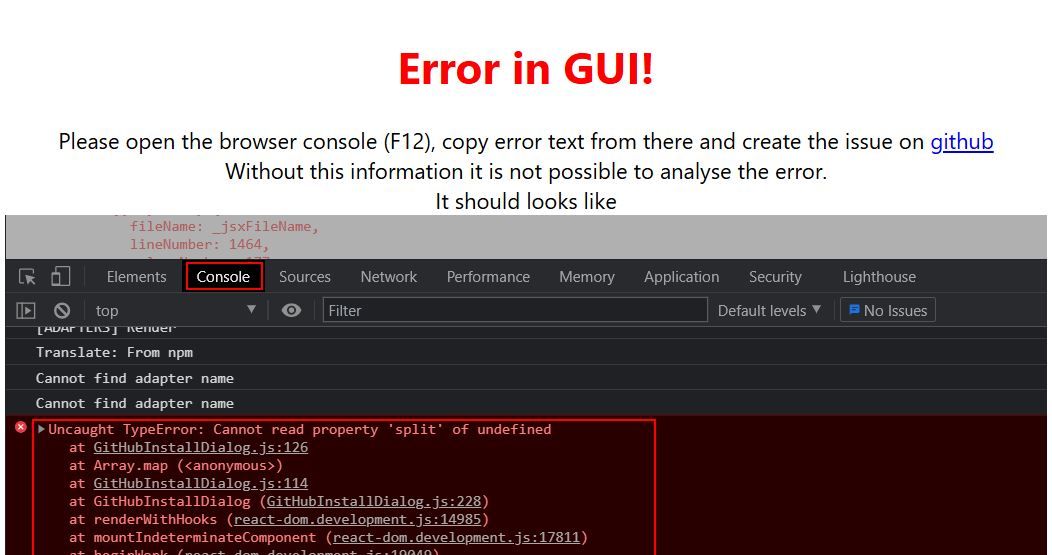
-
-
ist das hier ein von hinten nach vorne topic? :D
-
Bist Du sicher, dass Du das sehen willst?

-
Ja, solche Kisten wollen vorsichtig 'getatscht' werden. Die sind das ja nicht gewohnt, das die gepflegt werden.
-
@ticaki sagte in Error in GUI:
ist das hier ein von hinten nach vorne topic?
Reverse-Engineering

Neee, mal im Ernst:
@Di-Go Zeig mal die Langfassung voniob diagDann kann man sich schon mal ein Bild davon machen, wie das System aktuell aussieht.
-
Hallo zusammen,
die ganzen Updates und Upgrades haben geholfen. Läuft wieder alles!
Vielen lieben Dank euch allen!@di-go sagte in Error in GUI:
Updates und Upgrades haben geholfen. Läuft wieder alles!
Soviel zu 'Never tatsch a running system'...
-
Hallo, ich bekomme auch den Fehler Error in GUI angezeigt wenn ich die Adapter öffnen möchte. Habe jetzt alles wie hier beschrieben aktualisiert. Leider besteht der Fehler immer noch. Ich muss gestehen ich habe so gut wie keine Ahnung von Linux. ich nutze den Raspi um meine PV und Solaranlage zu visualisieren. Das mache ich mit Solaranzeige und habe mir eine Visualisierung mit dem IO Broker gebastelt. Keine Ahnung wie ich das 2022 geschafft habe. Jetzt wollte ich die VIS um eine Wärmepumpe erweitern und da war der Fehler.
-
========== Start marking the full check here ===========
Script v.2026-01-30

*** BASE SYSTEM ***
Operating System: Raspbian GNU/Linux 10 (buster)
   Static hostname: solaranzeige
         Icon name: computer
            Kernel: Linux 5.10.103-v7l+
      Architecture: arm
OS is similar to: debian

Model           : Raspberry Pi 4 Model B Rev 1.5
Docker          : false
Virtualization  : none
Kernel          : armv7l
Userland        : 32 bit

Outdated 32Bit architecture detected. Only a pure 64Bit-System will be supported in the future. You will have to reinstall your operating system with full 64Bit support or upgrade to more modern hardware soon.

Systemuptime and Load:
 09:55:45 up 16 min,  2 users,  load average: 0.33, 0.95, 0.69
CPU threads: 4


*** LIFE CYCLE STATUS ***
Unknown release codenamed 'buster'. Please check yourself if the Operating System is actively maintained.

*** RASPBERRY THROTTLING ***
Current issues:
No throttling issues detected.

Previously detected issues:
No throttling issues detected.

*** TIME AND TIMEZONES ***
               Local time: Sun 2026-02-01 09:55:45 CET
           Universal time: Sun 2026-02-01 08:55:45 UTC
                 RTC time: n/a
                Time zone: Europe/Berlin (CET, +0100)
System clock synchronized: yes
              NTP service: active
          RTC in local TZ: no

*** Users and Groups ***
User that called 'iob diag':
pi
HOME=/home/pi
GROUPS=pi adm dialout cdrom sudo audio video plugdev games users input netdev lpadmin gpio i2c spi iobroker

User that is running 'js-controller':
iobroker
HOME=/home/iobroker
GROUPS=iobroker tty dialout audio video plugdev bluetooth gpio i2c

*** DISPLAY-SERVER SETUP ***
Display-Server:         false
Display-Manager:        * lightdm.service - Light Display Manager
Desktop:
Session:                tty

*** MEMORY ***
              total        used        free      shared  buff/cache   available
Mem:           1.9G        565M        619M         18M        686M        1.3G
Swap:          511M          0B        511M
Total:         2.4G        565M        1.1G

Active iob-Instances:   6

         1872 M total memory
          565 M used memory
          277 M active memory
          879 M inactive memory
          620 M free memory
           88 M buffer memory
          597 M swap cache
          511 M total swap
            0 M used swap
          511 M free swap

*** top - Table Of Processes  ***
top - 09:55:45 up 16 min,  2 users,  load average: 0.33, 0.95, 0.69
Tasks: 148 total,   1 running, 147 sleeping,   0 stopped,   0 zombie
%Cpu(s):  0.0 us,  2.9 sy,  0.0 ni, 97.1 id,  0.0 wa,  0.0 hi,  0.0 si,  0.0 st
MiB Mem :   1872.2 total,    619.9 free,    565.6 used,    686.7 buff/cache
MiB Swap:    512.0 total,    512.0 free,      0.0 used.   1349.6 avail Mem

*** FAILED SERVICES ***

  UNIT                  LOAD   ACTIVE SUB    DESCRIPTION
* bthelper@hci0.service loaded failed failed Raspberry Pi bluetooth helper
* xrdp-sesman.service   loaded failed failed xrdp session manager
* xrdp.service          loaded failed failed xrdp daemon

LOAD   = Reflects whether the unit definition was properly loaded.
ACTIVE = The high-level unit activation state, i.e. generalization of SUB.
SUB    = The low-level unit activation state, values depend on unit type.

3 loaded units listed. Pass --all to see loaded but inactive units, too.
To show all installed unit files use 'systemctl list-unit-files'.


*** DMESG CRITICAL ERRORS ***
No critical errors detected

*** FILESYSTEM ***
Filesystem     Type      Size  Used Avail Use% Mounted on
/dev/root      ext4       59G  6.7G   50G  12% /
devtmpfs       devtmpfs  776M     0  776M   0% /dev
tmpfs          tmpfs     937M     0  937M   0% /dev/shm
tmpfs          tmpfs     937M   17M  920M   2% /run
tmpfs          tmpfs     5.0M  4.0K  5.0M   1% /run/lock
tmpfs          tmpfs     937M     0  937M   0% /sys/fs/cgroup
/dev/mmcblk0p1 vfat      253M   49M  204M  20% /boot
tmpfs          tmpfs     188M     0  188M   0% /run/user/1000

Messages concerning ext4 filesystem in dmesg:
[Sun Feb  1 09:39:26 2026] EXT4-fs (mmcblk0p2): mounted filesystem with ordered data mode. Opts: (null)
[Sun Feb  1 09:39:26 2026] VFS: Mounted root (ext4 filesystem) readonly on device 179:2.
[Sun Feb  1 09:39:29 2026] EXT4-fs (mmcblk0p2): re-mounted. Opts: (null)

Show mounted filesystems:
TARGET        SOURCE         FSTYPE OPTIONS
/             /dev/mmcblk0p2 ext4   rw,noatime
|-/sys/fs/bpf none           bpf    rw,nosuid,nodev,noexec,relatime,mode=700
`-/boot       /dev/mmcblk0p1 vfat   rw,relatime,fmask=0022,dmask=0022,codepage=437,iocharset=ascii,shortname=mixed,errors=remount-ro

Files in neuralgic directories:

/var:
1.6G    /var/
776M    /var/lib
641M    /var/lib/influxdb
616M    /var/lib/influxdb/data
268M    /var/lib/influxdb/data/solarregler2/autogen

Archived and active journals take up 16.0M in the file system.

/opt/iobroker/backups:
124M    /opt/iobroker/backups/

/opt/iobroker/iobroker-data:
171M    /opt/iobroker/iobroker-data/
118M    /opt/iobroker/iobroker-data/files
47M     /opt/iobroker/iobroker-data/backup-objects
32M     /opt/iobroker/iobroker-data/files/javascript.admin
17M     /opt/iobroker/iobroker-data/files/javascript.admin/static/js

The five largest files in iobroker-data are:
12M     /opt/iobroker/iobroker-data/files/javascript.admin/static/js/2.ea6ad656.chunk.js.map
6.3M    /opt/iobroker/iobroker-data/objects.jsonl
6.3M    /opt/iobroker/iobroker-data/files/admin.admin/custom/static/js/vendors-node_modules_iobroker_adapter-react-v5_assets_devices_parseNames_js-node_modules_iobr-99c23e.847b8ad9.chunk.js.map
5.4M    /opt/iobroker/iobroker-data/files/jarvis/js/index-2c99918a.js
4.5M    /opt/iobroker/iobroker-data/files/web.admin/static/js/2.b1d56998.chunk.js.map

USB-Devices by-id:
USB-Sticks - Avoid direct links to /dev/tty* in your adapter setups,
please always prefer the links 'by-id':

/dev/serial/by-id/usb-FTDI_FT232R_USB_UART_A10NIY56-if00-port0
/dev/serial/by-id/usb-FTDI_FT232R_USB_UART_AQ02MT9K-if00-port0

No nvbackup.json found.
/home/iobroker/.diag.sh: line 729: nodejs: command not found

*** NodeJS-Installation ***


/usr/bin/node           v16.20.2
/usr/bin/npm            8.19.4
/usr/bin/npx            8.19.4

*** Node.js is NOT correctly installed ***
Issues:  nodejs path x nodejs/node version mismatch
Execute 'iob nodejs-update' in your terminal.

nodejs:
  Installed: 16.20.2-deb-1nodesource1
  Candidate: 16.20.2-deb-1nodesource1
  Version table:
 *** 16.20.2-deb-1nodesource1 500
        500 https://deb.nodesource.com/node_16.x buster/main armhf Packages
        100 /var/lib/dpkg/status
     10.24.0~dfsg-1~deb10u1 500
        500 http://raspbian.raspberrypi.org/raspbian buster/main armhf Packages

Temp directories causing deletion problem: 0
No problems detected

Errors in npm tree: 0
No problems detected

Checking for nodejs vulnerability:


██████   █████  ███    ██  ██████  ███████ ███████
██   ██ ██   ██ ████   ██ ██       ██      ██   ██
██   ██ ███████ ██ ██  ██ ██   ███ █████   ███████
██   ██ ██   ██ ██  ██ ██ ██    ██ ██      ██   ██
██████  ██   ██ ██   ████  ██████  ███████ ██   ██


v16.20.2 is end-of-life. There are high chances of being vulnerable. Please upgrade it.

Outdated 32Bit architecture detected. Only a pure 64Bit-System will be supported in the future. You will have to reinstall your operating system with full 64Bit support or upgrade to more modern hardware soon.

*** ioBroker-Installation ***

ioBroker Status
iobroker is running on this host.


Objects type: jsonl
States  type: jsonl

Hosts:
solaranzeige        solaranzeige (version: 4.0.23, hostname: solaranzeige  , alive, uptime: 935)

Core adapters versions
js-controller:  4.0.23
admin:          6.2.20
javascript:     5.7.0

nodejs modules from github:     0

Adapter State
+ system.adapter.admin.0                  : admin                 : solaranzeige                             -  enabled, port: 8081, bind: 0.0.0.0, run as: admin
+ system.adapter.backitup.0               : backitup              : solaranzeige                             -  enabled
+ system.adapter.backitup.2               : backitup              : solaranzeige                             -  enabled
  system.adapter.bestway.0                : bestway               : solaranzeige                             - disabled
  system.adapter.broadlink2.0             : broadlink2            : solaranzeige                             - disabled
  system.adapter.discovery.0              : discovery             : solaranzeige                             - disabled
  system.adapter.fritzdect.0              : fritzdect             : solaranzeige                             - disabled
  system.adapter.fullybrowser.0           : fullybrowser          : solaranzeige                             - disabled
  system.adapter.hass.0                   : hass                  : solaranzeige                             - disabled, port: 8123
  system.adapter.hass.1                   : hass                  : solaranzeige                             - disabled, port: 8123
  system.adapter.icons-fatcow-hosting.0   : icons-fatcow-hosting  : solaranzeige                             - disabled
  system.adapter.icons-mfd-svg.0          : icons-mfd-svg         : solaranzeige                             - disabled
  system.adapter.influxdb.0               : influxdb              : solaranzeige                             - disabled, port: 8086
  system.adapter.jarvis.0                 : jarvis                : solaranzeige                             - disabled
  system.adapter.javascript.0             : javascript            : solaranzeige                             - disabled
  system.adapter.javascript.1             : javascript            : solaranzeige                             - disabled
+ system.adapter.mqtt.0                   : mqtt                  : solaranzeige                             -  enabled, port: 1883, bind: 0.0.0.0
+ system.adapter.mqtt.1                   : mqtt                  : solaranzeige                             -  enabled, port: 1883, bind: 0.0.0.0
  system.adapter.ping.0                   : ping                  : solaranzeige                             - disabled
  system.adapter.vis-bars.0               : vis-bars              : solaranzeige                             - disabled
  system.adapter.vis-material-advanced.0  : vis-material-advanced : solaranzeige                             - disabled
  system.adapter.vis-metro.0              : vis-metro             : solaranzeige                             - disabled
  system.adapter.vis-plumb.0              : vis-plumb             : solaranzeige                             - disabled
  system.adapter.vis-timeandweather.0     : vis-timeandweather    : solaranzeige                             - disabled
  system.adapter.vis.0                    : vis                   : solaranzeige                             - disabled
  system.adapter.web.0                    : web                   : solaranzeige                             - disabled, port: 8082, bind: 0.0.0.0, run as: admin

+ instance is alive

Enabled adapters with bindings
+ system.adapter.admin.0                  : admin                 : solaranzeige                             -  enabled, port: 8081, bind: 0.0.0.0, run as: admin
+ system.adapter.mqtt.0                   : mqtt                  : solaranzeige                             -  enabled, port: 1883, bind: 0.0.0.0
+ system.adapter.mqtt.1                   : mqtt                  : solaranzeige                             -  enabled, port: 1883, bind: 0.0.0.0

ioBroker-Repositories
stable        : http://download.iobroker.net/sources-dist.json
beta          : http://download.iobroker.net/sources-dist-latest.json

Active repo(s): stable

Installed ioBroker-Adapters
Used repository: stable
Adapter    "admin"        : 7.7.22   , installed 6.2.20 [Updatable]
Adapter    "backitup"     : 3.3.13   , installed 2.4.10 [Updatable]
Adapter    "bestway"      : 0.0.4    , installed 0.0.4
Adapter    "broadlink2"   : 2.3.0    , installed 2.1.5  [Updatable]
Adapter    "discovery"    : 5.0.0    , installed 3.0.3  [Updatable]
Adapter    "fritzdect"    : 2.6.2    , installed 2.2.3  [Updatable]
Adapter    "fullybrowser" : 3.1.2    , installed 2.1.2  [Updatable]
Adapter    "hass"         : 1.4.0    , installed 1.4.0
Adapter    "icons-fatcow-hosting": 0.1.0, installed 0.1.0
Adapter    "icons-mfd-svg": 1.2.0    , installed 1.2.0
Adapter    "influxdb"     : 4.0.2    , installed 3.1.7  [Updatable]
Adapter    "jarvis"       : 3.1.8    , installed 3.1.8
Adapter    "javascript"   : 9.0.11   , installed 5.7.0  [Updatable]
Controller "js-controller": 7.0.7    , installed 4.0.23 [Updatable]
Adapter    "mqtt"         : 6.1.4    , installed 4.0.7  [Updatable]
Adapter    "ping"         : 1.7.9    , installed 1.5.3  [Updatable]
Adapter    "simple-api"   : 2.8.0    , installed 2.8.0
Adapter    "socketio"     : 6.7.1    , installed 6.7.1
Adapter    "vis"          : 1.5.6    , installed 1.5.6
Adapter    "vis-bars"     : 0.1.4    , installed 0.1.4
Adapter    "vis-material-advanced": 1.7.4, installed 1.7.4
Adapter    "vis-metro"    : 1.2.0    , installed 1.2.0
Adapter    "vis-plumb"    : 1.0.2    , installed 1.0.2
Adapter    "vis-timeandweather": 1.2.2, installed 1.2.2
Adapter    "web"          : 7.0.8    , installed 4.3.0  [Updatable]
Adapter    "ws"           : 2.6.2    , installed 2.6.2

Objects and States
Please stand by - This may take a while
Objects:        703
States:         543

*** OS-Repositories and Updates ***
E: The repository 'http://raspbian.raspberrypi.org/raspbian buster Release' no longer has a Release file.
W: An error occurred during the signature verification. The repository is not updated and the previous index files will be used. GPG error: https://packages.grafana.com/oss/deb stable InRelease: The following signatures couldn't be verified because the public key is not available: NO_PUBKEY 963FA27710458545
W: An error occurred during the signature verification. The repository is not updated and the previous index files will be used. GPG error: https://repos.influxdata.com/debian stretch InRelease: The following signatures couldn't be verified because the public key is not available: NO_PUBKEY DA61C26A0585BD3B
Pending systemupdates: 47

*** Listening Ports ***
Active Internet connections (only servers)
Proto Recv-Q Send-Q Local Address           Foreign Address         State       User       Inode      PID/Program name
tcp        0      0 0.0.0.0:80              0.0.0.0:*               LISTEN      0          18565      606/lighttpd
tcp        0      0 0.0.0.0:22              0.0.0.0:*               LISTEN      0          16368      568/sshd
tcp        0      0 127.0.0.1:631           0.0.0.0:*               LISTEN      0          16270      402/cupsd
tcp        0      0 127.0.0.1:8088          0.0.0.0:*               LISTEN      111        19566      539/influxd
tcp        0      0 0.0.0.0:1883            0.0.0.0:*               LISTEN      113        17932      546/mosquitto
tcp        0      0 127.0.0.1:9000          0.0.0.0:*               LISTEN      1001       20898      910/iobroker.js-con
tcp        0      0 127.0.0.1:9001          0.0.0.0:*               LISTEN      1001       20891      910/iobroker.js-con
tcp6       0      0 :::80                   :::*                    LISTEN      0          18566      606/lighttpd
tcp6       0      0 :::8081                 :::*                    LISTEN      1001       20354      952/io.admin.0
tcp6       0      0 :::8086                 :::*                    LISTEN      111        18850      539/influxd
tcp6       0      0 :::22                   :::*                    LISTEN      0          16370      568/sshd
tcp6       0      0 ::1:631                 :::*                    LISTEN      0          16269      402/cupsd
tcp6       0      0 :::3000                 :::*                    LISTEN      112        20720      532/grafana-server
tcp6       0      0 :::1883                 :::*                    LISTEN      113        17933      546/mosquitto
udp        0      0 0.0.0.0:68              0.0.0.0:*                           0          18582      462/dhcpcd
udp        0      0 0.0.0.0:631             0.0.0.0:*                           0          18148      526/cups-browsed
udp        0      0 0.0.0.0:5353            0.0.0.0:*                           108        14879      412/avahi-daemon: r
udp        0      0 0.0.0.0:38754           0.0.0.0:*                           108        14881      412/avahi-daemon: r
udp6       0      0 :::39826                :::*                                108        14882      412/avahi-daemon: r
udp6       0      0 :::546                  :::*                                0          18721      462/dhcpcd
udp6       0      0 :::5353                 :::*                                108        14880      412/avahi-daemon: r

*** Log File - Last 25 Lines ***

2026-02-01 09:40:20.235  - info: admin.0 (952) http server listening on port 8081
2026-02-01 09:40:20.236  - info: admin.0 (952) Use link "http://localhost:8081" to configure.
2026-02-01 09:40:20.248  - info: admin.0 (952) socket.io server listening on port 8081
2026-02-01 09:40:21.673  - info: mqtt.0 (990) starting. Version 4.0.7 in /opt/iobroker/node_modules/iobroker.mqtt, node: v16.20.2, js-controller: 4.0.23
2026-02-01 09:40:22.183  - info: mqtt.0 (990) Try to connect to mqtt://192.168.178.49:1883 with clientId=iobrokerand credentials mikep500:*******************
2026-02-01 09:40:22.314  - info: mqtt.0 (990) Connected to 192.168.178.49
2026-02-01 09:40:22.317  - info: mqtt.0 (990) Subscribe on "#"
2026-02-01 09:40:22.447  - info: mqtt.0 (990) All states published
2026-02-01 09:40:23.559  - info: host.solaranzeige instance system.adapter.mqtt.1 started with pid 1011
2026-02-01 09:40:25.420  - info: mqtt.1 (1011) starting. Version 4.0.7 in /opt/iobroker/node_modules/iobroker.mqtt, node: v16.20.2, js-controller: 4.0.23
2026-02-01 09:40:25.789  - info: mqtt.1 (1011) Try to connect to mqtt://localhost:1883 with clientId=mqtt.mqtt.1and credentials mikep500:*******************
2026-02-01 09:40:25.930  - info: mqtt.1 (1011) Connected to localhost
2026-02-01 09:40:25.933  - info: mqtt.1 (1011) Subscribe on "#"
2026-02-01 09:40:26.074  - info: mqtt.1 (1011) All states published
2026-02-01 09:40:27.562  - info: host.solaranzeige instance system.adapter.backitup.0 started with pid 1026
2026-02-01 09:40:29.641  - info: backitup.0 (1026) starting. Version 2.4.10 in /opt/iobroker/node_modules/iobroker.backitup, node: v16.20.2, js-controller: 4.0.23
2026-02-01 09:40:29.717  - info: backitup.0 (1026) [iobroker] backup was activated at 02:40 every 1 day(s)
2026-02-01 09:40:31.594  - info: host.solaranzeige instance system.adapter.backitup.2 started with pid 1056
2026-02-01 09:40:33.699  - info: backitup.2 (1056) starting. Version 2.4.10 in /opt/iobroker/node_modules/iobroker.backitup, node: v16.20.2, js-controller: 4.0.23
2026-02-01 09:40:33.771  - info: backitup.2 (1056) [iobroker] backup was activated at 02:40 every 1 day(s)
2026-02-01 09:40:44.247  - info: admin.0 (952) ==> Connected system.user.admin from ::ffff:192.168.178.42
2026-02-01 09:41:24.073  - info: admin.0 (952) <== Disconnect system.user.admin from ::ffff:192.168.178.42 admin
2026-02-01 09:41:24.924  - info: admin.0 (952) ==> Connected system.user.admin from ::ffff:192.168.178.42
2026-02-01 09:46:14.402  - info: admin.0 (952) <== Disconnect system.user.admin from ::ffff:192.168.178.42 admin
2026-02-01 09:46:16.593  - info: admin.0 (952) ==> Connected system.user.admin from ::ffff:192.168.178.42
============ Mark until here for C&P =============
iob diag has finished.
-
========== Start marking the full check here ===========
Script v.2026-01-30

*** BASE SYSTEM ***
Operating System: Raspbian GNU/Linux 10 (buster)
   Static hostname: solaranzeige
         Icon name: computer
            Kernel: Linux 5.10.103-v7l+
      Architecture: arm
OS is similar to: debian

Model           : Raspberry Pi 4 Model B Rev 1.5
Docker          : false
Virtualization  : none
Kernel          : armv7l
Userland        : 32 bit

Outdated 32Bit architecture detected. Only a pure 64Bit-System will be supported in the future. You will have to reinstall your operating system with full 64Bit support or upgrade to more modern hardware soon.

Systemuptime and Load:
 09:55:45 up 16 min,  2 users,  load average: 0.33, 0.95, 0.69
CPU threads: 4


*** LIFE CYCLE STATUS ***
Unknown release codenamed 'buster'. Please check yourself if the Operating System is actively maintained.

*** RASPBERRY THROTTLING ***
Current issues:
No throttling issues detected.

Previously detected issues:
No throttling issues detected.

*** TIME AND TIMEZONES ***
               Local time: Sun 2026-02-01 09:55:45 CET
           Universal time: Sun 2026-02-01 08:55:45 UTC
                 RTC time: n/a
                Time zone: Europe/Berlin (CET, +0100)
System clock synchronized: yes
              NTP service: active
          RTC in local TZ: no

*** Users and Groups ***
User that called 'iob diag':
pi
HOME=/home/pi
GROUPS=pi adm dialout cdrom sudo audio video plugdev games users input netdev lpadmin gpio i2c spi iobroker

User that is running 'js-controller':
iobroker
HOME=/home/iobroker
GROUPS=iobroker tty dialout audio video plugdev bluetooth gpio i2c

*** DISPLAY-SERVER SETUP ***
Display-Server:         false
Display-Manager:        * lightdm.service - Light Display Manager
Desktop:
Session:                tty

*** MEMORY ***
              total        used        free      shared  buff/cache   available
Mem:           1.9G        565M        619M         18M        686M        1.3G
Swap:          511M          0B        511M
Total:         2.4G        565M        1.1G

Active iob-Instances:   6

         1872 M total memory
          565 M used memory
          277 M active memory
          879 M inactive memory
          620 M free memory
           88 M buffer memory
          597 M swap cache
          511 M total swap
            0 M used swap
          511 M free swap

*** top - Table Of Processes  ***
top - 09:55:45 up 16 min,  2 users,  load average: 0.33, 0.95, 0.69
Tasks: 148 total,   1 running, 147 sleeping,   0 stopped,   0 zombie
%Cpu(s):  0.0 us,  2.9 sy,  0.0 ni, 97.1 id,  0.0 wa,  0.0 hi,  0.0 si,  0.0 st
MiB Mem :   1872.2 total,    619.9 free,    565.6 used,    686.7 buff/cache
MiB Swap:    512.0 total,    512.0 free,      0.0 used.   1349.6 avail Mem

*** FAILED SERVICES ***

  UNIT                  LOAD   ACTIVE SUB    DESCRIPTION
* bthelper@hci0.service loaded failed failed Raspberry Pi bluetooth helper
* xrdp-sesman.service   loaded failed failed xrdp session manager
* xrdp.service          loaded failed failed xrdp daemon

LOAD   = Reflects whether the unit definition was properly loaded.
ACTIVE = The high-level unit activation state, i.e. generalization of SUB.
SUB    = The low-level unit activation state, values depend on unit type.

3 loaded units listed. Pass --all to see loaded but inactive units, too.
To show all installed unit files use 'systemctl list-unit-files'.


*** DMESG CRITICAL ERRORS ***
No critical errors detected

*** FILESYSTEM ***
Filesystem     Type      Size  Used Avail Use% Mounted on
/dev/root      ext4       59G  6.7G   50G  12% /
devtmpfs       devtmpfs  776M     0  776M   0% /dev
tmpfs          tmpfs     937M     0  937M   0% /dev/shm
tmpfs          tmpfs     937M   17M  920M   2% /run
tmpfs          tmpfs     5.0M  4.0K  5.0M   1% /run/lock
tmpfs          tmpfs     937M     0  937M   0% /sys/fs/cgroup
/dev/mmcblk0p1 vfat      253M   49M  204M  20% /boot
tmpfs          tmpfs     188M     0  188M   0% /run/user/1000

Messages concerning ext4 filesystem in dmesg:
[Sun Feb  1 09:39:26 2026] EXT4-fs (mmcblk0p2): mounted filesystem with ordered data mode. Opts: (null)
[Sun Feb  1 09:39:26 2026] VFS: Mounted root (ext4 filesystem) readonly on device 179:2.
[Sun Feb  1 09:39:29 2026] EXT4-fs (mmcblk0p2): re-mounted. Opts: (null)

Show mounted filesystems:
TARGET        SOURCE         FSTYPE OPTIONS
/             /dev/mmcblk0p2 ext4   rw,noatime
|-/sys/fs/bpf none           bpf    rw,nosuid,nodev,noexec,relatime,mode=700
`-/boot       /dev/mmcblk0p1 vfat   rw,relatime,fmask=0022,dmask=0022,codepage=437,iocharset=ascii,shortname=mixed,errors=remount-ro

Files in neuralgic directories:

/var:
1.6G    /var/
776M    /var/lib
641M    /var/lib/influxdb
616M    /var/lib/influxdb/data
268M    /var/lib/influxdb/data/solarregler2/autogen

Archived and active journals take up 16.0M in the file system.

/opt/iobroker/backups:
124M    /opt/iobroker/backups/

/opt/iobroker/iobroker-data:
171M    /opt/iobroker/iobroker-data/
118M    /opt/iobroker/iobroker-data/files
47M     /opt/iobroker/iobroker-data/backup-objects
32M     /opt/iobroker/iobroker-data/files/javascript.admin
17M     /opt/iobroker/iobroker-data/files/javascript.admin/static/js

The five largest files in iobroker-data are:
12M     /opt/iobroker/iobroker-data/files/javascript.admin/static/js/2.ea6ad656.chunk.js.map
6.3M    /opt/iobroker/iobroker-data/objects.jsonl
6.3M    /opt/iobroker/iobroker-data/files/admin.admin/custom/static/js/vendors-node_modules_iobroker_adapter-react-v5_assets_devices_parseNames_js-node_modules_iobr-99c23e.847b8ad9.chunk.js.map
5.4M    /opt/iobroker/iobroker-data/files/jarvis/js/index-2c99918a.js
4.5M    /opt/iobroker/iobroker-data/files/web.admin/static/js/2.b1d56998.chunk.js.map

USB-Devices by-id:
USB-Sticks - Avoid direct links to /dev/tty* in your adapter setups,
please always prefer the links 'by-id':

/dev/serial/by-id/usb-FTDI_FT232R_USB_UART_A10NIY56-if00-port0
/dev/serial/by-id/usb-FTDI_FT232R_USB_UART_AQ02MT9K-if00-port0

No nvbackup.json found.
/home/iobroker/.diag.sh: line 729: nodejs: command not found

*** NodeJS-Installation ***


/usr/bin/node           v16.20.2
/usr/bin/npm            8.19.4
/usr/bin/npx            8.19.4

*** Node.js is NOT correctly installed ***
Issues:  nodejs path x nodejs/node version mismatch
Execute 'iob nodejs-update' in your terminal.

nodejs:
  Installed: 16.20.2-deb-1nodesource1
  Candidate: 16.20.2-deb-1nodesource1
  Version table:
 *** 16.20.2-deb-1nodesource1 500
        500 https://deb.nodesource.com/node_16.x buster/main armhf Packages
        100 /var/lib/dpkg/status
     10.24.0~dfsg-1~deb10u1 500
        500 http://raspbian.raspberrypi.org/raspbian buster/main armhf Packages

Temp directories causing deletion problem: 0
No problems detected

Errors in npm tree: 0
No problems detected

Checking for nodejs vulnerability:


██████   █████  ███    ██  ██████  ███████ ███████
██   ██ ██   ██ ████   ██ ██       ██      ██   ██
██   ██ ███████ ██ ██  ██ ██   ███ █████   ███████
██   ██ ██   ██ ██  ██ ██ ██    ██ ██      ██   ██
██████  ██   ██ ██   ████  ██████  ███████ ██   ██


v16.20.2 is end-of-life. There are high chances of being vulnerable. Please upgrade it.

Outdated 32Bit architecture detected. Only a pure 64Bit-System will be supported in the future. You will have to reinstall your operating system with full 64Bit support or upgrade to more modern hardware soon.

*** ioBroker-Installation ***

ioBroker Status
iobroker is running on this host.


Objects type: jsonl
States  type: jsonl

Hosts:
solaranzeige        solaranzeige (version: 4.0.23, hostname: solaranzeige  , alive, uptime: 935)

Core adapters versions
js-controller:  4.0.23
admin:          6.2.20
javascript:     5.7.0

nodejs modules from github:     0

Adapter State
+ system.adapter.admin.0                  : admin                 : solaranzeige                             -  enabled, port: 8081, bind: 0.0.0.0, run as: admin
+ system.adapter.backitup.0               : backitup              : solaranzeige                             -  enabled
+ system.adapter.backitup.2               : backitup              : solaranzeige                             -  enabled
  system.adapter.bestway.0                : bestway               : solaranzeige                             - disabled
  system.adapter.broadlink2.0             : broadlink2            : solaranzeige                             - disabled
  system.adapter.discovery.0              : discovery             : solaranzeige                             - disabled
  system.adapter.fritzdect.0              : fritzdect             : solaranzeige                             - disabled
  system.adapter.fullybrowser.0           : fullybrowser          : solaranzeige                             - disabled
  system.adapter.hass.0                   : hass                  : solaranzeige                             - disabled, port: 8123
  system.adapter.hass.1                   : hass                  : solaranzeige                             - disabled, port: 8123
  system.adapter.icons-fatcow-hosting.0   : icons-fatcow-hosting  : solaranzeige                             - disabled
  system.adapter.icons-mfd-svg.0          : icons-mfd-svg         : solaranzeige                             - disabled
  system.adapter.influxdb.0               : influxdb              : solaranzeige                             - disabled, port: 8086
  system.adapter.jarvis.0                 : jarvis                : solaranzeige                             - disabled
  system.adapter.javascript.0             : javascript            : solaranzeige                             - disabled
  system.adapter.javascript.1             : javascript            : solaranzeige                             - disabled
+ system.adapter.mqtt.0                   : mqtt                  : solaranzeige                             -  enabled, port: 1883, bind: 0.0.0.0
+ system.adapter.mqtt.1                   : mqtt                  : solaranzeige                             -  enabled, port: 1883, bind: 0.0.0.0
  system.adapter.ping.0                   : ping                  : solaranzeige                             - disabled
  system.adapter.vis-bars.0               : vis-bars              : solaranzeige                             - disabled
  system.adapter.vis-material-advanced.0  : vis-material-advanced : solaranzeige                             - disabled
  system.adapter.vis-metro.0              : vis-metro             : solaranzeige                             - disabled
  system.adapter.vis-plumb.0              : vis-plumb             : solaranzeige                             - disabled
  system.adapter.vis-timeandweather.0     : vis-timeandweather    : solaranzeige                             - disabled
  system.adapter.vis.0                    : vis                   : solaranzeige                             - disabled
  system.adapter.web.0                    : web                   : solaranzeige                             - disabled, port: 8082, bind: 0.0.0.0, run as: admin

+ instance is alive

Enabled adapters with bindings
+ system.adapter.admin.0                  : admin                 : solaranzeige                             -  enabled, port: 8081, bind: 0.0.0.0, run as: admin
+ system.adapter.mqtt.0                   : mqtt                  : solaranzeige                             -  enabled, port: 1883, bind: 0.0.0.0
+ system.adapter.mqtt.1                   : mqtt                  : solaranzeige                             -  enabled, port: 1883, bind: 0.0.0.0

ioBroker-Repositories
stable        : http://download.iobroker.net/sources-dist.json
beta          : http://download.iobroker.net/sources-dist-latest.json

Active repo(s): stable

Installed ioBroker-Adapters
Used repository: stable
Adapter    "admin"        : 7.7.22   , installed 6.2.20 [Updatable]
Adapter    "backitup"     : 3.3.13   , installed 2.4.10 [Updatable]
Adapter    "bestway"      : 0.0.4    , installed 0.0.4
Adapter    "broadlink2"   : 2.3.0    , installed 2.1.5  [Updatable]
Adapter    "discovery"    : 5.0.0    , installed 3.0.3  [Updatable]
Adapter    "fritzdect"    : 2.6.2    , installed 2.2.3  [Updatable]
Adapter    "fullybrowser" : 3.1.2    , installed 2.1.2  [Updatable]
Adapter    "hass"         : 1.4.0    , installed 1.4.0
Adapter    "icons-fatcow-hosting": 0.1.0, installed 0.1.0
Adapter    "icons-mfd-svg": 1.2.0    , installed 1.2.0
Adapter    "influxdb"     : 4.0.2    , installed 3.1.7  [Updatable]
Adapter    "jarvis"       : 3.1.8    , installed 3.1.8
Adapter    "javascript"   : 9.0.11   , installed 5.7.0  [Updatable]
Controller "js-controller": 7.0.7    , installed 4.0.23 [Updatable]
Adapter    "mqtt"         : 6.1.4    , installed 4.0.7  [Updatable]
Adapter    "ping"         : 1.7.9    , installed 1.5.3  [Updatable]
Adapter    "simple-api"   : 2.8.0    , installed 2.8.0
Adapter    "socketio"     : 6.7.1    , installed 6.7.1
Adapter    "vis"          : 1.5.6    , installed 1.5.6
Adapter    "vis-bars"     : 0.1.4    , installed 0.1.4
Adapter    "vis-material-advanced": 1.7.4, installed 1.7.4
Adapter    "vis-metro"    : 1.2.0    , installed 1.2.0
Adapter    "vis-plumb"    : 1.0.2    , installed 1.0.2
Adapter    "vis-timeandweather": 1.2.2, installed 1.2.2
Adapter    "web"          : 7.0.8    , installed 4.3.0  [Updatable]
Adapter    "ws"           : 2.6.2    , installed 2.6.2

Objects and States
Please stand by - This may take a while
Objects:        703
States:         543

*** OS-Repositories and Updates ***
E: The repository 'http://raspbian.raspberrypi.org/raspbian buster Release' no longer has a Release file.
W: An error occurred during the signature verification. The repository is not updated and the previous index files will be used. GPG error: https://packages.grafana.com/oss/deb stable InRelease: The following signatures couldn't be verified because the public key is not available: NO_PUBKEY 963FA27710458545
W: An error occurred during the signature verification. The repository is not updated and the previous index files will be used. GPG error: https://repos.influxdata.com/debian stretch InRelease: The following signatures couldn't be verified because the public key is not available: NO_PUBKEY DA61C26A0585BD3B
Pending systemupdates: 47

*** Listening Ports ***
Active Internet connections (only servers)
Proto Recv-Q Send-Q Local Address           Foreign Address         State       User       Inode      PID/Program name
tcp        0      0 0.0.0.0:80              0.0.0.0:*               LISTEN      0          18565      606/lighttpd
tcp        0      0 0.0.0.0:22              0.0.0.0:*               LISTEN      0          16368      568/sshd
tcp        0      0 127.0.0.1:631           0.0.0.0:*               LISTEN      0          16270      402/cupsd
tcp        0      0 127.0.0.1:8088          0.0.0.0:*               LISTEN      111        19566      539/influxd
tcp        0      0 0.0.0.0:1883            0.0.0.0:*               LISTEN      113        17932      546/mosquitto
tcp        0      0 127.0.0.1:9000          0.0.0.0:*               LISTEN      1001       20898      910/iobroker.js-con
tcp        0      0 127.0.0.1:9001          0.0.0.0:*               LISTEN      1001       20891      910/iobroker.js-con
tcp6       0      0 :::80                   :::*                    LISTEN      0          18566      606/lighttpd
tcp6       0      0 :::8081                 :::*                    LISTEN      1001       20354      952/io.admin.0
tcp6       0      0 :::8086                 :::*                    LISTEN      111        18850      539/influxd
tcp6       0      0 :::22                   :::*                    LISTEN      0          16370      568/sshd
tcp6       0      0 ::1:631                 :::*                    LISTEN      0          16269      402/cupsd
tcp6       0      0 :::3000                 :::*                    LISTEN      112        20720      532/grafana-server
tcp6       0      0 :::1883                 :::*                    LISTEN      113        17933      546/mosquitto
udp        0      0 0.0.0.0:68              0.0.0.0:*                           0          18582      462/dhcpcd
udp        0      0 0.0.0.0:631             0.0.0.0:*                           0          18148      526/cups-browsed
udp        0      0 0.0.0.0:5353            0.0.0.0:*                           108        14879      412/avahi-daemon: r
udp        0      0 0.0.0.0:38754           0.0.0.0:*                           108        14881      412/avahi-daemon: r
udp6       0      0 :::39826                :::*                                108        14882      412/avahi-daemon: r
udp6       0      0 :::546                  :::*                                0          18721      462/dhcpcd
udp6       0      0 :::5353                 :::*                                108        14880      412/avahi-daemon: r

*** Log File - Last 25 Lines ***

2026-02-01 09:40:20.235  - info: admin.0 (952) http server listening on port 8081
2026-02-01 09:40:20.236  - info: admin.0 (952) Use link "http://localhost:8081" to configure.
2026-02-01 09:40:20.248  - info: admin.0 (952) socket.io server listening on port 8081
2026-02-01 09:40:21.673  - info: mqtt.0 (990) starting. Version 4.0.7 in /opt/iobroker/node_modules/iobroker.mqtt, node: v16.20.2, js-controller: 4.0.23
2026-02-01 09:40:22.183  - info: mqtt.0 (990) Try to connect to mqtt://192.168.178.49:1883 with clientId=iobrokerand credentials mikep500:*******************
2026-02-01 09:40:22.314  - info: mqtt.0 (990) Connected to 192.168.178.49
2026-02-01 09:40:22.317  - info: mqtt.0 (990) Subscribe on "#"
2026-02-01 09:40:22.447  - info: mqtt.0 (990) All states published
2026-02-01 09:40:23.559  - info: host.solaranzeige instance system.adapter.mqtt.1 started with pid 1011
2026-02-01 09:40:25.420  - info: mqtt.1 (1011) starting. Version 4.0.7 in /opt/iobroker/node_modules/iobroker.mqtt, node: v16.20.2, js-controller: 4.0.23
2026-02-01 09:40:25.789  - info: mqtt.1 (1011) Try to connect to mqtt://localhost:1883 with clientId=mqtt.mqtt.1and credentials mikep500:*******************
2026-02-01 09:40:25.930  - info: mqtt.1 (1011) Connected to localhost
2026-02-01 09:40:25.933  - info: mqtt.1 (1011) Subscribe on "#"
2026-02-01 09:40:26.074  - info: mqtt.1 (1011) All states published
2026-02-01 09:40:27.562  - info: host.solaranzeige instance system.adapter.backitup.0 started with pid 1026
2026-02-01 09:40:29.641  - info: backitup.0 (1026) starting. Version 2.4.10 in /opt/iobroker/node_modules/iobroker.backitup, node: v16.20.2, js-controller: 4.0.23
2026-02-01 09:40:29.717  - info: backitup.0 (1026) [iobroker] backup was activated at 02:40 every 1 day(s)
2026-02-01 09:40:31.594  - info: host.solaranzeige instance system.adapter.backitup.2 started with pid 1056
2026-02-01 09:40:33.699  - info: backitup.2 (1056) starting. Version 2.4.10 in /opt/iobroker/node_modules/iobroker.backitup, node: v16.20.2, js-controller: 4.0.23
2026-02-01 09:40:33.771  - info: backitup.2 (1056) [iobroker] backup was activated at 02:40 every 1 day(s)
2026-02-01 09:40:44.247  - info: admin.0 (952) ==> Connected system.user.admin from ::ffff:192.168.178.42
2026-02-01 09:41:24.073  - info: admin.0 (952) <== Disconnect system.user.admin from ::ffff:192.168.178.42 admin
2026-02-01 09:41:24.924  - info: admin.0 (952) ==> Connected system.user.admin from ::ffff:192.168.178.42
2026-02-01 09:46:14.402  - info: admin.0 (952) <== Disconnect system.user.admin from ::ffff:192.168.178.42 admin
2026-02-01 09:46:16.593  - info: admin.0 (952) ==> Connected system.user.admin from ::ffff:192.168.178.42
============ Mark until here for C&P =============
iob diag has finished.
Buster ist seit ewigen Zeiten ENDOFLIFE. Auch für dich...
Installier es komplett NEU, diesmal dann als reines 64Bit-System. Denn auch 32Bit wird nicht mehr vollumfänglich unterstützt.
Bei der Neuinstallation verwendest du einen eigenen Username, NICHT pi und nicht iobroker.
Installier diesmal direkt die Lite-Version, OHNE Desktop.Dein nodejs ist natürlich komplett abgesoffen. Erledigt sich aber mit der Neuinstallation.
Das neue System dann REGELMÄSSIG aktuell halten. Alle paar Wochen.
-
Hallo, ich bekomme auch den Fehler Error in GUI angezeigt wenn ich die Adapter öffnen möchte. Habe jetzt alles wie hier beschrieben aktualisiert. Leider besteht der Fehler immer noch. Ich muss gestehen ich habe so gut wie keine Ahnung von Linux. ich nutze den Raspi um meine PV und Solaranlage zu visualisieren. Das mache ich mit Solaranzeige und habe mir eine Visualisierung mit dem IO Broker gebastelt. Keine Ahnung wie ich das 2022 geschafft habe. Jetzt wollte ich die VIS um eine Wärmepumpe erweitern und da war der Fehler.
@mikep500 sagte in Error in GUI:
Habe jetzt alles wie hier beschrieben aktualisiert
Sicher? Und auch die Meldungen aus dem iob diag richtig gelesen? 😉
umgestiegen von Proxmox auf Unraid
-
Buster ist seit ewigen Zeiten ENDOFLIFE. Auch für dich...
Installier es komplett NEU, diesmal dann als reines 64Bit-System. Denn auch 32Bit wird nicht mehr vollumfänglich unterstützt.
Bei der Neuinstallation verwendest du einen eigenen Username, NICHT pi und nicht iobroker.
Installier diesmal direkt die Lite-Version, OHNE Desktop.Dein nodejs ist natürlich komplett abgesoffen. Erledigt sich aber mit der Neuinstallation.
Das neue System dann REGELMÄSSIG aktuell halten. Alle paar Wochen.
@Thomas-Braun Danke schon mal. Hab jetzt viele Fragen. Muss ich nach dem neu Installieren die Solaranzeige neu einrichten oder funktioniert das noch?
Hättest du einen Link was ich Installieren soll?
Hab da echt keinen Plan von allem. Sorry
Kann ich die Visualisierung vom IObroker irgendwie speichern bevor ich neu Installiere?
Danke -
@mikep500 sagte in Error in GUI:
Habe jetzt alles wie hier beschrieben aktualisiert
Sicher? Und auch die Meldungen aus dem iob diag richtig gelesen? 😉
-
@Thomas-Braun Danke schon mal. Hab jetzt viele Fragen. Muss ich nach dem neu Installieren die Solaranzeige neu einrichten oder funktioniert das noch?
Hättest du einen Link was ich Installieren soll?
Hab da echt keinen Plan von allem. Sorry
Kann ich die Visualisierung vom IObroker irgendwie speichern bevor ich neu Installiere?
Danke@mikep500 sagte in Error in GUI:
Muss ich nach dem neu Installieren die Solaranzeige neu einrichten oder funktioniert das noch?
Hängt da an dem Raspberry direkt ein Bildschirm?
-
@mikep500 sagte in Error in GUI:
Muss ich nach dem neu Installieren die Solaranzeige neu einrichten oder funktioniert das noch?
Hängt da an dem Raspberry direkt ein Bildschirm?
-
@Thomas-Braun Danke schon mal. Hab jetzt viele Fragen. Muss ich nach dem neu Installieren die Solaranzeige neu einrichten oder funktioniert das noch?
Hättest du einen Link was ich Installieren soll?
Hab da echt keinen Plan von allem. Sorry
Kann ich die Visualisierung vom IObroker irgendwie speichern bevor ich neu Installiere?
Danke@mikep500 sagte in Error in GUI:
Muss ich nach dem neu Installieren die Solaranzeige neu einrichten oder funktioniert das noch?
was genau ist das?
@mikep500 sagte in Error in GUI:
Kann ich die Visualisierung vom IObroker irgendwie speichern bevor ich neu Installiere?
ist im Backup mit drin
@mikep500 sagte in Error in GUI:
bis WLan ging
warum WLAN für einen 24/7 Server?
Das ist nicht zu empfehlen!geht kein LAN?
kein Support per PN! - Fragen im Forum stellen - Benutzt das Voting rechts unten im Beitrag wenn er euch geholfen hat.
Das Forum freut sich über eine Spende. Benutzt dazu den Spendenbutton oben rechts. Danke!
der Installationsfixer: curl -fsL https://iobroker.net/fix.sh | bash - -
@mikep500 sagte in Error in GUI:
Muss ich nach dem neu Installieren die Solaranzeige neu einrichten oder funktioniert das noch?
was genau ist das?
@mikep500 sagte in Error in GUI:
Kann ich die Visualisierung vom IObroker irgendwie speichern bevor ich neu Installiere?
ist im Backup mit drin
@mikep500 sagte in Error in GUI:
bis WLan ging
warum WLAN für einen 24/7 Server?
Das ist nicht zu empfehlen!geht kein LAN?
@Homoran https://www.solaranzeige.de/
Das Backup ist dummerweise auf dem Raspi. wie bekomme ich das auf mein Notebook? -
@Homoran https://www.solaranzeige.de/
Das Backup ist dummerweise auf dem Raspi. wie bekomme ich das auf mein Notebook?@mikep500 sagte in Error in GUI:
wie bekomme ich das auf mein Notebook
z.b. mit WINSCP oder filezilla oder direkt über die backitup Oberfläche




Hey! Du scheinst an dieser Unterhaltung interessiert zu sein, hast aber noch kein Konto.
Hast du es satt, bei jedem Besuch durch die gleichen Beiträge zu scrollen? Wenn du dich für ein Konto anmeldest, kommst du immer genau dorthin zurück, wo du zuvor warst, und kannst dich über neue Antworten benachrichtigen lassen (entweder per E-Mail oder Push-Benachrichtigung). Du kannst auch Lesezeichen speichern und Beiträge positiv bewerten, um anderen Community-Mitgliedern deine Wertschätzung zu zeigen.
Mit deinem Input könnte dieser Beitrag noch besser werden 💗
Registrieren Anmelden517
Online33.0k
Benutzer83.6k
Themen1.3m
Beiträge