
NEWS




Uralt System updaten oder Umzug
-
```bash Script v.2025-02-23 *** BASE SYSTEM *** Static hostname: ioBrokerVM Icon name: computer-vm Chassis: vm 🖴 Virtualization: kvm Operating System: Debian GNU/Linux 12 (bookworm) Kernel: Linux 6.1.0-35-amd64 Architecture: x86-64 Hardware Vendor: QEMU Hardware Model: Standard PC _i440FX + PIIX, 1996_ Firmware Version: rel-1.16.3-0-ga6ed6b701f0a-prebuilt.qemu.org OS is similar to: model name : QEMU Virtual CPU version 2.5+ Docker : false Virtualization : kvm Kernel : x86_64 Userland : 64 bit Systemuptime and Load: 11:10:46 up 11:15, 2 users, load average: 0.08, 0.05, 0.01 CPU threads: 4 *** LIFE CYCLE STATUS *** Operating System is the current Debian stable version codenamed 'bookworm'! *** TIME AND TIMEZONES *** Local time: Sun 2025-05-18 11:10:46 CEST Universal time: Sun 2025-05-18 09:10:46 UTC RTC time: Sun 2025-05-18 09:10:46 Time zone: Europe/Berlin (CEST, +0200) System clock synchronized: yes NTP service: active RTC in local TZ: no *** Users and Groups *** User that called 'iob diag': tadek HOME=/home/tadek GROUPS=tadek cdrom floppy sudo audio dip video plugdev users netdev iobroker User that is running 'js-controller': iobroker HOME=/home/iobroker GROUPS=iobroker tty dialout audio video plugdev *** DISPLAY-SERVER SETUP *** Display-Server: false Desktop: Terminal: tty *** MEMORY *** total used free shared buff/cache available Mem: 4.1G 501M 3.3G 557K 530M 3.6G Swap: 1.0G 0B 1.0G Total: 5.1G 501M 4.3G Active iob-Instances: 1 3914 M total memory 478 M used memory 289 M active memory 333 M inactive memory 3156 M free memory 93 M buffer memory 412 M swap cache 974 M total swap 0 M used swap 974 M free swap *** top - Table Of Processes *** top - 11:10:47 up 11:15, 2 users, load average: 0.08, 0.05, 0.01 Tasks: 106 total, 1 running, 105 sleeping, 0 stopped, 0 zombie %Cpu(s): 0.0 us, 0.0 sy, 0.0 ni,100.0 id, 0.0 wa, 0.0 hi, 0.0 si, 0.0 st MiB Mem : 3914.7 total, 3155.2 free, 480.1 used, 506.1 buff/cache MiB Swap: 975.0 total, 975.0 free, 0.0 used. 3434.6 avail Mem *** FAILED SERVICES *** UNIT LOAD ACTIVE SUB DESCRIPTION 0 loaded units listed. *** DMESG CRITICAL ERRORS *** No critical errors detected *** FILESYSTEM *** Filesystem Type Size Used Avail Use% Mounted on udev devtmpfs 1.9G 0 1.9G 0% /dev tmpfs tmpfs 392M 544K 391M 1% /run /dev/sda1 ext4 62G 4.4G 55G 8% / tmpfs tmpfs 2.0G 0 2.0G 0% /dev/shm tmpfs tmpfs 5.0M 0 5.0M 0% /run/lock tmpfs tmpfs 392M 0 392M 0% /run/user/1000 Messages concerning ext4 filesystem in dmesg: [Sat May 17 23:54:51 2025] EXT4-fs (sda1): mounted filesystem with ordered data mode. Quota mode: none. [Sat May 17 23:54:52 2025] EXT4-fs (sda1): re-mounted. Quota mode: none. Show mounted filesystems: TARGET SOURCE FSTYPE OPTIONS / /dev/sda1 ext4 rw,relatime,errors=remount-ro Files in neuralgic directories: /var: 459M /var/ 248M /var/cache 241M /var/cache/apt 172M /var/lib 165M /var/cache/apt/archives Hint: You are currently not seeing messages from other users and the system. Users in groups 'adm', 'systemd-journal' can see all messages. Pass -q to turn off this notice. Archived and active journals take up 8.0M in the file system. /opt/iobroker/backups: 7.5M /opt/iobroker/backups/ /opt/iobroker/iobroker-data: 326M /opt/iobroker/iobroker-data/ 153M /opt/iobroker/iobroker-data/files 123M /opt/iobroker/iobroker-data/backup-objects 41M /opt/iobroker/iobroker-data/files/javascript.admin 31M /opt/iobroker/iobroker-data/files/javascript.admin/static/js The five largest files in iobroker-data are: 21M /opt/iobroker/iobroker-data/objects.jsonl 11M /opt/iobroker/iobroker-data/objects.json.migrated 11M /opt/iobroker/iobroker-data/objects.json.bak.migrated 8.9M /opt/iobroker/iobroker-data/files/scenes.admin/static/js/2.7de3299d.chunk.js.map 7.1M /opt/iobroker/iobroker-data/files/ham.admin/static/js/main.2e2164eb.js.map USB-Devices by-id: USB-Sticks - Avoid direct links to /dev/tty* in your adapter setups, please always prefer the links 'by-id': /dev/serial/by-id/usb-ITead_Sonoff_Zigbee_3.0_USB_Dongle_Plus_2e66e30c326cef1192d399adc169b110-if00-port0 *** ZigBee Settings *** HINT: Your zigbee.0 COM-Port is NOT matching 'by-id'. Please check your setting: /dev/ttyACM0 HINT: Your zigbee.1 COM-Port is NOT matching 'by-id'. Please check your setting: /dev/ttyACM0 Zigbee Network Settings on your coordinator/in nvbackup are: zigbee.X Extended Pan ID: *** MASKED *** Pan ID: *** MASKED *** Channel: *** MASKED *** Network Key: *** MASKED *** To unmask the settings run 'iob diag --unmask' *** NodeJS-Installation *** /usr/bin/nodejs v20.19.2 /usr/bin/node v20.19.2 /usr/bin/npm 10.8.2 /usr/bin/npx 10.8.2 /usr/bin/corepack 0.31.0 nodejs: Installed: 20.19.2-1nodesource1 Candidate: 20.19.2-1nodesource1 Version table: *** 20.19.2-1nodesource1 1001 500 https://deb.nodesource.com/node_20.x nodistro/main amd64 Packages 100 /var/lib/dpkg/status 20.19.1-1nodesource1 1001 500 https://deb.nodesource.com/node_20.x nodistro/main amd64 Packages 20.19.0-1nodesource1 1001 500 https://deb.nodesource.com/node_20.x nodistro/main amd64 Packages 20.18.3-1nodesource1 1001 500 https://deb.nodesource.com/node_20.x nodistro/main amd64 Packages 20.18.2-1nodesource1 1001 500 https://deb.nodesource.com/node_20.x nodistro/main amd64 Packages 20.18.1-1nodesource1 1001 500 https://deb.nodesource.com/node_20.x nodistro/main amd64 Packages 20.18.0-1nodesource1 1001 500 https://deb.nodesource.com/node_20.x nodistro/main amd64 Packages 20.17.0-1nodesource1 1001 500 https://deb.nodesource.com/node_20.x nodistro/main amd64 Packages 20.16.0-1nodesource1 1001 500 https://deb.nodesource.com/node_20.x nodistro/main amd64 Packages 20.15.1-1nodesource1 1001 500 https://deb.nodesource.com/node_20.x nodistro/main amd64 Packages 20.15.0-1nodesource1 1001 500 https://deb.nodesource.com/node_20.x nodistro/main amd64 Packages 20.14.0-1nodesource1 1001 500 https://deb.nodesource.com/node_20.x nodistro/main amd64 Packages 20.13.1-1nodesource1 1001 500 https://deb.nodesource.com/node_20.x nodistro/main amd64 Packages 20.13.0-1nodesource1 1001 500 https://deb.nodesource.com/node_20.x nodistro/main amd64 Packages 20.12.2-1nodesource1 1001 500 https://deb.nodesource.com/node_20.x nodistro/main amd64 Packages 20.12.1-1nodesource1 1001 500 https://deb.nodesource.com/node_20.x nodistro/main amd64 Packages 20.12.0-1nodesource1 1001 500 https://deb.nodesource.com/node_20.x nodistro/main amd64 Packages 20.11.1-1nodesource1 1001 500 https://deb.nodesource.com/node_20.x nodistro/main amd64 Packages 20.11.0-1nodesource1 1001 500 https://deb.nodesource.com/node_20.x nodistro/main amd64 Packages 20.10.0-1nodesource1 1001 500 https://deb.nodesource.com/node_20.x nodistro/main amd64 Packages 20.9.0-1nodesource1 1001 500 https://deb.nodesource.com/node_20.x nodistro/main amd64 Packages 20.8.1-1nodesource1 1001 500 https://deb.nodesource.com/node_20.x nodistro/main amd64 Packages 20.8.0-1nodesource1 1001 500 https://deb.nodesource.com/node_20.x nodistro/main amd64 Packages 20.7.0-1nodesource1 1001 500 https://deb.nodesource.com/node_20.x nodistro/main amd64 Packages 20.6.1-1nodesource1 1001 500 https://deb.nodesource.com/node_20.x nodistro/main amd64 Packages 20.6.0-1nodesource1 1001 500 https://deb.nodesource.com/node_20.x nodistro/main amd64 Packages 20.5.1-1nodesource1 1001 500 https://deb.nodesource.com/node_20.x nodistro/main amd64 Packages 20.5.0-1nodesource1 1001 500 https://deb.nodesource.com/node_20.x nodistro/main amd64 Packages 20.4.0-1nodesource1 1001 500 https://deb.nodesource.com/node_20.x nodistro/main amd64 Packages 20.3.1-1nodesource1 1001 500 https://deb.nodesource.com/node_20.x nodistro/main amd64 Packages 20.3.0-1nodesource1 1001 500 https://deb.nodesource.com/node_20.x nodistro/main amd64 Packages 20.2.0-1nodesource1 1001 500 https://deb.nodesource.com/node_20.x nodistro/main amd64 Packages 20.1.0-1nodesource1 1001 500 https://deb.nodesource.com/node_20.x nodistro/main amd64 Packages 20.0.0-1nodesource1 1001 500 https://deb.nodesource.com/node_20.x nodistro/main amd64 Packages 18.19.0+dfsg-6~deb12u2 500 500 http://deb.debian.org/debian bookworm/main amd64 Packages 18.19.0+dfsg-6~deb12u1 500 500 http://security.debian.org/debian-security bookworm-security/main amd64 Packages Temp directories causing deletion problem: 0 No problems detected Errors in npm tree: 0 No problems detected *** ioBroker-Installation *** ioBroker Status iobroker is running on this host. Objects type: jsonl States type: jsonl Hosts: broker-slave broker-slave (version: 3.1.6, hostname: broker-slave , alive, uptime: 19) ioBrokerVM ioBrokerVM (version: 7.0.6, hostname: ioBrokerVM , alive, uptime: 40548) raspberrypi raspberrypi (version: 4.0.23, hostname: raspberrypi , alive, uptime: 4998) Core adapters versions js-controller: 7.0.6 admin: 7.6.3 javascript: 8.8.3 nodejs modules from github: 0 Adapter State system.adapter.admin.0 : admin : raspberrypi - enabled, port: 8081, bind: 0.0.0.0 (SSL), run as: admin system.adapter.alexa2.0 : alexa2 : raspberrypi - enabled system.adapter.backitup.0 : backitup : raspberrypi - enabled system.adapter.blockly-plus.0 : blockly-plus : raspberrypi - enabled system.adapter.cloud.0 : cloud : raspberrypi - enabled system.adapter.devices.0 : devices : raspberrypi - enabled system.adapter.discovery.0 : discovery : raspberrypi - enabled system.adapter.flot.0 : flot : raspberrypi - disabled system.adapter.history.0 : history : raspberrypi - enabled system.adapter.hm-rega.0 : hm-rega : raspberrypi - enabled system.adapter.hm-rpc.0 : hm-rpc : raspberrypi - enabled, port: 2010 system.adapter.iot.0 : iot : raspberrypi - enabled system.adapter.javascript.0 : javascript : raspberrypi - enabled system.adapter.mqtt.0 : mqtt : raspberrypi - disabled, port: 1883, bind: 0.0.0.0 system.adapter.netatmo-crawler.0 : netatmo-crawler : raspberrypi - enabled system.adapter.nuki-extended.0 : nuki-extended : raspberrypi - disabled system.adapter.openweathermap.0 : openweathermap : raspberrypi - enabled system.adapter.scenes.0 : scenes : raspberrypi - enabled system.adapter.shelly.0 : shelly : raspberrypi - enabled, port: 1882, bind: 0.0.0.0 system.adapter.simple-api.0 : simple-api : raspberrypi - enabled, port: 8087, bind: 0.0.0.0, run as: a dmin system.adapter.socketio.0 : socketio : raspberrypi - enabled, port: 8084, bind: 0.0.0.0, run as: a dmin system.adapter.statistics.0 : statistics : raspberrypi - enabled system.adapter.tankerkoenig.0 : tankerkoenig : raspberrypi - enabled system.adapter.telegram.0 : telegram : raspberrypi - enabled, port: 8443, bind: 0.0.0.0 system.adapter.tr-064.0 : tr-064 : raspberrypi - disabled system.adapter.tuya.0 : tuya : raspberrypi - disabled system.adapter.vis.0 : vis : raspberrypi - disabled system.adapter.weatherunderground.0 : weatherunderground : raspberrypi - enabled system.adapter.web.0 : web : raspberrypi - enabled, port: 8082, bind: 0.0.0.0, run as: a dmin system.adapter.zigbee.0 : zigbee : raspberrypi - enabled, port: /dev/ttyACM0 system.adapter.zigbee.1 : zigbee : broker-slave - enabled, port: /dev/ttyACM0 + instance is alive Enabled adapters with bindings system.adapter.admin.0 : admin : raspberrypi - enabled, port: 8081, bind: 0.0.0.0 (SSL), run as: admin system.adapter.hm-rpc.0 : hm-rpc : raspberrypi - enabled, port: 2010 system.adapter.shelly.0 : shelly : raspberrypi - enabled, port: 1882, bind: 0.0.0.0 system.adapter.simple-api.0 : simple-api : raspberrypi - enabled, port: 8087, bind: 0.0.0.0, run as: a dmin system.adapter.socketio.0 : socketio : raspberrypi - enabled, port: 8084, bind: 0.0.0.0, run as: a dmin system.adapter.telegram.0 : telegram : raspberrypi - enabled, port: 8443, bind: 0.0.0.0 system.adapter.web.0 : web : raspberrypi - enabled, port: 8082, bind: 0.0.0.0, run as: a dmin system.adapter.zigbee.0 : zigbee : raspberrypi - enabled, port: /dev/ttyACM0 system.adapter.zigbee.1 : zigbee : broker-slave - enabled, port: /dev/ttyACM0 ioBroker-Repositories ┌─────────┬────────────────────┬─────────────────────────────────────────────────────────┬──────────────┐ │ (index) │ name │ url │ auto upgrade │ ├─────────┼────────────────────┼─────────────────────────────────────────────────────────┼──────────────┤ │ 0 │ 'Stable (default)' │ 'http://download.iobroker.net/sources-dist.json' │ false │ │ 1 │ 'Beta (latest)' │ 'http://download.iobroker.net/sources-dist-latest.json' │ false │ └─────────┴────────────────────┴─────────────────────────────────────────────────────────┴──────────────┘ Active repo(s): Stable (default) Upgrade policy: none Installed ioBroker-Adapters Used repository: Stable (default) Adapter "admin" : 7.6.3 , installed 7.6.3 Adapter "backitup" : 3.0.31 , installed 3.0.31 Adapter "cloud" : 5.0.1 , installed 5.0.1 Adapter "discovery" : 5.0.0 , installed 5.0.0 Adapter "history" : 3.0.1 , installed 3.0.1 Adapter "iot" : 3.3.0 , installed 3.3.0 Adapter "javascript" : 8.8.3 , installed 8.8.3 Controller "js-controller": 7.0.6 , installed 7.0.6 Adapter "scenes" : 3.2.3 , installed 3.2.3 Adapter "telegram" : 4.1.0 , installed 4.1.0 Adapter "weatherunderground": 3.7.0, installed 3.7.0 Objects and States Please stand by - This may take a while Objects: 9397 States: 8041 *** OS-Repositories and Updates *** Hit:1 http://security.debian.org/debian-security bookworm-security InRelease Hit:2 http://deb.debian.org/debian bookworm InRelease Hit:3 http://deb.debian.org/debian bookworm-updates InRelease Hit:4 https://deb.nodesource.com/node_20.x nodistro InRelease Reading package lists... Pending Updates: 0 *** Listening Ports *** Active Internet connections (only servers) Proto Recv-Q Send-Q Local Address Foreign Address State User Inode PID/Program name tcp 0 0 0.0.0.0:22 0.0.0.0:* LISTEN 0 17819 545/sshd: /usr/sbin tcp 0 0 0.0.0.0:111 0.0.0.0:* LISTEN 0 15439 1/init tcp 0 0 0.0.0.0:9001 0.0.0.0:* LISTEN 1001 15785 520/iobroker.js-con tcp 0 0 0.0.0.0:9000 0.0.0.0:* LISTEN 1001 14807 520/iobroker.js-con tcp6 0 0 :::22 :::* LISTEN 0 17821 545/sshd: /usr/sbin tcp6 0 0 :::111 :::* LISTEN 0 236 1/init udp 0 0 0.0.0.0:68 0.0.0.0:* 0 14699 405/dhclient udp 0 0 0.0.0.0:111 0.0.0.0:* 0 14462 1/init udp6 0 0 :::111 :::* 0 15440 1/init *** Log File - Last 25 Lines *** 2025-05-17 23:31:47.804 - info: host.ioBrokerVM added notifications configuration of host 2025-05-17 23:31:48.169 - info: host.ioBrokerVM 31 instances found 2025-05-17 23:31:48.173 - warn: host.ioBrokerVM does not start any instances on this host 2025-05-17 23:47:48.075 - info: host.ioBrokerVM received SIGTERM 2025-05-17 23:47:48.098 - info: host.ioBrokerVM terminated 2025-05-17 23:52:30.769 - info: host.ioBrokerVM iobroker.js-controller version 7.0.6 js-controller starting 2025-05-17 23:52:30.771 - info: host.ioBrokerVM Copyright (c) 2014-2024 bluefox, 2014 hobbyquaker 2025-05-17 23:52:30.771 - info: host.ioBrokerVM hostname: ioBrokerVM, node: v20.19.2 2025-05-17 23:52:30.771 - info: host.ioBrokerVM ip addresses: 192.168.178.160 fd4c:16f3:42:5d6:be24:11ff:fe4d:a762 fe80::be24:11ff:fe4d:a762 2025-05-17 23:52:31.121 - info: host.ioBrokerVM Sets unsupported 2025-05-17 23:52:31.332 - info: host.ioBrokerVM connected to Objects and States 2025-05-17 23:52:31.340 - info: host.ioBrokerVM added notifications configuration of host 2025-05-17 23:52:31.611 - info: host.ioBrokerVM 31 instances found 2025-05-17 23:52:31.615 - warn: host.ioBrokerVM does not start any instances on this host 2025-05-17 23:54:38.715 - info: host.ioBrokerVM received SIGTERM 2025-05-17 23:54:38.741 - info: host.ioBrokerVM terminated 2025-05-17 23:54:55.361 - info: host.ioBrokerVM iobroker.js-controller version 7.0.6 js-controller starting 2025-05-17 23:54:55.363 - info: host.ioBrokerVM Copyright (c) 2014-2024 bluefox, 2014 hobbyquaker 2025-05-17 23:54:55.364 - info: host.ioBrokerVM hostname: ioBrokerVM, node: v20.19.2 2025-05-17 23:54:55.364 - info: host.ioBrokerVM ip addresses: 192.168.178.160 fd4c:16f3:42:5d6:be24:11ff:fe4d:a762 fe80::be24:11ff:fe4d:a762 2025-05-17 23:54:55.720 - info: host.ioBrokerVM Sets unsupported 2025-05-17 23:54:55.933 - info: host.ioBrokerVM connected to Objects and States 2025-05-17 23:54:55.942 - info: host.ioBrokerVM added notifications configuration of host 2025-05-17 23:54:56.311 - info: host.ioBrokerVM 31 instances found 2025-05-17 23:54:56.316 - warn: host.ioBrokerVM does not start any instances on this host -
```bash Script v.2025-02-23 *** BASE SYSTEM *** Static hostname: ioBrokerVM Icon name: computer-vm Chassis: vm 🖴 Virtualization: kvm Operating System: Debian GNU/Linux 12 (bookworm) Kernel: Linux 6.1.0-35-amd64 Architecture: x86-64 Hardware Vendor: QEMU Hardware Model: Standard PC _i440FX + PIIX, 1996_ Firmware Version: rel-1.16.3-0-ga6ed6b701f0a-prebuilt.qemu.org OS is similar to: model name : QEMU Virtual CPU version 2.5+ Docker : false Virtualization : kvm Kernel : x86_64 Userland : 64 bit Systemuptime and Load: 11:10:46 up 11:15, 2 users, load average: 0.08, 0.05, 0.01 CPU threads: 4 *** LIFE CYCLE STATUS *** Operating System is the current Debian stable version codenamed 'bookworm'! *** TIME AND TIMEZONES *** Local time: Sun 2025-05-18 11:10:46 CEST Universal time: Sun 2025-05-18 09:10:46 UTC RTC time: Sun 2025-05-18 09:10:46 Time zone: Europe/Berlin (CEST, +0200) System clock synchronized: yes NTP service: active RTC in local TZ: no *** Users and Groups *** User that called 'iob diag': tadek HOME=/home/tadek GROUPS=tadek cdrom floppy sudo audio dip video plugdev users netdev iobroker User that is running 'js-controller': iobroker HOME=/home/iobroker GROUPS=iobroker tty dialout audio video plugdev *** DISPLAY-SERVER SETUP *** Display-Server: false Desktop: Terminal: tty *** MEMORY *** total used free shared buff/cache available Mem: 4.1G 501M 3.3G 557K 530M 3.6G Swap: 1.0G 0B 1.0G Total: 5.1G 501M 4.3G Active iob-Instances: 1 3914 M total memory 478 M used memory 289 M active memory 333 M inactive memory 3156 M free memory 93 M buffer memory 412 M swap cache 974 M total swap 0 M used swap 974 M free swap *** top - Table Of Processes *** top - 11:10:47 up 11:15, 2 users, load average: 0.08, 0.05, 0.01 Tasks: 106 total, 1 running, 105 sleeping, 0 stopped, 0 zombie %Cpu(s): 0.0 us, 0.0 sy, 0.0 ni,100.0 id, 0.0 wa, 0.0 hi, 0.0 si, 0.0 st MiB Mem : 3914.7 total, 3155.2 free, 480.1 used, 506.1 buff/cache MiB Swap: 975.0 total, 975.0 free, 0.0 used. 3434.6 avail Mem *** FAILED SERVICES *** UNIT LOAD ACTIVE SUB DESCRIPTION 0 loaded units listed. *** DMESG CRITICAL ERRORS *** No critical errors detected *** FILESYSTEM *** Filesystem Type Size Used Avail Use% Mounted on udev devtmpfs 1.9G 0 1.9G 0% /dev tmpfs tmpfs 392M 544K 391M 1% /run /dev/sda1 ext4 62G 4.4G 55G 8% / tmpfs tmpfs 2.0G 0 2.0G 0% /dev/shm tmpfs tmpfs 5.0M 0 5.0M 0% /run/lock tmpfs tmpfs 392M 0 392M 0% /run/user/1000 Messages concerning ext4 filesystem in dmesg: [Sat May 17 23:54:51 2025] EXT4-fs (sda1): mounted filesystem with ordered data mode. Quota mode: none. [Sat May 17 23:54:52 2025] EXT4-fs (sda1): re-mounted. Quota mode: none. Show mounted filesystems: TARGET SOURCE FSTYPE OPTIONS / /dev/sda1 ext4 rw,relatime,errors=remount-ro Files in neuralgic directories: /var: 459M /var/ 248M /var/cache 241M /var/cache/apt 172M /var/lib 165M /var/cache/apt/archives Hint: You are currently not seeing messages from other users and the system. Users in groups 'adm', 'systemd-journal' can see all messages. Pass -q to turn off this notice. Archived and active journals take up 8.0M in the file system. /opt/iobroker/backups: 7.5M /opt/iobroker/backups/ /opt/iobroker/iobroker-data: 326M /opt/iobroker/iobroker-data/ 153M /opt/iobroker/iobroker-data/files 123M /opt/iobroker/iobroker-data/backup-objects 41M /opt/iobroker/iobroker-data/files/javascript.admin 31M /opt/iobroker/iobroker-data/files/javascript.admin/static/js The five largest files in iobroker-data are: 21M /opt/iobroker/iobroker-data/objects.jsonl 11M /opt/iobroker/iobroker-data/objects.json.migrated 11M /opt/iobroker/iobroker-data/objects.json.bak.migrated 8.9M /opt/iobroker/iobroker-data/files/scenes.admin/static/js/2.7de3299d.chunk.js.map 7.1M /opt/iobroker/iobroker-data/files/ham.admin/static/js/main.2e2164eb.js.map USB-Devices by-id: USB-Sticks - Avoid direct links to /dev/tty* in your adapter setups, please always prefer the links 'by-id': /dev/serial/by-id/usb-ITead_Sonoff_Zigbee_3.0_USB_Dongle_Plus_2e66e30c326cef1192d399adc169b110-if00-port0 *** ZigBee Settings *** HINT: Your zigbee.0 COM-Port is NOT matching 'by-id'. Please check your setting: /dev/ttyACM0 HINT: Your zigbee.1 COM-Port is NOT matching 'by-id'. Please check your setting: /dev/ttyACM0 Zigbee Network Settings on your coordinator/in nvbackup are: zigbee.X Extended Pan ID: *** MASKED *** Pan ID: *** MASKED *** Channel: *** MASKED *** Network Key: *** MASKED *** To unmask the settings run 'iob diag --unmask' *** NodeJS-Installation *** /usr/bin/nodejs v20.19.2 /usr/bin/node v20.19.2 /usr/bin/npm 10.8.2 /usr/bin/npx 10.8.2 /usr/bin/corepack 0.31.0 nodejs: Installed: 20.19.2-1nodesource1 Candidate: 20.19.2-1nodesource1 Version table: *** 20.19.2-1nodesource1 1001 500 https://deb.nodesource.com/node_20.x nodistro/main amd64 Packages 100 /var/lib/dpkg/status 20.19.1-1nodesource1 1001 500 https://deb.nodesource.com/node_20.x nodistro/main amd64 Packages 20.19.0-1nodesource1 1001 500 https://deb.nodesource.com/node_20.x nodistro/main amd64 Packages 20.18.3-1nodesource1 1001 500 https://deb.nodesource.com/node_20.x nodistro/main amd64 Packages 20.18.2-1nodesource1 1001 500 https://deb.nodesource.com/node_20.x nodistro/main amd64 Packages 20.18.1-1nodesource1 1001 500 https://deb.nodesource.com/node_20.x nodistro/main amd64 Packages 20.18.0-1nodesource1 1001 500 https://deb.nodesource.com/node_20.x nodistro/main amd64 Packages 20.17.0-1nodesource1 1001 500 https://deb.nodesource.com/node_20.x nodistro/main amd64 Packages 20.16.0-1nodesource1 1001 500 https://deb.nodesource.com/node_20.x nodistro/main amd64 Packages 20.15.1-1nodesource1 1001 500 https://deb.nodesource.com/node_20.x nodistro/main amd64 Packages 20.15.0-1nodesource1 1001 500 https://deb.nodesource.com/node_20.x nodistro/main amd64 Packages 20.14.0-1nodesource1 1001 500 https://deb.nodesource.com/node_20.x nodistro/main amd64 Packages 20.13.1-1nodesource1 1001 500 https://deb.nodesource.com/node_20.x nodistro/main amd64 Packages 20.13.0-1nodesource1 1001 500 https://deb.nodesource.com/node_20.x nodistro/main amd64 Packages 20.12.2-1nodesource1 1001 500 https://deb.nodesource.com/node_20.x nodistro/main amd64 Packages 20.12.1-1nodesource1 1001 500 https://deb.nodesource.com/node_20.x nodistro/main amd64 Packages 20.12.0-1nodesource1 1001 500 https://deb.nodesource.com/node_20.x nodistro/main amd64 Packages 20.11.1-1nodesource1 1001 500 https://deb.nodesource.com/node_20.x nodistro/main amd64 Packages 20.11.0-1nodesource1 1001 500 https://deb.nodesource.com/node_20.x nodistro/main amd64 Packages 20.10.0-1nodesource1 1001 500 https://deb.nodesource.com/node_20.x nodistro/main amd64 Packages 20.9.0-1nodesource1 1001 500 https://deb.nodesource.com/node_20.x nodistro/main amd64 Packages 20.8.1-1nodesource1 1001 500 https://deb.nodesource.com/node_20.x nodistro/main amd64 Packages 20.8.0-1nodesource1 1001 500 https://deb.nodesource.com/node_20.x nodistro/main amd64 Packages 20.7.0-1nodesource1 1001 500 https://deb.nodesource.com/node_20.x nodistro/main amd64 Packages 20.6.1-1nodesource1 1001 500 https://deb.nodesource.com/node_20.x nodistro/main amd64 Packages 20.6.0-1nodesource1 1001 500 https://deb.nodesource.com/node_20.x nodistro/main amd64 Packages 20.5.1-1nodesource1 1001 500 https://deb.nodesource.com/node_20.x nodistro/main amd64 Packages 20.5.0-1nodesource1 1001 500 https://deb.nodesource.com/node_20.x nodistro/main amd64 Packages 20.4.0-1nodesource1 1001 500 https://deb.nodesource.com/node_20.x nodistro/main amd64 Packages 20.3.1-1nodesource1 1001 500 https://deb.nodesource.com/node_20.x nodistro/main amd64 Packages 20.3.0-1nodesource1 1001 500 https://deb.nodesource.com/node_20.x nodistro/main amd64 Packages 20.2.0-1nodesource1 1001 500 https://deb.nodesource.com/node_20.x nodistro/main amd64 Packages 20.1.0-1nodesource1 1001 500 https://deb.nodesource.com/node_20.x nodistro/main amd64 Packages 20.0.0-1nodesource1 1001 500 https://deb.nodesource.com/node_20.x nodistro/main amd64 Packages 18.19.0+dfsg-6~deb12u2 500 500 http://deb.debian.org/debian bookworm/main amd64 Packages 18.19.0+dfsg-6~deb12u1 500 500 http://security.debian.org/debian-security bookworm-security/main amd64 Packages Temp directories causing deletion problem: 0 No problems detected Errors in npm tree: 0 No problems detected *** ioBroker-Installation *** ioBroker Status iobroker is running on this host. Objects type: jsonl States type: jsonl Hosts: broker-slave broker-slave (version: 3.1.6, hostname: broker-slave , alive, uptime: 19) ioBrokerVM ioBrokerVM (version: 7.0.6, hostname: ioBrokerVM , alive, uptime: 40548) raspberrypi raspberrypi (version: 4.0.23, hostname: raspberrypi , alive, uptime: 4998) Core adapters versions js-controller: 7.0.6 admin: 7.6.3 javascript: 8.8.3 nodejs modules from github: 0 Adapter State system.adapter.admin.0 : admin : raspberrypi - enabled, port: 8081, bind: 0.0.0.0 (SSL), run as: admin system.adapter.alexa2.0 : alexa2 : raspberrypi - enabled system.adapter.backitup.0 : backitup : raspberrypi - enabled system.adapter.blockly-plus.0 : blockly-plus : raspberrypi - enabled system.adapter.cloud.0 : cloud : raspberrypi - enabled system.adapter.devices.0 : devices : raspberrypi - enabled system.adapter.discovery.0 : discovery : raspberrypi - enabled system.adapter.flot.0 : flot : raspberrypi - disabled system.adapter.history.0 : history : raspberrypi - enabled system.adapter.hm-rega.0 : hm-rega : raspberrypi - enabled system.adapter.hm-rpc.0 : hm-rpc : raspberrypi - enabled, port: 2010 system.adapter.iot.0 : iot : raspberrypi - enabled system.adapter.javascript.0 : javascript : raspberrypi - enabled system.adapter.mqtt.0 : mqtt : raspberrypi - disabled, port: 1883, bind: 0.0.0.0 system.adapter.netatmo-crawler.0 : netatmo-crawler : raspberrypi - enabled system.adapter.nuki-extended.0 : nuki-extended : raspberrypi - disabled system.adapter.openweathermap.0 : openweathermap : raspberrypi - enabled system.adapter.scenes.0 : scenes : raspberrypi - enabled system.adapter.shelly.0 : shelly : raspberrypi - enabled, port: 1882, bind: 0.0.0.0 system.adapter.simple-api.0 : simple-api : raspberrypi - enabled, port: 8087, bind: 0.0.0.0, run as: a dmin system.adapter.socketio.0 : socketio : raspberrypi - enabled, port: 8084, bind: 0.0.0.0, run as: a dmin system.adapter.statistics.0 : statistics : raspberrypi - enabled system.adapter.tankerkoenig.0 : tankerkoenig : raspberrypi - enabled system.adapter.telegram.0 : telegram : raspberrypi - enabled, port: 8443, bind: 0.0.0.0 system.adapter.tr-064.0 : tr-064 : raspberrypi - disabled system.adapter.tuya.0 : tuya : raspberrypi - disabled system.adapter.vis.0 : vis : raspberrypi - disabled system.adapter.weatherunderground.0 : weatherunderground : raspberrypi - enabled system.adapter.web.0 : web : raspberrypi - enabled, port: 8082, bind: 0.0.0.0, run as: a dmin system.adapter.zigbee.0 : zigbee : raspberrypi - enabled, port: /dev/ttyACM0 system.adapter.zigbee.1 : zigbee : broker-slave - enabled, port: /dev/ttyACM0 + instance is alive Enabled adapters with bindings system.adapter.admin.0 : admin : raspberrypi - enabled, port: 8081, bind: 0.0.0.0 (SSL), run as: admin system.adapter.hm-rpc.0 : hm-rpc : raspberrypi - enabled, port: 2010 system.adapter.shelly.0 : shelly : raspberrypi - enabled, port: 1882, bind: 0.0.0.0 system.adapter.simple-api.0 : simple-api : raspberrypi - enabled, port: 8087, bind: 0.0.0.0, run as: a dmin system.adapter.socketio.0 : socketio : raspberrypi - enabled, port: 8084, bind: 0.0.0.0, run as: a dmin system.adapter.telegram.0 : telegram : raspberrypi - enabled, port: 8443, bind: 0.0.0.0 system.adapter.web.0 : web : raspberrypi - enabled, port: 8082, bind: 0.0.0.0, run as: a dmin system.adapter.zigbee.0 : zigbee : raspberrypi - enabled, port: /dev/ttyACM0 system.adapter.zigbee.1 : zigbee : broker-slave - enabled, port: /dev/ttyACM0 ioBroker-Repositories ┌─────────┬────────────────────┬─────────────────────────────────────────────────────────┬──────────────┐ │ (index) │ name │ url │ auto upgrade │ ├─────────┼────────────────────┼─────────────────────────────────────────────────────────┼──────────────┤ │ 0 │ 'Stable (default)' │ 'http://download.iobroker.net/sources-dist.json' │ false │ │ 1 │ 'Beta (latest)' │ 'http://download.iobroker.net/sources-dist-latest.json' │ false │ └─────────┴────────────────────┴─────────────────────────────────────────────────────────┴──────────────┘ Active repo(s): Stable (default) Upgrade policy: none Installed ioBroker-Adapters Used repository: Stable (default) Adapter "admin" : 7.6.3 , installed 7.6.3 Adapter "backitup" : 3.0.31 , installed 3.0.31 Adapter "cloud" : 5.0.1 , installed 5.0.1 Adapter "discovery" : 5.0.0 , installed 5.0.0 Adapter "history" : 3.0.1 , installed 3.0.1 Adapter "iot" : 3.3.0 , installed 3.3.0 Adapter "javascript" : 8.8.3 , installed 8.8.3 Controller "js-controller": 7.0.6 , installed 7.0.6 Adapter "scenes" : 3.2.3 , installed 3.2.3 Adapter "telegram" : 4.1.0 , installed 4.1.0 Adapter "weatherunderground": 3.7.0, installed 3.7.0 Objects and States Please stand by - This may take a while Objects: 9397 States: 8041 *** OS-Repositories and Updates *** Hit:1 http://security.debian.org/debian-security bookworm-security InRelease Hit:2 http://deb.debian.org/debian bookworm InRelease Hit:3 http://deb.debian.org/debian bookworm-updates InRelease Hit:4 https://deb.nodesource.com/node_20.x nodistro InRelease Reading package lists... Pending Updates: 0 *** Listening Ports *** Active Internet connections (only servers) Proto Recv-Q Send-Q Local Address Foreign Address State User Inode PID/Program name tcp 0 0 0.0.0.0:22 0.0.0.0:* LISTEN 0 17819 545/sshd: /usr/sbin tcp 0 0 0.0.0.0:111 0.0.0.0:* LISTEN 0 15439 1/init tcp 0 0 0.0.0.0:9001 0.0.0.0:* LISTEN 1001 15785 520/iobroker.js-con tcp 0 0 0.0.0.0:9000 0.0.0.0:* LISTEN 1001 14807 520/iobroker.js-con tcp6 0 0 :::22 :::* LISTEN 0 17821 545/sshd: /usr/sbin tcp6 0 0 :::111 :::* LISTEN 0 236 1/init udp 0 0 0.0.0.0:68 0.0.0.0:* 0 14699 405/dhclient udp 0 0 0.0.0.0:111 0.0.0.0:* 0 14462 1/init udp6 0 0 :::111 :::* 0 15440 1/init *** Log File - Last 25 Lines *** 2025-05-17 23:31:47.804 - info: host.ioBrokerVM added notifications configuration of host 2025-05-17 23:31:48.169 - info: host.ioBrokerVM 31 instances found 2025-05-17 23:31:48.173 - warn: host.ioBrokerVM does not start any instances on this host 2025-05-17 23:47:48.075 - info: host.ioBrokerVM received SIGTERM 2025-05-17 23:47:48.098 - info: host.ioBrokerVM terminated 2025-05-17 23:52:30.769 - info: host.ioBrokerVM iobroker.js-controller version 7.0.6 js-controller starting 2025-05-17 23:52:30.771 - info: host.ioBrokerVM Copyright (c) 2014-2024 bluefox, 2014 hobbyquaker 2025-05-17 23:52:30.771 - info: host.ioBrokerVM hostname: ioBrokerVM, node: v20.19.2 2025-05-17 23:52:30.771 - info: host.ioBrokerVM ip addresses: 192.168.178.160 fd4c:16f3:42:5d6:be24:11ff:fe4d:a762 fe80::be24:11ff:fe4d:a762 2025-05-17 23:52:31.121 - info: host.ioBrokerVM Sets unsupported 2025-05-17 23:52:31.332 - info: host.ioBrokerVM connected to Objects and States 2025-05-17 23:52:31.340 - info: host.ioBrokerVM added notifications configuration of host 2025-05-17 23:52:31.611 - info: host.ioBrokerVM 31 instances found 2025-05-17 23:52:31.615 - warn: host.ioBrokerVM does not start any instances on this host 2025-05-17 23:54:38.715 - info: host.ioBrokerVM received SIGTERM 2025-05-17 23:54:38.741 - info: host.ioBrokerVM terminated 2025-05-17 23:54:55.361 - info: host.ioBrokerVM iobroker.js-controller version 7.0.6 js-controller starting 2025-05-17 23:54:55.363 - info: host.ioBrokerVM Copyright (c) 2014-2024 bluefox, 2014 hobbyquaker 2025-05-17 23:54:55.364 - info: host.ioBrokerVM hostname: ioBrokerVM, node: v20.19.2 2025-05-17 23:54:55.364 - info: host.ioBrokerVM ip addresses: 192.168.178.160 fd4c:16f3:42:5d6:be24:11ff:fe4d:a762 fe80::be24:11ff:fe4d:a762 2025-05-17 23:54:55.720 - info: host.ioBrokerVM Sets unsupported 2025-05-17 23:54:55.933 - info: host.ioBrokerVM connected to Objects and States 2025-05-17 23:54:55.942 - info: host.ioBrokerVM added notifications configuration of host 2025-05-17 23:54:56.311 - info: host.ioBrokerVM 31 instances found 2025-05-17 23:54:56.316 - warn: host.ioBrokerVM does not start any instances on this host@mr-x
iob start adminmal versucht?
-
@mr-x
iob start adminmal versucht?
@thomas-braun sagte in Uralt System updaten oder Umzug:
@mr-x
iob start adminmal versucht?
Jap,
vor und nach einem reboot komme ich nicht drauf.War denn das Vorgehen beim kopieren richtig?
1.iob stop
2.iobroker-data Inhalt komplett löschen (per file zilla mit standard user)
3.ioBroker-data Inhalt vom alten System rüber kopieren.
4. reboot (iob start)das habe ich dahin kopiert:
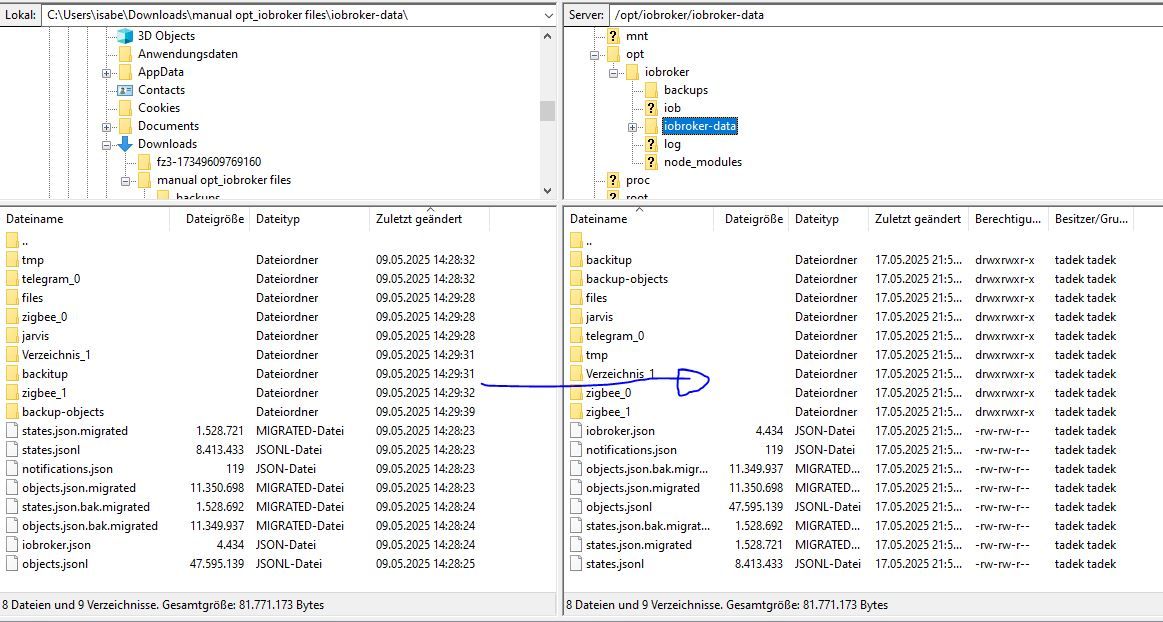
-
@thomas-braun sagte in Uralt System updaten oder Umzug:
@mr-x
iob start adminmal versucht?
Jap,
vor und nach einem reboot komme ich nicht drauf.War denn das Vorgehen beim kopieren richtig?
1.iob stop
2.iobroker-data Inhalt komplett löschen (per file zilla mit standard user)
3.ioBroker-data Inhalt vom alten System rüber kopieren.
4. reboot (iob start)das habe ich dahin kopiert:
@mr-x sagte in Uralt System updaten oder Umzug:
(per file zilla mit standard user)
Was auch immer der Standard User ist.
Die Dateien müssen jedenfalls danach diese Rechte haben:echad@chet:~ $ getfacl /opt/iobroker/iobroker-data/ getfacl: Removing leading '/' from absolute path names # file: opt/iobroker/iobroker-data/ # owner: iobroker # group: iobroker user::rwx group::r-x group:iobroker:rwx mask::rwx other::r-x default:user::rwx default:group::r-x default:group:iobroker:rwx default:mask::rwx default:other::r-x echad@chet:~ $Das macht der Fixer aber.
Es kann sein, das die Versionen einfach zu weit auseinanderliegen für so eine Aktion. -
@thomas-braun sagte in Uralt System updaten oder Umzug:
@mr-x
iob start adminmal versucht?
Jap,
vor und nach einem reboot komme ich nicht drauf.War denn das Vorgehen beim kopieren richtig?
1.iob stop
2.iobroker-data Inhalt komplett löschen (per file zilla mit standard user)
3.ioBroker-data Inhalt vom alten System rüber kopieren.
4. reboot (iob start)das habe ich dahin kopiert:
-
@mr-x sagte in Uralt System updaten oder Umzug:
(per file zilla mit standard user)
Was auch immer der Standard User ist.
Die Dateien müssen jedenfalls danach diese Rechte haben:echad@chet:~ $ getfacl /opt/iobroker/iobroker-data/ getfacl: Removing leading '/' from absolute path names # file: opt/iobroker/iobroker-data/ # owner: iobroker # group: iobroker user::rwx group::r-x group:iobroker:rwx mask::rwx other::r-x default:user::rwx default:group::r-x default:group:iobroker:rwx default:mask::rwx default:other::r-x echad@chet:~ $Das macht der Fixer aber.
Es kann sein, das die Versionen einfach zu weit auseinanderliegen für so eine Aktion.@thomas-braun sagte in Uralt System updaten oder Umzug:
@mr-x sagte in Uralt System updaten oder Umzug:
(per file zilla mit standard user)
Was auch immer der Standard User ist.
Die Dateien müssen jedenfalls danach diese Rechte haben:echad@chet:~ $ getfacl /opt/iobroker/iobroker-data/ getfacl: Removing leading '/' from absolute path names # file: opt/iobroker/iobroker-data/ # owner: iobroker # group: iobroker user::rwx group::r-x group:iobroker:rwx mask::rwx other::r-x default:user::rwx default:group::r-x default:group:iobroker:rwx default:mask::rwx default:other::r-x echad@chet:~ $Das macht der Fixer aber.
Es kann sein, das die Versionen einfach zu weit auseinanderliegen für so eine Aktion.Mit Standard meine ich den, den man beim aufsetzen von ioBroker erstellt.
iob fix lief drüber, aber das ändert nichts. Vom Browser nicht erreichbar.
Wenn du Recht hast mit den Versionen, dann würde das bedeuten, dass es mit dem kopieren somit nicht klappt, ja??? -
@mr-x kannst du mal das logfile zeigen wenn du den Befehl zum starten vom Admin eingibst.
Und auch nach einem Neustart von iobroker .
@wendy2702 sagte in Uralt System updaten oder Umzug:
@mr-x kannst du mal das logfile zeigen wenn du den Befehl zum starten vom Admin eingibst.
Und auch nach einem Neustart von iobroker .
Sorry, aber ich bräuchte etwas genauere Anweisungen :-(
Wärst du so nett die Befehle zu posten?
Danke -
@homoran
Also ich habe den inhalt von ioBroker data auf dem neuen System gelöscht und dann per filezilla mit normalen User vom alten System rein kopiert und neu gestartet.
iob fix ausgeführt.
Danach komme ich nicht mehr auf die Weboberfläche und diag sagt das:======================= SUMMARY ======================= v.2025-02-23 Static hostname: ioBrokerVM Icon name: computer-vm Chassis: vm 🖴 Virtualization: kvm Operating System: Debian GNU/Linux 12 (bookworm) Kernel: Linux 6.1.0-35-amd64 Architecture: x86-64 Hardware Vendor: QEMU Hardware Model: Standard PC _i440FX + PIIX, 1996_ Firmware Version: rel-1.16.3-0-ga6ed6b701f0a-prebuilt.qemu.org Installation: kvm Kernel: x86_64 Userland: 64 bit Timezone: Europe/Berlin (CEST, +0200) User-ID: 1000 Display-Server: false Boot Target: multi-user.target Pending OS-Updates: 0 Pending iob updates: 0 Nodejs-Installation: /usr/bin/nodejs v20.19.2 /usr/bin/node v20.19.2 /usr/bin/npm 10.8.2 /usr/bin/npx 10.8.2 /usr/bin/corepack 0.31.0 Recommended versions are nodejs and npm nodeJS installation is correct MEMORY: total used free shared buff/cache available Mem: 4.1G 528M 3.3G 557K 530M 3.6G Swap: 1.0G 0B 1.0G Total: 5.1G 528M 4.3G Active iob-Instances: 1 Upgrade policy: none ioBroker Core: js-controller 7.0.6 admin 7.6.3 ioBroker Status: iobroker is running on this host. Objects type: jsonl States type: jsonl Status admin and web instance: system.adapter.admin.0 : admin : raspberrypi - enabled, port: 8081, bind: 0.0.0.0 (SSL), run as: admin system.adapter.web.0 : web : raspberrypi - enabled, port: 8082, bind: 0.0.0.0, run as: admin Objects: 9397 States: 8041 Size of iob-Database: 21M /opt/iobroker/iobroker-data/objects.jsonl 11M /opt/iobroker/iobroker-data/objects.json.migrated 11M /opt/iobroker/iobroker-data/objects.json.bak.migrated 3.3M /opt/iobroker/iobroker-data/states.jsonl 1.5M /opt/iobroker/iobroker-data/states.json.migrated 1.5M /opt/iobroker/iobroker-data/states.json.bak.migrated Operating System is the current Debian stable version codenamed 'bookworm'! =================== END OF SUMMARY ====================@mr-x sagte in Uralt System updaten oder Umzug:
per filezilla mit normalen User vom alten System
existiert dieser User auch im neuen System und ist in der Gruppe iobroker?
-
@mr-x sagte in Uralt System updaten oder Umzug:
per filezilla mit normalen User vom alten System
existiert dieser User auch im neuen System und ist in der Gruppe iobroker?
@homoran sagte in Uralt System updaten oder Umzug:
@mr-x sagte in Uralt System updaten oder Umzug:
per filezilla mit normalen User vom alten System
existiert dieser User auch im neuen System und ist in der Gruppe iobroker?
Ich habe diesen user beim aufsetzen generiert.
Ich habe für diesem user 'tadek' nachträglich keine weiteren Rechte eingetragen. -
@homoran sagte in Uralt System updaten oder Umzug:
@mr-x sagte in Uralt System updaten oder Umzug:
per filezilla mit normalen User vom alten System
existiert dieser User auch im neuen System und ist in der Gruppe iobroker?
Ich habe diesen user beim aufsetzen generiert.
Ich habe für diesem user 'tadek' nachträglich keine weiteren Rechte eingetragen.@mr-x sagte in Uralt System updaten oder Umzug:
Ich habe diesen user beim aufsetzen generiert.
Das ist leider nicht die Antwort auf die Fragen: -(
bitte etwas präziser!
Beim Aufsetzen von Debian, ohne root Passwort?
und unter diesem User wurde iobroker installiert?
(ohne sudo!!! ?)und wenn wir schon dabei sind weitere Eventualitäten zu prüfen:
Als welcher User wurden mit filezilla die Dateien vom alten System heruntergeladen? -
@wendy2702 sagte in Uralt System updaten oder Umzug:
@mr-x kannst du mal das logfile zeigen wenn du den Befehl zum starten vom Admin eingibst.
Und auch nach einem Neustart von iobroker .
Sorry, aber ich bräuchte etwas genauere Anweisungen :-(
Wärst du so nett die Befehle zu posten?
Danke@mr-x Am besten machst du 2x eine Verbindung mit dem Terminal Programm deiner Wahl auf.
Dann im ersten:
tail -f /opt/iobroker/log/iobroker.current.logDamit siehst du das iobroker log "live". Zum beenden dann später diese Tasten kombination
CTRL + CIm zweiten Fenster dann
iob start adminDas logfile aus dem Terminalfenster kopieren und hier in Code Tags </> posten
Danach das ganze mal mit
iob restartEDIT: und was kommt bei dir bei dem von @Thomas-Braun geposteten Befehl:
getfacl /opt/iobroker/iobroker-data/ -
@wendy2702
ich habe
tail -f /opt/iobroker/log/iobroker.current.log
gestartet und im zweiten Fenster dann
iob start admin
ausgeführt.
Wenn ich dich richtig verstanden habe müsste im ersten was dazu kommen?
kommt nicht. es bleibt bei der ursprünglichen Ausgabe.tadek@ioBrokerVM:~$ tail -f /opt/iobroker/log/iobroker.current.log 2025-05-18 14:15:29.424 - info: host.ioBrokerVM terminated 2025-05-18 14:17:24.827 - info: host.ioBrokerVM iobroker.js-controller version 7.0.6 js-controller starting 2025-05-18 14:17:24.830 - info: host.ioBrokerVM Copyright (c) 2014-2024 bluefox , 2014 hobbyquaker 2025-05-18 14:17:24.830 - info: host.ioBrokerVM hostname: ioBrokerVM, node: v20 .19.2 2025-05-18 14:17:24.831 - info: host.ioBrokerVM ip addresses: 192.168.178.160 f d4c:16f3:42:5d6:be24:11ff:fe4d:a762 fe80::be24:11ff:fe4d:a762 2025-05-18 14:17:25.276 - info: host.ioBrokerVM Sets unsupported 2025-05-18 14:17:25.529 - info: host.ioBrokerVM connected to Objects and States 2025-05-18 14:17:25.538 - info: host.ioBrokerVM added notifications configurati on of host 2025-05-18 14:17:25.908 - info: host.ioBrokerVM 31 instances found 2025-05-18 14:17:25.912 - warn: host.ioBrokerVM does not start any instances on this hostgetfacl /opt/iobroker/iobroker-data/ergibt
tadek@ioBrokerVM:~$ getfacl /opt/iobroker/iobroker-data/ getfacl: Entferne führende '/' von absoluten Pfadnamen # file: opt/iobroker/iobroker-data/ # owner: iobroker # group: iobroker user::rwx group::r-x group:iobroker:rwx mask::rwx other::r-x default:user::rwx default:group::r-x default:group:iobroker:rwx default:mask::rwx default:other::r-x -
@mr-x sagte in Uralt System updaten oder Umzug:
Ich habe diesen user beim aufsetzen generiert.
Das ist leider nicht die Antwort auf die Fragen: -(
bitte etwas präziser!
Beim Aufsetzen von Debian, ohne root Passwort?
und unter diesem User wurde iobroker installiert?
(ohne sudo!!! ?)und wenn wir schon dabei sind weitere Eventualitäten zu prüfen:
Als welcher User wurden mit filezilla die Dateien vom alten System heruntergeladen?@homoran sagte in Uralt System updaten oder Umzug:
@mr-x sagte in Uralt System updaten oder Umzug:
Ich habe diesen user beim aufsetzen generiert.
Das ist leider nicht die Antwort auf die Fragen: -(
bitte etwas präziser!
Beim Aufsetzen von Debian, ohne root Passwort?
und unter diesem User wurde iobroker installiert?
(ohne sudo!!! ?)und wenn wir schon dabei sind weitere Eventualitäten zu prüfen:
Als welcher User wurden mit filezilla die Dateien vom alten System heruntergeladen?Ja, Debian wurde diesmal ohne root aufgesetzt
Ja mit diesem User wurde ioBroker aufgesetzt mit: curl -sLf https://iobroker.net/install.sh | bash -
Dann kommt ja der Einrichtungsassistent und dort das Admin Passwort vergeben (im Browser beim Einrichten)Vom alten System wurden die files als user "pi" runtergeladen.
Liegt hier der Hund begraben?Danke und Gruß
-
@homoran sagte in Uralt System updaten oder Umzug:
@mr-x sagte in Uralt System updaten oder Umzug:
Ich habe diesen user beim aufsetzen generiert.
Das ist leider nicht die Antwort auf die Fragen: -(
bitte etwas präziser!
Beim Aufsetzen von Debian, ohne root Passwort?
und unter diesem User wurde iobroker installiert?
(ohne sudo!!! ?)und wenn wir schon dabei sind weitere Eventualitäten zu prüfen:
Als welcher User wurden mit filezilla die Dateien vom alten System heruntergeladen?Ja, Debian wurde diesmal ohne root aufgesetzt
Ja mit diesem User wurde ioBroker aufgesetzt mit: curl -sLf https://iobroker.net/install.sh | bash -
Dann kommt ja der Einrichtungsassistent und dort das Admin Passwort vergeben (im Browser beim Einrichten)Vom alten System wurden die files als user "pi" runtergeladen.
Liegt hier der Hund begraben?Danke und Gruß
@mr-x sagte in Uralt System updaten oder Umzug:
Liegt hier der Hund begraben?
Nein, durch den
iob fixstimmen Rechte jetzt wieder.
Was steht im Log, wenn du Instanzen von Hand startest?iob start adminz. B.
Und mach das Fenster von puTTY breiter, damit da diese blöden Umbrüche nicht erscheinen. -
iob Fix habe ich schon durchgeführt.
vor und nach dem kopieren der Dateien.Sorry für mein Unwissen, aber ich kapiere das mit dem log nicht.
Ich habe oben Wendy geantwortet,wie ich es verstanden habe :dizzy_face:@mr-x
Das eine Fenster zeigt das Log permanent, du siehst also was passiert, wenn du im anderen Fenster mit der Installation agierst.
-
@wendy2702
ich habe
tail -f /opt/iobroker/log/iobroker.current.log
gestartet und im zweiten Fenster dann
iob start admin
ausgeführt.
Wenn ich dich richtig verstanden habe müsste im ersten was dazu kommen?
kommt nicht. es bleibt bei der ursprünglichen Ausgabe.tadek@ioBrokerVM:~$ tail -f /opt/iobroker/log/iobroker.current.log 2025-05-18 14:15:29.424 - info: host.ioBrokerVM terminated 2025-05-18 14:17:24.827 - info: host.ioBrokerVM iobroker.js-controller version 7.0.6 js-controller starting 2025-05-18 14:17:24.830 - info: host.ioBrokerVM Copyright (c) 2014-2024 bluefox , 2014 hobbyquaker 2025-05-18 14:17:24.830 - info: host.ioBrokerVM hostname: ioBrokerVM, node: v20 .19.2 2025-05-18 14:17:24.831 - info: host.ioBrokerVM ip addresses: 192.168.178.160 f d4c:16f3:42:5d6:be24:11ff:fe4d:a762 fe80::be24:11ff:fe4d:a762 2025-05-18 14:17:25.276 - info: host.ioBrokerVM Sets unsupported 2025-05-18 14:17:25.529 - info: host.ioBrokerVM connected to Objects and States 2025-05-18 14:17:25.538 - info: host.ioBrokerVM added notifications configurati on of host 2025-05-18 14:17:25.908 - info: host.ioBrokerVM 31 instances found 2025-05-18 14:17:25.912 - warn: host.ioBrokerVM does not start any instances on this hostgetfacl /opt/iobroker/iobroker-data/ergibt
tadek@ioBrokerVM:~$ getfacl /opt/iobroker/iobroker-data/ getfacl: Entferne führende '/' von absoluten Pfadnamen # file: opt/iobroker/iobroker-data/ # owner: iobroker # group: iobroker user::rwx group::r-x group:iobroker:rwx mask::rwx other::r-x default:user::rwx default:group::r-x default:group:iobroker:rwx default:mask::rwx default:other::r-x@mr-x sagte in Uralt System updaten oder Umzug:
ioBrokerVM
War der Name des alten "Host" -- Rechners auch so?
Und wie @Thomas-Braun geschrieben hat, mach das Terminal Fenster für das logfile größer. Versuche dann eine Instanz im zweiten Fenster zu starten und schaue was im LOG kommt und zeige uns das Log und die Ausgabe des anderen Terminalfensters.
z.B.
iob start admin.0 iob start web.0 iob start hm-rpc.0 -
@mr-x sagte in Uralt System updaten oder Umzug:
ioBrokerVM
War der Name des alten "Host" -- Rechners auch so?
Und wie @Thomas-Braun geschrieben hat, mach das Terminal Fenster für das logfile größer. Versuche dann eine Instanz im zweiten Fenster zu starten und schaue was im LOG kommt und zeige uns das Log und die Ausgabe des anderen Terminalfensters.
z.B.
iob start admin.0 iob start web.0 iob start hm-rpc.0@wendy2702
der alte heißt raspberry
der neue ioBrokerVMich poste mal ein Foto, da im ersten log Fenster sich nichts ändert, wenn ich die Befehle im zweiten eingebe.
Irgendwas mache ich wohl immer noch falsch.
Vermutlich starte ich das log falsch?
-
@wendy2702
der alte heißt raspberry
der neue ioBrokerVMich poste mal ein Foto, da im ersten log Fenster sich nichts ändert, wenn ich die Befehle im zweiten eingebe.
Irgendwas mache ich wohl immer noch falsch.
Vermutlich starte ich das log falsch? -
@mr-x mit den Logs sieht eigentlich richtig aus.
Kannst du mal
iob host thisMachen und dann den Container mal neu starten.
Im Anschluss mal probieren ob Admin erreichbar, wenn nicht wieder logfile und manuell starten versuchen
@wendy2702 sagte in Uralt System updaten oder Umzug:
@mr-x mit den Logs sieht eigentlich richtig aus.
Kannst du mal
iob host thisMachen und dann den Container mal neu starten.
Im Anschluss mal probieren ob Admin erreichbar, wenn nicht wieder logfile und manuell starten versuchen
Habe ich:
tadek@ioBrokerVM:~$ iob host this
Cannot execute changes on running system. Stop iobroker first.
tadek@ioBrokerVM:~$ iobroker stop
tadek@ioBrokerVM:~$ iob host this
Cannot use this command in multihost!
iobroker host this

Initialize current host

Options:
  --help  Show help  [boolean]
Danach tut sich weiterhin nichts im Log,
wenn ich iob start admin.0Debian GNU/Linux comes with ABSOLUTELY NO WARRANTY, to the extent permitted by applicable law. Last login: Sun May 18 18:51:13 2025 from 192.168.178.114 tadek@ioBrokerVM:~$ tail -f /opt/iobroker/log/iobroker.current.log 2025-05-18 18:49:43.867 - info: host.ioBrokerVM terminated 2025-05-18 18:51:04.695 - info: host.ioBrokerVM iobroker.js-controller version 7.0.6 js-controller starting 2025-05-18 18:51:04.698 - info: host.ioBrokerVM Copyright (c) 2014-2024 bluefox , 2014 hobbyquaker 2025-05-18 18:51:04.698 - info: host.ioBrokerVM hostname: ioBrokerVM, node: v20 .19.2 2025-05-18 18:51:04.698 - info: host.ioBrokerVM ip addresses: 192.168.178.160 f d4c:16f3:42:5d6:be24:11ff:fe4d:a762 fe80::be24:11ff:fe4d:a762 2025-05-18 18:51:05.073 - info: host.ioBrokerVM Sets unsupported 2025-05-18 18:51:05.296 - info: host.ioBrokerVM connected to Objects and States 2025-05-18 18:51:05.305 - info: host.ioBrokerVM added notifications configurati on of host 2025-05-18 18:51:05.666 - info: host.ioBrokerVM 31 instances found 2025-05-18 18:51:05.670 - warn: host.ioBrokerVM does not start any instances on this hostwenn ich nochmal aufrufe kommt dies:
tadek@ioBrokerVM:~$ tail -f /opt/iobroker/log/iobroker.current.log
2025-05-18 18:49:43.867  - info: host.ioBrokerVM terminated
2025-05-18 18:51:04.695  - info: host.ioBrokerVM iobroker.js-controller version 7.0.6 js-controller starting
2025-05-18 18:51:04.698  - info: host.ioBrokerVM Copyright (c) 2014-2024 bluefox, 2014 hobbyquaker
2025-05-18 18:51:04.698  - info: host.ioBrokerVM hostname: ioBrokerVM, node: v20.19.2
2025-05-18 18:51:04.698  - info: host.ioBrokerVM ip addresses: 192.168.178.160 fd4c:16f3:42:5d6:be24:11ff:fe4d:a762 fe80::be24:11ff:fe4d:a762
2025-05-18 18:51:05.073  - info: host.ioBrokerVM Sets unsupported
2025-05-18 18:51:05.296  - info: host.ioBrokerVM connected to Objects and States
2025-05-18 18:51:05.305  - info: host.ioBrokerVM added notifications configuration of host
2025-05-18 18:51:05.666  - info: host.ioBrokerVM 31 instances found
2025-05-18 18:51:05.670  - warn: host.ioBrokerVM does not start any instances on this host



866
Online32.4k
Users81.5k
Topics1.3m
Posts