




Problem mit dem Shelly Adapter
-
@peter-v sagte in Problem mit dem Shelly Adapter:
Seit dem sind die Meldungen fast verschwunden.
das habe ich ebenfalls angepasst, seither kommen die Meldungen eigentlich nur noch vereinzelt bei Neustart des Adapters/iobrokers (backup wird nächtlich per script angestoßen und dabei wird jeder docker angehalten)
soweit ich überblicken konnte, tritt der Fehler aber nicht immer auf-
Firmware sind unterschiedlich vom Auslieferungszustand bis hin zur aktuellen
handelt sich bei mir nur um 2 shellyplus2pm, die ich diesen Sommer erneuert habe, weil die alten kaputt gingen. Vorher waren keine Probleme vorhanden. -
uniFi Netzwerk mit 3 AP's , shelly's laufen im separaten VLAN IoT Netzwerk
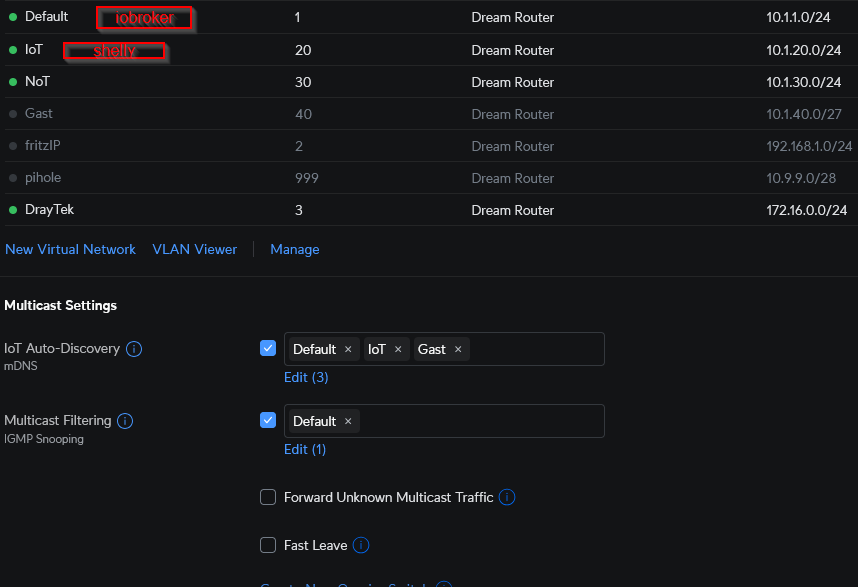
-
Signalstärke schwankt zwischen 40-50 dBm
-
js-controller aktuell 7.06 (war aber auch schon mit v6.x)
-
nodejs v20.18.1 (war auch schon mit v18)
-
Adapter v8.5.1 ( war auch schon mit einigen Vorversionen)
-
shelly laufen per mqtt Protokoll
ansonsten ist mir bisher nichts weiter aufgefallen
@haus-automatisierung sagte in Problem mit dem Shelly Adapter:
ob die MQTT-Client-ID richtig übermittelt wird
bei mir kommen nur noch
2024-12-11 03:05:03.284 - error: shelly.0 (630) [MQTT] Unable to get mqttprefix of client with id "shellyplus2pm-cc7b5c88d720"
2024-12-11 03:05:03.285 - error: shelly.0 (630) [MQTT] Unable to get mqttprefix of client with id "shellyplus2pm-cc7b5c8946e0"
dieses
Error in function setMqttPrefixHttp (Gen 1) for (undefined / undefined / undefined)...kommt bei mir seit geraumer Zeit nicht mehrFirmware-Version: laut der App alle Shelly haben die Akutelle Version: V1.14.0/ V1.4.4/ V2.2.4
Adapter-Version: Version 8.5.1
nodejs-Version: 20.18.1
js-controller-Version: 7.0.3
WiFi Setup (Access Points, Signalstärke, ...) ein WLAN 2,4GHz, 4 AP von Unifi, durchschnitte Singalstärke der Shelly 33 bis 73dBm
Debug-Logshelly.0 Zeit error Nachricht shelly.0 2024-12-17 08:04:35.730 error [MQTT] Unable to get mqttprefix of client with id "shellyplusrgbwpm-d8132add71d8" shelly.0 2024-12-17 08:04:35.730 error [MQTT] Error in function setMqttPrefixHttp (Gen 1) for (undefined / undefined / undefined): TypeError: Cannot read properties of undefined (reading 'replace') shelly.0 2024-12-17 08:04:15.484 error [MQTT] Unable to get mqttprefix of client with id "shellyplusplugs-b0b21cea77fc" shelly.0 2024-12-17 08:04:15.484 error [MQTT] Error in function setMqttPrefixHttp (Gen 1) for (undefined / undefined / undefined): TypeError: Cannot read properties of undefined (reading 'replace') shelly.0 2024-12-17 08:03:51.800 error [MQTT] Unable to get mqttprefix of client with id "shellyplusplugs-b0b21c130b30" shelly.0 2024-12-17 08:03:51.800 error [MQTT] Error in function setMqttPrefixHttp (Gen 1) for (undefined / undefined / undefined): TypeError: Cannot read properties of undefined (reading 'replace') shelly.0 2024-12-17 08:03:11.640 error [MQTT] Unable to get mqttprefix of client with id "shellyplusplugs-b0b21c12c334" shelly.0 2024-12-17 08:03:11.639 error [MQTT] Error in function setMqttPrefixHttp (Gen 1) for (undefined / undefined / undefined): TypeError: Cannot read properties of undefined (reading 'replace') shelly.0 2024-12-17 08:02:01.800 error [MQTT] Unable to get mqttprefix of client with id "shellyplusplugs-b0b21c12c334" shelly.0 2024-12-17 08:02:01.799 error [MQTT] Error in function setMqttPrefixHttp (Gen 1) for (undefined / undefined / undefined): TypeError: Cannot read properties of undefined (reading 'replace') shelly.0 2024-12-17 08:01:08.403 error [MQTT] Unable to get mqttprefix of client with id "shellyplusplugs-b0b21cea77fc" shelly.0 2024-12-17 08:01:08.403 error [MQTT] Error in function setMqttPrefixHttp (Gen 1) for (undefined / undefined / undefined): TypeError: Cannot read properties of undefined (reading 'replace') shelly.0 2024-12-17 08:00:56.101 error [MQTT] Unable to get mqttprefix of client with id "shellypmmini-348518dd6e34" shelly.0 2024-12-17 08:00:56.100 error [MQTT] Error in function setMqttPrefixHttp (Gen 1) for (undefined / undefined / undefined): TypeError: Cannot read properties of undefined (reading 'replace') shelly.0 2024-12-17 07:59:52.770 error [MQTT] Unable to get mqttprefix of client with id "shellyplusplugs-b0b21c12c334" shelly.0 2024-12-17 07:59:52.770 error [MQTT] Error in function setMqttPrefixHttp (Gen 1) for (undefined / undefined / undefined): TypeError: Cannot read properties of undefined (reading 'replace') shelly.0 2024-12-17 07:58:43.307 error [MQTT] Unable to get mqttprefix of client with id "shellypmmini-348518dd6e34" shelly.0 2024-12-17 07:58:43.307 error [MQTT] Error in function setMqttPrefixHttp (Gen 1) for (undefined / undefined / undefined): TypeError: Cannot read properties of undefined (reading 'replace') shelly.0 2024-12-17 07:58:43.259 error [MQTT] Unable to get mqttprefix of client with id "shellyplusplugs-b0b21c12c334" shelly.0 2024-12-17 07:58:43.258 error [MQTT] Error in function setMqttPrefixHttp (Gen 1) for (undefined / undefined / undefined): TypeError: Cannot read properties of undefined (reading 'replace') shelly.0 2024-12-17 07:58:43.196 error [MQTT] Unable to get mqttprefix of client with id "shellyplusplugs-b0b21cea77fc" shelly.0 2024-12-17 07:58:43.196 error [MQTT] Error in function setMqttPrefixHttp (Gen 1) for (undefined / undefined / undefined): TypeError: Cannot read properties of undefined (reading 'replace') shelly.0 2024-12-17 07:58:24.404 error [MQTT] Unable to get mqttprefix of client with id "shellypmmini-348518e0b808" shelly.0 2024-12-17 07:58:24.404 error [MQTT] Error in function setMqttPrefixHttp (Gen 1) for (undefined / undefined / undefined): TypeError: Cannot read properties of undefined (reading 'replace') shelly.0 2024-12-17 07:58:09.288 error [MQTT] Unable to get mqttprefix of client with id "shellyplusrgbwpm-d8132add71d8" shelly.0 2024-12-17 07:58:09.288 error [MQTT] Error in function setMqttPrefixHttp (Gen 1) for (undefined / undefined / undefined): TypeError: Cannot read properties of undefined (reading 'replace') shelly.0 2024-12-17 07:58:05.304 error [MQTT] Unable to get mqttprefix of client with id "shellypmmini-348518e0b0e8" shelly.0 2024-12-17 07:58:05.304 error [MQTT] Error in function setMqttPrefixHttp (Gen 1) for (undefined / undefined / undefined): TypeError: Cannot read properties of undefined (reading 'replace') shelly.0 2024-12-17 07:57:59.012 error [MQTT] Unable to get mqttprefix of client with id "shellyplusplugs-b0b21cea77fc" shelly.0 2024-12-17 07:57:59.012 error [MQTT] Error in function setMqttPrefixHttp (Gen 1) for (undefined / undefined / undefined): TypeError: Cannot read properties of undefined (reading 'replace') shelly.0 2024-12-17 07:57:44.023 error [MQTT] Unable to get mqttprefix of client with id "shellyplusplugs-b0b21c12c334" shelly.0 2024-12-17 07:57:44.023 error [MQTT] Error in function setMqttPrefixHttp (Gen 1) for (undefined / undefined / undefined): TypeError: Cannot read properties of undefined (reading 'replace') shelly.0 2024-12-17 07:57:41.803 error [MQTT] Unable to get mqttprefix of client with id "shellyplusplugs-b0b21c1100d4" shelly.0 2024-12-17 07:57:41.803 error [MQTT] Error in function setMqttPrefixHttp (Gen 1) for (undefined / undefined / undefined): TypeError: Cannot read properties of undefined (reading 'replace') shelly.0 2024-12-17 07:57:15.637 error [MQTT] Unable to get mqttprefix of client with id "shellypmmini-348518dd6e34" shelly.0 2024-12-17 07:57:15.637 error [MQTT] Error in function setMqttPrefixHttp (Gen 1) for (undefined / undefined / undefined): TypeError: Cannot read properties of undefined (reading 'replace') shelly.0 2024-12-17 07:57:00.930 error [MQTT] Unable to get mqttprefix of client with id "shellyplusplugs-b0b21c12c334" shelly.0 2024-12-17 07:57:00.232 error [MQTT] Unable to get mqttprefix of client with id "shellypmmini-348518e0b0e8" shelly.0 2024-12-17 07:57:00.232 error [MQTT] Error in function setMqttPrefixHttp (Gen 1) for (undefined / undefined / undefined): TypeError: Cannot read properties of undefined (reading 'replace') shelly.0 2024-12-17 07:56:59.933 error [MQTT] Unable to get mqttprefix of client with id "shellyplusplugs-b0b21c12c150" shelly.0 2024-12-17 07:56:59.933 error [MQTT] Error in function setMqttPrefixHttp (Gen 1) for (undefined / undefined / undefined): TypeError: Cannot read properties of undefined (reading 'replace') shelly.0 2024-12-17 07:56:59.431 error [MQTT] Unable to get mqttprefix of client with id "shellyplusrgbwpm-d8132add71d8" shelly.0 2024-12-17 07:56:59.431 error [MQTT] Error in function setMqttPrefixHttp (Gen 1) for (undefined / undefined / undefined): TypeError: Cannot read properties of undefined (reading 'replace') shelly.0 2024-12-17 07:56:34.771 error [MQTT] Unable to get mqttprefix of client with id "shellyplusplugs-b0b21c12c150" shelly.0 2024-12-17 07:56:34.771 error [MQTT] Error in function setMqttPrefixHttp (Gen 1) for (undefined / undefined / undefined): TypeError: Cannot read properties of undefined (reading 'replace') shelly.0 2024-12-17 07:56:28.591 error [MQTT] Unable to get mqttprefix of client with id "shellyplusplugs-b0b21c1100d4" shelly.0 2024-12-17 07:56:28.590 error [MQTT] Error in function setMqttPrefixHttp (Gen 1) for (undefined / undefined / undefined): TypeError: Cannot read properties of undefined (reading 'replace') shelly.0 2024-12-17 07:56:17.347 error [MQTT] Unable to get mqttprefix of client with id "shellyplusplugs-b0b21c12c150" shelly.0 2024-12-17 07:56:17.347 error [MQTT] Error in function setMqttPrefixHttp (Gen 1) for (undefined / undefined / undefined): TypeError: Cannot read properties of undefined (reading 'replace')usw.
@haus-automatisierung es war 1-2 Tage ruhe, also keine Probelme weil ich den Device-Watcher deaktiviert hatte, aber dann kam es auch auf einaml wieder.
-
-
Firmware-Version: laut der App alle Shelly haben die Akutelle Version: V1.14.0/ V1.4.4/ V2.2.4
Adapter-Version: Version 8.5.1
nodejs-Version: 20.18.1
js-controller-Version: 7.0.3
WiFi Setup (Access Points, Signalstärke, ...) ein WLAN 2,4GHz, 4 AP von Unifi, durchschnitte Singalstärke der Shelly 33 bis 73dBm
Debug-Logshelly.0 Zeit error Nachricht shelly.0 2024-12-17 08:04:35.730 error [MQTT] Unable to get mqttprefix of client with id "shellyplusrgbwpm-d8132add71d8" shelly.0 2024-12-17 08:04:35.730 error [MQTT] Error in function setMqttPrefixHttp (Gen 1) for (undefined / undefined / undefined): TypeError: Cannot read properties of undefined (reading 'replace') shelly.0 2024-12-17 08:04:15.484 error [MQTT] Unable to get mqttprefix of client with id "shellyplusplugs-b0b21cea77fc" shelly.0 2024-12-17 08:04:15.484 error [MQTT] Error in function setMqttPrefixHttp (Gen 1) for (undefined / undefined / undefined): TypeError: Cannot read properties of undefined (reading 'replace') shelly.0 2024-12-17 08:03:51.800 error [MQTT] Unable to get mqttprefix of client with id "shellyplusplugs-b0b21c130b30" shelly.0 2024-12-17 08:03:51.800 error [MQTT] Error in function setMqttPrefixHttp (Gen 1) for (undefined / undefined / undefined): TypeError: Cannot read properties of undefined (reading 'replace') shelly.0 2024-12-17 08:03:11.640 error [MQTT] Unable to get mqttprefix of client with id "shellyplusplugs-b0b21c12c334" shelly.0 2024-12-17 08:03:11.639 error [MQTT] Error in function setMqttPrefixHttp (Gen 1) for (undefined / undefined / undefined): TypeError: Cannot read properties of undefined (reading 'replace') shelly.0 2024-12-17 08:02:01.800 error [MQTT] Unable to get mqttprefix of client with id "shellyplusplugs-b0b21c12c334" shelly.0 2024-12-17 08:02:01.799 error [MQTT] Error in function setMqttPrefixHttp (Gen 1) for (undefined / undefined / undefined): TypeError: Cannot read properties of undefined (reading 'replace') shelly.0 2024-12-17 08:01:08.403 error [MQTT] Unable to get mqttprefix of client with id "shellyplusplugs-b0b21cea77fc" shelly.0 2024-12-17 08:01:08.403 error [MQTT] Error in function setMqttPrefixHttp (Gen 1) for (undefined / undefined / undefined): TypeError: Cannot read properties of undefined (reading 'replace') shelly.0 2024-12-17 08:00:56.101 error [MQTT] Unable to get mqttprefix of client with id "shellypmmini-348518dd6e34" shelly.0 2024-12-17 08:00:56.100 error [MQTT] Error in function setMqttPrefixHttp (Gen 1) for (undefined / undefined / undefined): TypeError: Cannot read properties of undefined (reading 'replace') shelly.0 2024-12-17 07:59:52.770 error [MQTT] Unable to get mqttprefix of client with id "shellyplusplugs-b0b21c12c334" shelly.0 2024-12-17 07:59:52.770 error [MQTT] Error in function setMqttPrefixHttp (Gen 1) for (undefined / undefined / undefined): TypeError: Cannot read properties of undefined (reading 'replace') shelly.0 2024-12-17 07:58:43.307 error [MQTT] Unable to get mqttprefix of client with id "shellypmmini-348518dd6e34" shelly.0 2024-12-17 07:58:43.307 error [MQTT] Error in function setMqttPrefixHttp (Gen 1) for (undefined / undefined / undefined): TypeError: Cannot read properties of undefined (reading 'replace') shelly.0 2024-12-17 07:58:43.259 error [MQTT] Unable to get mqttprefix of client with id "shellyplusplugs-b0b21c12c334" shelly.0 2024-12-17 07:58:43.258 error [MQTT] Error in function setMqttPrefixHttp (Gen 1) for (undefined / undefined / undefined): TypeError: Cannot read properties of undefined (reading 'replace') shelly.0 2024-12-17 07:58:43.196 error [MQTT] Unable to get mqttprefix of client with id "shellyplusplugs-b0b21cea77fc" shelly.0 2024-12-17 07:58:43.196 error [MQTT] Error in function setMqttPrefixHttp (Gen 1) for (undefined / undefined / undefined): TypeError: Cannot read properties of undefined (reading 'replace') shelly.0 2024-12-17 07:58:24.404 error [MQTT] Unable to get mqttprefix of client with id "shellypmmini-348518e0b808" shelly.0 2024-12-17 07:58:24.404 error [MQTT] Error in function setMqttPrefixHttp (Gen 1) for (undefined / undefined / undefined): TypeError: Cannot read properties of undefined (reading 'replace') shelly.0 2024-12-17 07:58:09.288 error [MQTT] Unable to get mqttprefix of client with id "shellyplusrgbwpm-d8132add71d8" shelly.0 2024-12-17 07:58:09.288 error [MQTT] Error in function setMqttPrefixHttp (Gen 1) for (undefined / undefined / undefined): TypeError: Cannot read properties of undefined (reading 'replace') shelly.0 2024-12-17 07:58:05.304 error [MQTT] Unable to get mqttprefix of client with id "shellypmmini-348518e0b0e8" shelly.0 2024-12-17 07:58:05.304 error [MQTT] Error in function setMqttPrefixHttp (Gen 1) for (undefined / undefined / undefined): TypeError: Cannot read properties of undefined (reading 'replace') shelly.0 2024-12-17 07:57:59.012 error [MQTT] Unable to get mqttprefix of client with id "shellyplusplugs-b0b21cea77fc" shelly.0 2024-12-17 07:57:59.012 error [MQTT] Error in function setMqttPrefixHttp (Gen 1) for (undefined / undefined / undefined): TypeError: Cannot read properties of undefined (reading 'replace') shelly.0 2024-12-17 07:57:44.023 error [MQTT] Unable to get mqttprefix of client with id "shellyplusplugs-b0b21c12c334" shelly.0 2024-12-17 07:57:44.023 error [MQTT] Error in function setMqttPrefixHttp (Gen 1) for (undefined / undefined / undefined): TypeError: Cannot read properties of undefined (reading 'replace') shelly.0 2024-12-17 07:57:41.803 error [MQTT] Unable to get mqttprefix of client with id "shellyplusplugs-b0b21c1100d4" shelly.0 2024-12-17 07:57:41.803 error [MQTT] Error in function setMqttPrefixHttp (Gen 1) for (undefined / undefined / undefined): TypeError: Cannot read properties of undefined (reading 'replace') shelly.0 2024-12-17 07:57:15.637 error [MQTT] Unable to get mqttprefix of client with id "shellypmmini-348518dd6e34" shelly.0 2024-12-17 07:57:15.637 error [MQTT] Error in function setMqttPrefixHttp (Gen 1) for (undefined / undefined / undefined): TypeError: Cannot read properties of undefined (reading 'replace') shelly.0 2024-12-17 07:57:00.930 error [MQTT] Unable to get mqttprefix of client with id "shellyplusplugs-b0b21c12c334" shelly.0 2024-12-17 07:57:00.232 error [MQTT] Unable to get mqttprefix of client with id "shellypmmini-348518e0b0e8" shelly.0 2024-12-17 07:57:00.232 error [MQTT] Error in function setMqttPrefixHttp (Gen 1) for (undefined / undefined / undefined): TypeError: Cannot read properties of undefined (reading 'replace') shelly.0 2024-12-17 07:56:59.933 error [MQTT] Unable to get mqttprefix of client with id "shellyplusplugs-b0b21c12c150" shelly.0 2024-12-17 07:56:59.933 error [MQTT] Error in function setMqttPrefixHttp (Gen 1) for (undefined / undefined / undefined): TypeError: Cannot read properties of undefined (reading 'replace') shelly.0 2024-12-17 07:56:59.431 error [MQTT] Unable to get mqttprefix of client with id "shellyplusrgbwpm-d8132add71d8" shelly.0 2024-12-17 07:56:59.431 error [MQTT] Error in function setMqttPrefixHttp (Gen 1) for (undefined / undefined / undefined): TypeError: Cannot read properties of undefined (reading 'replace') shelly.0 2024-12-17 07:56:34.771 error [MQTT] Unable to get mqttprefix of client with id "shellyplusplugs-b0b21c12c150" shelly.0 2024-12-17 07:56:34.771 error [MQTT] Error in function setMqttPrefixHttp (Gen 1) for (undefined / undefined / undefined): TypeError: Cannot read properties of undefined (reading 'replace') shelly.0 2024-12-17 07:56:28.591 error [MQTT] Unable to get mqttprefix of client with id "shellyplusplugs-b0b21c1100d4" shelly.0 2024-12-17 07:56:28.590 error [MQTT] Error in function setMqttPrefixHttp (Gen 1) for (undefined / undefined / undefined): TypeError: Cannot read properties of undefined (reading 'replace') shelly.0 2024-12-17 07:56:17.347 error [MQTT] Unable to get mqttprefix of client with id "shellyplusplugs-b0b21c12c150" shelly.0 2024-12-17 07:56:17.347 error [MQTT] Error in function setMqttPrefixHttp (Gen 1) for (undefined / undefined / undefined): TypeError: Cannot read properties of undefined (reading 'replace')usw.
@haus-automatisierung es war 1-2 Tage ruhe, also keine Probelme weil ich den Device-Watcher deaktiviert hatte, aber dann kam es auch auf einaml wieder.
@haus-automatisierung
2x Shelly Instanzen sonst kein MQTT Adapter
Firmware-Version: Geräte Shelly HTG3 1.4.5
Adapter-Version: Version 8.5.1
nodejs-Version: 20.18.1
NPM: 10.8.2
js-controller-Version: 7.0.3
WiFi Setup: Fritzbox 7590 plus Fritz Repeater 2400
Wifi Rissi: 45-78shelly.1 | 2024-12-15 11:20:01.277 | error | [httpIoBrokerState] HTTP request error for 192.168.2.158 (shellyhtg3 / shellyhtg3-543204567964 / shellyhtg3#543204567964#1) "/rpc/Shelly.GetStatus": Wrong http username or http password! Please enter user credentials for restricted login. shelly.1 | 2024-12-15 11:06:59.920 | error | [httpIoBrokerState] HTTP request error for 192.168.2.152 (shellyhtg3 / shellyhtg3-ecda3bc38e78 / shellyhtg3#ecda3bc38e78#1) "/rpc/Shelly.GetStatus": Wrong http username or http password! Please enter user credentials for restricted login. shelly.1 | 2024-12-15 11:00:01.819 | error | [httpIoBrokerState] HTTP request error for 192.168.2.150 (shellyhtg3 / shellyhtg3-ecda3bc39aa8 / shellyhtg3#ecda3bc39aa8#1) "/rpc/Shelly.GetStatus": Wrong http username or http password! Please enter user credentials for restricted login. shelly.1 | 2024-12-15 10:43:02.510 | error | [httpIoBrokerState] HTTP request error for 192.168.2.150 (shellyhtg3 / shellyhtg3-ecda3bc39aa8 / shellyhtg3#ecda3bc39aa8#1) "/rpc/Shelly.GetStatus": Wrong http username or http password! Please enter user credentials for restricted login.Daten werden von allen Shelly HTG3 im Intervall an den Shelly Adapter übertragen ohne Fehler.
Iobroker:
-
Für mich persöhnlich, gibt es nichts besseres, ich liebe es.
-
Du wächst mit ioBroker und ioBroker wächst mit dir.
-
-
@haus-automatisierung
2x Shelly Instanzen sonst kein MQTT Adapter
Firmware-Version: Geräte Shelly HTG3 1.4.5
Adapter-Version: Version 8.5.1
nodejs-Version: 20.18.1
NPM: 10.8.2
js-controller-Version: 7.0.3
WiFi Setup: Fritzbox 7590 plus Fritz Repeater 2400
Wifi Rissi: 45-78shelly.1 | 2024-12-15 11:20:01.277 | error | [httpIoBrokerState] HTTP request error for 192.168.2.158 (shellyhtg3 / shellyhtg3-543204567964 / shellyhtg3#543204567964#1) "/rpc/Shelly.GetStatus": Wrong http username or http password! Please enter user credentials for restricted login. shelly.1 | 2024-12-15 11:06:59.920 | error | [httpIoBrokerState] HTTP request error for 192.168.2.152 (shellyhtg3 / shellyhtg3-ecda3bc38e78 / shellyhtg3#ecda3bc38e78#1) "/rpc/Shelly.GetStatus": Wrong http username or http password! Please enter user credentials for restricted login. shelly.1 | 2024-12-15 11:00:01.819 | error | [httpIoBrokerState] HTTP request error for 192.168.2.150 (shellyhtg3 / shellyhtg3-ecda3bc39aa8 / shellyhtg3#ecda3bc39aa8#1) "/rpc/Shelly.GetStatus": Wrong http username or http password! Please enter user credentials for restricted login. shelly.1 | 2024-12-15 10:43:02.510 | error | [httpIoBrokerState] HTTP request error for 192.168.2.150 (shellyhtg3 / shellyhtg3-ecda3bc39aa8 / shellyhtg3#ecda3bc39aa8#1) "/rpc/Shelly.GetStatus": Wrong http username or http password! Please enter user credentials for restricted login.Daten werden von allen Shelly HTG3 im Intervall an den Shelly Adapter übertragen ohne Fehler.
@fabio Das ist aber ein komplett anderes Thema mit dem Username, oder? Glaube nicht, dass das mit dem Prefix-Thema zusammenhängt.
🧑🎓 Autor des beliebten ioBroker-Master-Kurses
🎥 Tutorials rund um das Thema DIY-Smart-Home: https://haus-automatisierung.com/
📚 Meine Dokumentation -
@fabio Das ist aber ein komplett anderes Thema mit dem Username, oder? Glaube nicht, dass das mit dem Prefix-Thema zusammenhängt.
@haus-automatisierung wo soll ich denn hin mit meinem Problem, du hast ja mein Issus auf Github geschlossen, was soll ich jetzt machen? Ich habe ja auch ab an und an den Fehler ich denke das hängt alles zusammen.
shelly.1
2024-12-05 06:27:09.166 error [MQTT] Unable to get mqttprefix of client with id "shellyhtg3-34b7da8cc040"
shelly.1
2024-12-05 06:27:09.166 error [MQTT] Error in function setMqttPrefixHttp (Gen 1) for (undefined / undefined / undefined): TypeError: Cannot read properties of undefined (reading 'replace')
shelly.1
2024-12-05 06:27:00.877 error [httpIoBrokerState] HTTP request error for 192.168.2.156 (shellyhtg3 / shellyhtg3-34b7da8cc040 / shellyhtg3#34b7da8cc040#1) "/rpc/Shelly.GetStatus": Wrong http username or http password! Please enter user credentials for restricted login
Bitte schau mal hier: https://github.com/iobroker-community-adapters/ioBroker.shelly/issues/1097
aber ich kann mich hier auch ausklinken wenn du meinst das es nichts damit zu tun hat.
Herzliche Grüße
FabioIobroker:
-
Für mich persöhnlich, gibt es nichts besseres, ich liebe es.
-
Du wächst mit ioBroker und ioBroker wächst mit dir.
-
-
@haus-automatisierung wo soll ich denn hin mit meinem Problem, du hast ja mein Issus auf Github geschlossen, was soll ich jetzt machen? Ich habe ja auch ab an und an den Fehler ich denke das hängt alles zusammen.
shelly.1
2024-12-05 06:27:09.166 error [MQTT] Unable to get mqttprefix of client with id "shellyhtg3-34b7da8cc040"
shelly.1
2024-12-05 06:27:09.166 error [MQTT] Error in function setMqttPrefixHttp (Gen 1) for (undefined / undefined / undefined): TypeError: Cannot read properties of undefined (reading 'replace')
shelly.1
2024-12-05 06:27:00.877 error [httpIoBrokerState] HTTP request error for 192.168.2.156 (shellyhtg3 / shellyhtg3-34b7da8cc040 / shellyhtg3#34b7da8cc040#1) "/rpc/Shelly.GetStatus": Wrong http username or http password! Please enter user credentials for restricted login
Bitte schau mal hier: https://github.com/iobroker-community-adapters/ioBroker.shelly/issues/1097
aber ich kann mich hier auch ausklinken wenn du meinst das es nichts damit zu tun hat.
Herzliche Grüße
Fabio@fabio sagte in Problem mit dem Shelly Adapter:
wo soll ich denn hin mit meinem Problem, du hast ja mein Issus auf Github geschlossen
Die Meldung mit dem Username und Passwort kommt, wenn der Shelly per HTTP ein 401 Response zurückliefert. Also hat er in jedem Fall geantwortet. Warum die Daten angeblich falsch sind, müsste man überprüfen.
Ich hatte im Issue nur Themen gesehen, welche ich schon kannte und wo es offene Issues zu gibt. Kann den aber gern wieder öffnen. Da ich so ein Gerät nicht habe, kann ich das aber nicht reproduzieren und der Issue bleibt dann ewig offen.
🧑🎓 Autor des beliebten ioBroker-Master-Kurses
🎥 Tutorials rund um das Thema DIY-Smart-Home: https://haus-automatisierung.com/
📚 Meine Dokumentation -
@fabio sagte in Problem mit dem Shelly Adapter:
wo soll ich denn hin mit meinem Problem, du hast ja mein Issus auf Github geschlossen
Die Meldung mit dem Username und Passwort kommt, wenn der Shelly per HTTP ein 401 Response zurückliefert. Also hat er in jedem Fall geantwortet. Warum die Daten angeblich falsch sind, müsste man überprüfen.
Ich hatte im Issue nur Themen gesehen, welche ich schon kannte und wo es offene Issues zu gibt. Kann den aber gern wieder öffnen. Da ich so ein Gerät nicht habe, kann ich das aber nicht reproduzieren und der Issue bleibt dann ewig offen.
@haus-automatisierung ich kann dir gerne ein Gerät zuschicken.
Danke für deine Mühen.
Grüße
Fabio -
Ich habe auch Probleme mit den Shelly-Geräten.
Meine Probleme:
3 von 4 Shelly Geräten werden angezeigt. Aber nur 1 "Shelly Plus 1" ist grün! Die beiden Anderen (Shelly Plus 1 und Shelly HT) sind grau!
Das 4. Gerät "Shelly PM mini Gen3" wird nicht angezeigt.Shelly PM mini Gen 3:
Beim Shelly Adapter wird für das "Shelly PM mini Gen3" eine WLAN-Verbindung als ok, aber die MQTT Verbindung wird als getrennt angezeigt!
Bei den Einstellungen im Browser wird aber WLAN und MQTT als verbunden angezeigt. (Icons rechts oben)Folgende Adapter sind installiert:
Admin 7.4.7
Shelly 8.5.1
Node.js 20.18.1
JS-Controller 7.0.6Meine Screenshots:
Objektdatei:

Instanzeinstellungen
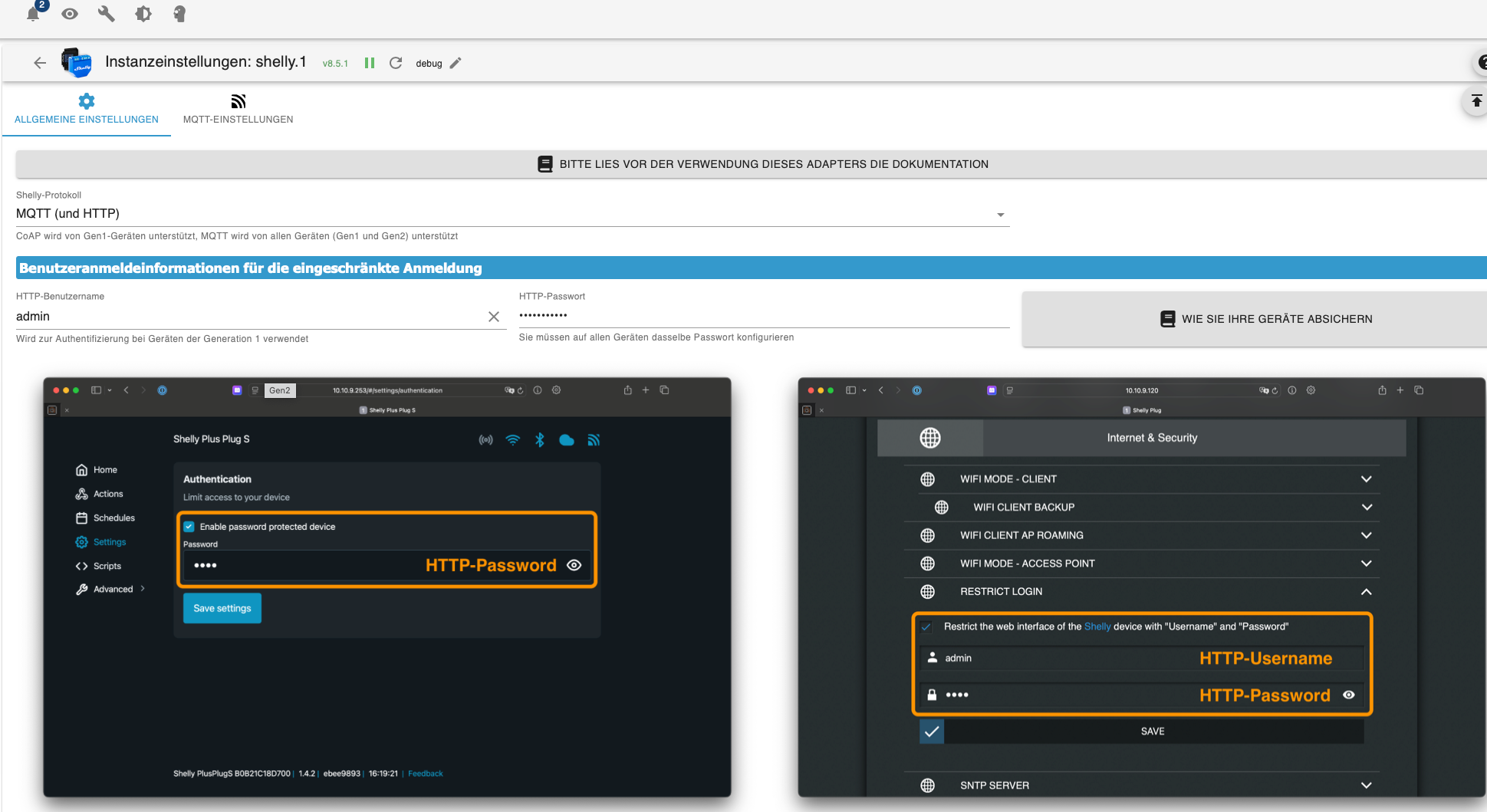
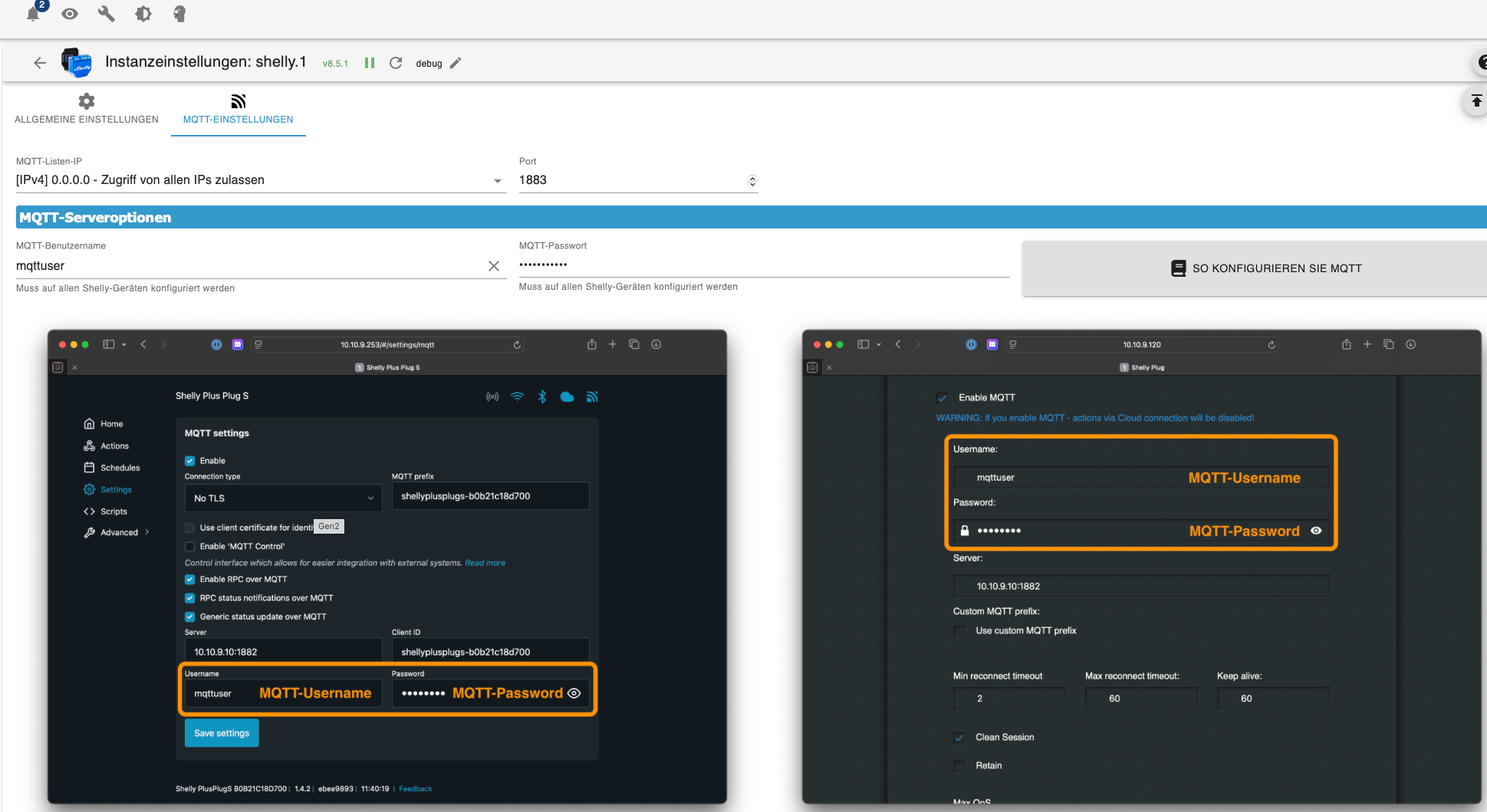
Einstellung über den Browser für den Mini Gen3
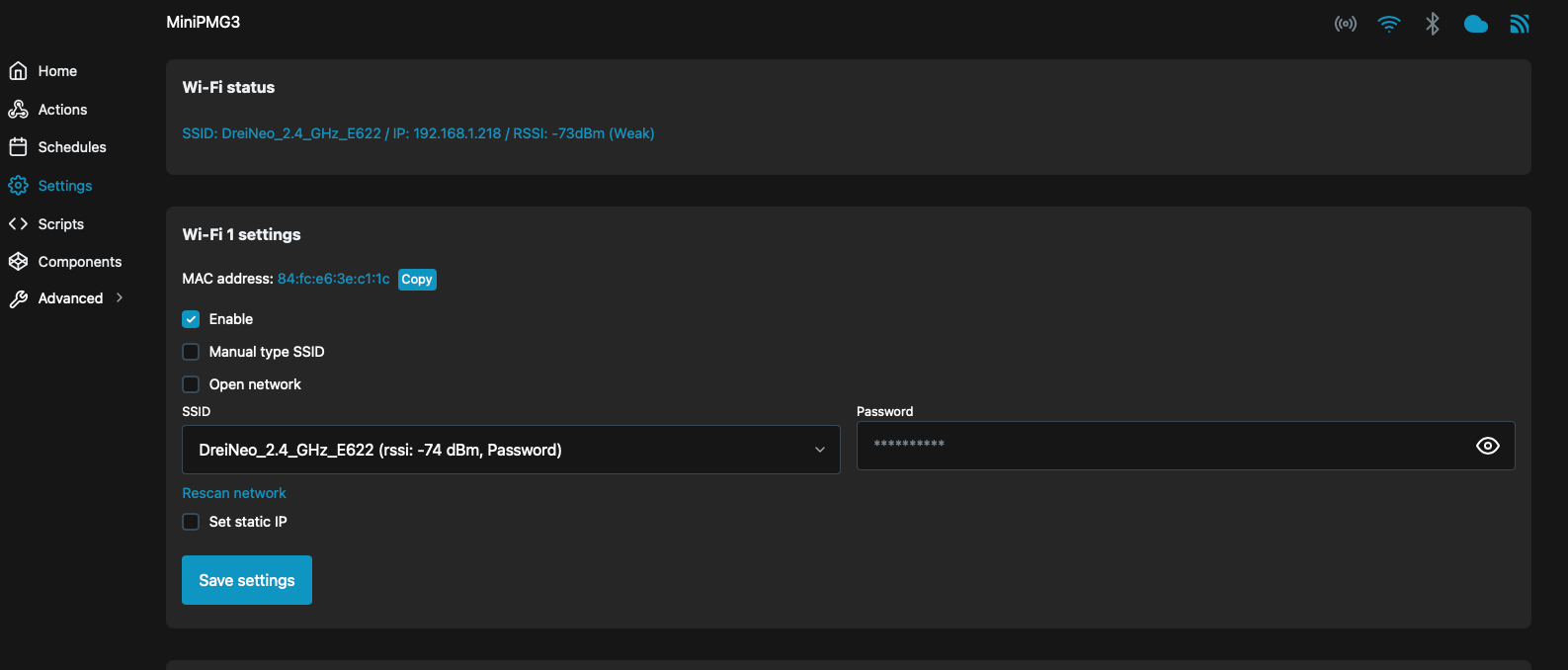
Einstellungen am Shelly Adapter
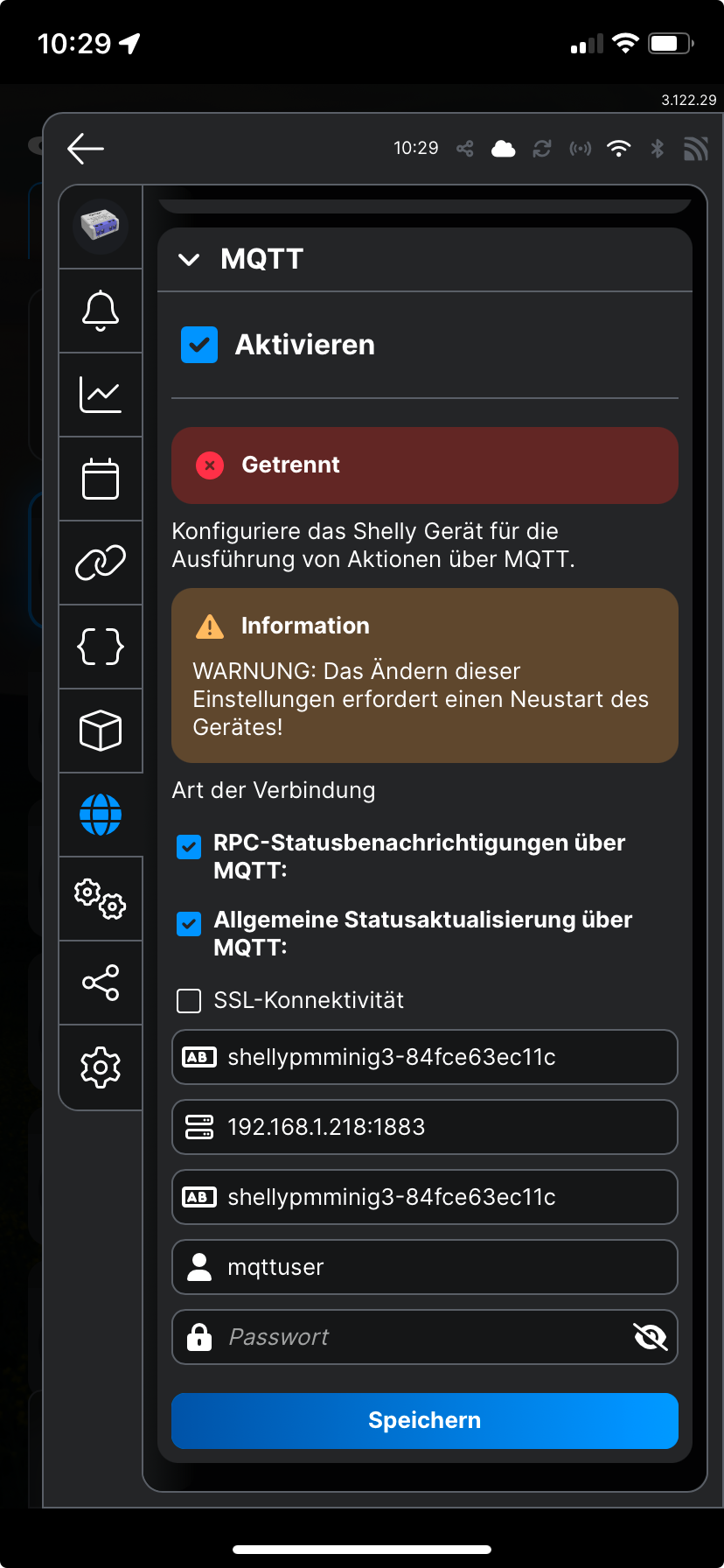
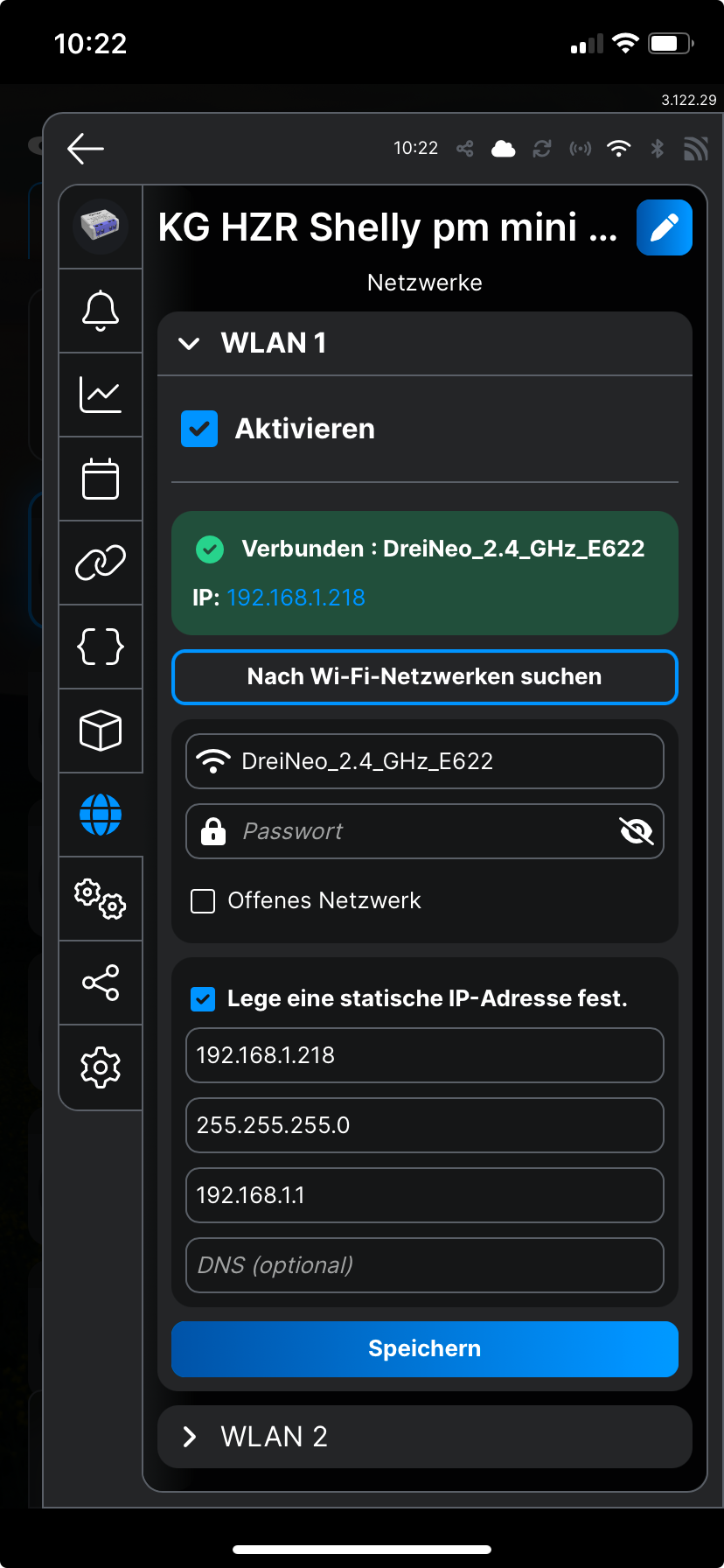
Beim Browser-Log wird angezeigt:
shelly_debug.cpp:236 Streaming logs to 192.168.1.76:63211
11:29:13
shos_mqtt_conn.c:640 MQTT0: Connecting to 192.168.1.218:1883 (192.168.1.218:1883)
11:29:21
shos_mqtt_conn.c:529 MQTT0: Connect status 256
11:29:21
shos_mqtt_conn.c:902 MQTT0: Connecting after 57973 msVielleicht kann mir wer behilflich sein, dass der Mini angezeigt wird. Wäre für mich wichtig, da dieser mir Daten für die Heizung liefern würde. Das Zusammenarbeiten von der Viessmann WP mit dem Pelletsofen funktioniert nicht optimal.
Für Eure Unterstützung schon mal ein "Großes Dankeschön". Fritz
-
Ich habe auch Probleme mit den Shelly-Geräten.
Meine Probleme:
3 von 4 Shelly Geräten werden angezeigt. Aber nur 1 "Shelly Plus 1" ist grün! Die beiden Anderen (Shelly Plus 1 und Shelly HT) sind grau!
Das 4. Gerät "Shelly PM mini Gen3" wird nicht angezeigt.Shelly PM mini Gen 3:
Beim Shelly Adapter wird für das "Shelly PM mini Gen3" eine WLAN-Verbindung als ok, aber die MQTT Verbindung wird als getrennt angezeigt!
Bei den Einstellungen im Browser wird aber WLAN und MQTT als verbunden angezeigt. (Icons rechts oben)Folgende Adapter sind installiert:
Admin 7.4.7
Shelly 8.5.1
Node.js 20.18.1
JS-Controller 7.0.6Meine Screenshots:
Objektdatei:
Instanzeinstellungen
Einstellung über den Browser für den Mini Gen3
Einstellungen am Shelly Adapter
Beim Browser-Log wird angezeigt:
shelly_debug.cpp:236 Streaming logs to 192.168.1.76:63211
11:29:13
shos_mqtt_conn.c:640 MQTT0: Connecting to 192.168.1.218:1883 (192.168.1.218:1883)
11:29:21
shos_mqtt_conn.c:529 MQTT0: Connect status 256
11:29:21
shos_mqtt_conn.c:902 MQTT0: Connecting after 57973 msVielleicht kann mir wer behilflich sein, dass der Mini angezeigt wird. Wäre für mich wichtig, da dieser mir Daten für die Heizung liefern würde. Das Zusammenarbeiten von der Viessmann WP mit dem Pelletsofen funktioniert nicht optimal.
Für Eure Unterstützung schon mal ein "Großes Dankeschön". Fritz
Gib mal in der Shelly GUI den richtigen MQTT Port ein.
1883 ( so wie es im Shelly Adapter steht )
Bei Dir steht 1882.
Oder Du machst es umgekehrt .
Und gibst im Shelly Adapter statt 1883 -> 1882 einEdit : Gerade bei mir nachgesehen .
Gib im Adapter den Port 1882 an.
Und den dann auch in der Shelly GUI eintragen.Synology DS218+ & 2 x Fujitsu Esprimo (VM/Container) + FritzBox7590 + 2 AVM 3000 Repeater & Homematic & HUE & Osram & Xiaomi, NPM 10.9.8, Nodejs 22.23.2 ,JS Controller 7.2.2 ,Admin 8.0.4
-
Gib mal in der Shelly GUI den richtigen MQTT Port ein.
1883 ( so wie es im Shelly Adapter steht )
Bei Dir steht 1882.
Oder Du machst es umgekehrt .
Und gibst im Shelly Adapter statt 1883 -> 1882 einEdit : Gerade bei mir nachgesehen .
Gib im Adapter den Port 1882 an.
Und den dann auch in der Shelly GUI eintragen.@haselchen Eigentlich egal. Hauptsache gleich. 1883 ist der Standard-Port für MQTT. Da aber viele noch einen anderen Broker laufen, welcher den Port schon belegt, wird 1882 im Shelly Adapter als Standard empfohlen.
Steht auch so in der Adapter Doku
🧑🎓 Autor des beliebten ioBroker-Master-Kurses
🎥 Tutorials rund um das Thema DIY-Smart-Home: https://haus-automatisierung.com/
📚 Meine Dokumentation -
@haselchen Eigentlich egal. Hauptsache gleich. 1883 ist der Standard-Port für MQTT. Da aber viele noch einen anderen Broker laufen, welcher den Port schon belegt, wird 1882 im Shelly Adapter als Standard empfohlen.
Steht auch so in der Adapter Doku
Genau deswegen habe ich das nochmal korrigiert.
Musste selber nochmal gucken , welche Ports ich für Shelly , MQTT und Sonoff habe 😮💨
-
Gib mal in der Shelly GUI den richtigen MQTT Port ein.
1883 ( so wie es im Shelly Adapter steht )
Bei Dir steht 1882.
Oder Du machst es umgekehrt .
Und gibst im Shelly Adapter statt 1883 -> 1882 einEdit : Gerade bei mir nachgesehen .
Gib im Adapter den Port 1882 an.
Und den dann auch in der Shelly GUI eintragen.@haselchen Danke für die prompte Information. Ich komme nur damit nicht ganz zurecht. Ich habe mir nochmals die Einstellung bei den Instanzen, Browser und App angesehen und da steht jedesmal 1883. Ich verstehe aber Shelly GUI nicht; ist das die Oberfläche, wenn ich über denBrowser (z.B. 192.168.1.218) das Gerät aufrufe?
-
@haselchen Danke für die prompte Information. Ich komme nur damit nicht ganz zurecht. Ich habe mir nochmals die Einstellung bei den Instanzen, Browser und App angesehen und da steht jedesmal 1883. Ich verstehe aber Shelly GUI nicht; ist das die Oberfläche, wenn ich über denBrowser (z.B. 192.168.1.218) das Gerät aufrufe?
-
@haselchen Danke für die prompte Information. Ich komme nur damit nicht ganz zurecht. Ich habe mir nochmals die Einstellung bei den Instanzen, Browser und App angesehen und da steht jedesmal 1883. Ich verstehe aber Shelly GUI nicht; ist das die Oberfläche, wenn ich über denBrowser (z.B. 192.168.1.218) das Gerät aufrufe?
@opa75 sagte in Problem mit dem Shelly Adapter:
Ich habe mir nochmals die Einstellung bei den Instanzen, Browser und App angesehen und da steht jedesmal 1883.
Bitte beschreib mal ganz genau, was an der Dokumentation unvollständig ist und was dort fehlt. Würde das gerne ergänzen:
https://github.com/iobroker-community-adapters/ioBroker.shelly/blob/master/docs/de/protocol-mqtt.md
-
Ja.
Du hast doch davon auch nen Screenshot gemacht?!Nimm bei allen Shellys , die über MQTT laufen den Port 1882.
UND trag den Port bei den Shellys in der Weboberfläche ein.
@haselchen Ich habe nun bei der Shelly Instanz auf 1882 umgestellt und gespeichert; Im Shelly Browser (Aufruf über die IP Adresse) 1883 mit 1882 geändert. Shelly App die Einstellungen kontrolliert! => Hat aber keine Änderung ergeben.
Instanz grün
Objektordner/Shelly/ 1x grün; 2x grau
Der Mini erscheint nicht! -
@opa75 sagte in Problem mit dem Shelly Adapter:
Ich habe mir nochmals die Einstellung bei den Instanzen, Browser und App angesehen und da steht jedesmal 1883.
Bitte beschreib mal ganz genau, was an der Dokumentation unvollständig ist und was dort fehlt. Würde das gerne ergänzen:
https://github.com/iobroker-community-adapters/ioBroker.shelly/blob/master/docs/de/protocol-mqtt.md
@haus-automatisierung
Die Dokumentation ist soweit sehr verständlich geschrieben. Ich habe/hatte nur das Problem, dass ich die Eingabe im Shelly Browser nicht verstanden habe. Vielleicht sollte man ein Beispiel dafür geben? (http://192.168.1.218/#/settings/wifi) -
@haus-automatisierung
Die Dokumentation ist soweit sehr verständlich geschrieben. Ich habe/hatte nur das Problem, dass ich die Eingabe im Shelly Browser nicht verstanden habe. Vielleicht sollte man ein Beispiel dafür geben? (http://192.168.1.218/#/settings/wifi)@opa75 Was ist denn ein Shelly Browser?
-
@haselchen Ich habe nun bei der Shelly Instanz auf 1882 umgestellt und gespeichert; Im Shelly Browser (Aufruf über die IP Adresse) 1883 mit 1882 geändert. Shelly App die Einstellungen kontrolliert! => Hat aber keine Änderung ergeben.
Instanz grün
Objektordner/Shelly/ 1x grün; 2x grau
Der Mini erscheint nicht!Bei dem PM Mini3 stand ja getrennt bei MQTT. (Screenshot)
Da sollte jetzt aber verbunden stehen.Edit:
Und was das grün und grau angeht, dass scheint ein Netzwerkthema zu sein.
Nochmal alle Wifi Einstellungen kontrollieren.
Am besten feste IP vergeben. Und im Router natürlich gucken a) das die IP frei ist und b) wenn er sich verbunden hat, auch im Router erscheint.
Und bei einer Fritzbox dann in den Netzwerkeinstellungen "immer die gleiche IP zuweisen" anhaken, -
@opa75 Was ist denn ein Shelly Browser?
-
@haus-automatisierung Ich meine nur den Browser in den ich die IP-Adresse vom Shelly Gerät eingebe.
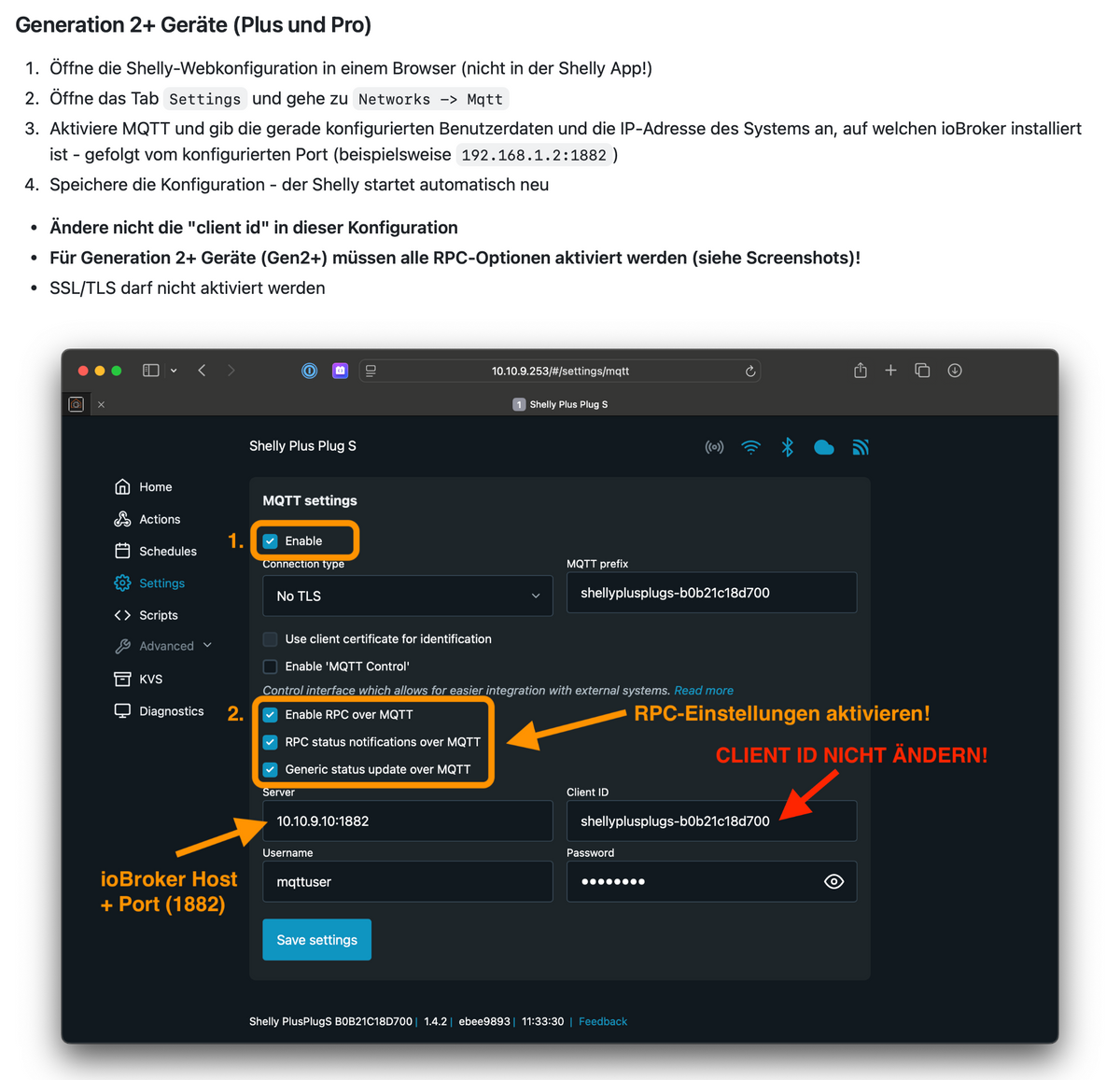
@opa75 Achso, und der Screenshot mit den dicken orangen Pfeilen war nicht hilfreich? Wozu genau fehlt Dir ein Beispiel?
-
Bei dem PM Mini3 stand ja getrennt bei MQTT. (Screenshot)
Da sollte jetzt aber verbunden stehen.Edit:
Und was das grün und grau angeht, dass scheint ein Netzwerkthema zu sein.
Nochmal alle Wifi Einstellungen kontrollieren.
Am besten feste IP vergeben. Und im Router natürlich gucken a) das die IP frei ist und b) wenn er sich verbunden hat, auch im Router erscheint.
Und bei einer Fritzbox dann in den Netzwerkeinstellungen "immer die gleiche IP zuweisen" anhaken,@haselchen Leider stehen alle 4 Geräte auf getrennt. Nicht einmal das Gerät, das im Objektordner/Shelly => grün angezeigt wird, steht verbunden. Alle Gen2 und 3 stehen auf getrennt.
Feste IP Adressen habe ich vergeben.
WiFi Einstellungen werde ich überprüfen.





Hey! Du scheinst an dieser Unterhaltung interessiert zu sein, hast aber noch kein Konto.
Hast du es satt, bei jedem Besuch durch die gleichen Beiträge zu scrollen? Wenn du dich für ein Konto anmeldest, kommst du immer genau dorthin zurück, wo du zuvor warst, und kannst dich über neue Antworten benachrichtigen lassen (entweder per E-Mail oder Push-Benachrichtigung). Du kannst auch Lesezeichen speichern und Beiträge positiv bewerten, um anderen Community-Mitgliedern deine Wertschätzung zu zeigen.
Mit deinem Input könnte dieser Beitrag noch besser werden 💗
Registrieren Anmelden456
Online33.0k
Benutzer83.7k
Themen1.3m
Beiträge