




Umzug von raspi Installation auf lxc proxmox container
-
Hallo zusammen,
Bin schon wieder am verzweifeln. Habe versucht ein backitup backup von det iobroker Installation auf meinem raspberry pi in meine neue proxmox Installation einzuspielen. Das Backup wird laut Ausgabe im popup-Fenster erfolgreich geladen und eingespielt. Nach ner Minute kann ich jedoch die Iobroler Konsole nicht mehr aufrufen (Seite nicht gefunden).
Fehlt noch irgendein Zwischenschritt?
Viele Grüße
@lunatikk sagte in Umzug von raspi Installation auf lxc proxmox container:
Das Backup wird laut Ausgabe im popup-Fenster erfolgreich geladen und eingespielt
dann ist es noch lange nicht abgeschlossen, jetzt wird erstmal der iobroker neu aufgebaut, das kann eine Weile dauern
@lunatikk sagte in Umzug von raspi Installation auf lxc proxmox container:
iobroker Installation auf meinem raspberry pi in meine neue proxmox Installation einzuspielen
mit verschiedenen IP`s nehm ich mal an
-
Also ich habe es das BackitUp file das erste mal einfach so importiert. Als sich nach 10 minuten nichts getan hat, habe ich nen rollback gemacht, habe dann die backup.json aus dem tar.gz Archiv geöffnet und die V4, V6 Ipadressen sowie die Mac Adresse vom alten host durch die vom neuen host ersetzt. Das hatte aber auch keinen besonderen Effekt. Nach 30 Minuten war das Web-Frontend vom Io Broker immer noch nicht aufrufbar. Muss man da etwa noch länger warten?
Edit:
Habe auch mal in die Protokolle reingeschaut: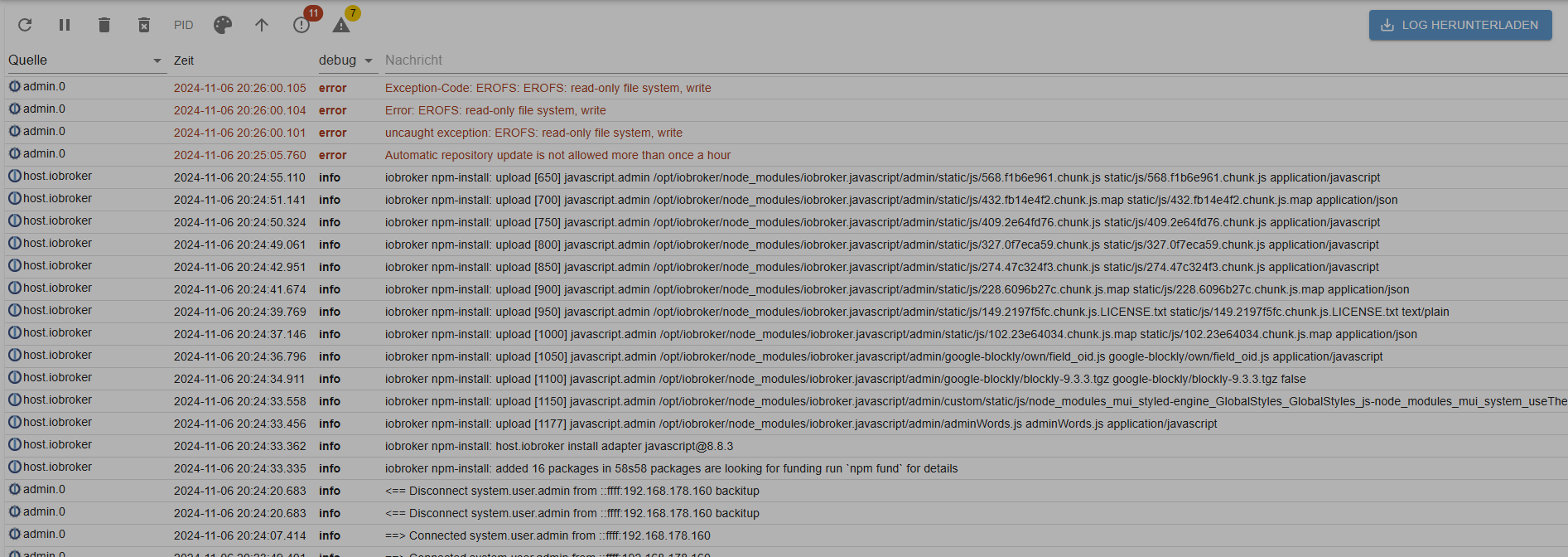
nach diesem error ist dann Schluss und die UI lässt sich nicht mehr aufrufen.
Viele Grüße
lunatikk -
Hallo zusammen,
Bin schon wieder am verzweifeln. Habe versucht ein backitup backup von det iobroker Installation auf meinem raspberry pi in meine neue proxmox Installation einzuspielen. Das Backup wird laut Ausgabe im popup-Fenster erfolgreich geladen und eingespielt. Nach ner Minute kann ich jedoch die Iobroler Konsole nicht mehr aufrufen (Seite nicht gefunden).
Fehlt noch irgendein Zwischenschritt?
Viele Grüße
Na, der fehler sagt dein filesystem ist schreibgeschützt..
evtl Iobroker nicht richtig installiert im lxc?
Lass mal iob fix laufen und poste bitte die Ausgabe von iob diag hier in codetags. -
Na, der fehler sagt dein filesystem ist schreibgeschützt..
evtl Iobroker nicht richtig installiert im lxc?
Lass mal iob fix laufen und poste bitte die Ausgabe von iob diag hier in codetags.selbst das geht jetzt nicht. wenn ich versuche mich über die shell vom lxc einzuloggen passiert einfach garnichts.
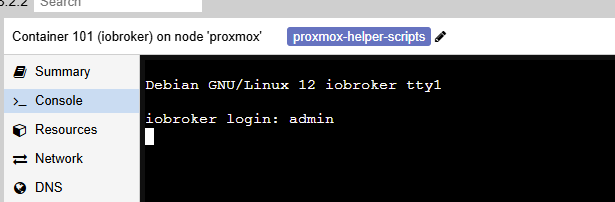
ich mach nochmal nen rollback und installier es nochmal mit standardeinstellungen. Wüsste nicht wie ich das mit dem filesystem wärend der Installation versemmelt haben könnte.
-
selbst das geht jetzt nicht. wenn ich versuche mich über die shell vom lxc einzuloggen passiert einfach garnichts.
ich mach nochmal nen rollback und installier es nochmal mit standardeinstellungen. Wüsste nicht wie ich das mit dem filesystem wärend der Installation versemmelt haben könnte.
Installier mal den Container neu , dann User anlegen, updates von Bookworm drauf, dann Iobroker installieren und dann mal ein iob diag posten.
Nicht dass schon mit dem Container was nicht stimmt.
-
Na, der fehler sagt dein filesystem ist schreibgeschützt..
evtl Iobroker nicht richtig installiert im lxc?
Lass mal iob fix laufen und poste bitte die Ausgabe von iob diag hier in codetags.hier der diag output:
======================= SUMMARY =======================
                        v.2024-10-19


 Static hostname: iobroker
       Icon name: computer-container
         Chassis: container ☐
  Virtualization: lxc
Operating System: Debian GNU/Linux 12 (bookworm)
          Kernel: Linux 6.8.4-2-pve
    Architecture: x86-64

Installation:           lxc
Kernel:                 x86_64
Userland:               64 bit
Timezone:               Europe/Berlin (CET, +0100)
User-ID:                0
Display-Server:         false
Boot Target:            graphical.target

Pending OS-Updates:     0
Pending iob updates:    0

Nodejs-Installation:
/usr/bin/nodejs         v20.18.0
/usr/bin/node           v20.18.0
/usr/bin/npm            10.8.2
/usr/bin/npx            10.8.2
/usr/bin/corepack       0.29.3

Recommended versions are nodejs
***For security reasons ioBroker should not be run or administrated as root.***
By default only a user that is member of iobroker group can execute ioBroker commands.
Please read the Documentation on how to set up such a user, if not done yet.
Only in very special cases you can run iobroker commands by adding the --allow-root option at the end of the command line.
Please note that this option may be disabled in the future, so please change your setup accordingly now. and npm
***For security reasons ioBroker should not be run or administrated as root.***
By default only a user that is member of iobroker group can execute ioBroker commands.
Please read the Documentation on how to set up such a user, if not done yet.
Only in very special cases you can run iobroker commands by adding the --allow-root option at the end of the command line.
Please note that this option may be disabled in the future, so please change your setup accordingly now.
nodeJS installation is correct

MEMORY:
               total        used        free      shared  buff/cache   available
Mem:            2.1G        309M        1.5G        102K        345M        1.8G
Swap:           536M          0B        536M
Total:          2.7G        309M        2.0G

Active iob-Instances:   0
Please note that this option may be disabled in the future, so please change your setup accordingly now.

ioBroker Core:          js-controller
***For security reasons ioBroker should not be run or administrated as root.***
By default only a user that is member of iobroker group can execute ioBroker commands.
Please read the Documentation on how to set up such a user, if not done yet.
Only in very special cases you can run iobroker commands by adding the --allow-root option at the end of the command line.
Please note that this option may be disabled in the future, so please change your setup accordingly now.
                        admin
***For security reasons ioBroker should not be run or administrated as root.***
By default only a user that is member of iobroker group can execute ioBroker commands.
Please read the Documentation on how to set up such a user, if not done yet.
Only in very special cases you can run iobroker commands by adding the --allow-root option at the end of the command line.
Please note that this option may be disabled in the future, so please change your setup accordingly now.

ioBroker Status:
***For security reasons ioBroker should not be run or administrated as root.***
By default only a user that is member of iobroker group can execute ioBroker commands.
Please read the Documentation on how to set up such a user, if not done yet.
Only in very special cases you can run iobroker commands by adding the --allow-root option at the end of the command line.
Please note that this option may be disabled in the future, so please change your setup accordingly now.

Status admin and web instance:
***For security reasons ioBroker should not be run or administrated as root.***

Objects:                6
States:                 6

Size of iob-Database:

5.0M    /opt/iobroker/iobroker-data/objects.jsonl
48K     /opt/iobroker/iobroker-data/states.jsonl


Unknown release codenamed ''. Please check yourself if the Operating System is actively maintained.

=================== END OF SUMMARY ====================
habe vorher den iobroker beendet und "iobroker fix" aufgerufen. bekam folgende ausgabe: "By default only a user that is member of iobroker group can execute ioBroker commands".
Das kannte ich so noch nicht von meinem raspberry. Habe das command mit --allow-root ausgeführt und einen neuen user "admin" angelegt (root und iobroker ging ja nicht). Der user ist nun angelegt. Das fix command habe ich trotzdem mit root ausgeführt: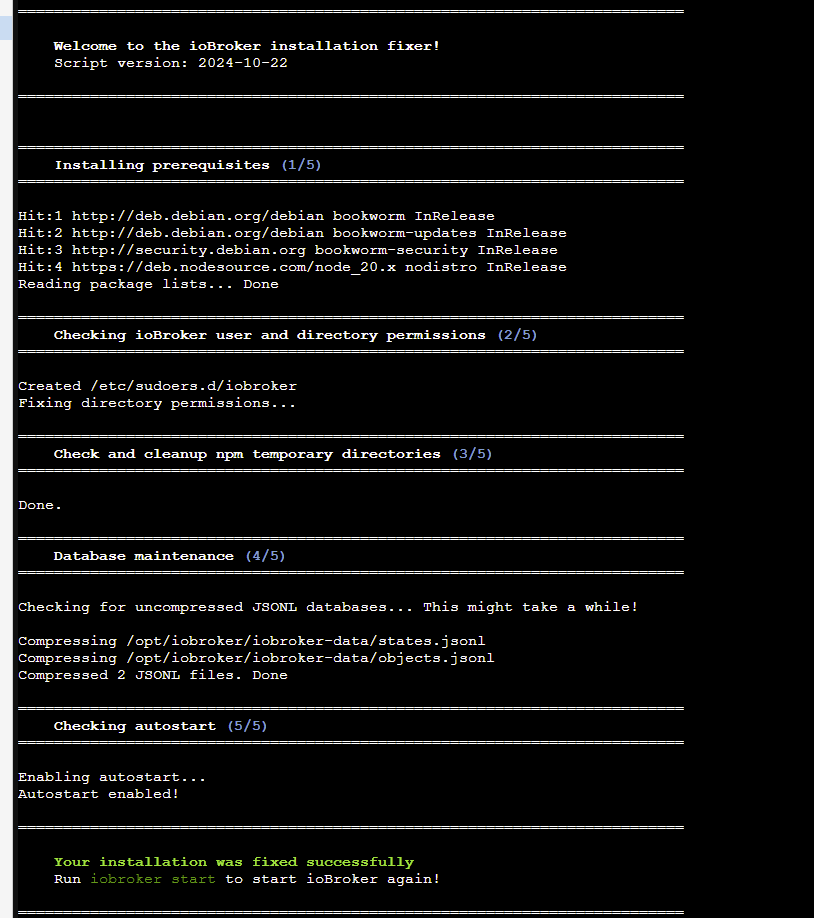
-
Installier mal den Container neu , dann User anlegen, updates von Bookworm drauf, dann Iobroker installieren und dann mal ein iob diag posten.
Nicht dass schon mit dem Container was nicht stimmt.
@ilovegym said in Umzug von raspi Installation auf lxc proxmox container:
Bookworm drauf, dan
Bookworm sagt mir leider garnix. Habe für die Installation die VR Helper scripts genutzt:
https://tteck.github.io/Proxmox/#iobroker-lxcviele Grüße
lunatikk -
hier der diag output:
======================= SUMMARY =======================
                        v.2024-10-19


 Static hostname: iobroker
       Icon name: computer-container
         Chassis: container ☐
  Virtualization: lxc
Operating System: Debian GNU/Linux 12 (bookworm)
          Kernel: Linux 6.8.4-2-pve
    Architecture: x86-64

Installation:           lxc
Kernel:                 x86_64
Userland:               64 bit
Timezone:               Europe/Berlin (CET, +0100)
User-ID:                0
Display-Server:         false
Boot Target:            graphical.target

Pending OS-Updates:     0
Pending iob updates:    0

Nodejs-Installation:
/usr/bin/nodejs         v20.18.0
/usr/bin/node           v20.18.0
/usr/bin/npm            10.8.2
/usr/bin/npx            10.8.2
/usr/bin/corepack       0.29.3

Recommended versions are nodejs
***For security reasons ioBroker should not be run or administrated as root.***
By default only a user that is member of iobroker group can execute ioBroker commands.
Please read the Documentation on how to set up such a user, if not done yet.
Only in very special cases you can run iobroker commands by adding the --allow-root option at the end of the command line.
Please note that this option may be disabled in the future, so please change your setup accordingly now. and npm
***For security reasons ioBroker should not be run or administrated as root.***
By default only a user that is member of iobroker group can execute ioBroker commands.
Please read the Documentation on how to set up such a user, if not done yet.
Only in very special cases you can run iobroker commands by adding the --allow-root option at the end of the command line.
Please note that this option may be disabled in the future, so please change your setup accordingly now.
nodeJS installation is correct

MEMORY:
               total        used        free      shared  buff/cache   available
Mem:            2.1G        309M        1.5G        102K        345M        1.8G
Swap:           536M          0B        536M
Total:          2.7G        309M        2.0G

Active iob-Instances:   0
Please note that this option may be disabled in the future, so please change your setup accordingly now.

ioBroker Core:          js-controller
***For security reasons ioBroker should not be run or administrated as root.***
By default only a user that is member of iobroker group can execute ioBroker commands.
Please read the Documentation on how to set up such a user, if not done yet.
Only in very special cases you can run iobroker commands by adding the --allow-root option at the end of the command line.
Please note that this option may be disabled in the future, so please change your setup accordingly now.
                        admin
***For security reasons ioBroker should not be run or administrated as root.***
By default only a user that is member of iobroker group can execute ioBroker commands.
Please read the Documentation on how to set up such a user, if not done yet.
Only in very special cases you can run iobroker commands by adding the --allow-root option at the end of the command line.
Please note that this option may be disabled in the future, so please change your setup accordingly now.

ioBroker Status:
***For security reasons ioBroker should not be run or administrated as root.***
By default only a user that is member of iobroker group can execute ioBroker commands.
Please read the Documentation on how to set up such a user, if not done yet.
Only in very special cases you can run iobroker commands by adding the --allow-root option at the end of the command line.
Please note that this option may be disabled in the future, so please change your setup accordingly now.

Status admin and web instance:
***For security reasons ioBroker should not be run or administrated as root.***

Objects:                6
States:                 6

Size of iob-Database:

5.0M    /opt/iobroker/iobroker-data/objects.jsonl
48K     /opt/iobroker/iobroker-data/states.jsonl


Unknown release codenamed ''. Please check yourself if the Operating System is actively maintained.

=================== END OF SUMMARY ====================
habe vorher den iobroker beendet und "iobroker fix" aufgerufen. bekam folgende ausgabe: "By default only a user that is member of iobroker group can execute ioBroker commands".
Das kannte ich so noch nicht von meinem raspberry. Habe das command mit --allow-root ausgeführt und einen neuen user "admin" angelegt (root und iobroker ging ja nicht). Der user ist nun angelegt. Das fix command habe ich trotzdem mit root ausgeführt:@lunatikk sagte in Umzug von raspi Installation auf lxc proxmox container:
Das fix command habe ich trotzdem mit root ausgeführt:
Du sollst da aber eben NICHTS mit root-Rechten machen.
-
@lunatikk sagte in Umzug von raspi Installation auf lxc proxmox container:
Das fix command habe ich trotzdem mit root ausgeführt:
Du sollst da aber eben NICHTS mit root-Rechten machen.
@thomas-braun said in Umzug von raspi Installation auf lxc proxmox container:
@lunatikk sagte in Umzug von raspi Installation auf lxc proxmox container:
Das fix command habe ich trotzdem mit root ausgeführt:
Du sollst da aber eben NICHTS mit root-Rechten machen.
Okay, nur verständnishalber: weshalb soll ich das nicht mit "root-Rechten" machen?
Iobroker läuft ja bereits in dem lxc container. Soll ich mich dann mit dem "iobroker" user anmelden oder mit dem von mir während dem "fix" neu erstellten user?Viele Grüße
-
@thomas-braun said in Umzug von raspi Installation auf lxc proxmox container:
@lunatikk sagte in Umzug von raspi Installation auf lxc proxmox container:
Das fix command habe ich trotzdem mit root ausgeführt:
Du sollst da aber eben NICHTS mit root-Rechten machen.
Okay, nur verständnishalber: weshalb soll ich das nicht mit "root-Rechten" machen?
Iobroker läuft ja bereits in dem lxc container. Soll ich mich dann mit dem "iobroker" user anmelden oder mit dem von mir während dem "fix" neu erstellten user?Viele Grüße
@lunatikk sagte in Umzug von raspi Installation auf lxc proxmox container:
weshalb soll ich das nicht mit "root-Rechten" machen?
Weil Du Dir damit die Rechte verbiegst.
oder mit dem von mir während dem "fix" neu erstellten user?
Du legst Dir einen eigenen User an. Entweder sowas wie "lunatikk" oder auch Dein Vorname.
Mit dem arbeitest Du in der Konsole. Niemals alsroot. Wenn Root-Rechte erforderlich sind, kommt einsudovorweg. -
Na, der fehler sagt dein filesystem ist schreibgeschützt..
evtl Iobroker nicht richtig installiert im lxc?
Lass mal iob fix laufen und poste bitte die Ausgabe von iob diag hier in codetags.@ilovegym said in Umzug von raspi Installation auf lxc proxmox container:
Na, der fehler sagt dein filesystem ist schreibgeschützt..
evtl Iobroker nicht richtig installiert im lxc?
Lass mal iob fix laufen und poste bitte die Ausgabe von iob diag hier in codetags.also, nach erneutem rollback auf den stand nachdem der iobroker lxc installiert wurde (vor backup wiederherstellung) habe ich einen benutzer "admin" angelegt und mit diesem user iobroker fix und im anschluss iob diag ausgeführt. Hier die Ausgabe:
======================= SUMMARY ======================= v.2024-10-19 Static hostname: iobroker Icon name: computer-container Chassis: container ☐ Virtualization: lxc Operating System: Debian GNU/Linux 12 (bookworm) Kernel: Linux 6.8.4-2-pve Architecture: x86-64 Installation: lxc Kernel: x86_64 Userland: 64 bit Timezone: Europe/Berlin (CET, +0100) User-ID: 1001 Display-Server: false Boot Target: multi-user.target Pending OS-Updates: 0 Pending iob updates: 0 Nodejs-Installation: /usr/bin/nodejs v20.18.0 /usr/bin/node v20.18.0 /usr/bin/npm 10.8.2 /usr/bin/npx 10.8.2 /usr/bin/corepack 0.29.3 Recommended versions are nodejs 20.18.0 and npm 10.8.2 nodeJS installation is correct MEMORY: total used free shared buff/cache available Mem: 2.1G 63M 1.7G 106K 352M 2.1G Swap: 536M 0B 536M Total: 2.7G 63M 2.3G Active iob-Instances: 1 Upgrade policy: none ioBroker Core: js-controller 6.0.11 admin 7.1.5 ioBroker Status: iobroker is not running on this host. Objects type: jsonl States type: jsonl Status admin and web instance: system.adapter.admin.0 : admin : iobroker - enabled, port: 8081, bind: 0.0.0.0, run as: admin Objects: 148 States: 78 Size of iob-Database: 4.9M /opt/iobroker/iobroker-data/objects.jsonl 36K /opt/iobroker/iobroker-data/states.jsonl Unknown release codenamed ''. Please check yourself if the Operating System is actively maintained. =================== END OF SUMMARY ==================== -
@ilovegym said in Umzug von raspi Installation auf lxc proxmox container:
Bookworm drauf, dan
Bookworm sagt mir leider garnix. Habe für die Installation die VR Helper scripts genutzt:
https://tteck.github.io/Proxmox/#iobroker-lxcviele Grüße
lunatikk@lunatikk sagte in Umzug von raspi Installation auf lxc proxmox container:
Habe für die Installation die VR Helper scripts genutzt:
Und warum nicht über den "offiziellen" Weg?
https://www.iobroker.net/#de/documentation/install/proxmox.md
Hatten wir doch hier zuletzt noch.
Du holst Dir zunächst das passende CT-Template und erzeugst damit einen LXC-Container: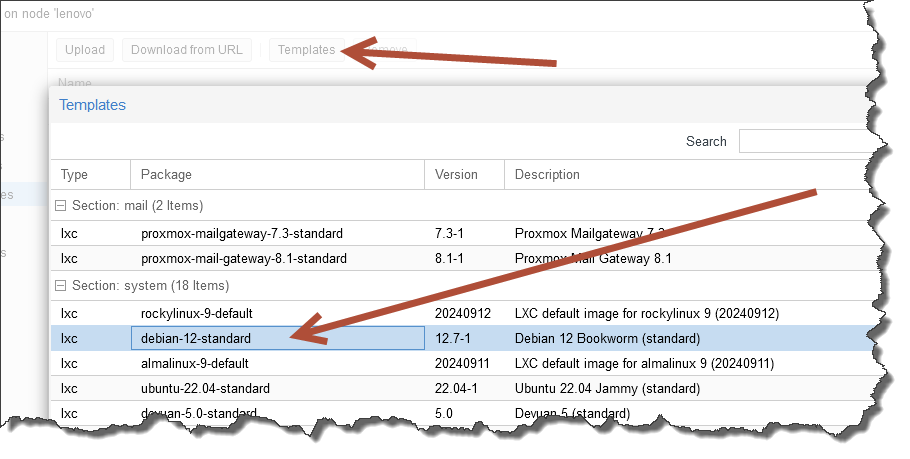
Danach:
- Updates installieren
- User anlegen
- ioBroker installieren
-
@lunatikk sagte in Umzug von raspi Installation auf lxc proxmox container:
Habe für die Installation die VR Helper scripts genutzt:
Und warum nicht über den "offiziellen" Weg?
https://www.iobroker.net/#de/documentation/install/proxmox.md
Hatten wir doch hier zuletzt noch.
Du holst Dir zunächst das passende CT-Template und erzeugst damit einen LXC-Container:Danach:
- Updates installieren
- User anlegen
- ioBroker installieren
@codierknecht said in Umzug von raspi Installation auf lxc proxmox container:
@lunatikk sagte in Umzug von raspi Installation auf lxc proxmox container:
Habe für die Installation die VR Helper scripts genutzt:
Und warum nicht über den "offiziellen" Weg?
habe eigentlich erwartet, dass es mit den sog. "helper scripts" noch etwas einfacher geht.
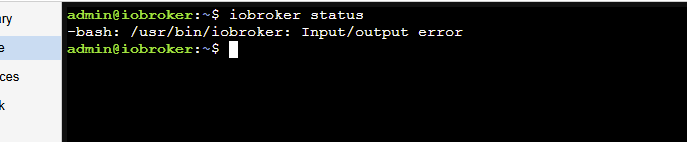
Selbst nach dem fix mit dem neu angelegten user bekomme ich das gleiche Ergebnis nach der wiederherstellung vom backup. Iobroker ist nach kurzer Zeit (1-2m) nicht mehr aufrufbar und startet auch nicht mehr neu.
-
@codierknecht said in Umzug von raspi Installation auf lxc proxmox container:
@lunatikk sagte in Umzug von raspi Installation auf lxc proxmox container:
Habe für die Installation die VR Helper scripts genutzt:
Und warum nicht über den "offiziellen" Weg?
habe eigentlich erwartet, dass es mit den sog. "helper scripts" noch etwas einfacher geht.
Selbst nach dem fix mit dem neu angelegten user bekomme ich das gleiche Ergebnis nach der wiederherstellung vom backup. Iobroker ist nach kurzer Zeit (1-2m) nicht mehr aufrufbar und startet auch nicht mehr neu.
@lunatikk sagte in Umzug von raspi Installation auf lxc proxmox container:
noch etwas einfacher
Du siehst ja, wie "einfach" solche Scripte die Sache machen.
Am längsten dauert noch das herunterladen des passenden Image - wenn man das noch nicht hat.
Der Rest dauert lediglich ein paar Minuten. Versuch's einfach mal ... das übt ;-) -
@codierknecht said in Umzug von raspi Installation auf lxc proxmox container:
@lunatikk sagte in Umzug von raspi Installation auf lxc proxmox container:
Habe für die Installation die VR Helper scripts genutzt:
Und warum nicht über den "offiziellen" Weg?
habe eigentlich erwartet, dass es mit den sog. "helper scripts" noch etwas einfacher geht.
Selbst nach dem fix mit dem neu angelegten user bekomme ich das gleiche Ergebnis nach der wiederherstellung vom backup. Iobroker ist nach kurzer Zeit (1-2m) nicht mehr aufrufbar und startet auch nicht mehr neu.
@lunatikk sagte in Umzug von raspi Installation auf lxc proxmox container:
Selbst nach dem fix mit dem neu angelegten user bekomme ich das gleiche Ergebnis nach der wiederherstellung vom backup
Fang nochmal von vorne an ... mit der "offiziellen" Vorgehensweise.
Was einmal so richtig verstrubbelt ist, kriegt man auch mit Prügel nicht mehr sauber hin. -
@lunatikk sagte in Umzug von raspi Installation auf lxc proxmox container:
Selbst nach dem fix mit dem neu angelegten user bekomme ich das gleiche Ergebnis nach der wiederherstellung vom backup
Fang nochmal von vorne an ... mit der "offiziellen" Vorgehensweise.
Was einmal so richtig verstrubbelt ist, kriegt man auch mit Prügel nicht mehr sauber hin.@codierknecht said in Umzug von raspi Installation auf lxc proxmox container:
@lunatikk sagte in Umzug von raspi Installation auf lxc proxmox container:
Selbst nach dem fix mit dem neu angelegten user bekomme ich das gleiche Ergebnis nach der wiederherstellung vom backup
Fang nochmal von vorne an ... mit der "offiziellen" Vorgehensweise.
Was einmal so richtig verstrubbelt ist, kriegt man auch mit Prügel nicht mehr sauber hin.Werde ich versuchen.
Bitte nicht falsch verstehen, aber dieser ganze Umgang mit Linux geht mir fürchterlich auf die Eier. Ich sitze alle 1-2 Jahre immer an System und versuche irgendwelche Probleme zu fixen. Man bekommt es stets hin - besonders auch aufgrund der guten Unterstützung in der Community - dennoch nervt es tierisch. Wenn man nicht regelmäßig damit arbeitet (und das tue ich eben nicht) dann vergisst man vieles und man muss immer wieder erneut in das Thema reinkommen - da geht richtig Zeit drauf. So, genug geheult.Vielen Dank & Grüße
-
@codierknecht said in Umzug von raspi Installation auf lxc proxmox container:
@lunatikk sagte in Umzug von raspi Installation auf lxc proxmox container:
Selbst nach dem fix mit dem neu angelegten user bekomme ich das gleiche Ergebnis nach der wiederherstellung vom backup
Fang nochmal von vorne an ... mit der "offiziellen" Vorgehensweise.
Was einmal so richtig verstrubbelt ist, kriegt man auch mit Prügel nicht mehr sauber hin.Werde ich versuchen.
Bitte nicht falsch verstehen, aber dieser ganze Umgang mit Linux geht mir fürchterlich auf die Eier. Ich sitze alle 1-2 Jahre immer an System und versuche irgendwelche Probleme zu fixen. Man bekommt es stets hin - besonders auch aufgrund der guten Unterstützung in der Community - dennoch nervt es tierisch. Wenn man nicht regelmäßig damit arbeitet (und das tue ich eben nicht) dann vergisst man vieles und man muss immer wieder erneut in das Thema reinkommen - da geht richtig Zeit drauf. So, genug geheult.Vielen Dank & Grüße
@lunatikk sagte in Umzug von raspi Installation auf lxc proxmox container:
aber dieser ganze Umgang mit Linux geht mir fürchterlich auf die Eier.
Dann meine Bitte: Lass die Finger davon. Bringt keinem was, wenn du mit dem System nicht arbeiten kannst und willst.
-
@codierknecht said in Umzug von raspi Installation auf lxc proxmox container:
@lunatikk sagte in Umzug von raspi Installation auf lxc proxmox container:
Selbst nach dem fix mit dem neu angelegten user bekomme ich das gleiche Ergebnis nach der wiederherstellung vom backup
Fang nochmal von vorne an ... mit der "offiziellen" Vorgehensweise.
Was einmal so richtig verstrubbelt ist, kriegt man auch mit Prügel nicht mehr sauber hin.Werde ich versuchen.
Bitte nicht falsch verstehen, aber dieser ganze Umgang mit Linux geht mir fürchterlich auf die Eier. Ich sitze alle 1-2 Jahre immer an System und versuche irgendwelche Probleme zu fixen. Man bekommt es stets hin - besonders auch aufgrund der guten Unterstützung in der Community - dennoch nervt es tierisch. Wenn man nicht regelmäßig damit arbeitet (und das tue ich eben nicht) dann vergisst man vieles und man muss immer wieder erneut in das Thema reinkommen - da geht richtig Zeit drauf. So, genug geheult.Vielen Dank & Grüße
@lunatikk
Schreib Dir auf was Du brauchst.
Soooo viel ist das ja nicht. -
@lunatikk sagte in Umzug von raspi Installation auf lxc proxmox container:
aber dieser ganze Umgang mit Linux geht mir fürchterlich auf die Eier.
Dann meine Bitte: Lass die Finger davon. Bringt keinem was, wenn du mit dem System nicht arbeiten kannst und willst.
@thomas-braun said in Umzug von raspi Installation auf lxc proxmox container:
@lunatikk sagte in Umzug von raspi Installation auf lxc proxmox container:
aber dieser ganze Umgang mit Linux geht mir fürchterlich auf die Eier.
Dann meine Bitte: Lass die Finger davon. Bringt keinem was, wenn du mit dem System nicht arbeiten kannst und willst.
So einfach ist das halt nicht. Ich möchte eben iobroker nutzen und damit arbeiten (tue ich ja shcon seit Jahren), aber das drunterliegende System macht's einem eben nicht einfach.
-
@thomas-braun said in Umzug von raspi Installation auf lxc proxmox container:
@lunatikk sagte in Umzug von raspi Installation auf lxc proxmox container:
aber dieser ganze Umgang mit Linux geht mir fürchterlich auf die Eier.
Dann meine Bitte: Lass die Finger davon. Bringt keinem was, wenn du mit dem System nicht arbeiten kannst und willst.
So einfach ist das halt nicht. Ich möchte eben iobroker nutzen und damit arbeiten (tue ich ja shcon seit Jahren), aber das drunterliegende System macht's einem eben nicht einfach.
aber das drunterliegende System macht's einem eben nicht einfach.
Linux ist total einfach. Nur nicht für jeden.
Man kann nämlich bei Interesse alles nachlesen.
'Linux' ist auch nicht komplexer als andere Systeme. Kann man sich alles aneignen. Musstest du bei anderen Systemen auch.




Support us
633
Online32.7k
Users82.5k
Topics1.3m
Posts