




Problem mit dem Starten des Zigbee-Adapters
-
Hallo zusammen,
ich habe ein Problem mit dem Starten des Zigbee-Adapters in ioBroker auf meinem Raspberry Pi. Es erscheint der Fehler „Cannot lock port” sowie „Failed to connect to the adapter (Error: SRSP - SYS - ping after 6000ms)”. Ich habe bereits mehrere Lösungsansätze ausprobiert, jedoch tritt das Problem weiterhin auf. Hier sind die Details und die Schritte, die ich bisher unternommen habe.
Systeminformationen:
- Raspberry Pi mit ioBroker-Installation
- Zigbee-Adapter von Sonoff mit CP2102N-Chip
- ioBroker Zigbee-Adapter Version 1.10.3
- Betriebssystem: Raspberry Pi OS, aktuellste Version
Problembeschreibung:
Der Zigbee-Adapter lässt sich nicht starten, und es erscheinen folgende Fehlermeldungen:- „Error herdsman start”
- „Failed to start Zigbee”
- „Starting zigbee-herdsman problem: "Error Resource temporarily unavailable Cannot lock port"”
- „Failed to connect to the adapter (Error: SRSP - SYS - ping after 6000ms)”
Bisherige Lösungsversuche:
-
Deaktivierung von ModemManager: Ich habe sichergestellt, dass der ModemManager deaktiviert ist (über
sudo systemctl status ModemManager), um Konflikte mit dem USB-Port zu vermeiden. -
Neustart des Systems und des Adapters: Ich habe sowohl den Raspberry Pi als auch den Zigbee-Adapter neu gestartet, doch das Problem besteht weiterhin.
-
System- und Treiber-Updates: Ich habe das gesamte System aktualisiert, um sicherzustellen, dass die neuesten Treiber installiert sind.
-
Log-Analyse: Nach dem Neustart habe ich die Logs über
dmesg | grep ttyUSB0überprüft, die bestätigen, dass der Adapter dem Port/dev/ttyUSB0zugewiesen ist. -
Überprüfung der Berechtigungen:
- Der Benutzer
iobrokerwurde zur Gruppedialouthinzugefügt (Befehl:sudo usermod -aG dialout iobroker). - Ich habe dem Port
/dev/ttyUSB0vollständige Zugriffsrechte gegeben (sudo chmod 666 /dev/ttyUSB0).
- Der Benutzer
-
Überprüfung der ioBroker-Logs: Ich habe die ioBroker-Logs (
tail -f /opt/iobroker/log/iobroker.<data>.log) durchgesehen und es treten immer wieder Fehler im Zusammenhang mit „Cannot lock port” auf.
Trotz dieser Schritte tritt das Problem weiterhin auf und verhindert den Betrieb des Zigbee-Adapters. Hatte jemand von euch ein ähnliches Problem oder kann weitere Diagnoseschritte empfehlen? Für jede Hilfe wäre ich sehr dankbar!
Viele Grüße,
Jaro -
Hallo zusammen,
ich habe ein Problem mit dem Starten des Zigbee-Adapters in ioBroker auf meinem Raspberry Pi. Es erscheint der Fehler „Cannot lock port” sowie „Failed to connect to the adapter (Error: SRSP - SYS - ping after 6000ms)”. Ich habe bereits mehrere Lösungsansätze ausprobiert, jedoch tritt das Problem weiterhin auf. Hier sind die Details und die Schritte, die ich bisher unternommen habe.
Systeminformationen:
- Raspberry Pi mit ioBroker-Installation
- Zigbee-Adapter von Sonoff mit CP2102N-Chip
- ioBroker Zigbee-Adapter Version 1.10.3
- Betriebssystem: Raspberry Pi OS, aktuellste Version
Problembeschreibung:
Der Zigbee-Adapter lässt sich nicht starten, und es erscheinen folgende Fehlermeldungen:- „Error herdsman start”
- „Failed to start Zigbee”
- „Starting zigbee-herdsman problem: "Error Resource temporarily unavailable Cannot lock port"”
- „Failed to connect to the adapter (Error: SRSP - SYS - ping after 6000ms)”
Bisherige Lösungsversuche:
-
Deaktivierung von ModemManager: Ich habe sichergestellt, dass der ModemManager deaktiviert ist (über
sudo systemctl status ModemManager), um Konflikte mit dem USB-Port zu vermeiden. -
Neustart des Systems und des Adapters: Ich habe sowohl den Raspberry Pi als auch den Zigbee-Adapter neu gestartet, doch das Problem besteht weiterhin.
-
System- und Treiber-Updates: Ich habe das gesamte System aktualisiert, um sicherzustellen, dass die neuesten Treiber installiert sind.
-
Log-Analyse: Nach dem Neustart habe ich die Logs über
dmesg | grep ttyUSB0überprüft, die bestätigen, dass der Adapter dem Port/dev/ttyUSB0zugewiesen ist. -
Überprüfung der Berechtigungen:
- Der Benutzer
iobrokerwurde zur Gruppedialouthinzugefügt (Befehl:sudo usermod -aG dialout iobroker). - Ich habe dem Port
/dev/ttyUSB0vollständige Zugriffsrechte gegeben (sudo chmod 666 /dev/ttyUSB0).
- Der Benutzer
-
Überprüfung der ioBroker-Logs: Ich habe die ioBroker-Logs (
tail -f /opt/iobroker/log/iobroker.<data>.log) durchgesehen und es treten immer wieder Fehler im Zusammenhang mit „Cannot lock port” auf.
Trotz dieser Schritte tritt das Problem weiterhin auf und verhindert den Betrieb des Zigbee-Adapters. Hatte jemand von euch ein ähnliches Problem oder kann weitere Diagnoseschritte empfehlen? Für jede Hilfe wäre ich sehr dankbar!
Viele Grüße,
Jaro@jaro sagte in Problem mit dem Starten des Zigbee-Adapters:
Ich habe dem Port /dev/ttyUSB0 vollständige Zugriffsrechte gegeben (sudo chmod 666 /dev/ttyUSB0).
Frickel da nix rum. Die Gerätedateien werden vom Kernel verwaltet, nicht von dir.
iob diagsagt?
-
@jaro sagte in Problem mit dem Starten des Zigbee-Adapters:
Ich habe dem Port /dev/ttyUSB0 vollständige Zugriffsrechte gegeben (sudo chmod 666 /dev/ttyUSB0).
Frickel da nix rum. Die Gerätedateien werden vom Kernel verwaltet, nicht von dir.
iob diagsagt?
Script v.2024-10-19 *** BASE SYSTEM *** Static hostname: raspberrypiHOME Icon name: computer Operating System: Debian GNU/Linux 12 (bookworm) Kernel: Linux 6.6.51+rpt-rpi-v8 Architecture: arm64 OS is similar to: Model : Raspberry Pi 4 Model B Rev 1.5 Docker : false Virtualization : none Kernel : aarch64 Userland : 64 bit Systemuptime and Load: 20:35:26 up 1:05, 2 users, load average: 0.43, 0.38, 0.25 CPU threads: 4 *** LIFE CYCLE STATUS *** Operating System is the current Debian stable version codenamed 'bookworm'! *** RASPBERRY THROTTLING *** Current issues: No throttling issues detected. Previously detected issues: No throttling issues detected. *** TIME AND TIMEZONES *** Local time: Mon 2024-11-04 20:35:26 CET Universal time: Mon 2024-11-04 19:35:26 UTC RTC time: n/a Time zone: Europe/Berlin (CET, +0100) System clock synchronized: yes NTP service: active RTC in local TZ: no *** Users and Groups *** User that called 'iob diag': jduda HOME=/home/jduda GROUPS=jduda adm dialout cdrom sudo audio video plugdev games users input render netdev gpio i2c spi iobroker User that is running 'js-controller': iobroker HOME=/home/iobroker GROUPS=iobroker tty dialout audio video plugdev bluetooth gpio i2c *** DISPLAY-SERVER SETUP *** Display-Server: false Desktop: Terminal: tty *** MEMORY *** total used free shared buff/cache available Mem: 8.2G 978M 6.7G 1.2M 586M 7.2G Swap: 209M 0B 209M Total: 8.4G 978M 7.0G Active iob-Instances: 10 7809 M total memory 933 M used memory 888 M active memory 374 M inactive memory 6436 M free memory 43 M buffer memory 515 M swap cache 199 M total swap 0 M used swap 199 M free swap *** top - Table Of Processes *** top - 20:35:26 up 1:05, 2 users, load average: 0.43, 0.38, 0.25 Tasks: 174 total, 1 running, 173 sleeping, 0 stopped, 0 zombie %Cpu(s): 20.0 us, 0.0 sy, 0.0 ni, 80.0 id, 0.0 wa, 0.0 hi, 0.0 si, 0.0 st MiB Mem : 7810.0 total, 6436.7 free, 933.6 used, 558.9 buff/cache MiB Swap: 200.0 total, 200.0 free, 0.0 used. 6876.4 avail Mem *** FAILED SERVICES *** UNIT LOAD ACTIVE SUB DESCRIPTION 0 loaded units listed. *** DMESG CRITICAL ERRORS *** No critical errors detected *** FILESYSTEM *** Filesystem Type Size Used Avail Use% Mounted on udev devtmpfs 3.6G 0 3.6G 0% /dev tmpfs tmpfs 781M 1.2M 780M 1% /run /dev/mmcblk0p2 ext4 59G 4.9G 51G 9% / tmpfs tmpfs 3.9G 0 3.9G 0% /dev/shm tmpfs tmpfs 5.0M 16K 5.0M 1% /run/lock /dev/mmcblk0p1 vfat 510M 64M 447M 13% /boot/firmware tmpfs tmpfs 781M 0 781M 0% /run/user/1000 Messages concerning ext4 filesystem in dmesg: [Mon Nov 4 19:30:02 2024] Kernel command line: coherent_pool=1M 8250.nr_uarts=0 snd_bcm2835.enable_headphones=0 snd_bcm2835.enable_headphones=1 snd_bcm2835.enable_hdmi=1 snd_bcm2835.enable_hdmi=0 smsc95xx.macaddr=D8:3A:DD:38:0B:8D vc_mem.mem_base=0x3ec00000 vc_mem.mem_size=0x40000000 console=ttyS0,115200 console=tty1 root=PARTUUID=eb20ea9a-02 rootfstype=ext4 fsck.repair=yes rootwait cfg80211.ieee80211_regdom=DE [Mon Nov 4 19:30:05 2024] EXT4-fs (mmcblk0p2): mounted filesystem 3b445224-0aeb-4897-9108-009ed4211fb4 ro with ordered data mode. Quota mode: none. [Mon Nov 4 19:30:06 2024] EXT4-fs (mmcblk0p2): re-mounted 3b445224-0aeb-4897-9108-009ed4211fb4 r/w. Quota mode: none. Show mounted filesystems: TARGET SOURCE FSTYPE OPTIONS / /dev/mmcblk0p2 ext4 rw,noatime `-/boot/firmware /dev/mmcblk0p1 vfat rw,relatime,fmask=0022,dmask=0022,codepage=437,iocharset=ascii,shortname=mixed,errors=remount-ro Files in neuralgic directories: /var: 651M /var/ 206M /var/cache 200M /var/cache/apt 163M /var/lib 134M /var/lib/apt/lists Archived and active journals take up 80.0M in the file system. /opt/iobroker/backups: 6.6M /opt/iobroker/backups/ /opt/iobroker/iobroker-data: 788M /opt/iobroker/iobroker-data/ 737M /opt/iobroker/iobroker-data/files 617M /opt/iobroker/iobroker-data/files/javascript.admin 560M /opt/iobroker/iobroker-data/files/javascript.admin/static 558M /opt/iobroker/iobroker-data/files/javascript.admin/static/js The five largest files in iobroker-data are: 38M /opt/iobroker/iobroker-data/files/iot.admin/static/js/main.d3d286bd.js.map 12M /opt/iobroker/iobroker-data/objects.jsonl 12M /opt/iobroker/iobroker-data/files/backitup.admin/static/js/main.bd24114f.js 8.8M /opt/iobroker/iobroker-data/files/iot.admin/static/js/main.d3d286bd.js 8.7M /opt/iobroker/iobroker-data/files/javascript.admin/static/js/838.0aa41cb0.chunk.js.map USB-Devices by-id: USB-Sticks - Avoid direct links to /dev/tty* in your adapter setups, please always prefer the links 'by-id': /dev/serial/by-id/usb-ITead_Sonoff_Zigbee_3.0_USB_Dongle_Plus_6eb30db799dbed11b16de92d62c613ac-if00-port0 HINT: Your zigbee.0 COM-Port is NOT matching 'by-id'. Please check your setting: /dev/ttyUSB0 *** NodeJS-Installation *** /usr/bin/nodejs v20.18.0 /usr/bin/node v20.18.0 /usr/bin/npm 10.8.2 /usr/bin/npx 10.8.2 /usr/bin/corepack 0.29.3 nodejs: Installed: 20.18.0-1nodesource1 Candidate: 20.18.0-1nodesource1 Version table: *** 20.18.0-1nodesource1 1001 500 https://deb.nodesource.com/node_20.x nodistro/main arm64 Packages 100 /var/lib/dpkg/status 20.17.0-1nodesource1 1001 500 https://deb.nodesource.com/node_20.x nodistro/main arm64 Packages 20.16.0-1nodesource1 1001 500 https://deb.nodesource.com/node_20.x nodistro/main arm64 Packages 20.15.1-1nodesource1 1001 500 https://deb.nodesource.com/node_20.x nodistro/main arm64 Packages 20.15.0-1nodesource1 1001 500 https://deb.nodesource.com/node_20.x nodistro/main arm64 Packages 20.14.0-1nodesource1 1001 500 https://deb.nodesource.com/node_20.x nodistro/main arm64 Packages 20.13.1-1nodesource1 1001 500 https://deb.nodesource.com/node_20.x nodistro/main arm64 Packages 20.13.0-1nodesource1 1001 500 https://deb.nodesource.com/node_20.x nodistro/main arm64 Packages 20.12.2-1nodesource1 1001 500 https://deb.nodesource.com/node_20.x nodistro/main arm64 Packages 20.12.1-1nodesource1 1001 500 https://deb.nodesource.com/node_20.x nodistro/main arm64 Packages 20.12.0-1nodesource1 1001 500 https://deb.nodesource.com/node_20.x nodistro/main arm64 Packages 20.11.1-1nodesource1 1001 500 https://deb.nodesource.com/node_20.x nodistro/main arm64 Packages 20.11.0-1nodesource1 1001 500 https://deb.nodesource.com/node_20.x nodistro/main arm64 Packages 20.10.0-1nodesource1 1001 500 https://deb.nodesource.com/node_20.x nodistro/main arm64 Packages 20.9.0-1nodesource1 1001 500 https://deb.nodesource.com/node_20.x nodistro/main arm64 Packages 20.8.1-1nodesource1 1001 500 https://deb.nodesource.com/node_20.x nodistro/main arm64 Packages 20.8.0-1nodesource1 1001 500 https://deb.nodesource.com/node_20.x nodistro/main arm64 Packages 20.7.0-1nodesource1 1001 500 https://deb.nodesource.com/node_20.x nodistro/main arm64 Packages 20.6.1-1nodesource1 1001 500 https://deb.nodesource.com/node_20.x nodistro/main arm64 Packages 20.6.0-1nodesource1 1001 500 https://deb.nodesource.com/node_20.x nodistro/main arm64 Packages 20.5.1-1nodesource1 1001 500 https://deb.nodesource.com/node_20.x nodistro/main arm64 Packages 20.5.0-1nodesource1 1001 500 https://deb.nodesource.com/node_20.x nodistro/main arm64 Packages 20.4.0-1nodesource1 1001 500 https://deb.nodesource.com/node_20.x nodistro/main arm64 Packages 20.3.1-1nodesource1 1001 500 https://deb.nodesource.com/node_20.x nodistro/main arm64 Packages 20.3.0-1nodesource1 1001 500 https://deb.nodesource.com/node_20.x nodistro/main arm64 Packages 20.2.0-1nodesource1 1001 500 https://deb.nodesource.com/node_20.x nodistro/main arm64 Packages 20.1.0-1nodesource1 1001 500 https://deb.nodesource.com/node_20.x nodistro/main arm64 Packages 20.0.0-1nodesource1 1001 500 https://deb.nodesource.com/node_20.x nodistro/main arm64 Packages 18.19.0+dfsg-6~deb12u2 500 500 http://deb.debian.org/debian bookworm/main arm64 Packages 18.19.0+dfsg-6~deb12u1 500 500 http://deb.debian.org/debian-security bookworm-security/main arm64 Packages Temp directories causing deletion problem: 0 No problems detected Errors in npm tree: 0 No problems detected *** ioBroker-Installation *** ioBroker Status iobroker is running on this host. Objects type: jsonl States type: jsonl Hosts: raspberrypiHOME raspberrypiHOME (version: 6.0.11, hostname: raspberrypiHOME, alive, uptime: 3920) Core adapters versions js-controller: 6.0.11 admin: 7.1.5 javascript: 8.8.3 nodejs modules from github: 0 Adapter State + system.adapter.admin.0 : admin : raspberrypiHOME - enabled, port: 8081, bind: 0.0.0.0, run as: admin + system.adapter.backitup.0 : backitup : raspberrypiHOME - enabled + system.adapter.cloud.0 : cloud : raspberrypiHOME - enabled + system.adapter.discovery.0 : discovery : raspberrypiHOME - enabled + system.adapter.iot.0 : iot : raspberrypiHOME - enabled + system.adapter.javascript.0 : javascript : raspberrypiHOME - enabled + system.adapter.mqtt.0 : mqtt : raspberrypiHOME - enabled, port: 1883, bind: 0.0.0.0 + system.adapter.shelly.0 : shelly : raspberrypiHOME - enabled, port: 1882, bind: 0.0.0.0 + system.adapter.zigbee.0 : zigbee : raspberrypiHOME - enabled, port: /dev/ttyUSB0 + instance is alive Enabled adapters with bindings + system.adapter.admin.0 : admin : raspberrypiHOME - enabled, port: 8081, bind: 0.0.0.0, run as: admin + system.adapter.mqtt.0 : mqtt : raspberrypiHOME - enabled, port: 1883, bind: 0.0.0.0 + system.adapter.shelly.0 : shelly : raspberrypiHOME - enabled, port: 1882, bind: 0.0.0.0 + system.adapter.zigbee.0 : zigbee : raspberrypiHOME - enabled, port: /dev/ttyUSB0 ioBroker-Repositories ┌─────────┬──────────┬─────────────────────────────────────────────────────────┬──────────────┐ │ (index) │ name │ url │ auto upgrade │ ├─────────┼──────────┼─────────────────────────────────────────────────────────┼──────────────┤ │ 0 │ 'stable' │ 'http://download.iobroker.net/sources-dist.json' │ false │ │ 1 │ 'beta' │ 'http://download.iobroker.net/sources-dist-latest.json' │ false │ └─────────┴──────────┴─────────────────────────────────────────────────────────┴──────────────┘ Active repo(s): stable Upgrade policy: none Installed ioBroker-Instances Used repository: stable Adapter "admin" : 7.1.5 , installed 7.1.5 Adapter "backitup" : 3.0.25 , installed 3.0.25 Adapter "cloud" : 5.0.1 , installed 5.0.1 Adapter "discovery" : 5.0.0 , installed 5.0.0 Adapter "iot" : 3.3.0 , installed 3.3.0 Adapter "javascript" : 8.8.3 , installed 8.8.3 Controller "js-controller": 6.0.11 , installed 6.0.11 Adapter "mqtt" : 6.1.2 , installed 6.1.2 Adapter "shelly" : 8.2.1 , installed 8.2.1 Adapter "zigbee" : 1.10.3 , installed 1.10.3 Objects and States Please stand by - This may take a while Objects: 489 States: 358 *** OS-Repositories and Updates *** Hit:1 http://archive.raspberrypi.com/debian bookworm InRelease Hit:2 http://deb.debian.org/debian bookworm InRelease Hit:3 http://deb.debian.org/debian-security bookworm-security InRelease Hit:4 http://deb.debian.org/debian bookworm-updates InRelease Hit:5 https://deb.nodesource.com/node_20.x nodistro InRelease Get:6 https://repo.mosquitto.org/debian bookworm InRelease [18.7 kB] Fetched 18.7 kB in 1s (15.9 kB/s) Reading package lists... Pending Updates: 0 *** Listening Ports *** Active Internet connections (only servers) Proto Recv-Q Send-Q Local Address Foreign Address State User Inode PID/Program name tcp 0 0 0.0.0.0:22 0.0.0.0:* LISTEN 0 462 659/sshd: /usr/sbin tcp 0 0 0.0.0.0:1882 0.0.0.0:* LISTEN 1001 5895 924/io.shelly.0 tcp 0 0 0.0.0.0:1883 0.0.0.0:* LISTEN 106 1972 658/mosquitto tcp 0 0 127.0.0.1:9000 0.0.0.0:* LISTEN 1001 484 646/iobroker.js-con tcp 0 0 127.0.0.1:9001 0.0.0.0:* LISTEN 1001 6565 646/iobroker.js-con tcp6 0 0 :::22 :::* LISTEN 0 464 659/sshd: /usr/sbin tcp6 0 0 :::8081 :::* LISTEN 1001 6648 692/io.admin.0 udp 0 0 0.0.0.0:5353 0.0.0.0:* 104 6384 511/avahi-daemon: r udp 0 0 0.0.0.0:52661 0.0.0.0:* 104 6386 511/avahi-daemon: r udp6 0 0 fe80::b7fd:aa87:cea:546 :::* 0 6654 600/NetworkManager udp6 0 0 fe80::70db:a5bf:62d:546 :::* 0 5661 600/NetworkManager udp6 0 0 :::5353 :::* 104 6385 511/avahi-daemon: r udp6 0 0 :::46928 :::* 104 6387 511/avahi-daemon: r *** Log File - Last 25 Lines *** 2024-11-04 20:20:36.471 - info: host.raspberrypiHOME "system.adapter.zigbee.0" disabled 2024-11-04 20:20:39.300 - info: host.raspberrypiHOME "system.adapter.zigbee.0" enabled 2024-11-04 20:20:39.626 - info: host.raspberrypiHOME instance system.adapter.zigbee.0 in version "1.10.3" started with pid 1187 2024-11-04 20:20:44.143 - info: zigbee.0 (1187) starting. Version 1.10.3 in /opt/iobroker/node_modules/iobroker.zigbee, node: v20.18.0, js-controller: 6.0.11 2024-11-04 20:20:44.227 - info: zigbee.0 (1187) delete old Backup files. keep only last 10 2024-11-04 20:20:44.230 - info: zigbee.0 (1187) Starting Zigbee npm ... 2024-11-04 20:20:44.567 - info: zigbee.0 (1187) Installed Version: iobroker.zigbee@1.10.3 2024-11-04 20:20:53.081 - info: admin.0 (692) <== Disconnect system.user.admin from ::ffff:192.168.178.36 2024-11-04 20:21:05.090 - error: zigbee.0 (1187) Starting zigbee-herdsman problem : "Failed to connect to the adapter (Error: SRSP - SYS - ping after 6000ms)" 2024-11-04 20:21:05.092 - error: zigbee.0 (1187) Failed to start Zigbee 2024-11-04 20:21:05.092 - error: zigbee.0 (1187) Error herdsman start 2024-11-04 20:21:09.959 - info: admin.0 (692) ==> Connected system.user.admin from ::ffff:192.168.178.36 2024-11-04 20:21:10.193 - error: zigbee.0 (1187) getGroups: caught error: TypeError: Cannot read properties of undefined (reading 'getGroups') 2024-11-04 20:21:10.338 - info: zigbee.0 (1187) List of port: [{"path":"/dev/ttyUSB0","manufacturer":"ITead","serialNumber":"6eb30db799dbed11b16de92d62c613ac","pnpId":"usb-ITead_Sonoff_Zigbee_3.0_USB_Dongle_Plus_6eb30db799dbed11b16de92d62c613ac-if00-port0","vendorId":"10c4","productId":"ea60"}] 2024-11-04 20:21:15.096 - info: zigbee.0 (1187) Try to reconnect. 1 attempts left 2024-11-04 20:21:15.098 - info: zigbee.0 (1187) Starting Zigbee npm ... 2024-11-04 20:21:15.121 - info: zigbee.0 (1187) Installed Version: iobroker.zigbee@1.10.3 2024-11-04 20:21:15.315 - error: zigbee.0 (1187) Starting zigbee-herdsman problem : "Error Resource temporarily unavailable Cannot lock port" 2024-11-04 20:21:15.316 - error: zigbee.0 (1187) Failed to start Zigbee 2024-11-04 20:21:15.317 - error: zigbee.0 (1187) Error herdsman start 2024-11-04 20:21:20.360 - info: admin.0 (692) <== Disconnect system.user.admin from ::ffff:192.168.178.36 2024-11-04 20:21:26.490 - info: admin.0 (692) ==> Connected system.user.admin from ::ffff:192.168.178.36 2024-11-04 20:21:26.618 - error: zigbee.0 (1187) getGroups: caught error: TypeError: Cannot read properties of undefined (reading 'getGroups') 2024-11-04 20:21:26.753 - info: zigbee.0 (1187) List of port: [{"path":"/dev/ttyUSB0","manufacturer":"ITead","serialNumber":"6eb30db799dbed11b16de92d62c613ac","pnpId":"usb-ITead_Sonoff_Zigbee_3.0_USB_Dongle_Plus_6eb30db799dbed11b16de92d62c613ac-if00-port0","vendorId":"10c4","productId":"ea60"}] 2024-11-04 20:21:40.029 - info: admin.0 (692) <== Disconnect system.user.admin from ::ffff:192.168.178.36 -
Script v.2024-10-19 *** BASE SYSTEM *** Static hostname: raspberrypiHOME Icon name: computer Operating System: Debian GNU/Linux 12 (bookworm) Kernel: Linux 6.6.51+rpt-rpi-v8 Architecture: arm64 OS is similar to: Model : Raspberry Pi 4 Model B Rev 1.5 Docker : false Virtualization : none Kernel : aarch64 Userland : 64 bit Systemuptime and Load: 20:35:26 up 1:05, 2 users, load average: 0.43, 0.38, 0.25 CPU threads: 4 *** LIFE CYCLE STATUS *** Operating System is the current Debian stable version codenamed 'bookworm'! *** RASPBERRY THROTTLING *** Current issues: No throttling issues detected. Previously detected issues: No throttling issues detected. *** TIME AND TIMEZONES *** Local time: Mon 2024-11-04 20:35:26 CET Universal time: Mon 2024-11-04 19:35:26 UTC RTC time: n/a Time zone: Europe/Berlin (CET, +0100) System clock synchronized: yes NTP service: active RTC in local TZ: no *** Users and Groups *** User that called 'iob diag': jduda HOME=/home/jduda GROUPS=jduda adm dialout cdrom sudo audio video plugdev games users input render netdev gpio i2c spi iobroker User that is running 'js-controller': iobroker HOME=/home/iobroker GROUPS=iobroker tty dialout audio video plugdev bluetooth gpio i2c *** DISPLAY-SERVER SETUP *** Display-Server: false Desktop: Terminal: tty *** MEMORY *** total used free shared buff/cache available Mem: 8.2G 978M 6.7G 1.2M 586M 7.2G Swap: 209M 0B 209M Total: 8.4G 978M 7.0G Active iob-Instances: 10 7809 M total memory 933 M used memory 888 M active memory 374 M inactive memory 6436 M free memory 43 M buffer memory 515 M swap cache 199 M total swap 0 M used swap 199 M free swap *** top - Table Of Processes *** top - 20:35:26 up 1:05, 2 users, load average: 0.43, 0.38, 0.25 Tasks: 174 total, 1 running, 173 sleeping, 0 stopped, 0 zombie %Cpu(s): 20.0 us, 0.0 sy, 0.0 ni, 80.0 id, 0.0 wa, 0.0 hi, 0.0 si, 0.0 st MiB Mem : 7810.0 total, 6436.7 free, 933.6 used, 558.9 buff/cache MiB Swap: 200.0 total, 200.0 free, 0.0 used. 6876.4 avail Mem *** FAILED SERVICES *** UNIT LOAD ACTIVE SUB DESCRIPTION 0 loaded units listed. *** DMESG CRITICAL ERRORS *** No critical errors detected *** FILESYSTEM *** Filesystem Type Size Used Avail Use% Mounted on udev devtmpfs 3.6G 0 3.6G 0% /dev tmpfs tmpfs 781M 1.2M 780M 1% /run /dev/mmcblk0p2 ext4 59G 4.9G 51G 9% / tmpfs tmpfs 3.9G 0 3.9G 0% /dev/shm tmpfs tmpfs 5.0M 16K 5.0M 1% /run/lock /dev/mmcblk0p1 vfat 510M 64M 447M 13% /boot/firmware tmpfs tmpfs 781M 0 781M 0% /run/user/1000 Messages concerning ext4 filesystem in dmesg: [Mon Nov 4 19:30:02 2024] Kernel command line: coherent_pool=1M 8250.nr_uarts=0 snd_bcm2835.enable_headphones=0 snd_bcm2835.enable_headphones=1 snd_bcm2835.enable_hdmi=1 snd_bcm2835.enable_hdmi=0 smsc95xx.macaddr=D8:3A:DD:38:0B:8D vc_mem.mem_base=0x3ec00000 vc_mem.mem_size=0x40000000 console=ttyS0,115200 console=tty1 root=PARTUUID=eb20ea9a-02 rootfstype=ext4 fsck.repair=yes rootwait cfg80211.ieee80211_regdom=DE [Mon Nov 4 19:30:05 2024] EXT4-fs (mmcblk0p2): mounted filesystem 3b445224-0aeb-4897-9108-009ed4211fb4 ro with ordered data mode. Quota mode: none. [Mon Nov 4 19:30:06 2024] EXT4-fs (mmcblk0p2): re-mounted 3b445224-0aeb-4897-9108-009ed4211fb4 r/w. Quota mode: none. Show mounted filesystems: TARGET SOURCE FSTYPE OPTIONS / /dev/mmcblk0p2 ext4 rw,noatime `-/boot/firmware /dev/mmcblk0p1 vfat rw,relatime,fmask=0022,dmask=0022,codepage=437,iocharset=ascii,shortname=mixed,errors=remount-ro Files in neuralgic directories: /var: 651M /var/ 206M /var/cache 200M /var/cache/apt 163M /var/lib 134M /var/lib/apt/lists Archived and active journals take up 80.0M in the file system. /opt/iobroker/backups: 6.6M /opt/iobroker/backups/ /opt/iobroker/iobroker-data: 788M /opt/iobroker/iobroker-data/ 737M /opt/iobroker/iobroker-data/files 617M /opt/iobroker/iobroker-data/files/javascript.admin 560M /opt/iobroker/iobroker-data/files/javascript.admin/static 558M /opt/iobroker/iobroker-data/files/javascript.admin/static/js The five largest files in iobroker-data are: 38M /opt/iobroker/iobroker-data/files/iot.admin/static/js/main.d3d286bd.js.map 12M /opt/iobroker/iobroker-data/objects.jsonl 12M /opt/iobroker/iobroker-data/files/backitup.admin/static/js/main.bd24114f.js 8.8M /opt/iobroker/iobroker-data/files/iot.admin/static/js/main.d3d286bd.js 8.7M /opt/iobroker/iobroker-data/files/javascript.admin/static/js/838.0aa41cb0.chunk.js.map USB-Devices by-id: USB-Sticks - Avoid direct links to /dev/tty* in your adapter setups, please always prefer the links 'by-id': /dev/serial/by-id/usb-ITead_Sonoff_Zigbee_3.0_USB_Dongle_Plus_6eb30db799dbed11b16de92d62c613ac-if00-port0 HINT: Your zigbee.0 COM-Port is NOT matching 'by-id'. Please check your setting: /dev/ttyUSB0 *** NodeJS-Installation *** /usr/bin/nodejs v20.18.0 /usr/bin/node v20.18.0 /usr/bin/npm 10.8.2 /usr/bin/npx 10.8.2 /usr/bin/corepack 0.29.3 nodejs: Installed: 20.18.0-1nodesource1 Candidate: 20.18.0-1nodesource1 Version table: *** 20.18.0-1nodesource1 1001 500 https://deb.nodesource.com/node_20.x nodistro/main arm64 Packages 100 /var/lib/dpkg/status 20.17.0-1nodesource1 1001 500 https://deb.nodesource.com/node_20.x nodistro/main arm64 Packages 20.16.0-1nodesource1 1001 500 https://deb.nodesource.com/node_20.x nodistro/main arm64 Packages 20.15.1-1nodesource1 1001 500 https://deb.nodesource.com/node_20.x nodistro/main arm64 Packages 20.15.0-1nodesource1 1001 500 https://deb.nodesource.com/node_20.x nodistro/main arm64 Packages 20.14.0-1nodesource1 1001 500 https://deb.nodesource.com/node_20.x nodistro/main arm64 Packages 20.13.1-1nodesource1 1001 500 https://deb.nodesource.com/node_20.x nodistro/main arm64 Packages 20.13.0-1nodesource1 1001 500 https://deb.nodesource.com/node_20.x nodistro/main arm64 Packages 20.12.2-1nodesource1 1001 500 https://deb.nodesource.com/node_20.x nodistro/main arm64 Packages 20.12.1-1nodesource1 1001 500 https://deb.nodesource.com/node_20.x nodistro/main arm64 Packages 20.12.0-1nodesource1 1001 500 https://deb.nodesource.com/node_20.x nodistro/main arm64 Packages 20.11.1-1nodesource1 1001 500 https://deb.nodesource.com/node_20.x nodistro/main arm64 Packages 20.11.0-1nodesource1 1001 500 https://deb.nodesource.com/node_20.x nodistro/main arm64 Packages 20.10.0-1nodesource1 1001 500 https://deb.nodesource.com/node_20.x nodistro/main arm64 Packages 20.9.0-1nodesource1 1001 500 https://deb.nodesource.com/node_20.x nodistro/main arm64 Packages 20.8.1-1nodesource1 1001 500 https://deb.nodesource.com/node_20.x nodistro/main arm64 Packages 20.8.0-1nodesource1 1001 500 https://deb.nodesource.com/node_20.x nodistro/main arm64 Packages 20.7.0-1nodesource1 1001 500 https://deb.nodesource.com/node_20.x nodistro/main arm64 Packages 20.6.1-1nodesource1 1001 500 https://deb.nodesource.com/node_20.x nodistro/main arm64 Packages 20.6.0-1nodesource1 1001 500 https://deb.nodesource.com/node_20.x nodistro/main arm64 Packages 20.5.1-1nodesource1 1001 500 https://deb.nodesource.com/node_20.x nodistro/main arm64 Packages 20.5.0-1nodesource1 1001 500 https://deb.nodesource.com/node_20.x nodistro/main arm64 Packages 20.4.0-1nodesource1 1001 500 https://deb.nodesource.com/node_20.x nodistro/main arm64 Packages 20.3.1-1nodesource1 1001 500 https://deb.nodesource.com/node_20.x nodistro/main arm64 Packages 20.3.0-1nodesource1 1001 500 https://deb.nodesource.com/node_20.x nodistro/main arm64 Packages 20.2.0-1nodesource1 1001 500 https://deb.nodesource.com/node_20.x nodistro/main arm64 Packages 20.1.0-1nodesource1 1001 500 https://deb.nodesource.com/node_20.x nodistro/main arm64 Packages 20.0.0-1nodesource1 1001 500 https://deb.nodesource.com/node_20.x nodistro/main arm64 Packages 18.19.0+dfsg-6~deb12u2 500 500 http://deb.debian.org/debian bookworm/main arm64 Packages 18.19.0+dfsg-6~deb12u1 500 500 http://deb.debian.org/debian-security bookworm-security/main arm64 Packages Temp directories causing deletion problem: 0 No problems detected Errors in npm tree: 0 No problems detected *** ioBroker-Installation *** ioBroker Status iobroker is running on this host. Objects type: jsonl States type: jsonl Hosts: raspberrypiHOME raspberrypiHOME (version: 6.0.11, hostname: raspberrypiHOME, alive, uptime: 3920) Core adapters versions js-controller: 6.0.11 admin: 7.1.5 javascript: 8.8.3 nodejs modules from github: 0 Adapter State + system.adapter.admin.0 : admin : raspberrypiHOME - enabled, port: 8081, bind: 0.0.0.0, run as: admin + system.adapter.backitup.0 : backitup : raspberrypiHOME - enabled + system.adapter.cloud.0 : cloud : raspberrypiHOME - enabled + system.adapter.discovery.0 : discovery : raspberrypiHOME - enabled + system.adapter.iot.0 : iot : raspberrypiHOME - enabled + system.adapter.javascript.0 : javascript : raspberrypiHOME - enabled + system.adapter.mqtt.0 : mqtt : raspberrypiHOME - enabled, port: 1883, bind: 0.0.0.0 + system.adapter.shelly.0 : shelly : raspberrypiHOME - enabled, port: 1882, bind: 0.0.0.0 + system.adapter.zigbee.0 : zigbee : raspberrypiHOME - enabled, port: /dev/ttyUSB0 + instance is alive Enabled adapters with bindings + system.adapter.admin.0 : admin : raspberrypiHOME - enabled, port: 8081, bind: 0.0.0.0, run as: admin + system.adapter.mqtt.0 : mqtt : raspberrypiHOME - enabled, port: 1883, bind: 0.0.0.0 + system.adapter.shelly.0 : shelly : raspberrypiHOME - enabled, port: 1882, bind: 0.0.0.0 + system.adapter.zigbee.0 : zigbee : raspberrypiHOME - enabled, port: /dev/ttyUSB0 ioBroker-Repositories ┌─────────┬──────────┬─────────────────────────────────────────────────────────┬──────────────┐ │ (index) │ name │ url │ auto upgrade │ ├─────────┼──────────┼─────────────────────────────────────────────────────────┼──────────────┤ │ 0 │ 'stable' │ 'http://download.iobroker.net/sources-dist.json' │ false │ │ 1 │ 'beta' │ 'http://download.iobroker.net/sources-dist-latest.json' │ false │ └─────────┴──────────┴─────────────────────────────────────────────────────────┴──────────────┘ Active repo(s): stable Upgrade policy: none Installed ioBroker-Instances Used repository: stable Adapter "admin" : 7.1.5 , installed 7.1.5 Adapter "backitup" : 3.0.25 , installed 3.0.25 Adapter "cloud" : 5.0.1 , installed 5.0.1 Adapter "discovery" : 5.0.0 , installed 5.0.0 Adapter "iot" : 3.3.0 , installed 3.3.0 Adapter "javascript" : 8.8.3 , installed 8.8.3 Controller "js-controller": 6.0.11 , installed 6.0.11 Adapter "mqtt" : 6.1.2 , installed 6.1.2 Adapter "shelly" : 8.2.1 , installed 8.2.1 Adapter "zigbee" : 1.10.3 , installed 1.10.3 Objects and States Please stand by - This may take a while Objects: 489 States: 358 *** OS-Repositories and Updates *** Hit:1 http://archive.raspberrypi.com/debian bookworm InRelease Hit:2 http://deb.debian.org/debian bookworm InRelease Hit:3 http://deb.debian.org/debian-security bookworm-security InRelease Hit:4 http://deb.debian.org/debian bookworm-updates InRelease Hit:5 https://deb.nodesource.com/node_20.x nodistro InRelease Get:6 https://repo.mosquitto.org/debian bookworm InRelease [18.7 kB] Fetched 18.7 kB in 1s (15.9 kB/s) Reading package lists... Pending Updates: 0 *** Listening Ports *** Active Internet connections (only servers) Proto Recv-Q Send-Q Local Address Foreign Address State User Inode PID/Program name tcp 0 0 0.0.0.0:22 0.0.0.0:* LISTEN 0 462 659/sshd: /usr/sbin tcp 0 0 0.0.0.0:1882 0.0.0.0:* LISTEN 1001 5895 924/io.shelly.0 tcp 0 0 0.0.0.0:1883 0.0.0.0:* LISTEN 106 1972 658/mosquitto tcp 0 0 127.0.0.1:9000 0.0.0.0:* LISTEN 1001 484 646/iobroker.js-con tcp 0 0 127.0.0.1:9001 0.0.0.0:* LISTEN 1001 6565 646/iobroker.js-con tcp6 0 0 :::22 :::* LISTEN 0 464 659/sshd: /usr/sbin tcp6 0 0 :::8081 :::* LISTEN 1001 6648 692/io.admin.0 udp 0 0 0.0.0.0:5353 0.0.0.0:* 104 6384 511/avahi-daemon: r udp 0 0 0.0.0.0:52661 0.0.0.0:* 104 6386 511/avahi-daemon: r udp6 0 0 fe80::b7fd:aa87:cea:546 :::* 0 6654 600/NetworkManager udp6 0 0 fe80::70db:a5bf:62d:546 :::* 0 5661 600/NetworkManager udp6 0 0 :::5353 :::* 104 6385 511/avahi-daemon: r udp6 0 0 :::46928 :::* 104 6387 511/avahi-daemon: r *** Log File - Last 25 Lines *** 2024-11-04 20:20:36.471 - info: host.raspberrypiHOME "system.adapter.zigbee.0" disabled 2024-11-04 20:20:39.300 - info: host.raspberrypiHOME "system.adapter.zigbee.0" enabled 2024-11-04 20:20:39.626 - info: host.raspberrypiHOME instance system.adapter.zigbee.0 in version "1.10.3" started with pid 1187 2024-11-04 20:20:44.143 - info: zigbee.0 (1187) starting. Version 1.10.3 in /opt/iobroker/node_modules/iobroker.zigbee, node: v20.18.0, js-controller: 6.0.11 2024-11-04 20:20:44.227 - info: zigbee.0 (1187) delete old Backup files. keep only last 10 2024-11-04 20:20:44.230 - info: zigbee.0 (1187) Starting Zigbee npm ... 2024-11-04 20:20:44.567 - info: zigbee.0 (1187) Installed Version: iobroker.zigbee@1.10.3 2024-11-04 20:20:53.081 - info: admin.0 (692) <== Disconnect system.user.admin from ::ffff:192.168.178.36 2024-11-04 20:21:05.090 - error: zigbee.0 (1187) Starting zigbee-herdsman problem : "Failed to connect to the adapter (Error: SRSP - SYS - ping after 6000ms)" 2024-11-04 20:21:05.092 - error: zigbee.0 (1187) Failed to start Zigbee 2024-11-04 20:21:05.092 - error: zigbee.0 (1187) Error herdsman start 2024-11-04 20:21:09.959 - info: admin.0 (692) ==> Connected system.user.admin from ::ffff:192.168.178.36 2024-11-04 20:21:10.193 - error: zigbee.0 (1187) getGroups: caught error: TypeError: Cannot read properties of undefined (reading 'getGroups') 2024-11-04 20:21:10.338 - info: zigbee.0 (1187) List of port: [{"path":"/dev/ttyUSB0","manufacturer":"ITead","serialNumber":"6eb30db799dbed11b16de92d62c613ac","pnpId":"usb-ITead_Sonoff_Zigbee_3.0_USB_Dongle_Plus_6eb30db799dbed11b16de92d62c613ac-if00-port0","vendorId":"10c4","productId":"ea60"}] 2024-11-04 20:21:15.096 - info: zigbee.0 (1187) Try to reconnect. 1 attempts left 2024-11-04 20:21:15.098 - info: zigbee.0 (1187) Starting Zigbee npm ... 2024-11-04 20:21:15.121 - info: zigbee.0 (1187) Installed Version: iobroker.zigbee@1.10.3 2024-11-04 20:21:15.315 - error: zigbee.0 (1187) Starting zigbee-herdsman problem : "Error Resource temporarily unavailable Cannot lock port" 2024-11-04 20:21:15.316 - error: zigbee.0 (1187) Failed to start Zigbee 2024-11-04 20:21:15.317 - error: zigbee.0 (1187) Error herdsman start 2024-11-04 20:21:20.360 - info: admin.0 (692) <== Disconnect system.user.admin from ::ffff:192.168.178.36 2024-11-04 20:21:26.490 - info: admin.0 (692) ==> Connected system.user.admin from ::ffff:192.168.178.36 2024-11-04 20:21:26.618 - error: zigbee.0 (1187) getGroups: caught error: TypeError: Cannot read properties of undefined (reading 'getGroups') 2024-11-04 20:21:26.753 - info: zigbee.0 (1187) List of port: [{"path":"/dev/ttyUSB0","manufacturer":"ITead","serialNumber":"6eb30db799dbed11b16de92d62c613ac","pnpId":"usb-ITead_Sonoff_Zigbee_3.0_USB_Dongle_Plus_6eb30db799dbed11b16de92d62c613ac-if00-port0","vendorId":"10c4","productId":"ea60"}] 2024-11-04 20:21:40.029 - info: admin.0 (692) <== Disconnect system.user.admin from ::ffff:192.168.178.36@jaro sagte in Problem mit dem Starten des Zigbee-Adapters:
USB-Devices by-id:
Zunächst trägst du im Zigbee-Adapter mal als COM-Port
/dev/serial/by-id/usb-ITead_Sonoff_Zigbee_3.0_USB_Dongle_Plus_6eb30db799dbed11b16de92d62c613ac-if00-port0statt /dev/ttyUSB0 ein.
Welchen Stack hast du eingetragen? -
@jaro sagte in Problem mit dem Starten des Zigbee-Adapters:
USB-Devices by-id:
Zunächst trägst du im Zigbee-Adapter mal als COM-Port
/dev/serial/by-id/usb-ITead_Sonoff_Zigbee_3.0_USB_Dongle_Plus_6eb30db799dbed11b16de92d62c613ac-if00-port0statt /dev/ttyUSB0 ein.
Welchen Stack hast du eingetragen?@thomas-braun
Ich verwende den standard Zigbee-Stack,
Und hier kurze Firmware-Informationen:
Bus 001 Device 004: ID 10c4:ea60 Silicon Labs CP210x UART Bridge
Couldn't open device, some information will be missing
Device Descriptor:
bLength 18
bDescriptorType 1
bcdUSB 2.00
bDeviceClass 0
bDeviceSubClass 0
bDeviceProtocol 0
bMaxPacketSize0 64
idVendor 0x10c4 Silicon Labs
idProduct 0xea60 CP210x UART Bridge
bcdDevice 1.00
iManufacturer 1 ITead
iProduct 2 Sonoff Zigbee 3.0 USB Dongle Plus
iSerial 3 6eb30db799dbed11b16de92d62c613ac
bNumConfigurations 1
Configuration Descriptor:
bLength 9
bDescriptorType 2
wTotalLength 0x0020
bNumInterfaces 1
bConfigurationValue 1
iConfiguration 0
bmAttributes 0x80
(Bus Powered)
MaxPower 100mA
Interface Descriptor:
bLength 9
bDescriptorType 4
bInterfaceNumber 0
bAlternateSetting 0
bNumEndpoints 2
bInterfaceClass 255 Vendor Specific Class
bInterfaceSubClass 0
bInterfaceProtocol 0
iInterface 0
Endpoint Descriptor:
bLength 7
bDescriptorType 5
bEndpointAddress 0x02 EP 2 OUT
bmAttributes 2
Transfer Type Bulk
Synch Type None
Usage Type Data
wMaxPacketSize 0x0040 1x 64 bytes
bInterval 0
Endpoint Descriptor:
bLength 7
bDescriptorType 5
bEndpointAddress 0x82 EP 2 IN
bmAttributes 2
Transfer Type Bulk
Synch Type None
Usage Type Data
wMaxPacketSize 0x0040 1x 64 bytes
bInterval 0 -
@thomas-braun
Ich verwende den standard Zigbee-Stack,
Und hier kurze Firmware-Informationen:
Bus 001 Device 004: ID 10c4:ea60 Silicon Labs CP210x UART Bridge
Couldn't open device, some information will be missing
Device Descriptor:
bLength 18
bDescriptorType 1
bcdUSB 2.00
bDeviceClass 0
bDeviceSubClass 0
bDeviceProtocol 0
bMaxPacketSize0 64
idVendor 0x10c4 Silicon Labs
idProduct 0xea60 CP210x UART Bridge
bcdDevice 1.00
iManufacturer 1 ITead
iProduct 2 Sonoff Zigbee 3.0 USB Dongle Plus
iSerial 3 6eb30db799dbed11b16de92d62c613ac
bNumConfigurations 1
Configuration Descriptor:
bLength 9
bDescriptorType 2
wTotalLength 0x0020
bNumInterfaces 1
bConfigurationValue 1
iConfiguration 0
bmAttributes 0x80
(Bus Powered)
MaxPower 100mA
Interface Descriptor:
bLength 9
bDescriptorType 4
bInterfaceNumber 0
bAlternateSetting 0
bNumEndpoints 2
bInterfaceClass 255 Vendor Specific Class
bInterfaceSubClass 0
bInterfaceProtocol 0
iInterface 0
Endpoint Descriptor:
bLength 7
bDescriptorType 5
bEndpointAddress 0x02 EP 2 OUT
bmAttributes 2
Transfer Type Bulk
Synch Type None
Usage Type Data
wMaxPacketSize 0x0040 1x 64 bytes
bInterval 0
Endpoint Descriptor:
bLength 7
bDescriptorType 5
bEndpointAddress 0x82 EP 2 IN
bmAttributes 2
Transfer Type Bulk
Synch Type None
Usage Type Data
wMaxPacketSize 0x0040 1x 64 bytes
bInterval 0@jaro sagte in Problem mit dem Starten des Zigbee-Adapters:
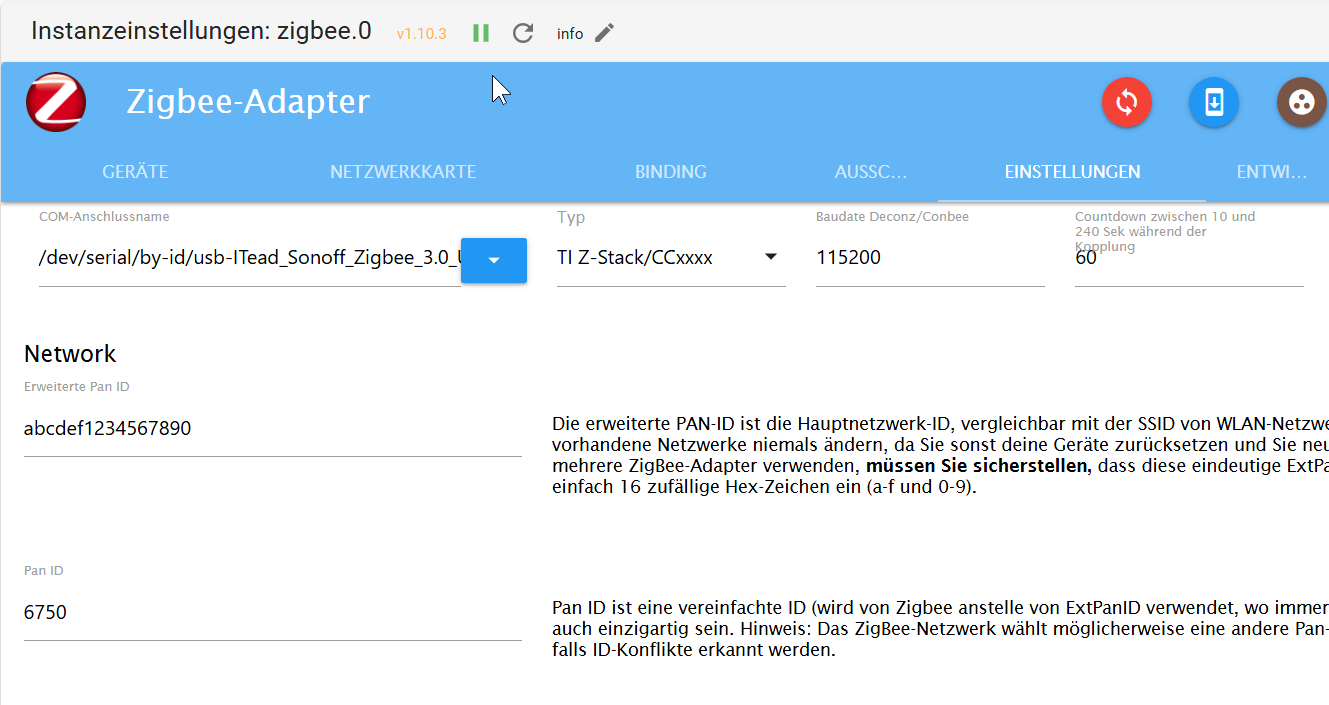
standard Zigbee-Stack,
Was ist denn 'Standard'?
TI-Z Stack? EZSP? EMBER? -
@jaro sagte in Problem mit dem Starten des Zigbee-Adapters:
standard Zigbee-Stack,
Was ist denn 'Standard'?
TI-Z Stack? EZSP? EMBER?TI Z-Stak/CC
Sorry, bin fast fertig -
TI Z-Stak/CC
Sorry, bin fast fertig

Hey! Du scheinst an dieser Unterhaltung interessiert zu sein, hast aber noch kein Konto.
Hast du es satt, bei jedem Besuch durch die gleichen Beiträge zu scrollen? Wenn du dich für ein Konto anmeldest, kommst du immer genau dorthin zurück, wo du zuvor warst, und kannst dich über neue Antworten benachrichtigen lassen (entweder per E-Mail oder Push-Benachrichtigung). Du kannst auch Lesezeichen speichern und Beiträge positiv bewerten, um anderen Community-Mitgliedern deine Wertschätzung zu zeigen.
Mit deinem Input könnte dieser Beitrag noch besser werden 💗
Registrieren AnmeldenSupport us
247
Online33.1k
Benutzende83.7k
Themen1.3m
Beiträge