Skip to content
  • Home
  • Recent
  • Tags
  • 0 Unread 0
  • Categories
  • Unreplied
  • Popular
  • GitHub
  • Docu
  • Hilfe
Skins
  • Light
  • Brite
  • Cerulean
  • Cosmo
  • Flatly
  • Journal
  • Litera
  • Lumen
  • Lux
  • Materia
  • Minty
  • Morph
  • Pulse
  • Sandstone
  • Simplex
  • Sketchy
  • Spacelab
  • United
  • Yeti
  • Zephyr
  • Dark
  • Cyborg
  • Darkly
  • Quartz
  • Slate
  • Solar
  • Superhero
  • Vapor

  • Default (No Skin)
  • No Skin
Collapse
ioBroker Logo

Community Forum

donate donate
  1. ioBroker Community Home
  2. Deutsch
  3. Skripten / Logik
  4. [Vorlage] Spotify Skript

NEWS

  • Weihnachtsangebot 2025! 🎄
    BluefoxB
    Bluefox
    22
    1
    1.2k

  • UPDATE 31.10.: Amazon Alexa - ioBroker Skill läuft aus ?
    apollon77A
    apollon77
    48
    3
    9.2k

  • Monatsrückblick – September 2025
    BluefoxB
    Bluefox
    14
    1
    2.5k

[Vorlage] Spotify Skript

Scheduled Pinned Locked Moved Skripten / Logik
javascript
745 Posts 95 Posters 268.7k Views 41 Watching
  • Oldest to Newest
  • Newest to Oldest
  • Most Votes
Reply
  • Reply as topic
Log in to reply
This topic has been deleted. Only users with topic management privileges can see it.
  • R robert_r

    Hallo, bin nun auch dabei Spotify in den Iobroker einzubinden. Leider bin ich aber noch ein ziemlicher Anfänger... Ich hab mir nun die Zip Datei 999_view_spotify_1.0.0__1_.zip von oben heruntergeladen, und nun stellt sich die frage wie ich dann das ganze in iobroker einbinde?
    Hätte jemand eine Anleitung für mich? Vielen Dank schon einmal im Vorasu

    W Offline
    W Offline
    Worn
    wrote on last edited by
    #724

    @robert_r

    Ich würde einfach den Adapter installieren :). Diesen dann entsprechend konfigurieren und fertig.

    1 Reply Last reply
    0
    • AxelF1977A AxelF1977

      Hier nun das View. Ihr findet in der Datei sowohl die Datei für eine Instanz, sowie die Version für mehrere.

      Das View funktioniert NUR mit dem Adapter ab Version 1.0.0

      Viel Spaß damit
      4249_view_spotify_1.0.0.rar

      K Offline
      K Offline
      kaiser21
      wrote on last edited by kaiser21
      #725

      @axelf1977 Hallo Axel, erstmal danke für dein tolles Script - so sieht es zumindest auf den Bildern aus. Leider bin ich aber irgendwie zu doof dafür, das zu installieren. Habe egtl alle deine Schritte aus der PDF befolgt, aber das ganze ist dann einfach nur total durcheinander auf der Main-Seite. Hoffe, du kannst mir noch helfen!

      EDIT:
      So sieht das Ganze bei mir aus:
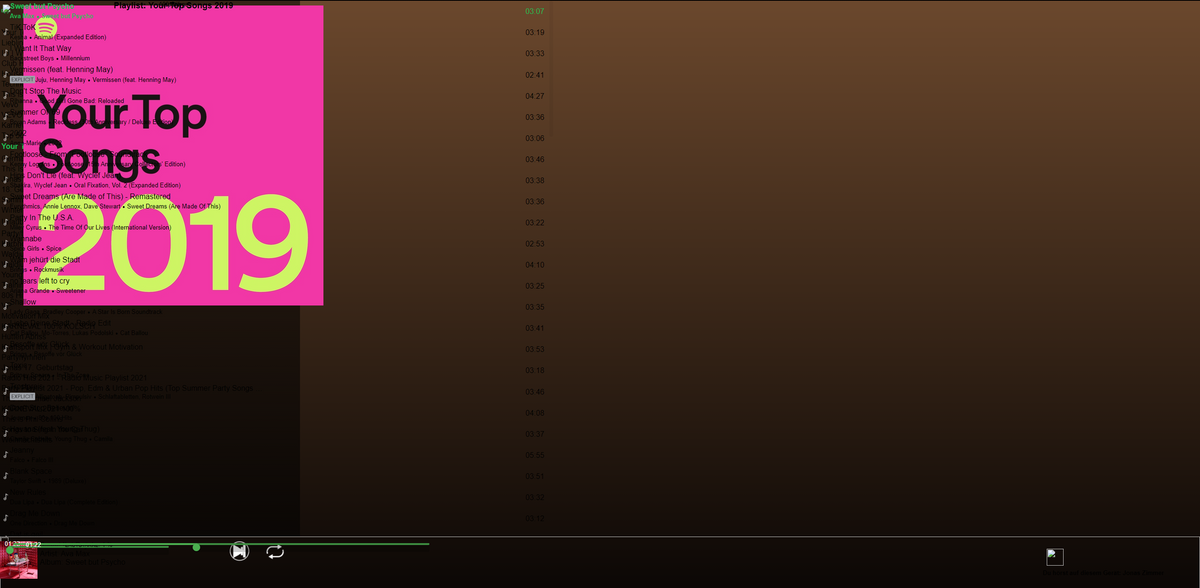
      e85886c0-a3df-48f3-a630-5a116b817233-image.png

      1 Reply Last reply
      0
      • crunchipC crunchip

        @crunchip:

        Ich habe heute auch mal versucht die Views einzuspielen, und frag mich….find den Fehler :roll:

        ~~![](</s><URL url=)<link_text text="https://i.ibb.co/RSRZ2YK/Opera-Momentau ... 178-90.png">https://i.ibb.co/RSRZ2YK/Opera-Momentaufnahme-2018-12-30-013054-192-168-178-90.png</link_text>" />

        hat da vllt jemand eine Idee~~ ` ~~edit:

        hatte die Icons vergessen~~

        ambergerA Offline
        ambergerA Offline
        amberger
        wrote on last edited by
        #726

        @crunchip hallo.könnte mir jemand weiterhelfen?

        bin neu in vis

        also die bilder sind im icon ordner.

        der ordner views hat 5 views.wenn ich im vis editor view inzufügen drücke.danach am pc ein view öffne einfüge und hochladen.dann hab ich im editor 5 seiten und in jeder seite ist etwas.kann man das nicht hochladen das alles auf einer seite ist?

        crunchipC 1 Reply Last reply
        0
        • ambergerA amberger

          @crunchip hallo.könnte mir jemand weiterhelfen?

          bin neu in vis

          also die bilder sind im icon ordner.

          der ordner views hat 5 views.wenn ich im vis editor view inzufügen drücke.danach am pc ein view öffne einfüge und hochladen.dann hab ich im editor 5 seiten und in jeder seite ist etwas.kann man das nicht hochladen das alles auf einer seite ist?

          crunchipC Away
          crunchipC Away
          crunchip
          Forum Testing Most Active
          wrote on last edited by
          #727

          @amberger nein das ist so unterteilt, also view in view, eine davon ist die Hauptview, die du dir in vis anzeigen lässt

          umgestiegen von Proxmox auf Unraid

          ambergerA 1 Reply Last reply
          0
          • crunchipC crunchip

            @amberger nein das ist so unterteilt, also view in view, eine davon ist die Hauptview, die du dir in vis anzeigen lässt

            ambergerA Offline
            ambergerA Offline
            amberger
            wrote on last edited by amberger
            #728

            @crunchip heisst das man fügt dann alles einzeln zusammen ?

            crunchipC 1 Reply Last reply
            0
            • wendy2702W wendy2702

              @Nordischerjung:

              Könnte jemand bitte die Datei Online noch mal stellen, oder mir diese per PN schicken? Danke schon mal `

              Hier mal als ZIP:

              999_view_spotify_1.0.0__1_.zip

              Wenn es immer noch nicht klappt prüfe mal deinen Virenschutz und schicke mir deine Mail per PN. Kann in einer PN leider keine Gepackten Dateien anhängen.

              ambergerA Offline
              ambergerA Offline
              amberger
              wrote on last edited by
              #729

              @wendy2702 diese zip hier meinte ich

              wendy2702W 1 Reply Last reply
              0
              • ambergerA amberger

                @crunchip heisst das man fügt dann alles einzeln zusammen ?

                crunchipC Away
                crunchipC Away
                crunchip
                Forum Testing Most Active
                wrote on last edited by
                #730

                @amberger nei, die sind doch schon fix und fertig, gegebenenfalls nur Pfade anpassen, musste ich zumindest damals, weil bei mir einige buttons wo anders abgelegt waren, ist aber auch schon ewig her, das ich spotify per vis benutzt habe

                umgestiegen von Proxmox auf Unraid

                1 Reply Last reply
                0
                • ambergerA amberger

                  @wendy2702 diese zip hier meinte ich

                  wendy2702W Online
                  wendy2702W Online
                  wendy2702
                  wrote on last edited by
                  #731

                  @amberger sagte in [Vorlage] Spotify Skript:

                  @wendy2702 diese zip hier meinte ich

                  Ui, das ist lange her.

                  Hier mal ein Export meines letzten Spotify Views welchen ich aber selber nicht mehr nutze da ich keine IPADs mehr an der Wand hängen habe.

                  IPAD_Spotify.txt

                  Bitte keine Fragen per PN, die gehören ins Forum!

                  Benutzt das Voting rechts unten im Beitrag wenn er euch geholfen hat.

                  1 Reply Last reply
                  0
                  • DickenD Offline
                    DickenD Offline
                    Dicken
                    wrote on last edited by
                    #732

                    @wendy2702 sagte in [Vorlage] Spotify Skript:

                    @Rakete Hoffe das ist es. Nutze den View aktuell nicht mehr.

                    
                    on({id: "spotify-premium.0.player.play"/*play*/, change: "any", ack: false}, function (obj) {
                      var value = obj.state.val;
                      var oldValue = obj.oldState.val;
                      if (getState("spotify-premium.0.player.play").val == true) {
                        setState("javascript.0.spotify-premium.playpause"/*playpause*/, true, true);
                      }
                    });
                    on({id: "spotify-premium.0.player.pause"/*pause*/, change: "any", ack: false}, function (obj) {
                      var value = obj.state.val;
                      var oldValue = obj.oldState.val;
                      if (getState("spotify-premium.0.player.pause").val == true) {
                        setState("javascript.0.spotify-premium.playpause"/*playpause*/, false, true);
                      }
                    });
                    on({id: "javascript.0.spotify-premium.playpausebutton"/*playpausebutton*/, change: "any", ack: false}, function (obj) {
                      var value = obj.state.val;
                      var oldValue = obj.oldState.val;
                      if (getState("javascript.0.spotify-premium.playpause").val == true) {
                        setState("spotify-premium.0.player.pause"/*pause*/, true);
                        setState("javascript.0.spotify-premium.playpause"/*playpause*/, false);
                      }
                    });
                    on({id: "javascript.0.spotify-premium.playpausebutton"/*playpausebutton*/, change: "any", ack: false}, function (obj) {
                      var value = obj.state.val;
                      var oldValue = obj.oldState.val;
                      if (getState("javascript.0.spotify-premium.playpause").val == false) {
                        setState("spotify-premium.0.player.play"/*play*/, true);
                        setState("javascript.0.spotify-premium.playpause"/*playpause*/, true);
                      }
                    });


                    Hey, kann mir jemand sagen, wo ich das einfügen muss, damit der Button funktioniert? :)

                    wendy2702W 1 Reply Last reply
                    0
                    • DickenD Dicken

                      @wendy2702 sagte in [Vorlage] Spotify Skript:

                      @Rakete Hoffe das ist es. Nutze den View aktuell nicht mehr.

                      
                      on({id: "spotify-premium.0.player.play"/*play*/, change: "any", ack: false}, function (obj) {
                        var value = obj.state.val;
                        var oldValue = obj.oldState.val;
                        if (getState("spotify-premium.0.player.play").val == true) {
                          setState("javascript.0.spotify-premium.playpause"/*playpause*/, true, true);
                        }
                      });
                      on({id: "spotify-premium.0.player.pause"/*pause*/, change: "any", ack: false}, function (obj) {
                        var value = obj.state.val;
                        var oldValue = obj.oldState.val;
                        if (getState("spotify-premium.0.player.pause").val == true) {
                          setState("javascript.0.spotify-premium.playpause"/*playpause*/, false, true);
                        }
                      });
                      on({id: "javascript.0.spotify-premium.playpausebutton"/*playpausebutton*/, change: "any", ack: false}, function (obj) {
                        var value = obj.state.val;
                        var oldValue = obj.oldState.val;
                        if (getState("javascript.0.spotify-premium.playpause").val == true) {
                          setState("spotify-premium.0.player.pause"/*pause*/, true);
                          setState("javascript.0.spotify-premium.playpause"/*playpause*/, false);
                        }
                      });
                      on({id: "javascript.0.spotify-premium.playpausebutton"/*playpausebutton*/, change: "any", ack: false}, function (obj) {
                        var value = obj.state.val;
                        var oldValue = obj.oldState.val;
                        if (getState("javascript.0.spotify-premium.playpause").val == false) {
                          setState("spotify-premium.0.player.play"/*play*/, true);
                          setState("javascript.0.spotify-premium.playpause"/*playpause*/, true);
                        }
                      });


                      Hey, kann mir jemand sagen, wo ich das einfügen muss, damit der Button funktioniert? :)

                      wendy2702W Online
                      wendy2702W Online
                      wendy2702
                      wrote on last edited by
                      #733

                      @dicken Im Javascript Adapter, weiss aber gar nicht mehr ob das bei Verwendung des Adapters noch benötigt wird.

                      Bitte keine Fragen per PN, die gehören ins Forum!

                      Benutzt das Voting rechts unten im Beitrag wenn er euch geholfen hat.

                      DickenD 1 Reply Last reply
                      0
                      • wendy2702W wendy2702

                        @dicken Im Javascript Adapter, weiss aber gar nicht mehr ob das bei Verwendung des Adapters noch benötigt wird.

                        DickenD Offline
                        DickenD Offline
                        Dicken
                        wrote on last edited by
                        #734

                        @wendy2702 sagte in [Vorlage] Spotify Skript:

                        @dicken Im Javascript Adapter, weiss aber gar nicht mehr ob das bei Verwendung des Adapters noch benötigt wird.

                        Sorry aber ich check nicht wo :man-facepalming: Muss ich unter Scripts ein neues Script anlegen? Bzw. brauch ich da zwei???
                        javascript.0.spotify-premium.playpause
                        und
                        javascript.0.spotify-premium.playpausebutton ?

                        wendy2702W 1 Reply Last reply
                        0
                        • DickenD Dicken

                          @wendy2702 sagte in [Vorlage] Spotify Skript:

                          @dicken Im Javascript Adapter, weiss aber gar nicht mehr ob das bei Verwendung des Adapters noch benötigt wird.

                          Sorry aber ich check nicht wo :man-facepalming: Muss ich unter Scripts ein neues Script anlegen? Bzw. brauch ich da zwei???
                          javascript.0.spotify-premium.playpause
                          und
                          javascript.0.spotify-premium.playpausebutton ?

                          wendy2702W Online
                          wendy2702W Online
                          wendy2702
                          wrote on last edited by wendy2702
                          #735

                          @dicken Ja, unter Javascript ein neues Anlagen. Wichtig: NICHT unter dem Ordner GLOBAL

                          Da dann die Zeilen oben reinkopieren. Namen vergeben, Speichern, Starten

                          Ein script reicht

                          Bitte keine Fragen per PN, die gehören ins Forum!

                          Benutzt das Voting rechts unten im Beitrag wenn er euch geholfen hat.

                          1 Reply Last reply
                          0
                          • L Offline
                            L Offline
                            lustig29
                            wrote on last edited by
                            #736

                            Ist das Skript noch aktuell? Bin genau nach Anleitung vorgegangen. Aber leider funktioniert es nicht.

                            1 Reply Last reply
                            0
                            • L Lucky

                              Moin,

                              ich habe mal ein Skript begonnen mit dem Spotify gesteuert werden kann,

                              Damit das Skript genutzt werden kann ist folgendes vorher zutun

                              • Es muß das NPM Modul querystring im Javascript Adapter hinzugefügt werden !
                              • Es wird ein Premium Account benötigt, mit Spotify Family sollte es auch laufen (gem. Angaben von Leuten die es getestet haben)
                              • Sonos Geräte werden NICHT zu 100% unterstützt, was durch die API bedingt ist !

                              1.Registriere dich auch https://developer.spotify.com

                              2.Erstelle einen Application, du erhällst einen Client ID und eine Client Secret

                              3.trage in den App Settings deiner Application bei Redirect URIs 'http://localhost' ein

                              4.trage hier in diesem Skript deine Cliend ID und Client Secret ein

                              5.Starte dieses Skript

                              6.wechsle zum Tap Objekte und klicke unter javascript.0.Spotify.Authorization.Authorized auf den Button Get_Authorization

                              7.Kopiere die unter javascript.0.Spotify.Authorization.Authorization_URL angezeigte URL in einen Webbrowser und rufe sie auf.

                              8.Der Browser wird die Verbindung ablehnen und in der Adresszeile eine URL zurückgeben

                              9.kopiere jetzt wider diese URL und füge sie im State 'javascript.0.Spotify.Authorization.Authorization_Return_URI' ein

                              ab jetzt gibte es die neueste Version nur noch hier !

                              change log

                              0.5.3

                              -Stabilität verbessert

                              -Tracks zusätzlich als Listenstring

                              Version 0.5.3 getestet mit JS 3.6.3 (edited by Bluefox)

                              /*Version 0.5.3
                              letzte änderung 11.02.2018 19:25
                              Read Me !!!!!!!
                              wie bekomme ich dieses Skript zum laufen ? 
                              Es muß das NPM Modul querystring im Javascript Adapter hinzugefügt werden !
                              1.Registriere dich auch https://developer.spotify.com
                              2.Erstelle einen application, du erhällst einen Client ID und eine Client Secret
                              3.trage in den App Settings deiner application bei Redirect URIs 'http://localhost' ein
                              4.trage hier in diesem Skript deine Cliend ID und Client Secret ein
                              5.Starte dieses Skript
                              6.wechsle zum Tap Objekte und klicke unter 'javascript.0.Spotify.Authorization.Authorized' auf den Button Get_Authorization
                              7.Kopiere die unter 'javascript.0.Spotify.Authorization.Authorization_URL' angezeigte URL in einen  Webbrowser und rufe sie auf.
                              8.Der Browser wird die Verbindung ablehnen und in der Adresszeile eine URL zurückgeben
                              9.kopiere jetzt wider diese URL und füge sie im State 'javascript.0.Spotify.Authorization.Authorization_Return_URI' ein
                              10.wenn alles funktioniert hat wechselt 'javascript.0.Spotify.Authorization.Authorized' auf true 
                              */
                              const request = require('request');
                              const querystring = require('querystring');
                              const fs = require('fs');
                              
                              createState('javascript.0.Spotify.Player.Play', false, {type: 'boolean', role: 'button'});
                              createState('javascript.0.Spotify.Player.Pause', false, {type: 'boolean', role: 'button'});
                              createState('javascript.0.Spotify.Player.Skip_Plus', false, {type: 'boolean', role: 'button'});
                              createState('javascript.0.Spotify.Player.Skip_Minus', false, {type: 'boolean', role: 'button'});
                              createState('javascript.0.Spotify.Player.Repeat_Track', false, {type: 'boolean', role: 'button'});
                              createState('javascript.0.Spotify.Player.Repeat_Context', false, {type: 'boolean', role: 'button'});
                              createState('javascript.0.Spotify.Player.Repeat_off', false, {type: 'boolean', role: 'button'});
                              createState('javascript.0.Spotify.Player.Volume', 0, {type: 'number', role: 'Volume %'});
                              createState('javascript.0.Spotify.Player.TrackId', '', {type: 'string', role: 'Track Id to Play'});
                              createState('javascript.0.Spotify.Player.Playlist_ID', '', {type: 'string', role: 'Playlist Id to Play'});
                              createState('javascript.0.Spotify.Player.Seek', 0, {type: 'number', role: 'Seek To Position (s)'});
                              createState('javascript.0.Spotify.Player.Shuffle', false, {type: 'boolean', role: 'Shuffle'});
                              createState('javascript.0.Spotify.Devices.Get_Devices', false, {type: 'boolean', role: 'button'});
                              //createState('javascript.0.Spotify.Authorization.Login', false,{type: 'boolean', role: 'button'});
                              createState('javascript.0.Spotify.Authorization.Get_Authorization', false, {type: 'boolean', role: 'button'});
                              createState('javascript.0.Spotify.Authorization.Authorization_URL', '', {
                                  type: 'string',
                                  role: 'Authorization_URL',
                                  write: false
                              });
                              createState('javascript.0.Spotify.Authorization.Authorization_Return_URI', '', {
                                  type: 'string',
                                  role: 'Authorization_Return_URI'
                              });
                              createState('javascript.0.Spotify.Authorization.User_ID', '', {type: 'string', role: 'User ID', write: false});
                              createState('javascript.0.Spotify.Authorization.Authorized', false, {
                                  type: 'boolean',
                                  role: 'Authorized',
                                  write: false
                              });
                              createState('javascript.0.Spotify.Get_User_Playlists', false, {type: 'boolean', role: 'button'});
                              createState('javascript.0.Spotify.PlaybackInfo.Track_Id', '', {type: 'string', role: 'Track Id', write: false});
                              createState('javascript.0.Spotify.PlaybackInfo.Artist_Name', '', {type: 'string', role: 'Artist Name', write: false});
                              createState('javascript.0.Spotify.PlaybackInfo.Type', '', {type: 'string', role: 'Type', write: false});
                              createState('javascript.0.Spotify.PlaybackInfo.Album', '', {type: 'string', role: 'Album', write: false});
                              createState('javascript.0.Spotify.PlaybackInfo.timestamp', 0, {type: 'number', role: 'Timestamp', write: false});
                              createState('javascript.0.Spotify.PlaybackInfo.progress_ms', 0, {type: 'number', role: 'progress_ms', write: false});
                              createState('javascript.0.Spotify.PlaybackInfo.progress', 0, {type: 'string', role: 'progress', write: false});
                              createState('javascript.0.Spotify.PlaybackInfo.is_playing', false, {type: 'boolean', role: 'is_playing', write: false});
                              createState('javascript.0.Spotify.PlaybackInfo.image_url', '', {type: 'string', role: 'Image URL', write: false});
                              createState('javascript.0.Spotify.PlaybackInfo.Track_Name', '', {type: 'string', role: 'Track_Name', write: false});
                              createState('javascript.0.Spotify.PlaybackInfo.duration_ms', 0, {type: 'number', role: 'Duration ms', write: false});
                              createState('javascript.0.Spotify.PlaybackInfo.duration', 0, {type: 'string', role: 'duration', write: false});
                              createState('javascript.0.Spotify.PlaybackInfo.Playlist', '', {type: 'string', role: 'Playlist', write: false});
                              createState('javascript.0.Spotify.PlaybackInfo.Device.id', '', {type: 'string', role: 'id', write: false});
                              createState('javascript.0.Spotify.PlaybackInfo.Device.is_active', false, {
                                  type: 'boolean',
                                  role: 'is active',
                                  write: false
                              });
                              createState('javascript.0.Spotify.PlaybackInfo.Device.is_restricted', false, {
                                  type: 'boolean',
                                  role: 'is restricted',
                                  write: false
                              });
                              createState('javascript.0.Spotify.PlaybackInfo.Device.name', '', {type: 'string', role: 'Name', write: false});
                              createState('javascript.0.Spotify.PlaybackInfo.Device.type', '', {type: 'string', role: 'Type', write: false});
                              createState('javascript.0.Spotify.PlaybackInfo.Device.volume_percent', 0, {
                                  type: 'number',
                                  role: 'volume_percent',
                                  write: false
                              });
                              //createState('javascript.0.Spotify.Playlist_Names','',{type: 'string', role: 'String of Playlist Names',write:false});
                              //createState('javascript.0.Spotify.Playlist_Index',0 ,{type: 'number', role: 'Playlist_Index'});
                              const application = {
                                  User_ID: '',//Nichts eintragen !!
                                  BaseURL: 'https://api.spotify.com',
                                  Client_ID: 'HIER DEINE CLIENT ID !!',
                                  Client_Secret: 'HIER DEIN CLIENT SECRET',
                                  redirect_uri: 'http://localhost',   // in älteren Versionen wird 'https://example.com/callback/' verwendet, 'http://localhost' ist eine Sichere Variante
                                  Token: '', //Nichts eintragen !!
                                  refresh_token: '',//Nichts eintragen !!
                                  code: '',//Nichts eintragen !!
                                  State: '',//Nichts eintragen !!
                                  TokenFilePath: '/opt/Spotify.token'
                              };
                              
                              const deviceData = {
                                  last_active_device_id: '',
                                  last_select_device_id: '',
                              };
                              
                              let interval;
                              
                              //############### Initial ##########
                              readTokenFiles((err, Token) => { //23.01.2018 Funktion überarbeitet 
                                  if (!err) {
                                      application.Token = Token.AccessToken;
                                      application.refresh_token = Token.RefreshToken;
                                      sendRequest('/v1/me', 'GET', '', (err, data) => {
                                          if (!err) {
                                              GetUserInformation(data);
                                              setState('javascript.0.Spotify.Authorization.Authorized', true, true);
                              
                                              sendRequest('/v1/me/player/devices', 'GET', '', (err, data) => !err && createDevices(data));
                                          } else {
                                              setState('javascript.0.Spotify.Authorization.Authorized', false, true);
                                              console.error('sendRequest in readTokenFiles ' + err);
                                          }
                                      });
                                  } else {
                                      setState('javascript.0.Spotify.Authorization.Authorized', false, true);
                                      console.warn(err);
                                  }
                              });
                              
                              //#################################
                              function readTokenFiles(callback) {
                                  fs.readFile(application.TokenFilePath, 'utf8', (err, data) => {
                                      if (!err) { //wenn keine Fehler
                              
                                          const Token = JSON.parse(data);
                                          const ATF = 'undefined' !== typeof  Token.AccessToken && (Token.AccessToken !== '');
                                          const RTF = 'undefined' !== typeof  Token.RefreshToken && (Token.RefreshToken !== '');
                              
                                          if (ATF && RTF) {
                                              console.log('Spotify Token aus Datei gelesen !');
                                              return callback(null, Token);
                                          } else {
                                              return callback('Keine Token in Datei gefunden !', null)
                                          }
                                      } else {
                                          console.log(err);
                                          return callback('keine Token-Datei gefunden !, wird erstellt nach Autorisierung  ', null);
                                      }
                                  });
                              }// End of Function readTokenFiles 
                              
                              //###################################################################################### FUNCTION SEND REQUEST ###################################################################################
                              function sendRequest(endPoint, method, body, callback) {
                                  method = method || 'PUT';
                                  body = body || '';
                                  
                                  const options = {
                                      url: application.BaseURL + endPoint,
                                      method: method,
                                      headers: {Authorization: 'Bearer ' + application.Token},
                                      form: body
                                  };
                                  // console.log(options.form);
                                  // console.log('Spotify API Call...'+ endPoint);
                                  request(options, (error, response, body) => {
                                      if (!error) {
                                          switch (response.statusCode) {
                                              case 200: // OK
                                                  return callback && callback(null, JSON.parse(body));
                              
                                              case 202: //Accepted, processing has not been completed.
                                                  return callback && callback(response.statusCode, null);
                                              case 204: // OK, No Content
                                                  return callback && callback(null, null);
                              
                                              case 400: //Bad Request, message body will contain more information
                                              case 500: //Server Error
                                              case 503: //Service Unavailable
                                              case 404: //Not Found
                                              case 502: //Bad Gateway
                                                  return callback && callback(response.statusCode, null);
                              
                                              case 401: //Unauthorized 
                                                  if (JSON.parse(body).error.message === 'The access token expired') {
                                                      console.log('Access Token Abgelaufen!!');
                                                      setState('javascript.0.Spotify.Authorization.Authorized', false, true);  // neu 05.02.2018
                              
                                                      refreshToken(err => {
                                                          if (!err) {
                                                              setState('javascript.0.Spotify.Authorization.Authorized', true, true);
                              
                                                              sendRequest(endPoint, method, body, (err, data) => { // dieser Request holt die Daten die zuvor mit altem Token gefordert wurden
                                                                  if (!err) {
                                                                      console.log('Daten mit neuem Token');
                                                                      return callback && callback(null, data);
                                                                  } else if (err == 202) {
                                                                      console.log(err + ' Anfrage akzeptiert, keine Daten in Antwort, veruch es nochnal ;-)');
                                                                      return callback && callback(err, null);
                                                                  } else {
                                                                      console.error('FEHLER BEIM ERNEUTEN DATEN ANFORDERN ! ' + err);
                                                                      return callback && callback(err, null);
                                                                  }
                                                              });
                              
                                                          } else {  //05.02.2018 19:43
                                                              console.error(err);
                                                              return callback && callback(err, null);
                                                          }
                                                      });
                                                  } else { //wenn anderer Fehler mit Code 401
                                                      setState('javascript.0.Spotify.Authorization.Authorized', false, true);  // neu 05.01.2018
                                                      console.error(JSON.parse(body).error.message);
                                                      return callback && callback(response.statusCode, null);
                                                  }
                                                  break;
                              
                                              default:
                                                  console.warn('HTTP Request Fehler wird nicht behandelt, bitte Debuggen !!');
                                                  return callback && callback(response.statusCode, null);
                                          }
                                      } else {
                                          console.error('erron in Request');
                                          return callback && callback(0, null);
                                      }
                                  });//end Request
                              }//End of Function sendRequest
                              //###################################################################################### END OF FUNCTION SEND REQUEST ###################################################################################
                              
                              function createPlaybackInfo(pBody) {
                              
                                  //console.log(JSON.stringify(pBody))
                              
                                  if (pBody.hasOwnProperty('device')) {
                                      deviceData.last_active_device_id = pBody.device.id;
                                      setState('javascript.0.Spotify.PlaybackInfo.Device.id', pBody.device.id, true);
                                  }
                              
                                  if (pBody.hasOwnProperty('is_playing')) {
                                      setState('javascript.0.Spotify.PlaybackInfo.is_playing', pBody.is_playing, true);
                                      if (pBody.is_playing === true) {
                              
                                          setState('javascript.0.Spotify.PlaybackInfo.Track_Id', pBody.item.id, true);
                                          setState('javascript.0.Spotify.PlaybackInfo.Artist_Name', pBody.item.artists[0].name, true);
                                          if (pBody.context !== null) {
                              
                                              setState('javascript.0.Spotify.PlaybackInfo.Type', pBody.context.type, true);
                              
                                              if (pBody.context.type === 'playlist') {
                                                  const IndexOfUser = pBody.context.uri.indexOf('user:') + 5;
                                                  const EndIndexOfUser = pBody.context.uri.indexOf(':', IndexOfUser);
                              
                                                  const IndexOfPlaylistID = pBody.context.uri.indexOf('playlist:') + 9;
                              
                                                  const query = {
                                                      fields: 'name',
                                                  };
                              
                                                  sendRequest('/v1/users/' + pBody.context.uri.substring(IndexOfUser, EndIndexOfUser) + '/playlists/' + pBody.context.uri.slice(IndexOfPlaylistID) + '?' + querystring.stringify(query), 'GET', '', (err, pBody) => {
                                                      if (!err && pBody.hasOwnProperty('name')) {
                                                          setState('javascript.0.Spotify.PlaybackInfo.Playlist', pBody.name, true);
                                                          //console.log(JSON.stringify(pBody))
                                                      } else {
                                                          console.warn(err + ' function createPlaybackInfo')
                                                      }
                                                  });
                                              }
                                              else {
                                                  setState('javascript.0.Spotify.PlaybackInfo.Playlist', '', true)
                                              }
                              
                                          }
                                          else {
                                              setState('javascript.0.Spotify.PlaybackInfo.Type', pBody.item.type, true);
                                              setState('javascript.0.Spotify.PlaybackInfo.Playlist', '', true);
                                          }
                              
                                          setState('javascript.0.Spotify.PlaybackInfo.Album', pBody.item.album.name, true);
                                          setState('javascript.0.Spotify.PlaybackInfo.timestamp', pBody.timestamp, true);
                                          setState('javascript.0.Spotify.PlaybackInfo.progress_ms', pBody.progress_ms, true);
                                          setState('javascript.0.Spotify.PlaybackInfo.image_url', pBody.item.album.images[0].url, true);
                                          setState('javascript.0.Spotify.PlaybackInfo.Track_Name', pBody.item.name, true);
                                          setState('javascript.0.Spotify.PlaybackInfo.duration_ms', pBody.item.duration_ms, true);
                              
                                          setState('javascript.0.Spotify.PlaybackInfo.duration', digiClock(pBody.item.duration_ms), true);
                                          setState('javascript.0.Spotify.PlaybackInfo.progress', digiClock(pBody.progress_ms), true);
                              
                                          setState('javascript.0.Spotify.PlaybackInfo.Device.is_active', pBody.device.is_active, true);
                                          setState('javascript.0.Spotify.PlaybackInfo.Device.is_restricted', pBody.device.is_restricted, true);
                                          setState('javascript.0.Spotify.PlaybackInfo.Device.name', pBody.device.name, true);
                                          setState('javascript.0.Spotify.PlaybackInfo.Device.type', pBody.device.type, true);
                                          setState('javascript.0.Spotify.PlaybackInfo.Device.volume_percent', pBody.device.volume_percent, true);
                              
                                      }
                                  }
                              }//End of Function createPlaybackInfo
                              
                              function digiClock(ms) {
                                  // Milisekunden zu Digitaluhr, Beispiel 3:59=238759
                                  let Min = Math.floor(ms / 60000);
                                  let Sec = Math.floor(((ms % 360000) % 60000) / 1000);
                                  if (Min < 10) {
                                      Min = '0' + Min
                                  }
                                  if (Sec < 10) {
                                      Sec = '0' + Sec
                                  }
                                  return Min + ':' + Sec;
                              }//End Function digiClock
                              
                              function GetUserInformation(pBody) {
                                  application.User_ID = pBody.id;
                                  setState('javascript.0.Spotify.Authorization.User_ID', pBody.id, true);
                              
                              }//End of Function GetUserInformation
                              
                              function GetUsersPlaylist(offset) {
                              
                                  let PlaylistString;
                              
                                  if (application.User_ID !== '') {
                                      const query = {
                                          limit: 30,
                                          offset: offset
                                      };
                              
                                      sendRequest('/v1/users/' + application.User_ID + '/playlists?' + querystring.stringify(query), 'GET', '', (err, pBody) => {
                                          if (!err) {
                                              for (let i = 0; i < pBody.items.length; i++) {
                                                  const Pfad = 'javascript.0.Spotify.Playlists.' + pBody.items[i].name.replace(/\s+/g, '');
                                                  PlaylistString = pBody.items[i].name + ';' + PlaylistString;
                              
                                                  if (getObject(Pfad + '.id') === null) {
                                                      createState(Pfad + '.Play_this_List', false, {type: 'boolean', role: 'button'});
                                                      createState(Pfad + '.id', pBody.items[i].id, {type: 'string', role: 'id', write: false});
                                                      createState(Pfad + '.owner', pBody.items[i].owner.id, {
                                                          type: 'string',
                                                          role: 'owner',
                                                          write: false
                                                      });
                                                      createState(Pfad + '.name', pBody.items[i].name, {type: 'string', role: 'Name', write: false});
                                                      createState(Pfad + '.tracks_total', pBody.items[i].tracks.total, {
                                                          type: 'number',
                                                          role: 'tracks_total',
                                                          write: false
                                                      });
                              
                                                  } else {
                                                      setState(Pfad + '.id', pBody.items[i].id, true);
                                                      setState(Pfad + '.owner', pBody.items[i].owner.id, true);
                                                      setState(Pfad + '.name', pBody.items[i].name, true);
                                                      setState(Pfad + '.tracks_total', pBody.items[i].tracks.total, true);
                                                  }
                                                  getPlaylistTracks(pBody.items[i].owner.id, pBody.items[i].id, Pfad);
                                              }
                                              if (pBody.items.length !== 0 && (pBody['next'] !== null)) {
                                                  GetUsersPlaylist(pBody.offset + pBody.limit)
                                              }
                              
                                              //setState('javascript.0.Spotify.Playlist_Names',PlaylistString);
                                          }
                              
                                      });
                                  }
                              } // End of Function GetUsersPlaylist
                              function deviceHandel(deviceData) {
                                  if (deviceData.last_select_device_id === '') {
                                      return deviceData.last_active_device_id;
                                  } else {
                                      return deviceData.last_select_device_id;
                                  }
                              }
                              
                              function getPlaylistTracks(owner, id, Pfad) {   //NEU
                                  const reg_param = owner + '/playlists/' + id + '/tracks';
                                  const query = {
                                      fields: 'items.track.name,items.track.id,items.track.artists.name,total,offset',
                                      limit: 100,
                                      offset: 0
                                  };
                              
                                  sendRequest('/v1/users/' + reg_param + '?' + querystring.stringify(query), 'GET', '', (err, data) => {
                                      if (!err) {
                                          let StateString = '';
                                          let ListString = '';
                                          let Track_ID_String = '';
                              
                                          for (let i = 0; i < data.items.length; i++) {
                              
                                              StateString = StateString + i.toString() + ':' + data.items[i].track.name + '-' + data.items[i].track.artists[0].name + ';';
                                              ListString = ListString + data.items[i].track.name + '-' + data.items[i].track.artists[0].name + ';';
                                              Track_ID_String = Track_ID_String + i.toString() + ':' + data.items[i].track.id + ';';
                                          }
                                          if (getObject(Pfad + '.Track_List') === null) {
                                              createState(Pfad + '.Track_List', -1, {
                                                  type: 'number',
                                                  role: 'Tracks',
                                                  states: StateString,
                                                  Track_ID: Track_ID_String
                                              });
                                          } else {
                                              //setState(Pfad+'.Track_List',StateString,Track_ID=Track_ID_String,akt=true);
                                          }
                              
                                          if (getObject(Pfad + '.Track_List_String') === null) {
                                              createState(Pfad + '.Track_List_String', ListString, {type: 'string', role: 'Tracks List String'});
                                          } else {
                                              setState(Pfad + '.Track_List_String', ListString, true);
                                          }
                              
                                      }
                              
                                  });
                              }//End of Function getPlaylistTracks
                              function createDevices(pBody) {
                              
                                  for (i = 0; i < pBody.devices.length; i++) {
                              
                                      for (const ObjName in pBody.devices[i]) {
                              
                                          if (!getObject('javascript.0.Spotify.Devices.' + pBody.devices[i].name.replace(/\s+/g, '') + '.' + ObjName)) {
                              
                                              createState('javascript.0.Spotify.Devices.' + pBody.devices[i].name.replace(/\s+/g, '') + '.' + ObjName, pBody.devices[i][ObjName], {
                                                  type: typeof pBody.devices[i][ObjName],
                                                  role: ObjName
                                              });
                                              createState('javascript.0.Spotify.Devices.' + pBody.devices[i].name.replace(/\s+/g, '') + '.' + 'Use_for_Playback', false, {
                                                  type: 'boolean',
                                                  role: 'button'
                                              });
                                          } else {
                                              setState('javascript.0.Spotify.Devices.' + pBody.devices[i].name.replace(/\s+/g, '') + '.' + ObjName, pBody.devices[i][ObjName], true);
                                          }
                                      }
                                  }
                              }//End of Function createDevices 
                              function generateRandomString(length) {
                                  let text = '';
                                  const possible = 'ABCDEFGHIJKLMNOPQRSTUVWXYZabcdefghijklmnopqrstuvwxyz0123456789';
                                  for (let i = 0; i < length; i++) {
                                      text += possible.charAt(Math.floor(Math.random() * possible.length));
                                  }
                                  return text;
                              }
                              
                              function requestAuthorization() {
                                  application.State = generateRandomString(20);
                              
                                  const query = {
                                      client_id: application.Client_ID,
                                      response_type: 'code',
                                      redirect_uri: application.redirect_uri,
                                      state: application.State,
                                      scope: 'user-modify-playback-state user-read-playback-state user-read-currently-playing playlist-read-private'
                                  };
                              
                                  const options = {
                                      url: 'https://accounts.spotify.com/de/authorize/?' + querystring.stringify(query),
                                      method: 'GET',
                                      followAllRedirects: true,
                                  };
                                  setState('javascript.0.Spotify.Authorization.Authorization_URL', options.url);
                                  const debug = false;
                                  if (debug) {
                                      request(options, (error, response, body, formData) => {
                                          // console.log(options.url);
                                          console.log('STATUS_CODE ' + response.statusCode);
                                          //console.log('RESPONSE*************'+JSON.stringify(response));
                                          //console.log('BODY*****'+body);
                                          //console.log('ERROR'+error);
                                          //console.log('FORM'+request.form);
                                          //console.log('HEADERS   *****'+JSON.stringify(response.headers));
                                          //console.log('HTML   *****'+JSON.stringify(response.html));
                                      });
                                  }
                              }// End of Function requestAuthorization
                              
                              function getToken() {
                                  const options = {
                                      url: 'https://accounts.spotify.com/api/token',
                                      method: 'POST',
                                      headers: {Authorization: 'Basic ' + Buffer.from(application.Client_ID + ':' + application.Client_Secret).toString('base64')},
                                      form: {grant_type: 'authorization_code', code: application.code, redirect_uri: application.redirect_uri}
                                  };
                                  request(options, function (error, response, body) {
                              
                                      saveToken(JSON.parse(body), function (err, Token) {
                                          if (!err) {
                                              setState('javascript.0.Spotify.Authorization.Authorization_URL', '', true);
                                              setState('javascript.0.Spotify.Authorization.Authorization_Return_URI', '', true);
                                              setState('javascript.0.Spotify.Authorization.Authorized', true, true);
                              
                                              application.Token = Token.AccessToken;
                                              application.refresh_token = Token.RefreshToken;
                                          }
                                          else {
                                              console.log(err)
                                          }
                                      });
                                  });
                              }//End of Function getToken
                              
                              function refreshToken(callback) {
                                  console.log('Token wird erneut angefordert ! ');
                              
                                  const options = {
                                      url: 'https://accounts.spotify.com/api/token',
                                      method: 'POST',
                                      headers: {Authorization: 'Basic ' + Buffer.from(application.Client_ID + ':' + application.Client_Secret).toString('base64')},
                                      form: {grant_type: 'refresh_token', refresh_token: application.refresh_token}
                                  };
                              
                                  if (application.refresh_token !== '') {
                                      request(options, (error, response, body) => { // dieser Request holt den neuen Token
                                          if (response.statusCode === 200) {
                                              console.log('neuer Token eingetroffen');
                                              //console.log(body);
                                              const pBody = JSON.parse(body);
                                              if (!pBody.hasOwnProperty('refresh_token')) {
                                                  pBody.refresh_token = application.refresh_token
                                              }
                                              //console.log(JSON.stringify(pBody))
                              
                                              saveToken(pBody, (err, Token) => {
                                                  if (!err) {
                                                      application.Token = Token.AccessToken;
                                                      return callback(null);
                                                      //application.refresh_token=Token.refresh_token;
                                                  } else {
                                                      console.log(err);
                                                      return callback(err);
                                                  }
                                              });
                                          } else {
                                              return callback(response.statusCode)
                                          }    //05.02.2018 19:37
                                      });
                                  }// end if   
                              }//End of Function refreshToken
                              
                              function saveToken(pBody, callback) {
                                  //const ParsedBody=JSON.parse(Body);
                                  //console.log(ParsedBody.hasOwnProperty('access_token'))
                                  if (pBody.access_token && pBody.refresh_token) {
                                      const Token = {
                                          AccessToken: pBody.access_token,
                                          RefreshToken: pBody.refresh_token
                                      };
                                      fs.writeFile(application.TokenFilePath, JSON.stringify(Token), 'utf8', err => {
                                          if (!err) {
                                              console.log('Token Saved!');
                                              return callback(null, Token);
                                          } else {
                                              return callback('Fehler beim Token Speichern', null)
                                          }
                                      });
                                  } else {
                                      return callback('keine Token in Serverantwort gefunden ! ', null)
                                  }
                              
                              }//End of Function saveToken
                              on({id: 'javascript.0.Spotify.Authorization.Authorization_Return_URI', change: 'any'}, obj => {
                                  if (!obj.state.ack) {
                                      const return_uri = querystring.parse(obj.state.val.slice(obj.state.val.search('[?]') + 1, obj.state.val.length));
                                      if (return_uri.state == application.State) {
                                          application.code = return_uri.code;
                                          getToken();
                                      }
                                  }
                              
                              });
                              on({id: 'javascript.0.Spotify.Authorization.Get_Authorization', val: true}, obj => {
                                  requestAuthorization();
                                  setState('javascript.0.Spotify.Authorization.Authorized', false, true);
                              });
                              
                              on({id: /\.Use_for_Playback$/, val: true}, obj => {
                                  deviceData.last_select_device_id = getState(obj.id.slice(0, obj.id.lastIndexOf('.')) + '.id').val;
                              
                                  const send = {
                                      device_ids: [deviceData.last_select_device_id],  //Divice IDs als Array !
                                      //play:false  //True = Wiedergabe startet sofort auf diesem Gerät, FALSE = Wiedergabe anhängig von Playback State
                                  };
                                  sendRequest('/v1/me/player', 'PUT', JSON.stringify(send), (err, data) => {
                                      //if(!err){deviceData.last_select_device_id=getState(obj.id.slice(0,obj.id.lastIndexOf('.'))+'.id').val}
                                  });
                              });
                              
                              on({id: /\.Track_List$/, valGe: 0, valNe: null, ack: false}, obj => { //eine bestimmten Track aus Playliste  sofort abspielen
                              
                                  const StateName = obj.common.Track_ID.split(';');
                                  const StateArr = [];
                                  for (let i = 0; i < StateName.length; i++) {
                                      const ele = StateName[i].split(':');
                                      StateArr[ele[0]] = ele[1];
                                  }
                                  if (StateArr[obj.state.val] !== '' && (StateArr[obj.state.val] !== null)) {
                                      const send = {
                                          uris: ['spotify:track:' + StateArr[obj.state.val]],
                                          offset: {
                                              position: 0
                                          }
                                      };
                              
                                      sendRequest('/v1/me/player/play', 'PUT', JSON.stringify(send), err =>
                                          !err && setState(obj.id, obj.state.val, true));
                                  }
                              });
                              
                              on({id: /\.Play_this_List$/, val: true}, obj => { //eine bestimmte Playlist sofort abspielen
                                  const send = {
                                      context_uri: 'spotify:user:' + getState(obj.id.slice(0, obj.id.lastIndexOf('.')) + '.owner').val + ':playlist:' + getState(obj.id.slice(0, obj.id.lastIndexOf('.')) + '.id').val,
                                      offset: {
                                          position: 1
                                      }
                                  };
                              
                                  const query = {device_id: deviceHandel(deviceData)};
                                  sendRequest('/v1/me/player/play?' + querystring.stringify(query), 'PUT', JSON.stringify(send), () => 
                                      sendRequest('/v1/me/player', 'GET', '', (err, data) => !err && createPlaybackInfo(data)));
                              });
                              
                              on({id: 'javascript.0.Spotify.Player.Play', val: true}, obj => {
                                  const query = {device_id: deviceHandel(deviceData)};
                                  console.log(deviceHandel(deviceData));
                                  sendRequest('/v1/me/player/play?' + querystring.stringify(query));
                              });
                              on({id: 'javascript.0.Spotify.Player.Pause', val: true}, obj => {
                                  const query = {device_id: deviceHandel(deviceData)};
                                  sendRequest('/v1/me/player/pause?' + querystring.stringify(query));
                              });
                              
                              on({id: 'javascript.0.Spotify.Player.Skip_Plus', val: true}, obj => {
                                  const query = {device_id: deviceHandel(deviceData)};
                                  sendRequest('/v1/me/player/next?' + querystring.stringify(query), 'POST');
                              });
                              
                              on({id: 'javascript.0.Spotify.Player.Skip_Minus', val: true}, obj => {
                                  const query = {device_id: deviceHandel(deviceData)};
                                  sendRequest('/v1/me/player/previous?' + querystring.stringify(query), 'POST');
                              });
                              
                              on({id: 'javascript.0.Spotify.Player.Repeat_Track', val: true}, obj => 
                                  sendRequest('/v1/me/player/repeat?state=track'));
                              
                              on({id: 'javascript.0.Spotify.Player.Repeat_Context', val: true}, obj => 
                                  sendRequest('/v1/me/player/repeat?state=context'));
                              
                              on({id: 'javascript.0.Spotify.Player.Repeat_off', val: true}, obj => 
                                  sendRequest('/v1/me/player/repeat?state=off'));
                              
                              on({id: 'javascript.0.Spotify.Player.Volume'}, obj => {
                                  sendRequest('/v1/me/player/volume?volume_percent=' + obj.state.val, 'PUT', '', err => {
                                      // !err && setState('javascript.0.Spotify.Player.Volume', true/*ack*/)
                                  });
                              });
                              
                              on({id: 'javascript.0.Spotify.Player.Seek'}, obj => 
                                  sendRequest('/v1/me/player/seek?position_ms=' + obj.state.val * 1000));
                              
                              on({id: 'javascript.0.Spotify.Player.Shuffle'}, obj => {
                                  if (obj.state.val === true) {
                                      sendRequest('/v1/me/player/shuffle?state=true');
                                  } else {
                                      sendRequest('/v1/me/player/shuffle?state=false');
                                  }
                              });
                              
                              on({id: 'javascript.0.Spotify.Player.TrackId'}, obj => {
                                  const send = {
                                      uris: ['spotify:track:' + obj.state.val],
                                      offset: {
                                          position: 0
                                      }
                                  };
                              
                                  sendRequest('/v1/me/player/play', 'PUT', JSON.stringify(send));
                              });
                              
                              on({id: 'javascript.0.Spotify.Player.Playlist_ID'}, obj => {
                                  const send = {
                                      context_uri: 'spotify:user:' + application.User_ID + ':playlist:' + obj.state.val,
                                      offset: {
                                          position: 1
                                      }
                                  };
                              
                                  sendRequest('/v1/me/player/play', 'PUT', JSON.stringify(send));
                              });
                              
                              on({id: 'javascript.0.Spotify.Get_User_Playlists'}, () => GetUsersPlaylist(0));
                              
                              on({id: 'javascript.0.Spotify.Devices.Get_Devices'}, () => 
                                  sendRequest('/v1/me/player/devices', 'GET', '', (err, data) => !err && createDevices(data)));
                              
                              on({id: 'javascript.0.Spotify.Get_Playback_Info'}, () => 
                                  sendRequest('/v1/me/player', 'GET', '', (err, data) => !err && createPlaybackInfo(data)));
                              
                              on({id: 'javascript.0.Spotify.Authorization.Authorized'}, obj => {
                                  if (obj.state.val === true) {
                                      interval = setInterval(() => {
                                          sendRequest('/v1/me/player', 'GET', '', (err, data) => {
                                              //console.log('interval'+err)
                              
                                              if (!err) {
                                                  createPlaybackInfo(data)
                                              } else if (err == 202 || (err == 502) || (err == 401)) {  //202,401 und 502 lassen den Interval  weiter laufen
                                                  DummyBody = {is_playing: false}; // tritt ein wenn kein Player geöffnet ist
                                                  createPlaybackInfo(DummyBody)
                                              } else {  // andere Fehler stoppen den interval
                                                  clearInterval(interval);
                                                  console.warn('Spotify interval gestoppt !');
                                              }
                              
                                          });
                              
                                      }, 5000);
                                  } else {
                                      interval && clearInterval(interval);
                                      interval = null;
                                  }
                              });
                              
                              // on({id:'javascript.0.Spotify.Authorization.Login'}, function (obj){});
                              
                              onStop(() => {
                                  setState('javascript.0.Spotify.Authorization.Authorization_URL', '', true);
                                  setState('javascript.0.Spotify.Authorization.Authorization_Return_URI', '', true);
                                  setState('javascript.0.Spotify.Player.TrackId', '', true);
                                  setState('javascript.0.Spotify.Player.Playlist_ID', '', true);
                                  setState('javascript.0.Spotify.Authorization.User_ID', '', true);
                                  setState('javascript.0.Spotify.Authorization.Authorized', false, true);
                                  interval && clearInterval(interval);
                                  interval = null;
                              }, 1000 /*ms*/);
                              
                              Scholl-MaeuselS Offline
                              Scholl-MaeuselS Offline
                              Scholl-Maeusel
                              wrote on last edited by
                              #737
                              This post is deleted!
                              1 Reply Last reply
                              0
                              • wendy2702W wendy2702

                                @Nordischerjung:

                                Könnte jemand bitte die Datei Online noch mal stellen, oder mir diese per PN schicken? Danke schon mal `

                                Hier mal als ZIP:

                                999_view_spotify_1.0.0__1_.zip

                                Wenn es immer noch nicht klappt prüfe mal deinen Virenschutz und schicke mir deine Mail per PN. Kann in einer PN leider keine Gepackten Dateien anhängen.

                                A Offline
                                A Offline
                                andbru01
                                wrote on last edited by
                                #738

                                @wendy2702 Hallo, ich bin leider ganz neu hier. Ich bräuchte bitte Hilfe. Ich weis leider nicht wie ich eine View importeren kann. Vl könnte mir wer eine detaillierte Anleitung zukommen lassen. Vielen Dank schon im Voraus.

                                sigi234S 1 Reply Last reply
                                0
                                • A andbru01

                                  @wendy2702 Hallo, ich bin leider ganz neu hier. Ich bräuchte bitte Hilfe. Ich weis leider nicht wie ich eine View importeren kann. Vl könnte mir wer eine detaillierte Anleitung zukommen lassen. Vielen Dank schon im Voraus.

                                  sigi234S Online
                                  sigi234S Online
                                  sigi234
                                  Forum Testing Most Active
                                  wrote on last edited by
                                  #739

                                  @andbru01
                                  Welche Vis Version?

                                  Bitte benutzt das Voting rechts unten im Beitrag wenn er euch geholfen hat.
                                  Immer Daten sichern!

                                  A 1 Reply Last reply
                                  0
                                  • sigi234S sigi234

                                    @andbru01
                                    Welche Vis Version?

                                    A Offline
                                    A Offline
                                    andbru01
                                    wrote on last edited by
                                    #740

                                    @sigi234 Vis 1

                                    sigi234S 1 Reply Last reply
                                    0
                                    • A andbru01

                                      @sigi234 Vis 1

                                      sigi234S Online
                                      sigi234S Online
                                      sigi234
                                      Forum Testing Most Active
                                      wrote on last edited by sigi234
                                      #741

                                      @andbru01 sagte in [Vorlage] Spotify Skript:

                                      @sigi234 Vis 1
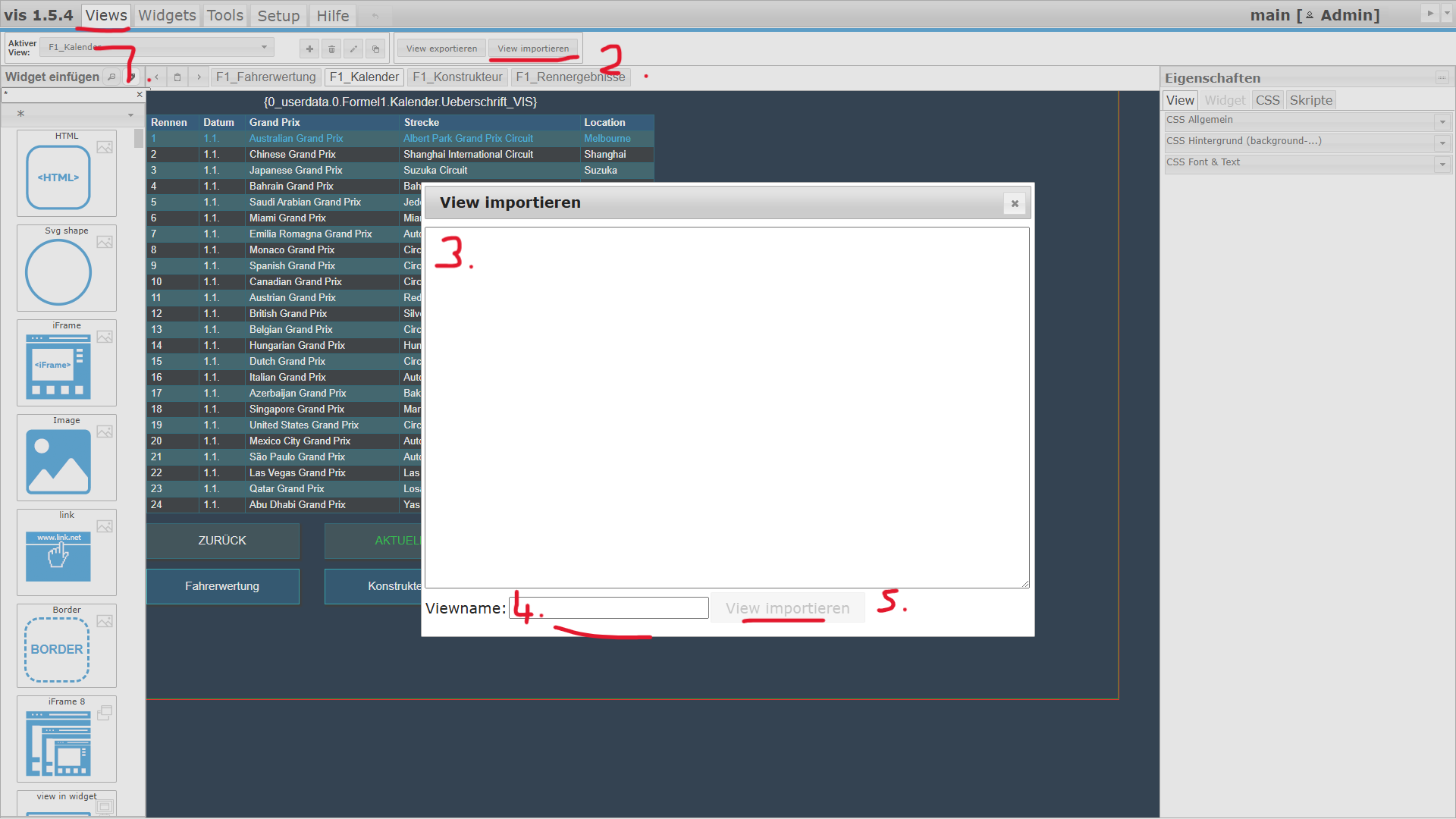
                                      Screenshot (1119).png

                                      1:
                                      2:
                                      3 : Inhalt der TXT Datei einfügen
                                      4: Name vergeben
                                      5. View Importieren

                                      Bitte benutzt das Voting rechts unten im Beitrag wenn er euch geholfen hat.
                                      Immer Daten sichern!

                                      A Walter.O.W 2 Replies Last reply
                                      0
                                      • sigi234S sigi234

                                        @andbru01 sagte in [Vorlage] Spotify Skript:

                                        @sigi234 Vis 1

                                        Screenshot (1119).png

                                        1:
                                        2:
                                        3 : Inhalt der TXT Datei einfügen
                                        4: Name vergeben
                                        5. View Importieren

                                        A Offline
                                        A Offline
                                        andbru01
                                        wrote on last edited by
                                        #742

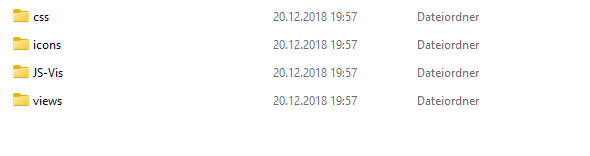
                                        @sigi234 Hallo, so sieht die heruntergeladene Visu aus. 2025-02-04 11_01_41-View eine Instanz – Datei-Explorer.png

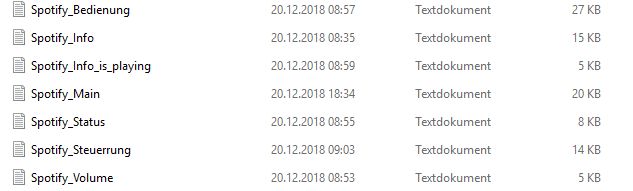
                                        Unter views sind dann mehrere txt dateien
                                        2025-02-04 11_02_48-views – Datei-Explorer.png

                                        ich weis auch nicht was ich z.B. mit dem machen soll
                                        2025-02-04 11_03_57-JS-Vis – Datei-Explorer.png
                                        wie importiere ich das?
                                        2025-02-04 11_04_34-css – Datei-Explorer.png

                                        Das einzige was ich verstehe sind die Icons. Die habe ich mal hochgeladen.

                                        1 Reply Last reply
                                        0
                                        • sigi234S sigi234

                                          @andbru01 sagte in [Vorlage] Spotify Skript:

                                          @sigi234 Vis 1

                                          Screenshot (1119).png

                                          1:
                                          2:
                                          3 : Inhalt der TXT Datei einfügen
                                          4: Name vergeben
                                          5. View Importieren

                                          Walter.O.W Offline
                                          Walter.O.W Offline
                                          Walter.O.
                                          wrote on last edited by
                                          #743

                                          @sigi234 Hallo, sigi234, habe da auch mal eine Frage zum Script: Spotify
                                          /*Version 0.5.3
                                          letzte änderung 11.02.2018 19:25
                                          Read Me !!!!!!!

                                          Nach dem Start gibt es diese Warnmeldung

                                          javascript.0 19:02:10.309 warn script.js.spotify: request package is deprecated - please use httpGet (or a stable lib like axios) instead!

                                          Was währe hier zu tun?
                                          Goggle gibt da nicht viel her (für mein Verständnis)
                                          Hoffe es ist verständlich für dich/euch

                                          sigi234S 1 Reply Last reply
                                          0
                                          Reply
                                          • Reply as topic
                                          Log in to reply
                                          • Oldest to Newest
                                          • Newest to Oldest
                                          • Most Votes


                                          Support us

                                          ioBroker
                                          Community Adapters
                                          Donate

                                          403

                                          Online

                                          32.5k

                                          Users

                                          81.7k

                                          Topics

                                          1.3m

                                          Posts
                                          Community
                                          Impressum | Datenschutz-Bestimmungen | Nutzungsbedingungen | Einwilligungseinstellungen
                                          ioBroker Community 2014-2025
                                          logo
                                          • Login

                                          • Don't have an account? Register

                                          • Login or register to search.
                                          • First post
                                            Last post
                                          0
                                          • Home
                                          • Recent
                                          • Tags
                                          • Unread 0
                                          • Categories
                                          • Unreplied
                                          • Popular
                                          • GitHub
                                          • Docu
                                          • Hilfe