




[gelöst] "node-gyp rebuild" wird ausgeführt - Warum?
-
@gaspode sagte in [gelöst] "node-gyp rebuild" wird ausgeführt - Warum?:
@sigi234
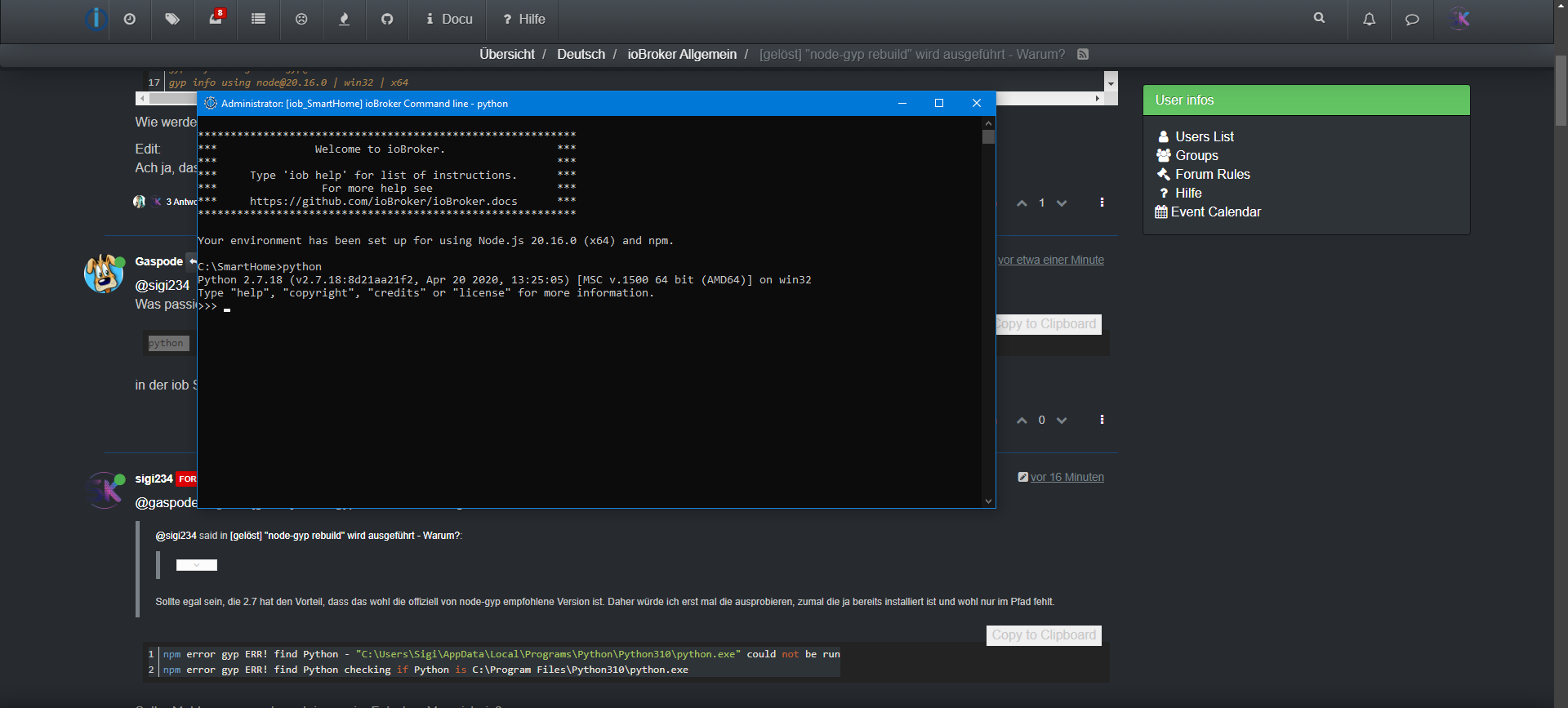
Was passiert denn jetzt beipythonin der iob Shell?
********************************************************** *** Welcome to ioBroker. *** *** *** *** Type 'iob help' for list of instructions. *** *** For more help see *** *** https://github.com/ioBroker/ioBroker.docs *** ********************************************************** Your environment has been set up for using Node.js 20.16.0 (x64) and npm. C:\SmartHome>npm i diskusage npm error code 1 npm error path C:\SmartHome\node_modules\diskusage npm error command failed npm error command C:\WINDOWS\system32\cmd.exe /d /s /c node-gyp rebuild npm error gyp info it worked if it ends with ok npm error gyp info using node-gyp@10.1.0 npm error gyp info using node@20.16.0 | win32 | x64 npm error gyp ERR! find Python npm error gyp ERR! find Python Python is not set from command line or npm configuration npm error gyp ERR! find Python Python is not set from environment variable PYTHON npm error gyp ERR! find Python checking if the py launcher can be used to find Python 3 npm error gyp ERR! find Python - executable path is "" npm error gyp ERR! find Python - "" could not be run npm error gyp ERR! find Python checking if "python3" can be used npm error gyp ERR! find Python - executable path is "" npm error gyp ERR! find Python - "" could not be run npm error gyp ERR! find Python checking if "python" can be used npm error gyp ERR! find Python - executable path is "" npm error gyp ERR! find Python - "" could not be run npm error gyp ERR! find Python checking if Python is C:\Users\Sigi\AppData\Local\Programs\Python\Python311\python.exe npm error gyp ERR! find Python - version is "" npm error gyp ERR! find Python - version is - should be >=3.6.0 npm error gyp ERR! find Python - THIS VERSION OF PYTHON IS NOT SUPPORTED npm error gyp ERR! find Python - "C:\Users\Sigi\AppData\Local\Programs\Python\Python311\python.exe" could not be run npm error gyp ERR! find Python checking if Python is C:\Program Files\Python311\python.exe npm error gyp ERR! find Python - version is "" npm error gyp ERR! find Python - version is - should be >=3.6.0 npm error gyp ERR! find Python - THIS VERSION OF PYTHON IS NOT SUPPORTED npm error gyp ERR! find Python - "C:\Program Files\Python311\python.exe" could not be run npm error gyp ERR! find Python checking if Python is C:\Users\Sigi\AppData\Local\Programs\Python\Python311-32\python.exe npm error gyp ERR! find Python - version is "" npm error gyp ERR! find Python - version is - should be >=3.6.0 npm error gyp ERR! find Python - THIS VERSION OF PYTHON IS NOT SUPPORTED npm error gyp ERR! find Python - "C:\Users\Sigi\AppData\Local\Programs\Python\Python311-32\python.exe" could not be run npm error gyp ERR! find Python checking if Python is C:\Program Files\Python311-32\python.exe npm error gyp ERR! find Python - version is "" npm error gyp ERR! find Python - version is - should be >=3.6.0 npm error gyp ERR! find Python - THIS VERSION OF PYTHON IS NOT SUPPORTED npm error gyp ERR! find Python - "C:\Program Files\Python311-32\python.exe" could not be run npm error gyp ERR! find Python checking if Python is C:\Program Files (x86)\Python311-32\python.exe npm error gyp ERR! find Python - version is "" npm error gyp ERR! find Python - version is - should be >=3.6.0 npm error gyp ERR! find Python - THIS VERSION OF PYTHON IS NOT SUPPORTED npm error gyp ERR! find Python - "C:\Program Files (x86)\Python311-32\python.exe" could not be run npm error gyp ERR! find Python checking if Python is C:\Users\Sigi\AppData\Local\Programs\Python\Python310\python.exe npm error gyp ERR! find Python - version is "" npm error gyp ERR! find Python - version is - should be >=3.6.0 npm error gyp ERR! find Python - THIS VERSION OF PYTHON IS NOT SUPPORTED npm error gyp ERR! find Python - "C:\Users\Sigi\AppData\Local\Programs\Python\Python310\python.exe" could not be run npm error gyp ERR! find Python checking if Python is C:\Program Files\Python310\python.exe npm error gyp ERR! find Python - version is "" npm error gyp ERR! find Python - version is - should be >=3.6.0 npm error gyp ERR! find Python - THIS VERSION OF PYTHON IS NOT SUPPORTED npm error gyp ERR! find Python - "C:\Program Files\Python310\python.exe" could not be run npm error gyp ERR! find Python checking if Python is C:\Users\Sigi\AppData\Local\Programs\Python\Python310-32\python.exe npm error gyp ERR! find Python - version is "" npm error gyp ERR! find Python - version is - should be >=3.6.0 npm error gyp ERR! find Python - THIS VERSION OF PYTHON IS NOT SUPPORTED npm error gyp ERR! find Python - "C:\Users\Sigi\AppData\Local\Programs\Python\Python310-32\python.exe" could not be run npm error gyp ERR! find Python checking if Python is C:\Program Files\Python310-32\python.exe npm error gyp ERR! find Python - version is "" npm error gyp ERR! find Python - version is - should be >=3.6.0 npm error gyp ERR! find Python - THIS VERSION OF PYTHON IS NOT SUPPORTED npm error gyp ERR! find Python - "C:\Program Files\Python310-32\python.exe" could not be run npm error gyp ERR! find Python checking if Python is C:\Program Files (x86)\Python310-32\python.exe npm error gyp ERR! find Python - version is "" npm error gyp ERR! find Python - version is - should be >=3.6.0 npm error gyp ERR! find Python - THIS VERSION OF PYTHON IS NOT SUPPORTED npm error gyp ERR! find Python - "C:\Program Files (x86)\Python310-32\python.exe" could not be run npm error gyp ERR! find Python checking if Python is C:\Users\Sigi\AppData\Local\Programs\Python\Python39\python.exe npm error gyp ERR! find Python - version is "" npm error gyp ERR! find Python - version is - should be >=3.6.0 npm error gyp ERR! find Python - THIS VERSION OF PYTHON IS NOT SUPPORTED npm error gyp ERR! find Python - "C:\Users\Sigi\AppData\Local\Programs\Python\Python39\python.exe" could not be run npm error gyp ERR! find Python checking if Python is C:\Program Files\Python39\python.exe npm error gyp ERR! find Python - version is "" npm error gyp ERR! find Python - version is - should be >=3.6.0 npm error gyp ERR! find Python - THIS VERSION OF PYTHON IS NOT SUPPORTED npm error gyp ERR! find Python - "C:\Program Files\Python39\python.exe" could not be run npm error gyp ERR! find Python checking if Python is C:\Users\Sigi\AppData\Local\Programs\Python\Python39-32\python.exe npm error gyp ERR! find Python - version is "" npm error gyp ERR! find Python - version is - should be >=3.6.0 npm error gyp ERR! find Python - THIS VERSION OF PYTHON IS NOT SUPPORTED npm error gyp ERR! find Python - "C:\Users\Sigi\AppData\Local\Programs\Python\Python39-32\python.exe" could not be run npm error gyp ERR! find Python checking if Python is C:\Program Files\Python39-32\python.exe npm error gyp ERR! find Python - version is "" npm error gyp ERR! find Python - version is - should be >=3.6.0 npm error gyp ERR! find Python - THIS VERSION OF PYTHON IS NOT SUPPORTED npm error gyp ERR! find Python - "C:\Program Files\Python39-32\python.exe" could not be run npm error gyp ERR! find Python checking if Python is C:\Program Files (x86)\Python39-32\python.exe npm error gyp ERR! find Python - version is "" npm error gyp ERR! find Python - version is - should be >=3.6.0 npm error gyp ERR! find Python - THIS VERSION OF PYTHON IS NOT SUPPORTED npm error gyp ERR! find Python - "C:\Program Files (x86)\Python39-32\python.exe" could not be run npm error gyp ERR! find Python checking if Python is C:\Users\Sigi\AppData\Local\Programs\Python\Python38\python.exe npm error gyp ERR! find Python - version is "" npm error gyp ERR! find Python - version is - should be >=3.6.0 npm error gyp ERR! find Python - THIS VERSION OF PYTHON IS NOT SUPPORTED npm error gyp ERR! find Python - "C:\Users\Sigi\AppData\Local\Programs\Python\Python38\python.exe" could not be run npm error gyp ERR! find Python checking if Python is C:\Program Files\Python38\python.exe npm error gyp ERR! find Python - version is "" npm error gyp ERR! find Python - version is - should be >=3.6.0 npm error gyp ERR! find Python - THIS VERSION OF PYTHON IS NOT SUPPORTED npm error gyp ERR! find Python - "C:\Program Files\Python38\python.exe" could not be run npm error gyp ERR! find Python checking if Python is C:\Users\Sigi\AppData\Local\Programs\Python\Python38-32\python.exe npm error gyp ERR! find Python - version is "" npm error gyp ERR! find Python - version is - should be >=3.6.0 npm error gyp ERR! find Python - THIS VERSION OF PYTHON IS NOT SUPPORTED npm error gyp ERR! find Python - "C:\Users\Sigi\AppData\Local\Programs\Python\Python38-32\python.exe" could not be run npm error gyp ERR! find Python checking if Python is C:\Program Files\Python38-32\python.exe npm error gyp ERR! find Python - version is "" npm error gyp ERR! find Python - version is - should be >=3.6.0 npm error gyp ERR! find Python - THIS VERSION OF PYTHON IS NOT SUPPORTED npm error gyp ERR! find Python - "C:\Program Files\Python38-32\python.exe" could not be run npm error gyp ERR! find Python checking if Python is C:\Program Files (x86)\Python38-32\python.exe npm error gyp ERR! find Python - version is "" npm error gyp ERR! find Python - version is - should be >=3.6.0 npm error gyp ERR! find Python - THIS VERSION OF PYTHON IS NOT SUPPORTED npm error gyp ERR! find Python - "C:\Program Files (x86)\Python38-32\python.exe" could not be run npm error gyp ERR! find Python npm error gyp ERR! find Python ********************************************************** npm error gyp ERR! find Python You need to install the latest version of Python. npm error gyp ERR! find Python Node-gyp should be able to find and use Python. If not, npm error gyp ERR! find Python you can try one of the following options: npm error gyp ERR! find Python - Use the switch --python="C:\Path\To\python.exe" npm error gyp ERR! find Python (accepted by both node-gyp and npm) npm error gyp ERR! find Python - Set the environment variable PYTHON npm error gyp ERR! find Python - Set the npm configuration variable python: npm error gyp ERR! find Python npm config set python "C:\Path\To\python.exe" npm error gyp ERR! find Python For more information consult the documentation at: npm error gyp ERR! find Python https://github.com/nodejs/node-gyp#installation npm error gyp ERR! find Python ********************************************************** npm error gyp ERR! find Python npm error gyp ERR! configure error npm error gyp ERR! stack Error: Could not find any Python installation to use npm error gyp ERR! stack at PythonFinder.fail (C:\Program Files\nodejs\node_modules\npm\node_modules\node-gyp\lib\find-python.js:306:11) npm error gyp ERR! stack at PythonFinder.findPython (C:\Program Files\nodejs\node_modules\npm\node_modules\node-gyp\lib\find-python.js:164:17) npm error gyp ERR! stack at process.processTicksAndRejections (node:internal/process/task_queues:95:5) npm error gyp ERR! stack at async configure (C:\Program Files\nodejs\node_modules\npm\node_modules\node-gyp\lib\configure.js:27:18) npm error gyp ERR! stack at async run (C:\Program Files\nodejs\node_modules\npm\node_modules\node-gyp\bin\node-gyp.js:81:18) npm error gyp ERR! System Windows_NT 10.0.19045 npm error gyp ERR! command "C:\\Program Files\\nodejs\\node.exe" "C:\\Program Files\\nodejs\\node_modules\\npm\\node_modules\\node-gyp\\bin\\node-gyp.js" "rebuild" npm error gyp ERR! cwd C:\SmartHome\node_modules\diskusage npm error gyp ERR! node -v v20.16.0 npm error gyp ERR! node-gyp -v v10.1.0 npm error gyp ERR! not ok npm error A complete log of this run can be found in: C:\Users\Sigi\AppData\Local\npm-cache\_logs\2024-08-20T11_21_58_639Z-debug-0.log C:\SmartHome>@sigi234
https://github.com/nodejs/node-gyp#configuring-python-dependencyAlso gucken, was alles verfügbar ist mit
py --list-pathsUnd testweise setzen mit
set npm_config_python=C:\python27
npm i diskusage
Sollte das klappen (sonst bin ich mit meinem Latein erst mal am Ende), die Variable npm_config_python im System setzen, analog zur Erweiterung von Path, nur halt als neue Variable anlegen.
Edit: Bei mir war das nicht notwendig, ich hatte Glück und er hat sich die korrekte Version automatisch rausgesucht.
-
@sigi234
https://github.com/nodejs/node-gyp#configuring-python-dependencyAlso gucken, was alles verfügbar ist mit
py --list-pathsUnd testweise setzen mit
set npm_config_python=C:\python27
npm i diskusage
Sollte das klappen (sonst bin ich mit meinem Latein erst mal am Ende), die Variable npm_config_python im System setzen, analog zur Erweiterung von Path, nur halt als neue Variable anlegen.
Edit: Bei mir war das nicht notwendig, ich hatte Glück und er hat sich die korrekte Version automatisch rausgesucht.
Ich gebe auf...
Bitte benutzt das Voting rechts unten im Beitrag wenn er euch geholfen hat.
Immer Daten sichern! -
So ganz klar ist mir die ganze Sache immer noch nicht, ich habe jetzt noch ein wenig getestet und war unter einem frischen Windows 11 mit wenigen Befehlen erfolgreich. Ich habe das in den Eingangspost geschrieben.
Ich bleibe aber dran, evtl. bekommen wir die Windows Installation ja doch mal so hin, dass node-gyp sauber aufgesetzt wird.
-
@sigi234 said in [gelöst] "node-gyp rebuild" wird ausgeführt - Warum?:
Ich gebe auf...
Hast du meinen letzten Vorschlag noch probiert?
@gaspode sagte in [gelöst] "node-gyp rebuild" wird ausgeführt - Warum?:
@sigi234 said in [gelöst] "node-gyp rebuild" wird ausgeführt - Warum?:
Ich gebe auf...
Hast du meinen letzten Vorschlag noch probiert?
Ja
Bitte benutzt das Voting rechts unten im Beitrag wenn er euch geholfen hat.
Immer Daten sichern! -
@gaspode sagte in [gelöst] "node-gyp rebuild" wird ausgeführt - Warum?:
@sigi234 said in [gelöst] "node-gyp rebuild" wird ausgeführt - Warum?:
Ich gebe auf...
Hast du meinen letzten Vorschlag noch probiert?
Ja
@sigi234 said in [gelöst] "node-gyp rebuild" wird ausgeführt - Warum?:
Ja
Du bist heute aber nicht besonders gesprächig ;)
Ich versuche Infos zu sammeln, um das Problem direkt bei der Installation anzugehen, dafür brauche ich aber eure Mithilfe.
Was sagte denn
py --list-paths?
Und das Setzen der Variable npm_config_python hat nichts verändert?
-
@sigi234 said in [gelöst] "node-gyp rebuild" wird ausgeführt - Warum?:
Ja
Du bist heute aber nicht besonders gesprächig ;)
Ich versuche Infos zu sammeln, um das Problem direkt bei der Installation anzugehen, dafür brauche ich aber eure Mithilfe.
Was sagte denn
py --list-paths?
Und das Setzen der Variable npm_config_python hat nichts verändert?
Zwar aus der Linux-Ecke, aber da hat der Installer bis vor kurzem auch noch das eigentlich längst obsolete python 2.7 angeschleppt. Ich weiß aber nicht mehr über welche Abhängigkeit das rein gekommen ist. Aktuelle Setups tun das auch nicht mehr, mein System hat nur noch python 3.xy an Bord.
-
Zwar aus der Linux-Ecke, aber da hat der Installer bis vor kurzem auch noch das eigentlich längst obsolete python 2.7 angeschleppt. Ich weiß aber nicht mehr über welche Abhängigkeit das rein gekommen ist. Aktuelle Setups tun das auch nicht mehr, mein System hat nur noch python 3.xy an Bord.
@thomas-braun
Danke für den Hinweis. Unter Windows installieren wir derzeit ja weder Python noch einen C++ Compiler während des Setups, da für 95 % aller Adapter nicht erforderlich.
Allerdings hatte der "alte" Installer diverse Software mit installiert (u.a. auch Python 2.7), die jetzt wahrscheinlich noch auf einigen PCs vor sich hin dümpelt und mehr Ärger macht als nützt.
Ich hatte mich bisher noch nie mit node-gyp beschäftigt, versuche da jetzt ein bisschen die Zusammenhänge zu kapieren und was wo wie konfiguriert wird. -
@thomas-braun
Danke für den Hinweis. Unter Windows installieren wir derzeit ja weder Python noch einen C++ Compiler während des Setups, da für 95 % aller Adapter nicht erforderlich.
Allerdings hatte der "alte" Installer diverse Software mit installiert (u.a. auch Python 2.7), die jetzt wahrscheinlich noch auf einigen PCs vor sich hin dümpelt und mehr Ärger macht als nützt.
Ich hatte mich bisher noch nie mit node-gyp beschäftigt, versuche da jetzt ein bisschen die Zusammenhänge zu kapieren und was wo wie konfiguriert wird.@gaspode sagte in [gelöst] "node-gyp rebuild" wird ausgeführt - Warum?:
da für 95 % aller Adapter nicht erforderlich.
Stimmt, ist nur für solche Adapter erforderlich, die Module reinholen die nicht bereits vorkompiliert worden sind.
Die github-Seite von node-gyp hast du ja bestimmt schon studiert, da steht eigentlich soweit alles drin, was node-gyp in welchen Versionen benötigt.
-
@gaspode sagte in [gelöst] "node-gyp rebuild" wird ausgeführt - Warum?:
da für 95 % aller Adapter nicht erforderlich.
Stimmt, ist nur für solche Adapter erforderlich, die Module reinholen die nicht bereits vorkompiliert worden sind.
Die github-Seite von node-gyp hast du ja bestimmt schon studiert, da steht eigentlich soweit alles drin, was node-gyp in welchen Versionen benötigt.
@thomas-braun said in [gelöst] "node-gyp rebuild" wird ausgeführt - Warum?:
Die github-Seite von node-gyp hast du ja bestimmt schon studiert, da steht eigentlich soweit alles drin, was node-gyp in welchen Versionen benötigt.
Jep, Danke. Auf nem jungfräulichen Rechner ist das anscheinend auch recht einfach. Auf meinen zwei Rechnern und weiteren VMs hatte ich jedenfalls keine Probleme, das zum Laufen zu bringen.
Wenn sich aber 47 verschiedene Python Versionen aus Altlasten tummeln, scheint es schwieriger zu werden. Bei @sigi234 klappt es ja anscheinend nicht, die zu verwendende Installation per Umgebungsvariable zu erzwingen, warum auch immer. Mal sehen, ob er noch weitere Infos beisteuern kann. -
@thomas-braun said in [gelöst] "node-gyp rebuild" wird ausgeführt - Warum?:
Die github-Seite von node-gyp hast du ja bestimmt schon studiert, da steht eigentlich soweit alles drin, was node-gyp in welchen Versionen benötigt.
Jep, Danke. Auf nem jungfräulichen Rechner ist das anscheinend auch recht einfach. Auf meinen zwei Rechnern und weiteren VMs hatte ich jedenfalls keine Probleme, das zum Laufen zu bringen.
Wenn sich aber 47 verschiedene Python Versionen aus Altlasten tummeln, scheint es schwieriger zu werden. Bei @sigi234 klappt es ja anscheinend nicht, die zu verwendende Installation per Umgebungsvariable zu erzwingen, warum auch immer. Mal sehen, ob er noch weitere Infos beisteuern kann.@gaspode sagte in [gelöst] "node-gyp rebuild" wird ausgeführt - Warum?:
@thomas-braun said in [gelöst] "node-gyp rebuild" wird ausgeführt - Warum?:
Bei @sigi234 klappt es ja anscheinend nicht, die zu verwendende Installation per Umgebungsvariable zu erzwingen, warum auch immer. Mal sehen, ob er noch weitere Infos beisteuern kann.
Kommen sobald ich wieder kann.
-
@sigi234 said in [gelöst] "node-gyp rebuild" wird ausgeführt - Warum?:
Ja
Du bist heute aber nicht besonders gesprächig ;)
Ich versuche Infos zu sammeln, um das Problem direkt bei der Installation anzugehen, dafür brauche ich aber eure Mithilfe.
Was sagte denn
py --list-paths?
Und das Setzen der Variable npm_config_python hat nichts verändert?
@gaspode sagte in [gelöst] "node-gyp rebuild" wird ausgeführt - Warum?:
py --list-paths
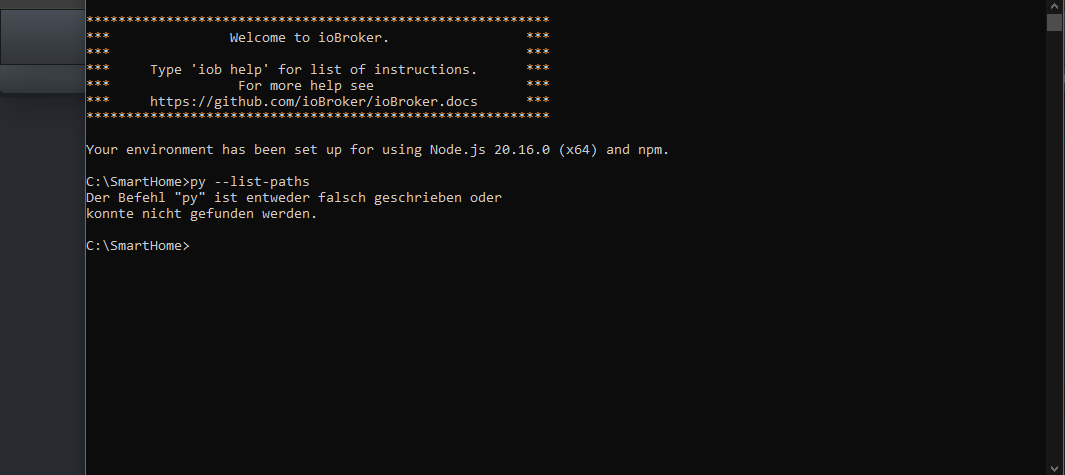
Bin ich da Richtig?
Bitte benutzt das Voting rechts unten im Beitrag wenn er euch geholfen hat.
Immer Daten sichern! -
@gaspode sagte in [gelöst] "node-gyp rebuild" wird ausgeführt - Warum?:
py --list-paths
Bin ich da Richtig?
@sigi234 said in [gelöst] "node-gyp rebuild" wird ausgeführt - Warum?:
Bin ich da Richtig?
Ja, prinzipiell schon. Anscheinend wird der Python Launcher nicht automatisch installiert, wenn man winget nutzt (im Gegensatz zur MSI Installation :( ).
Versuch bitte mal
winget install --id=Python.Launcher -eUnd dann nochmal
py --list-pathsSorry für das hin und her, ich lerne das auch gerade. :D
-
@sigi234 said in [gelöst] "node-gyp rebuild" wird ausgeführt - Warum?:
Bin ich da Richtig?
Ja, prinzipiell schon. Anscheinend wird der Python Launcher nicht automatisch installiert, wenn man winget nutzt (im Gegensatz zur MSI Installation :( ).
Versuch bitte mal
winget install --id=Python.Launcher -eUnd dann nochmal
py --list-pathsSorry für das hin und her, ich lerne das auch gerade. :D
@gaspode sagte in [gelöst] "node-gyp rebuild" wird ausgeführt - Warum?:
@sigi234 said in [gelöst] "node-gyp rebuild" wird ausgeführt - Warum?:
Bin ich da Richtig?
Ja, prinzipiell schon. Anscheinend wird der Python Launcher nicht automatisch installiert, wenn man winget nutzt (im Gegensatz zur MSI Installation :( ).
Versuch bitte mal
winget install --id=Python.Launcher -eUnd dann nochmal
py --list-pathsSorry für das hin und her, ich lerne das auch gerade. :D
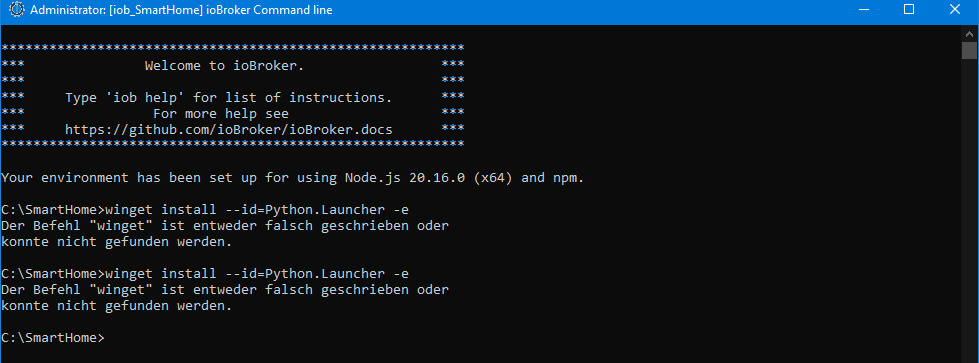
Bitte benutzt das Voting rechts unten im Beitrag wenn er euch geholfen hat.
Immer Daten sichern! -
@gaspode sagte in [gelöst] "node-gyp rebuild" wird ausgeführt - Warum?:
@sigi234 said in [gelöst] "node-gyp rebuild" wird ausgeführt - Warum?:
Bin ich da Richtig?
Ja, prinzipiell schon. Anscheinend wird der Python Launcher nicht automatisch installiert, wenn man winget nutzt (im Gegensatz zur MSI Installation :( ).
Versuch bitte mal
winget install --id=Python.Launcher -eUnd dann nochmal
py --list-pathsSorry für das hin und her, ich lerne das auch gerade. :D
-
@sigi234 said in [gelöst] "node-gyp rebuild" wird ausgeführt - Warum?:
winget install --id=Python.Launcher -e
Jetzt kapier ich gar nix mehr, winget hattest du doch gerade gestern noch verwendet?
@gaspode sagte in [gelöst] "node-gyp rebuild" wird ausgeführt - Warum?:
@sigi234 said in [gelöst] "node-gyp rebuild" wird ausgeführt - Warum?:
winget install --id=Python.Launcher -e
Jetzt kapier ich gar nix mehr, winget hattest du doch gerade gestern noch verwendet?
Nein, darum ja ich gebe auf...das kam gestern schon so
Bitte benutzt das Voting rechts unten im Beitrag wenn er euch geholfen hat.
Immer Daten sichern! -
@gaspode sagte in [gelöst] "node-gyp rebuild" wird ausgeführt - Warum?:
@sigi234 said in [gelöst] "node-gyp rebuild" wird ausgeführt - Warum?:
winget install --id=Python.Launcher -e
Jetzt kapier ich gar nix mehr, winget hattest du doch gerade gestern noch verwendet?
Nein, darum ja ich gebe auf...das kam gestern schon so
-
@sigi234
Alternativ die Installation per Download:https://www.python.org/ftp/python/3.12.5/python-3.12.5-amd64.exe
Ok, die alte Version deinstallieren?
Bitte benutzt das Voting rechts unten im Beitrag wenn er euch geholfen hat.
Immer Daten sichern! -
@sigi234 said in [gelöst] "node-gyp rebuild" wird ausgeführt - Warum?:
Ok, die alte Version deinstallieren?
Ist der Ordnung halber wohl besser, muss aber nicht sein. Auf meinem Arbeitsrechner hab ich 7 Python Versionen parallel und node-gyp funktioniert erstaunlicherweise und nimmt die richtige Version. :D
-
@sigi234 said in [gelöst] "node-gyp rebuild" wird ausgeführt - Warum?:
Ok, die alte Version deinstallieren?
Ist der Ordnung halber wohl besser, muss aber nicht sein. Auf meinem Arbeitsrechner hab ich 7 Python Versionen parallel und node-gyp funktioniert erstaunlicherweise und nimmt die richtige Version. :D
@gaspode sagte in [gelöst] "node-gyp rebuild" wird ausgeführt - Warum?:
@sigi234 said in [gelöst] "node-gyp rebuild" wird ausgeführt - Warum?:
Ok, die alte Version deinstallieren?
Ist der Ordnung halber wohl besser, muss aber nicht sein. Auf meinem Arbeitsrechner hab ich 7 Python Versionen parallel und node-gyp funktioniert erstaunlicherweise und nimmt die richtige Version. :D

Bitte benutzt das Voting rechts unten im Beitrag wenn er euch geholfen hat.
Immer Daten sichern!



742
Online32.7k
Users82.6k
Topics1.3m
Posts