



Skip to content
  • Home
  • Recent
  • Tags
  • 0 Unread 0
  • Categories
  • Unreplied
  • Popular
  • GitHub
  • Docu
  • Hilfe
Skins
  • Light
  • Brite
  • Cerulean
  • Cosmo
  • Flatly
  • Journal
  • Litera
  • Lumen
  • Lux
  • Materia
  • Minty
  • Morph
  • Pulse
  • Sandstone
  • Simplex
  • Sketchy
  • Spacelab
  • United
  • Yeti
  • Zephyr
  • Dark
  • Cyborg
  • Darkly
  • Quartz
  • Slate
  • Solar
  • Superhero
  • Vapor

  • Default (No Skin)
  • No Skin
Collapse
ioBroker Logo

Community Forum

donate donate
  1. ioBroker Community Home
  2. Deutsch
  3. ioBroker Allgemein
  4. Wir Empfehlen: Node.js 20.x :-)

NEWS

  • Jahresrückblick 2025 – unser neuer Blogbeitrag ist online! ✨
    BluefoxB
    Bluefox
    17
    1
    3.4k

  • Neuer Blogbeitrag: Monatsrückblick - Dezember 2025 🎄
    BluefoxB
    Bluefox
    13
    1
    1.1k

  • Weihnachtsangebot 2025! 🎄
    BluefoxB
    Bluefox
    25
    1
    2.5k

Wir Empfehlen: Node.js 20.x :-)

Scheduled Pinned Locked Moved ioBroker Allgemein
237 Posts 49 Posters 78.8k Views 46 Watching
  • Oldest to Newest
  • Newest to Oldest
  • Most Votes
Reply
  • Reply as topic
Log in to reply
This topic has been deleted. Only users with topic management privileges can see it.
  • FeuersturmF Feuersturm

    @chaot noch ist es die 20er Version wohl nicht fest hinterlegt. Mit folgendem Befehl steigst du um

    iob nodejs-update 20
    

    Und wenn du die 20 gegen die 18 tauscht, geht es wieder zurück.

    Alexander HauserA Offline
    Alexander HauserA Offline
    Alexander Hauser
    wrote on last edited by
    #208

    @feuersturm super dankeschön. hat ganz easy ohne Problem funktioniert.

    S 1 Reply Last reply
    0
    • Alexander HauserA Alexander Hauser

      @feuersturm super dankeschön. hat ganz easy ohne Problem funktioniert.

      S Offline
      S Offline
      shellyrulestheworld
      wrote on last edited by
      #209

      bei mir kommt leider ne Fehlermeldung: Screenshot 2025-02-01 081108.png
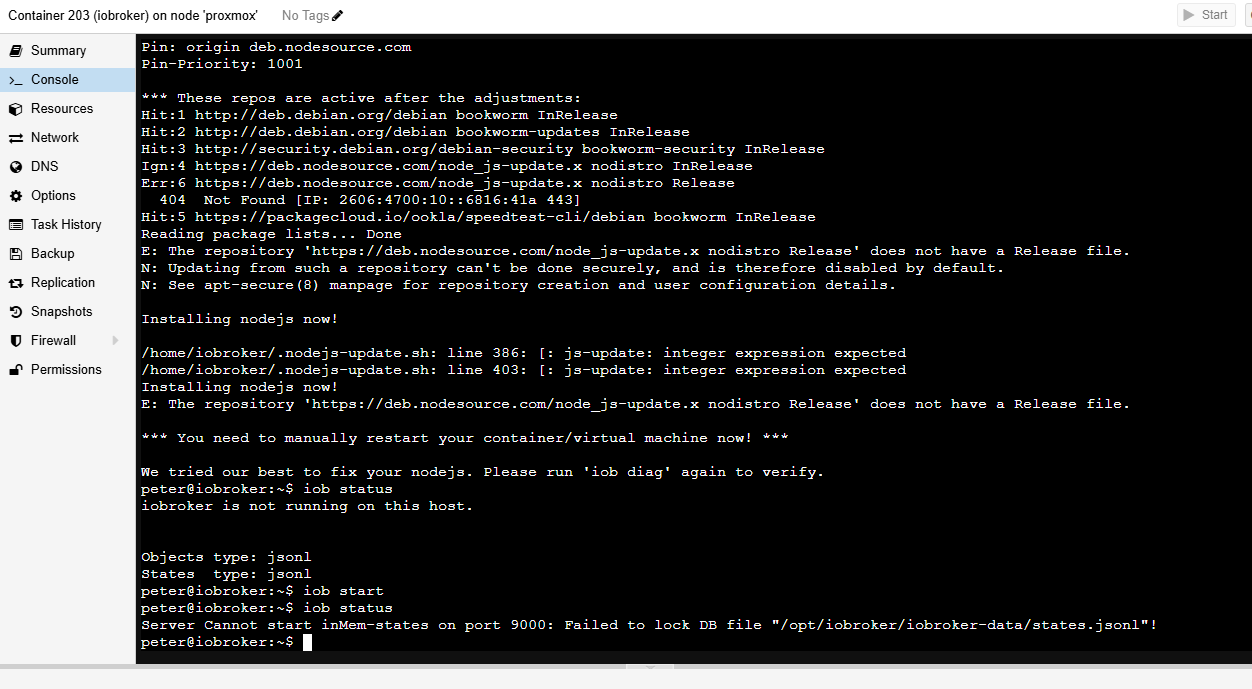
      Hat jemand eine Idee, wie ich auf nodejs 20 komme?

      Thomas BraunT 1 Reply Last reply
      0
      • S shellyrulestheworld

        bei mir kommt leider ne Fehlermeldung: Screenshot 2025-02-01 081108.png

        Hat jemand eine Idee, wie ich auf nodejs 20 komme?

        Thomas BraunT Online
        Thomas BraunT Online
        Thomas Braun
        Most Active
        wrote on last edited by Thomas Braun
        #210

        @shellyrulestheworld sagte in Wir Empfehlen: Node.js 20.x :-):

        bei mir kommt leider ne Fehlermeldung

        Text aus einem Terminal immer auch als Text in CodeTags eingebettet posten, nicht als Screenshot.

        Linux-Werkzeugkasten:
        https://forum.iobroker.net/topic/42952/der-kleine-iobroker-linux-werkzeugkasten
        NodeJS Fixer Skript:
        https://forum.iobroker.net/topic/68035/iob-node-fix-skript
        iob_diag: curl -sLf -o diag.sh https://iobroker.net/diag.sh && bash diag.sh

        S 1 Reply Last reply
        1
        • Thomas BraunT Thomas Braun

          @shellyrulestheworld sagte in Wir Empfehlen: Node.js 20.x :-):

          bei mir kommt leider ne Fehlermeldung

          Text aus einem Terminal immer auch als Text in CodeTags eingebettet posten, nicht als Screenshot.

          S Offline
          S Offline
          shellyrulestheworld
          wrote on last edited by
          #211

          @thomas-braun OK, immerhin kein Handy Foto 😜
          Nächstes Mal kommt wieder Code 😃

          Thomas BraunT 1 Reply Last reply
          0
          • S shellyrulestheworld

            @thomas-braun OK, immerhin kein Handy Foto 😜
            Nächstes Mal kommt wieder Code 😃

            Thomas BraunT Online
            Thomas BraunT Online
            Thomas Braun
            Most Active
            wrote on last edited by
            #212

            @shellyrulestheworld sagte in Wir Empfehlen: Node.js 20.x :-):

            Nächstes Mal kommt wieder Code

            Dann kann ich ja beim nächsten Mal antworten.

            Linux-Werkzeugkasten:
            https://forum.iobroker.net/topic/42952/der-kleine-iobroker-linux-werkzeugkasten
            NodeJS Fixer Skript:
            https://forum.iobroker.net/topic/68035/iob-node-fix-skript
            iob_diag: curl -sLf -o diag.sh https://iobroker.net/diag.sh && bash diag.sh

            S 1 Reply Last reply
            0
            • Thomas BraunT Thomas Braun

              @shellyrulestheworld sagte in Wir Empfehlen: Node.js 20.x :-):

              Nächstes Mal kommt wieder Code

              Dann kann ich ja beim nächsten Mal antworten.

              S Offline
              S Offline
              shellyrulestheworld
              wrote on last edited by
              #213

              @thomas-braun das Angebot nehme ich an. Irgendwie scheint es jetzt geklappt zu haben, oder?

              ioBroker nodejs fixer 2024-10-10
              You requested to install latest version from nodejs v20 tree.
              
              Your current setup is:
              /usr/bin/nodejs         v18.20.6
              /usr/bin/node           v18.20.6
              /usr/bin/npm            10.8.2
              /usr/bin/npx            10.8.2
              /usr/bin/corepack       0.29.4
              
              We found these nodejs versions available for installation:
              
              nodejs:
                Installed: 18.20.6-1nodesource1
                Candidate: 18.20.6-1nodesource1
                Version table:
               *** 18.20.6-1nodesource1 100
                      100 /var/lib/dpkg/status
                   18.19.0+dfsg-6~deb12u2 500
                      500 http://deb.debian.org/debian bookworm/main amd64 Packages
                   18.19.0+dfsg-6~deb12u1 500
                      500 http://security.debian.org/debian-security bookworm-security/main amd64 Packages


              Nothing to do - Your installation is using the correct paths.
              
              You are running nodejs v18.20.6. Do you want to install latest version from nodejs v.20 tree? 
              
              Press <y> to continue or any other key to quit
              Trying to fix your installation now. Please be patient.
              rm: cannot remove '/etc/apt/keyrings/nodesource.gpg 2> /dev/null': No such file or directory
              
              Virtualization: lxc
              Waiting for ioBroker to shut down - Give me a minute...
              ############################################################
              
              Removing dfsg-nodejs
              
              
              *** These repos are active on your system:
              Hit:1 http://security.debian.org/debian-security bookworm-security InRelease
              Hit:2 http://deb.debian.org/debian bookworm InRelease   
              Hit:3 http://deb.debian.org/debian bookworm-updates InRelease
              Hit:4 https://packagecloud.io/ookla/speedtest-cli/debian bookworm InRelease
              Reading package lists... Done
              
              *** Installing ca-certificates, curl and gnupg, just in case they are missing.
              
              *** Creating new /etc/apt/sources.list.d/nodesource.list and pinning source
              
              deb [signed-by=/etc/apt/keyrings/nodesource.gpg] https://deb.nodesource.com/node_20.x nodistro main
              Package: nodejs
              Pin: origin deb.nodesource.com
              Pin-Priority: 1001
              
              *** These repos are active after the adjustments:
              Hit:1 http://deb.debian.org/debian bookworm InRelease
              Hit:2 http://security.debian.org/debian-security bookworm-security InRelease
              Hit:3 http://deb.debian.org/debian bookworm-updates InRelease                                                                                                
              Get:4 https://deb.nodesource.com/node_20.x nodistro InRelease [12.1 kB]                                                                                      
              Get:6 https://deb.nodesource.com/node_20.x nodistro/main amd64 Packages [10.4 kB]                                                     
              Hit:5 https://packagecloud.io/ookla/speedtest-cli/debian bookworm InRelease
              Fetched 22.5 kB in 1s (18.6 kB/s)
              Reading package lists... Done
              
              Installing nodejs now!
              
              (Reading database ... 43850 files and directories currently installed.)
              Preparing to unpack .../nodejs_20.18.2-1nodesource1_amd64.deb ...
              Detected old npm client, removing...
              Unpacking nodejs (20.18.2-1nodesource1) over (18.20.6-1nodesource1) ...
              Setting up nodejs (20.18.2-1nodesource1) ...
              Processing triggers for man-db (2.11.2-2) ...
              Installing nodejs now!
              
              *** You need to manually restart your container/virtual machine now! *** 
              
              We tried our best to fix your nodejs. Please run 'iob diag' again to verify.
              peter@iobroker:~$ 
              
              Thomas BraunT 1 Reply Last reply
              0
              • S shellyrulestheworld

                @thomas-braun das Angebot nehme ich an. Irgendwie scheint es jetzt geklappt zu haben, oder?

                ioBroker nodejs fixer 2024-10-10
                You requested to install latest version from nodejs v20 tree.
                
                Your current setup is:
                /usr/bin/nodejs         v18.20.6
                /usr/bin/node           v18.20.6
                /usr/bin/npm            10.8.2
                /usr/bin/npx            10.8.2
                /usr/bin/corepack       0.29.4
                
                We found these nodejs versions available for installation:
                
                nodejs:
                  Installed: 18.20.6-1nodesource1
                  Candidate: 18.20.6-1nodesource1
                  Version table:
                 *** 18.20.6-1nodesource1 100
                        100 /var/lib/dpkg/status
                     18.19.0+dfsg-6~deb12u2 500
                        500 http://deb.debian.org/debian bookworm/main amd64 Packages
                     18.19.0+dfsg-6~deb12u1 500
                        500 http://security.debian.org/debian-security bookworm-security/main amd64 Packages


                Nothing to do - Your installation is using the correct paths.
                
                You are running nodejs v18.20.6. Do you want to install latest version from nodejs v.20 tree? 
                
                Press <y> to continue or any other key to quit
                Trying to fix your installation now. Please be patient.
                rm: cannot remove '/etc/apt/keyrings/nodesource.gpg 2> /dev/null': No such file or directory
                
                Virtualization: lxc
                Waiting for ioBroker to shut down - Give me a minute...
                ############################################################
                
                Removing dfsg-nodejs
                
                
                *** These repos are active on your system:
                Hit:1 http://security.debian.org/debian-security bookworm-security InRelease
                Hit:2 http://deb.debian.org/debian bookworm InRelease   
                Hit:3 http://deb.debian.org/debian bookworm-updates InRelease
                Hit:4 https://packagecloud.io/ookla/speedtest-cli/debian bookworm InRelease
                Reading package lists... Done
                
                *** Installing ca-certificates, curl and gnupg, just in case they are missing.
                
                *** Creating new /etc/apt/sources.list.d/nodesource.list and pinning source
                
                deb [signed-by=/etc/apt/keyrings/nodesource.gpg] https://deb.nodesource.com/node_20.x nodistro main
                Package: nodejs
                Pin: origin deb.nodesource.com
                Pin-Priority: 1001
                
                *** These repos are active after the adjustments:
                Hit:1 http://deb.debian.org/debian bookworm InRelease
                Hit:2 http://security.debian.org/debian-security bookworm-security InRelease
                Hit:3 http://deb.debian.org/debian bookworm-updates InRelease                                                                                                
                Get:4 https://deb.nodesource.com/node_20.x nodistro InRelease [12.1 kB]                                                                                      
                Get:6 https://deb.nodesource.com/node_20.x nodistro/main amd64 Packages [10.4 kB]                                                     
                Hit:5 https://packagecloud.io/ookla/speedtest-cli/debian bookworm InRelease
                Fetched 22.5 kB in 1s (18.6 kB/s)
                Reading package lists... Done
                
                Installing nodejs now!
                
                (Reading database ... 43850 files and directories currently installed.)
                Preparing to unpack .../nodejs_20.18.2-1nodesource1_amd64.deb ...
                Detected old npm client, removing...
                Unpacking nodejs (20.18.2-1nodesource1) over (18.20.6-1nodesource1) ...
                Setting up nodejs (20.18.2-1nodesource1) ...
                Processing triggers for man-db (2.11.2-2) ...
                Installing nodejs now!
                
                *** You need to manually restart your container/virtual machine now! *** 
                
                We tried our best to fix your nodejs. Please run 'iob diag' again to verify.
                peter@iobroker:~$ 
                
                Thomas BraunT Online
                Thomas BraunT Online
                Thomas Braun
                Most Active
                wrote on last edited by
                #214

                @shellyrulestheworld sagte in Wir Empfehlen: Node.js 20.x :-):

                Irgendwie scheint es jetzt geklappt zu haben, oder?

                Vermutlich. Container neugestartet?
                Dann nochmal

                iob nodejs-update
                

                Da sollte dann auch was passendes stehen.

                Linux-Werkzeugkasten:
                https://forum.iobroker.net/topic/42952/der-kleine-iobroker-linux-werkzeugkasten
                NodeJS Fixer Skript:
                https://forum.iobroker.net/topic/68035/iob-node-fix-skript
                iob_diag: curl -sLf -o diag.sh https://iobroker.net/diag.sh && bash diag.sh

                S 1 Reply Last reply
                0
                • Thomas BraunT Thomas Braun

                  @shellyrulestheworld sagte in Wir Empfehlen: Node.js 20.x :-):

                  Irgendwie scheint es jetzt geklappt zu haben, oder?

                  Vermutlich. Container neugestartet?
                  Dann nochmal

                  iob nodejs-update
                  

                  Da sollte dann auch was passendes stehen.

                  S Offline
                  S Offline
                  shellyrulestheworld
                  wrote on last edited by
                  #215

                  @thomas-braun genau. Ich habe den Container neu gestartet. jetzt kommt folgdendes:

                  ioBroker nodejs fixer 2024-10-10
                  
                  Recommended nodejs-version is: 20.18.2
                  Checking your installation now. Please be patient!
                  
                  Your current setup is:
                  /usr/bin/nodejs         v20.18.2
                  /usr/bin/node           v20.18.2
                  /usr/bin/npm            10.8.2
                  /usr/bin/npx            10.8.2
                  /usr/bin/corepack       0.29.4
                  
                  We found these nodejs versions available for installation:
                  
                  nodejs:
                    Installed: 20.18.2-1nodesource1
                    Candidate: 20.18.2-1nodesource1
                    Version table:
                   *** 20.18.2-1nodesource1 1001
                          500 https://deb.nodesource.com/node_20.x nodistro/main amd64 Packages
                          100 /var/lib/dpkg/status
                       20.18.1-1nodesource1 1001
                          500 https://deb.nodesource.com/node_20.x nodistro/main amd64 Packages
                       20.18.0-1nodesource1 1001
                          500 https://deb.nodesource.com/node_20.x nodistro/main amd64 Packages
                       20.17.0-1nodesource1 1001
                          500 https://deb.nodesource.com/node_20.x nodistro/main amd64 Packages
                       20.16.0-1nodesource1 1001
                          500 https://deb.nodesource.com/node_20.x nodistro/main amd64 Packages
                       20.15.1-1nodesource1 1001
                          500 https://deb.nodesource.com/node_20.x nodistro/main amd64 Packages
                       20.15.0-1nodesource1 1001
                          500 https://deb.nodesource.com/node_20.x nodistro/main amd64 Packages
                       20.14.0-1nodesource1 1001
                          500 https://deb.nodesource.com/node_20.x nodistro/main amd64 Packages
                       20.13.1-1nodesource1 1001
                          500 https://deb.nodesource.com/node_20.x nodistro/main amd64 Packages
                       20.13.0-1nodesource1 1001
                          500 https://deb.nodesource.com/node_20.x nodistro/main amd64 Packages
                       20.12.2-1nodesource1 1001
                          500 https://deb.nodesource.com/node_20.x nodistro/main amd64 Packages
                       20.12.1-1nodesource1 1001
                          500 https://deb.nodesource.com/node_20.x nodistro/main amd64 Packages
                       20.12.0-1nodesource1 1001
                          500 https://deb.nodesource.com/node_20.x nodistro/main amd64 Packages
                       20.11.1-1nodesource1 1001
                          500 https://deb.nodesource.com/node_20.x nodistro/main amd64 Packages
                       20.11.0-1nodesource1 1001
                          500 https://deb.nodesource.com/node_20.x nodistro/main amd64 Packages
                       20.10.0-1nodesource1 1001
                          500 https://deb.nodesource.com/node_20.x nodistro/main amd64 Packages
                       20.9.0-1nodesource1 1001
                          500 https://deb.nodesource.com/node_20.x nodistro/main amd64 Packages
                       20.8.1-1nodesource1 1001
                          500 https://deb.nodesource.com/node_20.x nodistro/main amd64 Packages
                       20.8.0-1nodesource1 1001
                          500 https://deb.nodesource.com/node_20.x nodistro/main amd64 Packages
                       20.7.0-1nodesource1 1001
                          500 https://deb.nodesource.com/node_20.x nodistro/main amd64 Packages
                       20.6.1-1nodesource1 1001
                          500 https://deb.nodesource.com/node_20.x nodistro/main amd64 Packages
                       20.6.0-1nodesource1 1001
                          500 https://deb.nodesource.com/node_20.x nodistro/main amd64 Packages
                       20.5.1-1nodesource1 1001
                          500 https://deb.nodesource.com/node_20.x nodistro/main amd64 Packages
                       20.5.0-1nodesource1 1001
                          500 https://deb.nodesource.com/node_20.x nodistro/main amd64 Packages
                       20.4.0-1nodesource1 1001
                          500 https://deb.nodesource.com/node_20.x nodistro/main amd64 Packages
                       20.3.1-1nodesource1 1001
                          500 https://deb.nodesource.com/node_20.x nodistro/main amd64 Packages
                       20.3.0-1nodesource1 1001
                          500 https://deb.nodesource.com/node_20.x nodistro/main amd64 Packages
                       20.2.0-1nodesource1 1001
                          500 https://deb.nodesource.com/node_20.x nodistro/main amd64 Packages
                       20.1.0-1nodesource1 1001
                          500 https://deb.nodesource.com/node_20.x nodistro/main amd64 Packages
                       20.0.0-1nodesource1 1001
                          500 https://deb.nodesource.com/node_20.x nodistro/main amd64 Packages
                       18.19.0+dfsg-6~deb12u2 500
                          500 http://deb.debian.org/debian bookworm/main amd64 Packages
                       18.19.0+dfsg-6~deb12u1 500
                          500 http://security.debian.org/debian-security bookworm-security/main amd64 Packages


                  Nothing to do - Your installation is using the correct paths.
                  Nothing to do - Your version is the recommended one.
                  
                  ***You can now keep your whole system up-to-date using the usual 'sudo apt update && sudo apt full-upgrade' commands. ***
                  *** DO NOT USE node version managers like 'nvm', 'n' and others in parallel. They will break your current installation! ***
                  
                   *** DO NOT use 'nodejs-update' as part of a regular update process! ***
                  peter@iobroker:~$ 
                  

                  Komischerweise steht im IOB folgendes:

                  CPU: 14,58 %
                  RAM: 28 %
                  Betriebszeit: 0h
                  Verfügbar: 7.0.6
                  Installiert: 7.0.6
                  Ereignisse: ⇥40 / ↦13
                  Plattform: linux
                  Betriebssystem: linux
                  Architektur: x64
                  CPUs: 4
                  Geschwindigkeit: 2799 MHz
                  Modell: Intel(R) Celeron(R) N5105 @ 2.00GHz
                  RAM: 8 GB
                  System-Betriebszeit: 00:00:48
                  Node.js: v18.20.6
                  time: 1738393951080
                  timeOffset: -60
                  NPM: 10.8.2
                  Adapter-Anzahl: 559
                  Datenträgergröße: 13.7 GB
                  Freier Festplattenspeicher: 5.3 GB
                  Aktive Instanzen: 7
                  Pfad: /opt/iobroker/
                  Betriebszeit: 00:00:43
                  
                  Thomas BraunT 1 Reply Last reply
                  0
                  • S shellyrulestheworld

                    @thomas-braun genau. Ich habe den Container neu gestartet. jetzt kommt folgdendes:

                    ioBroker nodejs fixer 2024-10-10
                    
                    Recommended nodejs-version is: 20.18.2
                    Checking your installation now. Please be patient!
                    
                    Your current setup is:
                    /usr/bin/nodejs         v20.18.2
                    /usr/bin/node           v20.18.2
                    /usr/bin/npm            10.8.2
                    /usr/bin/npx            10.8.2
                    /usr/bin/corepack       0.29.4
                    
                    We found these nodejs versions available for installation:
                    
                    nodejs:
                      Installed: 20.18.2-1nodesource1
                      Candidate: 20.18.2-1nodesource1
                      Version table:
                     *** 20.18.2-1nodesource1 1001
                            500 https://deb.nodesource.com/node_20.x nodistro/main amd64 Packages
                            100 /var/lib/dpkg/status
                         20.18.1-1nodesource1 1001
                            500 https://deb.nodesource.com/node_20.x nodistro/main amd64 Packages
                         20.18.0-1nodesource1 1001
                            500 https://deb.nodesource.com/node_20.x nodistro/main amd64 Packages
                         20.17.0-1nodesource1 1001
                            500 https://deb.nodesource.com/node_20.x nodistro/main amd64 Packages
                         20.16.0-1nodesource1 1001
                            500 https://deb.nodesource.com/node_20.x nodistro/main amd64 Packages
                         20.15.1-1nodesource1 1001
                            500 https://deb.nodesource.com/node_20.x nodistro/main amd64 Packages
                         20.15.0-1nodesource1 1001
                            500 https://deb.nodesource.com/node_20.x nodistro/main amd64 Packages
                         20.14.0-1nodesource1 1001
                            500 https://deb.nodesource.com/node_20.x nodistro/main amd64 Packages
                         20.13.1-1nodesource1 1001
                            500 https://deb.nodesource.com/node_20.x nodistro/main amd64 Packages
                         20.13.0-1nodesource1 1001
                            500 https://deb.nodesource.com/node_20.x nodistro/main amd64 Packages
                         20.12.2-1nodesource1 1001
                            500 https://deb.nodesource.com/node_20.x nodistro/main amd64 Packages
                         20.12.1-1nodesource1 1001
                            500 https://deb.nodesource.com/node_20.x nodistro/main amd64 Packages
                         20.12.0-1nodesource1 1001
                            500 https://deb.nodesource.com/node_20.x nodistro/main amd64 Packages
                         20.11.1-1nodesource1 1001
                            500 https://deb.nodesource.com/node_20.x nodistro/main amd64 Packages
                         20.11.0-1nodesource1 1001
                            500 https://deb.nodesource.com/node_20.x nodistro/main amd64 Packages
                         20.10.0-1nodesource1 1001
                            500 https://deb.nodesource.com/node_20.x nodistro/main amd64 Packages
                         20.9.0-1nodesource1 1001
                            500 https://deb.nodesource.com/node_20.x nodistro/main amd64 Packages
                         20.8.1-1nodesource1 1001
                            500 https://deb.nodesource.com/node_20.x nodistro/main amd64 Packages
                         20.8.0-1nodesource1 1001
                            500 https://deb.nodesource.com/node_20.x nodistro/main amd64 Packages
                         20.7.0-1nodesource1 1001
                            500 https://deb.nodesource.com/node_20.x nodistro/main amd64 Packages
                         20.6.1-1nodesource1 1001
                            500 https://deb.nodesource.com/node_20.x nodistro/main amd64 Packages
                         20.6.0-1nodesource1 1001
                            500 https://deb.nodesource.com/node_20.x nodistro/main amd64 Packages
                         20.5.1-1nodesource1 1001
                            500 https://deb.nodesource.com/node_20.x nodistro/main amd64 Packages
                         20.5.0-1nodesource1 1001
                            500 https://deb.nodesource.com/node_20.x nodistro/main amd64 Packages
                         20.4.0-1nodesource1 1001
                            500 https://deb.nodesource.com/node_20.x nodistro/main amd64 Packages
                         20.3.1-1nodesource1 1001
                            500 https://deb.nodesource.com/node_20.x nodistro/main amd64 Packages
                         20.3.0-1nodesource1 1001
                            500 https://deb.nodesource.com/node_20.x nodistro/main amd64 Packages
                         20.2.0-1nodesource1 1001
                            500 https://deb.nodesource.com/node_20.x nodistro/main amd64 Packages
                         20.1.0-1nodesource1 1001
                            500 https://deb.nodesource.com/node_20.x nodistro/main amd64 Packages
                         20.0.0-1nodesource1 1001
                            500 https://deb.nodesource.com/node_20.x nodistro/main amd64 Packages
                         18.19.0+dfsg-6~deb12u2 500
                            500 http://deb.debian.org/debian bookworm/main amd64 Packages
                         18.19.0+dfsg-6~deb12u1 500
                            500 http://security.debian.org/debian-security bookworm-security/main amd64 Packages


                    Nothing to do - Your installation is using the correct paths.
                    Nothing to do - Your version is the recommended one.
                    
                    ***You can now keep your whole system up-to-date using the usual 'sudo apt update && sudo apt full-upgrade' commands. ***
                    *** DO NOT USE node version managers like 'nvm', 'n' and others in parallel. They will break your current installation! ***
                    
                     *** DO NOT use 'nodejs-update' as part of a regular update process! ***
                    peter@iobroker:~$ 
                    

                    Komischerweise steht im IOB folgendes:

                    CPU: 14,58 %
                    RAM: 28 %
                    Betriebszeit: 0h
                    Verfügbar: 7.0.6
                    Installiert: 7.0.6
                    Ereignisse: ⇥40 / ↦13
                    Plattform: linux
                    Betriebssystem: linux
                    Architektur: x64
                    CPUs: 4
                    Geschwindigkeit: 2799 MHz
                    Modell: Intel(R) Celeron(R) N5105 @ 2.00GHz
                    RAM: 8 GB
                    System-Betriebszeit: 00:00:48
                    Node.js: v18.20.6
                    time: 1738393951080
                    timeOffset: -60
                    NPM: 10.8.2
                    Adapter-Anzahl: 559
                    Datenträgergröße: 13.7 GB
                    Freier Festplattenspeicher: 5.3 GB
                    Aktive Instanzen: 7
                    Pfad: /opt/iobroker/
                    Betriebszeit: 00:00:43
                    
                    Thomas BraunT Online
                    Thomas BraunT Online
                    Thomas Braun
                    Most Active
                    wrote on last edited by
                    #216

                    @shellyrulestheworld sagte in Wir Empfehlen: Node.js 20.x :-):

                    Nothing to do - Your installation is using the correct paths.
                    Nothing to do - Your version is the recommended one.

                    Alles richtig. ioBroker-GUI neuladen.

                    Linux-Werkzeugkasten:
                    https://forum.iobroker.net/topic/42952/der-kleine-iobroker-linux-werkzeugkasten
                    NodeJS Fixer Skript:
                    https://forum.iobroker.net/topic/68035/iob-node-fix-skript
                    iob_diag: curl -sLf -o diag.sh https://iobroker.net/diag.sh && bash diag.sh

                    S 1 Reply Last reply
                    1
                    • Thomas BraunT Thomas Braun

                      @shellyrulestheworld sagte in Wir Empfehlen: Node.js 20.x :-):

                      Nothing to do - Your installation is using the correct paths.
                      Nothing to do - Your version is the recommended one.

                      Alles richtig. ioBroker-GUI neuladen.

                      S Offline
                      S Offline
                      shellyrulestheworld
                      wrote on last edited by
                      #217

                      @thomas-braun perfekt. Wie immer: herzlichen Dank für deinen Support :-)

                      T 1 Reply Last reply
                      0
                      • M Offline
                        M Offline
                        Maddin77
                        wrote on last edited by
                        #218

                        Servus zusammen

                        hoffe ich darf hier bissi Fragen
                        ich bin ziemlich neu in der Welt

                        und IOB möchte gerne das ich Node update, allerdings habe ich ziemlich keine Ahnung davon
                        bei mir läuft IOB auf einem Synology NAS als Container

                        soll ich im NAS Terminal updaten oder im IOB
                        was wäre zu bevorzugen?

                        danke schon mal für eure hilfe

                        Thomas BraunT 1 Reply Last reply
                        0
                        • M Maddin77

                          Servus zusammen

                          hoffe ich darf hier bissi Fragen
                          ich bin ziemlich neu in der Welt

                          und IOB möchte gerne das ich Node update, allerdings habe ich ziemlich keine Ahnung davon
                          bei mir läuft IOB auf einem Synology NAS als Container

                          soll ich im NAS Terminal updaten oder im IOB
                          was wäre zu bevorzugen?

                          danke schon mal für eure hilfe

                          Thomas BraunT Online
                          Thomas BraunT Online
                          Thomas Braun
                          Most Active
                          wrote on last edited by
                          #219

                          @maddin77

                          Von welcher Version auf welche neue Version?

                          Linux-Werkzeugkasten:
                          https://forum.iobroker.net/topic/42952/der-kleine-iobroker-linux-werkzeugkasten
                          NodeJS Fixer Skript:
                          https://forum.iobroker.net/topic/68035/iob-node-fix-skript
                          iob_diag: curl -sLf -o diag.sh https://iobroker.net/diag.sh && bash diag.sh

                          M 1 Reply Last reply
                          0
                          • Thomas BraunT Thomas Braun

                            @maddin77

                            Von welcher Version auf welche neue Version?

                            M Offline
                            M Offline
                            Maddin77
                            wrote on last edited by
                            #220

                            @thomas-braun sagte in Wir Empfehlen: Node.js 20.x :-):

                            @maddin77

                            Von welcher Version auf welche neue Version?

                            im Terminal wird mir das angezeigt
                            /opt/iobroker$ node -v

                            v18.20.3
                            /opt/iobroker$

                            manche Adapter schreiben einfach >20

                            Thomas BraunT 1 Reply Last reply
                            0
                            • M Maddin77

                              @thomas-braun sagte in Wir Empfehlen: Node.js 20.x :-):

                              @maddin77

                              Von welcher Version auf welche neue Version?

                              im Terminal wird mir das angezeigt
                              /opt/iobroker$ node -v

                              v18.20.3
                              /opt/iobroker$

                              manche Adapter schreiben einfach >20

                              Thomas BraunT Online
                              Thomas BraunT Online
                              Thomas Braun
                              Most Active
                              wrote on last edited by
                              #221

                              @maddin77

                              Dann roll einen aktuellen Container drüber.

                              Linux-Werkzeugkasten:
                              https://forum.iobroker.net/topic/42952/der-kleine-iobroker-linux-werkzeugkasten
                              NodeJS Fixer Skript:
                              https://forum.iobroker.net/topic/68035/iob-node-fix-skript
                              iob_diag: curl -sLf -o diag.sh https://iobroker.net/diag.sh && bash diag.sh

                              M 1 Reply Last reply
                              0
                              • Thomas BraunT Thomas Braun

                                @maddin77

                                Dann roll einen aktuellen Container drüber.

                                M Offline
                                M Offline
                                Maddin77
                                wrote on last edited by
                                #222

                                @thomas-braun sagte in Wir Empfehlen: Node.js 20.x :-):

                                @maddin77

                                Dann roll einen aktuellen Container drüber.

                                ist das dann mit

                                sudo apt-get install -y nodejs

                                Thomas BraunT 1 Reply Last reply
                                0
                                • M Maddin77

                                  @thomas-braun sagte in Wir Empfehlen: Node.js 20.x :-):

                                  @maddin77

                                  Dann roll einen aktuellen Container drüber.

                                  ist das dann mit

                                  sudo apt-get install -y nodejs

                                  Thomas BraunT Online
                                  Thomas BraunT Online
                                  Thomas Braun
                                  Most Active
                                  wrote on last edited by
                                  #223

                                  @maddin77

                                  Nein. Du nimmst das aktuelle Container-Image und tauschst die Umgebung für den ioBroker aus.

                                  Linux-Werkzeugkasten:
                                  https://forum.iobroker.net/topic/42952/der-kleine-iobroker-linux-werkzeugkasten
                                  NodeJS Fixer Skript:
                                  https://forum.iobroker.net/topic/68035/iob-node-fix-skript
                                  iob_diag: curl -sLf -o diag.sh https://iobroker.net/diag.sh && bash diag.sh

                                  M 1 Reply Last reply
                                  0
                                  • Thomas BraunT Thomas Braun

                                    @maddin77

                                    Nein. Du nimmst das aktuelle Container-Image und tauschst die Umgebung für den ioBroker aus.

                                    M Offline
                                    M Offline
                                    Maddin77
                                    wrote on last edited by
                                    #224

                                    @thomas-braun

                                    o-Gott

                                    da bin ich aktuell etwas überfordert damit, sorry

                                    Thomas BraunT Samson71S 2 Replies Last reply
                                    0
                                    • M Maddin77

                                      @thomas-braun

                                      o-Gott

                                      da bin ich aktuell etwas überfordert damit, sorry

                                      Thomas BraunT Online
                                      Thomas BraunT Online
                                      Thomas Braun
                                      Most Active
                                      wrote on last edited by
                                      #225

                                      @maddin77

                                      Gibt Anleitungen dazu.
                                      Du musst deine Kiste ja verwalten und pflegen können.

                                      Linux-Werkzeugkasten:
                                      https://forum.iobroker.net/topic/42952/der-kleine-iobroker-linux-werkzeugkasten
                                      NodeJS Fixer Skript:
                                      https://forum.iobroker.net/topic/68035/iob-node-fix-skript
                                      iob_diag: curl -sLf -o diag.sh https://iobroker.net/diag.sh && bash diag.sh

                                      1 Reply Last reply
                                      0
                                      • M Offline
                                        M Offline
                                        Maddin77
                                        wrote on last edited by
                                        #226

                                        @thomas-braun

                                        theoretisch wäre das schön, ja
                                        aber das meiste macht man selten.

                                        ich hoffe immer das Adapter Update im IOB langt.......
                                        aber so ein komplett hab ich immer zu viel angst, das danach was nicht mehr geht und ich nicht weiter komme.

                                        aber dann werde ich wohl mal lesen und suchen müssen
                                        danke

                                        Thomas BraunT 1 Reply Last reply
                                        0
                                        • M Maddin77

                                          @thomas-braun

                                          theoretisch wäre das schön, ja
                                          aber das meiste macht man selten.

                                          ich hoffe immer das Adapter Update im IOB langt.......
                                          aber so ein komplett hab ich immer zu viel angst, das danach was nicht mehr geht und ich nicht weiter komme.

                                          aber dann werde ich wohl mal lesen und suchen müssen
                                          danke

                                          Thomas BraunT Online
                                          Thomas BraunT Online
                                          Thomas Braun
                                          Most Active
                                          wrote on last edited by
                                          #227

                                          @maddin77 sagte in Wir Empfehlen: Node.js 20.x :-):

                                          ich hoffe immer das Adapter Update im IOB langt.......

                                          Nein, tut es nicht.

                                          aber dann werde ich wohl mal lesen und suchen müssen

                                          Ja. Irgendwie haste das Ding ja auch drauf bekommen.

                                          Linux-Werkzeugkasten:
                                          https://forum.iobroker.net/topic/42952/der-kleine-iobroker-linux-werkzeugkasten
                                          NodeJS Fixer Skript:
                                          https://forum.iobroker.net/topic/68035/iob-node-fix-skript
                                          iob_diag: curl -sLf -o diag.sh https://iobroker.net/diag.sh && bash diag.sh

                                          1 Reply Last reply
                                          1
                                          Reply
                                          • Reply as topic
                                          Log in to reply
                                          • Oldest to Newest
                                          • Newest to Oldest
                                          • Most Votes


                                          Support us

                                          ioBroker
                                          Community Adapters
                                          Donate
                                          FAQ Cloud / IOT
                                          HowTo: Node.js-Update
                                          HowTo: Backup/Restore
                                          Downloads
                                          BLOG

                                          288

                                          Online

                                          32.7k

                                          Users

                                          82.4k

                                          Topics

                                          1.3m

                                          Posts
                                          Community
                                          Impressum | Datenschutz-Bestimmungen | Nutzungsbedingungen | Einwilligungseinstellungen
                                          ioBroker Community 2014-2025
                                          logo
                                          • Login

                                          • Don't have an account? Register

                                          • Login or register to search.
                                          • First post
                                            Last post
                                          0
                                          • Home
                                          • Recent
                                          • Tags
                                          • Unread 0
                                          • Categories
                                          • Unreplied
                                          • Popular
                                          • GitHub
                                          • Docu
                                          • Hilfe
