Skip to content
  • Home
  • Recent
  • Tags
  • 0 Unread 0
  • Categories
  • Unreplied
  • Popular
  • GitHub
  • Docu
  • Hilfe
Skins
  • Light
  • Brite
  • Cerulean
  • Cosmo
  • Flatly
  • Journal
  • Litera
  • Lumen
  • Lux
  • Materia
  • Minty
  • Morph
  • Pulse
  • Sandstone
  • Simplex
  • Sketchy
  • Spacelab
  • United
  • Yeti
  • Zephyr
  • Dark
  • Cyborg
  • Darkly
  • Quartz
  • Slate
  • Solar
  • Superhero
  • Vapor

  • Default (No Skin)
  • No Skin
Collapse
ioBroker Logo

Community Forum

donate donate
  1. ioBroker Community Home
  2. Deutsch
  3. ioBroker Allgemein
  4. ioBroker manuelles Backup

NEWS

  • UPDATE 31.10.: Amazon Alexa - ioBroker Skill läuft aus ?
    apollon77A
    apollon77
    48
    3
    8.9k

  • Monatsrückblick – September 2025
    BluefoxB
    Bluefox
    13
    1
    2.2k

  • Neues Video "KI im Smart Home" - ioBroker plus n8n
    BluefoxB
    Bluefox
    16
    1
    3.4k

ioBroker manuelles Backup

Scheduled Pinned Locked Moved ioBroker Allgemein
40 Posts 6 Posters 5.7k Views 6 Watching
  • Oldest to Newest
  • Newest to Oldest
  • Most Votes
Reply
  • Reply as topic
Log in to reply
This topic has been deleted. Only users with topic management privileges can see it.
  • 1 1704eu

    ok also neuer Versuch: neuen Container (buanet iobroker latest) auf mein bestehendes Data Verzeichnis. Auf den ersten Blick sieht es gar nicht so schlecht aus. Aber leider kann ich einige Adapter nicht updaten, weil mein js-controller 3.3.15 ist.

    Wie kann ich den js-controller aktualisieren? Ich hab hier diese Anleitung gefunden, doch beim upgrade self bekomme ich dann einen sha Fehler. iob fix hab ich dann auch nochmal probiert, hilft aber leider hier auch nicht. Das Problem besteht weiterhin.

    Hier mein iob diag

    root@iob24:/opt/iobroker# iobroker upgrade self                                                                                  
    Update js-controller from @3.3.15 to @5.0.19                                                                                     
    NPM version: 10.2.3                                                                                                              
    npm install iobroker.js-controller@5.0.19 --loglevel error --unsafe-perm --prefix "/opt/iobroker" (System call)                  
    npm ERR! code EINTEGRITY                                                                                                         
    npm ERR! sha512-RQMywok7AMwAUTlKvlmcgiPI5d7e/pLWNHqFZlWzFk0W8WcpksoX4VkTwmsfOl7iUwJSuLI5LoLnVMDeINpybg== integrity checksum faile
    d when using sha512: wanted sha512-RQMywok7AMwAUTlKvlmcgiPI5d7e/pLWNHqFZlWzFk0W8WcpksoX4VkTwmsfOl7iUwJSuLI5LoLnVMDeINpybg== but g
    ot sha512-THc8ldJmX3IcEK1vTDNjiYoc8YiWCbmc1BA0TlWeK0IXwY2TEOhbZyaHjO1BeYNiIOLhsxXrUQE7j7v4wLJlaQ==. (62474 bytes)                
                                                                                                                                     
    npm ERR! A complete log of this run can be found in: /opt/iobroker/.npm/_logs/2024-03-01T10_47_36_151Z-debug-0.log               
    ```
    Über ein ```iob fix``` wird der ja nicht upgedated, oder? Hier mal ein ```iob diag```vom latest container mit altem Data Ordner.
    
    ```                                                                                                        
    Skript v.2023-10-10                                                                                        
                                                                                                               
    *** BASE SYSTEM ***                                                                                        
    Hardware Vendor : Synology Inc.                                                                            
    Kernel          : x86_64                                                                                   
    Userland        : amd64                                                                                    
    Docker          : v9.1.1                                                                                   
    Virtualization  : Docker                                                                                   
    Kernel          : x86_64                                                                                   
    Userland        : amd64                                                                                    
                                                                                                               
    Systemuptime and Load:                                                                                     
     08:42:57 up 13 days, 15:54,  0 user,  load average: 1.41, 2.77, 2.80                                      
    CPU threads: 4                                                                                             
                             
    *** Time and Time Zones ***                                                                                
    Fri Mar  1 07:42:57 UTC 2024                                                                               
    Fri Mar  1 08:42:57 CET 2024                                                                               
    CET +0100                                                                                                  
    Etc/UTC                                                                                                    
                                                                                                               
    *** User and Groups ***                                                                                    
    root                                                                                                       
    /root                                                                                                      
    root                                                                                                       
                                                                                                               
    *** X-Server-Setup ***                                                                                     
    X-Server:       false                                                                                      
    Desktop:                                                                                                   
    Terminal:                                                                                                  
                                                                         
                                                                                                               
    *** MEMORY ***                                                                                             
                   total        used        free      shared  buff/cache   available                           
    Mem:            8.3G        7.1G        1.2G         93M        3.8G        1.2G                           
    Swap:           7.1G        1.8G        5.3G                                                               
    Total:           15G        8.9G        6.5G                                                               
                                                                                                               
             7903 M total memory                                                                               
             6761 M used memory                                                                                
             2277 M active memory                                                                              
             2663 M inactive memory                                                                            
             1142 M free memory                                                                                
                9 M buffer memory                                                                              
             3644 M swap cache                                                                                 
             6791 M total swap                                                                                 
             1754 M used swap                                                                                  
             5036 M free swap                                                                                  
                                                                                                               
    *** FILESYSTEM ***                                                                                         
    Filesystem        Type   Size  Used Avail Use% Mounted on                                                  
    /dev/vg1/volume_1 btrfs   16T  2.2T   14T  14% /                                                           
    tmpfs             tmpfs   64M     0   64M   0% /dev                                                        
    tmpfs             tmpfs  3.9G     0  3.9G   0% /sys/fs/cgroup                                              
    shm               tmpfs   64M     0   64M   0% /dev/shm                                                    
    /dev/vg1/volume_1 btrfs   16T  2.2T   14T  14% /opt/iobroker                                               
    /dev/vg1/volume_1 btrfs   16T  2.2T   14T  14% /etc/hosts                                                  
    tmpfs             tmpfs  3.9G     0  3.9G   0% /proc/acpi                                                  
    tmpfs             tmpfs  3.9G     0  3.9G   0% /proc/scsi                                                  
    tmpfs             tmpfs  3.9G     0  3.9G   0% /sys/firmware                                               
                                                                                                               
    Messages concerning ext4 filesystem in dmesg:                                                              
    [Fri Feb 16 16:49:57 2024] EXT4-fs (md0): barriers disabled                                                
    [Fri Feb 16 16:49:57 2024] EXT4-fs (md0): mounted filesystem with ordered data mode. Opts:                 
    [Fri Feb 16 16:50:00 2024] EXT4-fs (md0): mounted filesystem with ordered data mode. Opts: barrier=1       
    [Fri Feb 16 16:50:02 2024] EXT4-fs (md0): re-mounted. Opts: (null)               
    
    Show mounted filesystems \(real ones only\):                                                               
    TARGET             SOURCE                                                                                  
                                FSTYPE OPTIONS                                                                 
    /                  /dev/vg1/volume_1[/@docker/btrfs/subvolumes/9d9c67cc232371e4e97d18524f31fd5bd132148e6d82
    f27ea778e4f930f26e4c]       btrfs  rw,relatime,ssd,synoacl,space_cache=v2,auto_reclaim_space,metadata_ratio
    =50                                                                                                        
    |-/opt/iobroker    /dev/vg1/volume_1[/docker/iobroker_data]                                                
                                btrfs  rw,relatime,ssd,synoacl,space_cache=v2,auto_reclaim_space,metadata_ratio
    =50                                                                                                        
    |-/etc/resolv.conf /dev/vg1/volume_1[/@docker/containers/f68713cff31676cfc038cb4fb1a9bf5f8769d0310204d98f0b
    4cb6fe93b6b04b/resolv.conf] btrfs  rw,relatime,ssd,synoacl,space_cache=v2,auto_reclaim_space,metadata_ratio
    =50                                                                                                        
    |-/etc/hostname    /dev/vg1/volume_1[/@docker/containers/f68713cff31676cfc038cb4fb1a9bf5f8769d0310204d98f0b
    4cb6fe93b6b04b/hostname]    btrfs  rw,relatime,ssd,synoacl,space_cache=v2,auto_reclaim_space,metadata_ratio
    =50                                                                                                        
    `-/etc/hosts       /dev/vg1/volume_1[/@docker/containers/f68713cff31676cfc038cb4fb1a9bf5f8769d0310204d98f0b
    4cb6fe93b6b04b/hosts]       btrfs  rw,relatime,ssd,synoacl,space_cache=v2,auto_reclaim_space,metadata_ratio
    =50                                                                                                        
                                                                                                               
    Files in neuralgic directories:                                                                            
                                                                                                              
    /var:                                                                                                      
    34M     /var/                                                                                              
    32M     /var/lib                                                                                           
    19M     /var/lib/apt/lists                                                                                 
    19M     /var/lib/apt                                                                                       
    13M     /var/lib/dpkg                                                                                      


    /opt/iobroker/backups:                                                                                     
    16M     /opt/iobroker/backups/                                                                             
                                                      
    /opt/iobroker/iobroker-data:                                                                               
    20G     /opt/iobroker/iobroker-data/history                                                                
    20G     /opt/iobroker/iobroker-data/                                                                       
    91M     /opt/iobroker/iobroker-data/files                                                                  
    60M     /opt/iobroker/iobroker-data/backup-objects                                                         
    44M     /opt/iobroker/iobroker-data/files/javascript.admin    
                                                                                                               
    The five largest files in iobroker-data are:                                                               
    12M     /opt/iobroker/iobroker-data/objects.json.bak                                                       
    12M     /opt/iobroker/iobroker-data/objects.json                                                           
    9.5M    /opt/iobroker/iobroker-data/files/javascript.admin/static/js/2.0ffea560.chunk.js.map               
    4.9M    /opt/iobroker/iobroker-data/files/javascript.admin/static/js/2.df84d04d.chunk.js.map               
    4.7M    /opt/iobroker/iobroker-data/files/javascript.admin/static/js/2.7e0b7583.chunk.js.map               
                                                                                                               
    USB-Devices by-id:                                                                                         
    USB-Sticks -  Avoid direct links to /dev/* in your adapter setups, please always prefer the links 'by-id': 
                                                                                                               
    find: '/dev/serial/by-id/': No such file or directory                                                      
                                                                                                               
    *** NodeJS-Installation ***                                                                                
                                                                                                               
    /usr/bin/nodejs         v18.19.0                                                                           
    /usr/bin/node           v18.19.0                                                                           
    /usr/bin/npm            10.2.3                                                                             
    /usr/bin/npx            10.2.3                                                                             
    /usr/bin/corepack       0.22.0                    
                                                                                                                                     
    nodejs:                                                                                                                          
      Installed: 18.19.0-1nodesource1                                                                                                
      Candidate: 18.19.1-1nodesource1                                                                                                
      Version table:                                                                                                                 
         18.19.1-1nodesource1 1001                                                                                                   
           1001 https://deb.nodesource.com/node_18.x nodistro/main amd64 Packages                                                    
         18.19.0+dfsg-6~deb12u1 500                                                                                                  
            500 http://deb.debian.org/debian-security bookworm-security/main amd64 Packages                                          
     *** 18.19.0-1nodesource1 1001                                                                                                   
           1001 https://deb.nodesource.com/node_18.x nodistro/main amd64 Packages                                                    
            100 /var/lib/dpkg/status                                                                                                 
         18.18.2-1nodesource1 1001                                                                                                   
           1001 https://deb.nodesource.com/node_18.x nodistro/main amd64 Packages                                                    
         18.18.1-1nodesource1 1001                                                                                                   
           1001 https://deb.nodesource.com/node_18.x nodistro/main amd64 Packages                                                    
         18.18.0-1nodesource1 1001                                                                                                   
           1001 https://deb.nodesource.com/node_18.x nodistro/main amd64 Packages                                                    
         18.17.1-1nodesource1 1001                                                                                                   
           1001 https://deb.nodesource.com/node_18.x nodistro/main amd64 Packages                                                    
         18.17.0-1nodesource1 1001                                                                                                   
           1001 https://deb.nodesource.com/node_18.x nodistro/main amd64 Packages                                                    
         18.16.1-1nodesource1 1001                                                                                                   
           1001 https://deb.nodesource.com/node_18.x nodistro/main amd64 Packages                                                    
         18.16.0-1nodesource1 1001                                                                                                   
           1001 https://deb.nodesource.com/node_18.x nodistro/main amd64 Packages                                                    
         18.15.0-1nodesource1 1001                                                                                                   
           1001 https://deb.nodesource.com/node_18.x nodistro/main amd64 Packages                                                    
         18.14.2-1nodesource1 1001                                                                                                   
           1001 https://deb.nodesource.com/node_18.x nodistro/main amd64 Packages                                                    
         18.14.1-1nodesource1 1001             
           1001 https://deb.nodesource.com/node_18.x nodistro/main amd64 Packages
         18.14.0-1nodesource1 1001                                                                                                   
           1001 https://deb.nodesource.com/node_18.x nodistro/main amd64 Packages                                                    
         18.13.0+dfsg1-1 500                                                                                                         
            500 http://deb.debian.org/debian bookworm/main amd64 Packages                                                            
         18.13.0-1nodesource1 1001                                                                                                   
           1001 https://deb.nodesource.com/node_18.x nodistro/main amd64 Packages                                                    
         18.12.0-1nodesource1 1001                                                                                                   
           1001 https://deb.nodesource.com/node_18.x nodistro/main amd64 Packages                                                    
         18.11.0-1nodesource1 1001                                                                                                   
           1001 https://deb.nodesource.com/node_18.x nodistro/main amd64 Packages                                                    
         18.10.0-1nodesource1 1001                                                                                                   
           1001 https://deb.nodesource.com/node_18.x nodistro/main amd64 Packages                                                    
         18.9.1-1nodesource1 1001                                                                                                    
           1001 https://deb.nodesource.com/node_18.x nodistro/main amd64 Packages                                                    
         18.9.0-1nodesource1 1001                                                                                                    
           1001 https://deb.nodesource.com/node_18.x nodistro/main amd64 Packages                                                    
         18.8.0-1nodesource1 1001                                                                                                    
           1001 https://deb.nodesource.com/node_18.x nodistro/main amd64 Packages                                                    
         18.7.0-1nodesource1 1001                                                                                                    
           1001 https://deb.nodesource.com/node_18.x nodistro/main amd64 Packages                                                    
         18.6.0-1nodesource1 1001                                                                                                    
           1001 https://deb.nodesource.com/node_18.x nodistro/main amd64 Packages                                                    
         18.5.0-1nodesource1 1001                                                                                                    
           1001 https://deb.nodesource.com/node_18.x nodistro/main amd64 Packages     
         18.4.0-1nodesource1 1001                                                                                                    
           1001 https://deb.nodesource.com/node_18.x nodistro/main amd64 Packages                                                    
         18.3.0-1nodesource1 1001                                                                                                    
           1001 https://deb.nodesource.com/node_18.x nodistro/main amd64 Packages                                                    
         18.2.0-1nodesource1 1001                                                                                                    
           1001 https://deb.nodesource.com/node_18.x nodistro/main amd64 Packages                                                    
         18.1.0-1nodesource1 1001                                                                                                    
           1001 https://deb.nodesource.com/node_18.x nodistro/main amd64 Packages                                                    
         18.0.0-1nodesource1 1001                                                                                                    
           1001 https://deb.nodesource.com/node_18.x nodistro/main amd64 Packages                                                    
                                                                                                                                     
    Temp directories causing npm8 problem: 0                                                                                         
    No problems detected                                                                                                             
                                                                                                                                     
    Errors in npm tree: 
    
    *** ioBroker-Installation ***                                                                                                                   
                                                                                                                                                    
    ioBroker Status                                                                                                                                 
    iobroker is not running on this host.                                                                                                           
                                                                                                                                                    
                                                                                                                                                    
    Objects type: file                                                                                                                              
    States  type: file                                                                                                                              
                                                                                                                                                    
    Core adapters versions                                                                                                                          
    js-controller:  3.3.15                                                                                                                          
    admin:          5.1.23                                                                                                                          
    javascript:     5.2.8                                                                                                                           
                                                                                                                                                    
    Adapters from github:   0                                                                                                                       
                                                                                                                                                    
    Adapter State                                                                                                                                   
                                                                                                                                                    
    + instance is alive                                                                                                                             
    istory.0            : vis-history           : iob24                                    -  enabled                                               
      system.adapter.vis.0                    : vis                   : iob24                                                                       
      -  enabled                                                                                                                                    
      system.adapter.weatherunderground.0     : weatherunderground    : iob24                                                                       
      - disabled                                                                                                                                    
      system.adapter.web.0                    : web                   : iob24                                                                       
      -  enabled, port: 8082, bind: 0.0.0.0, run as: admin                                                                                          
      system.adapter.yahka.0                  : yahka                 : iob24                                                                       
      -  enabled                                                                                                                                    
      system.adapter.admin.0                  : admin                 : iob24                                                                       
      -  enabled, port: 8081, bind: 0.0.0.0, run as: admin                                                                                          
      system.adapter.alarm.0                  : alarm                 : iob24                                                                       
      - disabled                                                                                                                                    
      system.adapter.artnet.0                 : artnet                : iob24                                                                       
      -  enabled, port: 6454                                                                                                                        
      system.adapter.chromecast.0             : chromecast            : iob24                                                                       
      - disabled                                                                                                                                    
      system.adapter.coronavirus-statistics.0 : coronavirus-statistics: iob24      
     - disabled                                                                                                                                    
      system.adapter.daswetter.0              : daswetter             : iob24                                                                       
      -  enabled                                                                                                                                    
      system.adapter.discovery.0              : discovery             : iob24                                                                       
      - disabled                                                                                                                                    
      system.adapter.doorbird.0               : doorbird              : iob24                                                                       
      -  enabled                                                                                                                                    
      system.adapter.flot.0                   : flot                  : iob24                                                                       
      -  enabled                                                                                                                                    
      system.adapter.fritzbox.0               : fritzbox              : iob24                                                                       
      - disabled                                                                                                                                    
      system.adapter.fronius.0                : fronius               : iob24                                                                       
      -  enabled                                                                                                                                    
      system.adapter.fullcalendar.0           : fullcalendar          : iob24                                                                       
      - disabled                                                                                                                                    
      system.adapter.fullybrowser.0           : fullybrowser          : iob24                                                                       
      -  enabled                                                                                                                                    
      system.adapter.harmony.0                : harmony               : iob24                                                                       
      -  enabled                                                                                                                                    
      system.adapter.history.0                : history               : iob24                                                                       
      -  enabled                                                                                                                                    
      system.adapter.hue.0                    : hue                   : iob24                                                                       
      -  enabled, port: 80                                                                                                                          
      system.adapter.ical.0                   : ical                  : iob24                                                                       
      -  enabled                                                                                                                                    
      system.adapter.info.0                   : info                  : iob24                                                                       
      - disabled                                                                                                                                    
      system.adapter.javascript.0             : javascript            : iob24                                                                       
      -  enabled                                                                                                                                    
      system.adapter.javascript.1             : javascript            : iob24    
     -  enabled                                                                                                                                    
      system.adapter.knx.0                    : knx                   : iob24                                                                       
      -  enabled, bind: 10.9.20.81                                                                                                                  
      system.adapter.mqtt.0                   : mqtt                  : iob24                                                                       
      -  enabled, port: 1883, bind: 0.0.0.0                                                                                                         
      system.adapter.openweathermap.0         : openweathermap        : iob24                                                                       
      - disabled                                                                                                                                    
      system.adapter.owfs.0                   : owfs                  : iob24                                                                       
      -  enabled, port: 4304                                                                                                                        
      system.adapter.pushover.0               : pushover              : iob24                                                                       
      -  enabled                                                                                                                                    
      system.adapter.robonect.0               : robonect              : iob24                                                                       
      - disabled                                                                                                                                    
      system.adapter.simple-api.0             : simple-api            : iob24                                                                       
      -  enabled, port: 8087, bind: 0.0.0.0, run as: admin                                                                                          
      system.adapter.snmp.0                   : snmp                  : iob24                                                                       
      - disabled                                                                                                                                    
      system.adapter.sprinklecontrol.0        : sprinklecontrol       : iob24                                                                       
      - disabled                                                                                                                                    
      system.adapter.sql.0                    : sql                   : iob24                                                                       
      -  enabled, port: 3307                                                                                                                        
      system.adapter.telegram.0               : telegram              : iob24                                                                       
      -  enabled, port: 8443, bind: 0.0.0.0                                                                                                         
      system.adapter.text2command.0           : text2command          : iob24                                                                       
      - disabled                                                                                                                                    
      system.adapter.vis-h                                                                                                                          
    Enabled adapters with bindings                                                                                                                  
      system.adapter.admin.0                  : admin                 : iob24                                                                       
      -  enabled, port: 8081, bind: 0.0.0.0, run as: admin                                                                                          
      system.adapter.artnet.0                 : artnet                : iob24            
      -  enabled, port: 6454                                                                                                                        
      system.adapter.hue.0                    : hue                   : iob24                                                                       
      -  enabled, port: 80                                                                                                                          
      system.adapter.mqtt.0                   : mqtt                  : iob24                                                                       
      -  enabled, port: 1883, bind: 0.0.0.0                                                                                                         
      system.adapter.owfs.0                   : owfs                  : iob24                                                                       
      -  enabled, port: 4304                                                                                                                        
      system.adapter.simple-api.0             : simple-api            : iob24                                                                       
      -  enabled, port: 8087, bind: 0.0.0.0, run as: admin                                                                                          
      system.adapter.sql.0                    : sql                   : iob24                                                                       
      -  enabled, port: 3307                                                                                                                        
      system.adapter.telegram.0               : telegram              : iob24                                                                       
      -  enabled, port: 8443, bind: 0.0.0.0                                                                                                         
      system.adapter.web.0                    : web                   : iob24                                                                       
      -  enabled, port: 8082, bind: 0.0.0.0, run as: admin                                                                                          
                                                                                                                                                    
    ioBroker-Repositories                                                                                                                           
    stable      : http://download.iobroker.net/sources-dist.json                                                                                    
    beta        : http://download.iobroker.net/sources-dist-latest.json               
    Active repo: stable                                                                                                                             
                                                                                                                                                    
    Installed ioBroker-Instances                                                                                                                    
    Used repository: stable                                                                                                                         
    hash unchanged, use cached sources                                                                                                              
    update done                                                                                                                                     
    Adapter    "admin"         : 6.13.16  , installed 5.1.23 [Updateable]                                                                           
    Adapter    "alarm"         : 3.6.0    , installed 2.0.2 [Updateable]                                                                            
    Adapter    "artnet"        : 1.2.2    , installed 1.2.2                                                                                         
    Adapter    "chromecast"    : 3.2.0    , installed 2.3.1 [Updateable]                                                                            
    Adapter    "coronavirus-statistics": 0.9.0   , installed 0.8.7 [Updateable]                                                                     
    Adapter    "daswetter"     : 3.1.13   , installed 3.1.2 [Updateable]                                                                            
    Adapter    "discovery"     : 4.2.0    , installed 2.7.0 [Updateable]                                                                            
    Adapter    "doorbird"      : 1.3.0    , installed 0.1.5 [Updateable]                                                                            
    Adapter    "flot"          : 1.12.0   , installed 1.10.7 [Updateable]                                                                           
    Adapter    "fritzbox"      : 0.5.0    , installed 0.2.1 [Updateable]                                                                            
    Adapter    "fronius"       : 2.0.2    , installed 2.0.2                                                                                         
    Adapter    "fullcalendar"  : 2.3.4    , installed 1.2.0 [Updateable]                                                                            
    Adapter    "fullybrowser"  : 3.0.10   , installed 2.0.8 [Updateable]                                                                            
    Adapter    "harmony"       : 1.3.0    , installed 1.2.2 [Updateable]                                                                            
    Adapter    "history"       : 3.0.1    , installed 1.9.13 [Updateable]                                                                           
    Adapter    "hue"           : 3.10.2   , installed 3.5.19 [Updateable]                                                                           
    Adapter    "ical"          : 1.13.3   , installed 1.11.2 [Updateable]                                                                           
    Adapter    "javascript"    : 7.8.0    , installed 5.2.8 [Updateable]                                                                            
    Controller "js-controller" : 5.0.19   , installed 3.3.15 [Updateable]                                                                           
    Adapter    "knx"           : 2.0.24   , installed 1.0.45 [Updateable]                                                                           
    Adapter    "linux-control" : 1.1.5    , installed 1.1.2 [Updateable]                                                                            
    Adapter    "mqtt"          : 5.2.0    , installed 2.4.0 [Updateable]                                                                            
    Adapter    "openweathermap": 1.0.4    , installed 0.1.0 [Updateable]                                                                            
    Adapter    "owfs"          : 0.7.0    , installed 0.6.4 [Updateable]                                                                            
    Adapter    "pushover"      : 3.0.6    , installed 2.0.5 [Updateable]                                                                            
    Adapter    "robonect"      : 1.3.4    , installed 0.1.3 [Updateable]                                                                            
    Adapter    "simple-api"    : 2.7.2    , installed 2.7.0 [Updateable]                                                                            
    Adapter    "snmp"          : 3.1.0    , installed 0.5.0 [Updateable]                                                                            
    Adapter    "socketio"      : 6.6.0    , installed 3.1.4 [Updateable]                                                                            
    Adapter    "sprinklecontrol": 0.2.13  , installed 0.2.9 [Updateable]                                                                            
    Adapter    "sql"           : 2.2.0    , installed 1.15.7 [Updateable]                                                                           
    Adapter    "telegram"      : 3.0.1    , installed 1.10.0 [Updateable]                                                                           
    Adapter    "text2command"  : 3.0.3    , installed 2.1.1 [Updateable]                                                                            
    Adapter    "vis"           : 1.5.4    , installed 1.4.3 [Updateable]                                                                            
    Adapter    "vis-history"   : 1.0.0    , installed 1.0.0                                                                                         
    Adapter    "weatherunderground": 3.6.0   , installed 3.4.2 [Updateable]                                                                         
    Adapter    "web"           : 6.2.3    , installed 3.4.7 [Updateable]                                                                            
    Adapter    "yahka"         : 1.0.3    , installed 0.13.1 [Updateable]                                                                           
                                                                                                                                                    
    Objects and States                                                                                                                              
    Please stand by - This may take a while                                                                                                         
    Objects:        12320                                                                                                                           
    States:         5598                                                                                                                            
                                                                                                                                                    
    *** OS-Repositories and Updates ***                                                                                                             
    Hit:1 http://deb.debian.org/debian bookworm InRelease                                                                                           
    Hit:2 http://deb.debian.org/debian bookworm-updates InRelease                                                                                   
    Hit:3 http://deb.debian.org/debian-security bookworm-security InRelease                                                                         
    Hit:4 https://deb.nodesource.com/node_18.x nodistro InRelease                                                                                   
    Reading package lists...                                                                                                                        
    Pending Updates: 1                                                                                                                              
    Copy text starting here:                                                                                                                        
                                                                                                                                                    
    ```
    GlasfaserG Offline
    GlasfaserG Offline
    Glasfaser
    wrote on last edited by Glasfaser
    #12

    @1704eu sagte in ioBroker manuelles Backup:

    auf mein bestehendes Data Verzeichnis. Auf den ersten Blick sieht es gar nicht so schlecht aus.

    Das ist sehr schlecht ... du machst einen RIESEN Versionssprung des Docker Image von 4 auf 9.

    Besser den Contoller im neuen Image runterziehen , dein Backup rein , dann alles wieder hochziehen !

    Synology 918+ 16GB - ioBroker in Docker v9 , VISO auf Trekstor Primebook C13 13,3" , Hikvision Domkameras mit Surveillance Station .. CCU RaspberryMatic in Synology VM .. Zigbee CC2538+CC2592 .. Sonoff .. KNX .. Modbus ..

    1 1 Reply Last reply
    0
    • GlasfaserG Glasfaser

      @1704eu sagte in ioBroker manuelles Backup:

      iob fixund iob diag sind auf dem alten broker nicht vorhanden.

      dann zeige mal

      iob list instances
      iob list adapters
      

      und

      type -P nodejs && nodejs -v && type -P node && node -v && type -P npm && npm -v && type -P npx && npx -v && apt policy nodejs && ls -lh /opt/iobroker/iobroker-data/&& iob version
      
      1 Offline
      1 Offline
      1704eu
      wrote on last edited by
      #13

      @glasfaser said in ioBroker manuelles Backup:

      iob list instances
      iob list adapters

      unsere Posts haben sich da fast überschnitten.

      Was meinst du? Mit altem Container oder mit neuem weiter machen?

      GlasfaserG 1 Reply Last reply
      0
      • 1 1704eu

        @glasfaser said in ioBroker manuelles Backup:

        iob list instances
        iob list adapters

        unsere Posts haben sich da fast überschnitten.

        Was meinst du? Mit altem Container oder mit neuem weiter machen?

        GlasfaserG Offline
        GlasfaserG Offline
        Glasfaser
        wrote on last edited by
        #14

        @1704eu sagte in ioBroker manuelles Backup:

        Was meinst du?

        siehe oben !

        Synology 918+ 16GB - ioBroker in Docker v9 , VISO auf Trekstor Primebook C13 13,3" , Hikvision Domkameras mit Surveillance Station .. CCU RaspberryMatic in Synology VM .. Zigbee CC2538+CC2592 .. Sonoff .. KNX .. Modbus ..

        1 Reply Last reply
        0
        • GlasfaserG Glasfaser

          @1704eu sagte in ioBroker manuelles Backup:

          auf mein bestehendes Data Verzeichnis. Auf den ersten Blick sieht es gar nicht so schlecht aus.

          Das ist sehr schlecht ... du machst einen RIESEN Versionssprung des Docker Image von 4 auf 9.

          Besser den Contoller im neuen Image runterziehen , dein Backup rein , dann alles wieder hochziehen !

          1 Offline
          1 Offline
          1704eu
          wrote on last edited by
          #15

          @glasfaser said in ioBroker manuelles Backup:

          neuen Image runterziehen , dein Bac

          ok dann probier ich das nachher gleich mal noch aus. DANKE

          GlasfaserG 1 Reply Last reply
          0
          • 1 1704eu

            @glasfaser said in ioBroker manuelles Backup:

            neuen Image runterziehen , dein Bac

            ok dann probier ich das nachher gleich mal noch aus. DANKE

            GlasfaserG Offline
            GlasfaserG Offline
            Glasfaser
            wrote on last edited by
            #16

            @1704eu sagte in ioBroker manuelles Backup:

            ok dann probier ich das nachher gleich mal noch aus. DANKE

            OK... weißt du auch wie !?

            Synology 918+ 16GB - ioBroker in Docker v9 , VISO auf Trekstor Primebook C13 13,3" , Hikvision Domkameras mit Surveillance Station .. CCU RaspberryMatic in Synology VM .. Zigbee CC2538+CC2592 .. Sonoff .. KNX .. Modbus ..

            1 Reply Last reply
            0
            • 1 Offline
              1 Offline
              1704eu
              wrote on last edited by
              #17

              @glasfaser

              So?
              npm i iobroker.js-controller@3.3.15 --production

              GlasfaserG 1 Reply Last reply
              0
              • Marc BergM Offline
                Marc BergM Offline
                Marc Berg
                Most Active
                wrote on last edited by
                #18

                @glasfaser sagte in ioBroker manuelles Backup:

                Besser den Contoller im neuen Image runterziehen , dein Backup rein , dann alles wieder hochziehen !

                Meinst du, dass der js-controller 3.3 mit Node.js 18 läuft? Kann ich mir nicht vorstellen, lasse mich aber gern eines Besseren belehren.

                NUC10I3+Ubuntu+Docker+ioBroker+influxDB2+Node Red+RabbitMQ+Grafana

                Pi-hole, Traefik, Checkmk, Conbee II+Zigbee2MQTT, ESPSomfy-RTS, LoRaWAN, Arduino, KiCad

                Benutzt das Voting im Beitrag, wenn er euch geholfen hat.

                GlasfaserG 1 Reply Last reply
                0
                • 1 1704eu

                  @glasfaser

                  So?
                  npm i iobroker.js-controller@3.3.15 --production

                  GlasfaserG Offline
                  GlasfaserG Offline
                  Glasfaser
                  wrote on last edited by
                  #19

                  @1704eu sagte in ioBroker manuelles Backup:

                  @glasfaser

                  So?
                  npm i iobroker.js-controller@3.3.15 --production

                  Nee ..

                  cd /opt/iobroker
                  pkill -u iobroker
                  
                  sudo -H -u iobroker npm install iobroker.js-controller@3.3.15
                  
                  Container danach neu starten
                  

                  dann später auf

                  cd /opt/iobroker
                  sudo -H -u iobroker npm install iobroker.js-controller@4.0.24
                  
                  Container danach neu starten
                  

                  Dann auf 5

                  pkill -u iobroker
                  iobroker update
                  iobroker upgrade self
                  
                  Container danach neu starten
                  

                  Synology 918+ 16GB - ioBroker in Docker v9 , VISO auf Trekstor Primebook C13 13,3" , Hikvision Domkameras mit Surveillance Station .. CCU RaspberryMatic in Synology VM .. Zigbee CC2538+CC2592 .. Sonoff .. KNX .. Modbus ..

                  1 1 Reply Last reply
                  0
                  • Marc BergM Marc Berg

                    @glasfaser sagte in ioBroker manuelles Backup:

                    Besser den Contoller im neuen Image runterziehen , dein Backup rein , dann alles wieder hochziehen !

                    Meinst du, dass der js-controller 3.3 mit Node.js 18 läuft? Kann ich mir nicht vorstellen, lasse mich aber gern eines Besseren belehren.

                    GlasfaserG Offline
                    GlasfaserG Offline
                    Glasfaser
                    wrote on last edited by
                    #20

                    @marc-berg sagte in ioBroker manuelles Backup:

                    js-controller 3.3 mit Node.js 18 läuft?

                    Theoretisch .. würde ich sagen , ja !

                    Synology 918+ 16GB - ioBroker in Docker v9 , VISO auf Trekstor Primebook C13 13,3" , Hikvision Domkameras mit Surveillance Station .. CCU RaspberryMatic in Synology VM .. Zigbee CC2538+CC2592 .. Sonoff .. KNX .. Modbus ..

                    1 Reply Last reply
                    0
                    • GlasfaserG Glasfaser

                      @1704eu sagte in ioBroker manuelles Backup:

                      @glasfaser

                      So?
                      npm i iobroker.js-controller@3.3.15 --production

                      Nee ..

                      cd /opt/iobroker
                      pkill -u iobroker
                      
                      sudo -H -u iobroker npm install iobroker.js-controller@3.3.15
                      
                      Container danach neu starten
                      

                      dann später auf

                      cd /opt/iobroker
                      sudo -H -u iobroker npm install iobroker.js-controller@4.0.24
                      
                      Container danach neu starten
                      

                      Dann auf 5

                      pkill -u iobroker
                      iobroker update
                      iobroker upgrade self
                      
                      Container danach neu starten
                      
                      1 Offline
                      1 Offline
                      1704eu
                      wrote on last edited by
                      #21

                      @glasfaser

                      und nach

                      cd /opt/iobroker
                      pkill -u iobroker
                      
                      sudo -H -u iobroker npm install iobroker.js-controller@3.3.15
                      

                      spiele ich das Backup wieder ein? Und dann den Rest?

                      GlasfaserG 1 Reply Last reply
                      0
                      • 1 1704eu

                        @glasfaser

                        und nach

                        cd /opt/iobroker
                        pkill -u iobroker
                        
                        sudo -H -u iobroker npm install iobroker.js-controller@3.3.15
                        

                        spiele ich das Backup wieder ein? Und dann den Rest?

                        GlasfaserG Offline
                        GlasfaserG Offline
                        Glasfaser
                        wrote on last edited by
                        #22

                        @1704eu sagte in ioBroker manuelles Backup:

                        spiele ich das Backup wieder ein? Und dann den Rest?

                        richtig !

                        Synology 918+ 16GB - ioBroker in Docker v9 , VISO auf Trekstor Primebook C13 13,3" , Hikvision Domkameras mit Surveillance Station .. CCU RaspberryMatic in Synology VM .. Zigbee CC2538+CC2592 .. Sonoff .. KNX .. Modbus ..

                        1 1 Reply Last reply
                        0
                        • GlasfaserG Glasfaser

                          @1704eu sagte in ioBroker manuelles Backup:

                          spiele ich das Backup wieder ein? Und dann den Rest?

                          richtig !

                          1 Offline
                          1 Offline
                          1704eu
                          wrote on last edited by
                          #23

                          @glasfaser

                          also js-controller downgrade auf 3.3.15 hat geklappt, nach dem Neustart konnte ich aber das Webinterface nicht aufrufen. Dann hab ich dennoch iobroker restore 0 gemacht, was tatsächlich erfolgreich abgeschlossen werden konnte. Container restart, und nun hänge ich wieder :/

                          -----             Step 2 of 5: Detecting ioBroker Installation             -----
                          --------------------------------------------------------------------------------
                           
                          Existing installation of ioBroker detected in "/opt/iobroker".
                           
                          --------------------------------------------------------------------------------
                          -----             Step 3 of 5: Checking ioBroker Installation              -----
                          --------------------------------------------------------------------------------
                           
                          (Re)setting permissions (This might take a while! Please be patient!)... Done.
                           
                          Checking database connection... Failed.
                          Please check your configuration and try again.
                          For more information see ioBroker Docker image docs (https://docs.buanet.de/iobroker-docker-image/docs).
                           
                          This Script will exit now.
                          

                          so komme ich nicht mal ins Terminal zum ein iobroker fix oder ähnliches zu starten, weil er ja den Container stoppt :(

                          GlasfaserG 1 Reply Last reply
                          0
                          • 1 1704eu

                            @glasfaser

                            also js-controller downgrade auf 3.3.15 hat geklappt, nach dem Neustart konnte ich aber das Webinterface nicht aufrufen. Dann hab ich dennoch iobroker restore 0 gemacht, was tatsächlich erfolgreich abgeschlossen werden konnte. Container restart, und nun hänge ich wieder :/

                            -----             Step 2 of 5: Detecting ioBroker Installation             -----
                            --------------------------------------------------------------------------------
                             
                            Existing installation of ioBroker detected in "/opt/iobroker".
                             
                            --------------------------------------------------------------------------------
                            -----             Step 3 of 5: Checking ioBroker Installation              -----
                            --------------------------------------------------------------------------------
                             
                            (Re)setting permissions (This might take a while! Please be patient!)... Done.
                             
                            Checking database connection... Failed.
                            Please check your configuration and try again.
                            For more information see ioBroker Docker image docs (https://docs.buanet.de/iobroker-docker-image/docs).
                             
                            This Script will exit now.
                            

                            so komme ich nicht mal ins Terminal zum ein iobroker fix oder ähnliches zu starten, weil er ja den Container stoppt :(

                            GlasfaserG Offline
                            GlasfaserG Offline
                            Glasfaser
                            wrote on last edited by Glasfaser
                            #24

                            @1704eu sagte in ioBroker manuelles Backup:

                            was tatsächlich erfolgreich abgeschlossen werden konnte. Container restart, und nun hänge ich wieder

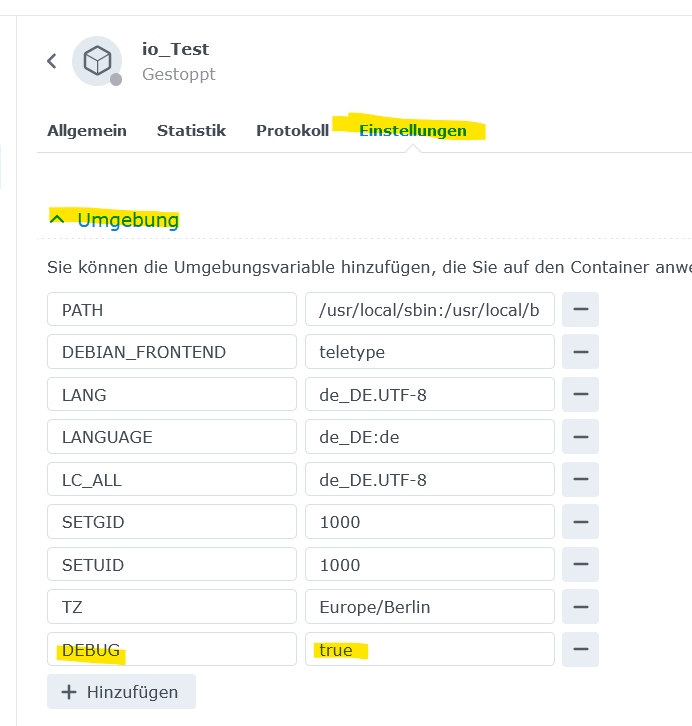
                            dann trage bei der ENV ( Environment Variables )

                            DEBUG = true
                            

                            ein .
                            Im Debuglog sieht man mehr

                            EDIT :

                            hier ein Screenshot :
                            .

                            .
                            b9e43157-85a5-4714-9f62-bff5376f6e35-grafik.png

                            Synology 918+ 16GB - ioBroker in Docker v9 , VISO auf Trekstor Primebook C13 13,3" , Hikvision Domkameras mit Surveillance Station .. CCU RaspberryMatic in Synology VM .. Zigbee CC2538+CC2592 .. Sonoff .. KNX .. Modbus ..

                            1 1 Reply Last reply
                            0
                            • GlasfaserG Glasfaser

                              @1704eu sagte in ioBroker manuelles Backup:

                              was tatsächlich erfolgreich abgeschlossen werden konnte. Container restart, und nun hänge ich wieder

                              dann trage bei der ENV ( Environment Variables )

                              DEBUG = true
                              

                              ein .
                              Im Debuglog sieht man mehr

                              EDIT :

                              hier ein Screenshot :
                              .

                              .
                              b9e43157-85a5-4714-9f62-bff5376f6e35-grafik.png

                              1 Offline
                              1 Offline
                              1704eu
                              wrote on last edited by
                              #25

                              @glasfaser

                              [DEBUG] Error message: 
                              [DEBUG] error: exec: "iob": executable file not found in $PATH 
                              

                              und wenn ich im Terminal nun iob fix mache, dann kommt die Meldung permission denied

                              1 GlasfaserG 2 Replies Last reply
                              0
                              • 1 1704eu

                                @glasfaser

                                [DEBUG] Error message: 
                                [DEBUG] error: exec: "iob": executable file not found in $PATH 
                                

                                und wenn ich im Terminal nun iob fix mache, dann kommt die Meldung permission denied

                                1 Offline
                                1 Offline
                                1704eu
                                wrote on last edited by
                                #26

                                @1704eu
                                ok ich hab mal chmod 755 iobroker gemacht, das bringt mich wieder einen Schritt weiter

                                Checking database connection... Failed.
                                [DEBUG] Error message: 
                                [DEBUG] Server Cannot load /opt/iobroker/iobroker-data/objects.json: Database file /opt/iobroker/iobroker-data/objects.json does not exists.. We try last Backup!
                                [DEBUG] Server Cannot load /opt/iobroker/iobroker-data/objects.json.bak: Database file /opt/iobroker/iobroker-data/objects.json.bak does not exists.. Continue with empty dataset!
                                [DEBUG] Server If this is no Migration or initial start please restore the last backup from /opt/iobroker/iobroker-data/backup-objects
                                [DEBUG]  Cannot read system.config: null (OK when migrating or restoring)
                                [DEBUG] Error: no UUID found
                                Please check your configuration and try again.
                                For more information see ioBroker Docker image docs (https://docs.buanet.de/iobroker-docker-image/docs).
                                 
                                [DEBUG] Debug mode prevents the container from exiting on errors.
                                [DEBUG] This enables you to investigate or fix your issue on the command line.
                                [DEBUG] If you want to stop or restart your container you have to do it manually.
                                [DEBUG] IoBroker is not running!
                                
                                HomoranH 1 Reply Last reply
                                0
                                • 1 1704eu

                                  @1704eu
                                  ok ich hab mal chmod 755 iobroker gemacht, das bringt mich wieder einen Schritt weiter

                                  Checking database connection... Failed.
                                  [DEBUG] Error message: 
                                  [DEBUG] Server Cannot load /opt/iobroker/iobroker-data/objects.json: Database file /opt/iobroker/iobroker-data/objects.json does not exists.. We try last Backup!
                                  [DEBUG] Server Cannot load /opt/iobroker/iobroker-data/objects.json.bak: Database file /opt/iobroker/iobroker-data/objects.json.bak does not exists.. Continue with empty dataset!
                                  [DEBUG] Server If this is no Migration or initial start please restore the last backup from /opt/iobroker/iobroker-data/backup-objects
                                  [DEBUG]  Cannot read system.config: null (OK when migrating or restoring)
                                  [DEBUG] Error: no UUID found
                                  Please check your configuration and try again.
                                  For more information see ioBroker Docker image docs (https://docs.buanet.de/iobroker-docker-image/docs).
                                   
                                  [DEBUG] Debug mode prevents the container from exiting on errors.
                                  [DEBUG] This enables you to investigate or fix your issue on the command line.
                                  [DEBUG] If you want to stop or restart your container you have to do it manually.
                                  [DEBUG] IoBroker is not running!
                                  
                                  HomoranH Do not disturb
                                  HomoranH Do not disturb
                                  Homoran
                                  Global Moderator Administrators
                                  wrote on last edited by
                                  #27

                                  @1704eu sagte in ioBroker manuelles Backup:

                                  ich hab mal chmod 755 iobroker gemacht

                                  wo lernt man sowas?
                                  derselbe von dem ncars kommt?

                                  iobroker hat seine Rechtestruktur nicht ohne Grund

                                  kein Support per PN! - Fragen im Forum stellen - es gibt fast nichts, was nicht auch für andere interessant ist.

                                  Benutzt das Voting rechts unten im Beitrag wenn er euch geholfen hat.

                                  der Installationsfixer: curl -fsL https://iobroker.net/fix.sh | bash -

                                  1 1 Reply Last reply
                                  0
                                  • HomoranH Homoran

                                    @1704eu sagte in ioBroker manuelles Backup:

                                    ich hab mal chmod 755 iobroker gemacht

                                    wo lernt man sowas?
                                    derselbe von dem ncars kommt?

                                    iobroker hat seine Rechtestruktur nicht ohne Grund

                                    1 Offline
                                    1 Offline
                                    1704eu
                                    wrote on last edited by
                                    #28

                                    @homoran said in ioBroker manuelles Backup:

                                    wo lernt man sowas?

                                    ich hab im alten Broker geschaut und dort war es 755 :/

                                    HomoranH Thomas BraunT 2 Replies Last reply
                                    0
                                    • 1 1704eu

                                      @homoran said in ioBroker manuelles Backup:

                                      wo lernt man sowas?

                                      ich hab im alten Broker geschaut und dort war es 755 :/

                                      HomoranH Do not disturb
                                      HomoranH Do not disturb
                                      Homoran
                                      Global Moderator Administrators
                                      wrote on last edited by
                                      #29

                                      @1704eu sagte in ioBroker manuelles Backup:

                                      im alten Broker

                                      möglich. 2014-15(16??) wurde noch als root installiert

                                      kein Support per PN! - Fragen im Forum stellen - es gibt fast nichts, was nicht auch für andere interessant ist.

                                      Benutzt das Voting rechts unten im Beitrag wenn er euch geholfen hat.

                                      der Installationsfixer: curl -fsL https://iobroker.net/fix.sh | bash -

                                      1 Reply Last reply
                                      0
                                      • 1 1704eu

                                        @homoran said in ioBroker manuelles Backup:

                                        wo lernt man sowas?

                                        ich hab im alten Broker geschaut und dort war es 755 :/

                                        Thomas BraunT Online
                                        Thomas BraunT Online
                                        Thomas Braun
                                        Most Active
                                        wrote on last edited by
                                        #30

                                        @1704eu sagte in ioBroker manuelles Backup:

                                        ich hab im alten Broker geschaut und dort war es 755

                                        Und aktuell werden ACLs gesetzt. Nix 755.

                                        Linux-Werkzeugkasten:
                                        https://forum.iobroker.net/topic/42952/der-kleine-iobroker-linux-werkzeugkasten
                                        NodeJS Fixer Skript:
                                        https://forum.iobroker.net/topic/68035/iob-node-fix-skript
                                        iob_diag: curl -sLf -o diag.sh https://iobroker.net/diag.sh && bash diag.sh

                                        1 1 Reply Last reply
                                        0
                                        • Thomas BraunT Thomas Braun

                                          @1704eu sagte in ioBroker manuelles Backup:

                                          ich hab im alten Broker geschaut und dort war es 755

                                          Und aktuell werden ACLs gesetzt. Nix 755.

                                          1 Offline
                                          1 Offline
                                          1704eu
                                          wrote on last edited by
                                          #31

                                          der alte Broker könnte schon so alt sein, aber mein Problem ist ja, dass ich nach meinem restore nun

                                          [DEBUG] Error message: 
                                          [DEBUG] error: exec: "iob": executable file not found in $PATH 
                                          

                                          und wenn ich im Terminal nun iob fix oder irgendwas iob xxx mache, dann kommt die Meldung permission denied

                                          und ich frage mich wie ich davon wieder weg komme :/

                                          1 Reply Last reply
                                          0
                                          Reply
                                          • Reply as topic
                                          Log in to reply
                                          • Oldest to Newest
                                          • Newest to Oldest
                                          • Most Votes


                                          Support us

                                          ioBroker
                                          Community Adapters
                                          Donate
                                          FAQ Cloud / IOT
                                          HowTo: Node.js-Update
                                          HowTo: Backup/Restore
                                          Downloads
                                          BLOG

                                          633

                                          Online

                                          32.4k

                                          Users

                                          81.5k

                                          Topics

                                          1.3m

                                          Posts
                                          Community
                                          Impressum | Datenschutz-Bestimmungen | Nutzungsbedingungen | Einwilligungseinstellungen
                                          ioBroker Community 2014-2025
                                          logo
                                          • Login

                                          • Don't have an account? Register

                                          • Login or register to search.
                                          • First post
                                            Last post
                                          0
                                          • Home
                                          • Recent
                                          • Tags
                                          • Unread 0
                                          • Categories
                                          • Unreplied
                                          • Popular
                                          • GitHub
                                          • Docu
                                          • Hilfe