




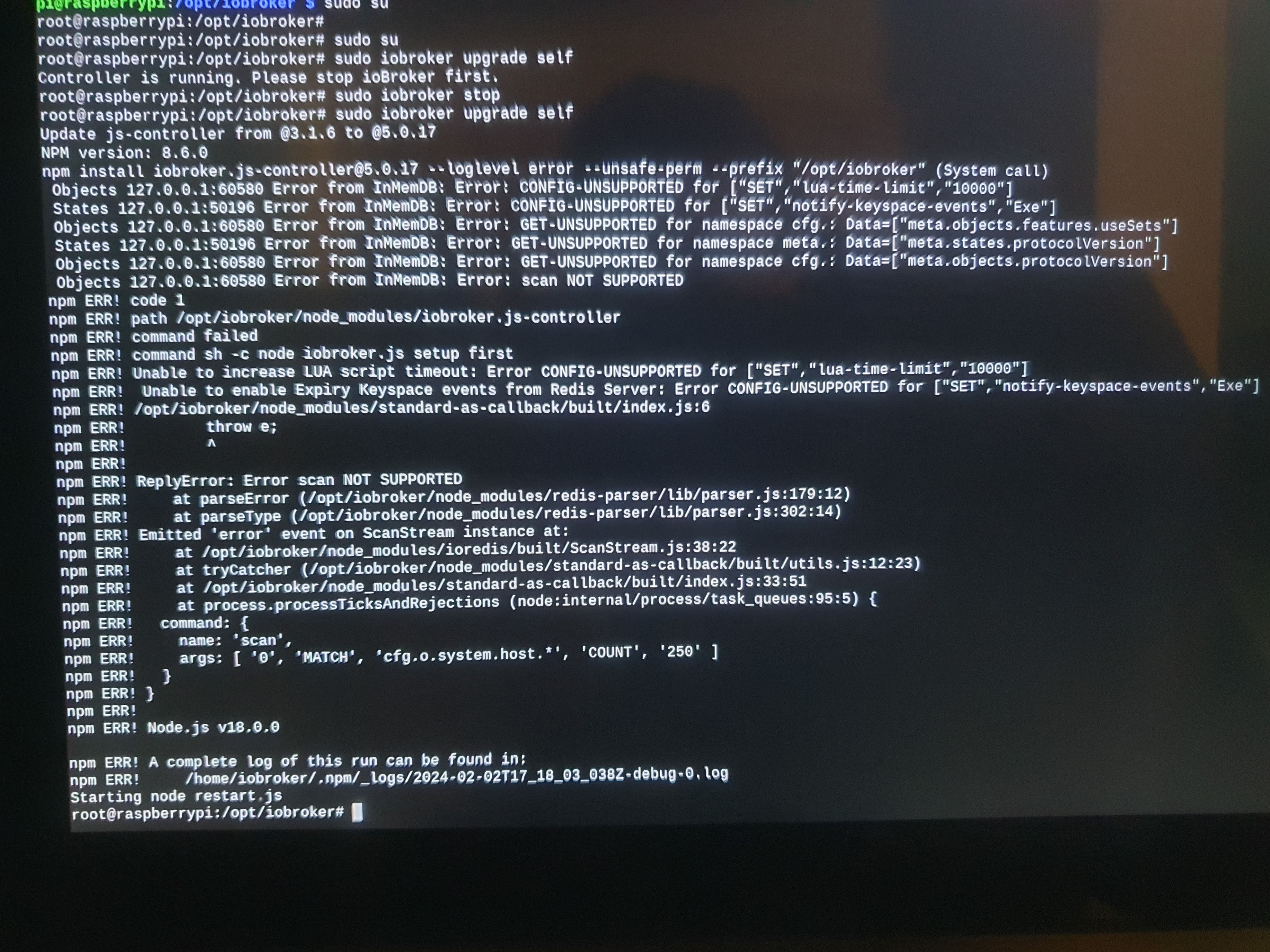
Update js-Controller 3.x auf 5.x funktioniert nicht
-
Jetzt was ich raus.
Also verstanden, dass ich nach dem Update des iobrokers und den Adaptern.. und deren Sicherung danach auf ein moderneres Betriebssystem wechseln soll.
Was wolltest du mir mit den Auszug sudo rm /etc.... mitteilen ?
@frank-knx sagte in Update js-Controller 3.x auf 5.x funktioniert nicht:
Was wolltest du mir mit den Auszug sudo rm /etc.... mitteilen ?
Das ist kein Auszug, das ist das was du in dein Terminal eingeben sollst.
Am besten zeilenweise kopieren und einfügen. -
@frank-knx sagte in Update js-Controller 3.x auf 5.x funktioniert nicht:
Was wolltest du mir mit den Auszug sudo rm /etc.... mitteilen ?
Das ist kein Auszug, das ist das was du in dein Terminal eingeben sollst.
Am besten zeilenweise kopieren und einfügen.Hallo Thomas, leider nach der ersten Zeile bereits Fehlermeldung als Antwort.
pi@raspberrypi:~ $ sudo rm /etc/apt/sources.list.d/infl* rm: das Entfernen von '/etc/apt/sources.list.d/infl*' ist nicht möglich: Datei oder Verzeichnis nicht gefunden pi@raspberrypi:~ $ -
Hallo Thomas, leider nach der ersten Zeile bereits Fehlermeldung als Antwort.
pi@raspberrypi:~ $ sudo rm /etc/apt/sources.list.d/infl* rm: das Entfernen von '/etc/apt/sources.list.d/infl*' ist nicht möglich: Datei oder Verzeichnis nicht gefunden pi@raspberrypi:~ $grep -r influx /etc/apt/ -
grep -r influx /etc/apt/ -
Hier das Ergebnis dieser Eingabe:
pi@raspberrypi:~ $ grep -r influx /etc/apt/ Übereinstimmungen in Binärdatei /etc/apt/trusted.gpg pi@raspberrypi:~ $Dann mach mal mit der zweiten Zeile weiter.
-
Dann mach mal mit der zweiten Zeile weiter.
-
Hallo Thomas, sorry für meine erneute Rückfrage
Meinst du deine Zeile mit "wget -q.....>"
Nur den Inhalt der Zeile 2? Was ist mit dem echo.... diese Zeilen separat eingeben oder die Zeile 2-4 gemeinsam kopieren und eingeben ?Zeilenweise 2 - 9 eingeben.
-
Zeilenweise 2 - 9 eingeben.
Hallo Thomas, heute ist der Wurm drin.
mit dem Befehl sudo apt full-upgrade sind zunächst Unmengen Daten erfolgreich geholt werden, aber dann starteten nachfolgende Fehlermeldungen:
Holen:322 http://mirror.netcologne.de/raspbian/raspbian buster/main armhf python-flask all 1.0.2-3+deb10u1 [93,0 kB] Holen:323 http://mirror.netcologne.de/raspbian/raspbian buster/main armhf python-pil armhf 5.4.1-2+deb10u4 [364 kB] Holen:333 http://mirror.netcologne.de/raspbian/raspbian buster/main armhf python3-renderpm armhf 3.5.13-1+deb10u2 [64,2 kB] Holen:283 http://ftp.gwdg.de/pub/linux/debian/raspbian/raspbian buster/main armhf libreoffice-avmedia-backend-gstreamer armhf 1:6.1.5-3+rpi1+deb10u11 [19,5 kB] Holen:284 http://ftp.gwdg.de/pub/linux/debian/raspbian/raspbian buster/main armhf libreoffice-writer armhf 1:6.1.5-3+rpi1+deb10u11 [6.736 kB] Fehl:263 http://debian.bio.lmu.de/raspbian/raspbian buster/main armhf openjdk-11-jdk-headless armhf 11.0.22+7-1~deb10u1 Verbindung fehlgeschlagen [IP: 2001:4ca0:4300::1:22 80] Fehl:284 http://ftp.gwdg.de/pub/linux/debian/raspbian/raspbian buster/main armhf libreoffice-writer armhf 1:6.1.5-3+rpi1+deb10u11 Verbindung mit ftp.gwdg.de:80 nicht möglich (134.76.12.6) - connect (113: Keine Route zum Zielrechner) Verbindung mit ftp.gwdg.de:80 konnte nicht aufgebaut werden (2001:638:60f:110::1:2), Zeitüberschreitung aufgetreten [IP: 2001:638:60f:110::1:2 80] Fehl:285 http://ftp.gwdg.de/pub/linux/debian/raspbian/raspbian buster/main armhf libreoffice-core armhf 1:6.1.5-3+rpi1+deb10u11 Verbindung mit ftp.gwdg.de:http nicht möglich: [IP: 2001:638:60f:110::1:2 80] Fehl:287 http://ftp.gwdg.de/pub/linux/debian/raspbian/raspbian buster/main armhf libreoffice-nlpsolver all 0.9+LibO6.1.5-3+rpi1+deb10u11 Verbindung mit ftp.gwdg.de:http nicht möglich: [IP: 2001:638:60f:110::1:2 80] Fehl:288 http://ftp.gwdg.de/pub/linux/debian/raspbian/raspbian buster/main armhf libreoffice-wiki-publisher all 1.2.0+LibO6.1.5-3+rpi1+deb10u11 Verbindung mit ftp.gwdg.de:http nicht möglich: [IP: 2001:638:60f:110::1:2 80] Fehl:299 http://ftp.gwdg.de/pub/linux/debian/raspbian/raspbian buster/main armhf libva-wayland2 armhf 2.4.0-1 Verbindung mit ftp.gwdg.de:http nicht möglich: [IP: 2001:638:60f:110::1:2 80] Fehl:278 http://debian.bio.lmu.de/raspbian/raspbian buster/main armhf libreoffice-report-builder all 1:6.1.5-3+rpi1+deb10u11 Verbindung mit debian.bio.lmu.de:80 nicht möglich (141.84.43.22) - connect (113: Keine Route zum Zielrechner) Verbindung mit debian.bio.lmu.de:80 konnte nicht aufgebaut werden (2001:4ca0:4300::1:22), Zeitüberschreitung aufgetreten [IP: 2001:4ca0:4300::1:22 80] Fehl:289 http://debian.bio.lmu.de/raspbian/raspbian buster/main armhf libruby2.5 armhf 2.5.5-3+deb10u6 Verbindung mit debian.bio.lmu.de:http nicht möglich: [IP: 2001:4ca0:4300::1:22 80] Fehl:306 http://debian.bio.lmu.de/raspbian/raspbian buster/main armhf vlc-l10n all 3.0.20-0+deb10u1 Verbindung mit debian.bio.lmu.de:http nicht möglich: [IP: 2001:4ca0:4300::1:22 80] Fehl:334 http://debian.bio.lmu.de/raspbian/raspbian buster/main armhf python3-reportlab-accel armhf 3.5.13-1+deb10u2 Verbindung mit debian.bio.lmu.de:http nicht möglich: [IP: 2001:4ca0:4300::1:22 80] Fehl:341 http://debian.bio.lmu.de/raspbian/raspbian buster/main armhf sudo armhf 1.8.27-1+deb10u5 Verbindung mit debian.bio.lmu.de:http nicht möglich: [IP: 2001:4ca0:4300::1:22 80] Fehl:345 http://debian.bio.lmu.de/raspbian/raspbian buster/main armhf vlc-plugin-samba armhf 3.0.20-0+deb10u1 Verbindung mit debian.bio.lmu.de:http nicht möglich: [IP: 2001:4ca0:4300::1:22 80] Fehl:300 http://ftp.gwdg.de/pub/linux/debian/raspbian/raspbian buster/main armhf libvlccore9 armhf 3.0.20-0+deb10u1 Verbindung mit ftp.gwdg.de:http nicht möglich: [IP: 2001:638:60f:110::1:2 80] Fehl:301 http://ftp.gwdg.de/pub/linux/debian/raspbian/raspbian buster/main armhf vlc-plugin-skins2 armhf 3.0.20-0+deb10u1 Verbindung mit ftp.gwdg.de:http nicht möglich: [IP: 2001:638:60f:110::1:2 80] Fehl:302 http://ftp.gwdg.de/pub/linux/debian/raspbian/raspbian buster/main armhf vlc armhf 3.0.20-0+deb10u1 Verbindung mit ftp.gwdg.de:http nicht möglich: [IP: 2001:638:60f:110::1:2 80] Fehl:303 http://ftp.gwdg.de/pub/linux/debian/raspbian/raspbian buster/main armhf vlc-plugin-qt armhf 3.0.20-0+deb10u1 Verbindung mit ftp.gwdg.de:http nicht möglich: [IP: 2001:638:60f:110::1:2 80] Fehl:311 http://ftp.gwdg.de/pub/linux/debian/raspbian/raspbian buster/main armhf libvlc-bin armhf 3.0.20-0+deb10u1 Verbindung mit ftp.gwdg.de:http nicht möglich: [IP: 2001:638:60f:110::1:2 80] Fehl:315 http://ftp.gwdg.de/pub/linux/debian/raspbian/raspbian buster/main armhf node-tough-cookie all 2.3.4+dfsg-1+deb10u1 Verbindung mit ftp.gwdg.de:http nicht möglich: [IP: 2001:638:60f:110::1:2 80] Fehl:321 http://ftp.gwdg.de/pub/linux/debian/raspbian/raspbian buster/main armhf python-jinja2 all 2.10-2+deb10u1 Verbindung mit ftp.gwdg.de:http nicht möglich: [IP: 2001:638:60f:110::1:2 80] Fehl:325 http://ftp.gwdg.de/pub/linux/debian/raspbian/raspbian buster/main armhf python-requests all 2.21.0-1+deb10u1 Verbindung mit ftp.gwdg.de:http nicht möglich: [IP: 2001:638:60f:110::1:2 80] Fehl:327 http://ftp.gwdg.de/pub/linux/debian/raspbian/raspbian buster/main armhf python3-jinja2 all 2.10-2+deb10u1 Verbindung mit ftp.gwdg.de:http nicht möglich: [IP: 2001:638:60f:110::1:2 80] Fehl:329 http://ftp.gwdg.de/pub/linux/debian/raspbian/raspbian buster/main armhf python3-flask all 1.0.2-3+deb10u1 Verbindung mit ftp.gwdg.de:http nicht möglich: [IP: 2001:638:60f:110::1:2 80] Fehl:331 http://ftp.gwdg.de/pub/linux/debian/raspbian/raspbian buster/main armhf python3-pil.imagetk armhf 5.4.1-2+deb10u4 Verbindung mit ftp.gwdg.de:http nicht möglich: [IP: 2001:638:60f:110::1:2 80] Fehl:332 http://ftp.gwdg.de/pub/linux/debian/raspbian/raspbian buster/main armhf python3-pil armhf 5.4.1-2+deb10u4 Verbindung mit ftp.gwdg.de:http nicht möglich: [IP: 2001:638:60f:110::1:2 80] Fehl:335 http://ftp.gwdg.de/pub/linux/debian/raspbian/raspbian buster/main armhf python3-reportlab all 3.5.13-1+deb10u2 Verbindung mit ftp.gwdg.de:http nicht möglich: [IP: 2001:638:60f:110::1:2 80] Fehl:336 http://ftp.gwdg.de/pub/linux/debian/raspbian/raspbian buster/main armhf python3-urllib3 all 1.24.1-1+deb10u2 Verbindung mit ftp.gwdg.de:http nicht möglich: [IP: 2001:638:60f:110::1:2 80] Fehl:337 http://ftp.gwdg.de/pub/linux/debian/raspbian/raspbian buster/main armhf python3-requests all 2.21.0-1+deb10u1 Verbindung mit ftp.gwdg.de:http nicht möglich: [IP: 2001:638:60f:110::1:2 80] Fehl:344 http://ftp.gwdg.de/pub/linux/debian/raspbian/raspbian buster/main armhf vlc-plugin-notify armhf 3.0.20-0+deb10u1 Verbindung mit ftp.gwdg.de:http nicht möglich: [IP: 2001:638:60f:110::1:2 80] Fehl:346 http://ftp.gwdg.de/pub/linux/debian/raspbian/raspbian buster/main armhf vlc-plugin-video-splitter armhf 3.0.20-0+deb10u1 Verbindung mit ftp.gwdg.de:http nicht möglich: [IP: 2001:638:60f:110::1:2 80] Fehl:347 http://ftp.gwdg.de/pub/linux/debian/raspbian/raspbian buster/main armhf vlc-plugin-visualization armhf 3.0.20-0+deb10u1 Verbindung mit ftp.gwdg.de:http nicht möglich: [IP: 2001:638:60f:110::1:2 80] Es wurden 572 MB in 3 min 36 s geholt (2.656 kB/s). E: Fehlschlag beim Holen von http://debian.bio.lmu.de/raspbian/raspbian/pool/main/o/openjdk-11/openjdk-11-jdk-headless_11.0.22+7-1~deb10u1_armhf.deb Verbindung fehlgeschlagen [IP: 2001:4ca0:4300::1:22 80] E: Fehlschlag beim Holen von http://debian.bio.lmu.de/raspbian/raspbian/pool/main/libr/libreoffice/libreoffice-report-builder_6.1.5-3+rpi1+deb10u11_all.deb Verbindung mit debian.bio.lmu.de:80 nicht möglich (141.84.43.22) - connect (113: Keine Route zum Zielrechner) Verbindung mit debian.bio.lmu.de:80 konnte nicht aufgebaut werden (2001:4ca0:4300::1:22), Zeitüberschreitung aufgetreten [IP: 2001:4ca0:4300::1:22 80] E: Fehlschlag beim Holen von http://ftp.gwdg.de/pub/linux/debian/raspbian/raspbian/pool/main/libr/libreoffice/libreoffice-writer_6.1.5-3+rpi1+deb10u11_armhf.deb Verbindung mit ftp.gwdg.de:80 nicht möglich (134.76.12.6) - connect (113: Keine Route zum Zielrechner) Verbindung mit ftp.gwdg.de:80 konnte nicht aufgebaut werden (2001:638:60f:110::1:2), Zeitüberschreitung aufgetreten [IP: 2001:638:60f:110::1:2 80] E: Fehlschlag beim Holen von http://ftp.gwdg.de/pub/linux/debian/raspbian/raspbian/pool/main/libr/libreoffice/libreoffice-core_6.1.5-3+rpi1+deb10u11_armhf.deb Verbindung mit ftp.gwdg.de:http nicht möglich: [IP: 2001:638:60f:110::1:2 80] E: Fehlschlag beim Holen von http://ftp.gwdg.de/pub/linux/debian/raspbian/raspbian/pool/main/libr/libreoffice/libreoffice-nlpsolver_0.9+LibO6.1.5-3+rpi1+deb10u11_all.deb Verbindung mit ftp.gwdg.de:http nicht möglich: [IP: 2001:638:60f:110::1:2 80] E: Fehlschlag beim Holen von http://ftp.gwdg.de/pub/linux/debian/raspbian/raspbian/pool/main/libr/libreoffice/libreoffice-wiki-publisher_1.2.0+LibO6.1.5-3+rpi1+deb10u11_all.deb Verbindung mit ftp.gwdg.de:http nicht möglich: [IP: 2001:638:60f:110::1:2 80] E: Fehlschlag beim Holen von http://debian.bio.lmu.de/raspbian/raspbian/pool/main/r/ruby2.5/libruby2.5_2.5.5-3+deb10u6_armhf.deb Verbindung mit debian.bio.lmu.de:http nicht möglich: [IP: 2001:4ca0:4300::1:22 80] E: Fehlschlag beim Holen von http://ftp.gwdg.de/pub/linux/debian/raspbian/raspbian/pool/main/libv/libva/libva-wayland2_2.4.0-1_armhf.deb Verbindung mit ftp.gwdg.de:http nicht möglich: [IP: 2001:638:60f:110::1:2 80] E: Fehlschlag beim Holen von http://ftp.gwdg.de/pub/linux/debian/raspbian/raspbian/pool/main/v/vlc/libvlccore9_3.0.20-0+deb10u1_armhf.deb Verbindung mit ftp.gwdg.de:http nicht möglich: [IP: 2001:638:60f:110::1:2 80] E: Fehlschlag beim Holen von http://ftp.gwdg.de/pub/linux/debian/raspbian/raspbian/pool/main/v/vlc/vlc-plugin-skins2_3.0.20-0+deb10u1_armhf.deb Verbindung mit ftp.gwdg.de:http nicht möglich: [IP: 2001:638:60f:110::1:2 80] E: Fehlschlag beim Holen von http://ftp.gwdg.de/pub/linux/debian/raspbian/raspbian/pool/main/v/vlc/vlc_3.0.20-0+deb10u1_armhf.deb Verbindung mit ftp.gwdg.de:http nicht möglich: [IP: 2001:638:60f:110::1:2 80] E: Fehlschlag beim Holen von http://ftp.gwdg.de/pub/linux/debian/raspbian/raspbian/pool/main/v/vlc/vlc-plugin-qt_3.0.20-0+deb10u1_armhf.deb Verbindung mit ftp.gwdg.de:http nicht möglich: [IP: 2001:638:60f:110::1:2 80] E: Fehlschlag beim Holen von http://debian.bio.lmu.de/raspbian/raspbian/pool/main/v/vlc/vlc-l10n_3.0.20-0+deb10u1_all.deb Verbindung mit debian.bio.lmu.de:http nicht möglich: [IP: 2001:4ca0:4300::1:22 80] E: Fehlschlag beim Holen von http://ftp.gwdg.de/pub/linux/debian/raspbian/raspbian/pool/main/v/vlc/libvlc-bin_3.0.20-0+deb10u1_armhf.deb Verbindung mit ftp.gwdg.de:http nicht möglich: [IP: 2001:638:60f:110::1:2 80] E: Fehlschlag beim Holen von http://ftp.gwdg.de/pub/linux/debian/raspbian/raspbian/pool/main/n/node-tough-cookie/node-tough-cookie_2.3.4+dfsg-1+deb10u1_all.deb Verbindung mit ftp.gwdg.de:http nicht möglich: [IP: 2001:638:60f:110::1:2 80] E: Fehlschlag beim Holen von http://ftp.gwdg.de/pub/linux/debian/raspbian/raspbian/pool/main/j/jinja2/python-jinja2_2.10-2+deb10u1_all.deb Verbindung mit ftp.gwdg.de:http nicht möglich: [IP: 2001:638:60f:110::1:2 80] E: Fehlschlag beim Holen von http://ftp.gwdg.de/pub/linux/debian/raspbian/raspbian/pool/main/r/requests/python-requests_2.21.0-1+deb10u1_all.deb Verbindung mit ftp.gwdg.de:http nicht möglich: [IP: 2001:638:60f:110::1:2 80] E: Fehlschlag beim Holen von http://ftp.gwdg.de/pub/linux/debian/raspbian/raspbian/pool/main/j/jinja2/python3-jinja2_2.10-2+deb10u1_all.deb Verbindung mit ftp.gwdg.de:http nicht möglich: [IP: 2001:638:60f:110::1:2 80] E: Fehlschlag beim Holen von http://ftp.gwdg.de/pub/linux/debian/raspbian/raspbian/pool/main/f/flask/python3-flask_1.0.2-3+deb10u1_all.deb Verbindung mit ftp.gwdg.de:http nicht möglich: [IP: 2001:638:60f:110::1:2 80] E: Fehlschlag beim Holen von http://ftp.gwdg.de/pub/linux/debian/raspbian/raspbian/pool/main/p/pillow/python3-pil.imagetk_5.4.1-2+deb10u4_armhf.deb Verbindung mit ftp.gwdg.de:http nicht möglich: [IP: 2001:638:60f:110::1:2 80] E: Fehlschlag beim Holen von http://ftp.gwdg.de/pub/linux/debian/raspbian/raspbian/pool/main/p/pillow/python3-pil_5.4.1-2+deb10u4_armhf.deb Verbindung mit ftp.gwdg.de:http nicht möglich: [IP: 2001:638:60f:110::1:2 80] E: Fehlschlag beim Holen von http://debian.bio.lmu.de/raspbian/raspbian/pool/main/p/python-reportlab/python3-reportlab-accel_3.5.13-1+deb10u2_armhf.deb Verbindung mit debian.bio.lmu.de:http nicht möglich: [IP: 2001:4ca0:4300::1:22 80] E: Fehlschlag beim Holen von http://ftp.gwdg.de/pub/linux/debian/raspbian/raspbian/pool/main/p/python-reportlab/python3-reportlab_3.5.13-1+deb10u2_all.deb Verbindung mit ftp.gwdg.de:http nicht möglich: [IP: 2001:638:60f:110::1:2 80] E: Fehlschlag beim Holen von http://ftp.gwdg.de/pub/linux/debian/raspbian/raspbian/pool/main/p/python-urllib3/python3-urllib3_1.24.1-1+deb10u2_all.deb Verbindung mit ftp.gwdg.de:http nicht möglich: [IP: 2001:638:60f:110::1:2 80] E: Fehlschlag beim Holen von http://ftp.gwdg.de/pub/linux/debian/raspbian/raspbian/pool/main/r/requests/python3-requests_2.21.0-1+deb10u1_all.deb Verbindung mit ftp.gwdg.de:http nicht möglich: [IP: 2001:638:60f:110::1:2 80] E: Fehlschlag beim Holen von http://debian.bio.lmu.de/raspbian/raspbian/pool/main/s/sudo/sudo_1.8.27-1+deb10u5_armhf.deb Verbindung mit debian.bio.lmu.de:http nicht möglich: [IP: 2001:4ca0:4300::1:22 80] E: Fehlschlag beim Holen von http://ftp.gwdg.de/pub/linux/debian/raspbian/raspbian/pool/main/v/vlc/vlc-plugin-notify_3.0.20-0+deb10u1_armhf.deb Verbindung mit ftp.gwdg.de:http nicht möglich: [IP: 2001:638:60f:110::1:2 80] E: Fehlschlag beim Holen von http://debian.bio.lmu.de/raspbian/raspbian/pool/main/v/vlc/vlc-plugin-samba_3.0.20-0+deb10u1_armhf.deb Verbindung mit debian.bio.lmu.de:http nicht möglich: [IP: 2001:4ca0:4300::1:22 80] E: Fehlschlag beim Holen von http://ftp.gwdg.de/pub/linux/debian/raspbian/raspbian/pool/main/v/vlc/vlc-plugin-video-splitter_3.0.20-0+deb10u1_armhf.deb Verbindung mit ftp.gwdg.de:http nicht möglich: [IP: 2001:638:60f:110::1:2 80] E: Fehlschlag beim Holen von http://ftp.gwdg.de/pub/linux/debian/raspbian/raspbian/pool/main/v/vlc/vlc-plugin-visualization_3.0.20-0+deb10u1_armhf.deb Verbindung mit ftp.gwdg.de:http nicht möglich: [IP: 2001:638:60f:110::1:2 80] E: Einige Archive konnten nicht heruntergeladen werden; vielleicht »apt-get update« ausführen oder mit »--fix-missing« probieren? pi@raspberrypi:~ $ -
Hallo Thomas, heute ist der Wurm drin.
mit dem Befehl sudo apt full-upgrade sind zunächst Unmengen Daten erfolgreich geholt werden, aber dann starteten nachfolgende Fehlermeldungen:
Holen:322 http://mirror.netcologne.de/raspbian/raspbian buster/main armhf python-flask all 1.0.2-3+deb10u1 [93,0 kB] Holen:323 http://mirror.netcologne.de/raspbian/raspbian buster/main armhf python-pil armhf 5.4.1-2+deb10u4 [364 kB] Holen:333 http://mirror.netcologne.de/raspbian/raspbian buster/main armhf python3-renderpm armhf 3.5.13-1+deb10u2 [64,2 kB] Holen:283 http://ftp.gwdg.de/pub/linux/debian/raspbian/raspbian buster/main armhf libreoffice-avmedia-backend-gstreamer armhf 1:6.1.5-3+rpi1+deb10u11 [19,5 kB] Holen:284 http://ftp.gwdg.de/pub/linux/debian/raspbian/raspbian buster/main armhf libreoffice-writer armhf 1:6.1.5-3+rpi1+deb10u11 [6.736 kB] Fehl:263 http://debian.bio.lmu.de/raspbian/raspbian buster/main armhf openjdk-11-jdk-headless armhf 11.0.22+7-1~deb10u1 Verbindung fehlgeschlagen [IP: 2001:4ca0:4300::1:22 80] Fehl:284 http://ftp.gwdg.de/pub/linux/debian/raspbian/raspbian buster/main armhf libreoffice-writer armhf 1:6.1.5-3+rpi1+deb10u11 Verbindung mit ftp.gwdg.de:80 nicht möglich (134.76.12.6) - connect (113: Keine Route zum Zielrechner) Verbindung mit ftp.gwdg.de:80 konnte nicht aufgebaut werden (2001:638:60f:110::1:2), Zeitüberschreitung aufgetreten [IP: 2001:638:60f:110::1:2 80] Fehl:285 http://ftp.gwdg.de/pub/linux/debian/raspbian/raspbian buster/main armhf libreoffice-core armhf 1:6.1.5-3+rpi1+deb10u11 Verbindung mit ftp.gwdg.de:http nicht möglich: [IP: 2001:638:60f:110::1:2 80] Fehl:287 http://ftp.gwdg.de/pub/linux/debian/raspbian/raspbian buster/main armhf libreoffice-nlpsolver all 0.9+LibO6.1.5-3+rpi1+deb10u11 Verbindung mit ftp.gwdg.de:http nicht möglich: [IP: 2001:638:60f:110::1:2 80] Fehl:288 http://ftp.gwdg.de/pub/linux/debian/raspbian/raspbian buster/main armhf libreoffice-wiki-publisher all 1.2.0+LibO6.1.5-3+rpi1+deb10u11 Verbindung mit ftp.gwdg.de:http nicht möglich: [IP: 2001:638:60f:110::1:2 80] Fehl:299 http://ftp.gwdg.de/pub/linux/debian/raspbian/raspbian buster/main armhf libva-wayland2 armhf 2.4.0-1 Verbindung mit ftp.gwdg.de:http nicht möglich: [IP: 2001:638:60f:110::1:2 80] Fehl:278 http://debian.bio.lmu.de/raspbian/raspbian buster/main armhf libreoffice-report-builder all 1:6.1.5-3+rpi1+deb10u11 Verbindung mit debian.bio.lmu.de:80 nicht möglich (141.84.43.22) - connect (113: Keine Route zum Zielrechner) Verbindung mit debian.bio.lmu.de:80 konnte nicht aufgebaut werden (2001:4ca0:4300::1:22), Zeitüberschreitung aufgetreten [IP: 2001:4ca0:4300::1:22 80] Fehl:289 http://debian.bio.lmu.de/raspbian/raspbian buster/main armhf libruby2.5 armhf 2.5.5-3+deb10u6 Verbindung mit debian.bio.lmu.de:http nicht möglich: [IP: 2001:4ca0:4300::1:22 80] Fehl:306 http://debian.bio.lmu.de/raspbian/raspbian buster/main armhf vlc-l10n all 3.0.20-0+deb10u1 Verbindung mit debian.bio.lmu.de:http nicht möglich: [IP: 2001:4ca0:4300::1:22 80] Fehl:334 http://debian.bio.lmu.de/raspbian/raspbian buster/main armhf python3-reportlab-accel armhf 3.5.13-1+deb10u2 Verbindung mit debian.bio.lmu.de:http nicht möglich: [IP: 2001:4ca0:4300::1:22 80] Fehl:341 http://debian.bio.lmu.de/raspbian/raspbian buster/main armhf sudo armhf 1.8.27-1+deb10u5 Verbindung mit debian.bio.lmu.de:http nicht möglich: [IP: 2001:4ca0:4300::1:22 80] Fehl:345 http://debian.bio.lmu.de/raspbian/raspbian buster/main armhf vlc-plugin-samba armhf 3.0.20-0+deb10u1 Verbindung mit debian.bio.lmu.de:http nicht möglich: [IP: 2001:4ca0:4300::1:22 80] Fehl:300 http://ftp.gwdg.de/pub/linux/debian/raspbian/raspbian buster/main armhf libvlccore9 armhf 3.0.20-0+deb10u1 Verbindung mit ftp.gwdg.de:http nicht möglich: [IP: 2001:638:60f:110::1:2 80] Fehl:301 http://ftp.gwdg.de/pub/linux/debian/raspbian/raspbian buster/main armhf vlc-plugin-skins2 armhf 3.0.20-0+deb10u1 Verbindung mit ftp.gwdg.de:http nicht möglich: [IP: 2001:638:60f:110::1:2 80] Fehl:302 http://ftp.gwdg.de/pub/linux/debian/raspbian/raspbian buster/main armhf vlc armhf 3.0.20-0+deb10u1 Verbindung mit ftp.gwdg.de:http nicht möglich: [IP: 2001:638:60f:110::1:2 80] Fehl:303 http://ftp.gwdg.de/pub/linux/debian/raspbian/raspbian buster/main armhf vlc-plugin-qt armhf 3.0.20-0+deb10u1 Verbindung mit ftp.gwdg.de:http nicht möglich: [IP: 2001:638:60f:110::1:2 80] Fehl:311 http://ftp.gwdg.de/pub/linux/debian/raspbian/raspbian buster/main armhf libvlc-bin armhf 3.0.20-0+deb10u1 Verbindung mit ftp.gwdg.de:http nicht möglich: [IP: 2001:638:60f:110::1:2 80] Fehl:315 http://ftp.gwdg.de/pub/linux/debian/raspbian/raspbian buster/main armhf node-tough-cookie all 2.3.4+dfsg-1+deb10u1 Verbindung mit ftp.gwdg.de:http nicht möglich: [IP: 2001:638:60f:110::1:2 80] Fehl:321 http://ftp.gwdg.de/pub/linux/debian/raspbian/raspbian buster/main armhf python-jinja2 all 2.10-2+deb10u1 Verbindung mit ftp.gwdg.de:http nicht möglich: [IP: 2001:638:60f:110::1:2 80] Fehl:325 http://ftp.gwdg.de/pub/linux/debian/raspbian/raspbian buster/main armhf python-requests all 2.21.0-1+deb10u1 Verbindung mit ftp.gwdg.de:http nicht möglich: [IP: 2001:638:60f:110::1:2 80] Fehl:327 http://ftp.gwdg.de/pub/linux/debian/raspbian/raspbian buster/main armhf python3-jinja2 all 2.10-2+deb10u1 Verbindung mit ftp.gwdg.de:http nicht möglich: [IP: 2001:638:60f:110::1:2 80] Fehl:329 http://ftp.gwdg.de/pub/linux/debian/raspbian/raspbian buster/main armhf python3-flask all 1.0.2-3+deb10u1 Verbindung mit ftp.gwdg.de:http nicht möglich: [IP: 2001:638:60f:110::1:2 80] Fehl:331 http://ftp.gwdg.de/pub/linux/debian/raspbian/raspbian buster/main armhf python3-pil.imagetk armhf 5.4.1-2+deb10u4 Verbindung mit ftp.gwdg.de:http nicht möglich: [IP: 2001:638:60f:110::1:2 80] Fehl:332 http://ftp.gwdg.de/pub/linux/debian/raspbian/raspbian buster/main armhf python3-pil armhf 5.4.1-2+deb10u4 Verbindung mit ftp.gwdg.de:http nicht möglich: [IP: 2001:638:60f:110::1:2 80] Fehl:335 http://ftp.gwdg.de/pub/linux/debian/raspbian/raspbian buster/main armhf python3-reportlab all 3.5.13-1+deb10u2 Verbindung mit ftp.gwdg.de:http nicht möglich: [IP: 2001:638:60f:110::1:2 80] Fehl:336 http://ftp.gwdg.de/pub/linux/debian/raspbian/raspbian buster/main armhf python3-urllib3 all 1.24.1-1+deb10u2 Verbindung mit ftp.gwdg.de:http nicht möglich: [IP: 2001:638:60f:110::1:2 80] Fehl:337 http://ftp.gwdg.de/pub/linux/debian/raspbian/raspbian buster/main armhf python3-requests all 2.21.0-1+deb10u1 Verbindung mit ftp.gwdg.de:http nicht möglich: [IP: 2001:638:60f:110::1:2 80] Fehl:344 http://ftp.gwdg.de/pub/linux/debian/raspbian/raspbian buster/main armhf vlc-plugin-notify armhf 3.0.20-0+deb10u1 Verbindung mit ftp.gwdg.de:http nicht möglich: [IP: 2001:638:60f:110::1:2 80] Fehl:346 http://ftp.gwdg.de/pub/linux/debian/raspbian/raspbian buster/main armhf vlc-plugin-video-splitter armhf 3.0.20-0+deb10u1 Verbindung mit ftp.gwdg.de:http nicht möglich: [IP: 2001:638:60f:110::1:2 80] Fehl:347 http://ftp.gwdg.de/pub/linux/debian/raspbian/raspbian buster/main armhf vlc-plugin-visualization armhf 3.0.20-0+deb10u1 Verbindung mit ftp.gwdg.de:http nicht möglich: [IP: 2001:638:60f:110::1:2 80] Es wurden 572 MB in 3 min 36 s geholt (2.656 kB/s). E: Fehlschlag beim Holen von http://debian.bio.lmu.de/raspbian/raspbian/pool/main/o/openjdk-11/openjdk-11-jdk-headless_11.0.22+7-1~deb10u1_armhf.deb Verbindung fehlgeschlagen [IP: 2001:4ca0:4300::1:22 80] E: Fehlschlag beim Holen von http://debian.bio.lmu.de/raspbian/raspbian/pool/main/libr/libreoffice/libreoffice-report-builder_6.1.5-3+rpi1+deb10u11_all.deb Verbindung mit debian.bio.lmu.de:80 nicht möglich (141.84.43.22) - connect (113: Keine Route zum Zielrechner) Verbindung mit debian.bio.lmu.de:80 konnte nicht aufgebaut werden (2001:4ca0:4300::1:22), Zeitüberschreitung aufgetreten [IP: 2001:4ca0:4300::1:22 80] E: Fehlschlag beim Holen von http://ftp.gwdg.de/pub/linux/debian/raspbian/raspbian/pool/main/libr/libreoffice/libreoffice-writer_6.1.5-3+rpi1+deb10u11_armhf.deb Verbindung mit ftp.gwdg.de:80 nicht möglich (134.76.12.6) - connect (113: Keine Route zum Zielrechner) Verbindung mit ftp.gwdg.de:80 konnte nicht aufgebaut werden (2001:638:60f:110::1:2), Zeitüberschreitung aufgetreten [IP: 2001:638:60f:110::1:2 80] E: Fehlschlag beim Holen von http://ftp.gwdg.de/pub/linux/debian/raspbian/raspbian/pool/main/libr/libreoffice/libreoffice-core_6.1.5-3+rpi1+deb10u11_armhf.deb Verbindung mit ftp.gwdg.de:http nicht möglich: [IP: 2001:638:60f:110::1:2 80] E: Fehlschlag beim Holen von http://ftp.gwdg.de/pub/linux/debian/raspbian/raspbian/pool/main/libr/libreoffice/libreoffice-nlpsolver_0.9+LibO6.1.5-3+rpi1+deb10u11_all.deb Verbindung mit ftp.gwdg.de:http nicht möglich: [IP: 2001:638:60f:110::1:2 80] E: Fehlschlag beim Holen von http://ftp.gwdg.de/pub/linux/debian/raspbian/raspbian/pool/main/libr/libreoffice/libreoffice-wiki-publisher_1.2.0+LibO6.1.5-3+rpi1+deb10u11_all.deb Verbindung mit ftp.gwdg.de:http nicht möglich: [IP: 2001:638:60f:110::1:2 80] E: Fehlschlag beim Holen von http://debian.bio.lmu.de/raspbian/raspbian/pool/main/r/ruby2.5/libruby2.5_2.5.5-3+deb10u6_armhf.deb Verbindung mit debian.bio.lmu.de:http nicht möglich: [IP: 2001:4ca0:4300::1:22 80] E: Fehlschlag beim Holen von http://ftp.gwdg.de/pub/linux/debian/raspbian/raspbian/pool/main/libv/libva/libva-wayland2_2.4.0-1_armhf.deb Verbindung mit ftp.gwdg.de:http nicht möglich: [IP: 2001:638:60f:110::1:2 80] E: Fehlschlag beim Holen von http://ftp.gwdg.de/pub/linux/debian/raspbian/raspbian/pool/main/v/vlc/libvlccore9_3.0.20-0+deb10u1_armhf.deb Verbindung mit ftp.gwdg.de:http nicht möglich: [IP: 2001:638:60f:110::1:2 80] E: Fehlschlag beim Holen von http://ftp.gwdg.de/pub/linux/debian/raspbian/raspbian/pool/main/v/vlc/vlc-plugin-skins2_3.0.20-0+deb10u1_armhf.deb Verbindung mit ftp.gwdg.de:http nicht möglich: [IP: 2001:638:60f:110::1:2 80] E: Fehlschlag beim Holen von http://ftp.gwdg.de/pub/linux/debian/raspbian/raspbian/pool/main/v/vlc/vlc_3.0.20-0+deb10u1_armhf.deb Verbindung mit ftp.gwdg.de:http nicht möglich: [IP: 2001:638:60f:110::1:2 80] E: Fehlschlag beim Holen von http://ftp.gwdg.de/pub/linux/debian/raspbian/raspbian/pool/main/v/vlc/vlc-plugin-qt_3.0.20-0+deb10u1_armhf.deb Verbindung mit ftp.gwdg.de:http nicht möglich: [IP: 2001:638:60f:110::1:2 80] E: Fehlschlag beim Holen von http://debian.bio.lmu.de/raspbian/raspbian/pool/main/v/vlc/vlc-l10n_3.0.20-0+deb10u1_all.deb Verbindung mit debian.bio.lmu.de:http nicht möglich: [IP: 2001:4ca0:4300::1:22 80] E: Fehlschlag beim Holen von http://ftp.gwdg.de/pub/linux/debian/raspbian/raspbian/pool/main/v/vlc/libvlc-bin_3.0.20-0+deb10u1_armhf.deb Verbindung mit ftp.gwdg.de:http nicht möglich: [IP: 2001:638:60f:110::1:2 80] E: Fehlschlag beim Holen von http://ftp.gwdg.de/pub/linux/debian/raspbian/raspbian/pool/main/n/node-tough-cookie/node-tough-cookie_2.3.4+dfsg-1+deb10u1_all.deb Verbindung mit ftp.gwdg.de:http nicht möglich: [IP: 2001:638:60f:110::1:2 80] E: Fehlschlag beim Holen von http://ftp.gwdg.de/pub/linux/debian/raspbian/raspbian/pool/main/j/jinja2/python-jinja2_2.10-2+deb10u1_all.deb Verbindung mit ftp.gwdg.de:http nicht möglich: [IP: 2001:638:60f:110::1:2 80] E: Fehlschlag beim Holen von http://ftp.gwdg.de/pub/linux/debian/raspbian/raspbian/pool/main/r/requests/python-requests_2.21.0-1+deb10u1_all.deb Verbindung mit ftp.gwdg.de:http nicht möglich: [IP: 2001:638:60f:110::1:2 80] E: Fehlschlag beim Holen von http://ftp.gwdg.de/pub/linux/debian/raspbian/raspbian/pool/main/j/jinja2/python3-jinja2_2.10-2+deb10u1_all.deb Verbindung mit ftp.gwdg.de:http nicht möglich: [IP: 2001:638:60f:110::1:2 80] E: Fehlschlag beim Holen von http://ftp.gwdg.de/pub/linux/debian/raspbian/raspbian/pool/main/f/flask/python3-flask_1.0.2-3+deb10u1_all.deb Verbindung mit ftp.gwdg.de:http nicht möglich: [IP: 2001:638:60f:110::1:2 80] E: Fehlschlag beim Holen von http://ftp.gwdg.de/pub/linux/debian/raspbian/raspbian/pool/main/p/pillow/python3-pil.imagetk_5.4.1-2+deb10u4_armhf.deb Verbindung mit ftp.gwdg.de:http nicht möglich: [IP: 2001:638:60f:110::1:2 80] E: Fehlschlag beim Holen von http://ftp.gwdg.de/pub/linux/debian/raspbian/raspbian/pool/main/p/pillow/python3-pil_5.4.1-2+deb10u4_armhf.deb Verbindung mit ftp.gwdg.de:http nicht möglich: [IP: 2001:638:60f:110::1:2 80] E: Fehlschlag beim Holen von http://debian.bio.lmu.de/raspbian/raspbian/pool/main/p/python-reportlab/python3-reportlab-accel_3.5.13-1+deb10u2_armhf.deb Verbindung mit debian.bio.lmu.de:http nicht möglich: [IP: 2001:4ca0:4300::1:22 80] E: Fehlschlag beim Holen von http://ftp.gwdg.de/pub/linux/debian/raspbian/raspbian/pool/main/p/python-reportlab/python3-reportlab_3.5.13-1+deb10u2_all.deb Verbindung mit ftp.gwdg.de:http nicht möglich: [IP: 2001:638:60f:110::1:2 80] E: Fehlschlag beim Holen von http://ftp.gwdg.de/pub/linux/debian/raspbian/raspbian/pool/main/p/python-urllib3/python3-urllib3_1.24.1-1+deb10u2_all.deb Verbindung mit ftp.gwdg.de:http nicht möglich: [IP: 2001:638:60f:110::1:2 80] E: Fehlschlag beim Holen von http://ftp.gwdg.de/pub/linux/debian/raspbian/raspbian/pool/main/r/requests/python3-requests_2.21.0-1+deb10u1_all.deb Verbindung mit ftp.gwdg.de:http nicht möglich: [IP: 2001:638:60f:110::1:2 80] E: Fehlschlag beim Holen von http://debian.bio.lmu.de/raspbian/raspbian/pool/main/s/sudo/sudo_1.8.27-1+deb10u5_armhf.deb Verbindung mit debian.bio.lmu.de:http nicht möglich: [IP: 2001:4ca0:4300::1:22 80] E: Fehlschlag beim Holen von http://ftp.gwdg.de/pub/linux/debian/raspbian/raspbian/pool/main/v/vlc/vlc-plugin-notify_3.0.20-0+deb10u1_armhf.deb Verbindung mit ftp.gwdg.de:http nicht möglich: [IP: 2001:638:60f:110::1:2 80] E: Fehlschlag beim Holen von http://debian.bio.lmu.de/raspbian/raspbian/pool/main/v/vlc/vlc-plugin-samba_3.0.20-0+deb10u1_armhf.deb Verbindung mit debian.bio.lmu.de:http nicht möglich: [IP: 2001:4ca0:4300::1:22 80] E: Fehlschlag beim Holen von http://ftp.gwdg.de/pub/linux/debian/raspbian/raspbian/pool/main/v/vlc/vlc-plugin-video-splitter_3.0.20-0+deb10u1_armhf.deb Verbindung mit ftp.gwdg.de:http nicht möglich: [IP: 2001:638:60f:110::1:2 80] E: Fehlschlag beim Holen von http://ftp.gwdg.de/pub/linux/debian/raspbian/raspbian/pool/main/v/vlc/vlc-plugin-visualization_3.0.20-0+deb10u1_armhf.deb Verbindung mit ftp.gwdg.de:http nicht möglich: [IP: 2001:638:60f:110::1:2 80] E: Einige Archive konnten nicht heruntergeladen werden; vielleicht »apt-get update« ausführen oder mit »--fix-missing« probieren? pi@raspberrypi:~ $@frank-knx sagte in Update js-Controller 3.x auf 5.x funktioniert nicht:
2001:638:60f:110::1:2
Da ist bei dir im Netzwerk wohl IPv6 nicht/nicht richtig eingerichtet.
-
@frank-knx sagte in Update js-Controller 3.x auf 5.x funktioniert nicht:
2001:638:60f:110::1:2
Da ist bei dir im Netzwerk wohl IPv6 nicht/nicht richtig eingerichtet.
@thomas-braun
Sorry, hatte ich bisher nicht gemerkt oder gebraucht. Daher an der Fritzbox nichts besonderes eingerichtet.
Habe ich nun ein Problem, dass ich ein paar Daten von IPV6 Adressen nicht laden kann ? -
@thomas-braun
Sorry, hatte ich bisher nicht gemerkt oder gebraucht. Daher an der Fritzbox nichts besonderes eingerichtet.
Habe ich nun ein Problem, dass ich ein paar Daten von IPV6 Adressen nicht laden kann ?@frank-knx Siehe HIER
Schau, dass Du in Deiner Fritzbox IPv6 vernünftig einstellst, Du wirst sonst immer mehr Probleme bekommen. Wie kann ich Dir leider nicht sagen. Ich habe keine Fritzbox und weiss auch nicht, bei welchem Provider Du bist.
Gruss, Jürgen
-
@thomas-braun
Sorry, hatte ich bisher nicht gemerkt oder gebraucht. Daher an der Fritzbox nichts besonderes eingerichtet.
Habe ich nun ein Problem, dass ich ein paar Daten von IPV6 Adressen nicht laden kann ?@frank-knx sagte in Update js-Controller 3.x auf 5.x funktioniert nicht:
Sorry, hatte ich bisher nicht gemerkt oder gebraucht.
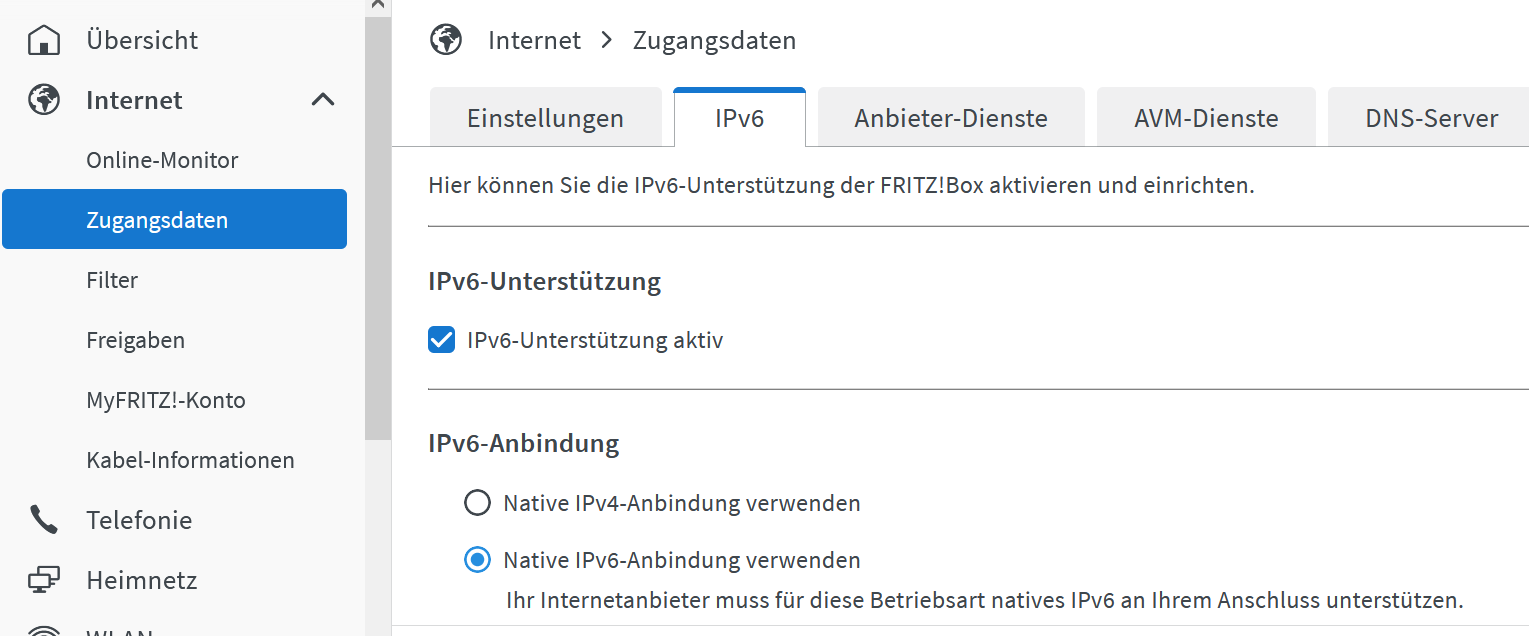
Jetzt brauchst du es. Einfachster Fall: Nur aktivieren.
-
@frank-knx sagte in Update js-Controller 3.x auf 5.x funktioniert nicht:
Sorry, hatte ich bisher nicht gemerkt oder gebraucht.
Jetzt brauchst du es. Einfachster Fall: Nur aktivieren.
Hallo Thomas,
ich hatte parallel schon gestartet und es ist alles (wie auf deinem Bild) aktiviert und unter "Online Monitor" ist auch der Hinweis, dass die IPV6 Verbindung mit Adresse vergeben ist.
Fritzbox ist also in Ordnung.Kann es am PI liegen, dass dort IPV6 aktiviert sein muss ?
Ich habe unter Einstellungen nichts gefunden.. ich habe aber den PI in Verdacht.Gibt es eine Testmöglichkeit ?
-
Hallo Thomas,
ich hatte parallel schon gestartet und es ist alles (wie auf deinem Bild) aktiviert und unter "Online Monitor" ist auch der Hinweis, dass die IPV6 Verbindung mit Adresse vergeben ist.
Fritzbox ist also in Ordnung.Kann es am PI liegen, dass dort IPV6 aktiviert sein muss ?
Ich habe unter Einstellungen nichts gefunden.. ich habe aber den PI in Verdacht.Gibt es eine Testmöglichkeit ?
@frank-knx sagte in Update js-Controller 3.x auf 5.x funktioniert nicht:
Gibt es eine Testmöglichkeit ?
ip aanschauen.
-
@frank-knx sagte in Update js-Controller 3.x auf 5.x funktioniert nicht:
Gibt es eine Testmöglichkeit ?
ip aanschauen.
PI hängt derzeit am W-Lan: hier das Ergebnis:
pi@raspberrypi:~ $ ip a 1: lo: <LOOPBACK,UP,LOWER_UP> mtu 65536 qdisc noqueue state UNKNOWN group default qlen 1000 link/loopback 00:00:00:00:00:00 brd 00:00:00:00:00:00 inet 127.0.0.1/8 scope host lo valid_lft forever preferred_lft forever inet6 ::1/128 scope host valid_lft forever preferred_lft forever 2: eth0: <NO-CARRIER,BROADCAST,MULTICAST,UP> mtu 1500 qdisc mq state DOWN group default qlen 1000 link/ether dc:a6:32:d3:7a:a7 brd ff:ff:ff:ff:ff:ff 3: wlan0: <BROADCAST,MULTICAST,UP,LOWER_UP> mtu 1500 qdisc pfifo_fast state UP group default qlen 1000 link/ether dc:a6:32:d3:7a:a8 brd ff:ff:ff:ff:ff:ff inet 192.168.2.98/24 brd 192.168.2.255 scope global noprefixroute wlan0 valid_lft forever preferred_lft forever inet6 2a02:6d40:2458:4101:933:caf3:d3fe:118c/64 scope global dynamic mngtmpaddr noprefixroute valid_lft 7081sec preferred_lft 3481sec inet6 fe80::199d:25f7:b037:5cec/64 scope link valid_lft forever preferred_lft forever pi@raspberrypi:~ $ -
PI hängt derzeit am W-Lan: hier das Ergebnis:
pi@raspberrypi:~ $ ip a 1: lo: <LOOPBACK,UP,LOWER_UP> mtu 65536 qdisc noqueue state UNKNOWN group default qlen 1000 link/loopback 00:00:00:00:00:00 brd 00:00:00:00:00:00 inet 127.0.0.1/8 scope host lo valid_lft forever preferred_lft forever inet6 ::1/128 scope host valid_lft forever preferred_lft forever 2: eth0: <NO-CARRIER,BROADCAST,MULTICAST,UP> mtu 1500 qdisc mq state DOWN group default qlen 1000 link/ether dc:a6:32:d3:7a:a7 brd ff:ff:ff:ff:ff:ff 3: wlan0: <BROADCAST,MULTICAST,UP,LOWER_UP> mtu 1500 qdisc pfifo_fast state UP group default qlen 1000 link/ether dc:a6:32:d3:7a:a8 brd ff:ff:ff:ff:ff:ff inet 192.168.2.98/24 brd 192.168.2.255 scope global noprefixroute wlan0 valid_lft forever preferred_lft forever inet6 2a02:6d40:2458:4101:933:caf3:d3fe:118c/64 scope global dynamic mngtmpaddr noprefixroute valid_lft 7081sec preferred_lft 3481sec inet6 fe80::199d:25f7:b037:5cec/64 scope link valid_lft forever preferred_lft forever pi@raspberrypi:~ $Sollte eigentlich passen.
-
Sollte eigentlich passen.
Soll ich das upgrade nochmal versuchen oder wie durch die Oberfläche vorgeschlagen die beiden Befehle versuchen ?
E: Einige Archive konnten nicht heruntergeladen werden; vielleicht »apt-get update« ausführen oder mit »--fix-missing« probieren? -
Soll ich das upgrade nochmal versuchen oder wie durch die Oberfläche vorgeschlagen die beiden Befehle versuchen ?
E: Einige Archive konnten nicht heruntergeladen werden; vielleicht »apt-get update« ausführen oder mit »--fix-missing« probieren? -
Hallo Thomas,
dieses Mal ist das Upgrade anders gelaufen. Ich habe nun aber folgende Meldung...
Was soll ich machen ?
Bestätigen ?libgit2 (0.27.7+dfsg.1-0.2+deb10u1) buster-security; urgency=medium Previous versions of libgit's ssh backend did by default NOT perform certificate checking if the caller did not explicitly provide a certificate check callback and so may be subjected to a man-in-the-middle attack. (CVE-2023-22742) libgit will also check server keys against ~/.ssh/known_hosts, but as an limitation of Debian 10's libssh2 validation can only succeed if the used HostKeyAlgorithm was ssh-dss or ssh-rsa. Otherwise libgit will provide the error "invalid or unknown remote ssh hostkey". In this case remove the known_host entry for this server and configure the ssh client to limit the HostKeyAlgorithms to supported types by adding Host <IP or hostname of the git server> HostKeyAlgorithms ssh-dss,ssh-rsa to ~/.ssh/config for the specific server and re-add the known_hosts entry by e.g manually connecting to it. -- Tobias Frost <tobi@debian.org> Thi, 23 Feb 2023 21:01:45 +0100 (Drücken Sie q zum Beenden (Quit))apt-listchanges: Neuigkeiten ---------------------------- libgit2 (0.27.7+dfsg.1-0.2+deb10u1) buster-security; urgency=medium Previous versions of libgit's ssh backend did by default NOT perform certificate checking if the caller did not explicitly provide a certificate check callback and so may be subjected to a man-in-the-middle attack. (CVE-2023-22742) libgit will also check server keys against ~/.ssh/known_hosts, but as an limitation of Debian 10's libssh2 validation can only succeed if the used HostKeyAlgorithm was ssh-dss or ssh-rsa. Otherwise libgit will provide the error "invalid or unknown remote ssh hostkey". In this case remove the known_host entry for this server and configure the ssh client to limit the HostKeyAlgorithms to supported types by adding Host <IP or hostname of the git server> HostKeyAlgorithms ssh-dss,ssh-rsa to ~/.ssh/config for the specific server and re-add the known_hosts entry by e.g manually connecting to it. -- Tobias Frost <tobi@debian.org> Thi, 23 Feb 2023 21:01:45 +0100 -
Hallo Thomas,
dieses Mal ist das Upgrade anders gelaufen. Ich habe nun aber folgende Meldung...
Was soll ich machen ?
Bestätigen ?libgit2 (0.27.7+dfsg.1-0.2+deb10u1) buster-security; urgency=medium Previous versions of libgit's ssh backend did by default NOT perform certificate checking if the caller did not explicitly provide a certificate check callback and so may be subjected to a man-in-the-middle attack. (CVE-2023-22742) libgit will also check server keys against ~/.ssh/known_hosts, but as an limitation of Debian 10's libssh2 validation can only succeed if the used HostKeyAlgorithm was ssh-dss or ssh-rsa. Otherwise libgit will provide the error "invalid or unknown remote ssh hostkey". In this case remove the known_host entry for this server and configure the ssh client to limit the HostKeyAlgorithms to supported types by adding Host <IP or hostname of the git server> HostKeyAlgorithms ssh-dss,ssh-rsa to ~/.ssh/config for the specific server and re-add the known_hosts entry by e.g manually connecting to it. -- Tobias Frost <tobi@debian.org> Thi, 23 Feb 2023 21:01:45 +0100 (Drücken Sie q zum Beenden (Quit))apt-listchanges: Neuigkeiten ---------------------------- libgit2 (0.27.7+dfsg.1-0.2+deb10u1) buster-security; urgency=medium Previous versions of libgit's ssh backend did by default NOT perform certificate checking if the caller did not explicitly provide a certificate check callback and so may be subjected to a man-in-the-middle attack. (CVE-2023-22742) libgit will also check server keys against ~/.ssh/known_hosts, but as an limitation of Debian 10's libssh2 validation can only succeed if the used HostKeyAlgorithm was ssh-dss or ssh-rsa. Otherwise libgit will provide the error "invalid or unknown remote ssh hostkey". In this case remove the known_host entry for this server and configure the ssh client to limit the HostKeyAlgorithms to supported types by adding Host <IP or hostname of the git server> HostKeyAlgorithms ssh-dss,ssh-rsa to ~/.ssh/config for the specific server and re-add the known_hosts entry by e.g manually connecting to it. -- Tobias Frost <tobi@debian.org> Thi, 23 Feb 2023 21:01:45 +0100Ja, bestätigen.

632
Online32.7k
Users82.5k
Topics1.3m
Posts