




Update js-Controller 3.x auf 5.x funktioniert nicht
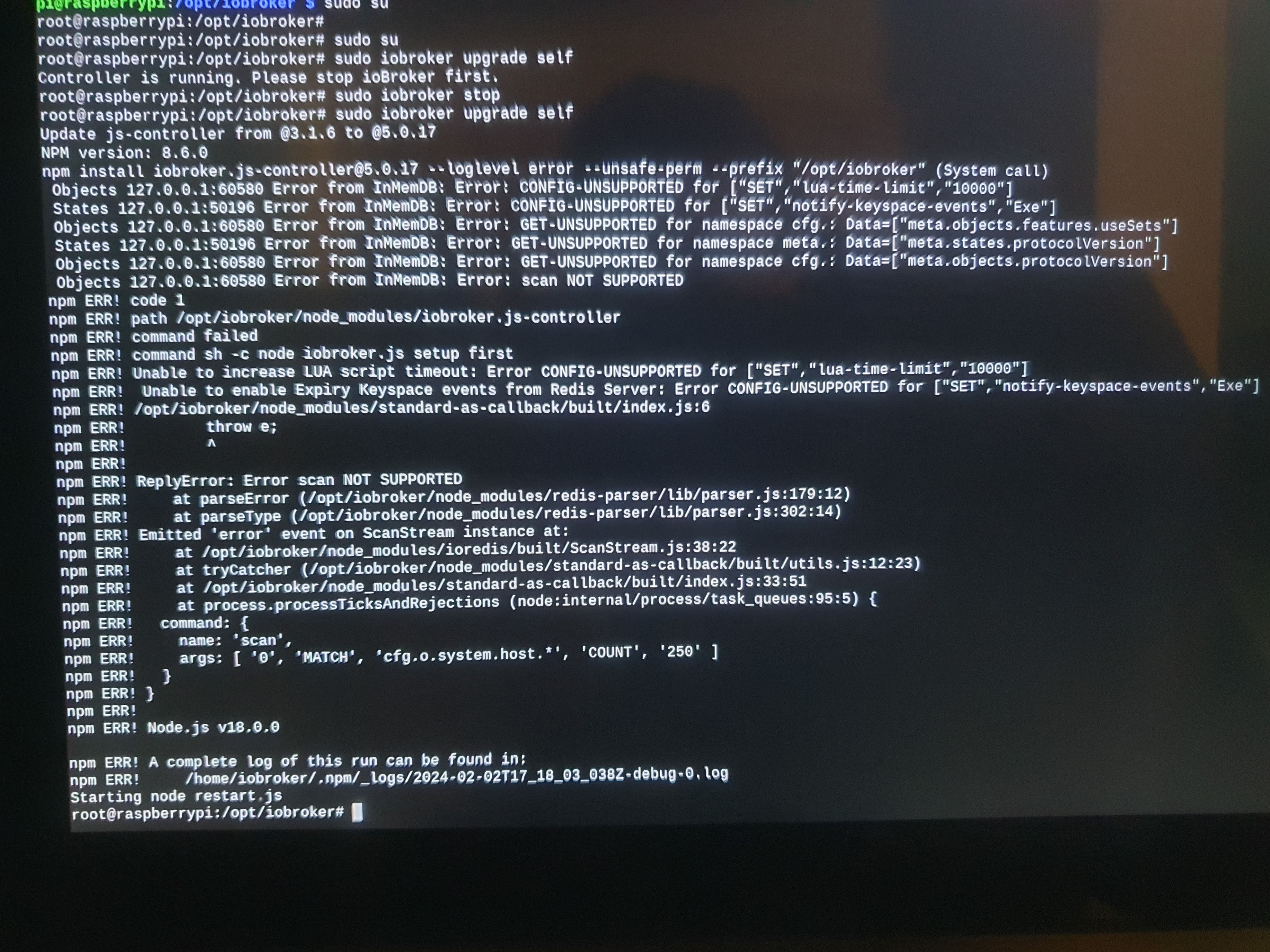
-
Zeilenweise 2 - 9 eingeben.
Hallo Thomas, heute ist der Wurm drin.
mit dem Befehl sudo apt full-upgrade sind zunächst Unmengen Daten erfolgreich geholt werden, aber dann starteten nachfolgende Fehlermeldungen:
Holen:322 http://mirror.netcologne.de/raspbian/raspbian buster/main armhf python-flask all 1.0.2-3+deb10u1 [93,0 kB] Holen:323 http://mirror.netcologne.de/raspbian/raspbian buster/main armhf python-pil armhf 5.4.1-2+deb10u4 [364 kB] Holen:333 http://mirror.netcologne.de/raspbian/raspbian buster/main armhf python3-renderpm armhf 3.5.13-1+deb10u2 [64,2 kB] Holen:283 http://ftp.gwdg.de/pub/linux/debian/raspbian/raspbian buster/main armhf libreoffice-avmedia-backend-gstreamer armhf 1:6.1.5-3+rpi1+deb10u11 [19,5 kB] Holen:284 http://ftp.gwdg.de/pub/linux/debian/raspbian/raspbian buster/main armhf libreoffice-writer armhf 1:6.1.5-3+rpi1+deb10u11 [6.736 kB] Fehl:263 http://debian.bio.lmu.de/raspbian/raspbian buster/main armhf openjdk-11-jdk-headless armhf 11.0.22+7-1~deb10u1 Verbindung fehlgeschlagen [IP: 2001:4ca0:4300::1:22 80] Fehl:284 http://ftp.gwdg.de/pub/linux/debian/raspbian/raspbian buster/main armhf libreoffice-writer armhf 1:6.1.5-3+rpi1+deb10u11 Verbindung mit ftp.gwdg.de:80 nicht möglich (134.76.12.6) - connect (113: Keine Route zum Zielrechner) Verbindung mit ftp.gwdg.de:80 konnte nicht aufgebaut werden (2001:638:60f:110::1:2), Zeitüberschreitung aufgetreten [IP: 2001:638:60f:110::1:2 80] Fehl:285 http://ftp.gwdg.de/pub/linux/debian/raspbian/raspbian buster/main armhf libreoffice-core armhf 1:6.1.5-3+rpi1+deb10u11 Verbindung mit ftp.gwdg.de:http nicht möglich: [IP: 2001:638:60f:110::1:2 80] Fehl:287 http://ftp.gwdg.de/pub/linux/debian/raspbian/raspbian buster/main armhf libreoffice-nlpsolver all 0.9+LibO6.1.5-3+rpi1+deb10u11 Verbindung mit ftp.gwdg.de:http nicht möglich: [IP: 2001:638:60f:110::1:2 80] Fehl:288 http://ftp.gwdg.de/pub/linux/debian/raspbian/raspbian buster/main armhf libreoffice-wiki-publisher all 1.2.0+LibO6.1.5-3+rpi1+deb10u11 Verbindung mit ftp.gwdg.de:http nicht möglich: [IP: 2001:638:60f:110::1:2 80] Fehl:299 http://ftp.gwdg.de/pub/linux/debian/raspbian/raspbian buster/main armhf libva-wayland2 armhf 2.4.0-1 Verbindung mit ftp.gwdg.de:http nicht möglich: [IP: 2001:638:60f:110::1:2 80] Fehl:278 http://debian.bio.lmu.de/raspbian/raspbian buster/main armhf libreoffice-report-builder all 1:6.1.5-3+rpi1+deb10u11 Verbindung mit debian.bio.lmu.de:80 nicht möglich (141.84.43.22) - connect (113: Keine Route zum Zielrechner) Verbindung mit debian.bio.lmu.de:80 konnte nicht aufgebaut werden (2001:4ca0:4300::1:22), Zeitüberschreitung aufgetreten [IP: 2001:4ca0:4300::1:22 80] Fehl:289 http://debian.bio.lmu.de/raspbian/raspbian buster/main armhf libruby2.5 armhf 2.5.5-3+deb10u6 Verbindung mit debian.bio.lmu.de:http nicht möglich: [IP: 2001:4ca0:4300::1:22 80] Fehl:306 http://debian.bio.lmu.de/raspbian/raspbian buster/main armhf vlc-l10n all 3.0.20-0+deb10u1 Verbindung mit debian.bio.lmu.de:http nicht möglich: [IP: 2001:4ca0:4300::1:22 80] Fehl:334 http://debian.bio.lmu.de/raspbian/raspbian buster/main armhf python3-reportlab-accel armhf 3.5.13-1+deb10u2 Verbindung mit debian.bio.lmu.de:http nicht möglich: [IP: 2001:4ca0:4300::1:22 80] Fehl:341 http://debian.bio.lmu.de/raspbian/raspbian buster/main armhf sudo armhf 1.8.27-1+deb10u5 Verbindung mit debian.bio.lmu.de:http nicht möglich: [IP: 2001:4ca0:4300::1:22 80] Fehl:345 http://debian.bio.lmu.de/raspbian/raspbian buster/main armhf vlc-plugin-samba armhf 3.0.20-0+deb10u1 Verbindung mit debian.bio.lmu.de:http nicht möglich: [IP: 2001:4ca0:4300::1:22 80] Fehl:300 http://ftp.gwdg.de/pub/linux/debian/raspbian/raspbian buster/main armhf libvlccore9 armhf 3.0.20-0+deb10u1 Verbindung mit ftp.gwdg.de:http nicht möglich: [IP: 2001:638:60f:110::1:2 80] Fehl:301 http://ftp.gwdg.de/pub/linux/debian/raspbian/raspbian buster/main armhf vlc-plugin-skins2 armhf 3.0.20-0+deb10u1 Verbindung mit ftp.gwdg.de:http nicht möglich: [IP: 2001:638:60f:110::1:2 80] Fehl:302 http://ftp.gwdg.de/pub/linux/debian/raspbian/raspbian buster/main armhf vlc armhf 3.0.20-0+deb10u1 Verbindung mit ftp.gwdg.de:http nicht möglich: [IP: 2001:638:60f:110::1:2 80] Fehl:303 http://ftp.gwdg.de/pub/linux/debian/raspbian/raspbian buster/main armhf vlc-plugin-qt armhf 3.0.20-0+deb10u1 Verbindung mit ftp.gwdg.de:http nicht möglich: [IP: 2001:638:60f:110::1:2 80] Fehl:311 http://ftp.gwdg.de/pub/linux/debian/raspbian/raspbian buster/main armhf libvlc-bin armhf 3.0.20-0+deb10u1 Verbindung mit ftp.gwdg.de:http nicht möglich: [IP: 2001:638:60f:110::1:2 80] Fehl:315 http://ftp.gwdg.de/pub/linux/debian/raspbian/raspbian buster/main armhf node-tough-cookie all 2.3.4+dfsg-1+deb10u1 Verbindung mit ftp.gwdg.de:http nicht möglich: [IP: 2001:638:60f:110::1:2 80] Fehl:321 http://ftp.gwdg.de/pub/linux/debian/raspbian/raspbian buster/main armhf python-jinja2 all 2.10-2+deb10u1 Verbindung mit ftp.gwdg.de:http nicht möglich: [IP: 2001:638:60f:110::1:2 80] Fehl:325 http://ftp.gwdg.de/pub/linux/debian/raspbian/raspbian buster/main armhf python-requests all 2.21.0-1+deb10u1 Verbindung mit ftp.gwdg.de:http nicht möglich: [IP: 2001:638:60f:110::1:2 80] Fehl:327 http://ftp.gwdg.de/pub/linux/debian/raspbian/raspbian buster/main armhf python3-jinja2 all 2.10-2+deb10u1 Verbindung mit ftp.gwdg.de:http nicht möglich: [IP: 2001:638:60f:110::1:2 80] Fehl:329 http://ftp.gwdg.de/pub/linux/debian/raspbian/raspbian buster/main armhf python3-flask all 1.0.2-3+deb10u1 Verbindung mit ftp.gwdg.de:http nicht möglich: [IP: 2001:638:60f:110::1:2 80] Fehl:331 http://ftp.gwdg.de/pub/linux/debian/raspbian/raspbian buster/main armhf python3-pil.imagetk armhf 5.4.1-2+deb10u4 Verbindung mit ftp.gwdg.de:http nicht möglich: [IP: 2001:638:60f:110::1:2 80] Fehl:332 http://ftp.gwdg.de/pub/linux/debian/raspbian/raspbian buster/main armhf python3-pil armhf 5.4.1-2+deb10u4 Verbindung mit ftp.gwdg.de:http nicht möglich: [IP: 2001:638:60f:110::1:2 80] Fehl:335 http://ftp.gwdg.de/pub/linux/debian/raspbian/raspbian buster/main armhf python3-reportlab all 3.5.13-1+deb10u2 Verbindung mit ftp.gwdg.de:http nicht möglich: [IP: 2001:638:60f:110::1:2 80] Fehl:336 http://ftp.gwdg.de/pub/linux/debian/raspbian/raspbian buster/main armhf python3-urllib3 all 1.24.1-1+deb10u2 Verbindung mit ftp.gwdg.de:http nicht möglich: [IP: 2001:638:60f:110::1:2 80] Fehl:337 http://ftp.gwdg.de/pub/linux/debian/raspbian/raspbian buster/main armhf python3-requests all 2.21.0-1+deb10u1 Verbindung mit ftp.gwdg.de:http nicht möglich: [IP: 2001:638:60f:110::1:2 80] Fehl:344 http://ftp.gwdg.de/pub/linux/debian/raspbian/raspbian buster/main armhf vlc-plugin-notify armhf 3.0.20-0+deb10u1 Verbindung mit ftp.gwdg.de:http nicht möglich: [IP: 2001:638:60f:110::1:2 80] Fehl:346 http://ftp.gwdg.de/pub/linux/debian/raspbian/raspbian buster/main armhf vlc-plugin-video-splitter armhf 3.0.20-0+deb10u1 Verbindung mit ftp.gwdg.de:http nicht möglich: [IP: 2001:638:60f:110::1:2 80] Fehl:347 http://ftp.gwdg.de/pub/linux/debian/raspbian/raspbian buster/main armhf vlc-plugin-visualization armhf 3.0.20-0+deb10u1 Verbindung mit ftp.gwdg.de:http nicht möglich: [IP: 2001:638:60f:110::1:2 80] Es wurden 572 MB in 3 min 36 s geholt (2.656 kB/s). E: Fehlschlag beim Holen von http://debian.bio.lmu.de/raspbian/raspbian/pool/main/o/openjdk-11/openjdk-11-jdk-headless_11.0.22+7-1~deb10u1_armhf.deb Verbindung fehlgeschlagen [IP: 2001:4ca0:4300::1:22 80] E: Fehlschlag beim Holen von http://debian.bio.lmu.de/raspbian/raspbian/pool/main/libr/libreoffice/libreoffice-report-builder_6.1.5-3+rpi1+deb10u11_all.deb Verbindung mit debian.bio.lmu.de:80 nicht möglich (141.84.43.22) - connect (113: Keine Route zum Zielrechner) Verbindung mit debian.bio.lmu.de:80 konnte nicht aufgebaut werden (2001:4ca0:4300::1:22), Zeitüberschreitung aufgetreten [IP: 2001:4ca0:4300::1:22 80] E: Fehlschlag beim Holen von http://ftp.gwdg.de/pub/linux/debian/raspbian/raspbian/pool/main/libr/libreoffice/libreoffice-writer_6.1.5-3+rpi1+deb10u11_armhf.deb Verbindung mit ftp.gwdg.de:80 nicht möglich (134.76.12.6) - connect (113: Keine Route zum Zielrechner) Verbindung mit ftp.gwdg.de:80 konnte nicht aufgebaut werden (2001:638:60f:110::1:2), Zeitüberschreitung aufgetreten [IP: 2001:638:60f:110::1:2 80] E: Fehlschlag beim Holen von http://ftp.gwdg.de/pub/linux/debian/raspbian/raspbian/pool/main/libr/libreoffice/libreoffice-core_6.1.5-3+rpi1+deb10u11_armhf.deb Verbindung mit ftp.gwdg.de:http nicht möglich: [IP: 2001:638:60f:110::1:2 80] E: Fehlschlag beim Holen von http://ftp.gwdg.de/pub/linux/debian/raspbian/raspbian/pool/main/libr/libreoffice/libreoffice-nlpsolver_0.9+LibO6.1.5-3+rpi1+deb10u11_all.deb Verbindung mit ftp.gwdg.de:http nicht möglich: [IP: 2001:638:60f:110::1:2 80] E: Fehlschlag beim Holen von http://ftp.gwdg.de/pub/linux/debian/raspbian/raspbian/pool/main/libr/libreoffice/libreoffice-wiki-publisher_1.2.0+LibO6.1.5-3+rpi1+deb10u11_all.deb Verbindung mit ftp.gwdg.de:http nicht möglich: [IP: 2001:638:60f:110::1:2 80] E: Fehlschlag beim Holen von http://debian.bio.lmu.de/raspbian/raspbian/pool/main/r/ruby2.5/libruby2.5_2.5.5-3+deb10u6_armhf.deb Verbindung mit debian.bio.lmu.de:http nicht möglich: [IP: 2001:4ca0:4300::1:22 80] E: Fehlschlag beim Holen von http://ftp.gwdg.de/pub/linux/debian/raspbian/raspbian/pool/main/libv/libva/libva-wayland2_2.4.0-1_armhf.deb Verbindung mit ftp.gwdg.de:http nicht möglich: [IP: 2001:638:60f:110::1:2 80] E: Fehlschlag beim Holen von http://ftp.gwdg.de/pub/linux/debian/raspbian/raspbian/pool/main/v/vlc/libvlccore9_3.0.20-0+deb10u1_armhf.deb Verbindung mit ftp.gwdg.de:http nicht möglich: [IP: 2001:638:60f:110::1:2 80] E: Fehlschlag beim Holen von http://ftp.gwdg.de/pub/linux/debian/raspbian/raspbian/pool/main/v/vlc/vlc-plugin-skins2_3.0.20-0+deb10u1_armhf.deb Verbindung mit ftp.gwdg.de:http nicht möglich: [IP: 2001:638:60f:110::1:2 80] E: Fehlschlag beim Holen von http://ftp.gwdg.de/pub/linux/debian/raspbian/raspbian/pool/main/v/vlc/vlc_3.0.20-0+deb10u1_armhf.deb Verbindung mit ftp.gwdg.de:http nicht möglich: [IP: 2001:638:60f:110::1:2 80] E: Fehlschlag beim Holen von http://ftp.gwdg.de/pub/linux/debian/raspbian/raspbian/pool/main/v/vlc/vlc-plugin-qt_3.0.20-0+deb10u1_armhf.deb Verbindung mit ftp.gwdg.de:http nicht möglich: [IP: 2001:638:60f:110::1:2 80] E: Fehlschlag beim Holen von http://debian.bio.lmu.de/raspbian/raspbian/pool/main/v/vlc/vlc-l10n_3.0.20-0+deb10u1_all.deb Verbindung mit debian.bio.lmu.de:http nicht möglich: [IP: 2001:4ca0:4300::1:22 80] E: Fehlschlag beim Holen von http://ftp.gwdg.de/pub/linux/debian/raspbian/raspbian/pool/main/v/vlc/libvlc-bin_3.0.20-0+deb10u1_armhf.deb Verbindung mit ftp.gwdg.de:http nicht möglich: [IP: 2001:638:60f:110::1:2 80] E: Fehlschlag beim Holen von http://ftp.gwdg.de/pub/linux/debian/raspbian/raspbian/pool/main/n/node-tough-cookie/node-tough-cookie_2.3.4+dfsg-1+deb10u1_all.deb Verbindung mit ftp.gwdg.de:http nicht möglich: [IP: 2001:638:60f:110::1:2 80] E: Fehlschlag beim Holen von http://ftp.gwdg.de/pub/linux/debian/raspbian/raspbian/pool/main/j/jinja2/python-jinja2_2.10-2+deb10u1_all.deb Verbindung mit ftp.gwdg.de:http nicht möglich: [IP: 2001:638:60f:110::1:2 80] E: Fehlschlag beim Holen von http://ftp.gwdg.de/pub/linux/debian/raspbian/raspbian/pool/main/r/requests/python-requests_2.21.0-1+deb10u1_all.deb Verbindung mit ftp.gwdg.de:http nicht möglich: [IP: 2001:638:60f:110::1:2 80] E: Fehlschlag beim Holen von http://ftp.gwdg.de/pub/linux/debian/raspbian/raspbian/pool/main/j/jinja2/python3-jinja2_2.10-2+deb10u1_all.deb Verbindung mit ftp.gwdg.de:http nicht möglich: [IP: 2001:638:60f:110::1:2 80] E: Fehlschlag beim Holen von http://ftp.gwdg.de/pub/linux/debian/raspbian/raspbian/pool/main/f/flask/python3-flask_1.0.2-3+deb10u1_all.deb Verbindung mit ftp.gwdg.de:http nicht möglich: [IP: 2001:638:60f:110::1:2 80] E: Fehlschlag beim Holen von http://ftp.gwdg.de/pub/linux/debian/raspbian/raspbian/pool/main/p/pillow/python3-pil.imagetk_5.4.1-2+deb10u4_armhf.deb Verbindung mit ftp.gwdg.de:http nicht möglich: [IP: 2001:638:60f:110::1:2 80] E: Fehlschlag beim Holen von http://ftp.gwdg.de/pub/linux/debian/raspbian/raspbian/pool/main/p/pillow/python3-pil_5.4.1-2+deb10u4_armhf.deb Verbindung mit ftp.gwdg.de:http nicht möglich: [IP: 2001:638:60f:110::1:2 80] E: Fehlschlag beim Holen von http://debian.bio.lmu.de/raspbian/raspbian/pool/main/p/python-reportlab/python3-reportlab-accel_3.5.13-1+deb10u2_armhf.deb Verbindung mit debian.bio.lmu.de:http nicht möglich: [IP: 2001:4ca0:4300::1:22 80] E: Fehlschlag beim Holen von http://ftp.gwdg.de/pub/linux/debian/raspbian/raspbian/pool/main/p/python-reportlab/python3-reportlab_3.5.13-1+deb10u2_all.deb Verbindung mit ftp.gwdg.de:http nicht möglich: [IP: 2001:638:60f:110::1:2 80] E: Fehlschlag beim Holen von http://ftp.gwdg.de/pub/linux/debian/raspbian/raspbian/pool/main/p/python-urllib3/python3-urllib3_1.24.1-1+deb10u2_all.deb Verbindung mit ftp.gwdg.de:http nicht möglich: [IP: 2001:638:60f:110::1:2 80] E: Fehlschlag beim Holen von http://ftp.gwdg.de/pub/linux/debian/raspbian/raspbian/pool/main/r/requests/python3-requests_2.21.0-1+deb10u1_all.deb Verbindung mit ftp.gwdg.de:http nicht möglich: [IP: 2001:638:60f:110::1:2 80] E: Fehlschlag beim Holen von http://debian.bio.lmu.de/raspbian/raspbian/pool/main/s/sudo/sudo_1.8.27-1+deb10u5_armhf.deb Verbindung mit debian.bio.lmu.de:http nicht möglich: [IP: 2001:4ca0:4300::1:22 80] E: Fehlschlag beim Holen von http://ftp.gwdg.de/pub/linux/debian/raspbian/raspbian/pool/main/v/vlc/vlc-plugin-notify_3.0.20-0+deb10u1_armhf.deb Verbindung mit ftp.gwdg.de:http nicht möglich: [IP: 2001:638:60f:110::1:2 80] E: Fehlschlag beim Holen von http://debian.bio.lmu.de/raspbian/raspbian/pool/main/v/vlc/vlc-plugin-samba_3.0.20-0+deb10u1_armhf.deb Verbindung mit debian.bio.lmu.de:http nicht möglich: [IP: 2001:4ca0:4300::1:22 80] E: Fehlschlag beim Holen von http://ftp.gwdg.de/pub/linux/debian/raspbian/raspbian/pool/main/v/vlc/vlc-plugin-video-splitter_3.0.20-0+deb10u1_armhf.deb Verbindung mit ftp.gwdg.de:http nicht möglich: [IP: 2001:638:60f:110::1:2 80] E: Fehlschlag beim Holen von http://ftp.gwdg.de/pub/linux/debian/raspbian/raspbian/pool/main/v/vlc/vlc-plugin-visualization_3.0.20-0+deb10u1_armhf.deb Verbindung mit ftp.gwdg.de:http nicht möglich: [IP: 2001:638:60f:110::1:2 80] E: Einige Archive konnten nicht heruntergeladen werden; vielleicht »apt-get update« ausführen oder mit »--fix-missing« probieren? pi@raspberrypi:~ $ -
Hallo Thomas, heute ist der Wurm drin.
mit dem Befehl sudo apt full-upgrade sind zunächst Unmengen Daten erfolgreich geholt werden, aber dann starteten nachfolgende Fehlermeldungen:
Holen:322 http://mirror.netcologne.de/raspbian/raspbian buster/main armhf python-flask all 1.0.2-3+deb10u1 [93,0 kB] Holen:323 http://mirror.netcologne.de/raspbian/raspbian buster/main armhf python-pil armhf 5.4.1-2+deb10u4 [364 kB] Holen:333 http://mirror.netcologne.de/raspbian/raspbian buster/main armhf python3-renderpm armhf 3.5.13-1+deb10u2 [64,2 kB] Holen:283 http://ftp.gwdg.de/pub/linux/debian/raspbian/raspbian buster/main armhf libreoffice-avmedia-backend-gstreamer armhf 1:6.1.5-3+rpi1+deb10u11 [19,5 kB] Holen:284 http://ftp.gwdg.de/pub/linux/debian/raspbian/raspbian buster/main armhf libreoffice-writer armhf 1:6.1.5-3+rpi1+deb10u11 [6.736 kB] Fehl:263 http://debian.bio.lmu.de/raspbian/raspbian buster/main armhf openjdk-11-jdk-headless armhf 11.0.22+7-1~deb10u1 Verbindung fehlgeschlagen [IP: 2001:4ca0:4300::1:22 80] Fehl:284 http://ftp.gwdg.de/pub/linux/debian/raspbian/raspbian buster/main armhf libreoffice-writer armhf 1:6.1.5-3+rpi1+deb10u11 Verbindung mit ftp.gwdg.de:80 nicht möglich (134.76.12.6) - connect (113: Keine Route zum Zielrechner) Verbindung mit ftp.gwdg.de:80 konnte nicht aufgebaut werden (2001:638:60f:110::1:2), Zeitüberschreitung aufgetreten [IP: 2001:638:60f:110::1:2 80] Fehl:285 http://ftp.gwdg.de/pub/linux/debian/raspbian/raspbian buster/main armhf libreoffice-core armhf 1:6.1.5-3+rpi1+deb10u11 Verbindung mit ftp.gwdg.de:http nicht möglich: [IP: 2001:638:60f:110::1:2 80] Fehl:287 http://ftp.gwdg.de/pub/linux/debian/raspbian/raspbian buster/main armhf libreoffice-nlpsolver all 0.9+LibO6.1.5-3+rpi1+deb10u11 Verbindung mit ftp.gwdg.de:http nicht möglich: [IP: 2001:638:60f:110::1:2 80] Fehl:288 http://ftp.gwdg.de/pub/linux/debian/raspbian/raspbian buster/main armhf libreoffice-wiki-publisher all 1.2.0+LibO6.1.5-3+rpi1+deb10u11 Verbindung mit ftp.gwdg.de:http nicht möglich: [IP: 2001:638:60f:110::1:2 80] Fehl:299 http://ftp.gwdg.de/pub/linux/debian/raspbian/raspbian buster/main armhf libva-wayland2 armhf 2.4.0-1 Verbindung mit ftp.gwdg.de:http nicht möglich: [IP: 2001:638:60f:110::1:2 80] Fehl:278 http://debian.bio.lmu.de/raspbian/raspbian buster/main armhf libreoffice-report-builder all 1:6.1.5-3+rpi1+deb10u11 Verbindung mit debian.bio.lmu.de:80 nicht möglich (141.84.43.22) - connect (113: Keine Route zum Zielrechner) Verbindung mit debian.bio.lmu.de:80 konnte nicht aufgebaut werden (2001:4ca0:4300::1:22), Zeitüberschreitung aufgetreten [IP: 2001:4ca0:4300::1:22 80] Fehl:289 http://debian.bio.lmu.de/raspbian/raspbian buster/main armhf libruby2.5 armhf 2.5.5-3+deb10u6 Verbindung mit debian.bio.lmu.de:http nicht möglich: [IP: 2001:4ca0:4300::1:22 80] Fehl:306 http://debian.bio.lmu.de/raspbian/raspbian buster/main armhf vlc-l10n all 3.0.20-0+deb10u1 Verbindung mit debian.bio.lmu.de:http nicht möglich: [IP: 2001:4ca0:4300::1:22 80] Fehl:334 http://debian.bio.lmu.de/raspbian/raspbian buster/main armhf python3-reportlab-accel armhf 3.5.13-1+deb10u2 Verbindung mit debian.bio.lmu.de:http nicht möglich: [IP: 2001:4ca0:4300::1:22 80] Fehl:341 http://debian.bio.lmu.de/raspbian/raspbian buster/main armhf sudo armhf 1.8.27-1+deb10u5 Verbindung mit debian.bio.lmu.de:http nicht möglich: [IP: 2001:4ca0:4300::1:22 80] Fehl:345 http://debian.bio.lmu.de/raspbian/raspbian buster/main armhf vlc-plugin-samba armhf 3.0.20-0+deb10u1 Verbindung mit debian.bio.lmu.de:http nicht möglich: [IP: 2001:4ca0:4300::1:22 80] Fehl:300 http://ftp.gwdg.de/pub/linux/debian/raspbian/raspbian buster/main armhf libvlccore9 armhf 3.0.20-0+deb10u1 Verbindung mit ftp.gwdg.de:http nicht möglich: [IP: 2001:638:60f:110::1:2 80] Fehl:301 http://ftp.gwdg.de/pub/linux/debian/raspbian/raspbian buster/main armhf vlc-plugin-skins2 armhf 3.0.20-0+deb10u1 Verbindung mit ftp.gwdg.de:http nicht möglich: [IP: 2001:638:60f:110::1:2 80] Fehl:302 http://ftp.gwdg.de/pub/linux/debian/raspbian/raspbian buster/main armhf vlc armhf 3.0.20-0+deb10u1 Verbindung mit ftp.gwdg.de:http nicht möglich: [IP: 2001:638:60f:110::1:2 80] Fehl:303 http://ftp.gwdg.de/pub/linux/debian/raspbian/raspbian buster/main armhf vlc-plugin-qt armhf 3.0.20-0+deb10u1 Verbindung mit ftp.gwdg.de:http nicht möglich: [IP: 2001:638:60f:110::1:2 80] Fehl:311 http://ftp.gwdg.de/pub/linux/debian/raspbian/raspbian buster/main armhf libvlc-bin armhf 3.0.20-0+deb10u1 Verbindung mit ftp.gwdg.de:http nicht möglich: [IP: 2001:638:60f:110::1:2 80] Fehl:315 http://ftp.gwdg.de/pub/linux/debian/raspbian/raspbian buster/main armhf node-tough-cookie all 2.3.4+dfsg-1+deb10u1 Verbindung mit ftp.gwdg.de:http nicht möglich: [IP: 2001:638:60f:110::1:2 80] Fehl:321 http://ftp.gwdg.de/pub/linux/debian/raspbian/raspbian buster/main armhf python-jinja2 all 2.10-2+deb10u1 Verbindung mit ftp.gwdg.de:http nicht möglich: [IP: 2001:638:60f:110::1:2 80] Fehl:325 http://ftp.gwdg.de/pub/linux/debian/raspbian/raspbian buster/main armhf python-requests all 2.21.0-1+deb10u1 Verbindung mit ftp.gwdg.de:http nicht möglich: [IP: 2001:638:60f:110::1:2 80] Fehl:327 http://ftp.gwdg.de/pub/linux/debian/raspbian/raspbian buster/main armhf python3-jinja2 all 2.10-2+deb10u1 Verbindung mit ftp.gwdg.de:http nicht möglich: [IP: 2001:638:60f:110::1:2 80] Fehl:329 http://ftp.gwdg.de/pub/linux/debian/raspbian/raspbian buster/main armhf python3-flask all 1.0.2-3+deb10u1 Verbindung mit ftp.gwdg.de:http nicht möglich: [IP: 2001:638:60f:110::1:2 80] Fehl:331 http://ftp.gwdg.de/pub/linux/debian/raspbian/raspbian buster/main armhf python3-pil.imagetk armhf 5.4.1-2+deb10u4 Verbindung mit ftp.gwdg.de:http nicht möglich: [IP: 2001:638:60f:110::1:2 80] Fehl:332 http://ftp.gwdg.de/pub/linux/debian/raspbian/raspbian buster/main armhf python3-pil armhf 5.4.1-2+deb10u4 Verbindung mit ftp.gwdg.de:http nicht möglich: [IP: 2001:638:60f:110::1:2 80] Fehl:335 http://ftp.gwdg.de/pub/linux/debian/raspbian/raspbian buster/main armhf python3-reportlab all 3.5.13-1+deb10u2 Verbindung mit ftp.gwdg.de:http nicht möglich: [IP: 2001:638:60f:110::1:2 80] Fehl:336 http://ftp.gwdg.de/pub/linux/debian/raspbian/raspbian buster/main armhf python3-urllib3 all 1.24.1-1+deb10u2 Verbindung mit ftp.gwdg.de:http nicht möglich: [IP: 2001:638:60f:110::1:2 80] Fehl:337 http://ftp.gwdg.de/pub/linux/debian/raspbian/raspbian buster/main armhf python3-requests all 2.21.0-1+deb10u1 Verbindung mit ftp.gwdg.de:http nicht möglich: [IP: 2001:638:60f:110::1:2 80] Fehl:344 http://ftp.gwdg.de/pub/linux/debian/raspbian/raspbian buster/main armhf vlc-plugin-notify armhf 3.0.20-0+deb10u1 Verbindung mit ftp.gwdg.de:http nicht möglich: [IP: 2001:638:60f:110::1:2 80] Fehl:346 http://ftp.gwdg.de/pub/linux/debian/raspbian/raspbian buster/main armhf vlc-plugin-video-splitter armhf 3.0.20-0+deb10u1 Verbindung mit ftp.gwdg.de:http nicht möglich: [IP: 2001:638:60f:110::1:2 80] Fehl:347 http://ftp.gwdg.de/pub/linux/debian/raspbian/raspbian buster/main armhf vlc-plugin-visualization armhf 3.0.20-0+deb10u1 Verbindung mit ftp.gwdg.de:http nicht möglich: [IP: 2001:638:60f:110::1:2 80] Es wurden 572 MB in 3 min 36 s geholt (2.656 kB/s). E: Fehlschlag beim Holen von http://debian.bio.lmu.de/raspbian/raspbian/pool/main/o/openjdk-11/openjdk-11-jdk-headless_11.0.22+7-1~deb10u1_armhf.deb Verbindung fehlgeschlagen [IP: 2001:4ca0:4300::1:22 80] E: Fehlschlag beim Holen von http://debian.bio.lmu.de/raspbian/raspbian/pool/main/libr/libreoffice/libreoffice-report-builder_6.1.5-3+rpi1+deb10u11_all.deb Verbindung mit debian.bio.lmu.de:80 nicht möglich (141.84.43.22) - connect (113: Keine Route zum Zielrechner) Verbindung mit debian.bio.lmu.de:80 konnte nicht aufgebaut werden (2001:4ca0:4300::1:22), Zeitüberschreitung aufgetreten [IP: 2001:4ca0:4300::1:22 80] E: Fehlschlag beim Holen von http://ftp.gwdg.de/pub/linux/debian/raspbian/raspbian/pool/main/libr/libreoffice/libreoffice-writer_6.1.5-3+rpi1+deb10u11_armhf.deb Verbindung mit ftp.gwdg.de:80 nicht möglich (134.76.12.6) - connect (113: Keine Route zum Zielrechner) Verbindung mit ftp.gwdg.de:80 konnte nicht aufgebaut werden (2001:638:60f:110::1:2), Zeitüberschreitung aufgetreten [IP: 2001:638:60f:110::1:2 80] E: Fehlschlag beim Holen von http://ftp.gwdg.de/pub/linux/debian/raspbian/raspbian/pool/main/libr/libreoffice/libreoffice-core_6.1.5-3+rpi1+deb10u11_armhf.deb Verbindung mit ftp.gwdg.de:http nicht möglich: [IP: 2001:638:60f:110::1:2 80] E: Fehlschlag beim Holen von http://ftp.gwdg.de/pub/linux/debian/raspbian/raspbian/pool/main/libr/libreoffice/libreoffice-nlpsolver_0.9+LibO6.1.5-3+rpi1+deb10u11_all.deb Verbindung mit ftp.gwdg.de:http nicht möglich: [IP: 2001:638:60f:110::1:2 80] E: Fehlschlag beim Holen von http://ftp.gwdg.de/pub/linux/debian/raspbian/raspbian/pool/main/libr/libreoffice/libreoffice-wiki-publisher_1.2.0+LibO6.1.5-3+rpi1+deb10u11_all.deb Verbindung mit ftp.gwdg.de:http nicht möglich: [IP: 2001:638:60f:110::1:2 80] E: Fehlschlag beim Holen von http://debian.bio.lmu.de/raspbian/raspbian/pool/main/r/ruby2.5/libruby2.5_2.5.5-3+deb10u6_armhf.deb Verbindung mit debian.bio.lmu.de:http nicht möglich: [IP: 2001:4ca0:4300::1:22 80] E: Fehlschlag beim Holen von http://ftp.gwdg.de/pub/linux/debian/raspbian/raspbian/pool/main/libv/libva/libva-wayland2_2.4.0-1_armhf.deb Verbindung mit ftp.gwdg.de:http nicht möglich: [IP: 2001:638:60f:110::1:2 80] E: Fehlschlag beim Holen von http://ftp.gwdg.de/pub/linux/debian/raspbian/raspbian/pool/main/v/vlc/libvlccore9_3.0.20-0+deb10u1_armhf.deb Verbindung mit ftp.gwdg.de:http nicht möglich: [IP: 2001:638:60f:110::1:2 80] E: Fehlschlag beim Holen von http://ftp.gwdg.de/pub/linux/debian/raspbian/raspbian/pool/main/v/vlc/vlc-plugin-skins2_3.0.20-0+deb10u1_armhf.deb Verbindung mit ftp.gwdg.de:http nicht möglich: [IP: 2001:638:60f:110::1:2 80] E: Fehlschlag beim Holen von http://ftp.gwdg.de/pub/linux/debian/raspbian/raspbian/pool/main/v/vlc/vlc_3.0.20-0+deb10u1_armhf.deb Verbindung mit ftp.gwdg.de:http nicht möglich: [IP: 2001:638:60f:110::1:2 80] E: Fehlschlag beim Holen von http://ftp.gwdg.de/pub/linux/debian/raspbian/raspbian/pool/main/v/vlc/vlc-plugin-qt_3.0.20-0+deb10u1_armhf.deb Verbindung mit ftp.gwdg.de:http nicht möglich: [IP: 2001:638:60f:110::1:2 80] E: Fehlschlag beim Holen von http://debian.bio.lmu.de/raspbian/raspbian/pool/main/v/vlc/vlc-l10n_3.0.20-0+deb10u1_all.deb Verbindung mit debian.bio.lmu.de:http nicht möglich: [IP: 2001:4ca0:4300::1:22 80] E: Fehlschlag beim Holen von http://ftp.gwdg.de/pub/linux/debian/raspbian/raspbian/pool/main/v/vlc/libvlc-bin_3.0.20-0+deb10u1_armhf.deb Verbindung mit ftp.gwdg.de:http nicht möglich: [IP: 2001:638:60f:110::1:2 80] E: Fehlschlag beim Holen von http://ftp.gwdg.de/pub/linux/debian/raspbian/raspbian/pool/main/n/node-tough-cookie/node-tough-cookie_2.3.4+dfsg-1+deb10u1_all.deb Verbindung mit ftp.gwdg.de:http nicht möglich: [IP: 2001:638:60f:110::1:2 80] E: Fehlschlag beim Holen von http://ftp.gwdg.de/pub/linux/debian/raspbian/raspbian/pool/main/j/jinja2/python-jinja2_2.10-2+deb10u1_all.deb Verbindung mit ftp.gwdg.de:http nicht möglich: [IP: 2001:638:60f:110::1:2 80] E: Fehlschlag beim Holen von http://ftp.gwdg.de/pub/linux/debian/raspbian/raspbian/pool/main/r/requests/python-requests_2.21.0-1+deb10u1_all.deb Verbindung mit ftp.gwdg.de:http nicht möglich: [IP: 2001:638:60f:110::1:2 80] E: Fehlschlag beim Holen von http://ftp.gwdg.de/pub/linux/debian/raspbian/raspbian/pool/main/j/jinja2/python3-jinja2_2.10-2+deb10u1_all.deb Verbindung mit ftp.gwdg.de:http nicht möglich: [IP: 2001:638:60f:110::1:2 80] E: Fehlschlag beim Holen von http://ftp.gwdg.de/pub/linux/debian/raspbian/raspbian/pool/main/f/flask/python3-flask_1.0.2-3+deb10u1_all.deb Verbindung mit ftp.gwdg.de:http nicht möglich: [IP: 2001:638:60f:110::1:2 80] E: Fehlschlag beim Holen von http://ftp.gwdg.de/pub/linux/debian/raspbian/raspbian/pool/main/p/pillow/python3-pil.imagetk_5.4.1-2+deb10u4_armhf.deb Verbindung mit ftp.gwdg.de:http nicht möglich: [IP: 2001:638:60f:110::1:2 80] E: Fehlschlag beim Holen von http://ftp.gwdg.de/pub/linux/debian/raspbian/raspbian/pool/main/p/pillow/python3-pil_5.4.1-2+deb10u4_armhf.deb Verbindung mit ftp.gwdg.de:http nicht möglich: [IP: 2001:638:60f:110::1:2 80] E: Fehlschlag beim Holen von http://debian.bio.lmu.de/raspbian/raspbian/pool/main/p/python-reportlab/python3-reportlab-accel_3.5.13-1+deb10u2_armhf.deb Verbindung mit debian.bio.lmu.de:http nicht möglich: [IP: 2001:4ca0:4300::1:22 80] E: Fehlschlag beim Holen von http://ftp.gwdg.de/pub/linux/debian/raspbian/raspbian/pool/main/p/python-reportlab/python3-reportlab_3.5.13-1+deb10u2_all.deb Verbindung mit ftp.gwdg.de:http nicht möglich: [IP: 2001:638:60f:110::1:2 80] E: Fehlschlag beim Holen von http://ftp.gwdg.de/pub/linux/debian/raspbian/raspbian/pool/main/p/python-urllib3/python3-urllib3_1.24.1-1+deb10u2_all.deb Verbindung mit ftp.gwdg.de:http nicht möglich: [IP: 2001:638:60f:110::1:2 80] E: Fehlschlag beim Holen von http://ftp.gwdg.de/pub/linux/debian/raspbian/raspbian/pool/main/r/requests/python3-requests_2.21.0-1+deb10u1_all.deb Verbindung mit ftp.gwdg.de:http nicht möglich: [IP: 2001:638:60f:110::1:2 80] E: Fehlschlag beim Holen von http://debian.bio.lmu.de/raspbian/raspbian/pool/main/s/sudo/sudo_1.8.27-1+deb10u5_armhf.deb Verbindung mit debian.bio.lmu.de:http nicht möglich: [IP: 2001:4ca0:4300::1:22 80] E: Fehlschlag beim Holen von http://ftp.gwdg.de/pub/linux/debian/raspbian/raspbian/pool/main/v/vlc/vlc-plugin-notify_3.0.20-0+deb10u1_armhf.deb Verbindung mit ftp.gwdg.de:http nicht möglich: [IP: 2001:638:60f:110::1:2 80] E: Fehlschlag beim Holen von http://debian.bio.lmu.de/raspbian/raspbian/pool/main/v/vlc/vlc-plugin-samba_3.0.20-0+deb10u1_armhf.deb Verbindung mit debian.bio.lmu.de:http nicht möglich: [IP: 2001:4ca0:4300::1:22 80] E: Fehlschlag beim Holen von http://ftp.gwdg.de/pub/linux/debian/raspbian/raspbian/pool/main/v/vlc/vlc-plugin-video-splitter_3.0.20-0+deb10u1_armhf.deb Verbindung mit ftp.gwdg.de:http nicht möglich: [IP: 2001:638:60f:110::1:2 80] E: Fehlschlag beim Holen von http://ftp.gwdg.de/pub/linux/debian/raspbian/raspbian/pool/main/v/vlc/vlc-plugin-visualization_3.0.20-0+deb10u1_armhf.deb Verbindung mit ftp.gwdg.de:http nicht möglich: [IP: 2001:638:60f:110::1:2 80] E: Einige Archive konnten nicht heruntergeladen werden; vielleicht »apt-get update« ausführen oder mit »--fix-missing« probieren? pi@raspberrypi:~ $@frank-knx sagte in Update js-Controller 3.x auf 5.x funktioniert nicht:
2001:638:60f:110::1:2
Da ist bei dir im Netzwerk wohl IPv6 nicht/nicht richtig eingerichtet.
-
@frank-knx sagte in Update js-Controller 3.x auf 5.x funktioniert nicht:
2001:638:60f:110::1:2
Da ist bei dir im Netzwerk wohl IPv6 nicht/nicht richtig eingerichtet.
@thomas-braun
Sorry, hatte ich bisher nicht gemerkt oder gebraucht. Daher an der Fritzbox nichts besonderes eingerichtet.
Habe ich nun ein Problem, dass ich ein paar Daten von IPV6 Adressen nicht laden kann ? -
@thomas-braun
Sorry, hatte ich bisher nicht gemerkt oder gebraucht. Daher an der Fritzbox nichts besonderes eingerichtet.
Habe ich nun ein Problem, dass ich ein paar Daten von IPV6 Adressen nicht laden kann ?@frank-knx Siehe HIER
Schau, dass Du in Deiner Fritzbox IPv6 vernünftig einstellst, Du wirst sonst immer mehr Probleme bekommen. Wie kann ich Dir leider nicht sagen. Ich habe keine Fritzbox und weiss auch nicht, bei welchem Provider Du bist.
Gruss, Jürgen
-
@thomas-braun
Sorry, hatte ich bisher nicht gemerkt oder gebraucht. Daher an der Fritzbox nichts besonderes eingerichtet.
Habe ich nun ein Problem, dass ich ein paar Daten von IPV6 Adressen nicht laden kann ?@frank-knx sagte in Update js-Controller 3.x auf 5.x funktioniert nicht:
Sorry, hatte ich bisher nicht gemerkt oder gebraucht.
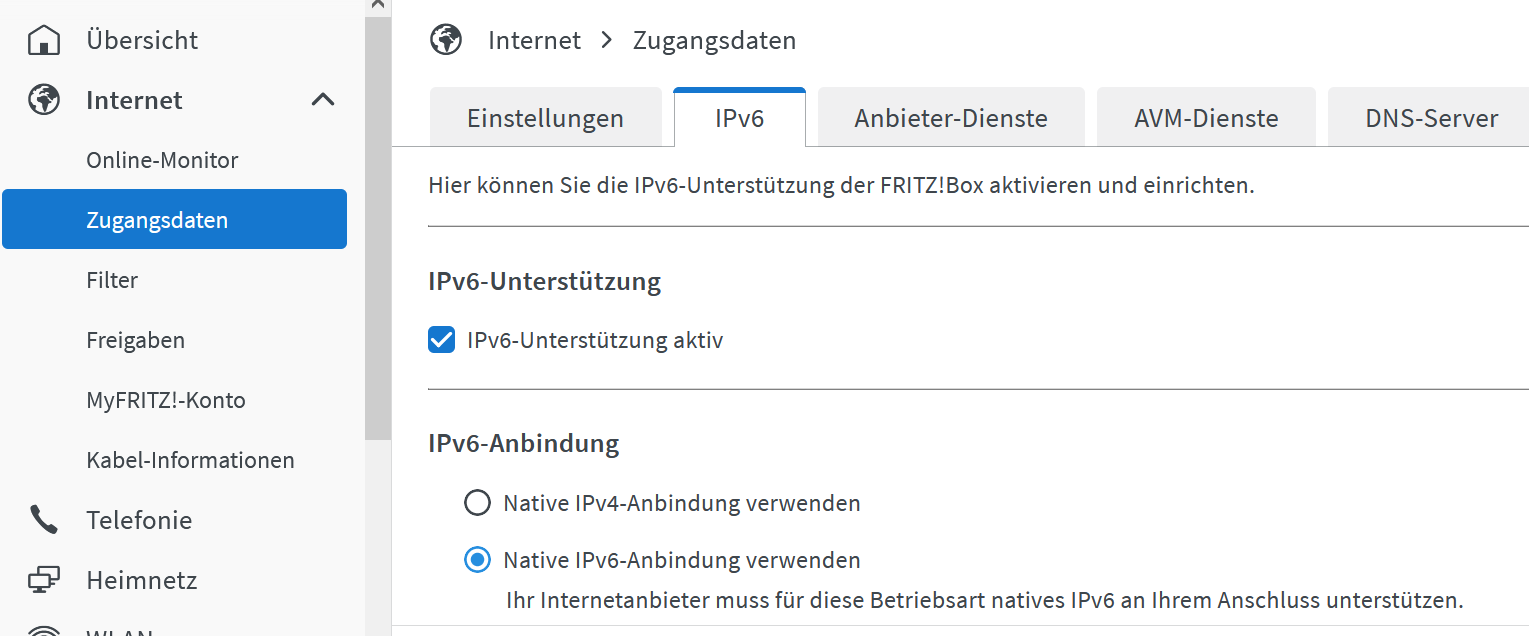
Jetzt brauchst du es. Einfachster Fall: Nur aktivieren.
-
@frank-knx sagte in Update js-Controller 3.x auf 5.x funktioniert nicht:
Sorry, hatte ich bisher nicht gemerkt oder gebraucht.
Jetzt brauchst du es. Einfachster Fall: Nur aktivieren.
Hallo Thomas,
ich hatte parallel schon gestartet und es ist alles (wie auf deinem Bild) aktiviert und unter "Online Monitor" ist auch der Hinweis, dass die IPV6 Verbindung mit Adresse vergeben ist.
Fritzbox ist also in Ordnung.Kann es am PI liegen, dass dort IPV6 aktiviert sein muss ?
Ich habe unter Einstellungen nichts gefunden.. ich habe aber den PI in Verdacht.Gibt es eine Testmöglichkeit ?
-
Hallo Thomas,
ich hatte parallel schon gestartet und es ist alles (wie auf deinem Bild) aktiviert und unter "Online Monitor" ist auch der Hinweis, dass die IPV6 Verbindung mit Adresse vergeben ist.
Fritzbox ist also in Ordnung.Kann es am PI liegen, dass dort IPV6 aktiviert sein muss ?
Ich habe unter Einstellungen nichts gefunden.. ich habe aber den PI in Verdacht.Gibt es eine Testmöglichkeit ?
@frank-knx sagte in Update js-Controller 3.x auf 5.x funktioniert nicht:
Gibt es eine Testmöglichkeit ?
ip aanschauen.
-
@frank-knx sagte in Update js-Controller 3.x auf 5.x funktioniert nicht:
Gibt es eine Testmöglichkeit ?
ip aanschauen.
PI hängt derzeit am W-Lan: hier das Ergebnis:
pi@raspberrypi:~ $ ip a 1: lo: <LOOPBACK,UP,LOWER_UP> mtu 65536 qdisc noqueue state UNKNOWN group default qlen 1000 link/loopback 00:00:00:00:00:00 brd 00:00:00:00:00:00 inet 127.0.0.1/8 scope host lo valid_lft forever preferred_lft forever inet6 ::1/128 scope host valid_lft forever preferred_lft forever 2: eth0: <NO-CARRIER,BROADCAST,MULTICAST,UP> mtu 1500 qdisc mq state DOWN group default qlen 1000 link/ether dc:a6:32:d3:7a:a7 brd ff:ff:ff:ff:ff:ff 3: wlan0: <BROADCAST,MULTICAST,UP,LOWER_UP> mtu 1500 qdisc pfifo_fast state UP group default qlen 1000 link/ether dc:a6:32:d3:7a:a8 brd ff:ff:ff:ff:ff:ff inet 192.168.2.98/24 brd 192.168.2.255 scope global noprefixroute wlan0 valid_lft forever preferred_lft forever inet6 2a02:6d40:2458:4101:933:caf3:d3fe:118c/64 scope global dynamic mngtmpaddr noprefixroute valid_lft 7081sec preferred_lft 3481sec inet6 fe80::199d:25f7:b037:5cec/64 scope link valid_lft forever preferred_lft forever pi@raspberrypi:~ $ -
PI hängt derzeit am W-Lan: hier das Ergebnis:
pi@raspberrypi:~ $ ip a 1: lo: <LOOPBACK,UP,LOWER_UP> mtu 65536 qdisc noqueue state UNKNOWN group default qlen 1000 link/loopback 00:00:00:00:00:00 brd 00:00:00:00:00:00 inet 127.0.0.1/8 scope host lo valid_lft forever preferred_lft forever inet6 ::1/128 scope host valid_lft forever preferred_lft forever 2: eth0: <NO-CARRIER,BROADCAST,MULTICAST,UP> mtu 1500 qdisc mq state DOWN group default qlen 1000 link/ether dc:a6:32:d3:7a:a7 brd ff:ff:ff:ff:ff:ff 3: wlan0: <BROADCAST,MULTICAST,UP,LOWER_UP> mtu 1500 qdisc pfifo_fast state UP group default qlen 1000 link/ether dc:a6:32:d3:7a:a8 brd ff:ff:ff:ff:ff:ff inet 192.168.2.98/24 brd 192.168.2.255 scope global noprefixroute wlan0 valid_lft forever preferred_lft forever inet6 2a02:6d40:2458:4101:933:caf3:d3fe:118c/64 scope global dynamic mngtmpaddr noprefixroute valid_lft 7081sec preferred_lft 3481sec inet6 fe80::199d:25f7:b037:5cec/64 scope link valid_lft forever preferred_lft forever pi@raspberrypi:~ $Sollte eigentlich passen.
-
Sollte eigentlich passen.
Soll ich das upgrade nochmal versuchen oder wie durch die Oberfläche vorgeschlagen die beiden Befehle versuchen ?
E: Einige Archive konnten nicht heruntergeladen werden; vielleicht »apt-get update« ausführen oder mit »--fix-missing« probieren? -
Soll ich das upgrade nochmal versuchen oder wie durch die Oberfläche vorgeschlagen die beiden Befehle versuchen ?
E: Einige Archive konnten nicht heruntergeladen werden; vielleicht »apt-get update« ausführen oder mit »--fix-missing« probieren? -
Hallo Thomas,
dieses Mal ist das Upgrade anders gelaufen. Ich habe nun aber folgende Meldung...
Was soll ich machen ?
Bestätigen ?libgit2 (0.27.7+dfsg.1-0.2+deb10u1) buster-security; urgency=medium Previous versions of libgit's ssh backend did by default NOT perform certificate checking if the caller did not explicitly provide a certificate check callback and so may be subjected to a man-in-the-middle attack. (CVE-2023-22742) libgit will also check server keys against ~/.ssh/known_hosts, but as an limitation of Debian 10's libssh2 validation can only succeed if the used HostKeyAlgorithm was ssh-dss or ssh-rsa. Otherwise libgit will provide the error "invalid or unknown remote ssh hostkey". In this case remove the known_host entry for this server and configure the ssh client to limit the HostKeyAlgorithms to supported types by adding Host <IP or hostname of the git server> HostKeyAlgorithms ssh-dss,ssh-rsa to ~/.ssh/config for the specific server and re-add the known_hosts entry by e.g manually connecting to it. -- Tobias Frost <tobi@debian.org> Thi, 23 Feb 2023 21:01:45 +0100 (Drücken Sie q zum Beenden (Quit))apt-listchanges: Neuigkeiten ---------------------------- libgit2 (0.27.7+dfsg.1-0.2+deb10u1) buster-security; urgency=medium Previous versions of libgit's ssh backend did by default NOT perform certificate checking if the caller did not explicitly provide a certificate check callback and so may be subjected to a man-in-the-middle attack. (CVE-2023-22742) libgit will also check server keys against ~/.ssh/known_hosts, but as an limitation of Debian 10's libssh2 validation can only succeed if the used HostKeyAlgorithm was ssh-dss or ssh-rsa. Otherwise libgit will provide the error "invalid or unknown remote ssh hostkey". In this case remove the known_host entry for this server and configure the ssh client to limit the HostKeyAlgorithms to supported types by adding Host <IP or hostname of the git server> HostKeyAlgorithms ssh-dss,ssh-rsa to ~/.ssh/config for the specific server and re-add the known_hosts entry by e.g manually connecting to it. -- Tobias Frost <tobi@debian.org> Thi, 23 Feb 2023 21:01:45 +0100 -
Hallo Thomas,
dieses Mal ist das Upgrade anders gelaufen. Ich habe nun aber folgende Meldung...
Was soll ich machen ?
Bestätigen ?libgit2 (0.27.7+dfsg.1-0.2+deb10u1) buster-security; urgency=medium Previous versions of libgit's ssh backend did by default NOT perform certificate checking if the caller did not explicitly provide a certificate check callback and so may be subjected to a man-in-the-middle attack. (CVE-2023-22742) libgit will also check server keys against ~/.ssh/known_hosts, but as an limitation of Debian 10's libssh2 validation can only succeed if the used HostKeyAlgorithm was ssh-dss or ssh-rsa. Otherwise libgit will provide the error "invalid or unknown remote ssh hostkey". In this case remove the known_host entry for this server and configure the ssh client to limit the HostKeyAlgorithms to supported types by adding Host <IP or hostname of the git server> HostKeyAlgorithms ssh-dss,ssh-rsa to ~/.ssh/config for the specific server and re-add the known_hosts entry by e.g manually connecting to it. -- Tobias Frost <tobi@debian.org> Thi, 23 Feb 2023 21:01:45 +0100 (Drücken Sie q zum Beenden (Quit))apt-listchanges: Neuigkeiten ---------------------------- libgit2 (0.27.7+dfsg.1-0.2+deb10u1) buster-security; urgency=medium Previous versions of libgit's ssh backend did by default NOT perform certificate checking if the caller did not explicitly provide a certificate check callback and so may be subjected to a man-in-the-middle attack. (CVE-2023-22742) libgit will also check server keys against ~/.ssh/known_hosts, but as an limitation of Debian 10's libssh2 validation can only succeed if the used HostKeyAlgorithm was ssh-dss or ssh-rsa. Otherwise libgit will provide the error "invalid or unknown remote ssh hostkey". In this case remove the known_host entry for this server and configure the ssh client to limit the HostKeyAlgorithms to supported types by adding Host <IP or hostname of the git server> HostKeyAlgorithms ssh-dss,ssh-rsa to ~/.ssh/config for the specific server and re-add the known_hosts entry by e.g manually connecting to it. -- Tobias Frost <tobi@debian.org> Thi, 23 Feb 2023 21:01:45 +0100Ja, bestätigen.
-
Ja, bestätigen.
Hallo Thomas,
dieses Mal gute Nachrichten verbunden mit besten Dank.
Also das Update ist fehlerfrei durchgelaufen.. Ich starte gerade mit sudo reboot.Was wären die nächsten Schritte für mich (für Morgen)...
Gib mir noch ein paar "Hausaufgaben" für Morgenfrüh.
Beste Grüße FRANK
-
Hallo Thomas,
dieses Mal gute Nachrichten verbunden mit besten Dank.
Also das Update ist fehlerfrei durchgelaufen.. Ich starte gerade mit sudo reboot.Was wären die nächsten Schritte für mich (für Morgen)...
Gib mir noch ein paar "Hausaufgaben" für Morgenfrüh.
Beste Grüße FRANK
-
Hier die aktuelle Version:
======== Start marking the full check here =========Skript v.2023-10-10
*** BASE SYSTEM ***
======== Start marking the full check here =========
Skript v.2023-10-10

*** BASE SYSTEM ***
   Static hostname: raspberrypi
         Icon name: computer
  Operating System: Raspbian GNU/Linux 10 (buster)
            Kernel: Linux 5.10.103-v7l+
      Architecture: arm

Model           : Raspberry Pi 4 Model B Rev 1.4
Docker          : false
Virtualization  : none
Kernel          : armv7l
Userland        : armhf

Systemuptime and Load:
 00:47:21 up 4 min,  3 users,  load average: 0.92, 1.06, 0.53
CPU threads: 4


*** RASPBERRY THROTTLING ***
Current issues:
No throttling issues detected.

Previously detected issues:
No throttling issues detected.

*** Time and Time Zones ***
               Local time: Sat 2024-02-03 00:47:21 CET
           Universal time: Fri 2024-02-02 23:47:21 UTC
                 RTC time: n/a
                Time zone: Europe/Berlin (CET, +0100)
System clock synchronized: yes
              NTP service: active
          RTC in local TZ: no

*** User and Groups ***
pi
/home/pi
pi adm dialout cdrom sudo audio video plugdev games users input netdev lpadmin gpio i2c spi iobroker

*** X-Server-Setup ***
X-Server:       true
Desktop:
Terminal:       tty
Boot Target:    graphical.target

*** MEMORY ***
              total        used        free      shared  buff/cache   available
Mem:           7.9G        1.0G        6.3G         40M        572M        6.6G
Swap:           99M          0B         99M
Total:         8.0G        1.0G        6.4G

         7898 M total memory
         1023 M used memory
          197 M active memory
         1257 M inactive memory
         6302 M free memory
           70 M buffer memory
          502 M swap cache
           99 M total swap
            0 M used swap
           99 M free swap

Raspberry only:
oom events: 0
lifetime oom required: 0 Mbytes
total time in oom handler: 0 ms
max time spent in oom handler: 0 ms

*** FAILED SERVICES ***

  UNIT                  LOAD   ACTIVE SUB    DESCRIPTION
* bthelper@hci0.service loaded failed failed Raspberry Pi bluetooth helper

LOAD   = Reflects whether the unit definition was properly loaded.
ACTIVE = The high-level unit activation state, i.e. generalization of SUB.
SUB    = The low-level unit activation state, values depend on unit type.

1 loaded units listed. Pass --all to see loaded but inactive units, too.
To show all installed unit files use 'systemctl list-unit-files'.

*** FILESYSTEM ***
Filesystem     Type      Size  Used Avail Use% Mounted on
/dev/root      ext4      117G   11G  103G   9% /
devtmpfs       devtmpfs  3.7G     0  3.7G   0% /dev
tmpfs          tmpfs     3.9G     0  3.9G   0% /dev/shm
tmpfs          tmpfs     3.9G  8.7M  3.9G   1% /run
tmpfs          tmpfs     5.0M  4.0K  5.0M   1% /run/lock
tmpfs          tmpfs     3.9G     0  3.9G   0% /sys/fs/cgroup
/dev/mmcblk0p1 vfat      253M   49M  204M  20% /boot
tmpfs          tmpfs     790M  4.0K  790M   1% /run/user/1000

Messages concerning ext4 filesystem in dmesg:
[Sat Feb  3 00:42:27 2024] Kernel command line: coherent_pool=1M 8250.nr_uarts=0 snd_bcm2835.enable_compat_alsa=0 snd_bcm2835.enable_hdmi=1 video=HDMI-A-1:1920x1080M@60 smsc95xx.macaddr=DC:A6:32:D3:7A:A7 vc_mem.mem_base=0x3ec00000 vc_mem.mem_size=0x40000000  console=ttyS0,115200 console=tty1 root=PARTUUID=def5eda3-02 rootfstype=ext4 elevator=deadline fsck.repair=yes rootwait quiet splash plymouth.ignore-serial-consoles
[Sat Feb  3 00:42:28 2024] EXT4-fs (mmcblk0p2): mounted filesystem with ordered data mode. Opts: (null)
[Sat Feb  3 00:42:28 2024] VFS: Mounted root (ext4 filesystem) readonly on device 179:2.
[Sat Feb  3 00:42:31 2024] EXT4-fs (mmcblk0p2): re-mounted. Opts: (null)

Show mounted filesystems \(real ones only\):
TARGET                SOURCE         FSTYPE          OPTIONS
/                     /dev/mmcblk0p2 ext4            rw,noatime
|-/sys/fs/bpf         none           bpf             rw,nosuid,nodev,noexec,relatime,mode=700
|-/run/user/1000/gvfs gvfsd-fuse     fuse.gvfsd-fuse rw,nosuid,nodev,relatime,user_id=1000,group_id=1000
`-/boot               /dev/mmcblk0p1 vfat            rw,relatime,fmask=0022,dmask=0022,codepage=437,iocharset=ascii,shortname=mixed,errors=remount-ro

Files in neuralgic directories:

/var:
1.5G    /var/
1.1G    /var/cache/apt/archives
1.1G    /var/cache/apt
1.1G    /var/cache
262M    /var/lib

Archived and active journals take up 8.0M in the file system.

/opt/iobroker/backups:
101M    /opt/iobroker/backups/

/opt/iobroker/iobroker-data:
148M    /opt/iobroker/iobroker-data/
69M     /opt/iobroker/iobroker-data/files
59M     /opt/iobroker/iobroker-data/backup-objects
16M     /opt/iobroker/iobroker-data/files/javascript.admin
13M     /opt/iobroker/iobroker-data/files/vis.0

The five largest files in iobroker-data are:
6.3M    /opt/iobroker/iobroker-data/objects.json.bak
6.3M    /opt/iobroker/iobroker-data/objects.json
4.7M    /opt/iobroker/iobroker-data/files/javascript.admin/static/js/2.7e0b7583.chunk.js.map
3.5M    /opt/iobroker/iobroker-data/files/vis.0/Grundriss_final.png
3.4M    /opt/iobroker/iobroker-data/files/vis.0/Parkplatz.jpg

USB-Devices by-id:
USB-Sticks -  Avoid direct links to /dev/* in your adapter setups, please always prefer the links 'by-id':

find: '/dev/serial/by-id/': No such file or directory

*** NodeJS-Installation ***

/usr/bin/nodejs         v18.19.0
/usr/bin/node           v18.19.0
/usr/bin/npm            10.2.3
/usr/bin/npx            10.2.3
/usr/bin/corepack       0.22.0


nodejs:
  Installed: 18.19.0-1nodesource1
  Candidate: 18.19.0-1nodesource1
  Version table:
 *** 18.19.0-1nodesource1 1001
        500 https://deb.nodesource.com/node_18.x nodistro/main armhf Packages
        100 /var/lib/dpkg/status
     18.18.2-1nodesource1 1001
        500 https://deb.nodesource.com/node_18.x nodistro/main armhf Packages
     18.18.1-1nodesource1 1001
        500 https://deb.nodesource.com/node_18.x nodistro/main armhf Packages
     18.18.0-1nodesource1 1001
        500 https://deb.nodesource.com/node_18.x nodistro/main armhf Packages
     18.17.1-1nodesource1 1001
        500 https://deb.nodesource.com/node_18.x nodistro/main armhf Packages
     18.17.0-1nodesource1 1001
        500 https://deb.nodesource.com/node_18.x nodistro/main armhf Packages
     18.16.1-1nodesource1 1001
        500 https://deb.nodesource.com/node_18.x nodistro/main armhf Packages
     18.16.0-1nodesource1 1001
        500 https://deb.nodesource.com/node_18.x nodistro/main armhf Packages
     18.15.0-1nodesource1 1001
        500 https://deb.nodesource.com/node_18.x nodistro/main armhf Packages
     18.14.2-1nodesource1 1001
        500 https://deb.nodesource.com/node_18.x nodistro/main armhf Packages
     18.14.1-1nodesource1 1001
        500 https://deb.nodesource.com/node_18.x nodistro/main armhf Packages
     18.14.0-1nodesource1 1001
        500 https://deb.nodesource.com/node_18.x nodistro/main armhf Packages
     18.13.0-1nodesource1 1001
        500 https://deb.nodesource.com/node_18.x nodistro/main armhf Packages
     18.12.0-1nodesource1 1001
        500 https://deb.nodesource.com/node_18.x nodistro/main armhf Packages
     18.11.0-1nodesource1 1001
        500 https://deb.nodesource.com/node_18.x nodistro/main armhf Packages
     18.10.0-1nodesource1 1001
        500 https://deb.nodesource.com/node_18.x nodistro/main armhf Packages
     18.9.1-1nodesource1 1001
        500 https://deb.nodesource.com/node_18.x nodistro/main armhf Packages
     18.9.0-1nodesource1 1001
        500 https://deb.nodesource.com/node_18.x nodistro/main armhf Packages
     18.8.0-1nodesource1 1001
        500 https://deb.nodesource.com/node_18.x nodistro/main armhf Packages
     18.7.0-1nodesource1 1001
        500 https://deb.nodesource.com/node_18.x nodistro/main armhf Packages
     18.6.0-1nodesource1 1001
        500 https://deb.nodesource.com/node_18.x nodistro/main armhf Packages
     18.5.0-1nodesource1 1001
        500 https://deb.nodesource.com/node_18.x nodistro/main armhf Packages
     18.4.0-1nodesource1 1001
        500 https://deb.nodesource.com/node_18.x nodistro/main armhf Packages
     18.3.0-1nodesource1 1001
        500 https://deb.nodesource.com/node_18.x nodistro/main armhf Packages
     18.2.0-1nodesource1 1001
        500 https://deb.nodesource.com/node_18.x nodistro/main armhf Packages
     18.1.0-1nodesource1 1001
        500 https://deb.nodesource.com/node_18.x nodistro/main armhf Packages
     18.0.0-1nodesource1 1001
        500 https://deb.nodesource.com/node_18.x nodistro/main armhf Packages
     10.24.0~dfsg-1~deb10u3 500
        500 http://raspbian.raspberrypi.org/raspbian buster/main armhf Packages

Temp directories causing npm8 problem: 0
No problems detected

Errors in npm tree:

*** ioBroker-Installation ***

ioBroker Status
iobroker is running on this host.

At least one iobroker host is running.

Objects type: file
States  type: file

Core adapters versions
js-controller:  3.1.6
admin:          4.1.11
javascript:     4.8.4

Adapters from github:   0

Adapter State
+ system.adapter.admin.0                 : admin                 -  enabled, port: 8081, bind: 0.0.0.0, run as: admin
+ system.adapter.discovery.0             : discovery             -  enabled
  system.adapter.ical.0                  : ical                  -  enabled
  system.adapter.icons-mfd-png.0         : icons-mfd-png         -  enabled
+ system.adapter.influxdb.0              : influxdb              -  enabled, port: 8086
+ system.adapter.info.0                  : info                  -  enabled
+ system.adapter.javascript.0            : javascript            -  enabled
+ system.adapter.knx.0                   : knx                   -  enabled, bind: 192.168.2.98
+ system.adapter.linux-control.0         : linux-control         -  enabled
+ system.adapter.meldungsliste.0         : meldungsliste         -  enabled
+ system.adapter.meldungsliste.1         : meldungsliste         -  enabled
+ system.adapter.meldungsliste.10        : meldungsliste         -  enabled
+ system.adapter.meldungsliste.11        : meldungsliste         -  enabled
+ system.adapter.meldungsliste.12        : meldungsliste         -  enabled
+ system.adapter.meldungsliste.13        : meldungsliste         -  enabled
+ system.adapter.meldungsliste.2         : meldungsliste         -  enabled
+ system.adapter.meldungsliste.3         : meldungsliste         -  enabled
+ system.adapter.meldungsliste.4         : meldungsliste         -  enabled
+ system.adapter.meldungsliste.5         : meldungsliste         -  enabled
+ system.adapter.meldungsliste.6         : meldungsliste         -  enabled
+ system.adapter.meldungsliste.7         : meldungsliste         -  enabled
+ system.adapter.meldungsliste.8         : meldungsliste         -  enabled
+ system.adapter.meldungsliste.9         : meldungsliste         -  enabled
+ system.adapter.node-red.0              : node-red              -  enabled, port: 1880, bind: 192.168.2.98
+ system.adapter.statistics.0            : statistics            -  enabled
  system.adapter.tr-064.0                : tr-064                - disabled
+ system.adapter.trashschedule.0         : trashschedule         -  enabled
  system.adapter.upnp.0                  : upnp                  - disabled
  system.adapter.vis-bars.0              : vis-bars              -  enabled
  system.adapter.vis-colorpicker.0       : vis-colorpicker       -  enabled
  system.adapter.vis-fancyswitch.0       : vis-fancyswitch       -  enabled
  system.adapter.vis-hqwidgets.0         : vis-hqwidgets         -  enabled
  system.adapter.vis-jqui-mfd.0          : vis-jqui-mfd          -  enabled
  system.adapter.vis-timeandweather.0    : vis-timeandweather    -  enabled
  system.adapter.vis.0                   : vis                   -  enabled
+ system.adapter.web.0                   : web                   -  enabled, port: 8082, bind: 0.0.0.0, run as: admin

+ instance is alive

Enabled adapters with bindings
+ system.adapter.admin.0                 : admin                 -  enabled, port: 8081, bind: 0.0.0.0, run as: admin
+ system.adapter.influxdb.0              : influxdb              -  enabled, port: 8086
+ system.adapter.node-red.0              : node-red              -  enabled, port: 1880, bind: 192.168.2.98
+ system.adapter.web.0                   : web                   -  enabled, port: 8082, bind: 0.0.0.0, run as: admin

ioBroker-Repositories
Stable (default): http://download.iobroker.net/sources-dist.json
Beta (latest): http://download.iobroker.net/sources-dist-latest.json

Active repo: Stable (default)

Installed ioBroker-Instances
Used repository: Stable (default)
hash unchanged, use cached sources
update done
Adapter    "admin"         : 6.13.15  , installed 4.1.11 [Updateable]
Adapter    "backitup"      : 2.9.8    , installed 2.9.8
Adapter    "discovery"     : 4.2.0    , installed 4.2.0
Adapter    "ical"          : 1.13.3   , installed 1.7.4 [Updateable]
Adapter    "icons-mfd-png" : 1.2.1    , installed 1.2.1
Adapter    "influxdb"      : 3.2.0    , installed 1.9.4 [Updateable]
Adapter    "info"          : 2.0.0    , installed 1.7.10 [Updateable]
Adapter    "javascript"    : 7.1.6    , installed 4.8.4 [Updateable]
Controller "js-controller" : 5.0.17   , installed 3.1.6 [Updateable]
Adapter    "knx"           : 2.0.24   , installed 1.0.39 [Updateable]
Adapter    "linux-control" : 1.1.5    , installed 1.1.2 [Updateable]
Adapter    "node-red"      : 5.1.0    , installed 2.0.1 [Updateable]
Adapter    "simple-api"    : 2.7.2    , installed 2.7.2
Adapter    "socketio"      : 6.6.0    , installed 6.6.0
Adapter    "statistics"    : 2.4.0    , installed 1.0.2 [Updateable]
Adapter    "tr-064"        : 4.2.18   , installed 4.2.18
Adapter    "trashschedule" : 2.3.0    , installed 1.0.3 [Updateable]
Adapter    "upnp"          : 1.0.21   , installed 1.0.17 [Updateable]
Adapter    "vis"           : 1.5.4    , installed 1.3.4 [Updateable]
Adapter    "vis-bars"      : 0.1.4    , installed 0.1.4
Adapter    "vis-colorpicker": 2.0.3   , installed 2.0.3
Adapter    "vis-fancyswitch": 1.1.0   , installed 1.1.0
Adapter    "vis-hqwidgets" : 1.4.0    , installed 1.4.0
Adapter    "vis-jqui-mfd"  : 1.0.12   , installed 1.0.12
Adapter    "vis-timeandweather": 1.2.2   , installed 1.2.2
Adapter    "web"           : 6.2.3    , installed 3.1.0 [Updateable]

Objects and States
Please stand by - This may take a while
Objects:        3504
States:         2438

*** OS-Repositories and Updates ***
Hit:1 http://raspbian.raspberrypi.org/raspbian buster InRelease
Hit:2 http://archive.raspberrypi.org/debian buster InRelease
Hit:3 https://repos.influxdata.com/debian stable InRelease
Hit:4 https://deb.nodesource.com/node_18.x nodistro InRelease
Reading package lists...
Pending Updates: 0

*** Listening Ports ***
Active Internet connections (only servers)
Proto Recv-Q Send-Q Local Address           Foreign Address         State       User       Inode      PID/Program name
tcp        0      0 0.0.0.0:22              0.0.0.0:*               LISTEN      0          17021      555/sshd
tcp        0      0 127.0.0.1:631           0.0.0.0:*               LISTEN      0          17841      420/cupsd
tcp        0      0 192.168.2.98:1880       0.0.0.0:*               LISTEN      1001       21249      1730/node-red
tcp        0      0 127.0.0.1:8088          0.0.0.0:*               LISTEN      999        19766      482/influxd
tcp        0      0 127.0.0.1:9000          0.0.0.0:*               LISTEN      1001       20250      938/iobroker.js-con
tcp        0      0 127.0.0.1:9001          0.0.0.0:*               LISTEN      1001       20249      938/iobroker.js-con
tcp6       0      0 :::8081                 :::*                    LISTEN      1001       20322      1096/io.admin.0
tcp6       0      0 :::8082                 :::*                    LISTEN      1001       21218      1771/io.web.0
tcp6       0      0 :::8086                 :::*                    LISTEN      999        20061      482/influxd
tcp6       0      0 :::22                   :::*                    LISTEN      0          17031      555/sshd
tcp6       0      0 ::1:631                 :::*                    LISTEN      0          17840      420/cupsd
udp        0      0 0.0.0.0:68              0.0.0.0:*                           0          17159      484/dhcpcd
udp        0      0 0.0.0.0:631             0.0.0.0:*                           0          18593      532/cups-browsed
udp        0      0 0.0.0.0:5353            0.0.0.0:*                           108        16137      413/avahi-daemon: r
udp        0      0 192.168.2.98:40181      0.0.0.0:*                           1001       21165      1197/io.knx.0
udp        0      0 0.0.0.0:40203           0.0.0.0:*                           1001       21251      1730/node-red
udp        0      0 0.0.0.0:42781           0.0.0.0:*                           108        16139      413/avahi-daemon: r
udp6       0      0 :::546                  :::*                                0          20302      484/dhcpcd
udp6       0      0 :::52887                :::*                                108        16140      413/avahi-daemon: r
udp6       0      0 :::5353                 :::*                                108        16138      413/avahi-daemon: r

*** Log File - Last 25 Lines ***

2024-02-03 00:48:18.227  - info: knx.0 (1197) Received CONNECTIONSTATE_RESPONSE :    06 10 02 08 00 08 4f 00                                                              192.168.2.99:3671 ChID : 79 SeqCntIN : 129 SeqCntOUT : 25  msgCode : [object Object]
2024-02-03 00:48:18.227  - info: knx.0 (1197) Change state from STATE_CONNECTION_STATE_REQUEST(5) to STATE_CONNECTION_STATE_RESPONSE(6)
2024-02-03 00:48:18.228  - info: knx.0 (1197) Change state from STATE_CONNECTION_STATE_RESPONSE(6) to STATE_READY(7)
2024-02-03 00:48:18.236  - info: knx.0 (1197) ( 3.2 ) Received TUNNEL_REQUEST (WRITE - send ACK )         :    06 10 04 20 00 19 04 4f 82 00 29 00 bc c0 12 3c 28 04 05 00 80 42 f2 00 00   ChID: 79
2024-02-03 00:48:18.237  - info: knx.0 (1197) WRITE : mappedName : Leistung    dest : 5/0/4  val: 121   (DPT14.056) Leistung
2024-02-03 00:48:18.237  - info: knx.0 (1197) Change state from STATE_READY(7) to STATE_TUNNELLING_REQUEST(13)
2024-02-03 00:48:18.238  - info: knx.0 (1197) Change state from STATE_TUNNELLING_REQUEST(13) to STATE_TUNNELLING_ACK(14)
2024-02-03 00:48:18.238  - info: knx.0 (1197) =====> STATE_TUNNELING_ACK
2024-02-03 00:48:18.239  - info: knx.0 (1197) ( 4 ) Sending Tunnel_Request ACK  : 06 10 04 21 00 0a 04 4f 82 00   ChID : 79 SeqCntIN : 130 SeqCntOUT : 25 queue length : 0
2024-02-03 00:48:18.240  - info: knx.0 (1197) ( 4.b ) return to STATE_READY, processing : false
2024-02-03 00:48:18.240  - info: knx.0 (1197) Change state from STATE_TUNNELLING_ACK(14) to STATE_READY(7)
2024-02-03 00:48:28.241  - info: knx.0 (1197) checkConnectionState 192.168.2.99   State : true
2024-02-03 00:48:28.242  - info: knx.0 (1197) Send : conCheck Connection State Request :  06 10 02 07 00 10 4f 00 08 01 c0 a8 02 62 9c f5        sent to 192.168.2.99:3671
2024-02-03 00:48:28.242  - info: knx.0 (1197) Change state from STATE_READY(7) to STATE_CONNECTION_STATE_REQUEST(5)
2024-02-03 00:48:28.245  - info: knx.0 (1197) Received CONNECTIONSTATE_RESPONSE :    06 10 02 08 00 08 4f 00                                                              192.168.2.99:3671 ChID : 79 SeqCntIN : 130 SeqCntOUT : 25  msgCode : [object Object]
2024-02-03 00:48:28.246  - info: knx.0 (1197) Change state from STATE_CONNECTION_STATE_REQUEST(5) to STATE_CONNECTION_STATE_RESPONSE(6)
2024-02-03 00:48:28.246  - info: knx.0 (1197) Change state from STATE_CONNECTION_STATE_RESPONSE(6) to STATE_READY(7)
2024-02-03 00:48:28.263  - info: knx.0 (1197) ( 3.2 ) Received TUNNEL_REQUEST (WRITE - send ACK )         :    06 10 04 20 00 19 04 4f 83 00 29 00 bc c0 12 3c 28 04 05 00 80 42 f8 00 00   ChID: 79
2024-02-03 00:48:28.265  - info: knx.0 (1197) WRITE : mappedName : Leistung    dest : 5/0/4  val: 124   (DPT14.056) Leistung
2024-02-03 00:48:28.265  - info: knx.0 (1197) Change state from STATE_READY(7) to STATE_TUNNELLING_REQUEST(13)
2024-02-03 00:48:28.266  - info: knx.0 (1197) Change state from STATE_TUNNELLING_REQUEST(13) to STATE_TUNNELLING_ACK(14)
2024-02-03 00:48:28.266  - info: knx.0 (1197) =====> STATE_TUNNELING_ACK
2024-02-03 00:48:28.268  - info: knx.0 (1197) ( 4 ) Sending Tunnel_Request ACK  : 06 10 04 21 00 0a 04 4f 83 00   ChID : 79 SeqCntIN : 131 SeqCntOUT : 25 queue length : 0
2024-02-03 00:48:28.268  - info: knx.0 (1197) ( 4.b ) return to STATE_READY, processing : false
2024-02-03 00:48:28.269  - info: knx.0 (1197) Change state from STATE_TUNNELLING_ACK(14) to STATE_READY(7)
============ Mark until here for C&P =============
-
Hier die aktuelle Version:
======== Start marking the full check here =========Skript v.2023-10-10
*** BASE SYSTEM ***
======== Start marking the full check here =========
Skript v.2023-10-10

*** BASE SYSTEM ***
   Static hostname: raspberrypi
         Icon name: computer
  Operating System: Raspbian GNU/Linux 10 (buster)
            Kernel: Linux 5.10.103-v7l+
      Architecture: arm

Model           : Raspberry Pi 4 Model B Rev 1.4
Docker          : false
Virtualization  : none
Kernel          : armv7l
Userland        : armhf

Systemuptime and Load:
 00:47:21 up 4 min,  3 users,  load average: 0.92, 1.06, 0.53
CPU threads: 4


*** RASPBERRY THROTTLING ***
Current issues:
No throttling issues detected.

Previously detected issues:
No throttling issues detected.

*** Time and Time Zones ***
               Local time: Sat 2024-02-03 00:47:21 CET
           Universal time: Fri 2024-02-02 23:47:21 UTC
                 RTC time: n/a
                Time zone: Europe/Berlin (CET, +0100)
System clock synchronized: yes
              NTP service: active
          RTC in local TZ: no

*** User and Groups ***
pi
/home/pi
pi adm dialout cdrom sudo audio video plugdev games users input netdev lpadmin gpio i2c spi iobroker

*** X-Server-Setup ***
X-Server:       true
Desktop:
Terminal:       tty
Boot Target:    graphical.target

*** MEMORY ***
              total        used        free      shared  buff/cache   available
Mem:           7.9G        1.0G        6.3G         40M        572M        6.6G
Swap:           99M          0B         99M
Total:         8.0G        1.0G        6.4G

         7898 M total memory
         1023 M used memory
          197 M active memory
         1257 M inactive memory
         6302 M free memory
           70 M buffer memory
          502 M swap cache
           99 M total swap
            0 M used swap
           99 M free swap

Raspberry only:
oom events: 0
lifetime oom required: 0 Mbytes
total time in oom handler: 0 ms
max time spent in oom handler: 0 ms

*** FAILED SERVICES ***

  UNIT                  LOAD   ACTIVE SUB    DESCRIPTION
* bthelper@hci0.service loaded failed failed Raspberry Pi bluetooth helper

LOAD   = Reflects whether the unit definition was properly loaded.
ACTIVE = The high-level unit activation state, i.e. generalization of SUB.
SUB    = The low-level unit activation state, values depend on unit type.

1 loaded units listed. Pass --all to see loaded but inactive units, too.
To show all installed unit files use 'systemctl list-unit-files'.

*** FILESYSTEM ***
Filesystem     Type      Size  Used Avail Use% Mounted on
/dev/root      ext4      117G   11G  103G   9% /
devtmpfs       devtmpfs  3.7G     0  3.7G   0% /dev
tmpfs          tmpfs     3.9G     0  3.9G   0% /dev/shm
tmpfs          tmpfs     3.9G  8.7M  3.9G   1% /run
tmpfs          tmpfs     5.0M  4.0K  5.0M   1% /run/lock
tmpfs          tmpfs     3.9G     0  3.9G   0% /sys/fs/cgroup
/dev/mmcblk0p1 vfat      253M   49M  204M  20% /boot
tmpfs          tmpfs     790M  4.0K  790M   1% /run/user/1000

Messages concerning ext4 filesystem in dmesg:
[Sat Feb  3 00:42:27 2024] Kernel command line: coherent_pool=1M 8250.nr_uarts=0 snd_bcm2835.enable_compat_alsa=0 snd_bcm2835.enable_hdmi=1 video=HDMI-A-1:1920x1080M@60 smsc95xx.macaddr=DC:A6:32:D3:7A:A7 vc_mem.mem_base=0x3ec00000 vc_mem.mem_size=0x40000000  console=ttyS0,115200 console=tty1 root=PARTUUID=def5eda3-02 rootfstype=ext4 elevator=deadline fsck.repair=yes rootwait quiet splash plymouth.ignore-serial-consoles
[Sat Feb  3 00:42:28 2024] EXT4-fs (mmcblk0p2): mounted filesystem with ordered data mode. Opts: (null)
[Sat Feb  3 00:42:28 2024] VFS: Mounted root (ext4 filesystem) readonly on device 179:2.
[Sat Feb  3 00:42:31 2024] EXT4-fs (mmcblk0p2): re-mounted. Opts: (null)

Show mounted filesystems \(real ones only\):
TARGET                SOURCE         FSTYPE          OPTIONS
/                     /dev/mmcblk0p2 ext4            rw,noatime
|-/sys/fs/bpf         none           bpf             rw,nosuid,nodev,noexec,relatime,mode=700
|-/run/user/1000/gvfs gvfsd-fuse     fuse.gvfsd-fuse rw,nosuid,nodev,relatime,user_id=1000,group_id=1000
`-/boot               /dev/mmcblk0p1 vfat            rw,relatime,fmask=0022,dmask=0022,codepage=437,iocharset=ascii,shortname=mixed,errors=remount-ro

Files in neuralgic directories:

/var:
1.5G    /var/
1.1G    /var/cache/apt/archives
1.1G    /var/cache/apt
1.1G    /var/cache
262M    /var/lib

Archived and active journals take up 8.0M in the file system.

/opt/iobroker/backups:
101M    /opt/iobroker/backups/

/opt/iobroker/iobroker-data:
148M    /opt/iobroker/iobroker-data/
69M     /opt/iobroker/iobroker-data/files
59M     /opt/iobroker/iobroker-data/backup-objects
16M     /opt/iobroker/iobroker-data/files/javascript.admin
13M     /opt/iobroker/iobroker-data/files/vis.0

The five largest files in iobroker-data are:
6.3M    /opt/iobroker/iobroker-data/objects.json.bak
6.3M    /opt/iobroker/iobroker-data/objects.json
4.7M    /opt/iobroker/iobroker-data/files/javascript.admin/static/js/2.7e0b7583.chunk.js.map
3.5M    /opt/iobroker/iobroker-data/files/vis.0/Grundriss_final.png
3.4M    /opt/iobroker/iobroker-data/files/vis.0/Parkplatz.jpg

USB-Devices by-id:
USB-Sticks -  Avoid direct links to /dev/* in your adapter setups, please always prefer the links 'by-id':

find: '/dev/serial/by-id/': No such file or directory

*** NodeJS-Installation ***

/usr/bin/nodejs         v18.19.0
/usr/bin/node           v18.19.0
/usr/bin/npm            10.2.3
/usr/bin/npx            10.2.3
/usr/bin/corepack       0.22.0


nodejs:
  Installed: 18.19.0-1nodesource1
  Candidate: 18.19.0-1nodesource1
  Version table:
 *** 18.19.0-1nodesource1 1001
        500 https://deb.nodesource.com/node_18.x nodistro/main armhf Packages
        100 /var/lib/dpkg/status
     18.18.2-1nodesource1 1001
        500 https://deb.nodesource.com/node_18.x nodistro/main armhf Packages
     18.18.1-1nodesource1 1001
        500 https://deb.nodesource.com/node_18.x nodistro/main armhf Packages
     18.18.0-1nodesource1 1001
        500 https://deb.nodesource.com/node_18.x nodistro/main armhf Packages
     18.17.1-1nodesource1 1001
        500 https://deb.nodesource.com/node_18.x nodistro/main armhf Packages
     18.17.0-1nodesource1 1001
        500 https://deb.nodesource.com/node_18.x nodistro/main armhf Packages
     18.16.1-1nodesource1 1001
        500 https://deb.nodesource.com/node_18.x nodistro/main armhf Packages
     18.16.0-1nodesource1 1001
        500 https://deb.nodesource.com/node_18.x nodistro/main armhf Packages
     18.15.0-1nodesource1 1001
        500 https://deb.nodesource.com/node_18.x nodistro/main armhf Packages
     18.14.2-1nodesource1 1001
        500 https://deb.nodesource.com/node_18.x nodistro/main armhf Packages
     18.14.1-1nodesource1 1001
        500 https://deb.nodesource.com/node_18.x nodistro/main armhf Packages
     18.14.0-1nodesource1 1001
        500 https://deb.nodesource.com/node_18.x nodistro/main armhf Packages
     18.13.0-1nodesource1 1001
        500 https://deb.nodesource.com/node_18.x nodistro/main armhf Packages
     18.12.0-1nodesource1 1001
        500 https://deb.nodesource.com/node_18.x nodistro/main armhf Packages
     18.11.0-1nodesource1 1001
        500 https://deb.nodesource.com/node_18.x nodistro/main armhf Packages
     18.10.0-1nodesource1 1001
        500 https://deb.nodesource.com/node_18.x nodistro/main armhf Packages
     18.9.1-1nodesource1 1001
        500 https://deb.nodesource.com/node_18.x nodistro/main armhf Packages
     18.9.0-1nodesource1 1001
        500 https://deb.nodesource.com/node_18.x nodistro/main armhf Packages
     18.8.0-1nodesource1 1001
        500 https://deb.nodesource.com/node_18.x nodistro/main armhf Packages
     18.7.0-1nodesource1 1001
        500 https://deb.nodesource.com/node_18.x nodistro/main armhf Packages
     18.6.0-1nodesource1 1001
        500 https://deb.nodesource.com/node_18.x nodistro/main armhf Packages
     18.5.0-1nodesource1 1001
        500 https://deb.nodesource.com/node_18.x nodistro/main armhf Packages
     18.4.0-1nodesource1 1001
        500 https://deb.nodesource.com/node_18.x nodistro/main armhf Packages
     18.3.0-1nodesource1 1001
        500 https://deb.nodesource.com/node_18.x nodistro/main armhf Packages
     18.2.0-1nodesource1 1001
        500 https://deb.nodesource.com/node_18.x nodistro/main armhf Packages
     18.1.0-1nodesource1 1001
        500 https://deb.nodesource.com/node_18.x nodistro/main armhf Packages
     18.0.0-1nodesource1 1001
        500 https://deb.nodesource.com/node_18.x nodistro/main armhf Packages
     10.24.0~dfsg-1~deb10u3 500
        500 http://raspbian.raspberrypi.org/raspbian buster/main armhf Packages

Temp directories causing npm8 problem: 0
No problems detected

Errors in npm tree:

*** ioBroker-Installation ***

ioBroker Status
iobroker is running on this host.

At least one iobroker host is running.

Objects type: file
States  type: file

Core adapters versions
js-controller:  3.1.6
admin:          4.1.11
javascript:     4.8.4

Adapters from github:   0

Adapter State
+ system.adapter.admin.0                 : admin                 -  enabled, port: 8081, bind: 0.0.0.0, run as: admin
+ system.adapter.discovery.0             : discovery             -  enabled
  system.adapter.ical.0                  : ical                  -  enabled
  system.adapter.icons-mfd-png.0         : icons-mfd-png         -  enabled
+ system.adapter.influxdb.0              : influxdb              -  enabled, port: 8086
+ system.adapter.info.0                  : info                  -  enabled
+ system.adapter.javascript.0            : javascript            -  enabled
+ system.adapter.knx.0                   : knx                   -  enabled, bind: 192.168.2.98
+ system.adapter.linux-control.0         : linux-control         -  enabled
+ system.adapter.meldungsliste.0         : meldungsliste         -  enabled
+ system.adapter.meldungsliste.1         : meldungsliste         -  enabled
+ system.adapter.meldungsliste.10        : meldungsliste         -  enabled
+ system.adapter.meldungsliste.11        : meldungsliste         -  enabled
+ system.adapter.meldungsliste.12        : meldungsliste         -  enabled
+ system.adapter.meldungsliste.13        : meldungsliste         -  enabled
+ system.adapter.meldungsliste.2         : meldungsliste         -  enabled
+ system.adapter.meldungsliste.3         : meldungsliste         -  enabled
+ system.adapter.meldungsliste.4         : meldungsliste         -  enabled
+ system.adapter.meldungsliste.5         : meldungsliste         -  enabled
+ system.adapter.meldungsliste.6         : meldungsliste         -  enabled
+ system.adapter.meldungsliste.7         : meldungsliste         -  enabled
+ system.adapter.meldungsliste.8         : meldungsliste         -  enabled
+ system.adapter.meldungsliste.9         : meldungsliste         -  enabled
+ system.adapter.node-red.0              : node-red              -  enabled, port: 1880, bind: 192.168.2.98
+ system.adapter.statistics.0            : statistics            -  enabled
  system.adapter.tr-064.0                : tr-064                - disabled
+ system.adapter.trashschedule.0         : trashschedule         -  enabled
  system.adapter.upnp.0                  : upnp                  - disabled
  system.adapter.vis-bars.0              : vis-bars              -  enabled
  system.adapter.vis-colorpicker.0       : vis-colorpicker       -  enabled
  system.adapter.vis-fancyswitch.0       : vis-fancyswitch       -  enabled
  system.adapter.vis-hqwidgets.0         : vis-hqwidgets         -  enabled
  system.adapter.vis-jqui-mfd.0          : vis-jqui-mfd          -  enabled
  system.adapter.vis-timeandweather.0    : vis-timeandweather    -  enabled
  system.adapter.vis.0                   : vis                   -  enabled
+ system.adapter.web.0                   : web                   -  enabled, port: 8082, bind: 0.0.0.0, run as: admin

+ instance is alive

Enabled adapters with bindings
+ system.adapter.admin.0                 : admin                 -  enabled, port: 8081, bind: 0.0.0.0, run as: admin
+ system.adapter.influxdb.0              : influxdb              -  enabled, port: 8086
+ system.adapter.node-red.0              : node-red              -  enabled, port: 1880, bind: 192.168.2.98
+ system.adapter.web.0                   : web                   -  enabled, port: 8082, bind: 0.0.0.0, run as: admin

ioBroker-Repositories
Stable (default): http://download.iobroker.net/sources-dist.json
Beta (latest): http://download.iobroker.net/sources-dist-latest.json

Active repo: Stable (default)

Installed ioBroker-Instances
Used repository: Stable (default)
hash unchanged, use cached sources
update done
Adapter    "admin"         : 6.13.15  , installed 4.1.11 [Updateable]
Adapter    "backitup"      : 2.9.8    , installed 2.9.8
Adapter    "discovery"     : 4.2.0    , installed 4.2.0
Adapter    "ical"          : 1.13.3   , installed 1.7.4 [Updateable]
Adapter    "icons-mfd-png" : 1.2.1    , installed 1.2.1
Adapter    "influxdb"      : 3.2.0    , installed 1.9.4 [Updateable]
Adapter    "info"          : 2.0.0    , installed 1.7.10 [Updateable]
Adapter    "javascript"    : 7.1.6    , installed 4.8.4 [Updateable]
Controller "js-controller" : 5.0.17   , installed 3.1.6 [Updateable]
Adapter    "knx"           : 2.0.24   , installed 1.0.39 [Updateable]
Adapter    "linux-control" : 1.1.5    , installed 1.1.2 [Updateable]
Adapter    "node-red"      : 5.1.0    , installed 2.0.1 [Updateable]
Adapter    "simple-api"    : 2.7.2    , installed 2.7.2
Adapter    "socketio"      : 6.6.0    , installed 6.6.0
Adapter    "statistics"    : 2.4.0    , installed 1.0.2 [Updateable]
Adapter    "tr-064"        : 4.2.18   , installed 4.2.18
Adapter    "trashschedule" : 2.3.0    , installed 1.0.3 [Updateable]
Adapter    "upnp"          : 1.0.21   , installed 1.0.17 [Updateable]
Adapter    "vis"           : 1.5.4    , installed 1.3.4 [Updateable]
Adapter    "vis-bars"      : 0.1.4    , installed 0.1.4
Adapter    "vis-colorpicker": 2.0.3   , installed 2.0.3
Adapter    "vis-fancyswitch": 1.1.0   , installed 1.1.0
Adapter    "vis-hqwidgets" : 1.4.0    , installed 1.4.0
Adapter    "vis-jqui-mfd"  : 1.0.12   , installed 1.0.12
Adapter    "vis-timeandweather": 1.2.2   , installed 1.2.2
Adapter    "web"           : 6.2.3    , installed 3.1.0 [Updateable]

Objects and States
Please stand by - This may take a while
Objects:        3504
States:         2438

*** OS-Repositories and Updates ***
Hit:1 http://raspbian.raspberrypi.org/raspbian buster InRelease
Hit:2 http://archive.raspberrypi.org/debian buster InRelease
Hit:3 https://repos.influxdata.com/debian stable InRelease
Hit:4 https://deb.nodesource.com/node_18.x nodistro InRelease
Reading package lists...
Pending Updates: 0

*** Listening Ports ***
Active Internet connections (only servers)
Proto Recv-Q Send-Q Local Address           Foreign Address         State       User       Inode      PID/Program name
tcp        0      0 0.0.0.0:22              0.0.0.0:*               LISTEN      0          17021      555/sshd
tcp        0      0 127.0.0.1:631           0.0.0.0:*               LISTEN      0          17841      420/cupsd
tcp        0      0 192.168.2.98:1880       0.0.0.0:*               LISTEN      1001       21249      1730/node-red
tcp        0      0 127.0.0.1:8088          0.0.0.0:*               LISTEN      999        19766      482/influxd
tcp        0      0 127.0.0.1:9000          0.0.0.0:*               LISTEN      1001       20250      938/iobroker.js-con
tcp        0      0 127.0.0.1:9001          0.0.0.0:*               LISTEN      1001       20249      938/iobroker.js-con
tcp6       0      0 :::8081                 :::*                    LISTEN      1001       20322      1096/io.admin.0
tcp6       0      0 :::8082                 :::*                    LISTEN      1001       21218      1771/io.web.0
tcp6       0      0 :::8086                 :::*                    LISTEN      999        20061      482/influxd
tcp6       0      0 :::22                   :::*                    LISTEN      0          17031      555/sshd
tcp6       0      0 ::1:631                 :::*                    LISTEN      0          17840      420/cupsd
udp        0      0 0.0.0.0:68              0.0.0.0:*                           0          17159      484/dhcpcd
udp        0      0 0.0.0.0:631             0.0.0.0:*                           0          18593      532/cups-browsed
udp        0      0 0.0.0.0:5353            0.0.0.0:*                           108        16137      413/avahi-daemon: r
udp        0      0 192.168.2.98:40181      0.0.0.0:*                           1001       21165      1197/io.knx.0
udp        0      0 0.0.0.0:40203           0.0.0.0:*                           1001       21251      1730/node-red
udp        0      0 0.0.0.0:42781           0.0.0.0:*                           108        16139      413/avahi-daemon: r
udp6       0      0 :::546                  :::*                                0          20302      484/dhcpcd
udp6       0      0 :::52887                :::*                                108        16140      413/avahi-daemon: r
udp6       0      0 :::5353                 :::*                                108        16138      413/avahi-daemon: r

*** Log File - Last 25 Lines ***

2024-02-03 00:48:18.227  - info: knx.0 (1197) Received CONNECTIONSTATE_RESPONSE :    06 10 02 08 00 08 4f 00                                                              192.168.2.99:3671 ChID : 79 SeqCntIN : 129 SeqCntOUT : 25  msgCode : [object Object]
2024-02-03 00:48:18.227  - info: knx.0 (1197) Change state from STATE_CONNECTION_STATE_REQUEST(5) to STATE_CONNECTION_STATE_RESPONSE(6)
2024-02-03 00:48:18.228  - info: knx.0 (1197) Change state from STATE_CONNECTION_STATE_RESPONSE(6) to STATE_READY(7)
2024-02-03 00:48:18.236  - info: knx.0 (1197) ( 3.2 ) Received TUNNEL_REQUEST (WRITE - send ACK )         :    06 10 04 20 00 19 04 4f 82 00 29 00 bc c0 12 3c 28 04 05 00 80 42 f2 00 00   ChID: 79
2024-02-03 00:48:18.237  - info: knx.0 (1197) WRITE : mappedName : Leistung    dest : 5/0/4  val: 121   (DPT14.056) Leistung
2024-02-03 00:48:18.237  - info: knx.0 (1197) Change state from STATE_READY(7) to STATE_TUNNELLING_REQUEST(13)
2024-02-03 00:48:18.238  - info: knx.0 (1197) Change state from STATE_TUNNELLING_REQUEST(13) to STATE_TUNNELLING_ACK(14)
2024-02-03 00:48:18.238  - info: knx.0 (1197) =====> STATE_TUNNELING_ACK
2024-02-03 00:48:18.239  - info: knx.0 (1197) ( 4 ) Sending Tunnel_Request ACK  : 06 10 04 21 00 0a 04 4f 82 00   ChID : 79 SeqCntIN : 130 SeqCntOUT : 25 queue length : 0
2024-02-03 00:48:18.240  - info: knx.0 (1197) ( 4.b ) return to STATE_READY, processing : false
2024-02-03 00:48:18.240  - info: knx.0 (1197) Change state from STATE_TUNNELLING_ACK(14) to STATE_READY(7)
2024-02-03 00:48:28.241  - info: knx.0 (1197) checkConnectionState 192.168.2.99   State : true
2024-02-03 00:48:28.242  - info: knx.0 (1197) Send : conCheck Connection State Request :  06 10 02 07 00 10 4f 00 08 01 c0 a8 02 62 9c f5        sent to 192.168.2.99:3671
2024-02-03 00:48:28.242  - info: knx.0 (1197) Change state from STATE_READY(7) to STATE_CONNECTION_STATE_REQUEST(5)
2024-02-03 00:48:28.245  - info: knx.0 (1197) Received CONNECTIONSTATE_RESPONSE :    06 10 02 08 00 08 4f 00                                                              192.168.2.99:3671 ChID : 79 SeqCntIN : 130 SeqCntOUT : 25  msgCode : [object Object]
2024-02-03 00:48:28.246  - info: knx.0 (1197) Change state from STATE_CONNECTION_STATE_REQUEST(5) to STATE_CONNECTION_STATE_RESPONSE(6)
2024-02-03 00:48:28.246  - info: knx.0 (1197) Change state from STATE_CONNECTION_STATE_RESPONSE(6) to STATE_READY(7)
2024-02-03 00:48:28.263  - info: knx.0 (1197) ( 3.2 ) Received TUNNEL_REQUEST (WRITE - send ACK )         :    06 10 04 20 00 19 04 4f 83 00 29 00 bc c0 12 3c 28 04 05 00 80 42 f8 00 00   ChID: 79
2024-02-03 00:48:28.265  - info: knx.0 (1197) WRITE : mappedName : Leistung    dest : 5/0/4  val: 124   (DPT14.056) Leistung
2024-02-03 00:48:28.265  - info: knx.0 (1197) Change state from STATE_READY(7) to STATE_TUNNELLING_REQUEST(13)
2024-02-03 00:48:28.266  - info: knx.0 (1197) Change state from STATE_TUNNELLING_REQUEST(13) to STATE_TUNNELLING_ACK(14)
2024-02-03 00:48:28.266  - info: knx.0 (1197) =====> STATE_TUNNELING_ACK
2024-02-03 00:48:28.268  - info: knx.0 (1197) ( 4 ) Sending Tunnel_Request ACK  : 06 10 04 21 00 0a 04 4f 83 00   ChID : 79 SeqCntIN : 131 SeqCntOUT : 25 queue length : 0
2024-02-03 00:48:28.268  - info: knx.0 (1197) ( 4.b ) return to STATE_READY, processing : false
2024-02-03 00:48:28.269  - info: knx.0 (1197) Change state from STATE_TUNNELLING_ACK(14) to STATE_READY(7)
============ Mark until here for C&P =============
Und hier noch das Summary:
======================= SUMMARY ======================= v.2023-10-10 Static hostname: raspberrypi Icon name: computer Operating System: Raspbian GNU/Linux 10 (buster) Kernel: Linux 5.10.103-v7l+ Architecture: arm Installation: native Kernel: armv7l Userland: armhf Timezone: Europe/Berlin (CET, +0100) User-ID: 1000 X-Server: true Boot Target: graphical.target Pending OS-Updates: 0 Pending iob updates: 14 Nodejs-Installation: /usr/bin/nodejs v18.19.0 /usr/bin/node v18.19.0 /usr/bin/npm 10.2.3 /usr/bin/npx 10.2.3 /usr/bin/corepack 0.22.0 Recommended versions are nodejs and npm Your nodejs installation is correct MEMORY: total used free shared buff/cache available Mem: 7.9G 1.1G 6.1G 39M 755M 6.6G Swap: 99M 0B 99M Total: 8.0G 1.1G 6.2G Active iob-Instances: 26 Active repo: Stable (default) ioBroker Core: js-controller 3.1.6 admin 4.1.11 ioBroker Status: iobroker is running on this host. At least one iobroker host is running. Objects type: file States type: file Status admin and web instance: + system.adapter.admin.0 : admin - enabled, port: 8081, bind: 0.0.0.0, run as: admin + system.adapter.web.0 : web - enabled, port: 8082, bind: 0.0.0.0, run as: admin Objects: 3504 States: 2438 Size of iob-Database: 6.3M /opt/iobroker/iobroker-data/objects.json.bak 6.3M /opt/iobroker/iobroker-data/objects.json 656K /opt/iobroker/iobroker-data/states.json.bak 656K /opt/iobroker/iobroker-data/states.json =================== END OF SUMMARY ==================== -
Und hier noch das Summary:
======================= SUMMARY ======================= v.2023-10-10 Static hostname: raspberrypi Icon name: computer Operating System: Raspbian GNU/Linux 10 (buster) Kernel: Linux 5.10.103-v7l+ Architecture: arm Installation: native Kernel: armv7l Userland: armhf Timezone: Europe/Berlin (CET, +0100) User-ID: 1000 X-Server: true Boot Target: graphical.target Pending OS-Updates: 0 Pending iob updates: 14 Nodejs-Installation: /usr/bin/nodejs v18.19.0 /usr/bin/node v18.19.0 /usr/bin/npm 10.2.3 /usr/bin/npx 10.2.3 /usr/bin/corepack 0.22.0 Recommended versions are nodejs and npm Your nodejs installation is correct MEMORY: total used free shared buff/cache available Mem: 7.9G 1.1G 6.1G 39M 755M 6.6G Swap: 99M 0B 99M Total: 8.0G 1.1G 6.2G Active iob-Instances: 26 Active repo: Stable (default) ioBroker Core: js-controller 3.1.6 admin 4.1.11 ioBroker Status: iobroker is running on this host. At least one iobroker host is running. Objects type: file States type: file Status admin and web instance: + system.adapter.admin.0 : admin - enabled, port: 8081, bind: 0.0.0.0, run as: admin + system.adapter.web.0 : web - enabled, port: 8082, bind: 0.0.0.0, run as: admin Objects: 3504 States: 2438 Size of iob-Database: 6.3M /opt/iobroker/iobroker-data/objects.json.bak 6.3M /opt/iobroker/iobroker-data/objects.json 656K /opt/iobroker/iobroker-data/states.json.bak 656K /opt/iobroker/iobroker-data/states.json =================== END OF SUMMARY ====================iob update iob upgrade iob stop iob upgrade self iob start -
iob update iob upgrade iob stop iob upgrade self iob startHallo Thomas,
also bei upgrade self bleibt er wieder hängen.
Nachfolgend die Fehlermeldung:pi@raspberrypi:~ $ iob upgrade self Update js-controller from @3.1.6 to @5.0.17 NPM version: 10.2.3 npm install iobroker.js-controller@5.0.17 --loglevel error --unsafe-perm --prefix "/opt/iobroker" (System call) Objects 127.0.0.1:36630 Error from InMemDB: Error: CONFIG-UNSUPPORTED for ["SET","lua-time-limit","10000"] States 127.0.0.1:43550 Error from InMemDB: Error: CONFIG-UNSUPPORTED for ["SET","notify-keyspace-events","Exe"] Objects 127.0.0.1:36630 Error from InMemDB: Error: GET-UNSUPPORTED for namespace cfg.: Data=["meta.objects.features.useSets"] States 127.0.0.1:43550 Error from InMemDB: Error: GET-UNSUPPORTED for namespace meta.: Data=["meta.states.protocolVersion"] Objects 127.0.0.1:36630 Error from InMemDB: Error: GET-UNSUPPORTED for namespace cfg.: Data=["meta.objects.protocolVersion"] Objects 127.0.0.1:36630 Error from InMemDB: Error: scan NOT SUPPORTED npm ERR! code 1 npm ERR! path /opt/iobroker/node_modules/iobroker.js-controller npm ERR! command failed npm ERR! command sh -c node iobroker.js setup first npm ERR! Unable to increase LUA script timeout: Error CONFIG-UNSUPPORTED for ["SET","lua-time-limit","10000"] npm ERR! Unable to enable Expiry Keyspace events from Redis Server: Error CONFIG-UNSUPPORTED for ["SET","notify-keyspace-events","Exe"] npm ERR! /opt/iobroker/node_modules/standard-as-callback/built/index.js:6 npm ERR! throw e; npm ERR! ^ npm ERR! npm ERR! ReplyError: Error scan NOT SUPPORTED npm ERR! at parseError (/opt/iobroker/node_modules/redis-parser/lib/parser.js:179:12) npm ERR! at parseType (/opt/iobroker/node_modules/redis-parser/lib/parser.js:302:14) npm ERR! Emitted 'error' event on ScanStream instance at: npm ERR! at /opt/iobroker/node_modules/ioredis/built/ScanStream.js:38:22 npm ERR! at tryCatcher (/opt/iobroker/node_modules/standard-as-callback/built/utils.js:12:23) npm ERR! at /opt/iobroker/node_modules/standard-as-callback/built/index.js:33:51 npm ERR! at process.processTicksAndRejections (node:internal/process/task_queues:95:5) { npm ERR! command: { npm ERR! name: 'scan', npm ERR! args: [ '0', 'MATCH', 'cfg.o.system.host.*', 'COUNT', '250' ] npm ERR! } npm ERR! } npm ERR! npm ERR! Node.js v18.19.0 npm ERR! A complete log of this run can be found in: /home/iobroker/.npm/_logs/2024-02-03T00_01_36_505Z-debug-0.log Starting node restart.js pi@raspberrypi:~ $ -
Hallo Thomas,
also bei upgrade self bleibt er wieder hängen.
Nachfolgend die Fehlermeldung:pi@raspberrypi:~ $ iob upgrade self Update js-controller from @3.1.6 to @5.0.17 NPM version: 10.2.3 npm install iobroker.js-controller@5.0.17 --loglevel error --unsafe-perm --prefix "/opt/iobroker" (System call) Objects 127.0.0.1:36630 Error from InMemDB: Error: CONFIG-UNSUPPORTED for ["SET","lua-time-limit","10000"] States 127.0.0.1:43550 Error from InMemDB: Error: CONFIG-UNSUPPORTED for ["SET","notify-keyspace-events","Exe"] Objects 127.0.0.1:36630 Error from InMemDB: Error: GET-UNSUPPORTED for namespace cfg.: Data=["meta.objects.features.useSets"] States 127.0.0.1:43550 Error from InMemDB: Error: GET-UNSUPPORTED for namespace meta.: Data=["meta.states.protocolVersion"] Objects 127.0.0.1:36630 Error from InMemDB: Error: GET-UNSUPPORTED for namespace cfg.: Data=["meta.objects.protocolVersion"] Objects 127.0.0.1:36630 Error from InMemDB: Error: scan NOT SUPPORTED npm ERR! code 1 npm ERR! path /opt/iobroker/node_modules/iobroker.js-controller npm ERR! command failed npm ERR! command sh -c node iobroker.js setup first npm ERR! Unable to increase LUA script timeout: Error CONFIG-UNSUPPORTED for ["SET","lua-time-limit","10000"] npm ERR! Unable to enable Expiry Keyspace events from Redis Server: Error CONFIG-UNSUPPORTED for ["SET","notify-keyspace-events","Exe"] npm ERR! /opt/iobroker/node_modules/standard-as-callback/built/index.js:6 npm ERR! throw e; npm ERR! ^ npm ERR! npm ERR! ReplyError: Error scan NOT SUPPORTED npm ERR! at parseError (/opt/iobroker/node_modules/redis-parser/lib/parser.js:179:12) npm ERR! at parseType (/opt/iobroker/node_modules/redis-parser/lib/parser.js:302:14) npm ERR! Emitted 'error' event on ScanStream instance at: npm ERR! at /opt/iobroker/node_modules/ioredis/built/ScanStream.js:38:22 npm ERR! at tryCatcher (/opt/iobroker/node_modules/standard-as-callback/built/utils.js:12:23) npm ERR! at /opt/iobroker/node_modules/standard-as-callback/built/index.js:33:51 npm ERR! at process.processTicksAndRejections (node:internal/process/task_queues:95:5) { npm ERR! command: { npm ERR! name: 'scan', npm ERR! args: [ '0', 'MATCH', 'cfg.o.system.host.*', 'COUNT', '250' ] npm ERR! } npm ERR! } npm ERR! npm ERR! Node.js v18.19.0 npm ERR! A complete log of this run can be found in: /home/iobroker/.npm/_logs/2024-02-03T00_01_36_505Z-debug-0.log Starting node restart.js pi@raspberrypi:~ $

Hey! Du scheinst an dieser Unterhaltung interessiert zu sein, hast aber noch kein Konto.
Hast du es satt, bei jedem Besuch durch die gleichen Beiträge zu scrollen? Wenn du dich für ein Konto anmeldest, kommst du immer genau dorthin zurück, wo du zuvor warst, und kannst dich über neue Antworten benachrichtigen lassen (entweder per E-Mail oder Push-Benachrichtigung). Du kannst auch Lesezeichen speichern und Beiträge positiv bewerten, um anderen Community-Mitgliedern deine Wertschätzung zu zeigen.
Mit deinem Input könnte dieser Beitrag noch besser werden 💗
Registrieren Anmelden454
Online33.0k
Benutzende83.7k
Themen1.3m
Beiträge