Skip to content
  • Home
  • Recent
  • Tags
  • 0 Unread 0
  • Categories
  • Unreplied
  • Popular
  • GitHub
  • Docu
  • Hilfe
Skins
  • Light
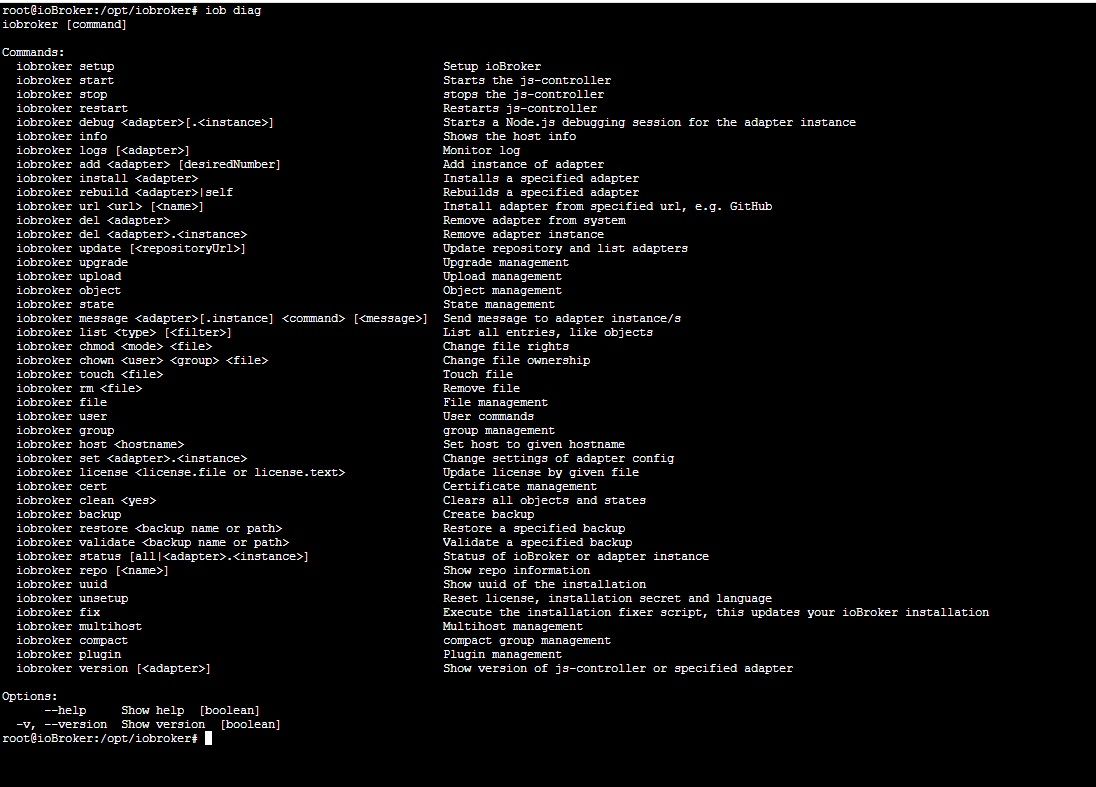
  • Brite
  • Cerulean
  • Cosmo
  • Flatly
  • Journal
  • Litera
  • Lumen
  • Lux
  • Materia
  • Minty
  • Morph
  • Pulse
  • Sandstone
  • Simplex
  • Sketchy
  • Spacelab
  • United
  • Yeti
  • Zephyr
  • Dark
  • Cyborg
  • Darkly
  • Quartz
  • Slate
  • Solar
  • Superhero
  • Vapor

  • Default (No Skin)
  • No Skin
Collapse
ioBroker Logo

Community Forum

donate donate
  1. ioBroker Community Home
  2. Deutsch
  3. ioBroker Allgemein
  4. QNAP NAS Container ioBroker js-controller und node update

NEWS

  • Jahresrückblick 2025 – unser neuer Blogbeitrag ist online! ✨
    BluefoxB
    Bluefox
    16
    1
    1.9k

  • Neuer Blogbeitrag: Monatsrückblick - Dezember 2025 🎄
    BluefoxB
    Bluefox
    13
    1
    911

  • Weihnachtsangebot 2025! 🎄
    BluefoxB
    Bluefox
    25
    1
    2.2k

QNAP NAS Container ioBroker js-controller und node update

Scheduled Pinned Locked Moved ioBroker Allgemein
68 Posts 7 Posters 7.1k Views 4 Watching
  • Oldest to Newest
  • Newest to Oldest
  • Most Votes
Reply
  • Reply as topic
Log in to reply
This topic has been deleted. Only users with topic management privileges can see it.
  • H HolgerCW

    Hallo zusammen,

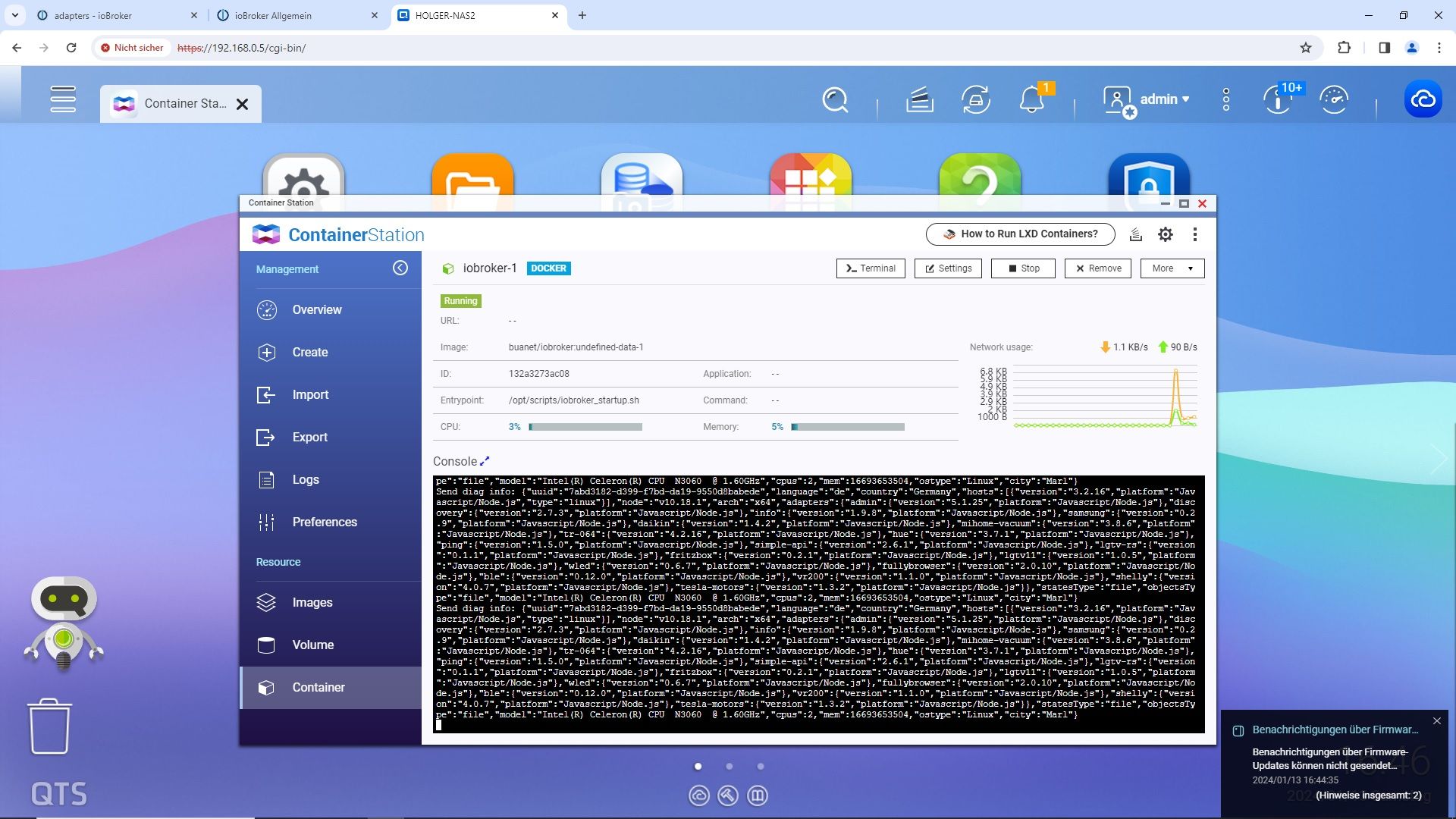
    ich finde im Netz für mich als Laien keine verständliche Anleitung, wie in im QNAP Container den ioBroker update, so das der js-controller und node aktell sind.

    So sieht das bei mir aus:
    1.jpg

    Was muss ich nun tun. Wo muss ich was aufrufen ?

    Gruss

    Holger

    malorossM Offline
    malorossM Offline
    maloross
    wrote on last edited by
    #2

    @holgercw Ich versuch es mal: Meine Testumgebung ist ein Image auf der QNAP Container-Station.
    Ich richte mich nach der dieser Anleitung, die dort genannten Befehle werden über die Konsole eingegeben, die man über einen Link aufrufen kann (Konsolenbefehl "bash").

    Auch Frauen können sich für Technik begeistern! ;)

    Equipment:
    diverse HM-, HMIP-, Aeotec- Tradfri- Sonos- und Fibaro-Geräte, Master-/Slavesystem auf 2 Raspi4, NAS

    H 1 Reply Last reply
    0
    • malorossM maloross

      @holgercw Ich versuch es mal: Meine Testumgebung ist ein Image auf der QNAP Container-Station.
      Ich richte mich nach der dieser Anleitung, die dort genannten Befehle werden über die Konsole eingegeben, die man über einen Link aufrufen kann (Konsolenbefehl "bash").

      H Offline
      H Offline
      HolgerCW
      wrote on last edited by
      #3

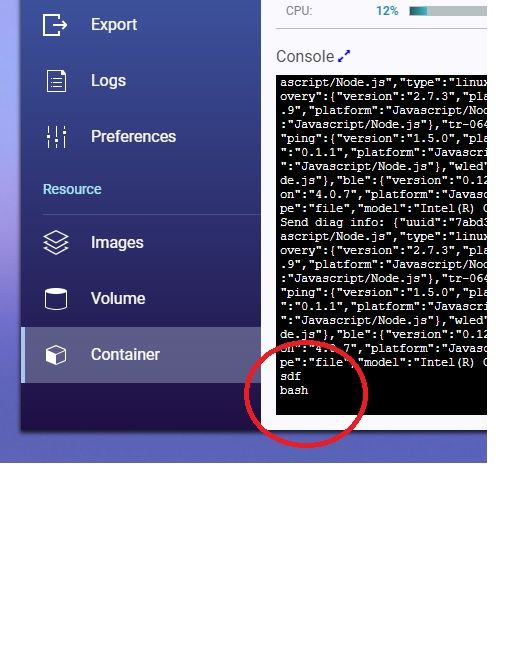
      @maloross Hey, danke das Du es versuchst. Nun finde ich den Einstig nämlich nicht. Wenn ich dort was eingebe und enter drücke passiert nichts:
      1.jpg

      Is das richtig dort ?

      GlasfaserG malorossM 2 Replies Last reply
      0
      • H HolgerCW

        Hallo zusammen,

        ich finde im Netz für mich als Laien keine verständliche Anleitung, wie in im QNAP Container den ioBroker update, so das der js-controller und node aktell sind.

        So sieht das bei mir aus:

        1.jpg

        Was muss ich nun tun. Wo muss ich was aufrufen ?

        Gruss

        Holger

        GlasfaserG Offline
        GlasfaserG Offline
        Glasfaser
        wrote on last edited by
        #4

        @holgercw

        Auf der Briefmarke erkennt man mit einer Lupe : :male-detective:

        JS Controller : 3.2.16
        Node : 10.18.1

        usw .

        dann wird auch das Image dazu sehr alt sein !?

        Also , alles Stein alt !?

        Synology 918+ 16GB - ioBroker in Docker v9 , VISO auf Trekstor Primebook C13 13,3" , Hikvision Domkameras mit Surveillance Station .. CCU RaspberryMatic in Synology VM .. Zigbee CC2538+CC2592 .. Sonoff .. KNX .. Modbus ..

        1 Reply Last reply
        0
        • H HolgerCW

          @maloross Hey, danke das Du es versuchst. Nun finde ich den Einstig nämlich nicht. Wenn ich dort was eingebe und enter drücke passiert nichts:

          1.jpg

          Is das richtig dort ?

          GlasfaserG Offline
          GlasfaserG Offline
          Glasfaser
          wrote on last edited by Glasfaser
          #5

          @holgercw sagte in QNAP NAS Container ioBroker js-controller und node update:

          Wenn ich dort was eingebe und enter drücke passiert nichts:

          Habe kein Qnap ... aber da bist du falsch , du hast da ein Button Terminal ...

          Aber im Grunde um dir zu helfen , brauchen wir keine Briefmarke , sondern ein richtige Ausgabe deines Systems :

          dazu dann einmal

          pkill -u iobroker
          iob fix
          

          danach den Container neu starten ,
          dann

          die Full Ausgabe von

          iob diag
          

          hier in Code-Tags </> posten

          Synology 918+ 16GB - ioBroker in Docker v9 , VISO auf Trekstor Primebook C13 13,3" , Hikvision Domkameras mit Surveillance Station .. CCU RaspberryMatic in Synology VM .. Zigbee CC2538+CC2592 .. Sonoff .. KNX .. Modbus ..

          1 Reply Last reply
          0
          • H HolgerCW

            @maloross Hey, danke das Du es versuchst. Nun finde ich den Einstig nämlich nicht. Wenn ich dort was eingebe und enter drücke passiert nichts:

            1.jpg

            Is das richtig dort ?

            malorossM Offline
            malorossM Offline
            maloross
            wrote on last edited by
            #6

            @holgercw ich habe die neue Container-Version, bei dir heißt der Einstieg "Terminal" und ist oben rechts über den Button erreichbar (soweit ich mich erinnere)

            Auch Frauen können sich für Technik begeistern! ;)

            Equipment:
            diverse HM-, HMIP-, Aeotec- Tradfri- Sonos- und Fibaro-Geräte, Master-/Slavesystem auf 2 Raspi4, NAS

            H 1 Reply Last reply
            0
            • malorossM maloross

              @holgercw ich habe die neue Container-Version, bei dir heißt der Einstieg "Terminal" und ist oben rechts über den Button erreichbar (soweit ich mich erinnere)

              H Offline
              H Offline
              HolgerCW
              wrote on last edited by
              #7

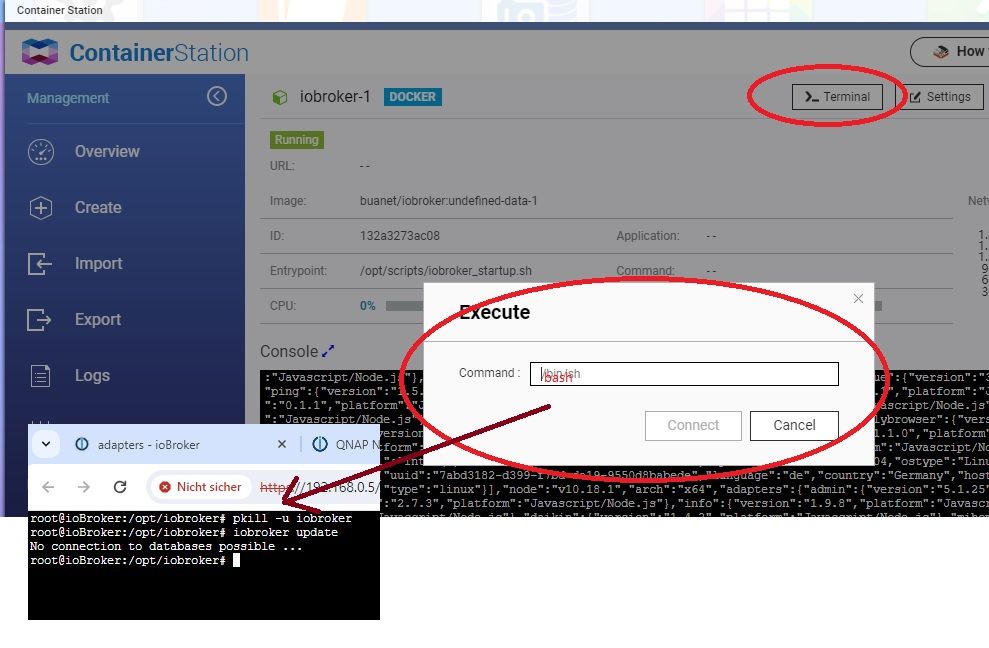
              Bin nun über Terminal rein. Was gibt man dort als Commando ein ? Ich habe da jetzt bash eingegeben und dann mal versucht:
              1.jpg

              Keine Verbindung zur Datenbank ?

              Der fix Befehl hat nichts ausgegeben:
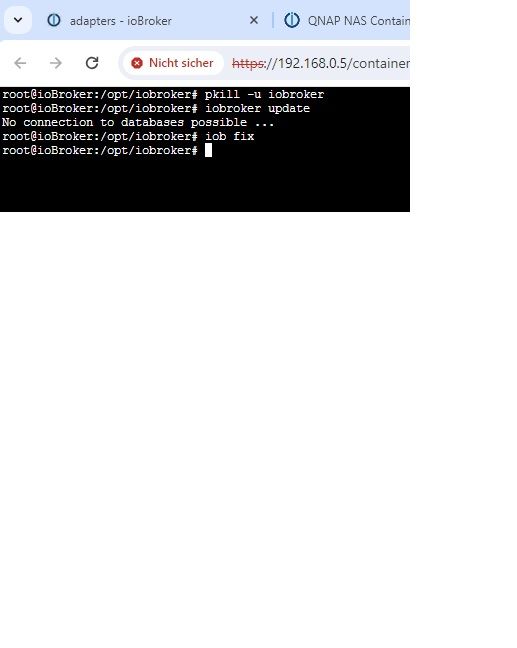
              2.jpg

              Gruss

              Holger

              GlasfaserG 1 Reply Last reply
              0
              • H HolgerCW

                Bin nun über Terminal rein. Was gibt man dort als Commando ein ? Ich habe da jetzt bash eingegeben und dann mal versucht:

                1.jpg

                Keine Verbindung zur Datenbank ?

                Der fix Befehl hat nichts ausgegeben:

                2.jpg

                Gruss

                Holger

                GlasfaserG Offline
                GlasfaserG Offline
                Glasfaser
                wrote on last edited by
                #8

                @holgercw

                Warum

                iobroker update
                

                das habe ich nicht angegeben !?

                Starte den Container neu ... und dann das eingeben was ich dir schreibe ..!

                Synology 918+ 16GB - ioBroker in Docker v9 , VISO auf Trekstor Primebook C13 13,3" , Hikvision Domkameras mit Surveillance Station .. CCU RaspberryMatic in Synology VM .. Zigbee CC2538+CC2592 .. Sonoff .. KNX .. Modbus ..

                H 1 Reply Last reply
                0
                • GlasfaserG Glasfaser

                  @holgercw

                  Warum

                  iobroker update
                  

                  das habe ich nicht angegeben !?

                  Starte den Container neu ... und dann das eingeben was ich dir schreibe ..!

                  H Offline
                  H Offline
                  HolgerCW
                  wrote on last edited by
                  #9

                  @glasfaser Das war noch von eben als ich das update versucht habe. Habe nun neu gestartet. Nun erstmal die Frage. Wenn ich auf Terminal klicke, kommt dieses Fenster:
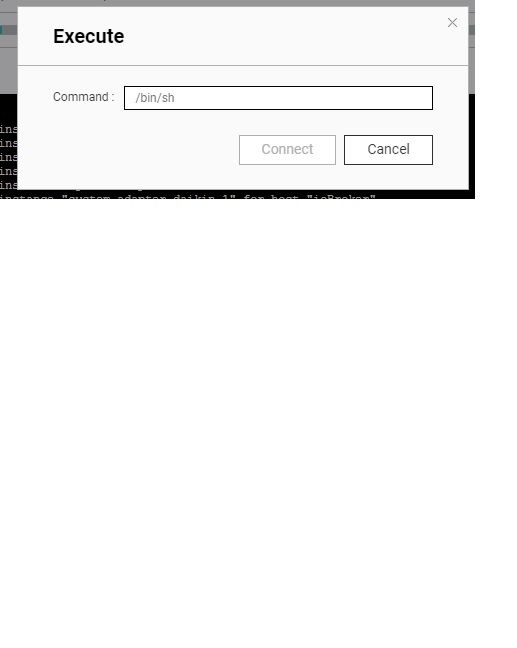
                  3.jpg

                  Was gebe ich da ein ?

                  GlasfaserG 2 Replies Last reply
                  0
                  • H HolgerCW

                    @glasfaser Das war noch von eben als ich das update versucht habe. Habe nun neu gestartet. Nun erstmal die Frage. Wenn ich auf Terminal klicke, kommt dieses Fenster:

                    3.jpg

                    Was gebe ich da ein ?

                    GlasfaserG Offline
                    GlasfaserG Offline
                    Glasfaser
                    wrote on last edited by
                    #10

                    @holgercw sagte in QNAP NAS Container ioBroker js-controller und node update:

                    Was gebe ich da ein ?

                    War doch schon richtig ... mit bash

                    Synology 918+ 16GB - ioBroker in Docker v9 , VISO auf Trekstor Primebook C13 13,3" , Hikvision Domkameras mit Surveillance Station .. CCU RaspberryMatic in Synology VM .. Zigbee CC2538+CC2592 .. Sonoff .. KNX .. Modbus ..

                    1 Reply Last reply
                    0
                    • H HolgerCW

                      @glasfaser Das war noch von eben als ich das update versucht habe. Habe nun neu gestartet. Nun erstmal die Frage. Wenn ich auf Terminal klicke, kommt dieses Fenster:

                      3.jpg

                      Was gebe ich da ein ?

                      GlasfaserG Offline
                      GlasfaserG Offline
                      Glasfaser
                      wrote on last edited by
                      #11

                      @holgercw

                      ich habe so eine Vorahnung, das wieder No connection kommt ,

                      dann diese Ausgabe hier posten :

                      type -P nodejs && nodejs -v && type -P node && node -v && type -P npm && npm -v && type -P npx && npx -v && apt policy nodejs && ls -lh /opt/iobroker/iobroker-data/&& iob version 
                      

                      Synology 918+ 16GB - ioBroker in Docker v9 , VISO auf Trekstor Primebook C13 13,3" , Hikvision Domkameras mit Surveillance Station .. CCU RaspberryMatic in Synology VM .. Zigbee CC2538+CC2592 .. Sonoff .. KNX .. Modbus ..

                      H 1 Reply Last reply
                      0
                      • GlasfaserG Glasfaser

                        @holgercw

                        ich habe so eine Vorahnung, das wieder No connection kommt ,

                        dann diese Ausgabe hier posten :

                        type -P nodejs && nodejs -v && type -P node && node -v && type -P npm && npm -v && type -P npx && npx -v && apt policy nodejs && ls -lh /opt/iobroker/iobroker-data/&& iob version 
                        
                        H Offline
                        H Offline
                        HolgerCW
                        wrote on last edited by
                        #12

                        @glasfaser HIer nun die Ausgabe

                        3.jpg

                        H GlasfaserG 2 Replies Last reply
                        0
                        • H HolgerCW

                          @glasfaser HIer nun die Ausgabe

                          3.jpg

                          H Offline
                          H Offline
                          HolgerCW
                          wrote on last edited by Homoran
                          #13

                          @holgercw

                          root@ioBroker:/opt/iobroker# iob diag
                          iobroker [command]
                          
                          Commands:
                            iobroker setup                                               Setup ioBroker
                            iobroker start                                               Starts the js-controller
                            iobroker stop                                                stops the js-controller
                            iobroker restart                                             Restarts js-controller
                            iobroker debug <adapter>[.<instance>]                        Starts a Node.js debugging session for the adapter instance
                            iobroker info                                                Shows the host info
                            iobroker logs [<adapter>]                                    Monitor log
                            iobroker add <adapter> [desiredNumber]                       Add instance of adapter
                            iobroker install <adapter>                                   Installs a specified adapter
                            iobroker rebuild <adapter>|self                              Rebuilds a specified adapter
                            iobroker url <url> [<name>]                                  Install adapter from specified url, e.g. GitHub
                            iobroker del <adapter>                                       Remove adapter from system
                            iobroker del <adapter>.<instance>                            Remove adapter instance
                            iobroker update [<repositoryUrl>]                            Update repository and list adapters
                            iobroker upgrade                                             Upgrade management
                            iobroker upload                                              Upload management
                            iobroker object                                              Object management
                            iobroker state                                               State management
                            iobroker message <adapter>[.instance] <command> [<message>]  Send message to adapter instance/s
                            iobroker list <type> [<filter>]                              List all entries, like objects
                            iobroker chmod <mode> <file>                                 Change file rights
                            iobroker chown <user> <group> <file>                         Change file ownership
                            iobroker touch <file>                                        Touch file
                            iobroker rm <file>                                           Remove file
                            iobroker file                                                File management
                            iobroker user                                                User commands
                            iobroker group                                               group management
                            iobroker host <hostname>                                     Set host to given hostname
                            iobroker set <adapter>.<instance>                            Change settings of adapter config
                            iobroker license <license.file or license.text>              Update license by given file
                            iobroker cert                                                Certificate management
                            iobroker clean <yes>                                         Clears all objects and states
                            iobroker backup                                              Create backup
                            iobroker restore <backup name or path>                       Restore a specified backup
                            iobroker validate <backup name or path>                      Validate a specified backup
                            iobroker status [all|<adapter>.<instance>]                   Status of ioBroker or adapter instance
                            iobroker repo [<name>]                                       Show repo information
                            iobroker uuid                                                Show uuid of the installation
                            iobroker unsetup                                             Reset license, installation secret and language
                            iobroker fix                                                 Execute the installation fixer script, this updates your ioBroker installation
                            iobroker multihost                                           Multihost management
                            iobroker compact                                             compact group management
                            iobroker plugin                                              Plugin management
                            iobroker version [<adapter>]                                 Show version of js-controller or specified adapter
                          
                          Options:
                                --help     Show help  [boolean]
                            -v, --version  Show version  [boolean]
                          
                          1 Reply Last reply
                          0
                          • H HolgerCW

                            @glasfaser HIer nun die Ausgabe

                            3.jpg

                            GlasfaserG Offline
                            GlasfaserG Offline
                            Glasfaser
                            wrote on last edited by
                            #14

                            @holgercw

                            Was machst du !

                            Zuerst :

                            @glasfaser sagte in QNAP NAS Container ioBroker js-controller und node update:

                            @holgercw sagte in QNAP NAS Container ioBroker js-controller und node update:

                            Wenn ich dort was eingebe und enter drücke passiert nichts:

                            Habe kein Qnap ... aber da bist du falsch , du hast da ein Button Terminal ...

                            Aber im Grunde um dir zu helfen , brauchen wir keine Briefmarke , sondern ein richtige Ausgabe deines Systems :

                            dazu dann einmal

                            pkill -u iobroker
                            iob fix
                            

                            danach den Container neu starten ,
                            dann

                            die Full Ausgabe von

                            iob diag
                            

                            hier in Code-Tags </> posten

                            sonst das :

                            @glasfaser sagte in QNAP NAS Container ioBroker js-controller und node update:

                            @holgercw

                            ich habe so eine Vorahnung, das wieder No connection kommt ,

                            dann diese Ausgabe hier posten :

                            type -P nodejs && nodejs -v && type -P node && node -v && type -P npm && npm -v && type -P npx && npx -v && apt policy nodejs && ls -lh /opt/iobroker/iobroker-data/&& iob version 
                            

                            Synology 918+ 16GB - ioBroker in Docker v9 , VISO auf Trekstor Primebook C13 13,3" , Hikvision Domkameras mit Surveillance Station .. CCU RaspberryMatic in Synology VM .. Zigbee CC2538+CC2592 .. Sonoff .. KNX .. Modbus ..

                            H 1 Reply Last reply
                            0
                            • GlasfaserG Glasfaser

                              @holgercw

                              Was machst du !

                              Zuerst :

                              @glasfaser sagte in QNAP NAS Container ioBroker js-controller und node update:

                              @holgercw sagte in QNAP NAS Container ioBroker js-controller und node update:

                              Wenn ich dort was eingebe und enter drücke passiert nichts:

                              Habe kein Qnap ... aber da bist du falsch , du hast da ein Button Terminal ...

                              Aber im Grunde um dir zu helfen , brauchen wir keine Briefmarke , sondern ein richtige Ausgabe deines Systems :

                              dazu dann einmal

                              pkill -u iobroker
                              iob fix
                              

                              danach den Container neu starten ,
                              dann

                              die Full Ausgabe von

                              iob diag
                              

                              hier in Code-Tags </> posten

                              sonst das :

                              @glasfaser sagte in QNAP NAS Container ioBroker js-controller und node update:

                              @holgercw

                              ich habe so eine Vorahnung, das wieder No connection kommt ,

                              dann diese Ausgabe hier posten :

                              type -P nodejs && nodejs -v && type -P node && node -v && type -P npm && npm -v && type -P npx && npx -v && apt policy nodejs && ls -lh /opt/iobroker/iobroker-data/&& iob version 
                              
                              H Offline
                              H Offline
                              HolgerCW
                              wrote on last edited by
                              #15

                              @glasfaser Habe nun den Code eingegeben:

                              root@ioBroker:/opt/iobroker# type -P nodejs && nodejs -v && type -P node && node -v && type -P npm && npm -v && type -P npx && npx -v && apt policy nodejs && ls -lh /opt/iobroker/iobroker-data/&& iob version
                              /usr/bin/nodejs
                              v10.18.1
                              /usr/bin/node
                              v10.18.1
                              /usr/bin/npm
                              6.13.4
                              /usr/bin/npx
                              6.13.4
                              nodejs:
                                Installiert:           10.18.1-1nodesource1
                                Installationskandidat: 10.18.1-1nodesource1
                                Versionstabelle:
                               *** 10.18.1-1nodesource1 100
                                      100 /var/lib/dpkg/status
                              insgesamt 15M
                              drwxrwxr-x 1 iobroker iobroker  12K Jan 13 18:09 backup-objects
                              drwxrwxr-x 1 iobroker iobroker 4,0K Jan 13 16:19 files
                              -rw-rwxr-- 1 iobroker iobroker 4,3K Jun  7  2021 iobroker.json
                              -rw-r--r-- 1 iobroker iobroker    3 Jan 13 17:57 notifications.json
                              -rw-r--r-- 1 iobroker iobroker 6,4M Jan 13 18:15 objects.json
                              -rw-r--r-- 1 iobroker iobroker 6,4M Jan 13 18:15 objects.json.bak
                              -rw-r--r-- 1 iobroker iobroker 847K Jan 13 18:21 states.json
                              -rw-r--r-- 1 iobroker iobroker 847K Jan 13 18:20 states.json.bak
                              3.2.16
                              root@ioBroker:/opt/iobroker# 
                              
                              H 1 Reply Last reply
                              0
                              • H HolgerCW

                                @glasfaser Habe nun den Code eingegeben:

                                root@ioBroker:/opt/iobroker# type -P nodejs && nodejs -v && type -P node && node -v && type -P npm && npm -v && type -P npx && npx -v && apt policy nodejs && ls -lh /opt/iobroker/iobroker-data/&& iob version
                                /usr/bin/nodejs
                                v10.18.1
                                /usr/bin/node
                                v10.18.1
                                /usr/bin/npm
                                6.13.4
                                /usr/bin/npx
                                6.13.4
                                nodejs:
                                  Installiert:           10.18.1-1nodesource1
                                  Installationskandidat: 10.18.1-1nodesource1
                                  Versionstabelle:
                                 *** 10.18.1-1nodesource1 100
                                        100 /var/lib/dpkg/status
                                insgesamt 15M
                                drwxrwxr-x 1 iobroker iobroker  12K Jan 13 18:09 backup-objects
                                drwxrwxr-x 1 iobroker iobroker 4,0K Jan 13 16:19 files
                                -rw-rwxr-- 1 iobroker iobroker 4,3K Jun  7  2021 iobroker.json
                                -rw-r--r-- 1 iobroker iobroker    3 Jan 13 17:57 notifications.json
                                -rw-r--r-- 1 iobroker iobroker 6,4M Jan 13 18:15 objects.json
                                -rw-r--r-- 1 iobroker iobroker 6,4M Jan 13 18:15 objects.json.bak
                                -rw-r--r-- 1 iobroker iobroker 847K Jan 13 18:21 states.json
                                -rw-r--r-- 1 iobroker iobroker 847K Jan 13 18:20 states.json.bak
                                3.2.16
                                root@ioBroker:/opt/iobroker# 
                                
                                H Offline
                                H Offline
                                HolgerCW
                                wrote on last edited by HolgerCW
                                #16

                                Wusste eben nicht ob ich zwischen iob fix und iob diag in dem neuen Fenster bleiben soll bis er neu gestartet ist. Bin mit der Materie komplet nicht vertraut. Kannst Du mit den Daten nun was anfangen ?
                                Vielleicht gibt es ja auch eine Möglichkeit das Image komplett neu zu installieren (Vorher backup und so) aber ohne das dann das Smarthome neu eingerichtet werden muss

                                GlasfaserG 1 Reply Last reply
                                0
                                • H HolgerCW

                                  Wusste eben nicht ob ich zwischen iob fix und iob diag in dem neuen Fenster bleiben soll bis er neu gestartet ist. Bin mit der Materie komplet nicht vertraut. Kannst Du mit den Daten nun was anfangen ?
                                  Vielleicht gibt es ja auch eine Möglichkeit das Image komplett neu zu installieren (Vorher backup und so) aber ohne das dann das Smarthome neu eingerichtet werden muss

                                  GlasfaserG Offline
                                  GlasfaserG Offline
                                  Glasfaser
                                  wrote on last edited by Glasfaser
                                  #17

                                  @holgercw sagte in QNAP NAS Container ioBroker js-controller und node update:

                                  Kannst Du mit den Daten nun was anfangen ?

                                  Ja ... , erstmal !

                                  Wie schon auf der Briefmarke zu erkennen , ist dein ioBroker / Container Stein Alt ... also nie gepflegt worden .

                                  Zeige mal :

                                  iob list instances
                                  iob list adapters
                                  

                                  Synology 918+ 16GB - ioBroker in Docker v9 , VISO auf Trekstor Primebook C13 13,3" , Hikvision Domkameras mit Surveillance Station .. CCU RaspberryMatic in Synology VM .. Zigbee CC2538+CC2592 .. Sonoff .. KNX .. Modbus ..

                                  H 3 Replies Last reply
                                  0
                                  • GlasfaserG Glasfaser

                                    @holgercw sagte in QNAP NAS Container ioBroker js-controller und node update:

                                    Kannst Du mit den Daten nun was anfangen ?

                                    Ja ... , erstmal !

                                    Wie schon auf der Briefmarke zu erkennen , ist dein ioBroker / Container Stein Alt ... also nie gepflegt worden .

                                    Zeige mal :

                                    iob list instances
                                    iob list adapters
                                    
                                    H Offline
                                    H Offline
                                    HolgerCW
                                    wrote on last edited by Homoran
                                    #18

                                    @glasfaser

                                    root@ioBroker:/opt/iobroker# iob list instances
                                    + system.adapter.admin.0                  : admin                 : ioBroker                                 -  enabled, port: 8081, bind: 0.0.0.0, run as: admin
                                      system.adapter.ble.0                    : ble                   : ioBroker                                 -  enabled
                                    + system.adapter.daikin.0                 : daikin                : ioBroker                                 -  enabled
                                    + system.adapter.daikin.1                 : daikin                : ioBroker                                 -  enabled
                                    + system.adapter.daikin.2                 : daikin                : ioBroker                                 -  enabled
                                    + system.adapter.discovery.0              : discovery             : ioBroker                                 -  enabled
                                    + system.adapter.fullybrowser.0           : fullybrowser          : ioBroker                                 -  enabled
                                    + system.adapter.hue.0                    : hue                   : ioBroker                                 -  enabled, port: 80
                                    + system.adapter.info.0                   : info                  : ioBroker                                 -  enabled
                                    + system.adapter.lgtv11.0                 : lgtv11                : ioBroker                                 -  enabled, port: 8080
                                    + system.adapter.mihome-vacuum.0          : mihome-vacuum         : ioBroker                                 -  enabled, port: 54321
                                    + system.adapter.mihome-vacuum.1          : mihome-vacuum         : ioBroker                                 -  enabled, port: 54321
                                    + system.adapter.ping.0                   : ping                  : ioBroker                                 -  enabled
                                    + system.adapter.samsung.0                : samsung               : ioBroker                                 -  enabled
                                    + system.adapter.samsung.1                : samsung               : ioBroker                                 -  enabled
                                    + system.adapter.shelly.0                 : shelly                : ioBroker                                 -  enabled, port: 1882, bind: 0.0.0.0
                                    + system.adapter.simple-api.0             : simple-api            : ioBroker                                 -  enabled, port: 8087, bind: 192.168.0.60, run as: admin
                                    + system.adapter.tesla-motors.0           : tesla-motors          : ioBroker                                 -  enabled
                                    + system.adapter.vr200.0                  : vr200                 : ioBroker                                 -  enabled
                                    + system.adapter.wled.0                   : wled                  : ioBroker                                 -  enabled
                                    
                                    + instance is alive
                                    
                                    1 Reply Last reply
                                    0
                                    • GlasfaserG Glasfaser

                                      @holgercw sagte in QNAP NAS Container ioBroker js-controller und node update:

                                      Kannst Du mit den Daten nun was anfangen ?

                                      Ja ... , erstmal !

                                      Wie schon auf der Briefmarke zu erkennen , ist dein ioBroker / Container Stein Alt ... also nie gepflegt worden .

                                      Zeige mal :

                                      iob list instances
                                      iob list adapters
                                      
                                      H Offline
                                      H Offline
                                      HolgerCW
                                      wrote on last edited by Homoran
                                      #19

                                      @glasfaser

                                      system.adapter.admin                   : admin          - v5.1.25
                                      system.adapter.ble                     : ble            - v0.12.0
                                      system.adapter.daikin                  : daikin         - v1.4.2
                                      system.adapter.discovery               : discovery      - v2.7.3
                                      system.adapter.fritzbox                : fritzbox       - v0.2.1
                                      system.adapter.fullybrowser            : fullybrowser   - v2.0.10
                                      system.adapter.hue                     : hue            - v3.7.1
                                      system.adapter.info                    : info           - v1.9.8
                                      system.adapter.lgtv-rs                 : lgtv-rs        - v0.1.1
                                      system.adapter.lgtv11                  : lgtv11         - v1.0.5
                                      system.adapter.mihome-vacuum           : mihome-vacuum  - v3.8.6
                                      system.adapter.ping                    : ping           - v1.5.0
                                      system.adapter.samsung                 : samsung        - v0.2.9
                                      system.adapter.shelly                  : shelly         - v4.0.7
                                      system.adapter.simple-api              : simple-api     - v2.6.1
                                      system.adapter.tesla-motors            : tesla-motors   - v1.3.2
                                      system.adapter.tr-064                  : tr-064         - v4.2.16
                                      system.adapter.vr200                   : vr200          - v1.1.0
                                      system.adapter.wled                    : wled           - v0.6.7
                                      
                                      1 Reply Last reply
                                      0
                                      • GlasfaserG Glasfaser

                                        @holgercw sagte in QNAP NAS Container ioBroker js-controller und node update:

                                        Kannst Du mit den Daten nun was anfangen ?

                                        Ja ... , erstmal !

                                        Wie schon auf der Briefmarke zu erkennen , ist dein ioBroker / Container Stein Alt ... also nie gepflegt worden .

                                        Zeige mal :

                                        iob list instances
                                        iob list adapters
                                        
                                        H Offline
                                        H Offline
                                        HolgerCW
                                        wrote on last edited by
                                        #20

                                        @glasfaser WUsste nie wie ich da ran gehen soll. Habe dann immer wieder aufgegeben. Hoffe jetzt geht es mal vorran


                                        GlasfaserG 1 Reply Last reply
                                        0
                                        • H HolgerCW

                                          @glasfaser WUsste nie wie ich da ran gehen soll. Habe dann immer wieder aufgegeben. Hoffe jetzt geht es mal vorran

                                          GlasfaserG Offline
                                          GlasfaserG Offline
                                          Glasfaser
                                          wrote on last edited by
                                          #21

                                          @holgercw sagte in QNAP NAS Container ioBroker js-controller und node update:

                                          Hoffe jetzt geht es mal vorran

                                          Das ganze Problem was ich jetzt sehe , ist das du kein Backup hast mit dem Backitup Adapter !

                                          Oder wie machst du Backups !?

                                          Synology 918+ 16GB - ioBroker in Docker v9 , VISO auf Trekstor Primebook C13 13,3" , Hikvision Domkameras mit Surveillance Station .. CCU RaspberryMatic in Synology VM .. Zigbee CC2538+CC2592 .. Sonoff .. KNX .. Modbus ..

                                          H 1 Reply Last reply
                                          0
                                          Reply
                                          • Reply as topic
                                          Log in to reply
                                          • Oldest to Newest
                                          • Newest to Oldest
                                          • Most Votes


                                          Support us

                                          ioBroker
                                          Community Adapters
                                          Donate
                                          FAQ Cloud / IOT
                                          HowTo: Node.js-Update
                                          HowTo: Backup/Restore
                                          Downloads
                                          BLOG

                                          733

                                          Online

                                          32.6k

                                          Users

                                          82.2k

                                          Topics

                                          1.3m

                                          Posts
                                          Community
                                          Impressum | Datenschutz-Bestimmungen | Nutzungsbedingungen | Einwilligungseinstellungen
                                          ioBroker Community 2014-2025
                                          logo
                                          • Login

                                          • Don't have an account? Register

                                          • Login or register to search.
                                          • First post
                                            Last post
                                          0
                                          • Home
                                          • Recent
                                          • Tags
                                          • Unread 0
                                          • Categories
                                          • Unreplied
                                          • Popular
                                          • GitHub
                                          • Docu
                                          • Hilfe