Skip to content
  • Home
  • Recent
  • Tags
  • 0 Unread 0
  • Categories
  • Unreplied
  • Popular
  • GitHub
  • Docu
  • Hilfe
Skins
  • Light
  • Brite
  • Cerulean
  • Cosmo
  • Flatly
  • Journal
  • Litera
  • Lumen
  • Lux
  • Materia
  • Minty
  • Morph
  • Pulse
  • Sandstone
  • Simplex
  • Sketchy
  • Spacelab
  • United
  • Yeti
  • Zephyr
  • Dark
  • Cyborg
  • Darkly
  • Quartz
  • Slate
  • Solar
  • Superhero
  • Vapor

  • Default (No Skin)
  • No Skin
Collapse
ioBroker Logo

Community Forum

donate donate
  1. ioBroker Community Home
  2. Deutsch
  3. ioBroker Allgemein
  4. ioBroker startet nicht nach Neuinstallation

NEWS

  • Monatsrückblick Januar/Februar 2026 ist online!
    BluefoxB
    Bluefox
    17
    1
    409

  • Jahresrückblick 2025 – unser neuer Blogbeitrag ist online! ✨
    BluefoxB
    Bluefox
    17
    1
    5.0k

  • Neuer Blogbeitrag: Monatsrückblick - Dezember 2025 🎄
    BluefoxB
    Bluefox
    13
    1
    1.4k

ioBroker startet nicht nach Neuinstallation

Scheduled Pinned Locked Moved ioBroker Allgemein
67 Posts 7 Posters 6.9k Views 5 Watching
  • Oldest to Newest
  • Newest to Oldest
  • Most Votes
Reply
  • Reply as topic
Log in to reply
This topic has been deleted. Only users with topic management privileges can see it.
  • W Offline
    W Offline
    Willi-Wunder
    wrote on last edited by
    #10

    @homoran
    Sorry, war eine lange Nacht und früh dann der Frust groß. Dachte mit dem Befehl iob diag sieht man was los ist.

    Leihe mir jetzt einen Rasp damit ich in Ruhe das System neu aufsetzen kann. Dann muss ich mein aktives System jetzt nicht lahm legen. Das Backup einspielen wird dann ja auch eine gewisse Zeit dauern.

    Die Installation sollte ja eigentlich easy sein, Installer von Debian am PC installieren, System auswählen, neue SD Karte einlegen und installieren, danach mit Putty alle updates ausführen, neustarten und dann den Befehl für iobroker zum Installieren eingeben. Das ist Theorie und Praxis, lach..... Werde später nochmal alles platt machen und neu ausprobieren. Bin gespannt, gebe später noch eine Rückmeldung. Vielleicht nehme ich dann auch nicht die Beta Version. Die 12'er Version ist alles noch Beta? Lieber erst die 11'er nehmen?

    1 Reply Last reply
    0
    • Thomas BraunT Online
      Thomas BraunT Online
      Thomas Braun
      Most Active
      wrote on last edited by Thomas Braun
      #11

      @willi-wunder sagte in ioBroker startet nicht nach Neuinstallation:

      Installer von Debian am PC installieren

      Du sprichst vom Raspberry OS Imager?

      Die 12'er Version ist alles noch Beta? Lieber erst die 11'er nehmen?

      Nein, Raspberry OS 12 'Bookworm' ist stabil, aber das daraus abgeleitete iobroker-Image ist erst noch im Beta-Stage.

      Linux-Werkzeugkasten:
      https://forum.iobroker.net/topic/42952/der-kleine-iobroker-linux-werkzeugkasten
      NodeJS Fixer Skript:
      https://forum.iobroker.net/topic/68035/iob-node-fix-skript
      iob_diag: curl -sLf -o diag.sh https://iobroker.net/diag.sh && bash diag.sh

      W 1 Reply Last reply
      1
      • Thomas BraunT Thomas Braun

        @willi-wunder sagte in ioBroker startet nicht nach Neuinstallation:

        Installer von Debian am PC installieren

        Du sprichst vom Raspberry OS Imager?

        Die 12'er Version ist alles noch Beta? Lieber erst die 11'er nehmen?

        Nein, Raspberry OS 12 'Bookworm' ist stabil, aber das daraus abgeleitete iobroker-Image ist erst noch im Beta-Stage.

        W Offline
        W Offline
        Willi-Wunder
        wrote on last edited by
        #12

        @thomas-braun sagte in ioBroker startet nicht nach Neuinstallation:

        Du sprichst vom Raspberry OS Imager?

        Korrekt

        Nein, Raspberry OS 12 'Bookworm' ist stabil, aber das daraus abgeleitete iobroker-Image ist erst noch im Beta-Stage.

        Heißt ich habe das falsche Image ausgewählt? Wobei das System ja lief, konnte nur den iobroker nicht wirklich zum Laufen bringen. Dann doch lieber auf der raspberrypi.com Seite das Image manuell runterladen?

        Thomas BraunT 1 Reply Last reply
        0
        • Thomas BraunT Thomas Braun

          @willi-wunder

          Wie sieht denn die Installation per

          curl -sLf https://iobroker.net/install.sh | bash -
          

          aus?

          W Offline
          W Offline
          Willi-Wunder
          wrote on last edited by Homoran
          #13

          @thomas-braun sagte in ioBroker startet nicht nach Neuinstallation:

          Wie sieht denn die Installation per
          curl -sLf https://iobroker.net/install.sh | bash -

          Sieht so aus, gleiche Ergebnis, nur das es relativ schnell beendet war im Gegensatz zu gestern.

           pi@raspberrypi:~ $ curl -sLf https://iobroker.net/install.sh | bash -
          library: loaded
          Library version=2023-10-13
          
          ==========================================================================
          
              Welcome to the ioBroker installer!
              Installer version: 2023-10-13
          
              You might need to enter your password a couple of times.
          
          ==========================================================================
          
          
          ==========================================================================
              Installing prerequisites (1/4)
          ==========================================================================
          
          Hit:1 http://archive.raspberrypi.com/debian bookworm InRelease
          Hit:2 http://deb.debian.org/debian bookworm InRelease
          Get:3 http://deb.debian.org/debian-security bookworm-security InRelease [48.0 kB                                                                                                                                                             ]
          Get:4 http://deb.debian.org/debian bookworm-updates InRelease [52.1 kB]
          Hit:5 https://deb.nodesource.com/node_18.x nodistro InRelease
          Get:6 http://deb.debian.org/debian-security bookworm-security/main arm64 Package                                                                                                                                                             s [127 kB]
          Get:7 http://deb.debian.org/debian-security bookworm-security/main armhf Package                                                                                                                                                             s [125 kB]
          Get:8 http://deb.debian.org/debian-security bookworm-security/main Translation-e                                                                                                                                                             n [76.5 kB]
          Fetched 328 kB in 2s (205 kB/s)
          Reading package lists... Done
          
          ==========================================================================
              Creating ioBroker user and directory (2/4)
          ==========================================================================
          
          Created /etc/sudoers.d/iobroker
          Directory /opt/iobroker created
          
          ==========================================================================
              Installing ioBroker (3/4)
          ==========================================================================
          
          npm ERR! code 24
          npm ERR! path /opt/iobroker/node_modules/iobroker.js-controller
          npm ERR! command failed
          npm ERR! command sh -c node iobroker.js setup first
          npm ERR! creating conf/iobroker.json
          npm ERR! Server Cannot start inMem-objects on port 9001: Failed to lock DB file "/opt/iobroker/iobroker-data/objects.jsonl"!
          
          npm ERR! A complete log of this run can be found in: /home/pi/.npm/_logs/2023-12-22T14_02_21_951Z-debug-0.log
          
          ==========================================================================
              Finalizing installation (4/4)
          ==========================================================================
          
          Enabling autostart...
          Autostart enabled!
          Fixing directory permissions...
          
          ==========================================================================
          
              ioBroker was installed successfully
              Open http://192.168.2.229:8081 in a browser and start configuring!
          
          ==========================================================================
          
          
          You need to re-login before doing anything else on the console!
          

          Wird einfacher sein jetzt alles platt zu machen oder gibt es hierzu noch einen Kniff?

          1 Reply Last reply
          0
          • W Willi-Wunder

            @thomas-braun sagte in ioBroker startet nicht nach Neuinstallation:

            Du sprichst vom Raspberry OS Imager?

            Korrekt

            Nein, Raspberry OS 12 'Bookworm' ist stabil, aber das daraus abgeleitete iobroker-Image ist erst noch im Beta-Stage.

            Heißt ich habe das falsche Image ausgewählt? Wobei das System ja lief, konnte nur den iobroker nicht wirklich zum Laufen bringen. Dann doch lieber auf der raspberrypi.com Seite das Image manuell runterladen?

            Thomas BraunT Online
            Thomas BraunT Online
            Thomas Braun
            Most Active
            wrote on last edited by
            #14

            @willi-wunder sagte in ioBroker startet nicht nach Neuinstallation:

            Heißt ich habe das falsche Image ausgewählt?

            Was hast du denn ausgewählt?
            Mach es mit dem Imager:

            https://forum.iobroker.net/topic/51869/installation-auf-raspi-einfacher-geht-s-nicht

            (Der sieht glaube ich mittlerweile etwas anders aus, aber grundsätzlich noch ganz ähnlich).

            Linux-Werkzeugkasten:
            https://forum.iobroker.net/topic/42952/der-kleine-iobroker-linux-werkzeugkasten
            NodeJS Fixer Skript:
            https://forum.iobroker.net/topic/68035/iob-node-fix-skript
            iob_diag: curl -sLf -o diag.sh https://iobroker.net/diag.sh && bash diag.sh

            W 1 Reply Last reply
            0
            • Thomas BraunT Thomas Braun

              @willi-wunder sagte in ioBroker startet nicht nach Neuinstallation:

              Heißt ich habe das falsche Image ausgewählt?

              Was hast du denn ausgewählt?
              Mach es mit dem Imager:

              https://forum.iobroker.net/topic/51869/installation-auf-raspi-einfacher-geht-s-nicht

              (Der sieht glaube ich mittlerweile etwas anders aus, aber grundsätzlich noch ganz ähnlich).

              W Offline
              W Offline
              Willi-Wunder
              wrote on last edited by
              #15

              @thomas-braun
              Ist das nicht der gleiche? Hatte auch die V1.8.3, man wird ja auch zu der gelichen Seite weitergeleitet.
              Hatte gestern dies ausgewählt:
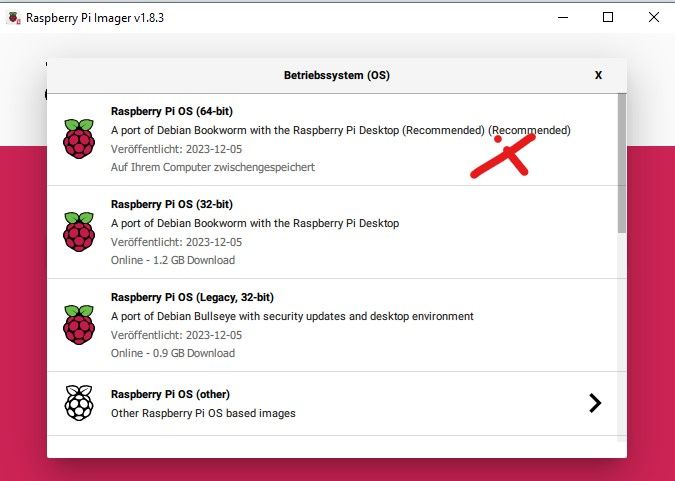
              PI.jpg

              DJMarc75D 1 Reply Last reply
              0
              • W Willi-Wunder

                @thomas-braun
                Ist das nicht der gleiche? Hatte auch die V1.8.3, man wird ja auch zu der gelichen Seite weitergeleitet.
                Hatte gestern dies ausgewählt:
                PI.jpg

                DJMarc75D Offline
                DJMarc75D Offline
                DJMarc75
                wrote on last edited by
                #16

                @willi-wunder

                Screenshot 2023-12-22 151705.png

                Screenshot 2023-12-22 151742.png

                Lehrling seit 1975 !!!
                Beitrag geholfen ? dann gerne ein upvote rechts unten im Beitrag klicken ;)
                https://forum.iobroker.net/topic/51555/hinweise-f%C3%BCr-gute-forenbeitr%C3%A4ge

                W 1 Reply Last reply
                1
                • DJMarc75D DJMarc75

                  @willi-wunder

                  Screenshot 2023-12-22 151705.png

                  Screenshot 2023-12-22 151742.png

                  W Offline
                  W Offline
                  Willi-Wunder
                  wrote on last edited by
                  #17

                  @djmarc75
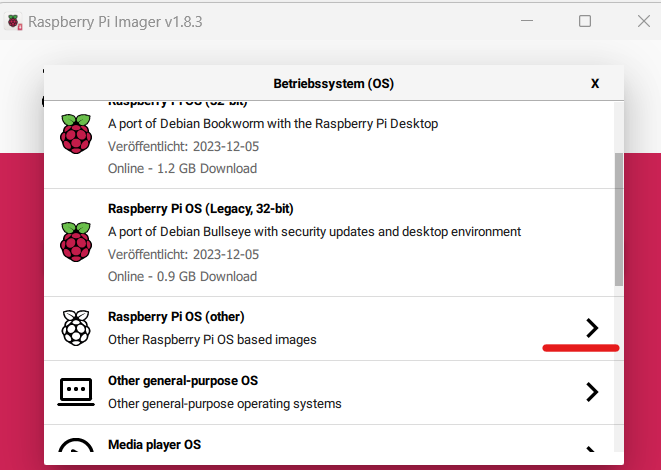
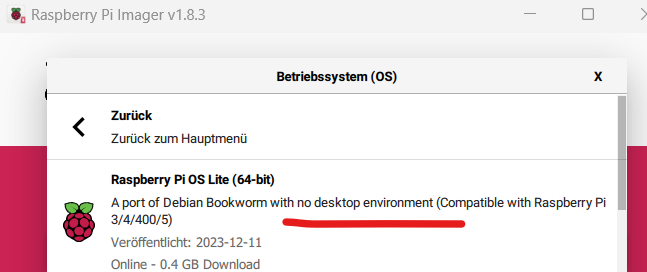
                  Danke habe ich auch gerade im anderen Thread gelesen das man unbedingt die Lite nehmen soll.
                  Warum geht die mit Desktop nicht wenn ich Fragen darf? :confused:

                  Thomas BraunT 1 Reply Last reply
                  0
                  • W Willi-Wunder

                    @djmarc75
                    Danke habe ich auch gerade im anderen Thread gelesen das man unbedingt die Lite nehmen soll.
                    Warum geht die mit Desktop nicht wenn ich Fragen darf? :confused:

                    Thomas BraunT Online
                    Thomas BraunT Online
                    Thomas Braun
                    Most Active
                    wrote on last edited by
                    #18

                    @willi-wunder sagte in ioBroker startet nicht nach Neuinstallation:

                    Warum geht die mit Desktop nicht wenn ich Fragen darf?

                    Weil Server immer ohne Desktop laufen.

                    Linux-Werkzeugkasten:
                    https://forum.iobroker.net/topic/42952/der-kleine-iobroker-linux-werkzeugkasten
                    NodeJS Fixer Skript:
                    https://forum.iobroker.net/topic/68035/iob-node-fix-skript
                    iob_diag: curl -sLf -o diag.sh https://iobroker.net/diag.sh && bash diag.sh

                    W 1 Reply Last reply
                    0
                    • Thomas BraunT Thomas Braun

                      @willi-wunder sagte in ioBroker startet nicht nach Neuinstallation:

                      Warum geht die mit Desktop nicht wenn ich Fragen darf?

                      Weil Server immer ohne Desktop laufen.

                      W Offline
                      W Offline
                      Willi-Wunder
                      wrote on last edited by Homoran
                      #19

                      Okay, gerade nochmal alles neu gemacht, Image Lite ohne Desktop ausgewählt, nach Anleitung @Thomas-Braun
                      ausgeführt, gleicher Fehler, siehe Log. Ab dem Punkt Installation 3/4 Iobroker hat es ca. 25 min. gedauert, dann kommt zwar ioBroker was installed successfully, kann diesen aber nicht über die Adresse aufrufen.

                      pi@iobroker:~ $ curl -sLf https://iobroker.net/install.sh | bash -
                      library: loaded
                      Library version=2023-10-13
                      
                      ==========================================================================
                      
                          Welcome to the ioBroker installer!
                          Installer version: 2023-10-13
                      
                          You might need to enter your password a couple of times.
                      
                      ==========================================================================
                      
                      
                      ==========================================================================
                          Installing prerequisites (1/4)
                      ==========================================================================
                      
                      Hit:1 http://deb.debian.org/debian bookworm InRelease
                      Hit:2 http://deb.debian.org/debian-security bookworm-security InRelease
                      Hit:3 http://archive.raspberrypi.com/debian bookworm InRelease
                      Hit:4 http://deb.debian.org/debian bookworm-updates InRelease
                      Reading package lists... Done
                      
                      ==========================================================================
                      
                          Node.js not found. Installing...
                      
                      ==========================================================================
                      
                      Hit:1 http://deb.debian.org/debian bookworm InRelease
                      Hit:2 http://deb.debian.org/debian-security bookworm-security InRelease
                      Hit:3 http://deb.debian.org/debian bookworm-updates InRelease
                      Hit:4 http://archive.raspberrypi.com/debian bookworm InRelease
                      Reading package lists... Done
                      Reading package lists... Done
                      Building dependency tree... Done
                      Reading state information... Done
                      ca-certificates is already the newest version (20230311).
                      curl is already the newest version (7.88.1-10+deb12u4).
                      gnupg is already the newest version (2.2.40-1.1).
                      gnupg set to manually installed.
                      0 upgraded, 0 newly installed, 0 to remove and 0 not upgraded.
                      deb [signed-by=/etc/apt/keyrings/nodesource.gpg] https://deb.nodesource.com/node                                                                                                                                                             _18.x nodistro main
                       Processing triggers for man-db (2.11.2-2) ...ource1_arm64.deb ...led.)
                      Installed nodejs
                      Node.js Installed successfully!
                      Changing npm registry to https://registry.npmjs.org
                       Processing triggers for man-db (2.11.2-2) ...arm64.deb ... installed.)
                      Installed acl
                       Setting up libavahi-compat-libdnssd-dev:arm64 (0.8-10) ...-10_arm64.deb ...
                      Installed libavahi-compat-libdnssd-dev
                       Processing triggers for man-db (2.11.2-2) ...1) ...1_arm64.deb ...ed.)
                      Installed libudev-dev
                       Processing triggers for man-db (2.11.2-2) ...eb12u1) ...1_arm64.deb ...
                      Installed libpam0g-dev
                       Processing triggers for man-db (2.11.2-2) ...m64.deb ......installed.)
                      Installed git
                      Extracting templates from packages: 100%
                       Preparing to unpack .../10-libcairo-script-interpreter2_1.16.0-7+rpt1_arm64.deb                                                                                                                                                              Setting up libcairo2-dev:arm64 (1.16.0-7+rpt1) ....u3) ...t1) .........
                      Installed libcairo2-dev
                       Processing triggers for libc-bin (2.36-9+rpt2+deb12u3) ...m64.deb ... ....
                      Installed libpango1.0-dev
                       Setting up libjpeg-dev:arm64 (1:2.1.5-2) ...5-2) ...4.deb ....deb ...)
                      Installed libjpeg-dev
                       Processing triggers for libc-bin (2.36-9+rpt2+deb12u3) ... installed.)
                      Installed libgif-dev
                       Preparing to unpack .../16-libgdk-pixbuf-2.0-dev_2.42.10+dfsg-1+b1_arm64.deb ..                                                                                                                                                              Processing triggers for libgdk-pixbuf-2.0-0:arm64 (2.42.10+dfsg-1+b1) ........
                      Installed librsvg2-dev
                       Processing triggers for libc-bin (2.36-9+rpt2+deb12u3) .....nstalled.)
                      Installed cmake
                      
                      ==========================================================================
                          Creating ioBroker user and directory (2/4)
                      ==========================================================================
                      
                      User iobroker created
                      Created /etc/sudoers.d/iobroker
                      Directory /opt/iobroker created
                      
                      ==========================================================================
                          Installing ioBroker (3/4)
                      ==========================================================================
                      
                      npm ERR! code ECONNRESET
                      npm ERR! network aborted
                      npm ERR! network This is a problem related to network connectivity.
                      npm ERR! network In most cases you are behind a proxy or have bad network settin                                                                                                                                                             gs.
                      npm ERR! network
                      npm ERR! network If you are behind a proxy, please make sure that the
                      npm ERR! network 'proxy' config is set properly.  See: 'npm help config'
                      
                      npm ERR! A complete log of this run can be found in: /home/pi/.npm/_logs/2023-12                                                                                                                                                             -22T16_47_20_580Z-debug-0.log
                      
                      ==========================================================================
                          Finalizing installation (4/4)
                      ==========================================================================
                      
                      Enabling autostart...
                      Created symlink /etc/systemd/system/multi-user.target.wants/iobroker.service → /                                                                                                                                                             lib/systemd/system/iobroker.service.
                      Autostart enabled!
                      Fixing directory permissions...
                      
                      ==========================================================================
                      
                          ioBroker was installed successfully
                          Open http://192.168.2.230:8081 in a browser and start configuring!
                      
                      ==========================================================================
                      
                      
                      You need to re-login before doing anything else on the console!
                      

                      Und jetzt? :confused:

                      Iobroker Status

                       pi@iobroker:~ $ iobroker status
                      Uncaught Rejection: Error: /opt/iobroker/iobroker-data/iobroker.json: ENOENT: no such file or directory, open '/opt/iobroker/iobroker-data/iobroker.json'
                          at Object.openSync (node:fs:596:3)
                          at Object.readFileSync (node:fs:464:35)
                          at Object.readFileSync (/opt/iobroker/node_modules/jsonfile/index.js:50:22)
                          at dbConnect (/opt/iobroker/node_modules/@iobroker/js-controller-cli/build/lib/setup/dbConnection.js:63:39)
                          at CLIProcess.status (/opt/iobroker/node_modules/@iobroker/js-controller-cli/build/lib/cli/cliProcess.js:194:9)
                          at processCommand (/opt/iobroker/node_modules/@iobroker/js-controller-cli/build/lib/setup.js:483:25)
                          at Object.execute (/opt/iobroker/node_modules/@iobroker/js-controller-cli/build/lib/setup.js:2705:5)
                          at Object.<anonymous> (/opt/iobroker/node_modules/iobroker.js-controller/iobroker.js:1:40)
                          at Module._compile (node:internal/modules/cjs/loader:1356:14)
                          at Module._extensions..js (node:internal/modules/cjs/loader:1414:10)
                      

                      HomoranH 1 Reply Last reply
                      0
                      • ? Offline
                        ? Offline
                        A Former User
                        wrote on last edited by
                        #20

                        @willi-wunder sagte in ioBroker startet nicht nach Neuinstallation:

                        Und jetzt?

                        Moin,

                        kann es sein, dass Deine Netzwerkanbindung nicht gut ist?
                        Denn da steht ja,

                        npm ERR! code ECONNRESET
                        npm ERR! network aborted
                        npm ERR! network This is a problem related to network connectivity.
                        npm ERR! network In most cases you are behind a proxy or have bad network settin gs.
                        npm ERR! network
                        npm ERR! network If you are behind a proxy, please make sure that the
                        npm ERR! network 'proxy' config is set properly. See: 'npm help config'
                        

                        Es kann auch mal wieder sein, dass der Server ausgelastet ist, vielleicht später noch einmal mit dem Befehl versuchen,, das Skript sollte dann ja 1 und 2 überspringen.

                        VG
                        Bernd

                        W 1 Reply Last reply
                        0
                        • W Willi-Wunder

                          Okay, gerade nochmal alles neu gemacht, Image Lite ohne Desktop ausgewählt, nach Anleitung @Thomas-Braun
                          ausgeführt, gleicher Fehler, siehe Log. Ab dem Punkt Installation 3/4 Iobroker hat es ca. 25 min. gedauert, dann kommt zwar ioBroker was installed successfully, kann diesen aber nicht über die Adresse aufrufen.

                          pi@iobroker:~ $ curl -sLf https://iobroker.net/install.sh | bash -
                          library: loaded
                          Library version=2023-10-13
                          
                          ==========================================================================
                          
                              Welcome to the ioBroker installer!
                              Installer version: 2023-10-13
                          
                              You might need to enter your password a couple of times.
                          
                          ==========================================================================
                          
                          
                          ==========================================================================
                              Installing prerequisites (1/4)
                          ==========================================================================
                          
                          Hit:1 http://deb.debian.org/debian bookworm InRelease
                          Hit:2 http://deb.debian.org/debian-security bookworm-security InRelease
                          Hit:3 http://archive.raspberrypi.com/debian bookworm InRelease
                          Hit:4 http://deb.debian.org/debian bookworm-updates InRelease
                          Reading package lists... Done
                          
                          ==========================================================================
                          
                              Node.js not found. Installing...
                          
                          ==========================================================================
                          
                          Hit:1 http://deb.debian.org/debian bookworm InRelease
                          Hit:2 http://deb.debian.org/debian-security bookworm-security InRelease
                          Hit:3 http://deb.debian.org/debian bookworm-updates InRelease
                          Hit:4 http://archive.raspberrypi.com/debian bookworm InRelease
                          Reading package lists... Done
                          Reading package lists... Done
                          Building dependency tree... Done
                          Reading state information... Done
                          ca-certificates is already the newest version (20230311).
                          curl is already the newest version (7.88.1-10+deb12u4).
                          gnupg is already the newest version (2.2.40-1.1).
                          gnupg set to manually installed.
                          0 upgraded, 0 newly installed, 0 to remove and 0 not upgraded.
                          deb [signed-by=/etc/apt/keyrings/nodesource.gpg] https://deb.nodesource.com/node                                                                                                                                                             _18.x nodistro main
                           Processing triggers for man-db (2.11.2-2) ...ource1_arm64.deb ...led.)
                          Installed nodejs
                          Node.js Installed successfully!
                          Changing npm registry to https://registry.npmjs.org
                           Processing triggers for man-db (2.11.2-2) ...arm64.deb ... installed.)
                          Installed acl
                           Setting up libavahi-compat-libdnssd-dev:arm64 (0.8-10) ...-10_arm64.deb ...
                          Installed libavahi-compat-libdnssd-dev
                           Processing triggers for man-db (2.11.2-2) ...1) ...1_arm64.deb ...ed.)
                          Installed libudev-dev
                           Processing triggers for man-db (2.11.2-2) ...eb12u1) ...1_arm64.deb ...
                          Installed libpam0g-dev
                           Processing triggers for man-db (2.11.2-2) ...m64.deb ......installed.)
                          Installed git
                          Extracting templates from packages: 100%
                           Preparing to unpack .../10-libcairo-script-interpreter2_1.16.0-7+rpt1_arm64.deb                                                                                                                                                              Setting up libcairo2-dev:arm64 (1.16.0-7+rpt1) ....u3) ...t1) .........
                          Installed libcairo2-dev
                           Processing triggers for libc-bin (2.36-9+rpt2+deb12u3) ...m64.deb ... ....
                          Installed libpango1.0-dev
                           Setting up libjpeg-dev:arm64 (1:2.1.5-2) ...5-2) ...4.deb ....deb ...)
                          Installed libjpeg-dev
                           Processing triggers for libc-bin (2.36-9+rpt2+deb12u3) ... installed.)
                          Installed libgif-dev
                           Preparing to unpack .../16-libgdk-pixbuf-2.0-dev_2.42.10+dfsg-1+b1_arm64.deb ..                                                                                                                                                              Processing triggers for libgdk-pixbuf-2.0-0:arm64 (2.42.10+dfsg-1+b1) ........
                          Installed librsvg2-dev
                           Processing triggers for libc-bin (2.36-9+rpt2+deb12u3) .....nstalled.)
                          Installed cmake
                          
                          ==========================================================================
                              Creating ioBroker user and directory (2/4)
                          ==========================================================================
                          
                          User iobroker created
                          Created /etc/sudoers.d/iobroker
                          Directory /opt/iobroker created
                          
                          ==========================================================================
                              Installing ioBroker (3/4)
                          ==========================================================================
                          
                          npm ERR! code ECONNRESET
                          npm ERR! network aborted
                          npm ERR! network This is a problem related to network connectivity.
                          npm ERR! network In most cases you are behind a proxy or have bad network settin                                                                                                                                                             gs.
                          npm ERR! network
                          npm ERR! network If you are behind a proxy, please make sure that the
                          npm ERR! network 'proxy' config is set properly.  See: 'npm help config'
                          
                          npm ERR! A complete log of this run can be found in: /home/pi/.npm/_logs/2023-12                                                                                                                                                             -22T16_47_20_580Z-debug-0.log
                          
                          ==========================================================================
                              Finalizing installation (4/4)
                          ==========================================================================
                          
                          Enabling autostart...
                          Created symlink /etc/systemd/system/multi-user.target.wants/iobroker.service → /                                                                                                                                                             lib/systemd/system/iobroker.service.
                          Autostart enabled!
                          Fixing directory permissions...
                          
                          ==========================================================================
                          
                              ioBroker was installed successfully
                              Open http://192.168.2.230:8081 in a browser and start configuring!
                          
                          ==========================================================================
                          
                          
                          You need to re-login before doing anything else on the console!
                          

                          Und jetzt? :confused:

                          Iobroker Status

                           pi@iobroker:~ $ iobroker status
                          Uncaught Rejection: Error: /opt/iobroker/iobroker-data/iobroker.json: ENOENT: no such file or directory, open '/opt/iobroker/iobroker-data/iobroker.json'
                              at Object.openSync (node:fs:596:3)
                              at Object.readFileSync (node:fs:464:35)
                              at Object.readFileSync (/opt/iobroker/node_modules/jsonfile/index.js:50:22)
                              at dbConnect (/opt/iobroker/node_modules/@iobroker/js-controller-cli/build/lib/setup/dbConnection.js:63:39)
                              at CLIProcess.status (/opt/iobroker/node_modules/@iobroker/js-controller-cli/build/lib/cli/cliProcess.js:194:9)
                              at processCommand (/opt/iobroker/node_modules/@iobroker/js-controller-cli/build/lib/setup.js:483:25)
                              at Object.execute (/opt/iobroker/node_modules/@iobroker/js-controller-cli/build/lib/setup.js:2705:5)
                              at Object.<anonymous> (/opt/iobroker/node_modules/iobroker.js-controller/iobroker.js:1:40)
                              at Module._compile (node:internal/modules/cjs/loader:1356:14)
                              at Module._extensions..js (node:internal/modules/cjs/loader:1414:10)
                          

                          HomoranH Do not disturb
                          HomoranH Do not disturb
                          Homoran
                          Global Moderator Administrators
                          wrote on last edited by
                          #21

                          @willi-wunder sagte in ioBroker startet nicht nach Neuinstallation:

                          npm ERR! network This is a problem related to network connectivity.

                          der mag nicht ins Internet

                          kein Support per PN! - Fragen im Forum stellen -
                          Benutzt das Voting rechts unten im Beitrag wenn er euch geholfen hat.
                          Das Forum freut sich über eine Spende. Benutzt dazu den Spendenbutton im Header. Danke!
                          der Installationsfixer: curl -fsL https://iobroker.net/fix.sh | bash -

                          ? 1 Reply Last reply
                          0
                          • HomoranH Homoran

                            @willi-wunder sagte in ioBroker startet nicht nach Neuinstallation:

                            npm ERR! network This is a problem related to network connectivity.

                            der mag nicht ins Internet

                            ? Offline
                            ? Offline
                            A Former User
                            wrote on last edited by A Former User
                            #22

                            @homoran sagte in ioBroker startet nicht nach Neuinstallation:

                            der mag nicht ins Internet

                            Moin,

                            doch, denn Punkt 1, die prerequisites kann er ja holen!

                                Installing prerequisites (1/4)
                            ==========================================================================
                            Hit:1 http://deb.debian.org/debian bookworm InRelease
                            Hit:2 http://deb.debian.org/debian-security bookworm-security InRelease
                            Hit:3 http://archive.raspberrypi.com/debian bookworm InRelease
                            Hit:4 http://deb.debian.org/debian bookworm-updates InRelease
                            Reading package lists... Done
                            ...
                            

                            VG
                            Bernd

                            P.S.: aktuell ist die Verbindung von hier zum iobroker.net ok, wie es vom TE aus sieht

                            ❯ ping iobroker.net
                            PING iobroker.net (82.165.135.239) 56(84) Bytes an Daten.
                            64 Bytes von s21181212.onlinehome-server.info (82.165.135.239): icmp_seq=1 ttl=56 Zeit=13.5 ms
                            64 Bytes von s21181212.onlinehome-server.info (82.165.135.239): icmp_seq=2 ttl=56 Zeit=13.0 ms
                            64 Bytes von s21181212.onlinehome-server.info (82.165.135.239): icmp_seq=3 ttl=56 Zeit=12.9 ms
                            64 Bytes von s21181212.onlinehome-server.info (82.165.135.239): icmp_seq=4 ttl=56 Zeit=12.9 ms
                            64 Bytes von s21181212.onlinehome-server.info (82.165.135.239): icmp_seq=5 ttl=56 Zeit=12.6 ms
                            ^C
                            --- iobroker.net ping-Statistik ---
                            5 Pakete übertragen, 5 empfangen, 0% packet loss, time 4006ms
                            rtt min/avg/max/mdev = 12.584/12.970/13.529/0.307 ms
                            ❯ traceroute iobroker.net
                            traceroute to iobroker.net (82.165.135.239), 30 hops max, 60 byte packets
                             1  _gateway (192.168.178.1)  0.317 ms  0.501 ms  0.582 ms
                             2  lo0.irai0010.as9136.net (62.176.224.222)  4.709 ms  4.797 ms  4.769 ms
                             3  ae0-181.irci0006.as9136.net (62.176.238.143)  4.794 ms  4.767 ms  4.733 ms
                             4  et-0-0-0-0.cfrc2101.as9136.net (62.176.251.11)  11.192 ms  11.251 ms  11.224 ms
                             5  decix.bb-a.fra3.fra.de.net.ionos.com (80.81.192.123)  11.437 ms  11.444 ms  11.670 ms
                             6  lo-0-0.rc-a.bap.rhr.de.net.ionos.com (212.227.117.208)  17.202 ms  18.543 ms  18.463 ms
                             7  port-channel-2.gw-distdh-a.kw.nbz.fr.net.ionos.com (195.20.243.9)  16.602 ms  13.515 ms  14.033 ms
                             8  ae-1.gw-prtr-a0110-a.kw.nbz.fr.net.ionos.com (195.20.243.81)  19.131 ms * *
                             9  s21181212.onlinehome-server.info (82.165.135.239)  19.532 ms  15.488 ms  14.474 ms
                            
                            W 1 Reply Last reply
                            0
                            • ? A Former User

                              @willi-wunder sagte in ioBroker startet nicht nach Neuinstallation:

                              Und jetzt?

                              Moin,

                              kann es sein, dass Deine Netzwerkanbindung nicht gut ist?
                              Denn da steht ja,

                              npm ERR! code ECONNRESET
                              npm ERR! network aborted
                              npm ERR! network This is a problem related to network connectivity.
                              npm ERR! network In most cases you are behind a proxy or have bad network settin gs.
                              npm ERR! network
                              npm ERR! network If you are behind a proxy, please make sure that the
                              npm ERR! network 'proxy' config is set properly. See: 'npm help config'
                              

                              Es kann auch mal wieder sein, dass der Server ausgelastet ist, vielleicht später noch einmal mit dem Befehl versuchen,, das Skript sollte dann ja 1 und 2 überspringen.

                              VG
                              Bernd

                              W Offline
                              W Offline
                              Willi-Wunder
                              wrote on last edited by
                              #23

                              @dp20eic sagte in ioBroker startet nicht nach Neuinstallation:

                              Moin,

                              kann es sein, dass Deine Netzwerkanbindung nicht gut ist?

                              Wäre mir nicht bekannt, läuft hier alles. Mein System Rasp scheint ja auch keine Probleme zu haben, der hat aber eine Fest IP. Mal die Netzwerk Einstellung in den anderen kopieren? Wo steht das genau drin? Hab mittlerweile einen zweiten Rasp bekommen, somit kann ich auf beide zugreifen.......

                              Thomas BraunT ? 2 Replies Last reply
                              0
                              • W Willi-Wunder

                                @dp20eic sagte in ioBroker startet nicht nach Neuinstallation:

                                Moin,

                                kann es sein, dass Deine Netzwerkanbindung nicht gut ist?

                                Wäre mir nicht bekannt, läuft hier alles. Mein System Rasp scheint ja auch keine Probleme zu haben, der hat aber eine Fest IP. Mal die Netzwerk Einstellung in den anderen kopieren? Wo steht das genau drin? Hab mittlerweile einen zweiten Rasp bekommen, somit kann ich auf beide zugreifen.......

                                Thomas BraunT Online
                                Thomas BraunT Online
                                Thomas Braun
                                Most Active
                                wrote on last edited by
                                #24

                                @willi-wunder

                                IPv6 aktiv?

                                Linux-Werkzeugkasten:
                                https://forum.iobroker.net/topic/42952/der-kleine-iobroker-linux-werkzeugkasten
                                NodeJS Fixer Skript:
                                https://forum.iobroker.net/topic/68035/iob-node-fix-skript
                                iob_diag: curl -sLf -o diag.sh https://iobroker.net/diag.sh && bash diag.sh

                                W 1 Reply Last reply
                                0
                                • W Willi-Wunder

                                  @dp20eic sagte in ioBroker startet nicht nach Neuinstallation:

                                  Moin,

                                  kann es sein, dass Deine Netzwerkanbindung nicht gut ist?

                                  Wäre mir nicht bekannt, läuft hier alles. Mein System Rasp scheint ja auch keine Probleme zu haben, der hat aber eine Fest IP. Mal die Netzwerk Einstellung in den anderen kopieren? Wo steht das genau drin? Hab mittlerweile einen zweiten Rasp bekommen, somit kann ich auf beide zugreifen.......

                                  ? Offline
                                  ? Offline
                                  A Former User
                                  wrote on last edited by
                                  #25

                                  @willi-wunder sagte in ioBroker startet nicht nach Neuinstallation:

                                  Wäre mir nicht bekannt, läuft hier alles.

                                  Moin,

                                  damit ist ja auch nicht nur Dein Netzwerk gemeint, es kann ja sein, dass jemand zum iobroker.net auf der Leitung steht, dass Du vielleicht bis zu Deinem Provider eine stabile Leitung hast ist ja nur die halbe Miete.

                                  VG
                                  Bernd

                                  1 Reply Last reply
                                  0
                                  • Thomas BraunT Thomas Braun

                                    @willi-wunder

                                    IPv6 aktiv?

                                    W Offline
                                    W Offline
                                    Willi-Wunder
                                    wrote on last edited by
                                    #26

                                    @thomas-braun
                                    Nein, bin mir aber nicht sicher. Wie kann ich das prüfen? Der andere Rasp läuft ja auch.......

                                    Marc BergM 1 Reply Last reply
                                    0
                                    • W Willi-Wunder

                                      @thomas-braun
                                      Nein, bin mir aber nicht sicher. Wie kann ich das prüfen? Der andere Rasp läuft ja auch.......

                                      Marc BergM Offline
                                      Marc BergM Offline
                                      Marc Berg
                                      Most Active
                                      wrote on last edited by
                                      #27

                                      @willi-wunder sagte in ioBroker startet nicht nach Neuinstallation:

                                      Wie kann ich das prüfen?

                                      ping registry.npmjs.org
                                      

                                      vom Raspi aus.

                                      NUC10I3+Ubuntu+Docker+ioBroker+influxDB2+Node Red+EMQX+Grafana

                                      Pi-hole, Traefik, Checkmk, Conbee II+Zigbee2MQTT, ESPSomfy-RTS, LoRaWAN, Arduino, KiCad

                                      Benutzt das Voting im Beitrag, wenn er euch geholfen hat.

                                      1 Reply Last reply
                                      0
                                      • W Offline
                                        W Offline
                                        Willi-Wunder
                                        wrote on last edited by
                                        #28

                                        @marc-berg sagte in ioBroker startet nicht nach Neuinstallation:

                                        ping registry.npmjs.org


                                        pi@iobroker:~ $ ping registry.npmjs.org
                                        PING registry.npmjs.org(2606:4700::6810:23 (2606:4700::6810:23)) 56 data bytes
                                        64 bytes from 2606:4700::6810:23 (2606:4700::6810:23): icmp_seq=1 ttl=57 time=210 ms
                                        64 bytes from 2606:4700::6810:23 (2606:4700::6810:23): icmp_seq=3 ttl=57 time=202 ms
                                        64 bytes from 2606:4700::6810:23 (2606:4700::6810:23): icmp_seq=4 ttl=57 time=225 ms
                                        64 bytes from 2606:4700::6810:23 (2606:4700::6810:23): icmp_seq=5 ttl=57 time=217 ms
                                        64 bytes from 2606:4700::6810:23 (2606:4700::6810:23): icmp_seq=8 ttl=57 time=209 ms
                                        64 bytes from 2606:4700::6810:23 (2606:4700::6810:23): icmp_seq=9 ttl=57 time=175 ms
                                        64 bytes from 2606:4700::6810:23 (2606:4700::6810:23): icmp_seq=10 ttl=57 time=181 ms
                                        64 bytes from 2606:4700::6810:23 (2606:4700::6810:23): icmp_seq=11 ttl=57 time=221 ms
                                        64 bytes from 2606:4700::6810:23 (2606:4700::6810:23): icmp_seq=12 ttl=57 time=218 ms
                                        64 bytes from 2606:4700::6810:23 (2606:4700::6810:23): icmp_seq=13 ttl=57 time=213 ms
                                        64 bytes from 2606:4700::6810:23 (2606:4700::6810:23): icmp_seq=14 ttl=57 time=208 ms
                                        64 bytes from 2606:4700::6810:23 (2606:4700::6810:23): icmp_seq=15 ttl=57 time=214 ms
                                        64 bytes from 2606:4700::6810:23 (2606:4700::6810:23): icmp_seq=16 ttl=57 time=216 ms
                                        64 bytes from 2606:4700::6810:23 (2606:4700::6810:23): icmp_seq=17 ttl=57 time=217 ms
                                        64 bytes from 2606:4700::6810:23 (2606:4700::6810:23): icmp_seq=18 ttl=57 time=215 ms
                                        64 bytes from 2606:4700::6810:23 (2606:4700::6810:23): icmp_seq=19 ttl=57 time=222 ms
                                        64 bytes from 2606:4700::6810:23 (2606:4700::6810:23): icmp_seq=20 ttl=57 time=220 ms
                                        64 bytes from 2606:4700::6810:23 (2606:4700::6810:23): icmp_seq=21 ttl=57 time=219 ms
                                        64 bytes from 2606:4700::6810:23 (2606:4700::6810:23): icmp_seq=22 ttl=57 time=219 ms
                                        64 bytes from 2606:4700::6810:23 (2606:4700::6810:23): icmp_seq=23 ttl=57 time=214 ms
                                        64 bytes from 2606:4700::6810:23 (2606:4700::6810:23): icmp_seq=24 ttl=57 time=213 ms
                                        64 bytes from 2606:4700::6810:23 (2606:4700::6810:23): icmp_seq=25 ttl=57 time=217 ms
                                        64 bytes from 2606:4700::6810:23 (2606:4700::6810:23): icmp_seq=26 ttl=57 time=215 ms
                                        64 bytes from 2606:4700::6810:23 (2606:4700::6810:23): icmp_seq=27 ttl=57 time=214 ms
                                        64 bytes from 2606:4700::6810:23 (2606:4700::6810:23): icmp_seq=28 ttl=57 time=216 ms
                                        64 bytes from 2606:4700::6810:23 (2606:4700::6810:23): icmp_seq=29 ttl=57 time=222 ms
                                        64 bytes from 2606:4700::6810:23 (2606:4700::6810:23): icmp_seq=31 ttl=57 time=222 ms
                                        64 bytes from 2606:4700::6810:23 (2606:4700::6810:23): icmp_seq=33 ttl=57 time=228 ms
                                        64 bytes from 2606:4700::6810:23 (2606:4700::6810:23): icmp_seq=36 ttl=57 time=216 ms
                                        64 bytes from 2606:4700::6810:23 (2606:4700::6810:23): icmp_seq=37 ttl=57 time=217 ms
                                        64 bytes from 2606:4700::6810:23 (2606:4700::6810:23): icmp_seq=39 ttl=57 time=217 ms
                                        64 bytes from 2606:4700::6810:23 (2606:4700::6810:23): icmp_seq=40 ttl=57 time=220 ms
                                        64 bytes from 2606:4700::6810:23 (2606:4700::6810:23): icmp_seq=41 ttl=57 time=215 ms
                                        64 bytes from 2606:4700::6810:23 (2606:4700::6810:23): icmp_seq=42 ttl=57 time=216 ms
                                        64 bytes from 2606:4700::6810:23 (2606:4700::6810:23): icmp_seq=43 ttl=57 time=220 ms

                                        Ist das jetzt gut oder schlecht?

                                        Marc BergM 1 Reply Last reply
                                        0
                                        • W Willi-Wunder

                                          @marc-berg sagte in ioBroker startet nicht nach Neuinstallation:

                                          ping registry.npmjs.org


                                          pi@iobroker:~ $ ping registry.npmjs.org
                                          PING registry.npmjs.org(2606:4700::6810:23 (2606:4700::6810:23)) 56 data bytes
                                          64 bytes from 2606:4700::6810:23 (2606:4700::6810:23): icmp_seq=1 ttl=57 time=210 ms
                                          64 bytes from 2606:4700::6810:23 (2606:4700::6810:23): icmp_seq=3 ttl=57 time=202 ms
                                          64 bytes from 2606:4700::6810:23 (2606:4700::6810:23): icmp_seq=4 ttl=57 time=225 ms
                                          64 bytes from 2606:4700::6810:23 (2606:4700::6810:23): icmp_seq=5 ttl=57 time=217 ms
                                          64 bytes from 2606:4700::6810:23 (2606:4700::6810:23): icmp_seq=8 ttl=57 time=209 ms
                                          64 bytes from 2606:4700::6810:23 (2606:4700::6810:23): icmp_seq=9 ttl=57 time=175 ms
                                          64 bytes from 2606:4700::6810:23 (2606:4700::6810:23): icmp_seq=10 ttl=57 time=181 ms
                                          64 bytes from 2606:4700::6810:23 (2606:4700::6810:23): icmp_seq=11 ttl=57 time=221 ms
                                          64 bytes from 2606:4700::6810:23 (2606:4700::6810:23): icmp_seq=12 ttl=57 time=218 ms
                                          64 bytes from 2606:4700::6810:23 (2606:4700::6810:23): icmp_seq=13 ttl=57 time=213 ms
                                          64 bytes from 2606:4700::6810:23 (2606:4700::6810:23): icmp_seq=14 ttl=57 time=208 ms
                                          64 bytes from 2606:4700::6810:23 (2606:4700::6810:23): icmp_seq=15 ttl=57 time=214 ms
                                          64 bytes from 2606:4700::6810:23 (2606:4700::6810:23): icmp_seq=16 ttl=57 time=216 ms
                                          64 bytes from 2606:4700::6810:23 (2606:4700::6810:23): icmp_seq=17 ttl=57 time=217 ms
                                          64 bytes from 2606:4700::6810:23 (2606:4700::6810:23): icmp_seq=18 ttl=57 time=215 ms
                                          64 bytes from 2606:4700::6810:23 (2606:4700::6810:23): icmp_seq=19 ttl=57 time=222 ms
                                          64 bytes from 2606:4700::6810:23 (2606:4700::6810:23): icmp_seq=20 ttl=57 time=220 ms
                                          64 bytes from 2606:4700::6810:23 (2606:4700::6810:23): icmp_seq=21 ttl=57 time=219 ms
                                          64 bytes from 2606:4700::6810:23 (2606:4700::6810:23): icmp_seq=22 ttl=57 time=219 ms
                                          64 bytes from 2606:4700::6810:23 (2606:4700::6810:23): icmp_seq=23 ttl=57 time=214 ms
                                          64 bytes from 2606:4700::6810:23 (2606:4700::6810:23): icmp_seq=24 ttl=57 time=213 ms
                                          64 bytes from 2606:4700::6810:23 (2606:4700::6810:23): icmp_seq=25 ttl=57 time=217 ms
                                          64 bytes from 2606:4700::6810:23 (2606:4700::6810:23): icmp_seq=26 ttl=57 time=215 ms
                                          64 bytes from 2606:4700::6810:23 (2606:4700::6810:23): icmp_seq=27 ttl=57 time=214 ms
                                          64 bytes from 2606:4700::6810:23 (2606:4700::6810:23): icmp_seq=28 ttl=57 time=216 ms
                                          64 bytes from 2606:4700::6810:23 (2606:4700::6810:23): icmp_seq=29 ttl=57 time=222 ms
                                          64 bytes from 2606:4700::6810:23 (2606:4700::6810:23): icmp_seq=31 ttl=57 time=222 ms
                                          64 bytes from 2606:4700::6810:23 (2606:4700::6810:23): icmp_seq=33 ttl=57 time=228 ms
                                          64 bytes from 2606:4700::6810:23 (2606:4700::6810:23): icmp_seq=36 ttl=57 time=216 ms
                                          64 bytes from 2606:4700::6810:23 (2606:4700::6810:23): icmp_seq=37 ttl=57 time=217 ms
                                          64 bytes from 2606:4700::6810:23 (2606:4700::6810:23): icmp_seq=39 ttl=57 time=217 ms
                                          64 bytes from 2606:4700::6810:23 (2606:4700::6810:23): icmp_seq=40 ttl=57 time=220 ms
                                          64 bytes from 2606:4700::6810:23 (2606:4700::6810:23): icmp_seq=41 ttl=57 time=215 ms
                                          64 bytes from 2606:4700::6810:23 (2606:4700::6810:23): icmp_seq=42 ttl=57 time=216 ms
                                          64 bytes from 2606:4700::6810:23 (2606:4700::6810:23): icmp_seq=43 ttl=57 time=220 ms

                                          Ist das jetzt gut oder schlecht?

                                          Marc BergM Offline
                                          Marc BergM Offline
                                          Marc Berg
                                          Most Active
                                          wrote on last edited by
                                          #29

                                          @willi-wunder sagte in ioBroker startet nicht nach Neuinstallation:

                                          Ist das jetzt gut oder schlecht?

                                          Das heißt zumindest, dass IPv6 eingerichtet ist und funktioniert. Gut, dass es funktioniert. Schlecht, dass die Ursache weiter unklar bleibt.


                                          NUC10I3+Ubuntu+Docker+ioBroker+influxDB2+Node Red+EMQX+Grafana

                                          Pi-hole, Traefik, Checkmk, Conbee II+Zigbee2MQTT, ESPSomfy-RTS, LoRaWAN, Arduino, KiCad

                                          Benutzt das Voting im Beitrag, wenn er euch geholfen hat.

                                          W 1 Reply Last reply
                                          0
                                          Reply
                                          • Reply as topic
                                          Log in to reply
                                          • Oldest to Newest
                                          • Newest to Oldest
                                          • Most Votes


                                          Support us

                                          ioBroker
                                          Community Adapters
                                          Donate
                                          FAQ Cloud / IOT
                                          HowTo: Node.js-Update
                                          HowTo: Backup/Restore
                                          Downloads
                                          BLOG

                                          621

                                          Online

                                          32.7k

                                          Users

                                          82.5k

                                          Topics

                                          1.3m

                                          Posts
                                          Community
                                          Impressum | Datenschutz-Bestimmungen | Nutzungsbedingungen | Einwilligungseinstellungen
                                          ioBroker Community 2014-2025
                                          logo
                                          • Login

                                          • Don't have an account? Register

                                          • Login or register to search.
                                          • First post
                                            Last post
                                          0
                                          • Home
                                          • Recent
                                          • Tags
                                          • Unread 0
                                          • Categories
                                          • Unreplied
                                          • Popular
                                          • GitHub
                                          • Docu
                                          • Hilfe