Skip to content
  • Home
  • Recent
  • Tags
  • 0 Unread 0
  • Categories
  • Unreplied
  • Popular
  • GitHub
  • Docu
  • Hilfe
Skins
  • Light
  • Brite
  • Cerulean
  • Cosmo
  • Flatly
  • Journal
  • Litera
  • Lumen
  • Lux
  • Materia
  • Minty
  • Morph
  • Pulse
  • Sandstone
  • Simplex
  • Sketchy
  • Spacelab
  • United
  • Yeti
  • Zephyr
  • Dark
  • Cyborg
  • Darkly
  • Quartz
  • Slate
  • Solar
  • Superhero
  • Vapor

  • Default (No Skin)
  • No Skin
Collapse
ioBroker Logo

Community Forum

donate donate
  1. ioBroker Community Home
  2. Deutsch
  3. ioBroker Allgemein
  4. Kein Zugriff au Iobroker

NEWS

  • UPDATE 31.10.: Amazon Alexa - ioBroker Skill läuft aus ?
    apollon77A
    apollon77
    48
    3
    8.8k

  • Monatsrückblick – September 2025
    BluefoxB
    Bluefox
    13
    1
    2.2k

  • Neues Video "KI im Smart Home" - ioBroker plus n8n
    BluefoxB
    Bluefox
    16
    1
    3.3k

Kein Zugriff au Iobroker

Scheduled Pinned Locked Moved ioBroker Allgemein
iobroker zugriff oberfläche
74 Posts 10 Posters 8.1k Views 7 Watching
  • Oldest to Newest
  • Newest to Oldest
  • Most Votes
Reply
  • Reply as topic
Log in to reply
This topic has been deleted. Only users with topic management privileges can see it.
  • Thomas BraunT Thomas Braun

    @joergfrde sagte in Kein Zugriff au Iobroker:

    Der PI hat 4x USB und ein LAN

    Und (Micro)-HDMI-Buchsen.

    joergfrdeJ Offline
    joergfrdeJ Offline
    joergfrde
    wrote on last edited by
    #45

    @thomas-braun Aber Kein Monitor für USB

    HomoranH Samson71S 2 Replies Last reply
    0
    • joergfrdeJ joergfrde

      @thomas-braun Aber Kein Monitor für USB

      HomoranH Do not disturb
      HomoranH Do not disturb
      Homoran
      Global Moderator Administrators
      wrote on last edited by
      #46

      @joergfrde sagte in Kein Zugriff au Iobroker:

      @thomas-braun Aber Kein Monitor für USB

      nochmal!
      aber einen für HDMI, oder etwa nicht mal einen TV??

      kein Support per PN! - Fragen im Forum stellen - es gibt fast nichts, was nicht auch für andere interessant ist.

      Benutzt das Voting rechts unten im Beitrag wenn er euch geholfen hat.

      der Installationsfixer: curl -fsL https://iobroker.net/fix.sh | bash -

      1 Reply Last reply
      0
      • joergfrdeJ joergfrde

        @thomas-braun Aber Kein Monitor für USB

        Samson71S Offline
        Samson71S Offline
        Samson71
        Global Moderator
        wrote on last edited by
        #47

        @joergfrde
        Du sollst auch keinen Monitor an USB anschließen, sondern an den HDMI Anschluss. Das sollte doch mit einem vorhandenen Monitor möglich sein.

        Markus

        Bitte beachten:
        Hinweise für gute Forenbeiträge
        Maßnahmen zum Schutz des Forums

        joergfrdeJ 1 Reply Last reply
        0
        • Thomas BraunT Thomas Braun

          @joergfrde sagte in Kein Zugriff au Iobroker:

          Der PI hat 4x USB und ein LAN

          Und (Micro)-HDMI-Buchsen.

          joergfrdeJ Offline
          joergfrdeJ Offline
          joergfrde
          wrote on last edited by
          #48

          @thomas-braun Entschuldigung das scheinen keine Micro USB zu sein. Evtl. Micro HDMI. Ich habe aber kein Kabel dafür.

          1 Reply Last reply
          0
          • Samson71S Samson71

            @joergfrde
            Du sollst auch keinen Monitor an USB anschließen, sondern an den HDMI Anschluss. Das sollte doch mit einem vorhandenen Monitor möglich sein.

            joergfrdeJ Offline
            joergfrdeJ Offline
            joergfrde
            wrote on last edited by
            #49

            @samson71 Mein PC Monitor hat kein HDMI

            1 Reply Last reply
            0
            • GlasfaserG Offline
              GlasfaserG Offline
              Glasfaser
              wrote on last edited by
              #50

              @joergfrde sagte in Kein Zugriff au Iobroker:

              @homoran keine Ahnung ob ich ein plugin habe .Ich Hatte die SSD vom PI abgezogen und über USB an den PC gesteckt.

              @homoran Es hat sich nichts geändert. Ich kann weder über Web noch über putti zugreifen.

              Was man nicht in den Zeilen erlesen kann ...
              hast du den PI mal Stromlos gemacht , dann die SSD wieder angeschlossen und dann den Stecker vom Netzteil wieder eingesteckt , das er booten kann !?

              Man ließt nur SSD ab und wieder angeschlossen !

              Synology 918+ 16GB - ioBroker in Docker v9 , VISO auf Trekstor Primebook C13 13,3" , Hikvision Domkameras mit Surveillance Station .. CCU RaspberryMatic in Synology VM .. Zigbee CC2538+CC2592 .. Sonoff .. KNX .. Modbus ..

              joergfrdeJ 2 Replies Last reply
              0
              • GlasfaserG Glasfaser

                @joergfrde sagte in Kein Zugriff au Iobroker:

                @homoran keine Ahnung ob ich ein plugin habe .Ich Hatte die SSD vom PI abgezogen und über USB an den PC gesteckt.

                @homoran Es hat sich nichts geändert. Ich kann weder über Web noch über putti zugreifen.

                Was man nicht in den Zeilen erlesen kann ...
                hast du den PI mal Stromlos gemacht , dann die SSD wieder angeschlossen und dann den Stecker vom Netzteil wieder eingesteckt , das er booten kann !?

                Man ließt nur SSD ab und wieder angeschlossen !

                joergfrdeJ Offline
                joergfrdeJ Offline
                joergfrde
                wrote on last edited by
                #51

                @glasfaser Nein mach ich gleich

                1 Reply Last reply
                0
                • GlasfaserG Glasfaser

                  @joergfrde sagte in Kein Zugriff au Iobroker:

                  @homoran keine Ahnung ob ich ein plugin habe .Ich Hatte die SSD vom PI abgezogen und über USB an den PC gesteckt.

                  @homoran Es hat sich nichts geändert. Ich kann weder über Web noch über putti zugreifen.

                  Was man nicht in den Zeilen erlesen kann ...
                  hast du den PI mal Stromlos gemacht , dann die SSD wieder angeschlossen und dann den Stecker vom Netzteil wieder eingesteckt , das er booten kann !?

                  Man ließt nur SSD ab und wieder angeschlossen !

                  joergfrdeJ Offline
                  joergfrdeJ Offline
                  joergfrde
                  wrote on last edited by
                  #52

                  @glasfaser OK, über Putti komm ich wieder rein, aber web nicht.

                  Thomas BraunT GlasfaserG 3 Replies Last reply
                  0
                  • joergfrdeJ joergfrde

                    @glasfaser OK, über Putti komm ich wieder rein, aber web nicht.

                    Thomas BraunT Online
                    Thomas BraunT Online
                    Thomas Braun
                    Most Active
                    wrote on last edited by
                    #53

                    @joergfrde

                    Dann erstmal einen Überblick verschaffen.

                    iob diag
                    

                    Linux-Werkzeugkasten:
                    https://forum.iobroker.net/topic/42952/der-kleine-iobroker-linux-werkzeugkasten
                    NodeJS Fixer Skript:
                    https://forum.iobroker.net/topic/68035/iob-node-fix-skript
                    iob_diag: curl -sLf -o diag.sh https://iobroker.net/diag.sh && bash diag.sh

                    joergfrdeJ 1 Reply Last reply
                    0
                    • joergfrdeJ joergfrde

                      @glasfaser OK, über Putti komm ich wieder rein, aber web nicht.

                      GlasfaserG Offline
                      GlasfaserG Offline
                      Glasfaser
                      wrote on last edited by
                      #54

                      @joergfrde sagte in Kein Zugriff au Iobroker:

                      über Putti komm ich wieder rein,

                      dann hier die Full Ausgabe von

                      iob diag
                      

                      posten !

                      Synology 918+ 16GB - ioBroker in Docker v9 , VISO auf Trekstor Primebook C13 13,3" , Hikvision Domkameras mit Surveillance Station .. CCU RaspberryMatic in Synology VM .. Zigbee CC2538+CC2592 .. Sonoff .. KNX .. Modbus ..

                      1 Reply Last reply
                      0
                      • Thomas BraunT Thomas Braun

                        @joergfrde

                        Dann erstmal einen Überblick verschaffen.

                        iob diag
                        
                        joergfrdeJ Offline
                        joergfrdeJ Offline
                        joergfrde
                        wrote on last edited by Homoran
                        #55

                        @thomas-braun
                        Copy text starting here:

                        ======================= SUMMARY =======================
                                                v.2023-10-10
                        
                        
                           Static hostname: raspberrypi
                                 Icon name: computer
                          Operating System: Raspbian GNU/Linux 10 (buster)
                                    Kernel: Linux 5.10.103-v7l+
                              Architecture: arm
                        
                        Installation:           native
                        Kernel:                 armv7l
                        Userland:               armhf
                        Timezone:               Europe/Berlin (CET, +0100)
                        User-ID:                1000
                        X-Server:               false
                        Boot Target:            graphical.target
                        
                        Pending OS-Updates:     112
                        Pending iob updates:    10
                        
                        Nodejs-Installation:    /usr/bin/nodejs         v18.16.0
                                                /usr/bin/node           v18.16.0
                                                /usr/bin/npm            9.5.1
                                                /usr/bin/npx            9.5.1
                                                /usr/bin/corepack       0.17.0
                        
                        Recommended versions are nodejs  Connection is closed.
                         Unable to subscribe to evicted Keyspace events from Redis Server: Connection is closed.
                         Unable to subscribe to meta namespace "meta." changes: Connection is closed. and npm  Cannot determine Set feature status: Connection is closed.
                         Connection is closed.
                        Your nodejs installation is correct
                        
                        MEMORY:
                                      total        used        free      shared  buff/cache   available
                        Mem:           3.8G        2.1G        629M        8.0M        1.1G        1.5G
                        Swap:           99M          0B         99M
                        Total:         3.9G        2.1G        729M
                        
                        Active iob-Instances:   47
                        Active repo(s): stable
                        
                        ioBroker Core:          js-controller           5.0.12
                                                admin                   6.12.0
                        
                        ioBroker Status:        iobroker is running on this host.
                        
                        
                        Objects type: jsonl
                        States  type: jsonl
                        
                        Status admin and web instance:
                        + system.adapter.admin.0                  : admin                 : raspberrypi                              -  enabled, port: 8081, bind: 0.0.0.0, run as: admin
                        + system.adapter.web.0                    : web                   : raspberrypi                              -  enabled, port: 8082, bind: 0.0.0.0, run as: admin
                        
                        Objects:                1
                        States:                 3
                        
                        Size of iob-Database:
                        
                        47M     /opt/iobroker/iobroker-data/objects.jsonl
                        19M     /opt/iobroker/iobroker-data/objects.json.migrated
                        19M     /opt/iobroker/iobroker-data/objects.json.bak.migrated
                        44K     /opt/iobroker/iobroker-data/objects.json.old
                        28M     /opt/iobroker/iobroker-data/states.jsonl
                        4.5M    /opt/iobroker/iobroker-data/states.json.migrated
                        4.5M    /opt/iobroker/iobroker-data/states.json.bak.migrated
                        3.6M    /opt/iobroker/iobroker-data/states.json.broken
                        2.2M    /opt/iobroker/iobroker-data/states.json.old


                        =================== END OF SUMMARY ====================
                        

                        === Mark text until here for copying ===
                        pi@raspberrypi:/opt/iobroker $ Copy text starting here:
                        -bash: Copy: Kommando nicht gefunden.
                        pi@raspberrypi:/opt/iobroker $
                        pi@raspberrypi:/opt/iobroker $

                        > ======================= SUMMARY =======================
                        >                         v.2023-10-10
                        >
                        >
                        >    Static hostname: raspberrypi
                        >          Icon name: computer
                        >   Operating System: Raspbian GNU/Linux 10 (buster)
                        >             Kernel: Linux 5.10.103-v7l+
                        >       Architecture: arm
                        >
                        > Installation:           native
                        > Kernel:                 armv7l
                        > Userland:               armhf
                        > Timezone:               Europe/Berlin (CET, +0100)
                        > User-ID:                1000
                        > X-Server:               false
                        > Boot Target:            graphical.target
                        >
                        > Pending OS-Updates:     112
                        > Pending iob updates:    10
                        >
                        > Nodejs-Installation:    /usr/bin/nodejs         v18.16.0
                        >                         /usr/bin/node           v18.16.0
                        >                         /usr/bin/npm            9.5.1
                        >                         /usr/bin/npx            9.5.1
                        >                         /usr/bin/corepack       0.17.0
                        >
                        > Recommended versions are nodejs  Connection is closed.
                        >  Unable to subscribe to evicted Keyspace events from Redis Server: Connection is closed.
                        >  Unable to subscribe to meta namespace "meta." changes: Connection is closed. and npm  Cannot determine Set feature status: Connection is closed.
                        >  Connection is closed.
                        > Your nodejs installation is correct
                        >
                        > MEMORY:
                        >               total        used        free      shared  buff/cache   available
                        > Mem:           3.8G        2.1G        629M        8.0M        1.1G        1.5G
                        > Swap:           99M          0B         99M
                        > Total:         3.9G        2.1G        729M
                        >
                        > Active iob-Instances:   47
                        > Active repo(s): stable
                        >
                        > ioBroker Core:          js-controller           5.0.12
                        >                         admin                   6.12.0
                        >
                        > ioBroker Status:        iobroker is running on this host.
                        >
                        >
                        > Objects type: jsonl
                        > States  type: jsonl
                        >
                        > Status admin and web instance:
                        > + system.adapter.admin.0                  : admin                 : raspberrypi                              -  enabled, port: 8081, bind: 0.0.0.0, run as: admin
                        > + system.adapter.web.0                    : web                   : raspberrypi                              -  enabled, port: 8082, bind: 0.0.0.0, run as: admin
                        >
                        > Objects:                1
                        > States:                 3
                        >
                        > Size of iob-Database:
                        >
                        > 47M     /opt/iobroker/iobroker-data/objects.jsonl
                        > 19M     /opt/iobroker/iobroker-data/objects.json.migrated
                        > 19M     /opt/iobroker/iobroker-data/objects.json.bak.migrated
                        > 44K     /opt/iobroker/iobroker-data/objects.json.old
                        > 28M     /opt/iobroker/iobroker-data/states.jsonl
                        > 4.5M    /opt/iobroker/iobroker-data/states.json.migrated
                        > 4.5M    /opt/iobroker/iobroker-data/states.json.bak.migrated
                        > 3.6M    /opt/iobroker/iobroker-data/states.json.broken
                        > 2.2M    /opt/iobroker/iobroker-data/states.json.old
                        >
                        >
                        >
                        > =================== END OF SUMMARY ====================
                        > ```


                        -bash: =======================: Kommando nicht gefunden.
                        -bash: v.2023-10-10: Kommando nicht gefunden.
                        -bash: Static: Kommando nicht gefunden.
                        -bash: Icon: Kommando nicht gefunden.
                        -bash: command substitution: Zeile 8: Syntaxfehler beim unerwarteten Wort (' -bash: command substitution: Zeile 8: Operating System: Raspbian GNU/Linux 10 (buster)'
                        pi@raspberrypi:/opt/iobroker $

                        Thomas BraunT 1 Reply Last reply
                        0
                        • joergfrdeJ joergfrde

                          @thomas-braun
                          Copy text starting here:

                          ======================= SUMMARY =======================
                                                  v.2023-10-10
                          
                          
                             Static hostname: raspberrypi
                                   Icon name: computer
                            Operating System: Raspbian GNU/Linux 10 (buster)
                                      Kernel: Linux 5.10.103-v7l+
                                Architecture: arm
                          
                          Installation:           native
                          Kernel:                 armv7l
                          Userland:               armhf
                          Timezone:               Europe/Berlin (CET, +0100)
                          User-ID:                1000
                          X-Server:               false
                          Boot Target:            graphical.target
                          
                          Pending OS-Updates:     112
                          Pending iob updates:    10
                          
                          Nodejs-Installation:    /usr/bin/nodejs         v18.16.0
                                                  /usr/bin/node           v18.16.0
                                                  /usr/bin/npm            9.5.1
                                                  /usr/bin/npx            9.5.1
                                                  /usr/bin/corepack       0.17.0
                          
                          Recommended versions are nodejs  Connection is closed.
                           Unable to subscribe to evicted Keyspace events from Redis Server: Connection is closed.
                           Unable to subscribe to meta namespace "meta." changes: Connection is closed. and npm  Cannot determine Set feature status: Connection is closed.
                           Connection is closed.
                          Your nodejs installation is correct
                          
                          MEMORY:
                                        total        used        free      shared  buff/cache   available
                          Mem:           3.8G        2.1G        629M        8.0M        1.1G        1.5G
                          Swap:           99M          0B         99M
                          Total:         3.9G        2.1G        729M
                          
                          Active iob-Instances:   47
                          Active repo(s): stable
                          
                          ioBroker Core:          js-controller           5.0.12
                                                  admin                   6.12.0
                          
                          ioBroker Status:        iobroker is running on this host.
                          
                          
                          Objects type: jsonl
                          States  type: jsonl
                          
                          Status admin and web instance:
                          + system.adapter.admin.0                  : admin                 : raspberrypi                              -  enabled, port: 8081, bind: 0.0.0.0, run as: admin
                          + system.adapter.web.0                    : web                   : raspberrypi                              -  enabled, port: 8082, bind: 0.0.0.0, run as: admin
                          
                          Objects:                1
                          States:                 3
                          
                          Size of iob-Database:
                          
                          47M     /opt/iobroker/iobroker-data/objects.jsonl
                          19M     /opt/iobroker/iobroker-data/objects.json.migrated
                          19M     /opt/iobroker/iobroker-data/objects.json.bak.migrated
                          44K     /opt/iobroker/iobroker-data/objects.json.old
                          28M     /opt/iobroker/iobroker-data/states.jsonl
                          4.5M    /opt/iobroker/iobroker-data/states.json.migrated
                          4.5M    /opt/iobroker/iobroker-data/states.json.bak.migrated
                          3.6M    /opt/iobroker/iobroker-data/states.json.broken
                          2.2M    /opt/iobroker/iobroker-data/states.json.old


                          =================== END OF SUMMARY ====================
                          

                          === Mark text until here for copying ===
                          pi@raspberrypi:/opt/iobroker $ Copy text starting here:
                          -bash: Copy: Kommando nicht gefunden.
                          pi@raspberrypi:/opt/iobroker $
                          pi@raspberrypi:/opt/iobroker $

                          > ======================= SUMMARY =======================
                          >                         v.2023-10-10
                          >
                          >
                          >    Static hostname: raspberrypi
                          >          Icon name: computer
                          >   Operating System: Raspbian GNU/Linux 10 (buster)
                          >             Kernel: Linux 5.10.103-v7l+
                          >       Architecture: arm
                          >
                          > Installation:           native
                          > Kernel:                 armv7l
                          > Userland:               armhf
                          > Timezone:               Europe/Berlin (CET, +0100)
                          > User-ID:                1000
                          > X-Server:               false
                          > Boot Target:            graphical.target
                          >
                          > Pending OS-Updates:     112
                          > Pending iob updates:    10
                          >
                          > Nodejs-Installation:    /usr/bin/nodejs         v18.16.0
                          >                         /usr/bin/node           v18.16.0
                          >                         /usr/bin/npm            9.5.1
                          >                         /usr/bin/npx            9.5.1
                          >                         /usr/bin/corepack       0.17.0
                          >
                          > Recommended versions are nodejs  Connection is closed.
                          >  Unable to subscribe to evicted Keyspace events from Redis Server: Connection is closed.
                          >  Unable to subscribe to meta namespace "meta." changes: Connection is closed. and npm  Cannot determine Set feature status: Connection is closed.
                          >  Connection is closed.
                          > Your nodejs installation is correct
                          >
                          > MEMORY:
                          >               total        used        free      shared  buff/cache   available
                          > Mem:           3.8G        2.1G        629M        8.0M        1.1G        1.5G
                          > Swap:           99M          0B         99M
                          > Total:         3.9G        2.1G        729M
                          >
                          > Active iob-Instances:   47
                          > Active repo(s): stable
                          >
                          > ioBroker Core:          js-controller           5.0.12
                          >                         admin                   6.12.0
                          >
                          > ioBroker Status:        iobroker is running on this host.
                          >
                          >
                          > Objects type: jsonl
                          > States  type: jsonl
                          >
                          > Status admin and web instance:
                          > + system.adapter.admin.0                  : admin                 : raspberrypi                              -  enabled, port: 8081, bind: 0.0.0.0, run as: admin
                          > + system.adapter.web.0                    : web                   : raspberrypi                              -  enabled, port: 8082, bind: 0.0.0.0, run as: admin
                          >
                          > Objects:                1
                          > States:                 3
                          >
                          > Size of iob-Database:
                          >
                          > 47M     /opt/iobroker/iobroker-data/objects.jsonl
                          > 19M     /opt/iobroker/iobroker-data/objects.json.migrated
                          > 19M     /opt/iobroker/iobroker-data/objects.json.bak.migrated
                          > 44K     /opt/iobroker/iobroker-data/objects.json.old
                          > 28M     /opt/iobroker/iobroker-data/states.jsonl
                          > 4.5M    /opt/iobroker/iobroker-data/states.json.migrated
                          > 4.5M    /opt/iobroker/iobroker-data/states.json.bak.migrated
                          > 3.6M    /opt/iobroker/iobroker-data/states.json.broken
                          > 2.2M    /opt/iobroker/iobroker-data/states.json.old
                          >
                          >
                          >
                          > =================== END OF SUMMARY ====================
                          > ```


                          -bash: =======================: Kommando nicht gefunden.
                          -bash: v.2023-10-10: Kommando nicht gefunden.
                          -bash: Static: Kommando nicht gefunden.
                          -bash: Icon: Kommando nicht gefunden.
                          -bash: command substitution: Zeile 8: Syntaxfehler beim unerwarteten Wort (' -bash: command substitution: Zeile 8: Operating System: Raspbian GNU/Linux 10 (buster)'
                          pi@raspberrypi:/opt/iobroker $

                          Thomas BraunT Online
                          Thomas BraunT Online
                          Thomas Braun
                          Most Active
                          wrote on last edited by
                          #56

                          @joergfrde

                          buster ist tot, muss ersetzt werden.

                          nodejs ist irgendwie schräg installiert und auch veraltet.

                          Pending OS-Updates:     112
                          Pending iob updates:    10
                          

                          Passt auch ins Bild.

                          Active iob-Instances: 47

                          Für 4GB sportlich...

                          Linux-Werkzeugkasten:
                          https://forum.iobroker.net/topic/42952/der-kleine-iobroker-linux-werkzeugkasten
                          NodeJS Fixer Skript:
                          https://forum.iobroker.net/topic/68035/iob-node-fix-skript
                          iob_diag: curl -sLf -o diag.sh https://iobroker.net/diag.sh && bash diag.sh

                          joergfrdeJ 1 Reply Last reply
                          0
                          • joergfrdeJ joergfrde

                            @glasfaser OK, über Putti komm ich wieder rein, aber web nicht.

                            GlasfaserG Offline
                            GlasfaserG Offline
                            Glasfaser
                            wrote on last edited by
                            #57

                            @joergfrde sagte in Kein Zugriff au Iobroker:

                            aber web nicht.

                            Was heißt web , bei dir .

                            Laut dem Schnipsel ( SUMMARY ) .. läuft erstmal alles

                            Synology 918+ 16GB - ioBroker in Docker v9 , VISO auf Trekstor Primebook C13 13,3" , Hikvision Domkameras mit Surveillance Station .. CCU RaspberryMatic in Synology VM .. Zigbee CC2538+CC2592 .. Sonoff .. KNX .. Modbus ..

                            joergfrdeJ 1 Reply Last reply
                            0
                            • GlasfaserG Glasfaser

                              @joergfrde sagte in Kein Zugriff au Iobroker:

                              aber web nicht.

                              Was heißt web , bei dir .

                              Laut dem Schnipsel ( SUMMARY ) .. läuft erstmal alles

                              joergfrdeJ Offline
                              joergfrdeJ Offline
                              joergfrde
                              wrote on last edited by
                              #58

                              @glasfaser über Webbrowser

                              GlasfaserG 1 Reply Last reply
                              0
                              • Thomas BraunT Thomas Braun

                                @joergfrde

                                buster ist tot, muss ersetzt werden.

                                nodejs ist irgendwie schräg installiert und auch veraltet.

                                Pending OS-Updates:     112
                                Pending iob updates:    10
                                

                                Passt auch ins Bild.

                                Active iob-Instances: 47

                                Für 4GB sportlich...

                                joergfrdeJ Offline
                                joergfrdeJ Offline
                                joergfrde
                                wrote on last edited by
                                #59

                                @thomas-braun was heißt buster ist tot

                                Thomas BraunT GlasfaserG 2 Replies Last reply
                                0
                                • joergfrdeJ joergfrde

                                  @glasfaser über Webbrowser

                                  GlasfaserG Offline
                                  GlasfaserG Offline
                                  Glasfaser
                                  wrote on last edited by
                                  #60

                                  @joergfrde

                                  Zeige bitte die Full Ausgabe ... kein SUMMARY !

                                  Synology 918+ 16GB - ioBroker in Docker v9 , VISO auf Trekstor Primebook C13 13,3" , Hikvision Domkameras mit Surveillance Station .. CCU RaspberryMatic in Synology VM .. Zigbee CC2538+CC2592 .. Sonoff .. KNX .. Modbus ..

                                  joergfrdeJ 1 Reply Last reply
                                  0
                                  • joergfrdeJ joergfrde

                                    @thomas-braun was heißt buster ist tot

                                    Thomas BraunT Online
                                    Thomas BraunT Online
                                    Thomas Braun
                                    Most Active
                                    wrote on last edited by
                                    #61

                                    @joergfrde

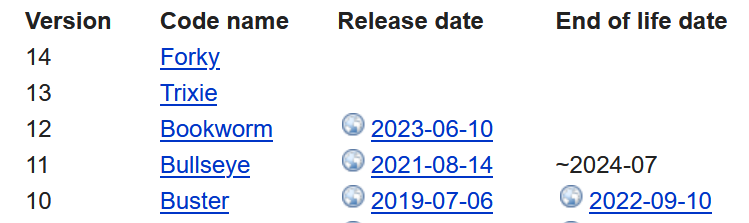
                                    Tot heißt:

                                    fc6e980b-5235-465f-8d79-377eca4495e0-image.png

                                    Linux-Werkzeugkasten:
                                    https://forum.iobroker.net/topic/42952/der-kleine-iobroker-linux-werkzeugkasten
                                    NodeJS Fixer Skript:
                                    https://forum.iobroker.net/topic/68035/iob-node-fix-skript
                                    iob_diag: curl -sLf -o diag.sh https://iobroker.net/diag.sh && bash diag.sh

                                    1 Reply Last reply
                                    0
                                    • joergfrdeJ joergfrde

                                      @thomas-braun was heißt buster ist tot

                                      GlasfaserG Offline
                                      GlasfaserG Offline
                                      Glasfaser
                                      wrote on last edited by
                                      #62

                                      @joergfrde sagte in Kein Zugriff au Iobroker:

                                      @thomas-braun was heißt buster ist tot

                                      ENDE ... kein Support mehr .

                                      https://www.debian.org/releases/buster/index.de.html

                                      Synology 918+ 16GB - ioBroker in Docker v9 , VISO auf Trekstor Primebook C13 13,3" , Hikvision Domkameras mit Surveillance Station .. CCU RaspberryMatic in Synology VM .. Zigbee CC2538+CC2592 .. Sonoff .. KNX .. Modbus ..

                                      1 Reply Last reply
                                      0
                                      • GlasfaserG Glasfaser

                                        @joergfrde

                                        Zeige bitte die Full Ausgabe ... kein SUMMARY !

                                        joergfrdeJ Offline
                                        joergfrdeJ Offline
                                        joergfrde
                                        wrote on last edited by Homoran
                                        #63

                                        @glasfaser

                                        ======== Start marking the full check here =========

                                        Skript v.2023-10-10
                                        
                                        *** BASE SYSTEM ***
                                           Static hostname: raspberrypi
                                                 Icon name: computer
                                          Operating System: Raspbian GNU/Linux 10 (buster)
                                                    Kernel: Linux 5.10.103-v7l+
                                              Architecture: arm
                                        
                                        Model           : Raspberry Pi 4 Model B Rev 1.1
                                        Docker          : false
                                        Virtualization  : none
                                        Kernel          : armv7l
                                        Userland        : armhf
                                        
                                        Systemuptime and Load:
                                         20:53:15 up 26 min,  1 user,  load average: 0.92, 1.02, 1.41
                                        CPU threads: 4
                                        
                                        
                                        *** RASPBERRY THROTTLING ***
                                        Current issues:
                                        No throttling issues detected.
                                        
                                        Previously detected issues:
                                        No throttling issues detected.
                                        
                                        *** Time and Time Zones ***
                                                       Local time: Fri 2023-11-10 20:53:15 CET
                                                   Universal time: Fri 2023-11-10 19:53:15 UTC
                                                         RTC time: n/a
                                                        Time zone: Europe/Berlin (CET, +0100)
                                        System clock synchronized: yes
                                                      NTP service: active
                                                  RTC in local TZ: no
                                        
                                        *** User and Groups ***
                                        pi
                                        /home/pi
                                        pi adm dialout cdrom sudo audio video plugdev games users input netdev gpio i2c spi iobroker
                                        
                                        *** X-Server-Setup ***
                                        X-Server:       false
                                        Desktop:
                                        Terminal:       tty
                                        Boot Target:    graphical.target
                                        
                                        *** MEMORY ***
                                                      total        used        free      shared  buff/cache   available
                                        Mem:           3.8G        2.0G        708M        8.0M        1.1G        1.6G
                                        Swap:           99M          0B         99M
                                        Total:         3.9G        2.0G        808M
                                        
                                                 3837 M total memory
                                                 2032 M used memory
                                                  568 M active memory
                                                 2375 M inactive memory
                                                  708 M free memory
                                                  184 M buffer memory
                                                  912 M swap cache
                                                   99 M total swap
                                                    0 M used swap
                                                   99 M free swap
                                        
                                        Raspberry only:
                                        oom events: 0
                                        lifetime oom required: 0 Mbytes
                                        total time in oom handler: 0 ms
                                        max time spent in oom handler: 0 ms
                                        
                                        *** FAILED SERVICES ***
                                        
                                          UNIT                LOAD   ACTIVE SUB    DESCRIPTION                          
                                        * deconz-init.service loaded failed failed deCONZ: ZigBee gateway -- Initialisation
                                        * proftpd.service     loaded failed failed LSB: Starts ProFTPD daemon           
                                        
                                        LOAD   = Reflects whether the unit definition was properly loaded.
                                        ACTIVE = The high-level unit activation state, i.e. generalization of SUB.
                                        SUB    = The low-level unit activation state, values depend on unit type.
                                        
                                        2 loaded units listed. Pass --all to see loaded but inactive units, too.
                                        To show all installed unit files use 'systemctl list-unit-files'.
                                        
                                        *** FILESYSTEM ***
                                        Filesystem     Type      Size  Used Avail Use% Mounted on
                                        /dev/root      ext4      220G   17G  195G   8% /
                                        devtmpfs       devtmpfs  1.8G     0  1.8G   0% /dev
                                        tmpfs          tmpfs     1.9G     0  1.9G   0% /dev/shm
                                        tmpfs          tmpfs     1.9G  8.8M  1.9G   1% /run
                                        tmpfs          tmpfs     5.0M  4.0K  5.0M   1% /run/lock
                                        tmpfs          tmpfs     1.9G     0  1.9G   0% /sys/fs/cgroup
                                        /dev/sda1      vfat      253M   49M  204M  20% /boot
                                        tmpfs          tmpfs     384M     0  384M   0% /run/user/1000
                                        
                                        Messages concerning ext4 filesystem in dmesg:
                                        [Fri Nov 10 20:27:07 2023] Kernel command line: coherent_pool=1M 8250.nr_uarts=1 snd_bcm2835.enable_compat_alsa=0 snd_bcm2835.enable_hdmi=1  smsc95xx.macaddr=DC:A6:32:22:43:EA vc_mem.mem_base=0x3eb00000 vc_mem.mem_size=0x3ff00000  console=tty1 root=PARTUUID=6c586e13-02 rootfstype=ext4 elevator=deadline fsck.repair=yes rootwait
                                        [Fri Nov 10 20:27:09 2023] EXT4-fs (sda2): INFO: recovery required on readonly filesystem
                                        [Fri Nov 10 20:27:09 2023] EXT4-fs (sda2): write access will be enabled during recovery
                                        [Fri Nov 10 20:27:09 2023] EXT4-fs (sda2): orphan cleanup on readonly fs
                                        [Fri Nov 10 20:27:09 2023] EXT4-fs (sda2): 50 orphan inodes deleted
                                        [Fri Nov 10 20:27:09 2023] EXT4-fs (sda2): recovery complete
                                        [Fri Nov 10 20:27:09 2023] EXT4-fs (sda2): mounted filesystem with ordered data mode. Opts: (null)
                                        [Fri Nov 10 20:27:09 2023] VFS: Mounted root (ext4 filesystem) readonly on device 8:2.
                                        [Fri Nov 10 20:27:12 2023] EXT4-fs (sda2): re-mounted. Opts: (null)
                                        
                                        Show mounted filesystems \(real ones only\):
                                        TARGET        SOURCE    FSTYPE OPTIONS
                                        /             /dev/sda2 ext4   rw,noatime
                                        |-/sys/fs/bpf none      bpf    rw,nosuid,nodev,noexec,relatime,mode=700
                                        `-/boot       /dev/sda1 vfat   rw,relatime,fmask=0022,dmask=0022,codepage=437,iocharset=ascii,shortname=mixed,errors=remount-ro
                                        
                                        Files in neuralgic directories:
                                        
                                        /var:
                                        1.3G    /var/
                                        1.1G    /var/cache/apt
                                        1.1G    /var/cache
                                        990M    /var/cache/apt/archives
                                        104M    /var/lib
                                        
                                        Archived and active journals take up 8.0M in the file system.
                                        
                                        /opt/iobroker/backups:
                                        293M    /opt/iobroker/backups/
                                        208K    /opt/iobroker/backups/scripte
                                        112K    /opt/iobroker/backups/scripte/common
                                        88K     /opt/iobroker/backups/scripte/Eigener_Ordner
                                        
                                        /opt/iobroker/iobroker-data:
                                        3.8G    /opt/iobroker/iobroker-data/
                                        2.8G    /opt/iobroker/iobroker-data/history
                                        524M    /opt/iobroker/iobroker-data/files
                                        283M    /opt/iobroker/iobroker-data/backup-objects
                                        78M     /opt/iobroker/iobroker-data/files/icons-open-icon-library-png
                                        
                                        The five largest files in iobroker-data are:
                                        50M     /opt/iobroker/iobroker-data/objects.jsonl
                                        35M     /opt/iobroker/iobroker-data/files/devices.admin/static/js/main.24f2bb56.js.map
                                        31M     /opt/iobroker/iobroker-data/states.jsonl
                                        21M     /opt/iobroker/iobroker-data/files/web.admin/static/js/main.edf7552a.js.map
                                        19M     /opt/iobroker/iobroker-data/objects.json.migrated
                                        
                                        USB-Devices by-id:
                                        USB-Sticks -  Avoid direct links to /dev/* in your adapter setups, please always prefer the links 'by-id':
                                        
                                        /dev/serial/by-id/usb-dresden_elektronik_ingenieurtechnik_GmbH_ConBee_II_DE2149438-if00
                                        
                                        *** NodeJS-Installation ***
                                        
                                        /usr/bin/nodejs         v18.16.0
                                        /usr/bin/node           v18.16.0
                                        /usr/bin/npm            9.5.1
                                        /usr/bin/npx            9.5.1
                                        /usr/bin/corepack       0.17.0
                                        
                                        
                                        nodejs:
                                          Installed: 18.16.0-deb-1nodesource1
                                          Candidate: 18.17.1-deb-1nodesource1
                                          Version table:
                                             18.17.1-deb-1nodesource1 500
                                                500 https://deb.nodesource.com/node_18.x buster/main armhf Packages
                                         *** 18.16.0-deb-1nodesource1 100
                                                100 /var/lib/dpkg/status
                                             10.24.0~dfsg-1~deb10u3 500
                                                500 http://raspbian.raspberrypi.org/raspbian buster/main armhf Packages
                                        
                                        Temp directories causing npm8 problem: 0
                                        No problems detected
                                        
                                        Errors in npm tree:
                                        
                                        *** ioBroker-Installation ***
                                        
                                        ioBroker Status
                                        iobroker is running on this host.
                                        
                                        
                                        Objects type: jsonl
                                        States  type: jsonl
                                        
                                        Core adapters versions
                                        js-controller:  5.0.12
                                        admin:          6.12.0
                                        javascript:     7.1.4
                                        
                                        Adapters from github:   1
                                        
                                        Adapter State
                                        + system.adapter.admin.0                  : admin                 : raspberrypi                              -  enabled, port: 8081, bind: 0.0.0.0, run as: admin
                                          system.adapter.alarm.0                  : alarm                 : raspberrypi                              - disabled
                                        + system.adapter.alexa2.0                 : alexa2                : raspberrypi                              -  enabled
                                        + system.adapter.backitup.0               : backitup              : raspberrypi                              -  enabled
                                        + system.adapter.calendar.0               : calendar              : raspberrypi                              -  enabled, port: 8095
                                        + system.adapter.calendar.1               : calendar              : raspberrypi                              -  enabled, port: 8095
                                        + system.adapter.cameras.0                : cameras               : raspberrypi                              -  enabled, port: 8085, bind: 0.0.0.0
                                        + system.adapter.cloud.0                  : cloud                 : raspberrypi                              -  enabled
                                        + system.adapter.deconz.0                 : deconz                : raspberrypi                              -  enabled, port: 80
                                          system.adapter.devices.0                : devices               : raspberrypi                              -  enabled
                                        + system.adapter.discovery.0              : discovery             : raspberrypi                              -  enabled
                                          system.adapter.egigeozone.0             : egigeozone            : raspberrypi                              -  enabled, port: 7654
                                        + system.adapter.email.0                  : email                 : raspberrypi                              -  enabled
                                        + system.adapter.exchangerates.0          : exchangerates         : raspberrypi                              -  enabled
                                          system.adapter.fb-checkpresence.0       : fb-checkpresence      : raspberrypi                              - disabled
                                          system.adapter.feiertage.0              : feiertage             : raspberrypi                              -  enabled
                                        + system.adapter.fritzbox.0               : fritzbox              : raspberrypi                              -  enabled
                                        + system.adapter.fritzdect.0              : fritzdect             : raspberrypi                              -  enabled
                                        + system.adapter.fullcalendar.0           : fullcalendar          : raspberrypi                              -  enabled
                                        + system.adapter.geofency.0               : geofency              : raspberrypi                              -  enabled, port: 7999, bind: 0.0.0.0
                                          system.adapter.heatingcontrol.0         : heatingcontrol        : raspberrypi                              - disabled
                                        + system.adapter.history.0                : history               : raspberrypi                              -  enabled
                                        + system.adapter.hm-rega.0                : hm-rega               : raspberrypi                              -  enabled
                                        + system.adapter.hm-rpc.0                 : hm-rpc                : raspberrypi                              -  enabled, port: 8081
                                        + system.adapter.hm-rpc.1                 : hm-rpc                : raspberrypi                              -  enabled, port: 0
                                        + system.adapter.hm-rpc.2                 : hm-rpc                : raspberrypi                              -  enabled, port: 0
                                        + system.adapter.hm-rpc.3                 : hm-rpc                : raspberrypi                              -  enabled, port: 0
                                        + system.adapter.hm-rpc.4                 : hm-rpc                : raspberrypi                              -  enabled, port: 0
                                        + system.adapter.homeconnect.0            : homeconnect           : raspberrypi                              -  enabled
                                        + system.adapter.homee.0                  : homee                 : raspberrypi                              -  enabled
                                          system.adapter.ical.0                   : ical                  : raspberrypi                              -  enabled
                                          system.adapter.ical.1                   : ical                  : raspberrypi                              -  enabled
                                          system.adapter.ical.2                   : ical                  : raspberrypi                              -  enabled
                                          system.adapter.icons-addictive-flavour-png.0: icons-addictive-flavour-png: raspberrypi                              -  enabled
                                          system.adapter.icons-fatcow-hosting.0   : icons-fatcow-hosting  : raspberrypi                              -  enabled
                                          system.adapter.icons-icons8.0           : icons-icons8          : raspberrypi                              -  enabled
                                          system.adapter.icons-material-png.0     : icons-material-png    : raspberrypi                              -  enabled
                                          system.adapter.icons-material-svg.0     : icons-material-svg    : raspberrypi                              -  enabled
                                          system.adapter.icons-mfd-png.0          : icons-mfd-png         : raspberrypi                              -  enabled
                                          system.adapter.icons-open-icon-library-png.0: icons-open-icon-library-png: raspberrypi                              -  enabled
                                          system.adapter.icons-ultimate-png.0     : icons-ultimate-png    : raspberrypi                              -  enabled
                                        + system.adapter.info.0                   : info                  : raspberrypi                              -  enabled
                                        + system.adapter.javascript.0             : javascript            : raspberrypi                              -  enabled
                                        + system.adapter.landroid.0               : landroid              : raspberrypi                              -  enabled
                                        + system.adapter.lifx.0                   : lifx                  : raspberrypi                              -  enabled
                                        + system.adapter.meross.0                 : meross                : raspberrypi                              -  enabled
                                          system.adapter.node-red.0               : node-red              : raspberrypi                              - disabled, port: 1880, bind: 0.0.0.0
                                        + system.adapter.onvif.0                  : onvif                 : raspberrypi                              -  enabled
                                          system.adapter.openweathermap.0         : openweathermap        : raspberrypi                              -  enabled
                                        + system.adapter.parcel.0                 : parcel                : raspberrypi                              -  enabled
                                        + system.adapter.paw.0                    : paw                   : raspberrypi                              -  enabled, port: 8898
                                          system.adapter.ring.0                   : ring                  : raspberrypi                              -  enabled
                                        + system.adapter.rpi2.0                   : rpi2                  : raspberrypi                              -  enabled
                                        + system.adapter.sayit.0                  : sayit                 : raspberrypi                              -  enabled
                                          system.adapter.schoolfree.0             : schoolfree            : raspberrypi                              -  enabled
                                          system.adapter.schoolfree.1             : schoolfree            : raspberrypi                              -  enabled
                                        + system.adapter.shelly.0                 : shelly                : raspberrypi                              -  enabled, port: 1882, bind: 0.0.0.0
                                        + system.adapter.shuttercontrol.0         : shuttercontrol        : raspberrypi                              -  enabled
                                        + system.adapter.smartcontrol.0           : smartcontrol          : raspberrypi                              -  enabled
                                        + system.adapter.tankerkoenig.0           : tankerkoenig          : raspberrypi                              -  enabled
                                        + system.adapter.telegram.0               : telegram              : raspberrypi                              -  enabled, port: 8443, bind: 0.0.0.0
                                        + system.adapter.text2command.0           : text2command          : raspberrypi                              -  enabled
                                        + system.adapter.toyota.0                 : toyota                : raspberrypi                              -  enabled
                                        + system.adapter.tr-064.0                 : tr-064                : raspberrypi                              -  enabled
                                        + system.adapter.trashschedule.2          : trashschedule         : raspberrypi                              -  enabled
                                        + system.adapter.trashschedule.3          : trashschedule         : raspberrypi                              -  enabled
                                          system.adapter.tvspielfilm.0            : tvspielfilm           : raspberrypi                              -  enabled
                                          system.adapter.vis-bars.0               : vis-bars              : raspberrypi                              -  enabled
                                          system.adapter.vis-canvas-gauges.0      : vis-canvas-gauges     : raspberrypi                              -  enabled
                                          system.adapter.vis-colorpicker.0        : vis-colorpicker       : raspberrypi                              -  enabled
                                          system.adapter.vis-fancyswitch.0        : vis-fancyswitch       : raspberrypi                              -  enabled
                                          system.adapter.vis-google-fonts.0       : vis-google-fonts      : raspberrypi                              -  enabled
                                          system.adapter.vis-hqwidgets.0          : vis-hqwidgets         : raspberrypi                              -  enabled
                                          system.adapter.vis-inventwo.0           : vis-inventwo          : raspberrypi                              -  enabled
                                          system.adapter.vis-jqui-mfd.0           : vis-jqui-mfd          : raspberrypi                              -  enabled
                                          system.adapter.vis-justgage.0           : vis-justgage          : raspberrypi                              -  enabled
                                          system.adapter.vis-lcars.0              : vis-lcars             : raspberrypi                              -  enabled
                                          system.adapter.vis-map.0                : vis-map               : raspberrypi                              -  enabled
                                          system.adapter.vis-material-webfont.0   : vis-material-webfont  : raspberrypi                              -  enabled
                                          system.adapter.vis-material.0           : vis-material          : raspberrypi                              -  enabled
                                          system.adapter.vis-metro.0              : vis-metro             : raspberrypi                              -  enabled
                                          system.adapter.vis-timeandweather.0     : vis-timeandweather    : raspberrypi                              -  enabled
                                          system.adapter.vis-weather.0            : vis-weather           : raspberrypi                              -  enabled
                                          system.adapter.vis.0                    : vis                   : raspberrypi                              -  enabled
                                          system.adapter.weatherunderground.0     : weatherunderground    : raspberrypi                              -  enabled
                                        + system.adapter.web.0                    : web                   : raspberrypi                              -  enabled, port: 8082, bind: 0.0.0.0, run as: admin
                                        + system.adapter.worx.0                   : worx                  : raspberrypi                              -  enabled
                                          system.adapter.yr.0                     : yr                    : raspberrypi                              -  enabled
                                        
                                        + instance is alive
                                        
                                        Enabled adapters with bindings
                                        + system.adapter.admin.0                  : admin                 : raspberrypi                              -  enabled, port: 8081, bind: 0.0.0.0, run as: admin
                                        + system.adapter.calendar.0               : calendar              : raspberrypi                              -  enabled, port: 8095
                                        + system.adapter.calendar.1               : calendar              : raspberrypi                              -  enabled, port: 8095
                                        + system.adapter.cameras.0                : cameras               : raspberrypi                              -  enabled, port: 8085, bind: 0.0.0.0
                                        + system.adapter.deconz.0                 : deconz                : raspberrypi                              -  enabled, port: 80
                                          system.adapter.egigeozone.0             : egigeozone            : raspberrypi                              -  enabled, port: 7654
                                        + system.adapter.geofency.0               : geofency              : raspberrypi                              -  enabled, port: 7999, bind: 0.0.0.0
                                        + system.adapter.hm-rpc.0                 : hm-rpc                : raspberrypi                              -  enabled, port: 8081
                                        + system.adapter.hm-rpc.1                 : hm-rpc                : raspberrypi                              -  enabled, port: 0
                                        + system.adapter.hm-rpc.2                 : hm-rpc                : raspberrypi                              -  enabled, port: 0
                                        + system.adapter.hm-rpc.3                 : hm-rpc                : raspberrypi                              -  enabled, port: 0
                                        + system.adapter.hm-rpc.4                 : hm-rpc                : raspberrypi                              -  enabled, port: 0
                                        + system.adapter.paw.0                    : paw                   : raspberrypi                              -  enabled, port: 8898
                                        + system.adapter.shelly.0                 : shelly                : raspberrypi                              -  enabled, port: 1882, bind: 0.0.0.0
                                        + system.adapter.telegram.0               : telegram              : raspberrypi                              -  enabled, port: 8443, bind: 0.0.0.0
                                        + system.adapter.web.0                    : web                   : raspberrypi                              -  enabled, port: 8082, bind: 0.0.0.0, run as: admin
                                        
                                        ioBroker-Repositories
                                        stable        : http://download.iobroker.net/sources-dist.json
                                        
                                        Active repo(s): stable
                                        
                                        Installed ioBroker-Instances
                                        Used repository: stable
                                        Adapter    "admin"        : 6.12.0   , installed 6.12.0
                                        Adapter    "alarm"        : 3.4.0    , installed 3.4.0
                                        Adapter    "alexa2"       : 3.25.2   , installed 3.25.2
                                        Adapter    "backitup"     : 2.8.7    , installed 2.8.1  [Updatable]
                                        Adapter    "cloud"        : 4.4.1    , installed 4.4.1
                                        Adapter    "deconz"       : 1.3.21   , installed 2.0.5
                                        Adapter    "denon"        : 1.15.4   , installed 1.15.4
                                        Adapter    "devices"      : 1.1.5    , installed 1.1.5
                                        Adapter    "discovery"    : 3.1.0    , installed 3.1.0
                                        Adapter    "egigeozone"   : 0.1.2    , installed 0.1.2
                                        Adapter    "email"        : 1.2.0    , installed 1.2.0
                                        Adapter    "exchangerates": 0.0.14   , installed 0.0.14
                                        Adapter    "fb-checkpresence": 1.2.2 , installed 1.2.2
                                        Adapter    "feiertage"    : 1.1.4    , installed 1.1.4
                                        Adapter    "fritzbox"     : 0.5.0    , installed 0.5.0
                                        Adapter    "fritzdect"    : 2.3.1    , installed 2.3.1
                                        Adapter    "fullcalendar" : 2.2.6    , installed 1.2.0  [Updatable]
                                        Adapter    "geofency"     : 1.2.4    , installed 1.2.4
                                        Adapter    "heatingcontrol": 2.11.1  , installed 2.11.1
                                        Adapter    "history"      : 3.0.1    , installed 3.0.1
                                        Adapter    "hm-rega"      : 4.0.0    , installed 3.0.47 [Updatable]
                                        Adapter    "hm-rpc"       : 1.15.19  , installed 1.15.19
                                        Adapter    "homeconnect"  : 1.1.1    , installed 1.1.1
                                        Adapter    "homee"        : 1.2.0    , installed 1.2.0
                                        Adapter    "ical"         : 1.13.3   , installed 1.13.3
                                        Adapter    "icons-addictive-flavour-png": 0.1.0, installed 0.1.0
                                        Adapter    "icons-fatcow-hosting": 0.1.0, installed 0.1.0
                                        Adapter    "icons-icons8" : 0.0.1    , installed 0.0.1
                                        Adapter    "icons-material-png": 0.1.0, installed 0.1.0
                                        Adapter    "icons-material-svg": 0.1.0, installed 0.1.0
                                        Adapter    "icons-mfd-png": 1.1.0    , installed 1.1.0
                                        Adapter    "icons-open-icon-library-png": 0.1.2, installed 0.1.3
                                        Adapter    "icons-ultimate-png": 1.0.1, installed 1.0.1
                                        Adapter    "info"         : 2.0.0    , installed 2.0.0
                                        Adapter    "javascript"   : 7.1.4    , installed 7.1.4
                                        Controller "js-controller": 5.0.12   , installed 5.0.12
                                        Adapter    "landroid"     : 1.0.3    , installed 1.0.3
                                        Adapter    "lifx"         : 1.0.3    , installed 1.0.3
                                        Adapter    "meross"       : 1.15.1   , installed 1.15.1
                                        Adapter    "node-red"     : 4.0.3    , installed 4.0.3
                                        Adapter    "onvif"        : 1.0.5    , installed 1.0.5
                                        Adapter    "openweathermap": 0.4.5   , installed 0.3.9  [Updatable]
                                        Adapter    "parcel"       : 0.0.27   , installed 0.0.27
                                        Adapter    "paw"          : 0.3.2    , installed 0.3.2
                                        Adapter    "ring"         : 3.2.2    , installed 3.2.2
                                        Adapter    "rpi2"         : 1.3.2    , installed 1.3.2
                                        Adapter    "sayit"        : 3.0.5    , installed 3.0.5
                                        Adapter    "schoolfree"   : 1.1.2    , installed 1.1.2
                                        Adapter    "shelly"       : 6.6.1    , installed 6.4.5  [Updatable]
                                        Adapter    "shuttercontrol": 1.6.2   , installed 1.6.2
                                        Adapter    "simple-api"   : 2.7.2    , installed 2.7.2
                                        Adapter    "smartcontrol" : 2.0.1    , installed 2.0.1
                                        Adapter    "socketio"     : 6.5.5    , installed 6.5.5
                                        Adapter    "tankerkoenig" : 3.3.7    , installed 3.3.7
                                        Adapter    "telegram"     : 2.0.1    , installed 1.16.0 [Updatable]
                                        Adapter    "text2command" : 3.0.2    , installed 3.0.2
                                        Adapter    "toyota"       : 0.0.3    , installed 0.0.3
                                        Adapter    "tr-064"       : 4.2.18   , installed 4.2.18
                                        Adapter    "trashschedule": 2.3.0    , installed 2.2.0  [Updatable]
                                        Adapter    "tvspielfilm"  : 2.0.5    , installed 2.0.5
                                        Adapter    "vis"          : 1.4.16   , installed 1.4.16
                                        Adapter    "vis-bars"     : 0.1.4    , installed 0.1.4
                                        Adapter    "vis-canvas-gauges": 1.0.1, installed 1.0.1
                                        Adapter    "vis-colorpicker": 2.0.3  , installed 2.0.3
                                        Adapter    "vis-fancyswitch": 1.1.0  , installed 1.1.0
                                        Adapter    "vis-google-fonts": 1.0.4 , installed 1.0.4
                                        Adapter    "vis-hqwidgets": 1.4.0    , installed 1.4.0
                                        Adapter    "vis-inventwo" : 3.3.3    , installed 3.3.3
                                        Adapter    "vis-jqui-mfd" : 1.0.12   , installed 1.0.12
                                        Adapter    "vis-justgage" : 1.0.2    , installed 1.0.2
                                        Adapter    "vis-lcars"    : 1.1.1    , installed 1.1.1
                                        Adapter    "vis-map"      : 1.0.4    , installed 1.0.4
                                        Adapter    "vis-metro"    : 1.2.0    , installed 1.2.0
                                        Adapter    "vis-timeandweather": 1.2.2, installed 1.2.2
                                        Adapter    "vis-weather"  : 2.5.6    , installed 2.5.6
                                        Adapter    "weatherunderground": 3.6.0, installed 3.6.0
                                        Adapter    "web"          : 6.1.10   , installed 6.1.2  [Updatable]
                                        Adapter    "worx"         : 2.3.4    , installed 2.3.2  [Updatable]
                                        Adapter    "ws"           : 2.5.8    , installed 2.5.5  [Updatable]
                                        Adapter    "yr"           : 5.3.0    , installed 5.3.0
                                        
                                        Objects and States
                                        Please stand by - This may take a while
                                        Objects:        74009
                                        States:         60139
                                        
                                        *** OS-Repositories and Updates ***
                                        Hit:1 http://archive.raspberrypi.org/debian buster InRelease
                                        Hit:2 http://raspbian.raspberrypi.org/raspbian buster InRelease
                                        Hit:3 https://phoscon.de/apt/deconz buster InRelease
                                        Hit:4 https://deb.nodesource.com/node_18.x buster InRelease
                                        Reading package lists...
                                        Pending Updates: 112
                                        
                                        *** Listening Ports ***
                                        Active Internet connections (only servers)
                                        Proto Recv-Q Send-Q Local Address           Foreign Address         State       User       Inode      PID/Program name
                                        tcp        0      0 0.0.0.0:80              0.0.0.0:*               LISTEN      1000       17915      463/deCONZ
                                        tcp        0      0 192.168.178.27:2001     0.0.0.0:*               LISTEN      1001       58919      6359/io.hm-rpc.4
                                        tcp        0      0 192.168.178.27:8083     0.0.0.0:*               LISTEN      1001       54935      5990/io.hm-rpc.0
                                        tcp        0      0 0.0.0.0:8085            0.0.0.0:*               LISTEN      1001       60653      8227/io.cameras.0
                                        tcp        0      0 0.0.0.0:53              0.0.0.0:*               LISTEN      0          17313      798/dnsmasq
                                        tcp        0      0 0.0.0.0:22              0.0.0.0:*               LISTEN      0          20583      792/sshd
                                        tcp        0      0 0.0.0.0:1880            0.0.0.0:*               LISTEN      1000       24250      387/node-red
                                        tcp        0      0 192.168.178.27:2010     0.0.0.0:*               LISTEN      1001       54939      6268/io.hm-rpc.1
                                        tcp        0      0 0.0.0.0:1883            0.0.0.0:*               LISTEN      0          16257      776/mosquitto
                                        tcp        0      0 0.0.0.0:443             0.0.0.0:*               LISTEN      1000       16146      463/deCONZ
                                        tcp        0      0 192.168.178.27:8701     0.0.0.0:*               LISTEN      1001       59620      6289/io.hm-rpc.2
                                        tcp        0      0 127.0.0.1:9000          0.0.0.0:*               LISTEN      1001       19965      775/iobroker.js-con
                                        tcp        0      0 127.0.0.1:9001          0.0.0.0:*               LISTEN      1001       19935      775/iobroker.js-con
                                        tcp        0      0 192.168.178.27:9292     0.0.0.0:*               LISTEN      1001       59625      6311/io.hm-rpc.3
                                        tcp6       0      0 :::8081                 :::*                    LISTEN      1001       49568      2563/io.admin.0
                                        tcp6       0      0 :::8082                 :::*                    LISTEN      1001       58313      3905/io.web.0
                                        tcp6       0      0 :::53                   :::*                    LISTEN      0          17315      798/dnsmasq
                                        tcp6       0      0 :::22                   :::*                    LISTEN      0          20585      792/sshd
                                        tcp6       0      0 :::1883                 :::*                    LISTEN      0          16258      776/mosquitto
                                        tcp6       0      0 :::7999                 :::*                    LISTEN      1001       49602      3337/io.geofency.0
                                        udp        0      0 0.0.0.0:5683            0.0.0.0:*                           1001       59873      4059/io.shelly.0
                                        udp        0      0 0.0.0.0:53              0.0.0.0:*                           0          17312      798/dnsmasq
                                        udp        0      0 0.0.0.0:52801           0.0.0.0:*                           108        18675      467/avahi-daemon: r
                                        udp        0      0 0.0.0.0:67              0.0.0.0:*                           0          17309      798/dnsmasq
                                        udp        0      0 0.0.0.0:68              0.0.0.0:*                           0          17006      773/dhcpcd
                                        udp        0      0 0.0.0.0:68              0.0.0.0:*                           0          19051      610/dhclient
                                        udp        0      0 0.0.0.0:43084           0.0.0.0:*                           1001       54063      6995/io.lifx.0
                                        udp        0      0 192.168.178.27:5353     0.0.0.0:*                           1001       58441      5099/io.tr-064.0
                                        udp        0      0 0.0.0.0:5353            0.0.0.0:*                           108        18673      467/avahi-daemon: r
                                        udp        0      0 0.0.0.0:1900            0.0.0.0:*                           1001       64536      8123/io.deconz.0
                                        udp        0      0 0.0.0.0:1900            0.0.0.0:*                           1000       18165      463/deCONZ
                                        udp6       0      0 :::53160                :::*                                108        18676      467/avahi-daemon: r
                                        udp6       0      0 :::546                  :::*                                0          19714      773/dhcpcd
                                        udp6       0      0 :::53                   :::*                                0          17314      798/dnsmasq
                                        udp6       0      0 :::5353                 :::*                                108        18674      467/avahi-daemon: r
                                        udp6       0      0 :::1900                 :::*                                1001       64539      8123/io.deconz.0
                                        udp6       0      0 :::1900                 :::*                                1001       64538      8123/io.deconz.0
                                        udp6       0      0 :::1900                 :::*                                1001       64537      8123/io.deconz.0
                                        
                                        *** Log File - Last 25 Lines ***
                                        
                                        2023-11-10 20:54:24.446  - info: tr-064.0 (5099) forEachConfiguredDevice: in GetSpecificHostEntry 6(Lenovo-Tablet/48:88:CA:DF:E3:9F) device seems offline but we never saw it since adapter was started:Error: sendSOAPActionRequest Error action=GetSpecificHostEntry serviceType=urn:dslforum-org:service:Hosts:1: 500 - {"code":500}
                                        2023-11-10 20:54:24.669  - info: tr-064.0 (5099) forEachConfiguredDevice: in GetSpecificHostEntry 8(Meross-Smart-Plug/48:E1:E9:04:34:24) device seems offline but we never saw it since adapter was started:Error: sendSOAPActionRequest Error action=GetSpecificHostEntry serviceType=urn:dslforum-org:service:Hosts:1: 500 - {"code":500}
                                        2023-11-10 20:54:26.334  - info: tr-064.0 (5099) forEachConfiguredDevice: in GetSpecificHostEntry 20(joerg/98:09:CF:8C:90:48) device seems offline but we never saw it since adapter was started:Error: sendSOAPActionRequest Error action=GetSpecificHostEntry serviceType=urn:dslforum-org:service:Hosts:1: 500 - {"code":500}
                                        2023-11-10 20:54:26.684  - info: tr-064.0 (5099) forEachConfiguredDevice: in GetSpecificHostEntry 23(ccu3-webui/B8:27:EB:00:A4:4A) device seems offline but we never saw it since adapter was started:Error: sendSOAPActionRequest Error action=GetSpecificHostEntry serviceType=urn:dslforum-org:service:Hosts:1: 500 - {"code":500}
                                        2023-11-10 20:54:26.703  - warn: shelly.0 (4059) [authEnabled] 192.168.178.57 (shelly1 / shelly1-A4CF12F41BAF / SHSW-1#A4CF12F41BAF#1): This device is not protected via restricted login (see adapter documentation for details)
                                        2023-11-10 20:54:38.824  - info: tr-064.0 (5099) forEachConfiguredDevice: in GetSpecificHostEntry 6(Lenovo-Tablet/48:88:CA:DF:E3:9F) device seems offline but we never saw it since adapter was started:Error: sendSOAPActionRequest Error action=GetSpecificHostEntry serviceType=urn:dslforum-org:service:Hosts:1: 500 - {"code":500}
                                        2023-11-10 20:54:39.048  - info: tr-064.0 (5099) forEachConfiguredDevice: in GetSpecificHostEntry 8(Meross-Smart-Plug/48:E1:E9:04:34:24) device seems offline but we never saw it since adapter was started:Error: sendSOAPActionRequest Error action=GetSpecificHostEntry serviceType=urn:dslforum-org:service:Hosts:1: 500 - {"code":500}
                                        2023-11-10 20:54:40.762  - info: tr-064.0 (5099) forEachConfiguredDevice: in GetSpecificHostEntry 20(joerg/98:09:CF:8C:90:48) device seems offline but we never saw it since adapter was started:Error: sendSOAPActionRequest Error action=GetSpecificHostEntry serviceType=urn:dslforum-org:service:Hosts:1: 500 - {"code":500}
                                        2023-11-10 20:54:41.176  - warn: shelly.0 (4059) [authEnabled] 192.168.178.57 (shelly1 / shelly1-A4CF12F41BAF / SHSW-1#A4CF12F41BAF#1): This device is not protected via restricted login (see adapter documentation for details)
                                        2023-11-10 20:54:41.227  - info: tr-064.0 (5099) forEachConfiguredDevice: in GetSpecificHostEntry 23(ccu3-webui/B8:27:EB:00:A4:4A) device seems offline but we never saw it since adapter was started:Error: sendSOAPActionRequest Error action=GetSpecificHostEntry serviceType=urn:dslforum-org:service:Hosts:1: 500 - {"code":500}
                                        2023-11-10 20:54:42.216  - warn: deconz.0 (8123) Object of state "deconz.0.info.connection" is missing the required property "common.type"
                                        2023-11-10 20:54:46.503  - warn: shelly.0 (4059) [authEnabled] 192.168.178.86 (shelly1 / shelly1-A4CF12F41DED / SHSW-1#A4CF12F41DED#1): This device is not protected via restricted login (see adapter documentation for details)
                                        2023-11-10 20:54:53.013  - warn: shelly.0 (4059) [authEnabled] 192.168.178.57 (shelly1 / shelly1-A4CF12F41BAF / SHSW-1#A4CF12F41BAF#1): This device is not protected via restricted login (see adapter documentation for details)
                                        2023-11-10 20:54:53.556  - info: tr-064.0 (5099) forEachConfiguredDevice: in GetSpecificHostEntry 6(Lenovo-Tablet/48:88:CA:DF:E3:9F) device seems offline but we never saw it since adapter was started:Error: sendSOAPActionRequest Error action=GetSpecificHostEntry serviceType=urn:dslforum-org:service:Hosts:1: 500 - {"code":500}
                                        2023-11-10 20:54:53.774  - info: tr-064.0 (5099) forEachConfiguredDevice: in GetSpecificHostEntry 8(Meross-Smart-Plug/48:E1:E9:04:34:24) device seems offline but we never saw it since adapter was started:Error: sendSOAPActionRequest Error action=GetSpecificHostEntry serviceType=urn:dslforum-org:service:Hosts:1: 500 - {"code":500}
                                        2023-11-10 20:54:55.198  - info: tr-064.0 (5099) forEachConfiguredDevice: in GetSpecificHostEntry 20(joerg/98:09:CF:8C:90:48) device seems offline but we never saw it since adapter was started:Error: sendSOAPActionRequest Error action=GetSpecificHostEntry serviceType=urn:dslforum-org:service:Hosts:1: 500 - {"code":500}
                                        2023-11-10 20:54:55.583  - info: tr-064.0 (5099) forEachConfiguredDevice: in GetSpecificHostEntry 23(ccu3-webui/B8:27:EB:00:A4:4A) device seems offline but we never saw it since adapter was started:Error: sendSOAPActionRequest Error action=GetSpecificHostEntry serviceType=urn:dslforum-org:service:Hosts:1: 500 - {"code":500}
                                        2023-11-10 20:55:01.666  - info: host.raspberrypi instance system.adapter.tvspielfilm.0 started with pid 21418
                                        2023-11-10 20:55:07.737  - info: tr-064.0 (5099) forEachConfiguredDevice: in GetSpecificHostEntry 6(Lenovo-Tablet/48:88:CA:DF:E3:9F) device seems offline but we never saw it since adapter was started:Error: sendSOAPActionRequest Error action=GetSpecificHostEntry serviceType=urn:dslforum-org:service:Hosts:1: 500 - {"code":500}
                                        2023-11-10 20:55:07.979  - info: tr-064.0 (5099) forEachConfiguredDevice: in GetSpecificHostEntry 8(Meross-Smart-Plug/48:E1:E9:04:34:24) device seems offline but we never saw it since adapter was started:Error: sendSOAPActionRequest Error action=GetSpecificHostEntry serviceType=urn:dslforum-org:service:Hosts:1: 500 - {"code":500}
                                        2023-11-10 20:55:09.154  - info: tvspielfilm.0 (21418) starting. Version 2.0.5 in /opt/iobroker/node_modules/iobroker.tvspielfilm, node: v18.16.0, js-controller: 5.0.12
                                        2023-11-10 20:55:09.498  - info: tr-064.0 (5099) forEachConfiguredDevice: in GetSpecificHostEntry 20(joerg/98:09:CF:8C:90:48) device seems offline but we never saw it since adapter was started:Error: sendSOAPActionRequest Error action=GetSpecificHostEntry serviceType=urn:dslforum-org:service:Hosts:1: 500 - {"code":500}
                                        2023-11-10 20:55:09.965  - info: tr-064.0 (5099) forEachConfiguredDevice: in GetSpecificHostEntry 23(ccu3-webui/B8:27:EB:00:A4:4A) device seems offline but we never saw it since adapter was started:Error: sendSOAPActionRequest Error action=GetSpecificHostEntry serviceType=urn:dslforum-org:service:Hosts:1: 500 - {"code":500}
                                        2023-11-10 20:55:11.060  - warn: shelly.0 (4059) [authEnabled] 192.168.178.57 (shelly1 / shelly1-A4CF12F41BAF / SHSW-1#A4CF12F41BAF#1): This device is not protected via restricted login (see adapter documentation for details)
                                        2023-11-10 20:55:11.275  - info: tvspielfilm.0 (21418) objects written


                                        ============ Mark until here for C&P =============

                                        iob diag has finished.

                                        Thomas BraunT GlasfaserG 3 Replies Last reply
                                        0
                                        • joergfrdeJ joergfrde

                                          @glasfaser

                                          ======== Start marking the full check here =========

                                          Skript v.2023-10-10
                                          
                                          *** BASE SYSTEM ***
                                             Static hostname: raspberrypi
                                                   Icon name: computer
                                            Operating System: Raspbian GNU/Linux 10 (buster)
                                                      Kernel: Linux 5.10.103-v7l+
                                                Architecture: arm
                                          
                                          Model           : Raspberry Pi 4 Model B Rev 1.1
                                          Docker          : false
                                          Virtualization  : none
                                          Kernel          : armv7l
                                          Userland        : armhf
                                          
                                          Systemuptime and Load:
                                           20:53:15 up 26 min,  1 user,  load average: 0.92, 1.02, 1.41
                                          CPU threads: 4
                                          
                                          
                                          *** RASPBERRY THROTTLING ***
                                          Current issues:
                                          No throttling issues detected.
                                          
                                          Previously detected issues:
                                          No throttling issues detected.
                                          
                                          *** Time and Time Zones ***
                                                         Local time: Fri 2023-11-10 20:53:15 CET
                                                     Universal time: Fri 2023-11-10 19:53:15 UTC
                                                           RTC time: n/a
                                                          Time zone: Europe/Berlin (CET, +0100)
                                          System clock synchronized: yes
                                                        NTP service: active
                                                    RTC in local TZ: no
                                          
                                          *** User and Groups ***
                                          pi
                                          /home/pi
                                          pi adm dialout cdrom sudo audio video plugdev games users input netdev gpio i2c spi iobroker
                                          
                                          *** X-Server-Setup ***
                                          X-Server:       false
                                          Desktop:
                                          Terminal:       tty
                                          Boot Target:    graphical.target
                                          
                                          *** MEMORY ***
                                                        total        used        free      shared  buff/cache   available
                                          Mem:           3.8G        2.0G        708M        8.0M        1.1G        1.6G
                                          Swap:           99M          0B         99M
                                          Total:         3.9G        2.0G        808M
                                          
                                                   3837 M total memory
                                                   2032 M used memory
                                                    568 M active memory
                                                   2375 M inactive memory
                                                    708 M free memory
                                                    184 M buffer memory
                                                    912 M swap cache
                                                     99 M total swap
                                                      0 M used swap
                                                     99 M free swap
                                          
                                          Raspberry only:
                                          oom events: 0
                                          lifetime oom required: 0 Mbytes
                                          total time in oom handler: 0 ms
                                          max time spent in oom handler: 0 ms
                                          
                                          *** FAILED SERVICES ***
                                          
                                            UNIT                LOAD   ACTIVE SUB    DESCRIPTION                          
                                          * deconz-init.service loaded failed failed deCONZ: ZigBee gateway -- Initialisation
                                          * proftpd.service     loaded failed failed LSB: Starts ProFTPD daemon           
                                          
                                          LOAD   = Reflects whether the unit definition was properly loaded.
                                          ACTIVE = The high-level unit activation state, i.e. generalization of SUB.
                                          SUB    = The low-level unit activation state, values depend on unit type.
                                          
                                          2 loaded units listed. Pass --all to see loaded but inactive units, too.
                                          To show all installed unit files use 'systemctl list-unit-files'.
                                          
                                          *** FILESYSTEM ***
                                          Filesystem     Type      Size  Used Avail Use% Mounted on
                                          /dev/root      ext4      220G   17G  195G   8% /
                                          devtmpfs       devtmpfs  1.8G     0  1.8G   0% /dev
                                          tmpfs          tmpfs     1.9G     0  1.9G   0% /dev/shm
                                          tmpfs          tmpfs     1.9G  8.8M  1.9G   1% /run
                                          tmpfs          tmpfs     5.0M  4.0K  5.0M   1% /run/lock
                                          tmpfs          tmpfs     1.9G     0  1.9G   0% /sys/fs/cgroup
                                          /dev/sda1      vfat      253M   49M  204M  20% /boot
                                          tmpfs          tmpfs     384M     0  384M   0% /run/user/1000
                                          
                                          Messages concerning ext4 filesystem in dmesg:
                                          [Fri Nov 10 20:27:07 2023] Kernel command line: coherent_pool=1M 8250.nr_uarts=1 snd_bcm2835.enable_compat_alsa=0 snd_bcm2835.enable_hdmi=1  smsc95xx.macaddr=DC:A6:32:22:43:EA vc_mem.mem_base=0x3eb00000 vc_mem.mem_size=0x3ff00000  console=tty1 root=PARTUUID=6c586e13-02 rootfstype=ext4 elevator=deadline fsck.repair=yes rootwait
                                          [Fri Nov 10 20:27:09 2023] EXT4-fs (sda2): INFO: recovery required on readonly filesystem
                                          [Fri Nov 10 20:27:09 2023] EXT4-fs (sda2): write access will be enabled during recovery
                                          [Fri Nov 10 20:27:09 2023] EXT4-fs (sda2): orphan cleanup on readonly fs
                                          [Fri Nov 10 20:27:09 2023] EXT4-fs (sda2): 50 orphan inodes deleted
                                          [Fri Nov 10 20:27:09 2023] EXT4-fs (sda2): recovery complete
                                          [Fri Nov 10 20:27:09 2023] EXT4-fs (sda2): mounted filesystem with ordered data mode. Opts: (null)
                                          [Fri Nov 10 20:27:09 2023] VFS: Mounted root (ext4 filesystem) readonly on device 8:2.
                                          [Fri Nov 10 20:27:12 2023] EXT4-fs (sda2): re-mounted. Opts: (null)
                                          
                                          Show mounted filesystems \(real ones only\):
                                          TARGET        SOURCE    FSTYPE OPTIONS
                                          /             /dev/sda2 ext4   rw,noatime
                                          |-/sys/fs/bpf none      bpf    rw,nosuid,nodev,noexec,relatime,mode=700
                                          `-/boot       /dev/sda1 vfat   rw,relatime,fmask=0022,dmask=0022,codepage=437,iocharset=ascii,shortname=mixed,errors=remount-ro
                                          
                                          Files in neuralgic directories:
                                          
                                          /var:
                                          1.3G    /var/
                                          1.1G    /var/cache/apt
                                          1.1G    /var/cache
                                          990M    /var/cache/apt/archives
                                          104M    /var/lib
                                          
                                          Archived and active journals take up 8.0M in the file system.
                                          
                                          /opt/iobroker/backups:
                                          293M    /opt/iobroker/backups/
                                          208K    /opt/iobroker/backups/scripte
                                          112K    /opt/iobroker/backups/scripte/common
                                          88K     /opt/iobroker/backups/scripte/Eigener_Ordner
                                          
                                          /opt/iobroker/iobroker-data:
                                          3.8G    /opt/iobroker/iobroker-data/
                                          2.8G    /opt/iobroker/iobroker-data/history
                                          524M    /opt/iobroker/iobroker-data/files
                                          283M    /opt/iobroker/iobroker-data/backup-objects
                                          78M     /opt/iobroker/iobroker-data/files/icons-open-icon-library-png
                                          
                                          The five largest files in iobroker-data are:
                                          50M     /opt/iobroker/iobroker-data/objects.jsonl
                                          35M     /opt/iobroker/iobroker-data/files/devices.admin/static/js/main.24f2bb56.js.map
                                          31M     /opt/iobroker/iobroker-data/states.jsonl
                                          21M     /opt/iobroker/iobroker-data/files/web.admin/static/js/main.edf7552a.js.map
                                          19M     /opt/iobroker/iobroker-data/objects.json.migrated
                                          
                                          USB-Devices by-id:
                                          USB-Sticks -  Avoid direct links to /dev/* in your adapter setups, please always prefer the links 'by-id':
                                          
                                          /dev/serial/by-id/usb-dresden_elektronik_ingenieurtechnik_GmbH_ConBee_II_DE2149438-if00
                                          
                                          *** NodeJS-Installation ***
                                          
                                          /usr/bin/nodejs         v18.16.0
                                          /usr/bin/node           v18.16.0
                                          /usr/bin/npm            9.5.1
                                          /usr/bin/npx            9.5.1
                                          /usr/bin/corepack       0.17.0
                                          
                                          
                                          nodejs:
                                            Installed: 18.16.0-deb-1nodesource1
                                            Candidate: 18.17.1-deb-1nodesource1
                                            Version table:
                                               18.17.1-deb-1nodesource1 500
                                                  500 https://deb.nodesource.com/node_18.x buster/main armhf Packages
                                           *** 18.16.0-deb-1nodesource1 100
                                                  100 /var/lib/dpkg/status
                                               10.24.0~dfsg-1~deb10u3 500
                                                  500 http://raspbian.raspberrypi.org/raspbian buster/main armhf Packages
                                          
                                          Temp directories causing npm8 problem: 0
                                          No problems detected
                                          
                                          Errors in npm tree:
                                          
                                          *** ioBroker-Installation ***
                                          
                                          ioBroker Status
                                          iobroker is running on this host.
                                          
                                          
                                          Objects type: jsonl
                                          States  type: jsonl
                                          
                                          Core adapters versions
                                          js-controller:  5.0.12
                                          admin:          6.12.0
                                          javascript:     7.1.4
                                          
                                          Adapters from github:   1
                                          
                                          Adapter State
                                          + system.adapter.admin.0                  : admin                 : raspberrypi                              -  enabled, port: 8081, bind: 0.0.0.0, run as: admin
                                            system.adapter.alarm.0                  : alarm                 : raspberrypi                              - disabled
                                          + system.adapter.alexa2.0                 : alexa2                : raspberrypi                              -  enabled
                                          + system.adapter.backitup.0               : backitup              : raspberrypi                              -  enabled
                                          + system.adapter.calendar.0               : calendar              : raspberrypi                              -  enabled, port: 8095
                                          + system.adapter.calendar.1               : calendar              : raspberrypi                              -  enabled, port: 8095
                                          + system.adapter.cameras.0                : cameras               : raspberrypi                              -  enabled, port: 8085, bind: 0.0.0.0
                                          + system.adapter.cloud.0                  : cloud                 : raspberrypi                              -  enabled
                                          + system.adapter.deconz.0                 : deconz                : raspberrypi                              -  enabled, port: 80
                                            system.adapter.devices.0                : devices               : raspberrypi                              -  enabled
                                          + system.adapter.discovery.0              : discovery             : raspberrypi                              -  enabled
                                            system.adapter.egigeozone.0             : egigeozone            : raspberrypi                              -  enabled, port: 7654
                                          + system.adapter.email.0                  : email                 : raspberrypi                              -  enabled
                                          + system.adapter.exchangerates.0          : exchangerates         : raspberrypi                              -  enabled
                                            system.adapter.fb-checkpresence.0       : fb-checkpresence      : raspberrypi                              - disabled
                                            system.adapter.feiertage.0              : feiertage             : raspberrypi                              -  enabled
                                          + system.adapter.fritzbox.0               : fritzbox              : raspberrypi                              -  enabled
                                          + system.adapter.fritzdect.0              : fritzdect             : raspberrypi                              -  enabled
                                          + system.adapter.fullcalendar.0           : fullcalendar          : raspberrypi                              -  enabled
                                          + system.adapter.geofency.0               : geofency              : raspberrypi                              -  enabled, port: 7999, bind: 0.0.0.0
                                            system.adapter.heatingcontrol.0         : heatingcontrol        : raspberrypi                              - disabled
                                          + system.adapter.history.0                : history               : raspberrypi                              -  enabled
                                          + system.adapter.hm-rega.0                : hm-rega               : raspberrypi                              -  enabled
                                          + system.adapter.hm-rpc.0                 : hm-rpc                : raspberrypi                              -  enabled, port: 8081
                                          + system.adapter.hm-rpc.1                 : hm-rpc                : raspberrypi                              -  enabled, port: 0
                                          + system.adapter.hm-rpc.2                 : hm-rpc                : raspberrypi                              -  enabled, port: 0
                                          + system.adapter.hm-rpc.3                 : hm-rpc                : raspberrypi                              -  enabled, port: 0
                                          + system.adapter.hm-rpc.4                 : hm-rpc                : raspberrypi                              -  enabled, port: 0
                                          + system.adapter.homeconnect.0            : homeconnect           : raspberrypi                              -  enabled
                                          + system.adapter.homee.0                  : homee                 : raspberrypi                              -  enabled
                                            system.adapter.ical.0                   : ical                  : raspberrypi                              -  enabled
                                            system.adapter.ical.1                   : ical                  : raspberrypi                              -  enabled
                                            system.adapter.ical.2                   : ical                  : raspberrypi                              -  enabled
                                            system.adapter.icons-addictive-flavour-png.0: icons-addictive-flavour-png: raspberrypi                              -  enabled
                                            system.adapter.icons-fatcow-hosting.0   : icons-fatcow-hosting  : raspberrypi                              -  enabled
                                            system.adapter.icons-icons8.0           : icons-icons8          : raspberrypi                              -  enabled
                                            system.adapter.icons-material-png.0     : icons-material-png    : raspberrypi                              -  enabled
                                            system.adapter.icons-material-svg.0     : icons-material-svg    : raspberrypi                              -  enabled
                                            system.adapter.icons-mfd-png.0          : icons-mfd-png         : raspberrypi                              -  enabled
                                            system.adapter.icons-open-icon-library-png.0: icons-open-icon-library-png: raspberrypi                              -  enabled
                                            system.adapter.icons-ultimate-png.0     : icons-ultimate-png    : raspberrypi                              -  enabled
                                          + system.adapter.info.0                   : info                  : raspberrypi                              -  enabled
                                          + system.adapter.javascript.0             : javascript            : raspberrypi                              -  enabled
                                          + system.adapter.landroid.0               : landroid              : raspberrypi                              -  enabled
                                          + system.adapter.lifx.0                   : lifx                  : raspberrypi                              -  enabled
                                          + system.adapter.meross.0                 : meross                : raspberrypi                              -  enabled
                                            system.adapter.node-red.0               : node-red              : raspberrypi                              - disabled, port: 1880, bind: 0.0.0.0
                                          + system.adapter.onvif.0                  : onvif                 : raspberrypi                              -  enabled
                                            system.adapter.openweathermap.0         : openweathermap        : raspberrypi                              -  enabled
                                          + system.adapter.parcel.0                 : parcel                : raspberrypi                              -  enabled
                                          + system.adapter.paw.0                    : paw                   : raspberrypi                              -  enabled, port: 8898
                                            system.adapter.ring.0                   : ring                  : raspberrypi                              -  enabled
                                          + system.adapter.rpi2.0                   : rpi2                  : raspberrypi                              -  enabled
                                          + system.adapter.sayit.0                  : sayit                 : raspberrypi                              -  enabled
                                            system.adapter.schoolfree.0             : schoolfree            : raspberrypi                              -  enabled
                                            system.adapter.schoolfree.1             : schoolfree            : raspberrypi                              -  enabled
                                          + system.adapter.shelly.0                 : shelly                : raspberrypi                              -  enabled, port: 1882, bind: 0.0.0.0
                                          + system.adapter.shuttercontrol.0         : shuttercontrol        : raspberrypi                              -  enabled
                                          + system.adapter.smartcontrol.0           : smartcontrol          : raspberrypi                              -  enabled
                                          + system.adapter.tankerkoenig.0           : tankerkoenig          : raspberrypi                              -  enabled
                                          + system.adapter.telegram.0               : telegram              : raspberrypi                              -  enabled, port: 8443, bind: 0.0.0.0
                                          + system.adapter.text2command.0           : text2command          : raspberrypi                              -  enabled
                                          + system.adapter.toyota.0                 : toyota                : raspberrypi                              -  enabled
                                          + system.adapter.tr-064.0                 : tr-064                : raspberrypi                              -  enabled
                                          + system.adapter.trashschedule.2          : trashschedule         : raspberrypi                              -  enabled
                                          + system.adapter.trashschedule.3          : trashschedule         : raspberrypi                              -  enabled
                                            system.adapter.tvspielfilm.0            : tvspielfilm           : raspberrypi                              -  enabled
                                            system.adapter.vis-bars.0               : vis-bars              : raspberrypi                              -  enabled
                                            system.adapter.vis-canvas-gauges.0      : vis-canvas-gauges     : raspberrypi                              -  enabled
                                            system.adapter.vis-colorpicker.0        : vis-colorpicker       : raspberrypi                              -  enabled
                                            system.adapter.vis-fancyswitch.0        : vis-fancyswitch       : raspberrypi                              -  enabled
                                            system.adapter.vis-google-fonts.0       : vis-google-fonts      : raspberrypi                              -  enabled
                                            system.adapter.vis-hqwidgets.0          : vis-hqwidgets         : raspberrypi                              -  enabled
                                            system.adapter.vis-inventwo.0           : vis-inventwo          : raspberrypi                              -  enabled
                                            system.adapter.vis-jqui-mfd.0           : vis-jqui-mfd          : raspberrypi                              -  enabled
                                            system.adapter.vis-justgage.0           : vis-justgage          : raspberrypi                              -  enabled
                                            system.adapter.vis-lcars.0              : vis-lcars             : raspberrypi                              -  enabled
                                            system.adapter.vis-map.0                : vis-map               : raspberrypi                              -  enabled
                                            system.adapter.vis-material-webfont.0   : vis-material-webfont  : raspberrypi                              -  enabled
                                            system.adapter.vis-material.0           : vis-material          : raspberrypi                              -  enabled
                                            system.adapter.vis-metro.0              : vis-metro             : raspberrypi                              -  enabled
                                            system.adapter.vis-timeandweather.0     : vis-timeandweather    : raspberrypi                              -  enabled
                                            system.adapter.vis-weather.0            : vis-weather           : raspberrypi                              -  enabled
                                            system.adapter.vis.0                    : vis                   : raspberrypi                              -  enabled
                                            system.adapter.weatherunderground.0     : weatherunderground    : raspberrypi                              -  enabled
                                          + system.adapter.web.0                    : web                   : raspberrypi                              -  enabled, port: 8082, bind: 0.0.0.0, run as: admin
                                          + system.adapter.worx.0                   : worx                  : raspberrypi                              -  enabled
                                            system.adapter.yr.0                     : yr                    : raspberrypi                              -  enabled
                                          
                                          + instance is alive
                                          
                                          Enabled adapters with bindings
                                          + system.adapter.admin.0                  : admin                 : raspberrypi                              -  enabled, port: 8081, bind: 0.0.0.0, run as: admin
                                          + system.adapter.calendar.0               : calendar              : raspberrypi                              -  enabled, port: 8095
                                          + system.adapter.calendar.1               : calendar              : raspberrypi                              -  enabled, port: 8095
                                          + system.adapter.cameras.0                : cameras               : raspberrypi                              -  enabled, port: 8085, bind: 0.0.0.0
                                          + system.adapter.deconz.0                 : deconz                : raspberrypi                              -  enabled, port: 80
                                            system.adapter.egigeozone.0             : egigeozone            : raspberrypi                              -  enabled, port: 7654
                                          + system.adapter.geofency.0               : geofency              : raspberrypi                              -  enabled, port: 7999, bind: 0.0.0.0
                                          + system.adapter.hm-rpc.0                 : hm-rpc                : raspberrypi                              -  enabled, port: 8081
                                          + system.adapter.hm-rpc.1                 : hm-rpc                : raspberrypi                              -  enabled, port: 0
                                          + system.adapter.hm-rpc.2                 : hm-rpc                : raspberrypi                              -  enabled, port: 0
                                          + system.adapter.hm-rpc.3                 : hm-rpc                : raspberrypi                              -  enabled, port: 0
                                          + system.adapter.hm-rpc.4                 : hm-rpc                : raspberrypi                              -  enabled, port: 0
                                          + system.adapter.paw.0                    : paw                   : raspberrypi                              -  enabled, port: 8898
                                          + system.adapter.shelly.0                 : shelly                : raspberrypi                              -  enabled, port: 1882, bind: 0.0.0.0
                                          + system.adapter.telegram.0               : telegram              : raspberrypi                              -  enabled, port: 8443, bind: 0.0.0.0
                                          + system.adapter.web.0                    : web                   : raspberrypi                              -  enabled, port: 8082, bind: 0.0.0.0, run as: admin
                                          
                                          ioBroker-Repositories
                                          stable        : http://download.iobroker.net/sources-dist.json
                                          
                                          Active repo(s): stable
                                          
                                          Installed ioBroker-Instances
                                          Used repository: stable
                                          Adapter    "admin"        : 6.12.0   , installed 6.12.0
                                          Adapter    "alarm"        : 3.4.0    , installed 3.4.0
                                          Adapter    "alexa2"       : 3.25.2   , installed 3.25.2
                                          Adapter    "backitup"     : 2.8.7    , installed 2.8.1  [Updatable]
                                          Adapter    "cloud"        : 4.4.1    , installed 4.4.1
                                          Adapter    "deconz"       : 1.3.21   , installed 2.0.5
                                          Adapter    "denon"        : 1.15.4   , installed 1.15.4
                                          Adapter    "devices"      : 1.1.5    , installed 1.1.5
                                          Adapter    "discovery"    : 3.1.0    , installed 3.1.0
                                          Adapter    "egigeozone"   : 0.1.2    , installed 0.1.2
                                          Adapter    "email"        : 1.2.0    , installed 1.2.0
                                          Adapter    "exchangerates": 0.0.14   , installed 0.0.14
                                          Adapter    "fb-checkpresence": 1.2.2 , installed 1.2.2
                                          Adapter    "feiertage"    : 1.1.4    , installed 1.1.4
                                          Adapter    "fritzbox"     : 0.5.0    , installed 0.5.0
                                          Adapter    "fritzdect"    : 2.3.1    , installed 2.3.1
                                          Adapter    "fullcalendar" : 2.2.6    , installed 1.2.0  [Updatable]
                                          Adapter    "geofency"     : 1.2.4    , installed 1.2.4
                                          Adapter    "heatingcontrol": 2.11.1  , installed 2.11.1
                                          Adapter    "history"      : 3.0.1    , installed 3.0.1
                                          Adapter    "hm-rega"      : 4.0.0    , installed 3.0.47 [Updatable]
                                          Adapter    "hm-rpc"       : 1.15.19  , installed 1.15.19
                                          Adapter    "homeconnect"  : 1.1.1    , installed 1.1.1
                                          Adapter    "homee"        : 1.2.0    , installed 1.2.0
                                          Adapter    "ical"         : 1.13.3   , installed 1.13.3
                                          Adapter    "icons-addictive-flavour-png": 0.1.0, installed 0.1.0
                                          Adapter    "icons-fatcow-hosting": 0.1.0, installed 0.1.0
                                          Adapter    "icons-icons8" : 0.0.1    , installed 0.0.1
                                          Adapter    "icons-material-png": 0.1.0, installed 0.1.0
                                          Adapter    "icons-material-svg": 0.1.0, installed 0.1.0
                                          Adapter    "icons-mfd-png": 1.1.0    , installed 1.1.0
                                          Adapter    "icons-open-icon-library-png": 0.1.2, installed 0.1.3
                                          Adapter    "icons-ultimate-png": 1.0.1, installed 1.0.1
                                          Adapter    "info"         : 2.0.0    , installed 2.0.0
                                          Adapter    "javascript"   : 7.1.4    , installed 7.1.4
                                          Controller "js-controller": 5.0.12   , installed 5.0.12
                                          Adapter    "landroid"     : 1.0.3    , installed 1.0.3
                                          Adapter    "lifx"         : 1.0.3    , installed 1.0.3
                                          Adapter    "meross"       : 1.15.1   , installed 1.15.1
                                          Adapter    "node-red"     : 4.0.3    , installed 4.0.3
                                          Adapter    "onvif"        : 1.0.5    , installed 1.0.5
                                          Adapter    "openweathermap": 0.4.5   , installed 0.3.9  [Updatable]
                                          Adapter    "parcel"       : 0.0.27   , installed 0.0.27
                                          Adapter    "paw"          : 0.3.2    , installed 0.3.2
                                          Adapter    "ring"         : 3.2.2    , installed 3.2.2
                                          Adapter    "rpi2"         : 1.3.2    , installed 1.3.2
                                          Adapter    "sayit"        : 3.0.5    , installed 3.0.5
                                          Adapter    "schoolfree"   : 1.1.2    , installed 1.1.2
                                          Adapter    "shelly"       : 6.6.1    , installed 6.4.5  [Updatable]
                                          Adapter    "shuttercontrol": 1.6.2   , installed 1.6.2
                                          Adapter    "simple-api"   : 2.7.2    , installed 2.7.2
                                          Adapter    "smartcontrol" : 2.0.1    , installed 2.0.1
                                          Adapter    "socketio"     : 6.5.5    , installed 6.5.5
                                          Adapter    "tankerkoenig" : 3.3.7    , installed 3.3.7
                                          Adapter    "telegram"     : 2.0.1    , installed 1.16.0 [Updatable]
                                          Adapter    "text2command" : 3.0.2    , installed 3.0.2
                                          Adapter    "toyota"       : 0.0.3    , installed 0.0.3
                                          Adapter    "tr-064"       : 4.2.18   , installed 4.2.18
                                          Adapter    "trashschedule": 2.3.0    , installed 2.2.0  [Updatable]
                                          Adapter    "tvspielfilm"  : 2.0.5    , installed 2.0.5
                                          Adapter    "vis"          : 1.4.16   , installed 1.4.16
                                          Adapter    "vis-bars"     : 0.1.4    , installed 0.1.4
                                          Adapter    "vis-canvas-gauges": 1.0.1, installed 1.0.1
                                          Adapter    "vis-colorpicker": 2.0.3  , installed 2.0.3
                                          Adapter    "vis-fancyswitch": 1.1.0  , installed 1.1.0
                                          Adapter    "vis-google-fonts": 1.0.4 , installed 1.0.4
                                          Adapter    "vis-hqwidgets": 1.4.0    , installed 1.4.0
                                          Adapter    "vis-inventwo" : 3.3.3    , installed 3.3.3
                                          Adapter    "vis-jqui-mfd" : 1.0.12   , installed 1.0.12
                                          Adapter    "vis-justgage" : 1.0.2    , installed 1.0.2
                                          Adapter    "vis-lcars"    : 1.1.1    , installed 1.1.1
                                          Adapter    "vis-map"      : 1.0.4    , installed 1.0.4
                                          Adapter    "vis-metro"    : 1.2.0    , installed 1.2.0
                                          Adapter    "vis-timeandweather": 1.2.2, installed 1.2.2
                                          Adapter    "vis-weather"  : 2.5.6    , installed 2.5.6
                                          Adapter    "weatherunderground": 3.6.0, installed 3.6.0
                                          Adapter    "web"          : 6.1.10   , installed 6.1.2  [Updatable]
                                          Adapter    "worx"         : 2.3.4    , installed 2.3.2  [Updatable]
                                          Adapter    "ws"           : 2.5.8    , installed 2.5.5  [Updatable]
                                          Adapter    "yr"           : 5.3.0    , installed 5.3.0
                                          
                                          Objects and States
                                          Please stand by - This may take a while
                                          Objects:        74009
                                          States:         60139
                                          
                                          *** OS-Repositories and Updates ***
                                          Hit:1 http://archive.raspberrypi.org/debian buster InRelease
                                          Hit:2 http://raspbian.raspberrypi.org/raspbian buster InRelease
                                          Hit:3 https://phoscon.de/apt/deconz buster InRelease
                                          Hit:4 https://deb.nodesource.com/node_18.x buster InRelease
                                          Reading package lists...
                                          Pending Updates: 112
                                          
                                          *** Listening Ports ***
                                          Active Internet connections (only servers)
                                          Proto Recv-Q Send-Q Local Address           Foreign Address         State       User       Inode      PID/Program name
                                          tcp        0      0 0.0.0.0:80              0.0.0.0:*               LISTEN      1000       17915      463/deCONZ
                                          tcp        0      0 192.168.178.27:2001     0.0.0.0:*               LISTEN      1001       58919      6359/io.hm-rpc.4
                                          tcp        0      0 192.168.178.27:8083     0.0.0.0:*               LISTEN      1001       54935      5990/io.hm-rpc.0
                                          tcp        0      0 0.0.0.0:8085            0.0.0.0:*               LISTEN      1001       60653      8227/io.cameras.0
                                          tcp        0      0 0.0.0.0:53              0.0.0.0:*               LISTEN      0          17313      798/dnsmasq
                                          tcp        0      0 0.0.0.0:22              0.0.0.0:*               LISTEN      0          20583      792/sshd
                                          tcp        0      0 0.0.0.0:1880            0.0.0.0:*               LISTEN      1000       24250      387/node-red
                                          tcp        0      0 192.168.178.27:2010     0.0.0.0:*               LISTEN      1001       54939      6268/io.hm-rpc.1
                                          tcp        0      0 0.0.0.0:1883            0.0.0.0:*               LISTEN      0          16257      776/mosquitto
                                          tcp        0      0 0.0.0.0:443             0.0.0.0:*               LISTEN      1000       16146      463/deCONZ
                                          tcp        0      0 192.168.178.27:8701     0.0.0.0:*               LISTEN      1001       59620      6289/io.hm-rpc.2
                                          tcp        0      0 127.0.0.1:9000          0.0.0.0:*               LISTEN      1001       19965      775/iobroker.js-con
                                          tcp        0      0 127.0.0.1:9001          0.0.0.0:*               LISTEN      1001       19935      775/iobroker.js-con
                                          tcp        0      0 192.168.178.27:9292     0.0.0.0:*               LISTEN      1001       59625      6311/io.hm-rpc.3
                                          tcp6       0      0 :::8081                 :::*                    LISTEN      1001       49568      2563/io.admin.0
                                          tcp6       0      0 :::8082                 :::*                    LISTEN      1001       58313      3905/io.web.0
                                          tcp6       0      0 :::53                   :::*                    LISTEN      0          17315      798/dnsmasq
                                          tcp6       0      0 :::22                   :::*                    LISTEN      0          20585      792/sshd
                                          tcp6       0      0 :::1883                 :::*                    LISTEN      0          16258      776/mosquitto
                                          tcp6       0      0 :::7999                 :::*                    LISTEN      1001       49602      3337/io.geofency.0
                                          udp        0      0 0.0.0.0:5683            0.0.0.0:*                           1001       59873      4059/io.shelly.0
                                          udp        0      0 0.0.0.0:53              0.0.0.0:*                           0          17312      798/dnsmasq
                                          udp        0      0 0.0.0.0:52801           0.0.0.0:*                           108        18675      467/avahi-daemon: r
                                          udp        0      0 0.0.0.0:67              0.0.0.0:*                           0          17309      798/dnsmasq
                                          udp        0      0 0.0.0.0:68              0.0.0.0:*                           0          17006      773/dhcpcd
                                          udp        0      0 0.0.0.0:68              0.0.0.0:*                           0          19051      610/dhclient
                                          udp        0      0 0.0.0.0:43084           0.0.0.0:*                           1001       54063      6995/io.lifx.0
                                          udp        0      0 192.168.178.27:5353     0.0.0.0:*                           1001       58441      5099/io.tr-064.0
                                          udp        0      0 0.0.0.0:5353            0.0.0.0:*                           108        18673      467/avahi-daemon: r
                                          udp        0      0 0.0.0.0:1900            0.0.0.0:*                           1001       64536      8123/io.deconz.0
                                          udp        0      0 0.0.0.0:1900            0.0.0.0:*                           1000       18165      463/deCONZ
                                          udp6       0      0 :::53160                :::*                                108        18676      467/avahi-daemon: r
                                          udp6       0      0 :::546                  :::*                                0          19714      773/dhcpcd
                                          udp6       0      0 :::53                   :::*                                0          17314      798/dnsmasq
                                          udp6       0      0 :::5353                 :::*                                108        18674      467/avahi-daemon: r
                                          udp6       0      0 :::1900                 :::*                                1001       64539      8123/io.deconz.0
                                          udp6       0      0 :::1900                 :::*                                1001       64538      8123/io.deconz.0
                                          udp6       0      0 :::1900                 :::*                                1001       64537      8123/io.deconz.0
                                          
                                          *** Log File - Last 25 Lines ***
                                          
                                          2023-11-10 20:54:24.446  - info: tr-064.0 (5099) forEachConfiguredDevice: in GetSpecificHostEntry 6(Lenovo-Tablet/48:88:CA:DF:E3:9F) device seems offline but we never saw it since adapter was started:Error: sendSOAPActionRequest Error action=GetSpecificHostEntry serviceType=urn:dslforum-org:service:Hosts:1: 500 - {"code":500}
                                          2023-11-10 20:54:24.669  - info: tr-064.0 (5099) forEachConfiguredDevice: in GetSpecificHostEntry 8(Meross-Smart-Plug/48:E1:E9:04:34:24) device seems offline but we never saw it since adapter was started:Error: sendSOAPActionRequest Error action=GetSpecificHostEntry serviceType=urn:dslforum-org:service:Hosts:1: 500 - {"code":500}
                                          2023-11-10 20:54:26.334  - info: tr-064.0 (5099) forEachConfiguredDevice: in GetSpecificHostEntry 20(joerg/98:09:CF:8C:90:48) device seems offline but we never saw it since adapter was started:Error: sendSOAPActionRequest Error action=GetSpecificHostEntry serviceType=urn:dslforum-org:service:Hosts:1: 500 - {"code":500}
                                          2023-11-10 20:54:26.684  - info: tr-064.0 (5099) forEachConfiguredDevice: in GetSpecificHostEntry 23(ccu3-webui/B8:27:EB:00:A4:4A) device seems offline but we never saw it since adapter was started:Error: sendSOAPActionRequest Error action=GetSpecificHostEntry serviceType=urn:dslforum-org:service:Hosts:1: 500 - {"code":500}
                                          2023-11-10 20:54:26.703  - warn: shelly.0 (4059) [authEnabled] 192.168.178.57 (shelly1 / shelly1-A4CF12F41BAF / SHSW-1#A4CF12F41BAF#1): This device is not protected via restricted login (see adapter documentation for details)
                                          2023-11-10 20:54:38.824  - info: tr-064.0 (5099) forEachConfiguredDevice: in GetSpecificHostEntry 6(Lenovo-Tablet/48:88:CA:DF:E3:9F) device seems offline but we never saw it since adapter was started:Error: sendSOAPActionRequest Error action=GetSpecificHostEntry serviceType=urn:dslforum-org:service:Hosts:1: 500 - {"code":500}
                                          2023-11-10 20:54:39.048  - info: tr-064.0 (5099) forEachConfiguredDevice: in GetSpecificHostEntry 8(Meross-Smart-Plug/48:E1:E9:04:34:24) device seems offline but we never saw it since adapter was started:Error: sendSOAPActionRequest Error action=GetSpecificHostEntry serviceType=urn:dslforum-org:service:Hosts:1: 500 - {"code":500}
                                          2023-11-10 20:54:40.762  - info: tr-064.0 (5099) forEachConfiguredDevice: in GetSpecificHostEntry 20(joerg/98:09:CF:8C:90:48) device seems offline but we never saw it since adapter was started:Error: sendSOAPActionRequest Error action=GetSpecificHostEntry serviceType=urn:dslforum-org:service:Hosts:1: 500 - {"code":500}
                                          2023-11-10 20:54:41.176  - warn: shelly.0 (4059) [authEnabled] 192.168.178.57 (shelly1 / shelly1-A4CF12F41BAF / SHSW-1#A4CF12F41BAF#1): This device is not protected via restricted login (see adapter documentation for details)
                                          2023-11-10 20:54:41.227  - info: tr-064.0 (5099) forEachConfiguredDevice: in GetSpecificHostEntry 23(ccu3-webui/B8:27:EB:00:A4:4A) device seems offline but we never saw it since adapter was started:Error: sendSOAPActionRequest Error action=GetSpecificHostEntry serviceType=urn:dslforum-org:service:Hosts:1: 500 - {"code":500}
                                          2023-11-10 20:54:42.216  - warn: deconz.0 (8123) Object of state "deconz.0.info.connection" is missing the required property "common.type"
                                          2023-11-10 20:54:46.503  - warn: shelly.0 (4059) [authEnabled] 192.168.178.86 (shelly1 / shelly1-A4CF12F41DED / SHSW-1#A4CF12F41DED#1): This device is not protected via restricted login (see adapter documentation for details)
                                          2023-11-10 20:54:53.013  - warn: shelly.0 (4059) [authEnabled] 192.168.178.57 (shelly1 / shelly1-A4CF12F41BAF / SHSW-1#A4CF12F41BAF#1): This device is not protected via restricted login (see adapter documentation for details)
                                          2023-11-10 20:54:53.556  - info: tr-064.0 (5099) forEachConfiguredDevice: in GetSpecificHostEntry 6(Lenovo-Tablet/48:88:CA:DF:E3:9F) device seems offline but we never saw it since adapter was started:Error: sendSOAPActionRequest Error action=GetSpecificHostEntry serviceType=urn:dslforum-org:service:Hosts:1: 500 - {"code":500}
                                          2023-11-10 20:54:53.774  - info: tr-064.0 (5099) forEachConfiguredDevice: in GetSpecificHostEntry 8(Meross-Smart-Plug/48:E1:E9:04:34:24) device seems offline but we never saw it since adapter was started:Error: sendSOAPActionRequest Error action=GetSpecificHostEntry serviceType=urn:dslforum-org:service:Hosts:1: 500 - {"code":500}
                                          2023-11-10 20:54:55.198  - info: tr-064.0 (5099) forEachConfiguredDevice: in GetSpecificHostEntry 20(joerg/98:09:CF:8C:90:48) device seems offline but we never saw it since adapter was started:Error: sendSOAPActionRequest Error action=GetSpecificHostEntry serviceType=urn:dslforum-org:service:Hosts:1: 500 - {"code":500}
                                          2023-11-10 20:54:55.583  - info: tr-064.0 (5099) forEachConfiguredDevice: in GetSpecificHostEntry 23(ccu3-webui/B8:27:EB:00:A4:4A) device seems offline but we never saw it since adapter was started:Error: sendSOAPActionRequest Error action=GetSpecificHostEntry serviceType=urn:dslforum-org:service:Hosts:1: 500 - {"code":500}
                                          2023-11-10 20:55:01.666  - info: host.raspberrypi instance system.adapter.tvspielfilm.0 started with pid 21418
                                          2023-11-10 20:55:07.737  - info: tr-064.0 (5099) forEachConfiguredDevice: in GetSpecificHostEntry 6(Lenovo-Tablet/48:88:CA:DF:E3:9F) device seems offline but we never saw it since adapter was started:Error: sendSOAPActionRequest Error action=GetSpecificHostEntry serviceType=urn:dslforum-org:service:Hosts:1: 500 - {"code":500}
                                          2023-11-10 20:55:07.979  - info: tr-064.0 (5099) forEachConfiguredDevice: in GetSpecificHostEntry 8(Meross-Smart-Plug/48:E1:E9:04:34:24) device seems offline but we never saw it since adapter was started:Error: sendSOAPActionRequest Error action=GetSpecificHostEntry serviceType=urn:dslforum-org:service:Hosts:1: 500 - {"code":500}
                                          2023-11-10 20:55:09.154  - info: tvspielfilm.0 (21418) starting. Version 2.0.5 in /opt/iobroker/node_modules/iobroker.tvspielfilm, node: v18.16.0, js-controller: 5.0.12
                                          2023-11-10 20:55:09.498  - info: tr-064.0 (5099) forEachConfiguredDevice: in GetSpecificHostEntry 20(joerg/98:09:CF:8C:90:48) device seems offline but we never saw it since adapter was started:Error: sendSOAPActionRequest Error action=GetSpecificHostEntry serviceType=urn:dslforum-org:service:Hosts:1: 500 - {"code":500}
                                          2023-11-10 20:55:09.965  - info: tr-064.0 (5099) forEachConfiguredDevice: in GetSpecificHostEntry 23(ccu3-webui/B8:27:EB:00:A4:4A) device seems offline but we never saw it since adapter was started:Error: sendSOAPActionRequest Error action=GetSpecificHostEntry serviceType=urn:dslforum-org:service:Hosts:1: 500 - {"code":500}
                                          2023-11-10 20:55:11.060  - warn: shelly.0 (4059) [authEnabled] 192.168.178.57 (shelly1 / shelly1-A4CF12F41BAF / SHSW-1#A4CF12F41BAF#1): This device is not protected via restricted login (see adapter documentation for details)
                                          2023-11-10 20:55:11.275  - info: tvspielfilm.0 (21418) objects written


                                          ============ Mark until here for C&P =============

                                          iob diag has finished.

                                          Thomas BraunT Online
                                          Thomas BraunT Online
                                          Thomas Braun
                                          Most Active
                                          wrote on last edited by
                                          #64

                                          @joergfrde sagte in Kein Zugriff au Iobroker:

                                          50 orphan inodes deleted

                                          Das Ding ist Matsch. Installier da von Null an das aktuelle Release von RaspberryOS in der 64bit Lite Variante.


                                          Linux-Werkzeugkasten:
                                          https://forum.iobroker.net/topic/42952/der-kleine-iobroker-linux-werkzeugkasten
                                          NodeJS Fixer Skript:
                                          https://forum.iobroker.net/topic/68035/iob-node-fix-skript
                                          iob_diag: curl -sLf -o diag.sh https://iobroker.net/diag.sh && bash diag.sh

                                          joergfrdeJ 1 Reply Last reply
                                          0
                                          Reply
                                          • Reply as topic
                                          Log in to reply
                                          • Oldest to Newest
                                          • Newest to Oldest
                                          • Most Votes


                                          Support us

                                          ioBroker
                                          Community Adapters
                                          Donate
                                          FAQ Cloud / IOT
                                          HowTo: Node.js-Update
                                          HowTo: Backup/Restore
                                          Downloads
                                          BLOG

                                          857

                                          Online

                                          32.4k

                                          Users

                                          81.5k

                                          Topics

                                          1.3m

                                          Posts
                                          Community
                                          Impressum | Datenschutz-Bestimmungen | Nutzungsbedingungen | Einwilligungseinstellungen
                                          ioBroker Community 2014-2025
                                          logo
                                          • Login

                                          • Don't have an account? Register

                                          • Login or register to search.
                                          • First post
                                            Last post
                                          0
                                          • Home
                                          • Recent
                                          • Tags
                                          • Unread 0
                                          • Categories
                                          • Unreplied
                                          • Popular
                                          • GitHub
                                          • Docu
                                          • Hilfe