




js controller update nicht möglich
-
Systemdata Bitte Ausfüllen Hardwaresystem: NUC/Pi3/etc. Arbeitsspeicher: 1GB Festplattenart: SD-Karte/SSD/HDD Betriebssystem: Ubuntu/Windows/Mac Node-Version: 10.x.x Nodejs-Version: 10.x.x NPM-Version: 6.x.x Installationsart: Skript/Manuell Image genutzt: Ja/Nein Ort/Name der Imagedatei: Link Hallo zusammen,
ich möchte bei einem System gerne den js controller vo 4.0.24 auf 5.0.12 updaten. Leider funktioniert das nicht. Ich habe bereits mehrfach versucht das über die Konsole auf den neuesten Stand zu bringen. Aber nachdem Neustart des Brokers ist immer noch die alte Version installiert. Zudem kann ich einige Adapter nicht mehr aktualisieren (siehe unten). Der Broker läuft auf einem Raspberry Pi 4 Model B Rev 1.2 auf dem auch der Homematic Server installiert ist.
Ich habe die Ausgabe der Konsole beim Update Versuch angehängt. Ich werde daraus nicht schlau und hoffe, dass mir jemand einen Tipp geben kann. Lt. iob diag ist aber node js nicht richtig installiert. Den Auszug habe ich ebenfalls angehängt.
Danke und Gruß
ChristianAusgabe iob diag
======================= SUMMARY =======================
                        v.2023-10-10


   Static hostname: raspberrypi
         Icon name: computer
  Operating System: Raspbian GNU/Linux 10 (buster)
            Kernel: Linux 5.10.103-v7l+
      Architecture: arm

Installation:           native
Kernel:                 armv7l
Userland:               armhf
Timezone:               Europe/London (GMT, +0000)
User-ID:                1000
X-Server:               false
Boot Target:            graphical.target

Pending OS-Updates:     43
Pending iob updates:    8

/home/iobroker/.diag.sh: line 486: nodejs: command not found
Nodejs-Installation:
                        /usr/bin/node           v16.20.2
                        /usr/bin/npm            8.19.4
                        /usr/bin/npx            8.19.4
                        /usr/bin/corepack       0.17.0

Recommended versions are nodejs 16.20.2 and npm 8.19.4
*** nodejs is NOT correctly installed ***
Wrong installation path detected. This needs to be fixed.

Please check
https://forum.iobroker.net/topic/35090/howto-nodejs-installation-und-upgrades-unter-debian
for more information on how to fix these errors.

MEMORY:
              total        used        free      shared  buff/cache   available
Mem:           3.8G        1.3G        1.1G         32M        1.5G        2.6G
Swap:           99M         12M         87M
Total:         3.9G        1.3G        1.2G

Active iob-Instances:   13
Active repo(s): stable

ioBroker Core:          js-controller           4.0.24
                        admin                   6.3.5

ioBroker Status:        iobroker is running on this host.


Objects type: jsonl
States  type: jsonl

Status admin and web instance:
+ system.adapter.admin.0                  : admin                 : raspberrypi                              -  enabled, port: 8081, bind: 0.0.0.0, run as: admin
+ system.adapter.web.0                    : web                   : raspberrypi                              -  enabled, port: 8082, bind: 0.0.0.0, run as: admin

Objects:                2753
States:                 2429

Size of iob-Database:

6.0M    /opt/iobroker/iobroker-data/objects.jsonl
4.0M    /opt/iobroker/iobroker-data/objects.json.migrated
4.0M    /opt/iobroker/iobroker-data/objects.json.bak.migrated
1.9M    /opt/iobroker/iobroker-data/states.jsonl
320K    /opt/iobroker/iobroker-data/states.json.migrated
320K    /opt/iobroker/iobroker-data/states.json.bak.migrated
0       /opt/iobroker/iobroker-data/states.json.broken


=================== END OF SUMMARY ====================
Update Versuch
pi@raspberrypi:~ $ iob stop
pi@raspberrypi:~ $ iob update
Used repository: stable
Adapter    "admin"        : 6.12.0   , installed 6.3.5  [Updatable]
Adapter    "bmw"          : 2.5.7    , installed 2.5.7
Adapter    "discovery"    : 3.1.0    , installed 3.1.0
Adapter    "fritzbox"     : 0.5.0    , installed 0.5.0
Adapter    "hm-rega"      : 3.0.47   , installed 3.0.47
Adapter    "hm-rpc"       : 1.15.19  , installed 1.15.16 [Updatable]
Adapter    "info"         : 2.0.0    , installed 1.9.26 [Updatable]
Adapter    "javascript"   : 7.1.4    , installed 7.1.4
Controller "js-controller": 5.0.12   , installed 4.0.24 [Updatable]
Adapter    "lgtv"         : 2.1.1    , installed 1.1.12 [Updatable]
Adapter    "onkyo"        : 2.1.2    , installed 2.1.2
Adapter    "parser"       : 1.3.2    , installed 1.3.2
Adapter    "samsung"      : 0.5.11   , installed 0.5.11
Adapter    "simple-api"   : 2.7.2    , installed 2.7.2
Adapter    "sonos"        : 2.3.1    , installed 2.3.1
Adapter    "synology"     : 3.0.0    , installed 2.1.13 [Updatable]
Adapter    "vis"          : 1.4.16   , installed 1.4.16
Adapter    "vis-bars"     : 0.1.4    , installed 0.1.4
Adapter    "vis-fancyswitch": 1.1.0  , installed 1.1.0
Adapter    "vis-hqwidgets": 1.4.0    , installed 1.4.0
Adapter    "vis-jqui-mfd" : 1.0.12   , installed 1.0.12
Adapter    "vis-keyboard" : 0.0.2    , installed 0.0.2
Adapter    "vis-metro"    : 1.2.0    , installed 1.2.0
Adapter    "vis-players"  : 0.1.6    , installed 0.1.6
Adapter    "web"          : 6.1.2    , installed 4.3.0  [Updatable]
Adapter    "ws"           : 2.5.5    , installed 1.3.0  [Updatable]
pi@raspberrypi:~ $ iob upgrade self
Update js-controller from @4.0.24 to @5.0.12
Stopped Objects DB
Stopped States DB
NPM version: 8.19.4
Installing iobroker.js-controller@5.0.12... (System call)
pi@raspberrypi:~ $ iob upgrade

This upgrade of "hm-rpc" will introduce the following changes:
==========================================================================
-> 1.15.19:
Updated packages

-> 1.15.18:
no longer support EOL versions, please upgrade to node 16

-> 1.15.17:
added new images (closes #778, closes #873, closes #882)
fix wrong paramsets (closes #617, closes #584, closes #539, closes #764, closes #460, closes #748, closes #756)
fix wrong events (closes #872)
==========================================================================

Would you like to upgrade hm-rpc from @1.15.16 to @1.15.19 now? [(y)es, (n)o]: y
Update hm-rpc from @1.15.16 to @1.15.19
NPM version: 8.19.4
Installing iobroker.hm-rpc@1.15.19... (System call)
upload [275] hm-rpc.admin /opt/iobroker/node_modules/iobroker.hm-rpc/admin/homematic.png homematic.png image/png
upload [250] hm-rpc.admin /opt/iobroker/node_modules/iobroker.hm-rpc/admin/icons/112_hmip-wrc2_thumb.png icons/112_hmip-wrc2_thumb.png image/png
upload [200] hm-rpc.admin /opt/iobroker/node_modules/iobroker.hm-rpc/admin/icons/154_hmip-spdr_thumb.png icons/154_hmip-spdr_thumb.png image/png
upload [150] hm-rpc.admin /opt/iobroker/node_modules/iobroker.hm-rpc/admin/icons/201_hmip-stv_thumb.png icons/201_hmip-stv_thumb.png image/png
upload [100] hm-rpc.admin /opt/iobroker/node_modules/iobroker.hm-rpc/admin/icons/42_hm-cc-tc_thumb.png icons/42_hm-cc-tc_thumb.png image/png
upload [90] hm-rpc.admin /opt/iobroker/node_modules/iobroker.hm-rpc/admin/icons/51_hm-sec-sd_thumb.png icons/51_hm-sec-sd_thumb.png image/png
upload [80] hm-rpc.admin /opt/iobroker/node_modules/iobroker.hm-rpc/admin/icons/59_hmw-io-12-fm_thumb.png icons/59_hmw-io-12-fm_thumb.png image/png
upload [70] hm-rpc.admin /opt/iobroker/node_modules/iobroker.hm-rpc/admin/icons/69_hm-lc-sw2-dr_thumb.png icons/69_hm-lc-sw2-dr_thumb.png image/png
upload [60] hm-rpc.admin /opt/iobroker/node_modules/iobroker.hm-rpc/admin/icons/7_hm-lc-bl1-fm_thumb.png icons/7_hm-lc-bl1-fm_thumb.png image/png
upload [50] hm-rpc.admin /opt/iobroker/node_modules/iobroker.hm-rpc/admin/icons/87_hm-sen-rd-o_thumb.png icons/87_hm-sen-rd-o_thumb.png image/png
upload [40] hm-rpc.admin /opt/iobroker/node_modules/iobroker.hm-rpc/admin/icons/99_hm-mod-em-8_thumb.png icons/99_hm-mod-em-8_thumb.png image/png
upload [30] hm-rpc.admin /opt/iobroker/node_modules/iobroker.hm-rpc/admin/icons/IP65_G201_thumb.png icons/IP65_G201_thumb.png image/png
upload [20] hm-rpc.admin /opt/iobroker/node_modules/iobroker.hm-rpc/admin/icons/hb-uni-sen-cap-moist.png icons/hb-uni-sen-cap-moist.png image/png
upload [19] hm-rpc.admin /opt/iobroker/node_modules/iobroker.hm-rpc/admin/icons/hb-uni-sen-temp-ds18b20_thumb.png icons/hb-uni-sen-temp-ds18b20_thumb.png image/png
upload [18] hm-rpc.admin /opt/iobroker/node_modules/iobroker.hm-rpc/admin/icons/hm-coupling-dim.png icons/hm-coupling-dim.png image/png
upload [17] hm-rpc.admin /opt/iobroker/node_modules/iobroker.hm-rpc/admin/icons/hm-coupling-group.png icons/hm-coupling-group.png image/png
upload [16] hm-rpc.admin /opt/iobroker/node_modules/iobroker.hm-rpc/admin/icons/hm-coupling-onoff.png icons/hm-coupling-onoff.png image/png
upload [15] hm-rpc.admin /opt/iobroker/node_modules/iobroker.hm-rpc/admin/icons/hm-coupling-rgb-dim.png icons/hm-coupling-rgb-dim.png image/png
upload [14] hm-rpc.admin /opt/iobroker/node_modules/iobroker.hm-rpc/admin/icons/hm-coupling-rgb.png icons/hm-coupling-rgb.png image/png
upload [13] hm-rpc.admin /opt/iobroker/node_modules/iobroker.hm-rpc/admin/icons/hm-coupling-rgbw-dim.png icons/hm-coupling-rgbw-dim.png image/png
upload [12] hm-rpc.admin /opt/iobroker/node_modules/iobroker.hm-rpc/admin/icons/hm-coupling-rgbw.png icons/hm-coupling-rgbw.png image/png
upload [11] hm-rpc.admin /opt/iobroker/node_modules/iobroker.hm-rpc/admin/icons/hm-coupling-white-dim.png icons/hm-coupling-white-dim.png image/png
upload [10] hm-rpc.admin /opt/iobroker/node_modules/iobroker.hm-rpc/admin/icons/hm-coupling-white.png icons/hm-coupling-white.png image/png
upload [9] hm-rpc.admin /opt/iobroker/node_modules/iobroker.hm-rpc/admin/icons/hm-hue_gateway.png icons/hm-hue_gateway.png image/png
upload [8] hm-rpc.admin /opt/iobroker/node_modules/iobroker.hm-rpc/admin/icons/hm-lightify_gateway.png icons/hm-lightify_gateway.png image/png
upload [7] hm-rpc.admin /opt/iobroker/node_modules/iobroker.hm-rpc/admin/icons/hm_resc-win-pcb-sc_thumb.png icons/hm_resc-win-pcb-sc_thumb.png image/png
upload [6] hm-rpc.admin /opt/iobroker/node_modules/iobroker.hm-rpc/admin/icons/hmip_brc2.png icons/hmip_brc2.png image/png
upload [5] hm-rpc.admin /opt/iobroker/node_modules/iobroker.hm-rpc/admin/icons/pc.png icons/pc.png image/png
upload [4] hm-rpc.admin /opt/iobroker/node_modules/iobroker.hm-rpc/admin/icons/sonos.png icons/sonos.png image/png
upload [3] hm-rpc.admin /opt/iobroker/node_modules/iobroker.hm-rpc/admin/icons/unknown_device_thumb.png icons/unknown_device_thumb.png image/png
upload [2] hm-rpc.admin /opt/iobroker/node_modules/iobroker.hm-rpc/admin/index.html index.html text/html
upload [1] hm-rpc.admin /opt/iobroker/node_modules/iobroker.hm-rpc/admin/index_m.html index_m.html text/html
upload [0] hm-rpc.admin /opt/iobroker/node_modules/iobroker.hm-rpc/admin/words.js words.js application/javascript

This upgrade of "admin" will at least introduce the following changes:
==========================================================================
-> 6.12.0:
fixed issue when updating news in backend
validate json config against the schema
update socket-client to improve performance

-> 6.11.0:
jsonConfig type number now stores values as number instead of string
objects browser number value input behavior change to allow leading minus
Added component `interfaces` to the JSON config
Implemented Backend to GUI communication

-> 6.10.9:
Improvement of the public accessibility check

-> 6.10.8:
update adapter-react-v5 to fix issues with object browser

-> 6.10.7:
Corrected adapter termination if the alias has no target

-> 6.10.6:
Added possibility to show the icon on JSON config tabs
on upgrade all, not yet started commands can now be aborted
Added security check if the server is available from the internet without protection
Corrected navigation after the settings closing

-> 6.10.5:
JSON config component `port` does no longer mark port as occupied if it is only occupied on another host
register news as notifications
if upgrade all is stopped on error, activate close button
Export/import objects with its values
==========================================================================

Would you like to upgrade admin from @6.3.5 to @6.12.0 now? [(y)es, (n)o]: y
Update admin from @6.3.5 to @6.12.0
host.raspberrypi Adapter "system.adapter.admin.0" is stopped.
NPM version: 8.19.4
Installing iobroker.admin@6.12.0... (System call)
host.raspberrypi Cannot install iobroker.admin@6.12.0: 217
pi@raspberrypi:~ $ iob start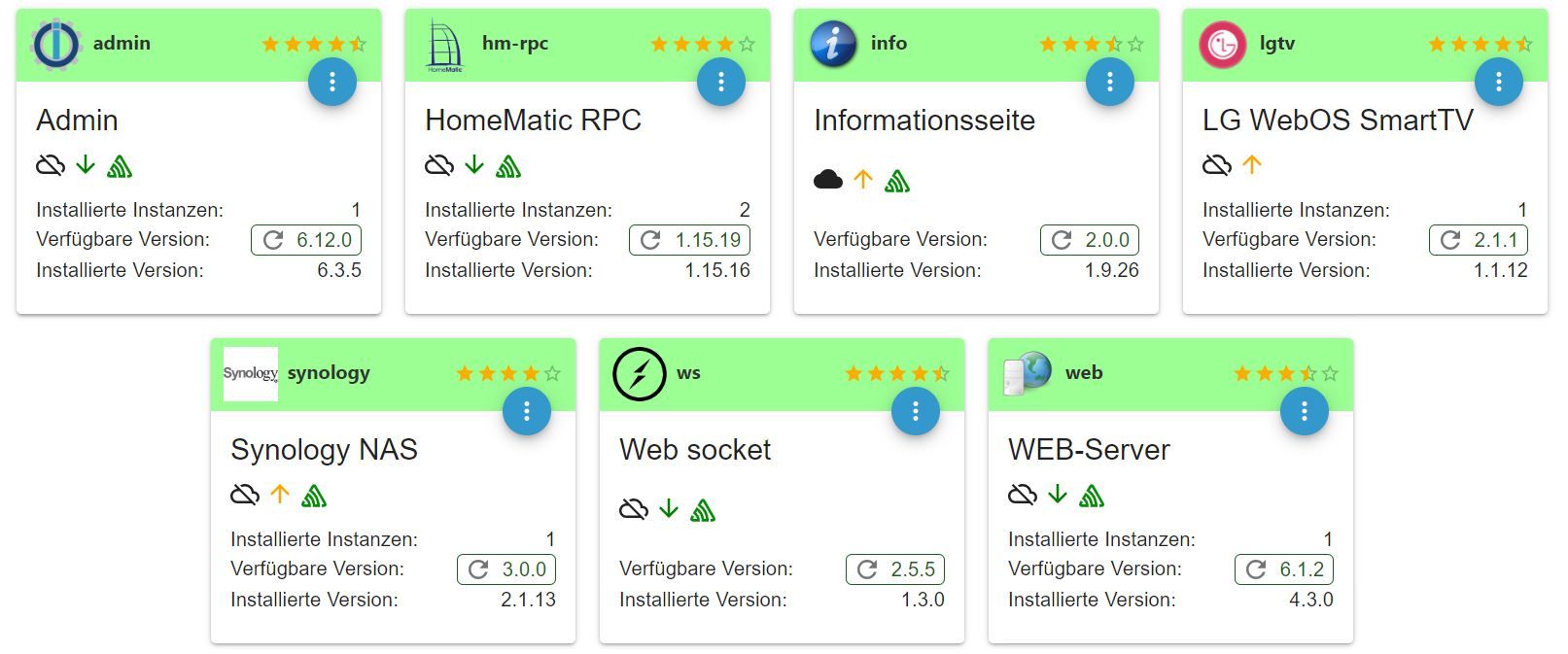
-
Systemdata Bitte Ausfüllen Hardwaresystem: NUC/Pi3/etc. Arbeitsspeicher: 1GB Festplattenart: SD-Karte/SSD/HDD Betriebssystem: Ubuntu/Windows/Mac Node-Version: 10.x.x Nodejs-Version: 10.x.x NPM-Version: 6.x.x Installationsart: Skript/Manuell Image genutzt: Ja/Nein Ort/Name der Imagedatei: Link Hallo zusammen,
ich möchte bei einem System gerne den js controller vo 4.0.24 auf 5.0.12 updaten. Leider funktioniert das nicht. Ich habe bereits mehrfach versucht das über die Konsole auf den neuesten Stand zu bringen. Aber nachdem Neustart des Brokers ist immer noch die alte Version installiert. Zudem kann ich einige Adapter nicht mehr aktualisieren (siehe unten). Der Broker läuft auf einem Raspberry Pi 4 Model B Rev 1.2 auf dem auch der Homematic Server installiert ist.
Ich habe die Ausgabe der Konsole beim Update Versuch angehängt. Ich werde daraus nicht schlau und hoffe, dass mir jemand einen Tipp geben kann. Lt. iob diag ist aber node js nicht richtig installiert. Den Auszug habe ich ebenfalls angehängt.
Danke und Gruß
ChristianAusgabe iob diag
======================= SUMMARY =======================
                        v.2023-10-10


   Static hostname: raspberrypi
         Icon name: computer
  Operating System: Raspbian GNU/Linux 10 (buster)
            Kernel: Linux 5.10.103-v7l+
      Architecture: arm

Installation:           native
Kernel:                 armv7l
Userland:               armhf
Timezone:               Europe/London (GMT, +0000)
User-ID:                1000
X-Server:               false
Boot Target:            graphical.target

Pending OS-Updates:     43
Pending iob updates:    8

/home/iobroker/.diag.sh: line 486: nodejs: command not found
Nodejs-Installation:
                        /usr/bin/node           v16.20.2
                        /usr/bin/npm            8.19.4
                        /usr/bin/npx            8.19.4
                        /usr/bin/corepack       0.17.0

Recommended versions are nodejs 16.20.2 and npm 8.19.4
*** nodejs is NOT correctly installed ***
Wrong installation path detected. This needs to be fixed.

Please check
https://forum.iobroker.net/topic/35090/howto-nodejs-installation-und-upgrades-unter-debian
for more information on how to fix these errors.

MEMORY:
              total        used        free      shared  buff/cache   available
Mem:           3.8G        1.3G        1.1G         32M        1.5G        2.6G
Swap:           99M         12M         87M
Total:         3.9G        1.3G        1.2G

Active iob-Instances:   13
Active repo(s): stable

ioBroker Core:          js-controller           4.0.24
                        admin                   6.3.5

ioBroker Status:        iobroker is running on this host.


Objects type: jsonl
States  type: jsonl

Status admin and web instance:
+ system.adapter.admin.0                  : admin                 : raspberrypi                              -  enabled, port: 8081, bind: 0.0.0.0, run as: admin
+ system.adapter.web.0                    : web                   : raspberrypi                              -  enabled, port: 8082, bind: 0.0.0.0, run as: admin

Objects:                2753
States:                 2429

Size of iob-Database:

6.0M    /opt/iobroker/iobroker-data/objects.jsonl
4.0M    /opt/iobroker/iobroker-data/objects.json.migrated
4.0M    /opt/iobroker/iobroker-data/objects.json.bak.migrated
1.9M    /opt/iobroker/iobroker-data/states.jsonl
320K    /opt/iobroker/iobroker-data/states.json.migrated
320K    /opt/iobroker/iobroker-data/states.json.bak.migrated
0       /opt/iobroker/iobroker-data/states.json.broken


=================== END OF SUMMARY ====================
Update Versuch
pi@raspberrypi:~ $ iob stop pi@raspberrypi:~ $ iob update Used repository: stable Adapter "admin" : 6.12.0 , installed 6.3.5 [Updatable] Adapter "bmw" : 2.5.7 , installed 2.5.7 Adapter "discovery" : 3.1.0 , installed 3.1.0 Adapter "fritzbox" : 0.5.0 , installed 0.5.0 Adapter "hm-rega" : 3.0.47 , installed 3.0.47 Adapter "hm-rpc" : 1.15.19 , installed 1.15.16 [Updatable] Adapter "info" : 2.0.0 , installed 1.9.26 [Updatable] Adapter "javascript" : 7.1.4 , installed 7.1.4 Controller "js-controller": 5.0.12 , installed 4.0.24 [Updatable] Adapter "lgtv" : 2.1.1 , installed 1.1.12 [Updatable] Adapter "onkyo" : 2.1.2 , installed 2.1.2 Adapter "parser" : 1.3.2 , installed 1.3.2 Adapter "samsung" : 0.5.11 , installed 0.5.11 Adapter "simple-api" : 2.7.2 , installed 2.7.2 Adapter "sonos" : 2.3.1 , installed 2.3.1 Adapter "synology" : 3.0.0 , installed 2.1.13 [Updatable] Adapter "vis" : 1.4.16 , installed 1.4.16 Adapter "vis-bars" : 0.1.4 , installed 0.1.4 Adapter "vis-fancyswitch": 1.1.0 , installed 1.1.0 Adapter "vis-hqwidgets": 1.4.0 , installed 1.4.0 Adapter "vis-jqui-mfd" : 1.0.12 , installed 1.0.12 Adapter "vis-keyboard" : 0.0.2 , installed 0.0.2 Adapter "vis-metro" : 1.2.0 , installed 1.2.0 Adapter "vis-players" : 0.1.6 , installed 0.1.6 Adapter "web" : 6.1.2 , installed 4.3.0 [Updatable] Adapter "ws" : 2.5.5 , installed 1.3.0 [Updatable] pi@raspberrypi:~ $ iob upgrade self Update js-controller from @4.0.24 to @5.0.12 Stopped Objects DB Stopped States DB NPM version: 8.19.4 Installing iobroker.js-controller@5.0.12... (System call) pi@raspberrypi:~ $ iob upgrade This upgrade of "hm-rpc" will introduce the following changes: ========================================================================== -> 1.15.19: Updated packages -> 1.15.18: no longer support EOL versions, please upgrade to node 16 -> 1.15.17: added new images (closes #778, closes #873, closes #882) fix wrong paramsets (closes #617, closes #584, closes #539, closes #764, closes #460, closes #748, closes #756) fix wrong events (closes #872) ========================================================================== Would you like to upgrade hm-rpc from @1.15.16 to @1.15.19 now? [(y)es, (n)o]: y Update hm-rpc from @1.15.16 to @1.15.19 NPM version: 8.19.4 Installing iobroker.hm-rpc@1.15.19... (System call) upload [275] hm-rpc.admin /opt/iobroker/node_modules/iobroker.hm-rpc/admin/homematic.png homematic.png image/png upload [250] hm-rpc.admin /opt/iobroker/node_modules/iobroker.hm-rpc/admin/icons/112_hmip-wrc2_thumb.png icons/112_hmip-wrc2_thumb.png image/png upload [200] hm-rpc.admin /opt/iobroker/node_modules/iobroker.hm-rpc/admin/icons/154_hmip-spdr_thumb.png icons/154_hmip-spdr_thumb.png image/png upload [150] hm-rpc.admin /opt/iobroker/node_modules/iobroker.hm-rpc/admin/icons/201_hmip-stv_thumb.png icons/201_hmip-stv_thumb.png image/png upload [100] hm-rpc.admin /opt/iobroker/node_modules/iobroker.hm-rpc/admin/icons/42_hm-cc-tc_thumb.png icons/42_hm-cc-tc_thumb.png image/png upload [90] hm-rpc.admin /opt/iobroker/node_modules/iobroker.hm-rpc/admin/icons/51_hm-sec-sd_thumb.png icons/51_hm-sec-sd_thumb.png image/png upload [80] hm-rpc.admin /opt/iobroker/node_modules/iobroker.hm-rpc/admin/icons/59_hmw-io-12-fm_thumb.png icons/59_hmw-io-12-fm_thumb.png image/png upload [70] hm-rpc.admin /opt/iobroker/node_modules/iobroker.hm-rpc/admin/icons/69_hm-lc-sw2-dr_thumb.png icons/69_hm-lc-sw2-dr_thumb.png image/png upload [60] hm-rpc.admin /opt/iobroker/node_modules/iobroker.hm-rpc/admin/icons/7_hm-lc-bl1-fm_thumb.png icons/7_hm-lc-bl1-fm_thumb.png image/png upload [50] hm-rpc.admin /opt/iobroker/node_modules/iobroker.hm-rpc/admin/icons/87_hm-sen-rd-o_thumb.png icons/87_hm-sen-rd-o_thumb.png image/png upload [40] hm-rpc.admin /opt/iobroker/node_modules/iobroker.hm-rpc/admin/icons/99_hm-mod-em-8_thumb.png icons/99_hm-mod-em-8_thumb.png image/png upload [30] hm-rpc.admin /opt/iobroker/node_modules/iobroker.hm-rpc/admin/icons/IP65_G201_thumb.png icons/IP65_G201_thumb.png image/png upload [20] hm-rpc.admin /opt/iobroker/node_modules/iobroker.hm-rpc/admin/icons/hb-uni-sen-cap-moist.png icons/hb-uni-sen-cap-moist.png image/png upload [19] hm-rpc.admin /opt/iobroker/node_modules/iobroker.hm-rpc/admin/icons/hb-uni-sen-temp-ds18b20_thumb.png icons/hb-uni-sen-temp-ds18b20_thumb.png image/png upload [18] hm-rpc.admin /opt/iobroker/node_modules/iobroker.hm-rpc/admin/icons/hm-coupling-dim.png icons/hm-coupling-dim.png image/png upload [17] hm-rpc.admin /opt/iobroker/node_modules/iobroker.hm-rpc/admin/icons/hm-coupling-group.png icons/hm-coupling-group.png image/png upload [16] hm-rpc.admin /opt/iobroker/node_modules/iobroker.hm-rpc/admin/icons/hm-coupling-onoff.png icons/hm-coupling-onoff.png image/png upload [15] hm-rpc.admin /opt/iobroker/node_modules/iobroker.hm-rpc/admin/icons/hm-coupling-rgb-dim.png icons/hm-coupling-rgb-dim.png image/png upload [14] hm-rpc.admin /opt/iobroker/node_modules/iobroker.hm-rpc/admin/icons/hm-coupling-rgb.png icons/hm-coupling-rgb.png image/png upload [13] hm-rpc.admin /opt/iobroker/node_modules/iobroker.hm-rpc/admin/icons/hm-coupling-rgbw-dim.png icons/hm-coupling-rgbw-dim.png image/png upload [12] hm-rpc.admin /opt/iobroker/node_modules/iobroker.hm-rpc/admin/icons/hm-coupling-rgbw.png icons/hm-coupling-rgbw.png image/png upload [11] hm-rpc.admin /opt/iobroker/node_modules/iobroker.hm-rpc/admin/icons/hm-coupling-white-dim.png icons/hm-coupling-white-dim.png image/png upload [10] hm-rpc.admin /opt/iobroker/node_modules/iobroker.hm-rpc/admin/icons/hm-coupling-white.png icons/hm-coupling-white.png image/png upload [9] hm-rpc.admin /opt/iobroker/node_modules/iobroker.hm-rpc/admin/icons/hm-hue_gateway.png icons/hm-hue_gateway.png image/png upload [8] hm-rpc.admin /opt/iobroker/node_modules/iobroker.hm-rpc/admin/icons/hm-lightify_gateway.png icons/hm-lightify_gateway.png image/png upload [7] hm-rpc.admin /opt/iobroker/node_modules/iobroker.hm-rpc/admin/icons/hm_resc-win-pcb-sc_thumb.png icons/hm_resc-win-pcb-sc_thumb.png image/png upload [6] hm-rpc.admin /opt/iobroker/node_modules/iobroker.hm-rpc/admin/icons/hmip_brc2.png icons/hmip_brc2.png image/png upload [5] hm-rpc.admin /opt/iobroker/node_modules/iobroker.hm-rpc/admin/icons/pc.png icons/pc.png image/png upload [4] hm-rpc.admin /opt/iobroker/node_modules/iobroker.hm-rpc/admin/icons/sonos.png icons/sonos.png image/png upload [3] hm-rpc.admin /opt/iobroker/node_modules/iobroker.hm-rpc/admin/icons/unknown_device_thumb.png icons/unknown_device_thumb.png image/png upload [2] hm-rpc.admin /opt/iobroker/node_modules/iobroker.hm-rpc/admin/index.html index.html text/html upload [1] hm-rpc.admin /opt/iobroker/node_modules/iobroker.hm-rpc/admin/index_m.html index_m.html text/html upload [0] hm-rpc.admin /opt/iobroker/node_modules/iobroker.hm-rpc/admin/words.js words.js application/javascript This upgrade of "admin" will at least introduce the following changes: ========================================================================== -> 6.12.0: fixed issue when updating news in backend validate json config against the schema update socket-client to improve performance -> 6.11.0: jsonConfig type number now stores values as number instead of string objects browser number value input behavior change to allow leading minus Added component `interfaces` to the JSON config Implemented Backend to GUI communication -> 6.10.9: Improvement of the public accessibility check -> 6.10.8: update adapter-react-v5 to fix issues with object browser -> 6.10.7: Corrected adapter termination if the alias has no target -> 6.10.6: Added possibility to show the icon on JSON config tabs on upgrade all, not yet started commands can now be aborted Added security check if the server is available from the internet without protection Corrected navigation after the settings closing -> 6.10.5: JSON config component `port` does no longer mark port as occupied if it is only occupied on another host register news as notifications if upgrade all is stopped on error, activate close button Export/import objects with its values ========================================================================== Would you like to upgrade admin from @6.3.5 to @6.12.0 now? [(y)es, (n)o]: y Update admin from @6.3.5 to @6.12.0 host.raspberrypi Adapter "system.adapter.admin.0" is stopped. NPM version: 8.19.4 Installing iobroker.admin@6.12.0... (System call) host.raspberrypi Cannot install iobroker.admin@6.12.0: 217 pi@raspberrypi:~ $ iob start@spaddel sagte in js controller update nicht möglich:
buster
Buster ist tot, installier da ein 64Bit-'Bookworm'-Lite (Neuinstallation von Grund auf!)
Zu den anderen Problemen...
-
Zeitzone falsch, stell das auf die richtige ein.
-
Updatestau
Bring das System auf den letzten Stand.
sudo apt update sudo apt full-upgrade sudo reboot- Bring nodejs auf den aktuellen Stand @18.
iob fix
iob nodejs-update
iob update iob upgrade all iob stop iob upgrade self iob startFertig. Von dem System ein Backup ziehen und alsbald auf ein lebendiges Release wechseln. Das ist überfällig.
-
-
@spaddel sagte in js controller update nicht möglich:
buster
Buster ist tot, installier da ein 64Bit-'Bookworm'-Lite (Neuinstallation von Grund auf!)
Zu den anderen Problemen...
-
Zeitzone falsch, stell das auf die richtige ein.
-
Updatestau
Bring das System auf den letzten Stand.
sudo apt update sudo apt full-upgrade sudo reboot- Bring nodejs auf den aktuellen Stand @18.
iob fix
iob nodejs-update
iob update iob upgrade all iob stop iob upgrade self iob startFertig. Von dem System ein Backup ziehen und alsbald auf ein lebendiges Release wechseln. Das ist überfällig.
@thomas-braun
Hallo Thomas,vielen Dank für die schnelle Antwort. Leider brachte der von dir vorgeschlagene Ablauf keine Verbesserung. Es sind immer noch alle Updates offen.
Da ich absoluter Laie bin, benötige ich auch deine Hilfe bei den anderen Themen. Bookworm Installation und was meinst du mit lebendigen Release? Ich dachte, dass sonst alles auf Stand ist.
Gruß
Christian -
-
@thomas-braun
Hallo Thomas,vielen Dank für die schnelle Antwort. Leider brachte der von dir vorgeschlagene Ablauf keine Verbesserung. Es sind immer noch alle Updates offen.
Da ich absoluter Laie bin, benötige ich auch deine Hilfe bei den anderen Themen. Bookworm Installation und was meinst du mit lebendigen Release? Ich dachte, dass sonst alles auf Stand ist.
Gruß
ChristianOhne (Fehler)-Meldungen kann ich dazu nichts sagen.
-
@thomas-braun
Hallo Thomas,vielen Dank für die schnelle Antwort. Leider brachte der von dir vorgeschlagene Ablauf keine Verbesserung. Es sind immer noch alle Updates offen.
Da ich absoluter Laie bin, benötige ich auch deine Hilfe bei den anderen Themen. Bookworm Installation und was meinst du mit lebendigen Release? Ich dachte, dass sonst alles auf Stand ist.
Gruß
Christiansudo timedatectl set-timezone Europe/BerlinOder was auch immer deine Zeitzone ist.
Dannsudo apt update sudo apt full-upgrade sudo reboot -
sudo timedatectl set-timezone Europe/BerlinOder was auch immer deine Zeitzone ist.
Dannsudo apt update sudo apt full-upgrade sudo reboot@thomas-braun
Die Zeitzone habe ich auf Berlin umgestellt.Ich versuche gerade noch mal mein Glück. Sollte es wieder nicht funktionieren, poste ich den Log.
DIe Befehle würden dann auf ein lebendiges System updaten?
Danke und Gruß
Christian -
@thomas-braun
Die Zeitzone habe ich auf Berlin umgestellt.Ich versuche gerade noch mal mein Glück. Sollte es wieder nicht funktionieren, poste ich den Log.
DIe Befehle würden dann auf ein lebendiges System updaten?
Danke und Gruß
Christian@spaddel sagte in js controller update nicht möglich:
DIe Befehle würden dann auf ein lebendiges System updaten?
Nein, das bring nur die Leiche auf den letzten Stand vor dem Exitus.
Du wirst das von Grund auf Neuinstallieren müssen. -
@spaddel sagte in js controller update nicht möglich:
DIe Befehle würden dann auf ein lebendiges System updaten?
Nein, das bring nur die Leiche auf den letzten Stand vor dem Exitus.
Du wirst das von Grund auf Neuinstallieren müssen. -
@thomas-braun
Wie kann ich die Neuinstallation am besten vornehmen. Ich habe noch den Homematic server auf den Pi laufen und keine Ahnung, wie das damals gemacht habe.Gruß
Christian@spaddel sagte in js controller update nicht möglich:
Ich habe noch den Homematic server auf den Pi laufen und keine Ahnung, wie das damals gemacht habe.
Ich auch nicht.
-
@spaddel sagte in js controller update nicht möglich:
Ich habe noch den Homematic server auf den Pi laufen und keine Ahnung, wie das damals gemacht habe.
Ich auch nicht.
@thomas-braun
Hallo Thomas,leider auch im zweiten Ansatz kein Erfolg.
Hier der Log:
ioBroker nodejs fixer 2023-10-13 Recommended nodejs-version is: 16.20.2 Checking your installation now. Please be patient! Your current setup is: /usr/bin/node v16.20.2 /usr/bin/npm 8.19.4 /usr/bin/npx 8.19.4 /usr/bin/corepack 0.17.0 We found these nodejs versions available for installation: nodejs: Installed: 16.20.2-deb-1nodesource1 Candidate: 16.20.2-deb-1nodesource1 Version table: *** 16.20.2-deb-1nodesource1 500 500 https://deb.nodesource.com/node_16.x buster/main armhf Packages 100 /var/lib/dpkg/status 10.24.0~dfsg-1~deb10u3 500 500 http://raspbian.raspberrypi.org/raspbian buster/main armhf Packages Nothing to do - Your installation is using the correct paths. Nothing to do - Your version is the recommended one. You can now keep your whole system up-to-date using the usual 'sudo apt update & & sudo apt full-upgrade' commands. Please DO NOT USE node version managers like 'nvm', 'n' and others in parallel. They will break your current installation! pi@raspberrypi:~ $ iob update Used repository: stable Adapter "admin" : 6.12.0 , installed 6.3.5 [Updatable] Adapter "bmw" : 2.5.7 , installed 2.5.7 Adapter "discovery" : 3.1.0 , installed 3.1.0 Adapter "fritzbox" : 0.5.0 , installed 0.5.0 Adapter "hm-rega" : 3.0.47 , installed 3.0.47 Adapter "hm-rpc" : 1.15.19 , installed 1.15.16 [Updatable] Adapter "info" : 2.0.0 , installed 1.9.26 [Updatable] Adapter "javascript" : 7.1.4 , installed 7.1.4 Controller "js-controller": 5.0.12 , installed 4.0.24 [Updatable] Adapter "lgtv" : 2.1.1 , installed 1.1.12 [Updatable] Adapter "onkyo" : 2.1.2 , installed 2.1.2 Adapter "parser" : 1.3.2 , installed 1.3.2 Adapter "samsung" : 0.5.11 , installed 0.5.11 Adapter "simple-api" : 2.7.2 , installed 2.7.2 Adapter "sonos" : 2.3.1 , installed 2.3.1 Adapter "synology" : 3.0.0 , installed 2.1.13 [Updatable] Adapter "vis" : 1.4.16 , installed 1.4.16 Adapter "vis-bars" : 0.1.4 , installed 0.1.4 Adapter "vis-fancyswitch": 1.1.0 , installed 1.1.0 Adapter "vis-hqwidgets": 1.4.0 , installed 1.4.0 Adapter "vis-jqui-mfd" : 1.0.12 , installed 1.0.12 Adapter "vis-keyboard" : 0.0.2 , installed 0.0.2 Adapter "vis-metro" : 1.2.0 , installed 1.2.0 Adapter "vis-players" : 0.1.6 , installed 0.1.6 Adapter "web" : 6.1.2 , installed 4.3.0 [Updatable] Adapter "ws" : 2.5.5 , installed 1.3.0 [Updatable] pi@raspberrypi:~ $ iob upgrade all This upgrade of "hm-rpc" will introduce the following changes: ========================================================================== -> 1.15.19: Updated packages -> 1.15.18: no longer support EOL versions, please upgrade to node 16 -> 1.15.17: added new images (closes #778, closes #873, closes #882) fix wrong paramsets (closes #617, closes #584, closes #539, closes #764, closes #460, c fix wrong events (closes #872) ========================================================================== Would you like to upgrade hm-rpc from @1.15.16 to @1.15.19 now? [(y)es, (n)o]: y Update hm-rpc from @1.15.16 to @1.15.19 NPM version: 8.19.4 Installing iobroker.hm-rpc@1.15.19... (System call) upload [275] hm-rpc.admin /opt/iobroker/node_modules/iobroker.hm-rpc/admin/homematic.png homematic.png image/png upload [250] hm-rpc.admin /opt/iobroker/node_modules/iobroker.hm-rpc/admin/icons/112_hmip-wrc2_thumb.png icons/112_hmip-wrc2_thumb.png image/png upload [200] hm-rpc.admin /opt/iobroker/node_modules/iobroker.hm-rpc/admin/icons/154_hmip-spdr_thumb.png icons/154_hmip-spdr_thumb.png image/png upload [150] hm-rpc.admin /opt/iobroker/node_modules/iobroker.hm-rpc/admin/icons/201_hmip-stv_thumb.png icons/201_hmip-stv_thumb.png image/png upload [100] hm-rpc.admin /opt/iobroker/node_modules/iobroker.hm-rpc/admin/icons/42_hm-cc-tc_thumb.png icons/42_hm-cc-tc_thumb.png image/png upload [90] hm-rpc.admin /opt/iobroker/node_modules/iobroker.hm-rpc/admin/icons/51_hm-sec-sd_thumb.png icons/51_hm-sec-sd_thumb.png image/png upload [80] hm-rpc.admin /opt/iobroker/node_modules/iobroker.hm-rpc/admin/icons/59_hmw-io-12-fm_thumb.png icons/59_hmw-io-12-fm_thumb.png image/png upload [70] hm-rpc.admin /opt/iobroker/node_modules/iobroker.hm-rpc/admin/icons/69_hm-lc-sw2-dr_thumb.png icons/69_hm-lc-sw2-dr_thumb.png image/png upload [60] hm-rpc.admin /opt/iobroker/node_modules/iobroker.hm-rpc/admin/icons/7_hm-lc-bl1-fm_thumb.png icons/7_hm-lc-bl1-fm_thumb.png image/png upload [50] hm-rpc.admin /opt/iobroker/node_modules/iobroker.hm-rpc/admin/icons/87_hm-sen-rd-o_thumb.png icons/87_hm-sen-rd-o_thumb.png image/png upload [40] hm-rpc.admin /opt/iobroker/node_modules/iobroker.hm-rpc/admin/icons/99_hm-mod-em-8_thumb.png icons/99_hm-mod-em-8_thumb.png image/png upload [30] hm-rpc.admin /opt/iobroker/node_modules/iobroker.hm-rpc/admin/icons/IP65_G201_thumb.png icons/IP65_G201_thumb.png image/png upload [20] hm-rpc.admin /opt/iobroker/node_modules/iobroker.hm-rpc/admin/icons/hb-uni-sen-cap-moist.png icons/hb-uni-sen-cap-moist.png image/png upload [19] hm-rpc.admin /opt/iobroker/node_modules/iobroker.hm-rpc/admin/icons/hb-uni-sen-temp-ds18b20_thumb.png icons/hb-uni-sen-temp-ds18b20_thumb.png image/png upload [18] hm-rpc.admin /opt/iobroker/node_modules/iobroker.hm-rpc/admin/icons/hm-coupling-dim.png icons/hm-coupling-dim.png image/png upload [17] hm-rpc.admin /opt/iobroker/node_modules/iobroker.hm-rpc/admin/icons/hm-coupling-group.png icons/hm-coupling-group.png image/png upload [16] hm-rpc.admin /opt/iobroker/node_modules/iobroker.hm-rpc/admin/icons/hm-coupling-onoff.png icons/hm-coupling-onoff.png image/png upload [15] hm-rpc.admin /opt/iobroker/node_modules/iobroker.hm-rpc/admin/icons/hm-coupling-rgb-dim.png icons/hm-coupling-rgb-dim.png image/png upload [14] hm-rpc.admin /opt/iobroker/node_modules/iobroker.hm-rpc/admin/icons/hm-coupling-rgb.png icons/hm-coupling-rgb.png image/png upload [13] hm-rpc.admin /opt/iobroker/node_modules/iobroker.hm-rpc/admin/icons/hm-coupling-rgbw-dim.png icons/hm-coupling-rgbw-dim.png image/png upload [12] hm-rpc.admin /opt/iobroker/node_modules/iobroker.hm-rpc/admin/icons/hm-coupling-rgbw.png icons/hm-coupling-rgbw.png image/png upload [11] hm-rpc.admin /opt/iobroker/node_modules/iobroker.hm-rpc/admin/icons/hm-coupling-white-dim.png icons/hm-coupling-white-dim.png image/png upload [10] hm-rpc.admin /opt/iobroker/node_modules/iobroker.hm-rpc/admin/icons/hm-coupling-white.png icons/hm-coupling-white.png image/png upload [9] hm-rpc.admin /opt/iobroker/node_modules/iobroker.hm-rpc/admin/icons/hm-hue_gateway.png icons/hm-hue_gateway.png image/png upload [8] hm-rpc.admin /opt/iobroker/node_modules/iobroker.hm-rpc/admin/icons/hm-lightify_gateway.png icons/hm-lightify_gateway.png image/png upload [7] hm-rpc.admin /opt/iobroker/node_modules/iobroker.hm-rpc/admin/icons/hm_resc-win-pcb-sc_thumb.png icons/hm_resc-win-pcb-sc_thumb.png image/png upload [6] hm-rpc.admin /opt/iobroker/node_modules/iobroker.hm-rpc/admin/icons/hmip_brc2.png icons/hmip_brc2.png image/png upload [5] hm-rpc.admin /opt/iobroker/node_modules/iobroker.hm-rpc/admin/icons/pc.png icons/pc.png image/png upload [4] hm-rpc.admin /opt/iobroker/node_modules/iobroker.hm-rpc/admin/icons/sonos.png icons/sonos.png image/png upload [3] hm-rpc.admin /opt/iobroker/node_modules/iobroker.hm-rpc/admin/icons/unknown_device_thumb.png icons/unknown_device_thumb.png image/png upload [2] hm-rpc.admin /opt/iobroker/node_modules/iobroker.hm-rpc/admin/index.html index.html text/html upload [1] hm-rpc.admin /opt/iobroker/node_modules/iobroker.hm-rpc/admin/index_m.html index_m.html text/html upload [0] hm-rpc.admin /opt/iobroker/node_modules/iobroker.hm-rpc/admin/words.js words.js application/javascript This upgrade of "admin" will at least introduce the following changes: ========================================================================== -> 6.12.0: fixed issue when updating news in backend validate json config against the schema update socket-client to improve performance -> 6.11.0: jsonConfig type number now stores values as number instead of string objects browser number value input behavior change to allow leading minus Added component `interfaces` to the JSON config Implemented Backend to GUI communication -> 6.10.9: Improvement of the public accessibility check -> 6.10.8: update adapter-react-v5 to fix issues with object browser -> 6.10.7: Corrected adapter termination if the alias has no target -> 6.10.6: Added possibility to show the icon on JSON config tabs on upgrade all, not yet started commands can now be aborted Added security check if the server is available from the internet without protection Corrected navigation after the settings closing -> 6.10.5: JSON config component `port` does no longer mark port as occupied if it is only occupied on another host register news as notifications if upgrade all is stopped on error, activate close button Export/import objects with its values ========================================================================== Would you like to upgrade admin from @6.3.5 to @6.12.0 now? [(y)es, (n)o]: y Update admin from @6.3.5 to @6.12.0 NPM version: 8.19.4 Installing iobroker.admin@6.12.0... (System call) Update "system.adapter.admin.0" upload [52] admin.admin /opt/iobroker/node_modules/iobroker.admin/admin/admin.png admin.png image/png upload [50] admin.admin /opt/iobroker/node_modules/iobroker.admin/admin/custom/customComponents.js.map custom/customComponents.js.map application/json upload [40] admin.admin /opt/iobroker/node_modules/iobroker.admin/admin/custom/i18n/zh-cn.json custom/i18n/zh-cn.json application/json upload [30] admin.admin /opt/iobroker/node_modules/iobroker.admin/admin/custom/static/js/node_modules_prop-types_index_js.512eddf9.chunk.js.map custom/static/js/node_modules_prop-types_index_js.512eddf9.chunk.js.map application/json upload [20] admin.admin /opt/iobroker/node_modules/iobroker.admin/admin/custom/static/js/vendors-node_modules_mui_material_Accordion_index_js-node_modules_mui_material_AccordionDetai-57e02d.0886b730.chunk.js.map custom/static/js/vendors-node_modules_mui_material_Accordion_index_js-node_modules_mui_material_AccordionDetai-57e02d.0886b730.chunk.js.map application/json upload [19] admin.admin /opt/iobroker/node_modules/iobroker.admin/admin/custom/static/js/vendors-node_modules_mui_material_index_js.40e01f69.chunk.js custom/static/js/vendors-node_modules_mui_material_index_js.40e01f69.chunk.js application/javascript upload [18] admin.admin /opt/iobroker/node_modules/iobroker.admin/admin/custom/static/js/vendors-node_modules_mui_material_index_js.40e01f69.chunk.js.map custom/static/js/vendors-node_modules_mui_material_index_js.40e01f69.chunk.js.map application/json upload [17] admin.admin /opt/iobroker/node_modules/iobroker.admin/admin/custom/static/js/vendors-node_modules_mui_styles_index_js-node_modules_mui_utils_esm_capitalize_js-node_module-19fe07.82575832.chunk.js custom/static/js/vendors-node_modules_mui_styles_index_js-node_modules_mui_utils_esm_capitalize_js-node_module-19fe07.82575832.chunk.js application/javascript upload [16] admin.admin /opt/iobroker/node_modules/iobroker.admin/admin/custom/static/js/vendors-node_modules_mui_styles_index_js-node_modules_mui_utils_esm_capitalize_js-node_module-19fe07.82575832.chunk.js.map custom/static/js/vendors-node_modules_mui_styles_index_js-node_modules_mui_utils_esm_capitalize_js-node_module-19fe07.82575832.chunk.js.map application/json upload [15] admin.admin /opt/iobroker/node_modules/iobroker.admin/admin/custom/static/js/vendors-node_modules_mui_styles_withStyles_withStyles_js.6d998ff2.chunk.js custom/static/js/vendors-node_modules_mui_styles_withStyles_withStyles_js.6d998ff2.chunk.js application/javascript upload [14] admin.admin /opt/iobroker/node_modules/iobroker.admin/admin/custom/static/js/vendors-node_modules_mui_styles_withStyles_withStyles_js.6d998ff2.chunk.js.map custom/static/js/vendors-node_modules_mui_styles_withStyles_withStyles_js.6d998ff2.chunk.js.map application/json upload [13] admin.admin /opt/iobroker/node_modules/iobroker.admin/admin/custom/static/js/vendors-node_modules_react-dom_index_js.51544235.chunk.js custom/static/js/vendors-node_modules_react-dom_index_js.51544235.chunk.js application/javascript upload [12] admin.admin /opt/iobroker/node_modules/iobroker.admin/admin/custom/static/js/vendors-node_modules_react-dom_index_js.51544235.chunk.js.map custom/static/js/vendors-node_modules_react-dom_index_js.51544235.chunk.js.map application/json upload [11] admin.admin /opt/iobroker/node_modules/iobroker.admin/admin/i18n/de/translations.json i18n/de/translations.json application/json upload [10] admin.admin /opt/iobroker/node_modules/iobroker.admin/admin/i18n/en/translations.json i18n/en/translations.json application/json upload [9] admin.admin /opt/iobroker/node_modules/iobroker.admin/admin/i18n/es/translations.json i18n/es/translations.json application/json upload [8] admin.admin /opt/iobroker/node_modules/iobroker.admin/admin/i18n/fr/translations.json i18n/fr/translations.json application/json upload [7] admin.admin /opt/iobroker/node_modules/iobroker.admin/admin/i18n/it/translations.json i18n/it/translations.json application/json upload [6] admin.admin /opt/iobroker/node_modules/iobroker.admin/admin/i18n/nl/translations.json i18n/nl/translations.json application/json upload [5] admin.admin /opt/iobroker/node_modules/iobroker.admin/admin/i18n/pl/translations.json i18n/pl/translations.json application/json upload [4] admin.admin /opt/iobroker/node_modules/iobroker.admin/admin/i18n/pt/translations.json i18n/pt/translations.json application/json upload [3] admin.admin /opt/iobroker/node_modules/iobroker.admin/admin/i18n/ru/translations.json i18n/ru/translations.json application/json upload [2] admin.admin /opt/iobroker/node_modules/iobroker.admin/admin/i18n/uk/translations.json i18n/uk/translations.json application/json upload [1] admin.admin /opt/iobroker/node_modules/iobroker.admin/admin/i18n/zh-cn/translations.json i18n/zh-cn/translations.json application/json upload [0] admin.admin /opt/iobroker/node_modules/iobroker.admin/admin/jsonConfig.json5 jsonConfig.json5 application/json5 This upgrade of "ws" will at least introduce the following changes: ========================================================================== -> 2.5.5: upgraded socket-classes to fix crash cases -> 2.5.4: added missing node16 requirement -> 2.5.3: Added the subscribing on the specific instance messages -> 2.4.0: (bluefox) extended the getObjects function with the possibility to read the list of IDs -> 2.3.6: Allowed deletion of fullcalendar objects -> 2.3.5: added `publishFileAll` method (for future use) -> 2.3.4: corrected connection string ========================================================================== BE CAREFUL: THIS IS A MAJOR UPGRADE, WHICH WILL MOST LIKELY INTRODUCE BREAKING CHANGES! Would you like to upgrade ws from @1.3.0 to @2.5.5 now? [(y)es, (n)o]: y Update ws from @1.3.0 to @2.5.5 NPM version: 8.19.4 Installing iobroker.ws@2.5.5... (System call) upload [11] ws.admin /opt/iobroker/node_modules/iobroker.ws/admin/i18n/de/translations.json i18n/de/translations.json application/json upload [10] ws.admin /opt/iobroker/node_modules/iobroker.ws/admin/i18n/en/translations.json i18n/en/translations.json application/json upload [9] ws.admin /opt/iobroker/node_modules/iobroker.ws/admin/i18n/es/translations.json i18n/es/translations.json application/json upload [8] ws.admin /opt/iobroker/node_modules/iobroker.ws/admin/i18n/fr/translations.json i18n/fr/translations.json application/json upload [7] ws.admin /opt/iobroker/node_modules/iobroker.ws/admin/i18n/it/translations.json i18n/it/translations.json application/json upload [6] ws.admin /opt/iobroker/node_modules/iobroker.ws/admin/i18n/nl/translations.json i18n/nl/translations.json application/json upload [5] ws.admin /opt/iobroker/node_modules/iobroker.ws/admin/i18n/pl/translations.json i18n/pl/translations.json application/json upload [4] ws.admin /opt/iobroker/node_modules/iobroker.ws/admin/i18n/pt/translations.json i18n/pt/translations.json application/json upload [3] ws.admin /opt/iobroker/node_modules/iobroker.ws/admin/i18n/ru/translations.json i18n/ru/translations.json application/json upload [2] ws.admin /opt/iobroker/node_modules/iobroker.ws/admin/i18n/zh-cn/translations.json i18n/zh-cn/translations.json application/json upload [1] ws.admin /opt/iobroker/node_modules/iobroker.ws/admin/jsonConfig.json jsonConfig.json application/json upload [0] ws.admin /opt/iobroker/node_modules/iobroker.ws/admin/ws.png ws.png image/png This upgrade of "web" will at least introduce the following changes: ========================================================================== -> 6.1.2: upgrade socketio and ws dependencies -> 6.1.1: added missing node16 requirement -> 6.1.0: Added the subscribing on the specific instance messages -> 6.0.3: Updated packages Implemented the possibility to view folder content -> 6.0.1: Removed letsencrypt handling from web adapter -> 5.5.3: Increased max size of the uploaded file via socket.io to 200MB (from 10MB) -> 5.5.2: Allowed deletion of fullcalendar objects ========================================================================== BE CAREFUL: THIS IS A MAJOR UPGRADE, WHICH WILL MOST LIKELY INTRODUCE BREAKING CHANGES! Would you like to upgrade web from @4.3.0 to @6.1.2 now? [(y)es, (n)o]: y Update web from @4.3.0 to @6.1.2 NPM version: 8.19.4 Installing iobroker.web@6.1.2... (System call) upload [396] web /opt/iobroker/node_modules/iobroker.web/www/admin/img/admin.png admin/img/admin.png image/png upload [350] web /opt/iobroker/node_modules/iobroker.web/www/lib/css/themes/jquery-ui/blitzer/images/ui-bg_highlight-soft_15_cc0000_1x100.png lib/css/themes/jquery-ui/blitzer/images/ui-bg_highlight-soft_15_cc0000_1x100.png image/png upload [300] web /opt/iobroker/node_modules/iobroker.web/www/lib/css/themes/jquery-ui/custom-light/jquery-ui.theme.min.css lib/css/themes/jquery-ui/custom-light/jquery-ui.theme.min.css text/css upload [250] web /opt/iobroker/node_modules/iobroker.web/www/lib/css/themes/jquery-ui/eggplant/images/ui-bg_highlight-soft_100_eae6ea_1x100.png lib/css/themes/jquery-ui/eggplant/images/ui-bg_highlight-soft_100_eae6ea_1x100.png image/png upload [200] web /opt/iobroker/node_modules/iobroker.web/www/lib/css/themes/jquery-ui/hot-sneaks/images/ui-bg_flat_75_ba9217_40x100.png lib/css/themes/jquery-ui/hot-sneaks/images/ui-bg_flat_75_ba9217_40x100.png image/png upload [150] web /opt/iobroker/node_modules/iobroker.web/www/lib/css/themes/jquery-ui/redmond/images/ui-bg_glass_85_dfeffc_1x400.png lib/css/themes/jquery-ui/redmond/images/ui-bg_glass_85_dfeffc_1x400.png image/png upload [100] web /opt/iobroker/node_modules/iobroker.web/www/lib/css/themes/jquery-ui/sunny/images/ui-bg_diagonals-medium_20_d34d17_40x40.png lib/css/themes/jquery-ui/sunny/images/ui-bg_diagonals-medium_20_d34d17_40x40.png image/png upload [90] web /opt/iobroker/node_modules/iobroker.web/www/lib/css/themes/jquery-ui/sunny/images/ui-icons_bd7b00_256x240.png lib/css/themes/jquery-ui/sunny/images/ui-icons_bd7b00_256x240.png image/png upload [80] web /opt/iobroker/node_modules/iobroker.web/www/lib/css/themes/jquery-ui/ui-darkness/images/ui-bg_flat_50_5c5c5c_40x100.png lib/css/themes/jquery-ui/ui-darkness/images/ui-bg_flat_50_5c5c5c_40x100.png image/png upload [70] web /opt/iobroker/node_modules/iobroker.web/www/lib/css/themes/jquery-ui/ui-darkness/images/ui-icons_a83300_256x240.png lib/css/themes/jquery-ui/ui-darkness/images/ui-icons_a83300_256x240.png image/png upload [60] web /opt/iobroker/node_modules/iobroker.web/www/lib/css/themes/jquery-ui/ui-lightness/images/ui-bg_glass_100_fdf5ce_1x400.png lib/css/themes/jquery-ui/ui-lightness/images/ui-bg_glass_100_fdf5ce_1x400.png image/png upload [50] web /opt/iobroker/node_modules/iobroker.web/www/lib/css/themes/jquery-ui/ui-lightness/jquery-ui.css lib/css/themes/jquery-ui/ui-lightness/jquery-ui.css text/css upload [40] web /opt/iobroker/node_modules/iobroker.web/www/lib/css/themes/jquery-ui/vader/images/ui-bg_inset-soft_15_121212_1x100.png lib/css/themes/jquery-ui/vader/images/ui-bg_inset-soft_15_121212_1x100.png image/png upload [30] web /opt/iobroker/node_modules/iobroker.web/www/lib/css/themes/jquery-ui/vader/theme.css lib/css/themes/jquery-ui/vader/theme.css text/css upload [20] web /opt/iobroker/node_modules/iobroker.web/www/lib/js/jquery-1.11.2.min.js lib/js/jquery-1.11.2.min.js application/javascript upload [19] web /opt/iobroker/node_modules/iobroker.web/www/lib/js/jquery-1.11.2.min.map lib/js/jquery-1.11.2.min.map application/json upload [18] web /opt/iobroker/node_modules/iobroker.web/www/lib/js/jquery-3.2.1.min.js lib/js/jquery-3.2.1.min.js application/javascript upload [17] web /opt/iobroker/node_modules/iobroker.web/www/lib/js/jquery-3.2.1.min.map lib/js/jquery-3.2.1.min.map application/json upload [16] web /opt/iobroker/node_modules/iobroker.web/www/lib/js/jquery-ui-1.10.3.full.min.js lib/js/jquery-ui-1.10.3.full.min.js application/javascript upload [15] web /opt/iobroker/node_modules/iobroker.web/www/lib/js/jquery-ui-1.11.3.full.min.js lib/js/jquery-ui-1.11.3.full.min.js application/javascript upload [14] web /opt/iobroker/node_modules/iobroker.web/www/lib/js/jquery-ui-1.11.4.full.min.js lib/js/jquery-ui-1.11.4.full.min.js application/javascript upload [13] web /opt/iobroker/node_modules/iobroker.web/www/lib/js/jquery-ui.1.11.2.slider.min.js lib/js/jquery-ui.1.11.2.slider.min.js application/javascript upload [12] web /opt/iobroker/node_modules/iobroker.web/www/lib/js/jquery-ui.min.js lib/js/jquery-ui.min.js application/javascript upload [11] web /opt/iobroker/node_modules/iobroker.web/www/lib/js/jquery.fancytree-all.min.js lib/js/jquery.fancytree-all.min.js application/javascript upload [10] web /opt/iobroker/node_modules/iobroker.web/www/lib/js/jquery.fancytree-all.min.js.map lib/js/jquery.fancytree-all.min.js.map application/json upload [9] web /opt/iobroker/node_modules/iobroker.web/www/lib/js/jquery.jqGrid-4.5.4.min.js lib/js/jquery.jqGrid-4.5.4.min.js application/javascript upload [8] web /opt/iobroker/node_modules/iobroker.web/www/lib/js/loStorage.js lib/js/loStorage.js application/javascript upload [7] web /opt/iobroker/node_modules/iobroker.web/www/lib/js/materialize.js lib/js/materialize.js application/javascript upload [6] web /opt/iobroker/node_modules/iobroker.web/www/lib/js/materialize.js.map lib/js/materialize.js.map application/json upload [5] web /opt/iobroker/node_modules/iobroker.web/www/lib/js/selectID.js lib/js/selectID.js application/javascript upload [4] web /opt/iobroker/node_modules/iobroker.web/www/lib/js/showdown.min.js lib/js/showdown.min.js application/javascript upload [3] web /opt/iobroker/node_modules/iobroker.web/www/lib/js/socket.io.js lib/js/socket.io.js application/javascript upload [2] web /opt/iobroker/node_modules/iobroker.web/www/lib/js/translate.js lib/js/translate.js application/javascript upload [1] web /opt/iobroker/node_modules/iobroker.web/www/login/favicon.ico login/favicon.ico image/vnd.microsoft.icon upload [0] web /opt/iobroker/node_modules/iobroker.web/www/login/index.html login/index.html text/html upload [16] web.admin /opt/iobroker/node_modules/iobroker.web/admin/asset-manifest.json asset-manifest.json application/json upload [15] web.admin /opt/iobroker/node_modules/iobroker.web/admin/favicon.ico favicon.ico image/vnd.microsoft.icon upload [14] web.admin /opt/iobroker/node_modules/iobroker.web/admin/index_m.html index_m.html text/html upload [13] web.admin /opt/iobroker/node_modules/iobroker.web/admin/manifest.json manifest.json application/json upload [12] web.admin /opt/iobroker/node_modules/iobroker.web/admin/static/css/2.faf2f676.chunk.css static/css/2.faf2f676.chunk.css text/css upload [11] web.admin /opt/iobroker/node_modules/iobroker.web/admin/static/css/2.faf2f676.chunk.css.map static/css/2.faf2f676.chunk.css.map application/json upload [10] web.admin /opt/iobroker/node_modules/iobroker.web/admin/static/css/main.e2d673ee.chunk.css static/css/main.e2d673ee.chunk.css text/css upload [9] web.admin /opt/iobroker/node_modules/iobroker.web/admin/static/css/main.e2d673ee.chunk.css.map static/css/main.e2d673ee.chunk.css.map application/json upload [8] web.admin /opt/iobroker/node_modules/iobroker.web/admin/static/js/2.b1d56998.chunk.js static/js/2.b1d56998.chunk.js application/javascript upload [7] web.admin /opt/iobroker/node_modules/iobroker.web/admin/static/js/2.b1d56998.chunk.js.LICENSE.txt static/js/2.b1d56998.chunk.js.LICENSE.txt text/plain upload [6] web.admin /opt/iobroker/node_modules/iobroker.web/admin/static/js/2.b1d56998.chunk.js.map static/js/2.b1d56998.chunk.js.map application/json upload [5] web.admin /opt/iobroker/node_modules/iobroker.web/admin/static/js/main.034751df.chunk.js static/js/main.034751df.chunk.js application/javascript upload [4] web.admin /opt/iobroker/node_modules/iobroker.web/admin/static/js/main.034751df.chunk.js.map static/js/main.034751df.chunk.js.map application/json upload [3] web.admin /opt/iobroker/node_modules/iobroker.web/admin/static/js/runtime-main.7278cf1c.js static/js/runtime-main.7278cf1c.js application/javascript upload [2] web.admin /opt/iobroker/node_modules/iobroker.web/admin/static/js/runtime-main.7278cf1c.js.map static/js/runtime-main.7278cf1c.js.map application/json upload [1] web.admin /opt/iobroker/node_modules/iobroker.web/admin/static/media/le.eb63b1db.png static/media/le.eb63b1db.png image/png upload [0] web.admin /opt/iobroker/node_modules/iobroker.web/admin/web.png web.png image/png This upgrade of "synology" will introduce the following changes: ========================================================================== -> 3.0.0: Added WOL to awake Synology NAS server Only node 16 or higher supported ========================================================================== BE CAREFUL: THIS IS A MAJOR UPGRADE, WHICH WILL MOST LIKELY INTRODUCE BREAKING CHANGES! Would you like to upgrade synology from @2.1.13 to @3.0.0 now? [(y)es, (n)o]: y Update synology from @2.1.13 to @3.0.0 NPM version: 8.19.4 Installing iobroker.synology@3.0.0... (System call) upload [19] synology.admin /opt/iobroker/node_modules/iobroker.synology/admin/_data.json _data.json application/json upload [18] synology.admin /opt/iobroker/node_modules/iobroker.synology/admin/admin.d.ts admin.d.ts video/mp2t upload [17] synology.admin /opt/iobroker/node_modules/iobroker.synology/admin/background.jpg background.jpg image/jpeg upload [16] synology.admin /opt/iobroker/node_modules/iobroker.synology/admin/cover.png cover.png image/png upload [15] synology.admin /opt/iobroker/node_modules/iobroker.synology/admin/i18n/de/translations.json i18n/de/translations.json application/json upload [14] synology.admin /opt/iobroker/node_modules/iobroker.synology/admin/i18n/en/translations.json i18n/en/translations.json application/json upload [13] synology.admin /opt/iobroker/node_modules/iobroker.synology/admin/i18n/es/translations.json i18n/es/translations.json application/json upload [12] synology.admin /opt/iobroker/node_modules/iobroker.synology/admin/i18n/fr/translations.json i18n/fr/translations.json application/json upload [11] synology.admin /opt/iobroker/node_modules/iobroker.synology/admin/i18n/it/translations.json i18n/it/translations.json application/json upload [10] synology.admin /opt/iobroker/node_modules/iobroker.synology/admin/i18n/nl/translations.json i18n/nl/translations.json application/json upload [9] synology.admin /opt/iobroker/node_modules/iobroker.synology/admin/i18n/pl/translations.json i18n/pl/translations.json application/json upload [8] synology.admin /opt/iobroker/node_modules/iobroker.synology/admin/i18n/pt/translations.json i18n/pt/translations.json application/json upload [7] synology.admin /opt/iobroker/node_modules/iobroker.synology/admin/i18n/ru/translations.json i18n/ru/translations.json application/json upload [6] synology.admin /opt/iobroker/node_modules/iobroker.synology/admin/i18n/zh-cn/translations.json i18n/zh-cn/translations.json application/json upload [5] synology.admin /opt/iobroker/node_modules/iobroker.synology/admin/index_m.html index_m.html text/html upload [4] synology.admin /opt/iobroker/node_modules/iobroker.synology/admin/jsonConfig.json jsonConfig.json application/json upload [3] synology.admin /opt/iobroker/node_modules/iobroker.synology/admin/synology.png synology.png image/png upload [2] synology.admin /opt/iobroker/node_modules/iobroker.synology/admin/synology_admin.png synology_admin.png image/png upload [1] synology.admin /opt/iobroker/node_modules/iobroker.synology/admin/tsconfig.json tsconfig.json application/json upload [0] synology.admin /opt/iobroker/node_modules/iobroker.synology/admin/words.js words.js application/javascript This upgrade of "lgtv" will introduce the following changes: ========================================================================== -> 2.1.1: Websocket configuration has been fixed [#161]. -> 2.1.1-alpha.0: Websocket configuration has been fixed [#161]. -> 2.1.0: A bug that destryed the actual app state on changing from tv to app mode has been fixed. Websocket SSL states can now be sent / received again due to the websocket ssl changes. Plain websocket has been replaced by SSL Websocket. -> 2.0.0: Adapter has been moved to iobroker-community-adapters area POSSIBLE BREAKING: Adapter has been built from current github content. As latest npm packages have been created external, theres a chance that some changes got lost. Travis and AppVeyor have been replced by GitHub Actions, based on ioBroker/create-adapter Adpter requires NodeJS 16 minimum now Dependencies have been updated Configuration item healthIntervall has been rename/correct to healthInterval -> 2.0.0-alpha.0: Adapter has been moved to iobroker-community-adapters area POSSIBLE BREAKING: Adapter has been built from current github content. As latest npm packages have been created external, theres a chance that some changes got lost. Travis and AppVeyor have been replaced by GitHub Actions, based on ioBroker/create-adapter Adapter requires NodeJS 16 minimum now Dependencies have been updated Configuration item healthIntervall has been rename/correct to healthInterval ========================================================================== BE CAREFUL: THIS IS A MAJOR UPGRADE, WHICH WILL MOST LIKELY INTRODUCE BREAKING CHANGES! Would you like to upgrade lgtv from @1.1.12 to @2.1.1 now? [(y)es, (n)o]: y Update lgtv from @1.1.12 to @2.1.1 NPM version: 8.19.4 Installing iobroker.lgtv@2.1.1... (System call) upload [3] lgtv.admin /opt/iobroker/node_modules/iobroker.lgtv/admin/index.html index.html text/html upload [2] lgtv.admin /opt/iobroker/node_modules/iobroker.lgtv/admin/index_m.html index_m.html text/html upload [1] lgtv.admin /opt/iobroker/node_modules/iobroker.lgtv/admin/lgtv.png lgtv.png image/png upload [0] lgtv.admin /opt/iobroker/node_modules/iobroker.lgtv/admin/words.js words.js application/javascript This upgrade of "info" will introduce the following changes: ========================================================================== -> 2.0.0: Updated packages Breaking change: minimal supported node.js version is 16.x ========================================================================== BE CAREFUL: THIS IS A MAJOR UPGRADE, WHICH WILL MOST LIKELY INTRODUCE BREAKING CHANGES! Would you like to upgrade info from @1.9.26 to @2.0.0 now? [(y)es, (n)o]: y Update info from @1.9.26 to @2.0.0 NPM version: 8.19.4 Installing iobroker.info@2.0.0... (System call) Adapter "system.adapter.vis.0" restarted. upload [91] info.admin /opt/iobroker/node_modules/iobroker.info/admin/i18n/de/translations.json i18n/de/translations.json application/json upload [90] info.admin /opt/iobroker/node_modules/iobroker.info/admin/i18n/en/translations.json i18n/en/translations.json application/json upload [80] info.admin /opt/iobroker/node_modules/iobroker.info/admin/index_m.html index_m.html text/html upload [70] info.admin /opt/iobroker/node_modules/iobroker.info/admin/lib/img/clock/hourhand.png lib/img/clock/hourhand.png image/png upload [60] info.admin /opt/iobroker/node_modules/iobroker.info/admin/lib/img/icons/memory.png lib/img/icons/memory.png image/png upload [50] info.admin /opt/iobroker/node_modules/iobroker.info/admin/lib/img/logos/coreos.png lib/img/logos/coreos.png image/png upload [40] info.admin /opt/iobroker/node_modules/iobroker.info/admin/lib/img/logos/manjaro.png lib/img/logos/manjaro.png image/png upload [30] info.admin /opt/iobroker/node_modules/iobroker.info/admin/lib/img/logos/slackware.png lib/img/logos/slackware.png image/png upload [20] info.admin /opt/iobroker/node_modules/iobroker.info/admin/lib/js/bootstrap.min.js lib/js/bootstrap.min.js application/javascript upload [19] info.admin /opt/iobroker/node_modules/iobroker.info/admin/lib/js/chartist.min.js lib/js/chartist.min.js application/javascript upload [18] info.admin /opt/iobroker/node_modules/iobroker.info/admin/lib/js/clock.js lib/js/clock.js application/javascript upload [17] info.admin /opt/iobroker/node_modules/iobroker.info/admin/lib/js/commons.js lib/js/commons.js application/javascript upload [16] info.admin /opt/iobroker/node_modules/iobroker.info/admin/lib/js/documentation.js lib/js/documentation.js application/javascript upload [15] info.admin /opt/iobroker/node_modules/iobroker.info/admin/lib/js/feednami.min.js lib/js/feednami.min.js application/javascript upload [14] info.admin /opt/iobroker/node_modules/iobroker.info/admin/lib/js/format-google-calender.js lib/js/format-google-calender.js application/javascript upload [13] info.admin /opt/iobroker/node_modules/iobroker.info/admin/lib/js/forum.js lib/js/forum.js application/javascript upload [12] info.admin /opt/iobroker/node_modules/iobroker.info/admin/lib/js/githubData.js lib/js/githubData.js application/javascript upload [11] info.admin /opt/iobroker/node_modules/iobroker.info/admin/lib/js/helper.js lib/js/helper.js application/javascript upload [10] info.admin /opt/iobroker/node_modules/iobroker.info/admin/lib/js/hostInfo.js lib/js/hostInfo.js application/javascript upload [9] info.admin /opt/iobroker/node_modules/iobroker.info/admin/lib/js/info.js lib/js/info.js application/javascript upload [8] info.admin /opt/iobroker/node_modules/iobroker.info/admin/lib/js/news.js lib/js/news.js application/javascript upload [7] info.admin /opt/iobroker/node_modules/iobroker.info/admin/lib/js/popupnews.js lib/js/popupnews.js application/javascript upload [6] info.admin /opt/iobroker/node_modules/iobroker.info/admin/lib/js/searchGithub.js lib/js/searchGithub.js application/javascript upload [5] info.admin /opt/iobroker/node_modules/iobroker.info/admin/lib/js/showdown.min.js lib/js/showdown.min.js application/javascript upload [4] info.admin /opt/iobroker/node_modules/iobroker.info/admin/lib/js/simplemde.min.js lib/js/simplemde.min.js application/javascript upload [3] info.admin /opt/iobroker/node_modules/iobroker.info/admin/lib/js/systemInformation.js lib/js/systemInformation.js application/javascript upload [2] info.admin /opt/iobroker/node_modules/iobroker.info/admin/lib/js/updateAdapter.js lib/js/updateAdapter.js application/javascript upload [1] info.admin /opt/iobroker/node_modules/iobroker.info/admin/tab_m.html tab_m.html text/html upload [0] info.admin /opt/iobroker/node_modules/iobroker.info/admin/words.js words.js application/javascript pi@raspberrypi:~ $ iob stop ^[[A^[[Api@raspberrypi:~ $ iob upgrade self Update js-controller from @4.0.24 to @5.0.12 Stopped Objects DB Stopped States DB NPM version: 8.19.4 Installing iobroker.js-controller@5.0.12... (System call) pi@raspberrypi:~ $ iob start pi@raspberrypi:~ $ iobroker start admin The adapter "admin.0" was started. pi@raspberrypi:~ $ -
@thomas-braun
Hallo Thomas,leider auch im zweiten Ansatz kein Erfolg.
Hier der Log:
ioBroker nodejs fixer 2023-10-13 Recommended nodejs-version is: 16.20.2 Checking your installation now. Please be patient! Your current setup is: /usr/bin/node v16.20.2 /usr/bin/npm 8.19.4 /usr/bin/npx 8.19.4 /usr/bin/corepack 0.17.0 We found these nodejs versions available for installation: nodejs: Installed: 16.20.2-deb-1nodesource1 Candidate: 16.20.2-deb-1nodesource1 Version table: *** 16.20.2-deb-1nodesource1 500 500 https://deb.nodesource.com/node_16.x buster/main armhf Packages 100 /var/lib/dpkg/status 10.24.0~dfsg-1~deb10u3 500 500 http://raspbian.raspberrypi.org/raspbian buster/main armhf Packages Nothing to do - Your installation is using the correct paths. Nothing to do - Your version is the recommended one. You can now keep your whole system up-to-date using the usual 'sudo apt update & & sudo apt full-upgrade' commands. Please DO NOT USE node version managers like 'nvm', 'n' and others in parallel. They will break your current installation! pi@raspberrypi:~ $ iob update Used repository: stable Adapter "admin" : 6.12.0 , installed 6.3.5 [Updatable] Adapter "bmw" : 2.5.7 , installed 2.5.7 Adapter "discovery" : 3.1.0 , installed 3.1.0 Adapter "fritzbox" : 0.5.0 , installed 0.5.0 Adapter "hm-rega" : 3.0.47 , installed 3.0.47 Adapter "hm-rpc" : 1.15.19 , installed 1.15.16 [Updatable] Adapter "info" : 2.0.0 , installed 1.9.26 [Updatable] Adapter "javascript" : 7.1.4 , installed 7.1.4 Controller "js-controller": 5.0.12 , installed 4.0.24 [Updatable] Adapter "lgtv" : 2.1.1 , installed 1.1.12 [Updatable] Adapter "onkyo" : 2.1.2 , installed 2.1.2 Adapter "parser" : 1.3.2 , installed 1.3.2 Adapter "samsung" : 0.5.11 , installed 0.5.11 Adapter "simple-api" : 2.7.2 , installed 2.7.2 Adapter "sonos" : 2.3.1 , installed 2.3.1 Adapter "synology" : 3.0.0 , installed 2.1.13 [Updatable] Adapter "vis" : 1.4.16 , installed 1.4.16 Adapter "vis-bars" : 0.1.4 , installed 0.1.4 Adapter "vis-fancyswitch": 1.1.0 , installed 1.1.0 Adapter "vis-hqwidgets": 1.4.0 , installed 1.4.0 Adapter "vis-jqui-mfd" : 1.0.12 , installed 1.0.12 Adapter "vis-keyboard" : 0.0.2 , installed 0.0.2 Adapter "vis-metro" : 1.2.0 , installed 1.2.0 Adapter "vis-players" : 0.1.6 , installed 0.1.6 Adapter "web" : 6.1.2 , installed 4.3.0 [Updatable] Adapter "ws" : 2.5.5 , installed 1.3.0 [Updatable] pi@raspberrypi:~ $ iob upgrade all This upgrade of "hm-rpc" will introduce the following changes: ========================================================================== -> 1.15.19: Updated packages -> 1.15.18: no longer support EOL versions, please upgrade to node 16 -> 1.15.17: added new images (closes #778, closes #873, closes #882) fix wrong paramsets (closes #617, closes #584, closes #539, closes #764, closes #460, c fix wrong events (closes #872) ========================================================================== Would you like to upgrade hm-rpc from @1.15.16 to @1.15.19 now? [(y)es, (n)o]: y Update hm-rpc from @1.15.16 to @1.15.19 NPM version: 8.19.4 Installing iobroker.hm-rpc@1.15.19... (System call) upload [275] hm-rpc.admin /opt/iobroker/node_modules/iobroker.hm-rpc/admin/homematic.png homematic.png image/png upload [250] hm-rpc.admin /opt/iobroker/node_modules/iobroker.hm-rpc/admin/icons/112_hmip-wrc2_thumb.png icons/112_hmip-wrc2_thumb.png image/png upload [200] hm-rpc.admin /opt/iobroker/node_modules/iobroker.hm-rpc/admin/icons/154_hmip-spdr_thumb.png icons/154_hmip-spdr_thumb.png image/png upload [150] hm-rpc.admin /opt/iobroker/node_modules/iobroker.hm-rpc/admin/icons/201_hmip-stv_thumb.png icons/201_hmip-stv_thumb.png image/png upload [100] hm-rpc.admin /opt/iobroker/node_modules/iobroker.hm-rpc/admin/icons/42_hm-cc-tc_thumb.png icons/42_hm-cc-tc_thumb.png image/png upload [90] hm-rpc.admin /opt/iobroker/node_modules/iobroker.hm-rpc/admin/icons/51_hm-sec-sd_thumb.png icons/51_hm-sec-sd_thumb.png image/png upload [80] hm-rpc.admin /opt/iobroker/node_modules/iobroker.hm-rpc/admin/icons/59_hmw-io-12-fm_thumb.png icons/59_hmw-io-12-fm_thumb.png image/png upload [70] hm-rpc.admin /opt/iobroker/node_modules/iobroker.hm-rpc/admin/icons/69_hm-lc-sw2-dr_thumb.png icons/69_hm-lc-sw2-dr_thumb.png image/png upload [60] hm-rpc.admin /opt/iobroker/node_modules/iobroker.hm-rpc/admin/icons/7_hm-lc-bl1-fm_thumb.png icons/7_hm-lc-bl1-fm_thumb.png image/png upload [50] hm-rpc.admin /opt/iobroker/node_modules/iobroker.hm-rpc/admin/icons/87_hm-sen-rd-o_thumb.png icons/87_hm-sen-rd-o_thumb.png image/png upload [40] hm-rpc.admin /opt/iobroker/node_modules/iobroker.hm-rpc/admin/icons/99_hm-mod-em-8_thumb.png icons/99_hm-mod-em-8_thumb.png image/png upload [30] hm-rpc.admin /opt/iobroker/node_modules/iobroker.hm-rpc/admin/icons/IP65_G201_thumb.png icons/IP65_G201_thumb.png image/png upload [20] hm-rpc.admin /opt/iobroker/node_modules/iobroker.hm-rpc/admin/icons/hb-uni-sen-cap-moist.png icons/hb-uni-sen-cap-moist.png image/png upload [19] hm-rpc.admin /opt/iobroker/node_modules/iobroker.hm-rpc/admin/icons/hb-uni-sen-temp-ds18b20_thumb.png icons/hb-uni-sen-temp-ds18b20_thumb.png image/png upload [18] hm-rpc.admin /opt/iobroker/node_modules/iobroker.hm-rpc/admin/icons/hm-coupling-dim.png icons/hm-coupling-dim.png image/png upload [17] hm-rpc.admin /opt/iobroker/node_modules/iobroker.hm-rpc/admin/icons/hm-coupling-group.png icons/hm-coupling-group.png image/png upload [16] hm-rpc.admin /opt/iobroker/node_modules/iobroker.hm-rpc/admin/icons/hm-coupling-onoff.png icons/hm-coupling-onoff.png image/png upload [15] hm-rpc.admin /opt/iobroker/node_modules/iobroker.hm-rpc/admin/icons/hm-coupling-rgb-dim.png icons/hm-coupling-rgb-dim.png image/png upload [14] hm-rpc.admin /opt/iobroker/node_modules/iobroker.hm-rpc/admin/icons/hm-coupling-rgb.png icons/hm-coupling-rgb.png image/png upload [13] hm-rpc.admin /opt/iobroker/node_modules/iobroker.hm-rpc/admin/icons/hm-coupling-rgbw-dim.png icons/hm-coupling-rgbw-dim.png image/png upload [12] hm-rpc.admin /opt/iobroker/node_modules/iobroker.hm-rpc/admin/icons/hm-coupling-rgbw.png icons/hm-coupling-rgbw.png image/png upload [11] hm-rpc.admin /opt/iobroker/node_modules/iobroker.hm-rpc/admin/icons/hm-coupling-white-dim.png icons/hm-coupling-white-dim.png image/png upload [10] hm-rpc.admin /opt/iobroker/node_modules/iobroker.hm-rpc/admin/icons/hm-coupling-white.png icons/hm-coupling-white.png image/png upload [9] hm-rpc.admin /opt/iobroker/node_modules/iobroker.hm-rpc/admin/icons/hm-hue_gateway.png icons/hm-hue_gateway.png image/png upload [8] hm-rpc.admin /opt/iobroker/node_modules/iobroker.hm-rpc/admin/icons/hm-lightify_gateway.png icons/hm-lightify_gateway.png image/png upload [7] hm-rpc.admin /opt/iobroker/node_modules/iobroker.hm-rpc/admin/icons/hm_resc-win-pcb-sc_thumb.png icons/hm_resc-win-pcb-sc_thumb.png image/png upload [6] hm-rpc.admin /opt/iobroker/node_modules/iobroker.hm-rpc/admin/icons/hmip_brc2.png icons/hmip_brc2.png image/png upload [5] hm-rpc.admin /opt/iobroker/node_modules/iobroker.hm-rpc/admin/icons/pc.png icons/pc.png image/png upload [4] hm-rpc.admin /opt/iobroker/node_modules/iobroker.hm-rpc/admin/icons/sonos.png icons/sonos.png image/png upload [3] hm-rpc.admin /opt/iobroker/node_modules/iobroker.hm-rpc/admin/icons/unknown_device_thumb.png icons/unknown_device_thumb.png image/png upload [2] hm-rpc.admin /opt/iobroker/node_modules/iobroker.hm-rpc/admin/index.html index.html text/html upload [1] hm-rpc.admin /opt/iobroker/node_modules/iobroker.hm-rpc/admin/index_m.html index_m.html text/html upload [0] hm-rpc.admin /opt/iobroker/node_modules/iobroker.hm-rpc/admin/words.js words.js application/javascript This upgrade of "admin" will at least introduce the following changes: ========================================================================== -> 6.12.0: fixed issue when updating news in backend validate json config against the schema update socket-client to improve performance -> 6.11.0: jsonConfig type number now stores values as number instead of string objects browser number value input behavior change to allow leading minus Added component `interfaces` to the JSON config Implemented Backend to GUI communication -> 6.10.9: Improvement of the public accessibility check -> 6.10.8: update adapter-react-v5 to fix issues with object browser -> 6.10.7: Corrected adapter termination if the alias has no target -> 6.10.6: Added possibility to show the icon on JSON config tabs on upgrade all, not yet started commands can now be aborted Added security check if the server is available from the internet without protection Corrected navigation after the settings closing -> 6.10.5: JSON config component `port` does no longer mark port as occupied if it is only occupied on another host register news as notifications if upgrade all is stopped on error, activate close button Export/import objects with its values ========================================================================== Would you like to upgrade admin from @6.3.5 to @6.12.0 now? [(y)es, (n)o]: y Update admin from @6.3.5 to @6.12.0 NPM version: 8.19.4 Installing iobroker.admin@6.12.0... (System call) Update "system.adapter.admin.0" upload [52] admin.admin /opt/iobroker/node_modules/iobroker.admin/admin/admin.png admin.png image/png upload [50] admin.admin /opt/iobroker/node_modules/iobroker.admin/admin/custom/customComponents.js.map custom/customComponents.js.map application/json upload [40] admin.admin /opt/iobroker/node_modules/iobroker.admin/admin/custom/i18n/zh-cn.json custom/i18n/zh-cn.json application/json upload [30] admin.admin /opt/iobroker/node_modules/iobroker.admin/admin/custom/static/js/node_modules_prop-types_index_js.512eddf9.chunk.js.map custom/static/js/node_modules_prop-types_index_js.512eddf9.chunk.js.map application/json upload [20] admin.admin /opt/iobroker/node_modules/iobroker.admin/admin/custom/static/js/vendors-node_modules_mui_material_Accordion_index_js-node_modules_mui_material_AccordionDetai-57e02d.0886b730.chunk.js.map custom/static/js/vendors-node_modules_mui_material_Accordion_index_js-node_modules_mui_material_AccordionDetai-57e02d.0886b730.chunk.js.map application/json upload [19] admin.admin /opt/iobroker/node_modules/iobroker.admin/admin/custom/static/js/vendors-node_modules_mui_material_index_js.40e01f69.chunk.js custom/static/js/vendors-node_modules_mui_material_index_js.40e01f69.chunk.js application/javascript upload [18] admin.admin /opt/iobroker/node_modules/iobroker.admin/admin/custom/static/js/vendors-node_modules_mui_material_index_js.40e01f69.chunk.js.map custom/static/js/vendors-node_modules_mui_material_index_js.40e01f69.chunk.js.map application/json upload [17] admin.admin /opt/iobroker/node_modules/iobroker.admin/admin/custom/static/js/vendors-node_modules_mui_styles_index_js-node_modules_mui_utils_esm_capitalize_js-node_module-19fe07.82575832.chunk.js custom/static/js/vendors-node_modules_mui_styles_index_js-node_modules_mui_utils_esm_capitalize_js-node_module-19fe07.82575832.chunk.js application/javascript upload [16] admin.admin /opt/iobroker/node_modules/iobroker.admin/admin/custom/static/js/vendors-node_modules_mui_styles_index_js-node_modules_mui_utils_esm_capitalize_js-node_module-19fe07.82575832.chunk.js.map custom/static/js/vendors-node_modules_mui_styles_index_js-node_modules_mui_utils_esm_capitalize_js-node_module-19fe07.82575832.chunk.js.map application/json upload [15] admin.admin /opt/iobroker/node_modules/iobroker.admin/admin/custom/static/js/vendors-node_modules_mui_styles_withStyles_withStyles_js.6d998ff2.chunk.js custom/static/js/vendors-node_modules_mui_styles_withStyles_withStyles_js.6d998ff2.chunk.js application/javascript upload [14] admin.admin /opt/iobroker/node_modules/iobroker.admin/admin/custom/static/js/vendors-node_modules_mui_styles_withStyles_withStyles_js.6d998ff2.chunk.js.map custom/static/js/vendors-node_modules_mui_styles_withStyles_withStyles_js.6d998ff2.chunk.js.map application/json upload [13] admin.admin /opt/iobroker/node_modules/iobroker.admin/admin/custom/static/js/vendors-node_modules_react-dom_index_js.51544235.chunk.js custom/static/js/vendors-node_modules_react-dom_index_js.51544235.chunk.js application/javascript upload [12] admin.admin /opt/iobroker/node_modules/iobroker.admin/admin/custom/static/js/vendors-node_modules_react-dom_index_js.51544235.chunk.js.map custom/static/js/vendors-node_modules_react-dom_index_js.51544235.chunk.js.map application/json upload [11] admin.admin /opt/iobroker/node_modules/iobroker.admin/admin/i18n/de/translations.json i18n/de/translations.json application/json upload [10] admin.admin /opt/iobroker/node_modules/iobroker.admin/admin/i18n/en/translations.json i18n/en/translations.json application/json upload [9] admin.admin /opt/iobroker/node_modules/iobroker.admin/admin/i18n/es/translations.json i18n/es/translations.json application/json upload [8] admin.admin /opt/iobroker/node_modules/iobroker.admin/admin/i18n/fr/translations.json i18n/fr/translations.json application/json upload [7] admin.admin /opt/iobroker/node_modules/iobroker.admin/admin/i18n/it/translations.json i18n/it/translations.json application/json upload [6] admin.admin /opt/iobroker/node_modules/iobroker.admin/admin/i18n/nl/translations.json i18n/nl/translations.json application/json upload [5] admin.admin /opt/iobroker/node_modules/iobroker.admin/admin/i18n/pl/translations.json i18n/pl/translations.json application/json upload [4] admin.admin /opt/iobroker/node_modules/iobroker.admin/admin/i18n/pt/translations.json i18n/pt/translations.json application/json upload [3] admin.admin /opt/iobroker/node_modules/iobroker.admin/admin/i18n/ru/translations.json i18n/ru/translations.json application/json upload [2] admin.admin /opt/iobroker/node_modules/iobroker.admin/admin/i18n/uk/translations.json i18n/uk/translations.json application/json upload [1] admin.admin /opt/iobroker/node_modules/iobroker.admin/admin/i18n/zh-cn/translations.json i18n/zh-cn/translations.json application/json upload [0] admin.admin /opt/iobroker/node_modules/iobroker.admin/admin/jsonConfig.json5 jsonConfig.json5 application/json5 This upgrade of "ws" will at least introduce the following changes: ========================================================================== -> 2.5.5: upgraded socket-classes to fix crash cases -> 2.5.4: added missing node16 requirement -> 2.5.3: Added the subscribing on the specific instance messages -> 2.4.0: (bluefox) extended the getObjects function with the possibility to read the list of IDs -> 2.3.6: Allowed deletion of fullcalendar objects -> 2.3.5: added `publishFileAll` method (for future use) -> 2.3.4: corrected connection string ========================================================================== BE CAREFUL: THIS IS A MAJOR UPGRADE, WHICH WILL MOST LIKELY INTRODUCE BREAKING CHANGES! Would you like to upgrade ws from @1.3.0 to @2.5.5 now? [(y)es, (n)o]: y Update ws from @1.3.0 to @2.5.5 NPM version: 8.19.4 Installing iobroker.ws@2.5.5... (System call) upload [11] ws.admin /opt/iobroker/node_modules/iobroker.ws/admin/i18n/de/translations.json i18n/de/translations.json application/json upload [10] ws.admin /opt/iobroker/node_modules/iobroker.ws/admin/i18n/en/translations.json i18n/en/translations.json application/json upload [9] ws.admin /opt/iobroker/node_modules/iobroker.ws/admin/i18n/es/translations.json i18n/es/translations.json application/json upload [8] ws.admin /opt/iobroker/node_modules/iobroker.ws/admin/i18n/fr/translations.json i18n/fr/translations.json application/json upload [7] ws.admin /opt/iobroker/node_modules/iobroker.ws/admin/i18n/it/translations.json i18n/it/translations.json application/json upload [6] ws.admin /opt/iobroker/node_modules/iobroker.ws/admin/i18n/nl/translations.json i18n/nl/translations.json application/json upload [5] ws.admin /opt/iobroker/node_modules/iobroker.ws/admin/i18n/pl/translations.json i18n/pl/translations.json application/json upload [4] ws.admin /opt/iobroker/node_modules/iobroker.ws/admin/i18n/pt/translations.json i18n/pt/translations.json application/json upload [3] ws.admin /opt/iobroker/node_modules/iobroker.ws/admin/i18n/ru/translations.json i18n/ru/translations.json application/json upload [2] ws.admin /opt/iobroker/node_modules/iobroker.ws/admin/i18n/zh-cn/translations.json i18n/zh-cn/translations.json application/json upload [1] ws.admin /opt/iobroker/node_modules/iobroker.ws/admin/jsonConfig.json jsonConfig.json application/json upload [0] ws.admin /opt/iobroker/node_modules/iobroker.ws/admin/ws.png ws.png image/png This upgrade of "web" will at least introduce the following changes: ========================================================================== -> 6.1.2: upgrade socketio and ws dependencies -> 6.1.1: added missing node16 requirement -> 6.1.0: Added the subscribing on the specific instance messages -> 6.0.3: Updated packages Implemented the possibility to view folder content -> 6.0.1: Removed letsencrypt handling from web adapter -> 5.5.3: Increased max size of the uploaded file via socket.io to 200MB (from 10MB) -> 5.5.2: Allowed deletion of fullcalendar objects ========================================================================== BE CAREFUL: THIS IS A MAJOR UPGRADE, WHICH WILL MOST LIKELY INTRODUCE BREAKING CHANGES! Would you like to upgrade web from @4.3.0 to @6.1.2 now? [(y)es, (n)o]: y Update web from @4.3.0 to @6.1.2 NPM version: 8.19.4 Installing iobroker.web@6.1.2... (System call) upload [396] web /opt/iobroker/node_modules/iobroker.web/www/admin/img/admin.png admin/img/admin.png image/png upload [350] web /opt/iobroker/node_modules/iobroker.web/www/lib/css/themes/jquery-ui/blitzer/images/ui-bg_highlight-soft_15_cc0000_1x100.png lib/css/themes/jquery-ui/blitzer/images/ui-bg_highlight-soft_15_cc0000_1x100.png image/png upload [300] web /opt/iobroker/node_modules/iobroker.web/www/lib/css/themes/jquery-ui/custom-light/jquery-ui.theme.min.css lib/css/themes/jquery-ui/custom-light/jquery-ui.theme.min.css text/css upload [250] web /opt/iobroker/node_modules/iobroker.web/www/lib/css/themes/jquery-ui/eggplant/images/ui-bg_highlight-soft_100_eae6ea_1x100.png lib/css/themes/jquery-ui/eggplant/images/ui-bg_highlight-soft_100_eae6ea_1x100.png image/png upload [200] web /opt/iobroker/node_modules/iobroker.web/www/lib/css/themes/jquery-ui/hot-sneaks/images/ui-bg_flat_75_ba9217_40x100.png lib/css/themes/jquery-ui/hot-sneaks/images/ui-bg_flat_75_ba9217_40x100.png image/png upload [150] web /opt/iobroker/node_modules/iobroker.web/www/lib/css/themes/jquery-ui/redmond/images/ui-bg_glass_85_dfeffc_1x400.png lib/css/themes/jquery-ui/redmond/images/ui-bg_glass_85_dfeffc_1x400.png image/png upload [100] web /opt/iobroker/node_modules/iobroker.web/www/lib/css/themes/jquery-ui/sunny/images/ui-bg_diagonals-medium_20_d34d17_40x40.png lib/css/themes/jquery-ui/sunny/images/ui-bg_diagonals-medium_20_d34d17_40x40.png image/png upload [90] web /opt/iobroker/node_modules/iobroker.web/www/lib/css/themes/jquery-ui/sunny/images/ui-icons_bd7b00_256x240.png lib/css/themes/jquery-ui/sunny/images/ui-icons_bd7b00_256x240.png image/png upload [80] web /opt/iobroker/node_modules/iobroker.web/www/lib/css/themes/jquery-ui/ui-darkness/images/ui-bg_flat_50_5c5c5c_40x100.png lib/css/themes/jquery-ui/ui-darkness/images/ui-bg_flat_50_5c5c5c_40x100.png image/png upload [70] web /opt/iobroker/node_modules/iobroker.web/www/lib/css/themes/jquery-ui/ui-darkness/images/ui-icons_a83300_256x240.png lib/css/themes/jquery-ui/ui-darkness/images/ui-icons_a83300_256x240.png image/png upload [60] web /opt/iobroker/node_modules/iobroker.web/www/lib/css/themes/jquery-ui/ui-lightness/images/ui-bg_glass_100_fdf5ce_1x400.png lib/css/themes/jquery-ui/ui-lightness/images/ui-bg_glass_100_fdf5ce_1x400.png image/png upload [50] web /opt/iobroker/node_modules/iobroker.web/www/lib/css/themes/jquery-ui/ui-lightness/jquery-ui.css lib/css/themes/jquery-ui/ui-lightness/jquery-ui.css text/css upload [40] web /opt/iobroker/node_modules/iobroker.web/www/lib/css/themes/jquery-ui/vader/images/ui-bg_inset-soft_15_121212_1x100.png lib/css/themes/jquery-ui/vader/images/ui-bg_inset-soft_15_121212_1x100.png image/png upload [30] web /opt/iobroker/node_modules/iobroker.web/www/lib/css/themes/jquery-ui/vader/theme.css lib/css/themes/jquery-ui/vader/theme.css text/css upload [20] web /opt/iobroker/node_modules/iobroker.web/www/lib/js/jquery-1.11.2.min.js lib/js/jquery-1.11.2.min.js application/javascript upload [19] web /opt/iobroker/node_modules/iobroker.web/www/lib/js/jquery-1.11.2.min.map lib/js/jquery-1.11.2.min.map application/json upload [18] web /opt/iobroker/node_modules/iobroker.web/www/lib/js/jquery-3.2.1.min.js lib/js/jquery-3.2.1.min.js application/javascript upload [17] web /opt/iobroker/node_modules/iobroker.web/www/lib/js/jquery-3.2.1.min.map lib/js/jquery-3.2.1.min.map application/json upload [16] web /opt/iobroker/node_modules/iobroker.web/www/lib/js/jquery-ui-1.10.3.full.min.js lib/js/jquery-ui-1.10.3.full.min.js application/javascript upload [15] web /opt/iobroker/node_modules/iobroker.web/www/lib/js/jquery-ui-1.11.3.full.min.js lib/js/jquery-ui-1.11.3.full.min.js application/javascript upload [14] web /opt/iobroker/node_modules/iobroker.web/www/lib/js/jquery-ui-1.11.4.full.min.js lib/js/jquery-ui-1.11.4.full.min.js application/javascript upload [13] web /opt/iobroker/node_modules/iobroker.web/www/lib/js/jquery-ui.1.11.2.slider.min.js lib/js/jquery-ui.1.11.2.slider.min.js application/javascript upload [12] web /opt/iobroker/node_modules/iobroker.web/www/lib/js/jquery-ui.min.js lib/js/jquery-ui.min.js application/javascript upload [11] web /opt/iobroker/node_modules/iobroker.web/www/lib/js/jquery.fancytree-all.min.js lib/js/jquery.fancytree-all.min.js application/javascript upload [10] web /opt/iobroker/node_modules/iobroker.web/www/lib/js/jquery.fancytree-all.min.js.map lib/js/jquery.fancytree-all.min.js.map application/json upload [9] web /opt/iobroker/node_modules/iobroker.web/www/lib/js/jquery.jqGrid-4.5.4.min.js lib/js/jquery.jqGrid-4.5.4.min.js application/javascript upload [8] web /opt/iobroker/node_modules/iobroker.web/www/lib/js/loStorage.js lib/js/loStorage.js application/javascript upload [7] web /opt/iobroker/node_modules/iobroker.web/www/lib/js/materialize.js lib/js/materialize.js application/javascript upload [6] web /opt/iobroker/node_modules/iobroker.web/www/lib/js/materialize.js.map lib/js/materialize.js.map application/json upload [5] web /opt/iobroker/node_modules/iobroker.web/www/lib/js/selectID.js lib/js/selectID.js application/javascript upload [4] web /opt/iobroker/node_modules/iobroker.web/www/lib/js/showdown.min.js lib/js/showdown.min.js application/javascript upload [3] web /opt/iobroker/node_modules/iobroker.web/www/lib/js/socket.io.js lib/js/socket.io.js application/javascript upload [2] web /opt/iobroker/node_modules/iobroker.web/www/lib/js/translate.js lib/js/translate.js application/javascript upload [1] web /opt/iobroker/node_modules/iobroker.web/www/login/favicon.ico login/favicon.ico image/vnd.microsoft.icon upload [0] web /opt/iobroker/node_modules/iobroker.web/www/login/index.html login/index.html text/html upload [16] web.admin /opt/iobroker/node_modules/iobroker.web/admin/asset-manifest.json asset-manifest.json application/json upload [15] web.admin /opt/iobroker/node_modules/iobroker.web/admin/favicon.ico favicon.ico image/vnd.microsoft.icon upload [14] web.admin /opt/iobroker/node_modules/iobroker.web/admin/index_m.html index_m.html text/html upload [13] web.admin /opt/iobroker/node_modules/iobroker.web/admin/manifest.json manifest.json application/json upload [12] web.admin /opt/iobroker/node_modules/iobroker.web/admin/static/css/2.faf2f676.chunk.css static/css/2.faf2f676.chunk.css text/css upload [11] web.admin /opt/iobroker/node_modules/iobroker.web/admin/static/css/2.faf2f676.chunk.css.map static/css/2.faf2f676.chunk.css.map application/json upload [10] web.admin /opt/iobroker/node_modules/iobroker.web/admin/static/css/main.e2d673ee.chunk.css static/css/main.e2d673ee.chunk.css text/css upload [9] web.admin /opt/iobroker/node_modules/iobroker.web/admin/static/css/main.e2d673ee.chunk.css.map static/css/main.e2d673ee.chunk.css.map application/json upload [8] web.admin /opt/iobroker/node_modules/iobroker.web/admin/static/js/2.b1d56998.chunk.js static/js/2.b1d56998.chunk.js application/javascript upload [7] web.admin /opt/iobroker/node_modules/iobroker.web/admin/static/js/2.b1d56998.chunk.js.LICENSE.txt static/js/2.b1d56998.chunk.js.LICENSE.txt text/plain upload [6] web.admin /opt/iobroker/node_modules/iobroker.web/admin/static/js/2.b1d56998.chunk.js.map static/js/2.b1d56998.chunk.js.map application/json upload [5] web.admin /opt/iobroker/node_modules/iobroker.web/admin/static/js/main.034751df.chunk.js static/js/main.034751df.chunk.js application/javascript upload [4] web.admin /opt/iobroker/node_modules/iobroker.web/admin/static/js/main.034751df.chunk.js.map static/js/main.034751df.chunk.js.map application/json upload [3] web.admin /opt/iobroker/node_modules/iobroker.web/admin/static/js/runtime-main.7278cf1c.js static/js/runtime-main.7278cf1c.js application/javascript upload [2] web.admin /opt/iobroker/node_modules/iobroker.web/admin/static/js/runtime-main.7278cf1c.js.map static/js/runtime-main.7278cf1c.js.map application/json upload [1] web.admin /opt/iobroker/node_modules/iobroker.web/admin/static/media/le.eb63b1db.png static/media/le.eb63b1db.png image/png upload [0] web.admin /opt/iobroker/node_modules/iobroker.web/admin/web.png web.png image/png This upgrade of "synology" will introduce the following changes: ========================================================================== -> 3.0.0: Added WOL to awake Synology NAS server Only node 16 or higher supported ========================================================================== BE CAREFUL: THIS IS A MAJOR UPGRADE, WHICH WILL MOST LIKELY INTRODUCE BREAKING CHANGES! Would you like to upgrade synology from @2.1.13 to @3.0.0 now? [(y)es, (n)o]: y Update synology from @2.1.13 to @3.0.0 NPM version: 8.19.4 Installing iobroker.synology@3.0.0... (System call) upload [19] synology.admin /opt/iobroker/node_modules/iobroker.synology/admin/_data.json _data.json application/json upload [18] synology.admin /opt/iobroker/node_modules/iobroker.synology/admin/admin.d.ts admin.d.ts video/mp2t upload [17] synology.admin /opt/iobroker/node_modules/iobroker.synology/admin/background.jpg background.jpg image/jpeg upload [16] synology.admin /opt/iobroker/node_modules/iobroker.synology/admin/cover.png cover.png image/png upload [15] synology.admin /opt/iobroker/node_modules/iobroker.synology/admin/i18n/de/translations.json i18n/de/translations.json application/json upload [14] synology.admin /opt/iobroker/node_modules/iobroker.synology/admin/i18n/en/translations.json i18n/en/translations.json application/json upload [13] synology.admin /opt/iobroker/node_modules/iobroker.synology/admin/i18n/es/translations.json i18n/es/translations.json application/json upload [12] synology.admin /opt/iobroker/node_modules/iobroker.synology/admin/i18n/fr/translations.json i18n/fr/translations.json application/json upload [11] synology.admin /opt/iobroker/node_modules/iobroker.synology/admin/i18n/it/translations.json i18n/it/translations.json application/json upload [10] synology.admin /opt/iobroker/node_modules/iobroker.synology/admin/i18n/nl/translations.json i18n/nl/translations.json application/json upload [9] synology.admin /opt/iobroker/node_modules/iobroker.synology/admin/i18n/pl/translations.json i18n/pl/translations.json application/json upload [8] synology.admin /opt/iobroker/node_modules/iobroker.synology/admin/i18n/pt/translations.json i18n/pt/translations.json application/json upload [7] synology.admin /opt/iobroker/node_modules/iobroker.synology/admin/i18n/ru/translations.json i18n/ru/translations.json application/json upload [6] synology.admin /opt/iobroker/node_modules/iobroker.synology/admin/i18n/zh-cn/translations.json i18n/zh-cn/translations.json application/json upload [5] synology.admin /opt/iobroker/node_modules/iobroker.synology/admin/index_m.html index_m.html text/html upload [4] synology.admin /opt/iobroker/node_modules/iobroker.synology/admin/jsonConfig.json jsonConfig.json application/json upload [3] synology.admin /opt/iobroker/node_modules/iobroker.synology/admin/synology.png synology.png image/png upload [2] synology.admin /opt/iobroker/node_modules/iobroker.synology/admin/synology_admin.png synology_admin.png image/png upload [1] synology.admin /opt/iobroker/node_modules/iobroker.synology/admin/tsconfig.json tsconfig.json application/json upload [0] synology.admin /opt/iobroker/node_modules/iobroker.synology/admin/words.js words.js application/javascript This upgrade of "lgtv" will introduce the following changes: ========================================================================== -> 2.1.1: Websocket configuration has been fixed [#161]. -> 2.1.1-alpha.0: Websocket configuration has been fixed [#161]. -> 2.1.0: A bug that destryed the actual app state on changing from tv to app mode has been fixed. Websocket SSL states can now be sent / received again due to the websocket ssl changes. Plain websocket has been replaced by SSL Websocket. -> 2.0.0: Adapter has been moved to iobroker-community-adapters area POSSIBLE BREAKING: Adapter has been built from current github content. As latest npm packages have been created external, theres a chance that some changes got lost. Travis and AppVeyor have been replced by GitHub Actions, based on ioBroker/create-adapter Adpter requires NodeJS 16 minimum now Dependencies have been updated Configuration item healthIntervall has been rename/correct to healthInterval -> 2.0.0-alpha.0: Adapter has been moved to iobroker-community-adapters area POSSIBLE BREAKING: Adapter has been built from current github content. As latest npm packages have been created external, theres a chance that some changes got lost. Travis and AppVeyor have been replaced by GitHub Actions, based on ioBroker/create-adapter Adapter requires NodeJS 16 minimum now Dependencies have been updated Configuration item healthIntervall has been rename/correct to healthInterval ========================================================================== BE CAREFUL: THIS IS A MAJOR UPGRADE, WHICH WILL MOST LIKELY INTRODUCE BREAKING CHANGES! Would you like to upgrade lgtv from @1.1.12 to @2.1.1 now? [(y)es, (n)o]: y Update lgtv from @1.1.12 to @2.1.1 NPM version: 8.19.4 Installing iobroker.lgtv@2.1.1... (System call) upload [3] lgtv.admin /opt/iobroker/node_modules/iobroker.lgtv/admin/index.html index.html text/html upload [2] lgtv.admin /opt/iobroker/node_modules/iobroker.lgtv/admin/index_m.html index_m.html text/html upload [1] lgtv.admin /opt/iobroker/node_modules/iobroker.lgtv/admin/lgtv.png lgtv.png image/png upload [0] lgtv.admin /opt/iobroker/node_modules/iobroker.lgtv/admin/words.js words.js application/javascript This upgrade of "info" will introduce the following changes: ========================================================================== -> 2.0.0: Updated packages Breaking change: minimal supported node.js version is 16.x ========================================================================== BE CAREFUL: THIS IS A MAJOR UPGRADE, WHICH WILL MOST LIKELY INTRODUCE BREAKING CHANGES! Would you like to upgrade info from @1.9.26 to @2.0.0 now? [(y)es, (n)o]: y Update info from @1.9.26 to @2.0.0 NPM version: 8.19.4 Installing iobroker.info@2.0.0... (System call) Adapter "system.adapter.vis.0" restarted. upload [91] info.admin /opt/iobroker/node_modules/iobroker.info/admin/i18n/de/translations.json i18n/de/translations.json application/json upload [90] info.admin /opt/iobroker/node_modules/iobroker.info/admin/i18n/en/translations.json i18n/en/translations.json application/json upload [80] info.admin /opt/iobroker/node_modules/iobroker.info/admin/index_m.html index_m.html text/html upload [70] info.admin /opt/iobroker/node_modules/iobroker.info/admin/lib/img/clock/hourhand.png lib/img/clock/hourhand.png image/png upload [60] info.admin /opt/iobroker/node_modules/iobroker.info/admin/lib/img/icons/memory.png lib/img/icons/memory.png image/png upload [50] info.admin /opt/iobroker/node_modules/iobroker.info/admin/lib/img/logos/coreos.png lib/img/logos/coreos.png image/png upload [40] info.admin /opt/iobroker/node_modules/iobroker.info/admin/lib/img/logos/manjaro.png lib/img/logos/manjaro.png image/png upload [30] info.admin /opt/iobroker/node_modules/iobroker.info/admin/lib/img/logos/slackware.png lib/img/logos/slackware.png image/png upload [20] info.admin /opt/iobroker/node_modules/iobroker.info/admin/lib/js/bootstrap.min.js lib/js/bootstrap.min.js application/javascript upload [19] info.admin /opt/iobroker/node_modules/iobroker.info/admin/lib/js/chartist.min.js lib/js/chartist.min.js application/javascript upload [18] info.admin /opt/iobroker/node_modules/iobroker.info/admin/lib/js/clock.js lib/js/clock.js application/javascript upload [17] info.admin /opt/iobroker/node_modules/iobroker.info/admin/lib/js/commons.js lib/js/commons.js application/javascript upload [16] info.admin /opt/iobroker/node_modules/iobroker.info/admin/lib/js/documentation.js lib/js/documentation.js application/javascript upload [15] info.admin /opt/iobroker/node_modules/iobroker.info/admin/lib/js/feednami.min.js lib/js/feednami.min.js application/javascript upload [14] info.admin /opt/iobroker/node_modules/iobroker.info/admin/lib/js/format-google-calender.js lib/js/format-google-calender.js application/javascript upload [13] info.admin /opt/iobroker/node_modules/iobroker.info/admin/lib/js/forum.js lib/js/forum.js application/javascript upload [12] info.admin /opt/iobroker/node_modules/iobroker.info/admin/lib/js/githubData.js lib/js/githubData.js application/javascript upload [11] info.admin /opt/iobroker/node_modules/iobroker.info/admin/lib/js/helper.js lib/js/helper.js application/javascript upload [10] info.admin /opt/iobroker/node_modules/iobroker.info/admin/lib/js/hostInfo.js lib/js/hostInfo.js application/javascript upload [9] info.admin /opt/iobroker/node_modules/iobroker.info/admin/lib/js/info.js lib/js/info.js application/javascript upload [8] info.admin /opt/iobroker/node_modules/iobroker.info/admin/lib/js/news.js lib/js/news.js application/javascript upload [7] info.admin /opt/iobroker/node_modules/iobroker.info/admin/lib/js/popupnews.js lib/js/popupnews.js application/javascript upload [6] info.admin /opt/iobroker/node_modules/iobroker.info/admin/lib/js/searchGithub.js lib/js/searchGithub.js application/javascript upload [5] info.admin /opt/iobroker/node_modules/iobroker.info/admin/lib/js/showdown.min.js lib/js/showdown.min.js application/javascript upload [4] info.admin /opt/iobroker/node_modules/iobroker.info/admin/lib/js/simplemde.min.js lib/js/simplemde.min.js application/javascript upload [3] info.admin /opt/iobroker/node_modules/iobroker.info/admin/lib/js/systemInformation.js lib/js/systemInformation.js application/javascript upload [2] info.admin /opt/iobroker/node_modules/iobroker.info/admin/lib/js/updateAdapter.js lib/js/updateAdapter.js application/javascript upload [1] info.admin /opt/iobroker/node_modules/iobroker.info/admin/tab_m.html tab_m.html text/html upload [0] info.admin /opt/iobroker/node_modules/iobroker.info/admin/words.js words.js application/javascript pi@raspberrypi:~ $ iob stop ^[[A^[[Api@raspberrypi:~ $ iob upgrade self Update js-controller from @4.0.24 to @5.0.12 Stopped Objects DB Stopped States DB NPM version: 8.19.4 Installing iobroker.js-controller@5.0.12... (System call) pi@raspberrypi:~ $ iob start pi@raspberrypi:~ $ iobroker start admin The adapter "admin.0" was started. pi@raspberrypi:~ $ -
@thomas-braun
Hier der Log:======================= SUMMARY ======================= v.2023-10-10 Static hostname: raspberrypi Icon name: computer Operating System: Raspbian GNU/Linux 10 (buster) Kernel: Linux 5.10.103-v7l+ Architecture: arm Installation: native Kernel: armv7l Userland: armhf Timezone: Europe/Berlin (CET, +0100) User-ID: 1000 X-Server: false Boot Target: graphical.target Pending OS-Updates: 0 Pending iob updates: 8 Nodejs-Installation: /usr/bin/nodejs v18.18.2 /usr/bin/node v18.18.2 /usr/bin/npm 9.8.1 /usr/bin/npx 9.8.1 /usr/bin/corepack 0.19.0 Recommended versions are nodejs 16.20.2 and npm 8.19.4 Your nodejs installation is correct MEMORY: total used free shared buff/cache available Mem: 3.8G 995M 1.2G 8.0M 1.7G 2.7G Swap: 99M 0B 99M Total: 3.9G 995M 1.3G Active iob-Instances: 13 Active repo(s): stable ioBroker Core: js-controller 4.0.24 admin 6.3.5 ioBroker Status: iobroker is running on this host. Objects type: jsonl States type: jsonl Status admin and web instance: + system.adapter.admin.0 : admin : raspberrypi - enabled, port: 8081, bind: 0.0.0.0, run as: admin + system.adapter.web.0 : web : raspberrypi - enabled, port: 8082, bind: 0.0.0.0, run as: admin Objects: 2753 States: 2429 Size of iob-Database: 15M /opt/iobroker/iobroker-data/objects.jsonl 4.0M /opt/iobroker/iobroker-data/objects.json.migrated 4.0M /opt/iobroker/iobroker-data/objects.json.bak.migrated 2.7M /opt/iobroker/iobroker-data/states.jsonl 320K /opt/iobroker/iobroker-data/states.json.migrated 320K /opt/iobroker/iobroker-data/states.json.bak.migrated 0 /opt/iobroker/iobroker-data/states.json.broken =================== END OF SUMMARY ==================== -
@thomas-braun
Hier der Log:======================= SUMMARY ======================= v.2023-10-10 Static hostname: raspberrypi Icon name: computer Operating System: Raspbian GNU/Linux 10 (buster) Kernel: Linux 5.10.103-v7l+ Architecture: arm Installation: native Kernel: armv7l Userland: armhf Timezone: Europe/Berlin (CET, +0100) User-ID: 1000 X-Server: false Boot Target: graphical.target Pending OS-Updates: 0 Pending iob updates: 8 Nodejs-Installation: /usr/bin/nodejs v18.18.2 /usr/bin/node v18.18.2 /usr/bin/npm 9.8.1 /usr/bin/npx 9.8.1 /usr/bin/corepack 0.19.0 Recommended versions are nodejs 16.20.2 and npm 8.19.4 Your nodejs installation is correct MEMORY: total used free shared buff/cache available Mem: 3.8G 995M 1.2G 8.0M 1.7G 2.7G Swap: 99M 0B 99M Total: 3.9G 995M 1.3G Active iob-Instances: 13 Active repo(s): stable ioBroker Core: js-controller 4.0.24 admin 6.3.5 ioBroker Status: iobroker is running on this host. Objects type: jsonl States type: jsonl Status admin and web instance: + system.adapter.admin.0 : admin : raspberrypi - enabled, port: 8081, bind: 0.0.0.0, run as: admin + system.adapter.web.0 : web : raspberrypi - enabled, port: 8082, bind: 0.0.0.0, run as: admin Objects: 2753 States: 2429 Size of iob-Database: 15M /opt/iobroker/iobroker-data/objects.jsonl 4.0M /opt/iobroker/iobroker-data/objects.json.migrated 4.0M /opt/iobroker/iobroker-data/objects.json.bak.migrated 2.7M /opt/iobroker/iobroker-data/states.jsonl 320K /opt/iobroker/iobroker-data/states.json.migrated 320K /opt/iobroker/iobroker-data/states.json.bak.migrated 0 /opt/iobroker/iobroker-data/states.json.broken =================== END OF SUMMARY ====================Die Langfassung bitte.
-
Die Langfassung bitte.
-
@thomas-braun
Hi Thomas, leider bekomme ich eine Fehlermeldung (Payload), wenn ich den Log posten will.
Ich versuche es aber später noch mal.
Gruß@spaddel sagte in js controller update nicht möglich:
Ich versuche es aber später noch mal.
Dann ist die Datei zu groß -> Zu viele Fehler.
Lad eine txt-Datei mit dem Inhalt hoch.
-
@spaddel sagte in js controller update nicht möglich:
Ich versuche es aber später noch mal.
Dann ist die Datei zu groß -> Zu viele Fehler.
Lad eine txt-Datei mit dem Inhalt hoch.
@thomas-braun
Mit Chrome bekomme ich ständig Fehlermeldung. Mit Edge funktioniert es aber. Hier der Log
Log.txtGruß
Christian -
@thomas-braun
Mit Chrome bekomme ich ständig Fehlermeldung. Mit Edge funktioniert es aber. Hier der Log
Log.txtGruß
ChristianDas ist nicht vollständig.
-
@thomas-braun
Mit Chrome bekomme ich ständig Fehlermeldung. Mit Edge funktioniert es aber. Hier der Log
Log.txtGruß
ChristianDie beiden sind aber schon mal krumm:
npm ERR! invalid: iobroker.samsung_tizen@0.0.12 /opt/iobroker/node_modules/iobroker.samsung_tizen
npm ERR! invalid: iobroker.samsung2016@0.0.2 /opt/iobroker/node_modules/iobroker.samsung2016
Schmeiß die raus:
iob del samsung_tizen iob del samsung2016 iob update iob upgrade -
Das ist nicht vollständig.
-
@thomas-braun
Ich habe den kompletten Inhalt aus Putty kopiert. Mehr war da nicht. Ich starte es noch mal und poste es.
GrußDas log liegt auch in /home/iobroker/iob_diag.log herum.


Hey! Du scheinst an dieser Unterhaltung interessiert zu sein, hast aber noch kein Konto.
Hast du es satt, bei jedem Besuch durch die gleichen Beiträge zu scrollen? Wenn du dich für ein Konto anmeldest, kommst du immer genau dorthin zurück, wo du zuvor warst, und kannst dich über neue Antworten benachrichtigen lassen (entweder per E-Mail oder Push-Benachrichtigung). Du kannst auch Lesezeichen speichern und Beiträge positiv bewerten, um anderen Community-Mitgliedern deine Wertschätzung zu zeigen.
Mit deinem Input könnte dieser Beitrag noch besser werden 💗
Registrieren AnmeldenSupport us
367
Online33.0k
Benutzer83.6k
Themen1.3m
Beiträge