
NEWS




BLE funktioniert nicht
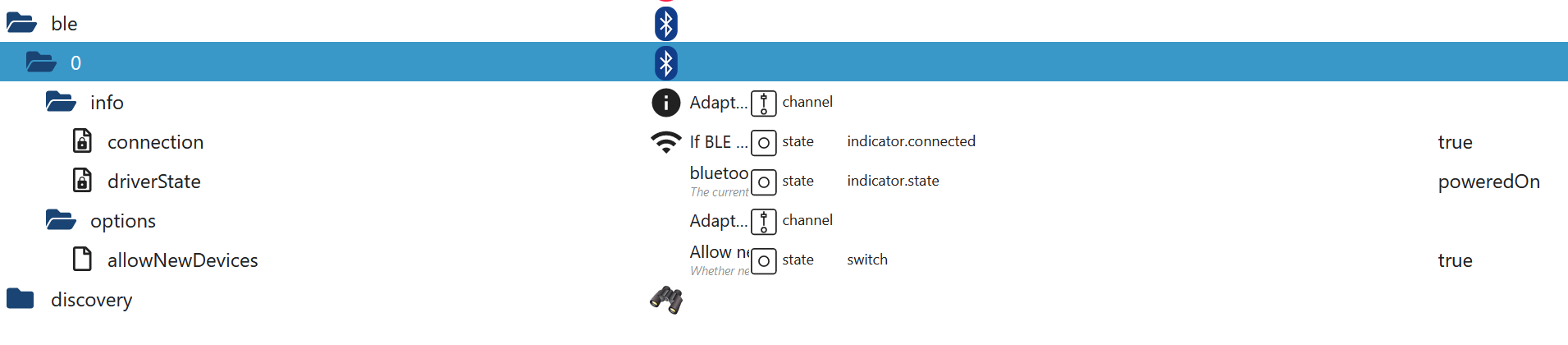

-
Dann weiß ich nicht weiter.
-
@thomas-braun
Danke Trotzdem!Ich denke dann muss ich es mit einem anderen Adapter probieren.
Hast du eine Idee welcher gut funktioniert?Schau mal in das Log, wenn der ble-Adapter neugestartet wird.
Bei mir spuckt das Ding sowas aus:2023-10-23 21:51:57.006 - error: ble.0 (55088) Cannot find module '../build/Release/bluetooth_hci_socket.node' Require stack: - /opt/iobroker/node_modules/@abandonware/bluetooth-hci-socket/lib/native.js - /opt/iobroker/node_modules/@abandonware/bluetooth-hci-socket/index.js - /opt/iobroker/node_modules/@abandonware/noble/lib/hci-socket/hci.js - /opt/iobroker/node_modules/@abandonware/noble/lib/hci-socket/bindings.js - /opt/iobroker/node_modules/@abandonware/noble/lib/resolve-bindings.js - /opt/iobroker/node_modules/@abandonware/noble/with-custom-binding.js - /opt/iobroker/node_modules/@abandonware/noble/index.js - /opt/iobroker/node_modules/iobroker.ble/build/scanProcess.jsEdit: Neuinstallation des ble-Adapters und das Ding lüppt wieder.
-
Schau mal in das Log, wenn der ble-Adapter neugestartet wird.
Bei mir spuckt das Ding sowas aus:2023-10-23 21:51:57.006 - error: ble.0 (55088) Cannot find module '../build/Release/bluetooth_hci_socket.node' Require stack: - /opt/iobroker/node_modules/@abandonware/bluetooth-hci-socket/lib/native.js - /opt/iobroker/node_modules/@abandonware/bluetooth-hci-socket/index.js - /opt/iobroker/node_modules/@abandonware/noble/lib/hci-socket/hci.js - /opt/iobroker/node_modules/@abandonware/noble/lib/hci-socket/bindings.js - /opt/iobroker/node_modules/@abandonware/noble/lib/resolve-bindings.js - /opt/iobroker/node_modules/@abandonware/noble/with-custom-binding.js - /opt/iobroker/node_modules/@abandonware/noble/index.js - /opt/iobroker/node_modules/iobroker.ble/build/scanProcess.jsEdit: Neuinstallation des ble-Adapters und das Ding lüppt wieder.
2023-10-23 20:24:31.603  - info: admin.0 (1277) ==> Connected system.user.admin from ::ffff:192.168.178.70
2023-10-23 20:24:41.810  - info: host.server "system.adapter.ble.0" disabled
2023-10-23 20:24:41.811  - info: host.server stopInstance system.adapter.ble.0 (force=false, process=true)
2023-10-23 20:24:41.814  - info: ble.0 (421939) Got terminate signal TERMINATE_YOURSELF
2023-10-23 20:24:41.856  - info: host.server stopInstance system.adapter.ble.0 send kill signal
2023-10-23 20:24:41.860  - info: ble.0 (421939) terminating
2023-10-23 20:24:41.862  - info: ble.0 (421939) Terminated (ADAPTER_REQUESTED_TERMINATION): Without reason
2023-10-23 20:24:42.364  - info: ble.0 (421939) terminating
2023-10-23 20:24:42.431  - info: host.server instance system.adapter.ble.0 terminated with code 11 (ADAPTER_REQUESTED_TERMINATION)
2023-10-23 20:24:45.231  - info: host.server "system.adapter.ble.0" enabled
2023-10-23 20:24:45.268  - info: host.server instance system.adapter.ble.0 started with pid 2462829
2023-10-23 20:24:45.735  - info: ble.0 (2462829) starting. Version 0.13.4 in /opt/iobroker/node_modules/iobroker.ble, node: v18.18.2, js-controller: 5.0.12
2023-10-23 20:24:45.792  - info: ble.0 (2462829) loaded plugins: Xiaomi, mi-flora, ruuvi-tag, _default
2023-10-23 20:24:45.793  - info: ble.0 (2462829) enabled plugins: Xiaomi, _default
2023-10-23 20:24:45.793  - info: ble.0 (2462829) monitoring all services
2023-10-23 20:24:45.842  - info: ble.0 (2462829) starting scanner process...
2023-10-23 20:24:46.081  - info: ble.0 (2462829) starting scan for services []
2023-10-23 20:24:31.603 - info: admin.0 (1277) ==> Connected system.user.admin from ::ffff:192.168.178.70 2023-10-23 20:24:41.810 - info: host.server "system.adapter.ble.0" disabled 2023-10-23 20:24:41.811 - info: host.server stopInstance system.adapter.ble.0 (force=false, process=true) 2023-10-23 20:24:41.814 - info: ble.0 (421939) Got terminate signal TERMINATE_YOURSELF 2023-10-23 20:24:41.856 - info: host.server stopInstance system.adapter.ble.0 send kill signal 2023-10-23 20:24:41.860 - info: ble.0 (421939) terminating 2023-10-23 20:24:41.862 - info: ble.0 (421939) Terminated (ADAPTER_REQUESTED_TERMINATION): Without reason 2023-10-23 20:24:42.364 - info: ble.0 (421939) terminating 2023-10-23 20:24:42.431 - info: host.server instance system.adapter.ble.0 terminated with code 11 (ADAPTER_REQUESTED_TERMINATION) 2023-10-23 20:24:45.231 - info: host.server "system.adapter.ble.0" enabled 2023-10-23 20:24:45.268 - info: host.server instance system.adapter.ble.0 started with pid 2462829 2023-10-23 20:24:45.735 - info: ble.0 (2462829) starting. Version 0.13.4 in /opt/iobroker/node_modules/iobroker.ble, node: v18.18.2, js-controller: 5.0.12 2023-10-23 20:24:45.792 - info: ble.0 (2462829) loaded plugins: Xiaomi, mi-flora, ruuvi-tag, _default 2023-10-23 20:24:45.793 - info: ble.0 (2462829) enabled plugins: Xiaomi, _default 2023-10-23 20:24:45.793 - info: ble.0 (2462829) monitoring all services 2023-10-23 20:24:45.842 - info: ble.0 (2462829) starting scanner process... 2023-10-23 20:24:46.081 - info: ble.0 (2462829) starting scan for services []Für mich sieht alles gut aus...
Ich habe mir einfach mal einen neuen Stick bestellt und werde testen. -
2023-10-23 20:24:31.603 - info: admin.0 (1277) ==> Connected system.user.admin from ::ffff:192.168.178.70 2023-10-23 20:24:41.810 - info: host.server "system.adapter.ble.0" disabled 2023-10-23 20:24:41.811 - info: host.server stopInstance system.adapter.ble.0 (force=false, process=true) 2023-10-23 20:24:41.814 - info: ble.0 (421939) Got terminate signal TERMINATE_YOURSELF 2023-10-23 20:24:41.856 - info: host.server stopInstance system.adapter.ble.0 send kill signal 2023-10-23 20:24:41.860 - info: ble.0 (421939) terminating 2023-10-23 20:24:41.862 - info: ble.0 (421939) Terminated (ADAPTER_REQUESTED_TERMINATION): Without reason 2023-10-23 20:24:42.364 - info: ble.0 (421939) terminating 2023-10-23 20:24:42.431 - info: host.server instance system.adapter.ble.0 terminated with code 11 (ADAPTER_REQUESTED_TERMINATION) 2023-10-23 20:24:45.231 - info: host.server "system.adapter.ble.0" enabled 2023-10-23 20:24:45.268 - info: host.server instance system.adapter.ble.0 started with pid 2462829 2023-10-23 20:24:45.735 - info: ble.0 (2462829) starting. Version 0.13.4 in /opt/iobroker/node_modules/iobroker.ble, node: v18.18.2, js-controller: 5.0.12 2023-10-23 20:24:45.792 - info: ble.0 (2462829) loaded plugins: Xiaomi, mi-flora, ruuvi-tag, _default 2023-10-23 20:24:45.793 - info: ble.0 (2462829) enabled plugins: Xiaomi, _default 2023-10-23 20:24:45.793 - info: ble.0 (2462829) monitoring all services 2023-10-23 20:24:45.842 - info: ble.0 (2462829) starting scanner process... 2023-10-23 20:24:46.081 - info: ble.0 (2462829) starting scan for services []2023-10-23 20:24:31.603 - info: admin.0 (1277) ==> Connected system.user.admin from ::ffff:192.168.178.70 2023-10-23 20:24:41.810 - info: host.server "system.adapter.ble.0" disabled 2023-10-23 20:24:41.811 - info: host.server stopInstance system.adapter.ble.0 (force=false, process=true) 2023-10-23 20:24:41.814 - info: ble.0 (421939) Got terminate signal TERMINATE_YOURSELF 2023-10-23 20:24:41.856 - info: host.server stopInstance system.adapter.ble.0 send kill signal 2023-10-23 20:24:41.860 - info: ble.0 (421939) terminating 2023-10-23 20:24:41.862 - info: ble.0 (421939) Terminated (ADAPTER_REQUESTED_TERMINATION): Without reason 2023-10-23 20:24:42.364 - info: ble.0 (421939) terminating 2023-10-23 20:24:42.431 - info: host.server instance system.adapter.ble.0 terminated with code 11 (ADAPTER_REQUESTED_TERMINATION) 2023-10-23 20:24:45.231 - info: host.server "system.adapter.ble.0" enabled 2023-10-23 20:24:45.268 - info: host.server instance system.adapter.ble.0 started with pid 2462829 2023-10-23 20:24:45.735 - info: ble.0 (2462829) starting. Version 0.13.4 in /opt/iobroker/node_modules/iobroker.ble, node: v18.18.2, js-controller: 5.0.12 2023-10-23 20:24:45.792 - info: ble.0 (2462829) loaded plugins: Xiaomi, mi-flora, ruuvi-tag, _default 2023-10-23 20:24:45.793 - info: ble.0 (2462829) enabled plugins: Xiaomi, _default 2023-10-23 20:24:45.793 - info: ble.0 (2462829) monitoring all services 2023-10-23 20:24:45.842 - info: ble.0 (2462829) starting scanner process... 2023-10-23 20:24:46.081 - info: ble.0 (2462829) starting scan for services []Für mich sieht alles gut aus...
Ich habe mir einfach mal einen neuen Stick bestellt und werde testen.Ist überhaupt irgendwas in der Nähe, was gescannt werden könnte?
Für mich schaut das nämlich eigentlich gut aus. -
2023-10-23 20:24:31.603  - info: admin.0 (1277) ==> Connected system.user.admin from ::ffff:192.168.178.70
2023-10-23 20:24:41.810  - info: host.server "system.adapter.ble.0" disabled
2023-10-23 20:24:41.811  - info: host.server stopInstance system.adapter.ble.0 (force=false, process=true)
2023-10-23 20:24:41.814  - info: ble.0 (421939) Got terminate signal TERMINATE_YOURSELF
2023-10-23 20:24:41.856  - info: host.server stopInstance system.adapter.ble.0 send kill signal
2023-10-23 20:24:41.860  - info: ble.0 (421939) terminating
2023-10-23 20:24:41.862  - info: ble.0 (421939) Terminated (ADAPTER_REQUESTED_TERMINATION): Without reason
2023-10-23 20:24:42.364  - info: ble.0 (421939) terminating
2023-10-23 20:24:42.431  - info: host.server instance system.adapter.ble.0 terminated with code 11 (ADAPTER_REQUESTED_TERMINATION)
2023-10-23 20:24:45.231  - info: host.server "system.adapter.ble.0" enabled
2023-10-23 20:24:45.268  - info: host.server instance system.adapter.ble.0 started with pid 2462829
2023-10-23 20:24:45.735  - info: ble.0 (2462829) starting. Version 0.13.4 in /opt/iobroker/node_modules/iobroker.ble, node: v18.18.2, js-controller: 5.0.12
2023-10-23 20:24:45.792  - info: ble.0 (2462829) loaded plugins: Xiaomi, mi-flora, ruuvi-tag, _default
2023-10-23 20:24:45.793  - info: ble.0 (2462829) enabled plugins: Xiaomi, _default
2023-10-23 20:24:45.793  - info: ble.0 (2462829) monitoring all services
2023-10-23 20:24:45.842  - info: ble.0 (2462829) starting scanner process...
2023-10-23 20:24:46.081  - info: ble.0 (2462829) starting scan for services []
2023-10-23 20:24:31.603 - info: admin.0 (1277) ==> Connected system.user.admin from ::ffff:192.168.178.70 2023-10-23 20:24:41.810 - info: host.server "system.adapter.ble.0" disabled 2023-10-23 20:24:41.811 - info: host.server stopInstance system.adapter.ble.0 (force=false, process=true) 2023-10-23 20:24:41.814 - info: ble.0 (421939) Got terminate signal TERMINATE_YOURSELF 2023-10-23 20:24:41.856 - info: host.server stopInstance system.adapter.ble.0 send kill signal 2023-10-23 20:24:41.860 - info: ble.0 (421939) terminating 2023-10-23 20:24:41.862 - info: ble.0 (421939) Terminated (ADAPTER_REQUESTED_TERMINATION): Without reason 2023-10-23 20:24:42.364 - info: ble.0 (421939) terminating 2023-10-23 20:24:42.431 - info: host.server instance system.adapter.ble.0 terminated with code 11 (ADAPTER_REQUESTED_TERMINATION) 2023-10-23 20:24:45.231 - info: host.server "system.adapter.ble.0" enabled 2023-10-23 20:24:45.268 - info: host.server instance system.adapter.ble.0 started with pid 2462829 2023-10-23 20:24:45.735 - info: ble.0 (2462829) starting. Version 0.13.4 in /opt/iobroker/node_modules/iobroker.ble, node: v18.18.2, js-controller: 5.0.12 2023-10-23 20:24:45.792 - info: ble.0 (2462829) loaded plugins: Xiaomi, mi-flora, ruuvi-tag, _default 2023-10-23 20:24:45.793 - info: ble.0 (2462829) enabled plugins: Xiaomi, _default 2023-10-23 20:24:45.793 - info: ble.0 (2462829) monitoring all services 2023-10-23 20:24:45.842 - info: ble.0 (2462829) starting scanner process... 2023-10-23 20:24:46.081 - info: ble.0 (2462829) starting scan for services []Für mich sieht alles gut aus...
Ich habe mir einfach mal einen neuen Stick bestellt und werde testen.Kann mich da @Thomas-Braun nur anschliessen.
Bisher ist alles okay lt. Log.
Kommt auf die Reichweite Deines Gerätes an und die Adapter Einstellungen.
Die haste glaube ich noch nicht gezeigt.
Hol das mal bitte nach. -
Kann mich da @Thomas-Braun nur anschliessen.
Bisher ist alles okay lt. Log.
Kommt auf die Reichweite Deines Gerätes an und die Adapter Einstellungen.
Die haste glaube ich noch nicht gezeigt.
Hol das mal bitte nach.@haselchen
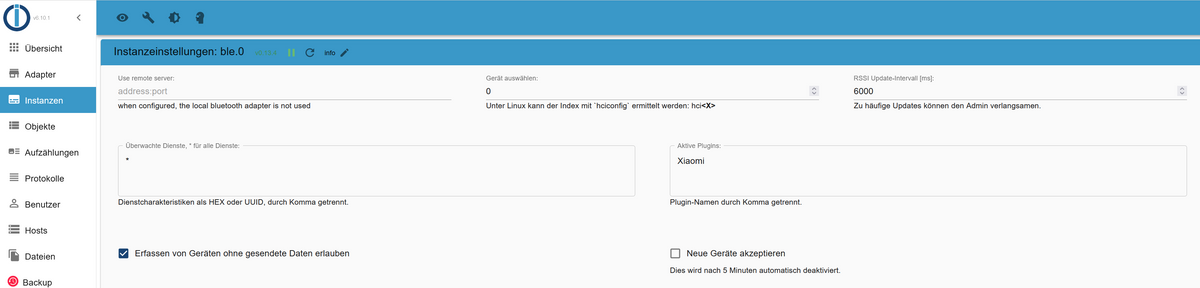
Der steht 2 meter neben dem Raspi 4.
Habe eben mein Handy auf Bluetooth Empfang gestellt, aber es kommt nichts.
Der Raspi hat Seitenweise Einträge..
Es stehen in 1m Entfernung auch ein Xiaomi Temp Sensor der permanent Daten liefert.
Der ist ja nicht gepaired mit dem alten Raspi. -
@haselchen
Der steht 2 meter neben dem Raspi 4.
Habe eben mein Handy auf Bluetooth Empfang gestellt, aber es kommt nichts.
Der Raspi hat Seitenweise Einträge..
Es stehen in 1m Entfernung auch ein Xiaomi Temp Sensor der permanent Daten liefert.
Der ist ja nicht gepaired mit dem alten Raspi. -
@haselchen
Habe ich natürlich schon gemacht ;)
Deswegen hatte ich auch den Screenshot in meinem ersten Post gewählt, da sieht man das der auf True steht.Habe gerade noch einen Fabrikneuen Xiaomi Sensor aus der Verpackung geholt und direkt neben den Server gestellt.
Es passiert einfach nichts... -
@haselchen
Habe ich natürlich schon gemacht ;)
Deswegen hatte ich auch den Screenshot in meinem ersten Post gewählt, da sieht man das der auf True steht.Habe gerade noch einen Fabrikneuen Xiaomi Sensor aus der Verpackung geholt und direkt neben den Server gestellt.
Es passiert einfach nichts...Ja, BLE ist schon speziell.
Gibt noch den Radar2 Adapter.
Den würde ich an erster Stelle ausprobieren.Und dann kannste auch noch per ESPHome BLE Geräte auslesen.
Das hatte ich mal gemacht, weil Raspi Bluetooth und ESPHome sich in die Quere kamen.
Da hatte ich dann nur ESPHome benutzt.https://esphome.io/components/esp32_ble_tracker.html
Jetzt bin ich auf Radar2 weil das stabiler läuft und 100% bei mir funktioniert.
Reichweite zum Gerät knapp 10m (Gigaset Beacon). -
Ja, BLE ist schon speziell.
Gibt noch den Radar2 Adapter.
Den würde ich an erster Stelle ausprobieren.Und dann kannste auch noch per ESPHome BLE Geräte auslesen.
Das hatte ich mal gemacht, weil Raspi Bluetooth und ESPHome sich in die Quere kamen.
Da hatte ich dann nur ESPHome benutzt.https://esphome.io/components/esp32_ble_tracker.html
Jetzt bin ich auf Radar2 weil das stabiler läuft und 100% bei mir funktioniert.
Reichweite zum Gerät knapp 10m (Gigaset Beacon).@haselchen
habe den eben gerade installiert, aber der hängt sofort im Restart loopradar initialization finished with error TypeError: Cannot read properties of null (reading 'push')at main (/opt/iobroker/node_modules/iobroker.radar2/radar2.js:782:21)at async IobAdapter.onReady (/opt/iobroker/node_modules/iobroker.radar2/fjadapter-core.js:212:3), will stop adapter!Aber da mache ich erst morgen Abend weiter!
Danke dir! -
@homoran
hm,
Wi-Fi-6E-Modul von Mediatek laut Notebookcheck@tenor-0 sagte in BLE funktioniert nicht:
@homoran
hm,
Wi-Fi-6E-Modul von Mediatek laut Notebookcheckund das kann BLE?
hast du alle notwendigen Hilfsprogramme installiert?
-
@homoran said in BLE funktioniert nicht:
Wi-Fi-6
Nachdem alles grün ist, vermutlich nicht.
Da es aber ein neuerer Chip zu seien scheint, habe ich es wohl nur angenommen.Morgen kommt ein neuer Adapter, mal sehen.
Bis dahin probiere ich noch ein bißchen mit dem Radar2 Adapter. -
@homoran said in BLE funktioniert nicht:
Wi-Fi-6
Nachdem alles grün ist, vermutlich nicht.
Da es aber ein neuerer Chip zu seien scheint, habe ich es wohl nur angenommen.Morgen kommt ein neuer Adapter, mal sehen.
Bis dahin probiere ich noch ein bißchen mit dem Radar2 Adapter.Der neue Adapter lief direkt nachdem ich den alten deaktiviert habe.
Somit hat der alte onboard vermutlich ein Macke.Ich habe mit mit hciconfig hci0 down deaktiviert.
Das Problem ist aber das der nicht reboot sicher unten bleibt.
Wie kann ich den dauerhaft deaktivieren? -
Der neue Adapter lief direkt nachdem ich den alten deaktiviert habe.
Somit hat der alte onboard vermutlich ein Macke.Ich habe mit mit hciconfig hci0 down deaktiviert.
Das Problem ist aber das der nicht reboot sicher unten bleibt.
Wie kann ich den dauerhaft deaktivieren?@tenor-0 sagte in BLE funktioniert nicht:
Wie kann ich den dauerhaft deaktivieren?
Mit
rfkillsollte das gehen. -
@tenor-0 sagte in BLE funktioniert nicht:
Wie kann ich den dauerhaft deaktivieren?
Mit
rfkillsollte das gehen.@thomas-braun
Danke das hat funktioniert!matthias@server:~$ rfkill list 0: hci0: Bluetooth Soft blocked: yes Hard blocked: no 1: hci1: Bluetooth Soft blocked: no Hard blocked: no 2: phy0: Wireless LAN Soft blocked: no Hard blocked: no matthias@server:~$ hciconfig -a hci1: Type: Primary Bus: USB BD Address: 8C:88:4B:05:62:63 ACL MTU: 1021:6 SCO MTU: 255:12 UP RUNNING RX bytes:2370 acl:0 sco:0 events:221 errors:0 TX bytes:33606 acl:0 sco:0 commands:223 errors:0 Features: 0xff 0xff 0xff 0xfe 0xdb 0xfd 0x7b 0x87 Packet type: DM1 DM3 DM5 DH1 DH3 DH5 HV1 HV2 HV3 Link policy: RSWITCH HOLD SNIFF PARK Link mode: PERIPHERAL ACCEPT Name: 'RTK_BT_5.0' Class: 0x000000 Service Classes: Unspecified Device Class: Miscellaneous, HCI Version: 5.1 (0xa) Revision: 0xdfc6 LMP Version: 5.1 (0xa) Subversion: 0xd922 Manufacturer: Realtek Semiconductor Corporation (93) hci0: Type: Primary Bus: USB BD Address: 38:D5:7A:22:B7:20 ACL MTU: 1021:6 SCO MTU: 240:8 DOWN RX bytes:771 acl:0 sco:0 events:51 errors:0 TX bytes:580 acl:0 sco:0 commands:51 errors:0 Features: 0xbf 0x3e 0x8d 0xfe 0xdb 0xff 0x7b 0x87 Packet type: DM1 DM3 DM5 DH1 DH3 DH5 HV1 HV2 HV3 Link policy: RSWITCH SNIFF Link mode: PERIPHERAL ACCEPTLeider funktioniert der Adapter nur wenn ich hci1 separat down und wieder ab nehme..
Wie bekomme ich das automatisiert hin? -
@thomas-braun
Danke das hat funktioniert!matthias@server:~$ rfkill list 0: hci0: Bluetooth Soft blocked: yes Hard blocked: no 1: hci1: Bluetooth Soft blocked: no Hard blocked: no 2: phy0: Wireless LAN Soft blocked: no Hard blocked: no matthias@server:~$ hciconfig -a hci1: Type: Primary Bus: USB BD Address: 8C:88:4B:05:62:63 ACL MTU: 1021:6 SCO MTU: 255:12 UP RUNNING RX bytes:2370 acl:0 sco:0 events:221 errors:0 TX bytes:33606 acl:0 sco:0 commands:223 errors:0 Features: 0xff 0xff 0xff 0xfe 0xdb 0xfd 0x7b 0x87 Packet type: DM1 DM3 DM5 DH1 DH3 DH5 HV1 HV2 HV3 Link policy: RSWITCH HOLD SNIFF PARK Link mode: PERIPHERAL ACCEPT Name: 'RTK_BT_5.0' Class: 0x000000 Service Classes: Unspecified Device Class: Miscellaneous, HCI Version: 5.1 (0xa) Revision: 0xdfc6 LMP Version: 5.1 (0xa) Subversion: 0xd922 Manufacturer: Realtek Semiconductor Corporation (93) hci0: Type: Primary Bus: USB BD Address: 38:D5:7A:22:B7:20 ACL MTU: 1021:6 SCO MTU: 240:8 DOWN RX bytes:771 acl:0 sco:0 events:51 errors:0 TX bytes:580 acl:0 sco:0 commands:51 errors:0 Features: 0xbf 0x3e 0x8d 0xfe 0xdb 0xff 0x7b 0x87 Packet type: DM1 DM3 DM5 DH1 DH3 DH5 HV1 HV2 HV3 Link policy: RSWITCH SNIFF Link mode: PERIPHERAL ACCEPTLeider funktioniert der Adapter nur wenn ich hci1 separat down und wieder ab nehme..
Wie bekomme ich das automatisiert hin?



Support us
773
Online32.4k
Users81.6k
Topics1.3m
Posts