Skip to content
  • Home
  • Aktuell
  • Tags
  • 0 Ungelesen 0
  • Kategorien
  • Unreplied
  • Beliebt
  • GitHub
  • Docu
  • Hilfe
Skins
  • Light
  • Brite
  • Cerulean
  • Cosmo
  • Flatly
  • Journal
  • Litera
  • Lumen
  • Lux
  • Materia
  • Minty
  • Morph
  • Pulse
  • Sandstone
  • Simplex
  • Sketchy
  • Spacelab
  • United
  • Yeti
  • Zephyr
  • Dark
  • Cyborg
  • Darkly
  • Quartz
  • Slate
  • Solar
  • Superhero
  • Vapor

  • Standard: (Kein Skin)
  • Kein Skin
Einklappen
ioBroker Logo

Community Forum

donate donate
  1. ioBroker Community Home
  2. Deutsch
  3. ioBroker Allgemein
  4. Neuer Befehl: "iob nodejs-update"

NEWS

  • UPDATE 31.10.: Amazon Alexa - ioBroker Skill läuft aus ?
    apollon77A
    apollon77
    48
    3
    8.7k

  • Monatsrückblick – September 2025
    BluefoxB
    Bluefox
    13
    1
    2.2k

  • Neues Video "KI im Smart Home" - ioBroker plus n8n
    BluefoxB
    Bluefox
    16
    1
    3.1k

Neuer Befehl: "iob nodejs-update"

Geplant Angeheftet Gesperrt Verschoben ioBroker Allgemein
93 Beiträge 27 Kommentatoren 32.7k Aufrufe 37 Watching
  • Älteste zuerst
  • Neuste zuerst
  • Meiste Stimmen
Antworten
  • In einem neuen Thema antworten
Anmelden zum Antworten
Dieses Thema wurde gelöscht. Nur Nutzer mit entsprechenden Rechten können es sehen.
  • S Offline
    S Offline
    Schreckus
    schrieb am zuletzt editiert von
    #77

    ok danke, ich versuch mich mal durchzubeissen wie das mit den gpg-Keys funktioniert bzw. wie man sie manuell aktualisiert wenn man nicht nen skript zur hand hat:-)

    Dankeschön!
    Grüße schreckus

    Thomas BraunT 1 Antwort Letzte Antwort
    0
    • S Schreckus

      ok danke, ich versuch mich mal durchzubeissen wie das mit den gpg-Keys funktioniert bzw. wie man sie manuell aktualisiert wenn man nicht nen skript zur hand hat:-)

      Dankeschön!
      Grüße schreckus

      Thomas BraunT Online
      Thomas BraunT Online
      Thomas Braun
      Most Active
      schrieb am zuletzt editiert von
      #78

      @schreckus

      Steht für nodesource exemplarisch in meinem entsprechenden HowTo drin.

      Linux-Werkzeugkasten:
      https://forum.iobroker.net/topic/42952/der-kleine-iobroker-linux-werkzeugkasten
      NodeJS Fixer Skript:
      https://forum.iobroker.net/topic/68035/iob-node-fix-skript
      iob_diag: curl -sLf -o diag.sh https://iobroker.net/diag.sh && bash diag.sh

      1 Antwort Letzte Antwort
      1
      • haselchenH haselchen

        @apollon77

        Wird dieser Fix auch in Docker Containern funktionieren?

        Edit: kann es mir selber beantworten. Wird nicht unterstützt.

        Nun dann meine Frage hierzu, ist es technisch nicht möglich das zu implementieren?

        Klar weiss ich , dass es immer heisst, mach nen neuen Container.
        Aber 3 Worte eintippen geht tatsächlich schneller, als nen Container aufsetzen.

        B Offline
        B Offline
        Bert 0
        schrieb am zuletzt editiert von
        #79

        Habe jetzt auch den Befehl versucht auf meinem Raspi Slave mit Version nodejs18.17.1. Ist leider schief gegangen. Fallback auf v18.00.
        Anbei das Protokoll:

        ioBroker nodejs fixer 2023-10-13
        No recommendation for a nodejs version found on your system. We recommend to install latest version from nodejs v18 tree.
        
        Your current setup is:
        /usr/bin/nodejs         v18.17.1
        /usr/bin/node           v18.17.1
        /usr/bin/npm            9.6.7
        /usr/bin/npx            9.6.7
        /usr/bin/corepack       0.18.0
        
        We found these nodejs versions available for installation:
        
        nodejs:
          Installed: 18.17.1-deb-1nodesource1
          Candidate: 18.17.1-deb-1nodesource1
          Version table:
         *** 18.17.1-deb-1nodesource1 500
                500 https://deb.nodesource.com/node_18.x bullseye/main arm64 Packages
                100 /var/lib/dpkg/status
             16.20.2-deb-1nodesource1 500
                500 https://deb.nodesource.com/node_16.x bullseye/main arm64 Packages
             12.22.12~dfsg-1~deb11u4 500
                500 http://deb.debian.org/debian bullseye/main arm64 Packages
                500 http://security.debian.org/debian-security bullseye-security/main arm64 Packages


        Nothing to do - Your installation is using the correct paths.
        
        You are running nodejs v18.17.1. Do you want to install latest version from nodejs v.18 tree?
        
        Press <y> to continue or any other key to quit
        Trying to update your installation now. Please be patient.
        find: '/var/lib/lxcfs/cgroup': Input/output error
        Waiting for ioBroker to shut down - Give me a minute...
        ############################################################
        
        *** These repos are active on your system:
        Hit:1 http://security.debian.org/debian-security bullseye-security InRelease
        Hit:2 http://deb.debian.org/debian bullseye InRelease
        Hit:3 http://deb.debian.org/debian bullseye-updates InRelease
        Hit:4 http://archive.raspberrypi.org/debian bullseye InRelease
        Hit:5 https://apt.pivccu.de/piVCCU stable InRelease
        Reading package lists... Done
        
        *** Installing ca-certificates, curl and gnupg, just in case they are missing.
        
        *** Creating new /etc/apt/sources.list.d/nodesource.list and pinning source
        
        deb [signed-by=/etc/apt/keyrings/nodesource.gpg] https://deb.nodesource.com/node_18.x nodistro main
        Package: nodejs
        Pin: origin deb.nodesource.com
        Pin-Priority: 1001
        
        *** These repos are active after the adjustments:
        Hit:1 http://deb.debian.org/debian bullseye InRelease
        Hit:2 http://deb.debian.org/debian bullseye-updates InRelease
        Hit:3 http://security.debian.org/debian-security bullseye-security InRelease
        Hit:4 http://archive.raspberrypi.org/debian bullseye InRelease
        Hit:5 https://apt.pivccu.de/piVCCU stable InRelease
        Get:6 https://deb.nodesource.com/node_18.x nodistro InRelease [12.1 kB]
        Get:7 https://deb.nodesource.com/node_18.x nodistro/main armhf Packages [6155 B]
        Get:8 https://deb.nodesource.com/node_18.x nodistro/main arm64 Packages [6123 B]
        Fetched 24.4 kB in 4s (5509 B/s)
        Reading package lists... Done
        
        Installing the recommended nodejs version now!
        
        Exact recommended version unknown, installing a fallback!
        dpkg: warning: downgrading nodejs from 18.17.1-deb-1nodesource1 to 18.0.0-1nodesource1
        (Reading database ... 91249 files and directories currently installed.)
        Preparing to unpack .../nodejs_18.0.0-1nodesource1_arm64.deb ...
        Detected old npm client, removing...
        Unpacking nodejs (18.0.0-1nodesource1) over (18.17.1-deb-1nodesource1) ...
        Setting up nodejs (18.0.0-1nodesource1) ...
        Processing triggers for man-db (2.9.4-2) ...
        
        Updating fallback to latest nodejs v18 release
        
        E: Failed to fetch https://deb.nodesource.com/node_18.x/pool/main/n/nodejs/nodejs_18.18.2-1nodesource1_arm64.deb  Connection timed out [IP: 2606:4700:10::ac43:acd 443]
        E: Unable to fetch some archives, maybe run apt-get update or try with --fix-missing?
        v18.0.0 has been installed! You are using the latest version now!
        Installing the recommended nodejs version!
        E: Failed to fetch https://deb.nodesource.com/node_18.x/pool/main/n/nodejs/nodejs_18.18.2-1nodesource1_arm64.deb  Error reading from server - read (5: Input/output error) [IP: 2606:4700:10::6816:41a 443]
        E: Unable to fetch some archives, maybe run apt-get update or try with --fix-missing?
        i
        We tried our best to fix your nodejs. Please run iob diag again to verify.
        
        *** RESTARTING ioBroker NOW! ***
         Please refresh or restart your browser in a few moments.
        

        Auserdem noch das Ergebnis bei iob diag

        ======================= SUMMARY =======================
                                v.2023-10-10
        
        
           Static hostname: raspberrypi-slave
                 Icon name: computer
          Operating System: Debian GNU/Linux 11 (bullseye)
                    Kernel: Linux 6.1.21-v8+
              Architecture: arm64
        
        Installation:           native
        Kernel:                 aarch64
        Userland:               arm64
        Timezone:               Europe/Berlin (CET, +0100)
        User-ID:                1000
        X-Server:               false
        Boot Target:            multi-user.target
        
        Pending OS-Updates:     1
        
        Pending iob updates:    0
        
        Nodejs-Installation:    /usr/bin/nodejs         v18.0.0
                                /usr/bin/node           v18.0.0
                                /usr/bin/npm            8.6.0
                                /usr/bin/npx            8.6.0
                                /usr/bin/corepack       0.10.0
        
        Recommended versions are nodejs No connection to databases possible ... and npm No connection to databases possible ...
        Your nodejs installation is correct
        
        MEMORY:
                       total        used        free      shared  buff/cache   available
        Mem:            909M        237M        130M        0.0K        541M        608M
        Swap:            99M        2.0M         97M
        Total:          1.0G        239M        227M
        
        Active iob-Instances:   0
        No connection to databases possible ...
        
        ioBroker Core:          js-controller           5.0.12
                                admin                   "admin" not found
        
        ioBroker Status:        No connection to databases possible ...
        
        Status admin and web instance:
        
        Objects:                1
        States:                 1
        
        Size of iob-Database:
        
        12M     /opt/iobroker/iobroker-data/objects.jsonl
        796K    /opt/iobroker/iobroker-data/states.jsonl


        =================== END OF SUMMARY ====================
        

        Jemand eine Idee?

        Danke

        Thomas BraunT 1 Antwort Letzte Antwort
        0
        • B Bert 0

          Habe jetzt auch den Befehl versucht auf meinem Raspi Slave mit Version nodejs18.17.1. Ist leider schief gegangen. Fallback auf v18.00.
          Anbei das Protokoll:

          ioBroker nodejs fixer 2023-10-13
          No recommendation for a nodejs version found on your system. We recommend to install latest version from nodejs v18 tree.
          
          Your current setup is:
          /usr/bin/nodejs         v18.17.1
          /usr/bin/node           v18.17.1
          /usr/bin/npm            9.6.7
          /usr/bin/npx            9.6.7
          /usr/bin/corepack       0.18.0
          
          We found these nodejs versions available for installation:
          
          nodejs:
            Installed: 18.17.1-deb-1nodesource1
            Candidate: 18.17.1-deb-1nodesource1
            Version table:
           *** 18.17.1-deb-1nodesource1 500
                  500 https://deb.nodesource.com/node_18.x bullseye/main arm64 Packages
                  100 /var/lib/dpkg/status
               16.20.2-deb-1nodesource1 500
                  500 https://deb.nodesource.com/node_16.x bullseye/main arm64 Packages
               12.22.12~dfsg-1~deb11u4 500
                  500 http://deb.debian.org/debian bullseye/main arm64 Packages
                  500 http://security.debian.org/debian-security bullseye-security/main arm64 Packages


          Nothing to do - Your installation is using the correct paths.
          
          You are running nodejs v18.17.1. Do you want to install latest version from nodejs v.18 tree?
          
          Press <y> to continue or any other key to quit
          Trying to update your installation now. Please be patient.
          find: '/var/lib/lxcfs/cgroup': Input/output error
          Waiting for ioBroker to shut down - Give me a minute...
          ############################################################
          
          *** These repos are active on your system:
          Hit:1 http://security.debian.org/debian-security bullseye-security InRelease
          Hit:2 http://deb.debian.org/debian bullseye InRelease
          Hit:3 http://deb.debian.org/debian bullseye-updates InRelease
          Hit:4 http://archive.raspberrypi.org/debian bullseye InRelease
          Hit:5 https://apt.pivccu.de/piVCCU stable InRelease
          Reading package lists... Done
          
          *** Installing ca-certificates, curl and gnupg, just in case they are missing.
          
          *** Creating new /etc/apt/sources.list.d/nodesource.list and pinning source
          
          deb [signed-by=/etc/apt/keyrings/nodesource.gpg] https://deb.nodesource.com/node_18.x nodistro main
          Package: nodejs
          Pin: origin deb.nodesource.com
          Pin-Priority: 1001
          
          *** These repos are active after the adjustments:
          Hit:1 http://deb.debian.org/debian bullseye InRelease
          Hit:2 http://deb.debian.org/debian bullseye-updates InRelease
          Hit:3 http://security.debian.org/debian-security bullseye-security InRelease
          Hit:4 http://archive.raspberrypi.org/debian bullseye InRelease
          Hit:5 https://apt.pivccu.de/piVCCU stable InRelease
          Get:6 https://deb.nodesource.com/node_18.x nodistro InRelease [12.1 kB]
          Get:7 https://deb.nodesource.com/node_18.x nodistro/main armhf Packages [6155 B]
          Get:8 https://deb.nodesource.com/node_18.x nodistro/main arm64 Packages [6123 B]
          Fetched 24.4 kB in 4s (5509 B/s)
          Reading package lists... Done
          
          Installing the recommended nodejs version now!
          
          Exact recommended version unknown, installing a fallback!
          dpkg: warning: downgrading nodejs from 18.17.1-deb-1nodesource1 to 18.0.0-1nodesource1
          (Reading database ... 91249 files and directories currently installed.)
          Preparing to unpack .../nodejs_18.0.0-1nodesource1_arm64.deb ...
          Detected old npm client, removing...
          Unpacking nodejs (18.0.0-1nodesource1) over (18.17.1-deb-1nodesource1) ...
          Setting up nodejs (18.0.0-1nodesource1) ...
          Processing triggers for man-db (2.9.4-2) ...
          
          Updating fallback to latest nodejs v18 release
          
          E: Failed to fetch https://deb.nodesource.com/node_18.x/pool/main/n/nodejs/nodejs_18.18.2-1nodesource1_arm64.deb  Connection timed out [IP: 2606:4700:10::ac43:acd 443]
          E: Unable to fetch some archives, maybe run apt-get update or try with --fix-missing?
          v18.0.0 has been installed! You are using the latest version now!
          Installing the recommended nodejs version!
          E: Failed to fetch https://deb.nodesource.com/node_18.x/pool/main/n/nodejs/nodejs_18.18.2-1nodesource1_arm64.deb  Error reading from server - read (5: Input/output error) [IP: 2606:4700:10::6816:41a 443]
          E: Unable to fetch some archives, maybe run apt-get update or try with --fix-missing?
          i
          We tried our best to fix your nodejs. Please run iob diag again to verify.
          
          *** RESTARTING ioBroker NOW! ***
           Please refresh or restart your browser in a few moments.
          

          Auserdem noch das Ergebnis bei iob diag

          ======================= SUMMARY =======================
                                  v.2023-10-10
          
          
             Static hostname: raspberrypi-slave
                   Icon name: computer
            Operating System: Debian GNU/Linux 11 (bullseye)
                      Kernel: Linux 6.1.21-v8+
                Architecture: arm64
          
          Installation:           native
          Kernel:                 aarch64
          Userland:               arm64
          Timezone:               Europe/Berlin (CET, +0100)
          User-ID:                1000
          X-Server:               false
          Boot Target:            multi-user.target
          
          Pending OS-Updates:     1
          
          Pending iob updates:    0
          
          Nodejs-Installation:    /usr/bin/nodejs         v18.0.0
                                  /usr/bin/node           v18.0.0
                                  /usr/bin/npm            8.6.0
                                  /usr/bin/npx            8.6.0
                                  /usr/bin/corepack       0.10.0
          
          Recommended versions are nodejs No connection to databases possible ... and npm No connection to databases possible ...
          Your nodejs installation is correct
          
          MEMORY:
                         total        used        free      shared  buff/cache   available
          Mem:            909M        237M        130M        0.0K        541M        608M
          Swap:            99M        2.0M         97M
          Total:          1.0G        239M        227M
          
          Active iob-Instances:   0
          No connection to databases possible ...
          
          ioBroker Core:          js-controller           5.0.12
                                  admin                   "admin" not found
          
          ioBroker Status:        No connection to databases possible ...
          
          Status admin and web instance:
          
          Objects:                1
          States:                 1
          
          Size of iob-Database:
          
          12M     /opt/iobroker/iobroker-data/objects.jsonl
          796K    /opt/iobroker/iobroker-data/states.jsonl


          =================== END OF SUMMARY ====================
          

          Jemand eine Idee?

          Danke

          Thomas BraunT Online
          Thomas BraunT Online
          Thomas Braun
          Most Active
          schrieb am zuletzt editiert von
          #80

          @bert-0 sagte in Neuer Befehl: "iob nodejs-update":

          Jemand eine Idee?

          Das dürfte am nodesource-Server liegen, nicht am Skript.

          sudo apt update
          sudo apt full-update
          

          sagt?

          Linux-Werkzeugkasten:
          https://forum.iobroker.net/topic/42952/der-kleine-iobroker-linux-werkzeugkasten
          NodeJS Fixer Skript:
          https://forum.iobroker.net/topic/68035/iob-node-fix-skript
          iob_diag: curl -sLf -o diag.sh https://iobroker.net/diag.sh && bash diag.sh

          B 1 Antwort Letzte Antwort
          0
          • Thomas BraunT Thomas Braun

            @bert-0 sagte in Neuer Befehl: "iob nodejs-update":

            Jemand eine Idee?

            Das dürfte am nodesource-Server liegen, nicht am Skript.

            sudo apt update
            sudo apt full-update
            

            sagt?

            B Offline
            B Offline
            Bert 0
            schrieb am zuletzt editiert von
            #81

            @thomas-braun

            @raspberrypi-slave:~ $ sudo apt update
            OK:1 http://deb.debian.org/debian bullseye InRelease
            OK:2 http://deb.debian.org/debian bullseye-updates InRelease
            OK:3 http://security.debian.org/debian-security bullseye-security InRelease
            OK:4 http://archive.raspberrypi.org/debian bullseye InRelease
            OK:5 https://apt.pivccu.de/piVCCU stable InRelease
            OK:6 https://deb.nodesource.com/node_18.x nodistro InRelease
            Paketlisten werden gelesen… Fertig
            Abhängigkeitsbaum wird aufgebaut… Fertig
            Statusinformationen werden eingelesen… Fertig
            Alle Pakete sind aktuell.
            @raspberrypi-slave:~ $ sudo apt full-upgrade
            Paketlisten werden gelesen… Fertig
            Abhängigkeitsbaum wird aufgebaut… Fertig
            Statusinformationen werden eingelesen… Fertig
            Paketaktualisierung (Upgrade) wird berechnet… Fertig
            0 aktualisiert, 0 neu installiert, 0 zu entfernen und 0 nicht aktualisiert.
            

            Mit

            sudo apt-get update && sudo apt-get upgrade -y 
            

            hatte ich das nach dem Versuch mit iob nodejs-update dann noch mal drüberlaufen lassen und ist jetzt die aktuelle Version.

            1 Antwort Letzte Antwort
            0
            • S Abwesend
              S Abwesend
              Shadowhunter23
              schrieb am zuletzt editiert von Shadowhunter23
              #82

              Ist bei mir seit heute im Angebot:
              Recommended versions are nodejs 18.19.0 and npm 10.2.3

              Auf diese Version kann man updaten?

              Proxmox 9 HA-Cluster mit 3x HP prodesk 400 G6 i5
              Bei einem downvote bitte melden, es könnte sein, dass dieser ungewollt ist!

              Thomas BraunT HomoranH 2 Antworten Letzte Antwort
              0
              • S Shadowhunter23

                Ist bei mir seit heute im Angebot:
                Recommended versions are nodejs 18.19.0 and npm 10.2.3

                Auf diese Version kann man updaten?

                Thomas BraunT Online
                Thomas BraunT Online
                Thomas Braun
                Most Active
                schrieb am zuletzt editiert von Thomas Braun
                #83

                @shadowhunter23

                Scheint ganz neu zu sein.
                Bei nodejs.org ist die 18.18.2 noch geführt.

                Linux-Werkzeugkasten:
                https://forum.iobroker.net/topic/42952/der-kleine-iobroker-linux-werkzeugkasten
                NodeJS Fixer Skript:
                https://forum.iobroker.net/topic/68035/iob-node-fix-skript
                iob_diag: curl -sLf -o diag.sh https://iobroker.net/diag.sh && bash diag.sh

                S 1 Antwort Letzte Antwort
                1
                • Thomas BraunT Thomas Braun

                  @shadowhunter23

                  Scheint ganz neu zu sein.
                  Bei nodejs.org ist die 18.18.2 noch geführt.

                  S Abwesend
                  S Abwesend
                  Shadowhunter23
                  schrieb am zuletzt editiert von Shadowhunter23
                  #84

                  @thomas-braun dann mach ich mal nichts ( Update ) und warte auf andere die sich besser damit auskennen wie z.B. Du.

                  Proxmox 9 HA-Cluster mit 3x HP prodesk 400 G6 i5
                  Bei einem downvote bitte melden, es könnte sein, dass dieser ungewollt ist!

                  Thomas BraunT 1 Antwort Letzte Antwort
                  0
                  • S Shadowhunter23

                    Ist bei mir seit heute im Angebot:
                    Recommended versions are nodejs 18.19.0 and npm 10.2.3

                    Auf diese Version kann man updaten?

                    HomoranH Offline
                    HomoranH Offline
                    Homoran
                    Global Moderator Administrators
                    schrieb am zuletzt editiert von
                    #85

                    @shadowhunter23 sagte in Neuer Befehl: "iob nodejs-update":

                    Recommended versions are nodejs 18.19.0 and npm 10.2.3

                    wo steht das?

                    kein Support per PN! - Fragen im Forum stellen - es gibt fast nichts, was nicht auch für andere interessant ist.

                    Benutzt das Voting rechts unten im Beitrag wenn er euch geholfen hat.

                    der Installationsfixer: curl -fsL https://iobroker.net/fix.sh | bash -

                    S 1 Antwort Letzte Antwort
                    0
                    • HomoranH Homoran

                      @shadowhunter23 sagte in Neuer Befehl: "iob nodejs-update":

                      Recommended versions are nodejs 18.19.0 and npm 10.2.3

                      wo steht das?

                      S Abwesend
                      S Abwesend
                      Shadowhunter23
                      schrieb am zuletzt editiert von Shadowhunter23
                      #86

                      @homoran
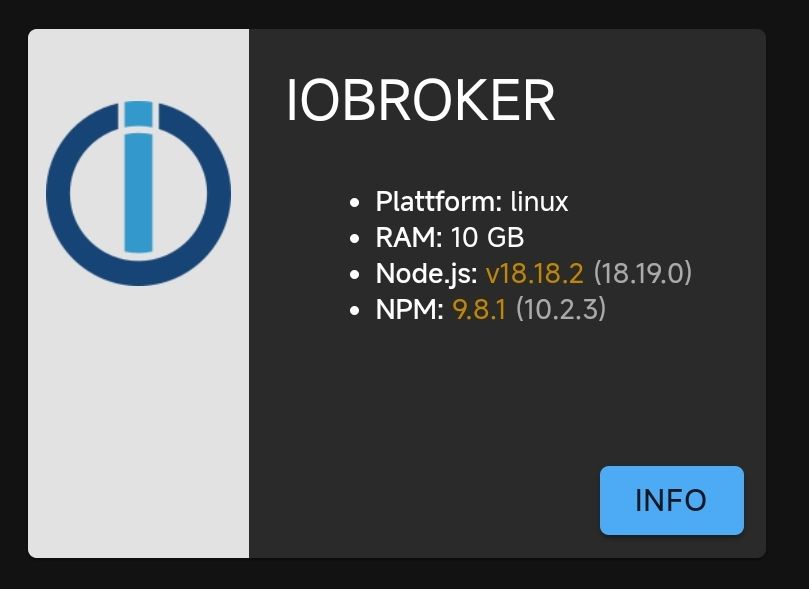
                      Screenshot_2023-11-29-19-06-38-361_com.android.chrome-edit.jpg

                      Und als Text bei iob diag

                      Nodejs-Installation:    /usr/bin/nodejs         v18.18.2                                                                                                                 /usr/bin/node           v18.18.2
                                              /usr/bin/npm            9.8.1                                                                                                                    /usr/bin/npx            9.8.1
                                              /usr/bin/corepack       0.19.0                                                                                           
                      Recommended versions are nodejs 18.19.0 and npm 10.2.3                                                                                           Your nodejs installation is correct
                      

                      Proxmox 9 HA-Cluster mit 3x HP prodesk 400 G6 i5
                      Bei einem downvote bitte melden, es könnte sein, dass dieser ungewollt ist!

                      1 Antwort Letzte Antwort
                      0
                      • S Shadowhunter23

                        @thomas-braun dann mach ich mal nichts ( Update ) und warte auf andere die sich besser damit auskennen wie z.B. Du.

                        Thomas BraunT Online
                        Thomas BraunT Online
                        Thomas Braun
                        Most Active
                        schrieb am zuletzt editiert von
                        #87

                        @shadowhunter23

                        Das Paket kommt ja über die übliche Systempflege über das nodesource-Repo zu gegebener Zeit rein.
                        Mit 'iob 'nodejs-update' hat das ja nix mehr zu tun, wenn es einmal umgestellt wurde.

                        Linux-Werkzeugkasten:
                        https://forum.iobroker.net/topic/42952/der-kleine-iobroker-linux-werkzeugkasten
                        NodeJS Fixer Skript:
                        https://forum.iobroker.net/topic/68035/iob-node-fix-skript
                        iob_diag: curl -sLf -o diag.sh https://iobroker.net/diag.sh && bash diag.sh

                        S 1 Antwort Letzte Antwort
                        0
                        • Thomas BraunT Thomas Braun

                          @shadowhunter23

                          Das Paket kommt ja über die übliche Systempflege über das nodesource-Repo zu gegebener Zeit rein.
                          Mit 'iob 'nodejs-update' hat das ja nix mehr zu tun, wenn es einmal umgestellt wurde.

                          S Abwesend
                          S Abwesend
                          Shadowhunter23
                          schrieb am zuletzt editiert von Shadowhunter23
                          #88

                          @thomas-braun stimmt ja danke. Ich muss nur warten, hab ich vergessen. Ich bin ja schon auf der richtigen Version und das kommt dann als Update.

                          Proxmox 9 HA-Cluster mit 3x HP prodesk 400 G6 i5
                          Bei einem downvote bitte melden, es könnte sein, dass dieser ungewollt ist!

                          Thomas BraunT 2 Antworten Letzte Antwort
                          0
                          • S Shadowhunter23

                            @thomas-braun stimmt ja danke. Ich muss nur warten, hab ich vergessen. Ich bin ja schon auf der richtigen Version und das kommt dann als Update.

                            Thomas BraunT Online
                            Thomas BraunT Online
                            Thomas Braun
                            Most Active
                            schrieb am zuletzt editiert von
                            #89

                            @shadowhunter23 sagte in Neuer Befehl: "iob nodejs-update":

                            Ich muss nur warten, hab ich vergessen.

                            Nee, in regelmäßigen Abständen das System 'warten'.

                            Linux-Werkzeugkasten:
                            https://forum.iobroker.net/topic/42952/der-kleine-iobroker-linux-werkzeugkasten
                            NodeJS Fixer Skript:
                            https://forum.iobroker.net/topic/68035/iob-node-fix-skript
                            iob_diag: curl -sLf -o diag.sh https://iobroker.net/diag.sh && bash diag.sh

                            1 Antwort Letzte Antwort
                            1
                            • S Shadowhunter23

                              @thomas-braun stimmt ja danke. Ich muss nur warten, hab ich vergessen. Ich bin ja schon auf der richtigen Version und das kommt dann als Update.

                              Thomas BraunT Online
                              Thomas BraunT Online
                              Thomas Braun
                              Most Active
                              schrieb am zuletzt editiert von Thomas Braun
                              #90

                              @shadowhunter23

                              echad@chet:~ $ apt policy nodejs
                              nodejs:
                                Installed: 21.2.0-1nodesource1
                                Candidate: 21.2.0-1nodesource1
                                Version table:
                               *** 21.2.0-1nodesource1 1001
                                      500 https://deb.nodesource.com/node_21.x nodistro/main arm64 Packages
                                      100 /var/lib/dpkg/status
                                   18.19.0-1nodesource1 1001
                                      500 https://deb.nodesource.com/node_18.x nodistro/main arm64 Packages
                              

                              Ist also via apt verfügbar.

                              Linux-Werkzeugkasten:
                              https://forum.iobroker.net/topic/42952/der-kleine-iobroker-linux-werkzeugkasten
                              NodeJS Fixer Skript:
                              https://forum.iobroker.net/topic/68035/iob-node-fix-skript
                              iob_diag: curl -sLf -o diag.sh https://iobroker.net/diag.sh && bash diag.sh

                              S 1 Antwort Letzte Antwort
                              1
                              • Thomas BraunT Thomas Braun

                                @shadowhunter23

                                echad@chet:~ $ apt policy nodejs
                                nodejs:
                                  Installed: 21.2.0-1nodesource1
                                  Candidate: 21.2.0-1nodesource1
                                  Version table:
                                 *** 21.2.0-1nodesource1 1001
                                        500 https://deb.nodesource.com/node_21.x nodistro/main arm64 Packages
                                        100 /var/lib/dpkg/status
                                     18.19.0-1nodesource1 1001
                                        500 https://deb.nodesource.com/node_18.x nodistro/main arm64 Packages
                                

                                Ist also via apt verfügbar.

                                S Abwesend
                                S Abwesend
                                Shadowhunter23
                                schrieb am zuletzt editiert von Shadowhunter23
                                #91

                                @thomas-braun man muß nur 'warten' ;) :
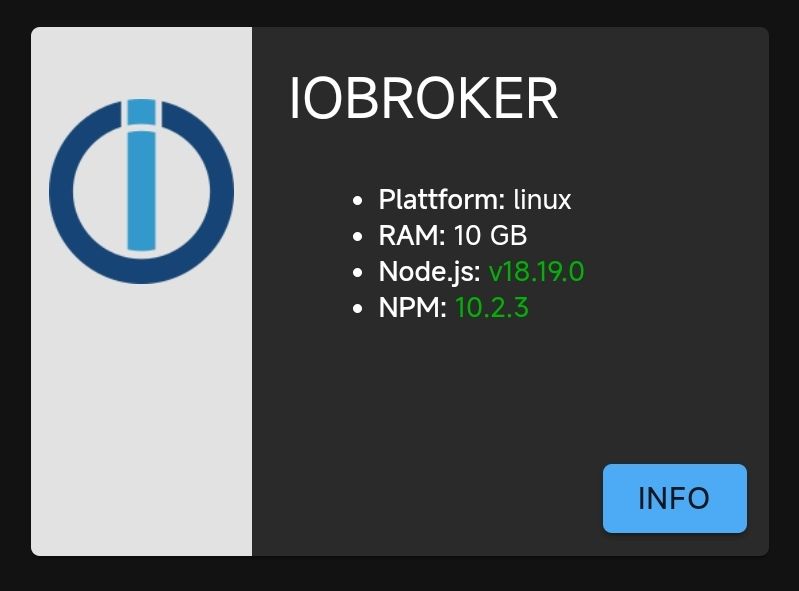
                                Screenshot_2023-11-29-20-47-57-717_com.android.chrome-edit.jpg

                                Proxmox 9 HA-Cluster mit 3x HP prodesk 400 G6 i5
                                Bei einem downvote bitte melden, es könnte sein, dass dieser ungewollt ist!

                                1 Antwort Letzte Antwort
                                1
                                • T tklein

                                  @thomas-braun danke dafür. nur bootet der raspi danach nicht mehr. da wurde mal von einem dev op kollegen etwas am system geändert. seitdem klappt es mit dem update nicht mehr. muss dann erst rausfinden, was/wie geändert wurde.

                                  Thomas BraunT Online
                                  Thomas BraunT Online
                                  Thomas Braun
                                  Most Active
                                  schrieb am zuletzt editiert von
                                  #92

                                  @tklein

                                  Und der Kollege hat dann gesagt, Updates sind überflüssig oder wie?

                                  Linux-Werkzeugkasten:
                                  https://forum.iobroker.net/topic/42952/der-kleine-iobroker-linux-werkzeugkasten
                                  NodeJS Fixer Skript:
                                  https://forum.iobroker.net/topic/68035/iob-node-fix-skript
                                  iob_diag: curl -sLf -o diag.sh https://iobroker.net/diag.sh && bash diag.sh

                                  T 1 Antwort Letzte Antwort
                                  0
                                  • C Offline
                                    C Offline
                                    Chris197
                                    schrieb am zuletzt editiert von
                                    #93

                                    Hallo zusammen,

                                    konnte auf meinem IOBroker keine Adapter mehr aktuallisieren.
                                    Dank diesem Thread funktioniert es nun.

                                    Möchte auf diesem Wege mein Dank ausprechen.

                                    Gruß, Chris

                                    1 Antwort Letzte Antwort
                                    0
                                    Antworten
                                    • In einem neuen Thema antworten
                                    Anmelden zum Antworten
                                    • Älteste zuerst
                                    • Neuste zuerst
                                    • Meiste Stimmen


                                    Support us

                                    ioBroker
                                    Community Adapters
                                    Donate
                                    FAQ Cloud / IOT
                                    HowTo: Node.js-Update
                                    HowTo: Backup/Restore
                                    Downloads
                                    BLOG

                                    433

                                    Online

                                    32.4k

                                    Benutzer

                                    81.5k

                                    Themen

                                    1.3m

                                    Beiträge
                                    Community
                                    Impressum | Datenschutz-Bestimmungen | Nutzungsbedingungen | Einwilligungseinstellungen
                                    ioBroker Community 2014-2025
                                    logo
                                    • Anmelden

                                    • Du hast noch kein Konto? Registrieren

                                    • Anmelden oder registrieren, um zu suchen
                                    • Erster Beitrag
                                      Letzter Beitrag
                                    0
                                    • Home
                                    • Aktuell
                                    • Tags
                                    • Ungelesen 0
                                    • Kategorien
                                    • Unreplied
                                    • Beliebt
                                    • GitHub
                                    • Docu
                                    • Hilfe