Skip to content
  • Home
  • Recent
  • Tags
  • 0 Unread 0
  • Categories
  • Unreplied
  • Popular
  • GitHub
  • Docu
  • Hilfe
Skins
  • Light
  • Brite
  • Cerulean
  • Cosmo
  • Flatly
  • Journal
  • Litera
  • Lumen
  • Lux
  • Materia
  • Minty
  • Morph
  • Pulse
  • Sandstone
  • Simplex
  • Sketchy
  • Spacelab
  • United
  • Yeti
  • Zephyr
  • Dark
  • Cyborg
  • Darkly
  • Quartz
  • Slate
  • Solar
  • Superhero
  • Vapor

  • Default (No Skin)
  • No Skin
Collapse
ioBroker Logo

Community Forum

donate donate
  1. ioBroker Community Home
  2. Deutsch
  3. ioBroker Allgemein
  4. kann vis nicht installieren

NEWS

  • Monatsrückblick Januar/Februar 2026 ist online!
    BluefoxB
    Bluefox
    16
    1
    278

  • Jahresrückblick 2025 – unser neuer Blogbeitrag ist online! ✨
    BluefoxB
    Bluefox
    17
    1
    4.6k

  • Neuer Blogbeitrag: Monatsrückblick - Dezember 2025 🎄
    BluefoxB
    Bluefox
    13
    1
    1.3k

kann vis nicht installieren

Scheduled Pinned Locked Moved ioBroker Allgemein
29 Posts 3 Posters 3.0k Views 1 Watching
  • Oldest to Newest
  • Newest to Oldest
  • Most Votes
Reply
  • Reply as topic
Log in to reply
This topic has been deleted. Only users with topic management privileges can see it.
  • L LJSven

    @homoran sagte in VIS: Keine gültige Lizenz gefunden:

    @ljsven sagte in VIS: Keine gültige Lizenz gefunden:

    Ich bekomme nach einem Backup die VIS nicht mehr installiert.
    

    nach einem Backup oder nach einem Restore?
    wenn letzteres muss vis vor dem Restore manuell installiert werden.

    Ich habe über den Backup Adapter eine Wiederherstellung gemacht. Gibt es einen anderen Weg?

    HomoranH Do not disturb
    HomoranH Do not disturb
    Homoran
    Global Moderator Administrators
    wrote on last edited by
    #7

    @ljsven sagte in VIS: Keine gültige Lizenz gefunden:

    eine Wiederherstellung

    also ein Restore!

    @ljsven sagte in VIS: Keine gültige Lizenz gefunden:

    Gibt es einen anderen Weg?

    als über backitup den Restore zu starten?

    kein Support per PN! - Fragen im Forum stellen -
    Benutzt das Voting rechts unten im Beitrag wenn er euch geholfen hat.
    Das Forum freut sich über eine Spende. Benutzt dazu den Spendenbutton im Header. Danke!
    der Installationsfixer: curl -fsL https://iobroker.net/fix.sh | bash -

    1 Reply Last reply
    0
    • Thomas BraunT Thomas Braun

      @ljsven

      Hast du vis vor dem Einspielen des Backups schon installiert?
      Ist ein Bug.

      L Offline
      L Offline
      LJSven
      wrote on last edited by
      #8

      @thomas-braun sagte in VIS: Keine gültige Lizenz gefunden:

      @ljsven

      Hast du vis vor dem Einspielen des Backups schon installiert?
      Ist ein Bug.

      Nein

      Thomas BraunT 1 Reply Last reply
      0
      • L LJSven

        @thomas-braun sagte in VIS: Keine gültige Lizenz gefunden:

        @ljsven

        Hast du vis vor dem Einspielen des Backups schon installiert?
        Ist ein Bug.

        Nein

        Thomas BraunT Online
        Thomas BraunT Online
        Thomas Braun
        Most Active
        wrote on last edited by
        #9

        @ljsven
        Dann mach das.

        iob install vis@1.14.0
        

        Muss eine intakte Vorversion sein, ich weiß nicht ob 1.14.0 funktioniert (oder ob es die überhaupt gibt...) Schau dir eine Version aus.

        Linux-Werkzeugkasten:
        https://forum.iobroker.net/topic/42952/der-kleine-iobroker-linux-werkzeugkasten
        NodeJS Fixer Skript:
        https://forum.iobroker.net/topic/68035/iob-node-fix-skript
        iob_diag: curl -sLf -o diag.sh https://iobroker.net/diag.sh && bash diag.sh

        HomoranH 1 Reply Last reply
        0
        • Thomas BraunT Thomas Braun

          @ljsven
          Dann mach das.

          iob install vis@1.14.0
          

          Muss eine intakte Vorversion sein, ich weiß nicht ob 1.14.0 funktioniert (oder ob es die überhaupt gibt...) Schau dir eine Version aus.

          HomoranH Do not disturb
          HomoranH Do not disturb
          Homoran
          Global Moderator Administrators
          wrote on last edited by
          #10

          @thomas-braun sagte in VIS: Keine gültige Lizenz gefunden:

          Schau dir eine Version aus.

          1.14.10

          kein Support per PN! - Fragen im Forum stellen -
          Benutzt das Voting rechts unten im Beitrag wenn er euch geholfen hat.
          Das Forum freut sich über eine Spende. Benutzt dazu den Spendenbutton im Header. Danke!
          der Installationsfixer: curl -fsL https://iobroker.net/fix.sh | bash -

          Thomas BraunT 1 Reply Last reply
          0
          • HomoranH Homoran

            @thomas-braun sagte in VIS: Keine gültige Lizenz gefunden:

            Schau dir eine Version aus.

            1.14.10

            Thomas BraunT Online
            Thomas BraunT Online
            Thomas Braun
            Most Active
            wrote on last edited by
            #11

            @homoran

            Dann war ich ja knapp dran.

            Linux-Werkzeugkasten:
            https://forum.iobroker.net/topic/42952/der-kleine-iobroker-linux-werkzeugkasten
            NodeJS Fixer Skript:
            https://forum.iobroker.net/topic/68035/iob-node-fix-skript
            iob_diag: curl -sLf -o diag.sh https://iobroker.net/diag.sh && bash diag.sh

            L 1 Reply Last reply
            0
            • L LJSven

              @thomas-braun

              /opt/iobroker$ iob install vis@1.14.10
              NPM version: 9.6.7
              Installing iobroker.vis@1.14.10... (System call)
              npm ERR! code ETARGET
              npm ERR! notarget No matching version found for iobroker.vis@1.14.10.
              npm ERR! notarget In most cases you or one of your dependencies are requesting
              npm ERR! notarget a package version that doesn't exist.
              
              npm ERR! A complete log of this run can be found in: /home/iobroker/.npm/_logs/2023-10-01T16_42_14_581Z-debug-0.log
              host.tinkerboard Cannot install iobroker.vis@1.14.10: 1
              
              
              HomoranH Do not disturb
              HomoranH Do not disturb
              Homoran
              Global Moderator Administrators
              wrote on last edited by
              #12

              @ljsven sorry, hab mich von Thomas in die Irre leiten lassen

              1.4.10 natürlich

              kein Support per PN! - Fragen im Forum stellen -
              Benutzt das Voting rechts unten im Beitrag wenn er euch geholfen hat.
              Das Forum freut sich über eine Spende. Benutzt dazu den Spendenbutton im Header. Danke!
              der Installationsfixer: curl -fsL https://iobroker.net/fix.sh | bash -

              L 1 Reply Last reply
              0
              • HomoranH Homoran

                @ljsven sorry, hab mich von Thomas in die Irre leiten lassen

                1.4.10 natürlich

                L Offline
                L Offline
                LJSven
                wrote on last edited by
                #13

                @homoran ich hab

                iob install vis@1.14.0 
                

                und

                iob install vis@1.14.10 
                

                versucht - geht beides nicht

                HomoranH 1 Reply Last reply
                0
                • L LJSven

                  @homoran ich hab

                  iob install vis@1.14.0 
                  

                  und

                  iob install vis@1.14.10 
                  

                  versucht - geht beides nicht

                  HomoranH Do not disturb
                  HomoranH Do not disturb
                  Homoran
                  Global Moderator Administrators
                  wrote on last edited by
                  #14

                  @ljsven sagte in VIS: Keine gültige Lizenz gefunden:

                  @homoran ich hab

                  iob install vis@1.14.0 
                  

                  und

                  iob install vis@1.14.10 
                  

                  versucht - geht beides nicht

                  und was ist mit

                  @homoran sagte in VIS: Keine gültige Lizenz gefunden:

                  1.4.10 natürlich

                  kein Support per PN! - Fragen im Forum stellen -
                  Benutzt das Voting rechts unten im Beitrag wenn er euch geholfen hat.
                  Das Forum freut sich über eine Spende. Benutzt dazu den Spendenbutton im Header. Danke!
                  der Installationsfixer: curl -fsL https://iobroker.net/fix.sh | bash -

                  L 1 Reply Last reply
                  0
                  • HomoranH Homoran

                    @ljsven sagte in VIS: Keine gültige Lizenz gefunden:

                    @homoran ich hab

                    iob install vis@1.14.0 
                    

                    und

                    iob install vis@1.14.10 
                    

                    versucht - geht beides nicht

                    und was ist mit

                    @homoran sagte in VIS: Keine gültige Lizenz gefunden:

                    1.4.10 natürlich

                    L Offline
                    L Offline
                    LJSven
                    wrote on last edited by
                    #15

                    @homoran

                    sven@tinkerboard:/opt/iobroker$ iob install vis@1.4.10 
                    NPM version: 9.6.7
                    Installing iobroker.vis@1.4.10... (System call)
                    npm ERR! code 6
                    npm ERR! path /opt/iobroker/node_modules/iobroker.vis
                    npm ERR! command failed
                    npm ERR! command sh -c node main.js --install
                    
                    npm ERR! A complete log of this run can be found in: /home/iobroker/.npm/_logs/2023-10-01T19_10_20_398Z-debug-0.log
                    host.tinkerboard Cannot install iobroker.vis@1.4.10: 6
                    
                    Thomas BraunT HomoranH 2 Replies Last reply
                    0
                    • L LJSven

                      @homoran

                      sven@tinkerboard:/opt/iobroker$ iob install vis@1.4.10 
                      NPM version: 9.6.7
                      Installing iobroker.vis@1.4.10... (System call)
                      npm ERR! code 6
                      npm ERR! path /opt/iobroker/node_modules/iobroker.vis
                      npm ERR! command failed
                      npm ERR! command sh -c node main.js --install
                      
                      npm ERR! A complete log of this run can be found in: /home/iobroker/.npm/_logs/2023-10-01T19_10_20_398Z-debug-0.log
                      host.tinkerboard Cannot install iobroker.vis@1.4.10: 6
                      
                      Thomas BraunT Online
                      Thomas BraunT Online
                      Thomas Braun
                      Most Active
                      wrote on last edited by
                      #16

                      @ljsven sagte in VIS: Keine gültige Lizenz gefunden:

                      iob upgrade vis@1.4.10
                      

                      Linux-Werkzeugkasten:
                      https://forum.iobroker.net/topic/42952/der-kleine-iobroker-linux-werkzeugkasten
                      NodeJS Fixer Skript:
                      https://forum.iobroker.net/topic/68035/iob-node-fix-skript
                      iob_diag: curl -sLf -o diag.sh https://iobroker.net/diag.sh && bash diag.sh

                      HomoranH 1 Reply Last reply
                      0
                      • L LJSven

                        @homoran

                        sven@tinkerboard:/opt/iobroker$ iob install vis@1.4.10 
                        NPM version: 9.6.7
                        Installing iobroker.vis@1.4.10... (System call)
                        npm ERR! code 6
                        npm ERR! path /opt/iobroker/node_modules/iobroker.vis
                        npm ERR! command failed
                        npm ERR! command sh -c node main.js --install
                        
                        npm ERR! A complete log of this run can be found in: /home/iobroker/.npm/_logs/2023-10-01T19_10_20_398Z-debug-0.log
                        host.tinkerboard Cannot install iobroker.vis@1.4.10: 6
                        
                        HomoranH Do not disturb
                        HomoranH Do not disturb
                        Homoran
                        Global Moderator Administrators
                        wrote on last edited by
                        #17

                        @ljsven ich hab das mal abgetrennt, hat ja mit der Lizenz nichts zu tun


                        was sagt iob diag in der Langfassung?

                        kein Support per PN! - Fragen im Forum stellen -
                        Benutzt das Voting rechts unten im Beitrag wenn er euch geholfen hat.
                        Das Forum freut sich über eine Spende. Benutzt dazu den Spendenbutton im Header. Danke!
                        der Installationsfixer: curl -fsL https://iobroker.net/fix.sh | bash -

                        L 1 Reply Last reply
                        0
                        • Thomas BraunT Thomas Braun

                          @ljsven sagte in VIS: Keine gültige Lizenz gefunden:

                          iob upgrade vis@1.4.10
                          
                          HomoranH Do not disturb
                          HomoranH Do not disturb
                          Homoran
                          Global Moderator Administrators
                          wrote on last edited by
                          #18

                          @thomas-braun dann müsste vis ja schon installiert sein, was angeblich nicht geht.

                          das wollte ich erst sehen

                          kein Support per PN! - Fragen im Forum stellen -
                          Benutzt das Voting rechts unten im Beitrag wenn er euch geholfen hat.
                          Das Forum freut sich über eine Spende. Benutzt dazu den Spendenbutton im Header. Danke!
                          der Installationsfixer: curl -fsL https://iobroker.net/fix.sh | bash -

                          1 Reply Last reply
                          0
                          • HomoranH Homoran

                            @ljsven ich hab das mal abgetrennt, hat ja mit der Lizenz nichts zu tun


                            was sagt iob diag in der Langfassung?

                            L Offline
                            L Offline
                            LJSven
                            wrote on last edited by
                            #19

                            @homoran

                            Skript v.2023-06-20
                            
                            *** BASE SYSTEM ***
                             Static hostname: tinkerboard
                                   Icon name: computer
                                  Machine ID: affa5e932b3247b79051b4333d4219f7
                                     Boot ID: 3ae4f613cf714e029c51e550b44607a3
                            Operating System: Armbian 23.8.3 bookworm
                                      Kernel: Linux 6.1.50-current-rockchip
                                Architecture: arm
                            
                            model name	: ARMv7 Processor rev 1 (v7l)
                            Docker          : false
                            Virtualization  : none
                            Kernel          : armv7l
                            Userland        : armhf
                            
                            Systemuptime and Load:
                             21:24:09 up  6:04,  2 users,  load average: 0.86, 0.50, 0.35
                            CPU threads: 4
                            
                            
                            *** Time and Time Zones ***
                                           Local time: Sun 2023-10-01 21:24:09 CEST
                                       Universal time: Sun 2023-10-01 19:24:09 UTC
                                             RTC time: Sun 2023-10-01 19:24:10
                                            Time zone: Europe/Berlin (CEST, +0200)
                            System clock synchronized: yes
                                          NTP service: active
                                      RTC in local TZ: no
                            
                            *** User and Groups ***
                            sven
                            /home/sven
                            sven tty disk dialout sudo audio video plugdev games users input netdev bluetooth systemd-journal iobroker
                            
                            *** X-Server-Setup ***
                            X-Server: 	false
                            Desktop: 	
                            Terminal: 	tty
                            Boot Target: 	graphical.target
                            
                            *** MEMORY ***
                                           total        used        free      shared  buff/cache   available
                            Mem:            2.1G        1.4G        358M        2.7M        458M        750M
                            Swap:           1.1G        786K        1.0G
                            Total:          3.2G        1.4G        1.4G
                            
                                     2004 M total memory
                                     1288 M used memory
                                     1279 M active memory
                                      261 M inactive memory
                                      342 M free memory
                                       48 M buffer memory
                                      388 M swap cache
                                     1002 M total swap
                                        0 M used swap
                                     1001 M free swap
                            
                            *** FILESYSTEM ***
                            Filesystem     Type      Size  Used Avail Use% Mounted on
                            udev           devtmpfs  990M     0  990M   0% /dev
                            tmpfs          tmpfs     201M  3.1M  198M   2% /run
                            /dev/mmcblk1p1 ext4       57G  3.9G   53G   7% /
                            tmpfs          tmpfs    1003M     0 1003M   0% /dev/shm
                            tmpfs          tmpfs     5.0M     0  5.0M   0% /run/lock
                            tmpfs          tmpfs    1003M     0 1003M   0% /tmp
                            /dev/zram1     ext4       47M  1.9M   42M   5% /var/log
                            tmpfs          tmpfs     201M     0  201M   0% /run/user/1000
                            
                            Messages concerning ext4 filesystem in dmesg:
                            [Sun Oct  1 15:19:25 2023] Kernel command line: earlyprintk root=UUID=5171d208-24a4-446e-a0a7-673ec46f0c58 rootwait rootfstype=ext4 splash=verbose console=ttyS2,115200n8 console=tty1 consoleblank=0 loglevel=1 ubootpart=2215e05a-01 usb-storage.quirks=0x2537:0x1066:u,0x2537:0x1068:u   cgroup_enable=cpuset cgroup_memory=1 cgroup_enable=memory swapaccount=1
                            [Sun Oct  1 15:19:30 2023] EXT4-fs (mmcblk1p1): mounted filesystem with writeback data mode. Quota mode: none.
                            [Sun Oct  1 15:19:32 2023] EXT4-fs (mmcblk1p1): re-mounted. Quota mode: none.
                            [Sun Oct  1 15:19:35 2023] EXT4-fs (zram1): mounted filesystem without journal. Quota mode: none.
                            
                            Show mounted filesystems (real ones only):
                            TARGET         SOURCE                   FSTYPE OPTIONS
                            /              /dev/mmcblk1p1           ext4   rw,noatime,errors=remount-ro,commit=600
                            |-/var/log.hdd /dev/mmcblk1p1[/var/log] ext4   rw,noatime,errors=remount-ro,commit=600
                            `-/var/log     /dev/zram1               ext4   rw,relatime,discard
                            
                            Files in neuralgic directories:
                            
                            /var:
                            385M	/var/
                            226M	/var/cache
                            221M	/var/cache/apt
                            153M	/var/cache/apt/archives
                            151M	/var/lib
                            
                            Archived and active journals take up 6.4M in the file system.
                            
                            /opt/iobroker/backups:
                            24M	/opt/iobroker/backups/
                            
                            /opt/iobroker/iobroker-data:
                            395M	/opt/iobroker/iobroker-data/
                            305M	/opt/iobroker/iobroker-data/files
                            52M	/opt/iobroker/iobroker-data/files/javascript.admin
                            34M	/opt/iobroker/iobroker-data/files/javascript.admin/static
                            33M	/opt/iobroker/iobroker-data/files/javascript.admin/static/js
                            
                            The five largest files in iobroker-data are:
                            44M	/opt/iobroker/iobroker-data/objects.jsonl
                            21M	/opt/iobroker/iobroker-data/files/web.admin/static/js/main.edf7552a.js.map
                            20M	/opt/iobroker/iobroker-data/states.jsonl
                            19M	/opt/iobroker/iobroker-data/files/iot.admin/static/js/main.2975a411.js.map
                            8.9M	/opt/iobroker/iobroker-data/files/scenes.admin/static/js/2.7de3299d.chunk.js.map
                            
                            *** NodeJS-Installation ***
                            
                            /usr/bin/nodejs 	v18.17.1
                            /usr/bin/node 		v18.17.1
                            /usr/bin/npm 		9.6.7
                            /usr/bin/npx 		9.6.7
                            
                            
                            nodejs:
                              Installed: 18.17.1-deb-1nodesource1
                              Candidate: 18.17.1-deb-1nodesource1
                              Version table:
                             *** 18.17.1-deb-1nodesource1 500
                                    500 https://deb.nodesource.com/node_18.x bookworm/main armhf Packages
                                    100 /var/lib/dpkg/status
                                 18.13.0+dfsg1-1 500
                                    500 http://deb.debian.org/debian bookworm/main armhf Packages
                            
                            Temp directories causing npm8 problem: 0
                            No problems detected
                            
                            Errors in npm tree: 0
                            
                            *** ioBroker-Installation ***
                            
                            ioBroker Status
                            iobroker is running on this host.
                            
                            
                            Objects type: jsonl
                            States  type: jsonl
                            
                            No configuration change needed.
                            
                            
                            Multihost discovery server: disabled
                            Discovery authentication:   enabled
                            Persistent activation:      disabled
                            Objects:                    jsonl on 0.0.0.0
                            States:                     jsonl on 0.0.0.0
                            
                            Core adapters versions
                            js-controller: 	5.0.12
                            admin: 		6.10.1
                            javascript: 	7.1.4
                            
                            Adapters from github: 	1
                            
                            Adapter State
                            + system.adapter.admin.0                  : admin                 : tinkerboard                              -  enabled, port: 8081, bind: 0.0.0.0, run as: admin
                            + system.adapter.alexa2.0                 : alexa2                : tinkerboard                              -  enabled
                              system.adapter.asterisk.0               : asterisk              : raspberrypi                              - disabled, port: 5038
                            + system.adapter.backitup.0               : backitup              : tinkerboard                              -  enabled
                              system.adapter.coronavirus-statistics.0 : coronavirus-statistics: raspberryzeropi                          - disabled
                              system.adapter.daswetter.0              : daswetter             : tinkerboard                              - disabled
                              system.adapter.deconz.0                 : deconz                : tinkerboard                              - disabled, port: 80
                              system.adapter.device-reminder.0        : device-reminder       : tinkerboard                              - disabled
                              system.adapter.discovery.0              : discovery             : tinkerboard                              - disabled
                              system.adapter.email.0                  : email                 : raspberrypi                              - disabled
                              system.adapter.enigma2.0                : enigma2               : tinkerboard                              - disabled
                              system.adapter.enigma2.1                : enigma2               : tinkerboard                              - disabled
                              system.adapter.flot.0                   : flot                  : tinkerboard                              - disabled
                              system.adapter.fritzdect.0              : fritzdect             : raspberrypi                              - disabled
                            + system.adapter.geofency.0               : geofency              : raspberrypi                              -  enabled, port: 7999, bind: 0.0.0.0
                              system.adapter.history.0                : history               : tinkerboard                              - disabled
                              system.adapter.ical.0                   : ical                  : tinkerboard                              -  enabled
                              system.adapter.icons-icons8.0           : icons-icons8          : tinkerboard                              - disabled
                              system.adapter.icons-material-png.0     : icons-material-png    : tinkerboard                              - disabled
                              system.adapter.icons-mfd-png.0          : icons-mfd-png         : tinkerboard                              - disabled
                              system.adapter.icons-mfd-svg.0          : icons-mfd-svg         : tinkerboard                              - disabled
                              system.adapter.info.0                   : info                  : tinkerboard                              - disabled
                            + system.adapter.iot.0                    : iot                   : tinkerboard                              -  enabled
                              system.adapter.iqontrol.0               : iqontrol              : tinkerboard                              - disabled
                            + system.adapter.javascript.0             : javascript            : tinkerboard                              -  enabled
                              system.adapter.lgtv11.0                 : lgtv11                : tinkerboard                              - disabled, port: 8080
                            + system.adapter.linkeddevices.0          : linkeddevices         : tinkerboard                              -  enabled
                            + system.adapter.mihome.0                 : mihome                : tinkerboard                              -  enabled, port: 9898, bind: 0.0.0.0
                            + system.adapter.modbus.0                 : modbus                : tinkerboard                              -  enabled
                            + system.adapter.mqtt.0                   : mqtt                  : tinkerboard                              -  enabled, port: 1886, bind: 0.0.0.0
                              system.adapter.phantomjs.0              : phantomjs             : tinkerboard                              - disabled
                              system.adapter.pvforecast.0             : pvforecast            : tinkerboard                              - disabled
                              system.adapter.radar2.0                 : radar2                : raspberryzeropi                          - disabled
                              system.adapter.rpi2.0                   : rpi2                  : raspberrypi                              - disabled
                            + system.adapter.scenes.0                 : scenes                : tinkerboard                              -  enabled
                            + system.adapter.shelly.0                 : shelly                : tinkerboard                              -  enabled, port: 1888, bind: 0.0.0.0
                            + system.adapter.shelly.1                 : shelly                : tinkerboard                              -  enabled, port: 1888, bind: 0.0.0.0
                            + system.adapter.simple-api.0             : simple-api            : tinkerboard                              -  enabled, port: 8087, bind: 0.0.0.0, run as: admin
                              system.adapter.smartmeter.0             : smartmeter            : raspberrypi                              - disabled
                              system.adapter.smartmeter.1             : smartmeter            : raspberrypi                              - disabled
                              system.adapter.smartmeter.2             : smartmeter            : raspberrypi                              - disabled
                            + system.adapter.smartmeter.3             : smartmeter            : raspberrypi                              -  enabled
                            + system.adapter.smartmeter.4             : smartmeter            : raspberrypi                              -  enabled
                            + system.adapter.sonoff.0                 : sonoff                : tinkerboard                              -  enabled, port: 1883, bind: 0.0.0.0
                            + system.adapter.sql.0                    : sql                   : tinkerboard                              -  enabled, port: 3306
                              system.adapter.tankerkoenig.0           : tankerkoenig          : tinkerboard                              - disabled
                            + system.adapter.telegram.0               : telegram              : tinkerboard                              -  enabled, port: 8443, bind: 0.0.0.0
                            + system.adapter.text2command.0           : text2command          : raspberrypi                              -  enabled
                              system.adapter.tinker.0                 : tinker                : tinkerboard                              - disabled
                              system.adapter.tr-064.0                 : tr-064                : tinkerboard                              - disabled
                            + system.adapter.trashschedule.0          : trashschedule         : raspberrypi                              -  enabled
                              system.adapter.tuya.0                   : tuya                  : raspberrypi                              - disabled
                              system.adapter.vis-google-fonts.0       : vis-google-fonts      : tinkerboard                              - disabled
                              system.adapter.vis-history.0            : vis-history           : tinkerboard                              - disabled
                              system.adapter.vis-hqwidgets.0          : vis-hqwidgets         : tinkerboard                              - disabled
                              system.adapter.vis-icontwo.0            : vis-icontwo           : tinkerboard                              - disabled
                              system.adapter.vis-metro.0              : vis-metro             : tinkerboard                              - disabled
                              system.adapter.vis-rgraph.0             : vis-rgraph            : tinkerboard                              - disabled
                              system.adapter.vis.0                    : vis                   : tinkerboard                              -  enabled
                            + system.adapter.web.0                    : web                   : tinkerboard                              -  enabled, port: 8082, bind: 0.0.0.0, run as: admin
                              system.adapter.wled.0                   : wled                  : tinkerboard                              - disabled
                              system.adapter.worx.0                   : worx                  : raspberrypi                              - disabled
                              system.adapter.yahka.0                  : yahka                 : tinkerboard                              - disabled
                            + system.adapter.zigbee.0                 : zigbee                : tinkerboard                              -  enabled, port: /dev/ttyACM0
                            
                            + instance is alive
                            
                            Enabled adapters with bindings
                            + system.adapter.admin.0                  : admin                 : tinkerboard                              -  enabled, port: 8081, bind: 0.0.0.0, run as: admin
                            + system.adapter.geofency.0               : geofency              : raspberrypi                              -  enabled, port: 7999, bind: 0.0.0.0
                            + system.adapter.mihome.0                 : mihome                : tinkerboard                              -  enabled, port: 9898, bind: 0.0.0.0
                            + system.adapter.mqtt.0                   : mqtt                  : tinkerboard                              -  enabled, port: 1886, bind: 0.0.0.0
                            + system.adapter.shelly.0                 : shelly                : tinkerboard                              -  enabled, port: 1888, bind: 0.0.0.0
                            + system.adapter.shelly.1                 : shelly                : tinkerboard                              -  enabled, port: 1888, bind: 0.0.0.0
                            + system.adapter.simple-api.0             : simple-api            : tinkerboard                              -  enabled, port: 8087, bind: 0.0.0.0, run as: admin
                            + system.adapter.sonoff.0                 : sonoff                : tinkerboard                              -  enabled, port: 1883, bind: 0.0.0.0
                            + system.adapter.sql.0                    : sql                   : tinkerboard                              -  enabled, port: 3306
                            + system.adapter.telegram.0               : telegram              : tinkerboard                              -  enabled, port: 8443, bind: 0.0.0.0
                            + system.adapter.web.0                    : web                   : tinkerboard                              -  enabled, port: 8082, bind: 0.0.0.0, run as: admin
                            + system.adapter.zigbee.0                 : zigbee                : tinkerboard                              -  enabled, port: /dev/ttyACM0
                            
                            ioBroker-Repositories
                            Stable (default): http://download.iobroker.net/sources-dist.json
                            Beta (latest) : http://download.iobroker.net/sources-dist-latest.json
                            
                            Active repo(s): Stable (default)
                            
                            Installed ioBroker-Instances
                            Used repository: Stable (default)
                            Adapter    "admin"        : 6.10.1   , installed 6.10.1
                            Adapter    "alexa2"       : 3.25.2   , installed 3.25.2
                            Adapter    "backitup"     : 2.8.1    , installed 2.8.1
                            Adapter    "daswetter"    : 3.1.10   , installed 3.1.10
                            Adapter    "deconz"       : 1.3.21   , installed 2.0.5
                            Adapter    "device-reminder": 1.2.9  , installed 1.2.9
                            Adapter    "discovery"    : 3.1.0    , installed 3.1.0
                            Adapter    "flot"         : 1.12.0   , installed 1.12.0
                            Adapter    "history"      : 2.2.6    , installed 2.2.6
                            Adapter    "ical"         : 1.13.3   , installed 1.13.3
                            Adapter    "icons-icons8" : 0.0.1    , installed 0.0.1
                            Adapter    "icons-material-png": 0.1.0, installed 0.1.0
                            Adapter    "icons-mfd-png": 1.1.0    , installed 1.1.0
                            Adapter    "icons-mfd-svg": 1.1.0    , installed 1.1.0
                            Adapter    "info"         : 2.0.0    , installed 2.0.0
                            Adapter    "iot"          : 1.14.5   , installed 1.14.5
                            Adapter    "iqontrol"     : 2.3.0    , installed 2.3.0
                            Adapter    "javascript"   : 7.1.4    , installed 7.1.4
                            Controller "js-controller": 5.0.12   , installed 5.0.12
                            Adapter    "lgtv11"       : 1.0.5    , installed 1.0.5
                            Adapter    "linkeddevices": 1.5.5    , installed 1.5.5
                            Adapter    "mihome"       : 1.4.0    , installed 1.4.0
                            Adapter    "modbus"       : 5.0.11   , installed 5.0.11
                            Adapter    "mqtt"         : 4.1.1    , installed 4.1.1
                            Adapter    "pvforecast"   : 2.7.1    , installed 2.7.1
                            Adapter    "scenes"       : 2.3.9    , installed 2.3.9
                            Adapter    "shelly"       : 6.4.1    , installed 6.4.1
                            Adapter    "simple-api"   : 2.7.2    , installed 2.7.2
                            Adapter    "socketio"     : 6.5.5    , installed 6.5.5
                            Adapter    "sonoff"       : 2.5.3    , installed 2.5.3
                            Adapter    "sql"          : 2.2.0    , installed 2.2.0
                            Adapter    "tankerkoenig" : 3.3.7    , installed 3.3.7
                            Adapter    "telegram"     : 1.16.0   , installed 1.16.0
                            Adapter    "tinker"       : 1.2.0    , installed 1.2.0
                            Adapter    "tr-064"       : 4.2.18   , installed 4.2.18
                            Adapter    "vis-google-fonts": 1.0.4 , installed 1.0.4
                            Adapter    "vis-history"  : 1.0.0    , installed 1.0.0
                            Adapter    "vis-hqwidgets": 1.4.0    , installed 1.4.0
                            Adapter    "vis-icontwo"  : 0.96.0   , installed 0.96.0
                            Adapter    "vis-metro"    : 1.2.0    , installed 1.2.0
                            Adapter    "vis-rgraph"   : 0.0.2    , installed 0.0.2
                            Adapter    "web"          : 6.1.2    , installed 6.1.2
                            Adapter    "wled"         : 0.6.7    , installed 0.6.7
                            Adapter    "ws"           : 2.5.5    , installed 2.5.5
                            Adapter    "yahka"        : 1.0.3    , installed 1.0.3
                            Adapter    "zigbee"       : 1.8.23   , installed 1.8.23
                            
                            Objects and States
                            Please stand by - This may take a while
                            Objects: 	14809
                            States: 	12780
                            
                            *** OS-Repositories and Updates ***
                            Hit:1 http://security.debian.org bookworm-security InRelease
                            Hit:2 http://deb.debian.org/debian bookworm InRelease
                            Hit:3 http://deb.debian.org/debian bookworm-updates InRelease
                            Hit:4 http://deb.debian.org/debian bookworm-backports InRelease
                            Hit:6 https://deb.nodesource.com/node_18.x bookworm InRelease
                            Hit:5 http://mirror.vinehost.net/armbian/apt bookworm InRelease
                            Reading package lists...
                            Pending Updates: 0
                            
                            *** Listening Ports ***
                            Active Internet connections (only servers)
                            Proto Recv-Q Send-Q Local Address           Foreign Address         State       User       Inode      PID/Program name    
                            tcp        0      0 0.0.0.0:111             0.0.0.0:*               LISTEN      0          17831      1/init              
                            tcp        0      0 0.0.0.0:22              0.0.0.0:*               LISTEN      0          21509      1081/sshd: /usr/sbi 
                            tcp        0      0 0.0.0.0:1888            0.0.0.0:*               LISTEN      1001       23782      1560/io.shelly.1    
                            tcp        0      0 0.0.0.0:1886            0.0.0.0:*               LISTEN      1001       21271      1526/io.mqtt.0      
                            tcp        0      0 0.0.0.0:1883            0.0.0.0:*               LISTEN      1001       23878      1598/io.sonoff.0    
                            tcp        0      0 0.0.0.0:9000            0.0.0.0:*               LISTEN      1001       22543      961/iobroker.js-con 
                            tcp        0      0 0.0.0.0:9001            0.0.0.0:*               LISTEN      1001       22539      961/iobroker.js-con 
                            tcp6       0      0 :::111                  :::*                    LISTEN      0          17833      1/init              
                            tcp6       0      0 :::22                   :::*                    LISTEN      0          21511      1081/sshd: /usr/sbi 
                            tcp6       0      0 :::1884                 :::*                    LISTEN      1001       23855      1331/io.javascript. 
                            tcp6       0      0 :::8087                 :::*                    LISTEN      1001       127843     2507/io.simple-api. 
                            tcp6       0      0 :::8081                 :::*                    LISTEN      1001       21745      1323/io.admin.0     
                            tcp6       0      0 :::8082                 :::*                    LISTEN      1001       22018      1662/io.web.0       
                            udp        0      0 0.0.0.0:111             0.0.0.0:*                           0          17832      1/init              
                            udp        0      0 0.0.0.0:9898            0.0.0.0:*                           1001       21207      1473/io.mihome.0    
                            udp        0      0 127.0.0.1:323           0.0.0.0:*                           0          18367      984/chronyd         
                            udp        0      0 0.0.0.0:5683            0.0.0.0:*                           1001       22845      1541/io.shelly.0    
                            udp6       0      0 :::111                  :::*                                0          19458      1/init              
                            udp6       0      0 ::1:323                 :::*                                0          18368      984/chronyd         
                            udp6       0      0 fe80::79ed:e114:5c1:546 :::*                                0          22533      782/NetworkManager  
                            
                            *** Log File - Last 25 Lines ***
                            
                            2023-10-01 21:12:08.633  - info: vis.0 (4034) vis license is OK.
                            2023-10-01 21:12:09.054  - error: vis.0 (4034) Unhandled promise rejection. This error originated either by throwing inside of an async function without a catch block, or by rejecting a promise which was not handled with .catch().
                            2023-10-01 21:12:09.055  - error: vis.0 (4034) unhandled promise rejection: Not exists
                            2023-10-01 21:12:09.058  - error: vis.0 (4034) Error: Not exists
                                at ObjectsInRedisClient._readFile (/opt/iobroker/node_modules/@iobroker/db-objects-redis/build/lib/objects/objectsInRedisClient.js:854:19)
                                at Immediate.<anonymous> (/opt/iobroker/node_modules/@iobroker/db-objects-redis/build/lib/objects/objectsInRedisClient.js:891:59)
                                at process.processImmediate (node:internal/timers:478:21)
                            2023-10-01 21:12:09.059  - error: vis.0 (4034) Not exists
                            2023-10-01 21:12:09.566  - info: vis.0 (4034) terminating
                            2023-10-01 21:12:09.568  - warn: vis.0 (4034) Terminated (UNCAUGHT_EXCEPTION): Without reason
                            2023-10-01 21:15:00.073  - info: host.tinkerboard instance system.adapter.ical.0 started with pid 4046
                            2023-10-01 21:15:13.374  - info: host.tinkerboard instance system.adapter.ical.0 terminated with code 0 (NO_ERROR)
                            2023-10-01 21:18:44.560  - info: javascript.0 (1331) script.js.common.Sonstige.EG_Aussenbeleuchtung_Haustuer: HT - Beleuchtung über BWM
                            2023-10-01 21:23:36.091  - info: vis.0 (4140) Sets unsupported
                            2023-10-01 21:23:36.873  - info: vis.0 (4140) starting. Version 1.4.10 in /opt/iobroker/node_modules/iobroker.vis, node: v18.17.1, js-controller: 5.0.12
                            2023-10-01 21:23:37.196  - info: vis.0 (4140) vis license is OK.
                            2023-10-01 21:23:37.599  - error: vis.0 (4140) Unhandled promise rejection. This error originated either by throwing inside of an async function without a catch block, or by rejecting a promise which was not handled with .catch().
                            2023-10-01 21:23:37.600  - error: vis.0 (4140) unhandled promise rejection: Not exists
                            2023-10-01 21:23:37.603  - error: vis.0 (4140) Error: Not exists
                                at ObjectsInRedisClient._readFile (/opt/iobroker/node_modules/@iobroker/db-objects-redis/build/lib/objects/objectsInRedisClient.js:854:19)
                                at Immediate.<anonymous> (/opt/iobroker/node_modules/@iobroker/db-objects-redis/build/lib/objects/objectsInRedisClient.js:891:59)
                                at process.processImmediate (node:internal/timers:478:21)
                            2023-10-01 21:23:37.604  - error: vis.0 (4140) Not exists
                            2023-10-01 21:23:38.111  - info: vis.0 (4140) terminating
                            2023-10-01 21:23:38.112  - warn: vis.0 (4140) Terminated (UNCAUGHT_EXCEPTION): Without reason
                            
                            
                            HomoranH 1 Reply Last reply
                            0
                            • L LJSven

                              @homoran

                              Skript v.2023-06-20
                              
                              *** BASE SYSTEM ***
                               Static hostname: tinkerboard
                                     Icon name: computer
                                    Machine ID: affa5e932b3247b79051b4333d4219f7
                                       Boot ID: 3ae4f613cf714e029c51e550b44607a3
                              Operating System: Armbian 23.8.3 bookworm
                                        Kernel: Linux 6.1.50-current-rockchip
                                  Architecture: arm
                              
                              model name	: ARMv7 Processor rev 1 (v7l)
                              Docker          : false
                              Virtualization  : none
                              Kernel          : armv7l
                              Userland        : armhf
                              
                              Systemuptime and Load:
                               21:24:09 up  6:04,  2 users,  load average: 0.86, 0.50, 0.35
                              CPU threads: 4
                              
                              
                              *** Time and Time Zones ***
                                             Local time: Sun 2023-10-01 21:24:09 CEST
                                         Universal time: Sun 2023-10-01 19:24:09 UTC
                                               RTC time: Sun 2023-10-01 19:24:10
                                              Time zone: Europe/Berlin (CEST, +0200)
                              System clock synchronized: yes
                                            NTP service: active
                                        RTC in local TZ: no
                              
                              *** User and Groups ***
                              sven
                              /home/sven
                              sven tty disk dialout sudo audio video plugdev games users input netdev bluetooth systemd-journal iobroker
                              
                              *** X-Server-Setup ***
                              X-Server: 	false
                              Desktop: 	
                              Terminal: 	tty
                              Boot Target: 	graphical.target
                              
                              *** MEMORY ***
                                             total        used        free      shared  buff/cache   available
                              Mem:            2.1G        1.4G        358M        2.7M        458M        750M
                              Swap:           1.1G        786K        1.0G
                              Total:          3.2G        1.4G        1.4G
                              
                                       2004 M total memory
                                       1288 M used memory
                                       1279 M active memory
                                        261 M inactive memory
                                        342 M free memory
                                         48 M buffer memory
                                        388 M swap cache
                                       1002 M total swap
                                          0 M used swap
                                       1001 M free swap
                              
                              *** FILESYSTEM ***
                              Filesystem     Type      Size  Used Avail Use% Mounted on
                              udev           devtmpfs  990M     0  990M   0% /dev
                              tmpfs          tmpfs     201M  3.1M  198M   2% /run
                              /dev/mmcblk1p1 ext4       57G  3.9G   53G   7% /
                              tmpfs          tmpfs    1003M     0 1003M   0% /dev/shm
                              tmpfs          tmpfs     5.0M     0  5.0M   0% /run/lock
                              tmpfs          tmpfs    1003M     0 1003M   0% /tmp
                              /dev/zram1     ext4       47M  1.9M   42M   5% /var/log
                              tmpfs          tmpfs     201M     0  201M   0% /run/user/1000
                              
                              Messages concerning ext4 filesystem in dmesg:
                              [Sun Oct  1 15:19:25 2023] Kernel command line: earlyprintk root=UUID=5171d208-24a4-446e-a0a7-673ec46f0c58 rootwait rootfstype=ext4 splash=verbose console=ttyS2,115200n8 console=tty1 consoleblank=0 loglevel=1 ubootpart=2215e05a-01 usb-storage.quirks=0x2537:0x1066:u,0x2537:0x1068:u   cgroup_enable=cpuset cgroup_memory=1 cgroup_enable=memory swapaccount=1
                              [Sun Oct  1 15:19:30 2023] EXT4-fs (mmcblk1p1): mounted filesystem with writeback data mode. Quota mode: none.
                              [Sun Oct  1 15:19:32 2023] EXT4-fs (mmcblk1p1): re-mounted. Quota mode: none.
                              [Sun Oct  1 15:19:35 2023] EXT4-fs (zram1): mounted filesystem without journal. Quota mode: none.
                              
                              Show mounted filesystems (real ones only):
                              TARGET         SOURCE                   FSTYPE OPTIONS
                              /              /dev/mmcblk1p1           ext4   rw,noatime,errors=remount-ro,commit=600
                              |-/var/log.hdd /dev/mmcblk1p1[/var/log] ext4   rw,noatime,errors=remount-ro,commit=600
                              `-/var/log     /dev/zram1               ext4   rw,relatime,discard
                              
                              Files in neuralgic directories:
                              
                              /var:
                              385M	/var/
                              226M	/var/cache
                              221M	/var/cache/apt
                              153M	/var/cache/apt/archives
                              151M	/var/lib
                              
                              Archived and active journals take up 6.4M in the file system.
                              
                              /opt/iobroker/backups:
                              24M	/opt/iobroker/backups/
                              
                              /opt/iobroker/iobroker-data:
                              395M	/opt/iobroker/iobroker-data/
                              305M	/opt/iobroker/iobroker-data/files
                              52M	/opt/iobroker/iobroker-data/files/javascript.admin
                              34M	/opt/iobroker/iobroker-data/files/javascript.admin/static
                              33M	/opt/iobroker/iobroker-data/files/javascript.admin/static/js
                              
                              The five largest files in iobroker-data are:
                              44M	/opt/iobroker/iobroker-data/objects.jsonl
                              21M	/opt/iobroker/iobroker-data/files/web.admin/static/js/main.edf7552a.js.map
                              20M	/opt/iobroker/iobroker-data/states.jsonl
                              19M	/opt/iobroker/iobroker-data/files/iot.admin/static/js/main.2975a411.js.map
                              8.9M	/opt/iobroker/iobroker-data/files/scenes.admin/static/js/2.7de3299d.chunk.js.map
                              
                              *** NodeJS-Installation ***
                              
                              /usr/bin/nodejs 	v18.17.1
                              /usr/bin/node 		v18.17.1
                              /usr/bin/npm 		9.6.7
                              /usr/bin/npx 		9.6.7
                              
                              
                              nodejs:
                                Installed: 18.17.1-deb-1nodesource1
                                Candidate: 18.17.1-deb-1nodesource1
                                Version table:
                               *** 18.17.1-deb-1nodesource1 500
                                      500 https://deb.nodesource.com/node_18.x bookworm/main armhf Packages
                                      100 /var/lib/dpkg/status
                                   18.13.0+dfsg1-1 500
                                      500 http://deb.debian.org/debian bookworm/main armhf Packages
                              
                              Temp directories causing npm8 problem: 0
                              No problems detected
                              
                              Errors in npm tree: 0
                              
                              *** ioBroker-Installation ***
                              
                              ioBroker Status
                              iobroker is running on this host.
                              
                              
                              Objects type: jsonl
                              States  type: jsonl
                              
                              No configuration change needed.
                              
                              
                              Multihost discovery server: disabled
                              Discovery authentication:   enabled
                              Persistent activation:      disabled
                              Objects:                    jsonl on 0.0.0.0
                              States:                     jsonl on 0.0.0.0
                              
                              Core adapters versions
                              js-controller: 	5.0.12
                              admin: 		6.10.1
                              javascript: 	7.1.4
                              
                              Adapters from github: 	1
                              
                              Adapter State
                              + system.adapter.admin.0                  : admin                 : tinkerboard                              -  enabled, port: 8081, bind: 0.0.0.0, run as: admin
                              + system.adapter.alexa2.0                 : alexa2                : tinkerboard                              -  enabled
                                system.adapter.asterisk.0               : asterisk              : raspberrypi                              - disabled, port: 5038
                              + system.adapter.backitup.0               : backitup              : tinkerboard                              -  enabled
                                system.adapter.coronavirus-statistics.0 : coronavirus-statistics: raspberryzeropi                          - disabled
                                system.adapter.daswetter.0              : daswetter             : tinkerboard                              - disabled
                                system.adapter.deconz.0                 : deconz                : tinkerboard                              - disabled, port: 80
                                system.adapter.device-reminder.0        : device-reminder       : tinkerboard                              - disabled
                                system.adapter.discovery.0              : discovery             : tinkerboard                              - disabled
                                system.adapter.email.0                  : email                 : raspberrypi                              - disabled
                                system.adapter.enigma2.0                : enigma2               : tinkerboard                              - disabled
                                system.adapter.enigma2.1                : enigma2               : tinkerboard                              - disabled
                                system.adapter.flot.0                   : flot                  : tinkerboard                              - disabled
                                system.adapter.fritzdect.0              : fritzdect             : raspberrypi                              - disabled
                              + system.adapter.geofency.0               : geofency              : raspberrypi                              -  enabled, port: 7999, bind: 0.0.0.0
                                system.adapter.history.0                : history               : tinkerboard                              - disabled
                                system.adapter.ical.0                   : ical                  : tinkerboard                              -  enabled
                                system.adapter.icons-icons8.0           : icons-icons8          : tinkerboard                              - disabled
                                system.adapter.icons-material-png.0     : icons-material-png    : tinkerboard                              - disabled
                                system.adapter.icons-mfd-png.0          : icons-mfd-png         : tinkerboard                              - disabled
                                system.adapter.icons-mfd-svg.0          : icons-mfd-svg         : tinkerboard                              - disabled
                                system.adapter.info.0                   : info                  : tinkerboard                              - disabled
                              + system.adapter.iot.0                    : iot                   : tinkerboard                              -  enabled
                                system.adapter.iqontrol.0               : iqontrol              : tinkerboard                              - disabled
                              + system.adapter.javascript.0             : javascript            : tinkerboard                              -  enabled
                                system.adapter.lgtv11.0                 : lgtv11                : tinkerboard                              - disabled, port: 8080
                              + system.adapter.linkeddevices.0          : linkeddevices         : tinkerboard                              -  enabled
                              + system.adapter.mihome.0                 : mihome                : tinkerboard                              -  enabled, port: 9898, bind: 0.0.0.0
                              + system.adapter.modbus.0                 : modbus                : tinkerboard                              -  enabled
                              + system.adapter.mqtt.0                   : mqtt                  : tinkerboard                              -  enabled, port: 1886, bind: 0.0.0.0
                                system.adapter.phantomjs.0              : phantomjs             : tinkerboard                              - disabled
                                system.adapter.pvforecast.0             : pvforecast            : tinkerboard                              - disabled
                                system.adapter.radar2.0                 : radar2                : raspberryzeropi                          - disabled
                                system.adapter.rpi2.0                   : rpi2                  : raspberrypi                              - disabled
                              + system.adapter.scenes.0                 : scenes                : tinkerboard                              -  enabled
                              + system.adapter.shelly.0                 : shelly                : tinkerboard                              -  enabled, port: 1888, bind: 0.0.0.0
                              + system.adapter.shelly.1                 : shelly                : tinkerboard                              -  enabled, port: 1888, bind: 0.0.0.0
                              + system.adapter.simple-api.0             : simple-api            : tinkerboard                              -  enabled, port: 8087, bind: 0.0.0.0, run as: admin
                                system.adapter.smartmeter.0             : smartmeter            : raspberrypi                              - disabled
                                system.adapter.smartmeter.1             : smartmeter            : raspberrypi                              - disabled
                                system.adapter.smartmeter.2             : smartmeter            : raspberrypi                              - disabled
                              + system.adapter.smartmeter.3             : smartmeter            : raspberrypi                              -  enabled
                              + system.adapter.smartmeter.4             : smartmeter            : raspberrypi                              -  enabled
                              + system.adapter.sonoff.0                 : sonoff                : tinkerboard                              -  enabled, port: 1883, bind: 0.0.0.0
                              + system.adapter.sql.0                    : sql                   : tinkerboard                              -  enabled, port: 3306
                                system.adapter.tankerkoenig.0           : tankerkoenig          : tinkerboard                              - disabled
                              + system.adapter.telegram.0               : telegram              : tinkerboard                              -  enabled, port: 8443, bind: 0.0.0.0
                              + system.adapter.text2command.0           : text2command          : raspberrypi                              -  enabled
                                system.adapter.tinker.0                 : tinker                : tinkerboard                              - disabled
                                system.adapter.tr-064.0                 : tr-064                : tinkerboard                              - disabled
                              + system.adapter.trashschedule.0          : trashschedule         : raspberrypi                              -  enabled
                                system.adapter.tuya.0                   : tuya                  : raspberrypi                              - disabled
                                system.adapter.vis-google-fonts.0       : vis-google-fonts      : tinkerboard                              - disabled
                                system.adapter.vis-history.0            : vis-history           : tinkerboard                              - disabled
                                system.adapter.vis-hqwidgets.0          : vis-hqwidgets         : tinkerboard                              - disabled
                                system.adapter.vis-icontwo.0            : vis-icontwo           : tinkerboard                              - disabled
                                system.adapter.vis-metro.0              : vis-metro             : tinkerboard                              - disabled
                                system.adapter.vis-rgraph.0             : vis-rgraph            : tinkerboard                              - disabled
                                system.adapter.vis.0                    : vis                   : tinkerboard                              -  enabled
                              + system.adapter.web.0                    : web                   : tinkerboard                              -  enabled, port: 8082, bind: 0.0.0.0, run as: admin
                                system.adapter.wled.0                   : wled                  : tinkerboard                              - disabled
                                system.adapter.worx.0                   : worx                  : raspberrypi                              - disabled
                                system.adapter.yahka.0                  : yahka                 : tinkerboard                              - disabled
                              + system.adapter.zigbee.0                 : zigbee                : tinkerboard                              -  enabled, port: /dev/ttyACM0
                              
                              + instance is alive
                              
                              Enabled adapters with bindings
                              + system.adapter.admin.0                  : admin                 : tinkerboard                              -  enabled, port: 8081, bind: 0.0.0.0, run as: admin
                              + system.adapter.geofency.0               : geofency              : raspberrypi                              -  enabled, port: 7999, bind: 0.0.0.0
                              + system.adapter.mihome.0                 : mihome                : tinkerboard                              -  enabled, port: 9898, bind: 0.0.0.0
                              + system.adapter.mqtt.0                   : mqtt                  : tinkerboard                              -  enabled, port: 1886, bind: 0.0.0.0
                              + system.adapter.shelly.0                 : shelly                : tinkerboard                              -  enabled, port: 1888, bind: 0.0.0.0
                              + system.adapter.shelly.1                 : shelly                : tinkerboard                              -  enabled, port: 1888, bind: 0.0.0.0
                              + system.adapter.simple-api.0             : simple-api            : tinkerboard                              -  enabled, port: 8087, bind: 0.0.0.0, run as: admin
                              + system.adapter.sonoff.0                 : sonoff                : tinkerboard                              -  enabled, port: 1883, bind: 0.0.0.0
                              + system.adapter.sql.0                    : sql                   : tinkerboard                              -  enabled, port: 3306
                              + system.adapter.telegram.0               : telegram              : tinkerboard                              -  enabled, port: 8443, bind: 0.0.0.0
                              + system.adapter.web.0                    : web                   : tinkerboard                              -  enabled, port: 8082, bind: 0.0.0.0, run as: admin
                              + system.adapter.zigbee.0                 : zigbee                : tinkerboard                              -  enabled, port: /dev/ttyACM0
                              
                              ioBroker-Repositories
                              Stable (default): http://download.iobroker.net/sources-dist.json
                              Beta (latest) : http://download.iobroker.net/sources-dist-latest.json
                              
                              Active repo(s): Stable (default)
                              
                              Installed ioBroker-Instances
                              Used repository: Stable (default)
                              Adapter    "admin"        : 6.10.1   , installed 6.10.1
                              Adapter    "alexa2"       : 3.25.2   , installed 3.25.2
                              Adapter    "backitup"     : 2.8.1    , installed 2.8.1
                              Adapter    "daswetter"    : 3.1.10   , installed 3.1.10
                              Adapter    "deconz"       : 1.3.21   , installed 2.0.5
                              Adapter    "device-reminder": 1.2.9  , installed 1.2.9
                              Adapter    "discovery"    : 3.1.0    , installed 3.1.0
                              Adapter    "flot"         : 1.12.0   , installed 1.12.0
                              Adapter    "history"      : 2.2.6    , installed 2.2.6
                              Adapter    "ical"         : 1.13.3   , installed 1.13.3
                              Adapter    "icons-icons8" : 0.0.1    , installed 0.0.1
                              Adapter    "icons-material-png": 0.1.0, installed 0.1.0
                              Adapter    "icons-mfd-png": 1.1.0    , installed 1.1.0
                              Adapter    "icons-mfd-svg": 1.1.0    , installed 1.1.0
                              Adapter    "info"         : 2.0.0    , installed 2.0.0
                              Adapter    "iot"          : 1.14.5   , installed 1.14.5
                              Adapter    "iqontrol"     : 2.3.0    , installed 2.3.0
                              Adapter    "javascript"   : 7.1.4    , installed 7.1.4
                              Controller "js-controller": 5.0.12   , installed 5.0.12
                              Adapter    "lgtv11"       : 1.0.5    , installed 1.0.5
                              Adapter    "linkeddevices": 1.5.5    , installed 1.5.5
                              Adapter    "mihome"       : 1.4.0    , installed 1.4.0
                              Adapter    "modbus"       : 5.0.11   , installed 5.0.11
                              Adapter    "mqtt"         : 4.1.1    , installed 4.1.1
                              Adapter    "pvforecast"   : 2.7.1    , installed 2.7.1
                              Adapter    "scenes"       : 2.3.9    , installed 2.3.9
                              Adapter    "shelly"       : 6.4.1    , installed 6.4.1
                              Adapter    "simple-api"   : 2.7.2    , installed 2.7.2
                              Adapter    "socketio"     : 6.5.5    , installed 6.5.5
                              Adapter    "sonoff"       : 2.5.3    , installed 2.5.3
                              Adapter    "sql"          : 2.2.0    , installed 2.2.0
                              Adapter    "tankerkoenig" : 3.3.7    , installed 3.3.7
                              Adapter    "telegram"     : 1.16.0   , installed 1.16.0
                              Adapter    "tinker"       : 1.2.0    , installed 1.2.0
                              Adapter    "tr-064"       : 4.2.18   , installed 4.2.18
                              Adapter    "vis-google-fonts": 1.0.4 , installed 1.0.4
                              Adapter    "vis-history"  : 1.0.0    , installed 1.0.0
                              Adapter    "vis-hqwidgets": 1.4.0    , installed 1.4.0
                              Adapter    "vis-icontwo"  : 0.96.0   , installed 0.96.0
                              Adapter    "vis-metro"    : 1.2.0    , installed 1.2.0
                              Adapter    "vis-rgraph"   : 0.0.2    , installed 0.0.2
                              Adapter    "web"          : 6.1.2    , installed 6.1.2
                              Adapter    "wled"         : 0.6.7    , installed 0.6.7
                              Adapter    "ws"           : 2.5.5    , installed 2.5.5
                              Adapter    "yahka"        : 1.0.3    , installed 1.0.3
                              Adapter    "zigbee"       : 1.8.23   , installed 1.8.23
                              
                              Objects and States
                              Please stand by - This may take a while
                              Objects: 	14809
                              States: 	12780
                              
                              *** OS-Repositories and Updates ***
                              Hit:1 http://security.debian.org bookworm-security InRelease
                              Hit:2 http://deb.debian.org/debian bookworm InRelease
                              Hit:3 http://deb.debian.org/debian bookworm-updates InRelease
                              Hit:4 http://deb.debian.org/debian bookworm-backports InRelease
                              Hit:6 https://deb.nodesource.com/node_18.x bookworm InRelease
                              Hit:5 http://mirror.vinehost.net/armbian/apt bookworm InRelease
                              Reading package lists...
                              Pending Updates: 0
                              
                              *** Listening Ports ***
                              Active Internet connections (only servers)
                              Proto Recv-Q Send-Q Local Address           Foreign Address         State       User       Inode      PID/Program name    
                              tcp        0      0 0.0.0.0:111             0.0.0.0:*               LISTEN      0          17831      1/init              
                              tcp        0      0 0.0.0.0:22              0.0.0.0:*               LISTEN      0          21509      1081/sshd: /usr/sbi 
                              tcp        0      0 0.0.0.0:1888            0.0.0.0:*               LISTEN      1001       23782      1560/io.shelly.1    
                              tcp        0      0 0.0.0.0:1886            0.0.0.0:*               LISTEN      1001       21271      1526/io.mqtt.0      
                              tcp        0      0 0.0.0.0:1883            0.0.0.0:*               LISTEN      1001       23878      1598/io.sonoff.0    
                              tcp        0      0 0.0.0.0:9000            0.0.0.0:*               LISTEN      1001       22543      961/iobroker.js-con 
                              tcp        0      0 0.0.0.0:9001            0.0.0.0:*               LISTEN      1001       22539      961/iobroker.js-con 
                              tcp6       0      0 :::111                  :::*                    LISTEN      0          17833      1/init              
                              tcp6       0      0 :::22                   :::*                    LISTEN      0          21511      1081/sshd: /usr/sbi 
                              tcp6       0      0 :::1884                 :::*                    LISTEN      1001       23855      1331/io.javascript. 
                              tcp6       0      0 :::8087                 :::*                    LISTEN      1001       127843     2507/io.simple-api. 
                              tcp6       0      0 :::8081                 :::*                    LISTEN      1001       21745      1323/io.admin.0     
                              tcp6       0      0 :::8082                 :::*                    LISTEN      1001       22018      1662/io.web.0       
                              udp        0      0 0.0.0.0:111             0.0.0.0:*                           0          17832      1/init              
                              udp        0      0 0.0.0.0:9898            0.0.0.0:*                           1001       21207      1473/io.mihome.0    
                              udp        0      0 127.0.0.1:323           0.0.0.0:*                           0          18367      984/chronyd         
                              udp        0      0 0.0.0.0:5683            0.0.0.0:*                           1001       22845      1541/io.shelly.0    
                              udp6       0      0 :::111                  :::*                                0          19458      1/init              
                              udp6       0      0 ::1:323                 :::*                                0          18368      984/chronyd         
                              udp6       0      0 fe80::79ed:e114:5c1:546 :::*                                0          22533      782/NetworkManager  
                              
                              *** Log File - Last 25 Lines ***
                              
                              2023-10-01 21:12:08.633  - info: vis.0 (4034) vis license is OK.
                              2023-10-01 21:12:09.054  - error: vis.0 (4034) Unhandled promise rejection. This error originated either by throwing inside of an async function without a catch block, or by rejecting a promise which was not handled with .catch().
                              2023-10-01 21:12:09.055  - error: vis.0 (4034) unhandled promise rejection: Not exists
                              2023-10-01 21:12:09.058  - error: vis.0 (4034) Error: Not exists
                                  at ObjectsInRedisClient._readFile (/opt/iobroker/node_modules/@iobroker/db-objects-redis/build/lib/objects/objectsInRedisClient.js:854:19)
                                  at Immediate.<anonymous> (/opt/iobroker/node_modules/@iobroker/db-objects-redis/build/lib/objects/objectsInRedisClient.js:891:59)
                                  at process.processImmediate (node:internal/timers:478:21)
                              2023-10-01 21:12:09.059  - error: vis.0 (4034) Not exists
                              2023-10-01 21:12:09.566  - info: vis.0 (4034) terminating
                              2023-10-01 21:12:09.568  - warn: vis.0 (4034) Terminated (UNCAUGHT_EXCEPTION): Without reason
                              2023-10-01 21:15:00.073  - info: host.tinkerboard instance system.adapter.ical.0 started with pid 4046
                              2023-10-01 21:15:13.374  - info: host.tinkerboard instance system.adapter.ical.0 terminated with code 0 (NO_ERROR)
                              2023-10-01 21:18:44.560  - info: javascript.0 (1331) script.js.common.Sonstige.EG_Aussenbeleuchtung_Haustuer: HT - Beleuchtung über BWM
                              2023-10-01 21:23:36.091  - info: vis.0 (4140) Sets unsupported
                              2023-10-01 21:23:36.873  - info: vis.0 (4140) starting. Version 1.4.10 in /opt/iobroker/node_modules/iobroker.vis, node: v18.17.1, js-controller: 5.0.12
                              2023-10-01 21:23:37.196  - info: vis.0 (4140) vis license is OK.
                              2023-10-01 21:23:37.599  - error: vis.0 (4140) Unhandled promise rejection. This error originated either by throwing inside of an async function without a catch block, or by rejecting a promise which was not handled with .catch().
                              2023-10-01 21:23:37.600  - error: vis.0 (4140) unhandled promise rejection: Not exists
                              2023-10-01 21:23:37.603  - error: vis.0 (4140) Error: Not exists
                                  at ObjectsInRedisClient._readFile (/opt/iobroker/node_modules/@iobroker/db-objects-redis/build/lib/objects/objectsInRedisClient.js:854:19)
                                  at Immediate.<anonymous> (/opt/iobroker/node_modules/@iobroker/db-objects-redis/build/lib/objects/objectsInRedisClient.js:891:59)
                                  at process.processImmediate (node:internal/timers:478:21)
                              2023-10-01 21:23:37.604  - error: vis.0 (4140) Not exists
                              2023-10-01 21:23:38.111  - info: vis.0 (4140) terminating
                              2023-10-01 21:23:38.112  - warn: vis.0 (4140) Terminated (UNCAUGHT_EXCEPTION): Without reason
                              
                              
                              HomoranH Do not disturb
                              HomoranH Do not disturb
                              Homoran
                              Global Moderator Administrators
                              wrote on last edited by Homoran
                              #20

                              @ljsven sagte in kann vis nicht installieren:

                              system.adapter.vis.0 : vis : tinkerboard

                              ist installiert!
                              also mit

                              @thomas-braun sagte in kann vis nicht installieren:

                              @ljsven sagte in VIS: Keine gültige Lizenz gefunden:

                              iob upgrade vis@1.4.10
                              

                              downgraden, dann per admin wieder upgraden

                              danach könntest du den node-fix drüberjagen.

                              @Thomas-Braun
                              wieso sind die Repos auf Debian und nicht auf Armbian?

                              kein Support per PN! - Fragen im Forum stellen -
                              Benutzt das Voting rechts unten im Beitrag wenn er euch geholfen hat.
                              Das Forum freut sich über eine Spende. Benutzt dazu den Spendenbutton im Header. Danke!
                              der Installationsfixer: curl -fsL https://iobroker.net/fix.sh | bash -

                              L 1 Reply Last reply
                              0
                              • HomoranH Homoran

                                @ljsven sagte in kann vis nicht installieren:

                                system.adapter.vis.0 : vis : tinkerboard

                                ist installiert!
                                also mit

                                @thomas-braun sagte in kann vis nicht installieren:

                                @ljsven sagte in VIS: Keine gültige Lizenz gefunden:

                                iob upgrade vis@1.4.10
                                

                                downgraden, dann per admin wieder upgraden

                                danach könntest du den node-fix drüberjagen.

                                @Thomas-Braun
                                wieso sind die Repos auf Debian und nicht auf Armbian?

                                L Offline
                                L Offline
                                LJSven
                                wrote on last edited by
                                #21

                                @homoran sagte in kann vis nicht installieren:

                                iob upgrade vis@1.4.10

                                sven@tinkerboard:/opt/iobroker$ iob upgrade vis@1.4.10 
                                Adapter "vis"            is not installed.
                                sven@tinkerboard:/opt/iobroker$ 
                                
                                HomoranH 1 Reply Last reply
                                0
                                • L LJSven

                                  @homoran sagte in kann vis nicht installieren:

                                  iob upgrade vis@1.4.10

                                  sven@tinkerboard:/opt/iobroker$ iob upgrade vis@1.4.10 
                                  Adapter "vis"            is not installed.
                                  sven@tinkerboard:/opt/iobroker$ 
                                  
                                  HomoranH Do not disturb
                                  HomoranH Do not disturb
                                  Homoran
                                  Global Moderator Administrators
                                  wrote on last edited by
                                  #22

                                  @ljsven Ins blaue

                                  iob del vis.0

                                  kein Support per PN! - Fragen im Forum stellen -
                                  Benutzt das Voting rechts unten im Beitrag wenn er euch geholfen hat.
                                  Das Forum freut sich über eine Spende. Benutzt dazu den Spendenbutton im Header. Danke!
                                  der Installationsfixer: curl -fsL https://iobroker.net/fix.sh | bash -

                                  L 1 Reply Last reply
                                  0
                                  • HomoranH Homoran

                                    @ljsven Ins blaue

                                    iob del vis.0

                                    L Offline
                                    L Offline
                                    LJSven
                                    wrote on last edited by
                                    #23

                                    @homoran sagte in kann vis nicht installieren:

                                    @ljsven Ins blaue

                                    iob del vis.0
                                    Ist dann das ganze File weg?

                                    HomoranH 2 Replies Last reply
                                    0
                                    • L LJSven

                                      @homoran sagte in kann vis nicht installieren:

                                      @ljsven Ins blaue

                                      iob del vis.0
                                      Ist dann das ganze File weg?

                                      HomoranH Do not disturb
                                      HomoranH Do not disturb
                                      Homoran
                                      Global Moderator Administrators
                                      wrote on last edited by
                                      #24

                                      @ljsven sagte in kann vis nicht installieren:

                                      Ist dann das ganze File weg?

                                      gute Frage!
                                      lass es

                                      kein Support per PN! - Fragen im Forum stellen -
                                      Benutzt das Voting rechts unten im Beitrag wenn er euch geholfen hat.
                                      Das Forum freut sich über eine Spende. Benutzt dazu den Spendenbutton im Header. Danke!
                                      der Installationsfixer: curl -fsL https://iobroker.net/fix.sh | bash -

                                      1 Reply Last reply
                                      0
                                      • L LJSven

                                        @homoran sagte in kann vis nicht installieren:

                                        @ljsven Ins blaue

                                        iob del vis.0
                                        Ist dann das ganze File weg?

                                        HomoranH Do not disturb
                                        HomoranH Do not disturb
                                        Homoran
                                        Global Moderator Administrators
                                        wrote on last edited by Homoran
                                        #25

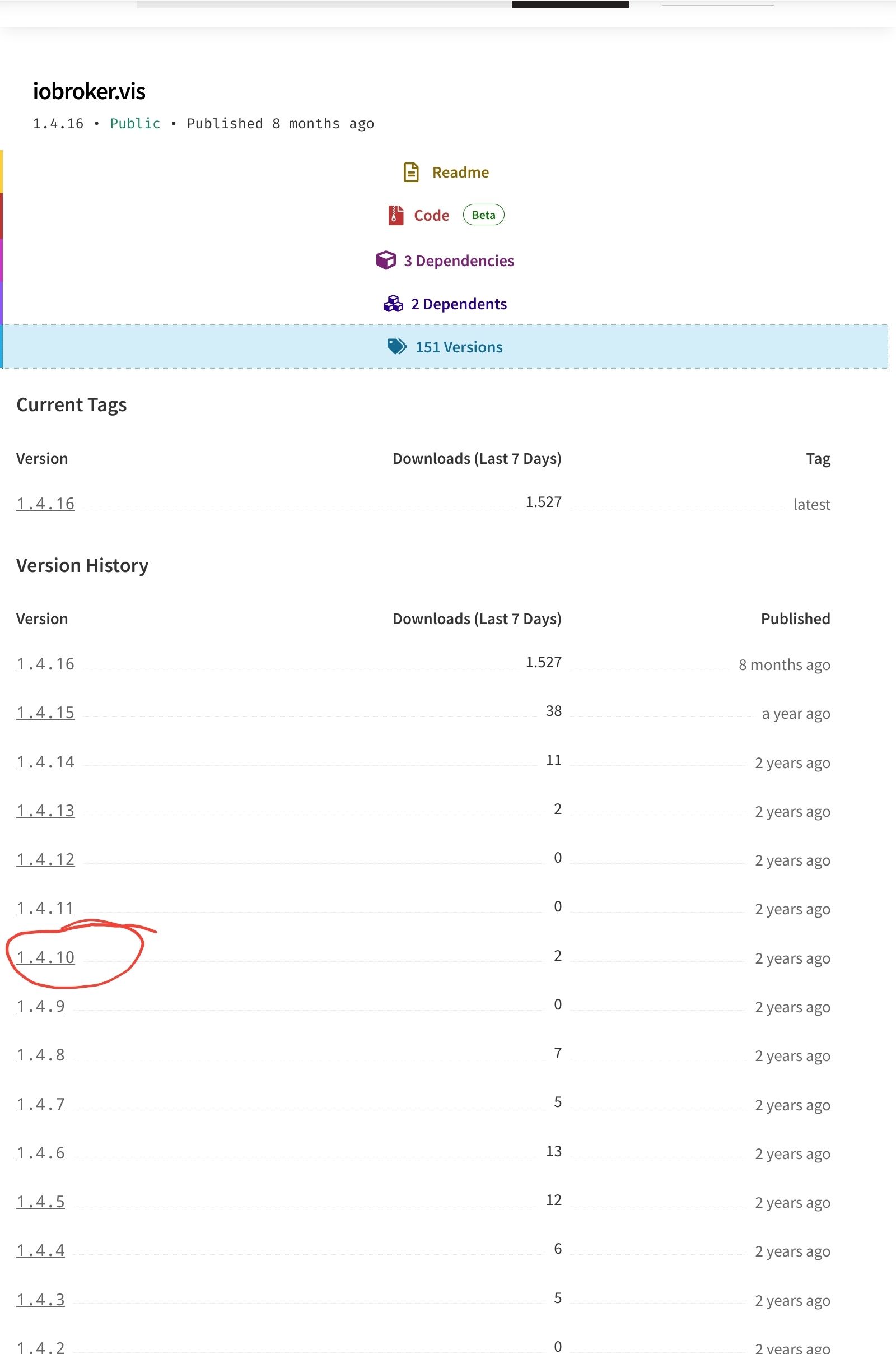
                                        @ljsven Screenshot_20231001-185347_Firefox.jpg
                                        versuch es mal mit einer anderen, niedrigeren Version

                                        wenn alle Stricke reissen (iob fix, reboot, Browsercache)

                                        cd /opt/iobroker 
                                        sudo -H -u iobroker npm install iobroker.vis@1.4.10
                                        

                                        kein Support per PN! - Fragen im Forum stellen -
                                        Benutzt das Voting rechts unten im Beitrag wenn er euch geholfen hat.
                                        Das Forum freut sich über eine Spende. Benutzt dazu den Spendenbutton im Header. Danke!
                                        der Installationsfixer: curl -fsL https://iobroker.net/fix.sh | bash -

                                        L 1 Reply Last reply
                                        0
                                        • HomoranH Homoran

                                          @ljsven Screenshot_20231001-185347_Firefox.jpg
                                          versuch es mal mit einer anderen, niedrigeren Version

                                          wenn alle Stricke reissen (iob fix, reboot, Browsercache)

                                          cd /opt/iobroker 
                                          sudo -H -u iobroker npm install iobroker.vis@1.4.10
                                          
                                          L Offline
                                          L Offline
                                          LJSven
                                          wrote on last edited by
                                          #26

                                          @homoran sagte in kann vis nicht installieren:

                                          sudo -H -u iobroker npm install iobroker.vis@1.4.10

                                          sven@tinkerboard:/opt/iobroker$ iob upgrade vis@1.4.10 
                                          Adapter "vis"            is not installed.
                                          sven@tinkerboard:/opt/iobroker$ iob upgrade vis@1.4.9
                                          Adapter "vis"            is not installed.
                                          sven@tinkerboard:/opt/iobroker$ iob upgrade vis@1.4.8
                                          Adapter "vis"            is not installed.
                                          sven@tinkerboard:/opt/iobroker$ sudo -H -u iobroker npm install iobroker.vis@1.4.10
                                          [sudo] Passwort für sven: 
                                          npm ERR! code 6
                                          npm ERR! path /opt/iobroker/node_modules/iobroker.vis
                                          npm ERR! command failed
                                          npm ERR! command sh -c node main.js --install
                                          
                                          npm ERR! A complete log of this run can be found in: /home/iobroker/.npm/_logs/2023-10-01T20_20_04_494Z-debug-0.log

                                          
                                          
                                          HomoranH 1 Reply Last reply
                                          0
                                          Reply
                                          • Reply as topic
                                          Log in to reply
                                          • Oldest to Newest
                                          • Newest to Oldest
                                          • Most Votes


                                          Support us

                                          ioBroker
                                          Community Adapters
                                          Donate
                                          FAQ Cloud / IOT
                                          HowTo: Node.js-Update
                                          HowTo: Backup/Restore
                                          Downloads
                                          BLOG

                                          258

                                          Online

                                          32.7k

                                          Users

                                          82.5k

                                          Topics

                                          1.3m

                                          Posts
                                          Community
                                          Impressum | Datenschutz-Bestimmungen | Nutzungsbedingungen | Einwilligungseinstellungen
                                          ioBroker Community 2014-2025
                                          logo
                                          • Login

                                          • Don't have an account? Register

                                          • Login or register to search.
                                          • First post
                                            Last post
                                          0
                                          • Home
                                          • Recent
                                          • Tags
                                          • Unread 0
                                          • Categories
                                          • Unreplied
                                          • Popular
                                          • GitHub
                                          • Docu
                                          • Hilfe