Skip to content
  • Home
  • Aktuell
  • Tags
  • 0 Ungelesen 0
  • Kategorien
  • Unreplied
  • Beliebt
  • GitHub
  • Docu
  • Hilfe
Skins
  • Light
  • Brite
  • Cerulean
  • Cosmo
  • Flatly
  • Journal
  • Litera
  • Lumen
  • Lux
  • Materia
  • Minty
  • Morph
  • Pulse
  • Sandstone
  • Simplex
  • Sketchy
  • Spacelab
  • United
  • Yeti
  • Zephyr
  • Dark
  • Cyborg
  • Darkly
  • Quartz
  • Slate
  • Solar
  • Superhero
  • Vapor

  • Standard: (Kein Skin)
  • Kein Skin
Einklappen
ioBroker Logo

Community Forum

donate donate
  1. ioBroker Community Home
  2. Deutsch
  3. ioBroker Allgemein
  4. kann vis nicht installieren

NEWS

  • Jahresrückblick 2025 – unser neuer Blogbeitrag ist online! ✨
    BluefoxB
    Bluefox
    14
    1
    144

  • Neuer Blogbeitrag: Monatsrückblick - Dezember 2025 🎄
    BluefoxB
    Bluefox
    12
    1
    564

  • Weihnachtsangebot 2025! 🎄
    BluefoxB
    Bluefox
    24
    1
    1.7k

kann vis nicht installieren

Geplant Angeheftet Gesperrt Verschoben ioBroker Allgemein
29 Beiträge 3 Kommentatoren 2.8k Aufrufe 1 Watching
  • Älteste zuerst
  • Neuste zuerst
  • Meiste Stimmen
Antworten
  • In einem neuen Thema antworten
Anmelden zum Antworten
Dieses Thema wurde gelöscht. Nur Nutzer mit entsprechenden Rechten können es sehen.
  • HomoranH Homoran

    @thomas-braun sagte in VIS: Keine gültige Lizenz gefunden:

    Schau dir eine Version aus.

    1.14.10

    Thomas BraunT Online
    Thomas BraunT Online
    Thomas Braun
    Most Active
    schrieb am zuletzt editiert von
    #11

    @homoran

    Dann war ich ja knapp dran.

    Linux-Werkzeugkasten:
    https://forum.iobroker.net/topic/42952/der-kleine-iobroker-linux-werkzeugkasten
    NodeJS Fixer Skript:
    https://forum.iobroker.net/topic/68035/iob-node-fix-skript
    iob_diag: curl -sLf -o diag.sh https://iobroker.net/diag.sh && bash diag.sh

    L 1 Antwort Letzte Antwort
    0
    • L LJSven

      @thomas-braun

      /opt/iobroker$ iob install vis@1.14.10
      NPM version: 9.6.7
      Installing iobroker.vis@1.14.10... (System call)
      npm ERR! code ETARGET
      npm ERR! notarget No matching version found for iobroker.vis@1.14.10.
      npm ERR! notarget In most cases you or one of your dependencies are requesting
      npm ERR! notarget a package version that doesn't exist.
      
      npm ERR! A complete log of this run can be found in: /home/iobroker/.npm/_logs/2023-10-01T16_42_14_581Z-debug-0.log
      host.tinkerboard Cannot install iobroker.vis@1.14.10: 1
      
      
      HomoranH Nicht stören
      HomoranH Nicht stören
      Homoran
      Global Moderator Administrators
      schrieb am zuletzt editiert von
      #12

      @ljsven sorry, hab mich von Thomas in die Irre leiten lassen

      1.4.10 natürlich

      kein Support per PN! - Fragen im Forum stellen - es gibt fast nichts, was nicht auch für andere interessant ist.

      Benutzt das Voting rechts unten im Beitrag wenn er euch geholfen hat.

      der Installationsfixer: curl -fsL https://iobroker.net/fix.sh | bash -

      L 1 Antwort Letzte Antwort
      0
      • HomoranH Homoran

        @ljsven sorry, hab mich von Thomas in die Irre leiten lassen

        1.4.10 natürlich

        L Offline
        L Offline
        LJSven
        schrieb am zuletzt editiert von
        #13

        @homoran ich hab

        iob install vis@1.14.0 
        

        und

        iob install vis@1.14.10 
        

        versucht - geht beides nicht

        HomoranH 1 Antwort Letzte Antwort
        0
        • L LJSven

          @homoran ich hab

          iob install vis@1.14.0 
          

          und

          iob install vis@1.14.10 
          

          versucht - geht beides nicht

          HomoranH Nicht stören
          HomoranH Nicht stören
          Homoran
          Global Moderator Administrators
          schrieb am zuletzt editiert von
          #14

          @ljsven sagte in VIS: Keine gültige Lizenz gefunden:

          @homoran ich hab

          iob install vis@1.14.0 
          

          und

          iob install vis@1.14.10 
          

          versucht - geht beides nicht

          und was ist mit

          @homoran sagte in VIS: Keine gültige Lizenz gefunden:

          1.4.10 natürlich

          kein Support per PN! - Fragen im Forum stellen - es gibt fast nichts, was nicht auch für andere interessant ist.

          Benutzt das Voting rechts unten im Beitrag wenn er euch geholfen hat.

          der Installationsfixer: curl -fsL https://iobroker.net/fix.sh | bash -

          L 1 Antwort Letzte Antwort
          0
          • HomoranH Homoran

            @ljsven sagte in VIS: Keine gültige Lizenz gefunden:

            @homoran ich hab

            iob install vis@1.14.0 
            

            und

            iob install vis@1.14.10 
            

            versucht - geht beides nicht

            und was ist mit

            @homoran sagte in VIS: Keine gültige Lizenz gefunden:

            1.4.10 natürlich

            L Offline
            L Offline
            LJSven
            schrieb am zuletzt editiert von
            #15

            @homoran

            sven@tinkerboard:/opt/iobroker$ iob install vis@1.4.10 
            NPM version: 9.6.7
            Installing iobroker.vis@1.4.10... (System call)
            npm ERR! code 6
            npm ERR! path /opt/iobroker/node_modules/iobroker.vis
            npm ERR! command failed
            npm ERR! command sh -c node main.js --install
            
            npm ERR! A complete log of this run can be found in: /home/iobroker/.npm/_logs/2023-10-01T19_10_20_398Z-debug-0.log
            host.tinkerboard Cannot install iobroker.vis@1.4.10: 6
            
            Thomas BraunT HomoranH 2 Antworten Letzte Antwort
            0
            • L LJSven

              @homoran

              sven@tinkerboard:/opt/iobroker$ iob install vis@1.4.10 
              NPM version: 9.6.7
              Installing iobroker.vis@1.4.10... (System call)
              npm ERR! code 6
              npm ERR! path /opt/iobroker/node_modules/iobroker.vis
              npm ERR! command failed
              npm ERR! command sh -c node main.js --install
              
              npm ERR! A complete log of this run can be found in: /home/iobroker/.npm/_logs/2023-10-01T19_10_20_398Z-debug-0.log
              host.tinkerboard Cannot install iobroker.vis@1.4.10: 6
              
              Thomas BraunT Online
              Thomas BraunT Online
              Thomas Braun
              Most Active
              schrieb am zuletzt editiert von
              #16

              @ljsven sagte in VIS: Keine gültige Lizenz gefunden:

              iob upgrade vis@1.4.10
              

              Linux-Werkzeugkasten:
              https://forum.iobroker.net/topic/42952/der-kleine-iobroker-linux-werkzeugkasten
              NodeJS Fixer Skript:
              https://forum.iobroker.net/topic/68035/iob-node-fix-skript
              iob_diag: curl -sLf -o diag.sh https://iobroker.net/diag.sh && bash diag.sh

              HomoranH 1 Antwort Letzte Antwort
              0
              • L LJSven

                @homoran

                sven@tinkerboard:/opt/iobroker$ iob install vis@1.4.10 
                NPM version: 9.6.7
                Installing iobroker.vis@1.4.10... (System call)
                npm ERR! code 6
                npm ERR! path /opt/iobroker/node_modules/iobroker.vis
                npm ERR! command failed
                npm ERR! command sh -c node main.js --install
                
                npm ERR! A complete log of this run can be found in: /home/iobroker/.npm/_logs/2023-10-01T19_10_20_398Z-debug-0.log
                host.tinkerboard Cannot install iobroker.vis@1.4.10: 6
                
                HomoranH Nicht stören
                HomoranH Nicht stören
                Homoran
                Global Moderator Administrators
                schrieb am zuletzt editiert von
                #17

                @ljsven ich hab das mal abgetrennt, hat ja mit der Lizenz nichts zu tun


                was sagt iob diag in der Langfassung?

                kein Support per PN! - Fragen im Forum stellen - es gibt fast nichts, was nicht auch für andere interessant ist.

                Benutzt das Voting rechts unten im Beitrag wenn er euch geholfen hat.

                der Installationsfixer: curl -fsL https://iobroker.net/fix.sh | bash -

                L 1 Antwort Letzte Antwort
                0
                • Thomas BraunT Thomas Braun

                  @ljsven sagte in VIS: Keine gültige Lizenz gefunden:

                  iob upgrade vis@1.4.10
                  
                  HomoranH Nicht stören
                  HomoranH Nicht stören
                  Homoran
                  Global Moderator Administrators
                  schrieb am zuletzt editiert von
                  #18

                  @thomas-braun dann müsste vis ja schon installiert sein, was angeblich nicht geht.

                  das wollte ich erst sehen

                  kein Support per PN! - Fragen im Forum stellen - es gibt fast nichts, was nicht auch für andere interessant ist.

                  Benutzt das Voting rechts unten im Beitrag wenn er euch geholfen hat.

                  der Installationsfixer: curl -fsL https://iobroker.net/fix.sh | bash -

                  1 Antwort Letzte Antwort
                  0
                  • HomoranH Homoran

                    @ljsven ich hab das mal abgetrennt, hat ja mit der Lizenz nichts zu tun


                    was sagt iob diag in der Langfassung?

                    L Offline
                    L Offline
                    LJSven
                    schrieb am zuletzt editiert von
                    #19

                    @homoran

                    Skript v.2023-06-20
                    
                    *** BASE SYSTEM ***
                     Static hostname: tinkerboard
                           Icon name: computer
                          Machine ID: affa5e932b3247b79051b4333d4219f7
                             Boot ID: 3ae4f613cf714e029c51e550b44607a3
                    Operating System: Armbian 23.8.3 bookworm
                              Kernel: Linux 6.1.50-current-rockchip
                        Architecture: arm
                    
                    model name	: ARMv7 Processor rev 1 (v7l)
                    Docker          : false
                    Virtualization  : none
                    Kernel          : armv7l
                    Userland        : armhf
                    
                    Systemuptime and Load:
                     21:24:09 up  6:04,  2 users,  load average: 0.86, 0.50, 0.35
                    CPU threads: 4
                    
                    
                    *** Time and Time Zones ***
                                   Local time: Sun 2023-10-01 21:24:09 CEST
                               Universal time: Sun 2023-10-01 19:24:09 UTC
                                     RTC time: Sun 2023-10-01 19:24:10
                                    Time zone: Europe/Berlin (CEST, +0200)
                    System clock synchronized: yes
                                  NTP service: active
                              RTC in local TZ: no
                    
                    *** User and Groups ***
                    sven
                    /home/sven
                    sven tty disk dialout sudo audio video plugdev games users input netdev bluetooth systemd-journal iobroker
                    
                    *** X-Server-Setup ***
                    X-Server: 	false
                    Desktop: 	
                    Terminal: 	tty
                    Boot Target: 	graphical.target
                    
                    *** MEMORY ***
                                   total        used        free      shared  buff/cache   available
                    Mem:            2.1G        1.4G        358M        2.7M        458M        750M
                    Swap:           1.1G        786K        1.0G
                    Total:          3.2G        1.4G        1.4G
                    
                             2004 M total memory
                             1288 M used memory
                             1279 M active memory
                              261 M inactive memory
                              342 M free memory
                               48 M buffer memory
                              388 M swap cache
                             1002 M total swap
                                0 M used swap
                             1001 M free swap
                    
                    *** FILESYSTEM ***
                    Filesystem     Type      Size  Used Avail Use% Mounted on
                    udev           devtmpfs  990M     0  990M   0% /dev
                    tmpfs          tmpfs     201M  3.1M  198M   2% /run
                    /dev/mmcblk1p1 ext4       57G  3.9G   53G   7% /
                    tmpfs          tmpfs    1003M     0 1003M   0% /dev/shm
                    tmpfs          tmpfs     5.0M     0  5.0M   0% /run/lock
                    tmpfs          tmpfs    1003M     0 1003M   0% /tmp
                    /dev/zram1     ext4       47M  1.9M   42M   5% /var/log
                    tmpfs          tmpfs     201M     0  201M   0% /run/user/1000
                    
                    Messages concerning ext4 filesystem in dmesg:
                    [Sun Oct  1 15:19:25 2023] Kernel command line: earlyprintk root=UUID=5171d208-24a4-446e-a0a7-673ec46f0c58 rootwait rootfstype=ext4 splash=verbose console=ttyS2,115200n8 console=tty1 consoleblank=0 loglevel=1 ubootpart=2215e05a-01 usb-storage.quirks=0x2537:0x1066:u,0x2537:0x1068:u   cgroup_enable=cpuset cgroup_memory=1 cgroup_enable=memory swapaccount=1
                    [Sun Oct  1 15:19:30 2023] EXT4-fs (mmcblk1p1): mounted filesystem with writeback data mode. Quota mode: none.
                    [Sun Oct  1 15:19:32 2023] EXT4-fs (mmcblk1p1): re-mounted. Quota mode: none.
                    [Sun Oct  1 15:19:35 2023] EXT4-fs (zram1): mounted filesystem without journal. Quota mode: none.
                    
                    Show mounted filesystems (real ones only):
                    TARGET         SOURCE                   FSTYPE OPTIONS
                    /              /dev/mmcblk1p1           ext4   rw,noatime,errors=remount-ro,commit=600
                    |-/var/log.hdd /dev/mmcblk1p1[/var/log] ext4   rw,noatime,errors=remount-ro,commit=600
                    `-/var/log     /dev/zram1               ext4   rw,relatime,discard
                    
                    Files in neuralgic directories:
                    
                    /var:
                    385M	/var/
                    226M	/var/cache
                    221M	/var/cache/apt
                    153M	/var/cache/apt/archives
                    151M	/var/lib
                    
                    Archived and active journals take up 6.4M in the file system.
                    
                    /opt/iobroker/backups:
                    24M	/opt/iobroker/backups/
                    
                    /opt/iobroker/iobroker-data:
                    395M	/opt/iobroker/iobroker-data/
                    305M	/opt/iobroker/iobroker-data/files
                    52M	/opt/iobroker/iobroker-data/files/javascript.admin
                    34M	/opt/iobroker/iobroker-data/files/javascript.admin/static
                    33M	/opt/iobroker/iobroker-data/files/javascript.admin/static/js
                    
                    The five largest files in iobroker-data are:
                    44M	/opt/iobroker/iobroker-data/objects.jsonl
                    21M	/opt/iobroker/iobroker-data/files/web.admin/static/js/main.edf7552a.js.map
                    20M	/opt/iobroker/iobroker-data/states.jsonl
                    19M	/opt/iobroker/iobroker-data/files/iot.admin/static/js/main.2975a411.js.map
                    8.9M	/opt/iobroker/iobroker-data/files/scenes.admin/static/js/2.7de3299d.chunk.js.map
                    
                    *** NodeJS-Installation ***
                    
                    /usr/bin/nodejs 	v18.17.1
                    /usr/bin/node 		v18.17.1
                    /usr/bin/npm 		9.6.7
                    /usr/bin/npx 		9.6.7
                    
                    
                    nodejs:
                      Installed: 18.17.1-deb-1nodesource1
                      Candidate: 18.17.1-deb-1nodesource1
                      Version table:
                     *** 18.17.1-deb-1nodesource1 500
                            500 https://deb.nodesource.com/node_18.x bookworm/main armhf Packages
                            100 /var/lib/dpkg/status
                         18.13.0+dfsg1-1 500
                            500 http://deb.debian.org/debian bookworm/main armhf Packages
                    
                    Temp directories causing npm8 problem: 0
                    No problems detected
                    
                    Errors in npm tree: 0
                    
                    *** ioBroker-Installation ***
                    
                    ioBroker Status
                    iobroker is running on this host.
                    
                    
                    Objects type: jsonl
                    States  type: jsonl
                    
                    No configuration change needed.
                    
                    
                    Multihost discovery server: disabled
                    Discovery authentication:   enabled
                    Persistent activation:      disabled
                    Objects:                    jsonl on 0.0.0.0
                    States:                     jsonl on 0.0.0.0
                    
                    Core adapters versions
                    js-controller: 	5.0.12
                    admin: 		6.10.1
                    javascript: 	7.1.4
                    
                    Adapters from github: 	1
                    
                    Adapter State
                    + system.adapter.admin.0                  : admin                 : tinkerboard                              -  enabled, port: 8081, bind: 0.0.0.0, run as: admin
                    + system.adapter.alexa2.0                 : alexa2                : tinkerboard                              -  enabled
                      system.adapter.asterisk.0               : asterisk              : raspberrypi                              - disabled, port: 5038
                    + system.adapter.backitup.0               : backitup              : tinkerboard                              -  enabled
                      system.adapter.coronavirus-statistics.0 : coronavirus-statistics: raspberryzeropi                          - disabled
                      system.adapter.daswetter.0              : daswetter             : tinkerboard                              - disabled
                      system.adapter.deconz.0                 : deconz                : tinkerboard                              - disabled, port: 80
                      system.adapter.device-reminder.0        : device-reminder       : tinkerboard                              - disabled
                      system.adapter.discovery.0              : discovery             : tinkerboard                              - disabled
                      system.adapter.email.0                  : email                 : raspberrypi                              - disabled
                      system.adapter.enigma2.0                : enigma2               : tinkerboard                              - disabled
                      system.adapter.enigma2.1                : enigma2               : tinkerboard                              - disabled
                      system.adapter.flot.0                   : flot                  : tinkerboard                              - disabled
                      system.adapter.fritzdect.0              : fritzdect             : raspberrypi                              - disabled
                    + system.adapter.geofency.0               : geofency              : raspberrypi                              -  enabled, port: 7999, bind: 0.0.0.0
                      system.adapter.history.0                : history               : tinkerboard                              - disabled
                      system.adapter.ical.0                   : ical                  : tinkerboard                              -  enabled
                      system.adapter.icons-icons8.0           : icons-icons8          : tinkerboard                              - disabled
                      system.adapter.icons-material-png.0     : icons-material-png    : tinkerboard                              - disabled
                      system.adapter.icons-mfd-png.0          : icons-mfd-png         : tinkerboard                              - disabled
                      system.adapter.icons-mfd-svg.0          : icons-mfd-svg         : tinkerboard                              - disabled
                      system.adapter.info.0                   : info                  : tinkerboard                              - disabled
                    + system.adapter.iot.0                    : iot                   : tinkerboard                              -  enabled
                      system.adapter.iqontrol.0               : iqontrol              : tinkerboard                              - disabled
                    + system.adapter.javascript.0             : javascript            : tinkerboard                              -  enabled
                      system.adapter.lgtv11.0                 : lgtv11                : tinkerboard                              - disabled, port: 8080
                    + system.adapter.linkeddevices.0          : linkeddevices         : tinkerboard                              -  enabled
                    + system.adapter.mihome.0                 : mihome                : tinkerboard                              -  enabled, port: 9898, bind: 0.0.0.0
                    + system.adapter.modbus.0                 : modbus                : tinkerboard                              -  enabled
                    + system.adapter.mqtt.0                   : mqtt                  : tinkerboard                              -  enabled, port: 1886, bind: 0.0.0.0
                      system.adapter.phantomjs.0              : phantomjs             : tinkerboard                              - disabled
                      system.adapter.pvforecast.0             : pvforecast            : tinkerboard                              - disabled
                      system.adapter.radar2.0                 : radar2                : raspberryzeropi                          - disabled
                      system.adapter.rpi2.0                   : rpi2                  : raspberrypi                              - disabled
                    + system.adapter.scenes.0                 : scenes                : tinkerboard                              -  enabled
                    + system.adapter.shelly.0                 : shelly                : tinkerboard                              -  enabled, port: 1888, bind: 0.0.0.0
                    + system.adapter.shelly.1                 : shelly                : tinkerboard                              -  enabled, port: 1888, bind: 0.0.0.0
                    + system.adapter.simple-api.0             : simple-api            : tinkerboard                              -  enabled, port: 8087, bind: 0.0.0.0, run as: admin
                      system.adapter.smartmeter.0             : smartmeter            : raspberrypi                              - disabled
                      system.adapter.smartmeter.1             : smartmeter            : raspberrypi                              - disabled
                      system.adapter.smartmeter.2             : smartmeter            : raspberrypi                              - disabled
                    + system.adapter.smartmeter.3             : smartmeter            : raspberrypi                              -  enabled
                    + system.adapter.smartmeter.4             : smartmeter            : raspberrypi                              -  enabled
                    + system.adapter.sonoff.0                 : sonoff                : tinkerboard                              -  enabled, port: 1883, bind: 0.0.0.0
                    + system.adapter.sql.0                    : sql                   : tinkerboard                              -  enabled, port: 3306
                      system.adapter.tankerkoenig.0           : tankerkoenig          : tinkerboard                              - disabled
                    + system.adapter.telegram.0               : telegram              : tinkerboard                              -  enabled, port: 8443, bind: 0.0.0.0
                    + system.adapter.text2command.0           : text2command          : raspberrypi                              -  enabled
                      system.adapter.tinker.0                 : tinker                : tinkerboard                              - disabled
                      system.adapter.tr-064.0                 : tr-064                : tinkerboard                              - disabled
                    + system.adapter.trashschedule.0          : trashschedule         : raspberrypi                              -  enabled
                      system.adapter.tuya.0                   : tuya                  : raspberrypi                              - disabled
                      system.adapter.vis-google-fonts.0       : vis-google-fonts      : tinkerboard                              - disabled
                      system.adapter.vis-history.0            : vis-history           : tinkerboard                              - disabled
                      system.adapter.vis-hqwidgets.0          : vis-hqwidgets         : tinkerboard                              - disabled
                      system.adapter.vis-icontwo.0            : vis-icontwo           : tinkerboard                              - disabled
                      system.adapter.vis-metro.0              : vis-metro             : tinkerboard                              - disabled
                      system.adapter.vis-rgraph.0             : vis-rgraph            : tinkerboard                              - disabled
                      system.adapter.vis.0                    : vis                   : tinkerboard                              -  enabled
                    + system.adapter.web.0                    : web                   : tinkerboard                              -  enabled, port: 8082, bind: 0.0.0.0, run as: admin
                      system.adapter.wled.0                   : wled                  : tinkerboard                              - disabled
                      system.adapter.worx.0                   : worx                  : raspberrypi                              - disabled
                      system.adapter.yahka.0                  : yahka                 : tinkerboard                              - disabled
                    + system.adapter.zigbee.0                 : zigbee                : tinkerboard                              -  enabled, port: /dev/ttyACM0
                    
                    + instance is alive
                    
                    Enabled adapters with bindings
                    + system.adapter.admin.0                  : admin                 : tinkerboard                              -  enabled, port: 8081, bind: 0.0.0.0, run as: admin
                    + system.adapter.geofency.0               : geofency              : raspberrypi                              -  enabled, port: 7999, bind: 0.0.0.0
                    + system.adapter.mihome.0                 : mihome                : tinkerboard                              -  enabled, port: 9898, bind: 0.0.0.0
                    + system.adapter.mqtt.0                   : mqtt                  : tinkerboard                              -  enabled, port: 1886, bind: 0.0.0.0
                    + system.adapter.shelly.0                 : shelly                : tinkerboard                              -  enabled, port: 1888, bind: 0.0.0.0
                    + system.adapter.shelly.1                 : shelly                : tinkerboard                              -  enabled, port: 1888, bind: 0.0.0.0
                    + system.adapter.simple-api.0             : simple-api            : tinkerboard                              -  enabled, port: 8087, bind: 0.0.0.0, run as: admin
                    + system.adapter.sonoff.0                 : sonoff                : tinkerboard                              -  enabled, port: 1883, bind: 0.0.0.0
                    + system.adapter.sql.0                    : sql                   : tinkerboard                              -  enabled, port: 3306
                    + system.adapter.telegram.0               : telegram              : tinkerboard                              -  enabled, port: 8443, bind: 0.0.0.0
                    + system.adapter.web.0                    : web                   : tinkerboard                              -  enabled, port: 8082, bind: 0.0.0.0, run as: admin
                    + system.adapter.zigbee.0                 : zigbee                : tinkerboard                              -  enabled, port: /dev/ttyACM0
                    
                    ioBroker-Repositories
                    Stable (default): http://download.iobroker.net/sources-dist.json
                    Beta (latest) : http://download.iobroker.net/sources-dist-latest.json
                    
                    Active repo(s): Stable (default)
                    
                    Installed ioBroker-Instances
                    Used repository: Stable (default)
                    Adapter    "admin"        : 6.10.1   , installed 6.10.1
                    Adapter    "alexa2"       : 3.25.2   , installed 3.25.2
                    Adapter    "backitup"     : 2.8.1    , installed 2.8.1
                    Adapter    "daswetter"    : 3.1.10   , installed 3.1.10
                    Adapter    "deconz"       : 1.3.21   , installed 2.0.5
                    Adapter    "device-reminder": 1.2.9  , installed 1.2.9
                    Adapter    "discovery"    : 3.1.0    , installed 3.1.0
                    Adapter    "flot"         : 1.12.0   , installed 1.12.0
                    Adapter    "history"      : 2.2.6    , installed 2.2.6
                    Adapter    "ical"         : 1.13.3   , installed 1.13.3
                    Adapter    "icons-icons8" : 0.0.1    , installed 0.0.1
                    Adapter    "icons-material-png": 0.1.0, installed 0.1.0
                    Adapter    "icons-mfd-png": 1.1.0    , installed 1.1.0
                    Adapter    "icons-mfd-svg": 1.1.0    , installed 1.1.0
                    Adapter    "info"         : 2.0.0    , installed 2.0.0
                    Adapter    "iot"          : 1.14.5   , installed 1.14.5
                    Adapter    "iqontrol"     : 2.3.0    , installed 2.3.0
                    Adapter    "javascript"   : 7.1.4    , installed 7.1.4
                    Controller "js-controller": 5.0.12   , installed 5.0.12
                    Adapter    "lgtv11"       : 1.0.5    , installed 1.0.5
                    Adapter    "linkeddevices": 1.5.5    , installed 1.5.5
                    Adapter    "mihome"       : 1.4.0    , installed 1.4.0
                    Adapter    "modbus"       : 5.0.11   , installed 5.0.11
                    Adapter    "mqtt"         : 4.1.1    , installed 4.1.1
                    Adapter    "pvforecast"   : 2.7.1    , installed 2.7.1
                    Adapter    "scenes"       : 2.3.9    , installed 2.3.9
                    Adapter    "shelly"       : 6.4.1    , installed 6.4.1
                    Adapter    "simple-api"   : 2.7.2    , installed 2.7.2
                    Adapter    "socketio"     : 6.5.5    , installed 6.5.5
                    Adapter    "sonoff"       : 2.5.3    , installed 2.5.3
                    Adapter    "sql"          : 2.2.0    , installed 2.2.0
                    Adapter    "tankerkoenig" : 3.3.7    , installed 3.3.7
                    Adapter    "telegram"     : 1.16.0   , installed 1.16.0
                    Adapter    "tinker"       : 1.2.0    , installed 1.2.0
                    Adapter    "tr-064"       : 4.2.18   , installed 4.2.18
                    Adapter    "vis-google-fonts": 1.0.4 , installed 1.0.4
                    Adapter    "vis-history"  : 1.0.0    , installed 1.0.0
                    Adapter    "vis-hqwidgets": 1.4.0    , installed 1.4.0
                    Adapter    "vis-icontwo"  : 0.96.0   , installed 0.96.0
                    Adapter    "vis-metro"    : 1.2.0    , installed 1.2.0
                    Adapter    "vis-rgraph"   : 0.0.2    , installed 0.0.2
                    Adapter    "web"          : 6.1.2    , installed 6.1.2
                    Adapter    "wled"         : 0.6.7    , installed 0.6.7
                    Adapter    "ws"           : 2.5.5    , installed 2.5.5
                    Adapter    "yahka"        : 1.0.3    , installed 1.0.3
                    Adapter    "zigbee"       : 1.8.23   , installed 1.8.23
                    
                    Objects and States
                    Please stand by - This may take a while
                    Objects: 	14809
                    States: 	12780
                    
                    *** OS-Repositories and Updates ***
                    Hit:1 http://security.debian.org bookworm-security InRelease
                    Hit:2 http://deb.debian.org/debian bookworm InRelease
                    Hit:3 http://deb.debian.org/debian bookworm-updates InRelease
                    Hit:4 http://deb.debian.org/debian bookworm-backports InRelease
                    Hit:6 https://deb.nodesource.com/node_18.x bookworm InRelease
                    Hit:5 http://mirror.vinehost.net/armbian/apt bookworm InRelease
                    Reading package lists...
                    Pending Updates: 0
                    
                    *** Listening Ports ***
                    Active Internet connections (only servers)
                    Proto Recv-Q Send-Q Local Address           Foreign Address         State       User       Inode      PID/Program name    
                    tcp        0      0 0.0.0.0:111             0.0.0.0:*               LISTEN      0          17831      1/init              
                    tcp        0      0 0.0.0.0:22              0.0.0.0:*               LISTEN      0          21509      1081/sshd: /usr/sbi 
                    tcp        0      0 0.0.0.0:1888            0.0.0.0:*               LISTEN      1001       23782      1560/io.shelly.1    
                    tcp        0      0 0.0.0.0:1886            0.0.0.0:*               LISTEN      1001       21271      1526/io.mqtt.0      
                    tcp        0      0 0.0.0.0:1883            0.0.0.0:*               LISTEN      1001       23878      1598/io.sonoff.0    
                    tcp        0      0 0.0.0.0:9000            0.0.0.0:*               LISTEN      1001       22543      961/iobroker.js-con 
                    tcp        0      0 0.0.0.0:9001            0.0.0.0:*               LISTEN      1001       22539      961/iobroker.js-con 
                    tcp6       0      0 :::111                  :::*                    LISTEN      0          17833      1/init              
                    tcp6       0      0 :::22                   :::*                    LISTEN      0          21511      1081/sshd: /usr/sbi 
                    tcp6       0      0 :::1884                 :::*                    LISTEN      1001       23855      1331/io.javascript. 
                    tcp6       0      0 :::8087                 :::*                    LISTEN      1001       127843     2507/io.simple-api. 
                    tcp6       0      0 :::8081                 :::*                    LISTEN      1001       21745      1323/io.admin.0     
                    tcp6       0      0 :::8082                 :::*                    LISTEN      1001       22018      1662/io.web.0       
                    udp        0      0 0.0.0.0:111             0.0.0.0:*                           0          17832      1/init              
                    udp        0      0 0.0.0.0:9898            0.0.0.0:*                           1001       21207      1473/io.mihome.0    
                    udp        0      0 127.0.0.1:323           0.0.0.0:*                           0          18367      984/chronyd         
                    udp        0      0 0.0.0.0:5683            0.0.0.0:*                           1001       22845      1541/io.shelly.0    
                    udp6       0      0 :::111                  :::*                                0          19458      1/init              
                    udp6       0      0 ::1:323                 :::*                                0          18368      984/chronyd         
                    udp6       0      0 fe80::79ed:e114:5c1:546 :::*                                0          22533      782/NetworkManager  
                    
                    *** Log File - Last 25 Lines ***
                    
                    2023-10-01 21:12:08.633  - info: vis.0 (4034) vis license is OK.
                    2023-10-01 21:12:09.054  - error: vis.0 (4034) Unhandled promise rejection. This error originated either by throwing inside of an async function without a catch block, or by rejecting a promise which was not handled with .catch().
                    2023-10-01 21:12:09.055  - error: vis.0 (4034) unhandled promise rejection: Not exists
                    2023-10-01 21:12:09.058  - error: vis.0 (4034) Error: Not exists
                        at ObjectsInRedisClient._readFile (/opt/iobroker/node_modules/@iobroker/db-objects-redis/build/lib/objects/objectsInRedisClient.js:854:19)
                        at Immediate.<anonymous> (/opt/iobroker/node_modules/@iobroker/db-objects-redis/build/lib/objects/objectsInRedisClient.js:891:59)
                        at process.processImmediate (node:internal/timers:478:21)
                    2023-10-01 21:12:09.059  - error: vis.0 (4034) Not exists
                    2023-10-01 21:12:09.566  - info: vis.0 (4034) terminating
                    2023-10-01 21:12:09.568  - warn: vis.0 (4034) Terminated (UNCAUGHT_EXCEPTION): Without reason
                    2023-10-01 21:15:00.073  - info: host.tinkerboard instance system.adapter.ical.0 started with pid 4046
                    2023-10-01 21:15:13.374  - info: host.tinkerboard instance system.adapter.ical.0 terminated with code 0 (NO_ERROR)
                    2023-10-01 21:18:44.560  - info: javascript.0 (1331) script.js.common.Sonstige.EG_Aussenbeleuchtung_Haustuer: HT - Beleuchtung über BWM
                    2023-10-01 21:23:36.091  - info: vis.0 (4140) Sets unsupported
                    2023-10-01 21:23:36.873  - info: vis.0 (4140) starting. Version 1.4.10 in /opt/iobroker/node_modules/iobroker.vis, node: v18.17.1, js-controller: 5.0.12
                    2023-10-01 21:23:37.196  - info: vis.0 (4140) vis license is OK.
                    2023-10-01 21:23:37.599  - error: vis.0 (4140) Unhandled promise rejection. This error originated either by throwing inside of an async function without a catch block, or by rejecting a promise which was not handled with .catch().
                    2023-10-01 21:23:37.600  - error: vis.0 (4140) unhandled promise rejection: Not exists
                    2023-10-01 21:23:37.603  - error: vis.0 (4140) Error: Not exists
                        at ObjectsInRedisClient._readFile (/opt/iobroker/node_modules/@iobroker/db-objects-redis/build/lib/objects/objectsInRedisClient.js:854:19)
                        at Immediate.<anonymous> (/opt/iobroker/node_modules/@iobroker/db-objects-redis/build/lib/objects/objectsInRedisClient.js:891:59)
                        at process.processImmediate (node:internal/timers:478:21)
                    2023-10-01 21:23:37.604  - error: vis.0 (4140) Not exists
                    2023-10-01 21:23:38.111  - info: vis.0 (4140) terminating
                    2023-10-01 21:23:38.112  - warn: vis.0 (4140) Terminated (UNCAUGHT_EXCEPTION): Without reason
                    
                    
                    HomoranH 1 Antwort Letzte Antwort
                    0
                    • L LJSven

                      @homoran

                      Skript v.2023-06-20
                      
                      *** BASE SYSTEM ***
                       Static hostname: tinkerboard
                             Icon name: computer
                            Machine ID: affa5e932b3247b79051b4333d4219f7
                               Boot ID: 3ae4f613cf714e029c51e550b44607a3
                      Operating System: Armbian 23.8.3 bookworm
                                Kernel: Linux 6.1.50-current-rockchip
                          Architecture: arm
                      
                      model name	: ARMv7 Processor rev 1 (v7l)
                      Docker          : false
                      Virtualization  : none
                      Kernel          : armv7l
                      Userland        : armhf
                      
                      Systemuptime and Load:
                       21:24:09 up  6:04,  2 users,  load average: 0.86, 0.50, 0.35
                      CPU threads: 4
                      
                      
                      *** Time and Time Zones ***
                                     Local time: Sun 2023-10-01 21:24:09 CEST
                                 Universal time: Sun 2023-10-01 19:24:09 UTC
                                       RTC time: Sun 2023-10-01 19:24:10
                                      Time zone: Europe/Berlin (CEST, +0200)
                      System clock synchronized: yes
                                    NTP service: active
                                RTC in local TZ: no
                      
                      *** User and Groups ***
                      sven
                      /home/sven
                      sven tty disk dialout sudo audio video plugdev games users input netdev bluetooth systemd-journal iobroker
                      
                      *** X-Server-Setup ***
                      X-Server: 	false
                      Desktop: 	
                      Terminal: 	tty
                      Boot Target: 	graphical.target
                      
                      *** MEMORY ***
                                     total        used        free      shared  buff/cache   available
                      Mem:            2.1G        1.4G        358M        2.7M        458M        750M
                      Swap:           1.1G        786K        1.0G
                      Total:          3.2G        1.4G        1.4G
                      
                               2004 M total memory
                               1288 M used memory
                               1279 M active memory
                                261 M inactive memory
                                342 M free memory
                                 48 M buffer memory
                                388 M swap cache
                               1002 M total swap
                                  0 M used swap
                               1001 M free swap
                      
                      *** FILESYSTEM ***
                      Filesystem     Type      Size  Used Avail Use% Mounted on
                      udev           devtmpfs  990M     0  990M   0% /dev
                      tmpfs          tmpfs     201M  3.1M  198M   2% /run
                      /dev/mmcblk1p1 ext4       57G  3.9G   53G   7% /
                      tmpfs          tmpfs    1003M     0 1003M   0% /dev/shm
                      tmpfs          tmpfs     5.0M     0  5.0M   0% /run/lock
                      tmpfs          tmpfs    1003M     0 1003M   0% /tmp
                      /dev/zram1     ext4       47M  1.9M   42M   5% /var/log
                      tmpfs          tmpfs     201M     0  201M   0% /run/user/1000
                      
                      Messages concerning ext4 filesystem in dmesg:
                      [Sun Oct  1 15:19:25 2023] Kernel command line: earlyprintk root=UUID=5171d208-24a4-446e-a0a7-673ec46f0c58 rootwait rootfstype=ext4 splash=verbose console=ttyS2,115200n8 console=tty1 consoleblank=0 loglevel=1 ubootpart=2215e05a-01 usb-storage.quirks=0x2537:0x1066:u,0x2537:0x1068:u   cgroup_enable=cpuset cgroup_memory=1 cgroup_enable=memory swapaccount=1
                      [Sun Oct  1 15:19:30 2023] EXT4-fs (mmcblk1p1): mounted filesystem with writeback data mode. Quota mode: none.
                      [Sun Oct  1 15:19:32 2023] EXT4-fs (mmcblk1p1): re-mounted. Quota mode: none.
                      [Sun Oct  1 15:19:35 2023] EXT4-fs (zram1): mounted filesystem without journal. Quota mode: none.
                      
                      Show mounted filesystems (real ones only):
                      TARGET         SOURCE                   FSTYPE OPTIONS
                      /              /dev/mmcblk1p1           ext4   rw,noatime,errors=remount-ro,commit=600
                      |-/var/log.hdd /dev/mmcblk1p1[/var/log] ext4   rw,noatime,errors=remount-ro,commit=600
                      `-/var/log     /dev/zram1               ext4   rw,relatime,discard
                      
                      Files in neuralgic directories:
                      
                      /var:
                      385M	/var/
                      226M	/var/cache
                      221M	/var/cache/apt
                      153M	/var/cache/apt/archives
                      151M	/var/lib
                      
                      Archived and active journals take up 6.4M in the file system.
                      
                      /opt/iobroker/backups:
                      24M	/opt/iobroker/backups/
                      
                      /opt/iobroker/iobroker-data:
                      395M	/opt/iobroker/iobroker-data/
                      305M	/opt/iobroker/iobroker-data/files
                      52M	/opt/iobroker/iobroker-data/files/javascript.admin
                      34M	/opt/iobroker/iobroker-data/files/javascript.admin/static
                      33M	/opt/iobroker/iobroker-data/files/javascript.admin/static/js
                      
                      The five largest files in iobroker-data are:
                      44M	/opt/iobroker/iobroker-data/objects.jsonl
                      21M	/opt/iobroker/iobroker-data/files/web.admin/static/js/main.edf7552a.js.map
                      20M	/opt/iobroker/iobroker-data/states.jsonl
                      19M	/opt/iobroker/iobroker-data/files/iot.admin/static/js/main.2975a411.js.map
                      8.9M	/opt/iobroker/iobroker-data/files/scenes.admin/static/js/2.7de3299d.chunk.js.map
                      
                      *** NodeJS-Installation ***
                      
                      /usr/bin/nodejs 	v18.17.1
                      /usr/bin/node 		v18.17.1
                      /usr/bin/npm 		9.6.7
                      /usr/bin/npx 		9.6.7
                      
                      
                      nodejs:
                        Installed: 18.17.1-deb-1nodesource1
                        Candidate: 18.17.1-deb-1nodesource1
                        Version table:
                       *** 18.17.1-deb-1nodesource1 500
                              500 https://deb.nodesource.com/node_18.x bookworm/main armhf Packages
                              100 /var/lib/dpkg/status
                           18.13.0+dfsg1-1 500
                              500 http://deb.debian.org/debian bookworm/main armhf Packages
                      
                      Temp directories causing npm8 problem: 0
                      No problems detected
                      
                      Errors in npm tree: 0
                      
                      *** ioBroker-Installation ***
                      
                      ioBroker Status
                      iobroker is running on this host.
                      
                      
                      Objects type: jsonl
                      States  type: jsonl
                      
                      No configuration change needed.
                      
                      
                      Multihost discovery server: disabled
                      Discovery authentication:   enabled
                      Persistent activation:      disabled
                      Objects:                    jsonl on 0.0.0.0
                      States:                     jsonl on 0.0.0.0
                      
                      Core adapters versions
                      js-controller: 	5.0.12
                      admin: 		6.10.1
                      javascript: 	7.1.4
                      
                      Adapters from github: 	1
                      
                      Adapter State
                      + system.adapter.admin.0                  : admin                 : tinkerboard                              -  enabled, port: 8081, bind: 0.0.0.0, run as: admin
                      + system.adapter.alexa2.0                 : alexa2                : tinkerboard                              -  enabled
                        system.adapter.asterisk.0               : asterisk              : raspberrypi                              - disabled, port: 5038
                      + system.adapter.backitup.0               : backitup              : tinkerboard                              -  enabled
                        system.adapter.coronavirus-statistics.0 : coronavirus-statistics: raspberryzeropi                          - disabled
                        system.adapter.daswetter.0              : daswetter             : tinkerboard                              - disabled
                        system.adapter.deconz.0                 : deconz                : tinkerboard                              - disabled, port: 80
                        system.adapter.device-reminder.0        : device-reminder       : tinkerboard                              - disabled
                        system.adapter.discovery.0              : discovery             : tinkerboard                              - disabled
                        system.adapter.email.0                  : email                 : raspberrypi                              - disabled
                        system.adapter.enigma2.0                : enigma2               : tinkerboard                              - disabled
                        system.adapter.enigma2.1                : enigma2               : tinkerboard                              - disabled
                        system.adapter.flot.0                   : flot                  : tinkerboard                              - disabled
                        system.adapter.fritzdect.0              : fritzdect             : raspberrypi                              - disabled
                      + system.adapter.geofency.0               : geofency              : raspberrypi                              -  enabled, port: 7999, bind: 0.0.0.0
                        system.adapter.history.0                : history               : tinkerboard                              - disabled
                        system.adapter.ical.0                   : ical                  : tinkerboard                              -  enabled
                        system.adapter.icons-icons8.0           : icons-icons8          : tinkerboard                              - disabled
                        system.adapter.icons-material-png.0     : icons-material-png    : tinkerboard                              - disabled
                        system.adapter.icons-mfd-png.0          : icons-mfd-png         : tinkerboard                              - disabled
                        system.adapter.icons-mfd-svg.0          : icons-mfd-svg         : tinkerboard                              - disabled
                        system.adapter.info.0                   : info                  : tinkerboard                              - disabled
                      + system.adapter.iot.0                    : iot                   : tinkerboard                              -  enabled
                        system.adapter.iqontrol.0               : iqontrol              : tinkerboard                              - disabled
                      + system.adapter.javascript.0             : javascript            : tinkerboard                              -  enabled
                        system.adapter.lgtv11.0                 : lgtv11                : tinkerboard                              - disabled, port: 8080
                      + system.adapter.linkeddevices.0          : linkeddevices         : tinkerboard                              -  enabled
                      + system.adapter.mihome.0                 : mihome                : tinkerboard                              -  enabled, port: 9898, bind: 0.0.0.0
                      + system.adapter.modbus.0                 : modbus                : tinkerboard                              -  enabled
                      + system.adapter.mqtt.0                   : mqtt                  : tinkerboard                              -  enabled, port: 1886, bind: 0.0.0.0
                        system.adapter.phantomjs.0              : phantomjs             : tinkerboard                              - disabled
                        system.adapter.pvforecast.0             : pvforecast            : tinkerboard                              - disabled
                        system.adapter.radar2.0                 : radar2                : raspberryzeropi                          - disabled
                        system.adapter.rpi2.0                   : rpi2                  : raspberrypi                              - disabled
                      + system.adapter.scenes.0                 : scenes                : tinkerboard                              -  enabled
                      + system.adapter.shelly.0                 : shelly                : tinkerboard                              -  enabled, port: 1888, bind: 0.0.0.0
                      + system.adapter.shelly.1                 : shelly                : tinkerboard                              -  enabled, port: 1888, bind: 0.0.0.0
                      + system.adapter.simple-api.0             : simple-api            : tinkerboard                              -  enabled, port: 8087, bind: 0.0.0.0, run as: admin
                        system.adapter.smartmeter.0             : smartmeter            : raspberrypi                              - disabled
                        system.adapter.smartmeter.1             : smartmeter            : raspberrypi                              - disabled
                        system.adapter.smartmeter.2             : smartmeter            : raspberrypi                              - disabled
                      + system.adapter.smartmeter.3             : smartmeter            : raspberrypi                              -  enabled
                      + system.adapter.smartmeter.4             : smartmeter            : raspberrypi                              -  enabled
                      + system.adapter.sonoff.0                 : sonoff                : tinkerboard                              -  enabled, port: 1883, bind: 0.0.0.0
                      + system.adapter.sql.0                    : sql                   : tinkerboard                              -  enabled, port: 3306
                        system.adapter.tankerkoenig.0           : tankerkoenig          : tinkerboard                              - disabled
                      + system.adapter.telegram.0               : telegram              : tinkerboard                              -  enabled, port: 8443, bind: 0.0.0.0
                      + system.adapter.text2command.0           : text2command          : raspberrypi                              -  enabled
                        system.adapter.tinker.0                 : tinker                : tinkerboard                              - disabled
                        system.adapter.tr-064.0                 : tr-064                : tinkerboard                              - disabled
                      + system.adapter.trashschedule.0          : trashschedule         : raspberrypi                              -  enabled
                        system.adapter.tuya.0                   : tuya                  : raspberrypi                              - disabled
                        system.adapter.vis-google-fonts.0       : vis-google-fonts      : tinkerboard                              - disabled
                        system.adapter.vis-history.0            : vis-history           : tinkerboard                              - disabled
                        system.adapter.vis-hqwidgets.0          : vis-hqwidgets         : tinkerboard                              - disabled
                        system.adapter.vis-icontwo.0            : vis-icontwo           : tinkerboard                              - disabled
                        system.adapter.vis-metro.0              : vis-metro             : tinkerboard                              - disabled
                        system.adapter.vis-rgraph.0             : vis-rgraph            : tinkerboard                              - disabled
                        system.adapter.vis.0                    : vis                   : tinkerboard                              -  enabled
                      + system.adapter.web.0                    : web                   : tinkerboard                              -  enabled, port: 8082, bind: 0.0.0.0, run as: admin
                        system.adapter.wled.0                   : wled                  : tinkerboard                              - disabled
                        system.adapter.worx.0                   : worx                  : raspberrypi                              - disabled
                        system.adapter.yahka.0                  : yahka                 : tinkerboard                              - disabled
                      + system.adapter.zigbee.0                 : zigbee                : tinkerboard                              -  enabled, port: /dev/ttyACM0
                      
                      + instance is alive
                      
                      Enabled adapters with bindings
                      + system.adapter.admin.0                  : admin                 : tinkerboard                              -  enabled, port: 8081, bind: 0.0.0.0, run as: admin
                      + system.adapter.geofency.0               : geofency              : raspberrypi                              -  enabled, port: 7999, bind: 0.0.0.0
                      + system.adapter.mihome.0                 : mihome                : tinkerboard                              -  enabled, port: 9898, bind: 0.0.0.0
                      + system.adapter.mqtt.0                   : mqtt                  : tinkerboard                              -  enabled, port: 1886, bind: 0.0.0.0
                      + system.adapter.shelly.0                 : shelly                : tinkerboard                              -  enabled, port: 1888, bind: 0.0.0.0
                      + system.adapter.shelly.1                 : shelly                : tinkerboard                              -  enabled, port: 1888, bind: 0.0.0.0
                      + system.adapter.simple-api.0             : simple-api            : tinkerboard                              -  enabled, port: 8087, bind: 0.0.0.0, run as: admin
                      + system.adapter.sonoff.0                 : sonoff                : tinkerboard                              -  enabled, port: 1883, bind: 0.0.0.0
                      + system.adapter.sql.0                    : sql                   : tinkerboard                              -  enabled, port: 3306
                      + system.adapter.telegram.0               : telegram              : tinkerboard                              -  enabled, port: 8443, bind: 0.0.0.0
                      + system.adapter.web.0                    : web                   : tinkerboard                              -  enabled, port: 8082, bind: 0.0.0.0, run as: admin
                      + system.adapter.zigbee.0                 : zigbee                : tinkerboard                              -  enabled, port: /dev/ttyACM0
                      
                      ioBroker-Repositories
                      Stable (default): http://download.iobroker.net/sources-dist.json
                      Beta (latest) : http://download.iobroker.net/sources-dist-latest.json
                      
                      Active repo(s): Stable (default)
                      
                      Installed ioBroker-Instances
                      Used repository: Stable (default)
                      Adapter    "admin"        : 6.10.1   , installed 6.10.1
                      Adapter    "alexa2"       : 3.25.2   , installed 3.25.2
                      Adapter    "backitup"     : 2.8.1    , installed 2.8.1
                      Adapter    "daswetter"    : 3.1.10   , installed 3.1.10
                      Adapter    "deconz"       : 1.3.21   , installed 2.0.5
                      Adapter    "device-reminder": 1.2.9  , installed 1.2.9
                      Adapter    "discovery"    : 3.1.0    , installed 3.1.0
                      Adapter    "flot"         : 1.12.0   , installed 1.12.0
                      Adapter    "history"      : 2.2.6    , installed 2.2.6
                      Adapter    "ical"         : 1.13.3   , installed 1.13.3
                      Adapter    "icons-icons8" : 0.0.1    , installed 0.0.1
                      Adapter    "icons-material-png": 0.1.0, installed 0.1.0
                      Adapter    "icons-mfd-png": 1.1.0    , installed 1.1.0
                      Adapter    "icons-mfd-svg": 1.1.0    , installed 1.1.0
                      Adapter    "info"         : 2.0.0    , installed 2.0.0
                      Adapter    "iot"          : 1.14.5   , installed 1.14.5
                      Adapter    "iqontrol"     : 2.3.0    , installed 2.3.0
                      Adapter    "javascript"   : 7.1.4    , installed 7.1.4
                      Controller "js-controller": 5.0.12   , installed 5.0.12
                      Adapter    "lgtv11"       : 1.0.5    , installed 1.0.5
                      Adapter    "linkeddevices": 1.5.5    , installed 1.5.5
                      Adapter    "mihome"       : 1.4.0    , installed 1.4.0
                      Adapter    "modbus"       : 5.0.11   , installed 5.0.11
                      Adapter    "mqtt"         : 4.1.1    , installed 4.1.1
                      Adapter    "pvforecast"   : 2.7.1    , installed 2.7.1
                      Adapter    "scenes"       : 2.3.9    , installed 2.3.9
                      Adapter    "shelly"       : 6.4.1    , installed 6.4.1
                      Adapter    "simple-api"   : 2.7.2    , installed 2.7.2
                      Adapter    "socketio"     : 6.5.5    , installed 6.5.5
                      Adapter    "sonoff"       : 2.5.3    , installed 2.5.3
                      Adapter    "sql"          : 2.2.0    , installed 2.2.0
                      Adapter    "tankerkoenig" : 3.3.7    , installed 3.3.7
                      Adapter    "telegram"     : 1.16.0   , installed 1.16.0
                      Adapter    "tinker"       : 1.2.0    , installed 1.2.0
                      Adapter    "tr-064"       : 4.2.18   , installed 4.2.18
                      Adapter    "vis-google-fonts": 1.0.4 , installed 1.0.4
                      Adapter    "vis-history"  : 1.0.0    , installed 1.0.0
                      Adapter    "vis-hqwidgets": 1.4.0    , installed 1.4.0
                      Adapter    "vis-icontwo"  : 0.96.0   , installed 0.96.0
                      Adapter    "vis-metro"    : 1.2.0    , installed 1.2.0
                      Adapter    "vis-rgraph"   : 0.0.2    , installed 0.0.2
                      Adapter    "web"          : 6.1.2    , installed 6.1.2
                      Adapter    "wled"         : 0.6.7    , installed 0.6.7
                      Adapter    "ws"           : 2.5.5    , installed 2.5.5
                      Adapter    "yahka"        : 1.0.3    , installed 1.0.3
                      Adapter    "zigbee"       : 1.8.23   , installed 1.8.23
                      
                      Objects and States
                      Please stand by - This may take a while
                      Objects: 	14809
                      States: 	12780
                      
                      *** OS-Repositories and Updates ***
                      Hit:1 http://security.debian.org bookworm-security InRelease
                      Hit:2 http://deb.debian.org/debian bookworm InRelease
                      Hit:3 http://deb.debian.org/debian bookworm-updates InRelease
                      Hit:4 http://deb.debian.org/debian bookworm-backports InRelease
                      Hit:6 https://deb.nodesource.com/node_18.x bookworm InRelease
                      Hit:5 http://mirror.vinehost.net/armbian/apt bookworm InRelease
                      Reading package lists...
                      Pending Updates: 0
                      
                      *** Listening Ports ***
                      Active Internet connections (only servers)
                      Proto Recv-Q Send-Q Local Address           Foreign Address         State       User       Inode      PID/Program name    
                      tcp        0      0 0.0.0.0:111             0.0.0.0:*               LISTEN      0          17831      1/init              
                      tcp        0      0 0.0.0.0:22              0.0.0.0:*               LISTEN      0          21509      1081/sshd: /usr/sbi 
                      tcp        0      0 0.0.0.0:1888            0.0.0.0:*               LISTEN      1001       23782      1560/io.shelly.1    
                      tcp        0      0 0.0.0.0:1886            0.0.0.0:*               LISTEN      1001       21271      1526/io.mqtt.0      
                      tcp        0      0 0.0.0.0:1883            0.0.0.0:*               LISTEN      1001       23878      1598/io.sonoff.0    
                      tcp        0      0 0.0.0.0:9000            0.0.0.0:*               LISTEN      1001       22543      961/iobroker.js-con 
                      tcp        0      0 0.0.0.0:9001            0.0.0.0:*               LISTEN      1001       22539      961/iobroker.js-con 
                      tcp6       0      0 :::111                  :::*                    LISTEN      0          17833      1/init              
                      tcp6       0      0 :::22                   :::*                    LISTEN      0          21511      1081/sshd: /usr/sbi 
                      tcp6       0      0 :::1884                 :::*                    LISTEN      1001       23855      1331/io.javascript. 
                      tcp6       0      0 :::8087                 :::*                    LISTEN      1001       127843     2507/io.simple-api. 
                      tcp6       0      0 :::8081                 :::*                    LISTEN      1001       21745      1323/io.admin.0     
                      tcp6       0      0 :::8082                 :::*                    LISTEN      1001       22018      1662/io.web.0       
                      udp        0      0 0.0.0.0:111             0.0.0.0:*                           0          17832      1/init              
                      udp        0      0 0.0.0.0:9898            0.0.0.0:*                           1001       21207      1473/io.mihome.0    
                      udp        0      0 127.0.0.1:323           0.0.0.0:*                           0          18367      984/chronyd         
                      udp        0      0 0.0.0.0:5683            0.0.0.0:*                           1001       22845      1541/io.shelly.0    
                      udp6       0      0 :::111                  :::*                                0          19458      1/init              
                      udp6       0      0 ::1:323                 :::*                                0          18368      984/chronyd         
                      udp6       0      0 fe80::79ed:e114:5c1:546 :::*                                0          22533      782/NetworkManager  
                      
                      *** Log File - Last 25 Lines ***
                      
                      2023-10-01 21:12:08.633  - info: vis.0 (4034) vis license is OK.
                      2023-10-01 21:12:09.054  - error: vis.0 (4034) Unhandled promise rejection. This error originated either by throwing inside of an async function without a catch block, or by rejecting a promise which was not handled with .catch().
                      2023-10-01 21:12:09.055  - error: vis.0 (4034) unhandled promise rejection: Not exists
                      2023-10-01 21:12:09.058  - error: vis.0 (4034) Error: Not exists
                          at ObjectsInRedisClient._readFile (/opt/iobroker/node_modules/@iobroker/db-objects-redis/build/lib/objects/objectsInRedisClient.js:854:19)
                          at Immediate.<anonymous> (/opt/iobroker/node_modules/@iobroker/db-objects-redis/build/lib/objects/objectsInRedisClient.js:891:59)
                          at process.processImmediate (node:internal/timers:478:21)
                      2023-10-01 21:12:09.059  - error: vis.0 (4034) Not exists
                      2023-10-01 21:12:09.566  - info: vis.0 (4034) terminating
                      2023-10-01 21:12:09.568  - warn: vis.0 (4034) Terminated (UNCAUGHT_EXCEPTION): Without reason
                      2023-10-01 21:15:00.073  - info: host.tinkerboard instance system.adapter.ical.0 started with pid 4046
                      2023-10-01 21:15:13.374  - info: host.tinkerboard instance system.adapter.ical.0 terminated with code 0 (NO_ERROR)
                      2023-10-01 21:18:44.560  - info: javascript.0 (1331) script.js.common.Sonstige.EG_Aussenbeleuchtung_Haustuer: HT - Beleuchtung über BWM
                      2023-10-01 21:23:36.091  - info: vis.0 (4140) Sets unsupported
                      2023-10-01 21:23:36.873  - info: vis.0 (4140) starting. Version 1.4.10 in /opt/iobroker/node_modules/iobroker.vis, node: v18.17.1, js-controller: 5.0.12
                      2023-10-01 21:23:37.196  - info: vis.0 (4140) vis license is OK.
                      2023-10-01 21:23:37.599  - error: vis.0 (4140) Unhandled promise rejection. This error originated either by throwing inside of an async function without a catch block, or by rejecting a promise which was not handled with .catch().
                      2023-10-01 21:23:37.600  - error: vis.0 (4140) unhandled promise rejection: Not exists
                      2023-10-01 21:23:37.603  - error: vis.0 (4140) Error: Not exists
                          at ObjectsInRedisClient._readFile (/opt/iobroker/node_modules/@iobroker/db-objects-redis/build/lib/objects/objectsInRedisClient.js:854:19)
                          at Immediate.<anonymous> (/opt/iobroker/node_modules/@iobroker/db-objects-redis/build/lib/objects/objectsInRedisClient.js:891:59)
                          at process.processImmediate (node:internal/timers:478:21)
                      2023-10-01 21:23:37.604  - error: vis.0 (4140) Not exists
                      2023-10-01 21:23:38.111  - info: vis.0 (4140) terminating
                      2023-10-01 21:23:38.112  - warn: vis.0 (4140) Terminated (UNCAUGHT_EXCEPTION): Without reason
                      
                      
                      HomoranH Nicht stören
                      HomoranH Nicht stören
                      Homoran
                      Global Moderator Administrators
                      schrieb am zuletzt editiert von Homoran
                      #20

                      @ljsven sagte in kann vis nicht installieren:

                      system.adapter.vis.0 : vis : tinkerboard

                      ist installiert!
                      also mit

                      @thomas-braun sagte in kann vis nicht installieren:

                      @ljsven sagte in VIS: Keine gültige Lizenz gefunden:

                      iob upgrade vis@1.4.10
                      

                      downgraden, dann per admin wieder upgraden

                      danach könntest du den node-fix drüberjagen.

                      @Thomas-Braun
                      wieso sind die Repos auf Debian und nicht auf Armbian?

                      kein Support per PN! - Fragen im Forum stellen - es gibt fast nichts, was nicht auch für andere interessant ist.

                      Benutzt das Voting rechts unten im Beitrag wenn er euch geholfen hat.

                      der Installationsfixer: curl -fsL https://iobroker.net/fix.sh | bash -

                      L 1 Antwort Letzte Antwort
                      0
                      • HomoranH Homoran

                        @ljsven sagte in kann vis nicht installieren:

                        system.adapter.vis.0 : vis : tinkerboard

                        ist installiert!
                        also mit

                        @thomas-braun sagte in kann vis nicht installieren:

                        @ljsven sagte in VIS: Keine gültige Lizenz gefunden:

                        iob upgrade vis@1.4.10
                        

                        downgraden, dann per admin wieder upgraden

                        danach könntest du den node-fix drüberjagen.

                        @Thomas-Braun
                        wieso sind die Repos auf Debian und nicht auf Armbian?

                        L Offline
                        L Offline
                        LJSven
                        schrieb am zuletzt editiert von
                        #21

                        @homoran sagte in kann vis nicht installieren:

                        iob upgrade vis@1.4.10

                        sven@tinkerboard:/opt/iobroker$ iob upgrade vis@1.4.10 
                        Adapter "vis"            is not installed.
                        sven@tinkerboard:/opt/iobroker$ 
                        
                        HomoranH 1 Antwort Letzte Antwort
                        0
                        • L LJSven

                          @homoran sagte in kann vis nicht installieren:

                          iob upgrade vis@1.4.10

                          sven@tinkerboard:/opt/iobroker$ iob upgrade vis@1.4.10 
                          Adapter "vis"            is not installed.
                          sven@tinkerboard:/opt/iobroker$ 
                          
                          HomoranH Nicht stören
                          HomoranH Nicht stören
                          Homoran
                          Global Moderator Administrators
                          schrieb am zuletzt editiert von
                          #22

                          @ljsven Ins blaue

                          iob del vis.0

                          kein Support per PN! - Fragen im Forum stellen - es gibt fast nichts, was nicht auch für andere interessant ist.

                          Benutzt das Voting rechts unten im Beitrag wenn er euch geholfen hat.

                          der Installationsfixer: curl -fsL https://iobroker.net/fix.sh | bash -

                          L 1 Antwort Letzte Antwort
                          0
                          • HomoranH Homoran

                            @ljsven Ins blaue

                            iob del vis.0

                            L Offline
                            L Offline
                            LJSven
                            schrieb am zuletzt editiert von
                            #23

                            @homoran sagte in kann vis nicht installieren:

                            @ljsven Ins blaue

                            iob del vis.0
                            Ist dann das ganze File weg?

                            HomoranH 2 Antworten Letzte Antwort
                            0
                            • L LJSven

                              @homoran sagte in kann vis nicht installieren:

                              @ljsven Ins blaue

                              iob del vis.0
                              Ist dann das ganze File weg?

                              HomoranH Nicht stören
                              HomoranH Nicht stören
                              Homoran
                              Global Moderator Administrators
                              schrieb am zuletzt editiert von
                              #24

                              @ljsven sagte in kann vis nicht installieren:

                              Ist dann das ganze File weg?

                              gute Frage!
                              lass es

                              kein Support per PN! - Fragen im Forum stellen - es gibt fast nichts, was nicht auch für andere interessant ist.

                              Benutzt das Voting rechts unten im Beitrag wenn er euch geholfen hat.

                              der Installationsfixer: curl -fsL https://iobroker.net/fix.sh | bash -

                              1 Antwort Letzte Antwort
                              0
                              • L LJSven

                                @homoran sagte in kann vis nicht installieren:

                                @ljsven Ins blaue

                                iob del vis.0
                                Ist dann das ganze File weg?

                                HomoranH Nicht stören
                                HomoranH Nicht stören
                                Homoran
                                Global Moderator Administrators
                                schrieb am zuletzt editiert von Homoran
                                #25

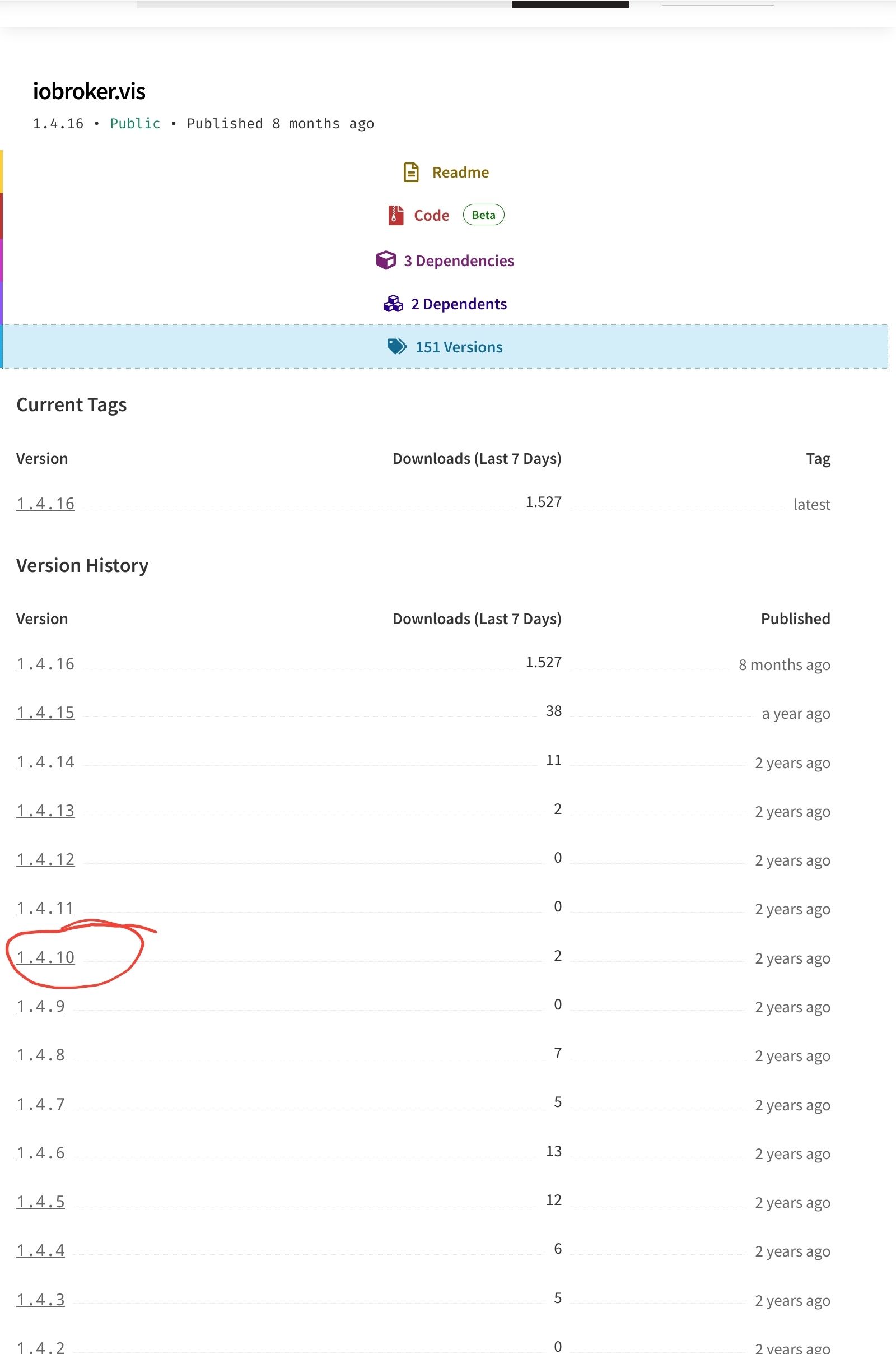
                                @ljsven Screenshot_20231001-185347_Firefox.jpg
                                versuch es mal mit einer anderen, niedrigeren Version

                                wenn alle Stricke reissen (iob fix, reboot, Browsercache)

                                cd /opt/iobroker 
                                sudo -H -u iobroker npm install iobroker.vis@1.4.10
                                

                                kein Support per PN! - Fragen im Forum stellen - es gibt fast nichts, was nicht auch für andere interessant ist.

                                Benutzt das Voting rechts unten im Beitrag wenn er euch geholfen hat.

                                der Installationsfixer: curl -fsL https://iobroker.net/fix.sh | bash -

                                L 1 Antwort Letzte Antwort
                                0
                                • HomoranH Homoran

                                  @ljsven Screenshot_20231001-185347_Firefox.jpg
                                  versuch es mal mit einer anderen, niedrigeren Version

                                  wenn alle Stricke reissen (iob fix, reboot, Browsercache)

                                  cd /opt/iobroker 
                                  sudo -H -u iobroker npm install iobroker.vis@1.4.10
                                  
                                  L Offline
                                  L Offline
                                  LJSven
                                  schrieb am zuletzt editiert von
                                  #26

                                  @homoran sagte in kann vis nicht installieren:

                                  sudo -H -u iobroker npm install iobroker.vis@1.4.10

                                  sven@tinkerboard:/opt/iobroker$ iob upgrade vis@1.4.10 
                                  Adapter "vis"            is not installed.
                                  sven@tinkerboard:/opt/iobroker$ iob upgrade vis@1.4.9
                                  Adapter "vis"            is not installed.
                                  sven@tinkerboard:/opt/iobroker$ iob upgrade vis@1.4.8
                                  Adapter "vis"            is not installed.
                                  sven@tinkerboard:/opt/iobroker$ sudo -H -u iobroker npm install iobroker.vis@1.4.10
                                  [sudo] Passwort für sven: 
                                  npm ERR! code 6
                                  npm ERR! path /opt/iobroker/node_modules/iobroker.vis
                                  npm ERR! command failed
                                  npm ERR! command sh -c node main.js --install
                                  
                                  npm ERR! A complete log of this run can be found in: /home/iobroker/.npm/_logs/2023-10-01T20_20_04_494Z-debug-0.log
                                  
                                  
                                  HomoranH 1 Antwort Letzte Antwort
                                  0
                                  • L LJSven

                                    @homoran sagte in kann vis nicht installieren:

                                    sudo -H -u iobroker npm install iobroker.vis@1.4.10

                                    sven@tinkerboard:/opt/iobroker$ iob upgrade vis@1.4.10 
                                    Adapter "vis"            is not installed.
                                    sven@tinkerboard:/opt/iobroker$ iob upgrade vis@1.4.9
                                    Adapter "vis"            is not installed.
                                    sven@tinkerboard:/opt/iobroker$ iob upgrade vis@1.4.8
                                    Adapter "vis"            is not installed.
                                    sven@tinkerboard:/opt/iobroker$ sudo -H -u iobroker npm install iobroker.vis@1.4.10
                                    [sudo] Passwort für sven: 
                                    npm ERR! code 6
                                    npm ERR! path /opt/iobroker/node_modules/iobroker.vis
                                    npm ERR! command failed
                                    npm ERR! command sh -c node main.js --install
                                    
                                    npm ERR! A complete log of this run can be found in: /home/iobroker/.npm/_logs/2023-10-01T20_20_04_494Z-debug-0.log
                                    
                                    
                                    HomoranH Nicht stören
                                    HomoranH Nicht stören
                                    Homoran
                                    Global Moderator Administrators
                                    schrieb am zuletzt editiert von
                                    #27

                                    @ljsven
                                    hab keine Ahnung mehr

                                    mach nochmal iob install vis@1.4.10 --debug diesmal mit --debug

                                    Vielleicht wird er dann gesprächiger.

                                    hier gab es das Problem auch schon
                                    https://forum.iobroker.net/post/1042831

                                    auch ohne Lösung, aber mit Wunderheilung

                                    kein Support per PN! - Fragen im Forum stellen - es gibt fast nichts, was nicht auch für andere interessant ist.

                                    Benutzt das Voting rechts unten im Beitrag wenn er euch geholfen hat.

                                    der Installationsfixer: curl -fsL https://iobroker.net/fix.sh | bash -

                                    L 1 Antwort Letzte Antwort
                                    0
                                    • HomoranH Homoran

                                      @ljsven
                                      hab keine Ahnung mehr

                                      mach nochmal iob install vis@1.4.10 --debug diesmal mit --debug

                                      Vielleicht wird er dann gesprächiger.

                                      hier gab es das Problem auch schon
                                      https://forum.iobroker.net/post/1042831

                                      auch ohne Lösung, aber mit Wunderheilung

                                      L Offline
                                      L Offline
                                      LJSven
                                      schrieb am zuletzt editiert von
                                      #28

                                      @homoran

                                      sven@tinkerboard:/opt/iobroker$ iob install vis@1.4.10 --debug
                                      NPM version: 9.6.7
                                      Installing iobroker.vis@1.4.10... (System call)
                                      npm ERR! code 6
                                      npm ERR! path /opt/iobroker/node_modules/iobroker.vis
                                      npm ERR! command failed
                                      npm ERR! command sh -c node main.js --install
                                      
                                      npm ERR! A complete log of this run can be found in: /home/iobroker/.npm/_logs/2023-10-02T11_03_09_693Z-debug-0.log
                                      npm ERR! code 6
                                      npm ERR! path /opt/iobroker/node_modules/iobroker.vis
                                      npm ERR! command failed
                                      npm ERR! command sh -c node main.js --install
                                      
                                      npm ERR! A complete log of this run can be found in: /home/iobroker/.npm/_logs/2023-10-02T11_03_09_693Z-debug-0.log
                                      host.tinkerboard Cannot install iobroker.vis@1.4.10: 6
                                      
                                      L 1 Antwort Letzte Antwort
                                      0
                                      • L LJSven

                                        @homoran

                                        sven@tinkerboard:/opt/iobroker$ iob install vis@1.4.10 --debug
                                        NPM version: 9.6.7
                                        Installing iobroker.vis@1.4.10... (System call)
                                        npm ERR! code 6
                                        npm ERR! path /opt/iobroker/node_modules/iobroker.vis
                                        npm ERR! command failed
                                        npm ERR! command sh -c node main.js --install
                                        
                                        npm ERR! A complete log of this run can be found in: /home/iobroker/.npm/_logs/2023-10-02T11_03_09_693Z-debug-0.log
                                        npm ERR! code 6
                                        npm ERR! path /opt/iobroker/node_modules/iobroker.vis
                                        npm ERR! command failed
                                        npm ERR! command sh -c node main.js --install
                                        
                                        npm ERR! A complete log of this run can be found in: /home/iobroker/.npm/_logs/2023-10-02T11_03_09_693Z-debug-0.log
                                        host.tinkerboard Cannot install iobroker.vis@1.4.10: 6
                                        
                                        L Offline
                                        L Offline
                                        LJSven
                                        schrieb am zuletzt editiert von
                                        #29

                                        @Homoran Ich habe Mut zur Lücke bewiesen und den Befehl

                                        iob del vis
                                        

                                        ausgeführt. Danach ließ sich der Adapter neu installieren und das File war noch da.

                                        1 Antwort Letzte Antwort
                                        0
                                        Antworten
                                        • In einem neuen Thema antworten
                                        Anmelden zum Antworten
                                        • Älteste zuerst
                                        • Neuste zuerst
                                        • Meiste Stimmen


                                        Support us

                                        ioBroker
                                        Community Adapters
                                        Donate
                                        FAQ Cloud / IOT
                                        HowTo: Node.js-Update
                                        HowTo: Backup/Restore
                                        Downloads
                                        BLOG

                                        632

                                        Online

                                        32.5k

                                        Benutzer

                                        81.8k

                                        Themen

                                        1.3m

                                        Beiträge
                                        Community
                                        Impressum | Datenschutz-Bestimmungen | Nutzungsbedingungen | Einwilligungseinstellungen
                                        ioBroker Community 2014-2025
                                        logo
                                        • Anmelden

                                        • Du hast noch kein Konto? Registrieren

                                        • Anmelden oder registrieren, um zu suchen
                                        • Erster Beitrag
                                          Letzter Beitrag
                                        0
                                        • Home
                                        • Aktuell
                                        • Tags
                                        • Ungelesen 0
                                        • Kategorien
                                        • Unreplied
                                        • Beliebt
                                        • GitHub
                                        • Docu
                                        • Hilfe