




kann vis nicht installieren
-
@ljsven sagte in VIS: Keine gültige Lizenz gefunden:
iob upgrade vis@1.4.10@thomas-braun dann müsste vis ja schon installiert sein, was angeblich nicht geht.
das wollte ich erst sehen
-
@ljsven ich hab das mal abgetrennt, hat ja mit der Lizenz nichts zu tun
was sagt
iob diagin der Langfassung?Skript v.2023-06-20 *** BASE SYSTEM *** Static hostname: tinkerboard Icon name: computer Machine ID: affa5e932b3247b79051b4333d4219f7 Boot ID: 3ae4f613cf714e029c51e550b44607a3 Operating System: Armbian 23.8.3 bookworm Kernel: Linux 6.1.50-current-rockchip Architecture: arm model name : ARMv7 Processor rev 1 (v7l) Docker : false Virtualization : none Kernel : armv7l Userland : armhf Systemuptime and Load: 21:24:09 up 6:04, 2 users, load average: 0.86, 0.50, 0.35 CPU threads: 4 *** Time and Time Zones *** Local time: Sun 2023-10-01 21:24:09 CEST Universal time: Sun 2023-10-01 19:24:09 UTC RTC time: Sun 2023-10-01 19:24:10 Time zone: Europe/Berlin (CEST, +0200) System clock synchronized: yes NTP service: active RTC in local TZ: no *** User and Groups *** sven /home/sven sven tty disk dialout sudo audio video plugdev games users input netdev bluetooth systemd-journal iobroker *** X-Server-Setup *** X-Server: false Desktop: Terminal: tty Boot Target: graphical.target *** MEMORY *** total used free shared buff/cache available Mem: 2.1G 1.4G 358M 2.7M 458M 750M Swap: 1.1G 786K 1.0G Total: 3.2G 1.4G 1.4G 2004 M total memory 1288 M used memory 1279 M active memory 261 M inactive memory 342 M free memory 48 M buffer memory 388 M swap cache 1002 M total swap 0 M used swap 1001 M free swap *** FILESYSTEM *** Filesystem Type Size Used Avail Use% Mounted on udev devtmpfs 990M 0 990M 0% /dev tmpfs tmpfs 201M 3.1M 198M 2% /run /dev/mmcblk1p1 ext4 57G 3.9G 53G 7% / tmpfs tmpfs 1003M 0 1003M 0% /dev/shm tmpfs tmpfs 5.0M 0 5.0M 0% /run/lock tmpfs tmpfs 1003M 0 1003M 0% /tmp /dev/zram1 ext4 47M 1.9M 42M 5% /var/log tmpfs tmpfs 201M 0 201M 0% /run/user/1000 Messages concerning ext4 filesystem in dmesg: [Sun Oct 1 15:19:25 2023] Kernel command line: earlyprintk root=UUID=5171d208-24a4-446e-a0a7-673ec46f0c58 rootwait rootfstype=ext4 splash=verbose console=ttyS2,115200n8 console=tty1 consoleblank=0 loglevel=1 ubootpart=2215e05a-01 usb-storage.quirks=0x2537:0x1066:u,0x2537:0x1068:u cgroup_enable=cpuset cgroup_memory=1 cgroup_enable=memory swapaccount=1 [Sun Oct 1 15:19:30 2023] EXT4-fs (mmcblk1p1): mounted filesystem with writeback data mode. Quota mode: none. [Sun Oct 1 15:19:32 2023] EXT4-fs (mmcblk1p1): re-mounted. Quota mode: none. [Sun Oct 1 15:19:35 2023] EXT4-fs (zram1): mounted filesystem without journal. Quota mode: none. Show mounted filesystems (real ones only): TARGET SOURCE FSTYPE OPTIONS / /dev/mmcblk1p1 ext4 rw,noatime,errors=remount-ro,commit=600 |-/var/log.hdd /dev/mmcblk1p1[/var/log] ext4 rw,noatime,errors=remount-ro,commit=600 `-/var/log /dev/zram1 ext4 rw,relatime,discard Files in neuralgic directories: /var: 385M /var/ 226M /var/cache 221M /var/cache/apt 153M /var/cache/apt/archives 151M /var/lib Archived and active journals take up 6.4M in the file system. /opt/iobroker/backups: 24M /opt/iobroker/backups/ /opt/iobroker/iobroker-data: 395M /opt/iobroker/iobroker-data/ 305M /opt/iobroker/iobroker-data/files 52M /opt/iobroker/iobroker-data/files/javascript.admin 34M /opt/iobroker/iobroker-data/files/javascript.admin/static 33M /opt/iobroker/iobroker-data/files/javascript.admin/static/js The five largest files in iobroker-data are: 44M /opt/iobroker/iobroker-data/objects.jsonl 21M /opt/iobroker/iobroker-data/files/web.admin/static/js/main.edf7552a.js.map 20M /opt/iobroker/iobroker-data/states.jsonl 19M /opt/iobroker/iobroker-data/files/iot.admin/static/js/main.2975a411.js.map 8.9M /opt/iobroker/iobroker-data/files/scenes.admin/static/js/2.7de3299d.chunk.js.map *** NodeJS-Installation *** /usr/bin/nodejs v18.17.1 /usr/bin/node v18.17.1 /usr/bin/npm 9.6.7 /usr/bin/npx 9.6.7 nodejs: Installed: 18.17.1-deb-1nodesource1 Candidate: 18.17.1-deb-1nodesource1 Version table: *** 18.17.1-deb-1nodesource1 500 500 https://deb.nodesource.com/node_18.x bookworm/main armhf Packages 100 /var/lib/dpkg/status 18.13.0+dfsg1-1 500 500 http://deb.debian.org/debian bookworm/main armhf Packages Temp directories causing npm8 problem: 0 No problems detected Errors in npm tree: 0 *** ioBroker-Installation *** ioBroker Status iobroker is running on this host. Objects type: jsonl States type: jsonl No configuration change needed. Multihost discovery server: disabled Discovery authentication: enabled Persistent activation: disabled Objects: jsonl on 0.0.0.0 States: jsonl on 0.0.0.0 Core adapters versions js-controller: 5.0.12 admin: 6.10.1 javascript: 7.1.4 Adapters from github: 1 Adapter State + system.adapter.admin.0 : admin : tinkerboard - enabled, port: 8081, bind: 0.0.0.0, run as: admin + system.adapter.alexa2.0 : alexa2 : tinkerboard - enabled system.adapter.asterisk.0 : asterisk : raspberrypi - disabled, port: 5038 + system.adapter.backitup.0 : backitup : tinkerboard - enabled system.adapter.coronavirus-statistics.0 : coronavirus-statistics: raspberryzeropi - disabled system.adapter.daswetter.0 : daswetter : tinkerboard - disabled system.adapter.deconz.0 : deconz : tinkerboard - disabled, port: 80 system.adapter.device-reminder.0 : device-reminder : tinkerboard - disabled system.adapter.discovery.0 : discovery : tinkerboard - disabled system.adapter.email.0 : email : raspberrypi - disabled system.adapter.enigma2.0 : enigma2 : tinkerboard - disabled system.adapter.enigma2.1 : enigma2 : tinkerboard - disabled system.adapter.flot.0 : flot : tinkerboard - disabled system.adapter.fritzdect.0 : fritzdect : raspberrypi - disabled + system.adapter.geofency.0 : geofency : raspberrypi - enabled, port: 7999, bind: 0.0.0.0 system.adapter.history.0 : history : tinkerboard - disabled system.adapter.ical.0 : ical : tinkerboard - enabled system.adapter.icons-icons8.0 : icons-icons8 : tinkerboard - disabled system.adapter.icons-material-png.0 : icons-material-png : tinkerboard - disabled system.adapter.icons-mfd-png.0 : icons-mfd-png : tinkerboard - disabled system.adapter.icons-mfd-svg.0 : icons-mfd-svg : tinkerboard - disabled system.adapter.info.0 : info : tinkerboard - disabled + system.adapter.iot.0 : iot : tinkerboard - enabled system.adapter.iqontrol.0 : iqontrol : tinkerboard - disabled + system.adapter.javascript.0 : javascript : tinkerboard - enabled system.adapter.lgtv11.0 : lgtv11 : tinkerboard - disabled, port: 8080 + system.adapter.linkeddevices.0 : linkeddevices : tinkerboard - enabled + system.adapter.mihome.0 : mihome : tinkerboard - enabled, port: 9898, bind: 0.0.0.0 + system.adapter.modbus.0 : modbus : tinkerboard - enabled + system.adapter.mqtt.0 : mqtt : tinkerboard - enabled, port: 1886, bind: 0.0.0.0 system.adapter.phantomjs.0 : phantomjs : tinkerboard - disabled system.adapter.pvforecast.0 : pvforecast : tinkerboard - disabled system.adapter.radar2.0 : radar2 : raspberryzeropi - disabled system.adapter.rpi2.0 : rpi2 : raspberrypi - disabled + system.adapter.scenes.0 : scenes : tinkerboard - enabled + system.adapter.shelly.0 : shelly : tinkerboard - enabled, port: 1888, bind: 0.0.0.0 + system.adapter.shelly.1 : shelly : tinkerboard - enabled, port: 1888, bind: 0.0.0.0 + system.adapter.simple-api.0 : simple-api : tinkerboard - enabled, port: 8087, bind: 0.0.0.0, run as: admin system.adapter.smartmeter.0 : smartmeter : raspberrypi - disabled system.adapter.smartmeter.1 : smartmeter : raspberrypi - disabled system.adapter.smartmeter.2 : smartmeter : raspberrypi - disabled + system.adapter.smartmeter.3 : smartmeter : raspberrypi - enabled + system.adapter.smartmeter.4 : smartmeter : raspberrypi - enabled + system.adapter.sonoff.0 : sonoff : tinkerboard - enabled, port: 1883, bind: 0.0.0.0 + system.adapter.sql.0 : sql : tinkerboard - enabled, port: 3306 system.adapter.tankerkoenig.0 : tankerkoenig : tinkerboard - disabled + system.adapter.telegram.0 : telegram : tinkerboard - enabled, port: 8443, bind: 0.0.0.0 + system.adapter.text2command.0 : text2command : raspberrypi - enabled system.adapter.tinker.0 : tinker : tinkerboard - disabled system.adapter.tr-064.0 : tr-064 : tinkerboard - disabled + system.adapter.trashschedule.0 : trashschedule : raspberrypi - enabled system.adapter.tuya.0 : tuya : raspberrypi - disabled system.adapter.vis-google-fonts.0 : vis-google-fonts : tinkerboard - disabled system.adapter.vis-history.0 : vis-history : tinkerboard - disabled system.adapter.vis-hqwidgets.0 : vis-hqwidgets : tinkerboard - disabled system.adapter.vis-icontwo.0 : vis-icontwo : tinkerboard - disabled system.adapter.vis-metro.0 : vis-metro : tinkerboard - disabled system.adapter.vis-rgraph.0 : vis-rgraph : tinkerboard - disabled system.adapter.vis.0 : vis : tinkerboard - enabled + system.adapter.web.0 : web : tinkerboard - enabled, port: 8082, bind: 0.0.0.0, run as: admin system.adapter.wled.0 : wled : tinkerboard - disabled system.adapter.worx.0 : worx : raspberrypi - disabled system.adapter.yahka.0 : yahka : tinkerboard - disabled + system.adapter.zigbee.0 : zigbee : tinkerboard - enabled, port: /dev/ttyACM0 + instance is alive Enabled adapters with bindings + system.adapter.admin.0 : admin : tinkerboard - enabled, port: 8081, bind: 0.0.0.0, run as: admin + system.adapter.geofency.0 : geofency : raspberrypi - enabled, port: 7999, bind: 0.0.0.0 + system.adapter.mihome.0 : mihome : tinkerboard - enabled, port: 9898, bind: 0.0.0.0 + system.adapter.mqtt.0 : mqtt : tinkerboard - enabled, port: 1886, bind: 0.0.0.0 + system.adapter.shelly.0 : shelly : tinkerboard - enabled, port: 1888, bind: 0.0.0.0 + system.adapter.shelly.1 : shelly : tinkerboard - enabled, port: 1888, bind: 0.0.0.0 + system.adapter.simple-api.0 : simple-api : tinkerboard - enabled, port: 8087, bind: 0.0.0.0, run as: admin + system.adapter.sonoff.0 : sonoff : tinkerboard - enabled, port: 1883, bind: 0.0.0.0 + system.adapter.sql.0 : sql : tinkerboard - enabled, port: 3306 + system.adapter.telegram.0 : telegram : tinkerboard - enabled, port: 8443, bind: 0.0.0.0 + system.adapter.web.0 : web : tinkerboard - enabled, port: 8082, bind: 0.0.0.0, run as: admin + system.adapter.zigbee.0 : zigbee : tinkerboard - enabled, port: /dev/ttyACM0 ioBroker-Repositories Stable (default): http://download.iobroker.net/sources-dist.json Beta (latest) : http://download.iobroker.net/sources-dist-latest.json Active repo(s): Stable (default) Installed ioBroker-Instances Used repository: Stable (default) Adapter "admin" : 6.10.1 , installed 6.10.1 Adapter "alexa2" : 3.25.2 , installed 3.25.2 Adapter "backitup" : 2.8.1 , installed 2.8.1 Adapter "daswetter" : 3.1.10 , installed 3.1.10 Adapter "deconz" : 1.3.21 , installed 2.0.5 Adapter "device-reminder": 1.2.9 , installed 1.2.9 Adapter "discovery" : 3.1.0 , installed 3.1.0 Adapter "flot" : 1.12.0 , installed 1.12.0 Adapter "history" : 2.2.6 , installed 2.2.6 Adapter "ical" : 1.13.3 , installed 1.13.3 Adapter "icons-icons8" : 0.0.1 , installed 0.0.1 Adapter "icons-material-png": 0.1.0, installed 0.1.0 Adapter "icons-mfd-png": 1.1.0 , installed 1.1.0 Adapter "icons-mfd-svg": 1.1.0 , installed 1.1.0 Adapter "info" : 2.0.0 , installed 2.0.0 Adapter "iot" : 1.14.5 , installed 1.14.5 Adapter "iqontrol" : 2.3.0 , installed 2.3.0 Adapter "javascript" : 7.1.4 , installed 7.1.4 Controller "js-controller": 5.0.12 , installed 5.0.12 Adapter "lgtv11" : 1.0.5 , installed 1.0.5 Adapter "linkeddevices": 1.5.5 , installed 1.5.5 Adapter "mihome" : 1.4.0 , installed 1.4.0 Adapter "modbus" : 5.0.11 , installed 5.0.11 Adapter "mqtt" : 4.1.1 , installed 4.1.1 Adapter "pvforecast" : 2.7.1 , installed 2.7.1 Adapter "scenes" : 2.3.9 , installed 2.3.9 Adapter "shelly" : 6.4.1 , installed 6.4.1 Adapter "simple-api" : 2.7.2 , installed 2.7.2 Adapter "socketio" : 6.5.5 , installed 6.5.5 Adapter "sonoff" : 2.5.3 , installed 2.5.3 Adapter "sql" : 2.2.0 , installed 2.2.0 Adapter "tankerkoenig" : 3.3.7 , installed 3.3.7 Adapter "telegram" : 1.16.0 , installed 1.16.0 Adapter "tinker" : 1.2.0 , installed 1.2.0 Adapter "tr-064" : 4.2.18 , installed 4.2.18 Adapter "vis-google-fonts": 1.0.4 , installed 1.0.4 Adapter "vis-history" : 1.0.0 , installed 1.0.0 Adapter "vis-hqwidgets": 1.4.0 , installed 1.4.0 Adapter "vis-icontwo" : 0.96.0 , installed 0.96.0 Adapter "vis-metro" : 1.2.0 , installed 1.2.0 Adapter "vis-rgraph" : 0.0.2 , installed 0.0.2 Adapter "web" : 6.1.2 , installed 6.1.2 Adapter "wled" : 0.6.7 , installed 0.6.7 Adapter "ws" : 2.5.5 , installed 2.5.5 Adapter "yahka" : 1.0.3 , installed 1.0.3 Adapter "zigbee" : 1.8.23 , installed 1.8.23 Objects and States Please stand by - This may take a while Objects: 14809 States: 12780 *** OS-Repositories and Updates *** Hit:1 http://security.debian.org bookworm-security InRelease Hit:2 http://deb.debian.org/debian bookworm InRelease Hit:3 http://deb.debian.org/debian bookworm-updates InRelease Hit:4 http://deb.debian.org/debian bookworm-backports InRelease Hit:6 https://deb.nodesource.com/node_18.x bookworm InRelease Hit:5 http://mirror.vinehost.net/armbian/apt bookworm InRelease Reading package lists... Pending Updates: 0 *** Listening Ports *** Active Internet connections (only servers) Proto Recv-Q Send-Q Local Address Foreign Address State User Inode PID/Program name tcp 0 0 0.0.0.0:111 0.0.0.0:* LISTEN 0 17831 1/init tcp 0 0 0.0.0.0:22 0.0.0.0:* LISTEN 0 21509 1081/sshd: /usr/sbi tcp 0 0 0.0.0.0:1888 0.0.0.0:* LISTEN 1001 23782 1560/io.shelly.1 tcp 0 0 0.0.0.0:1886 0.0.0.0:* LISTEN 1001 21271 1526/io.mqtt.0 tcp 0 0 0.0.0.0:1883 0.0.0.0:* LISTEN 1001 23878 1598/io.sonoff.0 tcp 0 0 0.0.0.0:9000 0.0.0.0:* LISTEN 1001 22543 961/iobroker.js-con tcp 0 0 0.0.0.0:9001 0.0.0.0:* LISTEN 1001 22539 961/iobroker.js-con tcp6 0 0 :::111 :::* LISTEN 0 17833 1/init tcp6 0 0 :::22 :::* LISTEN 0 21511 1081/sshd: /usr/sbi tcp6 0 0 :::1884 :::* LISTEN 1001 23855 1331/io.javascript. tcp6 0 0 :::8087 :::* LISTEN 1001 127843 2507/io.simple-api. tcp6 0 0 :::8081 :::* LISTEN 1001 21745 1323/io.admin.0 tcp6 0 0 :::8082 :::* LISTEN 1001 22018 1662/io.web.0 udp 0 0 0.0.0.0:111 0.0.0.0:* 0 17832 1/init udp 0 0 0.0.0.0:9898 0.0.0.0:* 1001 21207 1473/io.mihome.0 udp 0 0 127.0.0.1:323 0.0.0.0:* 0 18367 984/chronyd udp 0 0 0.0.0.0:5683 0.0.0.0:* 1001 22845 1541/io.shelly.0 udp6 0 0 :::111 :::* 0 19458 1/init udp6 0 0 ::1:323 :::* 0 18368 984/chronyd udp6 0 0 fe80::79ed:e114:5c1:546 :::* 0 22533 782/NetworkManager *** Log File - Last 25 Lines *** 2023-10-01 21:12:08.633 - info: vis.0 (4034) vis license is OK. 2023-10-01 21:12:09.054 - error: vis.0 (4034) Unhandled promise rejection. This error originated either by throwing inside of an async function without a catch block, or by rejecting a promise which was not handled with .catch(). 2023-10-01 21:12:09.055 - error: vis.0 (4034) unhandled promise rejection: Not exists 2023-10-01 21:12:09.058 - error: vis.0 (4034) Error: Not exists at ObjectsInRedisClient._readFile (/opt/iobroker/node_modules/@iobroker/db-objects-redis/build/lib/objects/objectsInRedisClient.js:854:19) at Immediate.<anonymous> (/opt/iobroker/node_modules/@iobroker/db-objects-redis/build/lib/objects/objectsInRedisClient.js:891:59) at process.processImmediate (node:internal/timers:478:21) 2023-10-01 21:12:09.059 - error: vis.0 (4034) Not exists 2023-10-01 21:12:09.566 - info: vis.0 (4034) terminating 2023-10-01 21:12:09.568 - warn: vis.0 (4034) Terminated (UNCAUGHT_EXCEPTION): Without reason 2023-10-01 21:15:00.073 - info: host.tinkerboard instance system.adapter.ical.0 started with pid 4046 2023-10-01 21:15:13.374 - info: host.tinkerboard instance system.adapter.ical.0 terminated with code 0 (NO_ERROR) 2023-10-01 21:18:44.560 - info: javascript.0 (1331) script.js.common.Sonstige.EG_Aussenbeleuchtung_Haustuer: HT - Beleuchtung über BWM 2023-10-01 21:23:36.091 - info: vis.0 (4140) Sets unsupported 2023-10-01 21:23:36.873 - info: vis.0 (4140) starting. Version 1.4.10 in /opt/iobroker/node_modules/iobroker.vis, node: v18.17.1, js-controller: 5.0.12 2023-10-01 21:23:37.196 - info: vis.0 (4140) vis license is OK. 2023-10-01 21:23:37.599 - error: vis.0 (4140) Unhandled promise rejection. This error originated either by throwing inside of an async function without a catch block, or by rejecting a promise which was not handled with .catch(). 2023-10-01 21:23:37.600 - error: vis.0 (4140) unhandled promise rejection: Not exists 2023-10-01 21:23:37.603 - error: vis.0 (4140) Error: Not exists at ObjectsInRedisClient._readFile (/opt/iobroker/node_modules/@iobroker/db-objects-redis/build/lib/objects/objectsInRedisClient.js:854:19) at Immediate.<anonymous> (/opt/iobroker/node_modules/@iobroker/db-objects-redis/build/lib/objects/objectsInRedisClient.js:891:59) at process.processImmediate (node:internal/timers:478:21) 2023-10-01 21:23:37.604 - error: vis.0 (4140) Not exists 2023-10-01 21:23:38.111 - info: vis.0 (4140) terminating 2023-10-01 21:23:38.112 - warn: vis.0 (4140) Terminated (UNCAUGHT_EXCEPTION): Without reason -
Skript v.2023-06-20 *** BASE SYSTEM *** Static hostname: tinkerboard Icon name: computer Machine ID: affa5e932b3247b79051b4333d4219f7 Boot ID: 3ae4f613cf714e029c51e550b44607a3 Operating System: Armbian 23.8.3 bookworm Kernel: Linux 6.1.50-current-rockchip Architecture: arm model name : ARMv7 Processor rev 1 (v7l) Docker : false Virtualization : none Kernel : armv7l Userland : armhf Systemuptime and Load: 21:24:09 up 6:04, 2 users, load average: 0.86, 0.50, 0.35 CPU threads: 4 *** Time and Time Zones *** Local time: Sun 2023-10-01 21:24:09 CEST Universal time: Sun 2023-10-01 19:24:09 UTC RTC time: Sun 2023-10-01 19:24:10 Time zone: Europe/Berlin (CEST, +0200) System clock synchronized: yes NTP service: active RTC in local TZ: no *** User and Groups *** sven /home/sven sven tty disk dialout sudo audio video plugdev games users input netdev bluetooth systemd-journal iobroker *** X-Server-Setup *** X-Server: false Desktop: Terminal: tty Boot Target: graphical.target *** MEMORY *** total used free shared buff/cache available Mem: 2.1G 1.4G 358M 2.7M 458M 750M Swap: 1.1G 786K 1.0G Total: 3.2G 1.4G 1.4G 2004 M total memory 1288 M used memory 1279 M active memory 261 M inactive memory 342 M free memory 48 M buffer memory 388 M swap cache 1002 M total swap 0 M used swap 1001 M free swap *** FILESYSTEM *** Filesystem Type Size Used Avail Use% Mounted on udev devtmpfs 990M 0 990M 0% /dev tmpfs tmpfs 201M 3.1M 198M 2% /run /dev/mmcblk1p1 ext4 57G 3.9G 53G 7% / tmpfs tmpfs 1003M 0 1003M 0% /dev/shm tmpfs tmpfs 5.0M 0 5.0M 0% /run/lock tmpfs tmpfs 1003M 0 1003M 0% /tmp /dev/zram1 ext4 47M 1.9M 42M 5% /var/log tmpfs tmpfs 201M 0 201M 0% /run/user/1000 Messages concerning ext4 filesystem in dmesg: [Sun Oct 1 15:19:25 2023] Kernel command line: earlyprintk root=UUID=5171d208-24a4-446e-a0a7-673ec46f0c58 rootwait rootfstype=ext4 splash=verbose console=ttyS2,115200n8 console=tty1 consoleblank=0 loglevel=1 ubootpart=2215e05a-01 usb-storage.quirks=0x2537:0x1066:u,0x2537:0x1068:u cgroup_enable=cpuset cgroup_memory=1 cgroup_enable=memory swapaccount=1 [Sun Oct 1 15:19:30 2023] EXT4-fs (mmcblk1p1): mounted filesystem with writeback data mode. Quota mode: none. [Sun Oct 1 15:19:32 2023] EXT4-fs (mmcblk1p1): re-mounted. Quota mode: none. [Sun Oct 1 15:19:35 2023] EXT4-fs (zram1): mounted filesystem without journal. Quota mode: none. Show mounted filesystems (real ones only): TARGET SOURCE FSTYPE OPTIONS / /dev/mmcblk1p1 ext4 rw,noatime,errors=remount-ro,commit=600 |-/var/log.hdd /dev/mmcblk1p1[/var/log] ext4 rw,noatime,errors=remount-ro,commit=600 `-/var/log /dev/zram1 ext4 rw,relatime,discard Files in neuralgic directories: /var: 385M /var/ 226M /var/cache 221M /var/cache/apt 153M /var/cache/apt/archives 151M /var/lib Archived and active journals take up 6.4M in the file system. /opt/iobroker/backups: 24M /opt/iobroker/backups/ /opt/iobroker/iobroker-data: 395M /opt/iobroker/iobroker-data/ 305M /opt/iobroker/iobroker-data/files 52M /opt/iobroker/iobroker-data/files/javascript.admin 34M /opt/iobroker/iobroker-data/files/javascript.admin/static 33M /opt/iobroker/iobroker-data/files/javascript.admin/static/js The five largest files in iobroker-data are: 44M /opt/iobroker/iobroker-data/objects.jsonl 21M /opt/iobroker/iobroker-data/files/web.admin/static/js/main.edf7552a.js.map 20M /opt/iobroker/iobroker-data/states.jsonl 19M /opt/iobroker/iobroker-data/files/iot.admin/static/js/main.2975a411.js.map 8.9M /opt/iobroker/iobroker-data/files/scenes.admin/static/js/2.7de3299d.chunk.js.map *** NodeJS-Installation *** /usr/bin/nodejs v18.17.1 /usr/bin/node v18.17.1 /usr/bin/npm 9.6.7 /usr/bin/npx 9.6.7 nodejs: Installed: 18.17.1-deb-1nodesource1 Candidate: 18.17.1-deb-1nodesource1 Version table: *** 18.17.1-deb-1nodesource1 500 500 https://deb.nodesource.com/node_18.x bookworm/main armhf Packages 100 /var/lib/dpkg/status 18.13.0+dfsg1-1 500 500 http://deb.debian.org/debian bookworm/main armhf Packages Temp directories causing npm8 problem: 0 No problems detected Errors in npm tree: 0 *** ioBroker-Installation *** ioBroker Status iobroker is running on this host. Objects type: jsonl States type: jsonl No configuration change needed. Multihost discovery server: disabled Discovery authentication: enabled Persistent activation: disabled Objects: jsonl on 0.0.0.0 States: jsonl on 0.0.0.0 Core adapters versions js-controller: 5.0.12 admin: 6.10.1 javascript: 7.1.4 Adapters from github: 1 Adapter State + system.adapter.admin.0 : admin : tinkerboard - enabled, port: 8081, bind: 0.0.0.0, run as: admin + system.adapter.alexa2.0 : alexa2 : tinkerboard - enabled system.adapter.asterisk.0 : asterisk : raspberrypi - disabled, port: 5038 + system.adapter.backitup.0 : backitup : tinkerboard - enabled system.adapter.coronavirus-statistics.0 : coronavirus-statistics: raspberryzeropi - disabled system.adapter.daswetter.0 : daswetter : tinkerboard - disabled system.adapter.deconz.0 : deconz : tinkerboard - disabled, port: 80 system.adapter.device-reminder.0 : device-reminder : tinkerboard - disabled system.adapter.discovery.0 : discovery : tinkerboard - disabled system.adapter.email.0 : email : raspberrypi - disabled system.adapter.enigma2.0 : enigma2 : tinkerboard - disabled system.adapter.enigma2.1 : enigma2 : tinkerboard - disabled system.adapter.flot.0 : flot : tinkerboard - disabled system.adapter.fritzdect.0 : fritzdect : raspberrypi - disabled + system.adapter.geofency.0 : geofency : raspberrypi - enabled, port: 7999, bind: 0.0.0.0 system.adapter.history.0 : history : tinkerboard - disabled system.adapter.ical.0 : ical : tinkerboard - enabled system.adapter.icons-icons8.0 : icons-icons8 : tinkerboard - disabled system.adapter.icons-material-png.0 : icons-material-png : tinkerboard - disabled system.adapter.icons-mfd-png.0 : icons-mfd-png : tinkerboard - disabled system.adapter.icons-mfd-svg.0 : icons-mfd-svg : tinkerboard - disabled system.adapter.info.0 : info : tinkerboard - disabled + system.adapter.iot.0 : iot : tinkerboard - enabled system.adapter.iqontrol.0 : iqontrol : tinkerboard - disabled + system.adapter.javascript.0 : javascript : tinkerboard - enabled system.adapter.lgtv11.0 : lgtv11 : tinkerboard - disabled, port: 8080 + system.adapter.linkeddevices.0 : linkeddevices : tinkerboard - enabled + system.adapter.mihome.0 : mihome : tinkerboard - enabled, port: 9898, bind: 0.0.0.0 + system.adapter.modbus.0 : modbus : tinkerboard - enabled + system.adapter.mqtt.0 : mqtt : tinkerboard - enabled, port: 1886, bind: 0.0.0.0 system.adapter.phantomjs.0 : phantomjs : tinkerboard - disabled system.adapter.pvforecast.0 : pvforecast : tinkerboard - disabled system.adapter.radar2.0 : radar2 : raspberryzeropi - disabled system.adapter.rpi2.0 : rpi2 : raspberrypi - disabled + system.adapter.scenes.0 : scenes : tinkerboard - enabled + system.adapter.shelly.0 : shelly : tinkerboard - enabled, port: 1888, bind: 0.0.0.0 + system.adapter.shelly.1 : shelly : tinkerboard - enabled, port: 1888, bind: 0.0.0.0 + system.adapter.simple-api.0 : simple-api : tinkerboard - enabled, port: 8087, bind: 0.0.0.0, run as: admin system.adapter.smartmeter.0 : smartmeter : raspberrypi - disabled system.adapter.smartmeter.1 : smartmeter : raspberrypi - disabled system.adapter.smartmeter.2 : smartmeter : raspberrypi - disabled + system.adapter.smartmeter.3 : smartmeter : raspberrypi - enabled + system.adapter.smartmeter.4 : smartmeter : raspberrypi - enabled + system.adapter.sonoff.0 : sonoff : tinkerboard - enabled, port: 1883, bind: 0.0.0.0 + system.adapter.sql.0 : sql : tinkerboard - enabled, port: 3306 system.adapter.tankerkoenig.0 : tankerkoenig : tinkerboard - disabled + system.adapter.telegram.0 : telegram : tinkerboard - enabled, port: 8443, bind: 0.0.0.0 + system.adapter.text2command.0 : text2command : raspberrypi - enabled system.adapter.tinker.0 : tinker : tinkerboard - disabled system.adapter.tr-064.0 : tr-064 : tinkerboard - disabled + system.adapter.trashschedule.0 : trashschedule : raspberrypi - enabled system.adapter.tuya.0 : tuya : raspberrypi - disabled system.adapter.vis-google-fonts.0 : vis-google-fonts : tinkerboard - disabled system.adapter.vis-history.0 : vis-history : tinkerboard - disabled system.adapter.vis-hqwidgets.0 : vis-hqwidgets : tinkerboard - disabled system.adapter.vis-icontwo.0 : vis-icontwo : tinkerboard - disabled system.adapter.vis-metro.0 : vis-metro : tinkerboard - disabled system.adapter.vis-rgraph.0 : vis-rgraph : tinkerboard - disabled system.adapter.vis.0 : vis : tinkerboard - enabled + system.adapter.web.0 : web : tinkerboard - enabled, port: 8082, bind: 0.0.0.0, run as: admin system.adapter.wled.0 : wled : tinkerboard - disabled system.adapter.worx.0 : worx : raspberrypi - disabled system.adapter.yahka.0 : yahka : tinkerboard - disabled + system.adapter.zigbee.0 : zigbee : tinkerboard - enabled, port: /dev/ttyACM0 + instance is alive Enabled adapters with bindings + system.adapter.admin.0 : admin : tinkerboard - enabled, port: 8081, bind: 0.0.0.0, run as: admin + system.adapter.geofency.0 : geofency : raspberrypi - enabled, port: 7999, bind: 0.0.0.0 + system.adapter.mihome.0 : mihome : tinkerboard - enabled, port: 9898, bind: 0.0.0.0 + system.adapter.mqtt.0 : mqtt : tinkerboard - enabled, port: 1886, bind: 0.0.0.0 + system.adapter.shelly.0 : shelly : tinkerboard - enabled, port: 1888, bind: 0.0.0.0 + system.adapter.shelly.1 : shelly : tinkerboard - enabled, port: 1888, bind: 0.0.0.0 + system.adapter.simple-api.0 : simple-api : tinkerboard - enabled, port: 8087, bind: 0.0.0.0, run as: admin + system.adapter.sonoff.0 : sonoff : tinkerboard - enabled, port: 1883, bind: 0.0.0.0 + system.adapter.sql.0 : sql : tinkerboard - enabled, port: 3306 + system.adapter.telegram.0 : telegram : tinkerboard - enabled, port: 8443, bind: 0.0.0.0 + system.adapter.web.0 : web : tinkerboard - enabled, port: 8082, bind: 0.0.0.0, run as: admin + system.adapter.zigbee.0 : zigbee : tinkerboard - enabled, port: /dev/ttyACM0 ioBroker-Repositories Stable (default): http://download.iobroker.net/sources-dist.json Beta (latest) : http://download.iobroker.net/sources-dist-latest.json Active repo(s): Stable (default) Installed ioBroker-Instances Used repository: Stable (default) Adapter "admin" : 6.10.1 , installed 6.10.1 Adapter "alexa2" : 3.25.2 , installed 3.25.2 Adapter "backitup" : 2.8.1 , installed 2.8.1 Adapter "daswetter" : 3.1.10 , installed 3.1.10 Adapter "deconz" : 1.3.21 , installed 2.0.5 Adapter "device-reminder": 1.2.9 , installed 1.2.9 Adapter "discovery" : 3.1.0 , installed 3.1.0 Adapter "flot" : 1.12.0 , installed 1.12.0 Adapter "history" : 2.2.6 , installed 2.2.6 Adapter "ical" : 1.13.3 , installed 1.13.3 Adapter "icons-icons8" : 0.0.1 , installed 0.0.1 Adapter "icons-material-png": 0.1.0, installed 0.1.0 Adapter "icons-mfd-png": 1.1.0 , installed 1.1.0 Adapter "icons-mfd-svg": 1.1.0 , installed 1.1.0 Adapter "info" : 2.0.0 , installed 2.0.0 Adapter "iot" : 1.14.5 , installed 1.14.5 Adapter "iqontrol" : 2.3.0 , installed 2.3.0 Adapter "javascript" : 7.1.4 , installed 7.1.4 Controller "js-controller": 5.0.12 , installed 5.0.12 Adapter "lgtv11" : 1.0.5 , installed 1.0.5 Adapter "linkeddevices": 1.5.5 , installed 1.5.5 Adapter "mihome" : 1.4.0 , installed 1.4.0 Adapter "modbus" : 5.0.11 , installed 5.0.11 Adapter "mqtt" : 4.1.1 , installed 4.1.1 Adapter "pvforecast" : 2.7.1 , installed 2.7.1 Adapter "scenes" : 2.3.9 , installed 2.3.9 Adapter "shelly" : 6.4.1 , installed 6.4.1 Adapter "simple-api" : 2.7.2 , installed 2.7.2 Adapter "socketio" : 6.5.5 , installed 6.5.5 Adapter "sonoff" : 2.5.3 , installed 2.5.3 Adapter "sql" : 2.2.0 , installed 2.2.0 Adapter "tankerkoenig" : 3.3.7 , installed 3.3.7 Adapter "telegram" : 1.16.0 , installed 1.16.0 Adapter "tinker" : 1.2.0 , installed 1.2.0 Adapter "tr-064" : 4.2.18 , installed 4.2.18 Adapter "vis-google-fonts": 1.0.4 , installed 1.0.4 Adapter "vis-history" : 1.0.0 , installed 1.0.0 Adapter "vis-hqwidgets": 1.4.0 , installed 1.4.0 Adapter "vis-icontwo" : 0.96.0 , installed 0.96.0 Adapter "vis-metro" : 1.2.0 , installed 1.2.0 Adapter "vis-rgraph" : 0.0.2 , installed 0.0.2 Adapter "web" : 6.1.2 , installed 6.1.2 Adapter "wled" : 0.6.7 , installed 0.6.7 Adapter "ws" : 2.5.5 , installed 2.5.5 Adapter "yahka" : 1.0.3 , installed 1.0.3 Adapter "zigbee" : 1.8.23 , installed 1.8.23 Objects and States Please stand by - This may take a while Objects: 14809 States: 12780 *** OS-Repositories and Updates *** Hit:1 http://security.debian.org bookworm-security InRelease Hit:2 http://deb.debian.org/debian bookworm InRelease Hit:3 http://deb.debian.org/debian bookworm-updates InRelease Hit:4 http://deb.debian.org/debian bookworm-backports InRelease Hit:6 https://deb.nodesource.com/node_18.x bookworm InRelease Hit:5 http://mirror.vinehost.net/armbian/apt bookworm InRelease Reading package lists... Pending Updates: 0 *** Listening Ports *** Active Internet connections (only servers) Proto Recv-Q Send-Q Local Address Foreign Address State User Inode PID/Program name tcp 0 0 0.0.0.0:111 0.0.0.0:* LISTEN 0 17831 1/init tcp 0 0 0.0.0.0:22 0.0.0.0:* LISTEN 0 21509 1081/sshd: /usr/sbi tcp 0 0 0.0.0.0:1888 0.0.0.0:* LISTEN 1001 23782 1560/io.shelly.1 tcp 0 0 0.0.0.0:1886 0.0.0.0:* LISTEN 1001 21271 1526/io.mqtt.0 tcp 0 0 0.0.0.0:1883 0.0.0.0:* LISTEN 1001 23878 1598/io.sonoff.0 tcp 0 0 0.0.0.0:9000 0.0.0.0:* LISTEN 1001 22543 961/iobroker.js-con tcp 0 0 0.0.0.0:9001 0.0.0.0:* LISTEN 1001 22539 961/iobroker.js-con tcp6 0 0 :::111 :::* LISTEN 0 17833 1/init tcp6 0 0 :::22 :::* LISTEN 0 21511 1081/sshd: /usr/sbi tcp6 0 0 :::1884 :::* LISTEN 1001 23855 1331/io.javascript. tcp6 0 0 :::8087 :::* LISTEN 1001 127843 2507/io.simple-api. tcp6 0 0 :::8081 :::* LISTEN 1001 21745 1323/io.admin.0 tcp6 0 0 :::8082 :::* LISTEN 1001 22018 1662/io.web.0 udp 0 0 0.0.0.0:111 0.0.0.0:* 0 17832 1/init udp 0 0 0.0.0.0:9898 0.0.0.0:* 1001 21207 1473/io.mihome.0 udp 0 0 127.0.0.1:323 0.0.0.0:* 0 18367 984/chronyd udp 0 0 0.0.0.0:5683 0.0.0.0:* 1001 22845 1541/io.shelly.0 udp6 0 0 :::111 :::* 0 19458 1/init udp6 0 0 ::1:323 :::* 0 18368 984/chronyd udp6 0 0 fe80::79ed:e114:5c1:546 :::* 0 22533 782/NetworkManager *** Log File - Last 25 Lines *** 2023-10-01 21:12:08.633 - info: vis.0 (4034) vis license is OK. 2023-10-01 21:12:09.054 - error: vis.0 (4034) Unhandled promise rejection. This error originated either by throwing inside of an async function without a catch block, or by rejecting a promise which was not handled with .catch(). 2023-10-01 21:12:09.055 - error: vis.0 (4034) unhandled promise rejection: Not exists 2023-10-01 21:12:09.058 - error: vis.0 (4034) Error: Not exists at ObjectsInRedisClient._readFile (/opt/iobroker/node_modules/@iobroker/db-objects-redis/build/lib/objects/objectsInRedisClient.js:854:19) at Immediate.<anonymous> (/opt/iobroker/node_modules/@iobroker/db-objects-redis/build/lib/objects/objectsInRedisClient.js:891:59) at process.processImmediate (node:internal/timers:478:21) 2023-10-01 21:12:09.059 - error: vis.0 (4034) Not exists 2023-10-01 21:12:09.566 - info: vis.0 (4034) terminating 2023-10-01 21:12:09.568 - warn: vis.0 (4034) Terminated (UNCAUGHT_EXCEPTION): Without reason 2023-10-01 21:15:00.073 - info: host.tinkerboard instance system.adapter.ical.0 started with pid 4046 2023-10-01 21:15:13.374 - info: host.tinkerboard instance system.adapter.ical.0 terminated with code 0 (NO_ERROR) 2023-10-01 21:18:44.560 - info: javascript.0 (1331) script.js.common.Sonstige.EG_Aussenbeleuchtung_Haustuer: HT - Beleuchtung über BWM 2023-10-01 21:23:36.091 - info: vis.0 (4140) Sets unsupported 2023-10-01 21:23:36.873 - info: vis.0 (4140) starting. Version 1.4.10 in /opt/iobroker/node_modules/iobroker.vis, node: v18.17.1, js-controller: 5.0.12 2023-10-01 21:23:37.196 - info: vis.0 (4140) vis license is OK. 2023-10-01 21:23:37.599 - error: vis.0 (4140) Unhandled promise rejection. This error originated either by throwing inside of an async function without a catch block, or by rejecting a promise which was not handled with .catch(). 2023-10-01 21:23:37.600 - error: vis.0 (4140) unhandled promise rejection: Not exists 2023-10-01 21:23:37.603 - error: vis.0 (4140) Error: Not exists at ObjectsInRedisClient._readFile (/opt/iobroker/node_modules/@iobroker/db-objects-redis/build/lib/objects/objectsInRedisClient.js:854:19) at Immediate.<anonymous> (/opt/iobroker/node_modules/@iobroker/db-objects-redis/build/lib/objects/objectsInRedisClient.js:891:59) at process.processImmediate (node:internal/timers:478:21) 2023-10-01 21:23:37.604 - error: vis.0 (4140) Not exists 2023-10-01 21:23:38.111 - info: vis.0 (4140) terminating 2023-10-01 21:23:38.112 - warn: vis.0 (4140) Terminated (UNCAUGHT_EXCEPTION): Without reason@ljsven sagte in kann vis nicht installieren:
system.adapter.vis.0 : vis : tinkerboard
ist installiert!
also mit@thomas-braun sagte in kann vis nicht installieren:
@ljsven sagte in VIS: Keine gültige Lizenz gefunden:
iob upgrade vis@1.4.10downgraden, dann per admin wieder upgraden
danach könntest du den node-fix drüberjagen.
@Thomas-Braun
wieso sind die Repos auf Debian und nicht auf Armbian? -
@ljsven sagte in kann vis nicht installieren:
system.adapter.vis.0 : vis : tinkerboard
ist installiert!
also mit@thomas-braun sagte in kann vis nicht installieren:
@ljsven sagte in VIS: Keine gültige Lizenz gefunden:
iob upgrade vis@1.4.10downgraden, dann per admin wieder upgraden
danach könntest du den node-fix drüberjagen.
@Thomas-Braun
wieso sind die Repos auf Debian und nicht auf Armbian? -
@homoran sagte in kann vis nicht installieren:
iob upgrade vis@1.4.10
sven@tinkerboard:/opt/iobroker$ iob upgrade vis@1.4.10 Adapter "vis" is not installed. sven@tinkerboard:/opt/iobroker$ -
@homoran sagte in kann vis nicht installieren:
@ljsven Ins blaue
iob del vis.0
Ist dann das ganze File weg? -
@homoran sagte in kann vis nicht installieren:
@ljsven Ins blaue
iob del vis.0
Ist dann das ganze File weg? -
@homoran sagte in kann vis nicht installieren:
@ljsven Ins blaue
iob del vis.0
Ist dann das ganze File weg? -
@ljsven
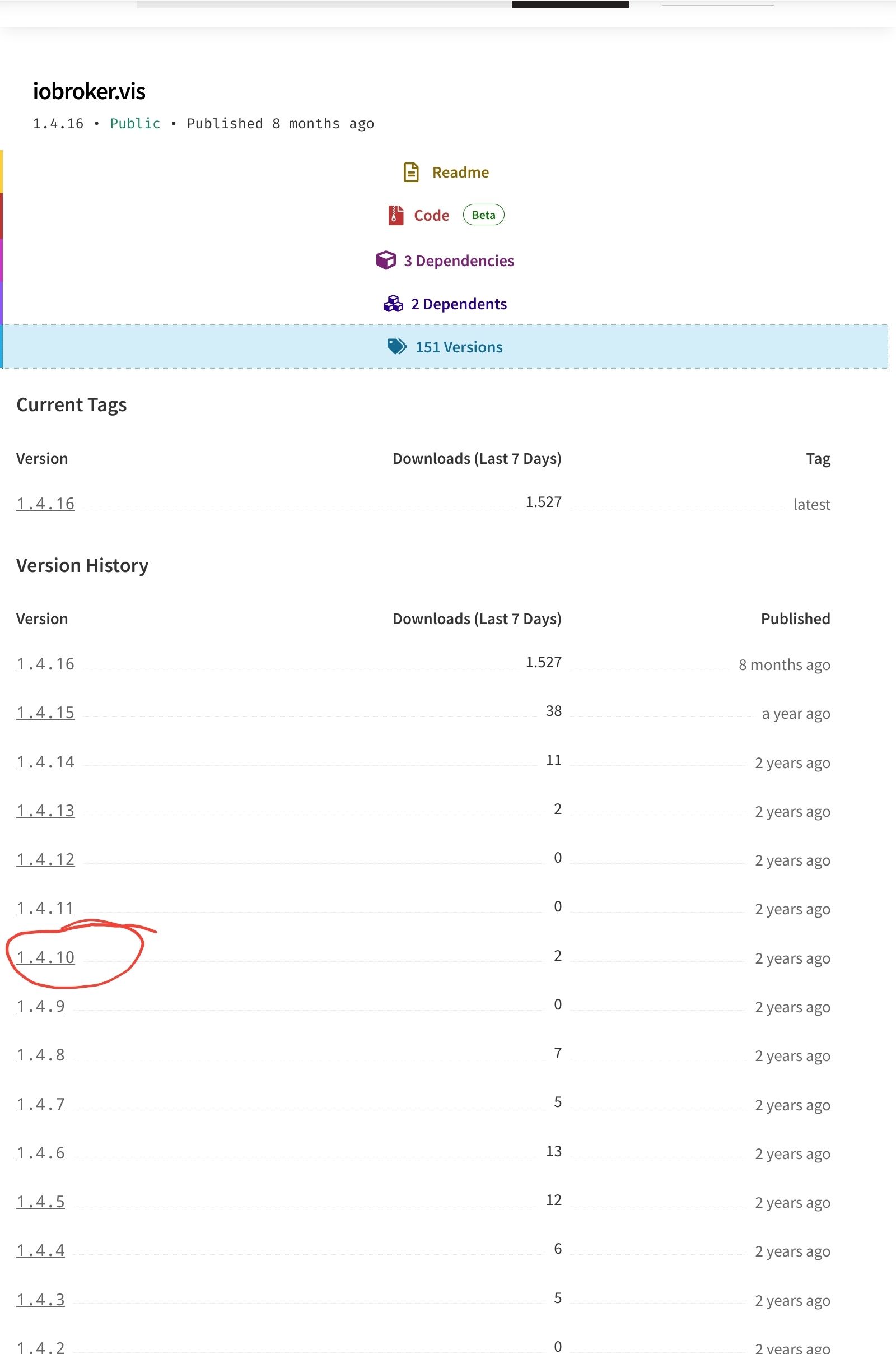
versuch es mal mit einer anderen, niedrigeren Versionwenn alle Stricke reissen (iob fix, reboot, Browsercache)
cd /opt/iobroker sudo -H -u iobroker npm install iobroker.vis@1.4.10@homoran sagte in kann vis nicht installieren:
sudo -H -u iobroker npm install iobroker.vis@1.4.10
sven@tinkerboard:/opt/iobroker$ iob upgrade vis@1.4.10 Adapter "vis" is not installed. sven@tinkerboard:/opt/iobroker$ iob upgrade vis@1.4.9 Adapter "vis" is not installed. sven@tinkerboard:/opt/iobroker$ iob upgrade vis@1.4.8 Adapter "vis" is not installed. sven@tinkerboard:/opt/iobroker$ sudo -H -u iobroker npm install iobroker.vis@1.4.10 [sudo] Passwort für sven: npm ERR! code 6 npm ERR! path /opt/iobroker/node_modules/iobroker.vis npm ERR! command failed npm ERR! command sh -c node main.js --install npm ERR! A complete log of this run can be found in: /home/iobroker/.npm/_logs/2023-10-01T20_20_04_494Z-debug-0.log -
@homoran sagte in kann vis nicht installieren:
sudo -H -u iobroker npm install iobroker.vis@1.4.10
sven@tinkerboard:/opt/iobroker$ iob upgrade vis@1.4.10 Adapter "vis" is not installed. sven@tinkerboard:/opt/iobroker$ iob upgrade vis@1.4.9 Adapter "vis" is not installed. sven@tinkerboard:/opt/iobroker$ iob upgrade vis@1.4.8 Adapter "vis" is not installed. sven@tinkerboard:/opt/iobroker$ sudo -H -u iobroker npm install iobroker.vis@1.4.10 [sudo] Passwort für sven: npm ERR! code 6 npm ERR! path /opt/iobroker/node_modules/iobroker.vis npm ERR! command failed npm ERR! command sh -c node main.js --install npm ERR! A complete log of this run can be found in: /home/iobroker/.npm/_logs/2023-10-01T20_20_04_494Z-debug-0.log@ljsven
hab keine Ahnung mehrmach nochmal
iob install vis@1.4.10 --debugdiesmal mit --debugVielleicht wird er dann gesprächiger.
hier gab es das Problem auch schon
https://forum.iobroker.net/post/1042831auch ohne Lösung, aber mit Wunderheilung
-
@ljsven
hab keine Ahnung mehrmach nochmal
iob install vis@1.4.10 --debugdiesmal mit --debugVielleicht wird er dann gesprächiger.
hier gab es das Problem auch schon
https://forum.iobroker.net/post/1042831auch ohne Lösung, aber mit Wunderheilung
sven@tinkerboard:/opt/iobroker$ iob install vis@1.4.10 --debug NPM version: 9.6.7 Installing iobroker.vis@1.4.10... (System call) npm ERR! code 6 npm ERR! path /opt/iobroker/node_modules/iobroker.vis npm ERR! command failed npm ERR! command sh -c node main.js --install npm ERR! A complete log of this run can be found in: /home/iobroker/.npm/_logs/2023-10-02T11_03_09_693Z-debug-0.log npm ERR! code 6 npm ERR! path /opt/iobroker/node_modules/iobroker.vis npm ERR! command failed npm ERR! command sh -c node main.js --install npm ERR! A complete log of this run can be found in: /home/iobroker/.npm/_logs/2023-10-02T11_03_09_693Z-debug-0.log host.tinkerboard Cannot install iobroker.vis@1.4.10: 6 -
sven@tinkerboard:/opt/iobroker$ iob install vis@1.4.10 --debug
NPM version: 9.6.7
Installing iobroker.vis@1.4.10... (System call)
npm ERR! code 6
npm ERR! path /opt/iobroker/node_modules/iobroker.vis
npm ERR! command failed
npm ERR! command sh -c node main.js --install

npm ERR! A complete log of this run can be found in: /home/iobroker/.npm/_logs/2023-10-02T11_03_09_693Z-debug-0.log
npm ERR! code 6
npm ERR! path /opt/iobroker/node_modules/iobroker.vis
npm ERR! command failed
npm ERR! command sh -c node main.js --install

npm ERR! A complete log of this run can be found in: /home/iobroker/.npm/_logs/2023-10-02T11_03_09_693Z-debug-0.log
host.tinkerboard Cannot install iobroker.vis@1.4.10: 6

Hey! Du scheinst an dieser Unterhaltung interessiert zu sein, hast aber noch kein Konto.
Hast du es satt, bei jedem Besuch durch die gleichen Beiträge zu scrollen? Wenn du dich für ein Konto anmeldest, kommst du immer genau dorthin zurück, wo du zuvor warst, und kannst dich über neue Antworten benachrichtigen lassen (entweder per E-Mail oder Push-Benachrichtigung). Du kannst auch Lesezeichen speichern und Beiträge positiv bewerten, um anderen Community-Mitgliedern deine Wertschätzung zu zeigen.
Mit deinem Input könnte dieser Beitrag noch besser werden 💗
Registrieren Anmelden182
Online33.0k
Benutzer83.6k
Themen1.3m
Beiträge