Skip to content
  • Home
  • Recent
  • Tags
  • 0 Unread 0
  • Categories
  • Unreplied
  • Popular
  • GitHub
  • Docu
  • Hilfe
Skins
  • Light
  • Brite
  • Cerulean
  • Cosmo
  • Flatly
  • Journal
  • Litera
  • Lumen
  • Lux
  • Materia
  • Minty
  • Morph
  • Pulse
  • Sandstone
  • Simplex
  • Sketchy
  • Spacelab
  • United
  • Yeti
  • Zephyr
  • Dark
  • Cyborg
  • Darkly
  • Quartz
  • Slate
  • Solar
  • Superhero
  • Vapor

  • Default (No Skin)
  • No Skin
Collapse
ioBroker Logo

Community Forum

donate donate
  1. ioBroker Community Home
  2. Deutsch
  3. Tester
  4. Test Adapter Pylontech v0.0.10
NEWS

  • Monatsrückblick Januar/Februar 2026 ist online!
    BluefoxB
    Bluefox
    12
    1
    126

  • Jahresrückblick 2025 – unser neuer Blogbeitrag ist online! ✨
    BluefoxB
    Bluefox
    17
    1
    4.3k

  • Neuer Blogbeitrag: Monatsrückblick - Dezember 2025 🎄
    BluefoxB
    Bluefox
    13
    1
    1.2k

Test Adapter Pylontech v0.0.10
Scheduled Pinned Locked Moved Tester
210 Posts 29 Posters 43.6k Views 24 Watching
  • Oldest to Newest
  • Newest to Oldest
  • Most Votes
Reply
  • Reply as topic
Log in to reply
This topic has been deleted. Only users with topic management privileges can see it.
  • L Offline
    L Offline
    l1berty
    wrote on last edited by
    #45

    Hi, Der Adapter läuft sauber bei mir.

    Initial mit nem ESP32 der die Daten auf einem Port über Wifi zur Verfügung gestellt hat.

    Nun mit Waveshare RS232/485/422 TO POE ETH (B).

    Hersteller Link

    POE powered mit Hutschienenmontage sieht das ganze schon ganz nett aus !
    (Das Webinterface von dem Ding ist eine Katastrophe, mit der Software vom Hersteller lässt es sich aber gut parametrieren, bei Switches die kein 10 Mbit mehr unterstützen kann es Probleme geben).

    Viele Grüße

    PLCHome 0P BananaJoeB derAugeD 3 Replies Last reply
    0
    • L l1berty

      Hi, Der Adapter läuft sauber bei mir.

      Initial mit nem ESP32 der die Daten auf einem Port über Wifi zur Verfügung gestellt hat.

      Nun mit Waveshare RS232/485/422 TO POE ETH (B).

      Hersteller Link

      POE powered mit Hutschienenmontage sieht das ganze schon ganz nett aus !
      (Das Webinterface von dem Ding ist eine Katastrophe, mit der Software vom Hersteller lässt es sich aber gut parametrieren, bei Switches die kein 10 Mbit mehr unterstützen kann es Probleme geben).

      Viele Grüße

      PLCHome 0P Offline
      PLCHome 0P Offline
      PLCHome 0
      Developer
      wrote on last edited by
      #46

      @l1berty Danke, das mit den 10Mbit bei dem Waveshare/POE werden ich zum nächten Release in die read.me aufnehmen.

      @Radi kann dein Waveshare auch 100Mbit/1Gbit oder redet der auch nur mit Switches, die 10Mibt unterstützen?

      R 1 Reply Last reply
      0
      • PLCHome 0P PLCHome 0

        @l1berty Danke, das mit den 10Mbit bei dem Waveshare/POE werden ich zum nächten Release in die read.me aufnehmen.

        @Radi kann dein Waveshare auch 100Mbit/1Gbit oder redet der auch nur mit Switches, die 10Mibt unterstützen?

        R Offline
        R Offline
        Radi
        wrote on last edited by Radi
        #47

        @plchome-0 Laut Beschreibung können beide Umsetzer (der von mir vorgeschlagene wie auch der von l1berty verwendete) 100Mbit. Auszug aus der Beschreibung des Herstellers:
        10/100M Auto-MDI/MDIX ethernet interface, regardless of cross-over or straight-through cable

        Der Switch, an dem der Umsetzer bei mir angeschlossen ist (Unifi USW Flex mini), meldet eine Fast-Ethernet-Verbindung (100Mbit).

        1 Reply Last reply
        0
        • PLCHome 0P Offline
          PLCHome 0P Offline
          PLCHome 0
          Developer
          wrote on last edited by PLCHome 0
          #48

          So der Adapter ist im stabilen Zweig.
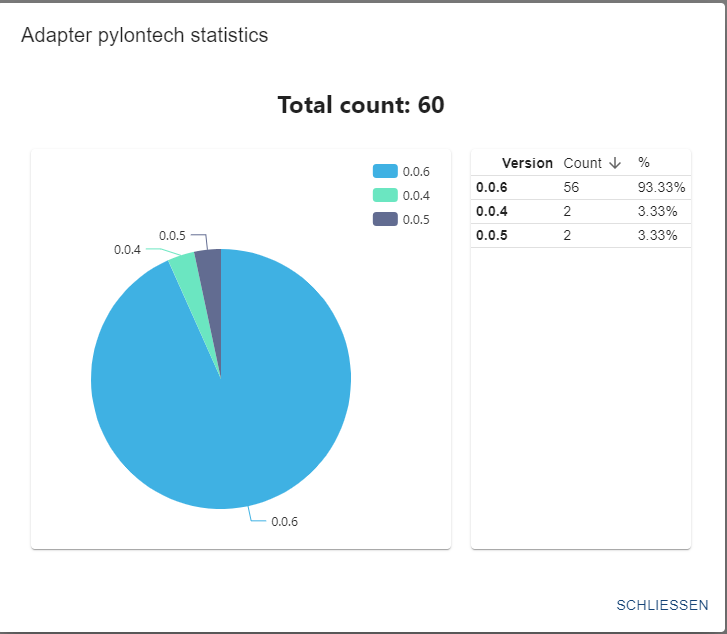
          Und Zack, Zack 60 Installationen :-)

          1f7d5198-8029-4f4a-bbb7-3d3a1aca9ad3-image.png

          Ralla66R 1 Reply Last reply
          0
          • PLCHome 0P PLCHome 0

            So der Adapter ist im stabilen Zweig.
            Und Zack, Zack 60 Installationen :-)

            1f7d5198-8029-4f4a-bbb7-3d3a1aca9ad3-image.png

            Ralla66R Offline
            Ralla66R Offline
            Ralla66
            Most Active
            wrote on last edited by Ralla66
            #49

            @plchome-0

            Nabend, bin weiter am testen mit der ESP TCP Bridge.
            Was wird bei Netzwerkhost eingetragen ? Die IP der ESP TCP Bridge ohne http
            bei mir dann 192.168.2.177 ?

            Trockenlauf :
            Vom Windows PC TCP Client über ESP TCP Bridge nach Hterm geht.
            Von Hterm über ESP TCP Bridge nach Windows PC TCP Client geht.
            Wireshark zeigt Telnet als Protokoll an.
            Also sind die Kabelwege in Ordnung.
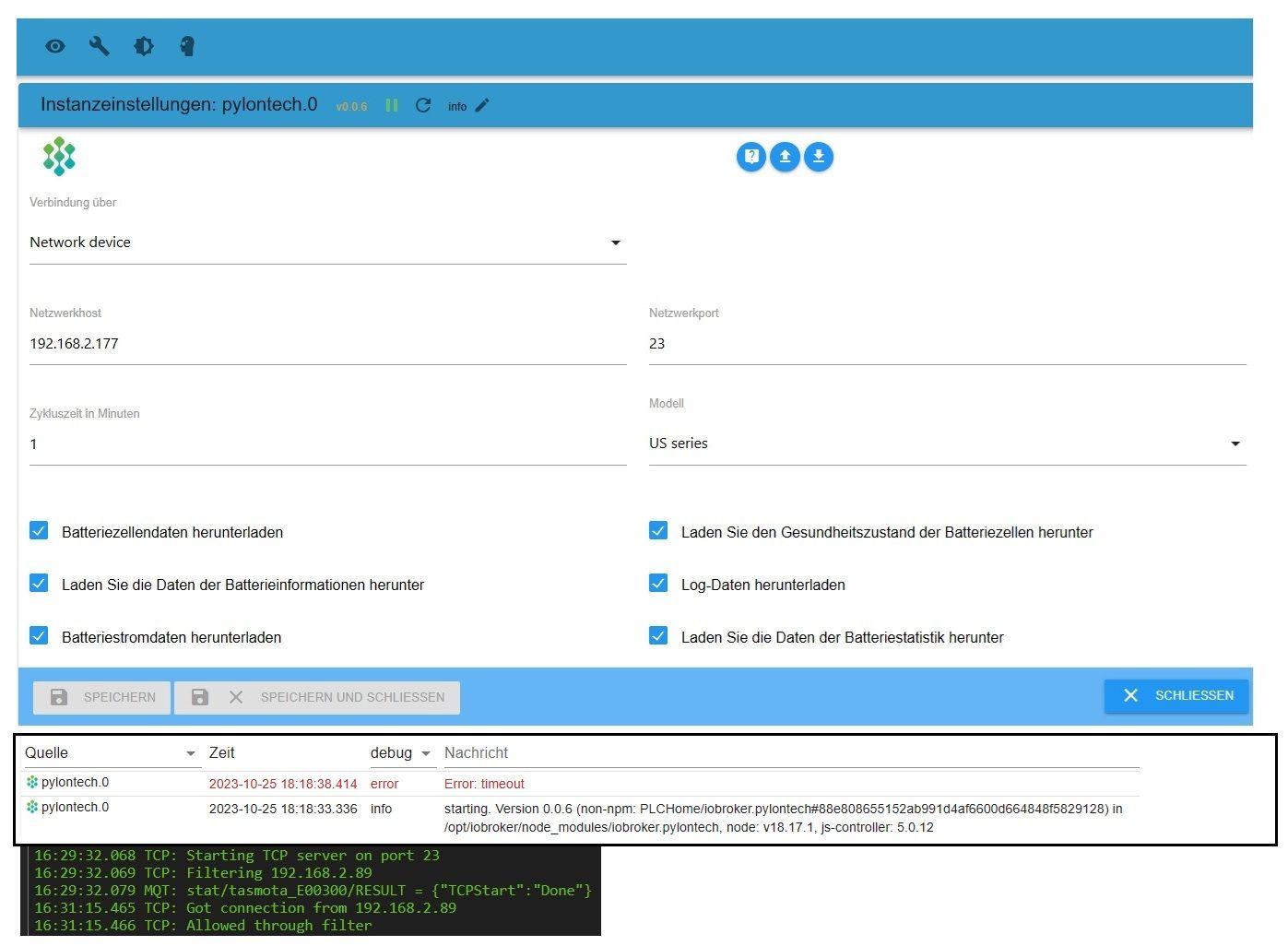
            py 2510 1.jpg

            192.168.2.89 ist IO Broker mit dem Adapter

            PLCHome 0P 1 Reply Last reply
            0
            • Ralla66R Ralla66

              @plchome-0

              Nabend, bin weiter am testen mit der ESP TCP Bridge.
              Was wird bei Netzwerkhost eingetragen ? Die IP der ESP TCP Bridge ohne http
              bei mir dann 192.168.2.177 ?

              Trockenlauf :
              Vom Windows PC TCP Client über ESP TCP Bridge nach Hterm geht.
              Von Hterm über ESP TCP Bridge nach Windows PC TCP Client geht.
              Wireshark zeigt Telnet als Protokoll an.
              Also sind die Kabelwege in Ordnung.

              py 2510 1.jpg

              192.168.2.89 ist IO Broker mit dem Adapter

              PLCHome 0P Offline
              PLCHome 0P Offline
              PLCHome 0
              Developer
              wrote on last edited by
              #50

              @ralla66 Der akku antwortet nicht ist das Kabel zum Akku ok? Was sendet der Akku?

              Ralla66R 1 Reply Last reply
              0
              • PLCHome 0P PLCHome 0

                @ralla66 Der akku antwortet nicht ist das Kabel zum Akku ok? Was sendet der Akku?

                Ralla66R Offline
                Ralla66R Offline
                Ralla66
                Most Active
                wrote on last edited by Ralla66
                #51

                @plchome-0

                Der Akku ist gar nicht angeschlossen.
                Der Adapter müsste ja eine Anfrage zur Batterie senden.
                Mit Wireshark ist keine Kommunikation vom Adapter zum ESP zu sehen.

                PLCHome 0P 1 Reply Last reply
                0
                • Ralla66R Ralla66

                  @plchome-0

                  Der Akku ist gar nicht angeschlossen.
                  Der Adapter müsste ja eine Anfrage zur Batterie senden.
                  Mit Wireshark ist keine Kommunikation vom Adapter zum ESP zu sehen.

                  PLCHome 0P Offline
                  PLCHome 0P Offline
                  PLCHome 0
                  Developer
                  wrote on last edited by PLCHome 0
                  #52

                  @ralla66 Lade den Adapter auf deinem hTerm Rechner von Github herunter, npm geht nicht und starte statt hTerm auf dem Rechner in der Root der Quellen.

                  https://github.com/PLCHome/ioBroker.pylontech/archive/refs/heads/master.zip

                  node build/moc/serialMoc.js <port> 115200 US
                  

                  Aber es ist komisch unter hTerm hättest du das erste Komando "pwr" sehen müssen.
                  Und im wireshark auch.

                  Ralla66R 1 Reply Last reply
                  0
                  • PLCHome 0P PLCHome 0

                    @ralla66 Lade den Adapter auf deinem hTerm Rechner von Github herunter, npm geht nicht und starte statt hTerm auf dem Rechner in der Root der Quellen.

                    https://github.com/PLCHome/ioBroker.pylontech/archive/refs/heads/master.zip

                    node build/moc/serialMoc.js <port> 115200 US
                    

                    Aber es ist komisch unter hTerm hättest du das erste Komando "pwr" sehen müssen.
                    Und im wireshark auch.

                    Ralla66R Offline
                    Ralla66R Offline
                    Ralla66
                    Most Active
                    wrote on last edited by
                    #53

                    @plchome-0

                    Also läuft der Adapter nicht auf meinem Raspi 4 mit IO ?

                    PLCHome 0P 1 Reply Last reply
                    0
                    • Ralla66R Ralla66

                      @plchome-0

                      Also läuft der Adapter nicht auf meinem Raspi 4 mit IO ?

                      PLCHome 0P Offline
                      PLCHome 0P Offline
                      PLCHome 0
                      Developer
                      wrote on last edited by PLCHome 0
                      #54

                      @ralla66 Irgendwie ist mir das hier zu blöd:
                      Zuerst schreibst du, dass du mit Hterm gegen einen gefummelten TCP/V24 Adapter getestet hast.

                      Also:
                      Verbinde deine Raspberry IO Installation in der du den ioBroker-Pylontech-Adapter installiert hast zu deinen TCP/V24 Adapter. Den TCP/V24 Adapter mit deinem Testrechner und starte dadrauf die Akkuemulation, also den serialMoc

                      Dan läuft der Adapter.

                      Sollte es nicht funktionieren, dann prüfe bitte deinen Aufbau/Hardware oder Konfiguration.

                      Es geht nämlich das Gerücht rum, dass der ioBroker-Pylontech-Adapter funktioniert!

                      Deinen Adapter kannst du mit Putty in raw und hTerm prüfen.

                      Ralla66R 1 Reply Last reply
                      0
                      • PLCHome 0P PLCHome 0

                        @ralla66 Irgendwie ist mir das hier zu blöd:
                        Zuerst schreibst du, dass du mit Hterm gegen einen gefummelten TCP/V24 Adapter getestet hast.

                        Also:
                        Verbinde deine Raspberry IO Installation in der du den ioBroker-Pylontech-Adapter installiert hast zu deinen TCP/V24 Adapter. Den TCP/V24 Adapter mit deinem Testrechner und starte dadrauf die Akkuemulation, also den serialMoc

                        Dan läuft der Adapter.

                        Sollte es nicht funktionieren, dann prüfe bitte deinen Aufbau/Hardware oder Konfiguration.

                        Es geht nämlich das Gerücht rum, dass der ioBroker-Pylontech-Adapter funktioniert!

                        Deinen Adapter kannst du mit Putty in raw und hTerm prüfen.

                        Ralla66R Offline
                        Ralla66R Offline
                        Ralla66
                        Most Active
                        wrote on last edited by
                        #55

                        @plchome-0

                        gefummelt, ah ja.
                        Danke für die Kommunikation.

                        1 Reply Last reply
                        0
                        • Der-JetiD Offline
                          Der-JetiD Offline
                          Der-Jeti
                          wrote on last edited by
                          #56

                          Hi,

                          wäre es auch möglich ein SC0500 Controller in den Adapter einzubauen ?

                          PLCHome 0P 1 Reply Last reply
                          0
                          • Der-JetiD Der-Jeti

                            Hi,

                            wäre es auch möglich ein SC0500 Controller in den Adapter einzubauen ?

                            PLCHome 0P Offline
                            PLCHome 0P Offline
                            PLCHome 0
                            Developer
                            wrote on last edited by
                            #57

                            @der-jeti wenn der auch einen Konsolenport hat. Ja dafür müsstest du den Konsolenport mit einem Rechner verbinden auf dem NodeJs oder der ioBroker läuft.
                            Der Adapter enthält Shell Funktionen um eine Referenz mit zu schneiden.

                            Der-JetiD 1 Reply Last reply
                            0
                            • PLCHome 0P PLCHome 0

                              @der-jeti wenn der auch einen Konsolenport hat. Ja dafür müsstest du den Konsolenport mit einem Rechner verbinden auf dem NodeJs oder der ioBroker läuft.
                              Der Adapter enthält Shell Funktionen um eine Referenz mit zu schneiden.

                              Der-JetiD Offline
                              Der-JetiD Offline
                              Der-Jeti
                              wrote on last edited by
                              #58

                              @plchome-0 ja, hat er. Werde mich morgen mal dran machen.

                              PLCHome 0P 1 Reply Last reply
                              0
                              • Der-JetiD Der-Jeti

                                @plchome-0 ja, hat er. Werde mich morgen mal dran machen.

                                PLCHome 0P Offline
                                PLCHome 0P Offline
                                PLCHome 0
                                Developer
                                wrote on last edited by
                                #59

                                @der-jeti us und force hast du schon probiert?

                                hg6806H 1 Reply Last reply
                                0
                                • PLCHome 0P PLCHome 0

                                  @der-jeti us und force hast du schon probiert?

                                  hg6806H Offline
                                  hg6806H Offline
                                  hg6806
                                  Most Active
                                  wrote on last edited by
                                  #60

                                  @plchome-0

                                  Hi, ich habe auch einen US3000C und würde den ganz gerne mittels deinem Adapter abfragen wollen.
                                  Ich habe den Pylontech über die RS232 des RJ45 an einen MAX3232 angeschlossen und die UART direkt an den Pi4.

                                  Muss ich das jetzt noch wie folgt konfigurieren?

                                  SOFTWARE USE OF THE SERIAL PORT
                                  If you intend to use the serial port for a software application running on the Raspberry Pi, there is a bit of configuration required to disable the console from using this port.   By default, the serial port is configured as a console port for interacting with the Linux OS shell.  The following steps will guide you through disabling the port from console access.
                                  
                                  First, lets make of backup of the two files that we intend to modify.
                                  
                                  sudo cp /boot/cmdline.txt /boot/cmdline.bak
                                  sudo cp /etc/inittab /etc/inittab.bak
                                  Next, we need to remove the "console=ttyAMA0,115200" and "kgdboc=ttyAMA0,115200" configuration parameters from the "/boot/cmdline.txt" configuration file. 
                                  
                                  To edit the file use this command:
                                  
                                  sudo nano /boot/cmdline.txt
                                  The file probably contains this default configuration line:
                                  
                                  dwc_otg.lpm_enable=0 console=ttyAMA0,115200 kgdboc=ttyAMA0,115200 
                                  console=tty1 root=/dev/mmcblk0p2 rootfstype=ext4 elevator=deadline rootwait
                                  After removing the two configuration parameters, it will look similar to this:
                                  
                                  dwc_otg.lpm_enable=0 console=tty1 root=/dev/mmcblk0p2 rootfstype=ext4 
                                  elevator=deadline rootwait
                                   
                                  
                                  The last step is to edit the "/etc/inittab" file and comment out the use of the "ttyAMA0" serial port.  To edit the file use this command:
                                  
                                  sudo nano /etc/inittab
                                  Now towards the bottom of the file, look for a configuration line that includes the "ttyAMA0" port address.


                                  Place a pound sign ("#") in front of the line to comment it out.  With a pound sign ("#") at the beginning of the line, Linux will ignore this configuration line.  


                                  Save the "/etc/inittab" file and then issue this command to reboot the Raspberry Pi:
                                  
                                  sudo reboot
                                  Now you are ready to use the serial port with a software application and the operating system won't interfere with the port.  Use the device address "ttyAMA0" in your application to access this serial port.  
                                  

                                  Und gebe ich dann unter lokaler Geräteadresse "ttyAMA0" ein?

                                  PLCHome 0P 1 Reply Last reply
                                  0
                                  • hg6806H hg6806

                                    @plchome-0

                                    Hi, ich habe auch einen US3000C und würde den ganz gerne mittels deinem Adapter abfragen wollen.
                                    Ich habe den Pylontech über die RS232 des RJ45 an einen MAX3232 angeschlossen und die UART direkt an den Pi4.

                                    Muss ich das jetzt noch wie folgt konfigurieren?

                                    SOFTWARE USE OF THE SERIAL PORT
                                    If you intend to use the serial port for a software application running on the Raspberry Pi, there is a bit of configuration required to disable the console from using this port.   By default, the serial port is configured as a console port for interacting with the Linux OS shell.  The following steps will guide you through disabling the port from console access.
                                    
                                    First, lets make of backup of the two files that we intend to modify.
                                    
                                    sudo cp /boot/cmdline.txt /boot/cmdline.bak
                                    sudo cp /etc/inittab /etc/inittab.bak
                                    Next, we need to remove the "console=ttyAMA0,115200" and "kgdboc=ttyAMA0,115200" configuration parameters from the "/boot/cmdline.txt" configuration file. 
                                    
                                    To edit the file use this command:
                                    
                                    sudo nano /boot/cmdline.txt
                                    The file probably contains this default configuration line:
                                    
                                    dwc_otg.lpm_enable=0 console=ttyAMA0,115200 kgdboc=ttyAMA0,115200 
                                    console=tty1 root=/dev/mmcblk0p2 rootfstype=ext4 elevator=deadline rootwait
                                    After removing the two configuration parameters, it will look similar to this:
                                    
                                    dwc_otg.lpm_enable=0 console=tty1 root=/dev/mmcblk0p2 rootfstype=ext4 
                                    elevator=deadline rootwait
                                     
                                    
                                    The last step is to edit the "/etc/inittab" file and comment out the use of the "ttyAMA0" serial port.  To edit the file use this command:
                                    
                                    sudo nano /etc/inittab
                                    Now towards the bottom of the file, look for a configuration line that includes the "ttyAMA0" port address.


                                    Place a pound sign ("#") in front of the line to comment it out.  With a pound sign ("#") at the beginning of the line, Linux will ignore this configuration line.  


                                    Save the "/etc/inittab" file and then issue this command to reboot the Raspberry Pi:
                                    
                                    sudo reboot
                                    Now you are ready to use the serial port with a software application and the operating system won't interfere with the port.  Use the device address "ttyAMA0" in your application to access this serial port.  
                                    

                                    Und gebe ich dann unter lokaler Geräteadresse "ttyAMA0" ein?

                                    PLCHome 0P Offline
                                    PLCHome 0P Offline
                                    PLCHome 0
                                    Developer
                                    wrote on last edited by
                                    #61

                                    @hg6806 ich kenne es so https://www.abelectronics.co.uk/kb/article/1035/serial-port-setup-in-raspberry-pi-os

                                    Dann ist der Port /dev/ttyS0

                                    1 Reply Last reply
                                    0
                                    • hg6806H Offline
                                      hg6806H Offline
                                      hg6806
                                      Most Active
                                      wrote on last edited by
                                      #62

                                      Adapter meldet "Error: Error: Input/output error setting custom baud rate of 115200"

                                      Seltsamerweise sehe ich mit dem Scope weder beim Pylontech noch bei dem Pi irgendetwas tackern auf der UART.

                                      PLCHome 0P 1 Reply Last reply
                                      0
                                      • hg6806H hg6806

                                        Adapter meldet "Error: Error: Input/output error setting custom baud rate of 115200"

                                        Seltsamerweise sehe ich mit dem Scope weder beim Pylontech noch bei dem Pi irgendetwas tackern auf der UART.

                                        PLCHome 0P Offline
                                        PLCHome 0P Offline
                                        PLCHome 0
                                        Developer
                                        wrote on last edited by PLCHome 0
                                        #63

                                        @hg6806 also der Stack kann die Geschwindigkeit nicht setzen. Kann auch an rechten liegen mach mal einen

                                        sudo chmod 777 /dev/ttyS0

                                        Du kannst die Schnittstelle auch von der Console öffnen

                                        sudo apt install cu
                                        cu -l /dev/ttyS0 -s 115200

                                        Oder sudo cu

                                        Die Schnittstelle bitte noch gegen deine tauschen..

                                        hg6806H 1 Reply Last reply
                                        0
                                        • PLCHome 0P PLCHome 0

                                          @hg6806 also der Stack kann die Geschwindigkeit nicht setzen. Kann auch an rechten liegen mach mal einen

                                          sudo chmod 777 /dev/ttyS0

                                          Du kannst die Schnittstelle auch von der Console öffnen

                                          sudo apt install cu
                                          cu -l /dev/ttyS0 -s 115200

                                          Oder sudo cu

                                          Die Schnittstelle bitte noch gegen deine tauschen..

                                          hg6806H Offline
                                          hg6806H Offline
                                          hg6806
                                          Most Active
                                          wrote on last edited by
                                          #64

                                          @plchome-0

                                          Rechte gesetzt, Fehler ist noch da.

                                          Ich dachte /dev/ttyS0 wäre meine Schnittstelle?

                                          PLCHome 0P 1 Reply Last reply
                                          0
                                          Reply
                                          • Reply as topic
                                          Log in to reply
                                          • Oldest to Newest
                                          • Newest to Oldest
                                          • Most Votes


                                          Support us

                                          ioBroker
                                          Community Adapters
                                          Donate

                                          598

                                          Online

                                          32.7k

                                          Users

                                          82.4k

                                          Topics

                                          1.3m

                                          Posts
                                          Community
                                          Impressum | Datenschutz-Bestimmungen | Nutzungsbedingungen | Einwilligungseinstellungen
                                          ioBroker Community 2014-2025
                                          logo
                                          • Login

                                          • Don't have an account? Register

                                          • Login or register to search.
                                          • First post
                                            Last post
                                          0
                                          • Home
                                          • Recent
                                          • Tags
                                          • Unread 0
                                          • Categories
                                          • Unreplied
                                          • Popular
                                          • GitHub
                                          • Docu
                                          • Hilfe