



Weiter zum Inhalt
  • Home
  • Aktuell
  • Tags
  • 0 Ungelesen 0
  • Kategorien
  • Unreplied
  • Beliebt
  • GitHub
  • Docu
  • Hilfe
Skins
  • Hell
  • Brite
  • Cerulean
  • Cosmo
  • Flatly
  • Journal
  • Litera
  • Lumen
  • Lux
  • Materia
  • Minty
  • Morph
  • Pulse
  • Sandstone
  • Simplex
  • Sketchy
  • Spacelab
  • United
  • Yeti
  • Zephyr
  • Dunkel
  • Cyborg
  • Darkly
  • Quartz
  • Slate
  • Solar
  • Superhero
  • Vapor

  • Standard: (Kein Skin)
  • Kein Skin
Einklappen
ioBroker Logo

Community Forum

donate donate
  1. ioBroker Community Home
  2. Deutsch
  3. ioBroker Allgemein
  4. IoBroker hängt sich komplett auf
NEWS

  • Neuer ioBroker-Blog online: Monatsrückblick März/April 2026
    BluefoxB
    Bluefox
    8
    1
    672

  • Verwendung von KI bitte immer deutlich kennzeichnen
    HomoranH
    Homoran
    10
    1
    514

  • Monatsrückblick Januar/Februar 2026 ist online!
    BluefoxB
    Bluefox
    18
    1
    1.0k

IoBroker hängt sich komplett auf

Geplant Angeheftet Gesperrt Verschoben ioBroker Allgemein
54 Beiträge 9 Kommentatoren 5.0k Aufrufe 7 Beobachtet
  • Älteste zuerst
  • Neuste zuerst
  • Meiste Stimmen
Antworten
  • In einem neuen Thema antworten
Anmelden zum Antworten
Dieses Thema wurde gelöscht. Nur Nutzer mit entsprechenden Rechten können es sehen.
  • Thomas BraunT Thomas Braun

    @joeysch

    iob diag
    

    sagt? Langfassung bitte.

    J Offline
    J Offline
    joeysch
    schrieb am zuletzt editiert von
    #4

    @thomas-braun

    ======== Start marking the full check here =========

    Skript v.2023-04-16
    
    *** BASE SYSTEM ***
    Architecture    : x86_64
    Docker          : false
    Virtualization  : lxc
    Distributor ID: Debian
    Description:    Debian GNU/Linux 11 (bullseye)
    Release:        11
    Codename:       bullseye
    
    PRETTY_NAME="Debian GNU/Linux 11 (bullseye)"
    NAME="Debian GNU/Linux"
    VERSION_ID="11"
    VERSION="11 (bullseye)"
    VERSION_CODENAME=bullseye
    ID=debian
    HOME_URL="https://www.debian.org/"
    SUPPORT_URL="https://www.debian.org/support"
    BUG_REPORT_URL="https://bugs.debian.org/"
    
    Systemuptime and Load:
     15:09:01 up 57 min,  1 user,  load average: 0.81, 0.80, 1.24
    CPU threads: 4
    
    
    *** Time and Time Zones ***
                   Local time: Mon 2023-09-04 15:09:01 UTC
               Universal time: Mon 2023-09-04 15:09:01 UTC
                     RTC time: n/a
                    Time zone: Etc/UTC (UTC, +0000)
    System clock synchronized: yes
                  NTP service: inactive
              RTC in local TZ: no
    
    *** User and Groups ***
    root
    /root
    root
    
    *** X-Server-Setup ***
    X-Server:       false
    Desktop: 
    Terminal: 
    Boot Target:    graphical.target
    
    *** MEMORY ***
                   total        used        free      shared  buff/cache   available
    Mem:            4.1G        2.7G        739M        0.0K        647M        1.4G
    Swap:           4.1G         60M        4.0G
    Total:          8.2G        2.8G        4.8G
    
             4096 M total memory
             2710 M used memory
              274 M active memory
             2818 M inactive memory
              738 M free memory
                0 M buffer memory
              647 M swap cache
             4096 M total swap
               60 M used swap
             4035 M free swap
    
    *** FILESYSTEM ***
    Filesystem                       Type      Size  Used Avail Use% Mounted on
    /dev/mapper/pve-vm--100--disk--0 ext4       20G  4.2G   15G  23% /
    none                             tmpfs     492K  4.0K  488K   1% /dev
    udev                             devtmpfs  7.8G     0  7.8G   0% /dev/tty
    tmpfs                            tmpfs     7.8G     0  7.8G   0% /dev/shm
    tmpfs                            tmpfs     3.2G   92K  3.2G   1% /run
    tmpfs                            tmpfs     5.0M     0  5.0M   0% /run/lock
    
    Messages concerning ext4 filesystem in dmesg:
    dmesg: read kernel buffer failed: Operation not permitted
    
    Show mounted filesystems (real ones only):
    TARGET SOURCE                           FSTYPE OPTIONS
    /      /dev/mapper/pve-vm--100--disk--0 ext4   rw,relatime,stripe=16
    
    Files in neuralgic directories:
    
    /var:
    414M    /var/
    262M    /var/cache
    257M    /var/cache/apt
    190M    /var/cache/apt/archives
    135M    /var/lib
    
    Archived and active journals take up 16.0M in the file system.
    
    /opt/iobroker/backups:
    32M     /opt/iobroker/backups/
    
    /opt/iobroker/iobroker-data:
    381M    /opt/iobroker/iobroker-data/
    295M    /opt/iobroker/iobroker-data/files
    52M     /opt/iobroker/iobroker-data/files/javascript.admin
    45M     /opt/iobroker/iobroker-data/files/devices.admin/static
    45M     /opt/iobroker/iobroker-data/files/devices.admin
    
    The five largest files in iobroker-data are:
    66M     /opt/iobroker/iobroker-data/objects.jsonl
    35M     /opt/iobroker/iobroker-data/files/devices.admin/static/js/main.24f2bb56.js.map
    21M     /opt/iobroker/iobroker-data/files/web.admin/static/js/main.e564fb87.js.map
    20M     /opt/iobroker/iobroker-data/states.jsonl
    19M     /opt/iobroker/iobroker-data/files/iot.admin/static/js/main.2975a411.js.map
    
    *** NodeJS-Installation ***
    
    /usr/bin/nodejs         v18.17.1
    /usr/bin/node           v18.17.1
    /usr/bin/npm            9.6.7
    /usr/bin/npx            9.6.7
    
    
    nodejs:
      Installed: 18.17.1-deb-1nodesource1
      Candidate: 18.17.1-deb-1nodesource1
      Version table:
     *** 18.17.1-deb-1nodesource1 500
            500 https://deb.nodesource.com/node_18.x bullseye/main amd64 Packages
            100 /var/lib/dpkg/status
         12.22.12~dfsg-1~deb11u4 500
            500 http://security.debian.org bullseye-security/main amd64 Packages
         12.22.12~dfsg-1~deb11u3 500
            500 http://ftp.debian.org/debian bullseye/main amd64 Packages
    
    Temp directories causing npm8 problem: 0
    No problems detected
    
    *** ioBroker-Installation ***
    
    ioBroker Status
    Thomas BraunT 1 Antwort Letzte Antwort
    0
    • J joeysch

      @thomas-braun

      ======== Start marking the full check here =========

      Skript v.2023-04-16
      
      *** BASE SYSTEM ***
      Architecture    : x86_64
      Docker          : false
      Virtualization  : lxc
      Distributor ID: Debian
      Description:    Debian GNU/Linux 11 (bullseye)
      Release:        11
      Codename:       bullseye
      
      PRETTY_NAME="Debian GNU/Linux 11 (bullseye)"
      NAME="Debian GNU/Linux"
      VERSION_ID="11"
      VERSION="11 (bullseye)"
      VERSION_CODENAME=bullseye
      ID=debian
      HOME_URL="https://www.debian.org/"
      SUPPORT_URL="https://www.debian.org/support"
      BUG_REPORT_URL="https://bugs.debian.org/"
      
      Systemuptime and Load:
       15:09:01 up 57 min,  1 user,  load average: 0.81, 0.80, 1.24
      CPU threads: 4
      
      
      *** Time and Time Zones ***
                     Local time: Mon 2023-09-04 15:09:01 UTC
                 Universal time: Mon 2023-09-04 15:09:01 UTC
                       RTC time: n/a
                      Time zone: Etc/UTC (UTC, +0000)
      System clock synchronized: yes
                    NTP service: inactive
                RTC in local TZ: no
      
      *** User and Groups ***
      root
      /root
      root
      
      *** X-Server-Setup ***
      X-Server:       false
      Desktop: 
      Terminal: 
      Boot Target:    graphical.target
      
      *** MEMORY ***
                     total        used        free      shared  buff/cache   available
      Mem:            4.1G        2.7G        739M        0.0K        647M        1.4G
      Swap:           4.1G         60M        4.0G
      Total:          8.2G        2.8G        4.8G
      
               4096 M total memory
               2710 M used memory
                274 M active memory
               2818 M inactive memory
                738 M free memory
                  0 M buffer memory
                647 M swap cache
               4096 M total swap
                 60 M used swap
               4035 M free swap
      
      *** FILESYSTEM ***
      Filesystem                       Type      Size  Used Avail Use% Mounted on
      /dev/mapper/pve-vm--100--disk--0 ext4       20G  4.2G   15G  23% /
      none                             tmpfs     492K  4.0K  488K   1% /dev
      udev                             devtmpfs  7.8G     0  7.8G   0% /dev/tty
      tmpfs                            tmpfs     7.8G     0  7.8G   0% /dev/shm
      tmpfs                            tmpfs     3.2G   92K  3.2G   1% /run
      tmpfs                            tmpfs     5.0M     0  5.0M   0% /run/lock
      
      Messages concerning ext4 filesystem in dmesg:
      dmesg: read kernel buffer failed: Operation not permitted
      
      Show mounted filesystems (real ones only):
      TARGET SOURCE                           FSTYPE OPTIONS
      /      /dev/mapper/pve-vm--100--disk--0 ext4   rw,relatime,stripe=16
      
      Files in neuralgic directories:
      
      /var:
      414M    /var/
      262M    /var/cache
      257M    /var/cache/apt
      190M    /var/cache/apt/archives
      135M    /var/lib
      
      Archived and active journals take up 16.0M in the file system.
      
      /opt/iobroker/backups:
      32M     /opt/iobroker/backups/
      
      /opt/iobroker/iobroker-data:
      381M    /opt/iobroker/iobroker-data/
      295M    /opt/iobroker/iobroker-data/files
      52M     /opt/iobroker/iobroker-data/files/javascript.admin
      45M     /opt/iobroker/iobroker-data/files/devices.admin/static
      45M     /opt/iobroker/iobroker-data/files/devices.admin
      
      The five largest files in iobroker-data are:
      66M     /opt/iobroker/iobroker-data/objects.jsonl
      35M     /opt/iobroker/iobroker-data/files/devices.admin/static/js/main.24f2bb56.js.map
      21M     /opt/iobroker/iobroker-data/files/web.admin/static/js/main.e564fb87.js.map
      20M     /opt/iobroker/iobroker-data/states.jsonl
      19M     /opt/iobroker/iobroker-data/files/iot.admin/static/js/main.2975a411.js.map
      
      *** NodeJS-Installation ***
      
      /usr/bin/nodejs         v18.17.1
      /usr/bin/node           v18.17.1
      /usr/bin/npm            9.6.7
      /usr/bin/npx            9.6.7
      
      
      nodejs:
        Installed: 18.17.1-deb-1nodesource1
        Candidate: 18.17.1-deb-1nodesource1
        Version table:
       *** 18.17.1-deb-1nodesource1 500
              500 https://deb.nodesource.com/node_18.x bullseye/main amd64 Packages
              100 /var/lib/dpkg/status
           12.22.12~dfsg-1~deb11u4 500
              500 http://security.debian.org bullseye-security/main amd64 Packages
           12.22.12~dfsg-1~deb11u3 500
              500 http://ftp.debian.org/debian bullseye/main amd64 Packages
      
      Temp directories causing npm8 problem: 0
      No problems detected
      
      *** ioBroker-Installation ***
      
      ioBroker Status
      Thomas BraunT Online
      Thomas BraunT Online
      Thomas Braun
      Most Active
      schrieb am zuletzt editiert von
      #5

      @joeysch

      Zeitzone setzen, nicht als root herumhampeln.

      Linux-Werkzeugkasten:
      https://forum.iobroker.net/topic/42952/der-kleine-iobroker-linux-werkzeugkasten
      NodeJS Fixer Skript:
      https://forum.iobroker.net/topic/68035/iob-node-fix-skript
      iob_diag: curl -sLf -o diag.sh https://iobroker.net/diag.sh && bash diag.sh

      1 Antwort Letzte Antwort
      0
      • ? Ein ehemaliger Benutzer

        @joeysch sagte in IoBroker hängt sich komplett auf:

        Was könnte das sein?

        Moin,

        ist es als Geheimsache erklärt, warum Du uns nicht sagst, worauf das läuft?

        • Hardware Defekt
        • Speichermangel

        Die Briefmarken sind auch nicht optimal, Text immer als Text in Code Tags </> hier posten.

        VG
        Bernd

        J Offline
        J Offline
        joeysch
        schrieb am zuletzt editiert von
        #6

        @dp20eic
        Läuft in lxc auf Proxmox
        167bd1af-54ba-41ae-aa3e-567e75382da3-image.png

        Speicher hab ich gerade erhöht.

        Thomas BraunT 1 Antwort Letzte Antwort
        0
        • J joeysch

          @dp20eic
          Läuft in lxc auf Proxmox
          167bd1af-54ba-41ae-aa3e-567e75382da3-image.png

          Speicher hab ich gerade erhöht.

          Thomas BraunT Online
          Thomas BraunT Online
          Thomas Braun
          Most Active
          schrieb am zuletzt editiert von Thomas Braun
          #7

          @joeysch

          Neben den ersten Punkten:

          Vollständige Ausgabe posten

          Linux-Werkzeugkasten:
          https://forum.iobroker.net/topic/42952/der-kleine-iobroker-linux-werkzeugkasten
          NodeJS Fixer Skript:
          https://forum.iobroker.net/topic/68035/iob-node-fix-skript
          iob_diag: curl -sLf -o diag.sh https://iobroker.net/diag.sh && bash diag.sh

          J 1 Antwort Letzte Antwort
          0
          • Thomas BraunT Thomas Braun

            @joeysch

            Neben den ersten Punkten:

            Vollständige Ausgabe posten

            J Offline
            J Offline
            joeysch
            schrieb am zuletzt editiert von
            #8

            @thomas-braun

            Was willst du mir damit sagen?

            Thomas BraunT 1 Antwort Letzte Antwort
            0
            • J joeysch

              @thomas-braun

              Was willst du mir damit sagen?

              Thomas BraunT Online
              Thomas BraunT Online
              Thomas Braun
              Most Active
              schrieb am zuletzt editiert von
              #9

              @joeysch

              Das deine Zeitzone nicht gesetzt ist, das du auch in einem lxc nicht als root herumstolperst und das es nicht die vollständige Ausgabe von iob diag gewesen ist.

              Linux-Werkzeugkasten:
              https://forum.iobroker.net/topic/42952/der-kleine-iobroker-linux-werkzeugkasten
              NodeJS Fixer Skript:
              https://forum.iobroker.net/topic/68035/iob-node-fix-skript
              iob_diag: curl -sLf -o diag.sh https://iobroker.net/diag.sh && bash diag.sh

              J 1 Antwort Letzte Antwort
              0
              • Thomas BraunT Thomas Braun

                @joeysch

                Das deine Zeitzone nicht gesetzt ist, das du auch in einem lxc nicht als root herumstolperst und das es nicht die vollständige Ausgabe von iob diag gewesen ist.

                J Offline
                J Offline
                joeysch
                schrieb am zuletzt editiert von
                #10

                @thomas-braun

                Mehr kommt nicht.

                ======== Start marking the full check here =========

                Skript v.2023-04-16
                
                *** BASE SYSTEM ***
                Architecture    : x86_64
                Docker          : false
                Virtualization  : lxc
                Distributor ID: Debian
                Description:    Debian GNU/Linux 11 (bullseye)
                Release:        11
                Codename:       bullseye
                
                PRETTY_NAME="Debian GNU/Linux 11 (bullseye)"
                NAME="Debian GNU/Linux"
                VERSION_ID="11"
                VERSION="11 (bullseye)"
                VERSION_CODENAME=bullseye
                ID=debian
                HOME_URL="https://www.debian.org/"
                SUPPORT_URL="https://www.debian.org/support"
                BUG_REPORT_URL="https://bugs.debian.org/"
                
                Systemuptime and Load:
                 15:18:34 up  1:06,  1 user,  load average: 1.18, 0.93, 1.09
                CPU threads: 4
                
                
                *** Time and Time Zones ***
                               Local time: Mon 2023-09-04 15:18:34 UTC
                           Universal time: Mon 2023-09-04 15:18:34 UTC
                                 RTC time: n/a
                                Time zone: Etc/UTC (UTC, +0000)
                System clock synchronized: yes
                              NTP service: inactive
                          RTC in local TZ: no
                
                *** User and Groups ***
                root
                /root
                root
                
                *** X-Server-Setup ***
                X-Server:       false
                Desktop: 
                Terminal: 
                Boot Target:    graphical.target
                
                *** MEMORY ***
                               total        used        free      shared  buff/cache   available
                Mem:            4.1G        1.7G        1.7G        0.0K        651M        2.4G
                Swap:           4.1G         60M        4.0G
                Total:          8.2G        1.8G        5.7G
                
                         4096 M total memory
                         1741 M used memory
                          380 M active memory
                         1813 M inactive memory
                         1702 M free memory
                            0 M buffer memory
                          651 M swap cache
                         4096 M total swap
                           60 M used swap
                         4035 M free swap
                
                *** FILESYSTEM ***
                Filesystem                       Type      Size  Used Avail Use% Mounted on
                /dev/mapper/pve-vm--100--disk--0 ext4       20G  4.2G   15G  23% /
                none                             tmpfs     492K  4.0K  488K   1% /dev
                udev                             devtmpfs  7.8G     0  7.8G   0% /dev/tty
                tmpfs                            tmpfs     7.8G     0  7.8G   0% /dev/shm
                tmpfs                            tmpfs     3.2G   92K  3.2G   1% /run
                tmpfs                            tmpfs     5.0M     0  5.0M   0% /run/lock
                
                Messages concerning ext4 filesystem in dmesg:
                dmesg: read kernel buffer failed: Operation not permitted
                
                Show mounted filesystems (real ones only):
                TARGET SOURCE                           FSTYPE OPTIONS
                /      /dev/mapper/pve-vm--100--disk--0 ext4   rw,relatime,stripe=16
                
                Files in neuralgic directories:
                
                /var:
                414M    /var/
                262M    /var/cache
                257M    /var/cache/apt
                190M    /var/cache/apt/archives
                135M    /var/lib
                
                Archived and active journals take up 16.0M in the file system.
                
                /opt/iobroker/backups:
                32M     /opt/iobroker/backups/
                
                /opt/iobroker/iobroker-data:
                382M    /opt/iobroker/iobroker-data/
                295M    /opt/iobroker/iobroker-data/files
                52M     /opt/iobroker/iobroker-data/files/javascript.admin
                45M     /opt/iobroker/iobroker-data/files/devices.admin/static
                45M     /opt/iobroker/iobroker-data/files/devices.admin
                
                The five largest files in iobroker-data are:
                66M     /opt/iobroker/iobroker-data/objects.jsonl
                35M     /opt/iobroker/iobroker-data/files/devices.admin/static/js/main.24f2bb56.js.map
                21M     /opt/iobroker/iobroker-data/states.jsonl
                21M     /opt/iobroker/iobroker-data/files/web.admin/static/js/main.e564fb87.js.map
                19M     /opt/iobroker/iobroker-data/files/iot.admin/static/js/main.2975a411.js.map
                
                *** NodeJS-Installation ***
                
                /usr/bin/nodejs         v18.17.1
                /usr/bin/node           v18.17.1
                /usr/bin/npm            9.6.7
                /usr/bin/npx            9.6.7
                
                
                nodejs:
                  Installed: 18.17.1-deb-1nodesource1
                  Candidate: 18.17.1-deb-1nodesource1
                  Version table:
                 *** 18.17.1-deb-1nodesource1 500
                        500 https://deb.nodesource.com/node_18.x bullseye/main amd64 Packages
                        100 /var/lib/dpkg/status
                     12.22.12~dfsg-1~deb11u4 500
                        500 http://security.debian.org bullseye-security/main amd64 Packages
                     12.22.12~dfsg-1~deb11u3 500
                        500 http://ftp.debian.org/debian bullseye/main amd64 Packages
                
                Temp directories causing npm8 problem: 0
                No problems detected
                
                *** ioBroker-Installation ***
                
                ioBroker Status
                Thomas BraunT GlasfaserG ? 3 Antworten Letzte Antwort
                0
                • J joeysch

                  @thomas-braun

                  Mehr kommt nicht.

                  ======== Start marking the full check here =========

                  Skript v.2023-04-16
                  
                  *** BASE SYSTEM ***
                  Architecture    : x86_64
                  Docker          : false
                  Virtualization  : lxc
                  Distributor ID: Debian
                  Description:    Debian GNU/Linux 11 (bullseye)
                  Release:        11
                  Codename:       bullseye
                  
                  PRETTY_NAME="Debian GNU/Linux 11 (bullseye)"
                  NAME="Debian GNU/Linux"
                  VERSION_ID="11"
                  VERSION="11 (bullseye)"
                  VERSION_CODENAME=bullseye
                  ID=debian
                  HOME_URL="https://www.debian.org/"
                  SUPPORT_URL="https://www.debian.org/support"
                  BUG_REPORT_URL="https://bugs.debian.org/"
                  
                  Systemuptime and Load:
                   15:18:34 up  1:06,  1 user,  load average: 1.18, 0.93, 1.09
                  CPU threads: 4
                  
                  
                  *** Time and Time Zones ***
                                 Local time: Mon 2023-09-04 15:18:34 UTC
                             Universal time: Mon 2023-09-04 15:18:34 UTC
                                   RTC time: n/a
                                  Time zone: Etc/UTC (UTC, +0000)
                  System clock synchronized: yes
                                NTP service: inactive
                            RTC in local TZ: no
                  
                  *** User and Groups ***
                  root
                  /root
                  root
                  
                  *** X-Server-Setup ***
                  X-Server:       false
                  Desktop: 
                  Terminal: 
                  Boot Target:    graphical.target
                  
                  *** MEMORY ***
                                 total        used        free      shared  buff/cache   available
                  Mem:            4.1G        1.7G        1.7G        0.0K        651M        2.4G
                  Swap:           4.1G         60M        4.0G
                  Total:          8.2G        1.8G        5.7G
                  
                           4096 M total memory
                           1741 M used memory
                            380 M active memory
                           1813 M inactive memory
                           1702 M free memory
                              0 M buffer memory
                            651 M swap cache
                           4096 M total swap
                             60 M used swap
                           4035 M free swap
                  
                  *** FILESYSTEM ***
                  Filesystem                       Type      Size  Used Avail Use% Mounted on
                  /dev/mapper/pve-vm--100--disk--0 ext4       20G  4.2G   15G  23% /
                  none                             tmpfs     492K  4.0K  488K   1% /dev
                  udev                             devtmpfs  7.8G     0  7.8G   0% /dev/tty
                  tmpfs                            tmpfs     7.8G     0  7.8G   0% /dev/shm
                  tmpfs                            tmpfs     3.2G   92K  3.2G   1% /run
                  tmpfs                            tmpfs     5.0M     0  5.0M   0% /run/lock
                  
                  Messages concerning ext4 filesystem in dmesg:
                  dmesg: read kernel buffer failed: Operation not permitted
                  
                  Show mounted filesystems (real ones only):
                  TARGET SOURCE                           FSTYPE OPTIONS
                  /      /dev/mapper/pve-vm--100--disk--0 ext4   rw,relatime,stripe=16
                  
                  Files in neuralgic directories:
                  
                  /var:
                  414M    /var/
                  262M    /var/cache
                  257M    /var/cache/apt
                  190M    /var/cache/apt/archives
                  135M    /var/lib
                  
                  Archived and active journals take up 16.0M in the file system.
                  
                  /opt/iobroker/backups:
                  32M     /opt/iobroker/backups/
                  
                  /opt/iobroker/iobroker-data:
                  382M    /opt/iobroker/iobroker-data/
                  295M    /opt/iobroker/iobroker-data/files
                  52M     /opt/iobroker/iobroker-data/files/javascript.admin
                  45M     /opt/iobroker/iobroker-data/files/devices.admin/static
                  45M     /opt/iobroker/iobroker-data/files/devices.admin
                  
                  The five largest files in iobroker-data are:
                  66M     /opt/iobroker/iobroker-data/objects.jsonl
                  35M     /opt/iobroker/iobroker-data/files/devices.admin/static/js/main.24f2bb56.js.map
                  21M     /opt/iobroker/iobroker-data/states.jsonl
                  21M     /opt/iobroker/iobroker-data/files/web.admin/static/js/main.e564fb87.js.map
                  19M     /opt/iobroker/iobroker-data/files/iot.admin/static/js/main.2975a411.js.map
                  
                  *** NodeJS-Installation ***
                  
                  /usr/bin/nodejs         v18.17.1
                  /usr/bin/node           v18.17.1
                  /usr/bin/npm            9.6.7
                  /usr/bin/npx            9.6.7
                  
                  
                  nodejs:
                    Installed: 18.17.1-deb-1nodesource1
                    Candidate: 18.17.1-deb-1nodesource1
                    Version table:
                   *** 18.17.1-deb-1nodesource1 500
                          500 https://deb.nodesource.com/node_18.x bullseye/main amd64 Packages
                          100 /var/lib/dpkg/status
                       12.22.12~dfsg-1~deb11u4 500
                          500 http://security.debian.org bullseye-security/main amd64 Packages
                       12.22.12~dfsg-1~deb11u3 500
                          500 http://ftp.debian.org/debian bullseye/main amd64 Packages
                  
                  Temp directories causing npm8 problem: 0
                  No problems detected
                  
                  *** ioBroker-Installation ***
                  
                  ioBroker Status
                  Thomas BraunT Online
                  Thomas BraunT Online
                  Thomas Braun
                  Most Active
                  schrieb am zuletzt editiert von
                  #11

                  @joeysch

                  Dann isses kaputt.
                  Installier es nochmal, diesmal richtig. Siehe entsprechende Anleitung für Proxmox/LXC.

                  Linux-Werkzeugkasten:
                  https://forum.iobroker.net/topic/42952/der-kleine-iobroker-linux-werkzeugkasten
                  NodeJS Fixer Skript:
                  https://forum.iobroker.net/topic/68035/iob-node-fix-skript
                  iob_diag: curl -sLf -o diag.sh https://iobroker.net/diag.sh && bash diag.sh

                  J 1 Antwort Letzte Antwort
                  0
                  • J joeysch

                    @thomas-braun

                    Mehr kommt nicht.

                    ======== Start marking the full check here =========

                    Skript v.2023-04-16
                    
                    *** BASE SYSTEM ***
                    Architecture    : x86_64
                    Docker          : false
                    Virtualization  : lxc
                    Distributor ID: Debian
                    Description:    Debian GNU/Linux 11 (bullseye)
                    Release:        11
                    Codename:       bullseye
                    
                    PRETTY_NAME="Debian GNU/Linux 11 (bullseye)"
                    NAME="Debian GNU/Linux"
                    VERSION_ID="11"
                    VERSION="11 (bullseye)"
                    VERSION_CODENAME=bullseye
                    ID=debian
                    HOME_URL="https://www.debian.org/"
                    SUPPORT_URL="https://www.debian.org/support"
                    BUG_REPORT_URL="https://bugs.debian.org/"
                    
                    Systemuptime and Load:
                     15:18:34 up  1:06,  1 user,  load average: 1.18, 0.93, 1.09
                    CPU threads: 4
                    
                    
                    *** Time and Time Zones ***
                                   Local time: Mon 2023-09-04 15:18:34 UTC
                               Universal time: Mon 2023-09-04 15:18:34 UTC
                                     RTC time: n/a
                                    Time zone: Etc/UTC (UTC, +0000)
                    System clock synchronized: yes
                                  NTP service: inactive
                              RTC in local TZ: no
                    
                    *** User and Groups ***
                    root
                    /root
                    root
                    
                    *** X-Server-Setup ***
                    X-Server:       false
                    Desktop: 
                    Terminal: 
                    Boot Target:    graphical.target
                    
                    *** MEMORY ***
                                   total        used        free      shared  buff/cache   available
                    Mem:            4.1G        1.7G        1.7G        0.0K        651M        2.4G
                    Swap:           4.1G         60M        4.0G
                    Total:          8.2G        1.8G        5.7G
                    
                             4096 M total memory
                             1741 M used memory
                              380 M active memory
                             1813 M inactive memory
                             1702 M free memory
                                0 M buffer memory
                              651 M swap cache
                             4096 M total swap
                               60 M used swap
                             4035 M free swap
                    
                    *** FILESYSTEM ***
                    Filesystem                       Type      Size  Used Avail Use% Mounted on
                    /dev/mapper/pve-vm--100--disk--0 ext4       20G  4.2G   15G  23% /
                    none                             tmpfs     492K  4.0K  488K   1% /dev
                    udev                             devtmpfs  7.8G     0  7.8G   0% /dev/tty
                    tmpfs                            tmpfs     7.8G     0  7.8G   0% /dev/shm
                    tmpfs                            tmpfs     3.2G   92K  3.2G   1% /run
                    tmpfs                            tmpfs     5.0M     0  5.0M   0% /run/lock
                    
                    Messages concerning ext4 filesystem in dmesg:
                    dmesg: read kernel buffer failed: Operation not permitted
                    
                    Show mounted filesystems (real ones only):
                    TARGET SOURCE                           FSTYPE OPTIONS
                    /      /dev/mapper/pve-vm--100--disk--0 ext4   rw,relatime,stripe=16
                    
                    Files in neuralgic directories:
                    
                    /var:
                    414M    /var/
                    262M    /var/cache
                    257M    /var/cache/apt
                    190M    /var/cache/apt/archives
                    135M    /var/lib
                    
                    Archived and active journals take up 16.0M in the file system.
                    
                    /opt/iobroker/backups:
                    32M     /opt/iobroker/backups/
                    
                    /opt/iobroker/iobroker-data:
                    382M    /opt/iobroker/iobroker-data/
                    295M    /opt/iobroker/iobroker-data/files
                    52M     /opt/iobroker/iobroker-data/files/javascript.admin
                    45M     /opt/iobroker/iobroker-data/files/devices.admin/static
                    45M     /opt/iobroker/iobroker-data/files/devices.admin
                    
                    The five largest files in iobroker-data are:
                    66M     /opt/iobroker/iobroker-data/objects.jsonl
                    35M     /opt/iobroker/iobroker-data/files/devices.admin/static/js/main.24f2bb56.js.map
                    21M     /opt/iobroker/iobroker-data/states.jsonl
                    21M     /opt/iobroker/iobroker-data/files/web.admin/static/js/main.e564fb87.js.map
                    19M     /opt/iobroker/iobroker-data/files/iot.admin/static/js/main.2975a411.js.map
                    
                    *** NodeJS-Installation ***
                    
                    /usr/bin/nodejs         v18.17.1
                    /usr/bin/node           v18.17.1
                    /usr/bin/npm            9.6.7
                    /usr/bin/npx            9.6.7
                    
                    
                    nodejs:
                      Installed: 18.17.1-deb-1nodesource1
                      Candidate: 18.17.1-deb-1nodesource1
                      Version table:
                     *** 18.17.1-deb-1nodesource1 500
                            500 https://deb.nodesource.com/node_18.x bullseye/main amd64 Packages
                            100 /var/lib/dpkg/status
                         12.22.12~dfsg-1~deb11u4 500
                            500 http://security.debian.org bullseye-security/main amd64 Packages
                         12.22.12~dfsg-1~deb11u3 500
                            500 http://ftp.debian.org/debian bullseye/main amd64 Packages
                    
                    Temp directories causing npm8 problem: 0
                    No problems detected
                    
                    *** ioBroker-Installation ***
                    
                    ioBroker Status
                    GlasfaserG Offline
                    GlasfaserG Offline
                    Glasfaser
                    schrieb am zuletzt editiert von
                    #12

                    @joeysch

                    Zeige mal die Ausgabe von

                    iobroker status
                    

                    Synology 918+ 16GB - ioBroker in Docker v9 , VISO auf Trekstor Primebook C13 13,3" , Hikvision Domkameras mit Surveillance Station .. CCU RaspberryMatic in Synology VM .. Zigbee CC2538+CC2592 .. Sonoff .. KNX .. Modbus ..

                    1 Antwort Letzte Antwort
                    0
                    • J joeysch

                      @thomas-braun

                      Mehr kommt nicht.

                      ======== Start marking the full check here =========

                      Skript v.2023-04-16
                      
                      *** BASE SYSTEM ***
                      Architecture    : x86_64
                      Docker          : false
                      Virtualization  : lxc
                      Distributor ID: Debian
                      Description:    Debian GNU/Linux 11 (bullseye)
                      Release:        11
                      Codename:       bullseye
                      
                      PRETTY_NAME="Debian GNU/Linux 11 (bullseye)"
                      NAME="Debian GNU/Linux"
                      VERSION_ID="11"
                      VERSION="11 (bullseye)"
                      VERSION_CODENAME=bullseye
                      ID=debian
                      HOME_URL="https://www.debian.org/"
                      SUPPORT_URL="https://www.debian.org/support"
                      BUG_REPORT_URL="https://bugs.debian.org/"
                      
                      Systemuptime and Load:
                       15:18:34 up  1:06,  1 user,  load average: 1.18, 0.93, 1.09
                      CPU threads: 4
                      
                      
                      *** Time and Time Zones ***
                                     Local time: Mon 2023-09-04 15:18:34 UTC
                                 Universal time: Mon 2023-09-04 15:18:34 UTC
                                       RTC time: n/a
                                      Time zone: Etc/UTC (UTC, +0000)
                      System clock synchronized: yes
                                    NTP service: inactive
                                RTC in local TZ: no
                      
                      *** User and Groups ***
                      root
                      /root
                      root
                      
                      *** X-Server-Setup ***
                      X-Server:       false
                      Desktop: 
                      Terminal: 
                      Boot Target:    graphical.target
                      
                      *** MEMORY ***
                                     total        used        free      shared  buff/cache   available
                      Mem:            4.1G        1.7G        1.7G        0.0K        651M        2.4G
                      Swap:           4.1G         60M        4.0G
                      Total:          8.2G        1.8G        5.7G
                      
                               4096 M total memory
                               1741 M used memory
                                380 M active memory
                               1813 M inactive memory
                               1702 M free memory
                                  0 M buffer memory
                                651 M swap cache
                               4096 M total swap
                                 60 M used swap
                               4035 M free swap
                      
                      *** FILESYSTEM ***
                      Filesystem                       Type      Size  Used Avail Use% Mounted on
                      /dev/mapper/pve-vm--100--disk--0 ext4       20G  4.2G   15G  23% /
                      none                             tmpfs     492K  4.0K  488K   1% /dev
                      udev                             devtmpfs  7.8G     0  7.8G   0% /dev/tty
                      tmpfs                            tmpfs     7.8G     0  7.8G   0% /dev/shm
                      tmpfs                            tmpfs     3.2G   92K  3.2G   1% /run
                      tmpfs                            tmpfs     5.0M     0  5.0M   0% /run/lock
                      
                      Messages concerning ext4 filesystem in dmesg:
                      dmesg: read kernel buffer failed: Operation not permitted
                      
                      Show mounted filesystems (real ones only):
                      TARGET SOURCE                           FSTYPE OPTIONS
                      /      /dev/mapper/pve-vm--100--disk--0 ext4   rw,relatime,stripe=16
                      
                      Files in neuralgic directories:
                      
                      /var:
                      414M    /var/
                      262M    /var/cache
                      257M    /var/cache/apt
                      190M    /var/cache/apt/archives
                      135M    /var/lib
                      
                      Archived and active journals take up 16.0M in the file system.
                      
                      /opt/iobroker/backups:
                      32M     /opt/iobroker/backups/
                      
                      /opt/iobroker/iobroker-data:
                      382M    /opt/iobroker/iobroker-data/
                      295M    /opt/iobroker/iobroker-data/files
                      52M     /opt/iobroker/iobroker-data/files/javascript.admin
                      45M     /opt/iobroker/iobroker-data/files/devices.admin/static
                      45M     /opt/iobroker/iobroker-data/files/devices.admin
                      
                      The five largest files in iobroker-data are:
                      66M     /opt/iobroker/iobroker-data/objects.jsonl
                      35M     /opt/iobroker/iobroker-data/files/devices.admin/static/js/main.24f2bb56.js.map
                      21M     /opt/iobroker/iobroker-data/states.jsonl
                      21M     /opt/iobroker/iobroker-data/files/web.admin/static/js/main.e564fb87.js.map
                      19M     /opt/iobroker/iobroker-data/files/iot.admin/static/js/main.2975a411.js.map
                      
                      *** NodeJS-Installation ***
                      
                      /usr/bin/nodejs         v18.17.1
                      /usr/bin/node           v18.17.1
                      /usr/bin/npm            9.6.7
                      /usr/bin/npx            9.6.7
                      
                      
                      nodejs:
                        Installed: 18.17.1-deb-1nodesource1
                        Candidate: 18.17.1-deb-1nodesource1
                        Version table:
                       *** 18.17.1-deb-1nodesource1 500
                              500 https://deb.nodesource.com/node_18.x bullseye/main amd64 Packages
                              100 /var/lib/dpkg/status
                           12.22.12~dfsg-1~deb11u4 500
                              500 http://security.debian.org bullseye-security/main amd64 Packages
                           12.22.12~dfsg-1~deb11u3 500
                              500 http://ftp.debian.org/debian bullseye/main amd64 Packages
                      
                      Temp directories causing npm8 problem: 0
                      No problems detected
                      
                      *** ioBroker-Installation ***
                      
                      ioBroker Status
                      ? Offline
                      ? Offline
                      Ein ehemaliger Benutzer
                      schrieb am zuletzt editiert von
                      #13

                      @joeysch sagte in IoBroker hängt sich komplett auf:

                      Mehr kommt nicht.

                      Moin,

                      ich würde rein prophylaktisch mal folgendes machen

                      # iob stop
                      # iob fix
                      # iob start
                      

                      Wie führst Du denn den Befehl iob diag aus, als welcher User?

                      VG
                      Bernd

                      J Thomas BraunT 2 Antworten Letzte Antwort
                      1
                      • Thomas BraunT Thomas Braun

                        @joeysch

                        Dann isses kaputt.
                        Installier es nochmal, diesmal richtig. Siehe entsprechende Anleitung für Proxmox/LXC.

                        J Offline
                        J Offline
                        joeysch
                        schrieb am zuletzt editiert von
                        #14

                        @thomas-braun

                        Proxmox konnte das nicht darstellen

                        ======== Start marking the full check here =========

                        Skript v.2023-04-16
                        
                        *** BASE SYSTEM ***
                        Architecture    : x86_64
                        Docker          : false
                        Virtualization  : lxc
                        Distributor ID: Debian
                        Description:    Debian GNU/Linux 11 (bullseye)
                        Release:        11
                        Codename:       bullseye
                        
                        PRETTY_NAME="Debian GNU/Linux 11 (bullseye)"
                        NAME="Debian GNU/Linux"
                        VERSION_ID="11"
                        VERSION="11 (bullseye)"
                        VERSION_CODENAME=bullseye
                        ID=debian
                        HOME_URL="https://www.debian.org/"
                        SUPPORT_URL="https://www.debian.org/support"
                        BUG_REPORT_URL="https://bugs.debian.org/"
                        
                        Systemuptime and Load:
                         17:30:42 up 8 min,  1 user,  load average: 0.08, 0.84, 1.09
                        CPU threads: 4
                        
                        
                        *** Time and Time Zones ***
                                       Local time: Mon 2023-09-04 17:30:42 CEST
                                   Universal time: Mon 2023-09-04 15:30:42 UTC
                                         RTC time: n/a
                                        Time zone: Europe/Berlin (CEST, +0200)
                        System clock synchronized: yes
                                      NTP service: inactive
                                  RTC in local TZ: no
                        
                        *** User and Groups ***
                        root
                        /root
                        root
                        
                        *** X-Server-Setup ***
                        X-Server:       false
                        Desktop: 
                        Terminal: 
                        Boot Target:    graphical.target
                        
                        *** MEMORY ***
                                       total        used        free      shared  buff/cache   available
                        Mem:            4.1G        2.5G        995M        0.0K        576M        1.6G
                        Swap:           4.1G          0B        4.1G
                        Total:          8.2G        2.5G        5.1G
                        
                                 4096 M total memory
                                 2524 M used memory
                                  240 M active memory
                                 2690 M inactive memory
                                  995 M free memory
                                    0 M buffer memory
                                  576 M swap cache
                                 4096 M total swap
                                    0 M used swap
                                 4096 M free swap
                        
                        *** FILESYSTEM ***
                        Filesystem                       Type      Size  Used Avail Use% Mounted on
                        /dev/mapper/pve-vm--100--disk--0 ext4       20G  4.2G   15G  23% /
                        none                             tmpfs     492K  4.0K  488K   1% /dev
                        udev                             devtmpfs  7.8G     0  7.8G   0% /dev/tty
                        tmpfs                            tmpfs     7.8G     0  7.8G   0% /dev/shm
                        tmpfs                            tmpfs     3.2G   96K  3.2G   1% /run
                        tmpfs                            tmpfs     5.0M     0  5.0M   0% /run/lock
                        
                        Messages concerning ext4 filesystem in dmesg:
                        dmesg: read kernel buffer failed: Operation not permitted
                        
                        Show mounted filesystems (real ones only):
                        TARGET SOURCE                           FSTYPE OPTIONS
                        /      /dev/mapper/pve-vm--100--disk--0 ext4   rw,relatime,stripe=16
                        
                        Files in neuralgic directories:
                        
                        /var:
                        414M    /var/
                        262M    /var/cache
                        257M    /var/cache/apt
                        190M    /var/cache/apt/archives
                        135M    /var/lib
                        
                        Archived and active journals take up 16.0M in the file system.
                        
                        /opt/iobroker/backups:
                        32M     /opt/iobroker/backups/
                        
                        /opt/iobroker/iobroker-data:
                        377M    /opt/iobroker/iobroker-data/
                        295M    /opt/iobroker/iobroker-data/files
                        52M     /opt/iobroker/iobroker-data/files/javascript.admin
                        45M     /opt/iobroker/iobroker-data/files/devices.admin/static
                        45M     /opt/iobroker/iobroker-data/files/devices.admin
                        
                        The five largest files in iobroker-data are:
                        58M     /opt/iobroker/iobroker-data/objects.jsonl
                        35M     /opt/iobroker/iobroker-data/files/devices.admin/static/js/main.24f2bb56.js.map
                        25M     /opt/iobroker/iobroker-data/states.jsonl
                        21M     /opt/iobroker/iobroker-data/files/web.admin/static/js/main.e564fb87.js.map
                        19M     /opt/iobroker/iobroker-data/files/iot.admin/static/js/main.2975a411.js.map
                        
                        *** NodeJS-Installation ***
                        
                        /usr/bin/nodejs         v18.17.1
                        /usr/bin/node           v18.17.1
                        /usr/bin/npm            9.6.7
                        /usr/bin/npx            9.6.7
                        
                        
                        nodejs:
                          Installed: 18.17.1-deb-1nodesource1
                          Candidate: 18.17.1-deb-1nodesource1
                          Version table:
                         *** 18.17.1-deb-1nodesource1 500
                                500 https://deb.nodesource.com/node_18.x bullseye/main amd64 Packages
                                100 /var/lib/dpkg/status
                             12.22.12~dfsg-1~deb11u4 500
                                500 http://security.debian.org bullseye-security/main amd64 Packages
                             12.22.12~dfsg-1~deb11u3 500
                                500 http://ftp.debian.org/debian bullseye/main amd64 Packages
                        
                        Temp directories causing npm8 problem: 0
                        No problems detected
                        
                        *** ioBroker-Installation ***
                        
                        ioBroker Status
                        iobroker is running on this host.
                        
                        
                        Objects type: jsonl
                        States  type: jsonl
                        
                        MULTIHOSTSERVICE/enabled: false
                        
                        Core adapters versions
                        js-controller:  4.0.24
                        admin:          6.8.0
                        javascript:     7.0.3
                        
                        Adapters from github:   4
                        
                        Adapter State
                        + system.adapter.admin.0                  : admin                 : iobroker                                 -  enabled, port: 8081, bind: 0.0.0.0, run as: guido
                        + system.adapter.backitup.0               : backitup              : iobroker                                 -  enabled
                        + system.adapter.chromecast.0             : chromecast            : iobroker                                 -  enabled
                          system.adapter.daswetter.0              : daswetter             : iobroker                                 -  enabled
                        + system.adapter.denon.0                  : denon                 : iobroker                                 -  enabled
                          system.adapter.devices.0                : devices               : iobroker                                 - disabled
                        + system.adapter.discovery.0              : discovery             : iobroker                                 -  enabled
                        + system.adapter.energiefluss.0           : energiefluss          : iobroker                                 -  enabled
                        + system.adapter.fullybrowser.0           : fullybrowser          : iobroker                                 -  enabled
                        + system.adapter.heos.0                   : heos                  : iobroker                                 -  enabled
                        + system.adapter.homeconnect.0            : homeconnect           : iobroker                                 -  enabled
                          system.adapter.ical.0                   : ical                  : iobroker                                 -  enabled
                          system.adapter.icons-mfd-svg.0          : icons-mfd-svg         : iobroker                                 - disabled
                        + system.adapter.influxdb.0               : influxdb              : iobroker                                 -  enabled, port: 8086
                        + system.adapter.influxdb.1               : influxdb              : iobroker                                 -  enabled, port: 8086
                        + system.adapter.info.0                   : info                  : iobroker                                 -  enabled
                        + system.adapter.iot.0                    : iot                   : iobroker                                 -  enabled
                        + system.adapter.javascript.0             : javascript            : iobroker                                 -  enabled
                        + system.adapter.lgtv.0                   : lgtv                  : iobroker                                 -  enabled
                          system.adapter.material.0               : material              : iobroker                                 - disabled
                        + system.adapter.melcloud.0               : melcloud              : iobroker                                 -  enabled
                        + system.adapter.mqtt.0                   : mqtt                  : iobroker                                 -  enabled, port: 8885, bind: 192.168.0.17
                        + system.adapter.net-tools.0              : net-tools             : iobroker                                 -  enabled
                        + system.adapter.node-red.0               : node-red              : iobroker                                 -  enabled, port: 1880, bind: 0.0.0.0
                        + system.adapter.simple-api.0             : simple-api            : iobroker                                 -  enabled, port: 8087, bind: 0.0.0.0, run as: admin
                        + system.adapter.sonoff.0                 : sonoff                : iobroker                                 -  enabled, port: 1883, bind: 0.0.0.0
                        + system.adapter.sourceanalytix.0         : sourceanalytix        : iobroker                                 -  enabled
                        + system.adapter.tankerkoenig.0           : tankerkoenig          : iobroker                                 -  enabled
                        + system.adapter.time-switch.0            : time-switch           : iobroker                                 -  enabled
                        + system.adapter.tr-064.0                 : tr-064                : iobroker                                 -  enabled
                        + system.adapter.trashschedule.0          : trashschedule         : iobroker                                 -  enabled
                          system.adapter.vis-hqwidgets.0          : vis-hqwidgets         : iobroker                                 - disabled
                          system.adapter.vis-icontwo.0            : vis-icontwo           : iobroker                                 - disabled
                        + system.adapter.vis-inventwo.0           : vis-inventwo          : iobroker                                 -  enabled
                          system.adapter.vis-jqui-mfd.0           : vis-jqui-mfd          : iobroker                                 - disabled
                          system.adapter.vis-keyboard.0           : vis-keyboard          : iobroker                                 - disabled
                          system.adapter.vis-materialdesign.0     : vis-materialdesign    : iobroker                                 - disabled
                          system.adapter.vis-metro.0              : vis-metro             : iobroker                                 - disabled
                          system.adapter.vis-players.0            : vis-players           : iobroker                                 - disabled
                          system.adapter.vis-timeandweather.0     : vis-timeandweather    : iobroker                                 - disabled
                          system.adapter.vis.0                    : vis                   : iobroker                                 -  enabled
                        + system.adapter.web.0                    : web                   : iobroker                                 -  enabled, port: 8082, bind: 0.0.0.0, run as: guido
                        + system.adapter.zigbee.0                 : zigbee                : iobroker                                 -  enabled, port: /dev/ttyACM0
                        
                        + instance is alive
                        
                        Enabled adapters with bindings
                        + system.adapter.admin.0                  : admin                 : iobroker                                 -  enabled, port: 8081, bind: 0.0.0.0, run as: guido
                        + system.adapter.influxdb.0               : influxdb              : iobroker                                 -  enabled, port: 8086
                        + system.adapter.influxdb.1               : influxdb              : iobroker                                 -  enabled, port: 8086
                        + system.adapter.mqtt.0                   : mqtt                  : iobroker                                 -  enabled, port: 8885, bind: 192.168.0.17
                        + system.adapter.node-red.0               : node-red              : iobroker                                 -  enabled, port: 1880, bind: 0.0.0.0
                        + system.adapter.simple-api.0             : simple-api            : iobroker                                 -  enabled, port: 8087, bind: 0.0.0.0, run as: admin
                        + system.adapter.sonoff.0                 : sonoff                : iobroker                                 -  enabled, port: 1883, bind: 0.0.0.0
                        + system.adapter.web.0                    : web                   : iobroker                                 -  enabled, port: 8082, bind: 0.0.0.0, run as: guido
                        + system.adapter.zigbee.0                 : zigbee                : iobroker                                 -  enabled, port: /dev/ttyACM0
                        
                        ioBroker-Repositories
                        stable        : http://download.iobroker.net/sources-dist.json
                        
                        Active repo(s): stable
                        
                        Installed ioBroker-Instances
                        Used repository: stable
                        Adapter    "admin"        : 6.8.0    , installed 6.8.0
                        Adapter    "backitup"     : 2.6.23   , installed 2.6.23
                        Adapter    "chromecast"   : 3.0.3    , installed 3.0.3
                        Adapter    "daswetter"    : 3.1.10   , installed 3.1.10
                        Adapter    "denon"        : 1.15.4   , installed 1.15.3 [Updatable]
                        Adapter    "devices"      : 1.1.5    , installed 1.1.5
                        Adapter    "discovery"    : 3.1.0    , installed 3.1.0
                        Adapter    "fullybrowser" : 2.1.2    , installed 2.1.2
                        Adapter    "heos"         : 2.1.0    , installed 2.1.0
                        Adapter    "homeconnect"  : 1.1.1    , installed 1.1.1
                        Adapter    "ical"         : 1.13.3   , installed 1.13.3
                        Adapter    "icons-mfd-svg": 1.1.0    , installed 1.1.0
                        Adapter    "influxdb"     : 3.2.0    , installed 3.2.0
                        Adapter    "info"         : 1.9.26   , installed 1.9.26
                        Adapter    "iot"          : 1.14.5   , installed 1.14.5
                        Adapter    "javascript"   : 7.0.3    , installed 7.0.3
                        Controller "js-controller": 4.0.24   , installed 4.0.24
                        Adapter    "lgtv"         : 1.1.10   , installed 1.1.10
                        Adapter    "material"     : 1.3.1    , installed 1.3.1
                        Adapter    "melcloud"     : 1.3.5    , installed 1.3.5
                        Adapter    "mqtt"         : 4.1.1    , installed 4.1.1
                        Adapter    "net-tools"    : 0.2.0    , installed 0.2.0
                        Adapter    "node-red"     : 4.0.3    , installed 4.0.3
                        Adapter    "simple-api"   : 2.7.2    , installed 2.7.2
                        Adapter    "socketio"     : 6.5.2    , installed 6.5.2
                        Adapter    "sonoff"       : 2.5.3    , installed 2.5.3
                        Adapter    "tankerkoenig" : 3.3.7    , installed 3.3.7
                        Adapter    "tr-064"       : 4.2.18   , installed 4.2.18
                        Adapter    "trashschedule": 2.2.0    , installed 2.2.0
                        Adapter    "vis"          : 1.4.16   , installed 1.4.16
                        Adapter    "vis-hqwidgets": 1.4.0    , installed 1.4.0
                        Adapter    "vis-icontwo"  : 0.96.0   , installed 0.96.0
                        Adapter    "vis-inventwo" : 3.3.3    , installed 3.3.3
                        Adapter    "vis-jqui-mfd" : 1.0.12   , installed 1.0.12
                        Adapter    "vis-keyboard" : 0.0.2    , installed 0.0.2
                        Adapter    "vis-metro"    : 1.2.0    , installed 1.2.0
                        Adapter    "vis-players"  : 0.1.6    , installed 0.1.6
                        Adapter    "vis-timeandweather": 1.2.2, installed 1.2.2
                        Adapter    "web"          : 6.1.0    , installed 6.1.0
                        Adapter    "ws"           : 2.5.3    , installed 2.5.3
                        Adapter    "zigbee"       : 1.8.23   , installed 1.8.23
                        
                        Objects and States
                        Please stand by - This may take a while
                        Objects:        69004
                        States:         70882
                        
                        *** OS-Repositories and Updates ***
                        Hit:1 http://security.debian.org bullseye-security InRelease
                        Hit:2 http://ftp.debian.org/debian bullseye InRelease
                        Hit:3 http://ftp.debian.org/debian bullseye-updates InRelease
                        Hit:4 https://deb.nodesource.com/node_18.x bullseye InRelease
                        Reading package lists...
                        Pending Updates: 0
                        
                        *** Listening Ports ***
                        Active Internet connections (only servers)
                        Proto Recv-Q Send-Q Local Address           Foreign Address         State       User       Inode      PID/Program name    
                        tcp        0      0 127.0.0.1:9000          0.0.0.0:*               LISTEN      1000       658599025  127/iobroker.js-con 
                        tcp        0      0 127.0.0.1:9001          0.0.0.0:*               LISTEN      1000       658595798  127/iobroker.js-con 
                        tcp        0      0 0.0.0.0:5355            0.0.0.0:*               LISTEN      104        658596858  115/systemd-resolve 
                        tcp        0      0 0.0.0.0:111             0.0.0.0:*               LISTEN      0          658596710  1/init              
                        tcp        0      0 192.168.0.17:8885       0.0.0.0:*               LISTEN      1000       658602110  483/io.mqtt.0       
                        tcp        0      0 127.0.0.53:53           0.0.0.0:*               LISTEN      104        658596864  115/systemd-resolve 
                        tcp        0      0 0.0.0.0:1880            0.0.0.0:*               LISTEN      1000       658600996  435/node-red        
                        tcp        0      0 127.0.0.1:25            0.0.0.0:*               LISTEN      0          658597149  300/master          
                        tcp        0      0 0.0.0.0:1883            0.0.0.0:*               LISTEN      1000       658599887  499/io.sonoff.0     
                        tcp6       0      0 :::5355                 :::*                    LISTEN      104        658596861  115/systemd-resolve 
                        tcp6       0      0 :::111                  :::*                    LISTEN      0          658596712  1/init              
                        tcp6       0      0 :::8081                 :::*                    LISTEN      1000       658600065  311/io.admin.0      
                        tcp6       0      0 :::8082                 :::*                    LISTEN      1000       658609468  1157/io.web.0       
                        tcp6       0      0 :::22                   :::*                    LISTEN      0          658595609  1/init              
                        tcp6       0      0 :::8087                 :::*                    LISTEN      1000       658605893  1052/io.simple-api. 
                        tcp6       0      0 ::1:25                  :::*                    LISTEN      0          658597150  300/master          
                        udp        0      0 0.0.0.0:5353            0.0.0.0:*                           1000       658598808  394/io.chromecast.0 
                        udp        0      0 0.0.0.0:5355            0.0.0.0:*                           104        658596857  115/systemd-resolve 
                        udp        0      0 127.0.0.53:53           0.0.0.0:*                           104        658596863  115/systemd-resolve 
                        udp        0      0 0.0.0.0:111             0.0.0.0:*                           0          658596711  1/init              
                        udp        0      0 0.0.0.0:52532           0.0.0.0:*                           1000       658604456  644/io.heos.0       
                        udp6       0      0 :::5355                 :::*                                104        658596860  115/systemd-resolve 
                        udp6       0      0 :::111                  :::*                                0          658596713  1/init              
                        
                        *** Log File - Last 25 Lines ***
                        
                        2023-09-04 15:25:46.002  - info: sourceanalytix.0 (1067) Initialization of sonoff.0.Waschmaschine.Wifi_RSSI successfully
                        2023-09-04 15:25:46.002  - info: sourceanalytix.0 (1067) Initialising (553 of 556) "sonoff.0.Waschmaschine.Wifi_SSId"
                        2023-09-04 15:25:46.127  - info: sourceanalytix.0 (1067) Initialization of sonoff.0.Waschmaschine.Wifi_SSId successfully
                        2023-09-04 15:25:46.127  - info: sourceanalytix.0 (1067) Initialising (554 of 556) "sonoff.0.Waschmaschine.Wifi_Signal"
                        2023-09-04 15:25:46.171  - error: sourceanalytix.0 (1067) Check settings for sonoff.0.Waschmaschine.Wifi_Signal ! Known valueAtDeviceReset : (null) > known cumulative value (-78752.64997722192) cannot proceed
                        2023-09-04 15:25:46.171  - error: sourceanalytix.0 (1067) Troubleshoot Data sonoff.0.Waschmaschine.Wifi_Signal custom Data : {"_id":"sonoff.0.Waschmaschine.Wifi_Signal","common":{"type":"number","role":"value","read":true,"write":false,"name":"Waschmaschine Wifi  Signal","custom":{"sourceanalytix.0":{"enabled":true,"selectedPrice":"ElectricityDay","selectedUnit":"kW","costs":true,"consumption":true,"meter_values":false,"start_day":-78617.64726527748,"start_week":-68733.11133305542,"start_month":-75269.80241777757,"start_quarter":0,"start_year":0,"valueAtDeviceInit":null,"valueAtDeviceReset":null,"cumulativeValue":-78617.64726527748}}},"native":{},"type":"state","from":"system.adapter.sourceanalytix.0","user":"system.user.admin","ts":1693692012274,"acl":{"object":1636,"state":1636,"owner":"system.user.admin","ownerGroup":"system.group.administrator"}} 
                        2023-09-04 15:25:46.171  - error: sourceanalytix.0 (1067) Cannot handle calculations for sonoff.0.Waschmaschine.Wifi_Signal, check log messages and adjust settings!
                        2023-09-04 15:25:46.171  - error: sourceanalytix.0 (1067) Initialization of sonoff.0.Waschmaschine.Wifi_Signal failed, check warn messages !
                        2023-09-04 15:25:46.171  - info: sourceanalytix.0 (1067) Initialising (555 of 556) "sonoff.0.Waschmaschine.alive"
                        2023-09-04 15:25:46.316  - info: sourceanalytix.0 (1067) Initialization of sonoff.0.Waschmaschine.alive successfully
                        2023-09-04 15:25:46.316  - info: sourceanalytix.0 (1067) Initialising (556 of 556) "sonoff.0.info.connection"
                        2023-09-04 15:25:46.482  - info: sourceanalytix.0 (1067) Initialization of sonoff.0.info.connection successfully
                        2023-09-04 15:25:46.486  - warn: sourceanalytix.0 (1067) Cannot handle calculations for 13 of 556 enabled states, check error messages
                        2023-09-04 15:25:46.486  - info: sourceanalytix.0 (1067) Successfully activated SourceAnalytix for 543 of 556 states, will do my Job until you stop me!
                        2023-09-04 15:26:29.416  - warn: sonoff.0 (499) Client [pvinverter]  has invalid password(undefined) or username(undefined)
                        2023-09-04 15:26:29.418  - warn: sonoff.0 (499) Client [smartmeter]  has invalid password(undefined) or username(undefined)
                        2023-09-04 15:26:38.447  - warn: fullybrowser.0 (629) updateDeviceERROR 192.168.0.225
                        2023-09-04 15:27:41.519  - warn: fullybrowser.0 (629) updateDeviceERROR 192.168.0.225
                        2023-09-04 15:28:29.421  - warn: sonoff.0 (499) Client [pvinverter]  has invalid password(undefined) or username(undefined)
                        2023-09-04 15:28:29.423  - warn: sonoff.0 (499) Client [smartmeter]  has invalid password(undefined) or username(undefined)
                        2023-09-04 15:28:44.591  - warn: fullybrowser.0 (629) updateDeviceERROR 192.168.0.225
                        2023-09-04 15:29:47.663  - warn: fullybrowser.0 (629) updateDeviceERROR 192.168.0.225
                        2023-09-04 15:30:29.426  - warn: sonoff.0 (499) Client [pvinverter]  has invalid password(undefined) or username(undefined)
                        2023-09-04 15:30:29.429  - warn: sonoff.0 (499) Client [smartmeter]  has invalid password(undefined) or username(undefined)
                        2023-09-04 15:30:50.735  - warn: fullybrowser.0 (629) updateDeviceERROR 192.168.0.225


                        ============ Mark until here for C&P =============

                        iob diag has finished.

                        Press any key for a summary

                        J GlasfaserG 2 Antworten Letzte Antwort
                        0
                        • J joeysch

                          @thomas-braun

                          Proxmox konnte das nicht darstellen

                          ======== Start marking the full check here =========

                          Skript v.2023-04-16
                          
                          *** BASE SYSTEM ***
                          Architecture    : x86_64
                          Docker          : false
                          Virtualization  : lxc
                          Distributor ID: Debian
                          Description:    Debian GNU/Linux 11 (bullseye)
                          Release:        11
                          Codename:       bullseye
                          
                          PRETTY_NAME="Debian GNU/Linux 11 (bullseye)"
                          NAME="Debian GNU/Linux"
                          VERSION_ID="11"
                          VERSION="11 (bullseye)"
                          VERSION_CODENAME=bullseye
                          ID=debian
                          HOME_URL="https://www.debian.org/"
                          SUPPORT_URL="https://www.debian.org/support"
                          BUG_REPORT_URL="https://bugs.debian.org/"
                          
                          Systemuptime and Load:
                           17:30:42 up 8 min,  1 user,  load average: 0.08, 0.84, 1.09
                          CPU threads: 4
                          
                          
                          *** Time and Time Zones ***
                                         Local time: Mon 2023-09-04 17:30:42 CEST
                                     Universal time: Mon 2023-09-04 15:30:42 UTC
                                           RTC time: n/a
                                          Time zone: Europe/Berlin (CEST, +0200)
                          System clock synchronized: yes
                                        NTP service: inactive
                                    RTC in local TZ: no
                          
                          *** User and Groups ***
                          root
                          /root
                          root
                          
                          *** X-Server-Setup ***
                          X-Server:       false
                          Desktop: 
                          Terminal: 
                          Boot Target:    graphical.target
                          
                          *** MEMORY ***
                                         total        used        free      shared  buff/cache   available
                          Mem:            4.1G        2.5G        995M        0.0K        576M        1.6G
                          Swap:           4.1G          0B        4.1G
                          Total:          8.2G        2.5G        5.1G
                          
                                   4096 M total memory
                                   2524 M used memory
                                    240 M active memory
                                   2690 M inactive memory
                                    995 M free memory
                                      0 M buffer memory
                                    576 M swap cache
                                   4096 M total swap
                                      0 M used swap
                                   4096 M free swap
                          
                          *** FILESYSTEM ***
                          Filesystem                       Type      Size  Used Avail Use% Mounted on
                          /dev/mapper/pve-vm--100--disk--0 ext4       20G  4.2G   15G  23% /
                          none                             tmpfs     492K  4.0K  488K   1% /dev
                          udev                             devtmpfs  7.8G     0  7.8G   0% /dev/tty
                          tmpfs                            tmpfs     7.8G     0  7.8G   0% /dev/shm
                          tmpfs                            tmpfs     3.2G   96K  3.2G   1% /run
                          tmpfs                            tmpfs     5.0M     0  5.0M   0% /run/lock
                          
                          Messages concerning ext4 filesystem in dmesg:
                          dmesg: read kernel buffer failed: Operation not permitted
                          
                          Show mounted filesystems (real ones only):
                          TARGET SOURCE                           FSTYPE OPTIONS
                          /      /dev/mapper/pve-vm--100--disk--0 ext4   rw,relatime,stripe=16
                          
                          Files in neuralgic directories:
                          
                          /var:
                          414M    /var/
                          262M    /var/cache
                          257M    /var/cache/apt
                          190M    /var/cache/apt/archives
                          135M    /var/lib
                          
                          Archived and active journals take up 16.0M in the file system.
                          
                          /opt/iobroker/backups:
                          32M     /opt/iobroker/backups/
                          
                          /opt/iobroker/iobroker-data:
                          377M    /opt/iobroker/iobroker-data/
                          295M    /opt/iobroker/iobroker-data/files
                          52M     /opt/iobroker/iobroker-data/files/javascript.admin
                          45M     /opt/iobroker/iobroker-data/files/devices.admin/static
                          45M     /opt/iobroker/iobroker-data/files/devices.admin
                          
                          The five largest files in iobroker-data are:
                          58M     /opt/iobroker/iobroker-data/objects.jsonl
                          35M     /opt/iobroker/iobroker-data/files/devices.admin/static/js/main.24f2bb56.js.map
                          25M     /opt/iobroker/iobroker-data/states.jsonl
                          21M     /opt/iobroker/iobroker-data/files/web.admin/static/js/main.e564fb87.js.map
                          19M     /opt/iobroker/iobroker-data/files/iot.admin/static/js/main.2975a411.js.map
                          
                          *** NodeJS-Installation ***
                          
                          /usr/bin/nodejs         v18.17.1
                          /usr/bin/node           v18.17.1
                          /usr/bin/npm            9.6.7
                          /usr/bin/npx            9.6.7
                          
                          
                          nodejs:
                            Installed: 18.17.1-deb-1nodesource1
                            Candidate: 18.17.1-deb-1nodesource1
                            Version table:
                           *** 18.17.1-deb-1nodesource1 500
                                  500 https://deb.nodesource.com/node_18.x bullseye/main amd64 Packages
                                  100 /var/lib/dpkg/status
                               12.22.12~dfsg-1~deb11u4 500
                                  500 http://security.debian.org bullseye-security/main amd64 Packages
                               12.22.12~dfsg-1~deb11u3 500
                                  500 http://ftp.debian.org/debian bullseye/main amd64 Packages
                          
                          Temp directories causing npm8 problem: 0
                          No problems detected
                          
                          *** ioBroker-Installation ***
                          
                          ioBroker Status
                          iobroker is running on this host.
                          
                          
                          Objects type: jsonl
                          States  type: jsonl
                          
                          MULTIHOSTSERVICE/enabled: false
                          
                          Core adapters versions
                          js-controller:  4.0.24
                          admin:          6.8.0
                          javascript:     7.0.3
                          
                          Adapters from github:   4
                          
                          Adapter State
                          + system.adapter.admin.0                  : admin                 : iobroker                                 -  enabled, port: 8081, bind: 0.0.0.0, run as: guido
                          + system.adapter.backitup.0               : backitup              : iobroker                                 -  enabled
                          + system.adapter.chromecast.0             : chromecast            : iobroker                                 -  enabled
                            system.adapter.daswetter.0              : daswetter             : iobroker                                 -  enabled
                          + system.adapter.denon.0                  : denon                 : iobroker                                 -  enabled
                            system.adapter.devices.0                : devices               : iobroker                                 - disabled
                          + system.adapter.discovery.0              : discovery             : iobroker                                 -  enabled
                          + system.adapter.energiefluss.0           : energiefluss          : iobroker                                 -  enabled
                          + system.adapter.fullybrowser.0           : fullybrowser          : iobroker                                 -  enabled
                          + system.adapter.heos.0                   : heos                  : iobroker                                 -  enabled
                          + system.adapter.homeconnect.0            : homeconnect           : iobroker                                 -  enabled
                            system.adapter.ical.0                   : ical                  : iobroker                                 -  enabled
                            system.adapter.icons-mfd-svg.0          : icons-mfd-svg         : iobroker                                 - disabled
                          + system.adapter.influxdb.0               : influxdb              : iobroker                                 -  enabled, port: 8086
                          + system.adapter.influxdb.1               : influxdb              : iobroker                                 -  enabled, port: 8086
                          + system.adapter.info.0                   : info                  : iobroker                                 -  enabled
                          + system.adapter.iot.0                    : iot                   : iobroker                                 -  enabled
                          + system.adapter.javascript.0             : javascript            : iobroker                                 -  enabled
                          + system.adapter.lgtv.0                   : lgtv                  : iobroker                                 -  enabled
                            system.adapter.material.0               : material              : iobroker                                 - disabled
                          + system.adapter.melcloud.0               : melcloud              : iobroker                                 -  enabled
                          + system.adapter.mqtt.0                   : mqtt                  : iobroker                                 -  enabled, port: 8885, bind: 192.168.0.17
                          + system.adapter.net-tools.0              : net-tools             : iobroker                                 -  enabled
                          + system.adapter.node-red.0               : node-red              : iobroker                                 -  enabled, port: 1880, bind: 0.0.0.0
                          + system.adapter.simple-api.0             : simple-api            : iobroker                                 -  enabled, port: 8087, bind: 0.0.0.0, run as: admin
                          + system.adapter.sonoff.0                 : sonoff                : iobroker                                 -  enabled, port: 1883, bind: 0.0.0.0
                          + system.adapter.sourceanalytix.0         : sourceanalytix        : iobroker                                 -  enabled
                          + system.adapter.tankerkoenig.0           : tankerkoenig          : iobroker                                 -  enabled
                          + system.adapter.time-switch.0            : time-switch           : iobroker                                 -  enabled
                          + system.adapter.tr-064.0                 : tr-064                : iobroker                                 -  enabled
                          + system.adapter.trashschedule.0          : trashschedule         : iobroker                                 -  enabled
                            system.adapter.vis-hqwidgets.0          : vis-hqwidgets         : iobroker                                 - disabled
                            system.adapter.vis-icontwo.0            : vis-icontwo           : iobroker                                 - disabled
                          + system.adapter.vis-inventwo.0           : vis-inventwo          : iobroker                                 -  enabled
                            system.adapter.vis-jqui-mfd.0           : vis-jqui-mfd          : iobroker                                 - disabled
                            system.adapter.vis-keyboard.0           : vis-keyboard          : iobroker                                 - disabled
                            system.adapter.vis-materialdesign.0     : vis-materialdesign    : iobroker                                 - disabled
                            system.adapter.vis-metro.0              : vis-metro             : iobroker                                 - disabled
                            system.adapter.vis-players.0            : vis-players           : iobroker                                 - disabled
                            system.adapter.vis-timeandweather.0     : vis-timeandweather    : iobroker                                 - disabled
                            system.adapter.vis.0                    : vis                   : iobroker                                 -  enabled
                          + system.adapter.web.0                    : web                   : iobroker                                 -  enabled, port: 8082, bind: 0.0.0.0, run as: guido
                          + system.adapter.zigbee.0                 : zigbee                : iobroker                                 -  enabled, port: /dev/ttyACM0
                          
                          + instance is alive
                          
                          Enabled adapters with bindings
                          + system.adapter.admin.0                  : admin                 : iobroker                                 -  enabled, port: 8081, bind: 0.0.0.0, run as: guido
                          + system.adapter.influxdb.0               : influxdb              : iobroker                                 -  enabled, port: 8086
                          + system.adapter.influxdb.1               : influxdb              : iobroker                                 -  enabled, port: 8086
                          + system.adapter.mqtt.0                   : mqtt                  : iobroker                                 -  enabled, port: 8885, bind: 192.168.0.17
                          + system.adapter.node-red.0               : node-red              : iobroker                                 -  enabled, port: 1880, bind: 0.0.0.0
                          + system.adapter.simple-api.0             : simple-api            : iobroker                                 -  enabled, port: 8087, bind: 0.0.0.0, run as: admin
                          + system.adapter.sonoff.0                 : sonoff                : iobroker                                 -  enabled, port: 1883, bind: 0.0.0.0
                          + system.adapter.web.0                    : web                   : iobroker                                 -  enabled, port: 8082, bind: 0.0.0.0, run as: guido
                          + system.adapter.zigbee.0                 : zigbee                : iobroker                                 -  enabled, port: /dev/ttyACM0
                          
                          ioBroker-Repositories
                          stable        : http://download.iobroker.net/sources-dist.json
                          
                          Active repo(s): stable
                          
                          Installed ioBroker-Instances
                          Used repository: stable
                          Adapter    "admin"        : 6.8.0    , installed 6.8.0
                          Adapter    "backitup"     : 2.6.23   , installed 2.6.23
                          Adapter    "chromecast"   : 3.0.3    , installed 3.0.3
                          Adapter    "daswetter"    : 3.1.10   , installed 3.1.10
                          Adapter    "denon"        : 1.15.4   , installed 1.15.3 [Updatable]
                          Adapter    "devices"      : 1.1.5    , installed 1.1.5
                          Adapter    "discovery"    : 3.1.0    , installed 3.1.0
                          Adapter    "fullybrowser" : 2.1.2    , installed 2.1.2
                          Adapter    "heos"         : 2.1.0    , installed 2.1.0
                          Adapter    "homeconnect"  : 1.1.1    , installed 1.1.1
                          Adapter    "ical"         : 1.13.3   , installed 1.13.3
                          Adapter    "icons-mfd-svg": 1.1.0    , installed 1.1.0
                          Adapter    "influxdb"     : 3.2.0    , installed 3.2.0
                          Adapter    "info"         : 1.9.26   , installed 1.9.26
                          Adapter    "iot"          : 1.14.5   , installed 1.14.5
                          Adapter    "javascript"   : 7.0.3    , installed 7.0.3
                          Controller "js-controller": 4.0.24   , installed 4.0.24
                          Adapter    "lgtv"         : 1.1.10   , installed 1.1.10
                          Adapter    "material"     : 1.3.1    , installed 1.3.1
                          Adapter    "melcloud"     : 1.3.5    , installed 1.3.5
                          Adapter    "mqtt"         : 4.1.1    , installed 4.1.1
                          Adapter    "net-tools"    : 0.2.0    , installed 0.2.0
                          Adapter    "node-red"     : 4.0.3    , installed 4.0.3
                          Adapter    "simple-api"   : 2.7.2    , installed 2.7.2
                          Adapter    "socketio"     : 6.5.2    , installed 6.5.2
                          Adapter    "sonoff"       : 2.5.3    , installed 2.5.3
                          Adapter    "tankerkoenig" : 3.3.7    , installed 3.3.7
                          Adapter    "tr-064"       : 4.2.18   , installed 4.2.18
                          Adapter    "trashschedule": 2.2.0    , installed 2.2.0
                          Adapter    "vis"          : 1.4.16   , installed 1.4.16
                          Adapter    "vis-hqwidgets": 1.4.0    , installed 1.4.0
                          Adapter    "vis-icontwo"  : 0.96.0   , installed 0.96.0
                          Adapter    "vis-inventwo" : 3.3.3    , installed 3.3.3
                          Adapter    "vis-jqui-mfd" : 1.0.12   , installed 1.0.12
                          Adapter    "vis-keyboard" : 0.0.2    , installed 0.0.2
                          Adapter    "vis-metro"    : 1.2.0    , installed 1.2.0
                          Adapter    "vis-players"  : 0.1.6    , installed 0.1.6
                          Adapter    "vis-timeandweather": 1.2.2, installed 1.2.2
                          Adapter    "web"          : 6.1.0    , installed 6.1.0
                          Adapter    "ws"           : 2.5.3    , installed 2.5.3
                          Adapter    "zigbee"       : 1.8.23   , installed 1.8.23
                          
                          Objects and States
                          Please stand by - This may take a while
                          Objects:        69004
                          States:         70882
                          
                          *** OS-Repositories and Updates ***
                          Hit:1 http://security.debian.org bullseye-security InRelease
                          Hit:2 http://ftp.debian.org/debian bullseye InRelease
                          Hit:3 http://ftp.debian.org/debian bullseye-updates InRelease
                          Hit:4 https://deb.nodesource.com/node_18.x bullseye InRelease
                          Reading package lists...
                          Pending Updates: 0
                          
                          *** Listening Ports ***
                          Active Internet connections (only servers)
                          Proto Recv-Q Send-Q Local Address           Foreign Address         State       User       Inode      PID/Program name    
                          tcp        0      0 127.0.0.1:9000          0.0.0.0:*               LISTEN      1000       658599025  127/iobroker.js-con 
                          tcp        0      0 127.0.0.1:9001          0.0.0.0:*               LISTEN      1000       658595798  127/iobroker.js-con 
                          tcp        0      0 0.0.0.0:5355            0.0.0.0:*               LISTEN      104        658596858  115/systemd-resolve 
                          tcp        0      0 0.0.0.0:111             0.0.0.0:*               LISTEN      0          658596710  1/init              
                          tcp        0      0 192.168.0.17:8885       0.0.0.0:*               LISTEN      1000       658602110  483/io.mqtt.0       
                          tcp        0      0 127.0.0.53:53           0.0.0.0:*               LISTEN      104        658596864  115/systemd-resolve 
                          tcp        0      0 0.0.0.0:1880            0.0.0.0:*               LISTEN      1000       658600996  435/node-red        
                          tcp        0      0 127.0.0.1:25            0.0.0.0:*               LISTEN      0          658597149  300/master          
                          tcp        0      0 0.0.0.0:1883            0.0.0.0:*               LISTEN      1000       658599887  499/io.sonoff.0     
                          tcp6       0      0 :::5355                 :::*                    LISTEN      104        658596861  115/systemd-resolve 
                          tcp6       0      0 :::111                  :::*                    LISTEN      0          658596712  1/init              
                          tcp6       0      0 :::8081                 :::*                    LISTEN      1000       658600065  311/io.admin.0      
                          tcp6       0      0 :::8082                 :::*                    LISTEN      1000       658609468  1157/io.web.0       
                          tcp6       0      0 :::22                   :::*                    LISTEN      0          658595609  1/init              
                          tcp6       0      0 :::8087                 :::*                    LISTEN      1000       658605893  1052/io.simple-api. 
                          tcp6       0      0 ::1:25                  :::*                    LISTEN      0          658597150  300/master          
                          udp        0      0 0.0.0.0:5353            0.0.0.0:*                           1000       658598808  394/io.chromecast.0 
                          udp        0      0 0.0.0.0:5355            0.0.0.0:*                           104        658596857  115/systemd-resolve 
                          udp        0      0 127.0.0.53:53           0.0.0.0:*                           104        658596863  115/systemd-resolve 
                          udp        0      0 0.0.0.0:111             0.0.0.0:*                           0          658596711  1/init              
                          udp        0      0 0.0.0.0:52532           0.0.0.0:*                           1000       658604456  644/io.heos.0       
                          udp6       0      0 :::5355                 :::*                                104        658596860  115/systemd-resolve 
                          udp6       0      0 :::111                  :::*                                0          658596713  1/init              
                          
                          *** Log File - Last 25 Lines ***
                          
                          2023-09-04 15:25:46.002  - info: sourceanalytix.0 (1067) Initialization of sonoff.0.Waschmaschine.Wifi_RSSI successfully
                          2023-09-04 15:25:46.002  - info: sourceanalytix.0 (1067) Initialising (553 of 556) "sonoff.0.Waschmaschine.Wifi_SSId"
                          2023-09-04 15:25:46.127  - info: sourceanalytix.0 (1067) Initialization of sonoff.0.Waschmaschine.Wifi_SSId successfully
                          2023-09-04 15:25:46.127  - info: sourceanalytix.0 (1067) Initialising (554 of 556) "sonoff.0.Waschmaschine.Wifi_Signal"
                          2023-09-04 15:25:46.171  - error: sourceanalytix.0 (1067) Check settings for sonoff.0.Waschmaschine.Wifi_Signal ! Known valueAtDeviceReset : (null) > known cumulative value (-78752.64997722192) cannot proceed
                          2023-09-04 15:25:46.171  - error: sourceanalytix.0 (1067) Troubleshoot Data sonoff.0.Waschmaschine.Wifi_Signal custom Data : {"_id":"sonoff.0.Waschmaschine.Wifi_Signal","common":{"type":"number","role":"value","read":true,"write":false,"name":"Waschmaschine Wifi  Signal","custom":{"sourceanalytix.0":{"enabled":true,"selectedPrice":"ElectricityDay","selectedUnit":"kW","costs":true,"consumption":true,"meter_values":false,"start_day":-78617.64726527748,"start_week":-68733.11133305542,"start_month":-75269.80241777757,"start_quarter":0,"start_year":0,"valueAtDeviceInit":null,"valueAtDeviceReset":null,"cumulativeValue":-78617.64726527748}}},"native":{},"type":"state","from":"system.adapter.sourceanalytix.0","user":"system.user.admin","ts":1693692012274,"acl":{"object":1636,"state":1636,"owner":"system.user.admin","ownerGroup":"system.group.administrator"}} 
                          2023-09-04 15:25:46.171  - error: sourceanalytix.0 (1067) Cannot handle calculations for sonoff.0.Waschmaschine.Wifi_Signal, check log messages and adjust settings!
                          2023-09-04 15:25:46.171  - error: sourceanalytix.0 (1067) Initialization of sonoff.0.Waschmaschine.Wifi_Signal failed, check warn messages !
                          2023-09-04 15:25:46.171  - info: sourceanalytix.0 (1067) Initialising (555 of 556) "sonoff.0.Waschmaschine.alive"
                          2023-09-04 15:25:46.316  - info: sourceanalytix.0 (1067) Initialization of sonoff.0.Waschmaschine.alive successfully
                          2023-09-04 15:25:46.316  - info: sourceanalytix.0 (1067) Initialising (556 of 556) "sonoff.0.info.connection"
                          2023-09-04 15:25:46.482  - info: sourceanalytix.0 (1067) Initialization of sonoff.0.info.connection successfully
                          2023-09-04 15:25:46.486  - warn: sourceanalytix.0 (1067) Cannot handle calculations for 13 of 556 enabled states, check error messages
                          2023-09-04 15:25:46.486  - info: sourceanalytix.0 (1067) Successfully activated SourceAnalytix for 543 of 556 states, will do my Job until you stop me!
                          2023-09-04 15:26:29.416  - warn: sonoff.0 (499) Client [pvinverter]  has invalid password(undefined) or username(undefined)
                          2023-09-04 15:26:29.418  - warn: sonoff.0 (499) Client [smartmeter]  has invalid password(undefined) or username(undefined)
                          2023-09-04 15:26:38.447  - warn: fullybrowser.0 (629) updateDeviceERROR 192.168.0.225
                          2023-09-04 15:27:41.519  - warn: fullybrowser.0 (629) updateDeviceERROR 192.168.0.225
                          2023-09-04 15:28:29.421  - warn: sonoff.0 (499) Client [pvinverter]  has invalid password(undefined) or username(undefined)
                          2023-09-04 15:28:29.423  - warn: sonoff.0 (499) Client [smartmeter]  has invalid password(undefined) or username(undefined)
                          2023-09-04 15:28:44.591  - warn: fullybrowser.0 (629) updateDeviceERROR 192.168.0.225
                          2023-09-04 15:29:47.663  - warn: fullybrowser.0 (629) updateDeviceERROR 192.168.0.225
                          2023-09-04 15:30:29.426  - warn: sonoff.0 (499) Client [pvinverter]  has invalid password(undefined) or username(undefined)
                          2023-09-04 15:30:29.429  - warn: sonoff.0 (499) Client [smartmeter]  has invalid password(undefined) or username(undefined)
                          2023-09-04 15:30:50.735  - warn: fullybrowser.0 (629) updateDeviceERROR 192.168.0.225


                          ============ Mark until here for C&P =============

                          iob diag has finished.

                          Press any key for a summary

                          J Offline
                          J Offline
                          joeysch
                          schrieb am zuletzt editiert von
                          #15

                          Und das noch

                          Copy text starting here:

                          ======================= SUMMARY =======================
                                               v.2023-04-16
                          
                          
                          Operatingsystem:        Debian GNU/Linux 11 (bullseye)
                          Kernel:                 5.13.19-2-pve
                          Installation:           lxc
                          Timezone:               Europe/Berlin (CEST, +0200)
                          User-ID:                0
                          X-Server:               false
                          Boot Target:            graphical.target
                          
                          Pending OS-Updates:     0
                          Pending iob updates:    1
                          
                          Nodejs-Installation:    /usr/bin/nodejs         v18.17.1
                                                  /usr/bin/node           v18.17.1
                                                  /usr/bin/npm            9.6.7
                                                  /usr/bin/npx            9.6.7
                          
                          Recommended versions are nodejs 18.x.y and npm 9.x.y
                          Your nodejs installation is correct
                          
                          MEMORY: 
                                         total        used        free      shared  buff/cache   available
                          Mem:            4.1G        2.6G        918M        0.0K        577M        1.5G
                          Swap:           4.1G          0B        4.1G
                          Total:          8.2G        2.6G        5.0G
                          
                          Active iob-Instances:   30
                          Active repo(s): stable
                          
                          ioBroker Core:          js-controller           4.0.24
                                                  admin                   6.8.0
                          
                          ioBroker Status:        iobroker is running on this host.
                          
                          
                          Objects type: jsonl
                          States  type: jsonl
                          
                          Status admin and web instance:
                          + system.adapter.admin.0                  : admin                 : iobroker                                 -  enabled, port: 8081, bind: 0.0.0.0, run as: guido
                          + system.adapter.web.0                    : web                   : iobroker                                 -  enabled, port: 8082, bind: 0.0.0.0, run as: guido
                          
                          Objects:                69004
                          States:                 70882
                          
                          Size of iob-Database:
                          
                          58M     /opt/iobroker/iobroker-data/objects.jsonl
                          25M     /opt/iobroker/iobroker-data/states.jsonl


                          =================== END OF SUMMARY ====================
                          
                          1 Antwort Letzte Antwort
                          0
                          • ? Ein ehemaliger Benutzer

                            @joeysch sagte in IoBroker hängt sich komplett auf:

                            Mehr kommt nicht.

                            Moin,

                            ich würde rein prophylaktisch mal folgendes machen

                            # iob stop
                            # iob fix
                            # iob start
                            

                            Wie führst Du denn den Befehl iob diag aus, als welcher User?

                            VG
                            Bernd

                            J Offline
                            J Offline
                            joeysch
                            schrieb am zuletzt editiert von
                            #16

                            @dp20eic

                            Mehrfach gemacht, nichts gebracht.

                            GlasfaserG 1 Antwort Letzte Antwort
                            0
                            • ? Ein ehemaliger Benutzer

                              @joeysch sagte in IoBroker hängt sich komplett auf:

                              Mehr kommt nicht.

                              Moin,

                              ich würde rein prophylaktisch mal folgendes machen

                              # iob stop
                              # iob fix
                              # iob start
                              

                              Wie führst Du denn den Befehl iob diag aus, als welcher User?

                              VG
                              Bernd

                              Thomas BraunT Online
                              Thomas BraunT Online
                              Thomas Braun
                              Most Active
                              schrieb am zuletzt editiert von
                              #17

                              @dp20eic sagte in IoBroker hängt sich komplett auf:

                              Wie führst Du denn den Befehl iob diag aus, als welcher User?

                              Na als User Null aka root

                              Linux-Werkzeugkasten:
                              https://forum.iobroker.net/topic/42952/der-kleine-iobroker-linux-werkzeugkasten
                              NodeJS Fixer Skript:
                              https://forum.iobroker.net/topic/68035/iob-node-fix-skript
                              iob_diag: curl -sLf -o diag.sh https://iobroker.net/diag.sh && bash diag.sh

                              1 Antwort Letzte Antwort
                              0
                              • J joeysch

                                @dp20eic

                                Mehrfach gemacht, nichts gebracht.

                                GlasfaserG Offline
                                GlasfaserG Offline
                                Glasfaser
                                schrieb am zuletzt editiert von Glasfaser
                                #18

                                @joeysch

                                In deinen Screenshot kommt der Port 3000
                                9a8d1c60-cdbe-402d-a3b5-2c54ab8073c2-grafik.png

                                .
                                Hast du Grafana als Dialog geöffnet , oder was ist auf diesem Port !?

                                Synology 918+ 16GB - ioBroker in Docker v9 , VISO auf Trekstor Primebook C13 13,3" , Hikvision Domkameras mit Surveillance Station .. CCU RaspberryMatic in Synology VM .. Zigbee CC2538+CC2592 .. Sonoff .. KNX .. Modbus ..

                                J HomoranH 2 Antworten Letzte Antwort
                                0
                                • GlasfaserG Glasfaser

                                  @joeysch

                                  In deinen Screenshot kommt der Port 3000

                                  9a8d1c60-cdbe-402d-a3b5-2c54ab8073c2-grafik.png

                                  .
                                  Hast du Grafana als Dialog geöffnet , oder was ist auf diesem Port !?

                                  J Offline
                                  J Offline
                                  joeysch
                                  schrieb am zuletzt editiert von
                                  #19

                                  @glasfaser

                                  Grafana läuft zwar auf Port 3000 hat aber eine eigene IP 192.168.0.22

                                  GlasfaserG 1 Antwort Letzte Antwort
                                  0
                                  • J joeysch

                                    @glasfaser

                                    Grafana läuft zwar auf Port 3000 hat aber eine eigene IP 192.168.0.22

                                    GlasfaserG Offline
                                    GlasfaserG Offline
                                    Glasfaser
                                    schrieb am zuletzt editiert von
                                    #20

                                    @joeysch

                                    ich würde daraus schließen , das der Gui Fehler von da kommt

                                    7b419cd8-6e6f-4ebb-a6c4-819906f1cb1b-grafik.png

                                    Synology 918+ 16GB - ioBroker in Docker v9 , VISO auf Trekstor Primebook C13 13,3" , Hikvision Domkameras mit Surveillance Station .. CCU RaspberryMatic in Synology VM .. Zigbee CC2538+CC2592 .. Sonoff .. KNX .. Modbus ..

                                    J 1 Antwort Letzte Antwort
                                    0
                                    • GlasfaserG Glasfaser

                                      @joeysch

                                      In deinen Screenshot kommt der Port 3000

                                      9a8d1c60-cdbe-402d-a3b5-2c54ab8073c2-grafik.png

                                      .
                                      Hast du Grafana als Dialog geöffnet , oder was ist auf diesem Port !?

                                      HomoranH Nicht stören
                                      HomoranH Nicht stören
                                      Homoran
                                      Global Moderator Administrators
                                      schrieb am zuletzt editiert von Homoran
                                      #21

                                      @glasfaser Das ist das Demo-Bild aus der Meldung, damit der User weiß was ihn erwartet

                                      kein Support per PN! - Fragen im Forum stellen -
                                      Benutzt das Voting rechts unten im Beitrag wenn er euch geholfen hat.
                                      Das Forum freut sich über eine Spende. Benutzt dazu den Spendenbutton oben rechts. Danke!
                                      der Installationsfixer: curl -fsL https://iobroker.net/fix.sh | bash -

                                      1 Antwort Letzte Antwort
                                      0
                                      • GlasfaserG Glasfaser

                                        @joeysch

                                        ich würde daraus schließen , das der Gui Fehler von da kommt

                                        7b419cd8-6e6f-4ebb-a6c4-819906f1cb1b-grafik.png

                                        J Offline
                                        J Offline
                                        joeysch
                                        schrieb am zuletzt editiert von
                                        #22

                                        @glasfaser

                                        Die Meldung kommt erst nachdem der Bildschirm 10min so aussah
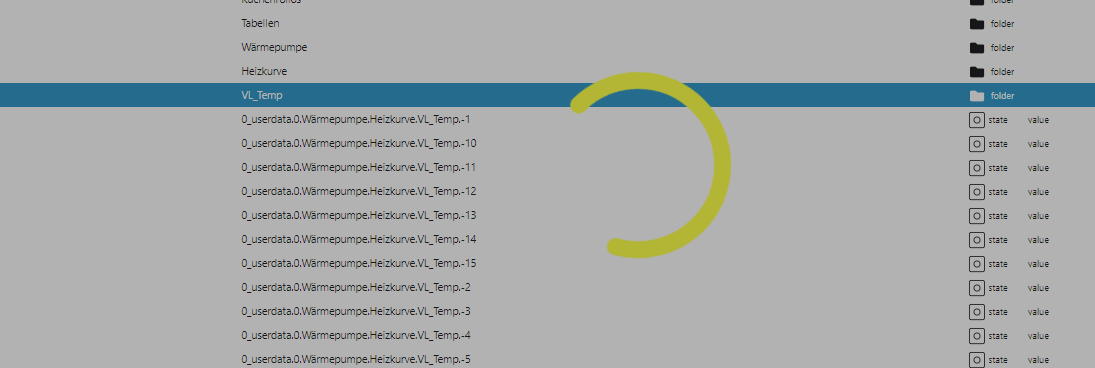
                                        ea0668a6-1849-416d-bddc-ad6060e97386-image.png

                                        Der IoBroker lief jetzt am Stück über ein halbes Jahr ohne Probleme

                                        DJMarc75D GlasfaserG 2 Antworten Letzte Antwort
                                        0
                                        • J joeysch

                                          @glasfaser

                                          Die Meldung kommt erst nachdem der Bildschirm 10min so aussah
                                          ea0668a6-1849-416d-bddc-ad6060e97386-image.png

                                          Der IoBroker lief jetzt am Stück über ein halbes Jahr ohne Probleme
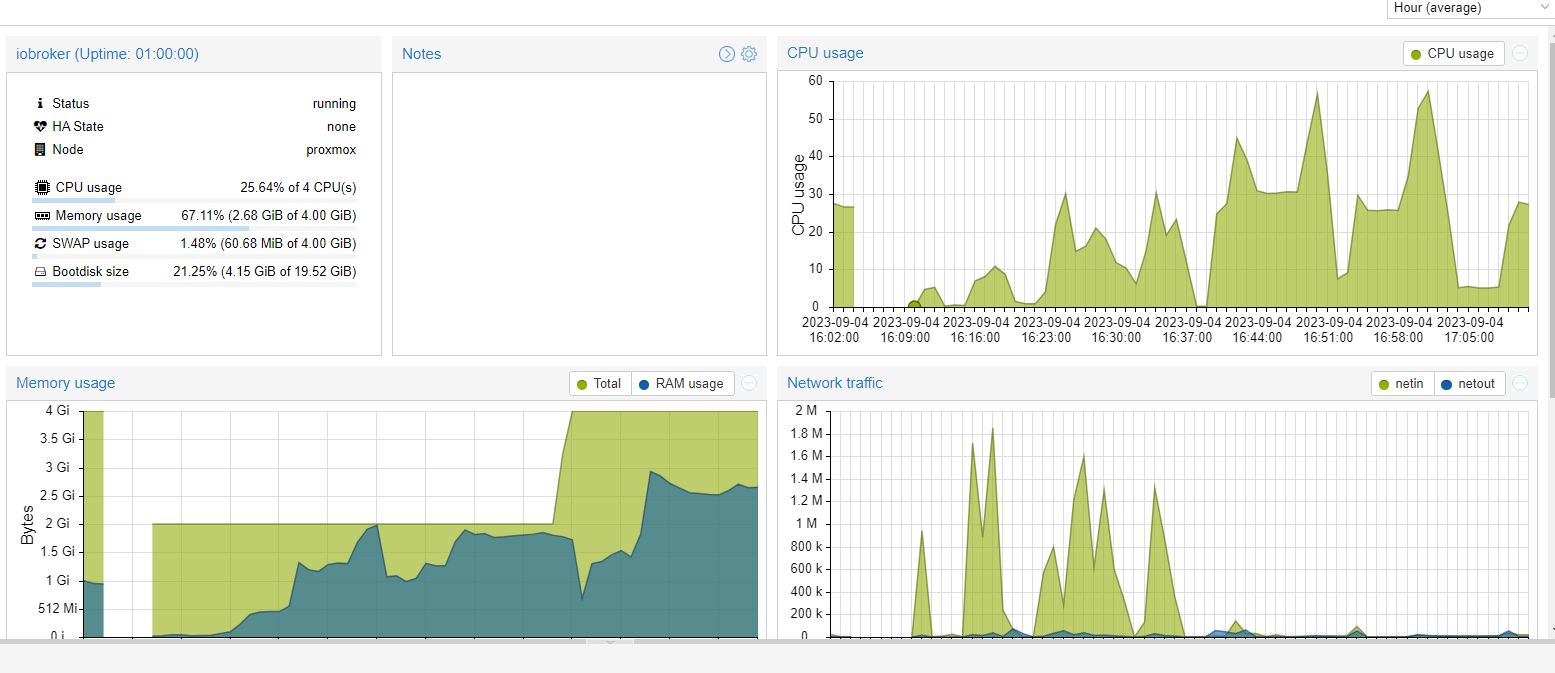
                                          DJMarc75D Offline
                                          DJMarc75D Offline
                                          DJMarc75
                                          schrieb am zuletzt editiert von
                                          #23

                                          @joeysch sagte in IoBroker hängt sich komplett auf:

                                          Der IoBroker lief jetzt am Stück über ein halbes Jahr ohne Probleme

                                          Na dann hast Du halt irgendwas am System geändert. Bitte Selbstkontrolle was Du gemacht hast.

                                          Lehrling seit 1975 !!!
                                          Beitrag geholfen ? dann gerne ein upvote rechts unten im Beitrag klicken ;)
                                          https://forum.iobroker.net/topic/51555/hinweise-f%C3%BCr-gute-forenbeitr%C3%A4ge

                                          J 1 Antwort Letzte Antwort
                                          0

                                          Hey! Du scheinst an dieser Unterhaltung interessiert zu sein, hast aber noch kein Konto.

                                          Hast du es satt, bei jedem Besuch durch die gleichen Beiträge zu scrollen? Wenn du dich für ein Konto anmeldest, kommst du immer genau dorthin zurück, wo du zuvor warst, und kannst dich über neue Antworten benachrichtigen lassen (entweder per E-Mail oder Push-Benachrichtigung). Du kannst auch Lesezeichen speichern und Beiträge positiv bewerten, um anderen Community-Mitgliedern deine Wertschätzung zu zeigen.

                                          Mit deinem Input könnte dieser Beitrag noch besser werden 💗

                                          Registrieren Anmelden
                                          Antworten
                                          • In einem neuen Thema antworten
                                          Anmelden zum Antworten
                                          • Älteste zuerst
                                          • Neuste zuerst
                                          • Meiste Stimmen


                                          Support us

                                          ioBroker
                                          Community Adapters
                                          Donate
                                          FAQ Cloud / IOT
                                          HowTo: Node.js-Update
                                          HowTo: Backup/Restore
                                          Downloads
                                          BLOG

                                          616

                                          Online

                                          32.8k

                                          Benutzer

                                          82.9k

                                          Themen

                                          1.3m

                                          Beiträge
                                          Community
                                          Impressum | Datenschutz-Bestimmungen | Nutzungsbedingungen | Einwilligungseinstellungen
                                          ioBroker Community 2014-2025
                                          logo
                                          • Anmelden

                                          • Du hast noch kein Konto? Registrieren

                                          • Anmelden oder registrieren, um zu suchen
                                          • Erster Beitrag
                                            Letzter Beitrag
                                          0
                                          • Home
                                          • Aktuell
                                          • Tags
                                          • Ungelesen 0
                                          • Kategorien
                                          • Unreplied
                                          • Beliebt
                                          • GitHub
                                          • Docu
                                          • Hilfe

