
NEWS




iob node fix - Skript
-
Bitte nochmal von einer nodejs@20 aus mit frischem Skript aufräumen lassen.
ioBroker nodejs fixer 2023-09-07 Recommended nodejs-version is: 18.17.1 Checking your installation now. Please be patient! Your current setup is: /usr/bin/nodejs v20.6.0 /usr/bin/node v20.6.0 /usr/bin/npm 9.8.1 /usr/bin/npx 9.8.1 /usr/bin/corepack 0.19.0 I found these nodejs versions available for installation: nodejs: Installed: 20.6.0-1nodesource1 Candidate: 20.6.0-1nodesource1 Version table: *** 20.6.0-1nodesource1 500 500 https://deb.nodesource.com/node_20.x nodistro/main amd64 Packages 100 /var/lib/dpkg/status 20.5.1-1nodesource1 500 500 https://deb.nodesource.com/node_20.x nodistro/main amd64 Packages 20.5.0-1nodesource1 500 500 https://deb.nodesource.com/node_20.x nodistro/main amd64 Packages 20.4.0-1nodesource1 500 500 https://deb.nodesource.com/node_20.x nodistro/main amd64 Packages 20.3.1-1nodesource1 500 500 https://deb.nodesource.com/node_20.x nodistro/main amd64 Packages 20.3.0-1nodesource1 500 500 https://deb.nodesource.com/node_20.x nodistro/main amd64 Packages 20.2.0-1nodesource1 500 500 https://deb.nodesource.com/node_20.x nodistro/main amd64 Packages 20.1.0-1nodesource1 500 500 https://deb.nodesource.com/node_20.x nodistro/main amd64 Packages 20.0.0-1nodesource1 500 500 https://deb.nodesource.com/node_20.x nodistro/main amd64 Packages 18.13.0+dfsg1-1 500 500 http://deb.debian.org/debian bookworm/main amd64 Packages Reading state information... Done ca-certificates is already the newest version (20230311). curl is already the newest version (7.88.1-10+deb12u1). gnupg is already the newest version (2.2.40-1.1). The following packages were automatically installed and are no longer required: libc-ares2 node-busboy node-cjs-module-lexer node-undici node-xtend Use 'sudo apt autoremove' to remove them. 0 upgraded, 0 newly installed, 0 to remove and 0 not upgraded. *** Creating new /etc/apt/sources.list.d/nodesource.list deb [signed-by=/etc/apt/keyrings/nodesource.gpg] https://deb.nodesource.com/node_18.x nodistro main *** These repos are active after the adjustments: Hit:1 http://deb.debian.org/debian bookworm InRelease Hit:2 http://deb.debian.org/debian bookworm-updates InRelease Hit:3 http://security.debian.org bookworm-security InRelease Get:4 https://deb.nodesource.com/node_18.x nodistro InRelease [12.1 kB] Get:5 https://deb.nodesource.com/node_18.x nodistro/main amd64 Packages [5181 B] Fetched 17.3 kB in 1s (27.1 kB/s) Reading package lists... Done Installing the recommended nodejs version now! Reading package lists... Done Building dependency tree... Done Reading state information... Done The following packages were automatically installed and are no longer required: libc-ares2 node-busboy node-cjs-module-lexer node-undici node-xtend Use 'sudo apt autoremove' to remove them. The following packages will be DOWNGRADED: nodejs 0 upgraded, 0 newly installed, 1 downgraded, 0 to remove and 0 not upgraded. Need to get 0 B/29.4 MB of archives. After this operation, 5746 kB disk space will be freed. dpkg: warning: downgrading nodejs from 20.6.0-1nodesource1 to 18.17.1-1nodesource1 (Reading database ... 38007 files and directories currently installed.) Preparing to unpack .../nodejs_18.17.1-1nodesource1_amd64.deb ... Detected old npm client, removing... Unpacking nodejs (18.17.1-1nodesource1) over (20.6.0-1nodesource1) ... Setting up nodejs (18.17.1-1nodesource1) ... Processing triggers for man-db (2.11.2-2) ... Reading package lists... Done Building dependency tree... Done Reading state information... Done nodejs is already the newest version (18.17.1-1nodesource1). Calculating upgrade... Done The following packages were automatically installed and are no longer required: libc-ares2 node-busboy node-cjs-module-lexer node-undici node-xtend Use 'sudo apt autoremove' to remove them. 0 upgraded, 0 newly installed, 0 to remove and 0 not upgraded. *** You need to manually restart your container now! *** We tried our best to fix your nodejs. Please run 'iob diag' again to verify. maik@iobtest:~$ -
ioBroker nodejs fixer 2023-09-07 Recommended nodejs-version is: 18.17.1 Checking your installation now. Please be patient! Your current setup is: /usr/bin/nodejs v20.6.0 /usr/bin/node v20.6.0 /usr/bin/npm 9.8.1 /usr/bin/npx 9.8.1 /usr/bin/corepack 0.19.0 I found these nodejs versions available for installation: nodejs: Installed: 20.6.0-1nodesource1 Candidate: 20.6.0-1nodesource1 Version table: *** 20.6.0-1nodesource1 500 500 https://deb.nodesource.com/node_20.x nodistro/main amd64 Packages 100 /var/lib/dpkg/status 20.5.1-1nodesource1 500 500 https://deb.nodesource.com/node_20.x nodistro/main amd64 Packages 20.5.0-1nodesource1 500 500 https://deb.nodesource.com/node_20.x nodistro/main amd64 Packages 20.4.0-1nodesource1 500 500 https://deb.nodesource.com/node_20.x nodistro/main amd64 Packages 20.3.1-1nodesource1 500 500 https://deb.nodesource.com/node_20.x nodistro/main amd64 Packages 20.3.0-1nodesource1 500 500 https://deb.nodesource.com/node_20.x nodistro/main amd64 Packages 20.2.0-1nodesource1 500 500 https://deb.nodesource.com/node_20.x nodistro/main amd64 Packages 20.1.0-1nodesource1 500 500 https://deb.nodesource.com/node_20.x nodistro/main amd64 Packages 20.0.0-1nodesource1 500 500 https://deb.nodesource.com/node_20.x nodistro/main amd64 Packages 18.13.0+dfsg1-1 500 500 http://deb.debian.org/debian bookworm/main amd64 Packages Reading state information... Done ca-certificates is already the newest version (20230311). curl is already the newest version (7.88.1-10+deb12u1). gnupg is already the newest version (2.2.40-1.1). The following packages were automatically installed and are no longer required: libc-ares2 node-busboy node-cjs-module-lexer node-undici node-xtend Use 'sudo apt autoremove' to remove them. 0 upgraded, 0 newly installed, 0 to remove and 0 not upgraded. *** Creating new /etc/apt/sources.list.d/nodesource.list deb [signed-by=/etc/apt/keyrings/nodesource.gpg] https://deb.nodesource.com/node_18.x nodistro main *** These repos are active after the adjustments: Hit:1 http://deb.debian.org/debian bookworm InRelease Hit:2 http://deb.debian.org/debian bookworm-updates InRelease Hit:3 http://security.debian.org bookworm-security InRelease Get:4 https://deb.nodesource.com/node_18.x nodistro InRelease [12.1 kB] Get:5 https://deb.nodesource.com/node_18.x nodistro/main amd64 Packages [5181 B] Fetched 17.3 kB in 1s (27.1 kB/s) Reading package lists... Done Installing the recommended nodejs version now! Reading package lists... Done Building dependency tree... Done Reading state information... Done The following packages were automatically installed and are no longer required: libc-ares2 node-busboy node-cjs-module-lexer node-undici node-xtend Use 'sudo apt autoremove' to remove them. The following packages will be DOWNGRADED: nodejs 0 upgraded, 0 newly installed, 1 downgraded, 0 to remove and 0 not upgraded. Need to get 0 B/29.4 MB of archives. After this operation, 5746 kB disk space will be freed. dpkg: warning: downgrading nodejs from 20.6.0-1nodesource1 to 18.17.1-1nodesource1 (Reading database ... 38007 files and directories currently installed.) Preparing to unpack .../nodejs_18.17.1-1nodesource1_amd64.deb ... Detected old npm client, removing... Unpacking nodejs (18.17.1-1nodesource1) over (20.6.0-1nodesource1) ... Setting up nodejs (18.17.1-1nodesource1) ... Processing triggers for man-db (2.11.2-2) ... Reading package lists... Done Building dependency tree... Done Reading state information... Done nodejs is already the newest version (18.17.1-1nodesource1). Calculating upgrade... Done The following packages were automatically installed and are no longer required: libc-ares2 node-busboy node-cjs-module-lexer node-undici node-xtend Use 'sudo apt autoremove' to remove them. 0 upgraded, 0 newly installed, 0 to remove and 0 not upgraded. *** You need to manually restart your container now! *** We tried our best to fix your nodejs. Please run 'iob diag' again to verify. maik@iobtest:~$@mrjeschke sagte in iob node fix - Skript:
The following packages were automatically installed and are no longer required:
libc-ares2 node-busboy node-cjs-module-lexer node-undici node-xtendDa hast du aber mal die dfsg-Version von nodejs installiert gehabt... Die kommt nämlich mit diesen jetzt obsoleten Paketen angeschleppt.
Aber das Skript selber schaut jetzt gut aus.
-
@mrjeschke sagte in iob node fix - Skript:
The following packages were automatically installed and are no longer required:
libc-ares2 node-busboy node-cjs-module-lexer node-undici node-xtendDa hast du aber mal die dfsg-Version von nodejs installiert gehabt... Die kommt nämlich mit diesen jetzt obsoleten Paketen angeschleppt.
Aber das Skript selber schaut jetzt gut aus.
@thomas-braun
Hier noch die Version mit einer ganz frischen Installation.
Habe ich Gestern nicht mehr geschafft, da ich Nachtschicht hatte.ioBroker nodejs fixer 2023-09-07 Recommended nodejs-version is: 18.17.1 Checking your installation now. Please be patient! Your current setup is: /usr/bin/nodejs v20.6.0 /usr/bin/node v20.6.0 /usr/bin/npm 9.8.1 /usr/bin/npx 9.8.1 /usr/bin/corepack 0.19.0 I found these nodejs versions available for installation: nodejs: Installed: 20.6.0-1nodesource1 Candidate: 20.6.0-1nodesource1 Version table: *** 20.6.0-1nodesource1 500 500 https://deb.nodesource.com/node_20.x nodistro/main amd64 Packages 100 /var/lib/dpkg/status 20.5.1-1nodesource1 500 500 https://deb.nodesource.com/node_20.x nodistro/main amd64 Packages 20.5.0-1nodesource1 500 500 https://deb.nodesource.com/node_20.x nodistro/main amd64 Packages 20.4.0-1nodesource1 500 500 https://deb.nodesource.com/node_20.x nodistro/main amd64 Packages 20.3.1-1nodesource1 500 500 https://deb.nodesource.com/node_20.x nodistro/main amd64 Packages 20.3.0-1nodesource1 500 500 https://deb.nodesource.com/node_20.x nodistro/main amd64 Packages 20.2.0-1nodesource1 500 500 https://deb.nodesource.com/node_20.x nodistro/main amd64 Packages 20.1.0-1nodesource1 500 500 https://deb.nodesource.com/node_20.x nodistro/main amd64 Packages 20.0.0-1nodesource1 500 500 https://deb.nodesource.com/node_20.x nodistro/main amd64 Packages 18.13.0+dfsg1-1 500 500 http://deb.debian.org/debian bookworm/main amd64 Packages Nothing to do, your installation is using the correct paths. You are running nodejs v20.6.0. Do you want to install recommended version 18.17.1? Press <y> to continue or any other key to quit Trying to fix your installation now. Please be patient. lxc Waiting for ioBroker to shut down - Give me a minute... ############################################################ *** These repos are active on your system: Hit:1 http://security.debian.org bookworm-security InRelease Hit:2 http://deb.debian.org/debian bookworm InRelease Hit:3 http://deb.debian.org/debian bookworm-updates InRelease Reading package lists... Done *** Installing ca-certificates, curl and gnupg, just in case they are missing. Reading package lists... Done Building dependency tree... Done Reading state information... Done ca-certificates is already the newest version (20230311). curl is already the newest version (7.88.1-10+deb12u1). gnupg is already the newest version (2.2.40-1.1). 0 upgraded, 0 newly installed, 0 to remove and 0 not upgraded. *** Creating new /etc/apt/sources.list.d/nodesource.list deb [signed-by=/etc/apt/keyrings/nodesource.gpg] https://deb.nodesource.com/node_18.x nodistro main *** These repos are active after the adjustments: Hit:1 http://security.debian.org bookworm-security InRelease Hit:2 http://deb.debian.org/debian bookworm InRelease Hit:3 http://deb.debian.org/debian bookworm-updates InRelease Get:4 https://deb.nodesource.com/node_18.x nodistro InRelease [12.1 kB] Get:5 https://deb.nodesource.com/node_18.x nodistro/main amd64 Packages [5181 B] Fetched 17.3 kB in 1s (27.3 kB/s) Reading package lists... Done Installing the recommended nodejs version now! Reading package lists... Done Building dependency tree... Done Reading state information... Done The following packages will be DOWNGRADED: nodejs 0 upgraded, 0 newly installed, 1 downgraded, 0 to remove and 0 not upgraded. Need to get 29.4 MB of archives. After this operation, 5746 kB disk space will be freed. Get:1 https://deb.nodesource.com/node_18.x nodistro/main amd64 nodejs amd64 18.17.1-1nodesource1 [29.4 MB] Fetched 29.4 MB in 1s (31.3 MB/s) dpkg: warning: downgrading nodejs from 20.6.0-1nodesource1 to 18.17.1-1nodesource1 (Reading database ... 37784 files and directories currently installed.) Preparing to unpack .../nodejs_18.17.1-1nodesource1_amd64.deb ... Detected old npm client, removing... Unpacking nodejs (18.17.1-1nodesource1) over (20.6.0-1nodesource1) ... Setting up nodejs (18.17.1-1nodesource1) ... Processing triggers for man-db (2.11.2-2) ... Reading package lists... Done Building dependency tree... Done Reading state information... Done nodejs is already the newest version (18.17.1-1nodesource1). Calculating upgrade... Done 0 upgraded, 0 newly installed, 0 to remove and 0 not upgraded. *** You need to manually restart your container now! *** We tried our best to fix your nodejs. Please run 'iob diag' again to verify. maik@iobtest2:~$ -
@thomas-braun
Hier noch die Version mit einer ganz frischen Installation.
Habe ich Gestern nicht mehr geschafft, da ich Nachtschicht hatte.ioBroker nodejs fixer 2023-09-07 Recommended nodejs-version is: 18.17.1 Checking your installation now. Please be patient! Your current setup is: /usr/bin/nodejs v20.6.0 /usr/bin/node v20.6.0 /usr/bin/npm 9.8.1 /usr/bin/npx 9.8.1 /usr/bin/corepack 0.19.0 I found these nodejs versions available for installation: nodejs: Installed: 20.6.0-1nodesource1 Candidate: 20.6.0-1nodesource1 Version table: *** 20.6.0-1nodesource1 500 500 https://deb.nodesource.com/node_20.x nodistro/main amd64 Packages 100 /var/lib/dpkg/status 20.5.1-1nodesource1 500 500 https://deb.nodesource.com/node_20.x nodistro/main amd64 Packages 20.5.0-1nodesource1 500 500 https://deb.nodesource.com/node_20.x nodistro/main amd64 Packages 20.4.0-1nodesource1 500 500 https://deb.nodesource.com/node_20.x nodistro/main amd64 Packages 20.3.1-1nodesource1 500 500 https://deb.nodesource.com/node_20.x nodistro/main amd64 Packages 20.3.0-1nodesource1 500 500 https://deb.nodesource.com/node_20.x nodistro/main amd64 Packages 20.2.0-1nodesource1 500 500 https://deb.nodesource.com/node_20.x nodistro/main amd64 Packages 20.1.0-1nodesource1 500 500 https://deb.nodesource.com/node_20.x nodistro/main amd64 Packages 20.0.0-1nodesource1 500 500 https://deb.nodesource.com/node_20.x nodistro/main amd64 Packages 18.13.0+dfsg1-1 500 500 http://deb.debian.org/debian bookworm/main amd64 Packages Nothing to do, your installation is using the correct paths. You are running nodejs v20.6.0. Do you want to install recommended version 18.17.1? Press <y> to continue or any other key to quit Trying to fix your installation now. Please be patient. lxc Waiting for ioBroker to shut down - Give me a minute... ############################################################ *** These repos are active on your system: Hit:1 http://security.debian.org bookworm-security InRelease Hit:2 http://deb.debian.org/debian bookworm InRelease Hit:3 http://deb.debian.org/debian bookworm-updates InRelease Reading package lists... Done *** Installing ca-certificates, curl and gnupg, just in case they are missing. Reading package lists... Done Building dependency tree... Done Reading state information... Done ca-certificates is already the newest version (20230311). curl is already the newest version (7.88.1-10+deb12u1). gnupg is already the newest version (2.2.40-1.1). 0 upgraded, 0 newly installed, 0 to remove and 0 not upgraded. *** Creating new /etc/apt/sources.list.d/nodesource.list deb [signed-by=/etc/apt/keyrings/nodesource.gpg] https://deb.nodesource.com/node_18.x nodistro main *** These repos are active after the adjustments: Hit:1 http://security.debian.org bookworm-security InRelease Hit:2 http://deb.debian.org/debian bookworm InRelease Hit:3 http://deb.debian.org/debian bookworm-updates InRelease Get:4 https://deb.nodesource.com/node_18.x nodistro InRelease [12.1 kB] Get:5 https://deb.nodesource.com/node_18.x nodistro/main amd64 Packages [5181 B] Fetched 17.3 kB in 1s (27.3 kB/s) Reading package lists... Done Installing the recommended nodejs version now! Reading package lists... Done Building dependency tree... Done Reading state information... Done The following packages will be DOWNGRADED: nodejs 0 upgraded, 0 newly installed, 1 downgraded, 0 to remove and 0 not upgraded. Need to get 29.4 MB of archives. After this operation, 5746 kB disk space will be freed. Get:1 https://deb.nodesource.com/node_18.x nodistro/main amd64 nodejs amd64 18.17.1-1nodesource1 [29.4 MB] Fetched 29.4 MB in 1s (31.3 MB/s) dpkg: warning: downgrading nodejs from 20.6.0-1nodesource1 to 18.17.1-1nodesource1 (Reading database ... 37784 files and directories currently installed.) Preparing to unpack .../nodejs_18.17.1-1nodesource1_amd64.deb ... Detected old npm client, removing... Unpacking nodejs (18.17.1-1nodesource1) over (20.6.0-1nodesource1) ... Setting up nodejs (18.17.1-1nodesource1) ... Processing triggers for man-db (2.11.2-2) ... Reading package lists... Done Building dependency tree... Done Reading state information... Done nodejs is already the newest version (18.17.1-1nodesource1). Calculating upgrade... Done 0 upgraded, 0 newly installed, 0 to remove and 0 not upgraded. *** You need to manually restart your container now! *** We tried our best to fix your nodejs. Please run 'iob diag' again to verify. maik@iobtest2:~$Vielen Dank für das Beta-Testing!
Habe jetzt gestern noch ein pinning auf das nodesoure-Repo gelegt, das muss aber nicht getestet werden.
PR gegen den ioBroker ist gestellt. Mal schauen wie schnell das im upstream landet. -
Vielen Dank für das Beta-Testing!
Habe jetzt gestern noch ein pinning auf das nodesoure-Repo gelegt, das muss aber nicht getestet werden.
PR gegen den ioBroker ist gestellt. Mal schauen wie schnell das im upstream landet.@thomas-braun Wenn irgendwann die empfohlene Version die 20 wäre, dann brauch ich nur
NODE_MAJOR=20zu setzen und lasse dann
iob_node_updatelaufen?
NUC i7 64GB mit Proxmox ---- Jarvis Infos Aktualisierungen der Doku auf Instagram verfolgen -> mcuiobroker Instagram
Wenn Euch mein Vorschlag geholfen hat, bitte rechts "^" klicken. -
@thomas-braun Wenn irgendwann die empfohlene Version die 20 wäre, dann brauch ich nur
NODE_MAJOR=20zu setzen und lasse dann
iob_node_updatelaufen?
Ja.
Das muss dann natürlich, wenn das Skript in den iob Installer integriert wurde dann auch dort zentral einmal geändert werden.Oder ich schau mal ob man das nicht aus der Installer Library auslesen kann. Dann wäre es nur einmal dort zu ändern.
Irgendwie/wo muss die recommended version ja auch dort drin sein.
Edith: In meinem ähnlich gelagerten PR zum Installer wird das natürlich auch mit einer Variablen gesetzt, im alten war ja der Link zum obsoleten nodejs-Installerskript drin.
Edit2: Wobei die Varible NODE_MAJOR auch nur dann als 'FallBack' zum tragen kommt, wenn aus den iob-States nichts ausgelesen werden kann.
-
Ja.
Das muss dann natürlich, wenn das Skript in den iob Installer integriert wurde dann auch dort zentral einmal geändert werden.Oder ich schau mal ob man das nicht aus der Installer Library auslesen kann. Dann wäre es nur einmal dort zu ändern.
Irgendwie/wo muss die recommended version ja auch dort drin sein.
Edith: In meinem ähnlich gelagerten PR zum Installer wird das natürlich auch mit einer Variablen gesetzt, im alten war ja der Link zum obsoleten nodejs-Installerskript drin.
Edit2: Wobei die Varible NODE_MAJOR auch nur dann als 'FallBack' zum tragen kommt, wenn aus den iob-States nichts ausgelesen werden kann.
@thomas-braun Kurze Frage dazu: wenn man gleichzeitig noch die Homebridge auf dem System hat, dann hat man zwei Installationen von Node drauf - Homebridge installiert Node in abweichenden Pfaden. Das können sogar unterschiedliche Versionen sein, es funktioniert trotzdem beides - ioB und Homebridge - einwandfrei. Kann der Node fixer das berücksichtigen, damit die Homebridge Installation nicht zerschossen wird oder interessiert das den Fixer gar nicht dass da noch eine zweite Installation drauf ist?
-
@thomas-braun Kurze Frage dazu: wenn man gleichzeitig noch die Homebridge auf dem System hat, dann hat man zwei Installationen von Node drauf - Homebridge installiert Node in abweichenden Pfaden. Das können sogar unterschiedliche Versionen sein, es funktioniert trotzdem beides - ioB und Homebridge - einwandfrei. Kann der Node fixer das berücksichtigen, damit die Homebridge Installation nicht zerschossen wird oder interessiert das den Fixer gar nicht dass da noch eine zweite Installation drauf ist?
Der Fixer haut alles weg, was nicht in den Installationspfaden des nodesource-Paketes, aber im $PATH liegt.
Wo liegt denn die Installation der Homebridge?Hab ich mangels Homebridge nicht getestet.
Edit:
Hab gerade mal geschaut. Deren nodejs wohnt inNode Path /opt/homebridge/bin/node
Das dürfte vom iob-Skript nicht tangiert werden, liegt es doch nicht im Standard $PATH. Außer sie verändern die Einträge dort.
Kannst es ja testen ...
-
Der Fixer haut alles weg, was nicht in den Installationspfaden des nodesource-Paketes, aber im $PATH liegt.
Wo liegt denn die Installation der Homebridge?Hab ich mangels Homebridge nicht getestet.
Edit:
Hab gerade mal geschaut. Deren nodejs wohnt inNode Path /opt/homebridge/bin/node
Das dürfte vom iob-Skript nicht tangiert werden, liegt es doch nicht im Standard $PATH. Außer sie verändern die Einträge dort.
Kannst es ja testen ...
Die Installation der Homebridge liegt hier:
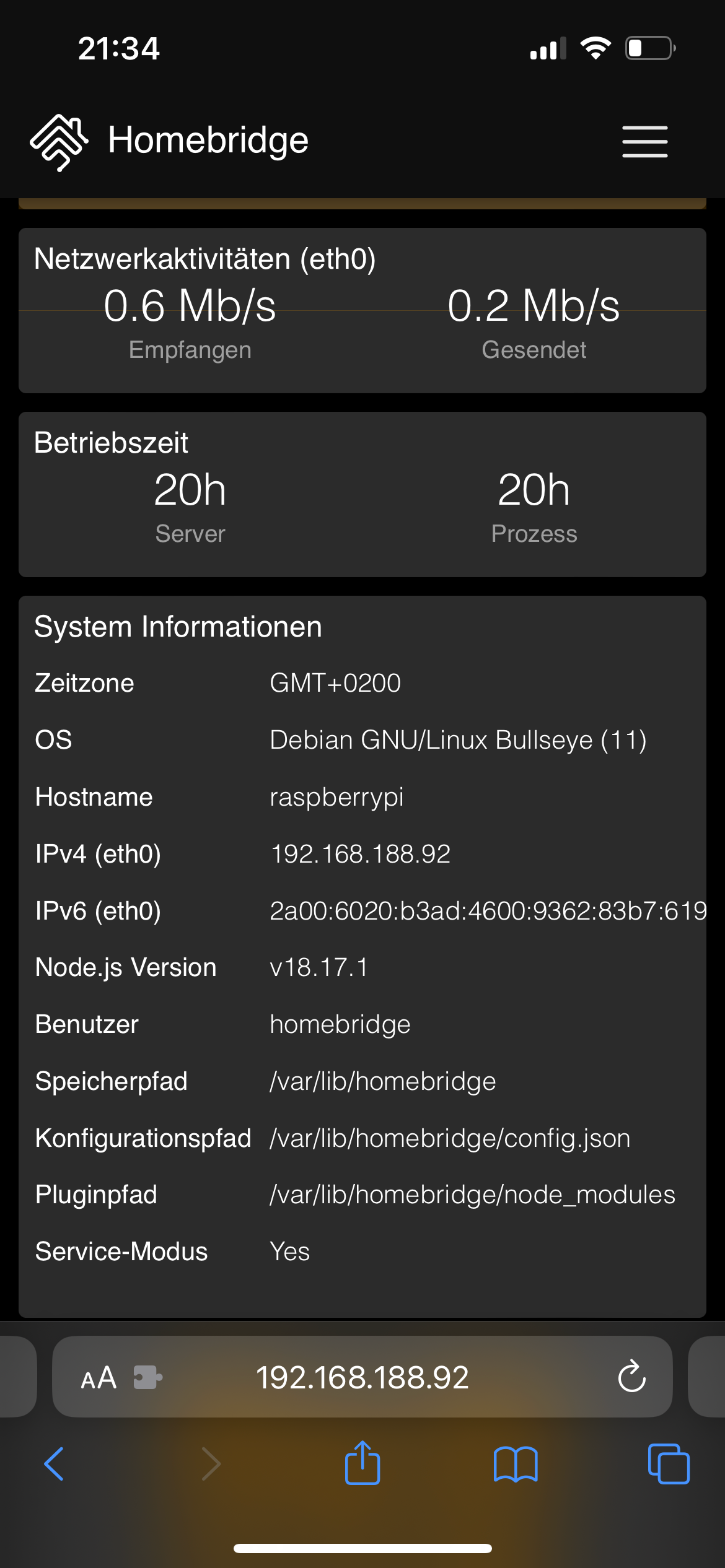
Node.js und NPM sind unter /opt/homebridge/bin/ zu finden (und deshalb auch nur für Homebridge sichtbar und nutzbar).
Edith: Posts haben sich überschnitten…
-
Die Installation der Homebridge liegt hier:
Node.js und NPM sind unter /opt/homebridge/bin/ zu finden (und deshalb auch nur für Homebridge sichtbar und nutzbar).
Edith: Posts haben sich überschnitten…
Dann gibt es da kein Problem.
-
Die Installation der Homebridge liegt hier:
Node.js und NPM sind unter /opt/homebridge/bin/ zu finden (und deshalb auch nur für Homebridge sichtbar und nutzbar).
Edith: Posts haben sich überschnitten…
Wie schaut es denn aus, wenn du das Skript aufrufst?
-
Das Skript unterstützt ja kein Docker/Container, also , wer auf die aktuelle 18.18.0 updaten möchte, kann das über diese Anleitung machen.
Installation Instructions
Node.jsIf you have root access, you can omit the 'sudo' command as you already have full administrative privileges.- Download and import the Nodesource GPG key
sudo apt-get update sudo apt-get install -y ca-certificates curl gnupg sudo mkdir -p /etc/apt/keyrings curl -fsSL https://deb.nodesource.com/gpgkey/nodesource-repo.gpg.key | sudo gpg --dearmor -o /etc/apt/keyrings/nodesource.gpg- Create deb repository
NODE_MAJOR=18 echo "deb [signed-by=/etc/apt/keyrings/nodesource.gpg] https://deb.nodesource.com/node_$NODE_MAJOR.x nodistro main" | sudo tee /etc/apt/sources.list.d/nodesource.list- Run Update and Install
sudo apt-get update
sudo apt-get install nodejs -y
Mein Ergebnis:

-
@haselchen sagte in iob node fix - Skript:
Das Skript unterstützt ja kein Docker/Container, also , wer auf die aktuelle 18.18.0 updaten möchte, kann das über diese Anleitung machen.
... was aber nur notwendig ist, wenn man nicht das offizielle (Buanet-)Image nutzt.
-
Korrekt.
Spreche da logischerweise nur für mich.
Ich hole mir nicht jedesmal nen neuen Container, wenn mal Node aktualisiert wird oder der JS Controller.
Das geht auch , soweit ich das praktiziere, in ein und dem gleichen Container.
Aus dem Gedächtnis heraus, musste ich , glaube ich, 1mal ein neues Container Image benutzen.
Ansonsten ist das jetzt hier seit ein paar Jahren der 2. Iobroker Container und läuft alles aktuell.Synology DS218+ & 2 x Fujitsu Esprimo (VM/Container) + FritzBox7590 + 2 AVM 3000 Repeater & Homematic & HUE & Osram & Xiaomi, NPM 10.9.4, Nodejs 22.21.0 ,JS Controller 7.0.7 ,Admin 7.7.19
-
Korrekt.
Spreche da logischerweise nur für mich.
Ich hole mir nicht jedesmal nen neuen Container, wenn mal Node aktualisiert wird oder der JS Controller.
Das geht auch , soweit ich das praktiziere, in ein und dem gleichen Container.
Aus dem Gedächtnis heraus, musste ich , glaube ich, 1mal ein neues Container Image benutzen.
Ansonsten ist das jetzt hier seit ein paar Jahren der 2. Iobroker Container und läuft alles aktuell.@haselchen sagte in iob node fix - Skript:
Aus dem Gedächtnis heraus, musste ich , glaube ich, 1mal ein neues Container Image benutzen.
Ansonsten ist das jetzt hier seit ein paar Jahren der 2. Iobroker Container und läuft alles aktuell.Jedem nach seinem Gusto, ich finde es aber falsch solche Tipps zu verbreiten. Wohin das manuelle Rumgefrickel an Node führt, können wir hier täglich mehrfach "bewundern". Du magst das im Griff haben, viele andere nicht.
Wenn man Docker korrekt eingerichtet hat, ist es eine Sache von zwei Mausklicks oder drei Befehlen auf der Kommandozeile und man hat ein aktuelles Image mit allen Abhängigkeiten. So zumindest das Konzept hinter Docker, wie ich es verstanden habe.
-
@haselchen sagte in iob node fix - Skript:
Das Skript unterstützt ja kein Docker/Container, also , wer auf die aktuelle 18.18.0 updaten möchte, kann das über diese Anleitung machen.
... was aber nur notwendig ist, wenn man nicht das offizielle (Buanet-)Image nutzt.
@marc-berg sagte in iob node fix - Skript:
@haselchen sagte in iob node fix - Skript:
Das Skript unterstützt ja kein Docker/Container, also , wer auf die aktuelle 18.18.0 updaten möchte, kann das über diese Anleitung machen.
... was aber nur notwendig ist, wenn man nicht das offizielle (Buanet-)Image nutzt.
wollte ich eig. genau so schreiben, aber das image(von heute Nacht) hat immer noch 18.17.1. Ich weiss dass André das umgestellt hat, evtl. geht da was beim deploy schief
iobroker läuft unter Docker auf QNAP TS-451+
SkriptRecovery: https://forum.iobroker.net/post/930558 -
@marc-berg sagte in iob node fix - Skript:
@haselchen sagte in iob node fix - Skript:
Das Skript unterstützt ja kein Docker/Container, also , wer auf die aktuelle 18.18.0 updaten möchte, kann das über diese Anleitung machen.
... was aber nur notwendig ist, wenn man nicht das offizielle (Buanet-)Image nutzt.
wollte ich eig. genau so schreiben, aber das image(von heute Nacht) hat immer noch 18.17.1. Ich weiss dass André das umgestellt hat, evtl. geht da was beim deploy schief
@fastfoot sagte in iob node fix - Skript:
wollte ich eig. genau so schreiben, aber das image(von heute Nacht) hat immer noch 18.17.1. Ich weiss dass André das umgestellt hat, evtl. geht da was beim deploy schief
Das sind aber zwei verschiedene paar Schuhe, wie ich finde. @haselchen sprach von einem Upgrade auf eine neue Major Version.
Unabhängig davon kann man ja mit einem "apt update && apt upgrade" die Minor Version hochziehen, ohne viel kaputt machen zu können.NUC10I3+Ubuntu+Docker+ioBroker+influxDB2+Node Red+RabbitMQ+Grafana
Pi-hole, Traefik, Checkmk, Conbee II+Zigbee2MQTT, ESPSomfy-RTS, LoRaWAN, Arduino, KiCad
Benutzt das Voting im Beitrag, wenn er euch geholfen hat.
-
@fastfoot sagte in iob node fix - Skript:
wollte ich eig. genau so schreiben, aber das image(von heute Nacht) hat immer noch 18.17.1. Ich weiss dass André das umgestellt hat, evtl. geht da was beim deploy schief
Das sind aber zwei verschiedene paar Schuhe, wie ich finde. @haselchen sprach von einem Upgrade auf eine neue Major Version.
Unabhängig davon kann man ja mit einem "apt update && apt upgrade" die Minor Version hochziehen, ohne viel kaputt machen zu können.Die Anleitung bezog sich auf Node 18.
Da man mit dem normalen update&upgrade von 18.17 nicht auf 18.18 mehr kommt.
Natürlich kann man bei MAJOR_NODE auch 20 eingeben, dann wird die Version auf 20 angehoben.
Mir ging es aber um die 18.18.0
Aber wie Du schon geschrieben hast, jeder nach seinem Gusto. -
@fastfoot sagte in iob node fix - Skript:
wollte ich eig. genau so schreiben, aber das image(von heute Nacht) hat immer noch 18.17.1. Ich weiss dass André das umgestellt hat, evtl. geht da was beim deploy schief
Das sind aber zwei verschiedene paar Schuhe, wie ich finde. @haselchen sprach von einem Upgrade auf eine neue Major Version.
Unabhängig davon kann man ja mit einem "apt update && apt upgrade" die Minor Version hochziehen, ohne viel kaputt machen zu können.@marc-berg jaein, da das repo im image nicht umgestellt ist würde es auch keine Minor updates mehr geben. Irgendwo hatte André geschrieben dass er das repo umgestellt hat, aber das ist nicht der Fall. Vlt. soll das aber auch erst für die nächste Version gelten. @andre ?
iobroker läuft unter Docker auf QNAP TS-451+
SkriptRecovery: https://forum.iobroker.net/post/930558 -
@marc-berg jaein, da das repo im image nicht umgestellt ist würde es auch keine Minor updates mehr geben. Irgendwo hatte André geschrieben dass er das repo umgestellt hat, aber das ist nicht der Fall. Vlt. soll das aber auch erst für die nächste Version gelten. @andre ?
@fastfoot sagte in iob node fix - Skript:
jaein, da das repo im image nicht umgestellt ist würde es auch keine Minor updates mehr geben. Irgendwo hatte André geschrieben dass er das repo umgestellt hat, aber das ist nicht der Fall. Vlt. soll das aber auch erst für die nächste Version gelten
Ah, okay. Dann sollte aber, wie du schreibst, an der Quelle angepackt und nicht Symptome behandelt werden.




786
Online32.5k
Users81.7k
Topics1.3m
Posts