



Skip to content
  • Home
  • Recent
  • Tags
  • 0 Unread 0
  • Categories
  • Unreplied
  • Popular
  • GitHub
  • Docu
  • Hilfe
Skins
  • Light
  • Brite
  • Cerulean
  • Cosmo
  • Flatly
  • Journal
  • Litera
  • Lumen
  • Lux
  • Materia
  • Minty
  • Morph
  • Pulse
  • Sandstone
  • Simplex
  • Sketchy
  • Spacelab
  • United
  • Yeti
  • Zephyr
  • Dark
  • Cyborg
  • Darkly
  • Quartz
  • Slate
  • Solar
  • Superhero
  • Vapor

  • Default (No Skin)
  • No Skin
Collapse
ioBroker Logo

Community Forum

donate donate
  1. ioBroker Community Home
  2. Deutsch
  3. ioBroker Allgemein
  4. TibberLink Adapter

NEWS

  • UPDATE 31.10.: Amazon Alexa - ioBroker Skill läuft aus ?
    apollon77A
    apollon77
    48
    3
    8.9k

  • Monatsrückblick – September 2025
    BluefoxB
    Bluefox
    13
    1
    2.3k

  • Neues Video "KI im Smart Home" - ioBroker plus n8n
    BluefoxB
    Bluefox
    16
    1
    3.5k

TibberLink Adapter

Scheduled Pinned Locked Moved ioBroker Allgemein
631 Posts 85 Posters 198.0k Views 78 Watching
  • Oldest to Newest
  • Newest to Oldest
  • Most Votes
Reply
  • Reply as topic
Log in to reply
This topic has been deleted. Only users with topic management privileges can see it.
  • H HansJochen

    Hi @reblausgt ,

    danke für Dein Feedback.

    Klar, bau es gerne ein. Ich habe das ja hier gepostet, weil ich dachte, dass es auch für andere praktisch sein kann.

    R Offline
    R Offline
    ReblausGT
    Developer
    wrote on last edited by
    #601

    Mal was anderes.... die X-Achse mit Strings war ein Entwurf der 1h Zeitscheiben.... jetzt, mit den 15 Minuten Scheiben überlege ich ob man das doch lieber im category time ändern sollte.... das zerschmeißt dann halt alles was man sich da schon an template gebastelt hatte.... Ist das ne Katastrophe? oder Überwiegen die Vorteile?

    H 1 Reply Last reply
    0
    • S Online
      S Online
      Schimi
      wrote on last edited by
      #602

      Ich brauche mal ne Erklärung zum "Batterie laden" Kanal nach der 15min Umstellung :-)

      a5dfc580-d177-40be-aaad-749936c05b44-image.png

      Wenn ich die AmountHours auf z.B. "0,5" stelle, schaltet er dann jede verfügbaren 30min Slot, wo der Preis 25% unter dem höchsten Tagespreis ist auf true? (den highest nutze ich nicht)

      1 Reply Last reply
      0
      • R Offline
        R Offline
        ReblausGT
        Developer
        wrote on last edited by
        #603

        @schimi said in TibberLink Adapter:

        Ich brauche mal ne Erklärung zum "Batterie laden" Kanal nach der 15min Umstellung :-)

        Er sucht die 2 billigsten 15 Minuten und lädt die Batterie. Dann nimmt er den Preis der teuersten Phase = die teuerste Wattstunde im Speicher und rechnet dazu den Wirkungsgradverlust hinzu.... alles was da drunter liegt sperrt er das Entladen, was darüber liegt wird entladen.

        S 1 Reply Last reply
        0
        • R ReblausGT

          Mal was anderes.... die X-Achse mit Strings war ein Entwurf der 1h Zeitscheiben.... jetzt, mit den 15 Minuten Scheiben überlege ich ob man das doch lieber im category time ändern sollte.... das zerschmeißt dann halt alles was man sich da schon an template gebastelt hatte.... Ist das ne Katastrophe? oder Überwiegen die Vorteile?

          H Offline
          H Offline
          HansJochen
          wrote on last edited by
          #604

          @reblausgt

          Gute Frage. Für mich war das mein erster Berührpunkt mit ECharts. So, wie es jetzt ist, passt es bei mir mit der Skalierung relativ gut. Je nach Fenstergröße auf unterschiedlichen Größen wählt ECharts hier recht vernünftig, welche Punkte auf der Skala weggelassen werden. Beispielsweise sehe ich in dem kleinen Ausschnitt, den ich dem Chart in meiner Visualisierung gönne, die vollen Stunden und wenn ich das Chart alleine im Browser Fullscreen öffne auch die Viertelstunden.

          Ich habe mir aber jetzt gerade eine Echart Demo angeschaut (https://echarts.apache.org/examples/en/editor.html?c=area-time-axis), da lässt sich in dem Chart mit dem Mausrad zoomen. Das geht bei uns nicht. Ob die String-Skala der Grund ist, weiß ich nicht. Das könnte ich mir aber vorstellen.

          Was wohl in jedem Fall schöner wäre: Es wäre halt der Weg, den ECharts für Zeitserien vorsieht. Das Datum würde nicht ständig wiederholt, sondern nur einmal angezeigt und ansonsten nur die Uhrzeit. Die X-Achse wäre also etwas übersichtlicher.

          Mir persönlich wäre die Änderung nicht wichtig, das Template wäre aber leicht anzupassen. Ich kann da bei Bedarf auch gerne unterstützen. Wer sich beispielsweise veränderte Tooltips eingebaut hat, müsste halt selbst noch mal Hand anlegen. Ich würde aber vermuten, wer das hinbekommen hat, wird auch an dem Umbau nicht scheitern.

          Übrigens: Ich vermute, dass es einige Nutzer gibt, die mit ECharts keine Berührpunkte hatten und die in ihrer Automatisierung nur für die Tibberpreise benutzen. Dann ist es schon etwas knifflig, die URL für die generierten Charts herauszufinden und die Templates in den Editor zu kopieren könnte auf manche auch etwas abschreckend wirken. Vermutlich benutzen die Meisten eines der Standard Templates ohne Veränderungen.

          Da könnte es aus meiner Sicht helfen, wenn die URL im Adapter direkt angezeigt würde und es eine Auswahl der Art "Standard Darstellung", "alternative Darstellung" oder "benutzerdefinierte Darstellung" gäbe und damit der ganze Flexchart Hintergrund samt Erklärungen, Beispielen und Editor nur sichtbar wird, wenn man zuvor "benutzerdefiniert" ausgewählt hat.

          1 Reply Last reply
          0
          • S Online
            S Online
            Schimi
            wrote on last edited by
            #605

            ist das was?

            {
            	backgroundColor: "#ffffff",
            
            	title: {
            		text: "Tibber Preis",
            		left: "center",
            		textStyle: { color: "#333", fontSize: 16 }
            	},
            
            	tooltip: {
            		trigger: "axis",
            		axisPointer: { type: "cross" },
            		valueFormatter: value => value.toFixed(3) + " €"
            	},
            
            	grid: {
            		left: "8%", right: "4%", top: "10%", bottom: "10%"
            	},
            
            	xAxis: {
            		type: "time",
            		name: "Zeit",
            		axisLabel: {
            			formatter: value => {
            				const date = new Date(value);
            				const hours = date.getHours().toString().padStart(2, "0");
            				const minutes = date.getMinutes().toString().padStart(2, "0");
            				return hours + ":" + minutes;
            			}
            		},
            		splitLine: { show: false }
            	},
            
            	yAxis: {
            		type: "value",
            		name: "Preis (€)",
            		axisLabel: { formatter: "{value} €" },
            		splitLine: { show: true }
            	},
            
            	visualMap: {
            		show: false,
            		min: 0.2,
            		max: 0.4,
            		inRange: {
            			color: ["green", "yellow", "red"]
            		}
            	},
            
            	series: [
            		{
            			name: "Preis",
            			type: "line",
            			symbol: "none",
            			step: "end",
            			data: %%yAxisData%%, // Format: [ [timestamp, value], [timestamp, value], ... ]
            
            			markArea: {
            				itemStyle: { color: "rgba(120, 200, 120, 0.2)" },
            				data: [ %%CalcChannelsData%% ] // z. B. [[{ xAxis: "2025-11-04T10:00" }, { xAxis: "2025-11-04T14:00" }]]
            			},
            
            			markLine: {
            				symbol: "none",
            				label: {
            					formatter: "Jetzt",
            					position: "end",
            					color: "#333"
            				},
            				lineStyle: { color: "red", type: "solid" },
            				data: [
            					{
            						xAxis: new Date().toISOString()
            					}
            				]
            			}
            		}
            	]
            }
            
            
            H 1 Reply Last reply
            0
            • S Schimi

              ist das was?

              {
              	backgroundColor: "#ffffff",
              
              	title: {
              		text: "Tibber Preis",
              		left: "center",
              		textStyle: { color: "#333", fontSize: 16 }
              	},
              
              	tooltip: {
              		trigger: "axis",
              		axisPointer: { type: "cross" },
              		valueFormatter: value => value.toFixed(3) + " €"
              	},
              
              	grid: {
              		left: "8%", right: "4%", top: "10%", bottom: "10%"
              	},
              
              	xAxis: {
              		type: "time",
              		name: "Zeit",
              		axisLabel: {
              			formatter: value => {
              				const date = new Date(value);
              				const hours = date.getHours().toString().padStart(2, "0");
              				const minutes = date.getMinutes().toString().padStart(2, "0");
              				return hours + ":" + minutes;
              			}
              		},
              		splitLine: { show: false }
              	},
              
              	yAxis: {
              		type: "value",
              		name: "Preis (€)",
              		axisLabel: { formatter: "{value} €" },
              		splitLine: { show: true }
              	},
              
              	visualMap: {
              		show: false,
              		min: 0.2,
              		max: 0.4,
              		inRange: {
              			color: ["green", "yellow", "red"]
              		}
              	},
              
              	series: [
              		{
              			name: "Preis",
              			type: "line",
              			symbol: "none",
              			step: "end",
              			data: %%yAxisData%%, // Format: [ [timestamp, value], [timestamp, value], ... ]
              
              			markArea: {
              				itemStyle: { color: "rgba(120, 200, 120, 0.2)" },
              				data: [ %%CalcChannelsData%% ] // z. B. [[{ xAxis: "2025-11-04T10:00" }, { xAxis: "2025-11-04T14:00" }]]
              			},
              
              			markLine: {
              				symbol: "none",
              				label: {
              					formatter: "Jetzt",
              					position: "end",
              					color: "#333"
              				},
              				lineStyle: { color: "red", type: "solid" },
              				data: [
              					{
              						xAxis: new Date().toISOString()
              					}
              				]
              			}
              		}
              	]
              }
              
              
              H Offline
              H Offline
              HansJochen
              wrote on last edited by
              #606

              @schimi sagte in TibberLink Adapter:

              ist das was?

              Kunst am Bau? :)

              Bildschirmfoto_20251104_184922.png

              S 1 Reply Last reply
              0
              • H HansJochen

                @schimi sagte in TibberLink Adapter:

                ist das was?

                Kunst am Bau? :)

                Bildschirmfoto_20251104_184922.png

                S Online
                S Online
                Schimi
                wrote on last edited by
                #607

                @hansjochen

                hehe, dachte ich bin mal "clever" und jag es einfach durch ChatGPT :D

                scheint wohl nicht geklappt zu haben....

                besser? :D

                {
                	backgroundColor: "#ffffff",
                
                	title: {
                		text: "Tibber Preis",
                		left: "center",
                		textStyle: { color: "#333", fontSize: 16 }
                	},
                
                	tooltip: {
                		trigger: "axis",
                		axisPointer: { type: "cross" },
                		valueFormatter: value => value.toFixed(3) + " €"
                	},
                
                	grid: {
                		left: "8%", right: "4%", top: "10%", bottom: "10%"
                	},
                
                	xAxis: {
                		type: "time",
                		name: "Zeit",
                		axisLabel: {
                			formatter: value => {
                				const date = new Date(value);
                				const hours = date.getHours().toString().padStart(2, "0");
                				const minutes = date.getMinutes().toString().padStart(2, "0");
                				return hours + ":" + minutes;
                			}
                		},
                		splitLine: { show: false }
                	},
                
                	yAxis: {
                		type: "value",
                		name: "Preis (€)",
                		axisLabel: { formatter: "{value} €" },
                		splitLine: { show: true }
                	},
                
                	visualMap: {
                		show: false,
                		min: 0.2,
                		max: 0.4,
                		inRange: {
                			color: ["green", "yellow", "red"]
                		}
                	},
                
                	series: [
                		{
                			name: "Preis",
                			type: "line",
                			symbol: "none",
                			smooth: true,          // <<< weiche Kurve statt Stufen
                			data: %%yAxisData%%,   // Format: [ [timestamp, value], [timestamp, value], ... ]
                
                			lineStyle: {
                				width: 2
                			},
                
                			markArea: {
                				itemStyle: { color: "rgba(120, 200, 120, 0.2)" },
                				data: [ %%CalcChannelsData%% ]
                			},
                
                			markLine: {
                				symbol: "none",
                				label: {
                					formatter: "Jetzt",
                					position: "end",
                					color: "#333"
                				},
                				lineStyle: { color: "red", type: "solid" },
                				data: [
                					{
                						xAxis: new Date().toISOString()
                					}
                				]
                			}
                		}
                	]
                }


                Falls das auch nichts ist, gebe ich auf ;-)

                H 1 Reply Last reply
                0
                • S Schimi

                  @hansjochen

                  hehe, dachte ich bin mal "clever" und jag es einfach durch ChatGPT :D

                  scheint wohl nicht geklappt zu haben....

                  besser? :D

                  {
                  	backgroundColor: "#ffffff",
                  
                  	title: {
                  		text: "Tibber Preis",
                  		left: "center",
                  		textStyle: { color: "#333", fontSize: 16 }
                  	},
                  
                  	tooltip: {
                  		trigger: "axis",
                  		axisPointer: { type: "cross" },
                  		valueFormatter: value => value.toFixed(3) + " €"
                  	},
                  
                  	grid: {
                  		left: "8%", right: "4%", top: "10%", bottom: "10%"
                  	},
                  
                  	xAxis: {
                  		type: "time",
                  		name: "Zeit",
                  		axisLabel: {
                  			formatter: value => {
                  				const date = new Date(value);
                  				const hours = date.getHours().toString().padStart(2, "0");
                  				const minutes = date.getMinutes().toString().padStart(2, "0");
                  				return hours + ":" + minutes;
                  			}
                  		},
                  		splitLine: { show: false }
                  	},
                  
                  	yAxis: {
                  		type: "value",
                  		name: "Preis (€)",
                  		axisLabel: { formatter: "{value} €" },
                  		splitLine: { show: true }
                  	},
                  
                  	visualMap: {
                  		show: false,
                  		min: 0.2,
                  		max: 0.4,
                  		inRange: {
                  			color: ["green", "yellow", "red"]
                  		}
                  	},
                  
                  	series: [
                  		{
                  			name: "Preis",
                  			type: "line",
                  			symbol: "none",
                  			smooth: true,          // <<< weiche Kurve statt Stufen
                  			data: %%yAxisData%%,   // Format: [ [timestamp, value], [timestamp, value], ... ]
                  
                  			lineStyle: {
                  				width: 2
                  			},
                  
                  			markArea: {
                  				itemStyle: { color: "rgba(120, 200, 120, 0.2)" },
                  				data: [ %%CalcChannelsData%% ]
                  			},
                  
                  			markLine: {
                  				symbol: "none",
                  				label: {
                  					formatter: "Jetzt",
                  					position: "end",
                  					color: "#333"
                  				},
                  				lineStyle: { color: "red", type: "solid" },
                  				data: [
                  					{
                  						xAxis: new Date().toISOString()
                  					}
                  				]
                  			}
                  		}
                  	]
                  }


                  Falls das auch nichts ist, gebe ich auf ;-)

                  H Offline
                  H Offline
                  HansJochen
                  wrote on last edited by
                  #608

                  @schimi sagte in TibberLink Adapter:

                  scheint wohl nicht geklappt zu haben....

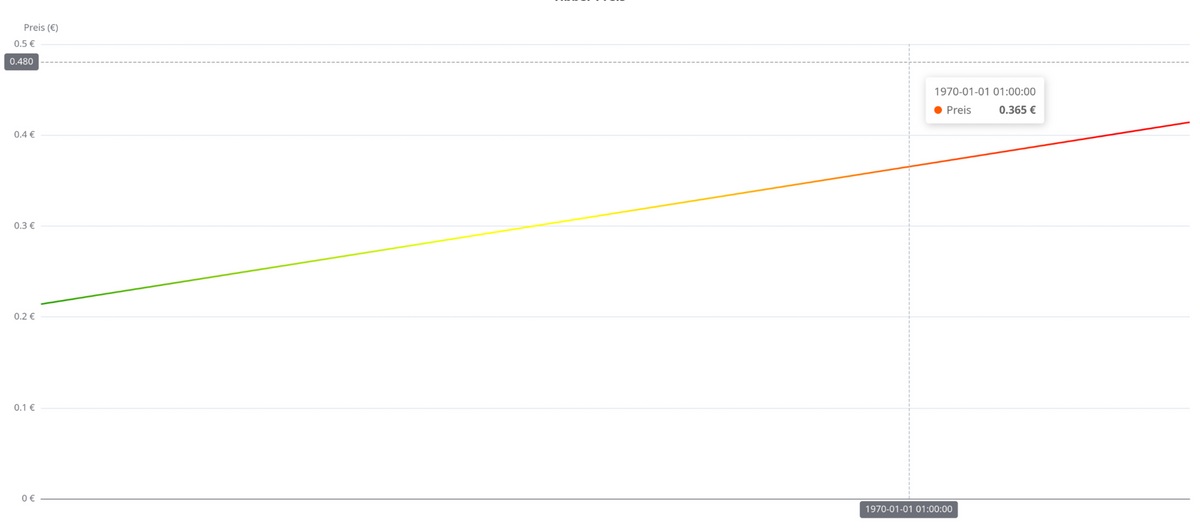
                  Schwer zu sagen. Falls Du das hier erreichen wolltest, hat es geklappt:
                  Bildschirmfoto_20251104_192150.png

                  Was ist denn Dein Ziel?

                  S 1 Reply Last reply
                  0
                  • H HansJochen

                    @schimi sagte in TibberLink Adapter:

                    scheint wohl nicht geklappt zu haben....

                    Schwer zu sagen. Falls Du das hier erreichen wolltest, hat es geklappt:

                    Bildschirmfoto_20251104_192150.png

                    Was ist denn Dein Ziel?

                    S Online
                    S Online
                    Schimi
                    wrote on last edited by
                    #609

                    @hansjochen sieht nicht richtig aus :D

                    wollte dein script (für welche die es brauchen, ich habe aktuell keine Verwendung für die Funktion)
                    umbauen das unten nur Uhrzeit angezeigt wird und nicht immer das Datum (quasi wie ihr danach drüber geschrieben habt)

                    H 1 Reply Last reply
                    0
                    • S Schimi

                      @hansjochen sieht nicht richtig aus :D

                      wollte dein script (für welche die es brauchen, ich habe aktuell keine Verwendung für die Funktion)
                      umbauen das unten nur Uhrzeit angezeigt wird und nicht immer das Datum (quasi wie ihr danach drüber geschrieben habt)

                      H Offline
                      H Offline
                      HansJochen
                      wrote on last edited by
                      #610

                      @Schimi

                      Okay, das fällt dann wohl in die Kategorie "gut gemeint" :)

                      Das Verhalten von Hand nachzubilden, solange der Adapter hier noch auf Strings basiert, wäre ziemlich müßig. Echarts macht das ja schon automatisch, wenn @ReblausGT , wie er es hier angedacht hat, den Adapter auf Datumsobjekte umstellt. Das sollte dann aber synchron passieren: Im Adapter und in den Templates.

                      1 Reply Last reply
                      1
                      • R ReblausGT

                        @schimi said in TibberLink Adapter:

                        Ich brauche mal ne Erklärung zum "Batterie laden" Kanal nach der 15min Umstellung :-)

                        Er sucht die 2 billigsten 15 Minuten und lädt die Batterie. Dann nimmt er den Preis der teuersten Phase = die teuerste Wattstunde im Speicher und rechnet dazu den Wirkungsgradverlust hinzu.... alles was da drunter liegt sperrt er das Entladen, was darüber liegt wird entladen.

                        S Online
                        S Online
                        Schimi
                        wrote on last edited by
                        #611

                        @reblausgt also nicht zusammenhängende 15 min (30min am stück)... sondern einfach nur 2 x 15min egal wie verteilt?

                        wenn ich "AmountHours" auf 0.75 stelle, dann wären es 3 x 15min?

                        Habe das zuerst so verstanden, das er schaut das er (bei 0.5) 30min am stück findet die 25% günstiger als der max preis ist...

                        B R 2 Replies Last reply
                        0
                        • S Schimi

                          @reblausgt also nicht zusammenhängende 15 min (30min am stück)... sondern einfach nur 2 x 15min egal wie verteilt?

                          wenn ich "AmountHours" auf 0.75 stelle, dann wären es 3 x 15min?

                          Habe das zuerst so verstanden, das er schaut das er (bei 0.5) 30min am stück findet die 25% günstiger als der max preis ist...

                          B Offline
                          B Offline
                          bakerman23
                          wrote on last edited by
                          #612

                          @schimi wie kommst du auf 25%?
                          Es ist der günstigste Preis vom Tag.

                          S 1 Reply Last reply
                          0
                          • B bakerman23

                            @schimi wie kommst du auf 25%?
                            Es ist der günstigste Preis vom Tag.

                            S Online
                            S Online
                            Schimi
                            wrote on last edited by
                            #613

                            @bakerman23 beim "Batterie laden"-kanal?

                            Dann sollte die Erklärung überarbeitet werden (vielleicht mit einem Beispiel zu den Einstellungen), habe ich dann total anders/falsch verstanden?

                            1 Reply Last reply
                            0
                            • S Schimi

                              @reblausgt also nicht zusammenhängende 15 min (30min am stück)... sondern einfach nur 2 x 15min egal wie verteilt?

                              wenn ich "AmountHours" auf 0.75 stelle, dann wären es 3 x 15min?

                              Habe das zuerst so verstanden, das er schaut das er (bei 0.5) 30min am stück findet die 25% günstiger als der max preis ist...

                              R Offline
                              R Offline
                              ReblausGT
                              Developer
                              wrote on last edited by
                              #614

                              @Schimi said in TibberLink Adapter:

                              @reblausgt also nicht zusammenhängende 15 min (30min am stück)... sondern einfach nur 2 x 15min egal wie verteilt?

                              0.75 sind die 3 besten 15 Minuten zum Laden genutzt.... Entladen wird nur in Zeiten wenn der Preis höher ist wie 1 + Wirkungsgradverlust des Stroms den du geladen hast.....

                              Aus dem Source Code (hours sind jetzt 15 minuten... muss ich mal n der Doku ändern):

                              	//#region *** SPECIFICATION Smart Battery Buffer ***
                              	/*
                              		Summary:
                              			Develop a channel that categorizes hourly energy prices into three groups—cheap, normal, and expensive.
                              			The categorization is based on the total price of each hour, considering a efficiency loss of a battery system.
                              
                              		Detailed Description:
                              			The system has an algorithm to organize hourly energy prices, providing users with a clear understanding of price
                              			dynamics. The algorithm follows these steps:
                              			- Sort by Total Price: Sort hourly rates in ascending order based on the total price.
                              			- Identify Cheap Hours: Starting with the cheapest hour, include hours in the cheap category if the total price is
                              			lower than the total price of the most expensive hour minus a minimum distance (MinDelta). Hereby calculate MinDelta
                              			based on the average total price of the cheap hours and a user-defined efficiency loss of a battery system. Collect
                              			cheap hours up to a maximum number of maxCheapCount
                              			- Determine the Most Expensive Hour Among the Cheap: Identify the hour with the highest total price among the cheap hours.
                              			- Classify Normal and Expensive Hours: Hours not classified as cheap are further categorized as follows:
                              				Normal Hours: Total price is lower than MinDelta plus the highest total price among the cheap hours.
                              				Expensive Hours: Total price is higher than MinDelta plus the highest total price among the cheap hours.
                              
                              		User Customization:
                              			Allow users to specify the maximum number of cheap hours they want to identify (maxCheapCount) and
                              			define the efficiency loss (efficiencyLoss).
                              
                              		Output:
                              			- Not Active - disable battery charging (OFF-1) and also disable feed into home energy system (OFF-2)
                              			- Cheap Hours - enable battery charging (ON-1) and disable feed into home energy system (OFF-2)
                              			- Normal Hours - disable battery charging (OFF-1) and also disable feed into home energy system (OFF-2)
                              			- Expensive Hours - disable battery charging (OFF-1) and enable feed into home energy system (ON-2)
                              		*/
                              	//#endregion
                              
                              L 1 Reply Last reply
                              1
                              • R ReblausGT

                                @Schimi said in TibberLink Adapter:

                                @reblausgt also nicht zusammenhängende 15 min (30min am stück)... sondern einfach nur 2 x 15min egal wie verteilt?

                                0.75 sind die 3 besten 15 Minuten zum Laden genutzt.... Entladen wird nur in Zeiten wenn der Preis höher ist wie 1 + Wirkungsgradverlust des Stroms den du geladen hast.....

                                Aus dem Source Code (hours sind jetzt 15 minuten... muss ich mal n der Doku ändern):

                                	//#region *** SPECIFICATION Smart Battery Buffer ***
                                	/*
                                		Summary:
                                			Develop a channel that categorizes hourly energy prices into three groups—cheap, normal, and expensive.
                                			The categorization is based on the total price of each hour, considering a efficiency loss of a battery system.
                                
                                		Detailed Description:
                                			The system has an algorithm to organize hourly energy prices, providing users with a clear understanding of price
                                			dynamics. The algorithm follows these steps:
                                			- Sort by Total Price: Sort hourly rates in ascending order based on the total price.
                                			- Identify Cheap Hours: Starting with the cheapest hour, include hours in the cheap category if the total price is
                                			lower than the total price of the most expensive hour minus a minimum distance (MinDelta). Hereby calculate MinDelta
                                			based on the average total price of the cheap hours and a user-defined efficiency loss of a battery system. Collect
                                			cheap hours up to a maximum number of maxCheapCount
                                			- Determine the Most Expensive Hour Among the Cheap: Identify the hour with the highest total price among the cheap hours.
                                			- Classify Normal and Expensive Hours: Hours not classified as cheap are further categorized as follows:
                                				Normal Hours: Total price is lower than MinDelta plus the highest total price among the cheap hours.
                                				Expensive Hours: Total price is higher than MinDelta plus the highest total price among the cheap hours.
                                
                                		User Customization:
                                			Allow users to specify the maximum number of cheap hours they want to identify (maxCheapCount) and
                                			define the efficiency loss (efficiencyLoss).
                                
                                		Output:
                                			- Not Active - disable battery charging (OFF-1) and also disable feed into home energy system (OFF-2)
                                			- Cheap Hours - enable battery charging (ON-1) and disable feed into home energy system (OFF-2)
                                			- Normal Hours - disable battery charging (OFF-1) and also disable feed into home energy system (OFF-2)
                                			- Expensive Hours - disable battery charging (OFF-1) and enable feed into home energy system (ON-2)
                                		*/
                                	//#endregion
                                
                                L Offline
                                L Offline
                                lesiflo
                                Most Active
                                wrote on last edited by lesiflo
                                #615

                                @ReblausGT said in TibberLink Adapter:

                                Entladen wird nur in Zeiten wenn der Preis höher ist wie 1 + Wirkungsgradverlust des Stroms den du geladen hast.....

                                Gelöscht

                                1 Reply Last reply
                                0
                                • N Offline
                                  N Offline
                                  nkoebe
                                  wrote on last edited by
                                  #616

                                  Moin,

                                  ich wollte mich hier ganz herzlich bedanken für den tollen Adapter und auch für die Templates der Charts. Das ist wirklich toll gemacht!
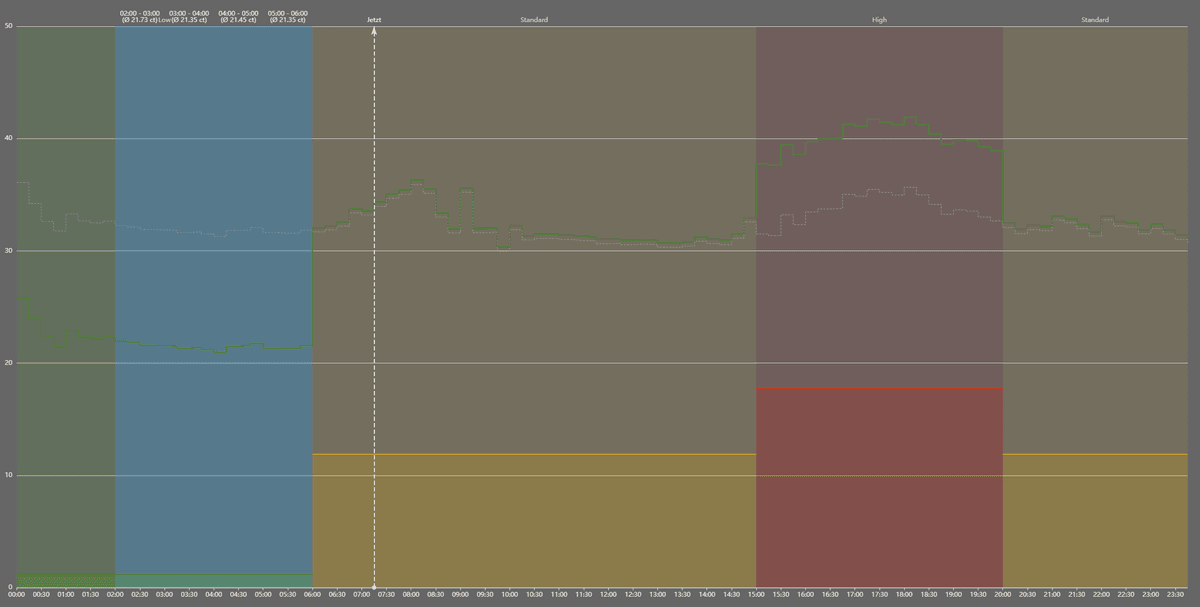
                                  Dank eurer Arbeit habe ich jetzt (mit ein bisschen Hilfe von AI...) für mich auch einen Chart erstellen können, wie ich ihn gerne hätte:
                                  4b8d7420-7f04-4ad6-90c7-573068dcc822-image.png

                                  Für den Chart berechne ich den 14a Gesamtpreis selbst, dazu lasse ich mir die Entgelttarife von Westnetz für 14a anzeigen und noch den Normalpreis als gestrichelte Linie.
                                  Dazu werden die besten (einzelnen) 4 Stunden mit Durchschnittspreis markiert.

                                  Vielen Dank!

                                  A 1 Reply Last reply
                                  0
                                  • N nkoebe

                                    Moin,

                                    ich wollte mich hier ganz herzlich bedanken für den tollen Adapter und auch für die Templates der Charts. Das ist wirklich toll gemacht!
                                    Dank eurer Arbeit habe ich jetzt (mit ein bisschen Hilfe von AI...) für mich auch einen Chart erstellen können, wie ich ihn gerne hätte:
                                    4b8d7420-7f04-4ad6-90c7-573068dcc822-image.png

                                    Für den Chart berechne ich den 14a Gesamtpreis selbst, dazu lasse ich mir die Entgelttarife von Westnetz für 14a anzeigen und noch den Normalpreis als gestrichelte Linie.
                                    Dazu werden die besten (einzelnen) 4 Stunden mit Durchschnittspreis markiert.

                                    Vielen Dank!

                                    A Offline
                                    A Offline
                                    ArnoD
                                    wrote on last edited by
                                    #617

                                    @nkoebe
                                    Berücksichtigt Tibber die Netzentgelte nach § 14a EnWG nicht automatisch im Bruttopreis?

                                    1 Reply Last reply
                                    0
                                    • N Offline
                                      N Offline
                                      nkoebe
                                      wrote on last edited by
                                      #618

                                      Bei der Rechnung denke ich schon (ich werde erst diesen Monat umgestellt).
                                      Ich bin mir aber nicht sicher, ob sie das bei der API Abfrage über den Adapter auch schon berücksichtigen.
                                      Wenn es soweit ist, kann ich ja berichten.
                                      Es sei denn, jemand hier kann das schon bestätigen...

                                      1 Reply Last reply
                                      0
                                      • M Offline
                                        M Offline
                                        Michi_Pi
                                        wrote on last edited by
                                        #619

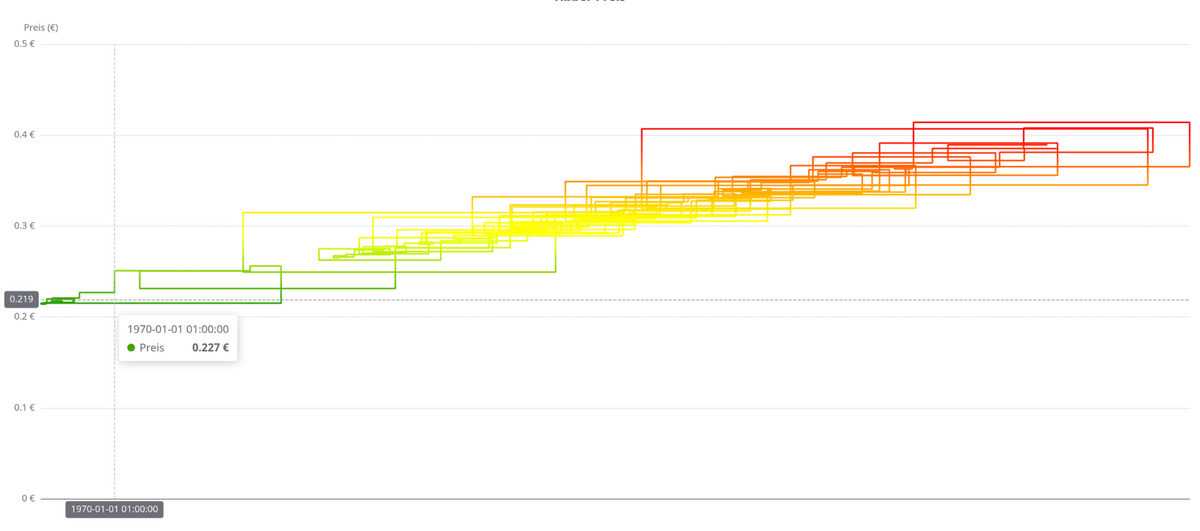
                                        Ich sehe den normalen Preis, und bei der Monatsabrechnung wird dann die Netzentgeltreduzierung abgezogen.
                                        N H A 3 Replies Last reply
                                        0
                                        • M Michi_Pi

                                          Ich sehe den normalen Preis, und bei der Monatsabrechnung wird dann die Netzentgeltreduzierung abgezogen.

                                          N Offline
                                          N Offline
                                          nkoebe
                                          wrote on last edited by
                                          #620

                                          @Michi_Pi

                                          Danke für die Info! Das hatte ich ehrlicher Weise auch so erwartet.

                                          Hier ist das JS Skript (ich hab Copilot benutzt, selber programmiert hab ich nix...):

                                          // ------------------------------
                                          // Konfiguration
                                          // ------------------------------
                                          
                                          // Netzengelt (wird von Tibber-Preis abgezogen)
                                          const NETZENTGELT = 11.5; // ct/kWh
                                          
                                          // §14a Tarifaufschläge je nach Uhrzeit
                                          const TARIF = {
                                             low: 1.19,       // 00–06 Uhr
                                             standard: 11.88, // 06–15 Uhr & 20–24 Uhr
                                             high: 17.75      // 15–20 Uhr
                                          };
                                          
                                          // Datenquelle Tibberlink Adapter
                                          const PRICE_BASE = "tibberlink.0.Homes.a51c83ea-7122-4cf7-9b33-8aa17f703c0a.PricesToday.";
                                          // Zielobjekt für VIS Chart
                                          const CHART_OID = "0_userdata.0.VIS.flexchartAngepassteStrompreis";
                                          
                                          // ------------------------------
                                          // Hilfsfunktionen
                                          // ------------------------------
                                          
                                          /**
                                          * Normalisiert Rohwerte in ct/kWh.
                                          * - Werte <5 werden als € interpretiert und in ct umgerechnet.
                                          * - Negative oder NaN werden verworfen.
                                          */
                                          function normalizeToCt(baseRaw) {
                                             if (isNaN(baseRaw) || baseRaw < 0) return NaN;
                                             return baseRaw < 5 ? baseRaw * 100 : baseRaw;
                                          }
                                          
                                          /**
                                          * Liefert Tarifaufschlag für eine Viertelstunde (Index 0–95).
                                          */
                                          function getTarifAdd(q) {
                                             const h = Math.floor(q / 4);
                                             if (h < 6) return TARIF.low;
                                             else if (h < 15) return TARIF.standard;
                                             else if (h < 20) return TARIF.high;
                                             else return TARIF.standard;
                                          }
                                          
                                          /**
                                          * Baut drei Linien für die Tarifzonen (Low/Standard/High).
                                          */
                                          function getTarifSeriesCt(xAxis) {
                                             const low = new Array(96).fill(null);
                                             const standard = new Array(96).fill(null);
                                             const high = new Array(96).fill(null);
                                          
                                             for (let q = 0; q < 96; q++) {
                                                 const h = Math.floor(q / 4);
                                                 if (h < 6) low[q] = TARIF.low;
                                                 else if (h < 15) standard[q] = TARIF.standard;
                                                 else if (h < 20) high[q] = TARIF.high;
                                                 else standard[q] = TARIF.standard;
                                             }
                                          
                                             return [
                                                 { name: "Tarif Low", type: "line", step: "end", symbol: "none", data: low,
                                                   lineStyle: { width: 1.5, color: "green" }, areaStyle: { color: "rgba(0,200,0,0.3)" } },
                                                 { name: "Tarif Standard", type: "line", step: "end", symbol: "none", data: standard,
                                                   lineStyle: { width: 1.5, color: "orange" }, areaStyle: { color: "rgba(255,165,0,0.3)" } },
                                                 { name: "Tarif High", type: "line", step: "end", symbol: "none", data: high,
                                                   lineStyle: { width: 1.5, color: "red" }, areaStyle: { color: "rgba(255,0,0,0.3)" } }
                                             ];
                                          }
                                          
                                          /**
                                          * Liefert aktuellen Viertelstundenindex (0–95).
                                          */
                                          function getCurrentQuarterIndex() {
                                             const now = new Date();
                                             return now.getHours() * 4 + Math.floor(now.getMinutes() / 15);
                                          }
                                          
                                          /**
                                          * Berechnet angepasste Preise nach §14a (Basispreis – Netzengelt + Tarifaufschlag).
                                          */
                                          function getAdjustedQuarterPricesCt() {
                                             const res = [];
                                             for (let q = 0; q < 96; q++) {
                                                 const s = getState(`${PRICE_BASE}${q}.total`);
                                                 const baseCt = normalizeToCt(s?.val !== undefined ? Number(s.val) : NaN);
                                                 if (isNaN(baseCt)) { res.push(null); continue; }
                                                 res.push(Number((baseCt - NETZENTGELT + getTarifAdd(q)).toFixed(2)));
                                             }
                                             return res;
                                          }
                                          
                                          /**
                                          * Baut X-Achse mit 96 Zeitlabels (00:00, 00:15, …).
                                          */
                                          function buildXAxis96() {
                                             const labels = [];
                                             for (let q = 0; q < 96; q++) {
                                                 const h = Math.floor(q / 4);
                                                 const m = (q % 4) * 15;
                                                 labels.push(`${("0"+h).slice(-2)}:${("0"+m).slice(-2)}`);
                                             }
                                             return labels;
                                          }
                                          
                                          /**
                                          * Ermittelt die 4 günstigsten Stundenblöcke (Durchschnitt aus 4 Viertelstunden).
                                          */
                                          function getBest4AdjustedHourBlocks() {
                                             const adjusted = getAdjustedQuarterPricesCt();
                                             const hours = [];
                                          
                                             for (let h = 0; h < 24; h++) {
                                                 const start = h * 4;
                                                 const block = adjusted.slice(start, start + 4).filter(v => v !== null);
                                                 if (block.length === 4) {
                                                     const avg = block.reduce((a, b) => a + b, 0) / block.length;
                                                     hours.push({ hour: h, avg });
                                                 }
                                             }
                                          
                                             return hours.sort((a, b) => a.avg - b.avg).slice(0, 4);
                                          }
                                          // ------------------------------
                                          // Chart JSON (96 Werte, 2 Linien)
                                          // ------------------------------
                                          
                                          function buildChartJSON96() {
                                             // §14a angepasste Preise
                                             const adjusted = getAdjustedQuarterPricesCt();
                                          
                                             // Originalpreise (nur normalisiert)
                                             const original = [];
                                             for (let q = 0; q < 96; q++) {
                                                 const s = getState(`${PRICE_BASE}${q}.total`);
                                                 const baseCt = normalizeToCt(s?.val !== undefined ? Number(s.val) : NaN);
                                                 original.push(isNaN(baseCt) ? null : Number(baseCt.toFixed(2)));
                                             }
                                          
                                             // X-Achse mit Zeitlabels
                                             const xAxis = buildXAxis96();
                                          
                                             // Wertebereich für Farbskala
                                             const numeric = adjusted.filter(v => v !== null && !isNaN(v));
                                             const minVal = numeric.length ? Math.min(...numeric) : 0;
                                             const maxVal = numeric.length ? Math.max(...numeric) : 1;
                                          
                                             // Chart-Definition
                                             const chart = {
                                                 backgroundColor: "#666666",
                                                 tooltip: { trigger: "axis", axisPointer: { type: "cross" } },
                                                 grid: { left: "10%", right: "4%", top: "8%", bottom: "8%" },
                                          
                                                 // Achsen
                                                 xAxis: {
                                                     type: "category", boundaryGap: false, data: xAxis,
                                                     axisLabel: { color: "rgb(230,230,230)" },
                                                     axisLine: { lineStyle: { color: "rgb(230,230,230)" } },
                                                     axisTick: { lineStyle: { color: "rgb(230,230,230)" } }
                                                 },
                                                 yAxis: {
                                                     type: "value",
                                                     axisLabel: { formatter: "{value} ct", color: "rgb(230,230,230)" },
                                                     axisLine: { lineStyle: { color: "rgb(230,230,230)" } },
                                                     axisTick: { lineStyle: { color: "rgb(230,230,230)" } }
                                                 },
                                          
                                                 // Farbskala (wird nicht angezeigt, nur für Farbverläufe)
                                                 visualMap: {
                                                     min: minVal,
                                                     max: maxVal,
                                                     inRange: { color: ["green", "yellow", "red"] },
                                                     show: false
                                                 },
                                          
                                                 // Datenserien
                                                 series: [
                                                     {
                                                         name: "Angepasster Preis",
                                                         type: "line",
                                                         step: "end",
                                                         symbol: "none",
                                                         data: adjusted,
                                                         lineStyle: { width: 2 },
                                          
                                                         // vertikale Linie "Jetzt"
                                                         markLine: {
                                                             data: [{ name: "Jetzt", xAxis: xAxis[getCurrentQuarterIndex()] }],
                                                             lineStyle: { color: "rgb(230,230,230)", type: "dashed", width: 2 },
                                                             label: { formatter: "Jetzt", color: "rgb(230,230,230)" }
                                                         },
                                          
                                                         // Flächen für Tarifzonen + beste 4 Stundenblöcke
                                                         markArea: {
                                                             data: [
                                                                 // feste Tarifzonen
                                                                 [{ xAxis: xAxis[0], itemStyle: { color: "rgba(0,200,0,0.1)" }, name: "Low" }, { xAxis: xAxis[24] }],
                                                                 [{ xAxis: xAxis[24], itemStyle: { color: "rgba(255,165,0,0.1)" }, name: "Standard" }, { xAxis: xAxis[60] }],
                                                                 [{ xAxis: xAxis[60], itemStyle: { color: "rgba(255,0,0,0.1)" }, name: "High" }, { xAxis: xAxis[80] }],
                                                                 [{ xAxis: xAxis[80], itemStyle: { color: "rgba(255,165,0,0.1)" }, name: "Standard" }, { xAxis: xAxis[95] }],
                                          
                                                                 // dynamisch: beste 4 Stundenblöcke (hellblau mit Label)
                                                                 ...getBest4AdjustedHourBlocks().map(b => [
                                                                     {
                                                                         xAxis: xAxis[b.hour * 4],
                                                                         itemStyle: { color: "rgba(0,150,255,0.3)" },
                                                                         label: {
                                                                             show: true,
                                                                             color: "rgb(230,230,230)",
                                                                             formatter: `${xAxis[b.hour * 4]} - ${xAxis[(b.hour + 1) * 4]}\n(Ø ${b.avg.toFixed(2)} ct)`
                                                                         }
                                                                     },
                                                                     { xAxis: xAxis[(b.hour + 1) * 4] }
                                                                 ])
                                                             ]
                                                         }
                                                     },
                                          
                                                     // Vergleichslinie: Originalpreise
                                                     {
                                                         name: "Normalpreis",
                                                         type: "line",
                                                         step: "end",
                                                         symbol: "none",
                                                         data: original,
                                                         lineStyle: { type: "dashed", width: 1, color: "#999999" },
                                                         itemStyle: { color: "#999999" }
                                                     },
                                          
                                                     // Tariflinien (Low/Standard/High)
                                                     ...getTarifSeriesCt(xAxis)
                                                 ]
                                             };
                                          
                                             return JSON.stringify(chart);
                                          }
                                          // ------------------------------
                                          // Trigger: alle 96 OIDs überwachen
                                          // ------------------------------
                                          
                                          // Liste aller 96 Viertelstunden-OIDs aus Tibberlink
                                          const quarterOids = Array.from({ length: 96 }, (_, i) => `${PRICE_BASE}${i}.total`);
                                          
                                          /**
                                          * Schreibt das Chart-JSON ins Zielobjekt.
                                          */
                                          function writeChart() {
                                             try {
                                                 const json = buildChartJSON96();   // Chart-Definition erzeugen
                                                 setState(CHART_OID, json, true);   // Ergebnis ins VIS-Objekt schreiben
                                             } catch (e) {
                                                 console.error("Fehler beim Erstellen des Chart-JSON:", e);
                                             }
                                          }
                                          
                                          // Aktualisierung bei jeder Änderung eines Viertelstundenwertes
                                          on({ id: quarterOids, change: "ne" }, () => {
                                             writeChart();
                                          });
                                          
                                          // Initiales Schreiben beim Start des Scripts
                                          writeChart();


                                          1 Reply Last reply
                                          0
                                          Reply
                                          • Reply as topic
                                          Log in to reply
                                          • Oldest to Newest
                                          • Newest to Oldest
                                          • Most Votes


                                          Support us

                                          ioBroker
                                          Community Adapters
                                          Donate
                                          FAQ Cloud / IOT
                                          HowTo: Node.js-Update
                                          HowTo: Backup/Restore
                                          Downloads
                                          BLOG

                                          800

                                          Online

                                          32.4k

                                          Users

                                          81.6k

                                          Topics

                                          1.3m

                                          Posts
                                          Community
                                          Impressum | Datenschutz-Bestimmungen | Nutzungsbedingungen | Einwilligungseinstellungen
                                          ioBroker Community 2014-2025
                                          logo
                                          • Login

                                          • Don't have an account? Register

                                          • Login or register to search.
                                          • First post
                                            Last post
                                          0
                                          • Home
                                          • Recent
                                          • Tags
                                          • Unread 0
                                          • Categories
                                          • Unreplied
                                          • Popular
                                          • GitHub
                                          • Docu
                                          • Hilfe