




gelöst-restore aus BackitUp nach Systemupgrade nicht möglich
-
@homoran
ich bin/war der Auffassung, dass es ein ganz anderes Thema ist, oder? Hat ja mit nicht vorhandenen Repositories des anderen Threads nichts zu tun.Aber wenn Du der Auffassung bist der Thread soll weg, dann lösche ihn bitte.
@mipl klingt plausibel, aber was hat das Problem mit einem Systemupgrade zu tun?
Welches upgrade?
wie durchgeführt?und vorher hat alles mit gleichen Einstellungen geklappt?
-
Hallo,
ich habe das derzeit aktuelle Betriebssystem
Raspberry Pi OS with desktop
Release date: May 3rd 2023
System: 64-bit
Kernel version: 6.1
Debian version: 11 (bullseye)auf einer SD-Card installiert. Das System läuft in einem Raspi 4 mit 8 GB.
Ich wollte nun meine iobroker-Instanzen wiederherstellen, doch kann das System nicht auf den Pfad des USB-sticks zugreifen.
ich habe bereits
curl -sL https://iobroker.net/fix.sh | bash -durchlaufen lassen, aber ohne Erfolg.
Das Log liefert:
Started iobroker ...
[DEBUG] [iobroker] - host.raspberrypi 104 states saved

[DEBUG] [iobroker] - host.raspberrypi 143 objects saved

[DEBUG] [iobroker] - Backup created: /opt/iobroker/backups/iobroker_2023_06_26-20_18_26_backupiobroker.tar.gz

[DEBUG] [iobroker] - done
[DEBUG] [cifs] - used copy path: /media/pi/e2ddbaf8-2f89-49a5-be69-394a89876b5e/backupDir
[ERROR] [cifs] - Path "/media/pi/e2ddbaf8-2f89-49a5-be69-394a89876b5e/backupDir" not found
In der Shell kann ich auf den Backup-Ordner zugreifen.
In der BackitUp-Instanz habe ich bei NAS/Kopieren eingestellt:
Copy
als Root-Benutzer mounten
Pfad: /media/pi/e2ddbaf8-2f89-49a5-be69-394a89876b5e/backupDirWo könnte das Problem liegen? Ein Rechteproblem?
@mipl sagte in restore aus BackitUp nach Systemupgrade nicht möglich:
Ein Rechteproblem?
Das sind in der Regel keine 'Probleme', weil die Dateisysteme genau so eingehängt werden wie es definiert wurde.
Mit Desktop unterwegs heißt vermutlich, dass da ein automounter automatisch, weil das ja so bequem ist, den Stick irgendwie/irgendwo einhängt. Das darf aber nur mit den Rechten des users erfolgen, der gerade auf dem Desktop herumhüpft. Und der 'iobroker' ist es nicht.
Schau dir an mit welchen Rechten das Dateisystem wo eingehängt wurde. -
@mipl klingt plausibel, aber was hat das Problem mit einem Systemupgrade zu tun?
Welches upgrade?
wie durchgeführt?und vorher hat alles mit gleichen Einstellungen geklappt?
Ein Systemupgrade von Debian 10 auf Debian 11. Eigentlich kein Upgrade sondern eine Neuinstallation auf SD-Card. Installation erfolgte mit dem Raspi-Installer. IoBroker läuft auch.
Vorher habe ich Backups machen können. Allerdings enthielt der Pfad nicht eine so unüberschaubare Zahlenkolonne wie jetzt auf diesem neuen System. Aber wie ich schrieb kann ich in der Konsole auf den Ordner des Sticks mit dem eingetragenen Pfad zugreifen. Sowohl über ssh als auch direkt am Raspi (letzteres ist ja klar).
Ich habe jetzt die Backups von Hand in /opt/iobroker/backups kopiert und dann die Wiederherstellung gestartet. Das lief mit exit 0 ab. Es kommen aber keine zusätzlichen Instanzen. Im log bekomme ich nun
2023-06-26 20:56:28.275 error Automatic repository update is not allowed more than once a hourDer Stick steht so in der Shell:
pi@raspberrypi:/media/pi $ ls -l
insgesamt 4
drwxrwxrwx 4 iobroker iobroker 4096 26. Jun 2022  437eabed-6594-437a-87c8-bba80cb20775
Und hier noch das Backup-Verzeichnis:
pi@raspberrypi:/media/pi/437eabed-6594-437a-87c8-bba80cb20775 $ ls -l insgesamt 108 drwxrwxrwx 2 iobroker iobroker 94208 26. Jun 02:40 backupDir drwxrwxrwx 2 iobroker iobroker 16384 8. Mär 2022 lost+found -
Ein Systemupgrade von Debian 10 auf Debian 11. Eigentlich kein Upgrade sondern eine Neuinstallation auf SD-Card. Installation erfolgte mit dem Raspi-Installer. IoBroker läuft auch.
Vorher habe ich Backups machen können. Allerdings enthielt der Pfad nicht eine so unüberschaubare Zahlenkolonne wie jetzt auf diesem neuen System. Aber wie ich schrieb kann ich in der Konsole auf den Ordner des Sticks mit dem eingetragenen Pfad zugreifen. Sowohl über ssh als auch direkt am Raspi (letzteres ist ja klar).
Ich habe jetzt die Backups von Hand in /opt/iobroker/backups kopiert und dann die Wiederherstellung gestartet. Das lief mit exit 0 ab. Es kommen aber keine zusätzlichen Instanzen. Im log bekomme ich nun
2023-06-26 20:56:28.275 error Automatic repository update is not allowed more than once a hourDer Stick steht so in der Shell:
pi@raspberrypi:/media/pi $ ls -l
insgesamt 4
drwxrwxrwx 4 iobroker iobroker 4096 26. Jun 2022  437eabed-6594-437a-87c8-bba80cb20775
Und hier noch das Backup-Verzeichnis:
pi@raspberrypi:/media/pi/437eabed-6594-437a-87c8-bba80cb20775 $ ls -l insgesamt 108 drwxrwxrwx 2 iobroker iobroker 94208 26. Jun 02:40 backupDir drwxrwxrwx 2 iobroker iobroker 16384 8. Mär 2022 lost+found@mipl ich hab keine Ahnung was du da machst!
@mipl sagte in restore aus BackitUp nach Systemupgrade nicht möglich:
sondern eine Neuinstallation auf SD-Card.
incl. Neuinstallation von ioBroker?
@mipl sagte in restore aus BackitUp nach Systemupgrade nicht möglich:
Aber wie ich schrieb kann ich in der Konsole auf den Ordner des Sticks mit dem eingetragenen Pfad zugreifen. Sowohl über ssh als auch direkt am Raspi (letzteres ist ja klar).
wie und als welcher User?
@mipl sagte in restore aus BackitUp nach Systemupgrade nicht möglich:
Ich habe jetzt die Backups von Hand in /opt/iobroker/backups kopiert
auch hier: wie und als welcher User? die Dateien dind jetzt mit welchen Rechten versehen?
@mipl sagte in restore aus BackitUp nach Systemupgrade nicht möglich:
dann die Wiederherstellung gestartet
mit
iob restore backupDateiName?@mipl sagte in restore aus BackitUp nach Systemupgrade nicht möglich:
Das lief mit exit 0 ab
was und wo?
@mipl sagte in restore aus BackitUp nach Systemupgrade nicht möglich:
Es kommen aber keine zusätzlichen Instanzen.
woher?
@mipl sagte in restore aus BackitUp nach Systemupgrade nicht möglich:
log bekomme ich nun
2023-06-26 20:56:28.275 error Automatic repository update is not allowed more than once a hourwas für ein log?
bei iobroker stünde der Adapter oder host dabei.
von iobroker kenne ich diese Meldung nicht.
welche Versionen? -
Ich habe eine Neuinstallation des Betriebssystems auf eine SD-Card gemacht. Dann habe ich iobroker neu installiert:
curl -sLf https://iobroker.net/install.sh | bash -IoBroker startet mit 3 instanzen (admin, backitup, discovery).
Ich habe dann über ssh als user pi die Backups vom Stick am Raspi in den Ordner /opt/iobroker/backups kopiert, so wie es in dieser link text Anleitung steht. Dann habe ich in der Backitup-Instanz des iobrokers die Wiederherstellung von iobroker, mysql, zigbee, javascripts und noch ein paar andere gestartet.
Bei der Wiederherstellung des iobroker-Backups erfolgte automatisch eine Abmeldung und dann automatisch wieder der Start es iobroker bis zur Anmeldemaske.
Instanzen woher? Ich war der Auffassung, dass man ein Backup von der iobroker-Instanz macht und durch die Wiederherstellung dafür gesorgt wird, dass die Instanzen, die es zum Zeitpunkt des Backups gab, geladen und installiert werden. Ist das ein Trugschluss?
Die Zeile aus dem log ist vollständig so:
admin.0
	2023-06-26 20:56:28.275	error	Automatic repository update is not allowed more than once a hour
Versionen - welche Version von was möchtest Du wissen?
-
Ich habe eine Neuinstallation des Betriebssystems auf eine SD-Card gemacht. Dann habe ich iobroker neu installiert:
curl -sLf https://iobroker.net/install.sh | bash -IoBroker startet mit 3 instanzen (admin, backitup, discovery).
Ich habe dann über ssh als user pi die Backups vom Stick am Raspi in den Ordner /opt/iobroker/backups kopiert, so wie es in dieser link text Anleitung steht. Dann habe ich in der Backitup-Instanz des iobrokers die Wiederherstellung von iobroker, mysql, zigbee, javascripts und noch ein paar andere gestartet.
Bei der Wiederherstellung des iobroker-Backups erfolgte automatisch eine Abmeldung und dann automatisch wieder der Start es iobroker bis zur Anmeldemaske.
Instanzen woher? Ich war der Auffassung, dass man ein Backup von der iobroker-Instanz macht und durch die Wiederherstellung dafür gesorgt wird, dass die Instanzen, die es zum Zeitpunkt des Backups gab, geladen und installiert werden. Ist das ein Trugschluss?
Die Zeile aus dem log ist vollständig so:
admin.0
	2023-06-26 20:56:28.275	error	Automatic repository update is not allowed more than once a hour
Versionen - welche Version von was möchtest Du wissen?
@mipl sagte in restore aus BackitUp nach Systemupgrade nicht möglich:
Versionen - welche Version von was möchtest Du wissen?
Eigentlich alles relevante
fangen wir mal an mit@mipl sagte in restore aus BackitUp nach Systemupgrade nicht möglich:
3 instanzen (admin, backitup, discovery).
sowie dem js-controller
Vor und nach dem restore -
Es gibt scheinbar keine Änderung des Systems nach dem restore - ich erkenne zumindest keine.
Zu den Versionen: Ich glaube das geht am übersichtlichsten/umfassendsten so:
======== Start marking the full check here ========= Skript v.2023-04-16 *** BASE SYSTEM *** Model : Raspberry Pi 4 Model B Rev 1.5 Architecture : aarch64 Docker : false Virtualization : none Distributor ID: Debian Description: Debian GNU/Linux 11 (bullseye) Release: 11 Codename: bullseye PRETTY_NAME="Debian GNU/Linux 11 (bullseye)" NAME="Debian GNU/Linux" VERSION_ID="11" VERSION="11 (bullseye)" VERSION_CODENAME=bullseye ID=debian HOME_URL="https://www.debian.org/" SUPPORT_URL="https://www.debian.org/support" BUG_REPORT_URL="https://bugs.debian.org/" Systemuptime and Load: 22:05:50 up 2:20, 3 users, load average: 0.05, 0.07, 0.22 CPU threads: 4 Raspberry only: throttled=0x0 Other values than 0x0 hint to temperature/voltage problems temp=48.2'C volt=0.9460V *** Time and Time Zones *** Local time: Mon 2023-06-26 22:05:51 CEST Universal time: Mon 2023-06-26 20:05:51 UTC RTC time: n/a Time zone: Europe/Berlin (CEST, +0200) System clock synchronized: yes NTP service: active RTC in local TZ: no *** User and Groups *** pi /home/pi pi adm dialout cdrom sudo audio video plugdev games users input render netdev lpadmin gpio i2c spi iobroker *** X-Server-Setup *** X-Server: true Desktop: Terminal: tty Boot Target: graphical.target *** MEMORY *** total used free shared buff/cache available Mem: 7.8G 495M 6.1G 12M 1.2G 7.2G Swap: 99M 0B 99M Total: 7.9G 495M 6.2G 7812 M total memory 495 M used memory 917 M active memory 645 M inactive memory 6080 M free memory 72 M buffer memory 1163 M swap cache 99 M total swap 0 M used swap 99 M free swap Raspberry only: oom events: 0 lifetime oom required: 0 Mbytes total time in oom handler: 0 ms max time spent in oom handler: 0 ms *** FILESYSTEM *** Filesystem Type Size Used Avail Use% Mounted on /dev/root ext4 29G 4.3G 23G 16% / devtmpfs devtmpfs 3.8G 0 3.8G 0% /dev tmpfs tmpfs 3.9G 0 3.9G 0% /dev/shm tmpfs tmpfs 1.6G 1.2M 1.6G 1% /run tmpfs tmpfs 5.0M 4.0K 5.0M 1% /run/lock /dev/mmcblk0p1 vfat 255M 31M 225M 13% /boot tmpfs tmpfs 782M 20K 782M 1% /run/user/1000 /dev/sda1 ext4 29G 1.5G 26G 6% /media/pi/437eabed-6594-437a-87c8-bba80cb20775 Messages concerning ext4 filesystem in dmesg: [Mon Jun 26 19:45:31 2023] Kernel command line: coherent_pool=1M 8250.nr_uarts=0 snd_bcm2835.enable_headphones=0 snd_bcm2835.enable_headphones=1 snd_bcm2835.enable_hdmi=1 bcm2708_fb.fbwidth=800 bcm2708_fb.fbheight=480 bcm2708_fb.fbswap=1 smsc95xx.macaddr=E4:5F:01:F5:E5:74 vc_mem.mem_base=0x3ec00000 vc_mem.mem_size=0x40000000 console=ttyS0,115200 console=tty1 root=PARTUUID=7ce318e3-02 rootfstype=ext4 fsck.repair=yes rootwait quiet splash plymouth.ignore-serial-consoles [Mon Jun 26 19:45:32 2023] EXT4-fs (mmcblk0p2): mounted filesystem with ordered data mode. Quota mode: none. [Mon Jun 26 19:45:32 2023] VFS: Mounted root (ext4 filesystem) readonly on device 179:2. [Mon Jun 26 19:45:35 2023] EXT4-fs (mmcblk0p2): re-mounted. Quota mode: none. [Mon Jun 26 19:45:58 2023] EXT4-fs (sda1): mounting ext2 file system using the ext4 subsystem [Mon Jun 26 19:45:59 2023] EXT4-fs (sda1): warning: mounting unchecked fs, running e2fsck is recommended [Mon Jun 26 19:45:59 2023] EXT4-fs (sda1): mounted filesystem without journal. Quota mode: none. [Mon Jun 26 20:35:19 2023] EXT4-fs (sda1): unmounting filesystem. [Mon Jun 26 20:35:48 2023] EXT4-fs (sda1): mounted filesystem with ordered data mode. Quota mode: none. Show mounted filesystems (real ones only): TARGET SOURCE FSTYPE OPTIONS / /dev/mmcblk0p2 ext4 rw,noatime |-/boot /dev/mmcblk0p1 vfat rw,relatime,fmask=0022,dmask=0022,codepage=437,iocharset=ascii,shortname=mixed,errors=remount-ro `-/media/pi/437eabed-6594-437a-87c8-bba80cb20775 /dev/sda1 ext4 rw,nosuid,nodev,relatime,errors=remount-ro Files in neuralgic directories: /var: 529M /var/ 184M /var/lib 163M /var/cache 157M /var/cache/apt 130M /var/lib/apt/lists Archived and active journals take up 80.0M in the file system. /opt/iobroker/backups: 27M /opt/iobroker/backups/ /opt/iobroker/iobroker-data: 30M /opt/iobroker/iobroker-data/ 15M /opt/iobroker/iobroker-data/files 13M /opt/iobroker/iobroker-data/files/admin.admin/custom/static/js 13M /opt/iobroker/iobroker-data/files/admin.admin/custom/static 13M /opt/iobroker/iobroker-data/files/admin.admin/custom The five largest files in iobroker-data are: 14M /opt/iobroker/iobroker-data/objects.jsonl 6.3M /opt/iobroker/iobroker-data/files/admin.admin/custom/static/js/vendors-node_modules_iobroker_adapter-react-v5_assets_devices_parseNames_js-node_modules_iobr-99c23e.847b8ad9.chunk.js.map 2.8M /opt/iobroker/iobroker-data/files/admin.admin/custom/static/js/vendors-node_modules_iobroker_adapter-react-v5_assets_devices_parseNames_js-node_modules_iobr-99c23e.847b8ad9.chunk.js 1.9M /opt/iobroker/iobroker-data/states.jsonl 1.6M /opt/iobroker/iobroker-data/files/admin.admin/custom/static/js/vendors-node_modules_mui_material_Accordion_index_js-node_modules_mui_material_AccordionDetai-57e02d.0886b730.chunk.js.map *** NodeJS-Installation *** /usr/bin/nodejs v18.16.1 /usr/bin/node v18.16.1 /usr/bin/npm 9.5.1 /usr/bin/npx 9.5.1 nodejs: Installed: 18.16.1-deb-1nodesource1 Candidate: 18.16.1-deb-1nodesource1 Version table: *** 18.16.1-deb-1nodesource1 500 500 https://deb.nodesource.com/node_18.x bullseye/main arm64 Packages 100 /var/lib/dpkg/status 12.22.12~dfsg-1~deb11u4 500 500 http://security.debian.org/debian-security bullseye-security/main arm64 Packages 12.22.12~dfsg-1~deb11u3 500 500 http://deb.debian.org/debian bullseye/main arm64 Packages Temp directories causing npm8 problem: 0 No problems detected *** ioBroker-Installation *** ioBroker Status iobroker is running on this host. Objects type: jsonl States type: jsonl MULTIHOSTSERVICE/enabled: false Core adapters versions js-controller: 4.0.24 admin: 6.3.5 javascript: "javascript" not found Adapters from github: 0 Adapter State + system.adapter.admin.0 : admin : raspberrypi - enabled, port: 8082, bind: 0.0.0.0, run as: admin + system.adapter.backitup.0 : backitup : raspberrypi - enabled system.adapter.discovery.0 : discovery : raspberrypi - disabled + instance is alive Enabled adapters with bindings + system.adapter.admin.0 : admin : raspberrypi - enabled, port: 8082, bind: 0.0.0.0, run as: admin ioBroker-Repositories stable : http://download.iobroker.net/sources-dist.json beta : http://download.iobroker.net/sources-dist-latest.json Active repo(s): stable Installed ioBroker-Instances Used repository: stable Adapter "admin" : 6.3.5 , installed 6.3.5 Adapter "backitup" : 2.6.23 , installed 2.6.23 Adapter "discovery" : 3.1.0 , installed 3.1.0 Controller "js-controller": 4.0.24 , installed 4.0.24 Objects and States Please stand by - This may take a while Objects: 142 States: 106 *** OS-Repositories and Updates *** Hit:1 http://security.debian.org/debian-security bullseye-security InRelease Hit:2 http://deb.debian.org/debian bullseye InRelease Hit:3 http://deb.debian.org/debian bullseye-updates InRelease Hit:4 http://archive.raspberrypi.org/debian bullseye InRelease Hit:5 https://deb.nodesource.com/node_18.x bullseye InRelease Reading package lists... Pending Updates: 30 *** Listening Ports *** Active Internet connections (only servers) Proto Recv-Q Send-Q Local Address Foreign Address State User Inode PID/Program name tcp 0 0 0.0.0.0:22 0.0.0.0:* LISTEN 0 14116 711/sshd: /usr/sbin tcp 0 0 127.0.0.1:9001 0.0.0.0:* LISTEN 1001 61429 2995/iobroker.js-co tcp 0 0 127.0.0.1:9000 0.0.0.0:* LISTEN 1001 24217 2995/iobroker.js-co tcp 0 0 127.0.0.1:631 0.0.0.0:* LISTEN 0 12873 697/cupsd tcp6 0 0 :::22 :::* LISTEN 0 14118 711/sshd: /usr/sbin tcp6 0 0 ::1:631 :::* LISTEN 0 12872 697/cupsd tcp6 0 0 :::8082 :::* LISTEN 1001 24258 3020/io.admin.0 udp 0 0 0.0.0.0:68 0.0.0.0:* 0 14984 438/dhcpcd udp 0 0 0.0.0.0:37363 0.0.0.0:* 108 14591 347/avahi-daemon: r udp 0 0 0.0.0.0:631 0.0.0.0:* 0 13038 717/cups-browsed udp 0 0 0.0.0.0:5353 0.0.0.0:* 108 14589 347/avahi-daemon: r udp6 0 0 :::48537 :::* 108 14592 347/avahi-daemon: r udp6 0 0 :::5353 :::* 108 14590 347/avahi-daemon: r *** Log File - Last 25 Lines *** 2023-06-26 21:38:10.997 - info: admin.0 (3020) failed connection to socket.io from ::ffff:10.56.78.99: Passport was not initialized 2023-06-26 21:38:11.056 - info: admin.0 (3020) failed connection to socket.io from ::ffff:10.56.78.99: Passport was not initialized 2023-06-26 21:38:11.123 - info: admin.0 (3020) failed connection to socket.io from ::ffff:10.56.78.99: Passport was not initialized 2023-06-26 21:38:11.181 - info: admin.0 (3020) failed connection to socket.io from ::ffff:10.56.78.99: Passport was not initialized 2023-06-26 21:38:11.249 - info: admin.0 (3020) failed connection to socket.io from ::ffff:10.56.78.99: Passport was not initialized 2023-06-26 21:38:11.383 - info: admin.0 (3020) failed connection to socket.io from ::ffff:10.56.78.99: Passport was not initialized 2023-06-26 21:38:11.449 - info: admin.0 (3020) failed connection to socket.io from ::ffff:10.56.78.99: Passport was not initialized 2023-06-26 21:38:19.305 - info: backitup.0 (3052) [iobroker] backup will be activated at 02:40 every 1 day(s) 2023-06-26 21:38:25.667 - info: host.raspberrypi iobroker npm-install: 2023-06-26 21:38:25.669 - info: host.raspberrypi iobroker npm-install: added 40 packages in 26s 2023-06-26 21:38:25.671 - info: host.raspberrypi iobroker npm-install: 46 packages are looking for funding run `npm fund` for details 2023-06-26 21:38:25.718 - info: host.raspberrypi iobroker npm-install: host.raspberrypi install adapter discovery@3.1.0 2023-06-26 21:38:25.760 - info: host.raspberrypi iobroker npm-install: upload [6] discovery.admin /opt/iobroker/node_modules/iobroker.discovery/admin/discovery.png discovery.png image/png 2023-06-26 21:38:25.799 - info: host.raspberrypi iobroker npm-install: upload [5] discovery.admin /opt/iobroker/node_modules/iobroker.discovery/admin/index.html index.html text/html 2023-06-26 21:38:26.969 - info: host.raspberrypi iobroker npm-install: upload [4] discovery.admin /opt/iobroker/node_modules/iobroker.discovery/admin/index_m.html index_m.html text/html 2023-06-26 21:38:26.986 - info: host.raspberrypi iobroker npm-install: upload [3] discovery.admin /opt/iobroker/node_modules/iobroker.discovery/admin/settings.html settings.html text/html 2023-06-26 21:38:27.001 - info: host.raspberrypi iobroker npm-install: upload [2] discovery.admin /opt/iobroker/node_modules/iobroker.discovery/admin/settings_m.html settings_m.html text/html 2023-06-26 21:38:27.011 - info: host.raspberrypi iobroker npm-install: upload [1] discovery.admin /opt/iobroker/node_modules/iobroker.discovery/admin/translateTools.js translateTools.js application/javascript 2023-06-26 21:38:27.021 - info: host.raspberrypi iobroker npm-install: upload [0] discovery.admin /opt/iobroker/node_modules/iobroker.discovery/admin/words.js words.js application/javascript 2023-06-26 21:38:27.068 - info: host.raspberrypi iobroker npm-install: host.raspberrypi object system.adapter.discovery created/updated 2023-06-26 21:38:27.090 - info: host.raspberrypi iobroker npm-install: Update "system.adapter.discovery.0" 2023-06-26 21:38:28.156 - info: host.raspberrypi iobroker npm-install: exit 0 2023-06-26 21:39:46.510 - info: admin.0 (3020) ==> Connected system.user.admin from ::ffff:10.56.78.99 2023-06-26 21:39:48.524 - info: admin.0 (3020) ==> Connected system.user.admin from ::ffff:10.56.78.99 2023-06-26 21:39:52.402 - info: admin.0 (3020) <== Disconnect system.user.admin from ::ffff:10.56.78.99 ============ Mark until here for C&P ============= iob diag has finished. Press any key for a summary -
Es gibt scheinbar keine Änderung des Systems nach dem restore - ich erkenne zumindest keine.
Zu den Versionen: Ich glaube das geht am übersichtlichsten/umfassendsten so:
======== Start marking the full check here ========= Skript v.2023-04-16 *** BASE SYSTEM *** Model : Raspberry Pi 4 Model B Rev 1.5 Architecture : aarch64 Docker : false Virtualization : none Distributor ID: Debian Description: Debian GNU/Linux 11 (bullseye) Release: 11 Codename: bullseye PRETTY_NAME="Debian GNU/Linux 11 (bullseye)" NAME="Debian GNU/Linux" VERSION_ID="11" VERSION="11 (bullseye)" VERSION_CODENAME=bullseye ID=debian HOME_URL="https://www.debian.org/" SUPPORT_URL="https://www.debian.org/support" BUG_REPORT_URL="https://bugs.debian.org/" Systemuptime and Load: 22:05:50 up 2:20, 3 users, load average: 0.05, 0.07, 0.22 CPU threads: 4 Raspberry only: throttled=0x0 Other values than 0x0 hint to temperature/voltage problems temp=48.2'C volt=0.9460V *** Time and Time Zones *** Local time: Mon 2023-06-26 22:05:51 CEST Universal time: Mon 2023-06-26 20:05:51 UTC RTC time: n/a Time zone: Europe/Berlin (CEST, +0200) System clock synchronized: yes NTP service: active RTC in local TZ: no *** User and Groups *** pi /home/pi pi adm dialout cdrom sudo audio video plugdev games users input render netdev lpadmin gpio i2c spi iobroker *** X-Server-Setup *** X-Server: true Desktop: Terminal: tty Boot Target: graphical.target *** MEMORY *** total used free shared buff/cache available Mem: 7.8G 495M 6.1G 12M 1.2G 7.2G Swap: 99M 0B 99M Total: 7.9G 495M 6.2G 7812 M total memory 495 M used memory 917 M active memory 645 M inactive memory 6080 M free memory 72 M buffer memory 1163 M swap cache 99 M total swap 0 M used swap 99 M free swap Raspberry only: oom events: 0 lifetime oom required: 0 Mbytes total time in oom handler: 0 ms max time spent in oom handler: 0 ms *** FILESYSTEM *** Filesystem Type Size Used Avail Use% Mounted on /dev/root ext4 29G 4.3G 23G 16% / devtmpfs devtmpfs 3.8G 0 3.8G 0% /dev tmpfs tmpfs 3.9G 0 3.9G 0% /dev/shm tmpfs tmpfs 1.6G 1.2M 1.6G 1% /run tmpfs tmpfs 5.0M 4.0K 5.0M 1% /run/lock /dev/mmcblk0p1 vfat 255M 31M 225M 13% /boot tmpfs tmpfs 782M 20K 782M 1% /run/user/1000 /dev/sda1 ext4 29G 1.5G 26G 6% /media/pi/437eabed-6594-437a-87c8-bba80cb20775 Messages concerning ext4 filesystem in dmesg: [Mon Jun 26 19:45:31 2023] Kernel command line: coherent_pool=1M 8250.nr_uarts=0 snd_bcm2835.enable_headphones=0 snd_bcm2835.enable_headphones=1 snd_bcm2835.enable_hdmi=1 bcm2708_fb.fbwidth=800 bcm2708_fb.fbheight=480 bcm2708_fb.fbswap=1 smsc95xx.macaddr=E4:5F:01:F5:E5:74 vc_mem.mem_base=0x3ec00000 vc_mem.mem_size=0x40000000 console=ttyS0,115200 console=tty1 root=PARTUUID=7ce318e3-02 rootfstype=ext4 fsck.repair=yes rootwait quiet splash plymouth.ignore-serial-consoles [Mon Jun 26 19:45:32 2023] EXT4-fs (mmcblk0p2): mounted filesystem with ordered data mode. Quota mode: none. [Mon Jun 26 19:45:32 2023] VFS: Mounted root (ext4 filesystem) readonly on device 179:2. [Mon Jun 26 19:45:35 2023] EXT4-fs (mmcblk0p2): re-mounted. Quota mode: none. [Mon Jun 26 19:45:58 2023] EXT4-fs (sda1): mounting ext2 file system using the ext4 subsystem [Mon Jun 26 19:45:59 2023] EXT4-fs (sda1): warning: mounting unchecked fs, running e2fsck is recommended [Mon Jun 26 19:45:59 2023] EXT4-fs (sda1): mounted filesystem without journal. Quota mode: none. [Mon Jun 26 20:35:19 2023] EXT4-fs (sda1): unmounting filesystem. [Mon Jun 26 20:35:48 2023] EXT4-fs (sda1): mounted filesystem with ordered data mode. Quota mode: none. Show mounted filesystems (real ones only): TARGET SOURCE FSTYPE OPTIONS / /dev/mmcblk0p2 ext4 rw,noatime |-/boot /dev/mmcblk0p1 vfat rw,relatime,fmask=0022,dmask=0022,codepage=437,iocharset=ascii,shortname=mixed,errors=remount-ro `-/media/pi/437eabed-6594-437a-87c8-bba80cb20775 /dev/sda1 ext4 rw,nosuid,nodev,relatime,errors=remount-ro Files in neuralgic directories: /var: 529M /var/ 184M /var/lib 163M /var/cache 157M /var/cache/apt 130M /var/lib/apt/lists Archived and active journals take up 80.0M in the file system. /opt/iobroker/backups: 27M /opt/iobroker/backups/ /opt/iobroker/iobroker-data: 30M /opt/iobroker/iobroker-data/ 15M /opt/iobroker/iobroker-data/files 13M /opt/iobroker/iobroker-data/files/admin.admin/custom/static/js 13M /opt/iobroker/iobroker-data/files/admin.admin/custom/static 13M /opt/iobroker/iobroker-data/files/admin.admin/custom The five largest files in iobroker-data are: 14M /opt/iobroker/iobroker-data/objects.jsonl 6.3M /opt/iobroker/iobroker-data/files/admin.admin/custom/static/js/vendors-node_modules_iobroker_adapter-react-v5_assets_devices_parseNames_js-node_modules_iobr-99c23e.847b8ad9.chunk.js.map 2.8M /opt/iobroker/iobroker-data/files/admin.admin/custom/static/js/vendors-node_modules_iobroker_adapter-react-v5_assets_devices_parseNames_js-node_modules_iobr-99c23e.847b8ad9.chunk.js 1.9M /opt/iobroker/iobroker-data/states.jsonl 1.6M /opt/iobroker/iobroker-data/files/admin.admin/custom/static/js/vendors-node_modules_mui_material_Accordion_index_js-node_modules_mui_material_AccordionDetai-57e02d.0886b730.chunk.js.map *** NodeJS-Installation *** /usr/bin/nodejs v18.16.1 /usr/bin/node v18.16.1 /usr/bin/npm 9.5.1 /usr/bin/npx 9.5.1 nodejs: Installed: 18.16.1-deb-1nodesource1 Candidate: 18.16.1-deb-1nodesource1 Version table: *** 18.16.1-deb-1nodesource1 500 500 https://deb.nodesource.com/node_18.x bullseye/main arm64 Packages 100 /var/lib/dpkg/status 12.22.12~dfsg-1~deb11u4 500 500 http://security.debian.org/debian-security bullseye-security/main arm64 Packages 12.22.12~dfsg-1~deb11u3 500 500 http://deb.debian.org/debian bullseye/main arm64 Packages Temp directories causing npm8 problem: 0 No problems detected *** ioBroker-Installation *** ioBroker Status iobroker is running on this host. Objects type: jsonl States type: jsonl MULTIHOSTSERVICE/enabled: false Core adapters versions js-controller: 4.0.24 admin: 6.3.5 javascript: "javascript" not found Adapters from github: 0 Adapter State + system.adapter.admin.0 : admin : raspberrypi - enabled, port: 8082, bind: 0.0.0.0, run as: admin + system.adapter.backitup.0 : backitup : raspberrypi - enabled system.adapter.discovery.0 : discovery : raspberrypi - disabled + instance is alive Enabled adapters with bindings + system.adapter.admin.0 : admin : raspberrypi - enabled, port: 8082, bind: 0.0.0.0, run as: admin ioBroker-Repositories stable : http://download.iobroker.net/sources-dist.json beta : http://download.iobroker.net/sources-dist-latest.json Active repo(s): stable Installed ioBroker-Instances Used repository: stable Adapter "admin" : 6.3.5 , installed 6.3.5 Adapter "backitup" : 2.6.23 , installed 2.6.23 Adapter "discovery" : 3.1.0 , installed 3.1.0 Controller "js-controller": 4.0.24 , installed 4.0.24 Objects and States Please stand by - This may take a while Objects: 142 States: 106 *** OS-Repositories and Updates *** Hit:1 http://security.debian.org/debian-security bullseye-security InRelease Hit:2 http://deb.debian.org/debian bullseye InRelease Hit:3 http://deb.debian.org/debian bullseye-updates InRelease Hit:4 http://archive.raspberrypi.org/debian bullseye InRelease Hit:5 https://deb.nodesource.com/node_18.x bullseye InRelease Reading package lists... Pending Updates: 30 *** Listening Ports *** Active Internet connections (only servers) Proto Recv-Q Send-Q Local Address Foreign Address State User Inode PID/Program name tcp 0 0 0.0.0.0:22 0.0.0.0:* LISTEN 0 14116 711/sshd: /usr/sbin tcp 0 0 127.0.0.1:9001 0.0.0.0:* LISTEN 1001 61429 2995/iobroker.js-co tcp 0 0 127.0.0.1:9000 0.0.0.0:* LISTEN 1001 24217 2995/iobroker.js-co tcp 0 0 127.0.0.1:631 0.0.0.0:* LISTEN 0 12873 697/cupsd tcp6 0 0 :::22 :::* LISTEN 0 14118 711/sshd: /usr/sbin tcp6 0 0 ::1:631 :::* LISTEN 0 12872 697/cupsd tcp6 0 0 :::8082 :::* LISTEN 1001 24258 3020/io.admin.0 udp 0 0 0.0.0.0:68 0.0.0.0:* 0 14984 438/dhcpcd udp 0 0 0.0.0.0:37363 0.0.0.0:* 108 14591 347/avahi-daemon: r udp 0 0 0.0.0.0:631 0.0.0.0:* 0 13038 717/cups-browsed udp 0 0 0.0.0.0:5353 0.0.0.0:* 108 14589 347/avahi-daemon: r udp6 0 0 :::48537 :::* 108 14592 347/avahi-daemon: r udp6 0 0 :::5353 :::* 108 14590 347/avahi-daemon: r *** Log File - Last 25 Lines *** 2023-06-26 21:38:10.997 - info: admin.0 (3020) failed connection to socket.io from ::ffff:10.56.78.99: Passport was not initialized 2023-06-26 21:38:11.056 - info: admin.0 (3020) failed connection to socket.io from ::ffff:10.56.78.99: Passport was not initialized 2023-06-26 21:38:11.123 - info: admin.0 (3020) failed connection to socket.io from ::ffff:10.56.78.99: Passport was not initialized 2023-06-26 21:38:11.181 - info: admin.0 (3020) failed connection to socket.io from ::ffff:10.56.78.99: Passport was not initialized 2023-06-26 21:38:11.249 - info: admin.0 (3020) failed connection to socket.io from ::ffff:10.56.78.99: Passport was not initialized 2023-06-26 21:38:11.383 - info: admin.0 (3020) failed connection to socket.io from ::ffff:10.56.78.99: Passport was not initialized 2023-06-26 21:38:11.449 - info: admin.0 (3020) failed connection to socket.io from ::ffff:10.56.78.99: Passport was not initialized 2023-06-26 21:38:19.305 - info: backitup.0 (3052) [iobroker] backup will be activated at 02:40 every 1 day(s) 2023-06-26 21:38:25.667 - info: host.raspberrypi iobroker npm-install: 2023-06-26 21:38:25.669 - info: host.raspberrypi iobroker npm-install: added 40 packages in 26s 2023-06-26 21:38:25.671 - info: host.raspberrypi iobroker npm-install: 46 packages are looking for funding run `npm fund` for details 2023-06-26 21:38:25.718 - info: host.raspberrypi iobroker npm-install: host.raspberrypi install adapter discovery@3.1.0 2023-06-26 21:38:25.760 - info: host.raspberrypi iobroker npm-install: upload [6] discovery.admin /opt/iobroker/node_modules/iobroker.discovery/admin/discovery.png discovery.png image/png 2023-06-26 21:38:25.799 - info: host.raspberrypi iobroker npm-install: upload [5] discovery.admin /opt/iobroker/node_modules/iobroker.discovery/admin/index.html index.html text/html 2023-06-26 21:38:26.969 - info: host.raspberrypi iobroker npm-install: upload [4] discovery.admin /opt/iobroker/node_modules/iobroker.discovery/admin/index_m.html index_m.html text/html 2023-06-26 21:38:26.986 - info: host.raspberrypi iobroker npm-install: upload [3] discovery.admin /opt/iobroker/node_modules/iobroker.discovery/admin/settings.html settings.html text/html 2023-06-26 21:38:27.001 - info: host.raspberrypi iobroker npm-install: upload [2] discovery.admin /opt/iobroker/node_modules/iobroker.discovery/admin/settings_m.html settings_m.html text/html 2023-06-26 21:38:27.011 - info: host.raspberrypi iobroker npm-install: upload [1] discovery.admin /opt/iobroker/node_modules/iobroker.discovery/admin/translateTools.js translateTools.js application/javascript 2023-06-26 21:38:27.021 - info: host.raspberrypi iobroker npm-install: upload [0] discovery.admin /opt/iobroker/node_modules/iobroker.discovery/admin/words.js words.js application/javascript 2023-06-26 21:38:27.068 - info: host.raspberrypi iobroker npm-install: host.raspberrypi object system.adapter.discovery created/updated 2023-06-26 21:38:27.090 - info: host.raspberrypi iobroker npm-install: Update "system.adapter.discovery.0" 2023-06-26 21:38:28.156 - info: host.raspberrypi iobroker npm-install: exit 0 2023-06-26 21:39:46.510 - info: admin.0 (3020) ==> Connected system.user.admin from ::ffff:10.56.78.99 2023-06-26 21:39:48.524 - info: admin.0 (3020) ==> Connected system.user.admin from ::ffff:10.56.78.99 2023-06-26 21:39:52.402 - info: admin.0 (3020) <== Disconnect system.user.admin from ::ffff:10.56.78.99 ============ Mark until here for C&P ============= iob diag has finished. Press any key for a summary@mipl sagte in restore aus BackitUp nach Systemupgrade nicht möglich:
Ich glaube das geht am übersichtlichsten/umfassendsten so:
sehr gut!
Damit sind auch weitere Punkte geklärt.
dein User pi ist in der Gruppe ioBrokerwenn dann der Restore nur mit
@mipl sagte in restore aus BackitUp nach Systemupgrade nicht möglich:
exit 0 ab
beendet wurde und nicht mit restore completely finished (o.ä.)
danach auch nichts aus dem Backup auftaucht, bleibt natürlich noch die Möglichkeit dass das Backup nich vollständig war -
-
Kleiner Zwischenbericht:
die Adapter wurden in der Zwischenzeit alle geladen. Gestartet werden mussten sie nun von Hand. SQL ist gelb und liefert Error: connect ECONNREFUSED 127.0.0.1:3306. Wenn ich es auf die Schnelle korrekt erfasst habe muss ich MySQL noch auf dem System installieren.
Der Pfad für das Backup geht leider auch heute morgen noch nicht. Auch da ist ja alles durch das Restore wiederhergestellt worden wie es war. Ok, auf dem neuen System liegt der USB-Stick jetzt ja an einer anderen Stelle, doch die Adresse habe ich im backitup-Adapter eingetragen. Vielleicht als Lösungsansatz einen eignen Mountpoint erstellen?
-
@mipl sagte in restore aus BackitUp nach Systemupgrade nicht möglich:
Ich glaube das geht am übersichtlichsten/umfassendsten so:
sehr gut!
Damit sind auch weitere Punkte geklärt.
dein User pi ist in der Gruppe ioBrokerwenn dann der Restore nur mit
@mipl sagte in restore aus BackitUp nach Systemupgrade nicht möglich:
exit 0 ab
beendet wurde und nicht mit restore completely finished (o.ä.)
danach auch nichts aus dem Backup auftaucht, bleibt natürlich noch die Möglichkeit dass das Backup nich vollständig war@homoran (musste jetzt an Dich antworten, da ich an mich nichts absenden konnte. Warum auch immer. Tut mir Leid.)
Sql läuft jetzt, aber ich bekomme vis.0 derzeit noch nicht ans Laufen. Das Log des iobroker liefert:
vis.0
	2023-06-27 19:19:31.330	warn	Terminated (UNCAUGHT_EXCEPTION): Without reason
vis.0
	2023-06-27 19:19:31.329	info	terminating
vis.0
	2023-06-27 19:19:30.824	error	Not exists
vis.0
	2023-06-27 19:19:30.823	error	Error: Not exists at Object.maybeCallbackWithError (/opt/iobroker/node_modules/@iobroker/js-controller-common/lib/common/tools.js:2983:17) at ObjectsInRedisClient._readFile (/opt/iobroker/node_modules/@iobroker/db-objects-redis/lib/objects/objectsInRedisClient.js:1043:26) at Immediate.<anonymous> (/opt/iobroker/node_modules/@iobroker/db-objects-redis/lib/objects/objectsInRedisClient.js:1092:29) at process.processImmediate (node:internal/timers:478:21)
vis.0
	2023-06-27 19:19:30.818	error	unhandled promise rejection: Not exists
vis.0
	2023-06-27 19:19:30.817	error	Unhandled promise rejection. This error originated either by throwing inside of an async function without a catch block, or by rejecting a promise which was not handled with .catch().
vis.0
	2023-06-27 19:19:30.733	info	vis license is OK.
vis.0
	2023-06-27 19:19:30.452	info	starting. Version 1.4.15 in /opt/iobroker/node_modules/iobroker.vis, node: v18.16.1, js-controller: 4.0.24
Die Lizenz stimmt noch. Mit der Fehlermeldung kann ich aber null anfangen. Auch das I-net spuckt für mich nicht wirklich etwas verwertbares aus. Auch ein Neustart des Host führt nicht zum Ziel. Jemand ne Idee?
-
@homoran (musste jetzt an Dich antworten, da ich an mich nichts absenden konnte. Warum auch immer. Tut mir Leid.)
Sql läuft jetzt, aber ich bekomme vis.0 derzeit noch nicht ans Laufen. Das Log des iobroker liefert:
vis.0
	2023-06-27 19:19:31.330	warn	Terminated (UNCAUGHT_EXCEPTION): Without reason
vis.0
	2023-06-27 19:19:31.329	info	terminating
vis.0
	2023-06-27 19:19:30.824	error	Not exists
vis.0
	2023-06-27 19:19:30.823	error	Error: Not exists at Object.maybeCallbackWithError (/opt/iobroker/node_modules/@iobroker/js-controller-common/lib/common/tools.js:2983:17) at ObjectsInRedisClient._readFile (/opt/iobroker/node_modules/@iobroker/db-objects-redis/lib/objects/objectsInRedisClient.js:1043:26) at Immediate.<anonymous> (/opt/iobroker/node_modules/@iobroker/db-objects-redis/lib/objects/objectsInRedisClient.js:1092:29) at process.processImmediate (node:internal/timers:478:21)
vis.0
	2023-06-27 19:19:30.818	error	unhandled promise rejection: Not exists
vis.0
	2023-06-27 19:19:30.817	error	Unhandled promise rejection. This error originated either by throwing inside of an async function without a catch block, or by rejecting a promise which was not handled with .catch().
vis.0
	2023-06-27 19:19:30.733	info	vis license is OK.
vis.0
	2023-06-27 19:19:30.452	info	starting. Version 1.4.15 in /opt/iobroker/node_modules/iobroker.vis, node: v18.16.1, js-controller: 4.0.24
Die Lizenz stimmt noch. Mit der Fehlermeldung kann ich aber null anfangen. Auch das I-net spuckt für mich nicht wirklich etwas verwertbares aus. Auch ein Neustart des Host führt nicht zum Ziel. Jemand ne Idee?
@mipl probier mal
iob stop vis iob upload vis iob start vis -
@homoran (musste jetzt an Dich antworten, da ich an mich nichts absenden konnte. Warum auch immer. Tut mir Leid.)
Sql läuft jetzt, aber ich bekomme vis.0 derzeit noch nicht ans Laufen. Das Log des iobroker liefert:
vis.0
	2023-06-27 19:19:31.330	warn	Terminated (UNCAUGHT_EXCEPTION): Without reason
vis.0
	2023-06-27 19:19:31.329	info	terminating
vis.0
	2023-06-27 19:19:30.824	error	Not exists
vis.0
	2023-06-27 19:19:30.823	error	Error: Not exists at Object.maybeCallbackWithError (/opt/iobroker/node_modules/@iobroker/js-controller-common/lib/common/tools.js:2983:17) at ObjectsInRedisClient._readFile (/opt/iobroker/node_modules/@iobroker/db-objects-redis/lib/objects/objectsInRedisClient.js:1043:26) at Immediate.<anonymous> (/opt/iobroker/node_modules/@iobroker/db-objects-redis/lib/objects/objectsInRedisClient.js:1092:29) at process.processImmediate (node:internal/timers:478:21)
vis.0
	2023-06-27 19:19:30.818	error	unhandled promise rejection: Not exists
vis.0
	2023-06-27 19:19:30.817	error	Unhandled promise rejection. This error originated either by throwing inside of an async function without a catch block, or by rejecting a promise which was not handled with .catch().
vis.0
	2023-06-27 19:19:30.733	info	vis license is OK.
vis.0
	2023-06-27 19:19:30.452	info	starting. Version 1.4.15 in /opt/iobroker/node_modules/iobroker.vis, node: v18.16.1, js-controller: 4.0.24
Die Lizenz stimmt noch. Mit der Fehlermeldung kann ich aber null anfangen. Auch das I-net spuckt für mich nicht wirklich etwas verwertbares aus. Auch ein Neustart des Host führt nicht zum Ziel. Jemand ne Idee?
-
folgendes zeigt die Shell:
pi@raspberrypi:/ $ iob stop vis The adapter "vis.0" was stopped. pi@raspberrypi:/ $ iob upload vis INFO: Directory "for vis.admin" was not found! Nothing was uploaded or deleted. Cannot find io-package.json for "vis" INFO: Directory "for vis" was not found! Nothing was uploaded or deleted.@Glasfaser
dies sieht besser aus:pi@raspberrypi:/ $ iobroker install vis@1.4.0 NPM version: 9.5.1 Installing iobroker.vis@1.4.0... (System call) added 1 package in 33s 164 packages are looking for funding run `npm fund` for details host.raspberrypi install adapter vis@1.4.0 upload [3] vis.admin /opt/iobroker/node_modules/iobroker.vis/admin/index.html index.html text/html upload [2] vis.admin /opt/iobroker/node_modules/iobroker.vis/admin/index_m.html index_m.html text/html upload [1] vis.admin /opt/iobroker/node_modules/iobroker.vis/admin/vis.png vis.png image/png upload [0] vis.admin /opt/iobroker/node_modules/iobroker.vis/admin/words.js words.js application/javascript upload [412] vis /opt/iobroker/node_modules/iobroker.vis/www/cache.manifest cache.manifest text/cache-manifest upload [400] vis /opt/iobroker/node_modules/iobroker.vis/www/icon/add.png icon/add.png image/png upload [350] vis /opt/iobroker/node_modules/iobroker.vis/www/img/bg-dots-15.svg img/bg-dots-15.svg image/svg+xml upload [300] vis /opt/iobroker/node_modules/iobroker.vis/www/js/fm/icon/mine/128/JS.png js/fm/icon/mine/128/JS.png image/png upload [250] vis /opt/iobroker/node_modules/iobroker.vis/www/lib/ace/worker-css.js lib/ace/worker-css.js application/javascript upload [200] vis /opt/iobroker/node_modules/iobroker.vis/www/lib/js/loStorage.js lib/js/loStorage.js application/javascript upload [150] vis /opt/iobroker/node_modules/iobroker.vis/www/widgets/basic/img/Prev_ValueListHtml8.png widgets/basic/img/Prev_ValueListHtml8.png image/png upload [100] vis /opt/iobroker/node_modules/iobroker.vis/www/widgets/jqui/img/Prev_ContainerButtonDialog.png widgets/jqui/img/Prev_ContainerButtonDialog.png image/png upload [90] vis /opt/iobroker/node_modules/iobroker.vis/www/widgets/swipe/doc.html widgets/swipe/doc.html text/html upload [80] vis /opt/iobroker/node_modules/iobroker.vis/www/widgets/tabs/styles/images/indicatorActive.png widgets/tabs/styles/images/indicatorActive.png image/png upload [70] vis /opt/iobroker/node_modules/iobroker.vis/www/widgets/todo/special.html widgets/todo/special.html text/html upload [60] vis /opt/iobroker/node_modules/iobroker.vis/www/widgets/vis-inventwo/img/0_Nav.png widgets/vis-inventwo/img/0_Nav.png image/png upload [50] vis /opt/iobroker/node_modules/iobroker.vis/www/widgets/vis-inventwo/img/Check.gif widgets/vis-inventwo/img/Check.gif image/gif upload [40] vis /opt/iobroker/node_modules/iobroker.vis/www/widgets/vis-inventwo/img/Slider2.gif widgets/vis-inventwo/img/Slider2.gif image/gif upload [30] vis /opt/iobroker/node_modules/iobroker.vis/www/widgets/vis-inventwo/img/ToggleSwitch/switch-1-vert-off-black.png widgets/vis-inventwo/img/ToggleSwitch/switch-1-vert-off-black.png image/png upload [20] vis /opt/iobroker/node_modules/iobroker.vis/www/widgets/vis-inventwo/img/clock_analog/01.png widgets/vis-inventwo/img/clock_analog/01.png image/png upload [19] vis /opt/iobroker/node_modules/iobroker.vis/www/widgets/vis-inventwo/img/clock_analog/02/min.png widgets/vis-inventwo/img/clock_analog/02/min.png image/png upload [18] vis /opt/iobroker/node_modules/iobroker.vis/www/widgets/vis-inventwo/img/clock_analog/02/sek.png widgets/vis-inventwo/img/clock_analog/02/sek.png image/png upload [17] vis /opt/iobroker/node_modules/iobroker.vis/www/widgets/vis-inventwo/img/clock_analog/02/std.png widgets/vis-inventwo/img/clock_analog/02/std.png image/png upload [16] vis /opt/iobroker/node_modules/iobroker.vis/www/widgets/vis-inventwo/img/clock_analog/02.png widgets/vis-inventwo/img/clock_analog/02.png image/png upload [15] vis /opt/iobroker/node_modules/iobroker.vis/www/widgets/vis-inventwo/img/clock_analog/03/min.png widgets/vis-inventwo/img/clock_analog/03/min.png image/png upload [14] vis /opt/iobroker/node_modules/iobroker.vis/www/widgets/vis-inventwo/img/clock_analog/03/sek.png widgets/vis-inventwo/img/clock_analog/03/sek.png image/png upload [13] vis /opt/iobroker/node_modules/iobroker.vis/www/widgets/vis-inventwo/img/clock_analog/03/std.png widgets/vis-inventwo/img/clock_analog/03/std.png image/png upload [12] vis /opt/iobroker/node_modules/iobroker.vis/www/widgets/vis-inventwo/img/clock_analog/03.png widgets/vis-inventwo/img/clock_analog/03.png image/png upload [11] vis /opt/iobroker/node_modules/iobroker.vis/www/widgets/vis-inventwo/img/clock_analog/04/min.png widgets/vis-inventwo/img/clock_analog/04/min.png image/png upload [10] vis /opt/iobroker/node_modules/iobroker.vis/www/widgets/vis-inventwo/img/clock_analog/04/sek.png widgets/vis-inventwo/img/clock_analog/04/sek.png image/png upload [9] vis /opt/iobroker/node_modules/iobroker.vis/www/widgets/vis-inventwo/img/clock_analog/04/std.png widgets/vis-inventwo/img/clock_analog/04/std.png image/png upload [8] vis /opt/iobroker/node_modules/iobroker.vis/www/widgets/vis-inventwo/img/clock_analog/04.png widgets/vis-inventwo/img/clock_analog/04.png image/png upload [7] vis /opt/iobroker/node_modules/iobroker.vis/www/widgets/vis-inventwo/img/clock_analog/05/min.png widgets/vis-inventwo/img/clock_analog/05/min.png image/png upload [6] vis /opt/iobroker/node_modules/iobroker.vis/www/widgets/vis-inventwo/img/clock_analog/05/sek.png widgets/vis-inventwo/img/clock_analog/05/sek.png image/png upload [5] vis /opt/iobroker/node_modules/iobroker.vis/www/widgets/vis-inventwo/img/clock_analog/05/std.png widgets/vis-inventwo/img/clock_analog/05/std.png image/png upload [4] vis /opt/iobroker/node_modules/iobroker.vis/www/widgets/vis-inventwo/img/clock_analog/05.png widgets/vis-inventwo/img/clock_analog/05.png image/png upload [3] vis /opt/iobroker/node_modules/iobroker.vis/www/widgets/vis-inventwo/img/clock_analog/frame.png widgets/vis-inventwo/img/clock_analog/frame.png image/png upload [2] vis /opt/iobroker/node_modules/iobroker.vis/www/widgets/vis-inventwo/js/iro.min.js widgets/vis-inventwo/js/iro.min.js application/javascript upload [1] vis /opt/iobroker/node_modules/iobroker.vis/www/widgets/vis-inventwo/js/vis-inventwo.js widgets/vis-inventwo/js/vis-inventwo.js application/javascript upload [0] vis /opt/iobroker/node_modules/iobroker.vis/www/widgets/vis-inventwo.html widgets/vis-inventwo.html text/html host.raspberrypi object system.adapter.vis created/updated Update "system.adapter.vis.0"Vis.0 läuft jetzt.
Ich weiß nun aber nicht was ich in der Admin Konsole updaten soll bzw. wie? -
folgendes zeigt die Shell:
pi@raspberrypi:/ $ iob stop vis The adapter "vis.0" was stopped. pi@raspberrypi:/ $ iob upload vis INFO: Directory "for vis.admin" was not found! Nothing was uploaded or deleted. Cannot find io-package.json for "vis" INFO: Directory "for vis" was not found! Nothing was uploaded or deleted.@Glasfaser
dies sieht besser aus:pi@raspberrypi:/ $ iobroker install vis@1.4.0 NPM version: 9.5.1 Installing iobroker.vis@1.4.0... (System call) added 1 package in 33s 164 packages are looking for funding run `npm fund` for details host.raspberrypi install adapter vis@1.4.0 upload [3] vis.admin /opt/iobroker/node_modules/iobroker.vis/admin/index.html index.html text/html upload [2] vis.admin /opt/iobroker/node_modules/iobroker.vis/admin/index_m.html index_m.html text/html upload [1] vis.admin /opt/iobroker/node_modules/iobroker.vis/admin/vis.png vis.png image/png upload [0] vis.admin /opt/iobroker/node_modules/iobroker.vis/admin/words.js words.js application/javascript upload [412] vis /opt/iobroker/node_modules/iobroker.vis/www/cache.manifest cache.manifest text/cache-manifest upload [400] vis /opt/iobroker/node_modules/iobroker.vis/www/icon/add.png icon/add.png image/png upload [350] vis /opt/iobroker/node_modules/iobroker.vis/www/img/bg-dots-15.svg img/bg-dots-15.svg image/svg+xml upload [300] vis /opt/iobroker/node_modules/iobroker.vis/www/js/fm/icon/mine/128/JS.png js/fm/icon/mine/128/JS.png image/png upload [250] vis /opt/iobroker/node_modules/iobroker.vis/www/lib/ace/worker-css.js lib/ace/worker-css.js application/javascript upload [200] vis /opt/iobroker/node_modules/iobroker.vis/www/lib/js/loStorage.js lib/js/loStorage.js application/javascript upload [150] vis /opt/iobroker/node_modules/iobroker.vis/www/widgets/basic/img/Prev_ValueListHtml8.png widgets/basic/img/Prev_ValueListHtml8.png image/png upload [100] vis /opt/iobroker/node_modules/iobroker.vis/www/widgets/jqui/img/Prev_ContainerButtonDialog.png widgets/jqui/img/Prev_ContainerButtonDialog.png image/png upload [90] vis /opt/iobroker/node_modules/iobroker.vis/www/widgets/swipe/doc.html widgets/swipe/doc.html text/html upload [80] vis /opt/iobroker/node_modules/iobroker.vis/www/widgets/tabs/styles/images/indicatorActive.png widgets/tabs/styles/images/indicatorActive.png image/png upload [70] vis /opt/iobroker/node_modules/iobroker.vis/www/widgets/todo/special.html widgets/todo/special.html text/html upload [60] vis /opt/iobroker/node_modules/iobroker.vis/www/widgets/vis-inventwo/img/0_Nav.png widgets/vis-inventwo/img/0_Nav.png image/png upload [50] vis /opt/iobroker/node_modules/iobroker.vis/www/widgets/vis-inventwo/img/Check.gif widgets/vis-inventwo/img/Check.gif image/gif upload [40] vis /opt/iobroker/node_modules/iobroker.vis/www/widgets/vis-inventwo/img/Slider2.gif widgets/vis-inventwo/img/Slider2.gif image/gif upload [30] vis /opt/iobroker/node_modules/iobroker.vis/www/widgets/vis-inventwo/img/ToggleSwitch/switch-1-vert-off-black.png widgets/vis-inventwo/img/ToggleSwitch/switch-1-vert-off-black.png image/png upload [20] vis /opt/iobroker/node_modules/iobroker.vis/www/widgets/vis-inventwo/img/clock_analog/01.png widgets/vis-inventwo/img/clock_analog/01.png image/png upload [19] vis /opt/iobroker/node_modules/iobroker.vis/www/widgets/vis-inventwo/img/clock_analog/02/min.png widgets/vis-inventwo/img/clock_analog/02/min.png image/png upload [18] vis /opt/iobroker/node_modules/iobroker.vis/www/widgets/vis-inventwo/img/clock_analog/02/sek.png widgets/vis-inventwo/img/clock_analog/02/sek.png image/png upload [17] vis /opt/iobroker/node_modules/iobroker.vis/www/widgets/vis-inventwo/img/clock_analog/02/std.png widgets/vis-inventwo/img/clock_analog/02/std.png image/png upload [16] vis /opt/iobroker/node_modules/iobroker.vis/www/widgets/vis-inventwo/img/clock_analog/02.png widgets/vis-inventwo/img/clock_analog/02.png image/png upload [15] vis /opt/iobroker/node_modules/iobroker.vis/www/widgets/vis-inventwo/img/clock_analog/03/min.png widgets/vis-inventwo/img/clock_analog/03/min.png image/png upload [14] vis /opt/iobroker/node_modules/iobroker.vis/www/widgets/vis-inventwo/img/clock_analog/03/sek.png widgets/vis-inventwo/img/clock_analog/03/sek.png image/png upload [13] vis /opt/iobroker/node_modules/iobroker.vis/www/widgets/vis-inventwo/img/clock_analog/03/std.png widgets/vis-inventwo/img/clock_analog/03/std.png image/png upload [12] vis /opt/iobroker/node_modules/iobroker.vis/www/widgets/vis-inventwo/img/clock_analog/03.png widgets/vis-inventwo/img/clock_analog/03.png image/png upload [11] vis /opt/iobroker/node_modules/iobroker.vis/www/widgets/vis-inventwo/img/clock_analog/04/min.png widgets/vis-inventwo/img/clock_analog/04/min.png image/png upload [10] vis /opt/iobroker/node_modules/iobroker.vis/www/widgets/vis-inventwo/img/clock_analog/04/sek.png widgets/vis-inventwo/img/clock_analog/04/sek.png image/png upload [9] vis /opt/iobroker/node_modules/iobroker.vis/www/widgets/vis-inventwo/img/clock_analog/04/std.png widgets/vis-inventwo/img/clock_analog/04/std.png image/png upload [8] vis /opt/iobroker/node_modules/iobroker.vis/www/widgets/vis-inventwo/img/clock_analog/04.png widgets/vis-inventwo/img/clock_analog/04.png image/png upload [7] vis /opt/iobroker/node_modules/iobroker.vis/www/widgets/vis-inventwo/img/clock_analog/05/min.png widgets/vis-inventwo/img/clock_analog/05/min.png image/png upload [6] vis /opt/iobroker/node_modules/iobroker.vis/www/widgets/vis-inventwo/img/clock_analog/05/sek.png widgets/vis-inventwo/img/clock_analog/05/sek.png image/png upload [5] vis /opt/iobroker/node_modules/iobroker.vis/www/widgets/vis-inventwo/img/clock_analog/05/std.png widgets/vis-inventwo/img/clock_analog/05/std.png image/png upload [4] vis /opt/iobroker/node_modules/iobroker.vis/www/widgets/vis-inventwo/img/clock_analog/05.png widgets/vis-inventwo/img/clock_analog/05.png image/png upload [3] vis /opt/iobroker/node_modules/iobroker.vis/www/widgets/vis-inventwo/img/clock_analog/frame.png widgets/vis-inventwo/img/clock_analog/frame.png image/png upload [2] vis /opt/iobroker/node_modules/iobroker.vis/www/widgets/vis-inventwo/js/iro.min.js widgets/vis-inventwo/js/iro.min.js application/javascript upload [1] vis /opt/iobroker/node_modules/iobroker.vis/www/widgets/vis-inventwo/js/vis-inventwo.js widgets/vis-inventwo/js/vis-inventwo.js application/javascript upload [0] vis /opt/iobroker/node_modules/iobroker.vis/www/widgets/vis-inventwo.html widgets/vis-inventwo.html text/html host.raspberrypi object system.adapter.vis created/updated Update "system.adapter.vis.0"Vis.0 läuft jetzt.
Ich weiß nun aber nicht was ich in der Admin Konsole updaten soll bzw. wie? -
@mipl sagte in restore aus BackitUp nach Systemupgrade nicht möglich:
ich in der Admin Konsole updaten soll bzw. wie?
du bekommst bei den Adapter angezeigt 1.4.0 , verfügbar 1.4.16
EDIT :
Beispiel :

@glasfaser
habs gerade in dem Moment gerafft - danke.habe jetzt alle Adapter auf den aktuellen Stand gebracht. System ist auch uptodate. Aber eine Sicherung in backitup liefert weiterhin:
[DEBUG] [cifs] - used copy path: /media/pi/437eabed-6594-437a-87c8-bba80cb20775/backupDir
[ERROR] [cifs] - Path "/media/pi/437eabed-6594-437a-87c8-bba80cb20775/backupDir" not found
Der Pfad steht auch in der mtab so drin. Hier ein Auszug:
/dev/sda1 /media/pi/437eabed-6594-437a-87c8-bba80cb20775 ext4 rw,nosuid,nodev,relatime,errors=remount-ro 0 0 -
@mipl said in restore aus BackitUp nach Systemupgrade nicht möglich:
[cifs] - Path
hab's jetzt gelöst.
In der /etc/fstab stand:
proc            /proc           proc    defaults          0       0
PARTUUID=7ce318e3-01  /boot           vfat    defaults          0       2
PARTUUID=7ce318e3-02  /               ext4    defaults,noatime  0       1
# a swapfile is not a swap partition, no line here
#   use  dphys-swapfile swap[on|off]  for that
Da habe ich nun noch die Zeile für den USB-Stick (von der SD-Card des alten Systems) eingefügt:
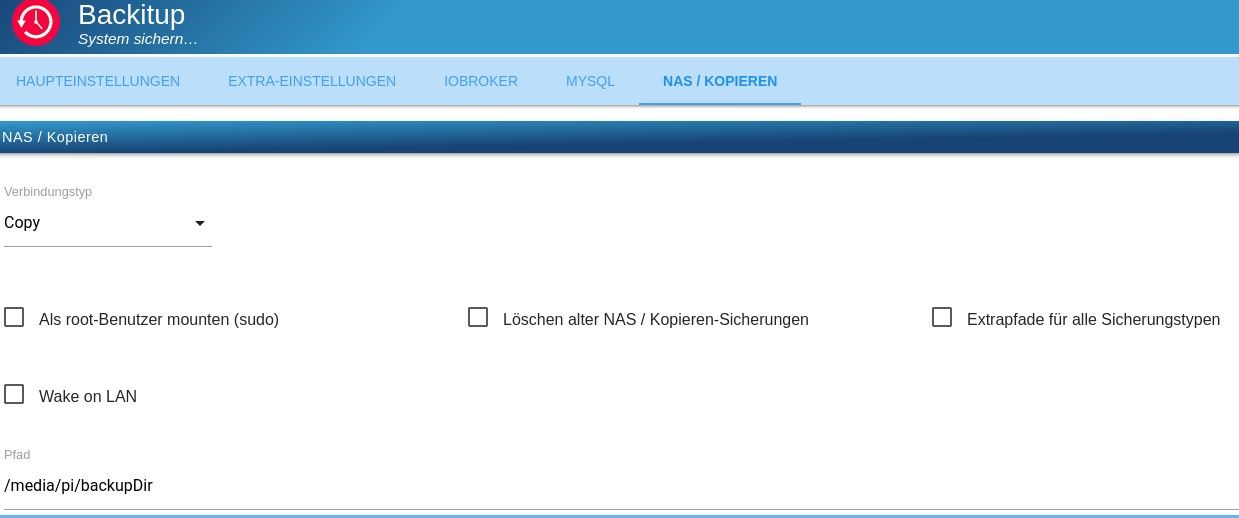
PARTUUID=c32c32e1-efaa-486f-aa98-9b8d9491e643 /media/pi ext4 rw,nosuid,nodev,relatime 0 0Der Zugriff auf die Backups ist wieder möglich und ich habe gerade auch ein Backup mit backitup erstellt, dass auch wieder automatisch auf den Stick kopiert wurde.
Dies sind dann meine Einstellungen im Adapter:



Hey! Du scheinst an dieser Unterhaltung interessiert zu sein, hast aber noch kein Konto.
Hast du es satt, bei jedem Besuch durch die gleichen Beiträge zu scrollen? Wenn du dich für ein Konto anmeldest, kommst du immer genau dorthin zurück, wo du zuvor warst, und kannst dich über neue Antworten benachrichtigen lassen (entweder per E-Mail oder Push-Benachrichtigung). Du kannst auch Lesezeichen speichern und Beiträge positiv bewerten, um anderen Community-Mitgliedern deine Wertschätzung zu zeigen.
Mit deinem Input könnte dieser Beitrag noch besser werden 💗
Registrieren Anmelden317
Online33.0k
Benutzer83.5k
Themen1.3m
Beiträge