
NEWS




Upgrade von Debian 11/Bullseye auf 12/Bookworm
-
@pi-ter sagte in Upgrade von Debian 11/Bullseye auf 12/Bookworm:
Boot Target: graphical.target
Würde ich auf multi-user.taget bringen.
Geht in raspi-config:
1, S5, B1@thomas-braun
Done!======================= SUMMARY ======================= v.2023-04-16 Operatingsystem: Raspbian GNU/Linux 12 (bookworm) Kernel: 6.1.21-v8+ Installation: Native Timezone: Europe/Berlin (CEST, +0200) User-ID: 1000 X-Server: false Boot Target: multi-user.targetDanke...
Wenns nicht geht, wie man will - muss mans tun, wie man kann. -
@thomas-braun
Done!======================= SUMMARY ======================= v.2023-04-16 Operatingsystem: Raspbian GNU/Linux 12 (bookworm) Kernel: 6.1.21-v8+ Installation: Native Timezone: Europe/Berlin (CEST, +0200) User-ID: 1000 X-Server: false Boot Target: multi-user.targetDanke...
@pi-ter
Gib mal die Langfassung zum Besten.
-
@pi-ter
Gib mal die Langfassung zum Besten.
@thomas-braun ,
Gern:======================= SUMMARY ======================= v.2023-04-16 Operatingsystem: Raspbian GNU/Linux 12 (bookworm) Kernel: 6.1.21-v8+ Installation: Native Timezone: Europe/Berlin (CEST, +0200) User-ID: 1000 X-Server: false Boot Target: multi-user.target Pending OS-Updates: 0 Pending iob updates: 1 Nodejs-Installation: /usr/bin/nodejs v18.17.1 /usr/bin/node v18.17.1 /usr/bin/npm 9.6.7 /usr/bin/npx 9.6.7 Recommended versions are nodejs 18.x.y and npm 9.x.y Your nodejs installation is correct MEMORY: total used free shared buff/cache available Mem: 4.0G 1.2G 2.3G 503K 648M 2.8G Swap: 104M 0B 104M Total: 4.1G 1.2G 2.4G Active iob-Instances: 19 Active repo(s): Stable (default) ioBroker Core: js-controller 4.0.24 admin 6.8.0 ioBroker Status: iobroker is running on this host. Objects type: jsonl States type: jsonl Status admin and web instance: + system.adapter.admin.0 : admin : raspberrypi - enabled, port: 8081, bind: 0.0.0.0, run as: admin + system.adapter.web.0 : web : raspberrypi - enabled, port: 8082, bind: 0.0.0.0, run as: admin Objects: 4721 States: 3990 Size of iob-Database: 20M /opt/iobroker/iobroker-data/objects.jsonl 4.2M /opt/iobroker/iobroker-data/objects.json.migrated 4.2M /opt/iobroker/iobroker-data/objects.json.bak.migrated 2.6M /opt/iobroker/iobroker-data/states.jsonl 500K /opt/iobroker/iobroker-data/states.json.migrated 500K /opt/iobroker/iobroker-data/states.json.bak.migrated =================== END OF SUMMARY ====================Wenns nicht geht, wie man will - muss mans tun, wie man kann. -
@thomas-braun ,
Gern:======================= SUMMARY ======================= v.2023-04-16 Operatingsystem: Raspbian GNU/Linux 12 (bookworm) Kernel: 6.1.21-v8+ Installation: Native Timezone: Europe/Berlin (CEST, +0200) User-ID: 1000 X-Server: false Boot Target: multi-user.target Pending OS-Updates: 0 Pending iob updates: 1 Nodejs-Installation: /usr/bin/nodejs v18.17.1 /usr/bin/node v18.17.1 /usr/bin/npm 9.6.7 /usr/bin/npx 9.6.7 Recommended versions are nodejs 18.x.y and npm 9.x.y Your nodejs installation is correct MEMORY: total used free shared buff/cache available Mem: 4.0G 1.2G 2.3G 503K 648M 2.8G Swap: 104M 0B 104M Total: 4.1G 1.2G 2.4G Active iob-Instances: 19 Active repo(s): Stable (default) ioBroker Core: js-controller 4.0.24 admin 6.8.0 ioBroker Status: iobroker is running on this host. Objects type: jsonl States type: jsonl Status admin and web instance: + system.adapter.admin.0 : admin : raspberrypi - enabled, port: 8081, bind: 0.0.0.0, run as: admin + system.adapter.web.0 : web : raspberrypi - enabled, port: 8082, bind: 0.0.0.0, run as: admin Objects: 4721 States: 3990 Size of iob-Database: 20M /opt/iobroker/iobroker-data/objects.jsonl 4.2M /opt/iobroker/iobroker-data/objects.json.migrated 4.2M /opt/iobroker/iobroker-data/objects.json.bak.migrated 2.6M /opt/iobroker/iobroker-data/states.jsonl 500K /opt/iobroker/iobroker-data/states.json.migrated 500K /opt/iobroker/iobroker-data/states.json.bak.migrated =================== END OF SUMMARY ==================== -
@pi-ter
Gib mal die Langfassung zum Besten.
Moin,
da ich betreffs multi-user.taget gestern nur einen Schnipsel aus diag gepostet hatte, nahm ich an, dass Du die komplette Zusammenfassung wolltest.Aber bevor ich die tatsächliche Langfassung bringe, noch eine Frage:
Was triggert, ob bei neofetch die Beere oder der Bookworm als Logo ausgegeben wird. Ist zwar nicht wirklich wichtig, interessiert mich nur halt. Auf dem Raspi 3 mit pihole mit bookworm wird der Wurm angezeigt, auf dem Raspi 4 mit iobroker die Beere. Beide laufen auf 64bit...
Skript v.2023-04-16 *** BASE SYSTEM *** Model : Raspberry Pi 4 Model B Rev 1.1 Architecture : aarch64 Docker : false Virtualization : none Distributor ID: Raspbian Description: Raspbian GNU/Linux 12 (bookworm) Release: 12 Codename: bookworm PRETTY_NAME="Raspbian GNU/Linux 12 (bookworm)" NAME="Raspbian GNU/Linux" VERSION_ID="12" VERSION="12 (bookworm)" VERSION_CODENAME=bookworm ID=raspbian ID_LIKE=debian HOME_URL="http://www.raspbian.org/" SUPPORT_URL="http://www.raspbian.org/RaspbianForums" BUG_REPORT_URL="http://www.raspbian.org/RaspbianBugs" Systemuptime and Load: 08:39:38 up 15 min, 2 users, load average: 1.77, 1.53, 0.87 CPU threads: 4 Raspberry only: throttled=0x0 Other values than 0x0 hint to temperature/voltage problems temp=55.5'C volt=0.8688V *** Time and Time Zones *** Local time: Sun 2023-09-03 08:39:38 CEST Universal time: Sun 2023-09-03 06:39:38 UTC RTC time: n/a Time zone: Europe/Berlin (CEST, +0200) System clock synchronized: yes NTP service: active RTC in local TZ: no *** User and Groups *** pi /home/pi pi adm dialout cdrom sudo audio video plugdev games users input netdev gpio i2c spi iobroker *** X-Server-Setup *** X-Server: false Desktop: Terminal: tty Boot Target: multi-user.target *** MEMORY *** total used free shared buff/cache available Mem: 4.0G 938M 2.6G 499K 546M 3.0G Swap: 104M 0B 104M Total: 4.1G 938M 2.7G 3794 M total memory 894 M used memory 858 M active memory 339 M inactive memory 2454 M free memory 83 M buffer memory 437 M swap cache 99 M total swap 0 M used swap 99 M free swap Raspberry only: oom events: 0 lifetime oom required: 0 Mbytes total time in oom handler: 0 ms max time spent in oom handler: 0 ms *** FILESYSTEM *** Filesystem Type Size Used Avail Use% Mounted on /dev/root ext4 29G 7.2G 21G 26% / devtmpfs devtmpfs 1.7G 0 1.7G 0% /dev tmpfs tmpfs 1.9G 0 1.9G 0% /dev/shm tmpfs tmpfs 759M 484K 759M 1% /run tmpfs tmpfs 5.0M 8.0K 5.0M 1% /run/lock /dev/mmcblk0p1 vfat 253M 51M 202M 20% /boot /dev/sda1 ext4 14G 1.3G 12G 10% /media/USBintern tmpfs tmpfs 380M 0 380M 0% /run/user/1000 Messages concerning ext4 filesystem in dmesg: [Sun Sep 3 08:24:29 2023] Kernel command line: coherent_pool=1M 8250.nr_uarts=0 snd_bcm2835.enable_headphones=0 snd_bcm2835.enable_headphones=1 snd_bcm2835.enable_hdmi=1 smsc95xx.macaddr=DC:A6:32:2D:5B:0D vc_mem.mem_base=0x3ec00000 vc_mem.mem_size=0x40000000 console=ttyS0,115200 console=tty1 root=PARTUUID=83dc1cec-02 rootfstype=ext4 elevator=deadline fsck.repair=yes rootwait [Sun Sep 3 08:24:30 2023] EXT4-fs (mmcblk0p2): mounted filesystem with ordered data mode. Quota mode: none. [Sun Sep 3 08:24:30 2023] VFS: Mounted root (ext4 filesystem) readonly on device 179:2. [Sun Sep 3 08:24:33 2023] EXT4-fs (mmcblk0p2): re-mounted. Quota mode: none. [Sun Sep 3 08:24:36 2023] EXT4-fs (sda1): mounted filesystem with ordered data mode. Quota mode: none. Show mounted filesystems (real ones only): TARGET SOURCE FSTYPE OPTIONS / /dev/mmcblk0p2 ext4 rw,noatime |-/boot /dev/mmcblk0p1 vfat rw,relatime,fmask=0022,dmask=0022,codepage=437,iocharset=ascii,shortname=mixed,flush,errors=remount-ro `-/media/USBintern /dev/sda1 ext4 rw,relatime Files in neuralgic directories: /var: 1.9G /var/ 1.2G /var/cache/apt 1.2G /var/cache 1.1G /var/cache/apt/archives 528M /var/log Archived and active journals take up 524.2M in the file system. /opt/iobroker/backups: 4.0K /opt/iobroker/backups/ /opt/iobroker/iobroker-data: 437M /opt/iobroker/iobroker-data/ 300M /opt/iobroker/iobroker-data/files 88M /opt/iobroker/iobroker-data/files/echarts.admin 88M /opt/iobroker/iobroker-data/backup-objects 57M /opt/iobroker/iobroker-data/files/echarts The five largest files in iobroker-data are: 31M /opt/iobroker/iobroker-data/objects.jsonl 23M /opt/iobroker/iobroker-data/files/echarts/static/js/main.eb0afecd.js.map 23M /opt/iobroker/iobroker-data/files/echarts.admin/static/js/main.7952f0f7.js.map 23M /opt/iobroker/iobroker-data/files/echarts.admin/chart/static/js/main.eb0afecd.js.map 21M /opt/iobroker/iobroker-data/files/web.admin/static/js/main.e564fb87.js.map *** NodeJS-Installation *** /usr/bin/nodejs v18.17.1 /usr/bin/node v18.17.1 /usr/bin/npm 9.6.7 /usr/bin/npx 9.6.7 nodejs: Installed: 18.17.1-1nodesource1 Candidate: 18.17.1-1nodesource1 Version table: *** 18.17.1-1nodesource1 500 500 https://deb.nodesource.com/node_18.x nodistro/main armhf Packages 100 /var/lib/dpkg/status 18.17.0-1nodesource1 500 500 https://deb.nodesource.com/node_18.x nodistro/main armhf Packages 18.16.1-1nodesource1 500 500 https://deb.nodesource.com/node_18.x nodistro/main armhf Packages 18.16.0-1nodesource1 500 500 https://deb.nodesource.com/node_18.x nodistro/main armhf Packages 18.15.0-1nodesource1 500 500 https://deb.nodesource.com/node_18.x nodistro/main armhf Packages 18.14.2-1nodesource1 500 500 https://deb.nodesource.com/node_18.x nodistro/main armhf Packages 18.14.1-1nodesource1 500 500 https://deb.nodesource.com/node_18.x nodistro/main armhf Packages 18.14.0-1nodesource1 500 500 https://deb.nodesource.com/node_18.x nodistro/main armhf Packages 18.13.0+dfsg1-1+rpi1 500 500 http://raspbian.raspberrypi.org/raspbian bookworm/main armhf Packages 18.13.0-1nodesource1 500 500 https://deb.nodesource.com/node_18.x nodistro/main armhf Packages 18.12.0-1nodesource1 500 500 https://deb.nodesource.com/node_18.x nodistro/main armhf Packages 18.11.0-1nodesource1 500 500 https://deb.nodesource.com/node_18.x nodistro/main armhf Packages 18.10.0-1nodesource1 500 500 https://deb.nodesource.com/node_18.x nodistro/main armhf Packages 18.9.1-1nodesource1 500 500 https://deb.nodesource.com/node_18.x nodistro/main armhf Packages 18.9.0-1nodesource1 500 500 https://deb.nodesource.com/node_18.x nodistro/main armhf Packages 18.8.0-1nodesource1 500 500 https://deb.nodesource.com/node_18.x nodistro/main armhf Packages 18.7.0-1nodesource1 500 500 https://deb.nodesource.com/node_18.x nodistro/main armhf Packages 18.6.0-1nodesource1 500 500 https://deb.nodesource.com/node_18.x nodistro/main armhf Packages 18.5.0-1nodesource1 500 500 https://deb.nodesource.com/node_18.x nodistro/main armhf Packages 18.4.0-1nodesource1 500 500 https://deb.nodesource.com/node_18.x nodistro/main armhf Packages 18.3.0-1nodesource1 500 500 https://deb.nodesource.com/node_18.x nodistro/main armhf Packages 18.2.0-1nodesource1 500 500 https://deb.nodesource.com/node_18.x nodistro/main armhf Packages 18.1.0-1nodesource1 500 500 https://deb.nodesource.com/node_18.x nodistro/main armhf Packages 18.0.0-1nodesource1 500 500 https://deb.nodesource.com/node_18.x nodistro/main armhf Packages Temp directories causing npm8 problem: 0 No problems detected *** ioBroker-Installation *** ioBroker Status iobroker is running on this host. Objects type: jsonl States type: jsonl MULTIHOSTSERVICE/enabled: false Core adapters versions js-controller: 4.0.24 admin: 6.8.0 javascript: 7.0.3 Adapters from github: 0 Adapter State + system.adapter.admin.0 : admin : raspberrypi - enabled, port: 8081, bind: 0.0.0.0, run as: admin + system.adapter.alexa2.0 : alexa2 : raspberrypi - enabled + system.adapter.backitup.0 : backitup : raspberrypi - enabled + system.adapter.deyeidc.0 : deyeidc : raspberrypi - enabled, port: 8899 system.adapter.discovery.0 : discovery : raspberrypi - disabled system.adapter.echarts.0 : echarts : raspberrypi - disabled + system.adapter.email.0 : email : raspberrypi - enabled + system.adapter.fritzdect.0 : fritzdect : raspberrypi - enabled system.adapter.ham.0 : ham : raspberrypi - disabled + system.adapter.history.0 : history : raspberrypi - enabled + system.adapter.hs100.0 : hs100 : raspberrypi - enabled + system.adapter.info.0 : info : raspberrypi - enabled + system.adapter.iot.0 : iot : raspberrypi - enabled + system.adapter.jarvis.0 : jarvis : raspberrypi - enabled + system.adapter.javascript.0 : javascript : raspberrypi - enabled + system.adapter.lovelace.0 : lovelace : raspberrypi - enabled, port: 8091, bind: 0.0.0.0, run as: admin system.adapter.net-tools.0 : net-tools : raspberrypi - disabled system.adapter.ping.0 : ping : raspberrypi - disabled + system.adapter.rpi2.0 : rpi2 : raspberrypi - enabled + system.adapter.shelly.0 : shelly : raspberrypi - enabled, port: 1882, bind: 0.0.0.0 + system.adapter.sonoff.0 : sonoff : raspberrypi - enabled, port: 1883, bind: 0.0.0.0 + system.adapter.statistics.0 : statistics : raspberrypi - enabled + system.adapter.web.0 : web : raspberrypi - enabled, port: 8082, bind: 0.0.0.0, run as: admin + instance is alive Enabled adapters with bindings + system.adapter.admin.0 : admin : raspberrypi - enabled, port: 8081, bind: 0.0.0.0, run as: admin + system.adapter.deyeidc.0 : deyeidc : raspberrypi - enabled, port: 8899 + system.adapter.lovelace.0 : lovelace : raspberrypi - enabled, port: 8091, bind: 0.0.0.0, run as: admin + system.adapter.shelly.0 : shelly : raspberrypi - enabled, port: 1882, bind: 0.0.0.0 + system.adapter.sonoff.0 : sonoff : raspberrypi - enabled, port: 1883, bind: 0.0.0.0 + system.adapter.web.0 : web : raspberrypi - enabled, port: 8082, bind: 0.0.0.0, run as: admin ioBroker-Repositories Stable (default): http://download.iobroker.net/sources-dist.json Beta (latest) : http://download.iobroker.net/sources-dist-latest.json Active repo(s): Stable (default) Installed ioBroker-Instances Used repository: Stable (default) Adapter "admin" : 6.8.0 , installed 6.8.0 Adapter "alexa2" : 3.24.1 , installed 3.24.1 Adapter "backitup" : 2.6.23 , installed 2.6.23 Adapter "deyeidc" : 0.0.11 , installed 0.0.11 Adapter "discovery" : 3.1.0 , installed 3.1.0 Adapter "echarts" : 1.5.1 , installed 1.5.1 Adapter "email" : 1.2.0 , installed 1.2.0 Adapter "fritzdect" : 2.3.1 , installed 2.3.1 Adapter "ham" : 5.3.1 , installed 4.0.2 [Updatable] Adapter "history" : 2.2.6 , installed 2.2.6 Adapter "hs100" : 2.1.2 , installed 2.1.2 Adapter "info" : 1.9.26 , installed 1.9.26 Adapter "iot" : 1.14.5 , installed 1.14.5 Adapter "jarvis" : 3.1.2 , installed 3.1.2 Adapter "javascript" : 7.0.3 , installed 7.0.3 Controller "js-controller": 4.0.24 , installed 4.0.24 Adapter "lovelace" : 3.0.1 , installed 3.0.1 Adapter "net-tools" : 0.2.0 , installed 0.2.0 Adapter "ping" : 1.6.2 , installed 1.6.2 Adapter "rpi2" : 1.3.2 , installed 1.3.2 Adapter "shelly" : 6.4.1 , installed 6.4.1 Adapter "simple-api" : 2.7.2 , installed 2.7.2 Adapter "socketio" : 6.5.2 , installed 6.5.2 Adapter "sonoff" : 2.5.3 , installed 2.5.3 Adapter "statistics" : 2.3.0 , installed 2.3.0 Adapter "web" : 6.1.0 , installed 6.1.0 Adapter "ws" : 2.5.3 , installed 2.5.3 Objects and States Please stand by - This may take a while Objects: 4721 States: 4005 *** OS-Repositories and Updates *** Hit:1 http://archive.raspberrypi.org/debian bookworm InRelease Hit:2 http://raspbian.raspberrypi.org/raspbian bookworm InRelease Hit:3 https://deb.nodesource.com/node_18.x nodistro InRelease Reading package lists... Pending Updates: 0 *** Listening Ports *** Active Internet connections (only servers) Proto Recv-Q Send-Q Local Address Foreign Address State User Inode PID/Program name tcp 0 0 0.0.0.0:1883 0.0.0.0:* LISTEN 1001 14093 733/io.sonoff.0 tcp 0 0 127.0.0.1:9001 0.0.0.0:* LISTEN 1001 15571 518/iobroker.js-con tcp 0 0 127.0.0.1:9000 0.0.0.0:* LISTEN 1001 12781 518/iobroker.js-con tcp 0 0 0.0.0.0:8400 0.0.0.0:* LISTEN 1001 16353 1341/io.jarvis.0 tcp 0 0 0.0.0.0:22 0.0.0.0:* LISTEN 0 15517 581/sshd: /usr/sbin tcp6 0 0 :::8091 :::* LISTEN 1001 18051 1561/io.lovelace.0 tcp6 0 0 :::8081 :::* LISTEN 1001 12863 634/io.admin.0 tcp6 0 0 :::8082 :::* LISTEN 1001 15931 969/io.web.0 tcp6 0 0 :::22 :::* LISTEN 0 15519 581/sshd: /usr/sbin udp 0 0 0.0.0.0:5683 0.0.0.0:* 1001 14173 787/io.shelly.0 udp 0 0 0.0.0.0:42766 0.0.0.0:* 108 13606 369/avahi-daemon: r udp 0 0 0.0.0.0:68 0.0.0.0:* 0 12172 650/dhcpcd udp 0 0 0.0.0.0:5353 0.0.0.0:* 108 13604 369/avahi-daemon: r udp6 0 0 :::51524 :::* 108 13607 369/avahi-daemon: r udp6 0 0 :::5353 :::* 108 13605 369/avahi-daemon: r *** Log File - Last 25 Lines *** 2023-09-03 08:40:38.898 - debug: fritzdect.0 (1520) onStateChange => state fritzdect.0.DECT_130960001449.name changed: FRITZ!DECT 400 #3 (ack = true) 2023-09-03 08:40:38.902 - debug: fritzdect.0 (1520) onStateChange => state fritzdect.0.DECT_130960001449.battery changed: 50 (ack = true) 2023-09-03 08:40:38.905 - debug: fritzdect.0 (1520) onStateChange => state fritzdect.0.DECT_130960001449.batterylow changed: false (ack = true) 2023-09-03 08:40:38.909 - debug: fritzdect.0 (1520) onStateChange => state fritzdect.0.DECT_130960001449.button.130960001449-0.id changed: 5000 (ack = true) 2023-09-03 08:40:38.913 - debug: fritzdect.0 (1520) onStateChange => state fritzdect.0.DECT_130960001449.button.130960001449-0.name changed: FRITZ!DECT 400 #3: kurz (ack = true) 2023-09-03 08:40:38.916 - debug: fritzdect.0 (1520) onStateChange => state fritzdect.0.DECT_130960001449.button.130960001449-0.lastpressedtimestamp changed: Sat Aug 26 2023 12:51:16 GMT+0200 (Central European Summer Time) (ack = true) 2023-09-03 08:40:38.920 - debug: fritzdect.0 (1520) onStateChange => state fritzdect.0.DECT_130960001449.button.130960001449-9.id changed: 5001 (ack = true) 2023-09-03 08:40:38.923 - debug: fritzdect.0 (1520) onStateChange => state fritzdect.0.DECT_130960001449.button.130960001449-9.name changed: FRITZ!DECT 400 #3: lang (ack = true) 2023-09-03 08:40:38.928 - debug: fritzdect.0 (1520) onStateChange => state fritzdect.0.DECT_grp6A507B-3D1EBDFC6.synchronized changed: false (ack = true) 2023-09-03 08:40:38.939 - debug: fritzdect.0 (1520) onStateChange => state fritzdect.0.DECT_grp6A507B-3D1EBDFC6.id changed: 900 (ack = true) 2023-09-03 08:40:38.943 - debug: fritzdect.0 (1520) onStateChange => state fritzdect.0.DECT_grp6A507B-3D1EBDFC6.fwversion changed: 1.0 (ack = true) 2023-09-03 08:40:38.946 - debug: fritzdect.0 (1520) onStateChange => state fritzdect.0.DECT_grp6A507B-3D1EBDFC6.manufacturer changed: AVM (ack = true) 2023-09-03 08:40:38.949 - debug: fritzdect.0 (1520) onStateChange => state fritzdect.0.DECT_grp6A507B-3D1EBDFC6.present changed: true (ack = true) 2023-09-03 08:40:38.952 - debug: fritzdect.0 (1520) onStateChange => state fritzdect.0.DECT_grp6A507B-3D1EBDFC6.txbusy changed: false (ack = true) 2023-09-03 08:40:38.955 - debug: fritzdect.0 (1520) onStateChange => state fritzdect.0.DECT_grp6A507B-3D1EBDFC6.name changed: Außenbereich (ack = true) 2023-09-03 08:40:38.958 - debug: fritzdect.0 (1520) onStateChange => state fritzdect.0.DECT_grp6A507B-3D1EBDFC6.state changed: false (ack = true) 2023-09-03 08:40:38.962 - debug: fritzdect.0 (1520) onStateChange => state fritzdect.0.DECT_grp6A507B-3D1EBDFC6.mode changed: auto (ack = true) 2023-09-03 08:40:38.964 - debug: fritzdect.0 (1520) onStateChange => state fritzdect.0.DECT_grp6A507B-3D1EBDFC6.lock changed: false (ack = true) 2023-09-03 08:40:38.967 - debug: fritzdect.0 (1520) onStateChange => state fritzdect.0.DECT_grp6A507B-3D1EBDFC6.devicelock changed: false (ack = true) 2023-09-03 08:40:38.970 - debug: fritzdect.0 (1520) onStateChange => state fritzdect.0.DECT_grp6A507B-3D1EBDFC6.state changed: false (ack = true) 2023-09-03 08:40:38.974 - debug: fritzdect.0 (1520) onStateChange => state fritzdect.0.DECT_grp6A507B-3D1EBDFC6.voltage changed: 234.211 (ack = true) 2023-09-03 08:40:38.977 - debug: fritzdect.0 (1520) onStateChange => state fritzdect.0.DECT_grp6A507B-3D1EBDFC6.power changed: 0 (ack = true) 2023-09-03 08:40:38.980 - debug: fritzdect.0 (1520) onStateChange => state fritzdect.0.DECT_grp6A507B-3D1EBDFC6.energy changed: 38558 (ack = true) 2023-09-03 08:40:38.984 - debug: fritzdect.0 (1520) onStateChange => state fritzdect.0.DECT_grp6A507B-3D1EBDFC6.masterdeviceid changed: 0 (ack = true) 2023-09-03 08:40:38.987 - debug: fritzdect.0 (1520) onStateChange => state fritzdect.0.DECT_grp6A507B-3D1EBDFC6.members changed: 17 (ack = true)Schönen Sonntag zunächst...
Wenns nicht geht, wie man will - muss mans tun, wie man kann. -
Moin,
da ich betreffs multi-user.taget gestern nur einen Schnipsel aus diag gepostet hatte, nahm ich an, dass Du die komplette Zusammenfassung wolltest.Aber bevor ich die tatsächliche Langfassung bringe, noch eine Frage:
Was triggert, ob bei neofetch die Beere oder der Bookworm als Logo ausgegeben wird. Ist zwar nicht wirklich wichtig, interessiert mich nur halt. Auf dem Raspi 3 mit pihole mit bookworm wird der Wurm angezeigt, auf dem Raspi 4 mit iobroker die Beere. Beide laufen auf 64bit...
Skript v.2023-04-16

*** BASE SYSTEM ***
Model           : Raspberry Pi 4 Model B Rev 1.1
Architecture    : aarch64
Docker          : false
Virtualization  : none
Distributor ID: Raspbian
Description:    Raspbian GNU/Linux 12 (bookworm)
Release:        12
Codename:       bookworm

PRETTY_NAME="Raspbian GNU/Linux 12 (bookworm)"
NAME="Raspbian GNU/Linux"
VERSION_ID="12"
VERSION="12 (bookworm)"
VERSION_CODENAME=bookworm
ID=raspbian
ID_LIKE=debian
HOME_URL="http://www.raspbian.org/"
SUPPORT_URL="http://www.raspbian.org/RaspbianForums"
BUG_REPORT_URL="http://www.raspbian.org/RaspbianBugs"

Systemuptime and Load:
 08:39:38 up 15 min,  2 users,  load average: 1.77, 1.53, 0.87
CPU threads: 4

Raspberry only:
throttled=0x0
Other values than 0x0 hint to temperature/voltage problems
temp=55.5'C
volt=0.8688V

*** Time and Time Zones ***
               Local time: Sun 2023-09-03 08:39:38 CEST
           Universal time: Sun 2023-09-03 06:39:38 UTC
                 RTC time: n/a
                Time zone: Europe/Berlin (CEST, +0200)
System clock synchronized: yes
              NTP service: active
          RTC in local TZ: no

*** User and Groups ***
pi
/home/pi
pi adm dialout cdrom sudo audio video plugdev games users input netdev gpio i2c spi iobroker

*** X-Server-Setup ***
X-Server:       false
Desktop:
Terminal:       tty
Boot Target:    multi-user.target

*** MEMORY ***
               total        used        free      shared  buff/cache   available
Mem:            4.0G        938M        2.6G        499K        546M        3.0G
Swap:           104M          0B        104M
Total:          4.1G        938M        2.7G

         3794 M total memory
          894 M used memory
          858 M active memory
          339 M inactive memory
         2454 M free memory
           83 M buffer memory
          437 M swap cache
           99 M total swap
            0 M used swap
           99 M free swap

Raspberry only:
oom events: 0
lifetime oom required: 0 Mbytes
total time in oom handler: 0 ms
max time spent in oom handler: 0 ms

*** FILESYSTEM ***
Filesystem     Type      Size  Used Avail Use% Mounted on
/dev/root      ext4       29G  7.2G   21G  26% /
devtmpfs       devtmpfs  1.7G     0  1.7G   0% /dev
tmpfs          tmpfs     1.9G     0  1.9G   0% /dev/shm
tmpfs          tmpfs     759M  484K  759M   1% /run
tmpfs          tmpfs     5.0M  8.0K  5.0M   1% /run/lock
/dev/mmcblk0p1 vfat      253M   51M  202M  20% /boot
/dev/sda1      ext4       14G  1.3G   12G  10% /media/USBintern
tmpfs          tmpfs     380M     0  380M   0% /run/user/1000

Messages concerning ext4 filesystem in dmesg:
[Sun Sep  3 08:24:29 2023] Kernel command line: coherent_pool=1M 8250.nr_uarts=0 snd_bcm2835.enable_headphones=0 snd_bcm2835.enable_headphones=1 snd_bcm2835.enable_hdmi=1  smsc95xx.macaddr=DC:A6:32:2D:5B:0D vc_mem.mem_base=0x3ec00000 vc_mem.mem_size=0x40000000  console=ttyS0,115200 console=tty1 root=PARTUUID=83dc1cec-02 rootfstype=ext4 elevator=deadline fsck.repair=yes rootwait
[Sun Sep  3 08:24:30 2023] EXT4-fs (mmcblk0p2): mounted filesystem with ordered data mode. Quota mode: none.
[Sun Sep  3 08:24:30 2023] VFS: Mounted root (ext4 filesystem) readonly on device 179:2.
[Sun Sep  3 08:24:33 2023] EXT4-fs (mmcblk0p2): re-mounted. Quota mode: none.
[Sun Sep  3 08:24:36 2023] EXT4-fs (sda1): mounted filesystem with ordered data mode. Quota mode: none.

Show mounted filesystems (real ones only):
TARGET             SOURCE         FSTYPE OPTIONS
/                  /dev/mmcblk0p2 ext4   rw,noatime
|-/boot            /dev/mmcblk0p1 vfat   rw,relatime,fmask=0022,dmask=0022,codepage=437,iocharset=ascii,shortname=mixed,flush,errors=remount-ro
`-/media/USBintern /dev/sda1      ext4   rw,relatime

Files in neuralgic directories:

/var:
1.9G    /var/
1.2G    /var/cache/apt
1.2G    /var/cache
1.1G    /var/cache/apt/archives
528M    /var/log

Archived and active journals take up 524.2M in the file system.

/opt/iobroker/backups:
4.0K    /opt/iobroker/backups/

/opt/iobroker/iobroker-data:
437M    /opt/iobroker/iobroker-data/
300M    /opt/iobroker/iobroker-data/files
88M     /opt/iobroker/iobroker-data/files/echarts.admin
88M     /opt/iobroker/iobroker-data/backup-objects
57M     /opt/iobroker/iobroker-data/files/echarts

The five largest files in iobroker-data are:
31M     /opt/iobroker/iobroker-data/objects.jsonl
23M     /opt/iobroker/iobroker-data/files/echarts/static/js/main.eb0afecd.js.map
23M     /opt/iobroker/iobroker-data/files/echarts.admin/static/js/main.7952f0f7.js.map
23M     /opt/iobroker/iobroker-data/files/echarts.admin/chart/static/js/main.eb0afecd.js.map
21M     /opt/iobroker/iobroker-data/files/web.admin/static/js/main.e564fb87.js.map

*** NodeJS-Installation ***

/usr/bin/nodejs         v18.17.1
/usr/bin/node           v18.17.1
/usr/bin/npm            9.6.7
/usr/bin/npx            9.6.7


nodejs:
  Installed: 18.17.1-1nodesource1
  Candidate: 18.17.1-1nodesource1
  Version table:
 *** 18.17.1-1nodesource1 500
        500 https://deb.nodesource.com/node_18.x nodistro/main armhf Packages
        100 /var/lib/dpkg/status
     18.17.0-1nodesource1 500
        500 https://deb.nodesource.com/node_18.x nodistro/main armhf Packages
     18.16.1-1nodesource1 500
        500 https://deb.nodesource.com/node_18.x nodistro/main armhf Packages
     18.16.0-1nodesource1 500
        500 https://deb.nodesource.com/node_18.x nodistro/main armhf Packages
     18.15.0-1nodesource1 500
        500 https://deb.nodesource.com/node_18.x nodistro/main armhf Packages
     18.14.2-1nodesource1 500
        500 https://deb.nodesource.com/node_18.x nodistro/main armhf Packages
     18.14.1-1nodesource1 500
        500 https://deb.nodesource.com/node_18.x nodistro/main armhf Packages
     18.14.0-1nodesource1 500
        500 https://deb.nodesource.com/node_18.x nodistro/main armhf Packages
     18.13.0+dfsg1-1+rpi1 500
        500 http://raspbian.raspberrypi.org/raspbian bookworm/main armhf Packages
     18.13.0-1nodesource1 500
        500 https://deb.nodesource.com/node_18.x nodistro/main armhf Packages
     18.12.0-1nodesource1 500
        500 https://deb.nodesource.com/node_18.x nodistro/main armhf Packages
     18.11.0-1nodesource1 500
        500 https://deb.nodesource.com/node_18.x nodistro/main armhf Packages
     18.10.0-1nodesource1 500
        500 https://deb.nodesource.com/node_18.x nodistro/main armhf Packages
     18.9.1-1nodesource1 500
        500 https://deb.nodesource.com/node_18.x nodistro/main armhf Packages
     18.9.0-1nodesource1 500
        500 https://deb.nodesource.com/node_18.x nodistro/main armhf Packages
     18.8.0-1nodesource1 500
        500 https://deb.nodesource.com/node_18.x nodistro/main armhf Packages
     18.7.0-1nodesource1 500
        500 https://deb.nodesource.com/node_18.x nodistro/main armhf Packages
     18.6.0-1nodesource1 500
        500 https://deb.nodesource.com/node_18.x nodistro/main armhf Packages
     18.5.0-1nodesource1 500
        500 https://deb.nodesource.com/node_18.x nodistro/main armhf Packages
     18.4.0-1nodesource1 500
        500 https://deb.nodesource.com/node_18.x nodistro/main armhf Packages
     18.3.0-1nodesource1 500
        500 https://deb.nodesource.com/node_18.x nodistro/main armhf Packages
     18.2.0-1nodesource1 500
        500 https://deb.nodesource.com/node_18.x nodistro/main armhf Packages
     18.1.0-1nodesource1 500
        500 https://deb.nodesource.com/node_18.x nodistro/main armhf Packages
     18.0.0-1nodesource1 500
        500 https://deb.nodesource.com/node_18.x nodistro/main armhf Packages

Temp directories causing npm8 problem: 0
No problems detected

*** ioBroker-Installation ***

ioBroker Status
iobroker is running on this host.


Objects type: jsonl
States  type: jsonl

MULTIHOSTSERVICE/enabled: false

Core adapters versions
js-controller:  4.0.24
admin:          6.8.0
javascript:     7.0.3

Adapters from github:   0

Adapter State
+ system.adapter.admin.0                  : admin                 : raspberrypi                              -  enabled, port: 8081, bind: 0.0.0.0, run as: admin
+ system.adapter.alexa2.0                 : alexa2                : raspberrypi                              -  enabled
+ system.adapter.backitup.0               : backitup              : raspberrypi                              -  enabled
+ system.adapter.deyeidc.0                : deyeidc               : raspberrypi                              -  enabled, port: 8899
  system.adapter.discovery.0              : discovery             : raspberrypi                              - disabled
  system.adapter.echarts.0                : echarts               : raspberrypi                              - disabled
+ system.adapter.email.0                  : email                 : raspberrypi                              -  enabled
+ system.adapter.fritzdect.0              : fritzdect             : raspberrypi                              -  enabled
  system.adapter.ham.0                    : ham                   : raspberrypi                              - disabled
+ system.adapter.history.0                : history               : raspberrypi                              -  enabled
+ system.adapter.hs100.0                  : hs100                 : raspberrypi                              -  enabled
+ system.adapter.info.0                   : info                  : raspberrypi                              -  enabled
+ system.adapter.iot.0                    : iot                   : raspberrypi                              -  enabled
+ system.adapter.jarvis.0                 : jarvis                : raspberrypi                              -  enabled
+ system.adapter.javascript.0             : javascript            : raspberrypi                              -  enabled
+ system.adapter.lovelace.0               : lovelace              : raspberrypi                              -  enabled, port: 8091, bind: 0.0.0.0, run as: admin
  system.adapter.net-tools.0              : net-tools             : raspberrypi                              - disabled
  system.adapter.ping.0                   : ping                  : raspberrypi                              - disabled
+ system.adapter.rpi2.0                   : rpi2                  : raspberrypi                              -  enabled
+ system.adapter.shelly.0                 : shelly                : raspberrypi                              -  enabled, port: 1882, bind: 0.0.0.0
+ system.adapter.sonoff.0                 : sonoff                : raspberrypi                              -  enabled, port: 1883, bind: 0.0.0.0
+ system.adapter.statistics.0             : statistics            : raspberrypi                              -  enabled
+ system.adapter.web.0                    : web                   : raspberrypi                              -  enabled, port: 8082, bind: 0.0.0.0, run as: admin

+ instance is alive

Enabled adapters with bindings
+ system.adapter.admin.0                  : admin                 : raspberrypi                              -  enabled, port: 8081, bind: 0.0.0.0, run as: admin
+ system.adapter.deyeidc.0                : deyeidc               : raspberrypi                              -  enabled, port: 8899
+ system.adapter.lovelace.0               : lovelace              : raspberrypi                              -  enabled, port: 8091, bind: 0.0.0.0, run as: admin
+ system.adapter.shelly.0                 : shelly                : raspberrypi                              -  enabled, port: 1882, bind: 0.0.0.0
+ system.adapter.sonoff.0                 : sonoff                : raspberrypi                              -  enabled, port: 1883, bind: 0.0.0.0
+ system.adapter.web.0                    : web                   : raspberrypi                              -  enabled, port: 8082, bind: 0.0.0.0, run as: admin

ioBroker-Repositories
Stable (default): http://download.iobroker.net/sources-dist.json
Beta (latest) : http://download.iobroker.net/sources-dist-latest.json

Active repo(s): Stable (default)

Installed ioBroker-Instances
Used repository: Stable (default)
Adapter    "admin"        : 6.8.0    , installed 6.8.0
Adapter    "alexa2"       : 3.24.1   , installed 3.24.1
Adapter    "backitup"     : 2.6.23   , installed 2.6.23
Adapter    "deyeidc"      : 0.0.11   , installed 0.0.11
Adapter    "discovery"    : 3.1.0    , installed 3.1.0
Adapter    "echarts"      : 1.5.1    , installed 1.5.1
Adapter    "email"        : 1.2.0    , installed 1.2.0
Adapter    "fritzdect"    : 2.3.1    , installed 2.3.1
Adapter    "ham"          : 5.3.1    , installed 4.0.2  [Updatable]
Adapter    "history"      : 2.2.6    , installed 2.2.6
Adapter    "hs100"        : 2.1.2    , installed 2.1.2
Adapter    "info"         : 1.9.26   , installed 1.9.26
Adapter    "iot"          : 1.14.5   , installed 1.14.5
Adapter    "jarvis"       : 3.1.2    , installed 3.1.2
Adapter    "javascript"   : 7.0.3    , installed 7.0.3
Controller "js-controller": 4.0.24   , installed 4.0.24
Adapter    "lovelace"     : 3.0.1    , installed 3.0.1
Adapter    "net-tools"    : 0.2.0    , installed 0.2.0
Adapter    "ping"         : 1.6.2    , installed 1.6.2
Adapter    "rpi2"         : 1.3.2    , installed 1.3.2
Adapter    "shelly"       : 6.4.1    , installed 6.4.1
Adapter    "simple-api"   : 2.7.2    , installed 2.7.2
Adapter    "socketio"     : 6.5.2    , installed 6.5.2
Adapter    "sonoff"       : 2.5.3    , installed 2.5.3
Adapter    "statistics"   : 2.3.0    , installed 2.3.0
Adapter    "web"          : 6.1.0    , installed 6.1.0
Adapter    "ws"           : 2.5.3    , installed 2.5.3

Objects and States
Please stand by - This may take a while
Objects:        4721
States:         4005

*** OS-Repositories and Updates ***
Hit:1 http://archive.raspberrypi.org/debian bookworm InRelease
Hit:2 http://raspbian.raspberrypi.org/raspbian bookworm InRelease
Hit:3 https://deb.nodesource.com/node_18.x nodistro InRelease
Reading package lists...
Pending Updates: 0

*** Listening Ports ***
Active Internet connections (only servers)
Proto Recv-Q Send-Q Local Address           Foreign Address         State       User       Inode      PID/Program name
tcp        0      0 0.0.0.0:1883            0.0.0.0:*               LISTEN      1001       14093      733/io.sonoff.0
tcp        0      0 127.0.0.1:9001          0.0.0.0:*               LISTEN      1001       15571      518/iobroker.js-con
tcp        0      0 127.0.0.1:9000          0.0.0.0:*               LISTEN      1001       12781      518/iobroker.js-con
tcp        0      0 0.0.0.0:8400            0.0.0.0:*               LISTEN      1001       16353      1341/io.jarvis.0
tcp        0      0 0.0.0.0:22              0.0.0.0:*               LISTEN      0          15517      581/sshd: /usr/sbin
tcp6       0      0 :::8091                 :::*                    LISTEN      1001       18051      1561/io.lovelace.0
tcp6       0      0 :::8081                 :::*                    LISTEN      1001       12863      634/io.admin.0
tcp6       0      0 :::8082                 :::*                    LISTEN      1001       15931      969/io.web.0
tcp6       0      0 :::22                   :::*                    LISTEN      0          15519      581/sshd: /usr/sbin
udp        0      0 0.0.0.0:5683            0.0.0.0:*                           1001       14173      787/io.shelly.0
udp        0      0 0.0.0.0:42766           0.0.0.0:*                           108        13606      369/avahi-daemon: r
udp        0      0 0.0.0.0:68              0.0.0.0:*                           0          12172      650/dhcpcd
udp        0      0 0.0.0.0:5353            0.0.0.0:*                           108        13604      369/avahi-daemon: r
udp6       0      0 :::51524                :::*                                108        13607      369/avahi-daemon: r
udp6       0      0 :::5353                 :::*                                108        13605      369/avahi-daemon: r

*** Log File - Last 25 Lines ***

2023-09-03 08:40:38.898  - debug: fritzdect.0 (1520) onStateChange => state fritzdect.0.DECT_130960001449.name changed: FRITZ!DECT 400 #3 (ack = true)
2023-09-03 08:40:38.902  - debug: fritzdect.0 (1520) onStateChange => state fritzdect.0.DECT_130960001449.battery changed: 50 (ack = true)
2023-09-03 08:40:38.905  - debug: fritzdect.0 (1520) onStateChange => state fritzdect.0.DECT_130960001449.batterylow changed: false (ack = true)
2023-09-03 08:40:38.909  - debug: fritzdect.0 (1520) onStateChange => state fritzdect.0.DECT_130960001449.button.130960001449-0.id changed: 5000 (ack = true)
2023-09-03 08:40:38.913  - debug: fritzdect.0 (1520) onStateChange => state fritzdect.0.DECT_130960001449.button.130960001449-0.name changed: FRITZ!DECT 400 #3: kurz (ack = true)
2023-09-03 08:40:38.916  - debug: fritzdect.0 (1520) onStateChange => state fritzdect.0.DECT_130960001449.button.130960001449-0.lastpressedtimestamp changed: Sat Aug 26 2023 12:51:16 GMT+0200 (Central European Summer Time) (ack = true)
2023-09-03 08:40:38.920  - debug: fritzdect.0 (1520) onStateChange => state fritzdect.0.DECT_130960001449.button.130960001449-9.id changed: 5001 (ack = true)
2023-09-03 08:40:38.923  - debug: fritzdect.0 (1520) onStateChange => state fritzdect.0.DECT_130960001449.button.130960001449-9.name changed: FRITZ!DECT 400 #3: lang (ack = true)
2023-09-03 08:40:38.928  - debug: fritzdect.0 (1520) onStateChange => state fritzdect.0.DECT_grp6A507B-3D1EBDFC6.synchronized changed: false (ack = true)
2023-09-03 08:40:38.939  - debug: fritzdect.0 (1520) onStateChange => state fritzdect.0.DECT_grp6A507B-3D1EBDFC6.id changed: 900 (ack = true)
2023-09-03 08:40:38.943  - debug: fritzdect.0 (1520) onStateChange => state fritzdect.0.DECT_grp6A507B-3D1EBDFC6.fwversion changed: 1.0 (ack = true)
2023-09-03 08:40:38.946  - debug: fritzdect.0 (1520) onStateChange => state fritzdect.0.DECT_grp6A507B-3D1EBDFC6.manufacturer changed: AVM (ack = true)
2023-09-03 08:40:38.949  - debug: fritzdect.0 (1520) onStateChange => state fritzdect.0.DECT_grp6A507B-3D1EBDFC6.present changed: true (ack = true)
2023-09-03 08:40:38.952  - debug: fritzdect.0 (1520) onStateChange => state fritzdect.0.DECT_grp6A507B-3D1EBDFC6.txbusy changed: false (ack = true)
2023-09-03 08:40:38.955  - debug: fritzdect.0 (1520) onStateChange => state fritzdect.0.DECT_grp6A507B-3D1EBDFC6.name changed: Außenbereich (ack = true)
2023-09-03 08:40:38.958  - debug: fritzdect.0 (1520) onStateChange => state fritzdect.0.DECT_grp6A507B-3D1EBDFC6.state changed: false (ack = true)
2023-09-03 08:40:38.962  - debug: fritzdect.0 (1520) onStateChange => state fritzdect.0.DECT_grp6A507B-3D1EBDFC6.mode changed: auto (ack = true)
2023-09-03 08:40:38.964  - debug: fritzdect.0 (1520) onStateChange => state fritzdect.0.DECT_grp6A507B-3D1EBDFC6.lock changed: false (ack = true)
2023-09-03 08:40:38.967  - debug: fritzdect.0 (1520) onStateChange => state fritzdect.0.DECT_grp6A507B-3D1EBDFC6.devicelock changed: false (ack = true)
2023-09-03 08:40:38.970  - debug: fritzdect.0 (1520) onStateChange => state fritzdect.0.DECT_grp6A507B-3D1EBDFC6.state changed: false (ack = true)
2023-09-03 08:40:38.974  - debug: fritzdect.0 (1520) onStateChange => state fritzdect.0.DECT_grp6A507B-3D1EBDFC6.voltage changed: 234.211 (ack = true)
2023-09-03 08:40:38.977  - debug: fritzdect.0 (1520) onStateChange => state fritzdect.0.DECT_grp6A507B-3D1EBDFC6.power changed: 0 (ack = true)
2023-09-03 08:40:38.980  - debug: fritzdect.0 (1520) onStateChange => state fritzdect.0.DECT_grp6A507B-3D1EBDFC6.energy changed: 38558 (ack = true)
2023-09-03 08:40:38.984  - debug: fritzdect.0 (1520) onStateChange => state fritzdect.0.DECT_grp6A507B-3D1EBDFC6.masterdeviceid changed: 0 (ack = true)
2023-09-03 08:40:38.987  - debug: fritzdect.0 (1520) onStateChange => state fritzdect.0.DECT_grp6A507B-3D1EBDFC6.members changed: 17 (ack = true)
Schönen Sonntag zunächst...
@pi-ter sagte in Upgrade von Debian 11/Bullseye auf 12/Bookworm:
debug: fritzdect.0
dein loglevel steht auf debug, stell das mal zurück auf z.b. info
-
Moin,
da ich betreffs multi-user.taget gestern nur einen Schnipsel aus diag gepostet hatte, nahm ich an, dass Du die komplette Zusammenfassung wolltest.Aber bevor ich die tatsächliche Langfassung bringe, noch eine Frage:
Was triggert, ob bei neofetch die Beere oder der Bookworm als Logo ausgegeben wird. Ist zwar nicht wirklich wichtig, interessiert mich nur halt. Auf dem Raspi 3 mit pihole mit bookworm wird der Wurm angezeigt, auf dem Raspi 4 mit iobroker die Beere. Beide laufen auf 64bit...
Skript v.2023-04-16 *** BASE SYSTEM *** Model : Raspberry Pi 4 Model B Rev 1.1 Architecture : aarch64 Docker : false Virtualization : none Distributor ID: Raspbian Description: Raspbian GNU/Linux 12 (bookworm) Release: 12 Codename: bookworm PRETTY_NAME="Raspbian GNU/Linux 12 (bookworm)" NAME="Raspbian GNU/Linux" VERSION_ID="12" VERSION="12 (bookworm)" VERSION_CODENAME=bookworm ID=raspbian ID_LIKE=debian HOME_URL="http://www.raspbian.org/" SUPPORT_URL="http://www.raspbian.org/RaspbianForums" BUG_REPORT_URL="http://www.raspbian.org/RaspbianBugs" Systemuptime and Load: 08:39:38 up 15 min, 2 users, load average: 1.77, 1.53, 0.87 CPU threads: 4 Raspberry only: throttled=0x0 Other values than 0x0 hint to temperature/voltage problems temp=55.5'C volt=0.8688V *** Time and Time Zones *** Local time: Sun 2023-09-03 08:39:38 CEST Universal time: Sun 2023-09-03 06:39:38 UTC RTC time: n/a Time zone: Europe/Berlin (CEST, +0200) System clock synchronized: yes NTP service: active RTC in local TZ: no *** User and Groups *** pi /home/pi pi adm dialout cdrom sudo audio video plugdev games users input netdev gpio i2c spi iobroker *** X-Server-Setup *** X-Server: false Desktop: Terminal: tty Boot Target: multi-user.target *** MEMORY *** total used free shared buff/cache available Mem: 4.0G 938M 2.6G 499K 546M 3.0G Swap: 104M 0B 104M Total: 4.1G 938M 2.7G 3794 M total memory 894 M used memory 858 M active memory 339 M inactive memory 2454 M free memory 83 M buffer memory 437 M swap cache 99 M total swap 0 M used swap 99 M free swap Raspberry only: oom events: 0 lifetime oom required: 0 Mbytes total time in oom handler: 0 ms max time spent in oom handler: 0 ms *** FILESYSTEM *** Filesystem Type Size Used Avail Use% Mounted on /dev/root ext4 29G 7.2G 21G 26% / devtmpfs devtmpfs 1.7G 0 1.7G 0% /dev tmpfs tmpfs 1.9G 0 1.9G 0% /dev/shm tmpfs tmpfs 759M 484K 759M 1% /run tmpfs tmpfs 5.0M 8.0K 5.0M 1% /run/lock /dev/mmcblk0p1 vfat 253M 51M 202M 20% /boot /dev/sda1 ext4 14G 1.3G 12G 10% /media/USBintern tmpfs tmpfs 380M 0 380M 0% /run/user/1000 Messages concerning ext4 filesystem in dmesg: [Sun Sep 3 08:24:29 2023] Kernel command line: coherent_pool=1M 8250.nr_uarts=0 snd_bcm2835.enable_headphones=0 snd_bcm2835.enable_headphones=1 snd_bcm2835.enable_hdmi=1 smsc95xx.macaddr=DC:A6:32:2D:5B:0D vc_mem.mem_base=0x3ec00000 vc_mem.mem_size=0x40000000 console=ttyS0,115200 console=tty1 root=PARTUUID=83dc1cec-02 rootfstype=ext4 elevator=deadline fsck.repair=yes rootwait [Sun Sep 3 08:24:30 2023] EXT4-fs (mmcblk0p2): mounted filesystem with ordered data mode. Quota mode: none. [Sun Sep 3 08:24:30 2023] VFS: Mounted root (ext4 filesystem) readonly on device 179:2. [Sun Sep 3 08:24:33 2023] EXT4-fs (mmcblk0p2): re-mounted. Quota mode: none. [Sun Sep 3 08:24:36 2023] EXT4-fs (sda1): mounted filesystem with ordered data mode. Quota mode: none. Show mounted filesystems (real ones only): TARGET SOURCE FSTYPE OPTIONS / /dev/mmcblk0p2 ext4 rw,noatime |-/boot /dev/mmcblk0p1 vfat rw,relatime,fmask=0022,dmask=0022,codepage=437,iocharset=ascii,shortname=mixed,flush,errors=remount-ro `-/media/USBintern /dev/sda1 ext4 rw,relatime Files in neuralgic directories: /var: 1.9G /var/ 1.2G /var/cache/apt 1.2G /var/cache 1.1G /var/cache/apt/archives 528M /var/log Archived and active journals take up 524.2M in the file system. /opt/iobroker/backups: 4.0K /opt/iobroker/backups/ /opt/iobroker/iobroker-data: 437M /opt/iobroker/iobroker-data/ 300M /opt/iobroker/iobroker-data/files 88M /opt/iobroker/iobroker-data/files/echarts.admin 88M /opt/iobroker/iobroker-data/backup-objects 57M /opt/iobroker/iobroker-data/files/echarts The five largest files in iobroker-data are: 31M /opt/iobroker/iobroker-data/objects.jsonl 23M /opt/iobroker/iobroker-data/files/echarts/static/js/main.eb0afecd.js.map 23M /opt/iobroker/iobroker-data/files/echarts.admin/static/js/main.7952f0f7.js.map 23M /opt/iobroker/iobroker-data/files/echarts.admin/chart/static/js/main.eb0afecd.js.map 21M /opt/iobroker/iobroker-data/files/web.admin/static/js/main.e564fb87.js.map *** NodeJS-Installation *** /usr/bin/nodejs v18.17.1 /usr/bin/node v18.17.1 /usr/bin/npm 9.6.7 /usr/bin/npx 9.6.7 nodejs: Installed: 18.17.1-1nodesource1 Candidate: 18.17.1-1nodesource1 Version table: *** 18.17.1-1nodesource1 500 500 https://deb.nodesource.com/node_18.x nodistro/main armhf Packages 100 /var/lib/dpkg/status 18.17.0-1nodesource1 500 500 https://deb.nodesource.com/node_18.x nodistro/main armhf Packages 18.16.1-1nodesource1 500 500 https://deb.nodesource.com/node_18.x nodistro/main armhf Packages 18.16.0-1nodesource1 500 500 https://deb.nodesource.com/node_18.x nodistro/main armhf Packages 18.15.0-1nodesource1 500 500 https://deb.nodesource.com/node_18.x nodistro/main armhf Packages 18.14.2-1nodesource1 500 500 https://deb.nodesource.com/node_18.x nodistro/main armhf Packages 18.14.1-1nodesource1 500 500 https://deb.nodesource.com/node_18.x nodistro/main armhf Packages 18.14.0-1nodesource1 500 500 https://deb.nodesource.com/node_18.x nodistro/main armhf Packages 18.13.0+dfsg1-1+rpi1 500 500 http://raspbian.raspberrypi.org/raspbian bookworm/main armhf Packages 18.13.0-1nodesource1 500 500 https://deb.nodesource.com/node_18.x nodistro/main armhf Packages 18.12.0-1nodesource1 500 500 https://deb.nodesource.com/node_18.x nodistro/main armhf Packages 18.11.0-1nodesource1 500 500 https://deb.nodesource.com/node_18.x nodistro/main armhf Packages 18.10.0-1nodesource1 500 500 https://deb.nodesource.com/node_18.x nodistro/main armhf Packages 18.9.1-1nodesource1 500 500 https://deb.nodesource.com/node_18.x nodistro/main armhf Packages 18.9.0-1nodesource1 500 500 https://deb.nodesource.com/node_18.x nodistro/main armhf Packages 18.8.0-1nodesource1 500 500 https://deb.nodesource.com/node_18.x nodistro/main armhf Packages 18.7.0-1nodesource1 500 500 https://deb.nodesource.com/node_18.x nodistro/main armhf Packages 18.6.0-1nodesource1 500 500 https://deb.nodesource.com/node_18.x nodistro/main armhf Packages 18.5.0-1nodesource1 500 500 https://deb.nodesource.com/node_18.x nodistro/main armhf Packages 18.4.0-1nodesource1 500 500 https://deb.nodesource.com/node_18.x nodistro/main armhf Packages 18.3.0-1nodesource1 500 500 https://deb.nodesource.com/node_18.x nodistro/main armhf Packages 18.2.0-1nodesource1 500 500 https://deb.nodesource.com/node_18.x nodistro/main armhf Packages 18.1.0-1nodesource1 500 500 https://deb.nodesource.com/node_18.x nodistro/main armhf Packages 18.0.0-1nodesource1 500 500 https://deb.nodesource.com/node_18.x nodistro/main armhf Packages Temp directories causing npm8 problem: 0 No problems detected *** ioBroker-Installation *** ioBroker Status iobroker is running on this host. Objects type: jsonl States type: jsonl MULTIHOSTSERVICE/enabled: false Core adapters versions js-controller: 4.0.24 admin: 6.8.0 javascript: 7.0.3 Adapters from github: 0 Adapter State + system.adapter.admin.0 : admin : raspberrypi - enabled, port: 8081, bind: 0.0.0.0, run as: admin + system.adapter.alexa2.0 : alexa2 : raspberrypi - enabled + system.adapter.backitup.0 : backitup : raspberrypi - enabled + system.adapter.deyeidc.0 : deyeidc : raspberrypi - enabled, port: 8899 system.adapter.discovery.0 : discovery : raspberrypi - disabled system.adapter.echarts.0 : echarts : raspberrypi - disabled + system.adapter.email.0 : email : raspberrypi - enabled + system.adapter.fritzdect.0 : fritzdect : raspberrypi - enabled system.adapter.ham.0 : ham : raspberrypi - disabled + system.adapter.history.0 : history : raspberrypi - enabled + system.adapter.hs100.0 : hs100 : raspberrypi - enabled + system.adapter.info.0 : info : raspberrypi - enabled + system.adapter.iot.0 : iot : raspberrypi - enabled + system.adapter.jarvis.0 : jarvis : raspberrypi - enabled + system.adapter.javascript.0 : javascript : raspberrypi - enabled + system.adapter.lovelace.0 : lovelace : raspberrypi - enabled, port: 8091, bind: 0.0.0.0, run as: admin system.adapter.net-tools.0 : net-tools : raspberrypi - disabled system.adapter.ping.0 : ping : raspberrypi - disabled + system.adapter.rpi2.0 : rpi2 : raspberrypi - enabled + system.adapter.shelly.0 : shelly : raspberrypi - enabled, port: 1882, bind: 0.0.0.0 + system.adapter.sonoff.0 : sonoff : raspberrypi - enabled, port: 1883, bind: 0.0.0.0 + system.adapter.statistics.0 : statistics : raspberrypi - enabled + system.adapter.web.0 : web : raspberrypi - enabled, port: 8082, bind: 0.0.0.0, run as: admin + instance is alive Enabled adapters with bindings + system.adapter.admin.0 : admin : raspberrypi - enabled, port: 8081, bind: 0.0.0.0, run as: admin + system.adapter.deyeidc.0 : deyeidc : raspberrypi - enabled, port: 8899 + system.adapter.lovelace.0 : lovelace : raspberrypi - enabled, port: 8091, bind: 0.0.0.0, run as: admin + system.adapter.shelly.0 : shelly : raspberrypi - enabled, port: 1882, bind: 0.0.0.0 + system.adapter.sonoff.0 : sonoff : raspberrypi - enabled, port: 1883, bind: 0.0.0.0 + system.adapter.web.0 : web : raspberrypi - enabled, port: 8082, bind: 0.0.0.0, run as: admin ioBroker-Repositories Stable (default): http://download.iobroker.net/sources-dist.json Beta (latest) : http://download.iobroker.net/sources-dist-latest.json Active repo(s): Stable (default) Installed ioBroker-Instances Used repository: Stable (default) Adapter "admin" : 6.8.0 , installed 6.8.0 Adapter "alexa2" : 3.24.1 , installed 3.24.1 Adapter "backitup" : 2.6.23 , installed 2.6.23 Adapter "deyeidc" : 0.0.11 , installed 0.0.11 Adapter "discovery" : 3.1.0 , installed 3.1.0 Adapter "echarts" : 1.5.1 , installed 1.5.1 Adapter "email" : 1.2.0 , installed 1.2.0 Adapter "fritzdect" : 2.3.1 , installed 2.3.1 Adapter "ham" : 5.3.1 , installed 4.0.2 [Updatable] Adapter "history" : 2.2.6 , installed 2.2.6 Adapter "hs100" : 2.1.2 , installed 2.1.2 Adapter "info" : 1.9.26 , installed 1.9.26 Adapter "iot" : 1.14.5 , installed 1.14.5 Adapter "jarvis" : 3.1.2 , installed 3.1.2 Adapter "javascript" : 7.0.3 , installed 7.0.3 Controller "js-controller": 4.0.24 , installed 4.0.24 Adapter "lovelace" : 3.0.1 , installed 3.0.1 Adapter "net-tools" : 0.2.0 , installed 0.2.0 Adapter "ping" : 1.6.2 , installed 1.6.2 Adapter "rpi2" : 1.3.2 , installed 1.3.2 Adapter "shelly" : 6.4.1 , installed 6.4.1 Adapter "simple-api" : 2.7.2 , installed 2.7.2 Adapter "socketio" : 6.5.2 , installed 6.5.2 Adapter "sonoff" : 2.5.3 , installed 2.5.3 Adapter "statistics" : 2.3.0 , installed 2.3.0 Adapter "web" : 6.1.0 , installed 6.1.0 Adapter "ws" : 2.5.3 , installed 2.5.3 Objects and States Please stand by - This may take a while Objects: 4721 States: 4005 *** OS-Repositories and Updates *** Hit:1 http://archive.raspberrypi.org/debian bookworm InRelease Hit:2 http://raspbian.raspberrypi.org/raspbian bookworm InRelease Hit:3 https://deb.nodesource.com/node_18.x nodistro InRelease Reading package lists... Pending Updates: 0 *** Listening Ports *** Active Internet connections (only servers) Proto Recv-Q Send-Q Local Address Foreign Address State User Inode PID/Program name tcp 0 0 0.0.0.0:1883 0.0.0.0:* LISTEN 1001 14093 733/io.sonoff.0 tcp 0 0 127.0.0.1:9001 0.0.0.0:* LISTEN 1001 15571 518/iobroker.js-con tcp 0 0 127.0.0.1:9000 0.0.0.0:* LISTEN 1001 12781 518/iobroker.js-con tcp 0 0 0.0.0.0:8400 0.0.0.0:* LISTEN 1001 16353 1341/io.jarvis.0 tcp 0 0 0.0.0.0:22 0.0.0.0:* LISTEN 0 15517 581/sshd: /usr/sbin tcp6 0 0 :::8091 :::* LISTEN 1001 18051 1561/io.lovelace.0 tcp6 0 0 :::8081 :::* LISTEN 1001 12863 634/io.admin.0 tcp6 0 0 :::8082 :::* LISTEN 1001 15931 969/io.web.0 tcp6 0 0 :::22 :::* LISTEN 0 15519 581/sshd: /usr/sbin udp 0 0 0.0.0.0:5683 0.0.0.0:* 1001 14173 787/io.shelly.0 udp 0 0 0.0.0.0:42766 0.0.0.0:* 108 13606 369/avahi-daemon: r udp 0 0 0.0.0.0:68 0.0.0.0:* 0 12172 650/dhcpcd udp 0 0 0.0.0.0:5353 0.0.0.0:* 108 13604 369/avahi-daemon: r udp6 0 0 :::51524 :::* 108 13607 369/avahi-daemon: r udp6 0 0 :::5353 :::* 108 13605 369/avahi-daemon: r *** Log File - Last 25 Lines *** 2023-09-03 08:40:38.898 - debug: fritzdect.0 (1520) onStateChange => state fritzdect.0.DECT_130960001449.name changed: FRITZ!DECT 400 #3 (ack = true) 2023-09-03 08:40:38.902 - debug: fritzdect.0 (1520) onStateChange => state fritzdect.0.DECT_130960001449.battery changed: 50 (ack = true) 2023-09-03 08:40:38.905 - debug: fritzdect.0 (1520) onStateChange => state fritzdect.0.DECT_130960001449.batterylow changed: false (ack = true) 2023-09-03 08:40:38.909 - debug: fritzdect.0 (1520) onStateChange => state fritzdect.0.DECT_130960001449.button.130960001449-0.id changed: 5000 (ack = true) 2023-09-03 08:40:38.913 - debug: fritzdect.0 (1520) onStateChange => state fritzdect.0.DECT_130960001449.button.130960001449-0.name changed: FRITZ!DECT 400 #3: kurz (ack = true) 2023-09-03 08:40:38.916 - debug: fritzdect.0 (1520) onStateChange => state fritzdect.0.DECT_130960001449.button.130960001449-0.lastpressedtimestamp changed: Sat Aug 26 2023 12:51:16 GMT+0200 (Central European Summer Time) (ack = true) 2023-09-03 08:40:38.920 - debug: fritzdect.0 (1520) onStateChange => state fritzdect.0.DECT_130960001449.button.130960001449-9.id changed: 5001 (ack = true) 2023-09-03 08:40:38.923 - debug: fritzdect.0 (1520) onStateChange => state fritzdect.0.DECT_130960001449.button.130960001449-9.name changed: FRITZ!DECT 400 #3: lang (ack = true) 2023-09-03 08:40:38.928 - debug: fritzdect.0 (1520) onStateChange => state fritzdect.0.DECT_grp6A507B-3D1EBDFC6.synchronized changed: false (ack = true) 2023-09-03 08:40:38.939 - debug: fritzdect.0 (1520) onStateChange => state fritzdect.0.DECT_grp6A507B-3D1EBDFC6.id changed: 900 (ack = true) 2023-09-03 08:40:38.943 - debug: fritzdect.0 (1520) onStateChange => state fritzdect.0.DECT_grp6A507B-3D1EBDFC6.fwversion changed: 1.0 (ack = true) 2023-09-03 08:40:38.946 - debug: fritzdect.0 (1520) onStateChange => state fritzdect.0.DECT_grp6A507B-3D1EBDFC6.manufacturer changed: AVM (ack = true) 2023-09-03 08:40:38.949 - debug: fritzdect.0 (1520) onStateChange => state fritzdect.0.DECT_grp6A507B-3D1EBDFC6.present changed: true (ack = true) 2023-09-03 08:40:38.952 - debug: fritzdect.0 (1520) onStateChange => state fritzdect.0.DECT_grp6A507B-3D1EBDFC6.txbusy changed: false (ack = true) 2023-09-03 08:40:38.955 - debug: fritzdect.0 (1520) onStateChange => state fritzdect.0.DECT_grp6A507B-3D1EBDFC6.name changed: Außenbereich (ack = true) 2023-09-03 08:40:38.958 - debug: fritzdect.0 (1520) onStateChange => state fritzdect.0.DECT_grp6A507B-3D1EBDFC6.state changed: false (ack = true) 2023-09-03 08:40:38.962 - debug: fritzdect.0 (1520) onStateChange => state fritzdect.0.DECT_grp6A507B-3D1EBDFC6.mode changed: auto (ack = true) 2023-09-03 08:40:38.964 - debug: fritzdect.0 (1520) onStateChange => state fritzdect.0.DECT_grp6A507B-3D1EBDFC6.lock changed: false (ack = true) 2023-09-03 08:40:38.967 - debug: fritzdect.0 (1520) onStateChange => state fritzdect.0.DECT_grp6A507B-3D1EBDFC6.devicelock changed: false (ack = true) 2023-09-03 08:40:38.970 - debug: fritzdect.0 (1520) onStateChange => state fritzdect.0.DECT_grp6A507B-3D1EBDFC6.state changed: false (ack = true) 2023-09-03 08:40:38.974 - debug: fritzdect.0 (1520) onStateChange => state fritzdect.0.DECT_grp6A507B-3D1EBDFC6.voltage changed: 234.211 (ack = true) 2023-09-03 08:40:38.977 - debug: fritzdect.0 (1520) onStateChange => state fritzdect.0.DECT_grp6A507B-3D1EBDFC6.power changed: 0 (ack = true) 2023-09-03 08:40:38.980 - debug: fritzdect.0 (1520) onStateChange => state fritzdect.0.DECT_grp6A507B-3D1EBDFC6.energy changed: 38558 (ack = true) 2023-09-03 08:40:38.984 - debug: fritzdect.0 (1520) onStateChange => state fritzdect.0.DECT_grp6A507B-3D1EBDFC6.masterdeviceid changed: 0 (ack = true) 2023-09-03 08:40:38.987 - debug: fritzdect.0 (1520) onStateChange => state fritzdect.0.DECT_grp6A507B-3D1EBDFC6.members changed: 17 (ack = true)Schönen Sonntag zunächst...
@pi-ter
Passt.
Zu neofetch: Keine Ahnung.
-
Moin,
da ich betreffs multi-user.taget gestern nur einen Schnipsel aus diag gepostet hatte, nahm ich an, dass Du die komplette Zusammenfassung wolltest.Aber bevor ich die tatsächliche Langfassung bringe, noch eine Frage:
Was triggert, ob bei neofetch die Beere oder der Bookworm als Logo ausgegeben wird. Ist zwar nicht wirklich wichtig, interessiert mich nur halt. Auf dem Raspi 3 mit pihole mit bookworm wird der Wurm angezeigt, auf dem Raspi 4 mit iobroker die Beere. Beide laufen auf 64bit...
Skript v.2023-04-16 *** BASE SYSTEM *** Model : Raspberry Pi 4 Model B Rev 1.1 Architecture : aarch64 Docker : false Virtualization : none Distributor ID: Raspbian Description: Raspbian GNU/Linux 12 (bookworm) Release: 12 Codename: bookworm PRETTY_NAME="Raspbian GNU/Linux 12 (bookworm)" NAME="Raspbian GNU/Linux" VERSION_ID="12" VERSION="12 (bookworm)" VERSION_CODENAME=bookworm ID=raspbian ID_LIKE=debian HOME_URL="http://www.raspbian.org/" SUPPORT_URL="http://www.raspbian.org/RaspbianForums" BUG_REPORT_URL="http://www.raspbian.org/RaspbianBugs" Systemuptime and Load: 08:39:38 up 15 min, 2 users, load average: 1.77, 1.53, 0.87 CPU threads: 4 Raspberry only: throttled=0x0 Other values than 0x0 hint to temperature/voltage problems temp=55.5'C volt=0.8688V *** Time and Time Zones *** Local time: Sun 2023-09-03 08:39:38 CEST Universal time: Sun 2023-09-03 06:39:38 UTC RTC time: n/a Time zone: Europe/Berlin (CEST, +0200) System clock synchronized: yes NTP service: active RTC in local TZ: no *** User and Groups *** pi /home/pi pi adm dialout cdrom sudo audio video plugdev games users input netdev gpio i2c spi iobroker *** X-Server-Setup *** X-Server: false Desktop: Terminal: tty Boot Target: multi-user.target *** MEMORY *** total used free shared buff/cache available Mem: 4.0G 938M 2.6G 499K 546M 3.0G Swap: 104M 0B 104M Total: 4.1G 938M 2.7G 3794 M total memory 894 M used memory 858 M active memory 339 M inactive memory 2454 M free memory 83 M buffer memory 437 M swap cache 99 M total swap 0 M used swap 99 M free swap Raspberry only: oom events: 0 lifetime oom required: 0 Mbytes total time in oom handler: 0 ms max time spent in oom handler: 0 ms *** FILESYSTEM *** Filesystem Type Size Used Avail Use% Mounted on /dev/root ext4 29G 7.2G 21G 26% / devtmpfs devtmpfs 1.7G 0 1.7G 0% /dev tmpfs tmpfs 1.9G 0 1.9G 0% /dev/shm tmpfs tmpfs 759M 484K 759M 1% /run tmpfs tmpfs 5.0M 8.0K 5.0M 1% /run/lock /dev/mmcblk0p1 vfat 253M 51M 202M 20% /boot /dev/sda1 ext4 14G 1.3G 12G 10% /media/USBintern tmpfs tmpfs 380M 0 380M 0% /run/user/1000 Messages concerning ext4 filesystem in dmesg: [Sun Sep 3 08:24:29 2023] Kernel command line: coherent_pool=1M 8250.nr_uarts=0 snd_bcm2835.enable_headphones=0 snd_bcm2835.enable_headphones=1 snd_bcm2835.enable_hdmi=1 smsc95xx.macaddr=DC:A6:32:2D:5B:0D vc_mem.mem_base=0x3ec00000 vc_mem.mem_size=0x40000000 console=ttyS0,115200 console=tty1 root=PARTUUID=83dc1cec-02 rootfstype=ext4 elevator=deadline fsck.repair=yes rootwait [Sun Sep 3 08:24:30 2023] EXT4-fs (mmcblk0p2): mounted filesystem with ordered data mode. Quota mode: none. [Sun Sep 3 08:24:30 2023] VFS: Mounted root (ext4 filesystem) readonly on device 179:2. [Sun Sep 3 08:24:33 2023] EXT4-fs (mmcblk0p2): re-mounted. Quota mode: none. [Sun Sep 3 08:24:36 2023] EXT4-fs (sda1): mounted filesystem with ordered data mode. Quota mode: none. Show mounted filesystems (real ones only): TARGET SOURCE FSTYPE OPTIONS / /dev/mmcblk0p2 ext4 rw,noatime |-/boot /dev/mmcblk0p1 vfat rw,relatime,fmask=0022,dmask=0022,codepage=437,iocharset=ascii,shortname=mixed,flush,errors=remount-ro `-/media/USBintern /dev/sda1 ext4 rw,relatime Files in neuralgic directories: /var: 1.9G /var/ 1.2G /var/cache/apt 1.2G /var/cache 1.1G /var/cache/apt/archives 528M /var/log Archived and active journals take up 524.2M in the file system. /opt/iobroker/backups: 4.0K /opt/iobroker/backups/ /opt/iobroker/iobroker-data: 437M /opt/iobroker/iobroker-data/ 300M /opt/iobroker/iobroker-data/files 88M /opt/iobroker/iobroker-data/files/echarts.admin 88M /opt/iobroker/iobroker-data/backup-objects 57M /opt/iobroker/iobroker-data/files/echarts The five largest files in iobroker-data are: 31M /opt/iobroker/iobroker-data/objects.jsonl 23M /opt/iobroker/iobroker-data/files/echarts/static/js/main.eb0afecd.js.map 23M /opt/iobroker/iobroker-data/files/echarts.admin/static/js/main.7952f0f7.js.map 23M /opt/iobroker/iobroker-data/files/echarts.admin/chart/static/js/main.eb0afecd.js.map 21M /opt/iobroker/iobroker-data/files/web.admin/static/js/main.e564fb87.js.map *** NodeJS-Installation *** /usr/bin/nodejs v18.17.1 /usr/bin/node v18.17.1 /usr/bin/npm 9.6.7 /usr/bin/npx 9.6.7 nodejs: Installed: 18.17.1-1nodesource1 Candidate: 18.17.1-1nodesource1 Version table: *** 18.17.1-1nodesource1 500 500 https://deb.nodesource.com/node_18.x nodistro/main armhf Packages 100 /var/lib/dpkg/status 18.17.0-1nodesource1 500 500 https://deb.nodesource.com/node_18.x nodistro/main armhf Packages 18.16.1-1nodesource1 500 500 https://deb.nodesource.com/node_18.x nodistro/main armhf Packages 18.16.0-1nodesource1 500 500 https://deb.nodesource.com/node_18.x nodistro/main armhf Packages 18.15.0-1nodesource1 500 500 https://deb.nodesource.com/node_18.x nodistro/main armhf Packages 18.14.2-1nodesource1 500 500 https://deb.nodesource.com/node_18.x nodistro/main armhf Packages 18.14.1-1nodesource1 500 500 https://deb.nodesource.com/node_18.x nodistro/main armhf Packages 18.14.0-1nodesource1 500 500 https://deb.nodesource.com/node_18.x nodistro/main armhf Packages 18.13.0+dfsg1-1+rpi1 500 500 http://raspbian.raspberrypi.org/raspbian bookworm/main armhf Packages 18.13.0-1nodesource1 500 500 https://deb.nodesource.com/node_18.x nodistro/main armhf Packages 18.12.0-1nodesource1 500 500 https://deb.nodesource.com/node_18.x nodistro/main armhf Packages 18.11.0-1nodesource1 500 500 https://deb.nodesource.com/node_18.x nodistro/main armhf Packages 18.10.0-1nodesource1 500 500 https://deb.nodesource.com/node_18.x nodistro/main armhf Packages 18.9.1-1nodesource1 500 500 https://deb.nodesource.com/node_18.x nodistro/main armhf Packages 18.9.0-1nodesource1 500 500 https://deb.nodesource.com/node_18.x nodistro/main armhf Packages 18.8.0-1nodesource1 500 500 https://deb.nodesource.com/node_18.x nodistro/main armhf Packages 18.7.0-1nodesource1 500 500 https://deb.nodesource.com/node_18.x nodistro/main armhf Packages 18.6.0-1nodesource1 500 500 https://deb.nodesource.com/node_18.x nodistro/main armhf Packages 18.5.0-1nodesource1 500 500 https://deb.nodesource.com/node_18.x nodistro/main armhf Packages 18.4.0-1nodesource1 500 500 https://deb.nodesource.com/node_18.x nodistro/main armhf Packages 18.3.0-1nodesource1 500 500 https://deb.nodesource.com/node_18.x nodistro/main armhf Packages 18.2.0-1nodesource1 500 500 https://deb.nodesource.com/node_18.x nodistro/main armhf Packages 18.1.0-1nodesource1 500 500 https://deb.nodesource.com/node_18.x nodistro/main armhf Packages 18.0.0-1nodesource1 500 500 https://deb.nodesource.com/node_18.x nodistro/main armhf Packages Temp directories causing npm8 problem: 0 No problems detected *** ioBroker-Installation *** ioBroker Status iobroker is running on this host. Objects type: jsonl States type: jsonl MULTIHOSTSERVICE/enabled: false Core adapters versions js-controller: 4.0.24 admin: 6.8.0 javascript: 7.0.3 Adapters from github: 0 Adapter State + system.adapter.admin.0 : admin : raspberrypi - enabled, port: 8081, bind: 0.0.0.0, run as: admin + system.adapter.alexa2.0 : alexa2 : raspberrypi - enabled + system.adapter.backitup.0 : backitup : raspberrypi - enabled + system.adapter.deyeidc.0 : deyeidc : raspberrypi - enabled, port: 8899 system.adapter.discovery.0 : discovery : raspberrypi - disabled system.adapter.echarts.0 : echarts : raspberrypi - disabled + system.adapter.email.0 : email : raspberrypi - enabled + system.adapter.fritzdect.0 : fritzdect : raspberrypi - enabled system.adapter.ham.0 : ham : raspberrypi - disabled + system.adapter.history.0 : history : raspberrypi - enabled + system.adapter.hs100.0 : hs100 : raspberrypi - enabled + system.adapter.info.0 : info : raspberrypi - enabled + system.adapter.iot.0 : iot : raspberrypi - enabled + system.adapter.jarvis.0 : jarvis : raspberrypi - enabled + system.adapter.javascript.0 : javascript : raspberrypi - enabled + system.adapter.lovelace.0 : lovelace : raspberrypi - enabled, port: 8091, bind: 0.0.0.0, run as: admin system.adapter.net-tools.0 : net-tools : raspberrypi - disabled system.adapter.ping.0 : ping : raspberrypi - disabled + system.adapter.rpi2.0 : rpi2 : raspberrypi - enabled + system.adapter.shelly.0 : shelly : raspberrypi - enabled, port: 1882, bind: 0.0.0.0 + system.adapter.sonoff.0 : sonoff : raspberrypi - enabled, port: 1883, bind: 0.0.0.0 + system.adapter.statistics.0 : statistics : raspberrypi - enabled + system.adapter.web.0 : web : raspberrypi - enabled, port: 8082, bind: 0.0.0.0, run as: admin + instance is alive Enabled adapters with bindings + system.adapter.admin.0 : admin : raspberrypi - enabled, port: 8081, bind: 0.0.0.0, run as: admin + system.adapter.deyeidc.0 : deyeidc : raspberrypi - enabled, port: 8899 + system.adapter.lovelace.0 : lovelace : raspberrypi - enabled, port: 8091, bind: 0.0.0.0, run as: admin + system.adapter.shelly.0 : shelly : raspberrypi - enabled, port: 1882, bind: 0.0.0.0 + system.adapter.sonoff.0 : sonoff : raspberrypi - enabled, port: 1883, bind: 0.0.0.0 + system.adapter.web.0 : web : raspberrypi - enabled, port: 8082, bind: 0.0.0.0, run as: admin ioBroker-Repositories Stable (default): http://download.iobroker.net/sources-dist.json Beta (latest) : http://download.iobroker.net/sources-dist-latest.json Active repo(s): Stable (default) Installed ioBroker-Instances Used repository: Stable (default) Adapter "admin" : 6.8.0 , installed 6.8.0 Adapter "alexa2" : 3.24.1 , installed 3.24.1 Adapter "backitup" : 2.6.23 , installed 2.6.23 Adapter "deyeidc" : 0.0.11 , installed 0.0.11 Adapter "discovery" : 3.1.0 , installed 3.1.0 Adapter "echarts" : 1.5.1 , installed 1.5.1 Adapter "email" : 1.2.0 , installed 1.2.0 Adapter "fritzdect" : 2.3.1 , installed 2.3.1 Adapter "ham" : 5.3.1 , installed 4.0.2 [Updatable] Adapter "history" : 2.2.6 , installed 2.2.6 Adapter "hs100" : 2.1.2 , installed 2.1.2 Adapter "info" : 1.9.26 , installed 1.9.26 Adapter "iot" : 1.14.5 , installed 1.14.5 Adapter "jarvis" : 3.1.2 , installed 3.1.2 Adapter "javascript" : 7.0.3 , installed 7.0.3 Controller "js-controller": 4.0.24 , installed 4.0.24 Adapter "lovelace" : 3.0.1 , installed 3.0.1 Adapter "net-tools" : 0.2.0 , installed 0.2.0 Adapter "ping" : 1.6.2 , installed 1.6.2 Adapter "rpi2" : 1.3.2 , installed 1.3.2 Adapter "shelly" : 6.4.1 , installed 6.4.1 Adapter "simple-api" : 2.7.2 , installed 2.7.2 Adapter "socketio" : 6.5.2 , installed 6.5.2 Adapter "sonoff" : 2.5.3 , installed 2.5.3 Adapter "statistics" : 2.3.0 , installed 2.3.0 Adapter "web" : 6.1.0 , installed 6.1.0 Adapter "ws" : 2.5.3 , installed 2.5.3 Objects and States Please stand by - This may take a while Objects: 4721 States: 4005 *** OS-Repositories and Updates *** Hit:1 http://archive.raspberrypi.org/debian bookworm InRelease Hit:2 http://raspbian.raspberrypi.org/raspbian bookworm InRelease Hit:3 https://deb.nodesource.com/node_18.x nodistro InRelease Reading package lists... Pending Updates: 0 *** Listening Ports *** Active Internet connections (only servers) Proto Recv-Q Send-Q Local Address Foreign Address State User Inode PID/Program name tcp 0 0 0.0.0.0:1883 0.0.0.0:* LISTEN 1001 14093 733/io.sonoff.0 tcp 0 0 127.0.0.1:9001 0.0.0.0:* LISTEN 1001 15571 518/iobroker.js-con tcp 0 0 127.0.0.1:9000 0.0.0.0:* LISTEN 1001 12781 518/iobroker.js-con tcp 0 0 0.0.0.0:8400 0.0.0.0:* LISTEN 1001 16353 1341/io.jarvis.0 tcp 0 0 0.0.0.0:22 0.0.0.0:* LISTEN 0 15517 581/sshd: /usr/sbin tcp6 0 0 :::8091 :::* LISTEN 1001 18051 1561/io.lovelace.0 tcp6 0 0 :::8081 :::* LISTEN 1001 12863 634/io.admin.0 tcp6 0 0 :::8082 :::* LISTEN 1001 15931 969/io.web.0 tcp6 0 0 :::22 :::* LISTEN 0 15519 581/sshd: /usr/sbin udp 0 0 0.0.0.0:5683 0.0.0.0:* 1001 14173 787/io.shelly.0 udp 0 0 0.0.0.0:42766 0.0.0.0:* 108 13606 369/avahi-daemon: r udp 0 0 0.0.0.0:68 0.0.0.0:* 0 12172 650/dhcpcd udp 0 0 0.0.0.0:5353 0.0.0.0:* 108 13604 369/avahi-daemon: r udp6 0 0 :::51524 :::* 108 13607 369/avahi-daemon: r udp6 0 0 :::5353 :::* 108 13605 369/avahi-daemon: r *** Log File - Last 25 Lines *** 2023-09-03 08:40:38.898 - debug: fritzdect.0 (1520) onStateChange => state fritzdect.0.DECT_130960001449.name changed: FRITZ!DECT 400 #3 (ack = true) 2023-09-03 08:40:38.902 - debug: fritzdect.0 (1520) onStateChange => state fritzdect.0.DECT_130960001449.battery changed: 50 (ack = true) 2023-09-03 08:40:38.905 - debug: fritzdect.0 (1520) onStateChange => state fritzdect.0.DECT_130960001449.batterylow changed: false (ack = true) 2023-09-03 08:40:38.909 - debug: fritzdect.0 (1520) onStateChange => state fritzdect.0.DECT_130960001449.button.130960001449-0.id changed: 5000 (ack = true) 2023-09-03 08:40:38.913 - debug: fritzdect.0 (1520) onStateChange => state fritzdect.0.DECT_130960001449.button.130960001449-0.name changed: FRITZ!DECT 400 #3: kurz (ack = true) 2023-09-03 08:40:38.916 - debug: fritzdect.0 (1520) onStateChange => state fritzdect.0.DECT_130960001449.button.130960001449-0.lastpressedtimestamp changed: Sat Aug 26 2023 12:51:16 GMT+0200 (Central European Summer Time) (ack = true) 2023-09-03 08:40:38.920 - debug: fritzdect.0 (1520) onStateChange => state fritzdect.0.DECT_130960001449.button.130960001449-9.id changed: 5001 (ack = true) 2023-09-03 08:40:38.923 - debug: fritzdect.0 (1520) onStateChange => state fritzdect.0.DECT_130960001449.button.130960001449-9.name changed: FRITZ!DECT 400 #3: lang (ack = true) 2023-09-03 08:40:38.928 - debug: fritzdect.0 (1520) onStateChange => state fritzdect.0.DECT_grp6A507B-3D1EBDFC6.synchronized changed: false (ack = true) 2023-09-03 08:40:38.939 - debug: fritzdect.0 (1520) onStateChange => state fritzdect.0.DECT_grp6A507B-3D1EBDFC6.id changed: 900 (ack = true) 2023-09-03 08:40:38.943 - debug: fritzdect.0 (1520) onStateChange => state fritzdect.0.DECT_grp6A507B-3D1EBDFC6.fwversion changed: 1.0 (ack = true) 2023-09-03 08:40:38.946 - debug: fritzdect.0 (1520) onStateChange => state fritzdect.0.DECT_grp6A507B-3D1EBDFC6.manufacturer changed: AVM (ack = true) 2023-09-03 08:40:38.949 - debug: fritzdect.0 (1520) onStateChange => state fritzdect.0.DECT_grp6A507B-3D1EBDFC6.present changed: true (ack = true) 2023-09-03 08:40:38.952 - debug: fritzdect.0 (1520) onStateChange => state fritzdect.0.DECT_grp6A507B-3D1EBDFC6.txbusy changed: false (ack = true) 2023-09-03 08:40:38.955 - debug: fritzdect.0 (1520) onStateChange => state fritzdect.0.DECT_grp6A507B-3D1EBDFC6.name changed: Außenbereich (ack = true) 2023-09-03 08:40:38.958 - debug: fritzdect.0 (1520) onStateChange => state fritzdect.0.DECT_grp6A507B-3D1EBDFC6.state changed: false (ack = true) 2023-09-03 08:40:38.962 - debug: fritzdect.0 (1520) onStateChange => state fritzdect.0.DECT_grp6A507B-3D1EBDFC6.mode changed: auto (ack = true) 2023-09-03 08:40:38.964 - debug: fritzdect.0 (1520) onStateChange => state fritzdect.0.DECT_grp6A507B-3D1EBDFC6.lock changed: false (ack = true) 2023-09-03 08:40:38.967 - debug: fritzdect.0 (1520) onStateChange => state fritzdect.0.DECT_grp6A507B-3D1EBDFC6.devicelock changed: false (ack = true) 2023-09-03 08:40:38.970 - debug: fritzdect.0 (1520) onStateChange => state fritzdect.0.DECT_grp6A507B-3D1EBDFC6.state changed: false (ack = true) 2023-09-03 08:40:38.974 - debug: fritzdect.0 (1520) onStateChange => state fritzdect.0.DECT_grp6A507B-3D1EBDFC6.voltage changed: 234.211 (ack = true) 2023-09-03 08:40:38.977 - debug: fritzdect.0 (1520) onStateChange => state fritzdect.0.DECT_grp6A507B-3D1EBDFC6.power changed: 0 (ack = true) 2023-09-03 08:40:38.980 - debug: fritzdect.0 (1520) onStateChange => state fritzdect.0.DECT_grp6A507B-3D1EBDFC6.energy changed: 38558 (ack = true) 2023-09-03 08:40:38.984 - debug: fritzdect.0 (1520) onStateChange => state fritzdect.0.DECT_grp6A507B-3D1EBDFC6.masterdeviceid changed: 0 (ack = true) 2023-09-03 08:40:38.987 - debug: fritzdect.0 (1520) onStateChange => state fritzdect.0.DECT_grp6A507B-3D1EBDFC6.members changed: 17 (ack = true)Schönen Sonntag zunächst...
@pi-ter sagte in Upgrade von Debian 11/Bullseye auf 12/Bookworm:
2023-09-03 08:40:38.952 - debug: fritzdect.0 (1520) onStateChange => state fritzdect.0.DECT_grp6A507B-3D1EBDFC6.txbusy changed: false (ack = true)
Moin,
Du hast bei einem oder vielleicht auch noch bei anderen Adaptern den Log Level auf Debug stehen, das schreibt Dir das
iobrokerLog voll, wenn Du aktuell kein Fehler suchst, solltest Du das aufinfoodererrorstellen.@pi-ter sagte in Upgrade von Debian 11/Bullseye auf 12/Bookworm:
Was triggert, ob bei neofetch die Beere oder der Bookworm als Logo ausgegeben wird.
Keine Ahnung, ob ich Dich richtig verstehe, aber das, was man da normalerweise beim Login sieht, steht in der Datei
/etc/motd, oder meinst Du das, was beim Booten angezeigt wird, das steuert man überGrub.VG
BerndP.S.: opps, man sollte nicht anfangen zu schreiben, dann Frühstücken und dann erst abschicken, dazu sind die User hier einfach zu schnell :)
-
@pi-ter sagte in Upgrade von Debian 11/Bullseye auf 12/Bookworm:
debug: fritzdect.0
dein loglevel steht auf debug, stell das mal zurück auf z.b. info
@crunchip
Ja, richtig. Muss ich wieder zurückstellen... Trifft auf andere Adapter auch zu.
Danke für die Erinnerung. -
@pi-ter
Passt.
Zu neofetch: Keine Ahnung.
@thomas-braun Ok, super. Danke fürs drüberschauen.
Loglevel passe ich wieder an und neofetch ist nicht wirklich wichtig. -
@pi-ter sagte in Upgrade von Debian 11/Bullseye auf 12/Bookworm:
2023-09-03 08:40:38.952 - debug: fritzdect.0 (1520) onStateChange => state fritzdect.0.DECT_grp6A507B-3D1EBDFC6.txbusy changed: false (ack = true)
Moin,
Du hast bei einem oder vielleicht auch noch bei anderen Adaptern den Log Level auf Debug stehen, das schreibt Dir das
iobrokerLog voll, wenn Du aktuell kein Fehler suchst, solltest Du das aufinfoodererrorstellen.@pi-ter sagte in Upgrade von Debian 11/Bullseye auf 12/Bookworm:
Was triggert, ob bei neofetch die Beere oder der Bookworm als Logo ausgegeben wird.
Keine Ahnung, ob ich Dich richtig verstehe, aber das, was man da normalerweise beim Login sieht, steht in der Datei
/etc/motd, oder meinst Du das, was beim Booten angezeigt wird, das steuert man überGrub.VG
BerndP.S.: opps, man sollte nicht anfangen zu schreiben, dann Frühstücken und dann erst abschicken, dazu sind die User hier einfach zu schnell :)
@dp20eic (inzwischen) Mahlzeit :-)
Ja, der Hinweis auf Loglevel kam auch schon von anderer Seite. Muss ich wieder zurückstellen. Ist mir einfach untergegangen.Zu neofetch:
Ist ja nicht wirklich wichtig, aber wissen würde ich es schon gern :-)
neofetch liefert folgendes:iobroker:
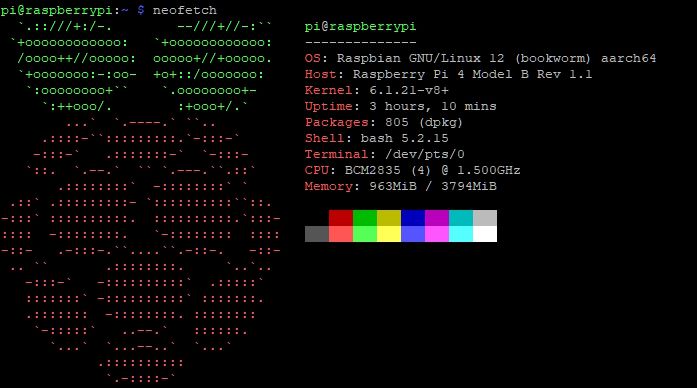
pihole:
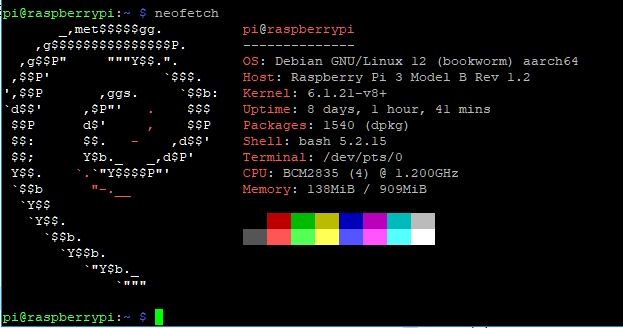
Ausserdem sehe ich gerade, dass beim Raspi4 mit iobroker neofetch auch gern mal nur ein 32bit System meldet (?)
Zumindest fehlt beim "aarch" dann die 64.Merkwürdig zudem, dass dies wohl erst nach der Einarbeitung der Änderungen (betreffs 31.08.23) auftaucht.
Wenns nicht geht, wie man will - muss mans tun, wie man kann. -
@dp20eic (inzwischen) Mahlzeit :-)
Ja, der Hinweis auf Loglevel kam auch schon von anderer Seite. Muss ich wieder zurückstellen. Ist mir einfach untergegangen.Zu neofetch:
Ist ja nicht wirklich wichtig, aber wissen würde ich es schon gern :-)
neofetch liefert folgendes:iobroker:
pihole:
Ausserdem sehe ich gerade, dass beim Raspi4 mit iobroker neofetch auch gern mal nur ein 32bit System meldet (?)
Zumindest fehlt beim "aarch" dann die 64.Merkwürdig zudem, dass dies wohl erst nach der Einarbeitung der Änderungen (betreffs 31.08.23) auftaucht.
@pi-ter bei deinem pihole steht als OS ein debian
-
@dp20eic (inzwischen) Mahlzeit :-)
Ja, der Hinweis auf Loglevel kam auch schon von anderer Seite. Muss ich wieder zurückstellen. Ist mir einfach untergegangen.Zu neofetch:
Ist ja nicht wirklich wichtig, aber wissen würde ich es schon gern :-)
neofetch liefert folgendes:iobroker:
pihole:
Ausserdem sehe ich gerade, dass beim Raspi4 mit iobroker neofetch auch gern mal nur ein 32bit System meldet (?)
Zumindest fehlt beim "aarch" dann die 64.Merkwürdig zudem, dass dies wohl erst nach der Einarbeitung der Änderungen (betreffs 31.08.23) auftaucht.
@pi-ter
Zweimal der gleiche hostname in einem Netzwerk ist auch schwer ungünstig. Wohin soll dann aufgelöst werden?
-
@dp20eic (inzwischen) Mahlzeit :-)
Ja, der Hinweis auf Loglevel kam auch schon von anderer Seite. Muss ich wieder zurückstellen. Ist mir einfach untergegangen.Zu neofetch:
Ist ja nicht wirklich wichtig, aber wissen würde ich es schon gern :-)
neofetch liefert folgendes:iobroker:
pihole:
Ausserdem sehe ich gerade, dass beim Raspi4 mit iobroker neofetch auch gern mal nur ein 32bit System meldet (?)
Zumindest fehlt beim "aarch" dann die 64.Merkwürdig zudem, dass dies wohl erst nach der Einarbeitung der Änderungen (betreffs 31.08.23) auftaucht.
@pi-ter sagte in Upgrade von Debian 11/Bullseye auf 12/Bookworm:
st ja nicht wirklich wichtig, aber wissen würde ich es schon gern
Moin,
hier mal die GitHub Seite zu
neofetchhttps://github.com/dylanaraps/neofetch
Hier Getting Start with neofetchAufgerufen wird das aus der
~/.bashrc, Konfiguration liegt unter~/.config/neofetch/VG
Bernd -
@pi-ter
Zweimal der gleiche hostname in einem Netzwerk ist auch schwer ungünstig. Wohin soll dann aufgelöst werden?
@thomas-braun Eigentlich bedarf es keiner Auflösung. Alle Geräte im Netzwerk haben eine feste IP und werden darüber angesprochen. Und so funktioniert das völlig ohne Probleme seit Jahren. Liege ich da faslch?
DHCP ist sowohl in der Fritte, als auch im pihole deaktiviert.Wenns nicht geht, wie man will - muss mans tun, wie man kann. -
@thomas-braun Eigentlich bedarf es keiner Auflösung. Alle Geräte im Netzwerk haben eine feste IP und werden darüber angesprochen. Und so funktioniert das völlig ohne Probleme seit Jahren. Liege ich da faslch?
DHCP ist sowohl in der Fritte, als auch im pihole deaktiviert.@pi-ter sagte in Upgrade von Debian 11/Bullseye auf 12/Bookworm:
Liege ich da faslch?
Ja.
Zu neofetch:
Da wird vermutlich die Datei
cat /etc/os-releaseausgelesen. -
@crunchip
Danke für den A...tritt. Sehe ich jetzt auch. Aber nun bin ich ja völlig verwirrt :-)
Wieso läuft auf dem 4er plötzlich Raspian und nicht wie bisher Debian?Lässt sich das fixen ohne Neuinstallation?
Wenns nicht geht, wie man will - muss mans tun, wie man kann. -
@crunchip
Danke für den A...tritt. Sehe ich jetzt auch. Aber nun bin ich ja völlig verwirrt :-)
Wieso läuft auf dem 4er plötzlich Raspian und nicht wie bisher Debian?Lässt sich das fixen ohne Neuinstallation?
@pi-ter sagte in Upgrade von Debian 11/Bullseye auf 12/Bookworm:
Lässt sich das fixen ohne Neuinstallation?
Was willst du denn da fixen? Vollkommen wumpe was da gemeldet wird.
Raspberry OS setzt doch zu 99% auf Debian auf.Edit: Wenn die os-release angepasst wird:
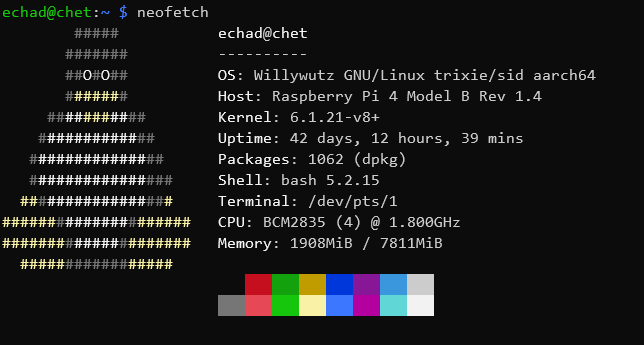
Und da es zur Zeit noch kein offizielles Raspberry OS 'Bookworm' gibt steht da halt das nächstbeste drin.
-
@thomas-braun Eigentlich bedarf es keiner Auflösung. Alle Geräte im Netzwerk haben eine feste IP und werden darüber angesprochen. Und so funktioniert das völlig ohne Probleme seit Jahren. Liege ich da faslch?
DHCP ist sowohl in der Fritte, als auch im pihole deaktiviert.@pi-ter sagte in Upgrade von Debian 11/Bullseye auf 12/Bookworm:
Eigentlich bedarf es keiner Auflösung. Alle Geräte im Netzwerk haben eine feste IP und werden darüber angesprochen.
Und das weißt du für jeglichen Code auf der Kiste?
Beim iobroker gibt es z. B. Funktionen, die über den hostname aufgerufen werden. -
@thomas-braun Eigentlich bedarf es keiner Auflösung. Alle Geräte im Netzwerk haben eine feste IP und werden darüber angesprochen. Und so funktioniert das völlig ohne Probleme seit Jahren. Liege ich da faslch?
DHCP ist sowohl in der Fritte, als auch im pihole deaktiviert.@pi-ter sagte in Upgrade von Debian 11/Bullseye auf 12/Bookworm:
Liege ich da faslch?
Moin,
misst, ich habe schon zwei Mal angefangen etwas zu schreiben, habe es dann aber nicht abgeschickt, weil ich eigentlich meine Klappe halten wollte, klappt nicht :)
Du machst Dir das Leben schwerer, wenn Du DHCP nicht nutzt. Um lokal Deine
hostszu finden, musst Du DeinDNSkorrekt einstellen, StichwortBind, Oder, Hostund auch die/etc/hostsauf den einzelnen Rechnern korrekt pflegen, denn sonst kann es zu dem Problem führen, dass@thomas-braun sagte in Upgrade von Debian 11/Bullseye auf 12/Bookworm:
Beim iobroker gibt es z. B. Funktionen, die über den hostname aufgerufen werden.
Funktionen, die eine Namensauflösung brauchen, falsch abbiegen und spätesten dann hast Du ein Problem, wenn wie bei Dir zwei RasPis den gleichen Namen haben.
Ist sicherlich zu simpel abgehandelt, aber DHCP / DNS ist kein Thema für das Forum, auch nicht
Off TopicVG
Bernd



Support us
655
Online32.7k
Users82.3k
Topics1.3m
Posts