



Skip to content
  • Home
  • Recent
  • Tags
  • 0 Unread 0
  • Categories
  • Unreplied
  • Popular
  • GitHub
  • Docu
  • Hilfe
Skins
  • Light
  • Brite
  • Cerulean
  • Cosmo
  • Flatly
  • Journal
  • Litera
  • Lumen
  • Lux
  • Materia
  • Minty
  • Morph
  • Pulse
  • Sandstone
  • Simplex
  • Sketchy
  • Spacelab
  • United
  • Yeti
  • Zephyr
  • Dark
  • Cyborg
  • Darkly
  • Quartz
  • Slate
  • Solar
  • Superhero
  • Vapor

  • Default (No Skin)
  • No Skin
Collapse
ioBroker Logo

Community Forum

donate donate
  1. ioBroker Community Home
  2. Deutsch
  3. ioBroker Allgemein
  4. webinterface nicht mehr erreichbar

NEWS

  • Jahresrückblick 2025 – unser neuer Blogbeitrag ist online! ✨
    BluefoxB
    Bluefox
    17
    1
    3.7k

  • Neuer Blogbeitrag: Monatsrückblick - Dezember 2025 🎄
    BluefoxB
    Bluefox
    13
    1
    1.2k

  • Weihnachtsangebot 2025! 🎄
    BluefoxB
    Bluefox
    25
    1
    2.5k

webinterface nicht mehr erreichbar

Scheduled Pinned Locked Moved ioBroker Allgemein
24 Posts 5 Posters 2.0k Views 4 Watching
  • Oldest to Newest
  • Newest to Oldest
  • Most Votes
Reply
  • Reply as topic
Log in to reply
This topic has been deleted. Only users with topic management privileges can see it.
  • Thomas BraunT Thomas Braun

    @neuzeit

    1:1 ungekürzte Ein- wie Ausgaben aus der Konsole, in CodeTags eingebettet hier posten.

    N Offline
    N Offline
    neuZeit
    wrote on last edited by Homoran
    #13

    @thomas-braun

    code_jochen@docker:~ $ sudo su -iobroker
    su: Ungültige Option -- i
    Try 'su --help' for more information.
    jochen@docker:~ $ sudo su --iobroker
    su: Unbekannte Option »--iobroker«
    Try 'su --help' for more information.
    jochen@docker:~ $ cd/opt/iobroker
    -bash: cd/opt/iobroker: Datei oder Verzeichnis nicht gefunden
    jochen@docker:~ $ cd /opt/iobroker
    -bash: cd: /opt/iobroker: Datei oder Verzeichnis nicht gefunden
    jochen@docker:~ $ iob add admin 3 --port 8081
    -bash: iob: Kommando nicht gefunden.
    jochen@docker:~ $ iobroker list instances
    -bash: iobroker: Kommando nicht gefunden.
    jochen@docker:~ $ iobroker add admin
    -bash: iobroker: Kommando nicht gefunden.
    jochen@docker:~ $ sudo iobroker add admin
    sudo: iobroker: Befehl nicht gefunden
    jochen@docker:~ $ sudo iobroker list instances
    sudo: iobroker: Befehl nicht gefunden
    jochen@docker:~ $
    text
    
    GlasfaserG 1 Reply Last reply
    0
    • N neuZeit

      @thomas-braun

      code_jochen@docker:~ $ sudo su -iobroker
      su: Ungültige Option -- i
      Try 'su --help' for more information.
      jochen@docker:~ $ sudo su --iobroker
      su: Unbekannte Option »--iobroker«
      Try 'su --help' for more information.
      jochen@docker:~ $ cd/opt/iobroker
      -bash: cd/opt/iobroker: Datei oder Verzeichnis nicht gefunden
      jochen@docker:~ $ cd /opt/iobroker
      -bash: cd: /opt/iobroker: Datei oder Verzeichnis nicht gefunden
      jochen@docker:~ $ iob add admin 3 --port 8081
      -bash: iob: Kommando nicht gefunden.
      jochen@docker:~ $ iobroker list instances
      -bash: iobroker: Kommando nicht gefunden.
      jochen@docker:~ $ iobroker add admin
      -bash: iobroker: Kommando nicht gefunden.
      jochen@docker:~ $ sudo iobroker add admin
      sudo: iobroker: Befehl nicht gefunden
      jochen@docker:~ $ sudo iobroker list instances
      sudo: iobroker: Befehl nicht gefunden
      jochen@docker:~ $
      text
      
      GlasfaserG Offline
      GlasfaserG Offline
      Glasfaser
      wrote on last edited by
      #14

      @neuzeit

      .... Frage ... da keine Info !?

      Hast du Portainer installiert .

      Synology 918+ 16GB - ioBroker in Docker v9 , VISO auf Trekstor Primebook C13 13,3" , Hikvision Domkameras mit Surveillance Station .. CCU RaspberryMatic in Synology VM .. Zigbee CC2538+CC2592 .. Sonoff .. KNX .. Modbus ..

      N 2 Replies Last reply
      0
      • GlasfaserG Glasfaser

        @neuzeit

        .... Frage ... da keine Info !?

        Hast du Portainer installiert .

        N Offline
        N Offline
        neuZeit
        wrote on last edited by
        #15

        @glasfaser ja hab ich dachte ich hatte das geschrieben sorry

        GlasfaserG 1 Reply Last reply
        0
        • GlasfaserG Glasfaser

          @neuzeit

          .... Frage ... da keine Info !?

          Hast du Portainer installiert .

          N Offline
          N Offline
          neuZeit
          wrote on last edited by Homoran
          #16

          @glasfaser

          host.docker check instance "system.adapter.hm-rpc.0" for host "docker"
          host.docker check instance "system.adapter.deconz.0" for host "docker"
          host.docker check instance "system.adapter.iot.0" for host "docker"
          host.docker check instance "system.adapter.cloud.0" for host "docker"
          Send diag info: {"uuid":"d1d07007-5fe1-4cd5-a7af-5050fc699b45","language":"de","country":"Germany","hosts":[{"version":"4.0.24","platform":"Javascript/Node.js","type":"linux"}],"node":"v18.16.0","arch":"arm","docker":true,"adapters":{"admin":{"version":"6.3.5","platform":"Javascript/Node.js"},"discovery":{"version":"3.1.0","platform":"Javascript/Node.js"},"backitup":{"version":"2.6.19","platform":"Javascript/Node.js"},"javascript":{"version":"6.1.4","platform":"Javascript/Node.js"},"deconz":{"version":"1.3.21","platform":"Javascript/Node.js"},"alexa2":{"version":"3.23.2","platform":"Javascript/Node.js"},"telegram":{"version":"1.15.2","platform":"Javascript/Node.js"},"sonoff":{"version":"2.5.1","platform":"Javascript/Node.js"},"iot":{"version":"1.14.2","platform":"Javascript/Node.js"},"hm-rpc":{"version":"1.15.16","platform":"Javascript/Node.js"},"cloud":{"version":"4.3.0","platform":"Javascript/Node.js"}},"statesType":"jsonl","objectsType":"jsonl","noInstances":10,"compactMode":false,"noCompactInstances":0,"model":"unknown","cpus":4,"mem":3926323200,"ostype":"Linux","city":""}
          ================================== > LOG REDIRECT system.adapter.admin.0 => false [Process stopped]
          ================================== > LOG REDIRECT system.adapter.admin.0 => false [system.adapter.admin.0.logging]
           
          Recived termination signal (SIGTERM).
          Shutting down ioBroker... 
          .================================== > LOG REDIRECT system.adapter.javascript.0 => false [Process stopped]
          ================================== > LOG REDIRECT system.adapter.javascript.0 => false [system.adapter.javascript.0.logging]
          ..
          Done. Have a nice day!
           
          --------------------------------------------------------------------------------
          -------------------------     2023-05-13 21:01:28      -------------------------
          --------------------------------------------------------------------------------
          -----                                                                      -----
          ----- ██╗  ██████╗  ██████╗  ██████╗   ██████╗  ██╗  ██╗ ███████╗ ██████╗  -----
          ----- ██║ ██╔═══██╗ ██╔══██╗ ██╔══██╗ ██╔═══██╗ ██║ ██╔╝ ██╔════╝ ██╔══██╗ -----
          ----- ██║ ██║   ██║ ██████╔╝ ██████╔╝ ██║   ██║ █████╔╝  █████╗   ██████╔╝ -----
          ----- ██║ ██║   ██║ ██╔══██╗ ██╔══██╗ ██║   ██║ ██╔═██╗  ██╔══╝   ██╔══██╗ -----
          ----- ██║ ╚██████╔╝ ██████╔╝ ██║  ██║ ╚██████╔╝ ██║  ██╗ ███████╗ ██║  ██║ -----
          ----- ╚═╝  ╚═════╝  ╚═════╝  ╚═╝  ╚═╝  ╚═════╝  ╚═╝  ╚═╝ ╚══════╝ ╚═╝  ╚═╝ -----
          -----                                                                      -----
          -----              Welcome to your ioBroker Docker container!              -----
          -----                    Startupscript is now running!                     -----
          -----                          Please be patient!                          -----
          --------------------------------------------------------------------------------
           
          --------------------------------------------------------------------------------
          -----                          System Information                          -----
          -----                    arch:                aarch64                      -----
          -----                    hostname:            docker                       -----
          -----                                                                      -----
          -----                          Version Information                         -----
          -----                    image:               v8.0.1                       -----
          -----                    build:               2023-04-26T23:45:40+00:00    -----
          -----                    node:                v18.16.0                     -----
          -----                    npm:                 9.5.1                        -----
          -----                                                                      -----
          -----                        Environment Variables                         -----
          -----                    SETGID:              1000                         -----
          -----                    SETUID:              1000                         -----
          --------------------------------------------------------------------------------
           
          --------------------------------------------------------------------------------
          -----                   Step 1 of 5: Preparing container                   -----
          --------------------------------------------------------------------------------
           
          This is not the first run of this container. Skipping first run preparation.
           
          --------------------------------------------------------------------------------
          -----             Step 2 of 5: Detecting ioBroker installation             -----
          --------------------------------------------------------------------------------
           
          Existing installation of ioBroker detected in "/opt/iobroker".
           
          --------------------------------------------------------------------------------
          -----             Step 3 of 5: Checking ioBroker installation              -----
          --------------------------------------------------------------------------------
           
          (Re)setting permissions (This might take a while! Please be patient!)... Done.
           
          Fixing "sudo-bug" by replacing sudo with gosu... Done.
           
          Checking Database connection... Done.
           
          Hostname in ioBroker matches the hostname of this container.
          No action required.
           
          --------------------------------------------------------------------------------
          -----                Step 4 of 5: Applying special settings                -----
          --------------------------------------------------------------------------------
           
          Some adapters have special requirements/ settings which can be activated by the use of environment variables.
          For more information see ioBroker Docker Image Docs (https://docs.buanet.de/iobroker-docker-image/docs/).
           
           
          --------------------------------------------------------------------------------
          -----                    Step 5 of 5: ioBroker startup                     -----
          --------------------------------------------------------------------------------
           
          Starting ioBroker... 
           
          ##### #### ### ## # iobroker.js-controller log output # ## ### #### #####
          host.docker check instance "system.adapter.admin.0" for host "docker"
          host.docker check instance "system.adapter.javascript.0" for host "docker"
          host.docker check instance "system.adapter.telegram.0" for host "docker"
          host.docker check instance "system.adapter.alexa2.0" for host "docker"
          host.docker check instance "system.adapter.sonoff.0" for host "docker"
          host.docker check instance "system.adapter.sonoff.1" for host "docker"
          host.docker check instance "system.adapter.hm-rpc.0" for host "docker"
          host.docker check instance "system.adapter.deconz.0" for host "docker"
          host.docker check instance "system.adapter.iot.0" for host "docker"
          host.docker check instance "system.adapter.cloud.0" for host "docker"
          Send diag info: {"uuid":"d1d07007-5fe1-4cd5-a7af-5050fc699b45","language":"de","country":"Germany","hosts":[{"version":"4.0.24","platform":"Javascript/Node.js","type":"linux"}],"node":"v18.16.0","arch":"arm","docker":true,"adapters":{"admin":{"version":"6.3.5","platform":"Javascript/Node.js"},"discovery":{"version":"3.1.0","platform":"Javascript/Node.js"},"backitup":{"version":"2.6.19","platform":"Javascript/Node.js"},"javascript":{"version":"6.1.4","platform":"Javascript/Node.js"},"deconz":{"version":"1.3.21","platform":"Javascript/Node.js"},"alexa2":{"version":"3.23.2","platform":"Javascript/Node.js"},"telegram":{"version":"1.15.2","platform":"Javascript/Node.js"},"sonoff":{"version":"2.5.1","platform":"Javascript/Node.js"},"iot":{"version":"1.14.2","platform":"Javascript/Node.js"},"hm-rpc":{"version":"1.15.16","platform":"Javascript/Node.js"},"cloud":{"version":"4.3.0","platform":"Javascript/Node.js"}},"statesType":"jsonl","objectsType":"jsonl","noInstances":10,"compactMode":false,"noCompactInstances":0,"model":"unknown","cpus":4,"mem":3926323200,"ostype":"Linux","city":""}
          ================================== > LOG REDIRECT system.adapter.admin.0 => false [Process stopped]
          ================================== > LOG REDIRECT system.adapter.admin.0 => false [system.adapter.admin.0.logging]
          
          1 Reply Last reply
          0
          • N neuZeit

            @glasfaser ja hab ich dachte ich hatte das geschrieben sorry

            GlasfaserG Offline
            GlasfaserG Offline
            Glasfaser
            wrote on last edited by
            #17

            @neuzeit

            dachte ich hatte das geschrieben

            Nein ... keine Angabe !

            Gehe in die Konsole
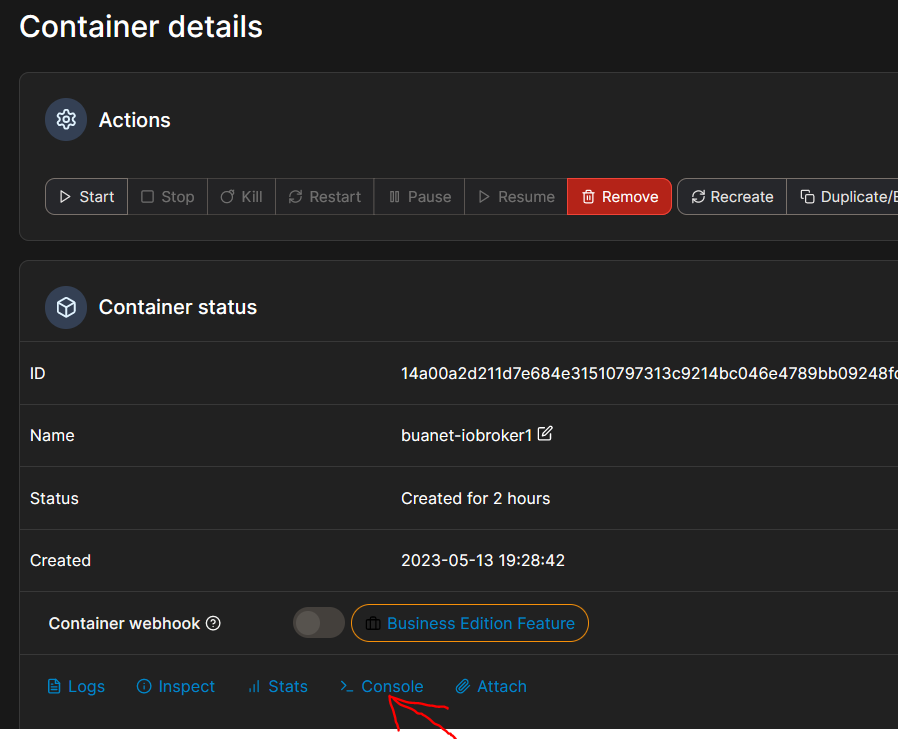
            10b1c8cf-fabe-48b8-8399-08ea40d66dce-grafik.png

            dann in der Konsole erstmal

            iobroker list instances
            

            hier zeigen

            dann geht es weiter

            Synology 918+ 16GB - ioBroker in Docker v9 , VISO auf Trekstor Primebook C13 13,3" , Hikvision Domkameras mit Surveillance Station .. CCU RaspberryMatic in Synology VM .. Zigbee CC2538+CC2592 .. Sonoff .. KNX .. Modbus ..

            N 1 Reply Last reply
            0
            • GlasfaserG Glasfaser

              @neuzeit

              dachte ich hatte das geschrieben

              Nein ... keine Angabe !

              Gehe in die Konsole

              10b1c8cf-fabe-48b8-8399-08ea40d66dce-grafik.png

              dann in der Konsole erstmal

              iobroker list instances
              

              hier zeigen

              dann geht es weiter

              N Offline
              N Offline
              neuZeit
              wrote on last edited by Homoran
              #18

              @glasfaser

              root@docker:/opt/iobroker# iobroker list instances
                system.adapter.admin.0                  : admin                 : docker                                   -  enabled, port: 8081, bind: 0.0.0.0 (SSL), run as: admin
              + system.adapter.alexa2.0                 : alexa2                : docker                                   -  enabled
                system.adapter.cloud.0                  : cloud                 : docker                                   - disabled
              + system.adapter.deconz.0                 : deconz                : docker                                   -  enabled
                system.adapter.hm-rpc.0                 : hm-rpc                : docker                                   - disabled, port: 0
                system.adapter.iot.0                    : iot                   : docker                                   - disabled
              + system.adapter.javascript.0             : javascript            : docker                                   -  enabled
              + system.adapter.sonoff.0                 : sonoff                : docker                                   -  enabled, port: 1883, bind: 0.0.0.0
              + system.adapter.sonoff.1                 : sonoff                : docker                                   -  enabled, port: 1884, bind: 0.0.0.0
              + system.adapter.telegram.0               : telegram              : docker                                   -  enabled, port: 8443, bind: 0.0.0.0
              
              + instance is alive
              root@docker:/opt/iobroker# ^C
              root@docker:/opt/iobroker# 
              
              GlasfaserG 1 Reply Last reply
              0
              • N neuZeit

                @glasfaser

                root@docker:/opt/iobroker# iobroker list instances
                  system.adapter.admin.0                  : admin                 : docker                                   -  enabled, port: 8081, bind: 0.0.0.0 (SSL), run as: admin
                + system.adapter.alexa2.0                 : alexa2                : docker                                   -  enabled
                  system.adapter.cloud.0                  : cloud                 : docker                                   - disabled
                + system.adapter.deconz.0                 : deconz                : docker                                   -  enabled
                  system.adapter.hm-rpc.0                 : hm-rpc                : docker                                   - disabled, port: 0
                  system.adapter.iot.0                    : iot                   : docker                                   - disabled
                + system.adapter.javascript.0             : javascript            : docker                                   -  enabled
                + system.adapter.sonoff.0                 : sonoff                : docker                                   -  enabled, port: 1883, bind: 0.0.0.0
                + system.adapter.sonoff.1                 : sonoff                : docker                                   -  enabled, port: 1884, bind: 0.0.0.0
                + system.adapter.telegram.0               : telegram              : docker                                   -  enabled, port: 8443, bind: 0.0.0.0
                
                + instance is alive
                root@docker:/opt/iobroker# ^C
                root@docker:/opt/iobroker# 
                
                GlasfaserG Offline
                GlasfaserG Offline
                Glasfaser
                wrote on last edited by
                #19

                @neuzeit

                Ok

                Jetzt in der Konsole

                iobroker set admin.0 --secure false
                

                Synology 918+ 16GB - ioBroker in Docker v9 , VISO auf Trekstor Primebook C13 13,3" , Hikvision Domkameras mit Surveillance Station .. CCU RaspberryMatic in Synology VM .. Zigbee CC2538+CC2592 .. Sonoff .. KNX .. Modbus ..

                N 1 Reply Last reply
                0
                • GlasfaserG Glasfaser

                  @neuzeit

                  Ok

                  Jetzt in der Konsole

                  iobroker set admin.0 --secure false
                  
                  N Offline
                  N Offline
                  neuZeit
                  wrote on last edited by
                  #20

                  @glasfaser komm wieder auf die Oberfäche vielen vielen dank wahnsinn dass ihr die Befehle alle kennt.

                  Super

                  GlasfaserG 1 Reply Last reply
                  0
                  • N neuZeit

                    @glasfaser komm wieder auf die Oberfäche vielen vielen dank wahnsinn dass ihr die Befehle alle kennt.

                    Super

                    GlasfaserG Offline
                    GlasfaserG Offline
                    Glasfaser
                    wrote on last edited by
                    #21

                    @neuzeit sagte in webinterface nicht mehr erreichbar:

                    @glasfaser komm wieder auf die Oberfäche vielen vielen dank wahnsinn dass ihr die Befehle alle kennt.

                    Super

                    Wenn du am Anfang des Thread alle erfolderlichen Info´s angegeben hättest , wäre es viel schneller gelaufen !

                    siehen hier :

                    @glasfaser sagte in webinterface nicht mehr erreichbar:

                    @neuzeit
                    Bitte alles Zeigen .. keine Nacherzählung !
                    Ausgabe vollständig in Code-Tags Posten !

                    @glasfaser sagte in webinterface nicht mehr erreichbar:
                    @neuzeit sagte in webinterface nicht mehr erreichbar:

                    Jemand ein Tipp ...

                    auch mal lesen ... und umsetzen

                    wird für uns alle hier im Forum einfachen , wenn du uns alle Infos dazu lieferst ...
                    und nicht immer von uns mühselig erfragen mußt .

                    https://forum.iobroker.net/topic/51555/hinweise-für-gute-forenbeiträge

                    @glasfaser sagte in webinterface nicht mehr erreichbar:
                    @neuzeit

                    Wie soll man dir helfen ... wenn du hier nichts dazu zeigst ..!

                    dann bin ich hier mal raus ....

                    @glasfaser sagte in webinterface nicht mehr erreichbar:
                    @neuzeit

                    .... Frage ... da keine Info !?

                    Hast du Portainer installiert .

                    Synology 918+ 16GB - ioBroker in Docker v9 , VISO auf Trekstor Primebook C13 13,3" , Hikvision Domkameras mit Surveillance Station .. CCU RaspberryMatic in Synology VM .. Zigbee CC2538+CC2592 .. Sonoff .. KNX .. Modbus ..

                    N 1 Reply Last reply
                    0
                    • GlasfaserG Glasfaser

                      @neuzeit sagte in webinterface nicht mehr erreichbar:

                      @glasfaser komm wieder auf die Oberfäche vielen vielen dank wahnsinn dass ihr die Befehle alle kennt.

                      Super

                      Wenn du am Anfang des Thread alle erfolderlichen Info´s angegeben hättest , wäre es viel schneller gelaufen !

                      siehen hier :

                      @glasfaser sagte in webinterface nicht mehr erreichbar:

                      @neuzeit
                      Bitte alles Zeigen .. keine Nacherzählung !
                      Ausgabe vollständig in Code-Tags Posten !

                      @glasfaser sagte in webinterface nicht mehr erreichbar:
                      @neuzeit sagte in webinterface nicht mehr erreichbar:

                      Jemand ein Tipp ...

                      auch mal lesen ... und umsetzen

                      wird für uns alle hier im Forum einfachen , wenn du uns alle Infos dazu lieferst ...
                      und nicht immer von uns mühselig erfragen mußt .

                      https://forum.iobroker.net/topic/51555/hinweise-für-gute-forenbeiträge

                      @glasfaser sagte in webinterface nicht mehr erreichbar:
                      @neuzeit

                      Wie soll man dir helfen ... wenn du hier nichts dazu zeigst ..!

                      dann bin ich hier mal raus ....

                      @glasfaser sagte in webinterface nicht mehr erreichbar:
                      @neuzeit

                      .... Frage ... da keine Info !?

                      Hast du Portainer installiert .

                      N Offline
                      N Offline
                      neuZeit
                      wrote on last edited by
                      #22

                      @glasfaser sagte in webinterface nicht mehr erreichbar:

                      Code-Tags Posten !

                      ja das ist möglich es wissen nicht alle Menschen was ein Code-Tags ist und dass ich Docker installiert habe hatte ich geschrieben das nächste mal weiß ich das also bitte Nachsicht.
                      Ich bedanke mich bei allen ihr habt mir viel Arbeit durch eine Neuinstallation erspart vielen Dank.


                      HomoranH GlasfaserG 2 Replies Last reply
                      0
                      • N neuZeit

                        @glasfaser sagte in webinterface nicht mehr erreichbar:

                        Code-Tags Posten !

                        ja das ist möglich es wissen nicht alle Menschen was ein Code-Tags ist und dass ich Docker installiert habe hatte ich geschrieben das nächste mal weiß ich das also bitte Nachsicht.
                        Ich bedanke mich bei allen ihr habt mir viel Arbeit durch eine Neuinstallation erspart vielen Dank.

                        HomoranH Do not disturb
                        HomoranH Do not disturb
                        Homoran
                        Global Moderator Administrators
                        wrote on last edited by
                        #23

                        @neuzeit sagte in webinterface nicht mehr erreichbar:

                        es wissen nicht alle Menschen was ein Code-Tags ist

                        dafür gibt es
                        https://forum.iobroker.net/topic/51555/hinweise-für-gute-forenbeiträge/1

                        kein Support per PN! - Fragen im Forum stellen - es gibt fast nichts, was nicht auch für andere interessant ist.

                        Benutzt das Voting rechts unten im Beitrag wenn er euch geholfen hat.

                        der Installationsfixer: curl -fsL https://iobroker.net/fix.sh | bash -

                        1 Reply Last reply
                        0
                        • N neuZeit

                          @glasfaser sagte in webinterface nicht mehr erreichbar:

                          Code-Tags Posten !

                          ja das ist möglich es wissen nicht alle Menschen was ein Code-Tags ist und dass ich Docker installiert habe hatte ich geschrieben das nächste mal weiß ich das also bitte Nachsicht.
                          Ich bedanke mich bei allen ihr habt mir viel Arbeit durch eine Neuinstallation erspart vielen Dank.
                          GlasfaserG Offline
                          GlasfaserG Offline
                          Glasfaser
                          wrote on last edited by
                          #24

                          @neuzeit sagte in webinterface nicht mehr erreichbar:

                          ja das ist möglich es wissen nicht alle Menschen was ein Code-Tags i

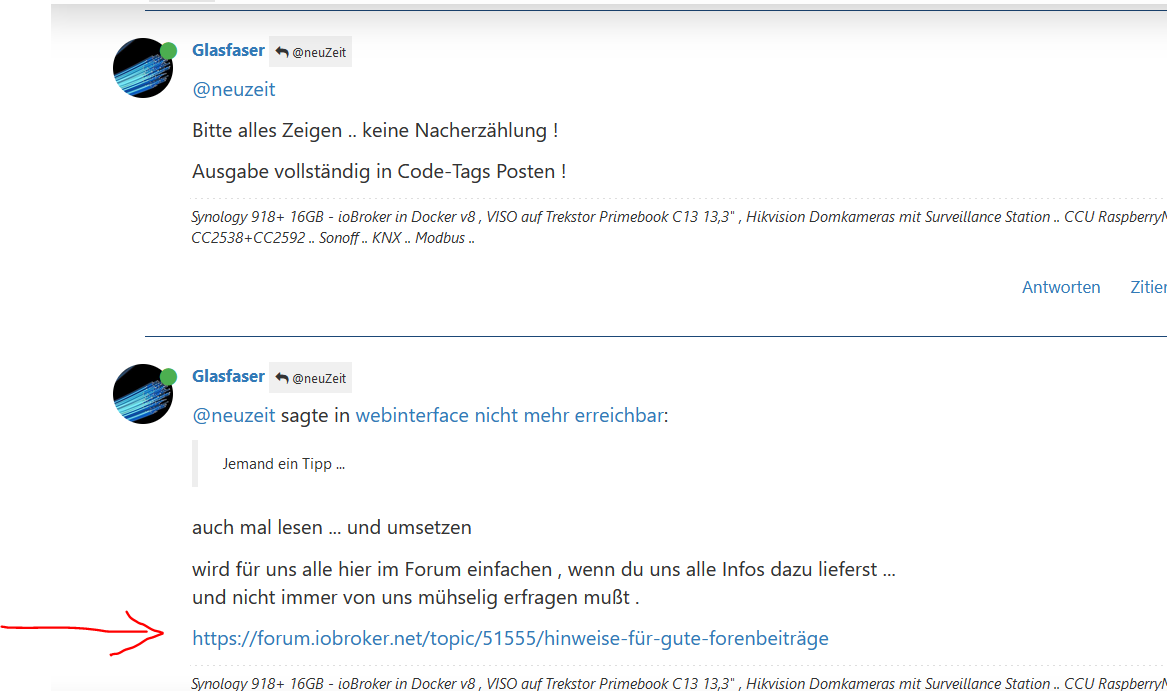
                          das hatte ich schon ganz oben gepostet :

                          d69205a1-a981-4650-80c3-7c00a74353a7-grafik.png

                          Synology 918+ 16GB - ioBroker in Docker v9 , VISO auf Trekstor Primebook C13 13,3" , Hikvision Domkameras mit Surveillance Station .. CCU RaspberryMatic in Synology VM .. Zigbee CC2538+CC2592 .. Sonoff .. KNX .. Modbus ..

                          1 Reply Last reply
                          0
                          Reply
                          • Reply as topic
                          Log in to reply
                          • Oldest to Newest
                          • Newest to Oldest
                          • Most Votes


                          Support us

                          ioBroker
                          Community Adapters
                          Donate
                          FAQ Cloud / IOT
                          HowTo: Node.js-Update
                          HowTo: Backup/Restore
                          Downloads
                          BLOG

                          745

                          Online

                          32.7k

                          Users

                          82.4k

                          Topics

                          1.3m

                          Posts
                          Community
                          Impressum | Datenschutz-Bestimmungen | Nutzungsbedingungen | Einwilligungseinstellungen
                          ioBroker Community 2014-2025
                          logo
                          • Login

                          • Don't have an account? Register

                          • Login or register to search.
                          • First post
                            Last post
                          0
                          • Home
                          • Recent
                          • Tags
                          • Unread 0
                          • Categories
                          • Unreplied
                          • Popular
                          • GitHub
                          • Docu
                          • Hilfe