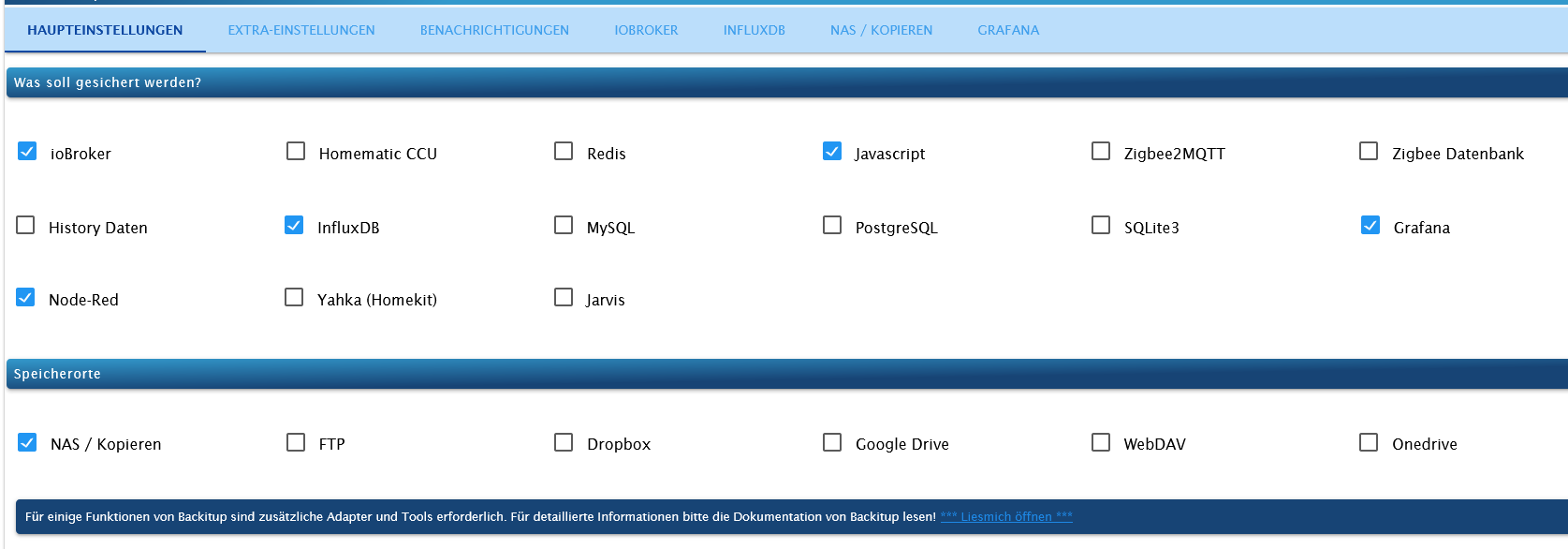
Skip to content
  • Home
  • Recent
  • Tags
  • 0 Unread 0
  • Categories
  • Unreplied
  • Popular
  • GitHub
  • Docu
  • Hilfe
Skins
  • Light
  • Brite
  • Cerulean
  • Cosmo
  • Flatly
  • Journal
  • Litera
  • Lumen
  • Lux
  • Materia
  • Minty
  • Morph
  • Pulse
  • Sandstone
  • Simplex
  • Sketchy
  • Spacelab
  • United
  • Yeti
  • Zephyr
  • Dark
  • Cyborg
  • Darkly
  • Quartz
  • Slate
  • Solar
  • Superhero
  • Vapor

  • Default (No Skin)
  • No Skin
Collapse
ioBroker Logo

Community Forum

donate donate
  1. ioBroker Community Home
  2. Deutsch
  3. ioBroker Allgemein
  4. Backup hält an bzw Fehlermeldungen erscheinen.
NEWS

  • Jahresrückblick 2025 – unser neuer Blogbeitrag ist online! ✨
    BluefoxB
    Bluefox
    17
    1
    3.3k

  • Neuer Blogbeitrag: Monatsrückblick - Dezember 2025 🎄
    BluefoxB
    Bluefox
    13
    1
    1.1k

  • Weihnachtsangebot 2025! 🎄
    BluefoxB
    Bluefox
    25
    1
    2.4k

Backup hält an bzw Fehlermeldungen erscheinen.
Scheduled Pinned Locked Moved ioBroker Allgemein
43 Posts 5 Posters 1.6k Views 4 Watching
  • Oldest to Newest
  • Newest to Oldest
  • Most Votes
Reply
  • Reply as topic
Log in to reply
This topic has been deleted. Only users with topic management privileges can see it.
  • Dr.PieD Dr.Pie

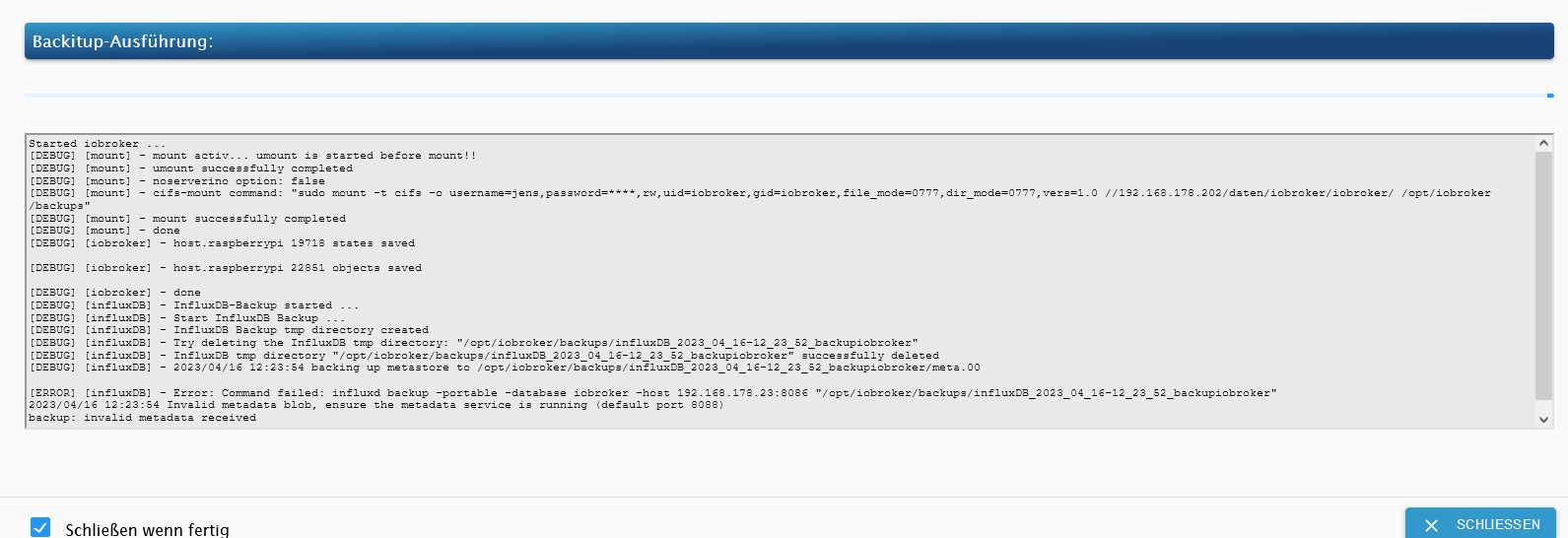
    @simatec Das mit dem Port hatte ich zuerst auch mit 8088 probiert.
    Da kam dann "Verbindung testen" das hier:
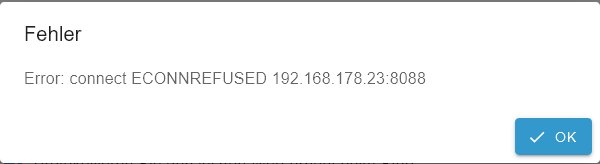
    backup8.png

    simatecS Online
    simatecS Online
    simatec
    Developer Most Active
    wrote on last edited by
    #5

    @dr-pie Port 8088 nur in Backitup nicht im Influx Adapter. Da bleibt 8086

    • Besuche meine Github Seite
    • Beitrag hat geholfen oder willst du mich unterstützen
    • HowTo Restore ioBroker
    Dr.PieD 1 Reply Last reply
    0
    • simatecS simatec

      @dr-pie Port 8088 nur in Backitup nicht im Influx Adapter. Da bleibt 8086

      Dr.PieD Offline
      Dr.PieD Offline
      Dr.Pie
      wrote on last edited by
      #6

      @simatec da scheint das Backup einfach anzuhalten.
      Das Fenster muss ich dann per Hand schließen.
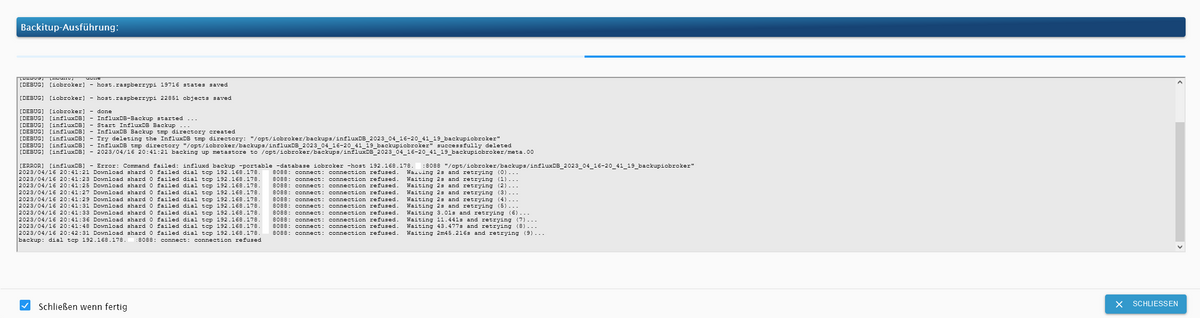
      backup9.png

      Started iobroker ...
      [DEBUG] [mount] - noserverino option: false
      [DEBUG] [mount] - cifs-mount command: "sudo mount -t cifs -o username=jens,password=****,rw,uid=iobroker,gid=iobroker,file_mode=0777,dir_mode=0777,vers=1.0 //192.168.178.xxx/xxx/iobroker/iobroker/ /opt/iobroker/backups"
      [DEBUG] [mount] - first mount attempt with smb option failed. try next mount attempt without smb option ...
      [DEBUG] [mount] - cifs-mount command: "sudo mount -t cifs -o username=jens,password=****,rw,uid=iobroker,gid=iobroker,file_mode=0777,dir_mode=0777 //192.168.178.xxx/xxx/iobroker/iobroker/ /opt/iobroker/backups"
      [DEBUG] [mount] - mount successfully completed
      [DEBUG] [mount] - done
      [DEBUG] [iobroker] - host.raspberrypi 19716 states saved
      
      [DEBUG] [iobroker] - host.raspberrypi 22851 objects saved
      
      [DEBUG] [iobroker] - done
      [DEBUG] [influxDB] - InfluxDB-Backup started ...
      [DEBUG] [influxDB] - Start InfluxDB Backup ...
      [DEBUG] [influxDB] - InfluxDB Backup tmp directory created 
      [DEBUG] [influxDB] - Try deleting the InfluxDB tmp directory: "/opt/iobroker/backups/influxDB_2023_04_16-20_41_19_backupiobroker"
      [DEBUG] [influxDB] - InfluxDB tmp directory "/opt/iobroker/backups/influxDB_2023_04_16-20_41_19_backupiobroker" successfully deleted
      [DEBUG] [influxDB] - 2023/04/16 20:41:21 backing up metastore to /opt/iobroker/backups/influxDB_2023_04_16-20_41_19_backupiobroker/meta.00
      
      [ERROR] [influxDB] - Error: Command failed: influxd backup -portable -database iobroker -host 192.168.178.xxx:8088 "/opt/iobroker/backups/influxDB_2023_04_16-20_41_19_backupiobroker"
      2023/04/16 20:41:21 Download shard 0 failed dial tcp 192.168.178.xxx:8088: connect: connection refused.  Waiting 2s and retrying (0)...
      2023/04/16 20:41:23 Download shard 0 failed dial tcp 192.168.178.xxx:8088: connect: connection refused.  Waiting 2s and retrying (1)...
      2023/04/16 20:41:25 Download shard 0 failed dial tcp 192.168.178.xxx:8088: connect: connection refused.  Waiting 2s and retrying (2)...
      2023/04/16 20:41:27 Download shard 0 failed dial tcp 192.168.178.xxx:8088: connect: connection refused.  Waiting 2s and retrying (3)...
      2023/04/16 20:41:29 Download shard 0 failed dial tcp 192.168.178.xxx:8088: connect: connection refused.  Waiting 2s and retrying (4)...
      2023/04/16 20:41:31 Download shard 0 failed dial tcp 192.168.178.xxx:8088: connect: connection refused.  Waiting 2s and retrying (5)...
      2023/04/16 20:41:33 Download shard 0 failed dial tcp 192.168.178.xxx:8088: connect: connection refused.  Waiting 3.01s and retrying (6)...
      2023/04/16 20:41:36 Download shard 0 failed dial tcp 192.168.178.xxx:8088: connect: connection refused.  Waiting 11.441s and retrying (7)...
      2023/04/16 20:41:48 Download shard 0 failed dial tcp 192.168.178.xxx:8088: connect: connection refused.  Waiting 43.477s and retrying (8)...
      2023/04/16 20:42:31 Download shard 0 failed dial tcp 192.168.178.xxx:8088: connect: connection refused.  Waiting 2m45.216s and retrying (9)...
      backup: dial tcp 192.168.178.xxx:8088: connect: connection refused
      
      Marc BergM 1 Reply Last reply
      0
      • Dr.PieD Dr.Pie

        @simatec da scheint das Backup einfach anzuhalten.
        Das Fenster muss ich dann per Hand schließen.
        backup9.png

        Started iobroker ...
        [DEBUG] [mount] - noserverino option: false
        [DEBUG] [mount] - cifs-mount command: "sudo mount -t cifs -o username=jens,password=****,rw,uid=iobroker,gid=iobroker,file_mode=0777,dir_mode=0777,vers=1.0 //192.168.178.xxx/xxx/iobroker/iobroker/ /opt/iobroker/backups"
        [DEBUG] [mount] - first mount attempt with smb option failed. try next mount attempt without smb option ...
        [DEBUG] [mount] - cifs-mount command: "sudo mount -t cifs -o username=jens,password=****,rw,uid=iobroker,gid=iobroker,file_mode=0777,dir_mode=0777 //192.168.178.xxx/xxx/iobroker/iobroker/ /opt/iobroker/backups"
        [DEBUG] [mount] - mount successfully completed
        [DEBUG] [mount] - done
        [DEBUG] [iobroker] - host.raspberrypi 19716 states saved
        
        [DEBUG] [iobroker] - host.raspberrypi 22851 objects saved
        
        [DEBUG] [iobroker] - done
        [DEBUG] [influxDB] - InfluxDB-Backup started ...
        [DEBUG] [influxDB] - Start InfluxDB Backup ...
        [DEBUG] [influxDB] - InfluxDB Backup tmp directory created 
        [DEBUG] [influxDB] - Try deleting the InfluxDB tmp directory: "/opt/iobroker/backups/influxDB_2023_04_16-20_41_19_backupiobroker"
        [DEBUG] [influxDB] - InfluxDB tmp directory "/opt/iobroker/backups/influxDB_2023_04_16-20_41_19_backupiobroker" successfully deleted
        [DEBUG] [influxDB] - 2023/04/16 20:41:21 backing up metastore to /opt/iobroker/backups/influxDB_2023_04_16-20_41_19_backupiobroker/meta.00
        
        [ERROR] [influxDB] - Error: Command failed: influxd backup -portable -database iobroker -host 192.168.178.xxx:8088 "/opt/iobroker/backups/influxDB_2023_04_16-20_41_19_backupiobroker"
        2023/04/16 20:41:21 Download shard 0 failed dial tcp 192.168.178.xxx:8088: connect: connection refused.  Waiting 2s and retrying (0)...
        2023/04/16 20:41:23 Download shard 0 failed dial tcp 192.168.178.xxx:8088: connect: connection refused.  Waiting 2s and retrying (1)...
        2023/04/16 20:41:25 Download shard 0 failed dial tcp 192.168.178.xxx:8088: connect: connection refused.  Waiting 2s and retrying (2)...
        2023/04/16 20:41:27 Download shard 0 failed dial tcp 192.168.178.xxx:8088: connect: connection refused.  Waiting 2s and retrying (3)...
        2023/04/16 20:41:29 Download shard 0 failed dial tcp 192.168.178.xxx:8088: connect: connection refused.  Waiting 2s and retrying (4)...
        2023/04/16 20:41:31 Download shard 0 failed dial tcp 192.168.178.xxx:8088: connect: connection refused.  Waiting 2s and retrying (5)...
        2023/04/16 20:41:33 Download shard 0 failed dial tcp 192.168.178.xxx:8088: connect: connection refused.  Waiting 3.01s and retrying (6)...
        2023/04/16 20:41:36 Download shard 0 failed dial tcp 192.168.178.xxx:8088: connect: connection refused.  Waiting 11.441s and retrying (7)...
        2023/04/16 20:41:48 Download shard 0 failed dial tcp 192.168.178.xxx:8088: connect: connection refused.  Waiting 43.477s and retrying (8)...
        2023/04/16 20:42:31 Download shard 0 failed dial tcp 192.168.178.xxx:8088: connect: connection refused.  Waiting 2m45.216s and retrying (9)...
        backup: dial tcp 192.168.178.xxx:8088: connect: connection refused
        
        Marc BergM Offline
        Marc BergM Offline
        Marc Berg
        Most Active
        wrote on last edited by
        #7

        @dr-pie sagte in Backup hält an bzw Fehlermeldungen erscheinen.:

        @simatec da scheint das Backup einfach anzuhalten.
        Das Fenster muss ich dann per Hand schließen.
        backup9.png

        Läuft iobroker und die influxdb auf dem selben Host?

        NUC10I3+Ubuntu+Docker+ioBroker+influxDB2+Node Red+EMQX+Grafana

        Pi-hole, Traefik, Checkmk, Conbee II+Zigbee2MQTT, ESPSomfy-RTS, LoRaWAN, Arduino, KiCad

        Benutzt das Voting im Beitrag, wenn er euch geholfen hat.

        Dr.PieD 1 Reply Last reply
        0
        • Marc BergM Marc Berg

          @dr-pie sagte in Backup hält an bzw Fehlermeldungen erscheinen.:

          @simatec da scheint das Backup einfach anzuhalten.
          Das Fenster muss ich dann per Hand schließen.
          backup9.png

          Läuft iobroker und die influxdb auf dem selben Host?

          Dr.PieD Offline
          Dr.PieD Offline
          Dr.Pie
          wrote on last edited by
          #8

          @marc-berg ja ... läuft alles auf dem RaspPi

          Marc BergM simatecS 2 Replies Last reply
          0
          • Dr.PieD Dr.Pie

            @marc-berg ja ... läuft alles auf dem RaspPi

            Marc BergM Offline
            Marc BergM Offline
            Marc Berg
            Most Active
            wrote on last edited by Marc Berg
            #9

            @dr-pie sagte in Backup hält an bzw Fehlermeldungen erscheinen.:

            @marc-berg ja ... läuft alles auf dem RaspPi

            zeig mal bitte die Influxdb Config des Backitup Adapters und die influxdb.conf.

            Und keine internen IP-Adressen weg x en

            NUC10I3+Ubuntu+Docker+ioBroker+influxDB2+Node Red+EMQX+Grafana

            Pi-hole, Traefik, Checkmk, Conbee II+Zigbee2MQTT, ESPSomfy-RTS, LoRaWAN, Arduino, KiCad

            Benutzt das Voting im Beitrag, wenn er euch geholfen hat.

            Dr.PieD 1 Reply Last reply
            0
            • Marc BergM Marc Berg

              @dr-pie sagte in Backup hält an bzw Fehlermeldungen erscheinen.:

              @marc-berg ja ... läuft alles auf dem RaspPi

              zeig mal bitte die Influxdb Config des Backitup Adapters und die influxdb.conf.

              Und keine internen IP-Adressen weg x en

              Dr.PieD Offline
              Dr.PieD Offline
              Dr.Pie
              wrote on last edited by
              #10

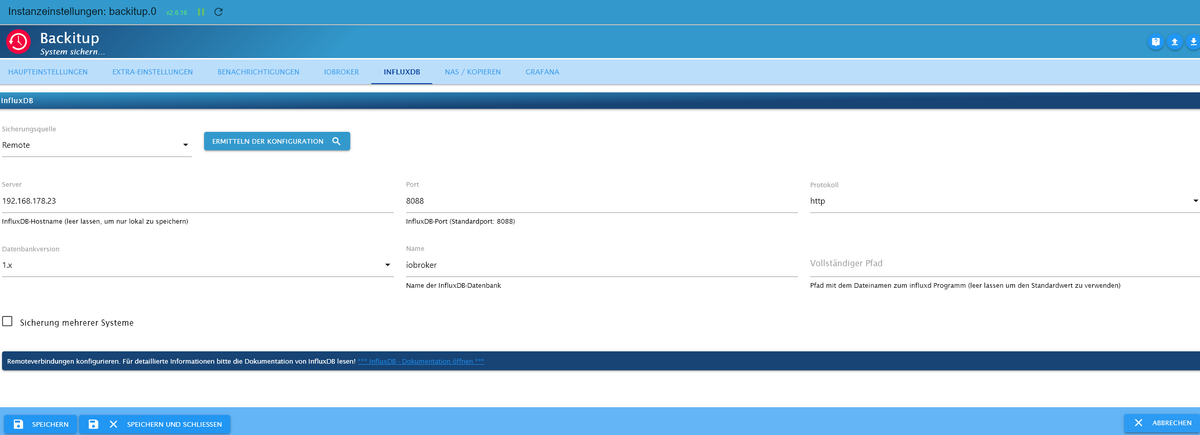
              @marc-berg backup10.png

              Wo/Wie finde ich die influxdb.conf ?

              Marc BergM 2 Replies Last reply
              0
              • Dr.PieD Dr.Pie

                @marc-berg backup10.png

                Wo/Wie finde ich die influxdb.conf ?

                Marc BergM Offline
                Marc BergM Offline
                Marc Berg
                Most Active
                wrote on last edited by
                #11

                @dr-pie sagte in Backup hält an bzw Fehlermeldungen erscheinen.:

                Wo/Wie finde ich die influxdb.conf ?

                wahrscheinlich unter /etc/influxdb

                NUC10I3+Ubuntu+Docker+ioBroker+influxDB2+Node Red+EMQX+Grafana

                Pi-hole, Traefik, Checkmk, Conbee II+Zigbee2MQTT, ESPSomfy-RTS, LoRaWAN, Arduino, KiCad

                Benutzt das Voting im Beitrag, wenn er euch geholfen hat.

                Dr.PieD Marc BergM 2 Replies Last reply
                0
                • Dr.PieD Dr.Pie

                  @marc-berg backup10.png

                  Wo/Wie finde ich die influxdb.conf ?

                  Marc BergM Offline
                  Marc BergM Offline
                  Marc Berg
                  Most Active
                  wrote on last edited by
                  #12

                  @dr-pie
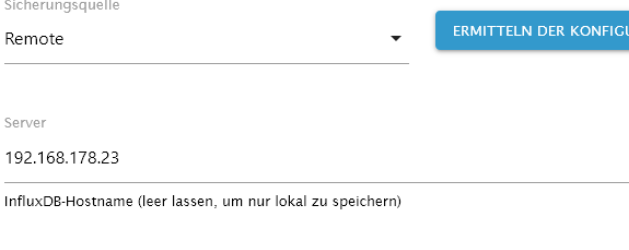
                  Warum hast Du "Remote" ausgewählt?
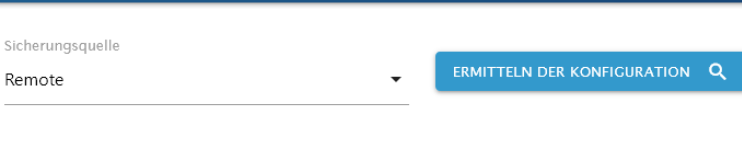
                  a3cf6fa7-c0e0-4e5a-a81e-2615fe24d545-grafik.png

                  NUC10I3+Ubuntu+Docker+ioBroker+influxDB2+Node Red+EMQX+Grafana

                  Pi-hole, Traefik, Checkmk, Conbee II+Zigbee2MQTT, ESPSomfy-RTS, LoRaWAN, Arduino, KiCad

                  Benutzt das Voting im Beitrag, wenn er euch geholfen hat.

                  1 Reply Last reply
                  0
                  • Marc BergM Marc Berg

                    @dr-pie sagte in Backup hält an bzw Fehlermeldungen erscheinen.:

                    Wo/Wie finde ich die influxdb.conf ?

                    wahrscheinlich unter /etc/influxdb

                    Dr.PieD Offline
                    Dr.PieD Offline
                    Dr.Pie
                    wrote on last edited by Dr.Pie
                    #13

                    wahrscheinlich unter /etc/influxdb

                    Wie komme dort hin ?
                    Mit Putty ?

                    Warum hast Du "Remote" ausgewählt?

                    Das ist eine gute Frage.
                    Das System ist schon lange so wie es ist ... keine Ahnung ... kommt sicher aus Unwissenheit .

                    CodierknechtC 1 Reply Last reply
                    0
                    • Marc BergM Offline
                      Marc BergM Offline
                      Marc Berg
                      Most Active
                      wrote on last edited by Marc Berg
                      #14

                      @dr-pie
                      Stell mal auf "lokal"

                      3fd249be-352d-4b08-80df-c405ac71021b-grafik.png

                      NUC10I3+Ubuntu+Docker+ioBroker+influxDB2+Node Red+EMQX+Grafana

                      Pi-hole, Traefik, Checkmk, Conbee II+Zigbee2MQTT, ESPSomfy-RTS, LoRaWAN, Arduino, KiCad

                      Benutzt das Voting im Beitrag, wenn er euch geholfen hat.

                      Marc BergM 1 Reply Last reply
                      0
                      • Dr.PieD Dr.Pie

                        wahrscheinlich unter /etc/influxdb

                        Wie komme dort hin ?
                        Mit Putty ?

                        Warum hast Du "Remote" ausgewählt?

                        Das ist eine gute Frage.
                        Das System ist schon lange so wie es ist ... keine Ahnung ... kommt sicher aus Unwissenheit .

                        CodierknechtC Online
                        CodierknechtC Online
                        Codierknecht
                        Developer Most Active
                        wrote on last edited by
                        #15

                        @dr-pie sagte in Backup hält an bzw Fehlermeldungen erscheinen.:

                        Wie komme dort hin ?
                        Mit Putty ?

                        Oder PowerShell ...
                        https://www.heise.de/tipps-tricks/SSH-unter-Windows-10-nutzen-4224757.html

                        "Any fool can write code that a computer can understand. Good programmers write code that humans can understand." (Martin Fowler, "Refactoring")

                        Proxmox 9.1.1 LXC|8 GB|Core i7-6700
                        HmIP|ZigBee|Tasmota|Unifi
                        Zabbix Certified Specialist
                        Konnte ich Dir helfen? Dann benutze bitte das Voting unten rechts im Beitrag

                        1 Reply Last reply
                        1
                        • Marc BergM Marc Berg

                          @dr-pie sagte in Backup hält an bzw Fehlermeldungen erscheinen.:

                          Wo/Wie finde ich die influxdb.conf ?

                          wahrscheinlich unter /etc/influxdb

                          Marc BergM Offline
                          Marc BergM Offline
                          Marc Berg
                          Most Active
                          wrote on last edited by
                          #16

                          @marc-berg sagte in Backup hält an bzw Fehlermeldungen erscheinen.:

                          @dr-pie sagte in Backup hält an bzw Fehlermeldungen erscheinen.:

                          Wo/Wie finde ich die influxdb.conf ?

                          wahrscheinlich unter /etc/influxdb

                          ist jetzt aber nicht so wichtig, wenn du nicht weißt, wie du dahin kommst.

                          NUC10I3+Ubuntu+Docker+ioBroker+influxDB2+Node Red+EMQX+Grafana

                          Pi-hole, Traefik, Checkmk, Conbee II+Zigbee2MQTT, ESPSomfy-RTS, LoRaWAN, Arduino, KiCad

                          Benutzt das Voting im Beitrag, wenn er euch geholfen hat.

                          Dr.PieD 1 Reply Last reply
                          1
                          • Marc BergM Marc Berg

                            @marc-berg sagte in Backup hält an bzw Fehlermeldungen erscheinen.:

                            @dr-pie sagte in Backup hält an bzw Fehlermeldungen erscheinen.:

                            Wo/Wie finde ich die influxdb.conf ?

                            wahrscheinlich unter /etc/influxdb

                            ist jetzt aber nicht so wichtig, wenn du nicht weißt, wie du dahin kommst.

                            Dr.PieD Offline
                            Dr.PieD Offline
                            Dr.Pie
                            wrote on last edited by
                            #17

                            @marc-berg

                            pi@raspberrypi:~ $ ls -a
                            .   .bash_history  .bashrc    .cache   Desktop    Downloads  .local  .npm    Pictures  .pp_backup  Public     Videos       .xsession-errors
                            ..  .bash_logout   Bookshelf  .config  Documents  .iobroker  Music   .npmrc  .pki      .profile    Templates  .Xauthority  .xsession-errors.old


                            das Verzeichnis scheint nicht zu existieren

                            Marc BergM 1 Reply Last reply
                            0
                            • Dr.PieD Dr.Pie

                              @marc-berg

                              pi@raspberrypi:~ $ ls -a
                              .   .bash_history  .bashrc    .cache   Desktop    Downloads  .local  .npm    Pictures  .pp_backup  Public     Videos       .xsession-errors
                              ..  .bash_logout   Bookshelf  .config  Documents  .iobroker  Music   .npmrc  .pki      .profile    Templates  .Xauthority  .xsession-errors.old


                              das Verzeichnis scheint nicht zu existieren

                              Marc BergM Offline
                              Marc BergM Offline
                              Marc Berg
                              Most Active
                              wrote on last edited by
                              #18

                              @dr-pie sagte in Backup hält an bzw Fehlermeldungen erscheinen.:

                              @marc-berg

                              pi@raspberrypi:~ $ ls -a
                              .   .bash_history  .bashrc    .cache   Desktop    Downloads  .local  .npm    Pictures  .pp_backup  Public     Videos       .xsession-errors
                              ..  .bash_logout   Bookshelf  .config  Documents  .iobroker  Music   .npmrc  .pki      .profile    Templates  .Xauthority  .xsession-errors.old


                              das Verzeichnis scheint nicht zu existieren

                              ne, da bist du falsch. Ist jetzt nicht schlimm.

                              NUC10I3+Ubuntu+Docker+ioBroker+influxDB2+Node Red+EMQX+Grafana

                              Pi-hole, Traefik, Checkmk, Conbee II+Zigbee2MQTT, ESPSomfy-RTS, LoRaWAN, Arduino, KiCad

                              Benutzt das Voting im Beitrag, wenn er euch geholfen hat.

                              1 Reply Last reply
                              0
                              • Marc BergM Marc Berg

                                @dr-pie
                                Stell mal auf "lokal"

                                3fd249be-352d-4b08-80df-c405ac71021b-grafik.png

                                Marc BergM Offline
                                Marc BergM Offline
                                Marc Berg
                                Most Active
                                wrote on last edited by
                                #19

                                @marc-berg sagte in Backup hält an bzw Fehlermeldungen erscheinen.:

                                Entscheidend wäre das jetzt hier:

                                @dr-pie
                                Stell mal auf "lokal"

                                3fd249be-352d-4b08-80df-c405ac71021b-grafik.png

                                NUC10I3+Ubuntu+Docker+ioBroker+influxDB2+Node Red+EMQX+Grafana

                                Pi-hole, Traefik, Checkmk, Conbee II+Zigbee2MQTT, ESPSomfy-RTS, LoRaWAN, Arduino, KiCad

                                Benutzt das Voting im Beitrag, wenn er euch geholfen hat.

                                1 Reply Last reply
                                0
                                • Dr.PieD Dr.Pie

                                  @marc-berg ja ... läuft alles auf dem RaspPi

                                  simatecS Online
                                  simatecS Online
                                  simatec
                                  Developer Most Active
                                  wrote on last edited by
                                  #20

                                  @dr-pie sagte in Backup hält an bzw Fehlermeldungen erscheinen.:

                                  @marc-berg ja ... läuft alles auf dem RaspPi

                                  Dann stelle in Backitup bitte im Tab InfluxDB von Remote auf Lokal

                                  • Besuche meine Github Seite
                                  • Beitrag hat geholfen oder willst du mich unterstützen
                                  • HowTo Restore ioBroker
                                  Dr.PieD 1 Reply Last reply
                                  0
                                  • simatecS simatec

                                    @dr-pie sagte in Backup hält an bzw Fehlermeldungen erscheinen.:

                                    @marc-berg ja ... läuft alles auf dem RaspPi

                                    Dann stelle in Backitup bitte im Tab InfluxDB von Remote auf Lokal

                                    Dr.PieD Offline
                                    Dr.PieD Offline
                                    Dr.Pie
                                    wrote on last edited by
                                    #21

                                    Dann stelle in Backitup bitte im Tab InfluxDB von Remote auf Lokal

                                    So scheint es wohl zu funktionieren.

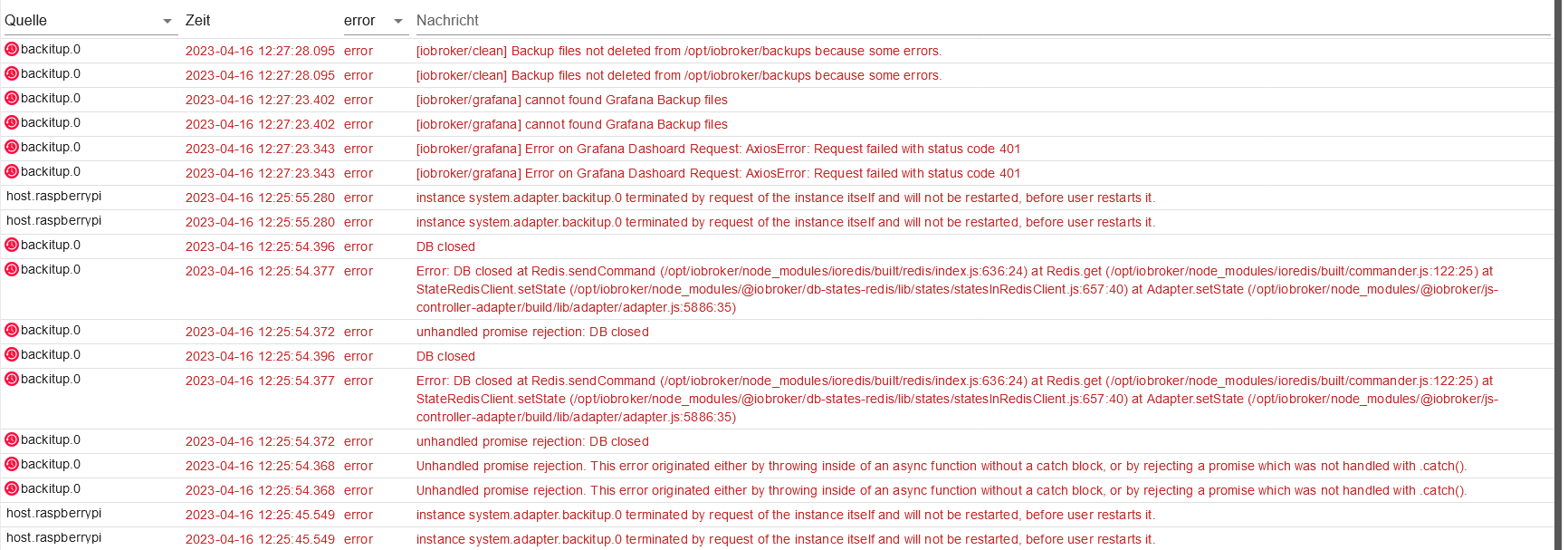
                                    backup11.png

                                    Obwohl der sich wahrscheinlich kurz aufgehangen hatte:
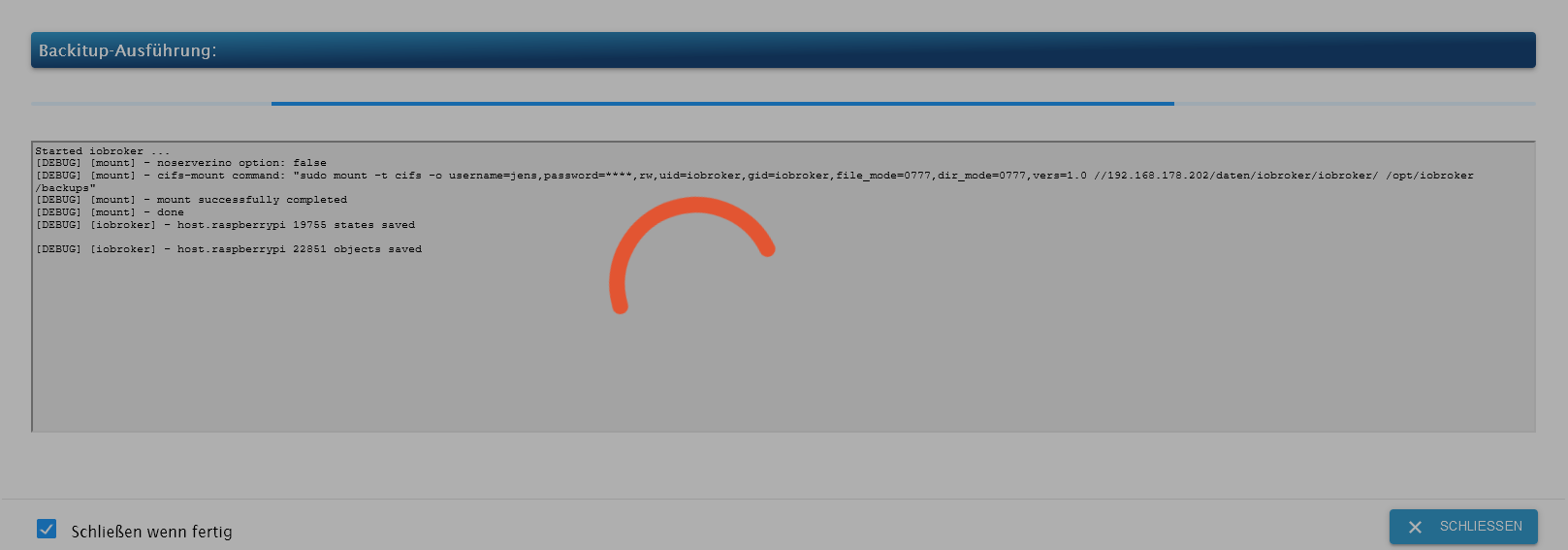
                                    backup12.png

                                    simatecS 1 Reply Last reply
                                    0
                                    • Dr.PieD Dr.Pie

                                      Dann stelle in Backitup bitte im Tab InfluxDB von Remote auf Lokal

                                      So scheint es wohl zu funktionieren.
                                      backup11.png

                                      Obwohl der sich wahrscheinlich kurz aufgehangen hatte:
                                      backup12.png

                                      simatecS Online
                                      simatecS Online
                                      simatec
                                      Developer Most Active
                                      wrote on last edited by
                                      #22

                                      @dr-pie dann geht dir wohl der RAM aus

                                      • Besuche meine Github Seite
                                      • Beitrag hat geholfen oder willst du mich unterstützen
                                      • HowTo Restore ioBroker
                                      Dr.PieD 1 Reply Last reply
                                      0
                                      • simatecS simatec

                                        @dr-pie dann geht dir wohl der RAM aus

                                        Dr.PieD Offline
                                        Dr.PieD Offline
                                        Dr.Pie
                                        wrote on last edited by
                                        #23

                                        @simatec Ich wollte schon seit langer Zeit auf einen Pi mit mehr Ram umsteigen.
                                        Der ist aber derzeit nicht bezahlbar.
                                        Ich habe noch eine Synology 1019+ auf der auch iobroker läuft.
                                        Dort bekomme ich aber Grafana nicht zum laufen... ein Teufelskreis.

                                        CodierknechtC 1 Reply Last reply
                                        0
                                        • Dr.PieD Dr.Pie

                                          @simatec Ich wollte schon seit langer Zeit auf einen Pi mit mehr Ram umsteigen.
                                          Der ist aber derzeit nicht bezahlbar.
                                          Ich habe noch eine Synology 1019+ auf der auch iobroker läuft.
                                          Dort bekomme ich aber Grafana nicht zum laufen... ein Teufelskreis.

                                          CodierknechtC Online
                                          CodierknechtC Online
                                          Codierknecht
                                          Developer Most Active
                                          wrote on last edited by
                                          #24

                                          @dr-pie sagte in Backup hält an bzw Fehlermeldungen erscheinen.:

                                          Ich habe noch eine Synology 1019+

                                          Wie ist die ausgestattet?

                                          Dort bekomme ich aber Grafana nicht zum laufen

                                          Läuft bei mir als Container out-of-the-box ... völlig problemlos.

                                          "Any fool can write code that a computer can understand. Good programmers write code that humans can understand." (Martin Fowler, "Refactoring")

                                          Proxmox 9.1.1 LXC|8 GB|Core i7-6700
                                          HmIP|ZigBee|Tasmota|Unifi
                                          Zabbix Certified Specialist
                                          Konnte ich Dir helfen? Dann benutze bitte das Voting unten rechts im Beitrag

                                          Dr.PieD 1 Reply Last reply
                                          0
                                          Reply
                                          • Reply as topic
                                          Log in to reply
                                          • Oldest to Newest
                                          • Newest to Oldest
                                          • Most Votes


                                          Support us

                                          ioBroker
                                          Community Adapters
                                          Donate
                                          FAQ Cloud / IOT
                                          HowTo: Node.js-Update
                                          HowTo: Backup/Restore
                                          Downloads
                                          BLOG

                                          267

                                          Online

                                          32.7k

                                          Users

                                          82.3k

                                          Topics

                                          1.3m

                                          Posts
                                          Community
                                          Impressum | Datenschutz-Bestimmungen | Nutzungsbedingungen | Einwilligungseinstellungen
                                          ioBroker Community 2014-2025
                                          logo
                                          • Login

                                          • Don't have an account? Register

                                          • Login or register to search.
                                          • First post
                                            Last post
                                          0
                                          • Home
                                          • Recent
                                          • Tags
                                          • Unread 0
                                          • Categories
                                          • Unreplied
                                          • Popular
                                          • GitHub
                                          • Docu
                                          • Hilfe