




Backup hält an bzw Fehlermeldungen erscheinen.
-
@simatec Das mit dem Port hatte ich zuerst auch mit 8088 probiert.
Da kam dann "Verbindung testen" das hier:
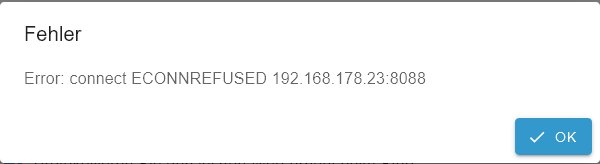
@dr-pie Port 8088 nur in Backitup nicht im Influx Adapter. Da bleibt 8086
-
@simatec da scheint das Backup einfach anzuhalten.
Das Fenster muss ich dann per Hand schließen.
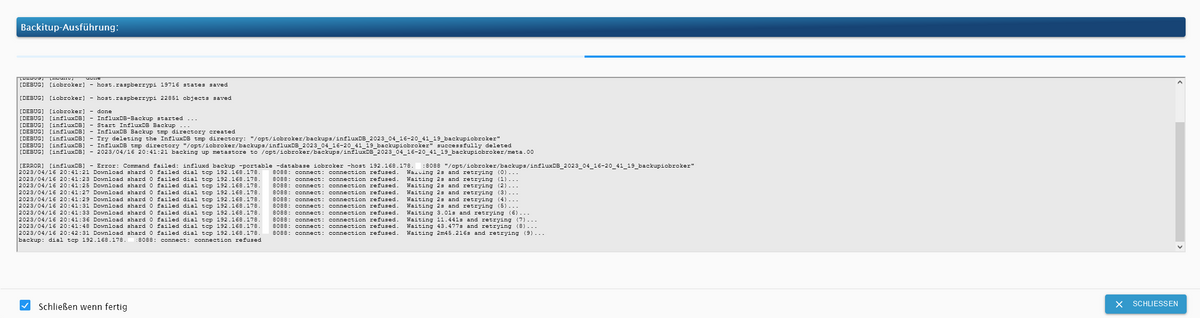
Started iobroker ... [DEBUG] [mount] - noserverino option: false [DEBUG] [mount] - cifs-mount command: "sudo mount -t cifs -o username=jens,password=****,rw,uid=iobroker,gid=iobroker,file_mode=0777,dir_mode=0777,vers=1.0 //192.168.178.xxx/xxx/iobroker/iobroker/ /opt/iobroker/backups" [DEBUG] [mount] - first mount attempt with smb option failed. try next mount attempt without smb option ... [DEBUG] [mount] - cifs-mount command: "sudo mount -t cifs -o username=jens,password=****,rw,uid=iobroker,gid=iobroker,file_mode=0777,dir_mode=0777 //192.168.178.xxx/xxx/iobroker/iobroker/ /opt/iobroker/backups" [DEBUG] [mount] - mount successfully completed [DEBUG] [mount] - done [DEBUG] [iobroker] - host.raspberrypi 19716 states saved [DEBUG] [iobroker] - host.raspberrypi 22851 objects saved [DEBUG] [iobroker] - done [DEBUG] [influxDB] - InfluxDB-Backup started ... [DEBUG] [influxDB] - Start InfluxDB Backup ... [DEBUG] [influxDB] - InfluxDB Backup tmp directory created [DEBUG] [influxDB] - Try deleting the InfluxDB tmp directory: "/opt/iobroker/backups/influxDB_2023_04_16-20_41_19_backupiobroker" [DEBUG] [influxDB] - InfluxDB tmp directory "/opt/iobroker/backups/influxDB_2023_04_16-20_41_19_backupiobroker" successfully deleted [DEBUG] [influxDB] - 2023/04/16 20:41:21 backing up metastore to /opt/iobroker/backups/influxDB_2023_04_16-20_41_19_backupiobroker/meta.00 [ERROR] [influxDB] - Error: Command failed: influxd backup -portable -database iobroker -host 192.168.178.xxx:8088 "/opt/iobroker/backups/influxDB_2023_04_16-20_41_19_backupiobroker" 2023/04/16 20:41:21 Download shard 0 failed dial tcp 192.168.178.xxx:8088: connect: connection refused. Waiting 2s and retrying (0)... 2023/04/16 20:41:23 Download shard 0 failed dial tcp 192.168.178.xxx:8088: connect: connection refused. Waiting 2s and retrying (1)... 2023/04/16 20:41:25 Download shard 0 failed dial tcp 192.168.178.xxx:8088: connect: connection refused. Waiting 2s and retrying (2)... 2023/04/16 20:41:27 Download shard 0 failed dial tcp 192.168.178.xxx:8088: connect: connection refused. Waiting 2s and retrying (3)... 2023/04/16 20:41:29 Download shard 0 failed dial tcp 192.168.178.xxx:8088: connect: connection refused. Waiting 2s and retrying (4)... 2023/04/16 20:41:31 Download shard 0 failed dial tcp 192.168.178.xxx:8088: connect: connection refused. Waiting 2s and retrying (5)... 2023/04/16 20:41:33 Download shard 0 failed dial tcp 192.168.178.xxx:8088: connect: connection refused. Waiting 3.01s and retrying (6)... 2023/04/16 20:41:36 Download shard 0 failed dial tcp 192.168.178.xxx:8088: connect: connection refused. Waiting 11.441s and retrying (7)... 2023/04/16 20:41:48 Download shard 0 failed dial tcp 192.168.178.xxx:8088: connect: connection refused. Waiting 43.477s and retrying (8)... 2023/04/16 20:42:31 Download shard 0 failed dial tcp 192.168.178.xxx:8088: connect: connection refused. Waiting 2m45.216s and retrying (9)... backup: dial tcp 192.168.178.xxx:8088: connect: connection refused -
@simatec da scheint das Backup einfach anzuhalten.
Das Fenster muss ich dann per Hand schließen.
Started iobroker ... [DEBUG] [mount] - noserverino option: false [DEBUG] [mount] - cifs-mount command: "sudo mount -t cifs -o username=jens,password=****,rw,uid=iobroker,gid=iobroker,file_mode=0777,dir_mode=0777,vers=1.0 //192.168.178.xxx/xxx/iobroker/iobroker/ /opt/iobroker/backups" [DEBUG] [mount] - first mount attempt with smb option failed. try next mount attempt without smb option ... [DEBUG] [mount] - cifs-mount command: "sudo mount -t cifs -o username=jens,password=****,rw,uid=iobroker,gid=iobroker,file_mode=0777,dir_mode=0777 //192.168.178.xxx/xxx/iobroker/iobroker/ /opt/iobroker/backups" [DEBUG] [mount] - mount successfully completed [DEBUG] [mount] - done [DEBUG] [iobroker] - host.raspberrypi 19716 states saved [DEBUG] [iobroker] - host.raspberrypi 22851 objects saved [DEBUG] [iobroker] - done [DEBUG] [influxDB] - InfluxDB-Backup started ... [DEBUG] [influxDB] - Start InfluxDB Backup ... [DEBUG] [influxDB] - InfluxDB Backup tmp directory created [DEBUG] [influxDB] - Try deleting the InfluxDB tmp directory: "/opt/iobroker/backups/influxDB_2023_04_16-20_41_19_backupiobroker" [DEBUG] [influxDB] - InfluxDB tmp directory "/opt/iobroker/backups/influxDB_2023_04_16-20_41_19_backupiobroker" successfully deleted [DEBUG] [influxDB] - 2023/04/16 20:41:21 backing up metastore to /opt/iobroker/backups/influxDB_2023_04_16-20_41_19_backupiobroker/meta.00 [ERROR] [influxDB] - Error: Command failed: influxd backup -portable -database iobroker -host 192.168.178.xxx:8088 "/opt/iobroker/backups/influxDB_2023_04_16-20_41_19_backupiobroker" 2023/04/16 20:41:21 Download shard 0 failed dial tcp 192.168.178.xxx:8088: connect: connection refused. Waiting 2s and retrying (0)... 2023/04/16 20:41:23 Download shard 0 failed dial tcp 192.168.178.xxx:8088: connect: connection refused. Waiting 2s and retrying (1)... 2023/04/16 20:41:25 Download shard 0 failed dial tcp 192.168.178.xxx:8088: connect: connection refused. Waiting 2s and retrying (2)... 2023/04/16 20:41:27 Download shard 0 failed dial tcp 192.168.178.xxx:8088: connect: connection refused. Waiting 2s and retrying (3)... 2023/04/16 20:41:29 Download shard 0 failed dial tcp 192.168.178.xxx:8088: connect: connection refused. Waiting 2s and retrying (4)... 2023/04/16 20:41:31 Download shard 0 failed dial tcp 192.168.178.xxx:8088: connect: connection refused. Waiting 2s and retrying (5)... 2023/04/16 20:41:33 Download shard 0 failed dial tcp 192.168.178.xxx:8088: connect: connection refused. Waiting 3.01s and retrying (6)... 2023/04/16 20:41:36 Download shard 0 failed dial tcp 192.168.178.xxx:8088: connect: connection refused. Waiting 11.441s and retrying (7)... 2023/04/16 20:41:48 Download shard 0 failed dial tcp 192.168.178.xxx:8088: connect: connection refused. Waiting 43.477s and retrying (8)... 2023/04/16 20:42:31 Download shard 0 failed dial tcp 192.168.178.xxx:8088: connect: connection refused. Waiting 2m45.216s and retrying (9)... backup: dial tcp 192.168.178.xxx:8088: connect: connection refused@dr-pie sagte in Backup hält an bzw Fehlermeldungen erscheinen.:
@simatec da scheint das Backup einfach anzuhalten.
Das Fenster muss ich dann per Hand schließen.
Läuft iobroker und die influxdb auf dem selben Host?
NUC10I3+Ubuntu+Docker+ioBroker+influxDB2+Node Red+EMQX+Grafana
Pi-hole, Traefik, Checkmk, Conbee II+Zigbee2MQTT, ESPSomfy-RTS, LoRaWAN
Benutzt das Voting im Beitrag, wenn er euch geholfen hat.
-
@dr-pie sagte in Backup hält an bzw Fehlermeldungen erscheinen.:
@simatec da scheint das Backup einfach anzuhalten.
Das Fenster muss ich dann per Hand schließen.
Läuft iobroker und die influxdb auf dem selben Host?
@marc-berg ja ... läuft alles auf dem RaspPi
-
@marc-berg ja ... läuft alles auf dem RaspPi
@dr-pie sagte in Backup hält an bzw Fehlermeldungen erscheinen.:
@marc-berg ja ... läuft alles auf dem RaspPi
zeig mal bitte die Influxdb Config des Backitup Adapters und die influxdb.conf.
Und keine internen IP-Adressen weg x en
NUC10I3+Ubuntu+Docker+ioBroker+influxDB2+Node Red+EMQX+Grafana
Pi-hole, Traefik, Checkmk, Conbee II+Zigbee2MQTT, ESPSomfy-RTS, LoRaWAN
Benutzt das Voting im Beitrag, wenn er euch geholfen hat.
-
@dr-pie sagte in Backup hält an bzw Fehlermeldungen erscheinen.:
@marc-berg ja ... läuft alles auf dem RaspPi
zeig mal bitte die Influxdb Config des Backitup Adapters und die influxdb.conf.
Und keine internen IP-Adressen weg x en
Wo/Wie finde ich die influxdb.conf ?
-
Wo/Wie finde ich die influxdb.conf ?
@dr-pie sagte in Backup hält an bzw Fehlermeldungen erscheinen.:
Wo/Wie finde ich die influxdb.conf ?
wahrscheinlich unter /etc/influxdb
NUC10I3+Ubuntu+Docker+ioBroker+influxDB2+Node Red+EMQX+Grafana
Pi-hole, Traefik, Checkmk, Conbee II+Zigbee2MQTT, ESPSomfy-RTS, LoRaWAN
Benutzt das Voting im Beitrag, wenn er euch geholfen hat.
-
Wo/Wie finde ich die influxdb.conf ?
@dr-pie
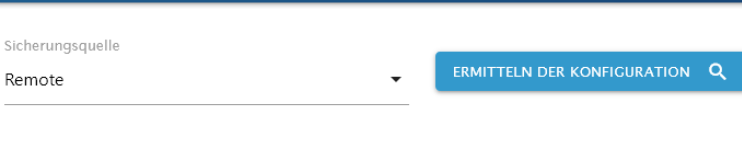
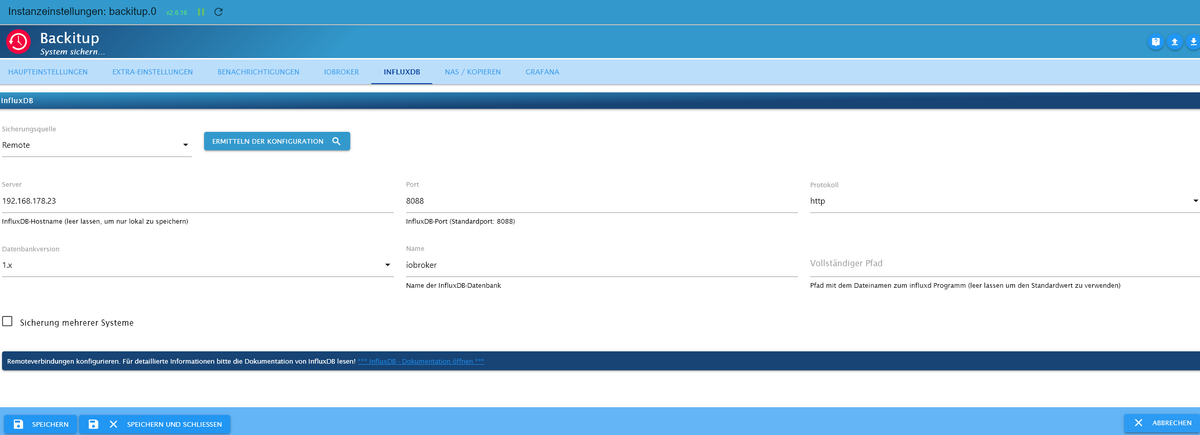
Warum hast Du "Remote" ausgewählt?
-
@dr-pie sagte in Backup hält an bzw Fehlermeldungen erscheinen.:
Wo/Wie finde ich die influxdb.conf ?
wahrscheinlich unter /etc/influxdb
wahrscheinlich unter /etc/influxdb
Wie komme dort hin ?
Mit Putty ?Warum hast Du "Remote" ausgewählt?
Das ist eine gute Frage.
Das System ist schon lange so wie es ist ... keine Ahnung ... kommt sicher aus Unwissenheit . -
@dr-pie
Stell mal auf "lokal"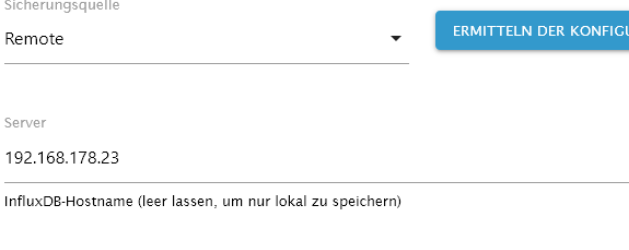
NUC10I3+Ubuntu+Docker+ioBroker+influxDB2+Node Red+EMQX+Grafana
Pi-hole, Traefik, Checkmk, Conbee II+Zigbee2MQTT, ESPSomfy-RTS, LoRaWAN
Benutzt das Voting im Beitrag, wenn er euch geholfen hat.
-
wahrscheinlich unter /etc/influxdb
Wie komme dort hin ?
Mit Putty ?Warum hast Du "Remote" ausgewählt?
Das ist eine gute Frage.
Das System ist schon lange so wie es ist ... keine Ahnung ... kommt sicher aus Unwissenheit .@dr-pie sagte in Backup hält an bzw Fehlermeldungen erscheinen.:
Wie komme dort hin ?
Mit Putty ?Oder PowerShell ...
https://www.heise.de/tipps-tricks/SSH-unter-Windows-10-nutzen-4224757.html -
@dr-pie sagte in Backup hält an bzw Fehlermeldungen erscheinen.:
Wo/Wie finde ich die influxdb.conf ?
wahrscheinlich unter /etc/influxdb
@marc-berg sagte in Backup hält an bzw Fehlermeldungen erscheinen.:
@dr-pie sagte in Backup hält an bzw Fehlermeldungen erscheinen.:
Wo/Wie finde ich die influxdb.conf ?
wahrscheinlich unter /etc/influxdb
ist jetzt aber nicht so wichtig, wenn du nicht weißt, wie du dahin kommst.
NUC10I3+Ubuntu+Docker+ioBroker+influxDB2+Node Red+EMQX+Grafana
Pi-hole, Traefik, Checkmk, Conbee II+Zigbee2MQTT, ESPSomfy-RTS, LoRaWAN
Benutzt das Voting im Beitrag, wenn er euch geholfen hat.
-
@marc-berg sagte in Backup hält an bzw Fehlermeldungen erscheinen.:
@dr-pie sagte in Backup hält an bzw Fehlermeldungen erscheinen.:
Wo/Wie finde ich die influxdb.conf ?
wahrscheinlich unter /etc/influxdb
ist jetzt aber nicht so wichtig, wenn du nicht weißt, wie du dahin kommst.
pi@raspberrypi:~ $ ls -a
.   .bash_history  .bashrc    .cache   Desktop    Downloads  .local  .npm    Pictures  .pp_backup  Public     Videos       .xsession-errors
..  .bash_logout   Bookshelf  .config  Documents  .iobroker  Music   .npmrc  .pki      .profile    Templates  .Xauthority  .xsession-errors.old
das Verzeichnis scheint nicht zu existieren
-
pi@raspberrypi:~ $ ls -a
.   .bash_history  .bashrc    .cache   Desktop    Downloads  .local  .npm    Pictures  .pp_backup  Public     Videos       .xsession-errors
..  .bash_logout   Bookshelf  .config  Documents  .iobroker  Music   .npmrc  .pki      .profile    Templates  .Xauthority  .xsession-errors.old
das Verzeichnis scheint nicht zu existieren
@dr-pie sagte in Backup hält an bzw Fehlermeldungen erscheinen.:
pi@raspberrypi:~ $ ls -a
.   .bash_history  .bashrc    .cache   Desktop    Downloads  .local  .npm    Pictures  .pp_backup  Public     Videos       .xsession-errors
..  .bash_logout   Bookshelf  .config  Documents  .iobroker  Music   .npmrc  .pki      .profile    Templates  .Xauthority  .xsession-errors.old
das Verzeichnis scheint nicht zu existieren
ne, da bist du falsch. Ist jetzt nicht schlimm.
-
@marc-berg sagte in Backup hält an bzw Fehlermeldungen erscheinen.:
Entscheidend wäre das jetzt hier:
@dr-pie
Stell mal auf "lokal" -
@marc-berg ja ... läuft alles auf dem RaspPi
@dr-pie sagte in Backup hält an bzw Fehlermeldungen erscheinen.:
@marc-berg ja ... läuft alles auf dem RaspPi
Dann stelle in Backitup bitte im Tab InfluxDB von Remote auf Lokal
-
@dr-pie sagte in Backup hält an bzw Fehlermeldungen erscheinen.:
@marc-berg ja ... läuft alles auf dem RaspPi
Dann stelle in Backitup bitte im Tab InfluxDB von Remote auf Lokal
-
Dann stelle in Backitup bitte im Tab InfluxDB von Remote auf Lokal
So scheint es wohl zu funktionieren.

Obwohl der sich wahrscheinlich kurz aufgehangen hatte:
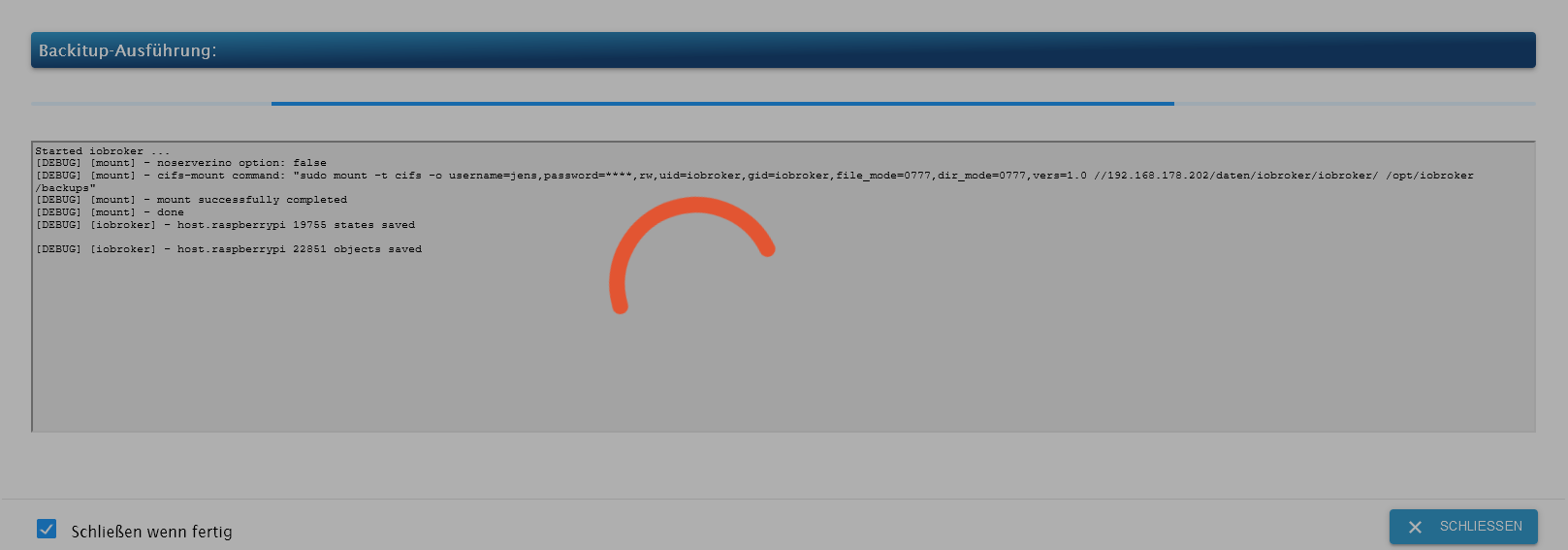
@dr-pie dann geht dir wohl der RAM aus
-
@simatec Ich wollte schon seit langer Zeit auf einen Pi mit mehr Ram umsteigen.
Der ist aber derzeit nicht bezahlbar.
Ich habe noch eine Synology 1019+ auf der auch iobroker läuft.
Dort bekomme ich aber Grafana nicht zum laufen... ein Teufelskreis. -
@simatec Ich wollte schon seit langer Zeit auf einen Pi mit mehr Ram umsteigen.
Der ist aber derzeit nicht bezahlbar.
Ich habe noch eine Synology 1019+ auf der auch iobroker läuft.
Dort bekomme ich aber Grafana nicht zum laufen... ein Teufelskreis.@dr-pie sagte in Backup hält an bzw Fehlermeldungen erscheinen.:
Ich habe noch eine Synology 1019+
Wie ist die ausgestattet?
Dort bekomme ich aber Grafana nicht zum laufen
Läuft bei mir als Container out-of-the-box ... völlig problemlos.
"Any fool can write code that a computer can understand. Good programmers write code that humans can understand." (Martin Fowler, "Refactoring")
Proxmox 9.1.1 LXC|8 GB|Core i7-6700
HmIP|ZigBee|Tasmota|Unifi
Zabbix Certified Specialist
Konnte ich Dir helfen? Dann benutze bitte das Voting unten rechts im Beitrag




Hey! Du scheinst an dieser Unterhaltung interessiert zu sein, hast aber noch kein Konto.
Hast du es satt, bei jedem Besuch durch die gleichen Beiträge zu scrollen? Wenn du dich für ein Konto anmeldest, kommst du immer genau dorthin zurück, wo du zuvor warst, und kannst dich über neue Antworten benachrichtigen lassen (entweder per E-Mail oder Push-Benachrichtigung). Du kannst auch Lesezeichen speichern und Beiträge positiv bewerten, um anderen Community-Mitgliedern deine Wertschätzung zu zeigen.
Mit deinem Input könnte dieser Beitrag noch besser werden 💗
Registrieren Anmelden462
Online33.0k
Benutzer83.5k
Themen1.3m
Beiträge