




Speicherbelegung Proxmox
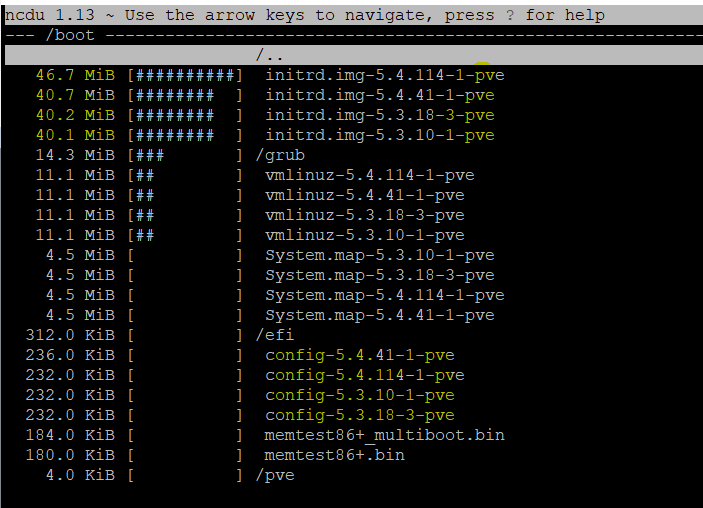
-
@ostfrieseunterwegs
Ja genau irgendwas ist faul. Ich weiß nur nicht wo. Gibt es noch weitere Ideen?
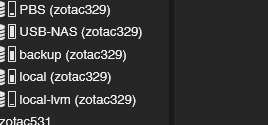
Das die NAS voll ist weiß ich - das macht ja bzgl. der Probleme mit ioBroker Proxmox nichts aus.Schau mal, was da für Storages eingebunden sind.
-
Schau mal, was da für Storages eingebunden sind.
-
@ostfrieseunterwegs
Hm okay dann sieht es lokal ja eigentlich ganz gut aus und nur die NAS ist voll. Erklärt aber immer noch nicht das ioBroke ENOMEM Problem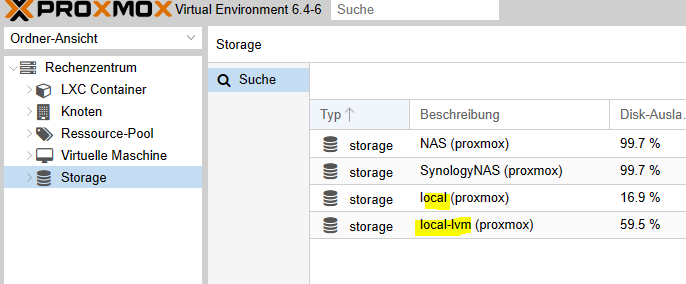
@toki1973
Ja das volle NAS hat möglicherweise nichts mit dem ENOMEM Problem zu tun.
Aber ich dachte du suchtest eine Erklärung für die 98% ??
Auf jeden Fall scheinst Du das NAS doppelt in Proxmox eingebunden zu haben. Daher die 7.2 Tera.
Du musst dich mal durch die Menüs von Proxmox hangeln und schauen, was du auf den beiden Storage Volumes speicherst bzw wo die eingebunden sind. Irgendwelche Backups der VM/Container ? -
@dp20eic Danke für die Geduld!
Ja die NAS ist am Anschlag. Aber warum bekomme ich denn den ENOMEM Fehler? Und warum wir in der Proxmox Oberfläche 98% Speicher angezeigt?
Übrigens hat apt autoremove hat nichts entfernt.
root@proxmox:~# ls -la /mnt/ total 20 drwxr-xr-x 5 root root 4096 Jun 20 2020 . drwxr-xr-x 18 root root 4096 Mar 14 2020 .. drwxr-xr-x 2 root root 4096 Mar 14 2020 hostrun drwxr-xr-x 4 root root 4096 Jul 30 2020 pve drwxr-xr-x 2 root root 4096 Jun 20 2020 vzsnap0 root@proxmox:~#@toki1973 sagte in Speicherbelegung Proxmox:
@dp20eic Danke für die Geduld!
Ja die NAS ist am Anschlag. Aber warum bekomme ich denn den ENOMEM Fehler? Und warum wir in der Proxmox Oberfläche 98% Speicher angezeigt?
Übrigens hat apt autoremove hat nichts entfernt.
root@proxmox:~# ls -la /mnt/
total 20
drwxr-xr-x  5 root root 4096 Jun 20  2020 .
drwxr-xr-x 18 root root 4096 Mar 14  2020 ..
drwxr-xr-x  2 root root 4096 Mar 14  2020 hostrun
drwxr-xr-x  4 root root 4096 Jul 30  2020 pve
drwxr-xr-x  2 root root 4096 Jun 20  2020 vzsnap0
root@proxmox:~#
Moin,
mach es Dir doch nicht so schwer! Du hast alle Befehle schon, Du musst sie nur noch richtig anwenden :)
Geh doch mal tiefer in die Verzeichnisse und schau wo, es kneift.
root@proxmox:~# ncdu /mnt

ls -la /mnt/*
Hör auf etwas Löschen zu wollen, wenn Du noch nicht mal weißt, was klemmt, finde doch erstmal raus was vorgeht, um dann dafür eine Lösung zu suchen.
Wie @OstfrieseUnterwegs schon fragte, liegen da Backups, Images etc. und wie er sagte, Du mountest das NAS zweimal.root@proxmox:~# mount | grep -i mntVG
Bernd -
@toki1973 sagte in Speicherbelegung Proxmox:
@dp20eic Danke für die Geduld!
Ja die NAS ist am Anschlag. Aber warum bekomme ich denn den ENOMEM Fehler? Und warum wir in der Proxmox Oberfläche 98% Speicher angezeigt?
Übrigens hat apt autoremove hat nichts entfernt.
root@proxmox:~# ls -la /mnt/
total 20
drwxr-xr-x  5 root root 4096 Jun 20  2020 .
drwxr-xr-x 18 root root 4096 Mar 14  2020 ..
drwxr-xr-x  2 root root 4096 Mar 14  2020 hostrun
drwxr-xr-x  4 root root 4096 Jul 30  2020 pve
drwxr-xr-x  2 root root 4096 Jun 20  2020 vzsnap0
root@proxmox:~#
Moin,
mach es Dir doch nicht so schwer! Du hast alle Befehle schon, Du musst sie nur noch richtig anwenden :)
Geh doch mal tiefer in die Verzeichnisse und schau wo, es kneift.
root@proxmox:~# ncdu /mnt

ls -la /mnt/*
Hör auf etwas Löschen zu wollen, wenn Du noch nicht mal weißt, was klemmt, finde doch erstmal raus was vorgeht, um dann dafür eine Lösung zu suchen.
Wie @OstfrieseUnterwegs schon fragte, liegen da Backups, Images etc. und wie er sagte, Du mountest das NAS zweimal.root@proxmox:~# mount | grep -i mntVG
BerndJa ein Backup liegt da in der proxmox Umgebung von 5,5gb rum wie oben im screeshot gezeigt.
Okay dann schaue ich mal weches NAS mountig ich entfernen kann.Ich habe mal das RAM von 4 auf 6GB für die iobroker VM erhöht. Sieht schon besser aus....
NUC, PROXMOX, Grafana, Influx, Unify
-
Ja ein Backup liegt da in der proxmox Umgebung von 5,5gb rum wie oben im screeshot gezeigt.
Okay dann schaue ich mal weches NAS mountig ich entfernen kann.Ich habe mal das RAM von 4 auf 6GB für die iobroker VM erhöht. Sieht schon besser aus....
@toki1973 sagte in Speicherbelegung Proxmox:
Ja ein Backup liegt da in der proxmox Umgebung von 5,5gb rum wie oben im screeshot gezeigt.
Moin,
das liegt aber nicht da wo das NAS gemountet ist, das liegt unter
/var/lib/vz/dump/
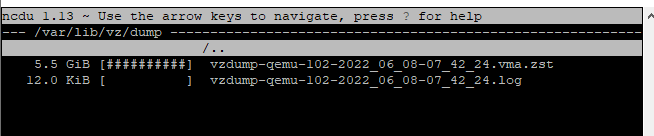
Also das hat nichts mit Deinem Problem unter
/mntzu tun.Du vermischst zwei Probleme, hast Du auch Probleme mit
ioBroker, dann lieber einen eigenen Thread aufmachen, ansonsten weiß man nicht mehr, wo jetzt Hilfe gebraucht wird.
Du redest die ganze Zeit von Speicher (HDD/SDD) und jetzt erweiterst Du RAM in der VM, das ist vielleicht auch wieder nur ein Pflaster, sodass es gerade funktioniert und in ein paar Tagen plötzlich wieder knallt.Wenn Du Dich in der VM anmeldest und als
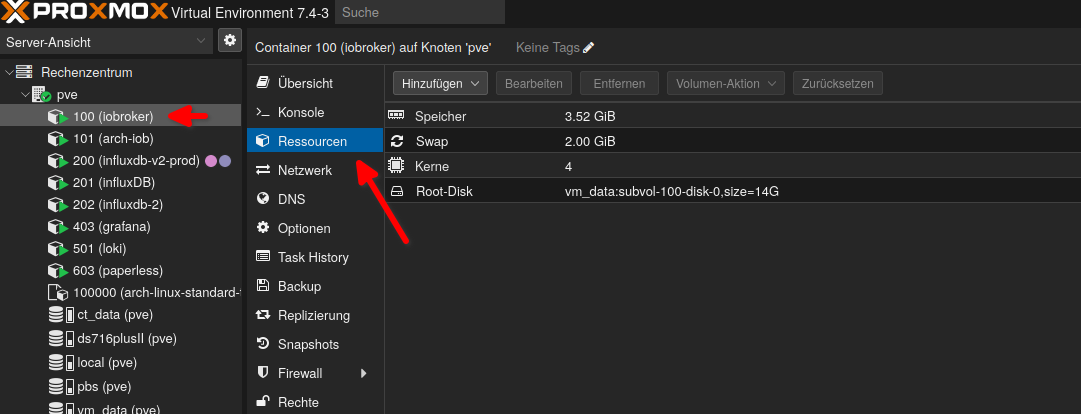
ioBrokerUser, das ausführst, dann mal die lange Ausführung hier rein in Code Tags </>.iobroker@iobroker:/opt/iobroker$ iob diagPoste mal von Deiner Installation etwas mehr Informationen, !!!Achtung!!! ich habe nur LXC Container, sollte aber bei VMs auch nicht anders aussehen, Beispiel:
VG
Bernd -
@toki1973 sagte in Speicherbelegung Proxmox:
Ja ein Backup liegt da in der proxmox Umgebung von 5,5gb rum wie oben im screeshot gezeigt.
Moin,
das liegt aber nicht da wo das NAS gemountet ist, das liegt unter
/var/lib/vz/dump/
Also das hat nichts mit Deinem Problem unter
/mntzu tun.Du vermischst zwei Probleme, hast Du auch Probleme mit
ioBroker, dann lieber einen eigenen Thread aufmachen, ansonsten weiß man nicht mehr, wo jetzt Hilfe gebraucht wird.
Du redest die ganze Zeit von Speicher (HDD/SDD) und jetzt erweiterst Du RAM in der VM, das ist vielleicht auch wieder nur ein Pflaster, sodass es gerade funktioniert und in ein paar Tagen plötzlich wieder knallt.Wenn Du Dich in der VM anmeldest und als
ioBrokerUser, das ausführst, dann mal die lange Ausführung hier rein in Code Tags </>.iobroker@iobroker:/opt/iobroker$ iob diagPoste mal von Deiner Installation etwas mehr Informationen, !!!Achtung!!! ich habe nur LXC Container, sollte aber bei VMs auch nicht anders aussehen, Beispiel:
VG
BerndIch habe in einen anderen Thread das diag schon gepostet und daher geht nun der Verdacht zu den Problemen zum RAM. Ursprünglich dachte ich das des der Diskspace local bei Proxmox oder in der VM das Problem ist. Aber das wurde ja oben schon geklärt.
Die NAS ist voll das weiß ich. Lediglich das monatliche Backup liegt lokal.
NUC, PROXMOX, Grafana, Influx, Unify
-
Ich habe in einen anderen Thread das diag schon gepostet und daher geht nun der Verdacht zu den Problemen zum RAM. Ursprünglich dachte ich das des der Diskspace local bei Proxmox oder in der VM das Problem ist. Aber das wurde ja oben schon geklärt.
Die NAS ist voll das weiß ich. Lediglich das monatliche Backup liegt lokal.
mount | sortjeweils im Host und im iobroker-System sagen?
Ich glaube du hast da irgendwas doppelt hin- und her gemountet. -
Ja ein Backup liegt da in der proxmox Umgebung von 5,5gb rum wie oben im screeshot gezeigt.
Okay dann schaue ich mal weches NAS mountig ich entfernen kann.Ich habe mal das RAM von 4 auf 6GB für die iobroker VM erhöht. Sieht schon besser aus....
-
mount | sortjeweils im Host und im iobroker-System sagen?
Ich glaube du hast da irgendwas doppelt hin- und her gemountet.@thomas-braun said in Speicherbelegung Proxmox:
mount | sort
ioBrkerVM
root@iobrokerNUC1:~# mount | sort
binfmt_misc on /proc/sys/fs/binfmt_misc type binfmt_misc (rw,relatime)
bpf on /sys/fs/bpf type bpf (rw,nosuid,nodev,noexec,relatime,mode=700)
cgroup2 on /sys/fs/cgroup/unified type cgroup2 (rw,nosuid,nodev,noexec,relatime,nsdelegate)
cgroup on /sys/fs/cgroup/blkio type cgroup (rw,nosuid,nodev,noexec,relatime,blkio)
cgroup on /sys/fs/cgroup/cpu,cpuacct type cgroup (rw,nosuid,nodev,noexec,relatime,cpu,cpuacct)
cgroup on /sys/fs/cgroup/cpuset type cgroup (rw,nosuid,nodev,noexec,relatime,cpuset)
cgroup on /sys/fs/cgroup/devices type cgroup (rw,nosuid,nodev,noexec,relatime,devices)
cgroup on /sys/fs/cgroup/freezer type cgroup (rw,nosuid,nodev,noexec,relatime,freezer)
cgroup on /sys/fs/cgroup/memory type cgroup (rw,nosuid,nodev,noexec,relatime,memory)
cgroup on /sys/fs/cgroup/net_cls,net_prio type cgroup (rw,nosuid,nodev,noexec,relatime,net_cls,net_prio)
cgroup on /sys/fs/cgroup/perf_event type cgroup (rw,nosuid,nodev,noexec,relatime,perf_event)
cgroup on /sys/fs/cgroup/pids type cgroup (rw,nosuid,nodev,noexec,relatime,pids)
cgroup on /sys/fs/cgroup/rdma type cgroup (rw,nosuid,nodev,noexec,relatime,rdma)
cgroup on /sys/fs/cgroup/systemd type cgroup (rw,nosuid,nodev,noexec,relatime,xattr,name=systemd)
debugfs on /sys/kernel/debug type debugfs (rw,relatime)
devpts on /dev/pts type devpts (rw,nosuid,noexec,relatime,gid=5,mode=620,ptmxmode=000)
/dev/sda1 on / type ext4 (rw,relatime,errors=remount-ro)
hugetlbfs on /dev/hugepages type hugetlbfs (rw,relatime,pagesize=2M)
mqueue on /dev/mqueue type mqueue (rw,relatime)
proc on /proc type proc (rw,nosuid,nodev,noexec,relatime)
pstore on /sys/fs/pstore type pstore (rw,nosuid,nodev,noexec,relatime)
securityfs on /sys/kernel/security type securityfs (rw,nosuid,nodev,noexec,relatime)
sunrpc on /run/rpc_pipefs type rpc_pipefs (rw,relatime)
sysfs on /sys type sysfs (rw,nosuid,nodev,noexec,relatime)
systemd-1 on /proc/sys/fs/binfmt_misc type autofs (rw,relatime,fd=42,pgrp=1,timeout=0,minproto=5,maxproto=5,direct,pipe_ino=11324)
tmpfs on /dev/shm type tmpfs (rw,nosuid,nodev)
tmpfs on /run/lock type tmpfs (rw,nosuid,nodev,noexec,relatime,size=5120k)
tmpfs on /run type tmpfs (rw,nosuid,noexec,relatime,size=596044k,mode=755)
tmpfs on /run/user/0 type tmpfs (rw,nosuid,nodev,relatime,size=596040k,mode=700)
tmpfs on /sys/fs/cgroup type tmpfs (ro,nosuid,nodev,noexec,mode=755)
tracefs on /sys/kernel/debug/tracing type tracefs (rw,relatime)
udev on /dev type devtmpfs (rw,nosuid,relatime,size=2965348k,nr_inodes=741337,mode=755)
root@iobrokerNUC1:~# mount | sort
binfmt_misc on /proc/sys/fs/binfmt_misc type binfmt_misc (rw,relatime)
bpf on /sys/fs/bpf type bpf (rw,nosuid,nodev,noexec,relatime,mode=700)
cgroup2 on /sys/fs/cgroup/unified type cgroup2 (rw,nosuid,nodev,noexec,relatime,nsdelegate)
cgroup on /sys/fs/cgroup/blkio type cgroup (rw,nosuid,nodev,noexec,relatime,blkio)
cgroup on /sys/fs/cgroup/cpu,cpuacct type cgroup (rw,nosuid,nodev,noexec,relatime,cpu,cpuacct)
cgroup on /sys/fs/cgroup/cpuset type cgroup (rw,nosuid,nodev,noexec,relatime,cpuset)
cgroup on /sys/fs/cgroup/devices type cgroup (rw,nosuid,nodev,noexec,relatime,devices)
cgroup on /sys/fs/cgroup/freezer type cgroup (rw,nosuid,nodev,noexec,relatime,freezer)
cgroup on /sys/fs/cgroup/memory type cgroup (rw,nosuid,nodev,noexec,relatime,memory)
cgroup on /sys/fs/cgroup/net_cls,net_prio type cgroup (rw,nosuid,nodev,noexec,relatime,net_cls,net_prio)
cgroup on /sys/fs/cgroup/perf_event type cgroup (rw,nosuid,nodev,noexec,relatime,perf_event)
cgroup on /sys/fs/cgroup/pids type cgroup (rw,nosuid,nodev,noexec,relatime,pids)
cgroup on /sys/fs/cgroup/rdma type cgroup (rw,nosuid,nodev,noexec,relatime,rdma)
cgroup on /sys/fs/cgroup/systemd type cgroup (rw,nosuid,nodev,noexec,relatime,xattr,name=systemd)
debugfs on /sys/kernel/debug type debugfs (rw,relatime)
devpts on /dev/pts type devpts (rw,nosuid,noexec,relatime,gid=5,mode=620,ptmxmode=000)
/dev/sda1 on / type ext4 (rw,relatime,errors=remount-ro)
hugetlbfs on /dev/hugepages type hugetlbfs (rw,relatime,pagesize=2M)
mqueue on /dev/mqueue type mqueue (rw,relatime)
proc on /proc type proc (rw,nosuid,nodev,noexec,relatime)
pstore on /sys/fs/pstore type pstore (rw,nosuid,nodev,noexec,relatime)
securityfs on /sys/kernel/security type securityfs (rw,nosuid,nodev,noexec,relatime)
sunrpc on /run/rpc_pipefs type rpc_pipefs (rw,relatime)
sysfs on /sys type sysfs (rw,nosuid,nodev,noexec,relatime)
systemd-1 on /proc/sys/fs/binfmt_misc type autofs (rw,relatime,fd=42,pgrp=1,timeout=0,minproto=5,maxproto=5,direct,pipe_ino=11324)
tmpfs on /dev/shm type tmpfs (rw,nosuid,nodev)
tmpfs on /run/lock type tmpfs (rw,nosuid,nodev,noexec,relatime,size=5120k)
tmpfs on /run type tmpfs (rw,nosuid,noexec,relatime,size=596044k,mode=755)
tmpfs on /run/user/0 type tmpfs (rw,nosuid,nodev,relatime,size=596040k,mode=700)
tmpfs on /sys/fs/cgroup type tmpfs (ro,nosuid,nodev,noexec,mode=755)
tracefs on /sys/kernel/debug/tracing type tracefs (rw,relatime)
udev on /dev type devtmpfs (rw,nosuid,relatime,size=2965348k,nr_inodes=741337,mode=755)
und hier proxmox:
root@proxmox:~# mount | sort 192.168.0.100:/volume1/NetBackup on /mnt/pve/NAS type nfs4 (rw,relatime,vers=4.0,rsize=131072,wsize=131072,namlen=255,hard,proto=tcp,timeo=600,retrans=2,sec=sys,clientaddr=192.168.0.250,local_lock=none,addr=192.168.0.100) 192.168.0.100:/volume1/NetBackup on /mnt/pve/SynologyNAS type nfs4 (rw,relatime,vers=4.0,rsize=131072,wsize=131072,namlen=255,hard,proto=tcp,timeo=600,retrans=2,sec=sys,clientaddr=192.168.0.250,local_lock=none,addr=192.168.0.100) binfmt_misc on /proc/sys/fs/binfmt_misc type binfmt_misc (rw,relatime) cgroup2 on /sys/fs/cgroup/unified type cgroup2 (rw,nosuid,nodev,noexec,relatime) cgroup on /sys/fs/cgroup/blkio type cgroup (rw,nosuid,nodev,noexec,relatime,blkio) cgroup on /sys/fs/cgroup/cpu,cpuacct type cgroup (rw,nosuid,nodev,noexec,relatime,cpu,cpuacct) cgroup on /sys/fs/cgroup/cpuset type cgroup (rw,nosuid,nodev,noexec,relatime,cpuset) cgroup on /sys/fs/cgroup/devices type cgroup (rw,nosuid,nodev,noexec,relatime,devices) cgroup on /sys/fs/cgroup/freezer type cgroup (rw,nosuid,nodev,noexec,relatime,freezer) cgroup on /sys/fs/cgroup/hugetlb type cgroup (rw,nosuid,nodev,noexec,relatime,hugetlb) cgroup on /sys/fs/cgroup/memory type cgroup (rw,nosuid,nodev,noexec,relatime,memory) cgroup on /sys/fs/cgroup/net_cls,net_prio type cgroup (rw,nosuid,nodev,noexec,relatime,net_cls,net_prio) cgroup on /sys/fs/cgroup/perf_event type cgroup (rw,nosuid,nodev,noexec,relatime,perf_event) cgroup on /sys/fs/cgroup/pids type cgroup (rw,nosuid,nodev,noexec,relatime,pids) cgroup on /sys/fs/cgroup/rdma type cgroup (rw,nosuid,nodev,noexec,relatime,rdma) cgroup on /sys/fs/cgroup/systemd type cgroup (rw,nosuid,nodev,noexec,relatime,xattr,name=systemd) configfs on /sys/kernel/config type configfs (rw,relatime) debugfs on /sys/kernel/debug type debugfs (rw,relatime) /dev/fuse on /etc/pve type fuse (rw,nosuid,nodev,relatime,user_id=0,group_id=0,default_permissions,allow_other) /dev/mapper/pve-root on / type ext4 (rw,relatime,errors=remount-ro) devpts on /dev/pts type devpts (rw,nosuid,noexec,relatime,gid=5,mode=620,ptmxmode=000) /dev/sda2 on /boot/efi type vfat (rw,relatime,fmask=0022,dmask=0022,codepage=437,iocharset=iso8859-1,shortname=mixed,errors=remount-ro) efivarfs on /sys/firmware/efi/efivars type efivarfs (rw,nosuid,nodev,noexec,relatime) fusectl on /sys/fs/fuse/connections type fusectl (rw,relatime) hugetlbfs on /dev/hugepages type hugetlbfs (rw,relatime,pagesize=2M) lxcfs on /var/lib/lxcfs type fuse.lxcfs (rw,nosuid,nodev,relatime,user_id=0,group_id=0,allow_other) mqueue on /dev/mqueue type mqueue (rw,relatime) none on /sys/fs/bpf type bpf (rw,nosuid,nodev,noexec,relatime,mode=700) proc on /proc type proc (rw,relatime) pstore on /sys/fs/pstore type pstore (rw,nosuid,nodev,noexec,relatime) securityfs on /sys/kernel/security type securityfs (rw,nosuid,nodev,noexec,relatime) sunrpc on /run/rpc_pipefs type rpc_pipefs (rw,relatime) sysfs on /sys type sysfs (rw,nosuid,nodev,noexec,relatime) systemd-1 on /proc/sys/fs/binfmt_misc type autofs (rw,relatime,fd=41,pgrp=1,timeout=0,minproto=5,maxproto=5,direct,pipe_ino=16725) tmpfs on /dev/shm type tmpfs (rw,nosuid,nodev) tmpfs on /run/lock type tmpfs (rw,nosuid,nodev,noexec,relatime,size=5120k) tmpfs on /run type tmpfs (rw,nosuid,noexec,relatime,size=772676k,mode=755) tmpfs on /run/user/0 type tmpfs (rw,nosuid,nodev,relatime,size=772676k,mode=700) tmpfs on /sys/fs/cgroup type tmpfs (ro,nosuid,nodev,noexec,mode=755) tracefs on /sys/kernel/debug/tracing type tracefs (rw,relatime) udev on /dev type devtmpfs (rw,nosuid,relatime,size=3835496k,nr_inodes=958874,mode=755) root@proxmox:~# -
-
Das geht nicht, nach meinem Dafürhalten.
192.168.0.100:/volume1/NetBackup on /mnt/pve/NAS type nfs4 (rw,relatime,vers=4.0,rsize=131072,wsize=131072,namlen=255,hard,proto=tcp,timeo=600,retrans=2,sec=sys,clientaddr=192.168.0.250,local_lock=none,addr=192.168.0.100)
192.168.0.100:/volume1/NetBackup on /mnt/pve/SynologyNAS type nfs4 (rw,relatime,vers=4.0,rsize=131072,wsize=131072,namlen=255,hard,proto=tcp,timeo=600,retrans=2,sec=sys,clientaddr=192.168.0.250,local_lock=none,addr=192.168.0.100)
Entweder da hin oder dorthin, aber gleichzeitig kannst du das nicht an zwei Stellen mounten.
-
Das geht nicht, nach meinem Dafürhalten.
192.168.0.100:/volume1/NetBackup on /mnt/pve/NAS type nfs4 (rw,relatime,vers=4.0,rsize=131072,wsize=131072,namlen=255,hard,proto=tcp,timeo=600,retrans=2,sec=sys,clientaddr=192.168.0.250,local_lock=none,addr=192.168.0.100)
192.168.0.100:/volume1/NetBackup on /mnt/pve/SynologyNAS type nfs4 (rw,relatime,vers=4.0,rsize=131072,wsize=131072,namlen=255,hard,proto=tcp,timeo=600,retrans=2,sec=sys,clientaddr=192.168.0.250,local_lock=none,addr=192.168.0.100)
Entweder da hin oder dorthin, aber gleichzeitig kannst du das nicht an zwei Stellen mounten.
@thomas-braun du meinst eine davon unmounten? Welche und wie?
NUC, PROXMOX, Grafana, Influx, Unify
-
@thomas-braun du meinst eine davon unmounten? Welche und wie?
@toki1973
Das weiß ich nicht. Hab das ja nicht eingerichtet. Das ist aber ja nur ein Dateisystem. Entweder hängst du das bei NAS ein oder bei SynologyNAS. -
@thomas-braun du meinst eine davon unmounten? Welche und wie?
@toki1973 sagte in Speicherbelegung Proxmox:
Welche und wie?
einfach eine davon mal deaktivieren
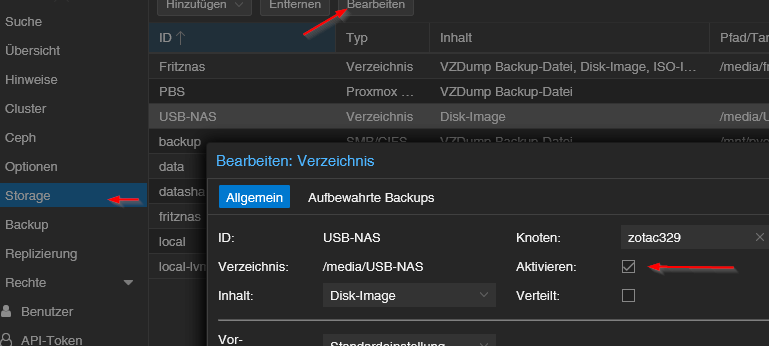
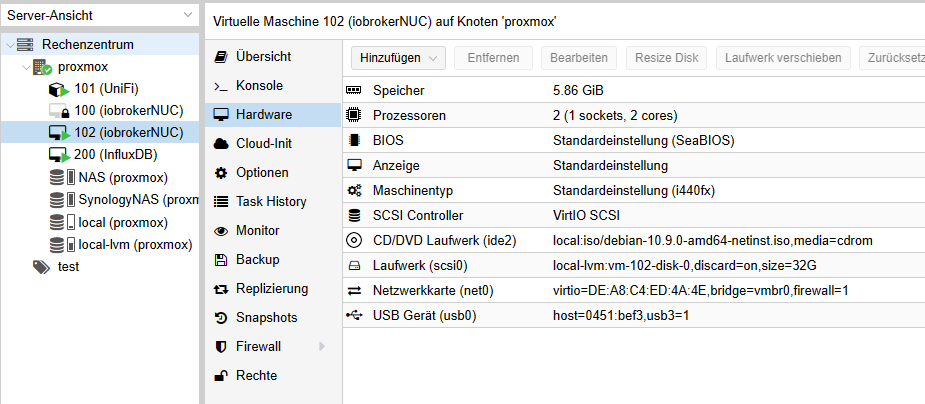
wenn du hier auf die jeweiligen Laufwerke klickst, siehst du ja in der Übersicht wo was abgelegt ist, ggf sind bei identisch




587
Online32.7k
Users82.5k
Topics1.3m
Posts