




Flot Diagramm - history nicht wählbar
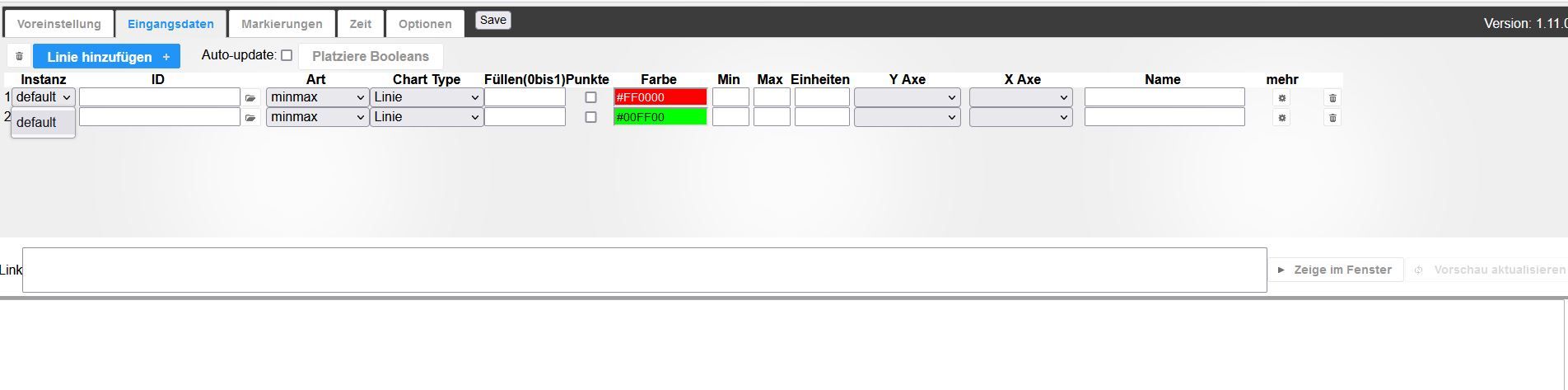
-
@muttileinchen-0 sagte in Flot Diagramm - history nicht wählbar:
*** Time and Time Zones ***
Etc/UTCZeitzone ist nicht gesetzt.
Das nodesource-Repository ist falsch, es gibt für ubuntu/jammy ein eigenes.
2 OS-Updates in der Pipeline.
Insofern richtig: Nix gewonnen, immer noch schief.
@thomas-braun
Ich steige aus. Sytem mit Debian (wie von euch empfohlen) komplett neu aufgesetzt. Bin jetzt auf bullyeye. Backup eingespielt. IoBroker fix ausgeführt. Timezone korrigiert. Auch die Adapter History und Flot gelöscht (es sollte keinen Unterschied machen die Adapter in der Weboerfläche zu löschen oder in der Console, oder???). Adapter neu eingespielt.
Keine Änderung. Ich bin zu doof.Skript v.2023-01-02 *** BASE SYSTEM *** Architecture: x86_64 Docker: false Virtualization: lxc Distributor ID: Debian Description: Debian GNU/Linux 11 (bullseye) Release: 11 Codename: bullseye PRETTY_NAME="Debian GNU/Linux 11 (bullseye)" NAME="Debian GNU/Linux" VERSION_ID="11" VERSION="11 (bullseye)" VERSION_CODENAME=bullseye ID=debian HOME_URL="https://www.debian.org/" SUPPORT_URL="https://www.debian.org/support" BUG_REPORT_URL="https://bugs.debian.org/" Systemuptime and Load: 16:22:48 up 12 min, 1 user, load average: 1.22, 0.93, 0.96 CPU threads: 4 *** Time and Time Zones *** Fri Mar 3 15:22:48 UTC 2023 Fri Mar 3 16:22:48 CET 2023 CET +0100 Europe/Berlin *** User and Groups *** uli /home/uli uli sudo iobroker *** X-Server-Setup *** X-Server: false Desktop: Terminal: Boot Target: graphical.target *** MEMORY *** total used free shared buff/cache available Mem: 3.7G 383M 2.6G 0.0K 661M 3.3G Swap: 4.1G 0.0K 4.1G Total: 7.8G 383M 6.7G 3693 M total memory 384 M used memory 329 M active memory 610 M inactive memory 2647 M free memory 0 M buffer memory 661 M swap cache 4095 M total swap 0 M used swap 4095 M free swap *** FILESYSTEM *** Filesystem Type Size Used Avail Use% Mounted on /dev/loop0 ext4 7.8G 2.5G 4.9G 34% / none tmpfs 492K 4.0K 488K 1% /dev udev devtmpfs 1.8G 0 1.8G 0% /dev/tty tmpfs tmpfs 1.9G 0 1.9G 0% /dev/shm tmpfs tmpfs 739M 96K 739M 1% /run tmpfs tmpfs 5.0M 0 5.0M 0% /run/lock Messages in dmesg: dmesg: read kernel buffer failed: Operation not permitted Show mounted filesystems (real ones only): TARGET SOURCE FSTYPE OPTIONS / /dev/loop0 ext4 rw,relatime Files in neuralgic directories: /var: 383M /var/ 223M /var/cache 219M /var/cache/apt 152M /var/cache/apt/archives 135M /var/lib /opt/iobroker/backups: 14M /opt/iobroker/backups/ /opt/iobroker/iobroker-data: 178M /opt/iobroker/iobroker-data/ 165M /opt/iobroker/iobroker-data/files 51M /opt/iobroker/iobroker-data/files/javascript.admin 32M /opt/iobroker/iobroker-data/files/javascript.admin/static/js 32M /opt/iobroker/iobroker-data/files/javascript.admin/static The five largest files in iobroker-data are: 9.7M /opt/iobroker/iobroker-data/objects.jsonl 8.5M /opt/iobroker/iobroker-data/files/vis.0/vis/vis-views.json 7.7M /opt/iobroker/iobroker-data/files/vis.0/neu/vis-views.json 6.9M /opt/iobroker/iobroker-data/files/javascript.admin/static/js/610.de0231c9.chunk.js.map 6.3M /opt/iobroker/iobroker-data/files/admin.admin/custom/static/js/vendors-node_modules_iobroker_adapter-react-v5_assets_devices_parseNames_js-node_modules_iobr-99c23e.847b8ad9.chunk.js.map *** NodeJS-Installation *** /usr/bin/nodejs v16.19.1 /usr/bin/node v16.19.1 /usr/bin/npm 8.19.3 /usr/bin/npx 8.19.3 nodejs: Installed: 16.19.1-deb-1nodesource1 Candidate: 16.19.1-deb-1nodesource1 Version table: *** 16.19.1-deb-1nodesource1 500 500 https://deb.nodesource.com/node_16.x bullseye/main amd64 Packages 100 /var/lib/dpkg/status 12.22.12~dfsg-1~deb11u3 500 500 http://security.debian.org bullseye-security/main amd64 Packages 12.22.5~dfsg-2~11u1 500 500 http://deb.debian.org/debian bullseye/main amd64 Packages Temp directories causing npm8 problem: 0 *** ioBroker-Installation *** ioBroker Status iobroker is running on this host. Objects type: jsonl States type: jsonl Core adapters versions js-controller: 4.0.24 admin: 6.3.5 javascript: 6.1.4 Adapters from github: 1 Adapter State system.adapter.accuweather.0 : accuweather : IOBroker-Uli - enabled + system.adapter.admin.0 : admin : IOBroker-Uli - enabled, port: 8081, bind: 0.0.0.0, run as: admin system.adapter.backitup.0 : backitup : IOBroker-Uli - enabled system.adapter.daswetter.0 : daswetter : IOBroker-Uli - enabled system.adapter.discovery.0 : discovery : IOBroker-Uli - enabled system.adapter.dwd.0 : dwd : IOBroker-Uli - enabled system.adapter.flot.0 : flot : IOBroker-Uli - enabled system.adapter.followthesun.0 : followthesun : IOBroker-Uli - enabled system.adapter.fullybrowser.0 : fullybrowser : IOBroker-Uli - disabled system.adapter.garmin.0 : garmin : IOBroker-Uli - disabled + system.adapter.history.0 : history : IOBroker-Uli - enabled + system.adapter.ical.0 : ical : IOBroker-Uli - enabled system.adapter.ical.1 : ical : IOBroker-Uli - enabled system.adapter.ical.2 : ical : IOBroker-Uli - enabled system.adapter.icons-mfd-png.0 : icons-mfd-png : IOBroker-Uli - disabled system.adapter.icons-mfd-svg.0 : icons-mfd-svg : IOBroker-Uli - disabled system.adapter.imow.0 : imow : IOBroker-Uli - disabled + system.adapter.javascript.0 : javascript : IOBroker-Uli - enabled system.adapter.mqtt.0 : mqtt : IOBroker-Uli - enabled, port: 1883, bind: 0.0.0.0 system.adapter.ping.0 : ping : IOBroker-Uli - enabled system.adapter.pollenflug.0 : pollenflug : IOBroker-Uli - enabled system.adapter.shelly.0 : shelly : IOBroker-Uli - enabled, port: 1882, bind: 0.0.0.0 system.adapter.sourceanalytix.0 : sourceanalytix : IOBroker-Uli - enabled system.adapter.tankerkoenig.0 : tankerkoenig : IOBroker-Uli - enabled system.adapter.trashschedule.0 : trashschedule : IOBroker-Uli - enabled system.adapter.trashschedule.1 : trashschedule : IOBroker-Uli - enabled system.adapter.vis-bars.0 : vis-bars : IOBroker-Uli - disabled system.adapter.vis-history.0 : vis-history : IOBroker-Uli - disabled system.adapter.vis-hqwidgets.0 : vis-hqwidgets : IOBroker-Uli - disabled system.adapter.vis-icontwo.0 : vis-icontwo : IOBroker-Uli - disabled system.adapter.vis-inventwo.0 : vis-inventwo : IOBroker-Uli - enabled system.adapter.vis-jqui-mfd.0 : vis-jqui-mfd : IOBroker-Uli - disabled system.adapter.vis-justgage.0 : vis-justgage : IOBroker-Uli - disabled system.adapter.vis-metro.0 : vis-metro : IOBroker-Uli - disabled system.adapter.vis-players.0 : vis-players : IOBroker-Uli - disabled system.adapter.vis-rgraph.0 : vis-rgraph : IOBroker-Uli - disabled system.adapter.vis-timeandweather.0 : vis-timeandweather : IOBroker-Uli - disabled system.adapter.vis.0 : vis : IOBroker-Uli - enabled system.adapter.vw-connect.0 : vw-connect : IOBroker-Uli - enabled system.adapter.web.0 : web : IOBroker-Uli - enabled, port: 8082, bind: 0.0.0.0, run as: admin system.adapter.ws.0 : ws : IOBroker-Uli - enabled, port: 8084, bind: 0.0.0.0, run as: admin + instance is alive Enabled adapters with bindings + system.adapter.admin.0 : admin : IOBroker-Uli - enabled, port: 8081, bind: 0.0.0.0, run as: admin system.adapter.mqtt.0 : mqtt : IOBroker-Uli - enabled, port: 1883, bind: 0.0.0.0 system.adapter.shelly.0 : shelly : IOBroker-Uli - enabled, port: 1882, bind: 0.0.0.0 system.adapter.web.0 : web : IOBroker-Uli - enabled, port: 8082, bind: 0.0.0.0, run as: admin system.adapter.ws.0 : ws : IOBroker-Uli - enabled, port: 8084, bind: 0.0.0.0, run as: admin ioBroker-Repositories stable : http://download.iobroker.net/sources-dist.json beta : http://download.iobroker.net/sources-dist-latest.json Active repo(s): stable Installed ioBroker-Instances Used repository: stable Adapter "accuweather" : 1.2.1 , installed 1.2.1 Adapter "admin" : 6.3.5 , installed 6.3.5 Adapter "backitup" : 2.5.12 , installed 2.5.12 Adapter "daswetter" : 3.1.7 , installed 3.1.7 Adapter "discovery" : 3.1.0 , installed 3.1.0 Adapter "dwd" : 2.8.3 , installed 2.8.3 Adapter "flot" : 1.11.0 , installed 1.11.0 Adapter "followthesun" : 0.4.1 , installed 0.4.1 Adapter "fullybrowser" : 2.1.2 , installed 2.1.2 Adapter "history" : 2.2.4 , installed 2.2.4 Adapter "ical" : 1.13.2 , installed 1.13.2 Adapter "icons-mfd-png": 1.1.0 , installed 1.1.0 Adapter "icons-mfd-svg": 1.1.0 , installed 1.1.0 Adapter "imow" : 0.0.2 , installed 0.0.2 Adapter "javascript" : 6.1.4 , installed 6.1.4 Controller "js-controller": 4.0.24 , installed 4.0.24 Adapter "mqtt" : 4.0.7 , installed 4.0.7 Adapter "ping" : 1.5.3 , installed 1.5.3 Adapter "pollenflug" : 1.0.6 , installed 1.0.6 Adapter "shelly" : 6.3.1 , installed 6.3.1 Adapter "simple-api" : 2.7.2 , installed 2.7.2 Adapter "socketio" : 4.2.0 , installed 4.2.0 Adapter "tankerkoenig" : 3.3.7 , installed 3.3.7 Adapter "trashschedule": 2.2.0 , installed 2.2.0 Adapter "vis" : 1.4.15 , installed 1.4.15 Adapter "vis-bars" : 0.1.4 , installed 0.1.4 Adapter "vis-history" : 1.0.0 , installed 1.0.0 Adapter "vis-hqwidgets": 1.3.0 , installed 1.3.0 Adapter "vis-icontwo" : 0.90.0 , installed 0.90.0 Adapter "vis-inventwo" : 3.3.1 , installed 3.3.1 Adapter "vis-jqui-mfd" : 1.0.12 , installed 1.0.12 Adapter "vis-justgage" : 1.0.2 , installed 1.0.2 Adapter "vis-metro" : 1.2.0 , installed 1.2.0 Adapter "vis-players" : 0.1.6 , installed 0.1.6 Adapter "vis-rgraph" : 0.0.2 , installed 0.0.2 Adapter "vis-timeandweather": 1.2.2, installed 1.2.2 Adapter "vw-connect" : 0.0.62 , installed 0.0.62 Adapter "web" : 4.3.0 , installed 4.3.0 Adapter "ws" : 1.3.0 , installed 1.3.0 Objects and States Please stand by - This may take a while Objects: 14659 States: 13330 *** OS-Repositories and Updates *** Hit:1 http://deb.debian.org/debian bullseye InRelease Hit:2 http://security.debian.org bullseye-security InRelease Hit:3 http://deb.debian.org/debian bullseye-updates InRelease Hit:4 https://deb.nodesource.com/node_16.x bullseye InRelease Reading package lists... Pending Updates: 0 *** Listening Ports *** Active Internet connections (only servers) Proto Recv-Q Send-Q Local Address Foreign Address State User Inode PID/Program name tcp 0 0 0.0.0.0:111 0.0.0.0:* LISTEN 0 280446 1/init tcp 0 0 127.0.0.53:53 0.0.0.0:* LISTEN 104 282506 115/systemd-resolve tcp 0 0 127.0.0.1:9001 0.0.0.0:* LISTEN 1000 336345 3765/iobroker.js-co tcp 0 0 127.0.0.1:9000 0.0.0.0:* LISTEN 1000 333730 3765/iobroker.js-co tcp 0 0 0.0.0.0:5355 0.0.0.0:* LISTEN 104 282500 115/systemd-resolve tcp 0 0 0.0.0.0:1883 0.0.0.0:* LISTEN 1000 339305 4146/io.mqtt.0 tcp 0 0 127.0.0.1:25 0.0.0.0:* LISTEN 0 283703 291/master tcp6 0 0 :::111 :::* LISTEN 0 280448 1/init tcp6 0 0 :::22 :::* LISTEN 0 280522 1/init tcp6 0 0 ::1:25 :::* LISTEN 0 283704 291/master tcp6 0 0 :::5355 :::* LISTEN 104 282503 115/systemd-resolve tcp6 0 0 :::8081 :::* LISTEN 1000 336668 3791/io.admin.0 udp 0 0 0.0.0.0:5683 0.0.0.0:* 1000 341913 4235/io.shelly.0 udp 0 0 127.0.0.53:53 0.0.0.0:* 104 282505 115/systemd-resolve udp 0 0 0.0.0.0:111 0.0.0.0:* 0 280447 1/init udp 0 0 0.0.0.0:5355 0.0.0.0:* 104 282499 115/systemd-resolve udp6 0 0 :::111 :::* 0 280449 1/init udp6 0 0 :::5355 :::* 104 282502 115/systemd-resolve *** Log File - Last 25 Lines *** 2023-03-03 16:23:10.556 - info: host.IOBroker-Uli iobroker npm-install: Installing iobroker.garmin@0.0.3... (System call) 2023-03-03 16:23:11.249 - info: mqtt.0 (4146) Plugin sentry Sentry Plugin disabled for this process because sending of statistic data is disabled for the system 2023-03-03 16:23:11.345 - info: mqtt.0 (4146) starting. Version 4.0.7 in /opt/iobroker/node_modules/iobroker.mqtt, node: v16.19.1, js-controller: 4.0.24 2023-03-03 16:23:11.740 - info: mqtt.0 (4146) Starting MQTT authenticated server on 0.0.0.0:1883 2023-03-03 16:23:13.150 - info: ical.2 (4103) Terminated (NO_ERROR): Without reason 2023-03-03 16:23:14.139 - info: host.IOBroker-Uli instance system.adapter.ical.2 terminated with code 0 (NO_ERROR) 2023-03-03 16:23:14.168 - info: host.IOBroker-Uli instance system.adapter.ping.0 started with pid 4200 2023-03-03 16:23:14.737 - error: host.IOBroker-Uli iobroker npm-install: host.IOBroker-Uli Cannot install iobroker.garmin@0.0.3: 1 2023-03-03 16:23:15.544 - info: ping.0 (4200) Plugin sentry Sentry Plugin disabled for this process because sending of statistic data is disabled for the system 2023-03-03 16:23:15.616 - info: ping.0 (4200) starting. Version 1.5.3 in /opt/iobroker/node_modules/iobroker.ping, node: v16.19.1, js-controller: 4.0.24 2023-03-03 16:23:15.760 - info: host.IOBroker-Uli iobroker npm-install: exit 25 2023-03-03 16:23:16.760 - warn: host.IOBroker-Uli startInstance cannot find adapter "garmin@0.0.3". Try to install it... 4 attempt 2023-03-03 16:23:16.761 - info: host.IOBroker-Uli iobroker install garmin@0.0.3 using installedVersion 2023-03-03 16:23:17.852 - info: host.IOBroker-Uli instance system.adapter.shelly.0 started with pid 4235 2023-03-03 16:23:18.669 - info: host.IOBroker-Uli iobroker npm-install: NPM version: 8.19.3 2023-03-03 16:23:18.670 - info: host.IOBroker-Uli iobroker npm-install: Installing iobroker.garmin@0.0.3... (System call) 2023-03-03 16:23:19.623 - info: shelly.0 (4235) Plugin sentry Sentry Plugin disabled for this process because sending of statistic data is disabled for the system 2023-03-03 16:23:19.756 - info: shelly.0 (4235) starting. Version 6.3.1 in /opt/iobroker/node_modules/iobroker.shelly, node: v16.19.1, js-controller: 4.0.24 2023-03-03 16:23:19.959 - info: shelly.0 (4235) Starting in CoAP mode. Listening on 0.0.0.0:5683 2023-03-03 16:23:20.131 - info: shelly.0 (4235) [CoAP Server] Listening for packets in the network 2023-03-03 16:23:21.785 - info: host.IOBroker-Uli instance system.adapter.discovery.0 started with pid 4743 2023-03-03 16:23:23.081 - error: host.IOBroker-Uli iobroker npm-install: host.IOBroker-Uli Cannot install iobroker.garmin@0.0.3: 1 2023-03-03 16:23:23.338 - info: discovery.0 (4743) Plugin sentry Sentry Plugin disabled for this process because sending of statistic data is disabled for the system 2023-03-03 16:23:23.453 - info: discovery.0 (4743) starting. Version 3.1.0 in /opt/iobroker/node_modules/iobroker.discovery, node: v16.19.1, js-controller: 4.0.24 2023-03-03 16:23:24.100 - info: host.IOBroker-Uli iobroker npm-install: exit 25======================= SUMMARY ======================= v.2023-01-02 Operatingsystem: Debian GNU/Linux 11 (bullseye) Installation: lxc Timezone: Europe/Berlin User-ID: 1001 X-Server: false Boot Target: graphical.target Pending OS-Updates: 0 Nodejs-Installation: /usr/bin/nodejs v16.19.1 /usr/bin/node v16.19.1 /usr/bin/npm 8.19.3 /usr/bin/npx 8.19.3 ioBroker Core: js-controller 4.0.24 admin 6.3.5 ioBroker Status: iobroker is running on this host. Objects type: jsonl States type: jsonl Status admin: + system.adapter.admin.0 : admin : IOBroker-Uli - enabled, port: 8081, bind: 0.0.0.0, run as: admin Pending iob updates: 0 Active repo(s): stable Objects: 14659 States: 13330 Size of iob-Database: 11M /opt/iobroker/iobroker-data/objects.jsonl 3.7M /opt/iobroker/iobroker-data/states.jsonl =================== END OF SUMMARY ==================== -
@thomas-braun
Ich steige aus. Sytem mit Debian (wie von euch empfohlen) komplett neu aufgesetzt. Bin jetzt auf bullyeye. Backup eingespielt. IoBroker fix ausgeführt. Timezone korrigiert. Auch die Adapter History und Flot gelöscht (es sollte keinen Unterschied machen die Adapter in der Weboerfläche zu löschen oder in der Console, oder???). Adapter neu eingespielt.
Keine Änderung. Ich bin zu doof.Skript v.2023-01-02 *** BASE SYSTEM *** Architecture: x86_64 Docker: false Virtualization: lxc Distributor ID: Debian Description: Debian GNU/Linux 11 (bullseye) Release: 11 Codename: bullseye PRETTY_NAME="Debian GNU/Linux 11 (bullseye)" NAME="Debian GNU/Linux" VERSION_ID="11" VERSION="11 (bullseye)" VERSION_CODENAME=bullseye ID=debian HOME_URL="https://www.debian.org/" SUPPORT_URL="https://www.debian.org/support" BUG_REPORT_URL="https://bugs.debian.org/" Systemuptime and Load: 16:22:48 up 12 min, 1 user, load average: 1.22, 0.93, 0.96 CPU threads: 4 *** Time and Time Zones *** Fri Mar 3 15:22:48 UTC 2023 Fri Mar 3 16:22:48 CET 2023 CET +0100 Europe/Berlin *** User and Groups *** uli /home/uli uli sudo iobroker *** X-Server-Setup *** X-Server: false Desktop: Terminal: Boot Target: graphical.target *** MEMORY *** total used free shared buff/cache available Mem: 3.7G 383M 2.6G 0.0K 661M 3.3G Swap: 4.1G 0.0K 4.1G Total: 7.8G 383M 6.7G 3693 M total memory 384 M used memory 329 M active memory 610 M inactive memory 2647 M free memory 0 M buffer memory 661 M swap cache 4095 M total swap 0 M used swap 4095 M free swap *** FILESYSTEM *** Filesystem Type Size Used Avail Use% Mounted on /dev/loop0 ext4 7.8G 2.5G 4.9G 34% / none tmpfs 492K 4.0K 488K 1% /dev udev devtmpfs 1.8G 0 1.8G 0% /dev/tty tmpfs tmpfs 1.9G 0 1.9G 0% /dev/shm tmpfs tmpfs 739M 96K 739M 1% /run tmpfs tmpfs 5.0M 0 5.0M 0% /run/lock Messages in dmesg: dmesg: read kernel buffer failed: Operation not permitted Show mounted filesystems (real ones only): TARGET SOURCE FSTYPE OPTIONS / /dev/loop0 ext4 rw,relatime Files in neuralgic directories: /var: 383M /var/ 223M /var/cache 219M /var/cache/apt 152M /var/cache/apt/archives 135M /var/lib /opt/iobroker/backups: 14M /opt/iobroker/backups/ /opt/iobroker/iobroker-data: 178M /opt/iobroker/iobroker-data/ 165M /opt/iobroker/iobroker-data/files 51M /opt/iobroker/iobroker-data/files/javascript.admin 32M /opt/iobroker/iobroker-data/files/javascript.admin/static/js 32M /opt/iobroker/iobroker-data/files/javascript.admin/static The five largest files in iobroker-data are: 9.7M /opt/iobroker/iobroker-data/objects.jsonl 8.5M /opt/iobroker/iobroker-data/files/vis.0/vis/vis-views.json 7.7M /opt/iobroker/iobroker-data/files/vis.0/neu/vis-views.json 6.9M /opt/iobroker/iobroker-data/files/javascript.admin/static/js/610.de0231c9.chunk.js.map 6.3M /opt/iobroker/iobroker-data/files/admin.admin/custom/static/js/vendors-node_modules_iobroker_adapter-react-v5_assets_devices_parseNames_js-node_modules_iobr-99c23e.847b8ad9.chunk.js.map *** NodeJS-Installation *** /usr/bin/nodejs v16.19.1 /usr/bin/node v16.19.1 /usr/bin/npm 8.19.3 /usr/bin/npx 8.19.3 nodejs: Installed: 16.19.1-deb-1nodesource1 Candidate: 16.19.1-deb-1nodesource1 Version table: *** 16.19.1-deb-1nodesource1 500 500 https://deb.nodesource.com/node_16.x bullseye/main amd64 Packages 100 /var/lib/dpkg/status 12.22.12~dfsg-1~deb11u3 500 500 http://security.debian.org bullseye-security/main amd64 Packages 12.22.5~dfsg-2~11u1 500 500 http://deb.debian.org/debian bullseye/main amd64 Packages Temp directories causing npm8 problem: 0 *** ioBroker-Installation *** ioBroker Status iobroker is running on this host. Objects type: jsonl States type: jsonl Core adapters versions js-controller: 4.0.24 admin: 6.3.5 javascript: 6.1.4 Adapters from github: 1 Adapter State system.adapter.accuweather.0 : accuweather : IOBroker-Uli - enabled + system.adapter.admin.0 : admin : IOBroker-Uli - enabled, port: 8081, bind: 0.0.0.0, run as: admin system.adapter.backitup.0 : backitup : IOBroker-Uli - enabled system.adapter.daswetter.0 : daswetter : IOBroker-Uli - enabled system.adapter.discovery.0 : discovery : IOBroker-Uli - enabled system.adapter.dwd.0 : dwd : IOBroker-Uli - enabled system.adapter.flot.0 : flot : IOBroker-Uli - enabled system.adapter.followthesun.0 : followthesun : IOBroker-Uli - enabled system.adapter.fullybrowser.0 : fullybrowser : IOBroker-Uli - disabled system.adapter.garmin.0 : garmin : IOBroker-Uli - disabled + system.adapter.history.0 : history : IOBroker-Uli - enabled + system.adapter.ical.0 : ical : IOBroker-Uli - enabled system.adapter.ical.1 : ical : IOBroker-Uli - enabled system.adapter.ical.2 : ical : IOBroker-Uli - enabled system.adapter.icons-mfd-png.0 : icons-mfd-png : IOBroker-Uli - disabled system.adapter.icons-mfd-svg.0 : icons-mfd-svg : IOBroker-Uli - disabled system.adapter.imow.0 : imow : IOBroker-Uli - disabled + system.adapter.javascript.0 : javascript : IOBroker-Uli - enabled system.adapter.mqtt.0 : mqtt : IOBroker-Uli - enabled, port: 1883, bind: 0.0.0.0 system.adapter.ping.0 : ping : IOBroker-Uli - enabled system.adapter.pollenflug.0 : pollenflug : IOBroker-Uli - enabled system.adapter.shelly.0 : shelly : IOBroker-Uli - enabled, port: 1882, bind: 0.0.0.0 system.adapter.sourceanalytix.0 : sourceanalytix : IOBroker-Uli - enabled system.adapter.tankerkoenig.0 : tankerkoenig : IOBroker-Uli - enabled system.adapter.trashschedule.0 : trashschedule : IOBroker-Uli - enabled system.adapter.trashschedule.1 : trashschedule : IOBroker-Uli - enabled system.adapter.vis-bars.0 : vis-bars : IOBroker-Uli - disabled system.adapter.vis-history.0 : vis-history : IOBroker-Uli - disabled system.adapter.vis-hqwidgets.0 : vis-hqwidgets : IOBroker-Uli - disabled system.adapter.vis-icontwo.0 : vis-icontwo : IOBroker-Uli - disabled system.adapter.vis-inventwo.0 : vis-inventwo : IOBroker-Uli - enabled system.adapter.vis-jqui-mfd.0 : vis-jqui-mfd : IOBroker-Uli - disabled system.adapter.vis-justgage.0 : vis-justgage : IOBroker-Uli - disabled system.adapter.vis-metro.0 : vis-metro : IOBroker-Uli - disabled system.adapter.vis-players.0 : vis-players : IOBroker-Uli - disabled system.adapter.vis-rgraph.0 : vis-rgraph : IOBroker-Uli - disabled system.adapter.vis-timeandweather.0 : vis-timeandweather : IOBroker-Uli - disabled system.adapter.vis.0 : vis : IOBroker-Uli - enabled system.adapter.vw-connect.0 : vw-connect : IOBroker-Uli - enabled system.adapter.web.0 : web : IOBroker-Uli - enabled, port: 8082, bind: 0.0.0.0, run as: admin system.adapter.ws.0 : ws : IOBroker-Uli - enabled, port: 8084, bind: 0.0.0.0, run as: admin + instance is alive Enabled adapters with bindings + system.adapter.admin.0 : admin : IOBroker-Uli - enabled, port: 8081, bind: 0.0.0.0, run as: admin system.adapter.mqtt.0 : mqtt : IOBroker-Uli - enabled, port: 1883, bind: 0.0.0.0 system.adapter.shelly.0 : shelly : IOBroker-Uli - enabled, port: 1882, bind: 0.0.0.0 system.adapter.web.0 : web : IOBroker-Uli - enabled, port: 8082, bind: 0.0.0.0, run as: admin system.adapter.ws.0 : ws : IOBroker-Uli - enabled, port: 8084, bind: 0.0.0.0, run as: admin ioBroker-Repositories stable : http://download.iobroker.net/sources-dist.json beta : http://download.iobroker.net/sources-dist-latest.json Active repo(s): stable Installed ioBroker-Instances Used repository: stable Adapter "accuweather" : 1.2.1 , installed 1.2.1 Adapter "admin" : 6.3.5 , installed 6.3.5 Adapter "backitup" : 2.5.12 , installed 2.5.12 Adapter "daswetter" : 3.1.7 , installed 3.1.7 Adapter "discovery" : 3.1.0 , installed 3.1.0 Adapter "dwd" : 2.8.3 , installed 2.8.3 Adapter "flot" : 1.11.0 , installed 1.11.0 Adapter "followthesun" : 0.4.1 , installed 0.4.1 Adapter "fullybrowser" : 2.1.2 , installed 2.1.2 Adapter "history" : 2.2.4 , installed 2.2.4 Adapter "ical" : 1.13.2 , installed 1.13.2 Adapter "icons-mfd-png": 1.1.0 , installed 1.1.0 Adapter "icons-mfd-svg": 1.1.0 , installed 1.1.0 Adapter "imow" : 0.0.2 , installed 0.0.2 Adapter "javascript" : 6.1.4 , installed 6.1.4 Controller "js-controller": 4.0.24 , installed 4.0.24 Adapter "mqtt" : 4.0.7 , installed 4.0.7 Adapter "ping" : 1.5.3 , installed 1.5.3 Adapter "pollenflug" : 1.0.6 , installed 1.0.6 Adapter "shelly" : 6.3.1 , installed 6.3.1 Adapter "simple-api" : 2.7.2 , installed 2.7.2 Adapter "socketio" : 4.2.0 , installed 4.2.0 Adapter "tankerkoenig" : 3.3.7 , installed 3.3.7 Adapter "trashschedule": 2.2.0 , installed 2.2.0 Adapter "vis" : 1.4.15 , installed 1.4.15 Adapter "vis-bars" : 0.1.4 , installed 0.1.4 Adapter "vis-history" : 1.0.0 , installed 1.0.0 Adapter "vis-hqwidgets": 1.3.0 , installed 1.3.0 Adapter "vis-icontwo" : 0.90.0 , installed 0.90.0 Adapter "vis-inventwo" : 3.3.1 , installed 3.3.1 Adapter "vis-jqui-mfd" : 1.0.12 , installed 1.0.12 Adapter "vis-justgage" : 1.0.2 , installed 1.0.2 Adapter "vis-metro" : 1.2.0 , installed 1.2.0 Adapter "vis-players" : 0.1.6 , installed 0.1.6 Adapter "vis-rgraph" : 0.0.2 , installed 0.0.2 Adapter "vis-timeandweather": 1.2.2, installed 1.2.2 Adapter "vw-connect" : 0.0.62 , installed 0.0.62 Adapter "web" : 4.3.0 , installed 4.3.0 Adapter "ws" : 1.3.0 , installed 1.3.0 Objects and States Please stand by - This may take a while Objects: 14659 States: 13330 *** OS-Repositories and Updates *** Hit:1 http://deb.debian.org/debian bullseye InRelease Hit:2 http://security.debian.org bullseye-security InRelease Hit:3 http://deb.debian.org/debian bullseye-updates InRelease Hit:4 https://deb.nodesource.com/node_16.x bullseye InRelease Reading package lists... Pending Updates: 0 *** Listening Ports *** Active Internet connections (only servers) Proto Recv-Q Send-Q Local Address Foreign Address State User Inode PID/Program name tcp 0 0 0.0.0.0:111 0.0.0.0:* LISTEN 0 280446 1/init tcp 0 0 127.0.0.53:53 0.0.0.0:* LISTEN 104 282506 115/systemd-resolve tcp 0 0 127.0.0.1:9001 0.0.0.0:* LISTEN 1000 336345 3765/iobroker.js-co tcp 0 0 127.0.0.1:9000 0.0.0.0:* LISTEN 1000 333730 3765/iobroker.js-co tcp 0 0 0.0.0.0:5355 0.0.0.0:* LISTEN 104 282500 115/systemd-resolve tcp 0 0 0.0.0.0:1883 0.0.0.0:* LISTEN 1000 339305 4146/io.mqtt.0 tcp 0 0 127.0.0.1:25 0.0.0.0:* LISTEN 0 283703 291/master tcp6 0 0 :::111 :::* LISTEN 0 280448 1/init tcp6 0 0 :::22 :::* LISTEN 0 280522 1/init tcp6 0 0 ::1:25 :::* LISTEN 0 283704 291/master tcp6 0 0 :::5355 :::* LISTEN 104 282503 115/systemd-resolve tcp6 0 0 :::8081 :::* LISTEN 1000 336668 3791/io.admin.0 udp 0 0 0.0.0.0:5683 0.0.0.0:* 1000 341913 4235/io.shelly.0 udp 0 0 127.0.0.53:53 0.0.0.0:* 104 282505 115/systemd-resolve udp 0 0 0.0.0.0:111 0.0.0.0:* 0 280447 1/init udp 0 0 0.0.0.0:5355 0.0.0.0:* 104 282499 115/systemd-resolve udp6 0 0 :::111 :::* 0 280449 1/init udp6 0 0 :::5355 :::* 104 282502 115/systemd-resolve *** Log File - Last 25 Lines *** 2023-03-03 16:23:10.556 - info: host.IOBroker-Uli iobroker npm-install: Installing iobroker.garmin@0.0.3... (System call) 2023-03-03 16:23:11.249 - info: mqtt.0 (4146) Plugin sentry Sentry Plugin disabled for this process because sending of statistic data is disabled for the system 2023-03-03 16:23:11.345 - info: mqtt.0 (4146) starting. Version 4.0.7 in /opt/iobroker/node_modules/iobroker.mqtt, node: v16.19.1, js-controller: 4.0.24 2023-03-03 16:23:11.740 - info: mqtt.0 (4146) Starting MQTT authenticated server on 0.0.0.0:1883 2023-03-03 16:23:13.150 - info: ical.2 (4103) Terminated (NO_ERROR): Without reason 2023-03-03 16:23:14.139 - info: host.IOBroker-Uli instance system.adapter.ical.2 terminated with code 0 (NO_ERROR) 2023-03-03 16:23:14.168 - info: host.IOBroker-Uli instance system.adapter.ping.0 started with pid 4200 2023-03-03 16:23:14.737 - error: host.IOBroker-Uli iobroker npm-install: host.IOBroker-Uli Cannot install iobroker.garmin@0.0.3: 1 2023-03-03 16:23:15.544 - info: ping.0 (4200) Plugin sentry Sentry Plugin disabled for this process because sending of statistic data is disabled for the system 2023-03-03 16:23:15.616 - info: ping.0 (4200) starting. Version 1.5.3 in /opt/iobroker/node_modules/iobroker.ping, node: v16.19.1, js-controller: 4.0.24 2023-03-03 16:23:15.760 - info: host.IOBroker-Uli iobroker npm-install: exit 25 2023-03-03 16:23:16.760 - warn: host.IOBroker-Uli startInstance cannot find adapter "garmin@0.0.3". Try to install it... 4 attempt 2023-03-03 16:23:16.761 - info: host.IOBroker-Uli iobroker install garmin@0.0.3 using installedVersion 2023-03-03 16:23:17.852 - info: host.IOBroker-Uli instance system.adapter.shelly.0 started with pid 4235 2023-03-03 16:23:18.669 - info: host.IOBroker-Uli iobroker npm-install: NPM version: 8.19.3 2023-03-03 16:23:18.670 - info: host.IOBroker-Uli iobroker npm-install: Installing iobroker.garmin@0.0.3... (System call) 2023-03-03 16:23:19.623 - info: shelly.0 (4235) Plugin sentry Sentry Plugin disabled for this process because sending of statistic data is disabled for the system 2023-03-03 16:23:19.756 - info: shelly.0 (4235) starting. Version 6.3.1 in /opt/iobroker/node_modules/iobroker.shelly, node: v16.19.1, js-controller: 4.0.24 2023-03-03 16:23:19.959 - info: shelly.0 (4235) Starting in CoAP mode. Listening on 0.0.0.0:5683 2023-03-03 16:23:20.131 - info: shelly.0 (4235) [CoAP Server] Listening for packets in the network 2023-03-03 16:23:21.785 - info: host.IOBroker-Uli instance system.adapter.discovery.0 started with pid 4743 2023-03-03 16:23:23.081 - error: host.IOBroker-Uli iobroker npm-install: host.IOBroker-Uli Cannot install iobroker.garmin@0.0.3: 1 2023-03-03 16:23:23.338 - info: discovery.0 (4743) Plugin sentry Sentry Plugin disabled for this process because sending of statistic data is disabled for the system 2023-03-03 16:23:23.453 - info: discovery.0 (4743) starting. Version 3.1.0 in /opt/iobroker/node_modules/iobroker.discovery, node: v16.19.1, js-controller: 4.0.24 2023-03-03 16:23:24.100 - info: host.IOBroker-Uli iobroker npm-install: exit 25======================= SUMMARY ======================= v.2023-01-02 Operatingsystem: Debian GNU/Linux 11 (bullseye) Installation: lxc Timezone: Europe/Berlin User-ID: 1001 X-Server: false Boot Target: graphical.target Pending OS-Updates: 0 Nodejs-Installation: /usr/bin/nodejs v16.19.1 /usr/bin/node v16.19.1 /usr/bin/npm 8.19.3 /usr/bin/npx 8.19.3 ioBroker Core: js-controller 4.0.24 admin 6.3.5 ioBroker Status: iobroker is running on this host. Objects type: jsonl States type: jsonl Status admin: + system.adapter.admin.0 : admin : IOBroker-Uli - enabled, port: 8081, bind: 0.0.0.0, run as: admin Pending iob updates: 0 Active repo(s): stable Objects: 14659 States: 13330 Size of iob-Database: 11M /opt/iobroker/iobroker-data/objects.jsonl 3.7M /opt/iobroker/iobroker-data/states.jsonl =================== END OF SUMMARY ====================@muttileinchen-0 und wie erwähnt - Zweitsystem läuft. Trotz altem Ubuntu und sonst gleichem Setup.
-
@muttileinchen-0
ein guter Teil der Doku zum History-Adapter befasst sich mit der Frage, wie man ihn wieder los wird (bzw. wie man z.B. auf Influxdb umsteigen kann) ;-) Vielleicht wäre es einen Versuch - oder Test - wert, mal ein paar DPs nach Influx loggen zu lassen? Das geht ja auch parallel zum History-Adapter.
Ansonsten - ruf' doch mal den Flot-Editor auf, nachdem du mit F12 die Browser-Konsole geöffnet hast, evtl. gibt es ein Problem mit dem JS im Frontend. -
@muttileinchen-0
ein guter Teil der Doku zum History-Adapter befasst sich mit der Frage, wie man ihn wieder los wird (bzw. wie man z.B. auf Influxdb umsteigen kann) ;-) Vielleicht wäre es einen Versuch - oder Test - wert, mal ein paar DPs nach Influx loggen zu lassen? Das geht ja auch parallel zum History-Adapter.
Ansonsten - ruf' doch mal den Flot-Editor auf, nachdem du mit F12 die Browser-Konsole geöffnet hast, evtl. gibt es ein Problem mit dem JS im Frontend.@jleg sagte in Flot Diagramm - history nicht wählbar:
ein guter Teil der Doku zum History-Adapter befasst sich mit der Frage, wie man ihn wieder los wird (
das kenne ich gar nicht

hast du mal einen Link dahin?kein Support per PN! - Fragen im Forum stellen - Benutzt das Voting rechts unten im Beitrag wenn er euch geholfen hat.
Das Forum freut sich über eine Spende. Benutzt dazu den Spendenbutton oben rechts. Danke!
der Installationsfixer: curl -fsL https://iobroker.net/fix.sh | bash - -
@thomas-braun
Ich steige aus. Sytem mit Debian (wie von euch empfohlen) komplett neu aufgesetzt. Bin jetzt auf bullyeye. Backup eingespielt. IoBroker fix ausgeführt. Timezone korrigiert. Auch die Adapter History und Flot gelöscht (es sollte keinen Unterschied machen die Adapter in der Weboerfläche zu löschen oder in der Console, oder???). Adapter neu eingespielt.
Keine Änderung. Ich bin zu doof.Skript v.2023-01-02 *** BASE SYSTEM *** Architecture: x86_64 Docker: false Virtualization: lxc Distributor ID: Debian Description: Debian GNU/Linux 11 (bullseye) Release: 11 Codename: bullseye PRETTY_NAME="Debian GNU/Linux 11 (bullseye)" NAME="Debian GNU/Linux" VERSION_ID="11" VERSION="11 (bullseye)" VERSION_CODENAME=bullseye ID=debian HOME_URL="https://www.debian.org/" SUPPORT_URL="https://www.debian.org/support" BUG_REPORT_URL="https://bugs.debian.org/" Systemuptime and Load: 16:22:48 up 12 min, 1 user, load average: 1.22, 0.93, 0.96 CPU threads: 4 *** Time and Time Zones *** Fri Mar 3 15:22:48 UTC 2023 Fri Mar 3 16:22:48 CET 2023 CET +0100 Europe/Berlin *** User and Groups *** uli /home/uli uli sudo iobroker *** X-Server-Setup *** X-Server: false Desktop: Terminal: Boot Target: graphical.target *** MEMORY *** total used free shared buff/cache available Mem: 3.7G 383M 2.6G 0.0K 661M 3.3G Swap: 4.1G 0.0K 4.1G Total: 7.8G 383M 6.7G 3693 M total memory 384 M used memory 329 M active memory 610 M inactive memory 2647 M free memory 0 M buffer memory 661 M swap cache 4095 M total swap 0 M used swap 4095 M free swap *** FILESYSTEM *** Filesystem Type Size Used Avail Use% Mounted on /dev/loop0 ext4 7.8G 2.5G 4.9G 34% / none tmpfs 492K 4.0K 488K 1% /dev udev devtmpfs 1.8G 0 1.8G 0% /dev/tty tmpfs tmpfs 1.9G 0 1.9G 0% /dev/shm tmpfs tmpfs 739M 96K 739M 1% /run tmpfs tmpfs 5.0M 0 5.0M 0% /run/lock Messages in dmesg: dmesg: read kernel buffer failed: Operation not permitted Show mounted filesystems (real ones only): TARGET SOURCE FSTYPE OPTIONS / /dev/loop0 ext4 rw,relatime Files in neuralgic directories: /var: 383M /var/ 223M /var/cache 219M /var/cache/apt 152M /var/cache/apt/archives 135M /var/lib /opt/iobroker/backups: 14M /opt/iobroker/backups/ /opt/iobroker/iobroker-data: 178M /opt/iobroker/iobroker-data/ 165M /opt/iobroker/iobroker-data/files 51M /opt/iobroker/iobroker-data/files/javascript.admin 32M /opt/iobroker/iobroker-data/files/javascript.admin/static/js 32M /opt/iobroker/iobroker-data/files/javascript.admin/static The five largest files in iobroker-data are: 9.7M /opt/iobroker/iobroker-data/objects.jsonl 8.5M /opt/iobroker/iobroker-data/files/vis.0/vis/vis-views.json 7.7M /opt/iobroker/iobroker-data/files/vis.0/neu/vis-views.json 6.9M /opt/iobroker/iobroker-data/files/javascript.admin/static/js/610.de0231c9.chunk.js.map 6.3M /opt/iobroker/iobroker-data/files/admin.admin/custom/static/js/vendors-node_modules_iobroker_adapter-react-v5_assets_devices_parseNames_js-node_modules_iobr-99c23e.847b8ad9.chunk.js.map *** NodeJS-Installation *** /usr/bin/nodejs v16.19.1 /usr/bin/node v16.19.1 /usr/bin/npm 8.19.3 /usr/bin/npx 8.19.3 nodejs: Installed: 16.19.1-deb-1nodesource1 Candidate: 16.19.1-deb-1nodesource1 Version table: *** 16.19.1-deb-1nodesource1 500 500 https://deb.nodesource.com/node_16.x bullseye/main amd64 Packages 100 /var/lib/dpkg/status 12.22.12~dfsg-1~deb11u3 500 500 http://security.debian.org bullseye-security/main amd64 Packages 12.22.5~dfsg-2~11u1 500 500 http://deb.debian.org/debian bullseye/main amd64 Packages Temp directories causing npm8 problem: 0 *** ioBroker-Installation *** ioBroker Status iobroker is running on this host. Objects type: jsonl States type: jsonl Core adapters versions js-controller: 4.0.24 admin: 6.3.5 javascript: 6.1.4 Adapters from github: 1 Adapter State system.adapter.accuweather.0 : accuweather : IOBroker-Uli - enabled + system.adapter.admin.0 : admin : IOBroker-Uli - enabled, port: 8081, bind: 0.0.0.0, run as: admin system.adapter.backitup.0 : backitup : IOBroker-Uli - enabled system.adapter.daswetter.0 : daswetter : IOBroker-Uli - enabled system.adapter.discovery.0 : discovery : IOBroker-Uli - enabled system.adapter.dwd.0 : dwd : IOBroker-Uli - enabled system.adapter.flot.0 : flot : IOBroker-Uli - enabled system.adapter.followthesun.0 : followthesun : IOBroker-Uli - enabled system.adapter.fullybrowser.0 : fullybrowser : IOBroker-Uli - disabled system.adapter.garmin.0 : garmin : IOBroker-Uli - disabled + system.adapter.history.0 : history : IOBroker-Uli - enabled + system.adapter.ical.0 : ical : IOBroker-Uli - enabled system.adapter.ical.1 : ical : IOBroker-Uli - enabled system.adapter.ical.2 : ical : IOBroker-Uli - enabled system.adapter.icons-mfd-png.0 : icons-mfd-png : IOBroker-Uli - disabled system.adapter.icons-mfd-svg.0 : icons-mfd-svg : IOBroker-Uli - disabled system.adapter.imow.0 : imow : IOBroker-Uli - disabled + system.adapter.javascript.0 : javascript : IOBroker-Uli - enabled system.adapter.mqtt.0 : mqtt : IOBroker-Uli - enabled, port: 1883, bind: 0.0.0.0 system.adapter.ping.0 : ping : IOBroker-Uli - enabled system.adapter.pollenflug.0 : pollenflug : IOBroker-Uli - enabled system.adapter.shelly.0 : shelly : IOBroker-Uli - enabled, port: 1882, bind: 0.0.0.0 system.adapter.sourceanalytix.0 : sourceanalytix : IOBroker-Uli - enabled system.adapter.tankerkoenig.0 : tankerkoenig : IOBroker-Uli - enabled system.adapter.trashschedule.0 : trashschedule : IOBroker-Uli - enabled system.adapter.trashschedule.1 : trashschedule : IOBroker-Uli - enabled system.adapter.vis-bars.0 : vis-bars : IOBroker-Uli - disabled system.adapter.vis-history.0 : vis-history : IOBroker-Uli - disabled system.adapter.vis-hqwidgets.0 : vis-hqwidgets : IOBroker-Uli - disabled system.adapter.vis-icontwo.0 : vis-icontwo : IOBroker-Uli - disabled system.adapter.vis-inventwo.0 : vis-inventwo : IOBroker-Uli - enabled system.adapter.vis-jqui-mfd.0 : vis-jqui-mfd : IOBroker-Uli - disabled system.adapter.vis-justgage.0 : vis-justgage : IOBroker-Uli - disabled system.adapter.vis-metro.0 : vis-metro : IOBroker-Uli - disabled system.adapter.vis-players.0 : vis-players : IOBroker-Uli - disabled system.adapter.vis-rgraph.0 : vis-rgraph : IOBroker-Uli - disabled system.adapter.vis-timeandweather.0 : vis-timeandweather : IOBroker-Uli - disabled system.adapter.vis.0 : vis : IOBroker-Uli - enabled system.adapter.vw-connect.0 : vw-connect : IOBroker-Uli - enabled system.adapter.web.0 : web : IOBroker-Uli - enabled, port: 8082, bind: 0.0.0.0, run as: admin system.adapter.ws.0 : ws : IOBroker-Uli - enabled, port: 8084, bind: 0.0.0.0, run as: admin + instance is alive Enabled adapters with bindings + system.adapter.admin.0 : admin : IOBroker-Uli - enabled, port: 8081, bind: 0.0.0.0, run as: admin system.adapter.mqtt.0 : mqtt : IOBroker-Uli - enabled, port: 1883, bind: 0.0.0.0 system.adapter.shelly.0 : shelly : IOBroker-Uli - enabled, port: 1882, bind: 0.0.0.0 system.adapter.web.0 : web : IOBroker-Uli - enabled, port: 8082, bind: 0.0.0.0, run as: admin system.adapter.ws.0 : ws : IOBroker-Uli - enabled, port: 8084, bind: 0.0.0.0, run as: admin ioBroker-Repositories stable : http://download.iobroker.net/sources-dist.json beta : http://download.iobroker.net/sources-dist-latest.json Active repo(s): stable Installed ioBroker-Instances Used repository: stable Adapter "accuweather" : 1.2.1 , installed 1.2.1 Adapter "admin" : 6.3.5 , installed 6.3.5 Adapter "backitup" : 2.5.12 , installed 2.5.12 Adapter "daswetter" : 3.1.7 , installed 3.1.7 Adapter "discovery" : 3.1.0 , installed 3.1.0 Adapter "dwd" : 2.8.3 , installed 2.8.3 Adapter "flot" : 1.11.0 , installed 1.11.0 Adapter "followthesun" : 0.4.1 , installed 0.4.1 Adapter "fullybrowser" : 2.1.2 , installed 2.1.2 Adapter "history" : 2.2.4 , installed 2.2.4 Adapter "ical" : 1.13.2 , installed 1.13.2 Adapter "icons-mfd-png": 1.1.0 , installed 1.1.0 Adapter "icons-mfd-svg": 1.1.0 , installed 1.1.0 Adapter "imow" : 0.0.2 , installed 0.0.2 Adapter "javascript" : 6.1.4 , installed 6.1.4 Controller "js-controller": 4.0.24 , installed 4.0.24 Adapter "mqtt" : 4.0.7 , installed 4.0.7 Adapter "ping" : 1.5.3 , installed 1.5.3 Adapter "pollenflug" : 1.0.6 , installed 1.0.6 Adapter "shelly" : 6.3.1 , installed 6.3.1 Adapter "simple-api" : 2.7.2 , installed 2.7.2 Adapter "socketio" : 4.2.0 , installed 4.2.0 Adapter "tankerkoenig" : 3.3.7 , installed 3.3.7 Adapter "trashschedule": 2.2.0 , installed 2.2.0 Adapter "vis" : 1.4.15 , installed 1.4.15 Adapter "vis-bars" : 0.1.4 , installed 0.1.4 Adapter "vis-history" : 1.0.0 , installed 1.0.0 Adapter "vis-hqwidgets": 1.3.0 , installed 1.3.0 Adapter "vis-icontwo" : 0.90.0 , installed 0.90.0 Adapter "vis-inventwo" : 3.3.1 , installed 3.3.1 Adapter "vis-jqui-mfd" : 1.0.12 , installed 1.0.12 Adapter "vis-justgage" : 1.0.2 , installed 1.0.2 Adapter "vis-metro" : 1.2.0 , installed 1.2.0 Adapter "vis-players" : 0.1.6 , installed 0.1.6 Adapter "vis-rgraph" : 0.0.2 , installed 0.0.2 Adapter "vis-timeandweather": 1.2.2, installed 1.2.2 Adapter "vw-connect" : 0.0.62 , installed 0.0.62 Adapter "web" : 4.3.0 , installed 4.3.0 Adapter "ws" : 1.3.0 , installed 1.3.0 Objects and States Please stand by - This may take a while Objects: 14659 States: 13330 *** OS-Repositories and Updates *** Hit:1 http://deb.debian.org/debian bullseye InRelease Hit:2 http://security.debian.org bullseye-security InRelease Hit:3 http://deb.debian.org/debian bullseye-updates InRelease Hit:4 https://deb.nodesource.com/node_16.x bullseye InRelease Reading package lists... Pending Updates: 0 *** Listening Ports *** Active Internet connections (only servers) Proto Recv-Q Send-Q Local Address Foreign Address State User Inode PID/Program name tcp 0 0 0.0.0.0:111 0.0.0.0:* LISTEN 0 280446 1/init tcp 0 0 127.0.0.53:53 0.0.0.0:* LISTEN 104 282506 115/systemd-resolve tcp 0 0 127.0.0.1:9001 0.0.0.0:* LISTEN 1000 336345 3765/iobroker.js-co tcp 0 0 127.0.0.1:9000 0.0.0.0:* LISTEN 1000 333730 3765/iobroker.js-co tcp 0 0 0.0.0.0:5355 0.0.0.0:* LISTEN 104 282500 115/systemd-resolve tcp 0 0 0.0.0.0:1883 0.0.0.0:* LISTEN 1000 339305 4146/io.mqtt.0 tcp 0 0 127.0.0.1:25 0.0.0.0:* LISTEN 0 283703 291/master tcp6 0 0 :::111 :::* LISTEN 0 280448 1/init tcp6 0 0 :::22 :::* LISTEN 0 280522 1/init tcp6 0 0 ::1:25 :::* LISTEN 0 283704 291/master tcp6 0 0 :::5355 :::* LISTEN 104 282503 115/systemd-resolve tcp6 0 0 :::8081 :::* LISTEN 1000 336668 3791/io.admin.0 udp 0 0 0.0.0.0:5683 0.0.0.0:* 1000 341913 4235/io.shelly.0 udp 0 0 127.0.0.53:53 0.0.0.0:* 104 282505 115/systemd-resolve udp 0 0 0.0.0.0:111 0.0.0.0:* 0 280447 1/init udp 0 0 0.0.0.0:5355 0.0.0.0:* 104 282499 115/systemd-resolve udp6 0 0 :::111 :::* 0 280449 1/init udp6 0 0 :::5355 :::* 104 282502 115/systemd-resolve *** Log File - Last 25 Lines *** 2023-03-03 16:23:10.556 - info: host.IOBroker-Uli iobroker npm-install: Installing iobroker.garmin@0.0.3... (System call) 2023-03-03 16:23:11.249 - info: mqtt.0 (4146) Plugin sentry Sentry Plugin disabled for this process because sending of statistic data is disabled for the system 2023-03-03 16:23:11.345 - info: mqtt.0 (4146) starting. Version 4.0.7 in /opt/iobroker/node_modules/iobroker.mqtt, node: v16.19.1, js-controller: 4.0.24 2023-03-03 16:23:11.740 - info: mqtt.0 (4146) Starting MQTT authenticated server on 0.0.0.0:1883 2023-03-03 16:23:13.150 - info: ical.2 (4103) Terminated (NO_ERROR): Without reason 2023-03-03 16:23:14.139 - info: host.IOBroker-Uli instance system.adapter.ical.2 terminated with code 0 (NO_ERROR) 2023-03-03 16:23:14.168 - info: host.IOBroker-Uli instance system.adapter.ping.0 started with pid 4200 2023-03-03 16:23:14.737 - error: host.IOBroker-Uli iobroker npm-install: host.IOBroker-Uli Cannot install iobroker.garmin@0.0.3: 1 2023-03-03 16:23:15.544 - info: ping.0 (4200) Plugin sentry Sentry Plugin disabled for this process because sending of statistic data is disabled for the system 2023-03-03 16:23:15.616 - info: ping.0 (4200) starting. Version 1.5.3 in /opt/iobroker/node_modules/iobroker.ping, node: v16.19.1, js-controller: 4.0.24 2023-03-03 16:23:15.760 - info: host.IOBroker-Uli iobroker npm-install: exit 25 2023-03-03 16:23:16.760 - warn: host.IOBroker-Uli startInstance cannot find adapter "garmin@0.0.3". Try to install it... 4 attempt 2023-03-03 16:23:16.761 - info: host.IOBroker-Uli iobroker install garmin@0.0.3 using installedVersion 2023-03-03 16:23:17.852 - info: host.IOBroker-Uli instance system.adapter.shelly.0 started with pid 4235 2023-03-03 16:23:18.669 - info: host.IOBroker-Uli iobroker npm-install: NPM version: 8.19.3 2023-03-03 16:23:18.670 - info: host.IOBroker-Uli iobroker npm-install: Installing iobroker.garmin@0.0.3... (System call) 2023-03-03 16:23:19.623 - info: shelly.0 (4235) Plugin sentry Sentry Plugin disabled for this process because sending of statistic data is disabled for the system 2023-03-03 16:23:19.756 - info: shelly.0 (4235) starting. Version 6.3.1 in /opt/iobroker/node_modules/iobroker.shelly, node: v16.19.1, js-controller: 4.0.24 2023-03-03 16:23:19.959 - info: shelly.0 (4235) Starting in CoAP mode. Listening on 0.0.0.0:5683 2023-03-03 16:23:20.131 - info: shelly.0 (4235) [CoAP Server] Listening for packets in the network 2023-03-03 16:23:21.785 - info: host.IOBroker-Uli instance system.adapter.discovery.0 started with pid 4743 2023-03-03 16:23:23.081 - error: host.IOBroker-Uli iobroker npm-install: host.IOBroker-Uli Cannot install iobroker.garmin@0.0.3: 1 2023-03-03 16:23:23.338 - info: discovery.0 (4743) Plugin sentry Sentry Plugin disabled for this process because sending of statistic data is disabled for the system 2023-03-03 16:23:23.453 - info: discovery.0 (4743) starting. Version 3.1.0 in /opt/iobroker/node_modules/iobroker.discovery, node: v16.19.1, js-controller: 4.0.24 2023-03-03 16:23:24.100 - info: host.IOBroker-Uli iobroker npm-install: exit 25======================= SUMMARY ======================= v.2023-01-02 Operatingsystem: Debian GNU/Linux 11 (bullseye) Installation: lxc Timezone: Europe/Berlin User-ID: 1001 X-Server: false Boot Target: graphical.target Pending OS-Updates: 0 Nodejs-Installation: /usr/bin/nodejs v16.19.1 /usr/bin/node v16.19.1 /usr/bin/npm 8.19.3 /usr/bin/npx 8.19.3 ioBroker Core: js-controller 4.0.24 admin 6.3.5 ioBroker Status: iobroker is running on this host. Objects type: jsonl States type: jsonl Status admin: + system.adapter.admin.0 : admin : IOBroker-Uli - enabled, port: 8081, bind: 0.0.0.0, run as: admin Pending iob updates: 0 Active repo(s): stable Objects: 14659 States: 13330 Size of iob-Database: 11M /opt/iobroker/iobroker-data/objects.jsonl 3.7M /opt/iobroker/iobroker-data/states.jsonl =================== END OF SUMMARY ====================@muttileinchen-0 sagte in Flot Diagramm - history nicht wählbar:
Backup eingespielt
dann liegt der Hund tiefer begraben, und die Ursache ist auch im Backup vorhanden.
-
@muttileinchen-0
ein guter Teil der Doku zum History-Adapter befasst sich mit der Frage, wie man ihn wieder los wird (bzw. wie man z.B. auf Influxdb umsteigen kann) ;-) Vielleicht wäre es einen Versuch - oder Test - wert, mal ein paar DPs nach Influx loggen zu lassen? Das geht ja auch parallel zum History-Adapter.
Ansonsten - ruf' doch mal den Flot-Editor auf, nachdem du mit F12 die Browser-Konsole geöffnet hast, evtl. gibt es ein Problem mit dem JS im Frontend.@jleg jetzt wo du es sagst, mist. Das Zweit System hat eine Influxdb, kein history, und flot läuft sauber.
Werde nun folgendes tun:
System mit Debian neu aufsetzen, Backup weglassen, stattdessen influx und dann beten das flot läuft. Ansonsten eben doch grafana.Ich verstehe einfach nicht, warum im Backup (da sind doch nur Java scripte und die Adapter drin?)probleme mit übernommen werden. .
-
@jleg jetzt wo du es sagst, mist. Das Zweit System hat eine Influxdb, kein history, und flot läuft sauber.
Werde nun folgendes tun:
System mit Debian neu aufsetzen, Backup weglassen, stattdessen influx und dann beten das flot läuft. Ansonsten eben doch grafana.Ich verstehe einfach nicht, warum im Backup (da sind doch nur Java scripte und die Adapter drin?)probleme mit übernommen werden. .
@muttileinchen-0 sagte in Flot Diagramm - history nicht wählbar:
im Backup (da sind doch nur Java scripte und die Adapter drin?)
naja, auch die vis usw.
Aber auch deine Systemeinstellungen.Da hatte ich ja zuerst den Verdacht.
@muttileinchen-0 sagte in Flot Diagramm - history nicht wählbar:
System mit Debian neu aufsetzen, Backup weglassen, stattdessen influx
warum direkt an 2 Schrauben drehen?
history läuft bei 25.000 Usern und flot bei 15.000
So ein Problem müsste dann ja wesentlich öfter hier aufschlagen.Mach doch erstmal ne Neunstallation ohne Backup mit flot und history
Wenn das läuft ist der Wurm im Backup
-
@jleg sagte in Flot Diagramm - history nicht wählbar:
ein guter Teil der Doku zum History-Adapter befasst sich mit der Frage, wie man ihn wieder los wird (
das kenne ich gar nicht
hast du mal einen Link dahin?@homoran sagte in Flot Diagramm - history nicht wählbar:
@jleg sagte in Flot Diagramm - history nicht wählbar:
ein guter Teil der Doku zum History-Adapter befasst sich mit der Frage, wie man ihn wieder los wird (
das kenne ich gar nicht
hast du mal einen Link dahin?…in der Adapterliste rechts auf das ? klicken - das untere Viertel dreht sich um die Migration auf eine ‚echte DB‘:
Wenn im Laufe der Zeit viele Daten anfallen, ist der History-Adapter möglicherweise nicht die beste Wahl und es wäre besser eine echte Datenbank zu nutzen…
-
@homoran sagte in Flot Diagramm - history nicht wählbar:
@jleg sagte in Flot Diagramm - history nicht wählbar:
ein guter Teil der Doku zum History-Adapter befasst sich mit der Frage, wie man ihn wieder los wird (
das kenne ich gar nicht
hast du mal einen Link dahin?…in der Adapterliste rechts auf das ? klicken - das untere Viertel dreht sich um die Migration auf eine ‚echte DB‘:
Wenn im Laufe der Zeit viele Daten anfallen, ist der History-Adapter möglicherweise nicht die beste Wahl und es wäre besser eine echte Datenbank zu nutzen…
@jleg sagte in Flot Diagramm - history nicht wählbar:
in der Adapterliste rechts auf das ? klicken
das ist nicht die Doku

aber Danke für den Hinweis!
Edit:
Die Hinweise für eine Migration der Historydaten nach influxdb oder SQL, ist aber ganz etwas anderes als deine Aussage@jleg sagte in Flot Diagramm - history nicht wählbar:
ein guter Teil der Doku zum History-Adapter befasst sich mit der Frage, wie man ihn wieder los wird (bzw. wie man z.B. auf Influxdb umsteigen kann)
zu implizieren scheint.
kein Support per PN! - Fragen im Forum stellen - Benutzt das Voting rechts unten im Beitrag wenn er euch geholfen hat.
Das Forum freut sich über eine Spende. Benutzt dazu den Spendenbutton oben rechts. Danke!
der Installationsfixer: curl -fsL https://iobroker.net/fix.sh | bash - -
@jleg sagte in Flot Diagramm - history nicht wählbar:
in der Adapterliste rechts auf das ? klicken
das ist nicht die Doku
aber Danke für den Hinweis!
Edit:
Die Hinweise für eine Migration der Historydaten nach influxdb oder SQL, ist aber ganz etwas anderes als deine Aussage@jleg sagte in Flot Diagramm - history nicht wählbar:
ein guter Teil der Doku zum History-Adapter befasst sich mit der Frage, wie man ihn wieder los wird (bzw. wie man z.B. auf Influxdb umsteigen kann)
zu implizieren scheint.
@homoran sagte in Flot Diagramm - history nicht wählbar:
@jleg sagte in Flot Diagramm - history nicht wählbar:
in der Adapterliste rechts auf das ? klicken
das ist nicht die Doku
immerhin aber die, die man unmittelbar aus iob und ohne Google erreicht - oder?
aber Danke für den Hinweis!
Edit:
Die Hinweise für eine Migration der Historydaten nach influxdb oder SQL, ist aber ganz etwas anderes als deine Aussagenämlich?
@jleg sagte in Flot Diagramm - history nicht wählbar:
ein guter Teil der Doku zum History-Adapter befasst sich mit der Frage, wie man ihn wieder los wird (bzw. wie man z.B. auf Influxdb umsteigen kann)
zu implizieren scheint.
Was habe ich denn deiner Meinung nach impliziert (was demnach nicht dort beschrieben wird)?
-
@homoran sagte in Flot Diagramm - history nicht wählbar:
@jleg sagte in Flot Diagramm - history nicht wählbar:
in der Adapterliste rechts auf das ? klicken
das ist nicht die Doku
immerhin aber die, die man unmittelbar aus iob und ohne Google erreicht - oder?
aber Danke für den Hinweis!
Edit:
Die Hinweise für eine Migration der Historydaten nach influxdb oder SQL, ist aber ganz etwas anderes als deine Aussagenämlich?
@jleg sagte in Flot Diagramm - history nicht wählbar:
ein guter Teil der Doku zum History-Adapter befasst sich mit der Frage, wie man ihn wieder los wird (bzw. wie man z.B. auf Influxdb umsteigen kann)
zu implizieren scheint.
Was habe ich denn deiner Meinung nach impliziert (was demnach nicht dort beschrieben wird)?
@jleg sagte in Flot Diagramm - history nicht wählbar:
Was habe ich denn deiner Meinung nach impliziert (was demnach nicht dort beschrieben wird)?
was ich rot markiert habe.
@jleg sagte in Flot Diagramm - history nicht wählbar:
ein guter Teil der Doku zum History-Adapter befasst sich mit der Frage, wie man ihn wieder los wird
hab dazu nichts größeres gefunden
kein Support per PN! - Fragen im Forum stellen - Benutzt das Voting rechts unten im Beitrag wenn er euch geholfen hat.
Das Forum freut sich über eine Spende. Benutzt dazu den Spendenbutton oben rechts. Danke!
der Installationsfixer: curl -fsL https://iobroker.net/fix.sh | bash - -
@homoran sagte in Flot Diagramm - history nicht wählbar:
@jleg sagte in Flot Diagramm - history nicht wählbar:
in der Adapterliste rechts auf das ? klicken
das ist nicht die Doku
immerhin aber die, die man unmittelbar aus iob und ohne Google erreicht - oder?
aber Danke für den Hinweis!
Edit:
Die Hinweise für eine Migration der Historydaten nach influxdb oder SQL, ist aber ganz etwas anderes als deine Aussagenämlich?
@jleg sagte in Flot Diagramm - history nicht wählbar:
ein guter Teil der Doku zum History-Adapter befasst sich mit der Frage, wie man ihn wieder los wird (bzw. wie man z.B. auf Influxdb umsteigen kann)
zu implizieren scheint.
Was habe ich denn deiner Meinung nach impliziert (was demnach nicht dort beschrieben wird)?
@jleg sagte in Flot Diagramm - history nicht wählbar:
die, die man unmittelbar aus iob und ohne Google erreicht - oder?
die Doku ist hier in der Titelzeile verlinkt
...und siehe da, dort wurde der Text auch ausgetauscht -
@jleg sagte in Flot Diagramm - history nicht wählbar:
Was habe ich denn deiner Meinung nach impliziert (was demnach nicht dort beschrieben wird)?
was ich rot markiert habe.
@jleg sagte in Flot Diagramm - history nicht wählbar:
ein guter Teil der Doku zum History-Adapter befasst sich mit der Frage, wie man ihn wieder los wird
hab dazu nichts größeres gefunden
@homoran sagte in Flot Diagramm - history nicht wählbar:
@jleg sagte in Flot Diagramm - history nicht wählbar:
Was habe ich denn deiner Meinung nach impliziert (was demnach nicht dort beschrieben wird)?
was ich rot markiert habe.
kaum - das Implizierte wäre das, was da eben nicht steht (sondern d.M.n. beinhaltet ist).
Aber egal, jedenfalls wollte ich nichts ‚implizieren‘ jenseits des Expliziten, sondern nur dem TO eine weitere und recht einfache Testmöglichkeit nennen, die ohne die 7. Totalneuinstallation auskommt…@jleg sagte in Flot Diagramm - history nicht wählbar:
ein guter Teil der Doku zum History-Adapter befasst sich mit der Frage, wie man ihn wieder los wird
hab dazu nichts größeres gefunden


Hey! Du scheinst an dieser Unterhaltung interessiert zu sein, hast aber noch kein Konto.
Hast du es satt, bei jedem Besuch durch die gleichen Beiträge zu scrollen? Wenn du dich für ein Konto anmeldest, kommst du immer genau dorthin zurück, wo du zuvor warst, und kannst dich über neue Antworten benachrichtigen lassen (entweder per E-Mail oder Push-Benachrichtigung). Du kannst auch Lesezeichen speichern und Beiträge positiv bewerten, um anderen Community-Mitgliedern deine Wertschätzung zu zeigen.
Mit deinem Input könnte dieser Beitrag noch besser werden 💗
Registrieren Anmelden440
Online33.0k
Benutzer83.5k
Themen1.3m
Beiträge